infotainment AUDI A3 2020 Owner´s Manual
[x] Cancel search | Manufacturer: AUDI, Model Year: 2020, Model line: A3, Model: AUDI A3 2020Pages: 400, PDF Size: 107.47 MB
Page 69 of 400

8V2012721BK
Warm and cold
85/ 29/ @3 Air distribution and vents
The air distribution can adjusted with the but-
tons. To have the air distribution regulated auto-
matically, press the AUTO button.
The round air vents in the cockpit are adjustable
> page 68.
To keep the front side windows from fogging up
in damp weather, we recommend opening the
side air vents and tilting them to the side.
Foot vents are located under the front seats and
adjustable vents on the end of the center console
to heat the rear of the vehicle.
& Defrosting
The windshield and side windows are defrosted
or cleared of condensation as quickly as possible.
The maximum amount of air flows mainly from
the vents below the windshield. Recirculation
mode switches off. The temperature should be
set at +72°F (22°C) or higher. The temperature is
controlled automatically. In the & setting, the
A/C cooling mode switches on automatically, de-
pending on the outside air temperature.
The AUTO button switches the defroster off.
<> Recirculation mode
The recirculation mode can be turned on manual-
ly or automatically*.
— Switching manual recirculation mode on and
off: press the > button.
— Automatic* recirculation mode: auto recircula-
tion needs to be activated in the Infotainment
system. Select in the Infotainment system:
MENU] button > Vehicle > left control button >
Air conditioning > Auto recirculation. The air
quality sensor that is designed for diesel and
gasoline exhaust automatically switches the re-
circulation mode on or off depending on the
level of pollutants in the outside air.
In recirculation mode, the air inside the vehicle is
circulated and filtered. This prevents the unfil-
tered air outside the vehicle from entering the
vehicle interior. Switching recirculation mode on
when driving through a tunnel or when sitting in
traffic is recommended > A.
Pressing the <> button, AUTO or the ® button
switches recirculation mode off.
@ Rear window heating
If the rear window defogger is activated when
the ignition is switched on, the battery manage-
ment determines based on the battery charge if
it is possible to turn on. Otherwise, the rear win-
dow defogger functions with the engine running
and switches off automatically after approxi-
mately 10 - 20 minutes, depending on the out-
side temperature.
To prevent the rear window defogger from
switching off automatically, press and hold the
® button for more than two seconds.
#/ Seat heating*
Pressing the a button switches the seat heating
on at the highest setting (level 3). The LEDs indi-
cate the temperature level. To reduce the tem-
perature, press the button again. To switch the
seat heating off, press the button repeatedly un-
til the LED turns off.
After approximately 10 minutes, the seat heating
automatically switches from level 3 to level 2.
Z\ WARNING
— You should not use the recirculation mode
for an extended period of time, because no
fresh air is drawn in and the windows can
fog when cooling mode is switched off. This
increases the risk of an accident.
— Individuals with reduced sensitivity to pain
or temperature could develop burns when
using the seat heating function. To reduce
the risk of injury, these individuals should
not use seat heating.
@) Note
To reduce the risk of damage to the seat heat-
ing elements, do not kneel on the seats or
place heavy pressure on one area of the seat.
G) Tips
If the front passenger's seat heating is turned
on, it will not turn on again automatically if
more than 10 minutes have passed between
67
>
Page 70 of 400
Warm and cold
switching the ignition off and switching it on
again.
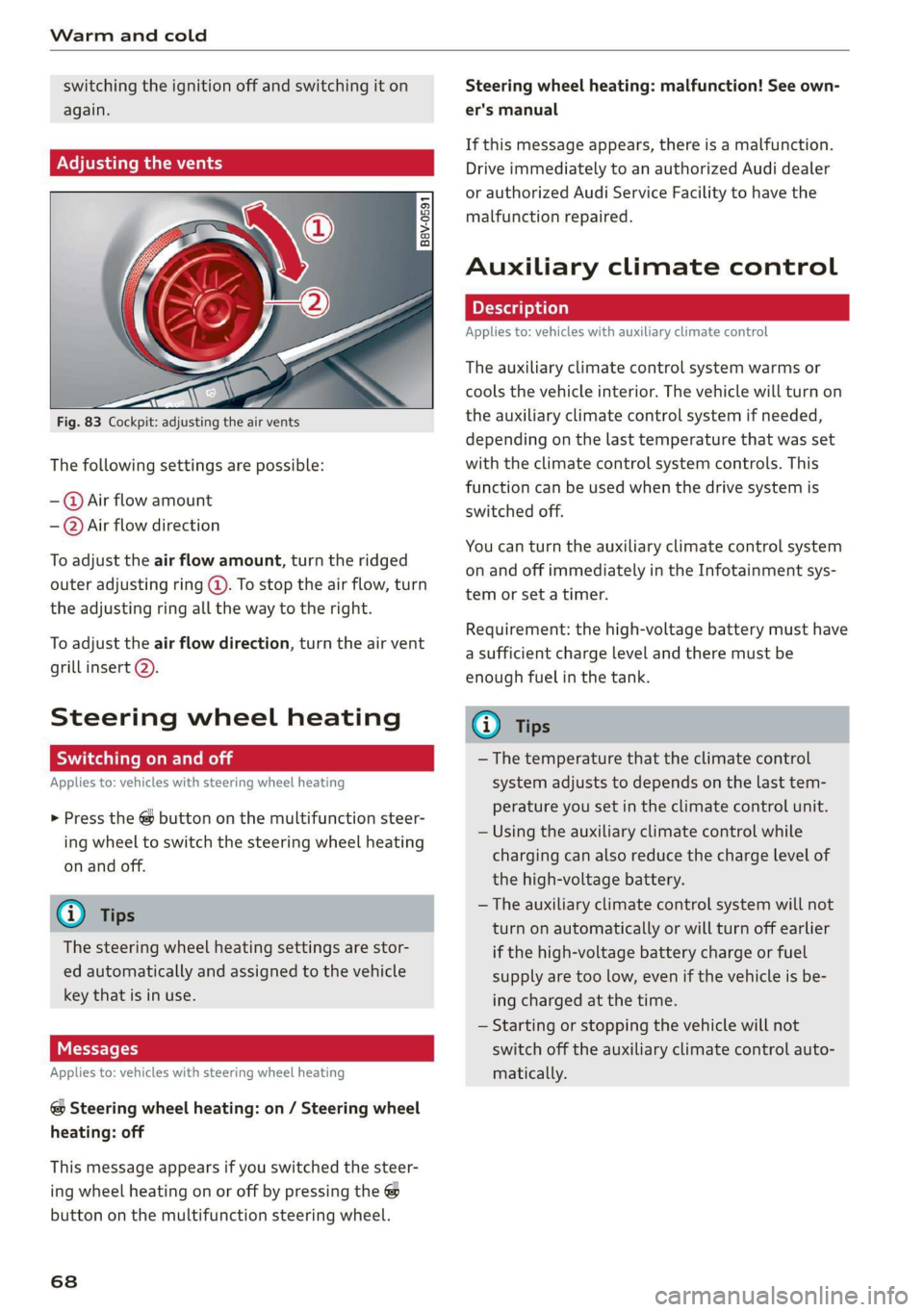
Adjusting the vents
Fig. 83 Cockpit: adjusting the air vents
The following settings are possible:
-@ Air flow amount
-—@Air flow direction
To adjust the air flow amount, turn the ridged
outer adjusting ring @. To stop the air flow, turn
the adjusting ring all the way to the right.
To adjust the air flow direction, turn the air vent
grill insert 2).
Steering wheel heating
Scale Rie mola
Applies to: vehicles with steering wheel heating
> Press the @ button on the multifunction steer-
ing wheel to switch the steering wheel heating
on and off.
G@) Tips
The steering wheel heating settings are stor-
ed automatically and assigned to the vehicle
key that is in use.
Messages
Applies to: vehicles with steering wheel heating
@ Steering wheel heating: on / Steering wheel
heating: off
This message appears if you switched the steer-
ing wheel heating on or off by pressing the @
button on the multifunction steering wheel.
68
Steering wheel heating: malfunction! See own-
er's manual
If this message appears, there is a malfunction.
Drive immediately to an authorized Audi dealer
or authorized Audi Service Facility to have the
malfunction repaired.
Auxiliary climate control
Applies to: vehicles with auxiliary climate control
The auxiliary climate control system warms or
cools the vehicle interior. The vehicle will turn on
the auxiliary climate control system if needed,
depending on the last temperature that was set
with the climate control system controls. This
function can be used when the drive system is
switched off.
You can turn the auxiliary climate control system
on and off immediately in the Infotainment sys-
tem or set a timer.
Requirement: the high-voltage battery must have
a sufficient charge level and there must be
enough fuel in the tank.
@) Tips
— The temperature that the climate control
system adjusts to depends on the last tem-
perature you set in the climate control unit.
— Using the auxiliary climate control while
charging can also reduce the charge level of
the high-voltage battery.
— The auxiliary climate control system will not
turn on automatically or will turn off earlier
if the high-voltage battery charge or fuel
supply are too low, even if the vehicle is be-
ing charged at the time.
— Starting or stopping the vehicle will not
switch off the auxiliary climate control auto-
matically.
Page 71 of 400
![AUDI A3 2020 Owner´s Manual 8V2012721BK
Warm and cold
Switching on and off
Applies to: vehicles with auxiliary climate control
Switching the auxiliary climate control on/
off:
> Select the [MENU] button > Vehicle > lef](/img/6/40265/w960_40265-70.png "AUDI A3 2020 Owner´s Manual 8V2012721BK
Warm and cold
Switching on and off
Applies to: vehicles with auxiliary climate control
Switching the auxiliary climate control on/
off:
> Select the [MENU] button > Vehicle > lef")
8V2012721BK
Warm and cold
Switching on and off
Applies to: vehicles with auxiliary climate control
Switching the auxiliary climate control on/
off:
> Select the [MENU] button > Vehicle > left con-
trol button > Auxiliary air conditioning > Turn
on auxiliary air conditioning or Turn off auxili-
ary air conditioning.
@) Tips
The auxiliary climate control can also be
switched on and off immediately when a tim-
er is set.
Setting the timer
Applies to: vehicles with auxiliary climate control
By setting the departure time, you determine
when your vehicle should reach the desired tem-
perature. You can set the timer in the auxiliary air
conditioning menu in the Infotainment system.
Auxiliary climate control: setting the timer
> Select: [MENU] button > Vehicle > left control
button > Auxiliary A/C > right control button >
Program timer.
> Set the time and the date.
> Press the [BACK] button.
> Confirm the setting with the control knob to ac-
tivate the timer. A V appears in the box.
Error messages
(ZA - The high-voltage battery charge level is too
low to heat/air condition the vehicle using only
electric power. Vehicles with auxiliary heating/air
conditioning* can continue to be heated or
cooled using the fuel in the tank.
If one of the following symbols appears in the
display, then you cannot switch on the auxiliary
climate control system or auxiliary heating/air
conditioning*:
2— - There is a system malfunction.
A - The fuel level is too low.
@) Tips
— If you switch the ignition off, the timer set-
tings will appear in the Infotainment sys-
tem display. You can still adjust the settings
for several minutes. The climate control sys-
tem can be started immediately, which will
maintain the desired climate control condi-
tions while you are not in the vehicle.
— You can set the timer a maximum of seven
days in advance.
— You can operate the climate control in the
vehicle interior when the high-voltage bat-
tery is charging using the charging timer
= page 106. The target climate control out-
put depends on the power supply capacity.
— Make sure the time and date match in the
Infotainment system settings so that the
timer can function correctly > page 230.
— The auxiliary climate control can continue to
run after the departure time is reached.
Fluids in the A/C system
Refrigerant in the A/C system
The sticker in the engine compartment provides
information about the type and amount of refrig-
erant used in the vehicle’s A/C system. The stick-
er is located in the front section of the engine
compartment or at the front or back of the hood.
Symbol
A
Meaning
Warning: the A/C system must only
be serviced by qualified technicians.
Refrigerant type
Lubricant type
a
tt
Refer to the service information
(only available for authorized Audi
dealers or authorized Audi Service
Facilities)
The A/C system must only be serv-
e
Bi) iced by qualified technicians. >
69
Page 82 of 400

Driving
If you need to brake additionally, brake in
intervals and not continuously.
nce md Cua SEN
Applies to: vehicles with plug-in hybrid drive
B8V-0675
Fig. 89 Instrument cluster: energy flow display
An energy flow display can be shown in the in-
strument cluster display/Infotainment system )).
The image is animated in the Infotainment sys-
tem).
Display of energy flow indicator in the
instrument cluster display
> Open the first Vehicle tab (trip computer) using
the [<>] button on the multifunction steering
wheel.
> Applies to: vehicles with Audi virtual cockpit:
Select on the multifunction steering wheel: left
control button > Energy flow.
Comfort
Auto
DES
Biante
Fig. 90 Infotainment system*: energy flow display
> Applies to: vehicles with analog instrument
cluster: Open the Energy flow indicator by
turning the left thumbwheel on the multifunc-
tion steering wheel.
Image in the Infotainment display”)
> In the Infotainment system, select: [MENU
button > Vehicle > left control button > Audi
drive select.
Component Color Meaning
@ Gasoline engine Orange The gasoline engine is running
Gray The gasoline engine is off
@ High-voltage battery Green High-voltage battery charge level
Green The high-voltage battery is charging
(animated in the
Infotainment sys-
tem?)
Gray
The vehicle is not in drive ready mode >
))_ Not available in all Infotainment systems.
80
Page 83 of 400

8V2012721BK
Driving
Component Color Meaning
Motion arrow Green Electric driving
Orange Driving with the gasoline engine
Green-orange Driving with the gasoline engine and electric mo-
tor (boost)
Green
@®) Motion arrow
Recuperation
a) Not available in all Infotainment systems.
Applies to: vehicles with plug-in hybrid drive
RAX-0108, Range potenti
+3 miles (1)
net)
eis)
te ace aera etre)
Bt 15 mites —@)) =
Fig. 91 Range monitor
You can display the projected range of the vehi-
cle.
> Select in the Infotainment system: [MENU] but-
ton > Vehicle > left control button > Range &
statistics > Range.
@ Range potential (value)
@ Range potential (graphic)
@®) Total range (graphic)
@ Total range (value)
Range potential: the value indicates an addition-
al amount of distance that can be gained by turn-
ing off certain convenience functions. The con-
venience functions with high energy usage are
listed on the display.
@) Tips
— The range can also be displayed in the in-
strument cluster in the on-board computer.
— The values given are based on the latest
consumption values.
— The range that is indicated is based on the
previous and predicted consumption values.
For example, these can be affected if con-
venience functions are turned on.
Statistics
Applies to: vehicles with plug-in hybrid drive
You can display statistics about the trips traveled
using electric power and those using fuel. The
values are taken from the short-term memory
and long-term memory of the on-board comput-
er.
> Select in the Infotainment system: [MENU] but-
ton > Vehicle > left control button > Range &
statistics > e-tron statistics.
Vehicle sound
Applies to: vehicles with plug-in hybrid drive
The electric drive system generates considerably
less noise than a combustion engine. An artificial
engine sound is generated when driving electri-
cally so that the vehicle can be heard from the
outside when driving. The vehicle sound auto-
matically fades out at higher speeds when the
sounds from the tires and wind start increasing.
ZA WARNING
Other road users may not be able to defini-
tively hear electric vehicles when they are
driving. This increases the risk of an accident
particularly when driving in areas with little
traffic, when maneuvering, or when driving in
reverse.
aie e- Riedie liereliea lt)
driving
Your driving style greatly influences the amount
of fuel and energy consumed, the environmental
impact, and the wear on the engine, brakes, and
tires. Note the following information for efficient
and environmentally-conscious driving: >
81
Page 93 of 400
8V2012721BK
Driving dynamic
Driving dynamic
Audi drive select
Introduction
Applies to: vehicles with Audi drive select
Drive select makes it possible to experience dif-
ferent types of vehicle characteristics in one vehi-
cle. With different driving modes, the driver can
switch the setting, for example from sporty to
comfortable. This allows you to adjust the set-
tings to your personal preferences. This makes it
possible to combine settings such as a sporty
drivetrain setting with comfortable steering.
Selecting an Audi drive select mode
Applies to: vehicles with Audi drive select
The ssise button is located above the selector lever
in the center console.
> Press the sis@ button repeatedly until the de-
sired mode appears in the instrument cluster or
center display, or:
> In the Infotainment system, select: [MENU
button > Vehicle > left control button > Audi
drive select.
You can change the driving mode when the vehi-
cle is stationary or while driving. If traffic per-
mits, briefly remove your foot from the accelera-
tor pedal after changing modes so that the mode
you have selected will be activated for the drive
system.
The following modes may be available depending
on the equipment:
comfort - Provides a comfort-oriented vehicle
setup and is suited for long drives on highways.
auto - Provides an overall comfortable yet dy-
namic driving feel and is suited for everyday use.
dynamic - Gives the driver a sporty driving feel
and is suited to a sporty driving style.
individual - Provides the option for personalized
vehicle settings > page 91.
@) Tips
When the ignition is being switched on, indi-
vidual systems, such as the drive system, will
be reset to a balanced setting. Select the cur-
rent mode again to attain its full configura-
tion.
Adjusting the “individual” mode
> Select in the Infotainment system: [MENU] but-
ton > Vehicle > Audi drive select> Individual >
right control button.
The equipment in your vehicle will determine
which settings you can adjust.
Engine/transmission
The drive system will react to accelerator pedal
moves more quickly or in a more balanced man-
ner. The shift points are Located in higher or low-
er engine speed ranges on vehicles with automat-
ic transmissions.
Steering
The power steering will adapt. Light steering is
suitable for long trips on highways or smooth
driving around curves, for example.
quattro
The all wheel drive system controls balanced to
sporty profiles.
Engine sound
The engine sound adapts and can be subtle to
sporty.
ACC
The driving behavior of the adaptive cruise con-
trol adjusts based on the acceleration and reac-
tion to vehicles driving ahead.
Suspension control
The suspension adjusts to be tighter or more
comfort-oriented when it comes to compensat-
ing for uneven spots on the road.
91
Page 108 of 400
High-voltage system
Setting the charging timer
You can delay the charging time with the charg-
ing timer in the Infotainment system )). You can
set two different timers.
> If a timer has been set, press the button @)
=> page 105, fig. 105. The LED in the button
will turn on.
> To set a charging timer, select: [MENU] button >
Vehicle > left control button > Charge > right
control button > Program timer.
> Select Individual timer or Repeat timer.
> Set the departure time, the date or day of the
week.
> You can specify a preferred charging time with
the charging timer, for example if you would
like to use the off-peak rate.
> You can activate the auxiliary air conditioning
with the charging timer while charging by se-
lecting Air conditioning with the control knob.
AV appears in the box. This activation is sepa-
rate from the Infotainment system settings in
the climate control menu > page 68.
> Press the [BACK] button.
> To activate the desired timer, confirm the set-
ting with the control knob. A ¥ appears in the
box.
@ Tips
— Auxiliary climate control is powered electri-
cally if you select climate control using the
charging timer. This may also be used in
confined spaces such as garages.
— Using the auxiliary climate control while
charging can also reduce the charge level of
the high-voltage battery.
—The charging process can be interrupted at
any time. Press the active button on the ve-
hicle to do this > page 105, fig. 105.
— The climate control output while charging
depends on the capacity of the electrical
connection. Additional information on cli-
mate control can be found under > page 68.
D_ Not available in all Infotainment systems.
106
Setting the charging power level
Applies to: vehicles with plug-in hybrid drive
The control unit automatically recognizes the
voltage and the available current strength. You
can set whether you would like to charge with full
or reduced charging power. The last setting that
was selected will be saved and used again the
next time the vehicle is charged. If multiple
items are connected to the power circuit, the
charging current may be reduced when charging
at a power outlet. This can help to prevent the
electrical equipment from overheating.
Before charging, always check if the charging
power setting that was selected last is still suita-
ble.
> To set the charging power level, press and hold
the @ button @ > page 105, fig. 104 for at
least two seconds.
After the charging power level is set, the status
LEDs ©, iand {) will flash green one time. The
selected value (50% or 100%) is displayed on the
left or right side of the ® button.
Name lee ale]
Applies to: vehicles with plug-in hybrid drive
After
completing the charging or climate control
process, the vehicle enters a sleep mode. No dis-
plays are visible on the charging unit during this
period. Always remove the vehicle charging con-
nector first after charging.
The vehicle charging connector is locked during
and after charging. You must unlock the connec-
tor to remove it.
Unlocking the vehicle charging connector
when the vehicle is locked
> Unlock the vehicle. The connector will unlock
for 30 seconds.
> Remove the connector.
> If the connector is not removed within 30 sec-
onds, it will lock again automatically.
Page 113 of 400

8V2012721BK
High-voltage system
LED on vehicle © Meaning Solution
Have the power supply or power
supply system inspected. Check
No power supply was recognized | the status display on the control
On even though the charging cable is | unit > table on page 107. See an
Yellow plugged in. authorized Audi dealer or author-
ized Audi Service Facility for assis-
tance if necessary.
‘ The selector lever in notin the P | Move the selector lever into the P
Flashing vps ue
position. position.
Check if the charging connector is
inserted correctly. Remove the
The charging connector could not | charging connector and insert it in-
On be correctly locked in the vehicle | to the charging port again. See an
charging port. authorized Audi dealer or author-
ized Audi Service Facility for assis-
Red tance if necessary.
Fault in the charging system. The
ong penne meme See an authorized Audi dealer or
Flashing cargec. . . authorized Audi Service Facility for
Or: the outside temperature is too . .
: assistance if necessary.
low. The high-voltage battery
could not be fully charged.
@) Tips
The operation status indicated by the LED G)
on the vehicle is also displayed in the instru-
ment cluster/Infotainment system.
Indicator lights and
messages
Applies to: vehicles with plug-in hybrid drive
If the Ey indicator light turns on, the high-volt-
age battery is charging or is already completely
charged.
If the EX indicator light stays on, there is a mal-
function in the charging system. Have the prob-
lem corrected immediately by an authorized Audi
dealer or authorized Audi Service Facility.
Charging connector still attached. Vehicle
cannot be driven
This message appears when the charging system
is still connected to the vehicle. Remove the con-
nector > page 106.
Incompatible charging system. Please check
charging system
This message appears when the charging system
is incompatible. Only charge using the charging
system that is designed for your vehicle.
Eg AC charging system: malfunction! Please
contact Service
This message appears if there is a malfunction in
the charging system. Have the problem corrected
immediately by an authorized Audi dealer or au-
thorized Audi Service Facility.
Warning! Charging unit cover is unlocked.
See owner's manual
This message appears if the charging unit cover is
open. Close the cover and lock it > page 107.
111
Page 117 of 400
8V2012721BK
Assist systems
Assist systems
Speed warning system
Applies to: vehicles with speed warning system
The speed warning system helps you to stay be-
low a specified maximum speed that can be set,
changed or deleted in the Infotainment system.
The speed warning system warns you if you are
exceeding the maximum speed that you have set.
A warning tone will sound as soon as your speed
exceeds the stored value slightly. The ow in-
dicator light will appear at the same time in the
instrument cluster display along with a message.
The fe) indicator light and the message turn
off if the speed falls back below the stored maxi-
mum speed.
Setting a threshold is recommended if you would
like to be reminded when you reach a certain
maximum speed. Situations where you may want
to do so include driving in a country with a gener-
al speed limit or if there is a specified maximum
speed for winter tires.
Setting the warning threshold
> Select in the Infotainment system: [MENU] but-
ton > Vehicle > left control button > Driver as-
sistance > Speed warning > Manual.
G) Tips
Regardless of the speed warning system, you
should always monitor your speed using the
speedometer and make sure you are following
the legal speed limit.
Messages
Applies to: vehicles with speed warning system
Manually set speed limit XX mph
(km/h) exceeded
The stored speed was exceeded.
Cruise control system
Applies to: vehicles with cruise control system
The cruise control system assists the driver in
maintaining a constant speed above approxi-
mately 15 mph (20 km/h). The system maintains
the desired speed by braking and accelerating.
ZA WARNING
— Always pay attention to the traffic around
your vehicle when the cruise control system
is in operation. As the driver, you are always
responsible for controlling your vehicle
speed and the distance between your vehicle
and
other vehicles.
— For safety reasons, cruise control should not
be used in the city, in stop-and-go traffic, on
winding roads, and when road conditions are
poor (such as ice, fog, gravel, heavy rain,
and conditions that could lead to hydroplan-
ing), because this increases the risk of an ac-
cident.
— Switch the cruise control off temporarily
when driving in turning lanes, highway exits,
or in construction zones.
—To reduce the risk of an accident, you should
only resume the stored speed if it is suitable
for the current traffic conditions.
@) Note
— Conventional drive system: before driving
downhill a long distance on a steep hill, de-
crease your speed and select a lower gear.
This makes use of the engine braking effect
and reduces the load placed on the brakes.
— Plug-in hybrid drive: before driving downhill
a long distance on a steep hill, decrease
your speed and use the recuperation braking
effect > page 78. This reduces the load on
the brakes.
(i) Tips
The brake lights turn on when the brakes are
applied automatically.
115
Page 125 of 400
8V2012721BK
Assist systems
> Press the brake pedal.
> To resume the stored speed, move the lever in-
to position @).
Interrupting cruise control when stopped
> Push the lever away from you into position @).
The message ACC: standby appears.
> To resume cruise control, press the brake pedal
and pull the lever toward you into position (2).
Z\ WARNING
It is dangerous to activate cruise control and
resume the stored speed when the current
road, traffic or weather conditions do not per-
mit this. This increases the risk of an accident.
Setting the distance
Applies to: vehicles with Audi adaptive cruise control
B4M-0234
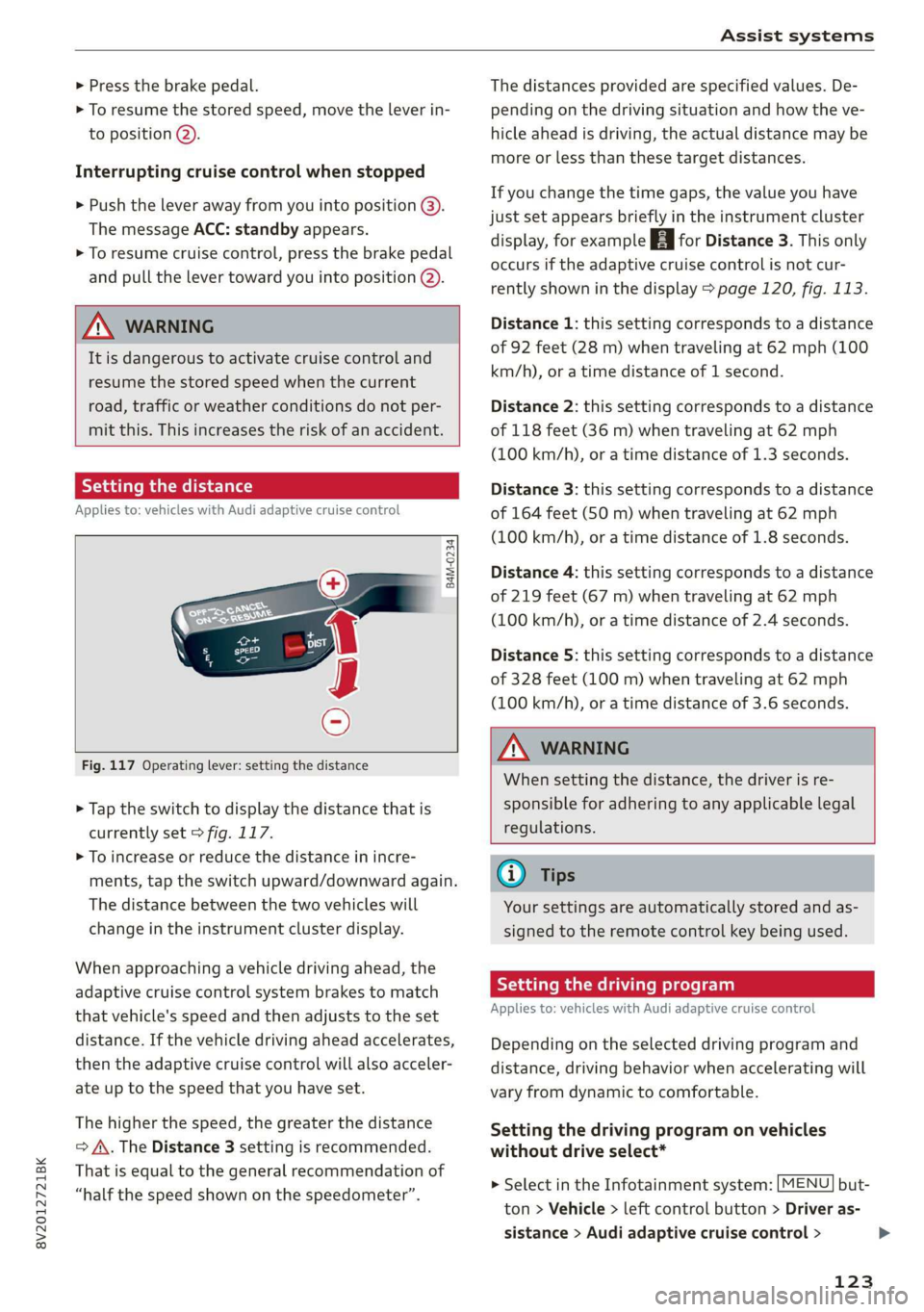
Fig. 117 Operating lever: setting the distance
> Tap the switch to display the distance that is
currently set > fig. 117.
> To increase or reduce the distance in incre-
ments, tap the switch upward/downward again.
The distance between the two vehicles will
change in the instrument cluster display.
When approaching a vehicle driving ahead, the
adaptive cruise control system brakes to match
that vehicle's speed and then adjusts to the set
distance. If the vehicle driving ahead accelerates,
then the adaptive cruise control will also acceler-
ate up to the speed that you have set.
The higher the speed, the greater the distance
=> A\. The Distance 3 setting is recommended.
That is equal to the general recommendation of
“half the speed shown on the speedometer”.
The distances provided are specified values. De-
pending on the driving situation and how the ve-
hicle ahead is driving, the actual distance may be
more or less than these target distances.
If you change the time gaps, the value you have
just set appears briefly in the instrument cluster
display, for example [Eg for Distance 3. This only
occurs if the adaptive cruise control is not cur-
rently shown in the display > page 120, fig. 113.
Distance 1: this setting corresponds to a distance
of 92 feet (28 m) when traveling at 62 mph (100
km/h), or a time distance of 1 second.
Distance 2: this setting corresponds to a distance
of 118 feet (36 m) when traveling at 62 mph
(100 km/h), or a time distance of 1.3 seconds.
Distance 3: this setting corresponds to a distance
of 164 feet (SO m) when traveling at 62 mph
(100 km/h), or a time distance of 1.8 seconds.
Distance 4: this setting corresponds to a distance
of 219 feet (67 m) when traveling at 62 mph
(100 km/h), or a time distance of 2.4 seconds.
Distance 5: this setting corresponds to a distance
of 328 feet (100 m) when traveling at 62 mph
(100 km/h), or a time distance of 3.6 seconds.
ZA WARNING
When setting the distance, the driver is re-
sponsible for adhering to any applicable legal
regulations.
(i) Tips
Your settings are automatically stored and as-
signed to the remote control key being used.
Setting the driving program
Applies to: vehicles with Audi adaptive cruise control
Depending on the selected driving program and
distance, driving behavior when accelerating will
vary from dynamic to comfortable.
Setting the driving program on vehicles
without drive select*
MENU > Select in the Infotainment system: but-
ton > Vehicle > left control button > Driver as-
sistance > Audi adaptive cruise control >
123
>