ignition AUDI A3 2020 Owner´s Manual
[x] Cancel search | Manufacturer: AUDI, Model Year: 2020, Model line: A3, Model: AUDI A3 2020Pages: 400, PDF Size: 107.47 MB
Page 174 of 400

Telephone
— The mobile device may become hot during
wireless charging. Pay attention to the tem-
perature of your mobile device and be care-
ful when removing it from the Audi phone
box.
—An alternating magnetic field is used for
wireless charging. Maintain a minimum dis-
tance of approximately 2.4 in (6 cm) to the
Audi phone box charging plate. The thresh-
olds for prolonged exposure at this distance
comply with ICNIRP1998. Therefore, inter-
actions such as irritation of sensory organs,
malfunctions of active implants (such as
pacemakers, infusion pumps, or neurosti-
mulators) or effects on passive implants
(such as prosthetic limbs) is highly unlikely.
If you have an implant, consult a medical
specialist if you have any questions.
@) Note
Applicable to U.S.A.
Operation of the Audi phone box is subject to
the following requirements of the Federal
Communications Commission:
— This is a CONSUMER device.
— BEFORE USE, you MUST REGISTER THIS DE-
VICE with your wireless provider and have
your provider’s consent. Most wireless pro-
viders consent to the use of signal boosters.
Some providers may not consent to the use
of this device on their network. If you are
unsure, contact your service provider.
— You MUST operate this device with approved
antennas and cables as specified by the
manufacturer. Antennas MUST be installed
at least 20 cm (8 inches) from any person.
— You MUST cease operating this device im-
mediately if requested by the FCC or a li-
censed wireless service provider.
— WARNING: E911 location information may
not be provided or may be inaccurate for
calls served by using this device.
@) Note
Applicable to Canada
In Canada, operation of a Zone Enhancer,
such as an Audi Phone Box, is subject to the
following requirements of the Innovation,
172
Science and Economic Development Canada
(ISED):
—This is a CONSUMER device.
— BEFORE USE, you MUST meet all require-
ments set out in CPC-2-1-05.
— You MUST operate this device with approved
antennas and cables as specified by the
manufacturer. Antennas MUST NOT be in-
stalled within 20 cm of any person.
— You MUST cease operating this device im-
mediately if requested by ISED or a licensed
wireless service provider.
— WARNING: £911 location information may
not be provided or may be inaccurate for
calls served by using this device.
G) Tips
— Placing the mobile device in a bag or protec-
tive sleeve inside the Audi phone box can in-
terfere with the connection to the external
antenna”.
— Metallic objects in the Audi phone box block
the wireless charging of your mobile device
and calls made using the exterior antenna”*.
—The charging time and temperature will vary
depending on the mobile device being used.
— Your mobile device can only be charged in
the Audi phone box when the ignition is
switched on.
— To reduce the risk of malfunctions, make
sure the mobile device is positioned correct-
ly in the Audi phone box.
—The maximum charging output is 5 W.
— Strong transmission quality* cannot be
guaranteed if more than one mobile device
is in the box.
— Only one mobile device at a time can be
charged wirelessly in the Audi phone box.
— Audi recommends using Audi Genuine Ac-
cessories. Audi has verified their reliability,
safety, and suitability.
— You can purchase a USB adapter from an au-
thorized Audi dealer or authorized Audi
Service Facility, or at specialty stores.
— If you place your remote control key togeth-
er with your mobile device in the Audi phone
box, it may cause your mobile device to stop
charging if wireless charging is active.
Page 185 of 400

8V2012721BK
Audi connect
An Internet connection is required to use Audi
connect Infotainment. Depending on the country
and the vehicle equipment, the following options
may be available:
— Embedded SIM card
Z\ WARNING
Always follow the information found in > AA
in General information on page 182.
@) Note
Always follow the information found in >@ in
General information on page 182.
Embedded SIM card
Applies to: vehicles with Audi connect Infotainment and an
embedded SIM card
The data connection for Audi connect Infotain-
ment services is made through an embedded SIM
card (eSIM card) that is installed in the vehicle.
You can use the Audi connect Infotainment serv-
ices immediately.
@) Note
Always follow the information found in >@ in
General information on page 182.
Using a Wi-Fi hotspot
Applies to: vehicles with Wi-Fi hotspot
You can connect up to eight Wi-Fi devices (such
as smartphones) with the MMI Wi-Fi hotspot. If
the MMI is connected to the Internet
=> page 182, the connected Wi-Fi devices can also
use the MMI’s Internet connection.
Requirement: the ignition must be switched on.
> Select: [MENU] button > Telephone > right con-
trol button > Wi-Fi settings > Wi-Fi. Switch on
the Wi-Fi hotspot.
> Select: [MENU] button > Telephone > right con-
trol button > Wi-Fi settings > Network key. The
access data for the Wi-Fi hotspot is displayed.
Switch on the visibility of the Wi-Fi hotspot if
necessary.
> Switch the Wi-Fi function on in your mobile de-
vice and connect it to the MMI Wi-Fi hotspot
using the authentication data that is shown.
> Follow any additional system prompts on your
Wi-Fi device if necessary.
Your device is successfully connected with the
MMI's Wi-Fi hotspot.
ZX WARNING
Always follow the information found in > AV
in General information on page 182.
® Note
Always follow the information found in >@ in
General information on page 182.
G) Tips
For an explanation on conformity with the
FCC regulations in the United States and the
Industry Canada regulations, see > page 377.
Audi connect
Infotainment services
Configuration
Applies to: vehicles with Audi connect Infotainment
Requirement: your vehicle must be connected to
the Internet > page 182.
Some Audi connect Infotainment services must
be configured through your personal myAudi ac-
count at my.audi.com before using them for the
first time.
> Register at my.audi.com.
> Add your vehicle to your myAudi account.
> Select: [MENU] button > Audi connect > right
control button > Log in.
> Log in to myAudi in the vehicle using your e-
mail address and password.
@ Tips
— For some Audi connect Infotainment serv-
ices, you may also have to enter your myAu-
di access information when accessing serv-
ices in the MMI.
183
Page 187 of 400
8V2012721BK
Audi connect
If you logged in to myAudi in your vehicle
=> page 183, personalized newsfeeds can be dis-
played.
Access to Twitter
Requirement: you must have connected your ve-
hicle with myAudi > page 183. You must have
connected your myAudi account with Twitter.
You can only connect one Twitter account with
your myAudi account. Not all settings can be ad-
justed in the MMI. Some can only be adjusted
through the Twitter website.
> Select: Twitter > left control button > desired
function (for example, Trends).
Charging stations
Applies to: vehicles with charging stations and plug-in hybrid
drive
Information on charging stations in the selected
search area.
>» Select and confirm Charging stations.
ZA WARNING
Always follow the information found in > AV
in General information on page 182.
@ Note
Always follow the information found in >@ in
General information on page 182.
Additional options
Applies to: vehicles with Audi connect Infotainment
> Select: [MENU
control button.
button > Audi connect > right
Depending on the equipment and the country,
the following options may be available in the
overview of Audi connect Infotainment services:
About Audi connect
Here you will find legal information regarding
Audi connect Infotainment usage.
D Depends on the country and equipment. These services
are available for a limited time.
Log in
See > page 183.
Connection manager
See > page 231.
License subscription
The validity and expiration date of your licenses
are displayed.
Refresh
The content of the selected Audi connect Info-
tainment service or the entire Audi connect Info-
tainment list is updated.
Data privacy
See 5 page 372.
@) Note
Always follow the information found in >@ in
General information on page 182.
Audi connect e-tron
services
Applies to: vehicles with plug-in hybrid drive and Audi connect
With Audi connect vehicle control services 1), you
can utilize various services using the myAudi app
or online at my.audi.com.
ZA WARNING
Always follow the information found in > A\
in General information on page 182.
Gi) Tips
— Accessing specific data or controlling func-
tions remotely depends on the charge level
of the vehicle battery. Therefore, these
functions only have limited availability after
switching off the ignition.
— An eSIM card establishes the Internet con-
nection for Audi connect vehicle control
services. The costs for this are included in
185
>
Page 188 of 400
Audi connect
the price of Audi connect vehicle control
services. The cell phone network, for exam-
ple, must be available to use these services.
Applies to: vehicles with plug-in hybrid drive and Audi connect
Requirement: your mobile devices must be com-
patible.
> An authorized Audi dealer must complete a
one-time activation of Audi connect e-tron serv-
ices for your vehicle before you can register on-
line.
> Register at etron.audiusa.com
If you require assistance with your Audi connect
e-tron services, please contact an authorized
Audi dealer or authorized Audi Service Facility.
Using the myAudi app
— Install the myAudi app on your mobile device
and log in with your access information.
Services
Applies to: vehicles with plug-in hybrid drive and Audi connect
Depending on the country and the vehicle equip-
ment, the following services may be available:
Trip data
Depending on the vehicle equipment, certain
driver information system data is transmitted to
a server. An overview of your trips with the values
from the short-term memory/long-term memory
can be displayed, for example, the driving dura-
tion. The values may differ from the values dis-
played in the vehicle.
Vehicle status report
This service transfers driver information system
data to a server. Depending on the vehicle equip-
ment, certain data may be accessed, such as the
remaining range or mileage. The values may dif-
fer from the values displayed in the vehicle.
Car Finder
This service transmits the parking location to a
server when the ignition is switched off. The vehi-
cle location, your location, or the route to your
186
vehicle can be displayed. The new parking loca-
tion cannot be determined with this service if the
vehicle is moved after shutting the vehicle off
and without switching the ignition on and off
again, for example if the vehicle is towed or sto-
len.
Remote charging
Requirement: the ignition must be switched off
when changing the charging mode.
You can control and monitor the charging process
remotely with the service.
— Charging mode: immediate charging or delayed
charging (timer)
— Program the timer
— Deactivate or activate the timer
For additional information, see > page 101,
Charging the battery with the Audi charging sys-
tem.
Temperature control
Requirement: the ignition must be switched off
when starting or stopping climate control.
You can control the climate control in your vehi-
cle remotely using these services.
— Start or stop climate control
— Program the timer
— Deactivate or activate the timer
For additional information, see > page 101,
Charging the battery with the Audi charging sys-
tem.
ZA\ WARNING
— Do not ignore messages and warning or indi-
cator lights that turn on in the vehicle be-
cause of the information in the vehicle sta-
tus report. This could lead to break downs in
on the road, accidents and serious injuries.
— Only perform the climate control functions
if your vehicle was shut off correctly and the
ignition is switched off.
— Only perform charging functions on the
high-voltage battery if the vehicle is shut off
correctly, is connected to a suitable socket
and if the ignition is switched off.
Page 189 of 400
![AUDI A3 2020 Owner´s Manual 8V2012721BK
Audi connect
Settings
Ce) atelal-mariancel a4
> Select: [MENU] button > Audi connect > right
control button > Connection manager.
> Select: right control button > Online settings](/img/6/40265/w960_40265-188.png "AUDI A3 2020 Owner´s Manual 8V2012721BK
Audi connect
Settings
Ce) atelal-mariancel a4
> Select: [MENU] button > Audi connect > right
control button > Connection manager.
> Select: right control button > Online settings")
8V2012721BK
Audi connect
Settings
Ce) atelal-mariancel a4
> Select: [MENU] button > Audi connect > right
control button > Connection manager.
> Select: right control button > Online settings >
Data connection settings.
Depending on the country, vehicle equipment,
and connection type, the following functions may
be available:
Data connection settings
Using the Data connection settings menu, you
can set when the system should connect to the
Internet. The Internet connection disconnects
automatically once the requested Audi connect
Infotainment service no longer requires any data.
— Connection setup: you can select when a data
connection should be established.
— Audi connect (MMI): when this function is
switched on, a data connection is automatically
established in order to use Audi connect Info-
tainment services.
— Wi-Fi devices: when this function is switched
on, you can permit or deny mobile devices to
connect to the Internet on the Wi-Fi hotspot.
ZA\ WARNING
Always follow the information found in > AV
in General information on page 182.
@) Note
Always follow the information found in >@ in
General information on page 182.
@ Tips
For more information on roaming charges,
contact your cell phone service provider.
Wi-Fi settings
Applies to: vehicles with Wi-Fi hotspot
Requirement: the ignition must be switched on.
))_ Not available in every market.
> Select: [MENU] button > Telephone > right con-
trol button > Wi-Fi settings.
Depending on the country and the vehicle equip-
ment, the following functions may be available:
Wi-Fi
When the function is switched on, the MMI's Wi-
Fi hotspot is active and Wi-Fi devices can be con-
nected to the hotspot.
Network key
The
Wi-Fi connection between the MMI and your
Wi-Fi device is encrypted. You can change the fol-
lowing information if needed.
— Access point (SSID): name of the Wi-Fi hot-
spot.
— Password: a random password was set at the
factory in the MMI. The password can be
changed. The encryption method requires a
password to be at least eight characters long.
Choose a secure password.
— Visible to others: you can switch the visibility
of the Wi-Fi hotspot on or off.
Z\ WARNING
Always follow the information found in > AV
in General information on page 182.
@) Note
Always follow the information found in >@ in
General information on page 182.
@ Tips
In vehicles without Audi connect Infotain-
ment, the use of the Wi-Fi hotspot is only
possible for the Wi-Fi audio player*. A data
connection to the Internet cannot be estab-
lished.
eye B) Elen
Applies to: vehicles with data plans
Requirement: you must have created a myAudi
account at my.audi.com. Your vehicle must be
registered in your myAudi account.
187
Page 197 of 400
8V2012721BK
Navigation
Store as favorite: > page 196.
Voice guidance: > page 198.
Navigation settings: > page 197.
@ Tips
Information on online traffic data* can also
be found online at www.audiusa.com.
Personal route
assistance
Applies to: vehicles with navigation system and personal
route assistance
Rameau e- (ele ge}
= ie (Ota
LS a
® Market Street
4
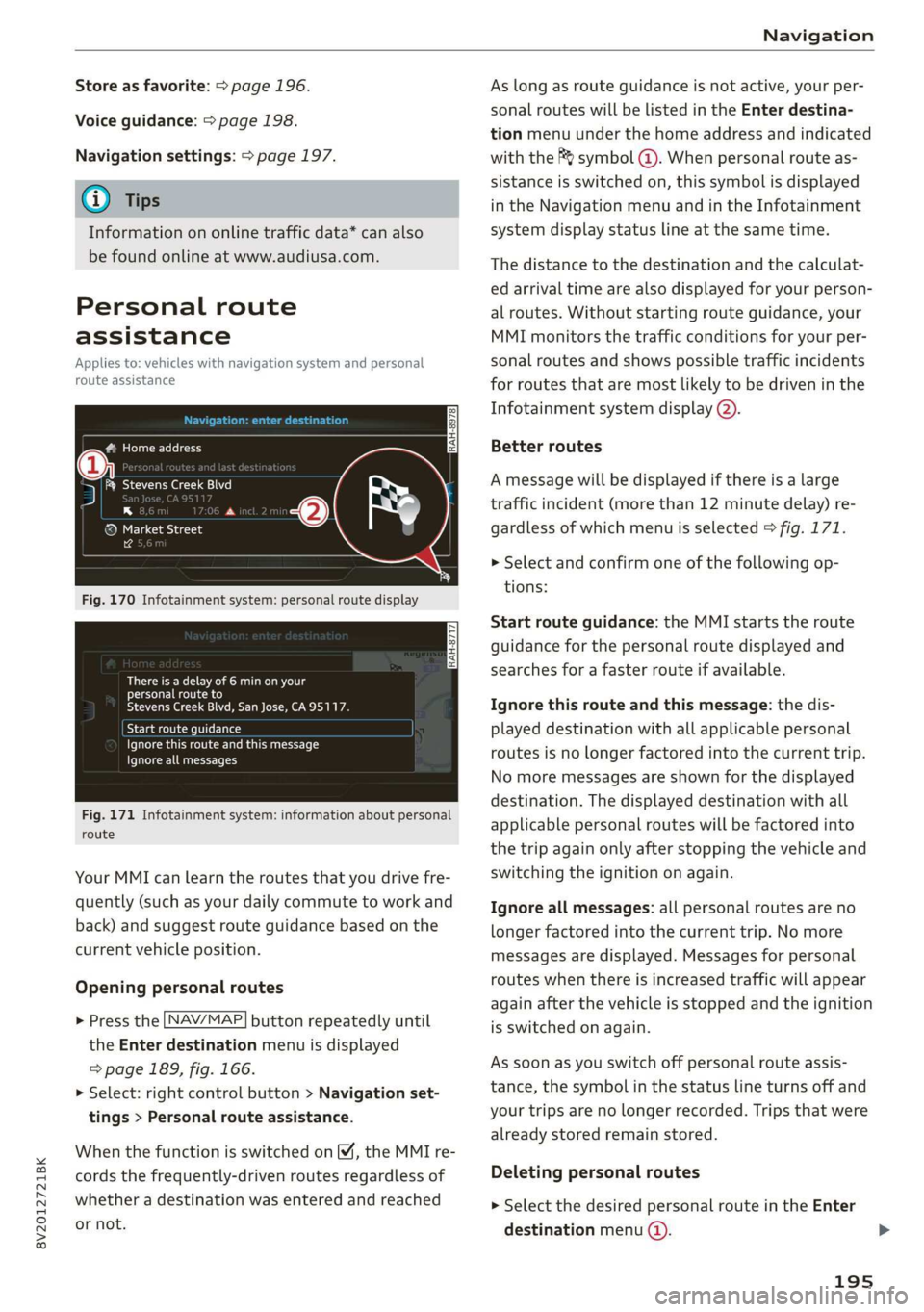
Fig. 170 Infotainment system: personal route display
There is a delay of 6 min on your
personal route to
Stevens Creek Blvd, San Jose, CA95117.
Start route guidance
Ignore this route and this message
Ignore all messages
Fig. 171 Infotainment system: information about personal
route
Your MMI can learn the routes that you drive fre-
quently (such as your daily commute to work and
back) and suggest route guidance based on the
current vehicle position.
Opening personal routes
> Press the [NAV/MAP] button repeatedly until
the Enter destination menu is displayed
=> page 189, fig. 166.
>» Select: right control button > Navigation set-
tings > Personal route assistance.
When the function is switched on M, the MMI re-
cords the frequently-driven routes regardless of
whether a destination was entered and reached
or not.
As long as route guidance is not active, your per-
sonal routes will be listed in the Enter destina-
tion menu under the home address and indicated
with the f& symbol @). When personal route as-
sistance is switched on, this symbol is displayed
in the Navigation menu and in the Infotainment
system display status line at the same time.
The distance to the destination and the calculat-
ed arrival time are also displayed for your person-
al routes. Without starting route guidance, your
MMI monitors the traffic conditions for your per-
sonal routes and shows possible traffic incidents
for routes that are most likely to be driven in the
Infotainment system display (2).
Better routes
A message will be displayed if there is a large
traffic incident (more than 12 minute delay) re-
gardless of which menu is selected > fig. 171.
> Select and confirm one of the following op-
tions:
Start route guidance: the MMI starts the route
guidance for the personal route displayed and
searches for a faster route if available.
Ignore this route and this message: the dis-
played destination with all applicable personal
routes is no longer factored into the current trip.
No more messages are shown for the displayed
destination. The displayed destination with all
applicable personal routes will be factored into
the trip again only after stopping the vehicle and
switching the ignition on again.
Ignore all messages: all personal routes are no
longer factored into the current trip. No more
messages are displayed. Messages for personal
routes when there is increased traffic will appear
again after the vehicle is stopped and the ignition
is switched on again.
As soon as you switch off personal route assis-
tance, the symbol in the status line turns off and
your trips are no longer recorded. Trips that were
already stored remain stored.
Deleting personal routes
> Select the desired personal route in the Enter
destination menu ().
195
Page 198 of 400
![AUDI A3 2020 Owner´s Manual Navigation
> Select: right control button > Delete destina-
tion.
Deleting all personal routes
> Select: [MENU] button > Settings > left control
button > MMI settings > Factory setting](/img/6/40265/w960_40265-197.png "AUDI A3 2020 Owner´s Manual Navigation
> Select: right control button > Delete destina-
tion.
Deleting all personal routes
> Select: [MENU] button > Settings > left control
button > MMI settings > Factory setting")
Navigation
> Select: right control button > Delete destina-
tion.
Deleting all personal routes
> Select: [MENU] button > Settings > left control
button > MMI settings > Factory settings.
> Select: Navigation and online memory > Re-
store factory settings > page 231.
G) Tips
— Personal routes are learned based on the ve-
hicle position. The route is prioritized ac-
cording to how frequently you drive to a
destination.
—A maximum of three personal routes are
displayed in the Enter destination menu.
Based on the current vehicle position, the
traffic situation for the route that is most
likely to be driven out of the three routes
will always be monitored.
— Please note that personal routes that have
already been stored will remain stored after
the
ignition is switched off and they must
be deleted manually.
Home address
Applies to: vehicles with navigation system
Opening a menu
> Press the LNAV/MAP] button repeatedly until
the Enter destination menu is displayed
=> page 189, fig. 166.
Storing a home address
> Select and confirm Home address (2)
=> page 189, fig. 166. After opening the home
address for the first time, you will be asked to
create a home address.
> Select and confirm Create now.
> Enter a destination or select a destination from
the list.
Editing the home address
> Select the Home address (2) > page 189,
fig. 166.
> Select: right control button > Edit home ad-
dress.
196
> Select and confirm a new destination as the
home address.
The selected destination is stored as the new
home address.
Favorites
Applies to: vehicles with navigation system
Opening a menu
> Press the [NAV/MAP] button repeatedly until
the Enter destination menu is displayed
=> page 189, fig. 166.
Saving a destination as a favorite
> Search for the desired destination in the input
field, or:
> Select a destination from the list.
> Select: right control button > Store as favorite.
Renaming a favorite
> Select: left control button > Favorites > select a
favorite from the list > right control button >
Rename favorite.
Moving a favorite
> Select a favorite from the list > right control
button > Move favorite.
> Select and confirm the location of the selected
favorite.
Deleting a favorite
> Select: a favorite from the list > right control
button > Delete favorite > Delete this favorite
or Delete all favorites.
Directory contacts
Applies to: vehicles with navigation system
Two addresses (private/business) can be assigned
as destinations for each contact in the directory.
Opening a menu
> Press the [NAV/MAP] button repeatedly until
the Enter destination menu is displayed
=> page 189, fig. 166.
Page 205 of 400
8V2012721BK
Navigation
Online map update
Applies to: vehicles with a navigation system and Audi con-
nect Infotainment
Recommended regions —> Confirmation
You have chosen to download 109 MB of data
Please be aware of your mobile data
allowance. Would you like to continue?
@
Start download
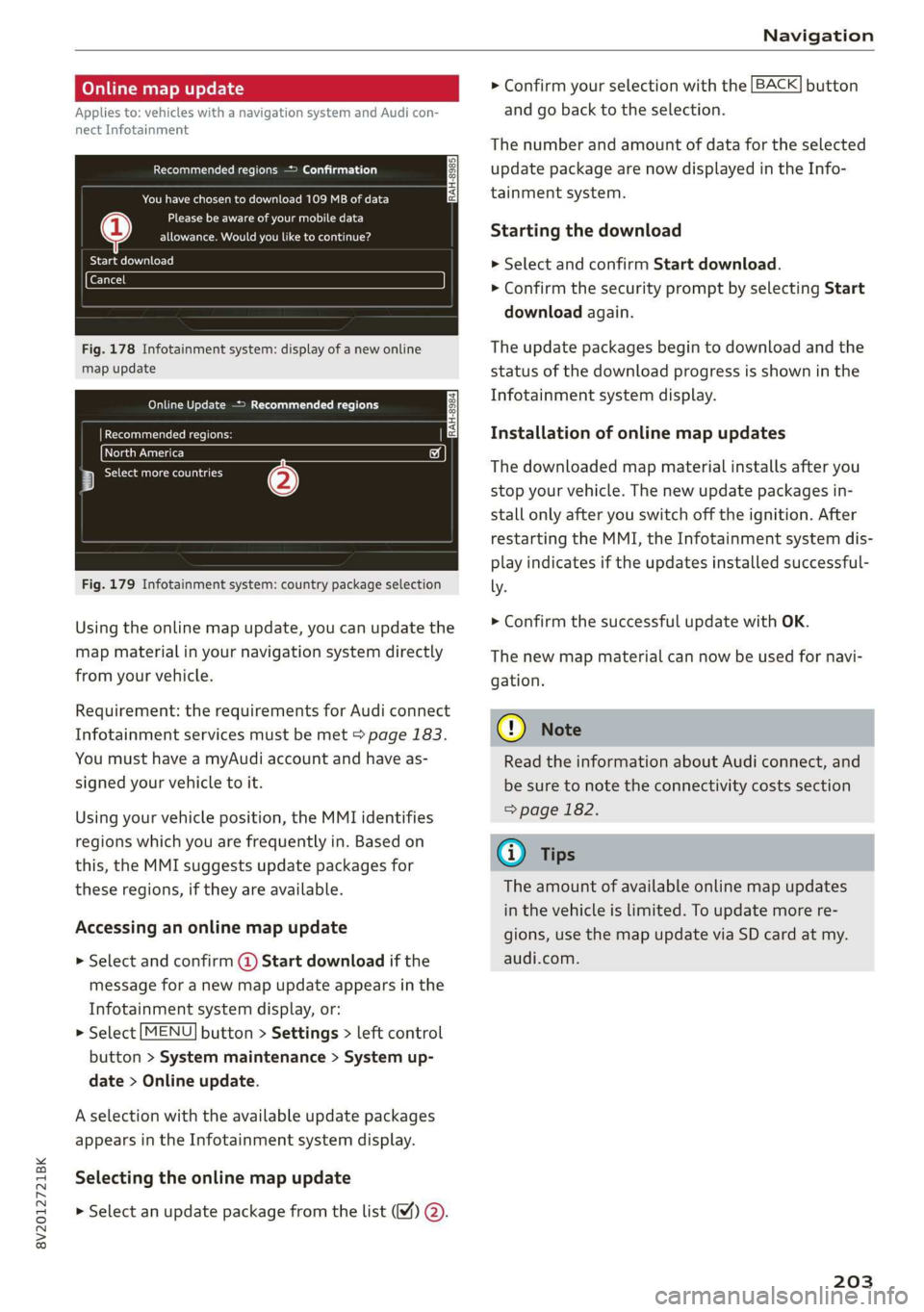
Fig. 178 Infotainment system: display of a new online
map update
Online Update > Recommended regions
RAH-8984 | Recommended regions: |
eta) w
3 botany (2)
Fig. 179 Infotainment system: country package selection
Using the online map update, you can update the
map material in your navigation system directly
from your vehicle.
Requirement: the requirements for Audi connect
Infotainment services must be met > page 183.
You must have a myAudi account and have as-
signed your vehicle to it.
Using your vehicle position, the MMI identifies
regions which you are frequently in. Based on
this, the MMI suggests update packages for
these regions, if they are available.
Accessing an online map update
> Select and confirm @ Start download if the
message for a new map update appears in the
Infotainment system display, or:
> Select [MENU] button > Settings > left control
button > System maintenance > System up-
date > Online update.
A selection with the available update packages
appears in the Infotainment system display.
Selecting the online map update
> Select an update package from the list (4) @.
> Confirm your selection with the [BACK] button
and go back to the selection.
The number and amount of data for the selected
update package are now displayed in the Info-
tainment system.
Starting the download
> Select and confirm Start download.
> Confirm the security prompt by selecting Start
download again.
The update packages begin to download and the
status of the download progress is shown in the
Infotainment system display.
Installation of online map updates
The downloaded map material installs after you
stop your vehicle. The new update packages in-
stall only after you switch off the ignition. After
restarting the MMI, the Infotainment system dis-
play indicates if the updates installed successful-
ly. >
Confirm the successful update with OK.
The new map material can now be used for navi-
gation.
@) Note
Read the information about Audi connect, and
be sure to note the connectivity costs section
=> page 182.
@) Tips
The amount of available online map updates
in the vehicle is limited. To update more re-
gions, use the map update via SD card at my.
audi.com.
203
Page 216 of 400
Media
— The status of the deleting process is shown in
the MMI. Jukebox playback stops during the de-
leting process and starts again automatically
once the deletion is complete.
@) Note
Do not import audio/video files when the en-
gine is turned off because this will drain the
vehicle battery.
@ Tips
— Tracks from audio CDs cannot be imported
to the Jukebox for legal reasons.
— Files that have already been imported are
automatically recognized and cannot be
copied to the Jukebox again.
— It is not possible to play audio/video* files
in the CD/DVD* drive while importing them.
— The Jukebox does not provide an export
function due to legal reasons.
— Files or tracks without additional stored in-
formation are listed as Unknown. Audi rec-
ommends adding additional information
(such as ID3 tags) to audio files.
— Reset the Jukebox to the factory default set-
tings when selling your vehicle > page 231.
Bluetooth audio player
Applies to: vehicles with Bluetooth audio player
With the Bluetooth audio player, you can play
music wirelessly from your Bluetooth-capable de-
vice (such as a cell phone) through the MMI.
Requirement: the vehicle must be stationary and
the ignition must be switched on. The Bluetooth
settings will open on your mobile device during
the connection setup. The Bluetooth function and
visibility of the MMI S page 233 and mobile de-
vice must be switched on. The Bluetooth audio
player > page 233 must be switched on in the
MMI.
— Connecting a Bluetooth device: press the
[MEDIA] button. Press the left control button
until the sources overview is displayed. Select
and confirm Bluetooth audio player @)
=> page 219, fig. 192.
214
— If necessary, select and confirm Not connected
> Connect Bluetooth audio player. The Blue-
tooth device search starts. Follow the instruc-
tions in the MMI.
— Select and confirm the desired Bluetooth device
from the list. The MMI generates a PIN for the
connection.
— Select and confirm Yes.
— Enter the PIN for connecting on your Bluetooth
device, or if the PIN is already displayed on your
Bluetooth device, confirm it on the Bluetooth
device. The time allowed for entering the PIN is
limited to approximately 30 seconds.
The media is started and operated through the
mobile device or the MMI, depending on the de-
vice being used.
G) Tips
— Check for any connection requests on your
Bluetooth device.
— Multiple Bluetooth audio players can be
connected to the MMI, but only one mobile
device can be active.
— Bluetooth protocols AVRCP (1.0/1.3/1.4)
and A2DP are supported.
— Note the volume setting on your Bluetooth
device. Audi recommends setting your mo-
bile device to the maximum volume when
using it as a Bluetooth audio player.
— The supported media functions (such as
shuffle) depend on the Bluetooth device be-
ing used.
—Aselection of supported Bluetooth devices
can be found in the database for tested mo-
bile devices at www.audi.com/bluetooth.
Wi-Fi audio player
Applies to: vehicles with Wi-Fi audio player
Using the Wi-Fi audio player media source on the
MMI, you can connect and operate your Wi-Fi-ca-
pable media player (such as a smartphone) to
wirelessly play music from your media player Li-
brary. The media player is connected through the
vehicle's Wi-Fi hotspot. A UPnP Server app or an
integrated UPnP/DLNA server on your media
player is required to access your media player Li-
brary.
Page 220 of 400
Media
— Disconnecting a mobile device from the AUX
input: remove the AUX cable from the AUX
input on the Audi music interface.
— Operation: select and confirm the External au-
dio player source G) > page 219, fig. 191. Me-
dia is started and operated on the mobile de-
vice.
ZX WARNING
Driving requires your complete and undivided
attention. As the driver, you have complete re-
sponsibility for safety in traffic. Never operate
mobile devices while driving, because this in-
creases the risk of an accident.
@) Note
— Use a USB extension cable to connect devi-
ces that have an integrated USB connector
(such as a USB stick) to prevent damage to
your USB device and the Audi music inter-
face.
— Extremely high or low temperatures that
can occur inside vehicles can damage mobile
devices and/or impair their performance.
Never leave mobile devices in the vehicle in
extremely high or low temperatures.
G) Tips
— Always follow the information found in
=> page 59.
—When you switch the ignition off, the USB
ports are still supplied with power until the
energy management intervenes.
— Do not use an additional adapter or USB ex-
tension cable to connect mobile devices to
the Audi music interface that already have a
cable or that must be connected with a USB
adapter (= page 217). Using an additional
adapter or US extension cable may impair
functionality.
— You can purchase the AUX connector cable
from an authorized Audi dealer or at spe-
cialty stores.
)) Applies only to MTP devices. Does not apply to Apple devi-
ces and USB mass storage devices.
218
— Audi recommends setting the volume of a
mobile device connected to the AUX input to
approximately 70% of the maximum vol-
ume.
— Functionality is not guaranteed for mobile
devices that do not conform to the USB 2.0
specification.
— USB hubs are not supported.
— Some versions of the iPod such as the iPod
shuffle cannot be connected to the USB
adapter for devices with Apple Dock connec-
tor. Connect these devices using a AUX con-
nector cable.
— Changed content on a mobile device )) that
is connected to the Audi music interface
may not be displayed in the media center. In
this case, reset the Media settings back to
Factory settings > page 231.
— Video playback through the Audi music in-
terface is only supported if the connected
device is recognized as a USB storage device
(for example a USB stick). Apple devices and
MTP devices (such as smartphones) are not
recognized as USB storage devices.
— iPod or iPhone malfunctions also affect the
operation of the MMI. Reset your iPod or
iPhone if this happens.
— For important information on operating
your iPod or iPhone, refer to the user guide
for the device. Audi recommends updating
the iPod or iPhone software to the latest
version.
— For more information about the Audi music
interface and supported devices, check the
Audi database for mobile devices at www.
audi.com/mp3 or contact an authorized
Audi dealer or authorized Audi Service Fa-
cility.
USB charging ports in the rear
Applies to: vehicles with USB charging ports in the rear
You can charge the battery on your mobile device
through a USB charging port.