infotainment AUDI A3 2020 Owner´s Manual
[x] Cancel search | Manufacturer: AUDI, Model Year: 2020, Model line: A3, Model: AUDI A3 2020Pages: 400, PDF Size: 107.47 MB
Page 184 of 400
Audi connect
Audi connect
General information
Applies to: vehicles with Audi connect
Depending on the country and the vehicle equip-
ment, the following functions may be available:
— Audi connect Infotainment
— Applies to: vehicles with plug-in hybrid drive:
Audi connect vehicle control services (Audi con-
nect e-tron services)
You can also find more information on Audi con-
nect online at my.audi.com.
Z\ WARNING
—To reduce the risk of an accident, only use
Audi connect services and the Wi-Fi hotspot
only if the traffic situation permits it. Read
and follow the guidelines provided in
= page 146, Traffic safety information.
— It is only safe to use tablets, laptops, mobile
devices and other similar devices when the
vehicle is stationary because, like all loose
objects, they could be thrown around the in-
side of the vehicle in a crash and cause seri-
ous injuries. Store these types of devices se-
curely while driving. Also read the warnings
in the chapter > page 257, Front airbags.
©) Note
— Applies to: embedded SIM card usage: The
connection costs for Audi connect Infotain-
ment services are included in the price of
Audi connect Infotainment during the sub-
scription period with some exceptions.
Please note that there may be additional
charges when using some services. For ex-
ample, this applies to online radio/
podcasts, Gracenote online database or for
Internet connections and services that use
the Wi-Fi hotspot, such as online media
sources. Depending on the country, data
plans may need to be purchased for these
services > page 187. For additional infor-
mation, see my.audi.com.
—Incertain situations, the Wi-Fi hotspot data
connection may be established as a replace-
ment for the SIM card on your Wi-Fi device.
182
This feature depends on the configuration
of your Wi-Fi device and operating system.
This could result in fees depending on your
cell phone service provider, especially if you
are using this feature while abroad. A flat
rate data plan is strongly recommended. For
more information, contact your cell phone
service provider or refer to the owner's man-
ual for your Wi-Fi device.
— You are responsible for all precautions taken
for data protection, anti-virus protection,
and protection against loss of data on mo-
bile devices that are used, for example, to
access the Internet through the Wi-Fi hot-
spot.
— In areas with poor GPS reception or outside
the coverage range of the respective cell
phone service provider, some functions
and/or services may not be available, it may
not be possible to send or receive data, or
functionality may be limited.
(i) Tips
— The availability of services depends on the
subscription.
— AUDI AG provides access to services from
third party providers. Permanent availability
cannot be guaranteed, because that de-
pends on the third party provider.
— Use of the most up-to-date mobile network
standard is not available in every country.
Contact an authorized Audi dealer or au-
thorized Audi Service Facility or your cell
phone service provider for additional infor-
mation.
— Availability, scope, providers, screen display,
and costs of services may vary depending on
the country, model, model year, end device
and rates.
Audi connect
Infotainment
Applies to: vehicles with Audi connect Infotainment
With Audi connect Infotainment services, online
information is transmitted directly to the vehicle. >
Page 185 of 400

8V2012721BK
Audi connect
An Internet connection is required to use Audi
connect Infotainment. Depending on the country
and the vehicle equipment, the following options
may be available:
— Embedded SIM card
Z\ WARNING
Always follow the information found in > AA
in General information on page 182.
@) Note
Always follow the information found in >@ in
General information on page 182.
Embedded SIM card
Applies to: vehicles with Audi connect Infotainment and an
embedded SIM card
The data connection for Audi connect Infotain-
ment services is made through an embedded SIM
card (eSIM card) that is installed in the vehicle.
You can use the Audi connect Infotainment serv-
ices immediately.
@) Note
Always follow the information found in >@ in
General information on page 182.
Using a Wi-Fi hotspot
Applies to: vehicles with Wi-Fi hotspot
You can connect up to eight Wi-Fi devices (such
as smartphones) with the MMI Wi-Fi hotspot. If
the MMI is connected to the Internet
=> page 182, the connected Wi-Fi devices can also
use the MMI’s Internet connection.
Requirement: the ignition must be switched on.
> Select: [MENU] button > Telephone > right con-
trol button > Wi-Fi settings > Wi-Fi. Switch on
the Wi-Fi hotspot.
> Select: [MENU] button > Telephone > right con-
trol button > Wi-Fi settings > Network key. The
access data for the Wi-Fi hotspot is displayed.
Switch on the visibility of the Wi-Fi hotspot if
necessary.
> Switch the Wi-Fi function on in your mobile de-
vice and connect it to the MMI Wi-Fi hotspot
using the authentication data that is shown.
> Follow any additional system prompts on your
Wi-Fi device if necessary.
Your device is successfully connected with the
MMI's Wi-Fi hotspot.
ZX WARNING
Always follow the information found in > AV
in General information on page 182.
® Note
Always follow the information found in >@ in
General information on page 182.
G) Tips
For an explanation on conformity with the
FCC regulations in the United States and the
Industry Canada regulations, see > page 377.
Audi connect
Infotainment services
Configuration
Applies to: vehicles with Audi connect Infotainment
Requirement: your vehicle must be connected to
the Internet > page 182.
Some Audi connect Infotainment services must
be configured through your personal myAudi ac-
count at my.audi.com before using them for the
first time.
> Register at my.audi.com.
> Add your vehicle to your myAudi account.
> Select: [MENU] button > Audi connect > right
control button > Log in.
> Log in to myAudi in the vehicle using your e-
mail address and password.
@ Tips
— For some Audi connect Infotainment serv-
ices, you may also have to enter your myAu-
di access information when accessing serv-
ices in the MMI.
183
Page 186 of 400
Audi connect
— Some Audi connect Infotainment services
must be activated at my.audi.com.
— To make logging in easier in the vehicle, you
will receive an 8-digit myAudi PIN as an al-
ternative to your myAudi password after you
have created a myAudi account.
— Depending on the country, you may be able
to use the myAudi app or my.audi.com.
— For detailed information on configuration,
visit my.audi.com.
Accessing Audi connect Infotainment
Applies to: vehicles with Audi connect Infotainment
> Select: the [MENU] button > Audi connect.
A list of all of the available Audi connect Infotain-
ment services is shown on the Infotainment sys-
tem display.
You can also filter the Audi connect Infotainment
services by category:
> Select: [MENU] button > Audi connect > left
control button > for example, Navigation for
the Audi connect Infotainment services in the
Navigation menu.
Applies to: vehicles with Audi connect Infotainment
> Select: [MENU] button > Audi connect > desired
Audi connect Infotainment service > right con-
trol button.
Depending on the equipment and the Audi con-
nect Infotainment service selected, the following
basic functions may be available:
Save as preview
You can also see a preview of the selected Audi
connect Infotainment services on the Audi con-
nect Infotainment home page.
Show on map
You can show selected contents on the map and
use them for route guidance.
D_ Not available in all languages.
184
Log in
See > page 183.
Read out)
You can allow the MMI to read out the selected
contents.
Call
If a phone number was assigned to an entry, you
can call the number, for example to reserve tick-
ets.
Refresh
The contents for the selected Audi connect Info-
tainment service are refreshed.
Start route guidance
If a location was saved with an entry, you can use
it as the navigation destination. Route guidance
starts immediately.
Change search area
The set search area can be changed at any time.
Additional information on search areas can be
found under > page 191.
Closing Audi connect Infotainment services
Regardless of the function selected, you can
close an Audi connect Infotainment service at
any time and return to the home screen.
Services
Applies
to: vehicles with Audi connect Infotainment
Depending on the country and the vehicle equip-
ment, the following services may be available:
Weather information
Information on current weather conditions as
well as weather forecasts for the selected search
area.
> Select and confirm Weather.
Online news
> Select: Online news > desired newsfeed > a
headline.
Page 187 of 400
8V2012721BK
Audi connect
If you logged in to myAudi in your vehicle
=> page 183, personalized newsfeeds can be dis-
played.
Access to Twitter
Requirement: you must have connected your ve-
hicle with myAudi > page 183. You must have
connected your myAudi account with Twitter.
You can only connect one Twitter account with
your myAudi account. Not all settings can be ad-
justed in the MMI. Some can only be adjusted
through the Twitter website.
> Select: Twitter > left control button > desired
function (for example, Trends).
Charging stations
Applies to: vehicles with charging stations and plug-in hybrid
drive
Information on charging stations in the selected
search area.
>» Select and confirm Charging stations.
ZA WARNING
Always follow the information found in > AV
in General information on page 182.
@ Note
Always follow the information found in >@ in
General information on page 182.
Additional options
Applies to: vehicles with Audi connect Infotainment
> Select: [MENU
control button.
button > Audi connect > right
Depending on the equipment and the country,
the following options may be available in the
overview of Audi connect Infotainment services:
About Audi connect
Here you will find legal information regarding
Audi connect Infotainment usage.
D Depends on the country and equipment. These services
are available for a limited time.
Log in
See > page 183.
Connection manager
See > page 231.
License subscription
The validity and expiration date of your licenses
are displayed.
Refresh
The content of the selected Audi connect Info-
tainment service or the entire Audi connect Info-
tainment list is updated.
Data privacy
See 5 page 372.
@) Note
Always follow the information found in >@ in
General information on page 182.
Audi connect e-tron
services
Applies to: vehicles with plug-in hybrid drive and Audi connect
With Audi connect vehicle control services 1), you
can utilize various services using the myAudi app
or online at my.audi.com.
ZA WARNING
Always follow the information found in > A\
in General information on page 182.
Gi) Tips
— Accessing specific data or controlling func-
tions remotely depends on the charge level
of the vehicle battery. Therefore, these
functions only have limited availability after
switching off the ignition.
— An eSIM card establishes the Internet con-
nection for Audi connect vehicle control
services. The costs for this are included in
185
>
Page 189 of 400
![AUDI A3 2020 Owner´s Manual 8V2012721BK
Audi connect
Settings
Ce) atelal-mariancel a4
> Select: [MENU] button > Audi connect > right
control button > Connection manager.
> Select: right control button > Online settings](/img/6/40265/w960_40265-188.png "AUDI A3 2020 Owner´s Manual 8V2012721BK
Audi connect
Settings
Ce) atelal-mariancel a4
> Select: [MENU] button > Audi connect > right
control button > Connection manager.
> Select: right control button > Online settings")
8V2012721BK
Audi connect
Settings
Ce) atelal-mariancel a4
> Select: [MENU] button > Audi connect > right
control button > Connection manager.
> Select: right control button > Online settings >
Data connection settings.
Depending on the country, vehicle equipment,
and connection type, the following functions may
be available:
Data connection settings
Using the Data connection settings menu, you
can set when the system should connect to the
Internet. The Internet connection disconnects
automatically once the requested Audi connect
Infotainment service no longer requires any data.
— Connection setup: you can select when a data
connection should be established.
— Audi connect (MMI): when this function is
switched on, a data connection is automatically
established in order to use Audi connect Info-
tainment services.
— Wi-Fi devices: when this function is switched
on, you can permit or deny mobile devices to
connect to the Internet on the Wi-Fi hotspot.
ZA\ WARNING
Always follow the information found in > AV
in General information on page 182.
@) Note
Always follow the information found in >@ in
General information on page 182.
@ Tips
For more information on roaming charges,
contact your cell phone service provider.
Wi-Fi settings
Applies to: vehicles with Wi-Fi hotspot
Requirement: the ignition must be switched on.
))_ Not available in every market.
> Select: [MENU] button > Telephone > right con-
trol button > Wi-Fi settings.
Depending on the country and the vehicle equip-
ment, the following functions may be available:
Wi-Fi
When the function is switched on, the MMI's Wi-
Fi hotspot is active and Wi-Fi devices can be con-
nected to the hotspot.
Network key
The
Wi-Fi connection between the MMI and your
Wi-Fi device is encrypted. You can change the fol-
lowing information if needed.
— Access point (SSID): name of the Wi-Fi hot-
spot.
— Password: a random password was set at the
factory in the MMI. The password can be
changed. The encryption method requires a
password to be at least eight characters long.
Choose a secure password.
— Visible to others: you can switch the visibility
of the Wi-Fi hotspot on or off.
Z\ WARNING
Always follow the information found in > AV
in General information on page 182.
@) Note
Always follow the information found in >@ in
General information on page 182.
@ Tips
In vehicles without Audi connect Infotain-
ment, the use of the Wi-Fi hotspot is only
possible for the Wi-Fi audio player*. A data
connection to the Internet cannot be estab-
lished.
eye B) Elen
Applies to: vehicles with data plans
Requirement: you must have created a myAudi
account at my.audi.com. Your vehicle must be
registered in your myAudi account.
187
Page 190 of 400
Audi connect
If driving out of the country, applicable data
plans must be purchased.
Always follow the information found in > AV
in General information on page 182.
Always follow the information found in > © in
General information on page 182.
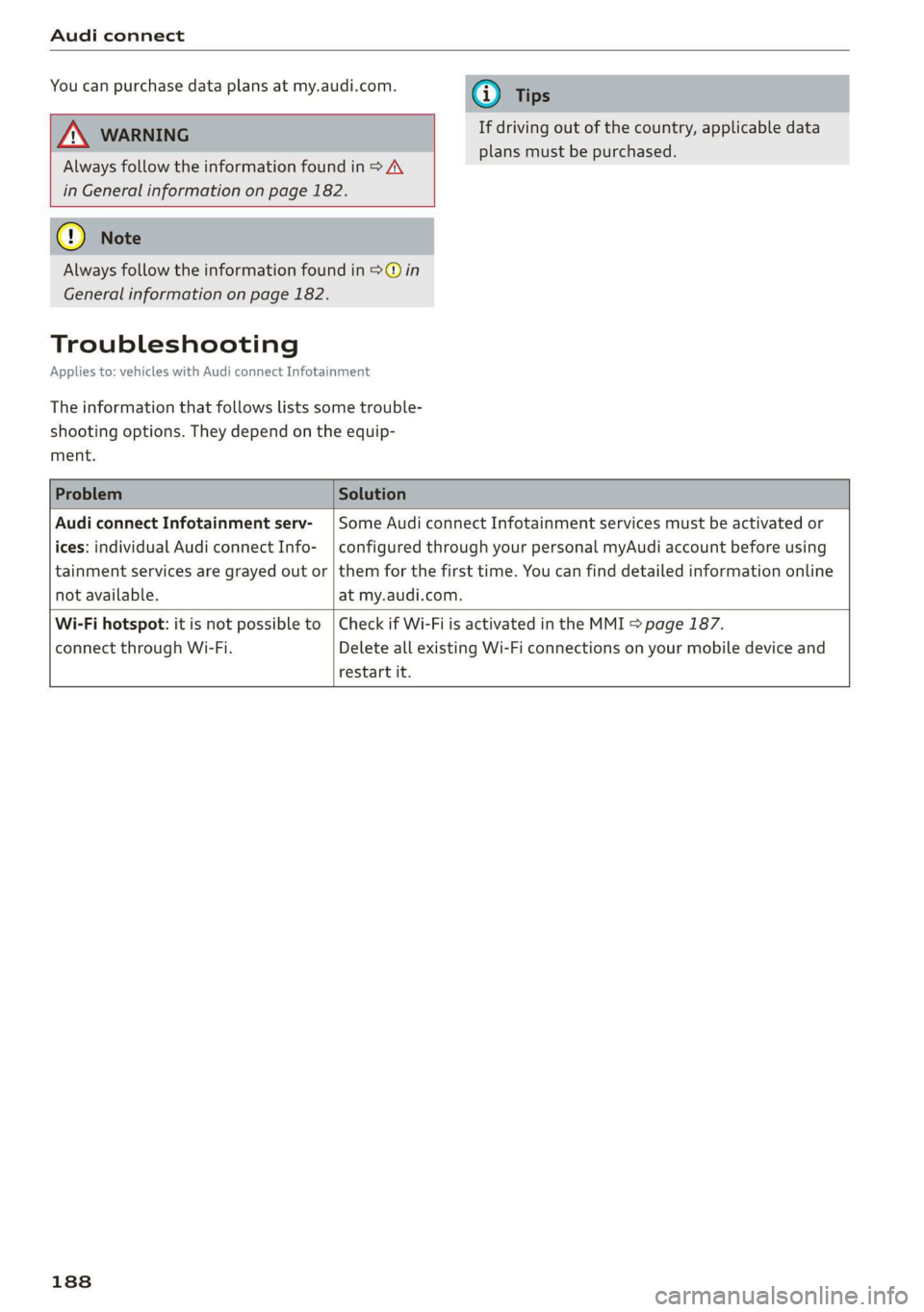
Troubleshooting
Applies to: vehicles with Audi connect Infotainment
The information that follows lists some trouble-
shooting options. They depend on the equip-
ment.
Audi connect Infotainment serv- | Some Audi connect Infotainment services must be activated or
ices: individual Audi connect Info- | configured through your personal myAudi account before using
tainment services are grayed out or | them for the first time. You can find detailed information online
not available. at my.audi.com.
Wi-Fi hotspot: it is not possible to | Check if Wi-Fi is activated in the MMI > page 187.
connect through Wi-Fi. Delete all existing Wi-Fi connections on your mobile device and
restart it.
188
Page 191 of 400
8V2012721BK
Navigation
Navigation
Opening navigation
Applies to: vehicles with navigation system
(le iY n
(2) 7
Home address
RAH-8976)
©-o Gas station
2
east
Fig. 166 Infotainment system: entering a destination
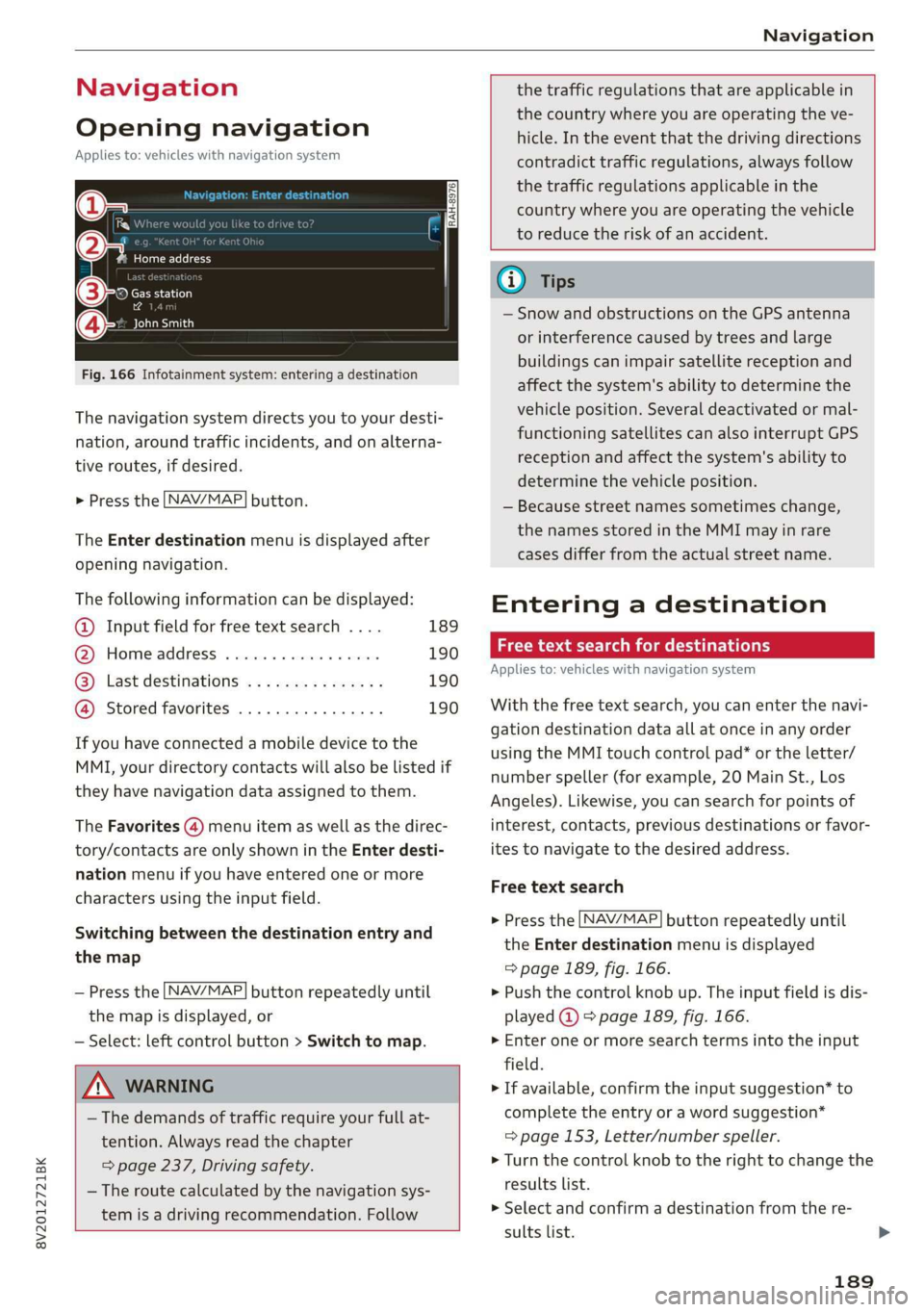
The navigation system directs you to your desti-
nation, around traffic incidents, and on alterna-
tive routes, if desired.
> Press the LNAV/MAP] button.
The Enter destination menu is displayed after
opening navigation.
The following information can be displayed:
@ Input field for free text search .... 189
@ Home address ...............-. 190
@® Last destinations ............... 190
@ Stored favorites ................ 190
If you have connected a mobile device to the
MMI, your directory contacts will also be listed if
they have navigation data assigned to them.
The Favorites (4) menu item as well as the direc-
tory/contacts are only shown in the Enter desti-
nation menu if you have entered one or more
characters using the input field.
Switching between the destination entry and
the map
— Press the [NAV/MAP] button repeatedly until
the map is displayed, or
— Select: left control button > Switch to map.
ZA WARNING
— The demands of traffic require your full at-
tention. Always read the chapter
= page 237, Driving safety.
— The route calculated by the navigation sys-
tem is a driving recommendation. Follow
the traffic regulations that are applicable in
the country where you are operating the ve-
hicle. In the event that the driving directions
contradict traffic regulations, always follow
the traffic regulations applicable in the
country where you are operating the vehicle
to reduce the risk of an accident.
Gi) Tips
— Snow and obstructions on the GPS antenna
or interference caused by trees and large
buildings can impair satellite reception and
affect the system's ability to determine the
vehicle position. Several deactivated or mal-
functioning satellites can also interrupt GPS
reception and affect the system's ability to
determine the vehicle position.
— Because street names sometimes change,
the names stored in the MMI may in rare
cases differ from the actual street name.
Entering a destination
act aeaee Tm (idler
Applies to: vehicles with navigation system
With the free text search, you can enter the navi-
gation destination data all at once in any order
using the MMI touch control pad* or the letter/
number speller (for example, 20 Main St., Los
Angeles). Likewise, you can search for points of
interest, contacts, previous destinations or favor-
ites to navigate to the desired address.
Free text search
> Press the [NAV/MAP] button repeatedly until
the Enter destination menu is displayed
=> page 189, fig. 166.
> Push the control knob up. The input field is dis-
played @) > page 1839, fig. 166.
> Enter one or more search terms into the input
field.
> If available, confirm the input suggestion* to
complete the entry or a word suggestion*
=> page 153, Letter/number speller.
> Turn the control knob to the right to change the
results list.
> Select and confirm a destination from the re-
sults list.
189
Page 193 of 400
8V2012721BK
Navigation
Setting a home address as the destination
Requirement: a home address must be stored
=> page 196.
Your
Home address is shown directly in the Enter
destination menu @) > page 1839, fig. 166.
> Select: Home address.
Setting a favorite as the destination
Requirement: a favorite must be stored as a des-
tination > page 196.
> Enter at least the first three letters of the de-
sired favorite in the free text search input field.
The favorites found are shown in the Infotain-
ment system display @) > page 189, fig. 166.
> Select and confirm the desired entry.
@ Tips
— Additional settings for the home address
can be found under > page 196.
— Additional settings for the favorites can be
found under > page 196.
Mice e Reishi m al
directory
Applies to: vehicles with navigation system
@ allele}
DS eran
a er re
fe MOM: ema on ey
Fig. 167 Infotainment system: contact details
34°03°12.7°°N, 118°14°43.2°°W
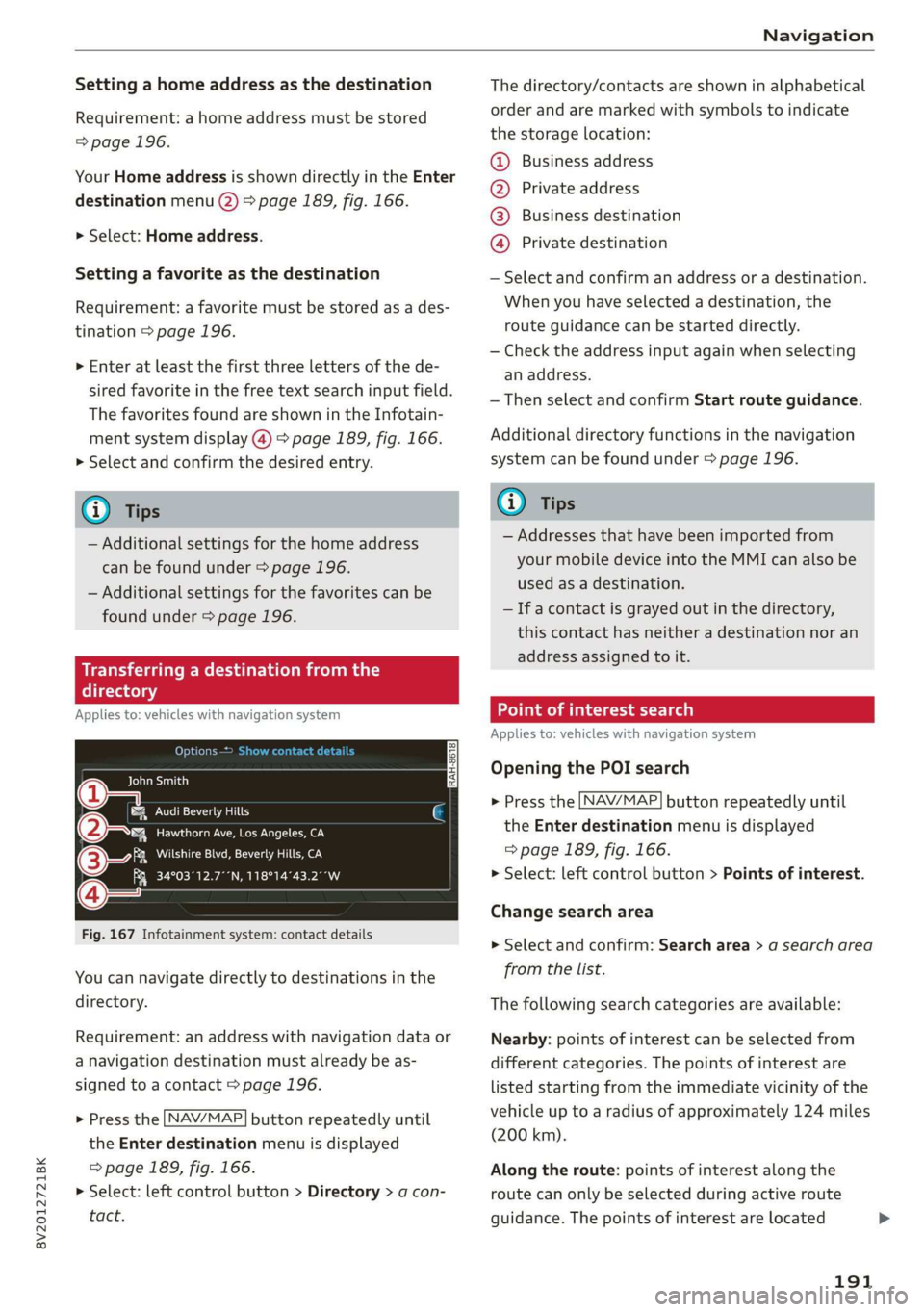
You can navigate directly to destinations in the
directory.
Requirement: an address with navigation data or
a navigation destination must already be as-
signed to a contact > page 196.
> Press the [NAV/MAP] button repeatedly until
the Enter destination menu is displayed
=> page 189, fig. 166.
> Select: left control button > Directory > a con-
tact.
The directory/contacts are shown in alphabetical
order and are marked with symbols to indicate
the storage location:
@ Business address
@ Private address
@®) Business destination
@ Private destination
— Select and confirm an address or a destination.
When you have selected a destination, the
route guidance can be started directly.
— Check the address input again when selecting
an address.
—Then select and confirm Start route guidance.
Additional directory functions in the navigation
system can be found under > page 196.
Gi) Tips
— Addresses that have been imported from
your mobile device into the MMI can also be
used as a destination.
— If a contact is grayed out in the directory,
this contact has neither a destination nor an
address assigned to it.
ol em Teast Ta a)
Applies to: vehicles with navigation system
Opening the POI search
> Press the [NAV/MAP] button repeatedly until
the Enter destination menu is displayed
=> page 189, fig. 166.
> Select: left control button > Points of interest.
Change search area
> Select and confirm: Search area > a search area
from the list.
The following search categories are available:
Nearby: points of interest can be selected from
different categories. The points of interest are
listed starting from the immediate vicinity of the
vehicle up to a radius of approximately 124 miles
(200 km).
Along the route: points of interest along the
route can only be selected during active route
guidance. The points of interest are located
191
Page 194 of 400
Navigation
directly along or in the immediate vicinity of the
calculated route. The points of interest can like-
wise be selected from various categories. For ex-
ample, you can search for a hotel or parking lot
along the route.
Near destination/Near stopover: points of inter-
est near a destination or a stopover can only be
selected during active route guidance. The points
of interest can likewise be selected from various
categories. For example, you can search for a ho-
tel or parking lot at the destination.
In a new city: select a country/state or search in
a new city. Enter the name of the desired city.
Points of interest can be selected from various
categories. This function allows you to search for
points of interest in any city regardless of the ac-
tive route guidance or the vehicle position.
Searching for the name of a point of interest
in the selected search area
> Select: Find entry > Enter POI.
> Enter the name of the point of interest.
Searching for a point of interest in a specific
category
> Select Select category.
> Select and confirm a category, such as Restau-
rants.
G) Tips
— Distances to points of interest are displayed
as a straight-line distance from your current
location. The actual distance from your cur-
rent location to the point of interest is up-
dated automatically. The list of points of in-
terest that were found is not resorted when
this happens.
— There may be entries in the list that cannot
be displayed completely due to their length.
Select the corresponding entry from the list.
Select: right control button > Show destina-
tion details. Detailed information for the se-
lected entry in the list is then displayed.
192
Point of interest search (charging station)
Applies to: vehicles with navigation system and plug-in hybrid
drive
aurea
BB Los Angeles Law Library
Py n
J &}) BROOKEIELD WEST / WFC HILL ST O...
roe) J r
SHARED / 43 (24h
rs ea
Fig. 168 Infotainment system: searching for charging sta-
tions
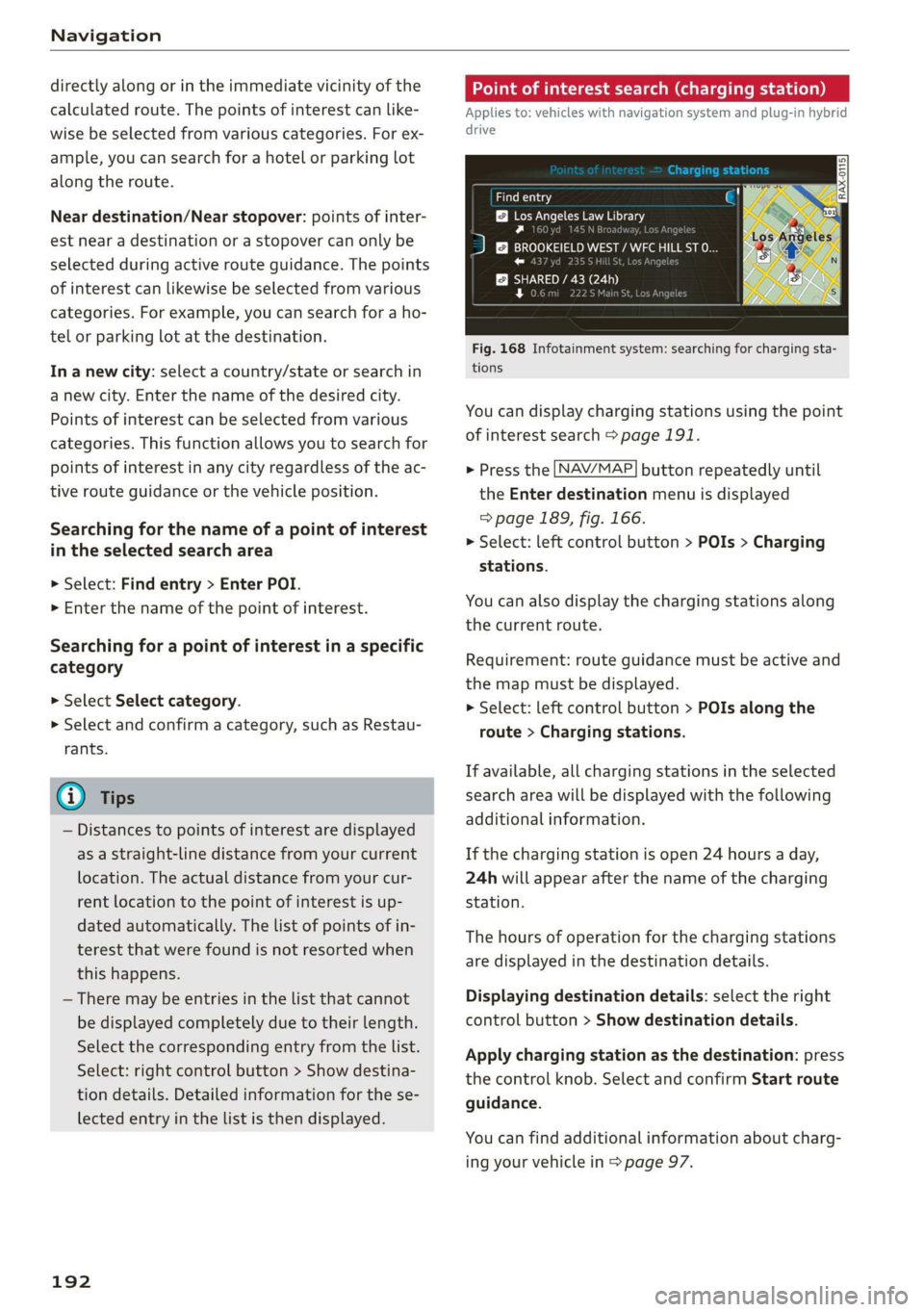
You can display charging stations using the point
of interest search > page 191.
> Press the [NAV/MAP] button repeatedly until
the Enter destination menu is displayed
> page 189, fig. 166.
> Select: left control button > POIs > Charging
stations.
You can also display the charging stations along
the current route.
Requirement: route guidance must be active and
the map must be displayed.
> Select: left control button > POIs along the
route > Charging stations.
If available, all charging stations in the selected
search area will be displayed with the following
additional information.
If the charging station is open 24 hours a day,
24h will appear after the name of the charging
station.
The hours of operation for the charging stations
are displayed in the destination details.
Displaying destination details: select the right
control button > Show destination details.
Apply charging station as the destination: press
the control knob. Select and confirm Start route
guidance.
You can find additional information about charg-
ing your vehicle in > page 97.
Page 195 of 400
8V2012721BK
Navigation
Online point of interest search (online Accessing destinations from myAudi
search) account
Applies to: vehicles with a navigation system and Audi con-
nect Infotainment
You can search for points of interest on the Inter-
net.
Requirement: the requirements for Audi connect
Infotainment must be met > page 182.
Opening the online search
> Press the [NAV/MAP] button repeatedly until
the Enter destination menu is displayed
=> page 189, fig. 166.
> Select: left control button > Online search. The
search area last set is displayed in the input
field.
Change search area
> Select: right control button > Select search
area.
Searching for an online destination in the
selected search area
> If necessary, enter a new city, state, or country.
> Enter the search term, such as hotel.
> Press the control knob.
> Select and confirm an online destination from
the list.
Searching for an online destination ina
specific category
> Select and confirm Select category.
> Select and confirm a category, such as Restau-
rants.
Find which search areas are available under
=>page 191.
You can search for online destinations using the
voice recognition system* > table on page 165.
@) Note
Read the information about Audi connect, and
be sure to note the connectivity costs section
=> page 182.
Applies to: vehicles with a navigation system and Audi con-
nect Infotainment
Import individual destinations from your myAudi
account into the MMI.
Requirement: the requirements for Audi connect
Infotainment must be met > page 182. You
must have a registered myAudi account at my.
audi.com. You must have a vehicle assigned to
your myAudi account and you must have stored
one or more destinations.
> Press the [NAV/MAP] button repeatedly until
the Enter destination menu is displayed
=> page 189, fig. 166.
> Select: left control button > myAudi contacts.
> If necessary, enter your myAudi user data or
your myAudi PIN > page 183. The contacts
stored in myAudi are displayed.
> Select and confirm a contact.
» Select and confirm a private or business desti-
nation.
> Select and confirm Start route guidance.
@) Tips
— You only need to enter the myAudi user data
one time.
— You can receive your myAudi PIN if you have
set up a myAudi account.
— For additional information, visit www.
audiusa.com.
Entering a destination using geo
coordinates
Applies to: vehicles with navigation system
> Press the [NAV/MAP] button repeatedly until
the Enter destination menu is displayed
> page 189, fig. 166.
> Select: left control button > Geographical coor-
dinates.
> Select Latitude/Longitude.
> Press the control knob to set the individual val-
ues.
> Turn the control knob to the left/right to
change the selected value.
> Select and confirm Start route guidance.
193