battery AUDI A3 CABRIOLET 2015 User Guide
[x] Cancel search | Manufacturer: AUDI, Model Year: 2015, Model line: A3 CABRIOLET, Model: AUDI A3 CABRIOLET 2015Pages: 302, PDF Size: 73.83 MB
Page 44 of 302
42 Power top
-Make sure no one will be injured by the
power top supports and other moving
components when opening and closing
the top.
- The headroom in the rear is reduced
when opening and closing the power top. Make sure the rear passengers keep
enough distance from the power top to
reduce the risk of injury.
- When operating the power top, visibility
to the rear is limited . Avoid operating the
top while driving in reverse.
(D Note
-To prevent damage to the power top:
- do not store any objects in the power
top storage compartment.
- make sure there is enough space above
the vehicle when opening or closing
the power top.
- To reduce the risk of damage, make sure
there are no sensitive objects in the pow
er top storage compartment's range of motion.
@ Tips
- To prevent the battery from draining un
necessarily, do not open or close the
power top repeatedly when the engine is
switched off.
- A message will appear in the instrument
cluster if there is a malfunction in the
power top c:>
page 43.
-The power top can also be operated
manually temporarily if there is a mal
function c:>
page 45, Power top emer
gency operation.
An authorized Audi
dealer or authorized Audi Service Facility
should diagnose and correct the cause of
the malfunction as soon as possible .
- If the vehicle is parked with the power
top open, the vehicle interior is not pro
tected from damaging weather or unau
thorized access. Lock any items you leave
behind in the luggage compartment.
Close the power top before leaving the
vehicle. - The
side windows automatically lower
slightly when opening or closing the
power top.
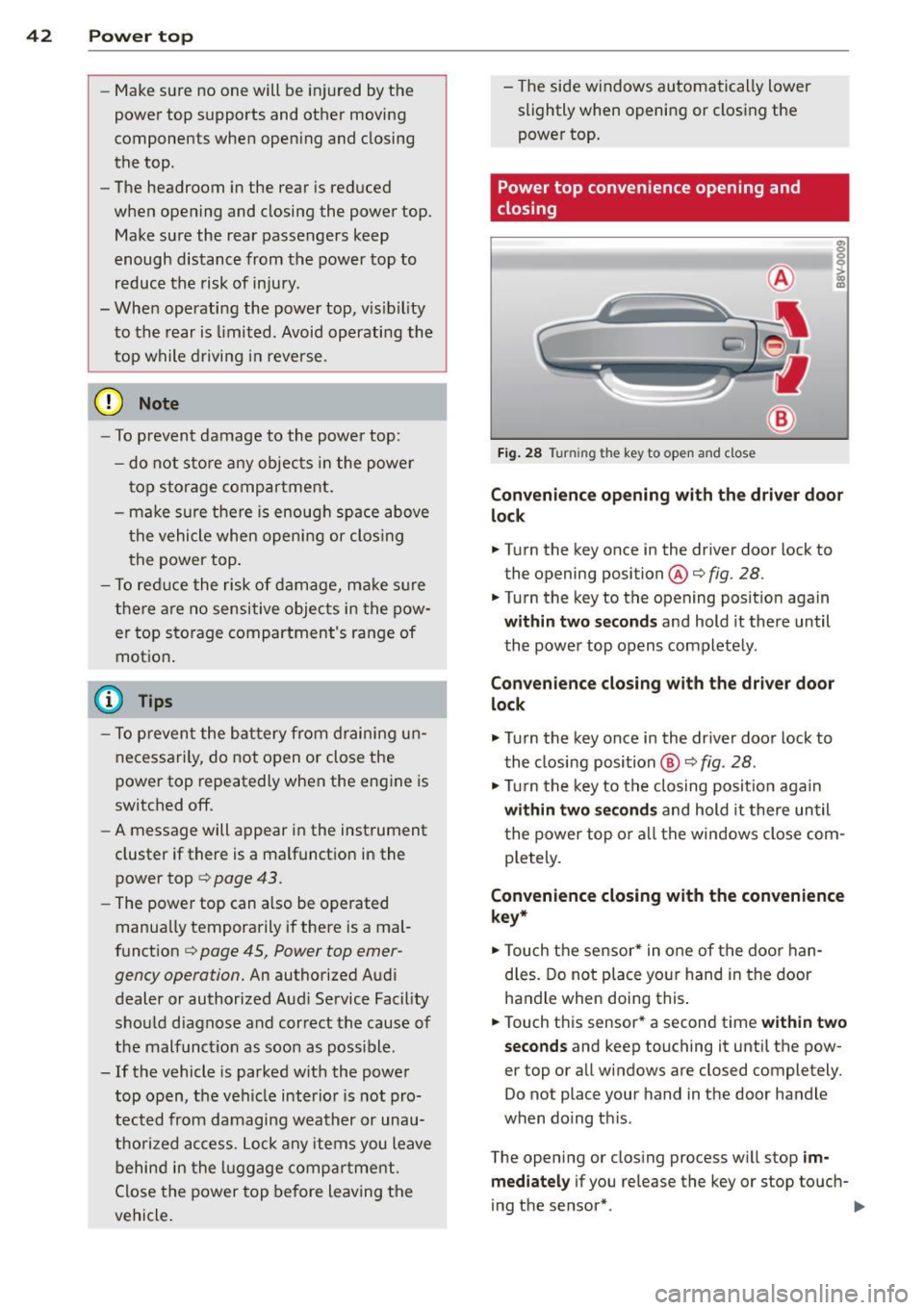
Power top convenience opening and
closing
Fig. 28 Tu rnin g the key to open and close
Convenience opening with the driver door
lock
.. Turn the key once in the driver door lock to
the opening position@c:>
fig. 28.
.. Turn the key to the opening position again
within two seconds and hold it there until
the power top opens completely.
Convenience closing with the driver door
lock
.,. Turn the key once in the driver door lock to
the closing position @
c:> fig. 28.
.,. Turn the key to the closing position again
within two seconds and hold it there until
the power top or all the windows close com
pletely .
Convenience closing with the convenience
key*
.. Touch the sensor* in one of the door han
dles. Do not place your hand in the door
handle when doing this.
.. Touch this sensor* a second time
within two
seconds
and keep touching it until the pow
er top or all windows are closed completely .
Do not place your hand in the door handle
when doing this .
The opening or closing process will stop
im
mediately
if you release the key or stop touch-
ing the sensor*. ..,.
Page 45 of 302

....,
N
r--. > co
rl I.O
"' rl
"' rl
,&_ WARNING
Read and follow the im po rt an t sa fety p re
cautions i n
c::> & in Opening and closing
the power top on page 41 .
Power top storage compartment
Fig. 2 9 Luggage compar tm en t: powe r to p sto rage
co mpa rt ment lowe red
F ig. 30 Luggage compart men t: power top storage
compartme nt ra ised
The power top storage compa rtment must b e
l owe red to open the power top . To avo id dam
a ge, make sure that a re no sensi tive o bje cts in
the s tor age compartmen t's range of mo tion .
Raising the power top storage
compartment
"P ress the trim on the hand le in the d irect io n
of the arrow to raise t he power top s torage
compartment
c::> fig. 2 9.
Lowering the power top storage
compartment
" Press the trim on the handle in the direct io n
of the arrow to lower the power top s torage
compartment
c::> fig. 30 .
The power top storage comp artmen t can be
ra ised when the
power top i s closed . This pro-
Power top 43
vides more cargo space in the luggage com
partment.
T he
open power top is sto red and pr otec ted in
t he power top s torage compar tment . The
power top storage compa rtment cannot be
raised when the power top is open. Because of
th is, the cargo area in the luggage compart
ment is smaller when the powe r top is open
than when it is closed.
Messages
Soft top: pl ease close trunk lid
This message appears in the instrument cl us
ter display if the luggage compartment is not closed w hen the power top is operated . Close
the luggage compart ment lid.
Soft top : please lower soft top compartment
T his mess age ap pears if the power top stor
age compartment is not lowered when ope n
ing t he power top. Lower the power top stor
age compartment ¢
page 43.
Soft top: operation not pos sible
T h is message appears w hen t here is a mal
func tion. T he powe r top can be o pe ra ted man
u ally
c::> page 4 5 .
Soft top: operation not pos sible at pres ent
If the power top is operated continually for a
long period of time, the overload protect ion
activates for app rox imately 15 to 30 mi nutes .
You can o pen or close the powe r top aga in af
te r that.
Soft top: operation not possible at present .
Engine must be running
The power top is a utomat ica lly deactivated if
the battery vo ltage is low. Yo u can open or
close t he power top again after start ing the
engine.
Soft top : operation not possible at present .
Outside temperature too low
The powe r top w ill not open when the tem per-
atu re is be low - 15
°C. ~
Page 66 of 302
64 Seats and storage
Socket
Applies to vehicles: wit h socket
Electrical accessories can be connected in the
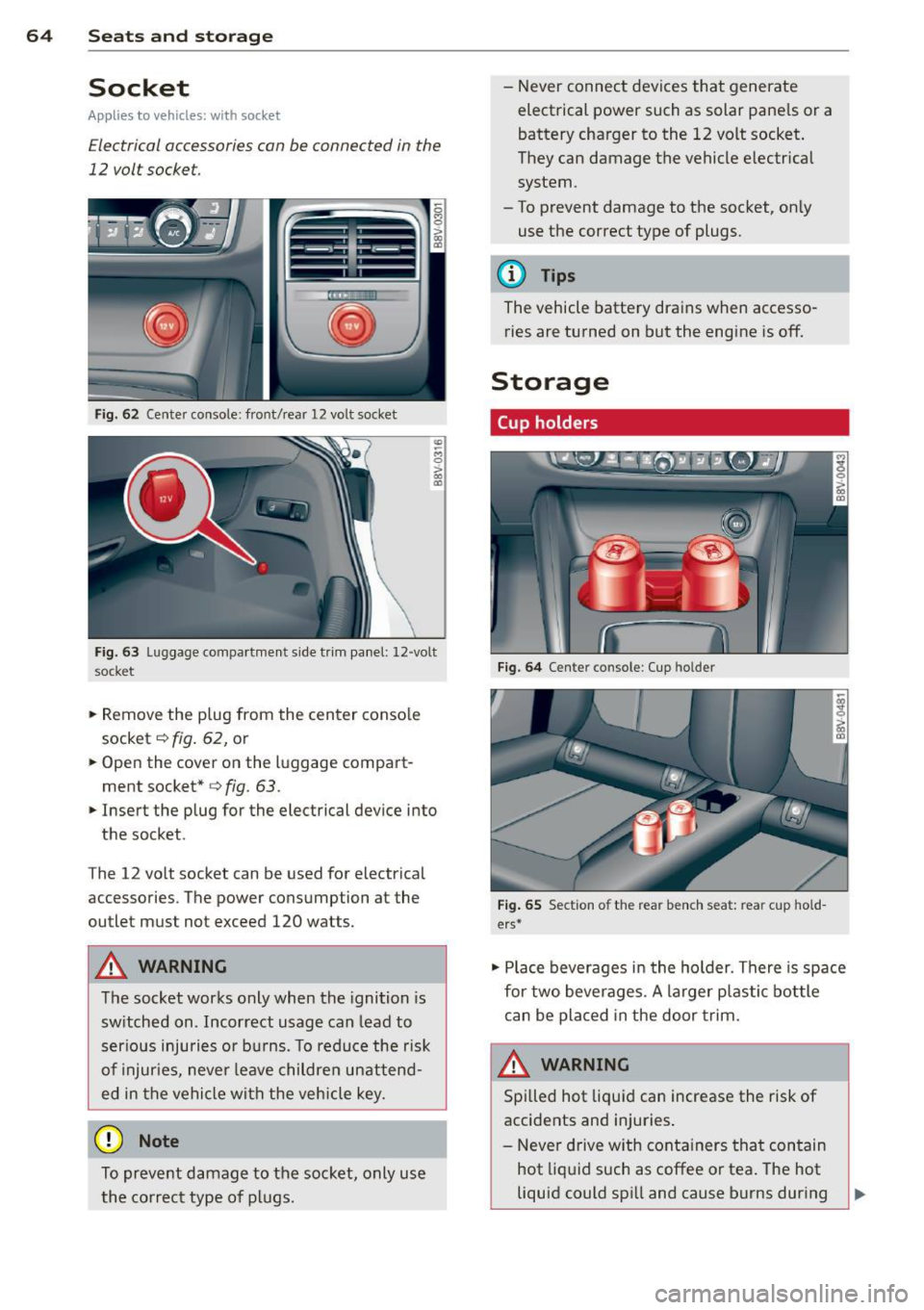
12 volt socket.
F ig . 6 2 Center console: front/rear 1 2 vol t so cket
"' -M
0
> a, (D
F ig. 63 Lu ggage compartme nt s ide tr im panel: 12 -volt
s ocke t
.,. Remove the p lug from the center conso le
socket
c::> fig . 62, or
~ Open the cover on the luggage compart
ment socket*
<=> fig. 63 .
.,. Insert the plug for the electrical device into
the socket .
T he 12 vo lt socket can be used for electrical
accessories. T he power cons umption a t the
outlet mus t not exceed 120 watts.
&_ WARNING
The socket works only when the ignition is
sw itched on . Incor rect usage can lead to
ser ious injuries or bu rns. To reduce the r isk
of injur ies, never leave childre n unattend
ed in the vehicle wi th the vehicle key.
(D Note
To preve nt damage to the socket, only use
the co rrect type o f plugs. - N
ever connec t devices tha t generate
electrical power such as solar pane ls or a
battery charger to the 12 volt socket .
They can damage the vehicle e lectrical
system .
- To prevent damage to the socket, on ly
use the correct type of plugs.
(D Tips
The vehicle battery dra ins when accesso
ries are turned on but the engine is off.
Storage
Cup holders
F ig. 6 4 Center co nso le : C up holde r
Fig. 65 Sect io n of th e re ar ben ch seat: re ar cu p hold
ers *
.,. Place beverages i n the holder . There is space
for two bever ages. A larger p lastic bottle
can be placed in the door trim.
&_ WARNING
Spi lled hot liquid can increase the risk of
accidents and injuries .
- Never d rive w ith conta iners that con tain
hot liq uid such as coffee or tea . The hot
liquid could spi ll and cause burns during
Page 76 of 302
7 4 Warm and cold
& WARNING
You should not use the rec irculation mode
for an extended per iod since no fresh air is
drawn in . With the ai r-conditioning switch
ed off, the windows can fog up, which in
c reases t he risk of an ac cident.
Adjusting the air vents
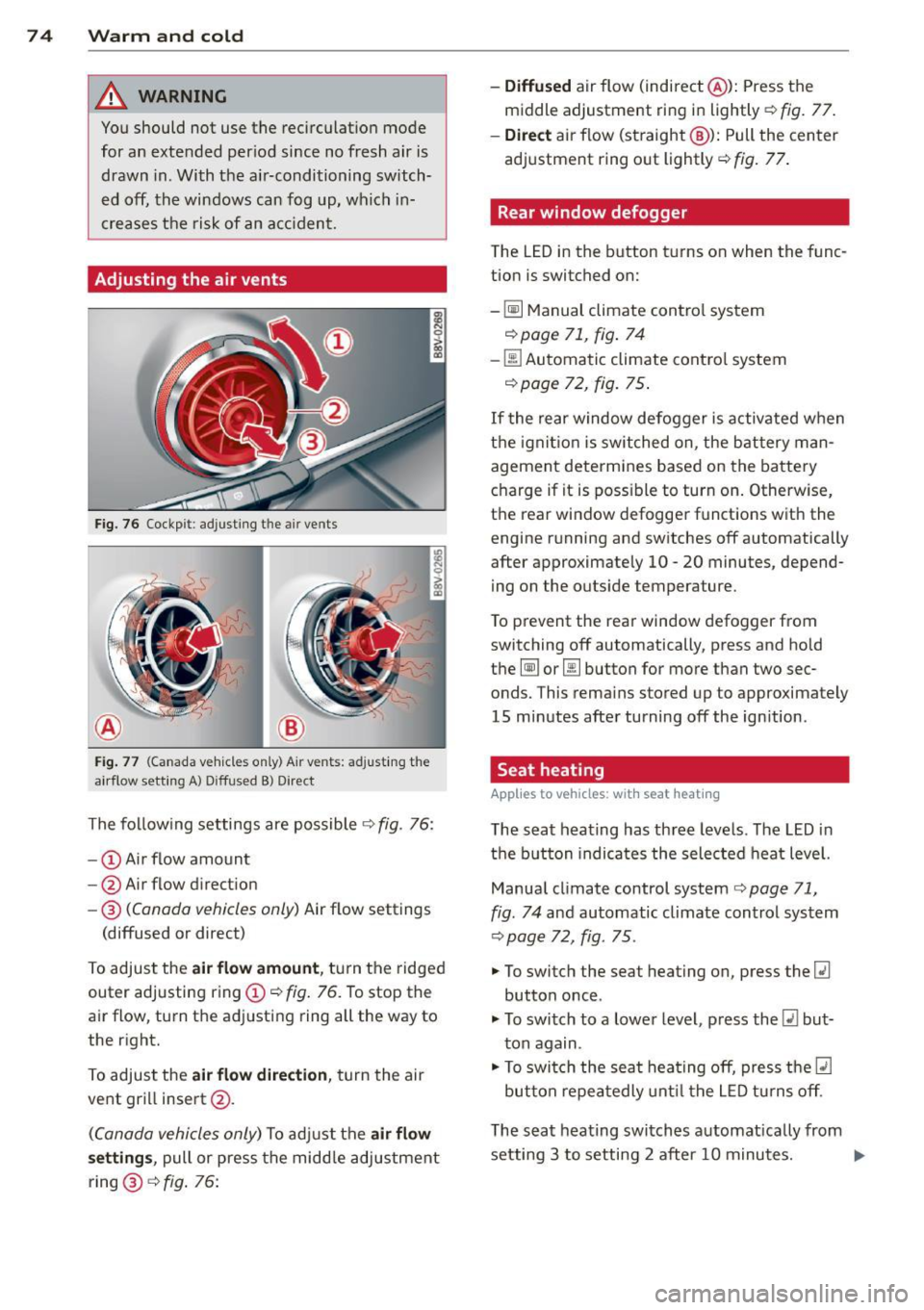
Fig. 76 Cockp it : adjust ing the a ir vents
®
Fi g. 77 (Canada ve hicles o nly) A ir ve nts : ad just ing t he
a irflow sett ing A ) D iffused B ) Direct
The fo llow ing settings are possible ¢ fig. 76:
- © Airflow amount
- @ Air flow d irect ion
- @
(Canada vehicles only) Air f low settings
(diffused or direct)
To adjust the
air flow amount , tu rn the ridged
outer adj usting ring©
c::> fig. 76. To stop the
air flow, turn t he adjusting ring all the way to
the right.
To adjust the
air flow direction , turn the air
ve nt gri ll insert @.
(C anada vehicles only) To ad just the air flow
setting s,
pull or press the midd le adjustment
ring @¢
fig. 76:
-Diffused air flow (indirect @): Press the
middle adjustment ri ng in lightly
c::> fig. 77 .
-Direct air f low (st raight @): Pull the center
ad justment ring o ut lightly ¢
fig. 77.
Rear window defogger
The LED in the button t urns on when the func
tion is switched on:
-
~ M anual climate contro l system
c::> page 71, fig . 74
-00 Automatic climate contro l system
¢ page 72, fig . 75 .
If the rear w indow defogger is activated w hen
t h e igni tion is switched on, the bat tery man
agement determines based on the battery
c h arge if i t is poss ible to turn on . Otherw ise,
the rear window defogge r funct ions w it h the
engine running and switches off automatically
after approximately 10 -20 minutes, depend
i ng on the outs ide temperature .
T o p revent the rear window defogger f rom
switching off automatically, press and hold
t h e
@ii or 00 button for more than two sec
onds. This rema ins stored up to approxima tely
15 minutes afte r turning off the ign ition .
Seat heating
Applies to veh icles : w it h seat heat ing
The seat heating has th ree leve ls. The LED in
the b utt on indica tes the sele cted heat leve l.
Manua l climate control system
c::> page 71,
fig . 74
and automatic climate control system
c::> page 72, fig . 75 .
"'To switch the seat heating on, press the lt:J
button once .
"' To swi tch to a lower level , press the
lt:I but
ton again .
"' To swi tch the sea t heating off, press the
lt:J
but ton re peat edly unt il t he L ED turns off .
T he seat heating swi tches a utomat ica lly from
setting 3 to setting 2 after 10 minutes.
Iii>
Page 79 of 302
M N ,....
> co ,...., \!) 1.1'1 ,...., 1.1'1 ,....,
Switchin g th e ig nition on /off
"'T o sw itch the ignition on, turn the ignition
key to position
(D .
"'To switch the ignition off, turn the ignition
key to position @.
Starting the engin e
Your vehicle is equipped w ith launch cont ro l.
As soon as you have turned the ign ition key to
position @, the engine will start automatical
l y.
"' Press the brake peda l and move the se lector
lever to the P or N pos it ion.
"'T urn the key briefly to position @. The igni
t ion key automatically r eturns to posit ion
(D . Do not press the accelerator pedal wh en
doing this .
Major electrical equipment switches off tem
porarily when starting the eng ine.
If the engine does not sta rt immedia tely , stop
the starting procedure by turning the ignition key to position @and repeat after 30 sec
onds .
Automatic start m alfunction
If the ~ indicator l ight turns on (gasoline en
g ine) and the message
Engin e start sys te m
m alfu nction. Ple ase contac t Se rvice
appears ,
there is an automatic start ma lfunction.
To start t he eng ine, hold the ignition key in
position @until the engine runs .
Drive to an authorized Aud i dealer or author
ized Audi Service Facility immed iate ly to have
the ma lfunction corrected .
_& WARNING
-Never allow the engine to run in confined
spaces -there is a risk o f asphyxiation.
- Never remove the ign ition key from the
ignition lock whi le the vehicle is moving .
Otherw ise the steering lock wi ll engage
and you will not be able to steer the vehi
cle.
- Please note that the brake booster and
power steering only work when the en-
Dri vin g 77
gine is running. When the engine off, you
must use more force to steer or brake
the vehicle. Because the usual steering
and brak ing capability is not avai lab le,
the risk of accidents or injur ies increases.
- Always take the vehicle key with you
when leaving the vehicle, even for a
short period of time. This applies part ic
ularly when children remain in the veh i
cle. Otherwise the ch ild ren could start
the engine or operate electrical equip
men t such as power w indows.
(D Note
- Avo id h igh engine speed, full throttle,
and heavy eng ine load as long as the en
gine has no t reached operat ing tempera
t u re yet . You could damage the engine.
- T he engine cannot be started by pushi ng
or towing.
(® For the sake of the environment
Do not let the eng ine run w hile pa rked to
warm u p. Begin driv ing immediately . T his
r educes unne cessary emissions.
(D Tips
- If it is d iff icult to turn the key to position
(D , turn the steering wheel back and
forth slightly to release the s teer ing
wheel lock .
- After s tarting a cold engine, there may
be a brief period of inc reased no ise be
cause the oil press ure must first bui ld up
in the hydraulic va lve adj usters . This is
normal and not a cause for concern.
- If the battery is disconnected and recon
nected, you have to hold the ignition key
in posit ion
(D for five seconds for the en
gine to start.
- After sw itching the ignition off, you can
only remove the key when the selector
lever is in the "P" (Park) position. After
that, the selector lever is locked.
•
Page 82 of 302
80 Driving
Steering lock1
)
The steering locks when you turn the engine
off using the
I START ENGINE STOPI* button,
move the selector lever into the P position
and open the driver's door.
The locked steering helps prevent vehicle
theft.
Emergency off function
If it is absolutely necessary, the engine can al
so be turned off while driving at speeds lower
than 6 mph (10 km/h).
If you press the
I START ENGINE STOPI* button while driving,
the message
Pressing start/stop button
again will switch off engine!
appears. To
switch the engine off, press the
I STAR T ENGINE STO PI* button twice in a row
briefly or press and hold for longer than two
seconds.
A WARNING
- Never turn off the engine before the ve
hicle has come to a complete stop. The
full function of the brake booster and the power steering is not guaranteed. You
must use more force to turn or brake, if
necessary. Because you cannot steer and
brake as you usually would, this could
lead to accidents and serious injuries .
- Please note that the brake booster and
power steering only work when the en
gine is running. When the engine off, you
must use more force to steer or brake
the vehicle. Because the usual steering and braking capability is not available,
the risk of accidents or injuries increases.
- Always take the vehicle key with you when leaving the vehicle, even for a
short period of time. This applies partic ularly when children remain in the vehi
cle. Otherwise the children could start
the engine or operate electrical equip
ment such as power windows.
- For safety reasons, always park the vehi
cle with the selector lever in the P posi-
ll This function is not available in all cou ntr ies.
tion. Otherwise, there is the risk that the
vehicle could roll.
- After the engine has been switched off,
the radiator fan can continue to run for
up to 10 minutes - even with the ignition
switched off. It can also switch on again
after some time if the coolant tempera
ture rises as a result of heat buildup or if
the engine compartment is heated by sunlight and the engine is hot.
(D Note
If the engine has been under heavy load
for an extended period of time, heat builds
up in the engine compartment after the
engine is switched off - there is a risk of
damaging the engine. For this reason, let
the engine run for at idle for approximate
ly two minutes before shutting it off.
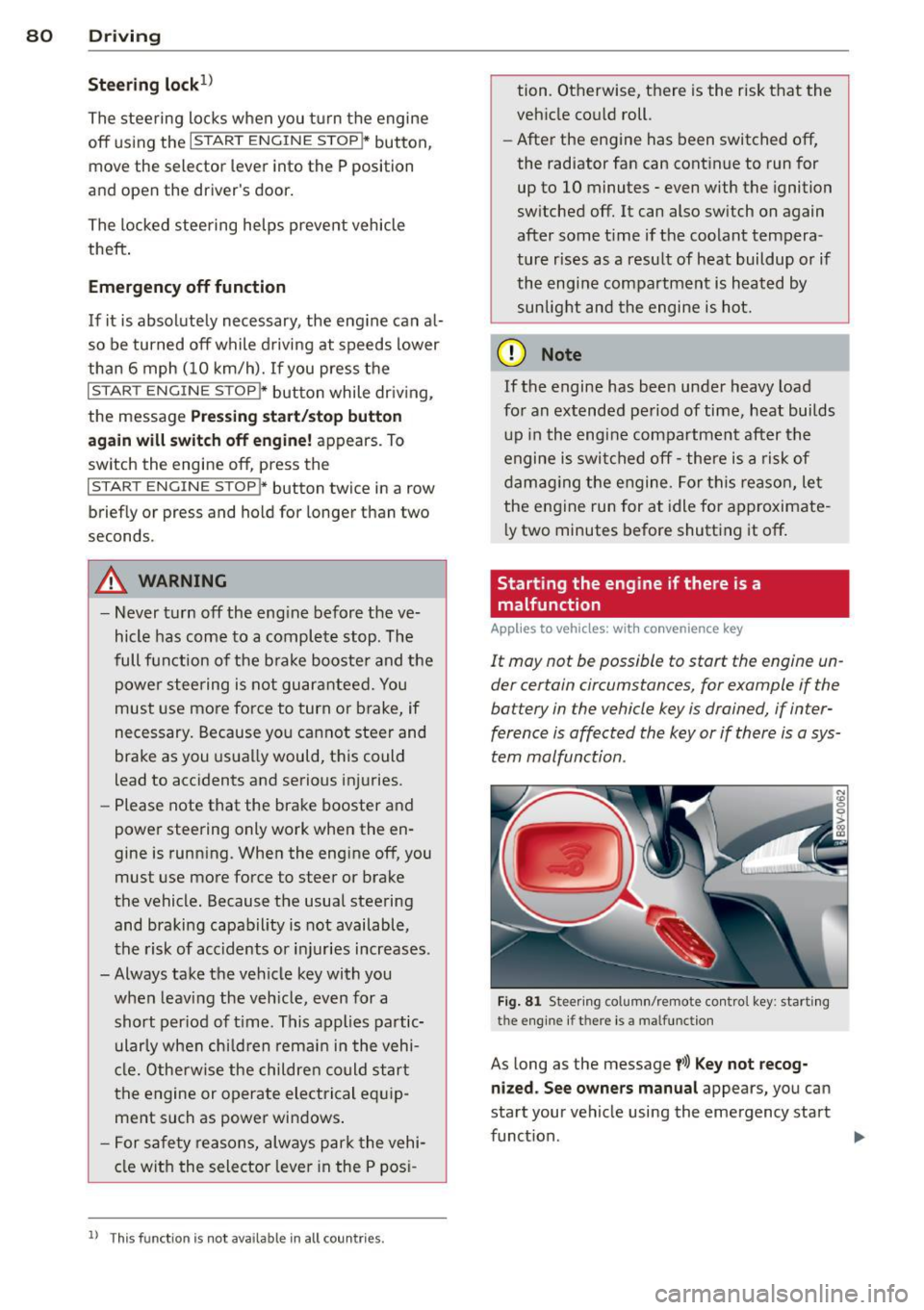
Starting the engine if there is a
malfunction
Applies to vehicles: with convenience key
It may not be possible to start the engine un
der certain circumstances, for example if the
battery in the vehicle key is drained, if inter
ference is affected the key or if there is a sys
tem malfunction.
Fig. 81 Steer ing colum n/remote control key : start ing
the e ngine
if t h ere is a malfu nction
As long as the message y>l) Key not recog
nized. See owners manual
appears, you can
sta rt your vehicle using the emergency start
function . .,.
Page 83 of 302
M N
" > co ,...., \!) ..,.,
,...., ..,., ,....,
~ Press the brake pedal¢ A in Starting the
engine with the
S TAR T ENGINE STOP but
ton on page 79.
~ Press the l ~ s =T ~A~R=T~E~N-G~I~N~E~s=T~O~P~I button .
~ Hold the maste r key as shown in the illustra
t ion in the location indicated
y>l) ¢ fig . 81 .
The eng ine will start .
~ If the engine does not automatically start,
press the
I STAR T E NGINE STOP! button
again.
Drive to an authorized Aud i dea ler or author
i zed Audi Service Fac ility immed iate ly to have
the ma lfunction co rrected .
(D Tips
You can disp lay the message that appears
during an eme rgency by p ressing the
!S TART EN GINE STOPI* button.
Driver messages
Turn off ig nition befor e leaving car . Batter y
is disc har ging
This message appears and a warn ing tone
sounds if yo u ope n the dr ive r's door when the
i gnit ion is switched on. Sw itch the ignition off
so that the batte ry wi ll not discharge.
Pr ess ing start/stop button again will sw it ch
off engin e!
This message appears when you press the
I STAR T ENGIN E STOP !* button while dr iv ing
¢ page 80, Emergency off function.
E ngine start s ystem malfunction. Please
contact Service
The engine automatic start system has a mal
function. Drive to an authorized Audi dealer or
author iz ed Audi Serv ice Facility immediately
to have the ma lfunction corrected . To start
t he eng ine, press and hold the
I STAR T ENGIN E STOP ! button .
DJ Key not recognized . See owne r's manual
This message appea rs i f the re is no conven
ience key inside the vehicle or if the system
does not recognize the key. The convenience key may not be recognized, for examp le, if it is
Dri vin g 81
cove red by an object that disrupts the s ignal
(such as a briefcase), or if the key battery is
weak. E lectronic devices such as ce ll phones
can a lso interfere with the signa l.
T o still be ab le to start or stop the engine, re
fer to "Correcting a malfunction"¢
page 80.
Ill Key not in vehi cle?
The Ill in dicator light turns on and th is mes
sage appears if the co nvenience key was re
moved from the vehicle when the engi ne was
run ning . If the convenience key is no longer in
the ve hicl e, you cannot switch the igni tion on
o r start the engine once yo u stop it . You also
cannot lock the vehicle from the outside .
Press brake pedal
Th is message appears if you do not p ress the
brake pedal when sta rting the eng ine .
Please eng age N or P
This message appears when starting or stop
ping the engine if the se lector l ever is not in
the N or P position. The engine will not start/
stop.
Shift to P , othe rwi se vehicle can roll away.
Door s do not lock if le ver is not in P
T h is mess age appears for safety reasons
along wi th a warn ing tone.
It appea rs if the
selector lever for the automatic transm ission
is not in the P pos it ion when switching the ig
nition off with the
I S TAR T ENGINE STOP !*
button. Shift the se lec tor lever to the P posi
tion . Otherw ise, the vehicle could roll . You al
so cannot lock the vehicle us ing the loc king
senso r o n the door hand le or using the con
venience key.
•
Page 108 of 302
106 Audi side assist
- Side assist is not active wh ile you are
making the adjus tment.
- Your settings are automatically sto red
and ass igned to the remote control key
being used.
Driver messages
App lies to vehicles: with Audi side assist
If t he side assist switc hes off automat ically, a
message appea rs in the instrument cluster
d is p lay .
@; Audi side assi st : currently unavailable
No sensor vision
The radar sensors' visio n is affected . Do not
cover the area in front of the senso rs with bike
wheels, s tickers, dir t or ot her objects. Clean
the are a in front of the sensors , if ne cessa ry
~ page 104, fig. 102.
@• Audi side assist: currently unavailable
Side assist can not be switched o n temporari ly
beca use there is a mal func tion (for example,
the battery cha rge leve l may be too low) .
@; Audi side assist : System fault!
The system cannot guara ntee that it w ill de
tect ve hicles correctly and it is sw itched
off.
The senso rs have been displaced o r are faulty .
H ave the sys tem checked by an au thor ized
Aud i dea le r or autho rized Aud i S ervice Fac ility
soon .
Page 120 of 302
118 Automatic transmission
Selector lever emergency release
.. Press and hold the yellow release button
with the screwdriver
r=>fig. 111 .
.. Press the release button in the selector lever
® and move the lever into the N position .
.. Clip the shift cover back into the shift gate
after using the emergency release.
If the vehic le must be pushed or towed due to
a power failure (for example, the battery is
dead), the selector lever must f irst be moved
to the N position using the emergency release
mechanism .
A WARNING
Only move the selector lever out of the P
position when the parking brake is set. If
that does not work, secure the vehicle with
the brake pedal. Otherwise, the vehicle
could start to move unintentiona lly when
the selector lever is moved out of the P po
sition.
Page 164 of 302
162 Airbag system
Repair, care and disposal of the airbags
Parts of the airbag system are installed at
many different places on your Audi. Installing,
removing, servicing or repairing a part in an
area of the vehicle can damage a part of an
airbag system and prevent that system from
working properly in a collision.
There are some important things you have to know to make sure that the effectiveness of
the system will not be impaired and that dis
carded components do not cause injury or pol lute the environment.
A WARNING
Improper care, servicing and repair proce
dures can increase the risk of personal in
jury and death by preventing an airbag from deploying when needed or deploying
an airbag unexpectedly:
- Never cover, obstruct, or change the
steering wheel horn pad or airbag cover
or the instrument panel or modify them
in any way.
- Never attach any objects such as cup
holders or telephone mountings to the
surfaces covering the airbag units.
- For cleaning the horn pad or instrument
panel, use only a soft, dry cloth or one
moistened with plain water. Solvents or
cleaners could damage the airbag cover
or change the stiffness or strength of the material so that the airbag cannot de
ploy and protect properly.
- Never repair, adjust, or change any parts
of the airbag system.
- All work on the steering wheel, instru
ment panel, front seats or electrical sys
tem (including the installation of audio
equipment, cellular telephones and CB
radios, etc .) must be performed by a
qualified technician who has the training
and special equipment necessary.
- For any work on the airbag system, we
strongly recommend that you see your
authorized Audi dealer or qualified work
shop. -
Never modify the front bumper or parts
of the vehicle body.
- Always make sure that the side airbag
can inflate without interference:
- Never install seat covers or replace
ment upholstery over the front seat
backs that have not been specifically
approved by Audi.
- Never use additional seat cushions that
cover the areas where the side airbags
inflate.
- Damage to the original seat covers or
to the seam in the area of the side air
bag module must always be repaired
immediately by an authorized Audi
dealer.
- The airbag system can deploy only once.
After an airbag has been deployed, it must be replaced with new replacement
parts designed and approved especially
for your Audi model version. Replace
ment of complete airbag systems or air
bag components must be performed by
qualified workshops only . Make sure that
any airbag service action is entered in
your Audi Warranty
& Maintenance book
let under
AIRBAG REPLACEMENT RE
CORD.
- For safety reasons in severe accidents,
the alternator and starter are separated
from the vehicle battery with a pyrotech nic circuit interrupter.
- Work on the pyrotechnic circuit inter
rupter must only be performed by a
qualified technicians who have the ex perience, information and special tools
necessary to perform the work safely.
- If the vehicle or the circuit interrupter
is scrapped, all applicable safety pre
cautions must be followed.
@) For the sake of the environment
Undeployed airbag modules and preten
sioners might be classified as Perchlorate
Material -special handling may apply, see