heating AUDI A3 CABRIOLET 2015 Owners Manual
[x] Cancel search | Manufacturer: AUDI, Model Year: 2015, Model line: A3 CABRIOLET, Model: AUDI A3 CABRIOLET 2015Pages: 302, PDF Size: 73.83 MB
Page 14 of 302
12 Instrum ent s and indicator lamp s
Fuel level
The display @
c;, page 10, fig. 3 only works
when the ignition is sw itched on . When the
d isplay has reached the reserve mark, the bot
tom LED wi ll turn red and the
tD indicator
light turns on¢
page 23 . The bottom LED
blinks red when the fue l level is very low .
The on -board computer shows the range
based on the fuel leve l
c;, page 2 7, On-board
computer display.
F or the tank capac ity in yo ur vehicle , refer to
the Tec hnical Data ¢
page 280.
CJ) Note
Never d rive until the tank is completely
empty. The irregular supp ly of fuel that re
sults from that can cause the engine to
misfire. Uncombusted f uel will then enter
the exha ust system. This can cause over
heating and damage to the catalytic con
verter .
Coolant temperature indicator
The coolant temperature ind icator @
c::> page 10, fig . 3 only works when the ignition
is switched on . T o prevent engine damage, ob
serve the fo llow ing notes about the tempe ra
ture ranges.
Cold range
If only the LEDs at the bottom of the gauge
turn on, the engine has not reached operat ing
temperature yet . Avoid high engine speeds,
fu ll acce le rat ing and heavy engine loads.
Norm al range
The engine has reached its operating temper
ature once the LEDs up to the center of the
gauge turn on under normal driving condi
tions. The L EDs higher up may turn on if the
engine is under heavy load or the o uts ide tem
perat ure is h igh. This is not a cause for con
cern as long as the. indicator light in the
display does not t urn on. Hot range
If the L
EDs in the upper area of the d isp lay
and the. indicator light in the instrumen t
cluster disp lay t urn on, the coo lant tempe ra
ture is too high
c::> poge 19.
A WARNING
-Always observe the warning in
c;, page 214 before opening the hood
and checking the engine coolant level.
- Never open the eng ine hood if you see or
hear steam, or if you see engine coo lant
dripping from the engine compartment .
You could burn yourself. Let the engi ne
coo l off first until you can no longe r see
or hea r steam or coolant escaping.
([) Note
- Add itiona l headlights and other compo
ne nts in front of the a ir intake impairs
the cooling eff ect of the coolant. This in
creases the risk of the engine over heat
ing dur ing high outs ide temper atures
and heavy eng ine load .
- The front spoiler also he lps to distr ibute
cooling air correct ly wh ile driving.
If the
spoiler is damaged, the coo ling effect
wi ll be impai red and the risk of the en
gine overheating will increase. See an au
thorized Audi dealer o r authorized Aud i
Service Facility for ass istance.
Page 72 of 302
70 Warm and cold
Warm and cold Climate control system
Description
Different systems could be installed.
- manual climate control system* or
- automatic climate control system*
The
climate control system* cools and re
moves humidity from the air in the vehicle in
terior. It is the most effective when the win
dows and power top are closed. If there is a
build-up of heat inside the vehicle, ventila tion
can help to speed up the cooling process. Be
cause of this, the windows can be opened
from outside .
~ page 39, Convenience open
ing/closing
Pollutant filter
The pollutant filter removes pollutants such
as dust and pollen from the air .
Key recognition
You can store various settings for the manual
and automatic
climate control system* and
assign them to the key being used .
A WARNING
Poor visibility can lead to accidents.
- For safer driving, keep a ll windows free
of ice, snow and fog.
- Become familiar as quickly as possible
with the correct use and function of the
climate control system, especially with
the defrosting and defogging function .
- When the temperature is below freezing,
only use the windsh ield washer system
after the w indshield has been warmed by the cl
imate control system . The washer
fluid could freeze on the windshield and
impair visibility.
(D Note
- If you suspect that the climate control
system is damaged, switch the system
off to prevent further damage and have
it checked by an authorized Audi dealer
or authorized Audi Service Facility.
- Repairs to the Audi climate control sys
tem require special technical knowledge
and special tools. See an authorized Audi
dealer or authorized Audi Serv ice Facility .
® For the sake of the environment
Reducing the amount of fuel used also re
duces the amount of pollutants that enter
the air.
(D Tips
- To prevent interference with the heating
and cooling output and to prevent the
w indows from fogging over, the air in
take in front of the windshield must be
free of ice, snow or leaves.
- Condensation from the cooling system*
can drip and form a puddle of water un
der the vehicle. This is normal and does
not mean there is a leak.
- T he energy management system may
switch the seat heating* or rear window
defroster off temporari Ly. These systems
are available again as soon as the energy
balance has been restored.
- The flows through the vents under the
rear window. Make sure the openings are
not covered when placing clothing on the
luggage compartment cover.
Page 73 of 302
....,
N
r--. > co
rl I.O
"' rl
"' rl
Climate control system controls
App lies to ve hicles: with manu al cl im ate c ontrol syst em
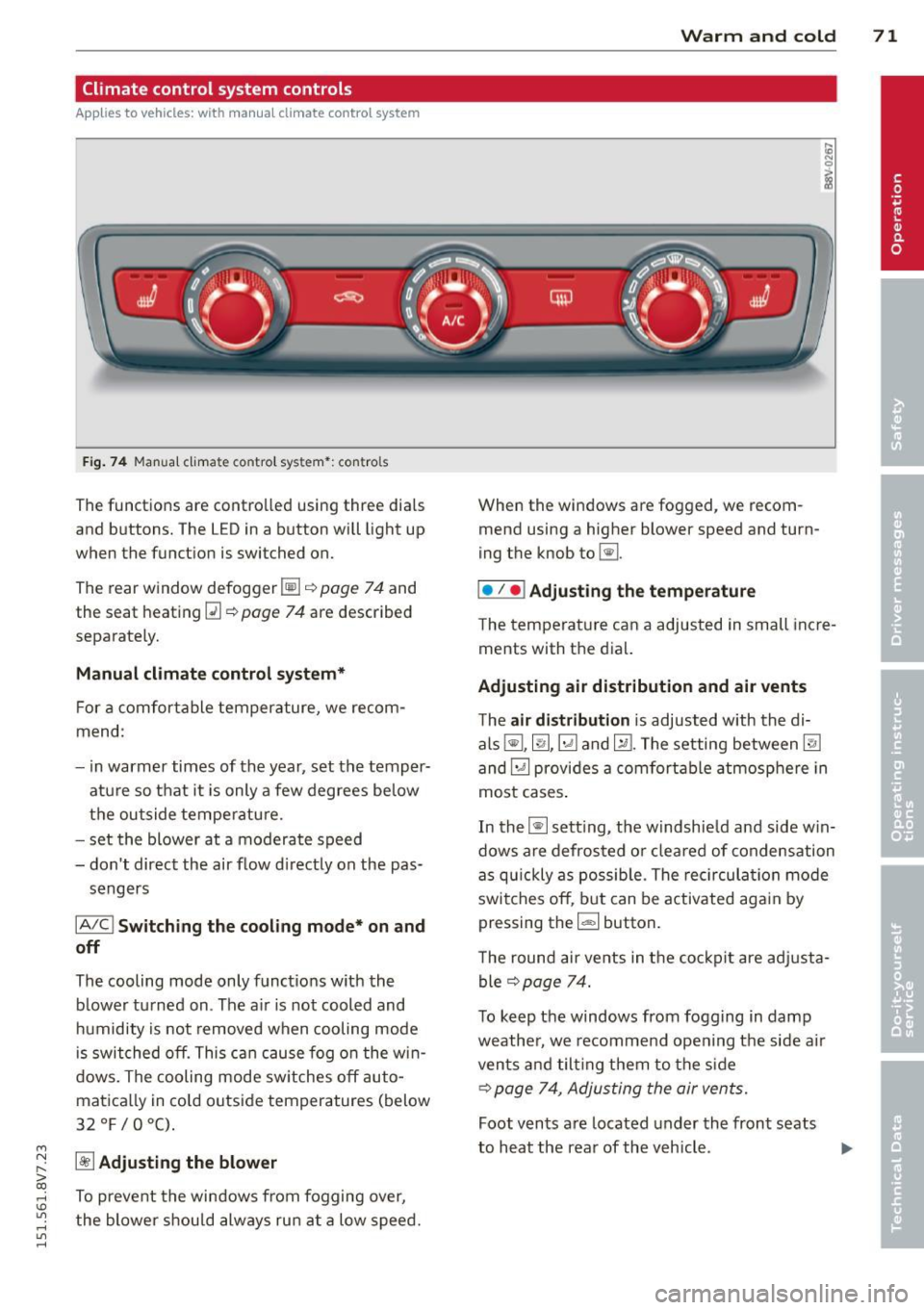
F ig . 7 4 Man ual cl ima te con tro l sy ste m•: con tro ls
The functions are contro lled using three dia ls
and buttons. The L ED in a button will light up
when the function is switched on.
The rear window defogger~¢
page 7 4 and
the seat heating~
c::> page 74 are described
separate ly.
Manual climat e control system*
For a comfortable temperature, we recom
mend :
- in warmer times of the yea r, set the temper
atu re so that it is only a few degrees be low
the outside tempe ratu re.
- set the blower at a moderate speed
- don't direct the air flow d irectly on the pas-
sengers
IA/C l Switching the cooling mode* on and
off
The cooling mode only f unct ions w ith the
b lower turned on . The a ir is not cooled and
h umidity is not removed when cooling mode
i s swit ched off. This c an cause fog o n the w in
dows. The cooling mode sw itches off auto
matica lly in co ld outside temperatures (below
32 °F/0°C) .
~ Adjusting the blower
To prevent the windows from fogging over,
the blower sh ou ld always ru n at a low speed.
W arm and cold 71
When the w indows are fogged , we recom
mend using a h igher blowe r speed and tu rn
ing t he knob to~-
I• I • I Adjusting the temperature
T he tempera ture can a adjusted in small inc re
ments with t he dial.
Adjusting air distribution and air vents
The air di stribution is adjusted with the di
als ~'~ .~ and ~-T he setting between
@J
and~ provides a comf ort abl e atmosphere in
most cases .
In the~ setting, the windshie ld and side w in
dows are defros ted o r cleared of condensation
as q uickly as possib le . The rec ircul ation mode
swi tche s off , bu t can be activated aga in by
pressing the
l d;) I button.
T he round air ve nts in t he coc kpit are adj usta
ble
¢ page 74.
To keep the windows from fogg ing in damp
weathe r, we recomme nd open ing the side a ir
vents and tilt ing them to the s ide
c::> page 7 4, Adjusting the air vents.
Foot vents a re located under the front seats
to h eat the rear of the v eh icle . ...,
Page 74 of 302
7 2 Warm and cold
1- 1 Sw itching r ecircul ation mode on and
off
In recirculation mode, the air inside the vehi
cle is circu lated and filtered. This prevents the
unfiltered air outside the vehicle from enter ing the vehicle inter ior. We recommend
switch ing recirculation mode on when driving
through a tunnel or when sitt ing in traffic
c::> ,& .
Automatic climate control system controls
App lies to vehicles: with a utomat ic climate contro l system
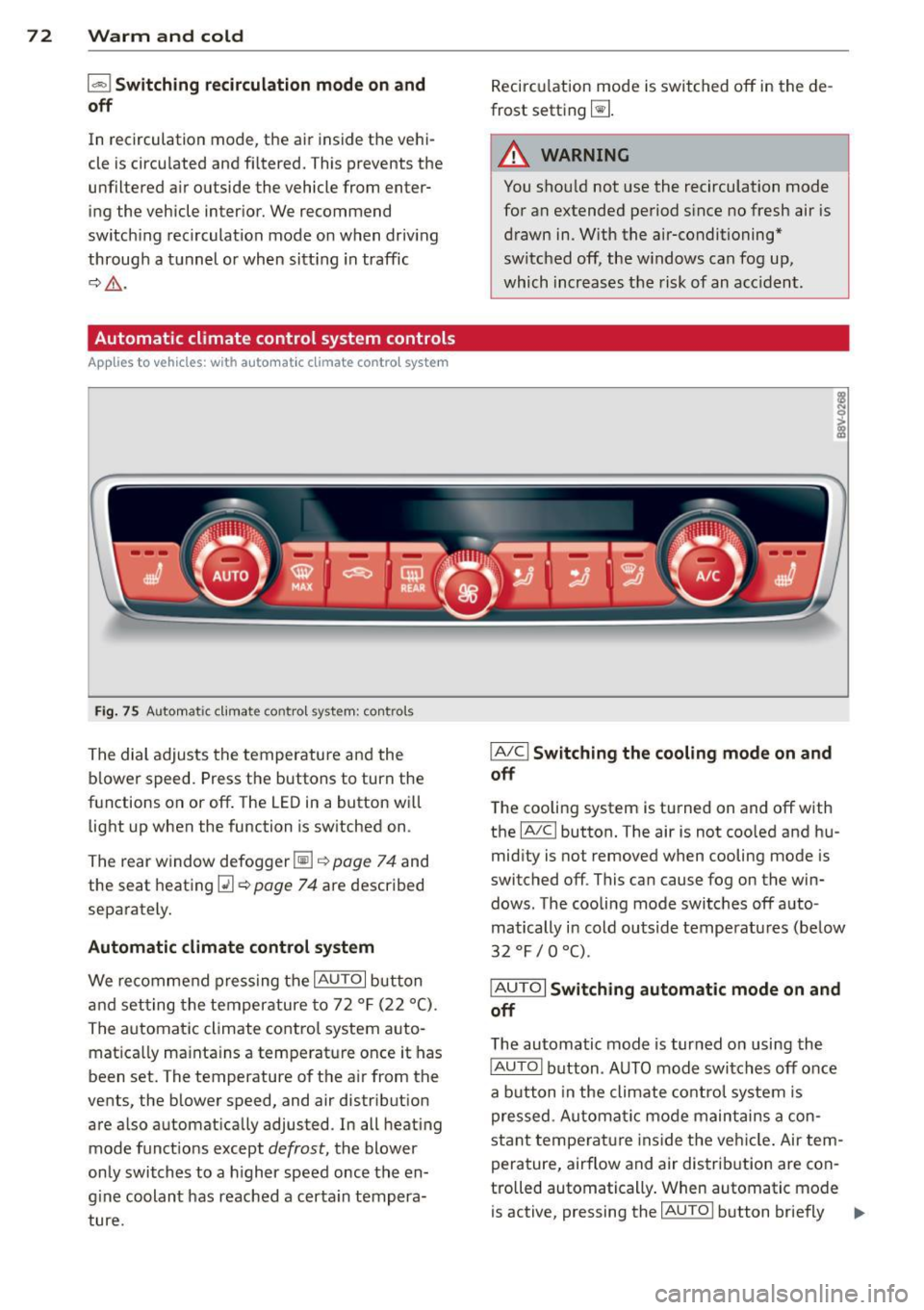
Fig . 75 A ut oma tic cl ima te co ntro l sy ste m: con trols
The dial adjusts the temperature and the
blower speed. Press the buttons to turn the
functions on or off . T he LED in a button w ill
light up when the function is sw itched on .
The rear window defogger~
c::> page 7 4 and
the seat heating
Q] c::> page 74 are described
separately.
Automatic climate control syst em
We re commend pressing the IAU TO I button
and setting the temperature to 72
°F (22 °() .
The automatic climate control system auto
matica lly ma inta ins a temperature once it has
been set. The temperature of the air from the
vents, the b lower speed, and air distribution
are also automat ically adju sted . In all heat ing
mode funct ions except
defrost, the blower
only switches to a h igher speed once the en
g ine coolant has reached a certa in tempera
ture . Recirculation mode is switched off in the de
frost setting ~-
.&_ WARNING
-You shou ld not use the recirculation mode
for an extended period s ince no fresh air is
drawn in. With the air-conditioning*
switched off, the w indows can fog up,
which increases the risk of an acc ident .
IA/ Cl Switching th e cooling mode on and
off
T he cooling system is turned on and off with
the
IA/C l button. The air is not coo led and hu
mid ity is not removed when cooling mode is
switched off . This can cause fog on the win
dows . The cooli ng mode switches off auto
matically i n cold outside temperatu res (be low
32 °F / 0 °() .
IAUTOI Switch ing automatic mode on and
off
The automatic mode is turned on using the
IAUTOI button . AUTO mode switches off once
a b utton in the climate control system is
pressed. Automatic mode maintains a con
sta nt temperature ins ide the ve hicle . Air tem
perature, airflow and air d istribution are con
trolled automatically . When automatic mode
is active, pressing the
IAU TO I button briefly IJJ,-
Page 75 of 302
M N
" > co ,...., \!) ..,.,
activates the "eco" mode*1>. I n "eco" mode*,
a ll settings are lowered slightly to save fuel.
When in "eco" mode* ,
eco is shown in the dis
play. To ex it "eco" mode*, press the
!AU TO !
button again .
I• I • I S etting the temperatu re
The temperature can be adjusted individually
for the driver and front passenger using the
dials . Temperatu res between 60 °F (+16 °C)
and 84 °F (+28 °C) can be set . Outs ide of this
range,
Lo or Hi will appear in the climate con
trol system display. In both settings, the cli mate control runs with constantly at the max
i mum cooling or heating level. The tempera
ture is not regu lated.
Syn chroni zation: By pressing the !AU TO I but
ton for two seconds , the temperat ure setting
for the driver is transferred to the front pas
senger's side. This applies a temperature
change to the front passenger's side.
~ Adjusting the blower
To prevent the windows from fogging over,
the blower shou ld always run at a low speed.
You ca n adj ust the volume of air generated by
the blower to you r preference. To have the
b lower regu la ted automatically, press the
!AU TO! button.
Adjusting th e air d istribution
The a ir distribution is adjusted with the~, [Ml
and ~ buttons. To have the air d istr ibut io n
r eg ulated automatically, press the
!AUTO ! but
ton .
The ro und air vents in the cockpit are adjusta
b le
~ page 74.
To keep the w indows from fogging in damp
weather, we recommend opening the side air
vents and t ilting them to the side
~ page 7 4, Adjusting the air vents.
Foot vents are located under the front seats
and adjustable vents on the end of the center
console to heat the rear of the vehicle.
,....,
"' l) This func tio n is not ava ilable in a ll coun tri es . ,....,
Warm and c old 73
~ Switching th e defro ster on and off
T he w indshield and side windows are defrost
ed or cleared of condensation as quickly as
poss ible . The maximum amount of air flows
main ly from the vents below the windshield.
Recircu lation mode switches off. The tempera
ture is controlled automatically. In the
[i] set
ting, the
! AIC ! cooling mode sw itches on auto
matically, depending on the outside air tem
perature .
The
! AU TO ! button sw itches the defroster off.
l""'I Sw itching recirculation mode on and
off
The recircu lation mode can be turned on man
ually or automatically* .
- Switching manual recirculation mode on and
off: Press the~ button. The LED light up
when switched on.
- Automatic* recircu lation mode: The recircu
lation mode must be activated in the MMI.
Select: the
I MENU I button >C ar> Sys tems *
contro l bu tton> A C> Auto recirculat ion .
The a ir quality sensor that is des igned for
diesel and gasoline exhaust automatically
sw itches the rec irculat ion mode on or off
depending on the leve l of po llutants in the
outs ide air .
In recirculation mode, the air inside the vehi
cle is circulated and filtered . This prevents the
unfiltered air outs ide the veh icle from e nter
ing the vehi cle interior. We recommend
switching recircu lation mode on when driving
th rough a tunne l or when sitting in traffic
~ .&. .
The 1- 1 button, IAU TO ! or the [i] bu tton
switches rec irculation mode off.
The system switches to recirculation mode
whe n driving in reve rse when the engine is
cold.
•
Page 76 of 302
7 4 Warm and cold
& WARNING
You should not use the rec irculation mode
for an extended per iod since no fresh air is
drawn in . With the ai r-conditioning switch
ed off, the windows can fog up, which in
c reases t he risk of an ac cident.
Adjusting the air vents
Fig. 76 Cockp it : adjust ing the a ir vents
®
Fi g. 77 (Canada ve hicles o nly) A ir ve nts : ad just ing t he
a irflow sett ing A ) D iffused B ) Direct
The fo llow ing settings are possible ¢ fig. 76:
- © Airflow amount
- @ Air flow d irect ion
- @
(Canada vehicles only) Air f low settings
(diffused or direct)
To adjust the
air flow amount , tu rn the ridged
outer adj usting ring©
c::> fig. 76. To stop the
air flow, turn t he adjusting ring all the way to
the right.
To adjust the
air flow direction , turn the air
ve nt gri ll insert @.
(C anada vehicles only) To ad just the air flow
setting s,
pull or press the midd le adjustment
ring @¢
fig. 76:
-Diffused air flow (indirect @): Press the
middle adjustment ri ng in lightly
c::> fig. 77 .
-Direct air f low (st raight @): Pull the center
ad justment ring o ut lightly ¢
fig. 77.
Rear window defogger
The LED in the button t urns on when the func
tion is switched on:
-
~ M anual climate contro l system
c::> page 71, fig . 74
-00 Automatic climate contro l system
¢ page 72, fig . 75 .
If the rear w indow defogger is activated w hen
t h e igni tion is switched on, the bat tery man
agement determines based on the battery
c h arge if i t is poss ible to turn on . Otherw ise,
the rear window defogge r funct ions w it h the
engine running and switches off automatically
after approximately 10 -20 minutes, depend
i ng on the outs ide temperature .
T o p revent the rear window defogger f rom
switching off automatically, press and hold
t h e
@ii or 00 button for more than two sec
onds. This rema ins stored up to approxima tely
15 minutes afte r turning off the ign ition .
Seat heating
Applies to veh icles : w it h seat heat ing
The seat heating has th ree leve ls. The LED in
the b utt on indica tes the sele cted heat leve l.
Manua l climate control system
c::> page 71,
fig . 74
and automatic climate control system
c::> page 72, fig . 75 .
"'To switch the seat heating on, press the lt:J
button once .
"' To swi tch to a lower level , press the
lt:I but
ton again .
"' To swi tch the sea t heating off, press the
lt:J
but ton re peat edly unt il t he L ED turns off .
T he seat heating swi tches a utomat ica lly from
setting 3 to setting 2 after 10 minutes.
Iii>
Page 77 of 302
M N ,....
> co ,...., \!) 1.1'1 ,...., 1.1'1 ,....,
When seat heating should not be
sw itch ed on
Do not turn the seat heating on under the fol
l owing circumstances:
- T he seat is unoccupied.
- T he seat is covered w ith a seat cover.
- The seat is covered w ith a ch ild seat .
- The seat is damp or wet .
A WARNING
Individuals with reduced sensitivity to pain
or temperatu re could develop burns when
using the seat heating function. To reduce
t he risk of inju ry, these individ uals should
not use seat heating.
(D Note
To avo id damage to the heating elements
in the seats, do not kneel on the seats or
p lace heavy loads on a small area of the
seat.
(D Tips
- The se tti ng fo r the seat heating on the
driver's side is assigned to the key that is
1 n use .
- If the fron t passenger's seat heating is
turned on, it will not turn on again auto
ma tically if more than
1 0 minutes have
passed between switching the ignition
off and switching it on aga in.
Warm and c old 75
•
Page 87 of 302
....,
N
r--. > co
rl I.O
"' rl
"' rl
off when the speed decreases below the stor
ed maximum speed.
Setting a thresho ld is recommended if yo u
wo uld like to be reminded when you reach a
certain maximum speed . Situations where you
may want to do so include d riving in a country
with a general speed limit or if there is a
specified max imum speed for winter tires.
@ Tips
Regard less of the speed warning system,
you shou ld always mon itor your speed us
ing the speedometer and make sure you
are following the legal speed limit.
Setting the threshold
You con set, change and delete the threshold
in the MMI.
• Se lect : the
IMENU ! button> Car> System s*
control button > Driv er assist an ce > Speed
w arning .
You can set any thresho ld between 20 mph
(30 km/h) and 150 mph (240 km/h). Settings
can each be adjusted in increments of 6 mph
(10 km/h).
Cruise control system
Description
Appl ies to vehicles : with cruise con trol system
The c ruise control system makes i t possible to
d rive at a constant speed starting at lS mph
(20 km/h).
The speed is kept constant by modify ing en
g ine power or through an a ct ive brake in ter
vention.
A WARNING
- Always pay attention to the traffic
around you when the cruise control is in
operation. You are always responsible for
your speed and the distance between
your vehicle and other vehicles.
- For reasons of safety, cruise contro l
should not be used in the c ity, in stop-
Dri vin g 85
and-go traffic, on winding roads and
when road cond itions are poor (such as
ice, fog, gravel, heavy rain and hydro
plan ing) -you could have an accident.
- Switch the cruise control off temporarily
when dr iv ing in turning lanes, h ighway
e xits or in construction zones.
- Please note that unconsc iously "resting"
your foot on the accelerator pedal p re
vents t he cr uise control from b raking.
This is due to the control system be ing
over ridden by the dr iver's acceleration .
- If the re is a brake system malfunct ion
such as overheating when the spee d
warn ing system is switched on, the bra k
ing f unction in the system w il l be deac ti
vated . The remaining speed warning sys
tem fu nctions will remain active, as long
as the
Ill ( U SA mode ls) I l'I (Canada
models) indicator light is on.
(D Tips
- T he cr uise control system is ideal fo r
st retches wit h speed limits. The driver is
responsib le for adhering to the correct
speed.
- The cr uise control remains act ive when
shift ing gears.
- The b ra ke lights turn on when the b rakes
are act ivated.
Switching on
Applies to vehicles: with cruise control system
Fi g. 83 Operat ing lever: Cruise control system
• To swi tch the cruise cont ro l on, p ull the lev
er into pos it ion @
~fig. 83.
• Dr ive at the speed to be maintained.
Page 118 of 302
116 Automatic tran smi ssio n
Launch Control-Program
Ap plies to vehicles: with launch co ntrol
The Launch Control Program enables maxi
mum acceleration .
Requirement: The engine must be at operat
ing temperature and the steering wheel must
not be turned .
• With the engine running, press the
l~ OFFI
button briefly one time ll .
• Pull the selector lever back out of the D/S
position briefly to select the S position, or
press it toward the rig ht into the tipt ronic
pos it ion or select the
dynami c driving mode
in drive select*
~ page 107.
• Press the brake peda l firmly with your left
f oot and hold it all the way down for at least
1 second .
.. At the same time, press the gas peda l all the
way down with your right foot unti l the en
gine reaches and stays at a high RPM level.
• Remove your left foot from the brake.
A WARNING
- Always adapt your driving to the traffic
flow.
- Only use Launch Contro l when road and
t raff ic conditions a llow it and othe r driv
ers w ill not be endangered or impacted
by you r driv ing and the veh icle's acceler
ation.
- Please note that the drive whee ls can
spin and the vehicle can brea k away
when sport mode is sw itched on, espe
cially when the road is slippery.
- Once the vehicle has s tarted moving,
press the
I ~ OFF ! button br iefly to turn
the sport mode off.
@ Tips
- The transm ission tempera ture may in
crease significantly after using the
l ) In vehicles with a drive r inform ation system, an ESC
l ig ht in t he in strume nt cl us te r stays on cont inuously
and the m essage
Stabili zatio n co ntrol (ESC): spo rt.
W arn ing! Restricted st ability
appears te mpo rarily.
Launch Control Program . If that hap
pens, the program may not be availab le
for a few minutes . It will be ava ilable
again after a cool-down period.
- When accelerating using the Launch
Contro l Program, all vehicle parts are
subject to heavy loads. Th is can lead to
increased wear.
Emergency mode
Applies to vehicles: wit h S tronic transm issio n
In the event of a system malfunction, there is
an emergency program.
If all of the selector lever positions are high
li ghted with a light background in the instru
ment cluster d isp lay, there is a system mal
funct ion and the S tronic transmission is run
ning in the emergency program . The vehicle
can still be driven in emergency mode, but on
ly w it h reduced speed and not in all gears. In
some cases, the ve hicl e
cann ot driv e in re
v e rs e .
d) Note
If the transmission runs in emergency
mode, drive to your author ized Audi dealer
or q ualified repa ir fa cility immed iate ly to
have the ma lf u nct ion corrected.
Transmission malfunction
• Tran smi ssion m alfu ncti on! Please st op
the vehicle and select P
T he re is a malfunction in the transmiss ion .
Park the ve hicle securely and do not continue
driv ing. See an authorized A udi dealer or au
thorized Audi Service Facility for assistance.
• Tran smi ssion o verheating! Plea se stop
the vehicle!
The transm iss ion is too hot and can become
damaged . Stop and let the t ransmission cool .,.
Page 119 of 302
....,
N
r--. > co
rl I.O
"' rl
"' rl
with the engine running (at id le) in the P se
l ecto r lever positio n. The n the indicator light
and the message turn off , d rive to an author
i z ed A udi dealer or qualified repair facility im
mediately to have the malfunct ion corrected.
If the i ndicator light and the drive r message
do not tur n off, do not cont inue dr iv ing. See
an author ized Audi dealer or authori zed A udi
S ervi ce Fa cility for assis tan ce.
DD Transmiss ion malfunction: you can con
tinue driving
Drive to an authori zed Aud i dea ler or a uthor
ized Audi Service Facility immed iate ly to have
the ma lfunction corrected .
DD Transmission malfunction: no reverse
gear (you can continue driving )
Drive to an aut ho rized Aud i dea le r o r a uthor
ized A udi Service Facility immed iate ly to have
the ma lfunction cor rected .
DD Transmi ssion malfunction: You can con
tinue dri ving in D until engine off
D rive t he ve hicle away from mov ing t raff ic and
par k. See an au thori zed A ud i d ealer or au tho r
iz ed A udi Service Faci lity for assis tance .
DD Transmi ssion overheating! Please adapt
driving style
Continue dr iving moderate ly . W hen t he indi
cator light tur ns off, you can continue dr iving
normally .
DD Transmiss ion : Please press brake pedal
and select gear again
I f the tra nsmission mal functions beca use the
temperature is too high , a message appears
when the transmission is cooled.
Autom atic transm ission 11 7
Selector lever emergency release
Applies to vehicles: with S tronic transmission
If the vehicle's power supply fails , the selec
tor lever can be released in an emergency .
Fig. 110 Se lector leve r: remov ing t he cover
Fig . 1 11 Se lector lev er: Us ing t he e mergency re lea se
to move out of the Park pos it io n
The emergency release mechanism is located
in the right area under the selector lever sh ift
gate. Using the emergency release ca n be
complicated. We recommend contacting an
autho rized Aud i dea le r or a uthorized Audi
Se rv ice Facili ty for assistance, if necessa ry.
The screwdriver from the ve hicle too l kit locat
ed in the luggage compa rtment is needed to
fo r the em ergency re lease <=:>
page 261 . Use
the flat side of the reversible screwdriver
blade .
Removing the selector lever cover
... Set the park ing brake «e)) <=:> &. to secure
your veh icle from rolling .
... Insert t he flat side of the scr ewdrive r side
ways in the s lot near the s hift cover a nd p ry
t he shift cove r up
<=>fig. 11 0 .
... Pull u p the co rners of the s hift cove r ca reful
ly wi th yo ur hands and fold it over the s hift-
er knob
r::!) fig. 111 . ..,.