ABS AUDI A3 SEDAN 2017 Owner's Manual
[x] Cancel search | Manufacturer: AUDI, Model Year: 2017, Model line: A3 SEDAN, Model: AUDI A3 SEDAN 2017Pages: 400, PDF Size: 67.32 MB
Page 285 of 400
a, a, ..... N
" N ..... 0 N > 00
action is entered in your Audi Warranty &
Maintenance booklet under
AIRBAG RE
PLACEMENT RECORD.
- Applies to plug-in hybrid* vehicles: In the
event of a co llision where the a irbags de
ploy, the electrical connection to the high
voltage battery is automatically disconnect
ed. This prevents a short c ircuit.
@) For the sake of the environment
Undep loyed airbag modules and pretension
ers might be classified as Perch lorate Materi
al - special handling may apply, see
www.dtsc.ca.gov/hazardouswaste/perchlo
rate. When the veh icle or parts of the re
straint system incl uding airbag modules and
safety belts with pre tensioners are scrapped,
all applicable laws and regulations must be
observed. Your authorized Audi dealer is fa
miliar with these requirements and we recom
mend that you have your dealer perform this
service for you.
Other things that can affect Advanced
Airbag performance
Changing the vehicle's suspension system can
change the way that the Advanced Airbag Sys tem
performs in a crash. For examp le, using tire-r im
combinations not approved by Audi, lowering the
vehicle, changing the stiffness of the suspension, including the springs , suspension struts, shock
absorbers etc. can change the forces that are
measured by the airbag sensors and sent to the
electronic control unit . Some suspens ion changes
can, for example, increase the force levels meas
ured by the sensors and make the airbag system
deploy in crashes in wh ich it would not dep loy if
t he changes had no t been made. Other kinds of
changes may reduce the force levels meas ured by
the sensors and prevent the airbag from deploy ing when it should.
.&_ WARNING
Changing the vehicle 's s uspension incl uding
use of unapproved tire-rim combinations can
change Advanced A irbag performance and in-
Airb ag sys tem
crease the risk of serious personal injury in a
crash.
- Never install suspension components that
do not have the same performance charac
ter istics as the components originally instal
led on your vehicle.
- Never use tire-rim combinations that have
not been approved by Audi.
Knee airbags
Description of knee airbags
Applies to: vehicles wit h knee airbags
The knee airbag system con provide supplemen
tal protection to properly restrained front seat
occupants.
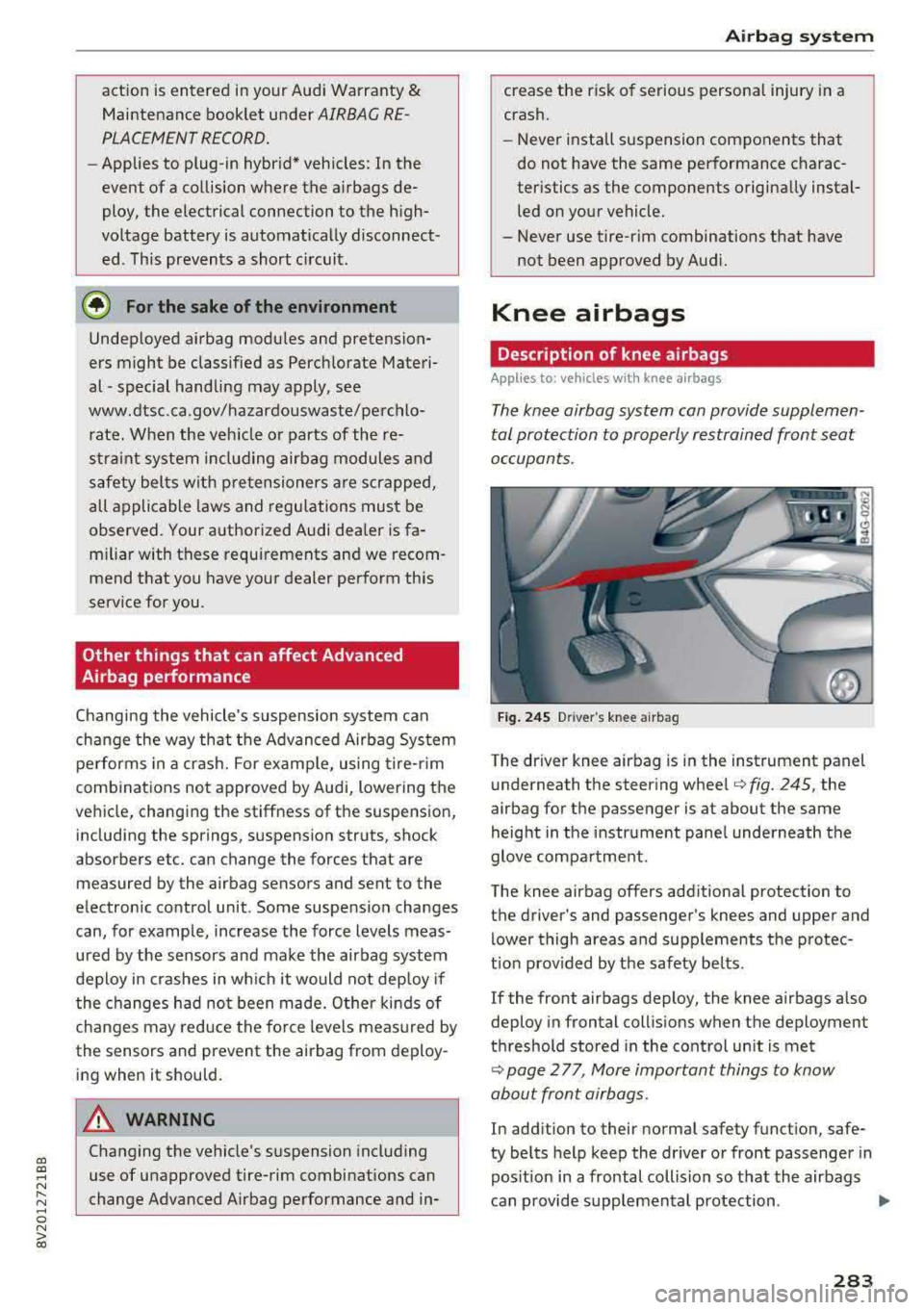
F ig . 24 S Driver 's knee airbag
The driver knee airbag is in the instrument panel
underneath the steering
whee l¢ fig. 245, the
airbag for the passenger is at about the same
height in the instrument pane l underneath the
glove compartment.
The knee airbag offers additiona l protection to
t h e driver's and passenger's knees and upper and
lower thigh areas a nd supplements the p rotec
t io n prov ided by the safety belts .
If the front airbags deploy, the knee airbags also
deploy in frontal collis ions when the deployment
threshold stored in the control un it is met
¢ page 2 77, More important things to know
about front airbags .
In addition to their normal safety function, safe
ty belts help keep the dr iver or front passenger in
pos it ion in a frontal collision so t hat the airbags
can p rovide supplemental protection .
..,.
283
Page 304 of 400

Child safety
Booster seats and safety belts
Properly used booster seats can help protect
children weighing between about 40 lbs . and 80
lbs. (18 kg and 36 kg) who are less than 4
ft. 9
in. (57 inches/1.45 meters) tall .
Fig. 256 Rear seat: child properly restrained in a booster
seat
The vehicle's safety belts alone will not fit most
children until they are at least 4
ft. 9 in. (57 in
ches/1.45 meters) tall and weigh about 80 lbs.
(36 kg). Booster seats raise these children up so
that the safety belt will pass properly
over the
stronger parts of their bodies and the safety belt
can help protect them in a crash.
• Do not use the convertible locking retractor
when using the vehicle's safety belt to restrain
a child on a booster seat.
• The shoulder belt must lie as close to the cen
ter of the child's collar bone as possible and
must lie flat and snug on the upper body. It
must never lie across the throat or neck. The
lap belt must lie across the pelvis and never
across the stomach or abdomen . Make sure the
belt lies flat and snug. Pull on the belt to tight
en if necessary .
• Applies to: vehicles with safety be lt height ad
justment: If you must transport an older child
in a booster seat on the front passenger seat,
you can use the safety belt height adjustment
to help adjust the shoulder portion properly.
• Secure unused safety belts on the rear seat
qpage298 .
Children up to at least 8 years old (over 40 lbs or
18 kg) are best protected in child safety seats de
signed for their age and weight. Experts say that
the skeletal structure, particularly the pelvis, of
302
these children is not fully developed, and they
must not use the vehicle safety belts without a
suitable child restraint.
It is usually best to put these children in appro
priate booster seats. Be sure the booster seat
meets all applicable safety standards.
Booster seats raise the seating position of the
child and reposition both the lap and shoulder
parts of the safety belt so that they pass across
the child 's body in the right places. The routing of
the belt over the child's body is very important
for the child's protection, whether or not a boos
ter seat is used. Children age 12 and under must
always ride in the rear seat .
Children who are at least 4 ft. 9 in. (57 inches/
1.45 meters) tall can generally use the vehicle's
three point lap and shoulder belts. Never use the
lap belt portion of the vehicle's safety belt alone
to restrain any child, regardless of how big the
child is. Always remember that children do not
have the pronounced pelvic structure required for
the proper function of lap belt portion of the
ve
hicle's three point lap and shoulder belts. The
child's safety absolutely requires that a lap belt
portion of the safety belt be fastened snugly and
as low as possible around the pelvis. Never let
the lap belt portion of the safety belt pass
over
the child's stomach or abdomen.
In a crash, airbags must inflate within a blink of
an eye and with considerable force. In order to do its job , the airbag needs room to inflate so that it
will be there to protect the occupant as the occu pant moves forward into the airbag.
A vehicle occupant who is out of position and too
close to the airbag gets in the way of an inflating
airbag. When an occupant is too close, he or she
will be struck violently and will receive serious or
possibly even fatal injury.
In order for the airbag to offer protection, it is
important that all vehicle occupants, especially
any children, who must be in the front seat be
cause of exceptional circumstances, be properly
restrained and as far away from the airbag as
possible. By keeping room between the child's
body and the front of the passenger compart-
ment, the airbag can inflate completely and
..,.
Page 337 of 400
a, a, ..... N
" N ..... 0 N > 00
fo r t he numb er of seating p osi
t io ns . R efe r to th e ta bl e
¢ ta ble
o n pag e 33 8 for th e number of
p eople th at co rrespo nd to th e ve
hi cle n orm al l oa d.
New tires or wheels
Aud i recommends having all work on tires or
wheels performed by an authorized Audi dealer
or author ized Audi Se rvice Facility . These fac ili
ties have the proper know ledge and are equipped
with the required too ls and replacement parts.
• New tires do not yet have the optimum grip
ping properties. Drive caref ully and at moder
ate speeds for the first 350 mi les (500 km)
with new tires.
• Only use tires w it h the same design, size (roll
i ng c ircumference) and as close to the same
tread patter n as poss ible on all four wheels .
• Do not replace t ires individua lly. At least re
pla ce both t ires on the same axle at the same
t ime .
• Audi recommends that you use Aud i Original
Tires . If you wou ld like to use different tires,
please note that the tires may perform differ
ently even if they are the same
si ze ¢ ,& .
• If you would like to equip your veh icle w ith a
tire/rim comb inat ion that is different from
what was installed at the factory, consult w ith
an aut horized Aud i dea ler o r authorized Audi
Se rvice Facility befo re making a
purchase ¢,& .
The spare tire* is different from the regular tires
insta lled on the veh icle
-for example, if w inter
tires or w ide tires a re ins talled
-so only use the
spa re ti re* tempo rar ily in case of emergen cy and
d rive caref ully wh ile i t is in use . It should be re
p laced w it h a regular t ire as soon as possib le.
Applies to: vehicles with all wheel drive: all four
wheels must be eq uipped w ith tires that are the
same brand and have the same construc tion and
tread pattern so that the drive system is not
damaged by different wheel speeds. For this rea
son , in case of eme rgency, only use a spare tire*
Wheels
that is the same circ umfe rence as the regular
tires.
A WARNING
--On ly use t ire/rim comb inations and suitab le
wheel bo lts that have been approved by
Aud i. Otherwise, damage to the vehicle and
a n accident could res ult.
-For technical reasons, it is not possible to
use t ires from other ve hicles
-in some cas
es, yo u cannot even use tires from the same
veh icle model.
-Make sure that the tires you select have
e nough clearance to the veh icle. Rep lace
ment tires should not be chosen s imply
based on the nomina l size, because ti res
wit h a differe nt constru ction can diffe r
g reatly even if they are the same size . If
there is no t enough clearance, the tires or
the vehicle can be damage d and this can re
duce dr iving safety and increase the risk of
an accident.
-On ly use t ires that are more than s ix years
old when absolutely necessa ry and drive
carefully when doing so.
- Do not use run -flat tires on your vehicle . Us
ing them when not perm itted can lead to
veh icle damage or accidents.
- If you install wheel covers on the vehicle, make sure they allow enough air circulation
to cool the brake system. If they do not, t his
could increase the risk of an acc ident.
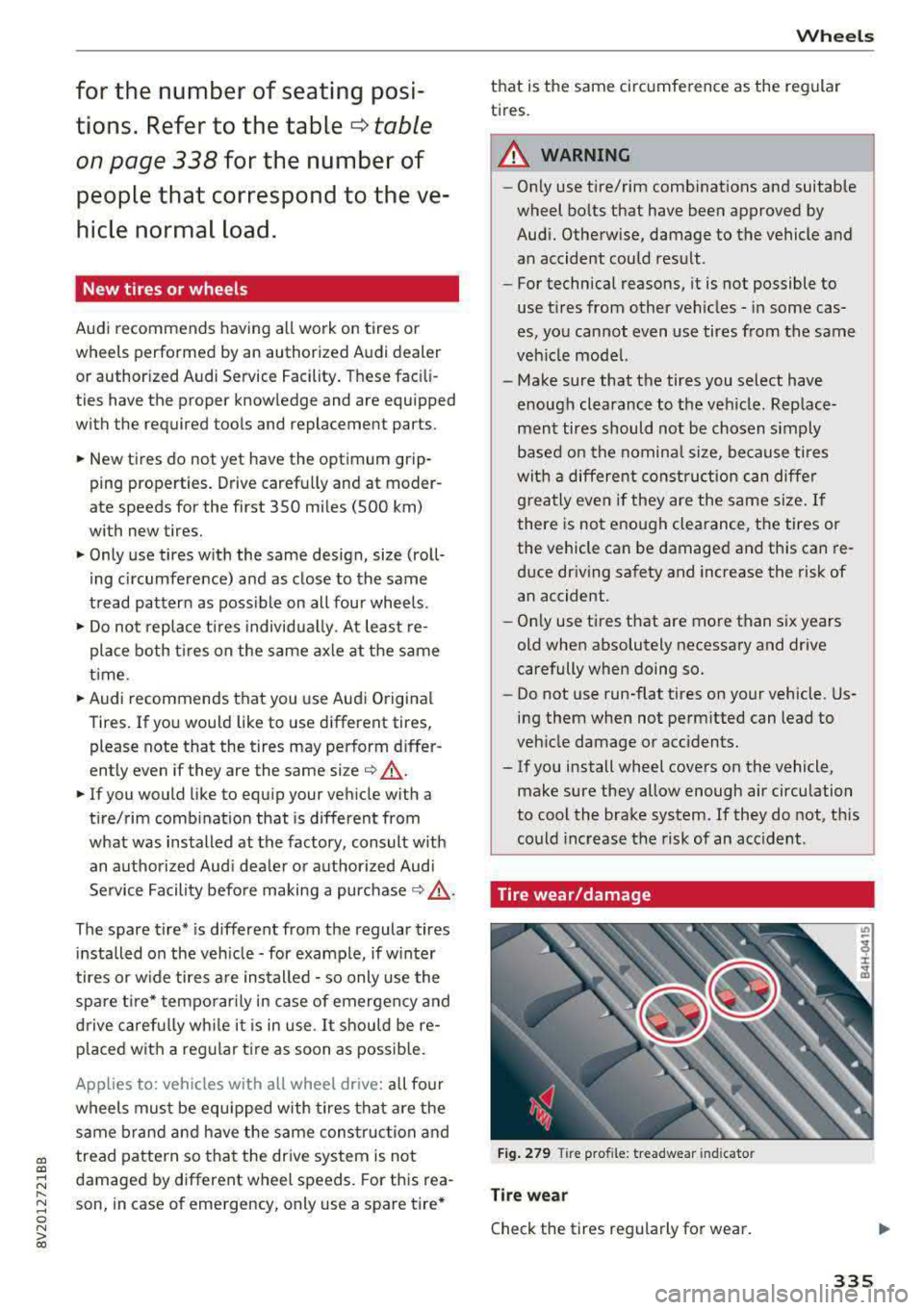
Tire wear/damage
F ig . 279 Tire pro file: treadwear indicato r
Tire we ar
Check the tires regu larly for wear.
335
Page 347 of 400
CXl CXl .... N ,.__
N .... 0 N > 00
label, you should determine the proper tire infla
tion pressure for those tires).
As an added safety feature, your veh icle has been
eq uipped w ith a t ire pressu re monitoring system
(TPMS) that illuminates a low tire press ure te ll
tale when one or more of your tires is significant l y under- inflated. Accordingly, when the low tire
pressure tellta le illuminates, you should stop and
check your tires as soon as possible, and inflate
them to the proper pressure . Driving on a s ignifi
cantly under- inflated tire causes the tire to ove r
h eat and can lead to t ire failure. Unde r-inflation
a lso reduces fuel efficiency and tire tread life,
and may affec t the vehicle's handling and stop
p ing ability .
P lease note that the TPMS is not a substitute for
p roper tire maintenance, and i t is the d rive r's re
sponsib ility to ma inta in cor rec t tire p ressure,
even if under-inflation has not reached the leve l
to trigger illumination of the TPMS low tire pres
sure tellta le .
Your veh icle has also been eq uipped w ith a TPM S
mal funct ion indicator to indicate when the sys
tem is not operating properly . The TPMS ma l
function indicator is combined with the low tire
pressure tellta le. When the system detects a
malfunct ion, the telltale will flash for approxi
mately one minute and then remain cont inuously
i l lum inated . This sequence will continue upon
subseq uent ve hicle start-ups as long as the ma l
function ex ists .
When the malfunct ion indicator is illuminated,
the system may not be ab le to detect or signal
low t ire press ure as intended. TPM S malf unctions
may occur for a var iety of reasons, including the
i nstalla tion of replacement o r alte rnate t ires o r
wheels o n the vehicle that prevent the TPM S
from func tioning properly. Always chec k the
TPMS malfunction telltale afte r rep lacing one or
more tires or whee ls on your ve hicle to ensure
that the replacement or alternate tires and
wheels allow the TPMS to cont inue to function
properly.
Wh eel s
If the tire pressure indicator appears
App lies to : vehicles wi th Tire Pressure Monito rin g Syste m in
dicator
The tire pressure indicator in the instrument
cluster informs you if the tire pressure is too low
or if there is a system malfunction.
U sing the ABS sensors, the tire pressure monitor
ing system compares the tire tread c ircumfer
ence and vibration characterist ics of the ind ividu
al tires. If the pressure changes in one or more
t ires, th is is indicated in the instrument cluster
display with an
[I] indicator light and a message .
If only one tire is affected, the location of that
t ir e will be indicated.
The tire pressures must be stored in the menu display again each t ime the p ressures change
(swi tching between partial and full load pres
s ur e) o r after changing or replacing a ti re o n your
vehicle
Q page 346. T he tire p ressure mo nitor
ing system on ly monitors the t ire pressure you
have stored. Refer to the tire pressure label for
the recommended tire pressure for yo ur vehicle
c:> page 336, fig. 281.
T ire tread c ircumference and vibra tion characte r
istics can change and ca use a tire press ure wa rn
ing if:
- t he t ire pressure in one or more ti res is too low.
- the t ire has str uctural damage.
- t he t ire was replaced or the t ire pressure was
changed and it was not stored
c:> page 346.
- one side of the vehicle is more heavi ly loaded
than the othe r.
- the wheels on one axle are more heavily loaded
than the othe rs (for example, when towing a
t ra ile r or when driving up and down hi lls).
- snow chains are installed .
- the spare tire* is installed.
- only one tire was replaced on eac h axle.
Indicator lights
[I] -Loss of pressu re in at least one tire c:> ,&. .
Check the tires and replace or re pair if necessary .
Check/correct the pressures of all fou r tires . Then
store the tire pressures in the menu
Q page 346 .
m (T ire Pressure Mon itor ing Sys tem) Tir e
pre ssure: System malfunction!.
If m appears 1JJ,,
345
Page 348 of 400
Wheels
after switching the ignition on or while driving
and the
[tlJ indicator light in the instrument clus
ter blinks for approximately one minute and then
stays on, there is system malfunction. Check/cor rect the pressures on all four tires and store the
pressures
Q page 346 . If the indicator light does
turn off or turns on again after a short period of
time, drive to an authorized Audi dealer or au
thorized Audi Service Facility immediately to have
the malfunction corrected.
A WARNING
- If the tire pressure indicator appears in the
instrument cluster display, reduce your
speed immediately and avoid any hard
steering or braking maneuvers. Stop as soon
as possible and check the tires and their
pressures.
- The driver is responsible for maintaining the correct tire pressures. You must check the
tire pressures regularly.
- Under certain conditions (such as a sporty
driving style, winter conditions or unpaved
roads), the pressure monitor indicator may
be delayed.
- Do not use run-flat tires on your vehicle. Us
ing them when not permitted can lead to
vehicle damage or accidents.
@ Tips
- The tire pressure monitoring system can al
so stop working when there is an ESC/ABS
malfunction.
- Using snow chains may result in a system
malfunction.
- The tire pressure monitoring system in your
Audi was calibrated with "Audi Original
Tires"
¢ page 335. Using these tires is rec
ommended .
- The tire pressure monitoring system can on
ly monitor the tire pressure of the driving
tires. Check the tire pressure of the spare
wheel in the luggage compartment so that
if necessary it is ready for use.
346
· Storing tire pressures
Applies to: vehicles with Tire P ressure Monitoring System in
dicator
A change in tire pressure or a change in tires
must be stored in the system.
Before storing the tire pressures, make sure the
tire pressures of all four tires meet the specified
values and are adapted to the load¢
page 335.
.,. Select in the Infotainment system: IMENU ! but
ton
> Vehicle > Service & checks > Tire pres
sure monitoring
> Store tire pressure > Yes,
store now.
(D Tips
Do not store the tire pressures if snow chains
are installed.
Page 352 of 400
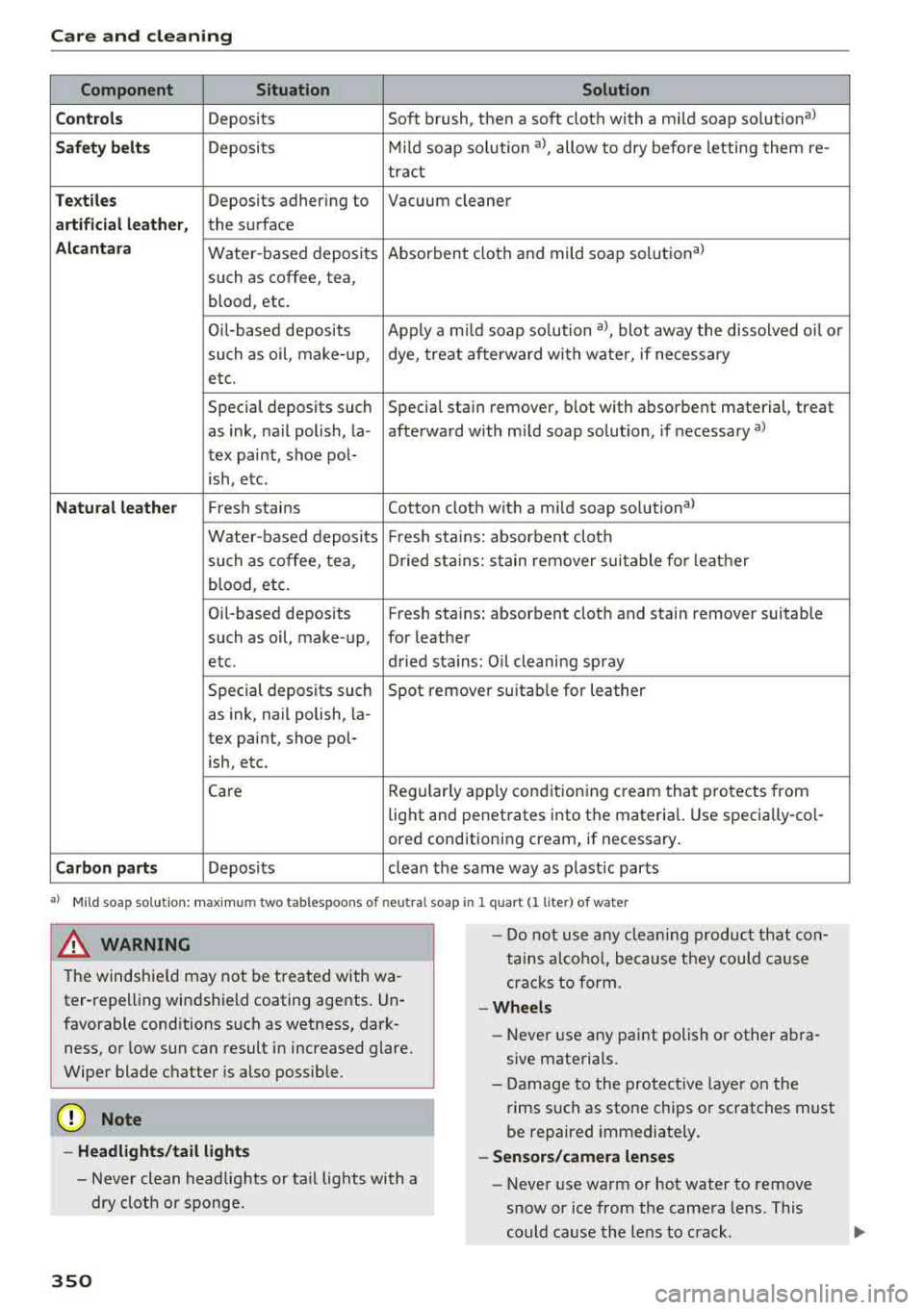
Care and cleaning
Component Situation Solution
C ont rols
Deposits Soft brush, then a soft cloth with a mild soap solution a)
Safet y belt s Deposits M
ild soap so lution a), allow to dry befo re letting them re-
tract
Te xt ile s Deposits adhering to Vacuum cleaner
artifi cial le athe r, the surface
Alcantara Water -based deposits Absorbent cloth and mild soap solutional
such as coffee, tea,
blood , etc.
Oi l-based deposits Apply a m ild soap so lution al, blot away the dissolved oi l or
such as oil, make-up , dye, treat afterward with water, if necessary
etc.
Special deposits such Special sta in remover, blot with absorbent material, treat
as ink, na il polish, la -afterward with mild soap solution, if necessary al
tex paint, shoe pol-
ish, etc.
N atu ral leath er Fresh stains Cotton cloth with a mild soap so lutiona )
Water-based deposits Fresh sta iins: absorbent cloth
such as coffee, tea , Dried st ains: stain remover suitable fo r leathe r
blood , etc.
Oil-based deposits Fresh
sta iin s: absorbent cloth and stain remover suitable
such as oil, make -up, for leather
etc. dried stains: Oil cleaning spray
Special deposits such Spot remover suitab
le for leather
as ink, nail polish, la-
tex paint, shoe pol-
ish, etc.
Care Regularly apply conditioning cream that protects from
light and penetrates into the materia l. Use specially-co l-
ored cond itioning cream, if necessary .
Carbon part s Deposits clean the same way as plastic parts
a) M ild soap so lution: maxim um two tabl espoo ns o f neu tral s oa p in 1 quart (l lite r) of water
8_ WARNING
-The windshie ld may not be treated with wa-
ter-repelling windshield coating agents. Un
favorable conditions such as wetness, dark ness, or low sun can result in increased glare.
Wiper blade chatter is also possible.
Q;) Note
- Headl ights /tail li ght s
- Never clean headlights or ta il lights with a
dry cloth or sponge .
350
-
-Do not use any clea ning product that con
tains alco ho l, because they could cause
crac ks to form.
-Whe els
- Never use any paint polish or other abra-
sive materials.
- Damage to the protect ive layer on the
rims such as stone chips or scratches must
be repaired immediately.
- Sensors /camera lenses
- Never use warm or hot water to remove
snow or ice from the camera lens . This
could cause the lens to crack.
Page 356 of 400
Emergency assistance
• To open the side pane l, turn the lock and re
move the
cover @*/ @ ¢ fig. 283.
• Lift the cargo floor using the plastic handle @
un til the cargo floor engages behind the tabs
© in both side panels¢ fig. 284 (upper im
age) .
• Fold the cargo floor back before closing the
luggage compartment lid.
Vehicle tool kit and cargo floor cover
App lies to: ve hicles w ith versio n 2
The vehicle too l kit, tire mobility kit* and com
pressor* are stored in the luggage compartment
under the cargo floor
cover @¢ fig. 283 .
• Engage the plastic hook® in the luggage com
partment
seal ¢ fig. 284.
• Fold the cargo floor back before closing the
luggage compartment lid .
.&_ WARNING
Improper use of the vehicle jack can cause se
r ious personal injuries.
- Never use the screw driver hex head to
tighten wheel bolts, since the bolts cannot
attain the necessary tightening torque if you
use the hex head, potentially causing an ac
cident.
- T he factory-supplied jack is intended only
for your vehicle model. Under no circum
stances should it be used to lift heavy
vehicles or other loads; you risk injuring
yourself.
- Never start the engine when the vehicle is
raised, which could cause an accident.
- Support the vehicle securely with appropri
ate stands if work is to be performed under
neath the vehicle; otherwise, there is a po
tent ial risk for injury.
- Never use the jack supplied with your Audi
on another vehicle, particularly on a heavier
one. The jack is only suitable for use on the
vehicle it came w ith.
@ Tips
The vehicle jack* in your vehicle is mainte
nance-free.
354
Tire mobility kit
Preparation
App lies to: vehicles with tire mobility kit
• Read and fo llow the important safety precau-
tions
in ¢ page 353.
• Set the parking brake.
• Move the selector lever into the P position.
• Check if a repair with the tire mobility kit is pos
sible
¢ page 354.
Using the tire mobility kit
Applies to: vehicles wit h tire mobility kit
Fig. 285
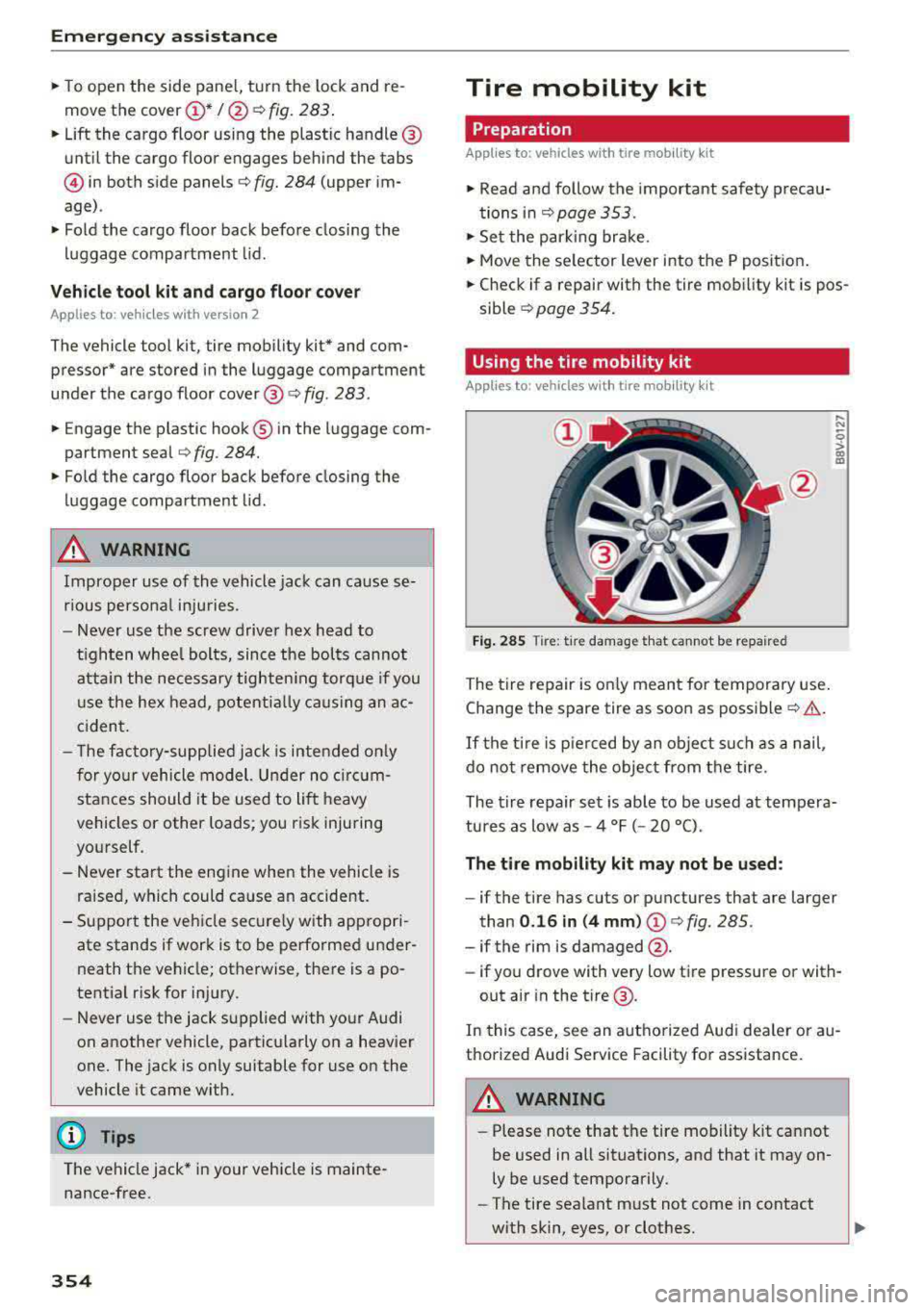
Tire: t ir e damage that cannot be repaired
The tire repair is only meant for temporary use .
Change the spare tire as soon as possible
c:;> .&..
If the tire is pierced by an object such as a nail ,
do not remove the object from the tire.
..... N
0
> 00 m
The tire repair set is able to be used at tempera
tures as low as -4 °F ( -20 °C).
The tire mobility kit may not be used :
-if the tire has cuts or punctures that are larger
than
0.16 in (4 mm) (!)¢ fig. 285.
-if the rim is damaged @.
- if you drove with very low tire pressure or with-
out air in the tire @.
In this case, see an authorized Aud i dea ler or au
thorized Audi Service Facility for assistance.
~ WARNING
-Please note that the tire mobility kit cannot
be used in all situations, and that it may on
ly be used temporarily.
-The tire sealant must not come in contact
with skin, eyes, or clothes.
Page 365 of 400
a, a, ..... N
" N ..... 0 N > 00
Removing the subwoofer
• Lift up the cargo floor ¢ page 362, fig. 295.
• Press the connector tabs CD¢ fig. 297 togeth
er.
• Remove the connector @and set the discon-
nected cab le aside.
• Remove the bolt@.
• Carefully remove the subwoofer .
Installing the subwoofer
• Carefully place the subwoofer in the rim wel l.
The word "FRONT" on the subwoofer must face
forward.
• Insert the connector that was removed .
• Secure the subwoofer with the bolt.
• Fold the cargo floor cover back into place .
@ Tips
The subwoofer can also be mounted when the
spare tire is not in the spare wheel wheel.
Removing the subwoofer (version 2)
App lies to: vehicles with subwoofer in the spare wheel well
The subwoofer must be removed before the
spore wheel* can be removed .
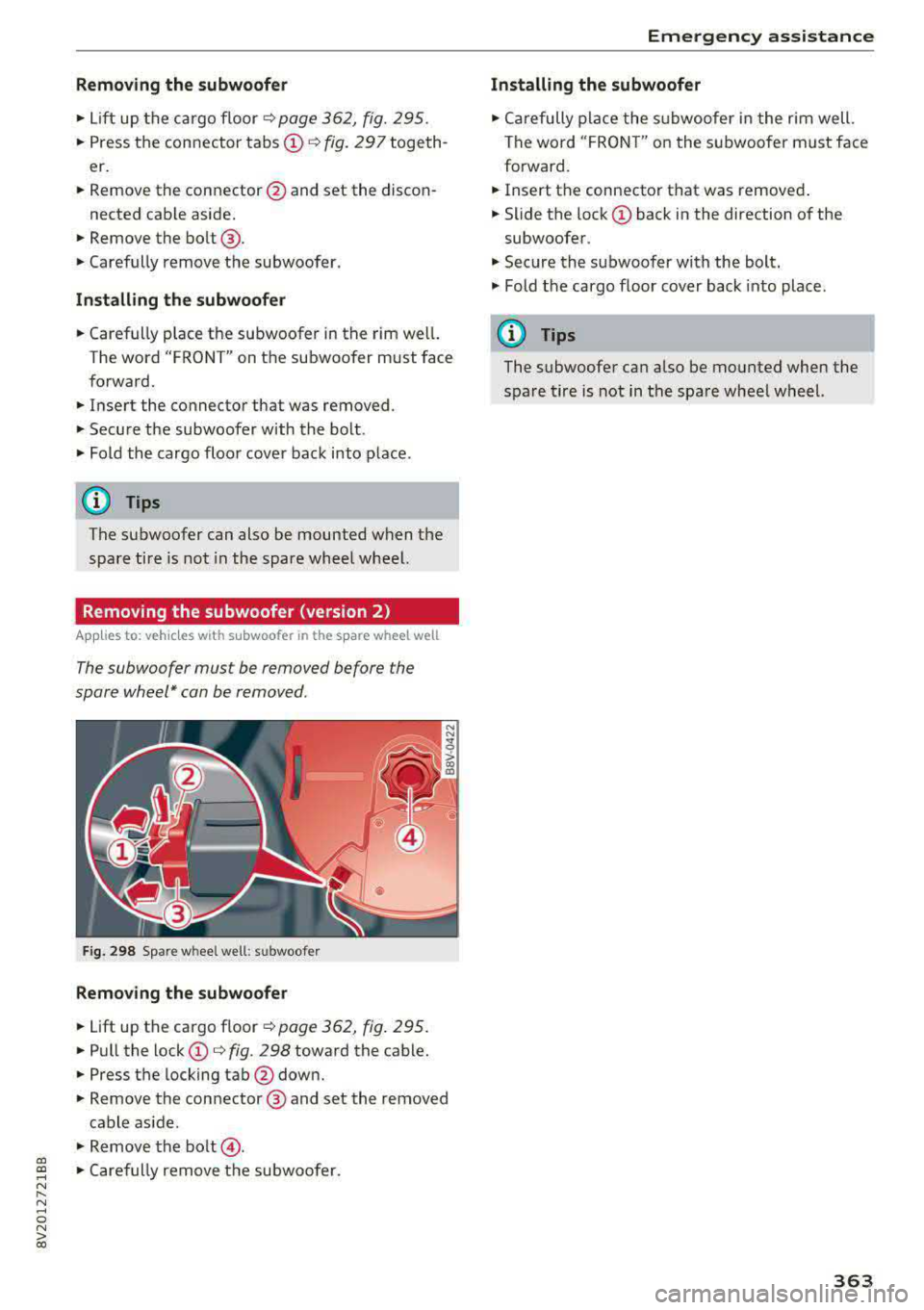
Fig. 298 Spare w heel well : su bwoofer
Removing the subwoofer
• Lift up the cargo floor ¢ page 362, fig . 295.
• Pull the lock CD¢ fig. 298 toward the cable.
• Press the locking tab@down.
• Remove the connector @ and set the removed
cable aside .
"' Remove the bolt@.
• Caref ully remove the subwoofer.
Emergency assistance
Installing the subwoofer
• Carefully place the subwoofer in the rim well.
The word "FRON T" on the subwoofer must face
forward.
• Insert the connector that was removed .
• Slide the lock CD back in the direction of the
subwoofer .
• Secure the subwoo fer with the bolt.
"' Fold the cargo floor cover back into place .
@ Tips
The subwoofer can also be mounted when the
spare tire is not in the spare wheel wheel.
363
Page 384 of 400
Index
A
A/C (automatic climate control system) . . . . 71
Accessories . . . . . . . . . . . . . . . . . . . . . . . 64, 380
Active lane assist
refer to Audi active lane assist . . . . . . . . . 136
Active rollover protection system . . . . . . . . 256
Retracting rollover protection.......... 257
Adaptive cruise control
refer to Audi adaptive cruise control . . . . 126
Adaptive light
refer to Audi adaptive light . . . . . . . . . . . . . 51
Adjusting the air distribution Automatic climate control system . . . . . . . 72
Adjusting the air vents . . . . . . . . . . . . . . . . . . 73 Automatic climate control system . . . . . . . 72
Adjusting the sound . . . . . . . . . . . . . . . . . . . 245
Advanced key
refer to Convenience key . . . . . . . . . . . . . . . 78
Airbag .... .. .. ............... .... ... 267
Airbag system .. .... .............. 267,287
Advanced Airbag System components . . . 274
Care . . . . . . . . . . . . . . . . . . . . . . . . . . . . . . 282
Ch ildren . . . . . . . . . . . . . . . . . . . . . . . . . . . 294
Ch ild restraints . . . . . . . . . . . . . . . . . . . . . 295
Components (front airbags) . . . . . . . . . . . 274
Danger of fitting a child safety seat on the
front passenger seat . . . . . . . . . . . . . . . . . 268
Disposal . . . . . . . . . . . . . . . . . . . . . . . . . . . 282
Front airbags . . . . . . . . . . . . . . . . . . . . . . . 272
How do the front airbags work? . . . . . . . . 277
How many airbags does my vehicle have? 274
How the Advanced Airbag System compo -
nents work together . . . . . . . . . . . . . . . . . 276
Important safety instructions on the knee
airbag system . . . . . . . . . . . . . . . . . . . . . . . 285
Knee airbags . . . . . . . . . . . . . . . . . . . . . . . . 283
Monitoring . . . . . . . . . . . . . . . . . . . . . . . . . 279
PASSENGER AIR BAG OFF light . . . . . . . . . 279
Repairs . . . . . . . . . . . . . . . . . . . . . . . . . . . . 282
Safety instructions . . . . . . . . . . . . . . . . . . . 281
Side airbags . . . . . . . . . . . . . . . . . . . . . . . . 285
Warning/Indicator lights . . . . . . . . . . . . . 279
When must the system be inspected? . . . 279
Air pressure (tires) . . . . . . . . . . . . . . . . 336, 345
A lignment pin (tire change) . . . . . . . . . . . . . 353
All-weather lights..... ......... .... .. .. 51
382
All season tires
All wheel drive 342
refer to quattro (all wheel drive) . . . . .
. . 154
AMI
refer to Audi music interface . . . . . . . 228, 229
Android Auto
refer to Audi smartphone interface . . . . . 239
Ant i-freeze
Windshield washer system . . . . . . . . . . . . 327
Anti -Lock Braking System (ABS) . . . . . . . . . 151
Anti-Slip Regulation (ASR) . . . . . . . . . . . . . . 151
Apple CarP lay
refer to Aud i smartphone interface . . . . . 239
Audi active lane assist . . . . . . . . . . . . . . . . . 136
Cleaning the camera area . . . . . . . . . . . . . 348
Messages . .. .. .. ... .... ....... .... .
Audi adaptive cruise control ........... . .
Cleaning the sensor . .. .. ........... . . 138
126
348
Distance display, distance warning ..... . 132
Messages . . . . . . . . . . . . . . . . . . . . . . . . . . 133
Audi adaptive light . . . . . . . . . . . . . . . . . 51, 143
Audi connect e-tron services . . . . . . . . . . . . 198
Doors and lights .. .. .. .. ........... .. 198
Audi connect (Infotainment) ........ 190,195
Data protection . . . . . . . . . . . . . . . . . . . . . 196
Services overview . . . . . . . . . . . . . . . . . . . . 191
Start ing . . . . . . . . . . . . . . . . . . . . . . . . . . . 191
Audi drive select . . . . . . . . . . . . . . . . . . . . . . 143
Audi magnetic ride
refer to Suspension control . . . . . . . . . . . . 143
Audi music interface . . . . . . . . . . . . . . . . . . . 228
Audi music stream
refer to Wi-Fi . . . . . . . . . . . . . . . . . . . . . . . 226
Audio files . . . . . . . . . . . . . . . . . . . . . . . . . . . 230
Audio player Bluetooth audio player . . . . . . . . . . . . . . . 225
Wi-Fi audio player . . . . . . . . . . . . . . . . . . . 226
Audio track . . . . . . . . . . . . . . . . . . . . . . . . . . 233
Audi pre sense . . . . . . . . . . . . . . . . . . . . . . . 133
Messages . . . . . . . . . . . . . . . . . . . . . . 133, 136
Settings . . . . . . . . . . . . . . . . . . . . . . . . . . . 136
Audi Service Repair Manuals and Literature 378
Audi side assist . . . . . . . . . . . . . . . . . . . . . . . 139
Cleaning the sensors . . . . . . . . . . . . . . . . . 348
Messages . ....... ... ..... .........
.
Rear cross-traffic assist ... ........... . 143
142
Page 391 of 400
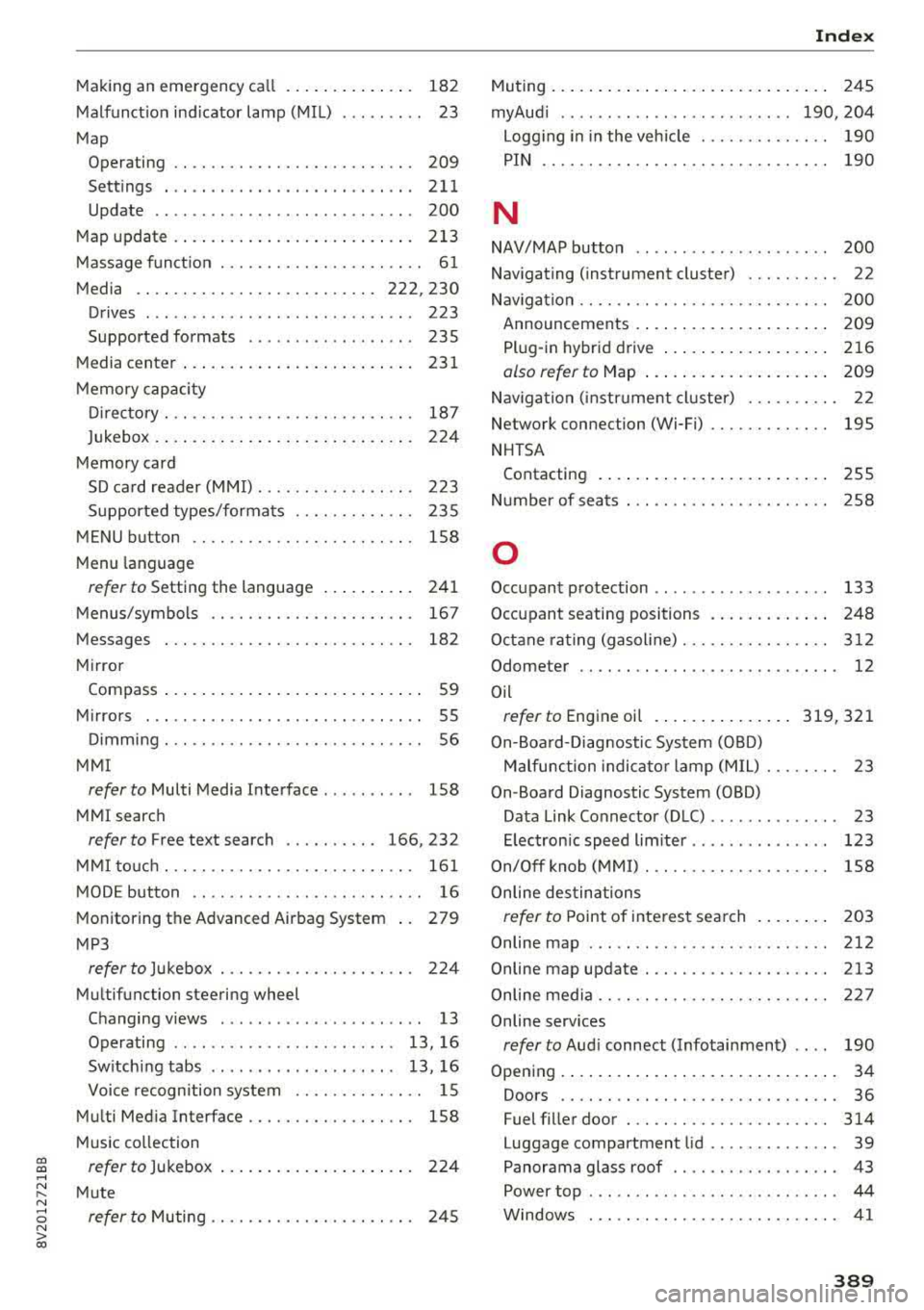
CXl CXl .... N ,.__
N .... 0 N > 00
Making an emergency ca ll . . . . . . . . . . . . . . 182
Malfunction indicator lamp (MIL) . . . . . . . . . 23
Map Operating . . . . . . . . . . . . . . . . . . . . . . . . . . 209
Sett ings . ...................... ... . 211
Update .. ... ..................... .. 200
Map updat e . . . . . . . . . . . . . . . . . . . . . . . . . . 213
Massage function . . . . . . . . . . . . . . . . . . . . . . 61
Media . . . . . . . . . . . . . . . . . . . . . . . . . . 222, 230
Drives . . . . . . . . . . . . . . . . . . . . . . . . . . . . . 223
Supported formats . . . . . . . . . . . . . . . . . . 235
M edia center . . . . . . . . . . . . . . . . . . . . . . . . . 231
Memory capacity
Directory . . . . . . . . . . . . . . . . . . . . . . . . . . . 187
Jukebox . . . . . . . . . . . . . . . . . . . . . . . . . . . . 224
Memory card SD card reader (MMI). . . . . . . . . . . . . . . . . 223
Supported types/formats . . . . . . . . . . . . . 235
MENU button . . . . . . . . . . . . . . . . . . . . . . . . 158
M enu languag e
refer to Setting the language . . . . . . . . . . 241
Menus/symbols . . . . . . . . . . . . . . . . . . . . . . 167
Messages . . . . . . . . . . . . . . . . . . . . . . . . . . . 182
Mirror Compass ... .. ....................... 59
Mirrors . . . . . . . . . . . . . . . . . . . . . . . . . . . . . . 55
Dimming ... .. ............. .. .. .... .. 56
MMI
refer to Multi Media Interface . . . . . . . . . . 158
MMI search
refer to Free text search . . . . . . . . . . 166, 232
MMI touch . . . . . . . . . . . . . . . . . . . . . . . . . . . 161
MODE button . . . . . . . . . . . . . . . . . . . . . . . . . 16
Monitoring the Advanced Airbag System 279
MP3
refer to Jukebox . . . . . . . . . . . . . . . . . . . . . 224
Multifunction steering wheel
Changing views . . . . . . . . . . . . . . . . . . . . . . 13
Operating . . . . . . . . . . . . . . . . . . . . . . . . 13, 16
Switching tabs . . . . . . . . . . . . . . . . . . . . 13, 16
Voice recognition system . . . . . . . . . . . . . . 15
Multi Media Interface . . . . . . . . . . . . . . . . . . 158
Music collect ion
refer to Jukebox . . . . . . . . . . . . . . . . . . . . . 224
Mute
refer to Muting . . . . . . . . . . . . . . . . . . . . . . 245
Index
Muting..... .. .. .. .................. . 245
myAud i . . . . . . . . . . . . . . . . . . . . . . . . . 190, 204
Logging in in the vehicle . . . . . . . . . . . . . . 190
PIN . . . . . . . . . . . . . . . . . . . . . . . . . . . . . . . 190
N
NAV/MAP button . . . . . . . . . . . . . . . . . . . . . 200
Navigating (instrument cluster) . . . . . . . . . . 22
Nav igation . . . . . . . . . . . . . . . . . . . . . . . . . . . 200
Announcements . . . . . . . . . . . . . . . . . . . . . 209
Plug-in hybrid drive . . . . . . . . . . . . . . . . . . 216
also refer to Map . . . . . . . . . . . . . . . . . . . . 209
Nav igation (instrument cluster) . . . . . . . . . . 22
Network connection (Wi-Fi) . . . . . . . . . . . . . 195
NHTSA Contacting . . . . . . . . . . . . . . . . . . . . . . . . . 255
Number of seats . . . . . . . . . . . . . . . . . . . . . . 258
0
Occupant protection . . . . . . . . . . . . . . . . . . . 133
Occupant seating positions . . . . . . . . . . . . . 248
Octane rating (gasoline).............. .. 312
Odometer . . . . . . . . . . . . . . . . . . . . . . . . . . . . 12
Oil
refer to Engine oil ............... 319,321
On-Board-Diagnostic System (OBD)
Malfunction indicator lamp (MIL) . . . . . . . . 23
On-Board Diagnostic System (OBD) Data Link Connector (D LC) . . . . . . . . . . . . . . 23
E lectron ic speed lim iter . . . . . . . . . . . . . . . 123
On/Off knob (MMI) . . . . . . . . . . . . . . . . . . . . 158
Online destinations
refer to Point of interest search . . . . . . . . 203
Online map . . . . . . . . . . . . . . . . . . . . . . . . . . 212
Online map update. ................. .. 213
Online media . . . . . . . . . . . . . . . . . . . . . . . . . 227
Online services
refer to Aud i connect (Infotainment) . . . . 190
Opening..... ..... .. ................ .. 34
Doors . . . . . . . . . . . . . . . . . . . . . . . . . . . . . . 36
Fuel filler door . . . . . . . . . . . . . . . . . . . . . . 314
Luggage compartment lid . . . . . . . . . . . . . . 39
Panorama glass roof . . . . . . . . . . . . . . . . . . 43
Power top . . . . . . . . . . . . . . . . . . . . . . . . . . . 44
Windows . .. .. .. ............... .. .. . 41
389