MMI AUDI A3 SEDAN 2017 Owner's Manual
[x] Cancel search | Manufacturer: AUDI, Model Year: 2017, Model line: A3 SEDAN, Model: AUDI A3 SEDAN 2017Pages: 400, PDF Size: 67.32 MB
Page 170 of 400
Multi Med ia Int erfac e
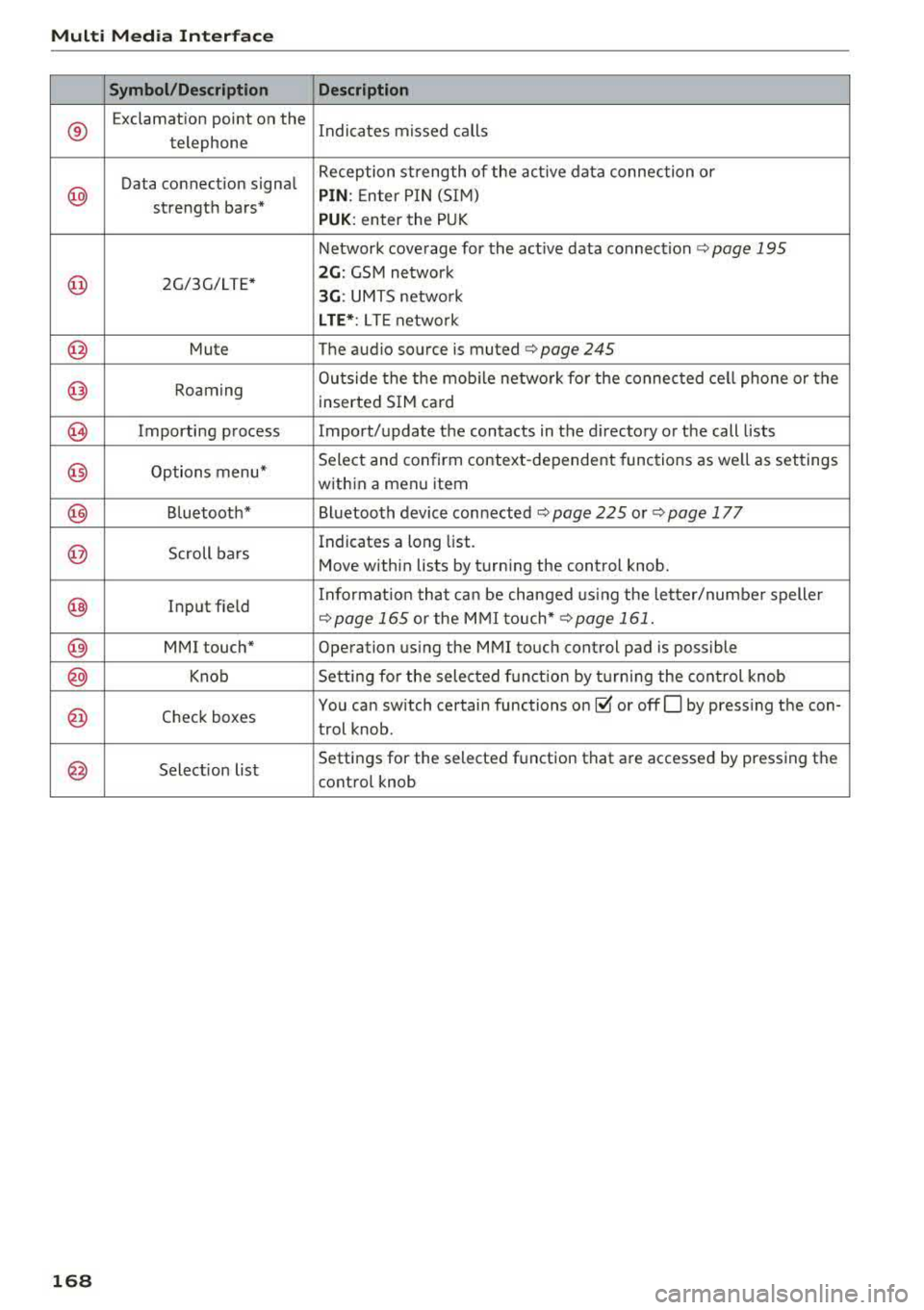
Symbol /Description Descr iption
®
Exclamation point on the
Indicates missed calls
telephone
Data connection signal Reception strength of the active data connection or
@ PIN
: Enter P IN (SIM)
strength bars*
PUK: enter the PUK
Network coverage for the active data connection
c:::> page 195
@ 2G/3G/LTE* 2G : GSM network
3G : UMTS netwo rk
L TE *: L TE netwo rk
@ Mute The audio source is. muted ¢ page 245
@ Roaming Outside the the mob
ile network fo r the connected cell phone or the
inserted SIM card
@ Importing process Import/update the contacts in the directory or the call lists
@ Options menu* Select and confirm context-dependent functions as
well as settings
within a menu item
@ Bluetooth* Bluetooth device connected c:::> page 225 or¢ page 177
@ Scroll bars Indicates
a long list.
Move within lists by turning the control knob.
@ Input field Informat
ion that can be changed us ing the le tter/numbe r speller c:::>page 165 or the MMI touch* ¢ page 161.
@ MMI touch* Operation using the MMI touch control pad is possible
@ Knob Setting for the selected funct ion by t urning the control knob
@ Check boxes You
can switch certain functions on~ or offO by pressing the con-
trol knob .
@ Selection list Settings
for the selected function that are accessed by pressing the
control knob
1 6 8
Page 172 of 400
Voice recognition system
Voice recognition system Operating
Applies to: vehicles with vo ice recognition system
You con operate many Infotainment functions
conveniently by speaking.
Requirements: the ignition and the MM I must be
sw itched
on~ page 158, the re must not be any
phone call in progress and the parking system
m ust not be active.
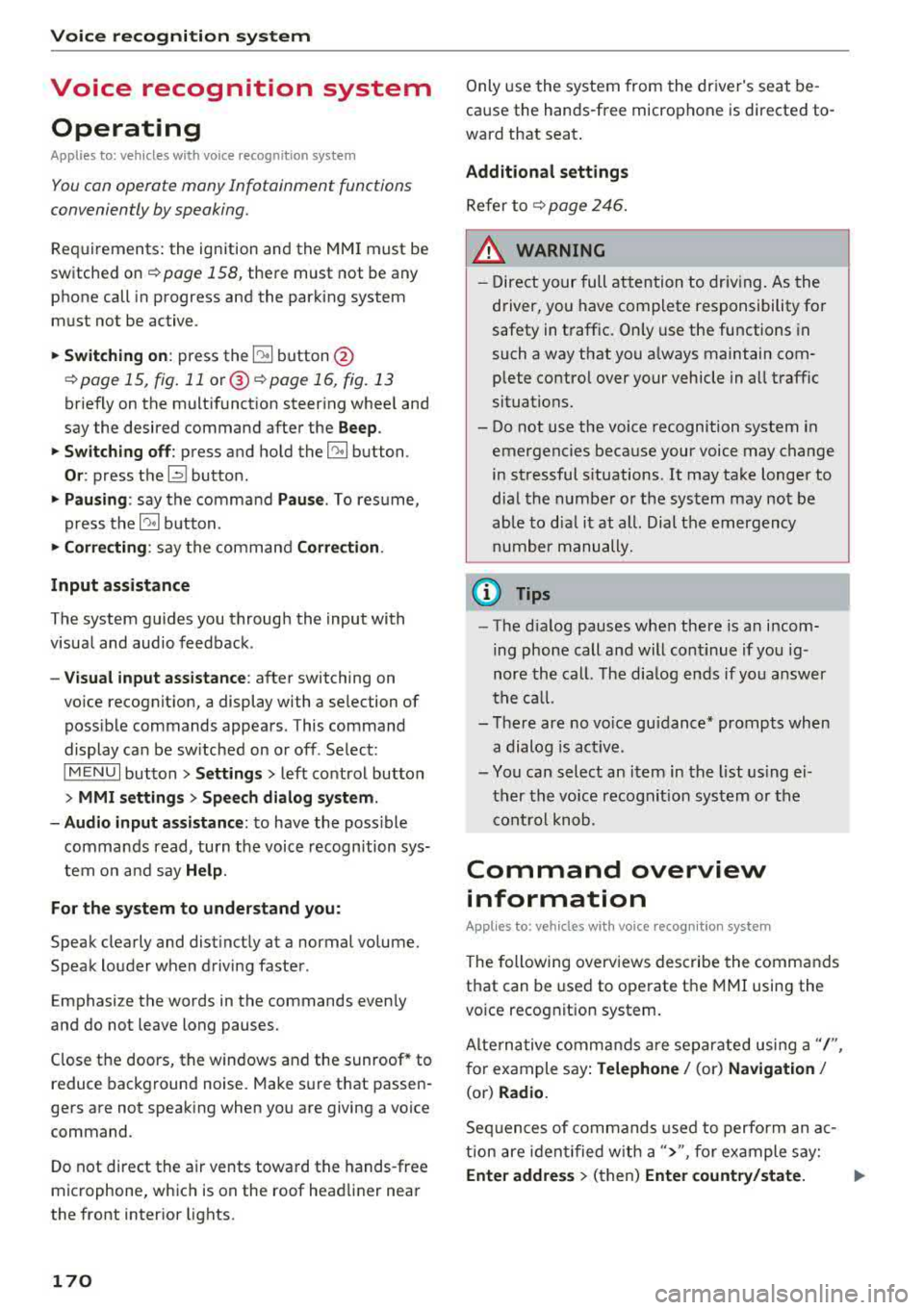
.. Switching on : press the~ button @
¢ page 15, fig. 11 or@ ~ page 16, fig . 13
briefly on the multifunct ion steer ing whee l and
say the desired command after the
Beep.
.. Switching off : press and hold the~ button.
Or : press the l2l butto n.
.,. Pausing : say the command Pause. To resume,
press
the~ button.
.,. Corre cting : say the command Correction .
Input assistance
The system guides you through the input with
visua l and audio feedback.
- Visual input as sistance : after switching on
vo ice recognit ion, a display with a selection of
poss ible commands appears. This command
display can be sw itched on or off . Se lect:
IMENU I button> Settings > left control button
> MMI settings > Speech dialog sy stem .
- Audio input as sis tance :
to have the poss ible
commands read, turn the voice recognition sys
tem on and say
Help .
For the system to understand you:
Speak clearly and distinct ly at a normal volume.
Speak louder when driving faster.
Emphasize the words in the commands even ly
and do not leave long pauses.
Close the doors, the windows and the sunroof* to
reduce background noise. Make sure th at passen
gers are not speaking when you are giving a voice
command.
D o not direct the air vents toward the hands-free
microphone, whic h is on the roof head liner near
the front interior lights.
170
Only use the system from the dr iver's seat be
cause the hands-free microphone is directed to
ward that seat.
Additional sett ings
Refer to~ page 246.
_&. WARNING
- Direct your full attention to dr iv ing. As the
driver, you have complete responsibility fo r
safety in t raffic. Only use the functions in
such a way that you a lways maintain com
plete contro l over your vehicle in all traffic
situations.
-
- Do not use the voice recognition system in
emergencies because your voice may change
in stressful s ituations.
It may take longer to
dial the numbe r or the system may not be
ab le to dia l it at all. Dial the emergency
number manually .
(D Tips
- The d ia log pauses when the re is an incom
ing phone call a nd will continue i f you ig
nore the cal l. The dia log ends if you answer
the ca ll.
- There are no vo ice gu idance* prompts when
a dialog is act ive.
- You can select an item in the list using ei
ther the vo ice recognit ion system or the
cont rol knob.
Command overview
information
Applies to: vehicles with voice recognition system
The following overv iews des cribe the commands
that can be used to operate the MMI using the
vo ice recog nit ion system.
Alte rnative commands are separated using a"/",
for example say:
Telephone / (or) Navigation /
(or) Radio.
Sequences of com mands used to perform an a c
tion are iden tified w ith a
">", fo r example say:
Ente r addre ss > (then) Enter country /state. IJ,,
Page 173 of 400
CXl CXl .... N ,.__
N .... 0 N > 00
Voice recognition system
The majority shown are main commands. This
system also recognizes synonyms in certain cas-es
. For a Bu sine ss addre ss, you can a lso say bu si
ness , work , office or at the office .
Commands
Global commands
Applies to: vehicles with voice recognition system
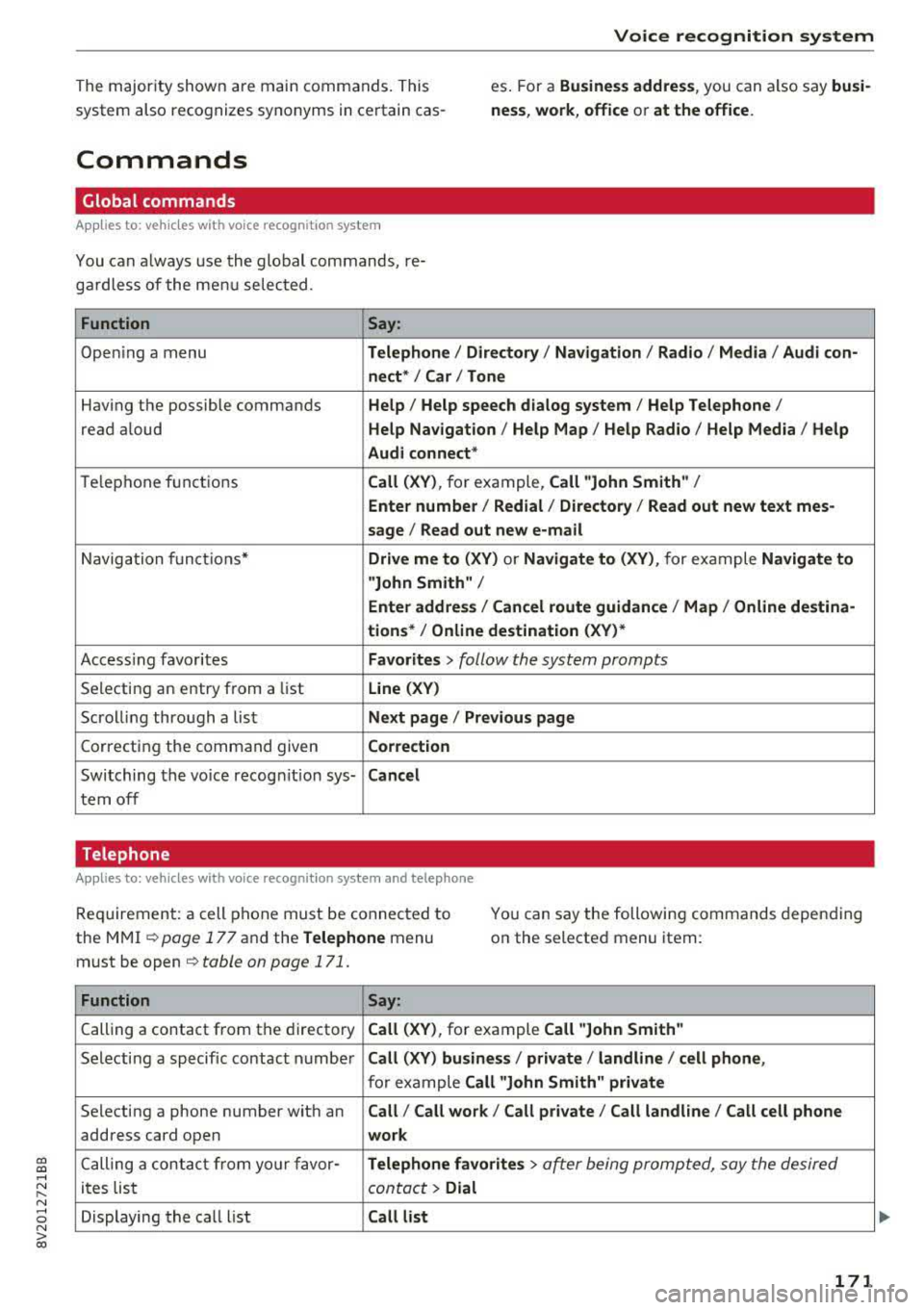
You can a lways use the global commands, re
ga rdless of the me nu selected .
Function Say:
Open ing a menu Tel ephon e/ Directory / Navigation / Radio / Medi a/ Audi con ·
n ec t*
I Car I Tone
Hav ing the possible commands Help / Help s peech dialog s ystem / Help Telephone /
read aloud Help Na vigat ion / Help Map / Help Radio / Help Med ia / He lp
Aud i connect *
Telephone fu nctions Call (XV ), for example, Call "John Smith" /
Enter numbe r/ Redial / Di rectory
I Read out new te xt me s-
s age
I Read out new e -mail
Navigation funct ions* Driv e me to (XV ) or Navigate to (XV ), for example Navigate to
"John Smith" /
Enter addre ss/ Cancel r oute guidance / Map / Online de stin a·
tion s*
I Online destinat ion (X V)*
Access ing favorites Favorit es > follow the system prompts
Selecting an entry from a list Line (XV)
Scrolling through a list N ex t page I Pre viou s page
Correcting the command given Correction
Switching the vo ice recogn it io n sys-Canc el
tern off
Telephone
Applies to: veh icles with vo ice recognition system and telephone
Req uirement: a cell phone must be connected to
the MMI ¢
page 177 and the Telephone menu
must be open ¢
table on page 171.
You can say the following commands depending
on the selected menu item :
Function
Say:
Calling a contact from the directory Call (X V ), for example Call "John Smith "
Selecting a specific contact number Call (XV) bu sines s/ private / land line / cell phone ,
for example Call "John Smith " privat e
Selecting a phone number with an Call/ Call wo rk / Call private / Call land l ine / Call cell phone
address card open wo rk
Calling a contact from yo ur favor -Teleph one fav orite s > a~er being prompted, say the desired
ites list contact > Dial
Displaying the call list Call list
171
Page 175 of 400
CXl CXl .... N r--N .... 0 N > 00
Voice recognition system
Messages (Audi connect (Infotainment))
Applies to: vehicles with voice recognition system and Audi connect (Infotainment)
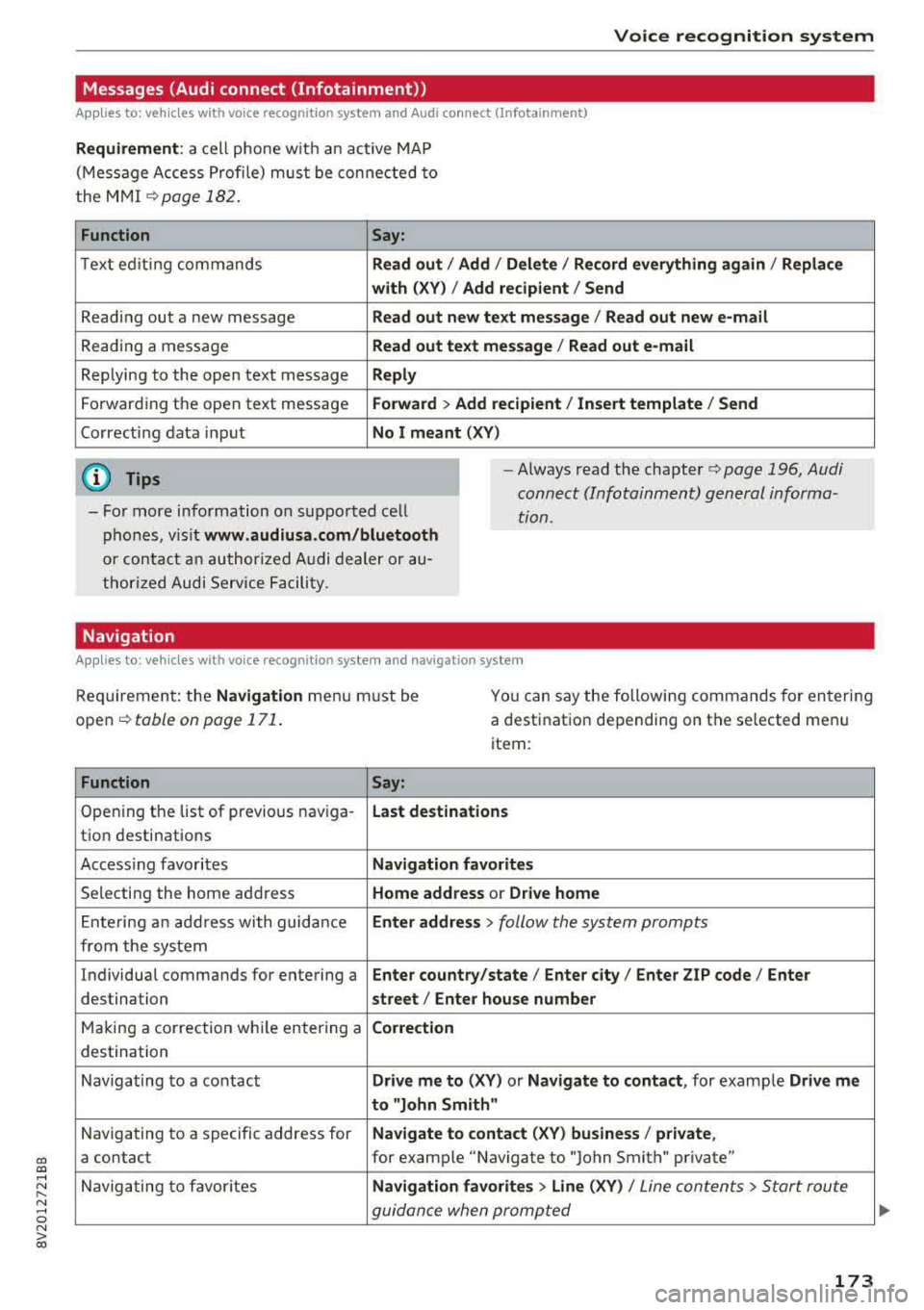
Requirement: a cell phone with an active MAP
(Message Access Profile) must be connected to
the MMI
¢page 182.
Function Say:
Text ed iting commands Read out / Add / Delete / Record everything again / Replace
with (XV) / Add recipient / Send
Reading out a new message Read out new text message / Read out new e-mail
Reading a message Read out text message / Read out e-mail
Replying to the open text message Reply
Forwarding the open text message Forward > Add recipient/ Insert template/ Send
Correcting data input No I meant (XV)
(D Tips
-For more information on supported cell
phones, visit
www.audiusa.com/bluetooth
or contact an authorized Audi dealer or au
thorized Audi Service Facility.
-Always read the chapter¢ page 196, Audi
connect (Infotainment) general informa
tion .
Navigation
Applies to: vehicles with voice recognitio n system and navigation system
Requirement: the Navigation menu must be
open
¢ table on page 171.
You can say the following commands for entering
a destination depending on the selected menu
item :
Function
Say:
Opening the list of previous naviga-Last destinations
tion destinations
Accessing favorites
Navigation favorites
Selecting the home address Home address or Drive home
Ent ering an address with guidance Enter address > follow the system prompts
from the system
Individual commands for entering a
Enter country/state / Enter city/ Enter ZIP code / Enter
destination street/ Enter house number
Making a correction while entering a Correction
destination
Navigating to a contact
Drive me to (XV) or Navigate to contact , for example Drive me
to "John Smith"
Navigating to a specific address for Navigate to contact (XV) business/ private,
a contact for example "Navigate to "John Smith" private"
Navigating to favorites
Navigation favorites > Line (XV) / Line contents> Start route
guidance when prompted
173
Page 177 of 400
CXl CXl .... N r--N .... 0 N > 00
Voice recognition system
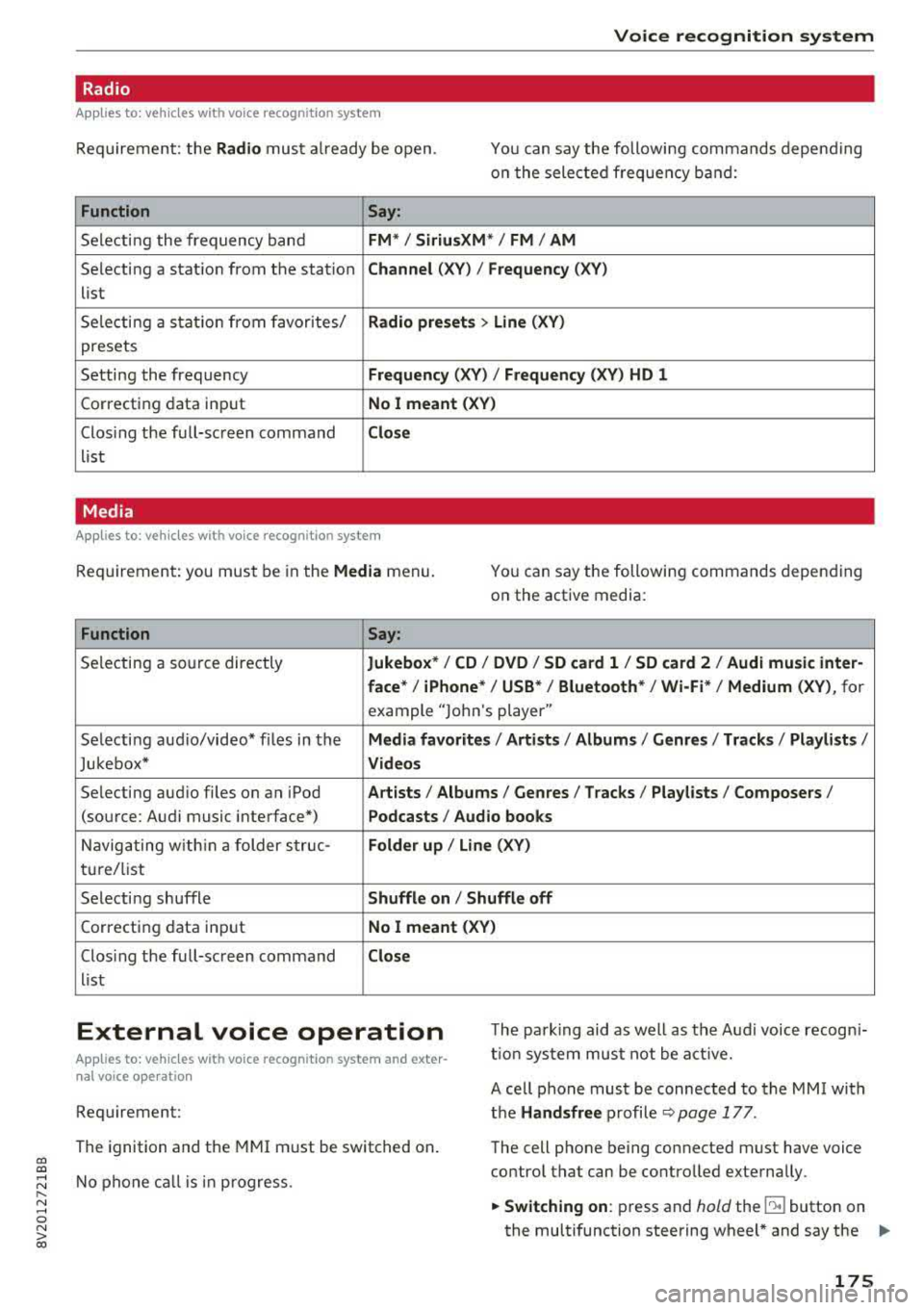
Radio
Applies to: vehicles with voice recognition system
Requ ireme nt: the Radio must a lready be open. You can say the followi ng commands depend ing
o n t he sele cted frequen cy b and:
Function Say:
Sele cti ng the frequency ba nd FM */ SiriusXM * / FM / AM
Selecting a stat ion from the station Channel (XV ) / Frequency (XV)
list
S ele cti ng a s tat io n from favorites/
Radio prese ts > Line (XV)
presets
Setting the frequency
Frequency (XV) I Frequency (XV) HD 1
Correcting data inp ut No I meant (XV )
Closing the full-sc reen command Close
list
Media
Applies to: vehicles with voice recognitio n system
Re qui reme nt: you mus t be in the Media menu.
You can say the following commands depen ding
on the active media:
Function Say:
Selectin g a so urce directly Jukebox* / CD / DVD / SD card 1 / SD card 2 / Audi music inter-
face *
I iPhone* / USB * / Bluetooth* / Wi-Fi * / Medium (XV) , for
example "Jolhn 's player"
Selecti ng aud io/video * fi les in the
Media favorites / Artists / Albums / Genres / Track s/ Playlists /
Jukebox* Videos
Selecting aud io files on an iPod A rt ists / Albums / Genres / Tracks / Playlists /Composers /
(source: Audi music interface*) Podcasts / Audio books
Naviga ting w ith in a folder s truc -Folder up / Line (XV)
tu re/list
Selecti ng shuffle
Shuffle on I Shuffle off
C orrecting data inp ut No I meant (XV)
Clos ing the fu ll-sc reen command Close
list
External voice operation T he pa rk ing aid as well as the A ud i voice r ecogn i
t io n sys te m must not be a ctive.
Applies to: vehicles with voice recognition system and exter
nal voice operation
Requirement:
The ignition and the MMI m ust be switched on.
N o phone call is in progress . A cell phone must be connected to the MMI with
the Handsfree p rofile ~ pag e 177.
The cell p hone be ing connected must have voice
contro l that can be contro lled exte rna lly.
.,. Switching on : press and hold the lei.I button on
the multifunction steering wheel * and say the
liJJ,,
175
Page 178 of 400
Voice recognition system
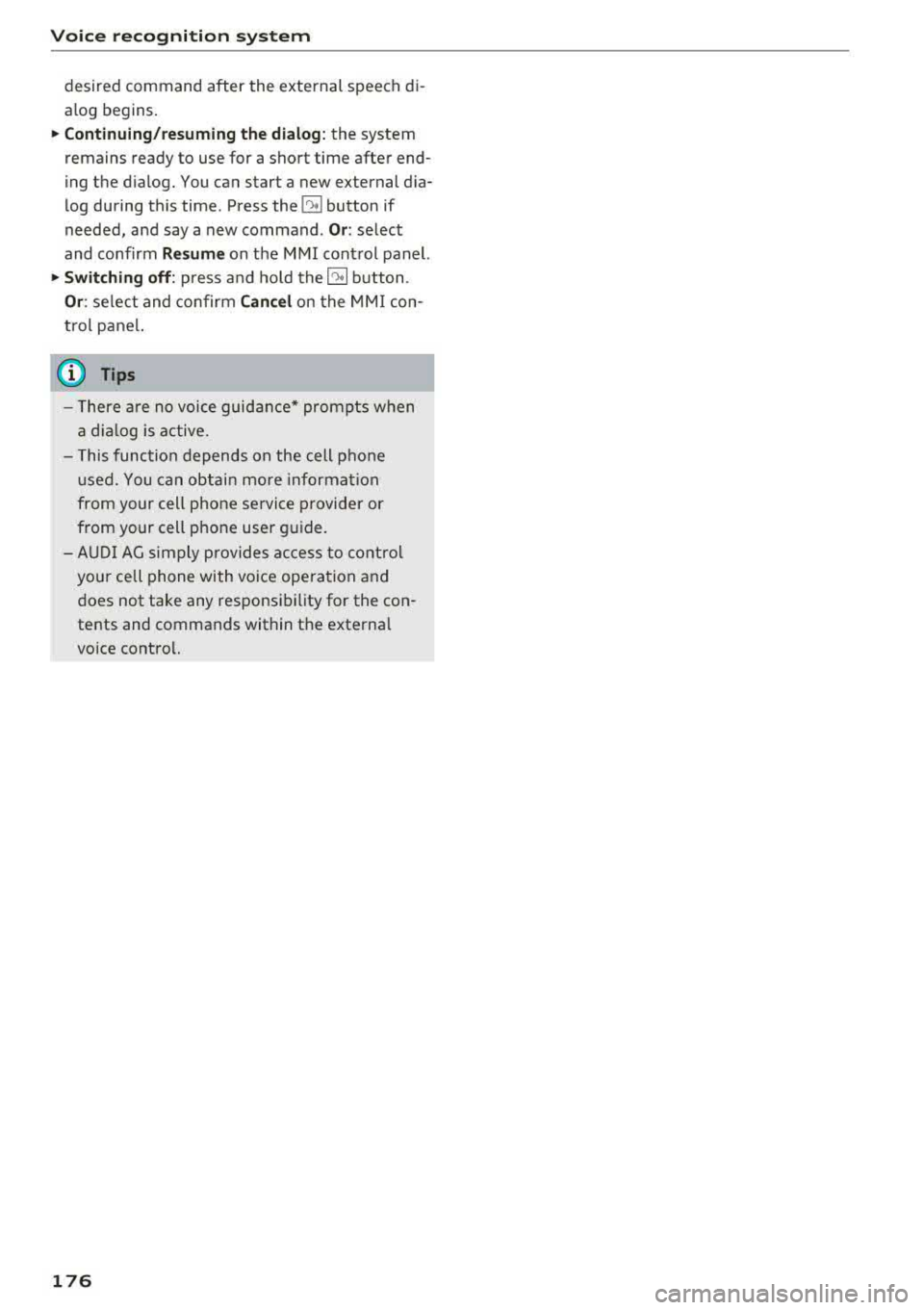
desired command after the external speech di
alog begins.
~ Continuing/resuming the dialog: the system
remains ready to use for a short time after end
ing the dialog. You can start a new external dia
log during this time. Press the
10.I button if
needed, and say a new command .
Or: select
and confirm
Resume on the MMI control panel.
~ Switching off: press and hold the~ button .
Or: select and confirm Cancel on the MMI con
trol panel.
a) Tips
- There are no voice guidance* prompts when
a dialog is active.
- This function depends on the cell phone
used. You can obtain more information
from your cell phone service provider or
from your cell phone user guide.
- AUDI AG simply provides access to control
your cell phone with voice operation and
does not take any responsibility for the con
tents and commands within the external
voice control.
176
Page 179 of 400
CXl CXl .... N r--N .... 0 N > 00
Telephone Introduction
A pp lies to: ve hicles with telep hone
To make phone coils in your vehicle using the
MMI, connect your cell phone to the
MMI via
Bluetooth.
H and sfree
Afte r you have connected your cell phone to the
MMI via Bluetooth, you can use the handsfree
system and operate telephone functions through
your MMI. You can make calls using the antenna
on your cell phone.
A WARNING
- Medical experts warn that cell phones can
interfere w ith the function of pacemakers.
Always ma inta in a m inimum distance of 20
centimeters between the cell phone anten
na and the pacemaker.
- Do not carry the cell phone in a pocket di
rectly over the pacemaker when the phone
is switched on.
- Sw itch the cell phone off immediately if
you suspect it may be interfering with the pacemaker.
- Do not use the voice recognition system*
c::> page 170 in emergencies because your
voice may change in stressful situations. It may take longer to dial the number or the
system may not be able to dia l it at all. Dial
the emergency n umber manua lly.
- Switch your cell phone off in areas where
there is a risk of an exp losion. These loca
tions are not always clea rly marked. This
may include gas stations, fuel and chemical
storage facilities or transport vehicles, or lo
cations where fuel vapors (such as propane
or gasoline vapor in vehicles or bu ildings),
chem icals or large quantities of dust parti
cles (such as flour, sawdust or metal) may
be present in the air. Th is also applies to all
other locations where you would normally
tu rn your vehicle engine off .
- The demands of traffic requ ire your full at
tent io n. Always read t he chapter
c::> page 158, Traffic safety information.
-
T e le ph on e
(D Note
Always fo llow the information found in Q (!) in
Wi-Fi hotspot on page 195.
(D Tips
- The Bluetooth connect ion range is limited
to inside the vehicle. It can also be affected
by local condit ions and interference with
other devices.
- To learn which Bluetooth connections and
wh ich of the functions in your cell phone are
supported, check with your cell phone serv
ice provider or the database for mobile devi
ces at
www .audiu sa.com /bl uetooth .
Setup
Connecting a cell phone using Bluetooth
Applies to: vehicles wi th telepho ne
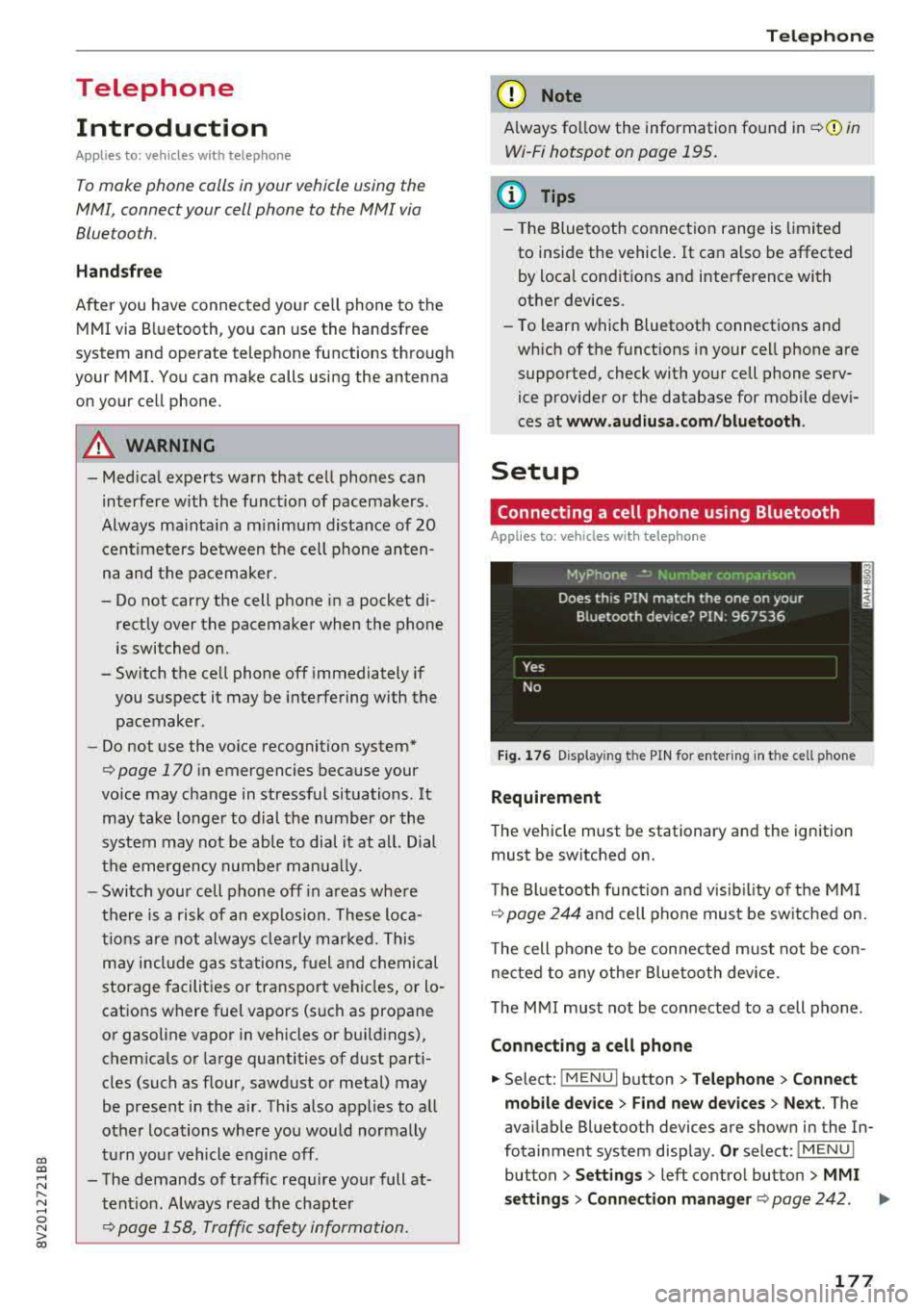
Fig . 17 6 Display ing t he PIN for enter ing in t he cell ph one
R equirem ent
The vehicle must be stationary and the ignition
must be switched on.
T he Bl uetoo th funct ion and v isib ility o f the MMI
¢ page 244 and cell phone must be sw itched on.
T he cell phone to be connected must not be con
nected to any other Bluetooth device.
T he
MMI must not be connected to a cell phone .
Connecting a cell phone
.,. Select: !MENU I button> Telephone > Co nnect
mobile dev ice
> Find new de vices > Ne xt. The
avai lable Bluetooth devices are shown in the In
fotainment system display .
Or select: !MENUI
button > S etting s> left contro l button > MMI
s ettin gs> Connec tion manag er ¢
page 242 . .,..
177
Page 180 of 400
Telephone
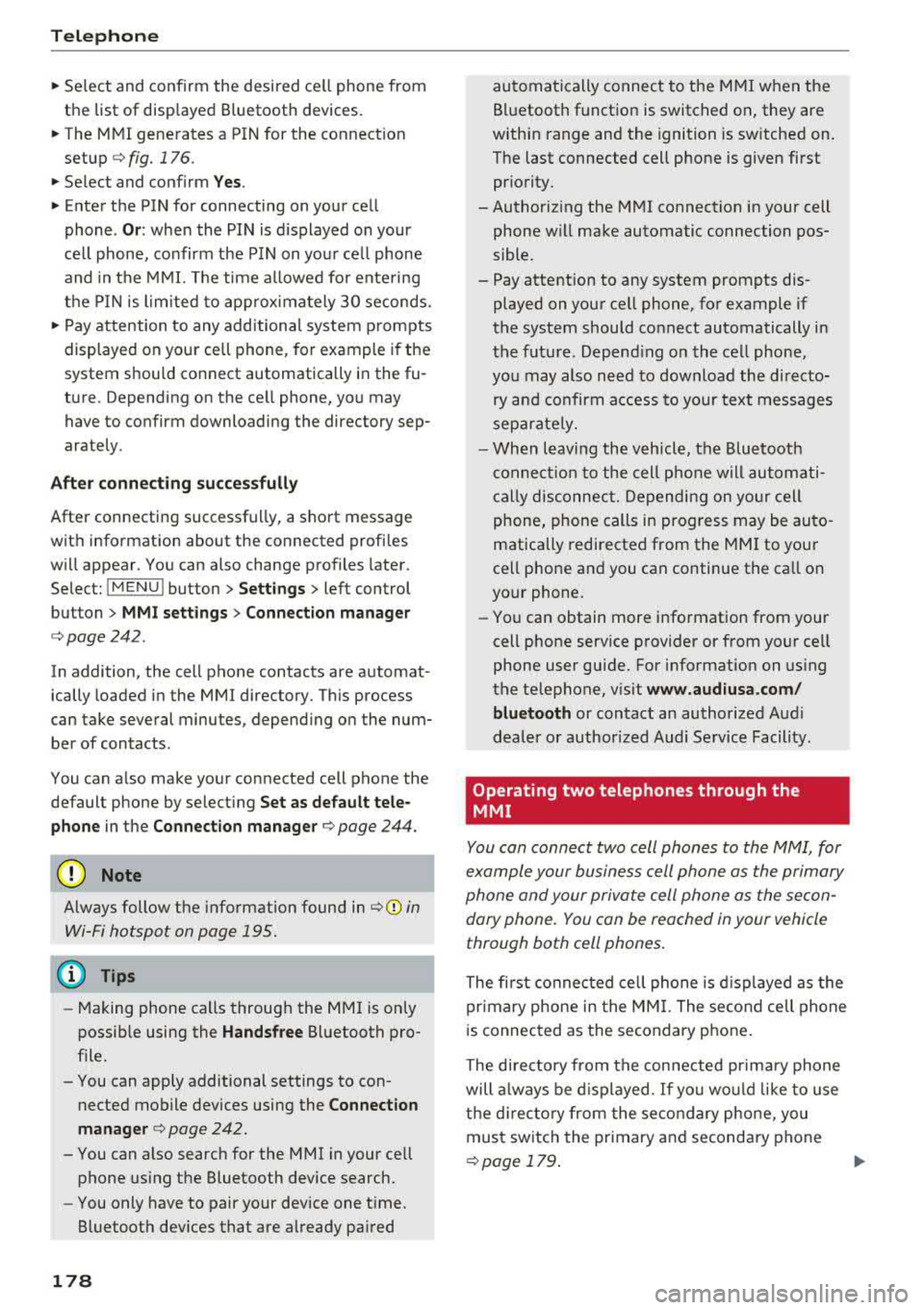
"'Se lect and confirm the desired ce ll phone from
the list of disp layed Bluetooth devices.
"' The MMI generates a PIN for the connect ion
setup
¢ fig. 176 .
"' Select and confirm Y es.
"' Enter the PIN for connecting on your cell
phone .
Or: when the PIN is d isplayed on your
ce ll phone, confirm the PIN on you r ce ll phone
and in the MMI. The time a llowed for ente ring
the PIN is l im ited to app rox imately 30 seconds.
"' Pay attention to any additiona l system prompts
displayed on your cell phone, for example if the
system should connect automatically in the fu
ture . Depending on the ce ll phone, you may
have to confirm downloading the directory sep
arately .
After connect ing succ essfull y
After connecting successfully, a short message
with information about the connected profi les
will appear . You can also change profiles later.
Select:
! MENU ! button> Sett ings> left control
button
> MMI sett ings > Conn ection man ag er
c:::;, page242 .
In addition, the cell phone contacts are automat
ically loaded in the MMI directory. Th is process
can take several minutes, depend ing on the num
ber of contacts .
You can a lso make your connected cell phone the
default phone by select ing
Se t as de fault tel e
phone
in the Conne ct ion man ager c:::;, page 244 .
Q) Note
Always follow the information found in c:::;,(D in
Wi-Fi hotspot on page 195.
(D Tips
- Making phone calls through the MMI is only
possib le using the
Handsfree Bluetooth pro
file.
- You can apply additional settings to con nected mobile devices using the
Connection
manager
c:::;, page 242.
- You can also search for the MMI in your cell phone us ing the Bluetooth device search.
- You only have to pair your device one t ime.
Bluetooth devices that are already paired
178
automatically connect to the M MI when the
Bluetooth function is switched on, they are
within range and the ignition is sw itched on.
The last connected cell phone is given first pr iority.
-Authoriz ing the MMI connect ion in your cell
phone wi ll make automatic connection pos
sible .
- Pay attention to any system prompts dis played on your cell phone, for example if
the system should connect automatically in
the future. Depend ing on the cell phone,
you may also need to download the directo
ry and confirm a ccess to your text messages
separately.
- When leaving the vehicle, the Bluetooth
c onnect ion to the cell phone will automati
cally disconnect. Depending on yo ur cell
phone, phone calls in progress may be auto
matically redirected from the MM I to your
cell phone and you can continue the ca ll on
your phone.
- You can obtain more info rmation from your
cell phone service provider or from yo ur ce ll
phone user guide. For information on us ing
the te lephone, v isit
ww w.audiu sa.com /
bluetooth
or contact an authorized Audi
dealer or author ized Audi Service Facility.
'
Operating two telephones through the
MMI
You can connect two cell phones to the MMI, for
example your business cell phone as the primary
phone and your private cell phone as the secon dary phone. You can be reached in your vehicle
through both cell phones .
The first connected cell phone is d isplayed as the
primary phone in the MM I. The second cell phone
i s connected as the secondary phone .
The directory from the con nected prima ry phone
will a lways be d isplayed . If yo u wo uld like to use
the d irecto ry from the secondary phone, you
must switch the primary and secondary phone
¢ page 179 .
Page 181 of 400
a, a, ..... N
" N ..... 0 N > 00
Connecting a c ell phone as th e prima ry
phon e
Connect your cell phone to the MMI via Blue
tooth. The first connected cell phone is displayed
as the
P ri ma ry p hone in the MMI.
Refer to
¢ page 177, Connect ing a cell phone us
ing Bluetooth .
Connecting a cell phone as th e secondar y
pho ne
Requirement: a cell phone must be connected to
the MMI as the primary phone.
Select:
IMENU ! button> Telephone > right con
trol button
> C onne ct sec ondary tel ephon e.
Refer to ~ page 177, Connecting a cell phone us
ing Bluetooth.
Example: you have connected your business cell
phone to the MMI as the primary phone and your
private cell phone as the secondary phone . To be
able to call contacts from your private cell phone
d irec tory, you must switch the primary and sec
ondary phone, s in ce the di rectory from the pri
mary phone is always displayed.
Switching the pr imar y and secondary phone
Requirement : a primary phone and a secondary
phone must be connected .
Switc h primar y and second. phone : select:
I MENU I button >Te lephone > right control but
ton >
S w it ch p rim ary and secon d. phon e.
@ Tips
-Please note that only the directory from the
primary phone is always displayed .
-You can see if a cell p hone is connected as
the primary phone or secondary phone in
the
C onne ction mana ger ¢ page 242 . Or:
the dev ice name of the connected primary
phone is shown in the
T elephone menu
(such as MyPhone).
-If the primary phone does not connect auto
matically to the MMI when the ign ition is
switched on, for examp le because it is out
of the vehicle range or the Bluetooth func
tion is switched off, then a previous ly paired
Teleph one
secondary phone is automatically connected
as the primary phone.
-You can send and receive messages on your primary phone as well as on your secondary
phone¢ page 179, fig . 177. You do not
need to switch your primary phone and sec
ondary phone for th is.
-You can also make your connected cell
phone the default phone by se lecting
Set a s
def ault telephon e
in the Co nnect ion ma n
a g er
¢ page 244 .
Using the telephone
Opening the telephone
Applies to: vehicles wi th telepho ne
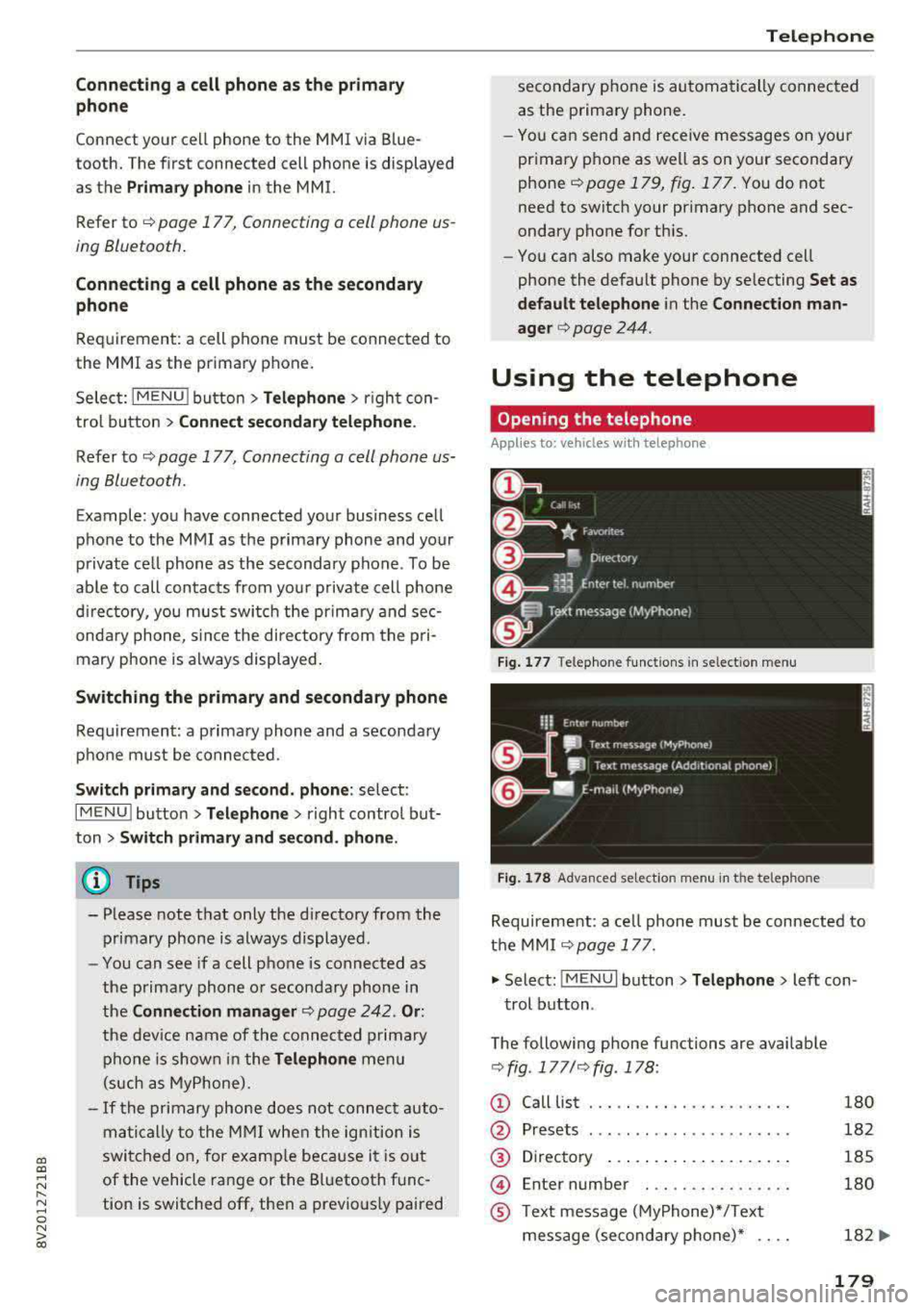
Fig . 17 7 Telephone func tion s in se lect io n menu
Fi g. 1 78 Adva nced selectio n menu in t he te lep hone
Requirement: a ce ll phone must be connected to
t h e MMI
¢ page 177 .
.,. Select: !M ENUI button> Tel ephon e> Left con
trol button .
The following phone functions are available
¢ fig . 177/ ¢fig . 178 :
(!) Call List
@
®
@
®
Presets
Directory ..... .. ... ... ...... .
En ter number . .. .. .... .. .... .
T ext message (MyPhone)*/Text
message (secondary phone)* ....
180
182
185
180
182
...
179
Page 183 of 400
CXl CXl .... N ,.__
N .... 0 N > 00
Accepting/ending a call
Applies to: ve hicles with telephone
- Accepting a call: select and confirm Answer.
- Declining a call: select and confirm Decline.
- Muting the active call: select and confirm
Mute .
- Ending a phone call/cancel dialing: select and
confirm End call.
Caller information: the
name, phone number or
Unknown appears in the Infotainment system
display depending on if the caller has been stored
in the directory and if the phone number has
been transmitted . A picture may also be dis·
played, depending on whether you have assigned
a picture to a contact in your directory and if it
was transferred to your MMI. You can find out if
your cell phone supports this function from your
cell phone network provider, your cell phone
owner's manual or at www.audiusa.com/blue
tooth.
- The radio or media playback is muted during
a phone call.
- Missed calls are displayed with a symbol in the status line of the Infotainment system
display @
~page 167, fig. 174.
During a phone call
Applies to: ve hicles with telephone
Requirement: there must be a call in progress .
.. End call: you can end a phone call.
.. Send tone sequence: you can enter tone se
quences (DTMF) directly using the number
speller and send to the other person on the call.
.,. Other call options: press the right control but-
ton.
The following options are possible during a call depending on the cell phone being used and the
type of connection:
-Answering an additional call: if there is an in
coming call while another call is active, you can
select Answer to put the existing call on hold
Telephone
and answer the incoming call. If you select De
cline, the incoming call will be declined.
- Accepting an incoming call when there is an
ac
tive call and a call on hold: select Replace. The
active call is replaced with the incoming call.
- Muting the incoming call: select and confirm
Mute.
- Additional call: select: Find contact
> Call list/
Directory/Favorites
> an entry from the list.
Mute: if you select and confirm this function, the
other person on the phone cannot hear you . You
can hear the other person. To turn the micro
phone back on, select and confirm Un mute.
Hold call/Resume held call : you can place the
ex
isting call on hold and resume it again. To re
sume the call, select and confirm the call you
would like to resume.
Transfer call to mobile device*: select and con·
firm Transfer call to mobile device to transfer
the existing call from the MMI to your cell phone.
Switch to hands-free mode*: Requirement: you
must have a phone call in progress on your cell
phone . Select and confirm Switch to hands-free
mode to transfer the call from your cell phone
back to the MMI.
Swap call: alternate between two phone calls
while one of the calls is on hold . Selecting End
call will end the active phone call. A phone call on
hold can be resumed using the right control but
ton
> Resume.
Connection manager: see
¢page 242 .
Telephone settings: see~ page 187 .
(D Tips
- To be notified of an incoming call during a
phone call, the
call waiting function in your
cell phone must be switched on when using
the Handsfree profile.
- You can obtain more information from your
cell phone service provider or from your cell
phone user guide.
- When leaving the vehicle, the Bluetooth
connection to the cell phone will automati
cally disconnect. Depending on your cell
phone, phone calls in progress may be
181