infotainment AUDI A3 SEDAN 2017 Repair Manual
[x] Cancel search | Manufacturer: AUDI, Model Year: 2017, Model line: A3 SEDAN, Model: AUDI A3 SEDAN 2017Pages: 400, PDF Size: 67.32 MB
Page 230 of 400
Media
-Do not u se any wireless devices on the fro nt
seats within range of the airba gs w hile driv
ing. Also read and follow the warnings in
r=> page 271, Fro nt airbags.
CD Note
- Always follow the information found in ¢ 0
in Wi-Fi hotspot on page 195 .
-Please note that there generally are add i
tiona l costs when using an online media
service account, especially when it is used i nternationally.
{!) Tips
-Depending on the Internet connection and
network traff ic, a connection loss can occur
during p layback of on line media serv ices.
-Online media and Internet radio usage de
pends on the serv ice avai lability of the third
party provider.
- Audi AG simply makes the access to on line
media serv ices possible t hrough the MMI
and does not take any respons ibility for the
contents of the onli ne med ia serv ices .
-Always read the chapter r:> page 196, Audi
connect (Infotainment) general informa tion.
-Depending on the mobile device used, the re
may be interr uptions du ring media playback
and when using the
Audi MMI connect app.
T o avoi d inter ruption s when usi ng a mob ile
device, do no t loc k t he s creen on you r mo
bi le dev ice a nd keep the
Audi MMI connect
app in the foreground .
- Co ntact an a utho rized Audi dea le r or a u
thorized Audi Service Facili ty for additional
informat ion about on line media .
228
Multimedia connections
USB adapter for Audi music interface
You can connect your mobile devices (such as a
smartphone or
MP3 player) to the Audi music in
terface and charge them using a special USB
adapter .
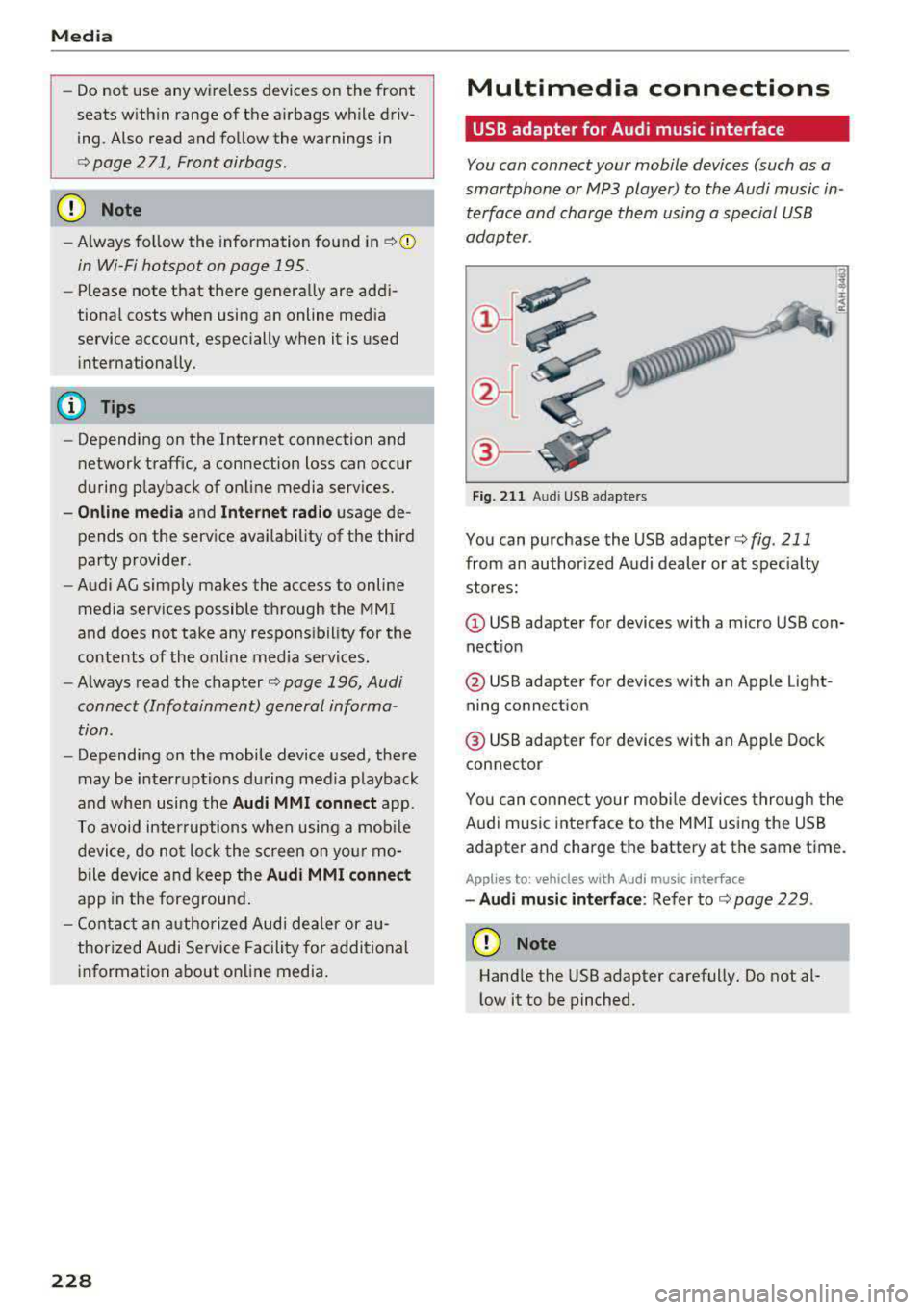
®-
Fig. 2 11 Audi USB adapters
You can purchase the USB adapter ¢ fig . 211
from an author ized Audi dealer or at spec ia lty
stores:
Q) USB adapter for devices with a micro USB con
nect ion
@ USB adapter for devices with an Apple Light
ning connect ion
@ USB adapte r for devices with an Apple Dock
connector
You can conne ct your mob ile dev ices throug h the
Audi music interface to the MM I using the USB
adapter and charge the battery at the same time.
Applies to: vehicles wit h Aud i music interface
-Audi musi c interface : Refer to¢ page 229.
CD Note
Handle the USB adapter carefully. Do not al
l ow it to be pinched .
Page 237 of 400
CXl CXl .... N ,.__
N .... 0 N > 00
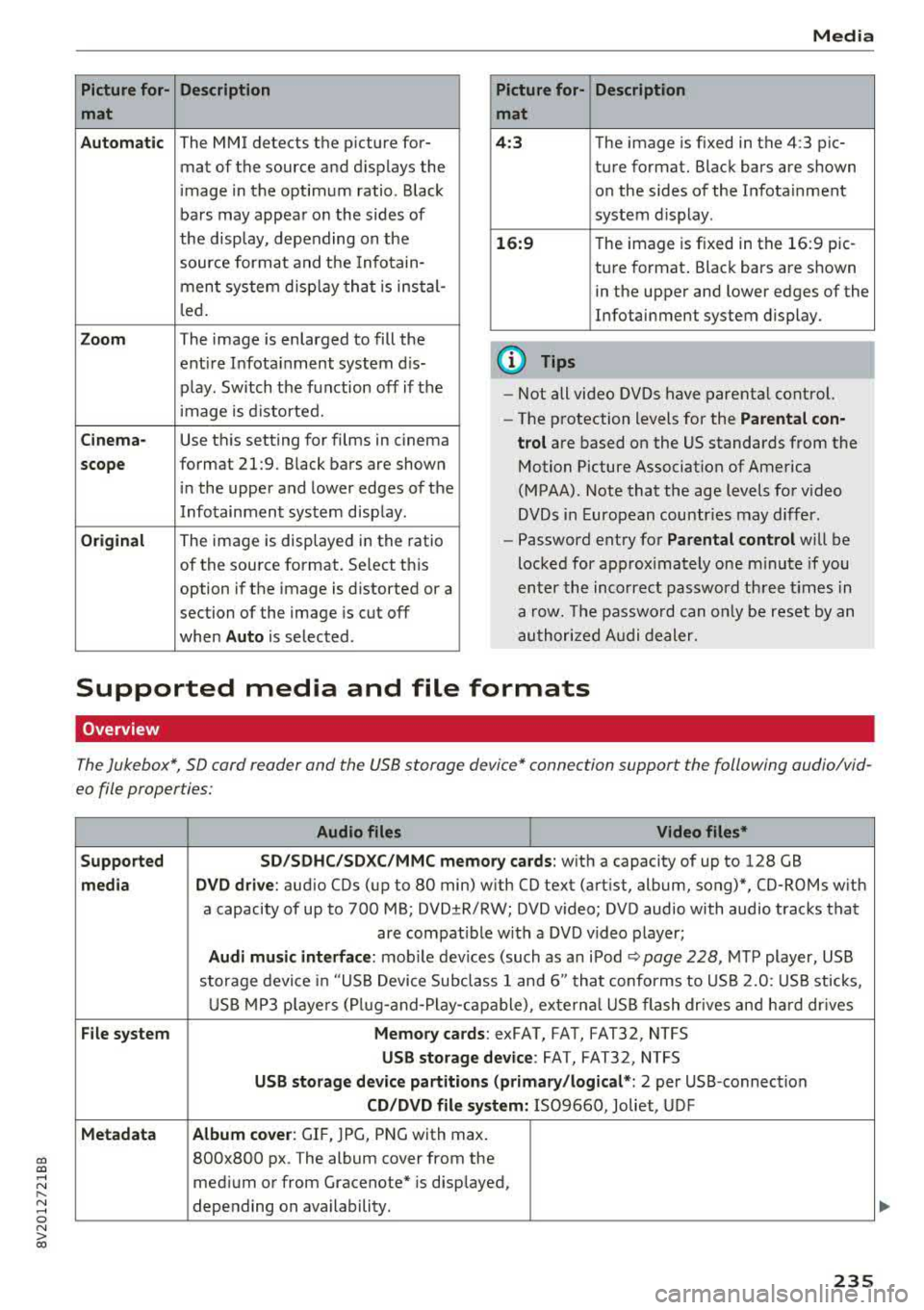
Picture for- Description
mat
Automatic
The MMI detects the picture for- mat of the source and displays the
image in the optimum ratio . Black
bars may appear on the sides of
the display, depending on the
source format and the Infotain-
ment system d isp lay that is instal-
led.
Zoom The image is enlarged to fill the
ent ire Infotainment system d is-
p lay . Switch the function off if the
image is distorted.
Cinema-Use this setting for films in cinema
scope format 21:9. Black bars are shown
in the upper and lower edges of the
Infotainment system display.
Original The image is displayed in the ratio
of the source format. Se lect th is
option if the image is distorted or a
section of the image is cut off
when
Auto is selected . Media
Picture for- Description
mat
4 :3 The image is fixed in the 4:3 pie-
ture format. Black bars are shown on the sides of the Infotainment
system display.
16:9 T he image is f ixed in the 16:9 pie-
ture format . Black bars are shown
in the upper and lower edges of the
Infotainment system display.
(D Tips
- Not all video DVDs have parenta l control.
- The protection levels for the
Parental con-
trol
are based on the US standards from the
Motion Picture Association of America
(MPAA). Note that the age levels for v ideo
DVDs in European countries may differ.
- Password entry for
Parental control will be
locked for approx imately one m inute if you
enter the incorrect password three times in
a row. The password can o nly be reset by an
authorized Audi dealer.
Supported media and file formats
Overview
The Jukebox*, SD card reader and the USB storage device* connection support the following audio/vid
eo file properties:
Audio files Video files*
Supported SD/SDHC/SDXC/MMC
memory cards:
with a capacity of up to 128 GB
media DVD drive : audio CDs (up to 80 min) w ith CO text (artist, album, song)*, CO-ROMs with
a capacity of up to 700 MB; DVD±R/RW; DVD v ideo; DVD audio with audio tracks that
are compatible with a DVD video player;
Audi music interface: mobile devices (such as an iPod ¢ page 228 , MTP player, USB
storage device in "USB Device Subclass 1 and 6" that conforms to USB 2.0: USB sticks,
USB MP3 players (Plug-a nd-Play-capable), exte rna l USB flash drives and hard dr ives
File system Memory cards: exFAT, FAT, FAT32, NTFS
USB storage device: FAT, FAT32, NTFS
USB storage device partitions (primary /logical* : 2 per USB-connection
CD/DVD file system: IS09660, Joliet, UDF
Metadata Album cover
: GIF, )PG, PNG with max.
800x800 px . The album cover from the
medium or from Gracenote* is disp layed,
depending on availability.
235
Page 244 of 400
System settings
switched on~, you can say new commands dur
ing announcements. You do not need to wait for
the signal tone (beep) during an announcement.
When the function is switched off
0, you need to
wait for the signa l tone (beep) to say a new com
mand .
Volume: you can adjust the volume of the
prompts by turning the control knob.
Speech training (only when the vehicle is station
ary): you can adapt the voice recognition system
to your voice or pronunciation in order to improve
the system's ability to recogni ze your speech. In
d iv idual training is comprised of 20 speech en
tr ies that consist of commands and sequences of
numbers . You can delete the programmed voice
training with the
Reset individual speech train
ing
function.
Display brightness
Display brightness:
you can adjust the bright
ness of the Infotainment system display by turn
ing the control knob .
Factory settings
The following functions can be reset to the facto
ry default settings :
-Sound settings
- Radio
- Media settings
-Jukebox*
- Directory
- Telephone
- Bluetooth and Wi-Fi*
- Navigation settings*
- Navigation and online memory*
- Speech dialog system*
- Message settings*
- Apps *
- Tool tips
- Audi connect*
- Audi smartphone interface*
You can select the desired functions individually
or all at once with the option
Select all entries .
Select and confirm Restore factory settings.
242
(D Tips
-Make sure that not only the settings were
deleted but also the stored data, if applica
ble .
- If you reset the
Navigation and on line
memory* , Apps* or Audi connect*
to the
factory default settings, the system auto matically restarts after approximately 20
seconds . The Infotainment system display
will be black for several minutes when re
sta rting.
- Please note that the voice recognition sys
tem* is not available in Cabriolets.
Connection manager
Introduction
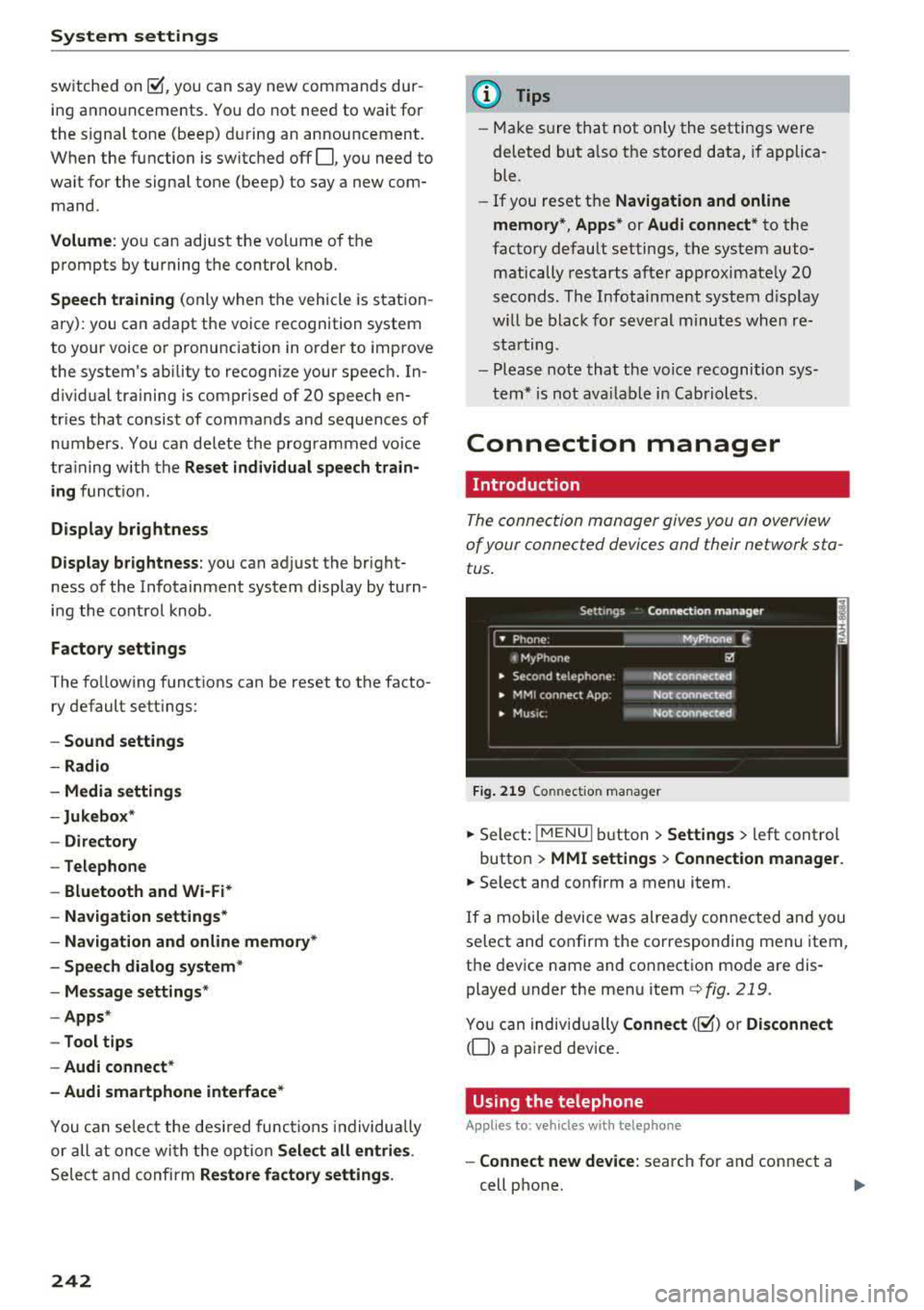
The connection manager gives you an overview
of your connected dev ices and their network sta
tus .
Fig. 219 Connect ion manager
.. Select: !MENU I button> Settings > left control
button >
MMI settings > Connection manager.
.. Select and confirm a menu item.
If a mobile device was already connected and you
select and confirm the corresponding menu item,
the device name and connect ion mode are dis
played under the menu item
c::>fig. 219.
You can individually Connect(~) o r Disconnect
(0) a paired device.
Using the telephone
Appl ies to: vehicles with telephone
-Connect new device: search for and connect a
cell phone.
..,.
Page 245 of 400
CXl CXl .... N ,.__
N .... 0 N > 00
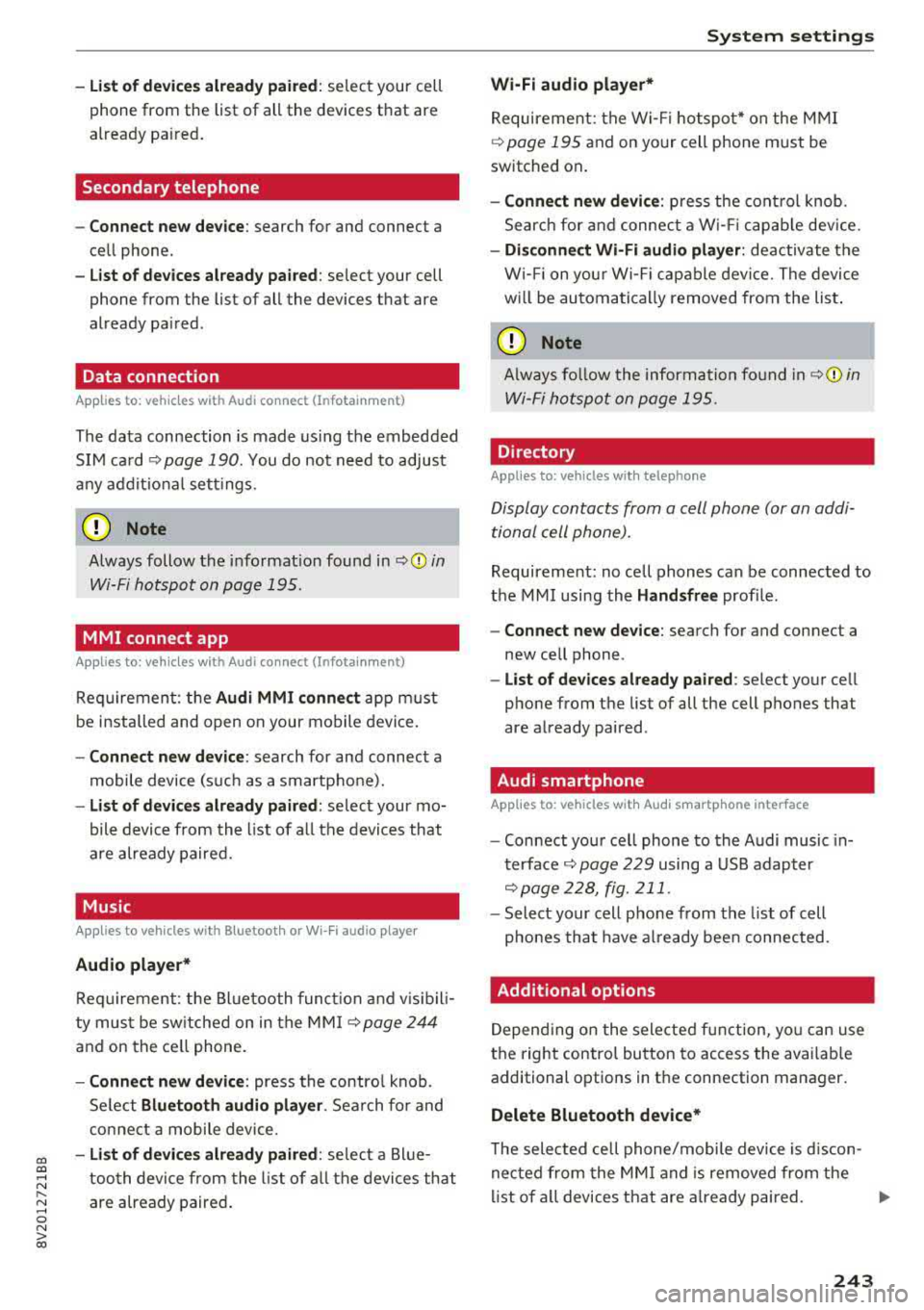
-List of dev ice s already pa ired : select your cell
phone from the list of all the devices that are
already pa ired .
Secondary telephone
-Connect ne w de vic e: search for and connect a
cell phone.
-Lis t of dev ice s alread y pa ired : select your cell
phone from the list of all the devices that are
already pa ired.
Data connection
App lies to: vehicles with Audi connect (Infotainment)
The data connection is made us ing the embedded
SIM ca rd
~ page 190. You do not need to adjust
any add it ional se ttings .
(D Note
Always follow the i nformat ion found inc:> @ in
Wi-Fi hotspot on page 195.
MMI connect app
Applies to: vehicles with Audi connect (Infotainment)
Requiremen t: the Audi MMI connect app m ust
be i nstalled and open on your mobile device .
-Connect new d evice: search for and connect a
mobile device (s uch as a smartp ho ne).
-Li st of device s already pa ir e d : select your mo
bile device from the list of a ll the devices that
are already paired.
Music
Applies to vehicles with B luetooth or Wi -Fi audio playe r
Audio player *
Requirement: the Bluetooth func tion and v is ib il i
ty must be sw itched on in the MMI
c:> page 244
and on the ce ll phone.
-Connect n ew de vice : press the contro l knob.
Se lect
Bl uetooth audio pla yer . Search for and
connect a mobile device .
-List of devic es alrea dy pa ired : selec t a Blue
too th device from the l ist of a ll the devi ces that
are already paired .
Sys te m set ting s
Wi-Fi audio playe r*
Re quirement: the Wi- Fi hotspot* on the M MI
c:>
page 195 and on yo ur cell phone m ust be
switched on .
-Connect new device : press the cont rol knob .
Search for and connect a W i- Fi capab le dev ice.
-Disconn ect Wi-Fi audio player : deactivate the
Wi- Fi on you r Wi-Fi capable device. The device
w ill be automati cally removed from the list .
(Q) Note
Always fo llow the information found in ~ © in
Wi-Fi hotspo t on page 195.
Directory
Applies to: vehicles with telephone
Display contacts from a cell phone (or an addi
tional cell phone).
Requirement: no cell phones can be connected to
the MMI using the
Hand sfr ee profile.
-Connect new de vice : search for and connect a
new cell phone .
-List of devices alre ad y paired : select your ce ll
phone from the list of all the cell phones that
are already paired .
Audi smartphone
Applies to: vehicles with Aud i smartphone interface
-Connect your ce ll phone to the Audi music in
terface ~ page 229 using a USB adapter
c:> page228, fig. 211 .
-Select your cell phone from the list of cell
p hones that have a lready bee n connected .
Additional options
Depending on the selected function, yo u can use
the right control button to access the availab le
additional options in the connection manager.
Delete Bluetooth device*
T he selected cell phone/mobile device is d iscon
nected from the MM I and is removed from the
list of a ll devices that are a lready paired.
..,.
243
Page 329 of 400
CXl CXl .... N ,.__
N .... 0 N > 00
Windshield washer system
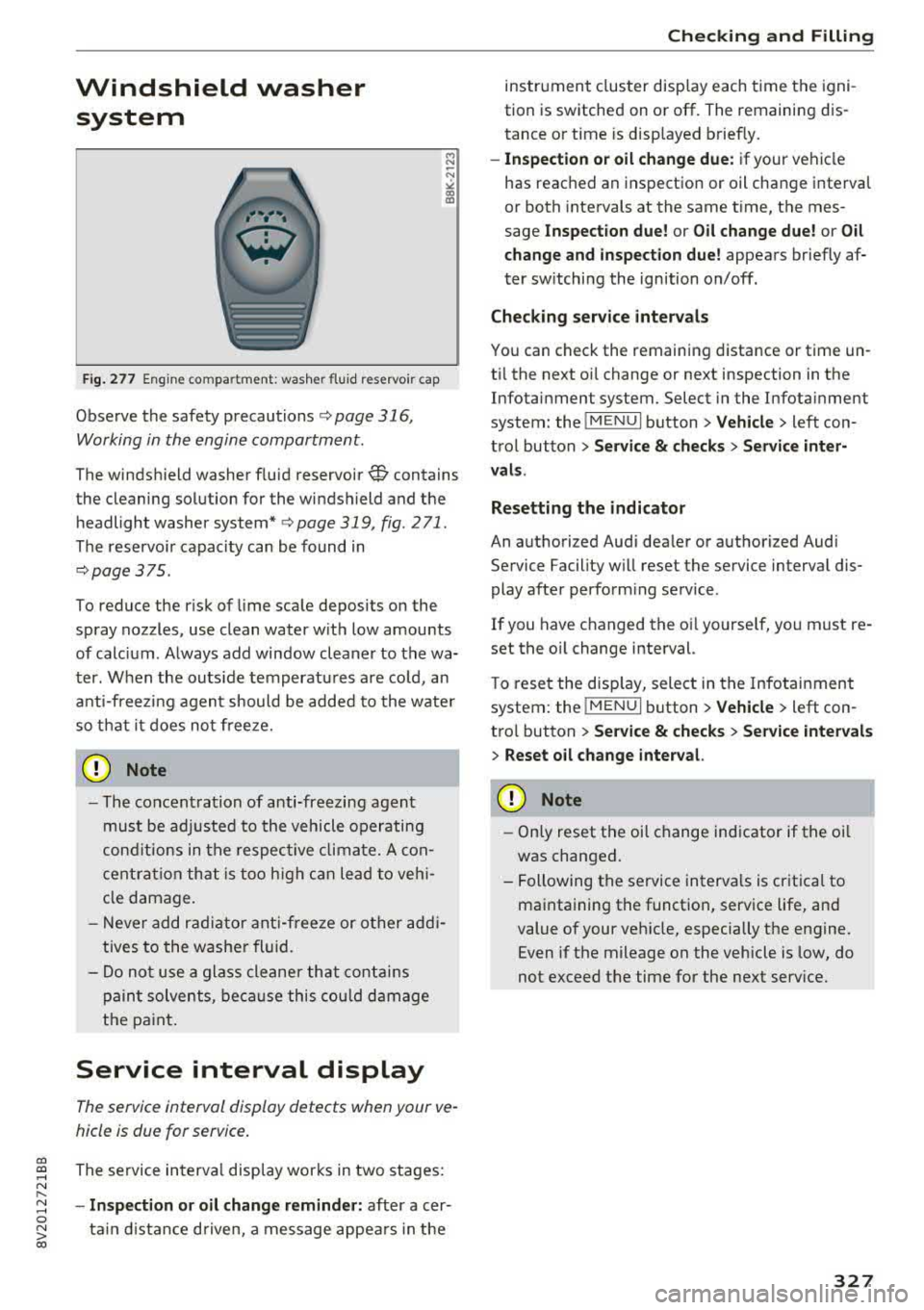
Fig. 277 Engine co mpa rtment: washer fluid reservoir cap
Observe the safety precautions ¢ page 316,
Working in the engine compartment.
M N
-N ~
"' a,
The windshield washer f luid reservoir~ contains
the cleaning solution for the windshield and the
headlight washer
system* ¢ page 319, fig. 2 71 .
The reservoir capacity can be found in
¢page 375 .
To reduce the risk of lime scale deposits on the
spray nozzles, use clean water with low amounts
of calc ium . Always add window cleaner to the wa
ter. When the outside temperatures are co ld, an
anti-freezing agent should be added to the water
so that it does not freeze.
CD Note
-The concentration of anti-freezing agent
must be adjusted to the vehicle operating
conditions in the respective climate. A con
centration that is too high can lead to veh i
cle damage.
- Never add radiator anti-freeze or other addi
tives to the washer fluid.
- Do not use a glass cleaner that contains
paint solvents, because this could damage
the paint .
Service interval display
The service interval display detects when your ve
hicle is due for service .
The service interva l display works in two stages:
- Inspection or oil change reminder: after a cer-
ta in distance driven, a message appea rs in the
Checking and Filling
instrument cluster display each time the igni
tion is switched on or off. The remaining dis
tance or time is disp layed briefly.
- Inspection or oil change due: if your vehicle
has reached an inspection or oil change interval
or both intervals at the same time, the mes
sage
Inspection due! or Oil change due! or Oil
change and inspection due!
appears briefly af
ter sw itching the ignition on/off.
Checking service intervals
You can check the remaining distance or time un
til the next oi l change or next inspection in the
Infotainment system. Select in the Infotainment
system: the
! MENUI button> Vehicle> left con
trol button
> Service & checks > Service inter
vals.
Resetting the indicator
An authorized Audi dealer or authorized Audi Service Facility will reset the service interval dis
play after performing service .
If you have changed the oi l yourself, you must re
set the oil change interval.
T o reset the disp lay, select in the Infotainment
system: the
! MENUI button> Vehicle> left con
tro l button
> Service & checks > Service intervals
> Reset oil change interval.
CD Note
-Only reset the oil change indicator if the oi l
was changed.
- Following the service intervals is critical to
maintaining the function, service life, and
value of your vehicle, especially the engine.
Even if the mileage on the vehicle is low, do
not exceed the time for the next service.
327
Page 348 of 400
Wheels
after switching the ignition on or while driving
and the
[tlJ indicator light in the instrument clus
ter blinks for approximately one minute and then
stays on, there is system malfunction. Check/cor rect the pressures on all four tires and store the
pressures
Q page 346 . If the indicator light does
turn off or turns on again after a short period of
time, drive to an authorized Audi dealer or au
thorized Audi Service Facility immediately to have
the malfunction corrected.
A WARNING
- If the tire pressure indicator appears in the
instrument cluster display, reduce your
speed immediately and avoid any hard
steering or braking maneuvers. Stop as soon
as possible and check the tires and their
pressures.
- The driver is responsible for maintaining the correct tire pressures. You must check the
tire pressures regularly.
- Under certain conditions (such as a sporty
driving style, winter conditions or unpaved
roads), the pressure monitor indicator may
be delayed.
- Do not use run-flat tires on your vehicle. Us
ing them when not permitted can lead to
vehicle damage or accidents.
@ Tips
- The tire pressure monitoring system can al
so stop working when there is an ESC/ABS
malfunction.
- Using snow chains may result in a system
malfunction.
- The tire pressure monitoring system in your
Audi was calibrated with "Audi Original
Tires"
¢ page 335. Using these tires is rec
ommended .
- The tire pressure monitoring system can on
ly monitor the tire pressure of the driving
tires. Check the tire pressure of the spare
wheel in the luggage compartment so that
if necessary it is ready for use.
346
· Storing tire pressures
Applies to: vehicles with Tire P ressure Monitoring System in
dicator
A change in tire pressure or a change in tires
must be stored in the system.
Before storing the tire pressures, make sure the
tire pressures of all four tires meet the specified
values and are adapted to the load¢
page 335.
.,. Select in the Infotainment system: IMENU ! but
ton
> Vehicle > Service & checks > Tire pres
sure monitoring
> Store tire pressure > Yes,
store now.
(D Tips
Do not store the tire pressures if snow chains
are installed.
Page 367 of 400
a, co ..... N
" N ..... 0 N > 00
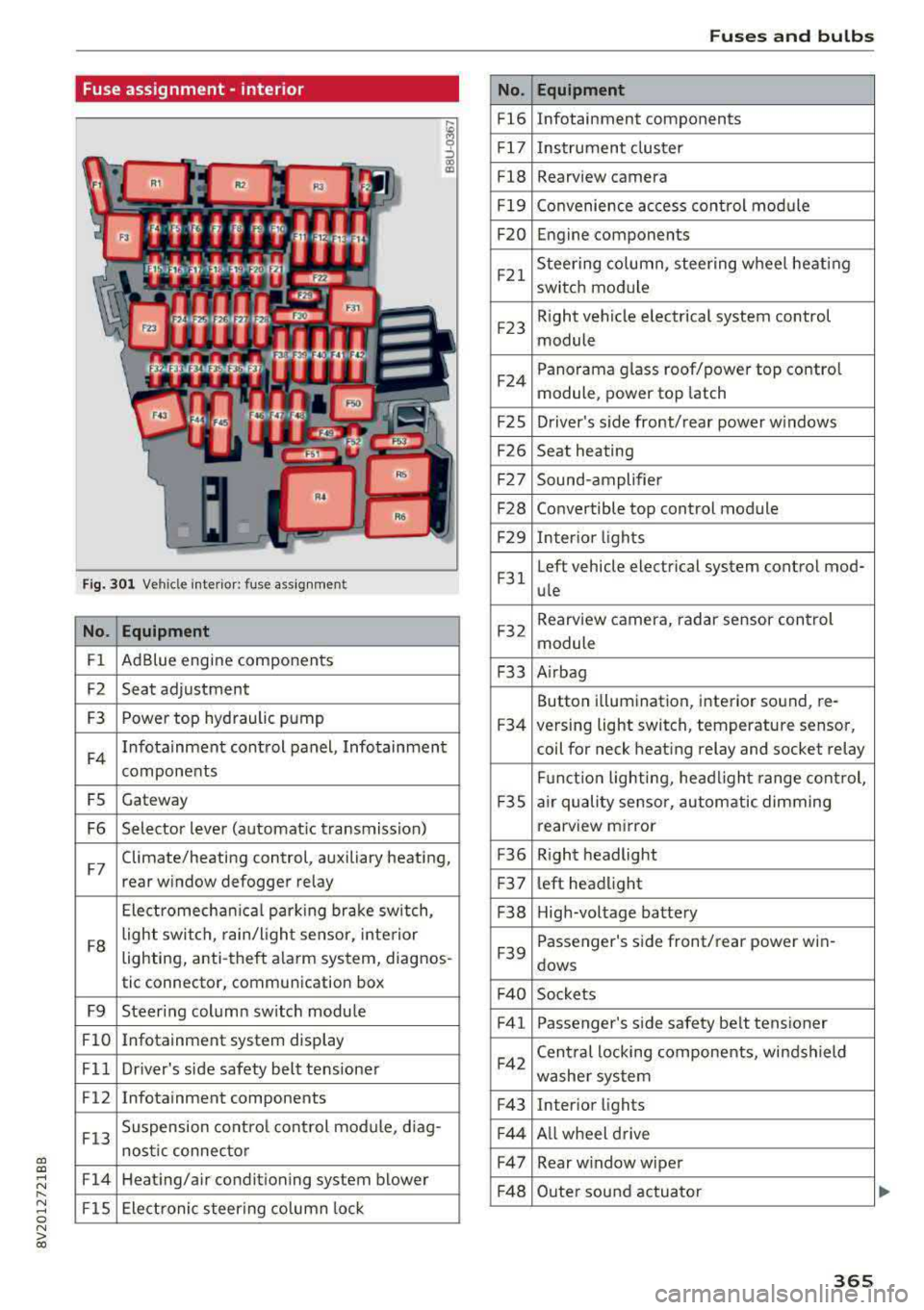
Fuse assignment -interior
Fig. 301 Vehicle interior: fuse assignment
No. Equipment
Fl Ad
Blue engine components
F2 Seat adjustment
F3 Power top hyd
raulic pump
F4 Infotainment control panel, Infotainment
components
FS Gateway
F6 Selector lever (automat ic transmission)
F7 Climate/heating control, auxiliary heating,
rear window defogger relay
Electromechan ica l parking brake sw itch,
F8 light switch,
rain/light sensor, inte rior
lighting, anti-theft alarm system, diagnos -
tic connector, communication box
F9 Steering column sw itch module
Fl0 Infotainment system display
Fll Dr iver's side safety belt tens ioner
F12 Infotainment components
F13 Suspension
control control module, diag-
nostic connector
F14 Heating/air conditioning system blower
FlS Electronic steering column lock
No .
Fl6
F 17
Fl8
F 19
F20
F21
F2 3
F24
F 2S
F26
F 27
F28
F2 9
F 31
F32
F33
F34
F 3S
F36
F3 7
F38
F39
F 40
F41
F42
F43
F44
F47
F4 8
Fuses and bulbs
Equipment
Infotainment components
Instrument cluster
Rearview camera
Convenience access cont rol module
Engine components
Steering column, steering wheel heating
switch module
Right vehicle electrical system control
module
Panorama glass roof/power top control
module, power top latch
Driver's s ide front/rear power w indows
Seat heating
Sound-amplifier
Convertible top control module
Interior lights
Left vehicle electrical system control mod-
ule
Rearview camera, radar sensor control
module
A irbag
Button i llumination, interior sound, re-
versing light switch, temperature sensor,
coil for neck heating relay and socket relay
Fu nct ion lighting, headl ight range control,
a ir quality sensor, automatic dimming
rearview mirror
R ight headlight
l eft headlight
High-voltage battery
Passenger's s ide front/rear power win -
dows
Sockets Passenger's side safety belt tensioner
Cen tral locking components, windshield
washer system
Interior lights
Al l wheel drive
Rear w indow wiper
Outer sound actuator
365
Page 376 of 400
Techni cal data
Technical data
Vehicle data
XXXXX XX -X -X X XX XXX XX
®-+ : :::ti/:: XXXXXXXX XX X X X XX XXXX
IYP /l'YP! XXX XXX
XX XXXXXXX XX X X XX
XXX
K W XXX
f,\__J_ I IIJIORl
1
:tr:l~
1
XXXX I XXXX XXX I XX
II. -AlJSliT. / OPTIONS
EOA 7D5 4U B 6XM SS G SR W
2 EH JO Z l lB lAS lBA
3FC 5 MU 7X l
FDA 9G3 OG7 O YH OJF
TL 6 3 KA 8EH UlA X 9B O Z7
lX W
80 3 908 8Z4 02D
7T6 C V7
7KO 4 X3
2K2
3 l4 4 KC 3Y O 413 5 D2
lS A 7GB 0 1A 4GO
XX . X XX X XX X XXXX
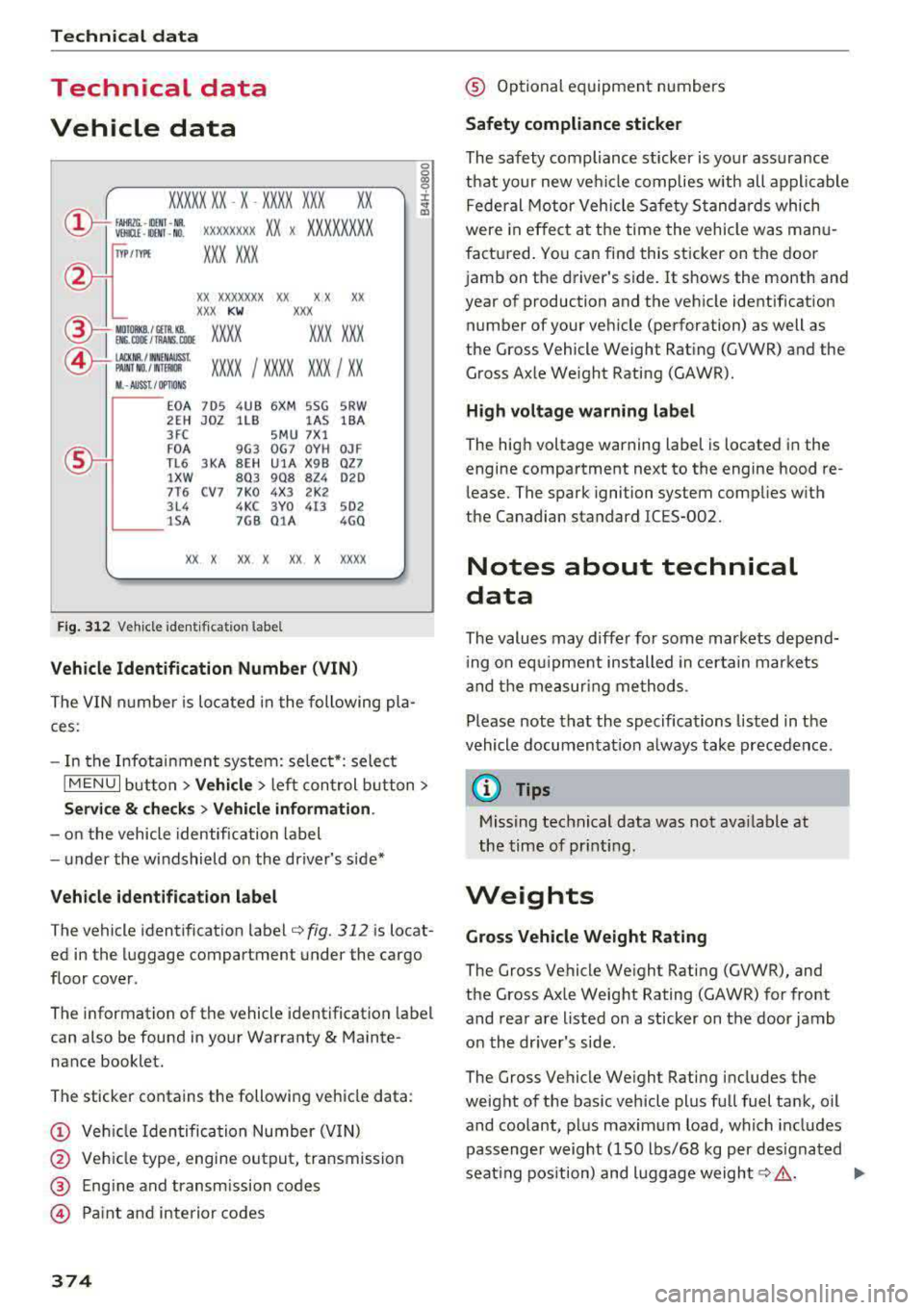
Fig. 312 Veh icl e ident if ic ation labe l
Vehicle Identification Number (VIN )
The VIN numbe r is lo cated i n the following pla
ces :
0
0
~ :x: ... IX)
- In the Infotainment system: selec t*: select
IM ENU I button > Vehicle > left control b utton>
Ser vice & che cks > Vehicl e information .
-on the vehicle identification label
- u nder the windshield on the driver's side*
Vehicle identification label
The vehicle identification label ¢ fig. 312 is locat
ed in the luggage compartment under the cargo
floor cover.
The information of the vehicle identification label
can also be found in your Warranty
& Mainte·
nance booklet.
The sticker contains the following vehicle data :
(D Vehicle Iden tifica tion Number (VIN)
@ Vehicle type, engine output, transmission
@ Eng ine and transm ission codes
@ Pa int and interior codes
374
@ Optional equipment numbers
Safety compliance sticker
The safety compliance sticker is your assurance
that your new vehicle complies with all applicable Federal Motor Veh icle Safety S tandards which
were in ef fect at the time the vehicle was manu
factu red. You can find this sticker on the door
jamb on the driver's side. It shows the month and year of production and the veh icle identification
number of your veh icle (perforation) as well as
the Gross Vehicle Weight Ra ting (GVWR) and the
Gross Axle We ight Rating (GAWR).
H igh volt age warning label
The hig h voltage warn ing label is located in the
engine compartment next to the engine hood
re
lease. The spark ignition system complies w ith
the Canadian s tandard ICES-002.
Notes about technical
data
The values may diffe r for som e markets depend
i ng o n eq uipment installed in certa in mar kets
and the me asur ing me thods .
Please note that the specifica tions listed in the
vehicle documentat ion a lways take precedence .
(D Tips
Missing technical data was not ava ilable at
the time of pr int ing .
Weights
Gross Vehicle Weight Rating
The Gross Vehicle We ight Rating (GVWR), and
the Gross Axle Weig ht Rating (GAWR) for front
and rea r are listed on a sticker on the door jamb
o n the dr iver's side .
The Gross Vehicle We ight Rating includes the
weight of the bas ic vehicle plus full fuel tank, oil
and coolant , plus maximum load, which includes
passenger weight ( 150 lbs/68 kg per des ignated
seat ing pos ition) and luggage
weight ¢& . ..,_
Page 384 of 400
Index
A
A/C (automatic climate control system) . . . . 71
Accessories . . . . . . . . . . . . . . . . . . . . . . . 64, 380
Active lane assist
refer to Audi active lane assist . . . . . . . . . 136
Active rollover protection system . . . . . . . . 256
Retracting rollover protection.......... 257
Adaptive cruise control
refer to Audi adaptive cruise control . . . . 126
Adaptive light
refer to Audi adaptive light . . . . . . . . . . . . . 51
Adjusting the air distribution Automatic climate control system . . . . . . . 72
Adjusting the air vents . . . . . . . . . . . . . . . . . . 73 Automatic climate control system . . . . . . . 72
Adjusting the sound . . . . . . . . . . . . . . . . . . . 245
Advanced key
refer to Convenience key . . . . . . . . . . . . . . . 78
Airbag .... .. .. ............... .... ... 267
Airbag system .. .... .............. 267,287
Advanced Airbag System components . . . 274
Care . . . . . . . . . . . . . . . . . . . . . . . . . . . . . . 282
Ch ildren . . . . . . . . . . . . . . . . . . . . . . . . . . . 294
Ch ild restraints . . . . . . . . . . . . . . . . . . . . . 295
Components (front airbags) . . . . . . . . . . . 274
Danger of fitting a child safety seat on the
front passenger seat . . . . . . . . . . . . . . . . . 268
Disposal . . . . . . . . . . . . . . . . . . . . . . . . . . . 282
Front airbags . . . . . . . . . . . . . . . . . . . . . . . 272
How do the front airbags work? . . . . . . . . 277
How many airbags does my vehicle have? 274
How the Advanced Airbag System compo -
nents work together . . . . . . . . . . . . . . . . . 276
Important safety instructions on the knee
airbag system . . . . . . . . . . . . . . . . . . . . . . . 285
Knee airbags . . . . . . . . . . . . . . . . . . . . . . . . 283
Monitoring . . . . . . . . . . . . . . . . . . . . . . . . . 279
PASSENGER AIR BAG OFF light . . . . . . . . . 279
Repairs . . . . . . . . . . . . . . . . . . . . . . . . . . . . 282
Safety instructions . . . . . . . . . . . . . . . . . . . 281
Side airbags . . . . . . . . . . . . . . . . . . . . . . . . 285
Warning/Indicator lights . . . . . . . . . . . . . 279
When must the system be inspected? . . . 279
Air pressure (tires) . . . . . . . . . . . . . . . . 336, 345
A lignment pin (tire change) . . . . . . . . . . . . . 353
All-weather lights..... ......... .... .. .. 51
382
All season tires
All wheel drive 342
refer to quattro (all wheel drive) . . . . .
. . 154
AMI
refer to Audi music interface . . . . . . . 228, 229
Android Auto
refer to Audi smartphone interface . . . . . 239
Ant i-freeze
Windshield washer system . . . . . . . . . . . . 327
Anti -Lock Braking System (ABS) . . . . . . . . . 151
Anti-Slip Regulation (ASR) . . . . . . . . . . . . . . 151
Apple CarP lay
refer to Aud i smartphone interface . . . . . 239
Audi active lane assist . . . . . . . . . . . . . . . . . 136
Cleaning the camera area . . . . . . . . . . . . . 348
Messages . .. .. .. ... .... ....... .... .
Audi adaptive cruise control ........... . .
Cleaning the sensor . .. .. ........... . . 138
126
348
Distance display, distance warning ..... . 132
Messages . . . . . . . . . . . . . . . . . . . . . . . . . . 133
Audi adaptive light . . . . . . . . . . . . . . . . . 51, 143
Audi connect e-tron services . . . . . . . . . . . . 198
Doors and lights .. .. .. .. ........... .. 198
Audi connect (Infotainment) ........ 190,195
Data protection . . . . . . . . . . . . . . . . . . . . . 196
Services overview . . . . . . . . . . . . . . . . . . . . 191
Start ing . . . . . . . . . . . . . . . . . . . . . . . . . . . 191
Audi drive select . . . . . . . . . . . . . . . . . . . . . . 143
Audi magnetic ride
refer to Suspension control . . . . . . . . . . . . 143
Audi music interface . . . . . . . . . . . . . . . . . . . 228
Audi music stream
refer to Wi-Fi . . . . . . . . . . . . . . . . . . . . . . . 226
Audio files . . . . . . . . . . . . . . . . . . . . . . . . . . . 230
Audio player Bluetooth audio player . . . . . . . . . . . . . . . 225
Wi-Fi audio player . . . . . . . . . . . . . . . . . . . 226
Audio track . . . . . . . . . . . . . . . . . . . . . . . . . . 233
Audi pre sense . . . . . . . . . . . . . . . . . . . . . . . 133
Messages . . . . . . . . . . . . . . . . . . . . . . 133, 136
Settings . . . . . . . . . . . . . . . . . . . . . . . . . . . 136
Audi Service Repair Manuals and Literature 378
Audi side assist . . . . . . . . . . . . . . . . . . . . . . . 139
Cleaning the sensors . . . . . . . . . . . . . . . . . 348
Messages . ....... ... ..... .........
.
Rear cross-traffic assist ... ........... . 143
142
Page 387 of 400
CXl CXl .... N r--N .... 0 N > 00
Convenience key Em ergency operation . . . . . . . . . . . . . . . . . . 81
Starting/stopping the engine . . . . . . . . . . . 78
Unlocking/locking . . . . . . . . . . . . . . . . . . . . 36
Convenience opening/closing . . . . . . . . . . . . 42
Convertible child safety seats . . . . . . . . . . . 300
Convertible locking retracto r
Activating . . . . . . . . . . . . . . . . . . . . . . . . . . 305
Deactiva ting . . . . . . . . . . . . . . . . . . . . . . . . 306
Using to secure a child safety seat . . . . . . 305
Cooling mode Automatic climate control system . . . . . . . 71
Cooling system Adding coolant . . . . . . . . . . . . . . . . . . . . . . 323
Coolant . . . . . . . . . . . . . . . . . . . . . . . . . . . . 323
Coolant level checking . . . . . . . . . . . . . . . . 323
Coolant temperature indicator . . . . . . . . . . 11
Corner ing light . . . . . . . . . . . . . . . . . . . . . . . . 51
Cruise control system . . . . . . . . . . . . . . . . . . 123
Cup holders . . . . . . . . . . . . . . . . . . . . . . . . . . . 65
Current consumption . . . . . . . . . . . . . . . . 17, 18
D
Data connection . . . . . . . . . . . . . . . . . . . . . . 195
Data protection . . . . . . . . . . . . . . . . . . . 196, 222
Data recorder . . . . . . . . . . . . . . . . . . . . . . . . 156
Date .. .. .. .. .. ............... .. .. .. . 241
Date display . . . . . . . . . . . . . . . . . . . . . . . . . 241
Daytime running lights . . . . . . . . . . . . . . . . . 51
Declaration of compliance Audi adaptive cruise control . . . . . . . . . . . 381
Audi side assist . . . . . . . . . . . . . . . . . . . . . 381
Cell phone package . . . . . . . . . . . . . . . . . . 381
Convenience key . . . . . . . . . . . . . . . . . . . . . 381
Electronic immobilizer. . . . . . . . . . . . . . . . 381
H omelink universal remote control . . . . . 381
Remote control key . . . . . . . . . . . . . . . . . . 381
Defrosting (windows) Automatic climate control system . . . . . . . 72
DEF (instrument cluster) . . . . . . . . . . . . . . . . 12
Deluxe automatic climate control
refer to Climate control system
(automatic) . . . . . . . . . . . . . . . . . . . . . . 70, 71
Demo mode
refer to Presentation mode . . . . . . . . . . . . 208
Determining correct load limit . . . . . . . . . . 341
Index
Digital compass . . . . . . . . . . . . . . . . . . . . . . . 59
Digital Rights Management . . . . . . . . . . . . . 222
Dimensions . . . . . . . . . . . . . . . . . . . . . . . . . . 375
Dimming the exterior mirrors . . . . . . . . . . . . 56
Dimming the rearview mirror . . . . . . . . . . . . 56
Directory
refer to Contacts . . . . . . . . . . . . . . . . . . . . 185
Display . . . . . . . . . . . . . . . . . . . . . . . . . . . . . . 13
Cleaning . . . . . . . . . . . . . . . . . . . . . . . . . . . 349
Infotainment system display . . . . . . 159, 242
Instrument cluster. . . . . . . . . . . . . . . . . . . . 16
Multifunction steering wheel . . . . . . . . . . . 13
Distance ... ....................... 17,18
Doors Child safety lock . . . . . . . . . . . . . . . . . . . . . . 41
Door contact switch . . . . . . . . . . . . . . . . . . . 54
Emergency release . . . . . . . . . . . . . . . . . . . . 38
also refer to Unlocking/locking ....... 36, 37
Driver information system . . . . . . . . . . . . . . . 17
Changing views . . . . . . . . . . . . . . . . . . . . . . 13
Economy tips (analog instrument cluster) . 19
Efficiency program . . . . . . . . . . . . . . . . . . . . 19
Energy consumers (Audi virtual cockp it) . . 18
Outs ide temperature display. . . . . . . . . . . . 12
Service interval display . . . . . . . . . . . . . . . 327
Trip computer (analog instrument cluster . 18
Trip computer (Audi virtual cockpit) . . . . . . 17
View . . . . . . . . . . . . . . . . . . . . . . . . . . . . . . . 15
Driver seating position . . . . . . . . . . . . . . . . . 248
Drives
refer to Media . . . . . . . . . . . . . . . . . . 222, 230
Drive select
refer to Audi drive select . . . . . . . . . . . . . . 143
Driving econom ically . . . . . . . . . . . . . . . . . . . 74
Driving safely . . . . . . . . . . . . . . . . . . . . . . . . 247
Driving through water . . . . . . . . . . . . . . . . . . 74
Driving time . . . . . . . . . . . . . . . . . . . . . . . 17, 18
Dust filter
refer to Pollutant filter . . . . . . . . . . . . . . . . 70
DVD drive (media drives)
223
Dynamic volume
refer to System volume . . . . . . . . . . . . . . . 246
E
E-mail . . . . . . . . . . . . . . . . . . . . . . . . . . . . . . 184
385