automatic AUDI A4 2013 User Guide
[x] Cancel search | Manufacturer: AUDI, Model Year: 2013, Model line: A4, Model: AUDI A4 2013Pages: 302, PDF Size: 75.61 MB
Page 37 of 302
@ For the sake of the environment
Dispose of dead batteries properly so as
not to pollute the environment.
@ Tips
The replacement battery must be the
same specification as the original.
Emergency unlocking of the ignition key
In the event of malfunctions in the electrical
system, it may happen that you cannot re move the ignition key .
• Remove the mechanical key<:? page 34.
• Lock the vehicle using the mechanical key
<:?page 38.
• Have the e lectrica l system inspected by an
authori zed Audi dealership .
Locking and unlocking the vehicle with
the remote control
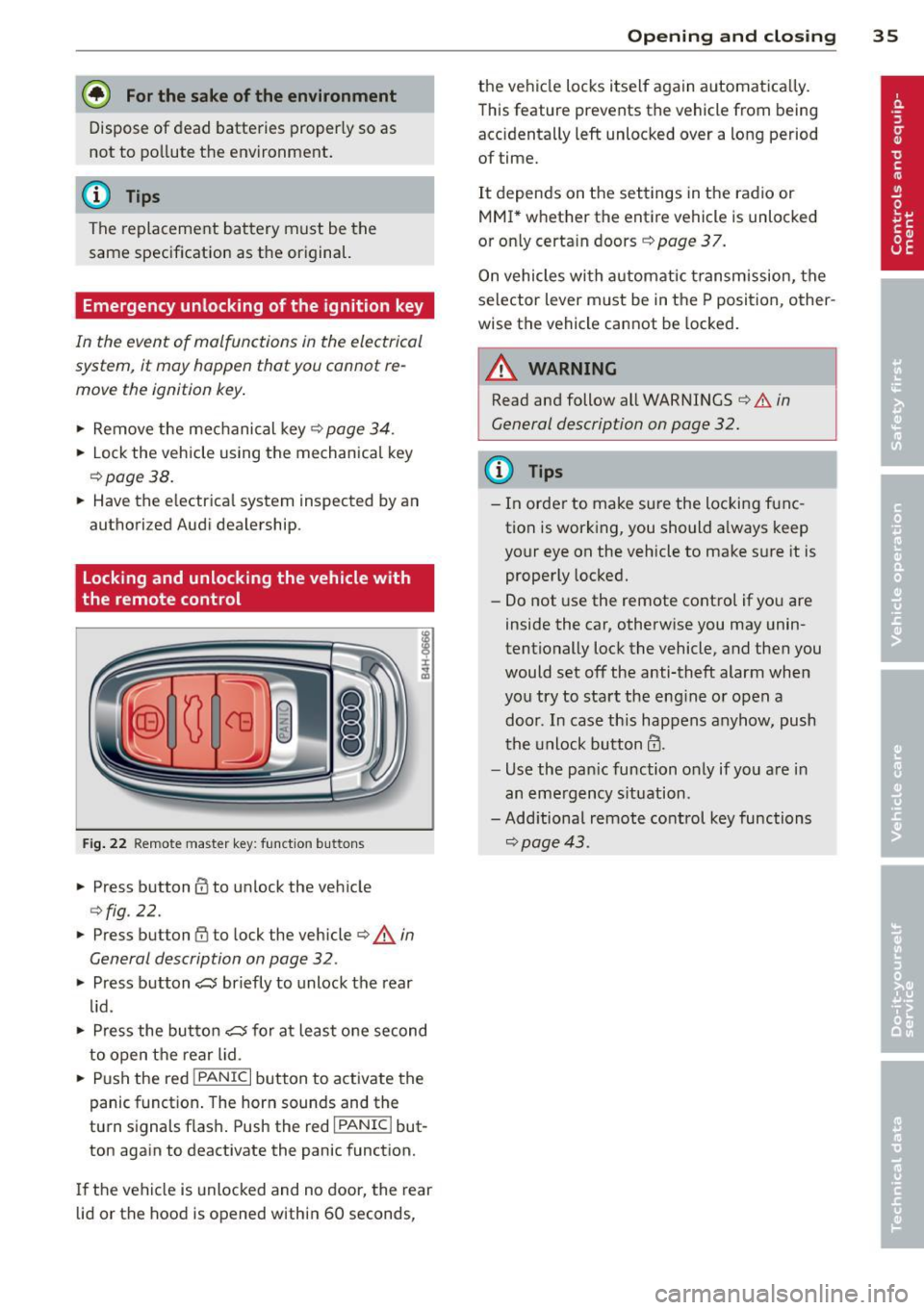
Fig. 22 Remote master key: function but tons
• Press button @to unlock the vehicle
Qfig . 22.
• Press button fij to lock the vehicle QA in
General description on page
32 .
• Press button ,c:;5 briefly to unlock the rear
lid .
• Press the button
,c:;5 for at least one second
to open the rear lid .
• Push the red
I PANIC I button to activate the
panic function. The horn sounds and the
turn s ignals flash . Push the red
I PANIC ! but
ton again to deactivate the panic function.
If the vehicle is unlocked and no door, the rear
lid or the hood is opened within 60 seconds,
Opening and closing 35
the vehicle locks itself again automat ica lly.
This feature prevents the vehicle from being
accidentally left unlocked over a long period of time.
It depends on the settings in the radio or
MMI* whether the entire vehicle is unlocked
or only certain doors <:?
page 37.
On vehicles with automatic transmission, the
selector lever must be in the P position, other
wise the vehicle cannot be locked.
A WARNING
Read and follow all WARNINGS ¢.&. in
General description on page
32.
(D Tips
- In order to make sure the locking func
tion is working, you should a lways keep
your eye on the vehicle to make sure it is properly locked.
- Do not use the remote control if you are
inside the car, otherwise you may unin
tentionally lock the vehicle, and then you
would set off the anti-theft alarm when
you try to start the eng ine or open a
door . In case this happens anyhow, push
t he unlock button@.
- Use the pan ic function only if you are in
an emergency s ituation.
-Add itional remote control key functions
¢page 43 .
Page 38 of 302
36 Opening and clo sing
locking and unlocking with convenience
key
Appl ies t o vehicles : wit h convenience key
The doors ond the rear lid can be unlocked
and locked without operating the master key.
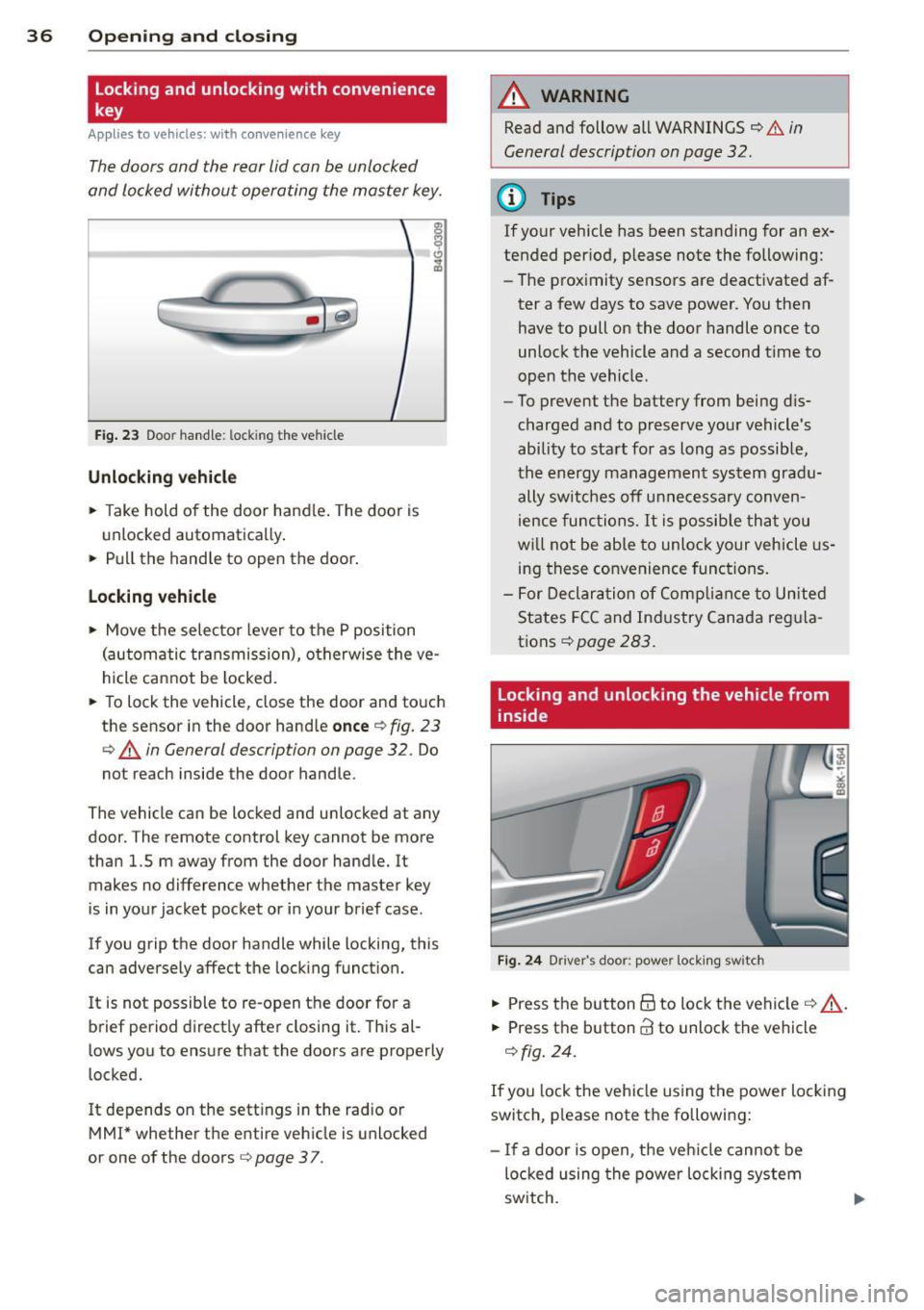
Fig . 23 Door hand le: lock ing the v ehi cle
Unlocking vehicl e
.. Take hold of the door hand le . The door is
unlocked automatically .
.. Pull the handle to open th e door .
locking vehicle
.. Move the selecto r lever to the P position
(au tomatic transmission), o therwise the ve
hicle cannot be locked.
.. To lock the veh icle , close the door and to uch
the sensor in th e door hand le
once ¢ fig. 23
c:> A in General description on page 32. Do
not reach inside the door handle .
The vehicle ca n be locked and unlocked at any
doo r. T he remote control key cannot be more
t han 1.5 m away from the door hand le. It
makes no difference whether the m aster key
is in your jacket pocket or i n your brief ca se .
If you grip the door handle while lo cking, th is
can adversely affect the lock ing funct ion.
I t is not possible to re-open the door for a
brief period direct ly after closing it. This al
l ows you to ensure that the doors are properly
locked.
I t depends on the sett ings in the radio or
MMI* whether the e ntire vehicle is unlocked
or one of the doors
c:> page 3 7 .
A WARNING
-
Read and follow all WARNINGS c:> .&. in
General description on page
32 .
(D Tips
If your vehicle has been standing for an ex
tended per iod, please note the following:
- The prox imity sensors are deactivated af-
ter a few days to save power. You then
have to pull on the door handle once to
unlock the vehicle and a second t ime to
open the vehicle .
- To prevent the battery from being d is
charged and to preserve your vehicle 's
ability to start for as long as possib le,
the energy managemen t system gra du
ally switches off u nnecessa ry c onven
ience func tions.
It is possib le th at you
w ill not be able to unloc k your vehicle us
ing these convenience func tions.
- F or Declar ation of Complian ce to Unite d
States FC C and Ind ustry Canada reg ula
tions
¢ page 283.
locking and unlocking the vehicle from
inside
Fi g. 24 Drive r's doo r: pow er lock ing sw it c h
.. Press the b utton B to lock the vehicle c::> ,& .
.. Press the button @ to unlock the vehicle
¢ fig. 24.
If you lock the veh icle using the power loc king
switch, p lease note the followi ng:
- I f a door is open, the veh icle canno t be
loc ked u sing the power loc king system
sw itch.
Page 39 of 302
-You cannot open the doors or the rear lid
from the outside (increased security, for ex
amp le when yo u are stopped at a red light).
- The diodes in the power loc king switc h illu
minate when a ll the doors are closed and
l ocked.
- Front doors: you can un lock and open the
doors from the ins ide by p ulling on the door
hand le.
- Rea r doors: p ull the door handle once to re
lease the lock. Pull the hand le again to open
the door.
- If you have a crash and the airbag is activat
ed, the doors automatically un lock.
A WARNING
- The power locking sw itch works w ith the
ignition off and automatically locks the
entire vehicle when it is actua ted .
- On a vehicle locked from the outs ide the
power locking system switch is inopera
t ive.
- Locked doors make it more diffic ult for
eme rg ency workers to get into th e vehi
cle, w hich puts lives at risk . Do not leave
anyone behi nd in the ve hicle, espe cially
ch ildren.
(D Tips
Your vehicle is locked automatically at a
speed of
9 mph (15 km/h) (Au to Lock)
~ page 32. You ca n unl ock the vehicle
a g ai n using the opening f un ction in the
power locking sys tem swit ch ~ -
Setting power locking
In the radio/MM !*, you can se t which doors
t he central locking system will unlo ck .
.,. Se lect: ICARlf unct io n button>
Central lock
ing .
Or
.,. Se lect: ~ I C-A-R~I fu nct io n bu tton >
Car sy s
tems*
c ontrol bu tton > Vehicle setting s >
(Central lock ing) *.
Single door unlocking /Unlock door s* -
you
c a n specify whi ch door s unl ock when yo u open
the vehicle .
Opening and clo sin g 37
-Select ing off / All and p ressing the Iii button
on t he remote contro l key unlocks the entire
veh icle.
- Selecting
on /Driver and pressing the Iii but
ton on the remote control key once un locks
only the driver's door. In vehicles with a con
ven ience key*, only the door whose handle
you pull w ill unlock. If you press the
Iii but
ton tw ice, the entire vehicle will u nlock . If
you press the [@] button, t he entire ve hicle
w ill always lock .
Luggage comp. loc k/Lock e xterior trunk han
dl e -
If you select On , you can no longer ope n
the luggage compartment using the rea r lid
hand le
~ page 39, fig. 2 7. In this case, the
r ear lid can be opened with t he l=I button on
th e maste r key¢ page 35, fig. 22 or with the
l = I* button in the d river's doo r¢ page 40,
fig .
29 .
Fold mirrors * if you se lec t On , the outs ide
mirro rs will fo ld in au tomati cally when yo u
press the
Iii button on the remote cont ro l key
~ page 50.
Tone when locking -if you selec t On, a to ne
will soun d when yo u lo ck t he vehicle.
Auto Lock /Lock when driving -if you selec t
On, th e e nti re ve hicl e w ill lock automat ically
whe n the speed reaches
9 m ph (1 5 km /h).
Page 40 of 302
38 Opening and closing
Emergency locking
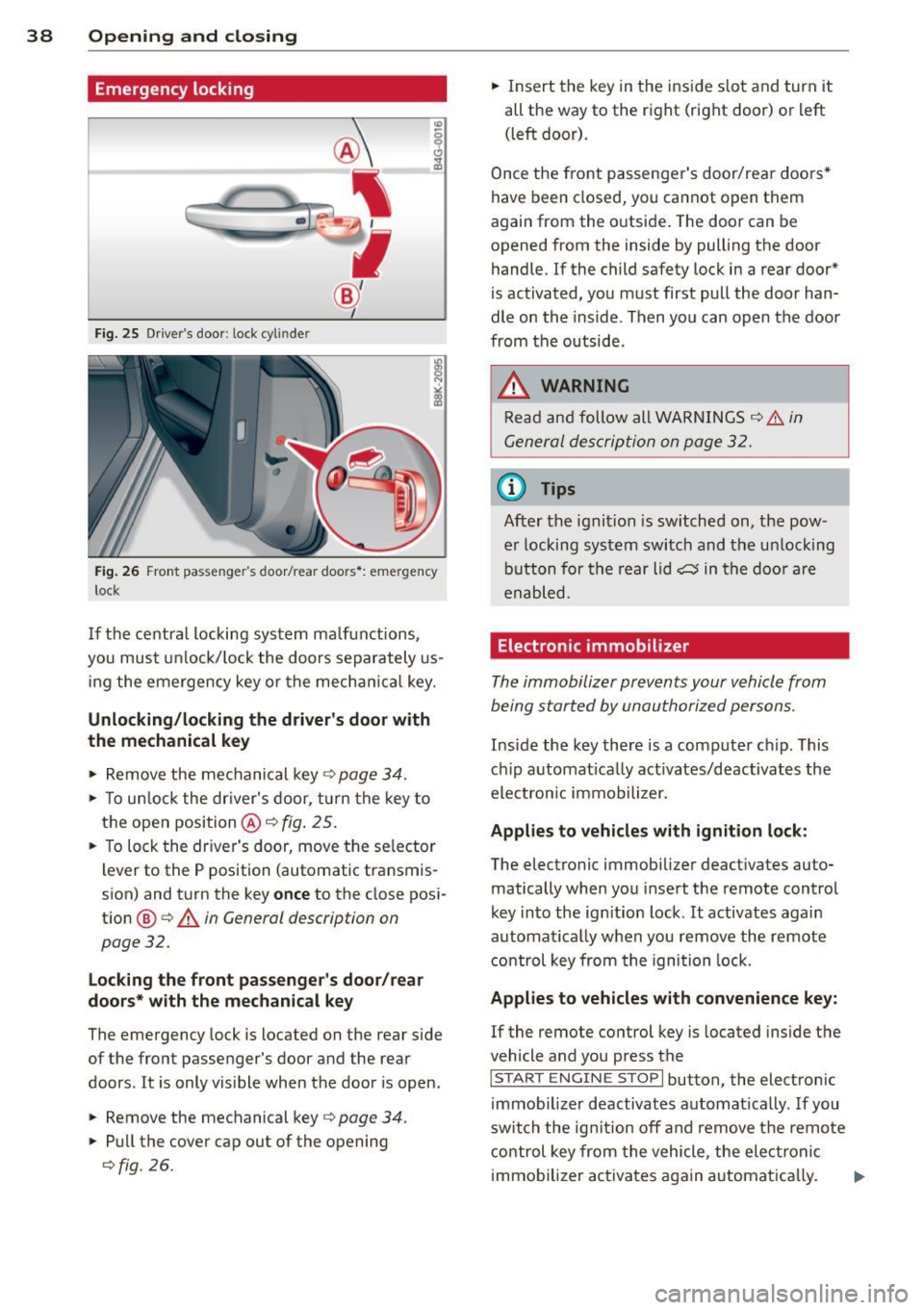
Fig. 25 Drive r's door : lock cyl inde r
Fig . 26 Front passe nge r's door/rea r doo rs *: emergency
l ock
If the centra l locking system ma lfunctions ,
you must unlock/lock the doors separately us
ing the emergency key or the mechanic al key.
Unlocking/locking the driver's door with
the mechanical key
,. Remove the mechanical key¢ page 34.
,. To unlock the dr iver's door, turn the key to
the open position@¢
fig. 25.
,. To lock the driver's door, move the se lector
lever to the P position (automatic transmis
sion) and turn the key
once to the close posi
tion
® c> A in General description on
page 32.
Locking the front passenger's door/rear
doors* with the mechanical key
The emergency lock is located on the rear side
of the front passenger's door and the rear
doors . It is only visible when the door is open.
,. Remove the mechanical key¢
page 34.
,. Pull the cover cap out of the opening
<=>fig . 26.
,. Insert the key in the inside slot and turn it
all the way to the right (right door) or left
(left door).
Once the front passenger's door/rea r doors *
have been closed, you cannot open them
again from the outside . The door can be
opened from the inside by pulling the door handle. If the child safety lock in a rear door*
is activated, you must first pull the door han
dle on the inside . Then you can open the door
from the outside .
.8, WARNING
Read and follow all WARNINGS c> .&. in
General description on page 32.
(D Tips
-
After the ignition is switched on, the pow
er locking system switch and the unlocking button for the rear lid
cs in the door are
enabled.
Electronic immobilizer
The immobilizer prevents your vehicle from
being started by unauthorized persons .
Inside the key there is a computer chip . This
chip automat ically act ivates/deactivates the
electron ic immobilizer.
Applies to vehicles with ignition lock:
The electronic immobilizer deactivates auto
matically when you insert the remote control
key into the ign ition lock . It activates again
automatically when you
remove the remote
control key from the ignition lock.
Applies to vehicles with convenience key:
If the remote control key is located inside the
vehicle and you press the
I S TART ENGI NE STOP I button, the electron ic
immobilizer deactivates automat ically .
If you
switch the ignition off and remove the remote
control key from the vehicle, the electronic
immobilizer activates again automatica lly. ..,.
Page 42 of 302
40 Opening and closing
Power opening/closing rear lid
Applies to vehicles: wit h au tom atic rear lid op erat ion
The open position can be adjusted.
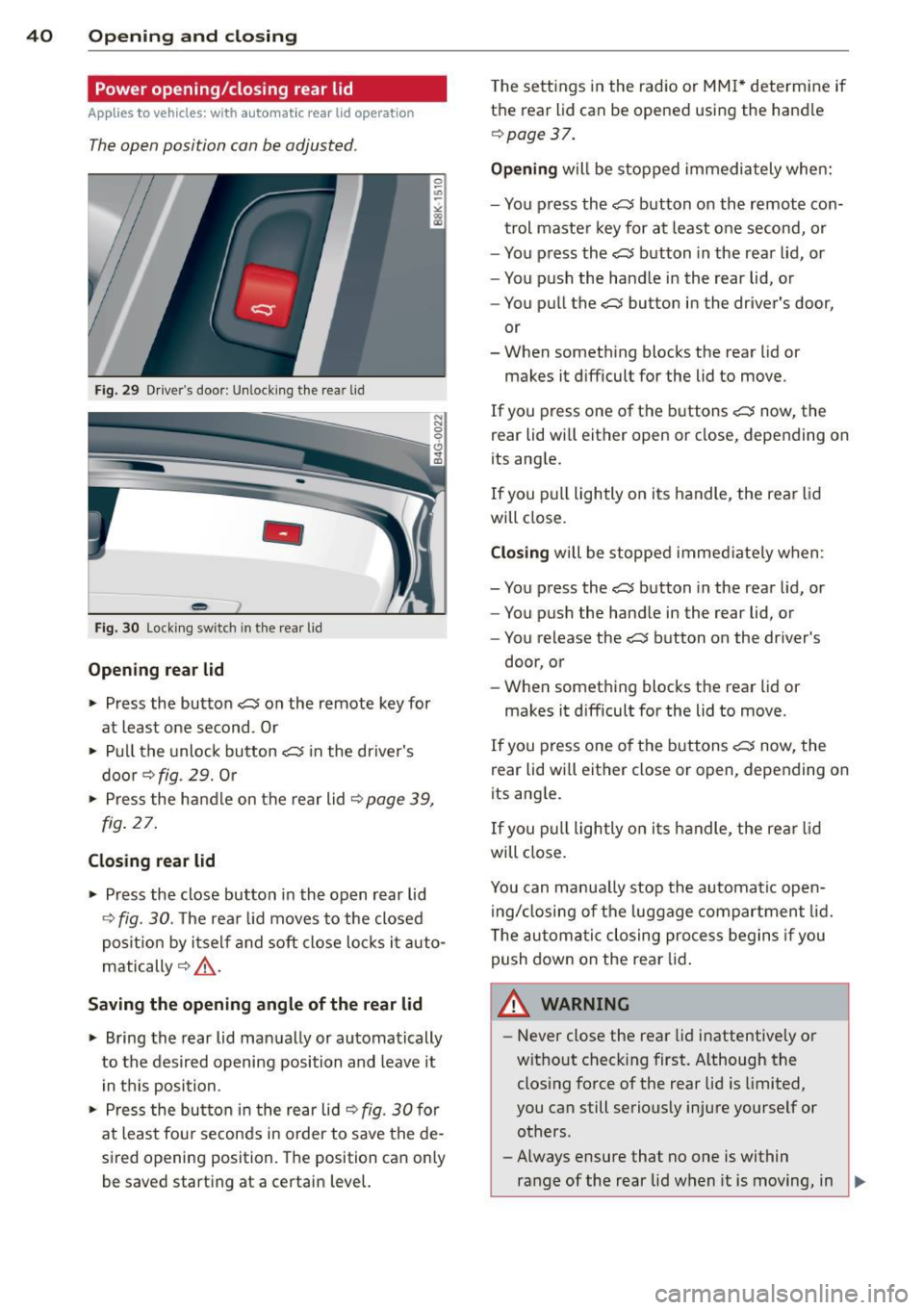
Fig . 29 Drive r's door: Unlock ing the rear lid
-
Fig. 30 Locking switch in the rear lid
Opening rear lid
~ Press the button C$ on the remote key for
at least one second . Or
~ Pull the unlock button C$ in the driver's
door
r::::> fig. 29. Or
~ Press the handle on the rear lid r:::;, page 39,
fig. 27.
Closing rear lid
~ Press the close button in the open rear lid
r::::> fig. 30. The rear lid moves to the closed
position by itself and soft close locks it auto
matically
r:::;, ,&. .
Saving the opening angle of the rear lid
~ Bring the rear lid manually or automatically
to the desired opening position and leave it
in this position.
~ Press the button in the rear lid r:::;, fig. 30 for
at least fou r seconds in order to save the de
sired opening position. The position can only
be saved start ing at a certain level. T
he sett ings in the radio or MMI* determine if
the rear lid can be opened using the handle
r::::>page 37.
Opening will be stopped immediately when:
- You press the
C$ button on the remote con-
trol master key for at least one second, or
- You press the
C$ button in the rear lid, or
- You push the handle in the rear lid, or
- You pull the
C$ button in the driver's door,
or
- When something blocks the rear lid or
makes it difficult for the lid to move.
If you press one of the buttons
C$ now, the
rear lid will either open or close, depending on
its angle.
If you pull lightly on its handle, the rear lid
will close.
Closing will be stopped immediately when :
- You press the
C$ button in the rear lid, or
- You push the handle in the rear lid, or
- You release the
C$ button on the driver's
door, or
- When something blocks the rear lid or
makes it difficult for the lid to move.
If you press one of the buttons
C$ now, the
rear lid wi ll either close or open, depending on
its ang le.
If you pull lightly on its h andle, the rear lid
will close.
You can manua lly stop the automatic open
ing/closing of the luggage compartment lid.
T he automatic closing process begins if you
push down on the rear lid.
A WARNING ,..___
-Never close the rear lid inattentive ly or
without check ing first. Although the
closing force of the rear lid is limited,
you can still seriously injure yourself or others.
- Always ensure that no one is within
range of the rear lid when it is moving, in
~
Page 43 of 302
particu lar close to the h inges and the up
per and lower edges -fingers or hands
can be pinched.
- To help prevent poisonous exhaust gas
from being drawn into the vehicle, al
ways keep the rear lid closed while driv
ing. Never transport objects larger than
those which fit completely into the lug
gage area, because then the rear lid can
not be fu lly closed.
- Never leave your vehicle unattended es pecially with the rear lid left open. A
child could c rawl into the ca r th rough the
luggage compa rtment and pull the lid
shut, becoming trapped and unab le to
get out. To reduce the risk of persona l in
jury, never let children p lay in or around
your vehicle. Always keep the rear lid as
well as the vehicle doors closed when not in use.
- If there is a luggage rack or bicycle rack
mounted on the rear lid, it may not be
able to open completely or an opened
rear lid may close by itself because of the
added weight . So the open rea r lid must
be supported or the weight must be re
moved from the luggage rack first.
(D Tips
- When the vehicle is locked, the rear lid
can be unlocked separately by pressing
the button
c:s on the master key. When
the rea r lid is closed aga in, it locks a uto
mati cally .
- The following applies to veh icles equip
ped with the conven ience key * feature: if
the remote control key is left in the lug
gage compartment, luggage compart
ment will automatica lly unlock itse lf af
ter you lock the vehicle. This prevents
you from unintentionally locking your
key in the luggage compartment .
-If the ve hicle battery charge drops be
low a certa in leve l, you can still open or
close the rear lid manually, however , you
will need to apply more force to close it .
Openin g an d clos ing 41
Sedan: Rear lid emergency release
Applies to veh icles: w it h fixed rear seat backrest
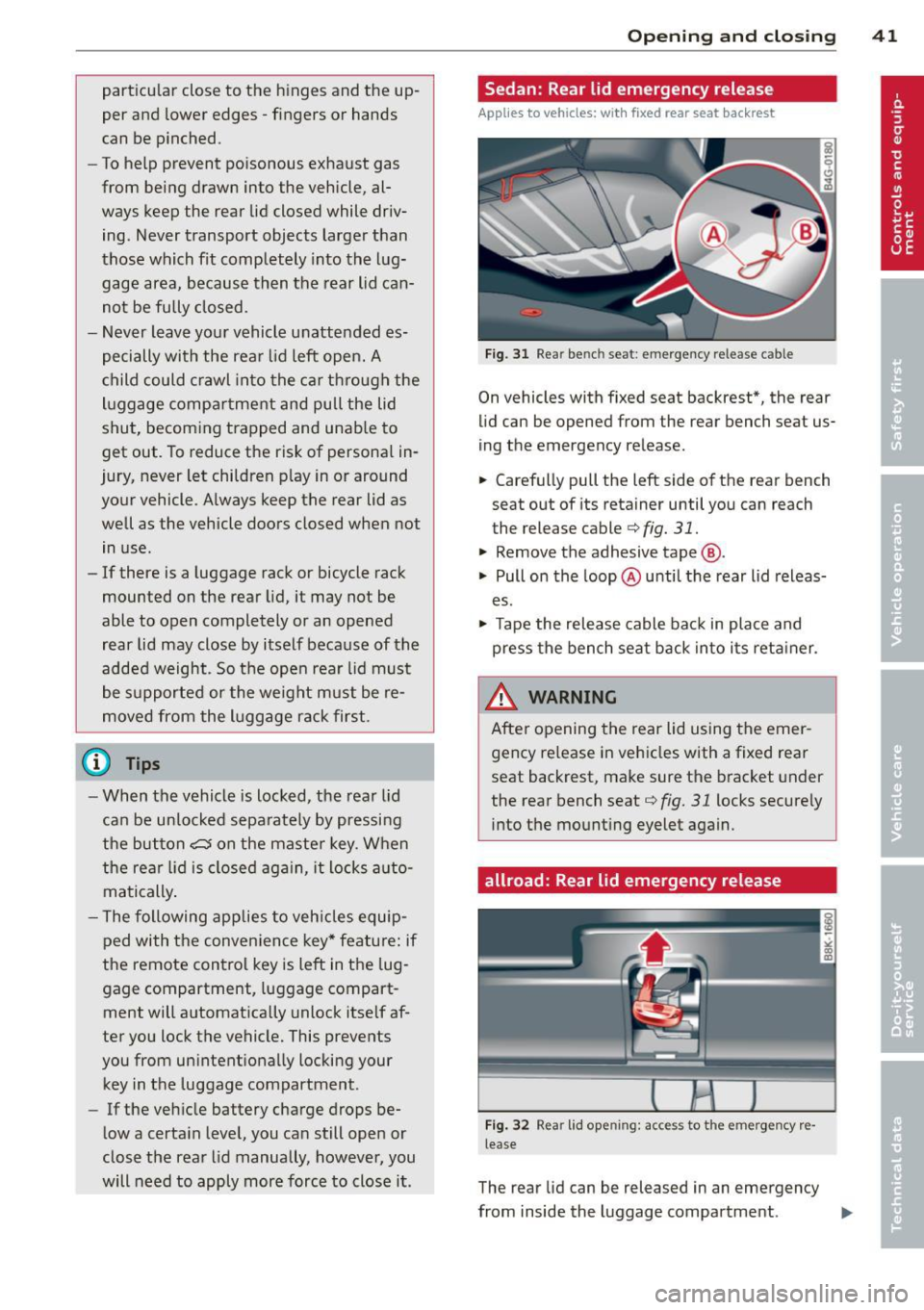
Fig. 3 1 Rear bench seat : emergency re le ase c able
On vehicles with fixed seat backrest*, the rear
lid can be opened from the rear bench se at us
ing the emergency release.
.,. Carefully pull the left side of the rear bench
seat out of its retainer until you can reach
the release cable
¢fig. 31.
.,. Remove the adhesive tape @.
.,. Pull on the loop @ until the rear lid releas
es .
.,. Tape the rele ase cable ba ck in place and
press the bench seat back into its reta iner .
A WARNING
Afte r opening the rear lid using the emer
gency re lease in vehicles with a fixed rear
seat backrest, make sure the bracket under
the rear bench seat
¢fig. 31 locks secure ly
into the mount ing eyelet again.
allroad: Rear lid emergency release
F ig . 32 Rea r lid op ening: acces s to t he e merg ency re
lease
The rear lid can be released in an emergency
from inside the luggage compartment .
IIJ,,
Page 45 of 302
Opening th e windows
"' Press the switch to the firs t stop and hold it
until the window reaches the desi red posi
tion.
"' Press the switch briefly to the se cond stop
to automatically open the window .
Cl os ing th e windows
"' Pull the swi tch to the first sto p and hold it
until the window reaches the desi red posi
tion .
"' Pu ll the switch brief ly to the sec on d st op to
automatica lly close the window.
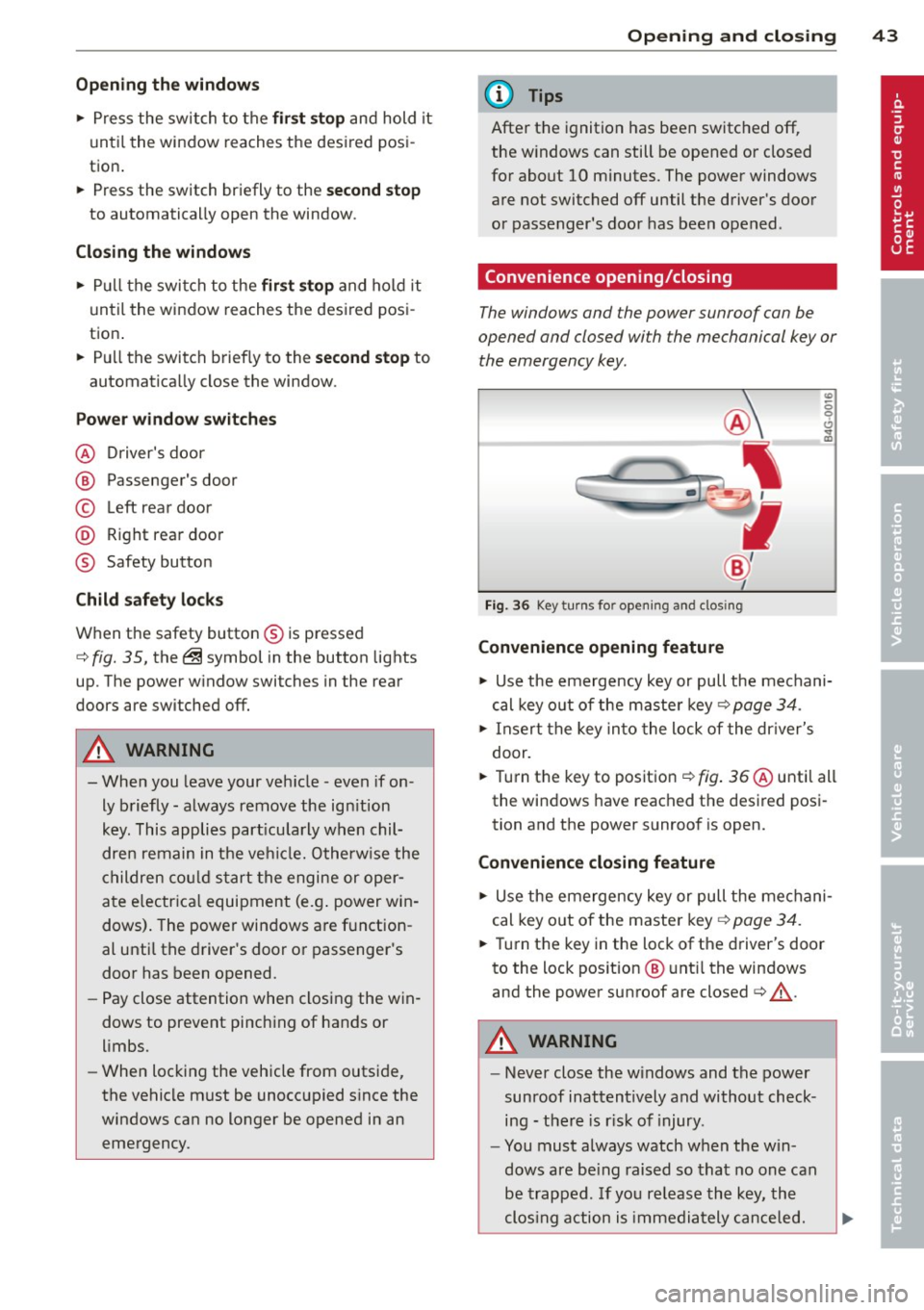
P ow er w ind ow switch es
@ Driver's door
@ Passenger's door
© Left rea r door
@ R ight rear door
® Safety button
Child safety loc ks
When the safety button® is pressed
c::> fig. 35, the ~ symbol in the button lights
up . The power w indow switches in the rear
doors are switched off.
A WARNING
- When you leave your veh icle - even if on
ly briefly - always remove the ign ition
key. This applies part icularly when chil
dren remain in the vehicle. Otherw ise the
children cou ld s tart the engine or oper
ate e lectr ica l equipment (e.g . power win
dows). The power windows a re f unction
al until the driver's door or passenger's
door has been opened.
- Pay close attention when closing the win
dows to prevent pinching of hands or
limbs.
- When locking the vehicle from outside,
the vehicle must be unoccupied s ince the
windows can no longer be opened in an
emergency.
Opening and clo sin g 43
(D Tips
After the ignition has been switched off,
the w indows can still be opened or closed
for about 10 minutes. The power windows
are not switched off until the driver's door
or passenger's door has been opened .
Convenience opening/closing
The windows and the power sunroof can be
opened and closed with the mechanical key or the emergency key.
Fig. 36 Key turns for opening and clos ing
Convenience opening feature
"' -0 0 t!, ., a,
"' Use the emergency key or pull the mechani
cal key out of the maste r key
c:? page 34.
"' Insert the key into the lock of the dr iver's
door.
"' Turn the key to position ¢
fig. 36 @until all
the windows have reached the desired posi
tion and the power sunroof is open.
Convenience closing f eature
"' Use the emergency key or pull the mechani
cal key out of the maste r key ¢
page 34.
"' Turn the key in the lock of the driver's door
to the lock position @ unt il the windows
and the power sunroof are closed¢
A.
A WARNING
- Never close the w indows and the power
sunroof inattentively and without check ing - the re is r isk of injury.
- You must always watch when the win
dows are be ing raised so that no one can
be trapped. If you re lease the key, the
clos ing action is immediately canceled.
Page 46 of 302
44 Opening and clo sing
- Always read and heed WARNING ¢ &. in
General description on page 32.
Correcting window regulator
malfunction
After disconnecting the vehicle battery, the
one-touch up and down feature must be acti
vated again .
.. Pull and hold the power w indow switch un
til the window is completely closed.
.. Release the switch and pull the switch again
for one second .
Sunroof
Operation sliding/tilting sunroof
Applies to vehicles: with sliding/tilting sunroof
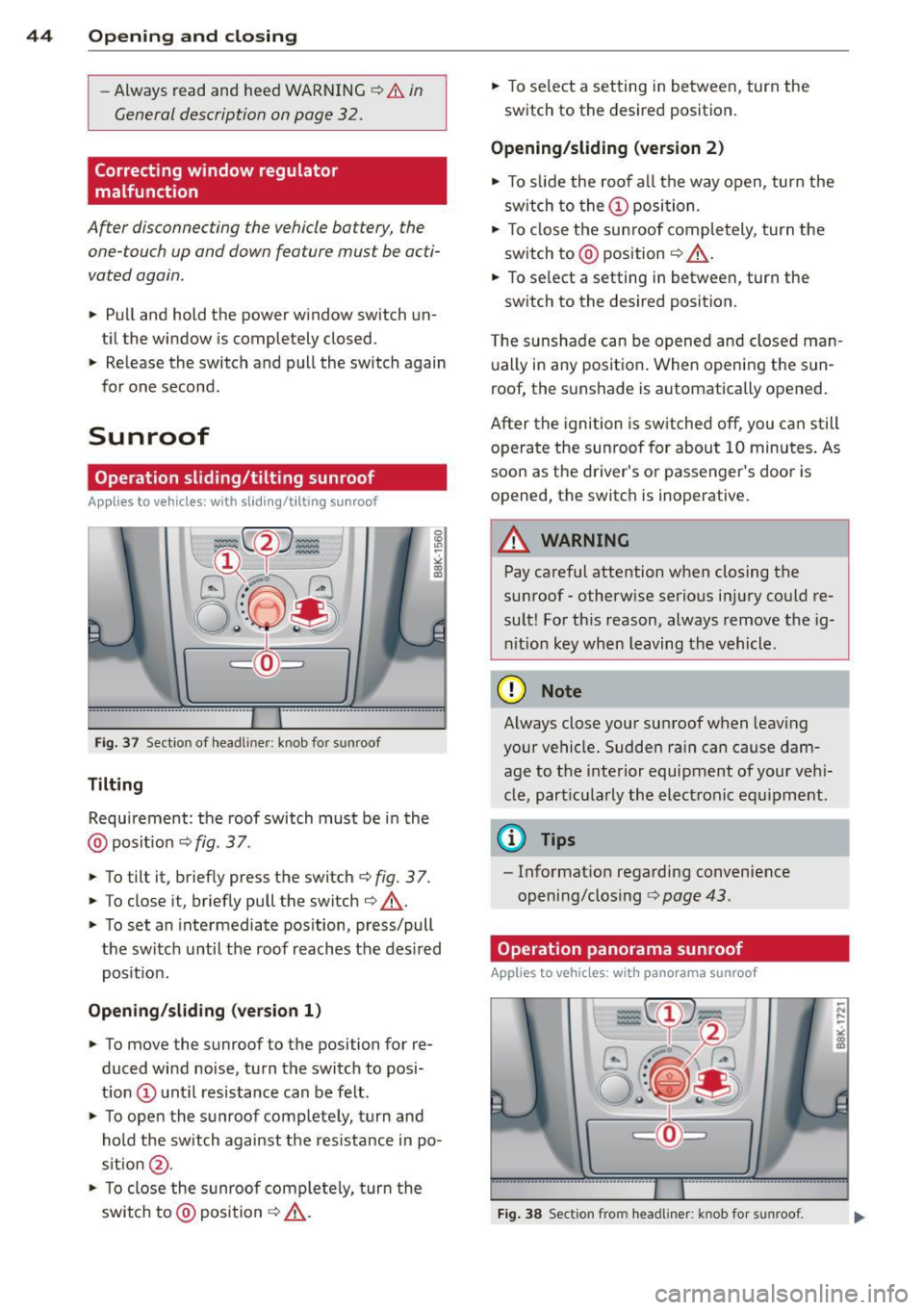
Fig. 37 Section of headline r: knob fo r sunroof
Tilting
Requ irement: the roof switch must be in the
@ pos it io n ¢
fig . 37.
.. To tilt it, briefly press the switch ¢ fig. 3 7.
.. To close it, briefly pull the switch¢.&, .
.. To set an inte rmediate pos ition, press/pull
t h e switc h until the roof reaches the des ired
pos it ion.
Opening/sliding (version 1 )
.. To move the sunroof to the position for re
duced wind noise, turn the swi tc h to posi
t ion
CD unt il resistance can be felt .
.. To open the s unroof complete ly, tu rn and
hold the switch against the res istance in po
s it ion @ .
.. To close the sunroof comple tely, turn the
switch to @posi tion
¢ .&, . ..
To se lect a setting in between, turn the
switch to the desired position .
Opening/sliding (version 2)
.. To s lide the roof a ll the way open, turn the
sw itch to the
CD posi tion.
.. To close the sun roof completely, turn the
switch to @ position ¢ .&, .
.. To se lect a setting in between, turn the
sw itch to the desired position .
T he sunshade can be opene d and closed man
u ally in any posit io n. When opening the sun
roof, the sunshade is automatically opened.
After the igni tion is sw itche d off, you can s till
o pera te the sunroof for about 1 0 minutes . As
soon as the driver's or passenger 's doo r is
opened, the switch is inoperative .
_8 WARNING ~ -
Pay careful attention when closing the
su nroof -otherw ise serio us i njury co uld re
sult! Fo r th is reason, always remove the ig
ni tio n key when leaving the vehicle.
(D Note
Always close your sun roof w hen leav ing
your vehicle. Sudde n ra in ca n cause dam
age to t he interior equipment of your ve hi
cle, part icu larly the ele ctronic equ ipment .
@ Tips
-Informat ion regarding convenience
opening/closing
r:> page 43 .
Operation panorama sunroof
Applies to vehicles: with panorama sunroof
Fig. 38 Sect ion fro m headli ner : kn ob for s unroof.
Page 47 of 302
Tilting
• The sunroof can be tilted or closed only in
switch position @¢
fig. 38
• To tilt it , brief ly press the switch ¢ page 44,
fig. 37.
• To close it, briefly pull the switch ¢ .&, .
• To set an intermediate position, press/pull
the switch until the roof reaches the desired
pos ition .
Opening
• To open the sunroof complete ly, turn and
hold the switch against the resistance in po
s ition (!).
• To close the sunroof, turn the rotary sw itch
to posit ion @ ¢.&, .
• An intermediate position can be set by turn
ing the rotary swit ch to the des ired position.
Opening /closing the sunshade
• Press the switch®¢ page 44, fig . 37 in
the des ired arrow direction .
• To stop the sunshade in an intermed iate po-
sit ion, press the switch again .
After the ignit ion is switched off, you can st ill
operate the sunroof for about 10 minutes. As
soon as the driver's or passenger's door is
opened, the sw itch is inoperative.
T he power sunshade can also be closed when
the sunroof is open.
A WARNING
Pay careful attention when clos ing the
sunroof- otherwise serious injury could re
sult! For this reason, always remove the ig
nition key when leav ing the veh icle.
(D Note
Always close your sunroof when leaving
your veh icle. Sudden rain can cause dam
age to the inter ior equipment of yo ur vehi
cle, particularly the electronic equipment.
@ Tips
-Information regarding convenience
opening/closing¢
page 43.
Opening and closing 45
Emergency closing of the sunroof
If the sunroof detects an object in its path
when it is clos ing, it will open again automati
ca lly. In this case, you can close the roof with
the power emergency closing function.
• Within five seconds after the sunroof opens
automatically , pull the switch until the roof
closes.
Valet parking
Applies to vehicles: with fo lding and lockab le rear seat
backs
The valet parking feature protects the lug
gage compartment from unauthorized ac
cess.
-
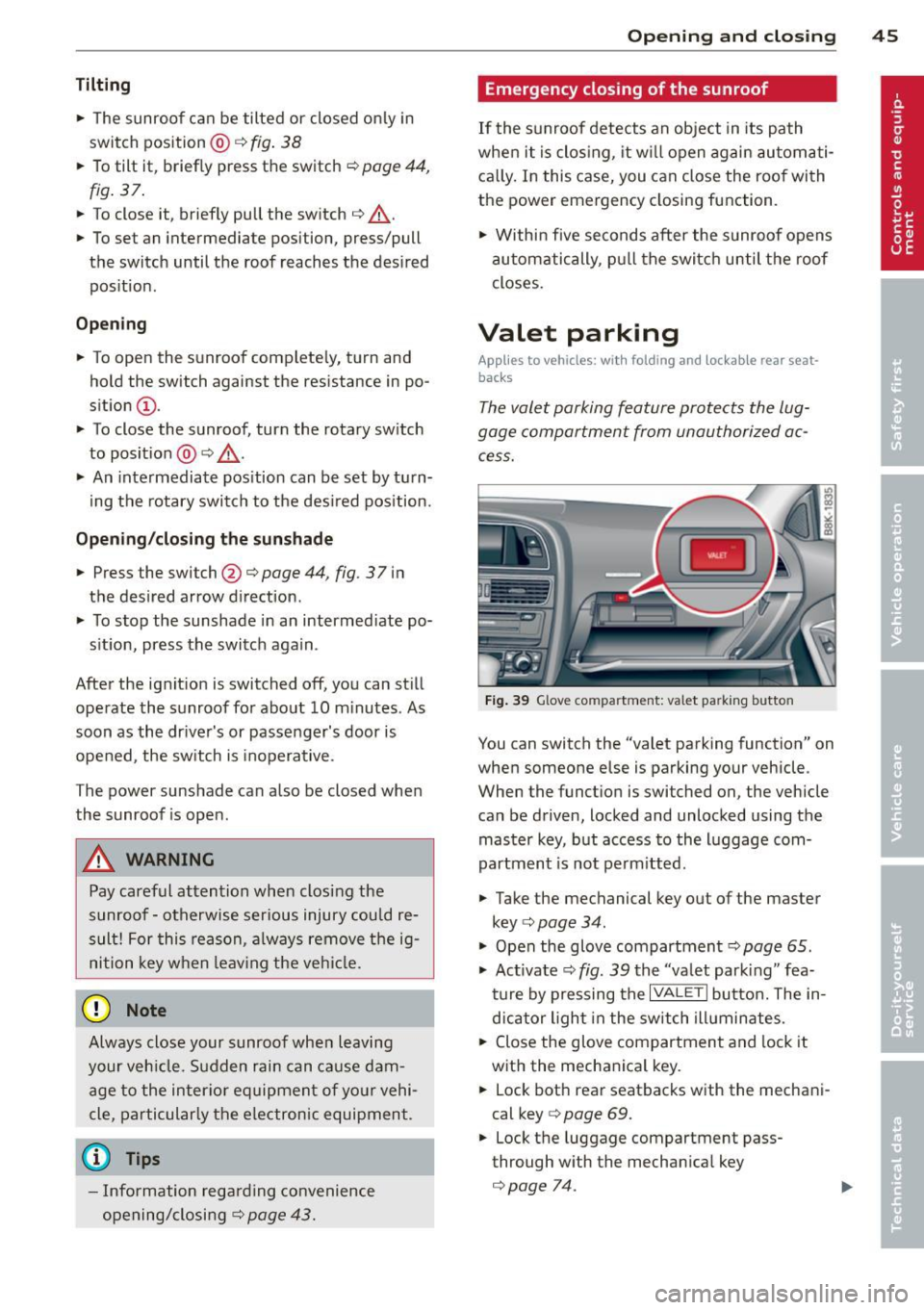
Fig. 39 Glove co mpartment: valet pa rking butto n
You can switch the "valet parking function" on
when someone else is parking your vehicle .
When the funct ion is switched on , the vehicle
can be driven, locked and unlocked using the master key, but access to the luggage com
partment is not perm itted .
• Take the mechanical key out of the master
key ¢
page 34.
"' Open the glove compartment¢ page 65.
"' Act ivate ¢
fig. 39 the "valet park ing" fea
ture by pressing the
I VALET I button. The in
dicator light in the switch illuminates.
• Close the glove compartment and lock it
with the mechanical key.
• Lock both rear seatbacks with the mechani
cal key
c> page 69.
• Lock the luggage compartment pass
through w ith the mechan ica l key
c> page 74.
Page 49 of 302
Clear vision Lights
Switching the lights on and off
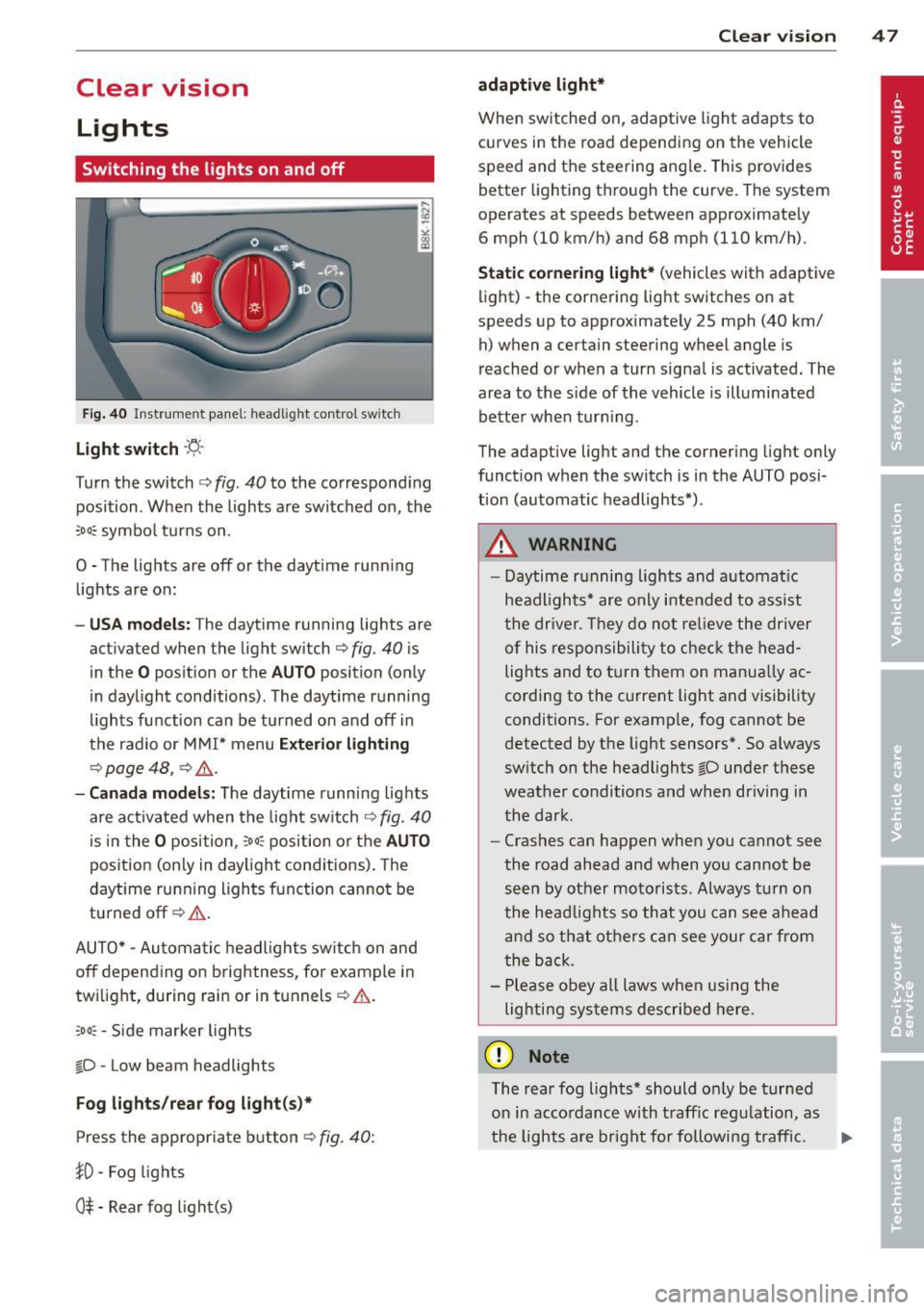
F ig . 40 Instrument pane l: headlight control switch
Light switch ·'t/,·
Turn the switch c> fig . 40 to the correspond ing
position . When the lights are switched on, the
:oo: symbol turns on.
0 • The lights are off or the dayt ime running
lights are on:
- USA mod els : The daytime running lights are
activated when the light sw itch
c> fig . 40 is
in the
O position or the AUTO position (only
in daylight conditions) . The daytime running
lights function can be turned on and off in
the radio or MMI* menu
E xteri or li ghtin g
¢ page 48 , c> &_.
-Ca nad a mod els: The daytime runn ing lights
are activated when the light sw itch
¢ fig . 40
is in the O position, :oo : position or the AUTO
posit ion (only in daylight conditions). The
daytime running lights function cannot be
turned off¢&. .
AUTO* -Automatic headlights switch on and
off depending on b rightness, for example in
tw ilight, during rain or in tunnels¢,& .
:oo: -Side marker lights
~D -Low beam headlights
Fog light s/rea r fog ligh t(s)*
Press the appropriate button c> fig. 40:
1D -Fog lights
0$ -Rear fog light(s)
Clear vi sion 4 7
adaptive light*
When switched on, adaptive ligh t adap ts to
curves in the road depend ing on the vehicle
speed and the steering ang le. This provides
better lighting through the curve. The system
operates at speeds between approximately 6 mph (10 km/h) and 68 mph (110 km/h).
St atic corner ing light * (vehicles with adaptive
light) -the cornering light switches on at
speeds up to approximately 25 mph (40 km/ h) when a certain steering wheel angle is
reached or when a turn signal is activated. The
area to the s ide of the vehicle is illuminated
better whe n turn ing .
The adaptive light and the cornering light only
function when the switch is in the AUTO posi
tion (automatic headlights*) .
A WARNING
-Daytime running lights and automatic
headlights* are only intended to ass ist
the driver . T hey do no t re lieve the driver
of his responsibility to chec k the head
lights and to t urn them on manua lly ac
cording to the current light and visibility
conditions. For examp le, fog cannot be
detected by the light sensors*. So a lways
switch on the headlights
~D under these
weather conditions and when driving in
the dark .
- Crashes can happen when you cannot see
the road ahead and when you cannot be
seen by other motorists. Always turn on
the head lights so that you can see ahead
and so that others can see your car from
the back.
- Please obey all laws when using the
lig hting sys tems described here.
(D Note
The rear fog lights* should on ly be turned
on in accordance with t raff ic regulation, as
the lights are bright for following traffic. ..,.