automatic AUDI A4 2013 Owners Manual
[x] Cancel search | Manufacturer: AUDI, Model Year: 2013, Model line: A4, Model: AUDI A4 2013Pages: 302, PDF Size: 75.61 MB
Page 11 of 302
CD
@
®
©
®
®
(j)
Door handle
Memory buttons (dr iver's seat)
Power locking sw itch
Button for side ass ist
A ir outlets
L ight switch
Control lever for :
- T urn signal and high beam
@ Multifunction steering wheel
with:
- Horn
- Driver's airbag
- Audio/video, telephone, navi-
gation and vo ice recognition
buttons
- Rocker switches for tiptron ic
opera tion ........... .... .
® ISET I button ...... ..... .... .
@ Instrument cluster .. ... .. .. .
@ Reset button for trip odometer
@ Sw itches for:
- Windsh ield wiper/washer
- Trip computer ..... ... .. .. .
@ Ignition lock ............. . .
(8) Adjustable s teer ing column
@ Control lever for :
- Cruise contro l ......... ... .
- adaptive cruise contro l .... . .
@ Ins trumen t lighting .... .. .. .
@ Release lever for the engine
hood .. .. .. .. ........... .. .
@ Data L ink Connector for On
B oard Diag nostics (OBD II) . .. .
@ Sw itch for unlock ing the trunk
lid .. .. .. ................. .
@ Adjuster control fo r outside m ir-
r ors .. .. .. .. ........... .. .
@ Power window switches ... .. .
@ Rad io-Display1l or MMI-Display
62
36
109
4 7
48
149
96
11
10
12
53
25
80
80
89
99
so
219
30
39
50
42
l) T he image in t he d is pl ay will app ear e it h er in mu lt iple
c o lor s or in a singl e co lor , de pen din g o n th e vehicl e
e q ui pment. T he m ulti co lo r im age w ill b e used i n this
O w ner's M anual becau se bo th mu lt i co lo r and si ng le
c o lor ver sio ns are almos t ide ntic al.
In strument s and control s 9
@) Depend ing on options:
- Rad io system
- CD changer
Emergency flashe r
G love compartment (lockab le)
Front passenger's airbag .....
Depend ing o n op tions, sw itches
f or: 49
65
149
- drive select .. .. .......... .
113
- Electronic Stabilization Con-
trol . ... .. .. .. . .. ... .... .
- Rear window sun shade .. .. . 185
53
@ Deluxe automat ic cl imate con-
trol ...... .. .... .......... .
@) Depending on options, selecto r
lever or shift lever for :
- Manual transmission ...... .
- Automatic transmission .... .
@ Asht ray with ciga rette lighter
@ Depend ing on options:
- MMI contro l console or
76
91
91
63
- drive select . . . . . . . . . . . . . . . 113
- Electronic Stabilizat ion Con-
trol button . . . . . . . . . . . . . . . 185
- Power switch for rear window sun shade . . . . . . . . . . . . . . . . 53
@ I STA RT ENGI NE STOPI button 83
@) Electromec hanical p arking
brake . . . . . . . . . . . . . . . . . . . . . 85
(D Tips
-Some of the equipment o r fea tures
show n in the gener al illustration m ay be
standard equ ipment on your vehicle or
may be optional eq uipment depending
on your model. Always as k your author
ized Aud i dea ler if you have a quest ion
about your ve hicle.
- Operat ion of the Multi Med ia Interface
(MMI) is described in a separate manua l.
Page 18 of 302
16 Instrum ent s and w arn ing /indic ato r light s
possible to set the parking brake or release
it once it has been set. Seek professional as
s istance .
(USA models): If the warning light
1111 and
the warning light
liJ appear together, imme
diate ly contact your authorized Audi dealer or
qua lified workshop to have all brake pads in
spected
¢ page 20.
When the light comes on, an audib le warning
signal is also given .
A WARNING
-Always observe the warnings in
¢ page 213, Engine compartment, be
fore opening the hood and checking the brake flu id .
- Driv ing with low brake fluid is a safety
hazard. Stop the car and get professional
assistance.
- USA models: If the 1111 warn ing light,
the
G1 warning light and the m;B warn
ing light come on together, the rear
wheels co uld lock up first unde r hard
braking. Rear wheel lock-up can cause
loss of vehicle con tro l an d an accident .
Have your vehicle repai red immedia tely
by your aut ho rized Audi dea le r or a quali
fied workshop. Drive slowly and avoid sudden, hard brake applications.
- Canada models: If the brake warn ing
light ., the
DJ warning light and the
ABS warning light
BJ come on together,
the rear wheels could lock up first unde r
hard braking. Rear wheel lock-up can
cause loss of vehicle control and an acc i
dent . Have yo ur vehicle repaired immed i
ately by your authori zed A udi dealer or a
qu alifie d wo rkshop. Dr ive slowly and
avo id su dden, hard brake appli cat ions.
- If the brake warning/indicator light does
no t go out afte r a few se con ds and the
par king brake is released, or lights up
whi le you are driving, the fluid level in
the brake f luid reservoir is too low. If you
believe that it is safe to do so, proceed
immediately at low speed to the nearest
authorized Audi dealer or qualified repair facility and have the brake system in
spected.
- Always keep in mind that after severa l
brake applications, you will need greater
pressure on the brake pedal to stop your
veh icle. Do not rely on strained brakes to
respond with max imum stopping power
in critical s ituations . You must allow for
increased braking distances. The extra
d istance used up by fading bra kes could
le ad to an ac cident.
:l~/(®) Electromechanical parking brake
The warning/indicator light monitors the
electromechanical parking brake .
If the indicator light . (USA models)/ .
(Canada models) turns on, the pa rking brake
was set. If the parking brake is set when the
ignition is off, the ind icator light turns off af
ter abo ut 20 seconds.
The wa rning/i ndicator lig ht will go out when
the pa rking brake is re leased .
• (USA models ) /. (Can ada model s) Cau
tion: Vehicle parked too ste ep
If the indicator light b links and the message
appears, there is not enough braking power to
keep the vehicle from roll ing . The brakes have
overheated . The veh icle cou ld roll away eve n
o n a sma ll incline .
Press brake pedal to release parking bra ke
To re lease the parking brake, press the brake
pedal and press t he button(® or start driving
with starting assist at the same time
¢ page 86.
Please relea se park ing brake
T o re lease the par king b rake manually , p ress
t h e b rake peda l and press the button{®) at
the same time. The pa rking brake on ly releas
es automatically if the driver's safety be lt is
fastened.
Ill Parking brake!
If the 11,1 indicator light turns on and t his
message appears, the re is a parki ng b rake
Page 21 of 302
Instruments and warning/indicator lights 19
@ Tips
The symbol's appearance might be differ
ent in some models .
n,/{J Electronic Stabilization Control
(ESC)
If the G1 indicator lamp blinks while driving,
the ESC or ASR (Ant i-S lip Regulation) is active
ly regulating.
If the G1 indicator lamp illuminates, the sys
tem has switched the ESC off. In this case , you
can switch the ignition off and then on to
sw itch the ESC on again . The system is func
tioning completely when the indicator lamp
switches off .
I f the
Ii indicator lamp illuminates, the ESC
was switched off with the
I.!? O FF ! button.
Stabilization control (ESC/ABS): Fault! See
owner's manual
If the indicator light G1 and the ABS indicator
light
l!SJ (USA models) / li] (Canada mod
els) turn on and the message appears, there is
a malfunct ion in the ABS system or electronic
differential lock. This also interrupts the ESC.
The brakes still function with their normal
power, but ABS is not active.
Drive to your autho rized Aud i dealer immedi
ately to have the malfunction corrected.
For more informat ion about the ESC
c::> page 185.
ABS /(8) Anti-lock braking system (ABS)
This warning/indicator light monitors the ABS
and the electronic differential lock (EDL) .
T he warning/indicator light
E (USA mod
els)l[i] (Canada models) will come on for a
few seconds when the ignition is switched on .
T he light will go out after an automatic check
sequence is completed .
There is a malfunction in the ABS when:
- The warning/indicator light does not illumi
nate when you switch the ignition on. -
The warning/indicator light does not go out
after a few seconds.
- The warning/indicator light il luminates
while driving.
T he ESC indicator lig ht also illuminates if
there is a ma lfunct ion in the ABS. The mes
sage
Stabilization control (ESC): Fault! See
owner 's manual
also appears in the instru
ment cluster display and a warning tone
sounds.
The brake system will still respond even
without the assistance of the ABS system.
See your authorized Audi dealer as soon as
possible to restore full braking performance.
For more information regarding the ABS
c::> page 185.
Malfunction in the brake system
If the brake warning light c::> page 15 and the
ABS warning illuminate together there may be
a malfunction in the ABS, and there may a lso
be a malfunction in the brake system itself
c::> .&. . The ABS will not work and you will no
tice a change in braking response and per
formance.
In the event of a malfunction in the brake
system
the warning/indicator light 1111
(USA models)/ . (Canada models) in the in
strument cluster flashes
c::> page 15 .
Malfunction in the electronic differential
lock (EDL)
The EDL works together w ith the ABS . The
ABS warning light will come on if there is a
malfu nction in the EDL system ¢ page 185 .
See your authorized Audi dealer as soon as
poss ible.
A WARNING
-If the ma:1 (USA mode ls)/ [i] (Canada
models) warning light does not go out,
or if it comes on whi le dr iving, the ABS
system is not working properly. The vehi
cle can then be stopped only w ith the
standard brakes (without ABS). You w ill
not have the protect ion ABS provides.
-
...
Page 24 of 302

22 Instruments and warning/indicator lights
If the message appea rs, there is a mal func
tion in the headlights or lig ht switch.
Dr ive to yo ur autho rize d Audi deale r i mmedi
a te ly to have the mal func tion cor re cte d.
8_ WARNING
- Ligh t bul bs are pressurized and co uld ex
plode while t hey are being changed caus
ing ser ious persona l injury.
- W ork w ith due care when handling the
high-volta ge section of gas discha rge
(xenon) lights*. Fai lure to do so could re
sult in death or se rious i njury.
Have the bulb replaced or t he connection
re paired by yo ur auth o rized Au di Service
department.
~()) Headlight range control
App lies to vehicles: with headlig ht range control
El Headlight range control defective !
If t he symbo l El il lum inates , the dynam ic
headlight range cont ro l is no longer wo rking
properly . Have the system checked and re
pa ired at your author ized Audi dealer.
§0 Adaptive Light
App lies to vehicles: with adaptive lig ht
mil Audi adaptive light : defective
If the indicator light turns on and th is mes
sage appears, there is a malfunction in the
adapt ive light system. The headlights still
f u nction .
Go to an authori zed dea lership to have the
headlights or the contro l unit for the adapt ive
light repa ired .
~D Light/rain sensor
App lies to vehicles: with light/ra in sensor
tfl Automatic headlights / automatic wipers
defective
If the indica to r li ght turns on and this mes
sage a ppears, the light/ rain senso r is not
f unct ioning correct ly .
F o r sa fe ty reasons the low be ams are turne d
o n pe rmanen tly with the sw itch in
AUTO.
However, you can conti nue to turn the lights
o n and off using the light switch. Yo u can st ill
control a ll functions that are independent of
the ra in sensor through the w indshield w iper
l ever .
Contact your a uthorized Aud i dea ler as soon
as possible to have the problem co rrected .
Q Adaptive dampers
Applies to vehicles: wit h Audi drive se lect and adaptive
dampers
B Suspension: System fault!
I f the B symbol in the disp lay co mes on, there
is a ma lf unc tion in the a dap tive dampers.
Please go to an authorized A udi dealer or ot h
er qualifie d wo rkshop to have the malfunct ion
r epaired.
.r i Sport differential
Applies to vehicles: wit h Aud i drive se lect and spo rt dif
ferential
Sport differential : System fault!
T he re is a malfunction with the sp ort diffe ren
ti al.
D rive to your author ized A udi dealer immed i
ate ly to have the ma lfu nction corr ected .
Sport differential : Overheating
T he transm iss ion tem perat ure has inc reased
s ignificantly due to the sporty d riving manner.
Drive in a less sporty ma nner until the tem
perature re turns to the normal range and the
i ndicato r light switc hes of.
8_ WARNING
"---
Co ntac t your author ized Audi d ealer or a
qu alified wor kshop if the s port differential
is fa u lty or malfun ctionin g . Th e rep air
m ust be perfor med b y train ed p ersonn el
-
Page 26 of 302
24 Driver information d isplay
Driver information
display
Introduction
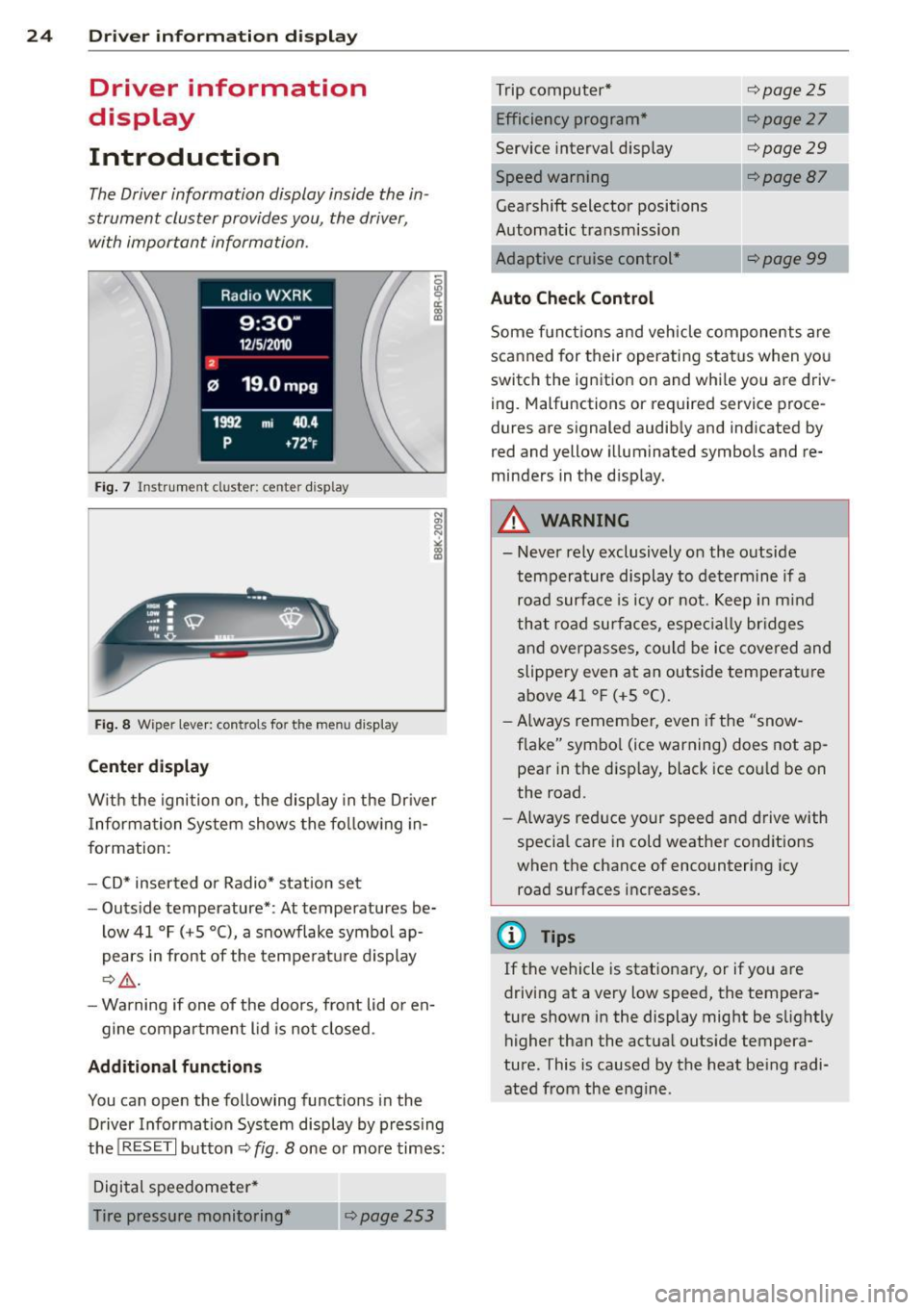
The Driver information display inside the in
strument cluster provides you, the driver ,
with important information.
Fig. 7 Ins trum en t cl uster : ce nter display
Fig. 8 W iper lev er: con trols fo r th e menu disp lay
Center display
W ith the ignition on, the display in the Dr iver
I nformation System shows the following in
formation :
- CD* inserted or Radio* station set
- Outside temperature* : At temperatures be-
low 41 °F (+5 °C), a snowflake symbol ap
pears in front of the temperature display
c::> .&_.
-Warning if one of the doors, front lid or en-
gine compartment lid is not closed .
Additional functions
You can open the following functions in the
Driver Information System display by pressing
the
! RESET I button c::> fig. 8 one or more times:
Digital speedometer*
Tire pressure monitoring *
~page253
Trip computer*
Efficiency program*
Service interval display
c::>page25
c::> page 27
c::> page 29
--·-
Gearshift selector positions
Automatic transmission
Adaptive cruise control*
Auto Check Control
<::>page 87
Some functions and vehicle components are
scanned for their operating status when you
switch the ignition on and whi le you are driv
ing. Malfunctions or required service proce
dures are signaled audibly and indicated by
red and yellow illuminated symbols and re
minders in the d isplay.
A WARNING
--- Never rely exclusively on the outside
temperature display to determine if a
road surface is icy or not. Keep in mind
that road surfaces, especially br idges
and overpasses, could be ice covered and
slippery even at an outside temperature
above 41 °F (+5 °C).
- Always remember, even if the "snow
flake" symbol (ice warning) does not ap
pear in the disp lay, black ice cou ld be on
the road.
- Always reduce your speed and drive with
specia l care in cold weather cond itions
when the chance of encountering icy
road surfaces increases.
¢j) Tips
If the vehicle is stationary, or if you are
driving at a very low speed, the tempera
ture shown in the display might be s light ly
higher than the actual outs ide tempera
ture. This i.s caused by the heat being radi
ated from the engine .
Page 27 of 302
Trip computer
Introduction
Applies to vehicles: with trip computer
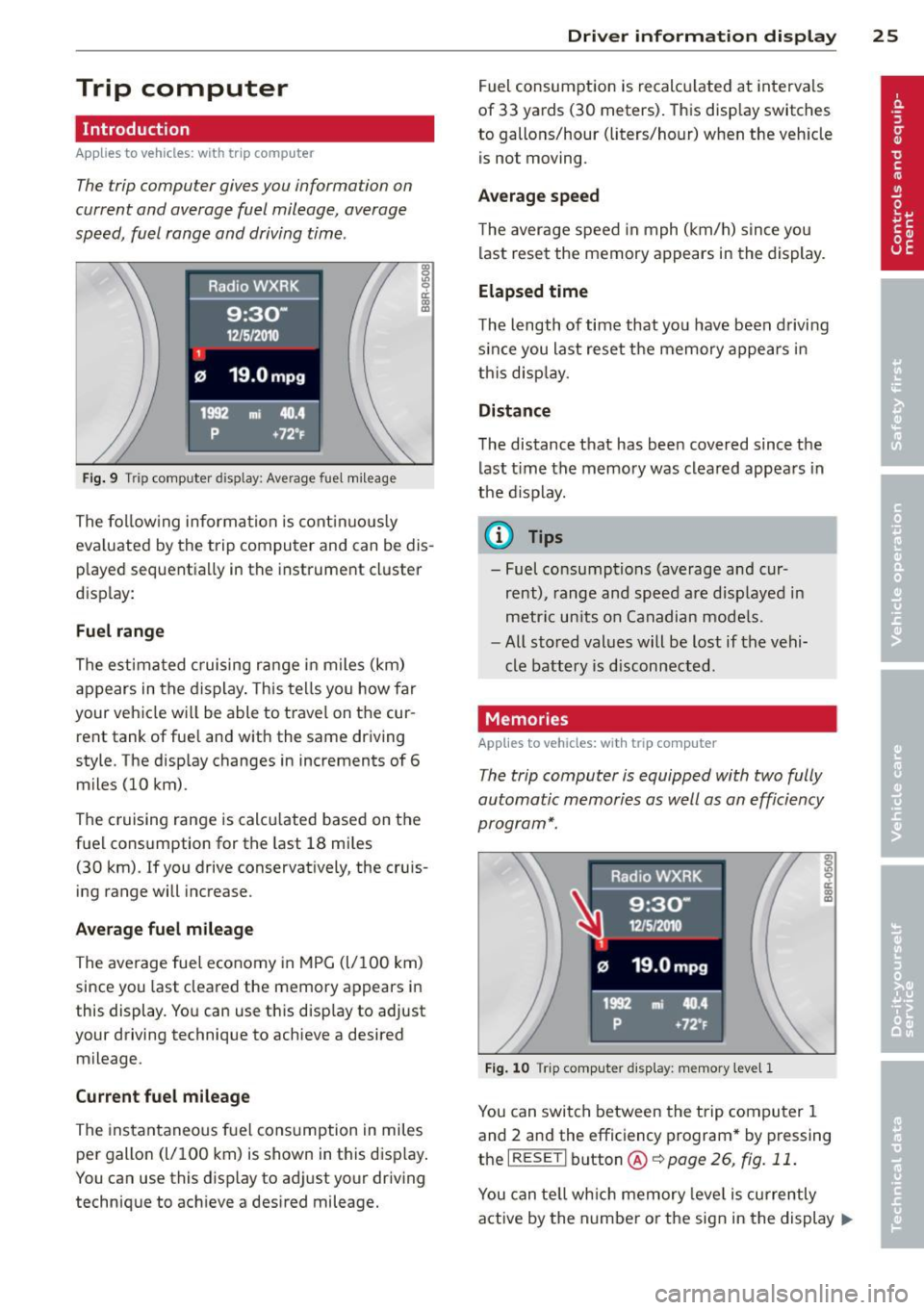
The trip computer gives you information on
current and average fuel mileage, average
speed, fuel range and driving time .
Fig. 9 Trip comp uter d isp lay : Ave rage fuel mileage
The following information is continuously
eva luated by the trip computer and can be dis
played sequentia lly in the instrument cluster
disp lay:
Fuel range
The estimated cruising range in miles (km)
appears in the display. This tells you how far
your vehicle wi ll be able to travel on the cur
rent tank of fuel and with the same driving
style. The display changes in increments of 6
miles (10 km).
The cruising range is calcu lated based on the
fuel consumption for the last 18 miles
(30 km). If you drive conservatively, the cruis
ing range will increase.
Average fuel mileage
The average fuel economy in MPG (l/100 km)
since you last cleared the memory appears in
this display. You can use this disp lay to adjust
your driving technique to achieve a desired
mileage.
Current fuel mileage
The instantaneous fuel consumption in miles
per gallon (l/100 km) is shown in this disp lay.
You can use this display to adjust your driving
technique to achieve a desired mileage.
Driver information display 25
Fuel consumption is recalculated at intervals
of 33 yards (30 meters). This display switches
to gallons/hour (liters/hour) when the veh icle
is not moving .
Average speed
The average speed in mph (km/h) s ince you
last reset the memory appears in the display.
Elapsed time
The length of time that yo u have been driving
s inc e you last reset the memory appears in
this display.
Distance
The distance that has been covered since the
last time the memory was cleared appears in
the display.
(0 Tips
- Fuel consumptions (average and cur
rent), range and speed are displayed in
metric units on Canadian models.
- All stored values will be lost if the vehi
cle battery is disconnected.
Memories
App lies to vehicles: wi th trip computer
The trip computer is equipped with two fully
automatic memories as well as an efficiency
program*.
Fig. 10 T rip comput er dis play: memory lev el 1
You can switch between the trip computer 1
and 2 and the efficiency program* by pressing
the
I RESET I button @c::> page 26, fig. 11 .
You can tell which memory leve l is currently
active by the number or the sign in the display .,..
Page 28 of 302
26 Driver in formation d isplay
¢fig . 10 . The data from the single -trip mem
ory (memory leve l 1) is being displayed if a
D
appears in the display . If a II is shown, then
the data from the total -trip memory is being
d isplayed (memory leve l 2). The fuel pump
nozzle
iii indicates the efficiency program*
¢ page 27.
Single-tr ip m emory (Trip computer 1 )
The single-trip memory stores the trip infor
mat ion from the time the ignition is turned o n
until it is turned off. If the trip is continued
w ithin 2 hours from the t ime the ignition was
turned off, the new data will be included in
the calcu lation of the current trip i nfo rma
tion .
If the t rip is inte rrupted fo r more than 2
hours the memory is reset automati ca lly.
Total -trip memory (Trip computer 2)
Unlike the sing le-trip memory, the tota l- tr ip
memory is not reset automatically . Th is per
mits you to evaluate your d riving data for the
enti re pe riod be tween manual rese ts.
Efficiency program*
The effic iency program can help you to use
less fuel ¢
page 2 7.
Operation
App lies to vehicles: with trip computer
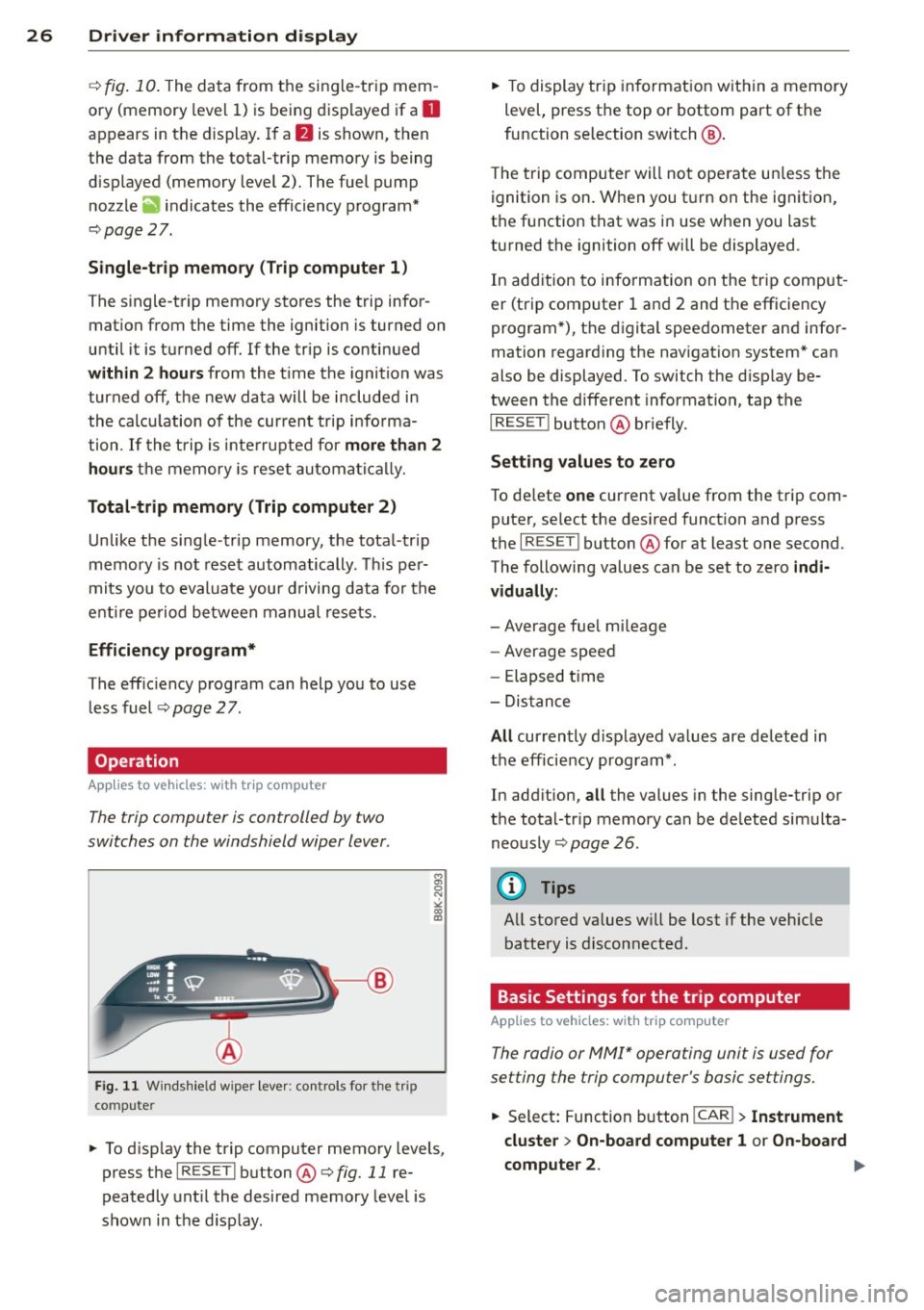
The trip computer is controlled by two
switches on the windshield wiper lever .
Fig. 11 W indsh ie ld wipe r leve r: co ntrols for the tri p
co mpute r
M
"' 0 N
"' co a:,
~ To d isp lay the trip computer memory levels ,
press the
I RES ET I button @¢ fig. 11 re
peatedly unt il the desired memory leve l is
shown in the d isplay .
~ To display tr ip in format ion wit hin a memory
level, press the top or bottom part of the
function se lection switch @.
T he trip computer will not ope rate un less the
ignition is on. W hen you t urn on the ignition,
the function that was in use when you last
turned the ignition off will be displayed .
In add ition to info rmation on the trip comput
er (trip computer 1 and 2 and the efficiency
program *), t he digital spee dometer and infor
mation regard ing the nav igat ion system* can
also be displayed. To switch the d isp lay be
tween the different information, tap the
I RESET ! button@ briefly.
Sett ing values to zero
To de lete one current va lue from the trip com
puter, se lect the des ired funct ion and press
t h e
I RES ET I button @for at least one second.
The following values can be set to zero
indi
vidually :
- Average fue l mi leage
- Average speed
- Elapsed t ime
- Dis tance
All cur rently d isplayed va lues are deleted in
the eff iciency program*.
In add it ion,
all the values in the single-trip or
the total-tr ip memory can be de leted simulta
neously ¢
page 26.
(D Tips
All stored va lues w ill be lost if the veh icle
battery is discon nected .
Basic Settings for the trip computer
Applies to vehicles: with trip computer
The radio or MMI* operating unit is used for
setting the trip computer's basic settings.
~ Select: Function b utton ICAR ! > Instrument
cluster > On -board computer 1 or On-board
computer 2 . .,.
Page 31 of 302
Fuel economy messages
Applies to vehicles: with trip computer w ith efficiency
program
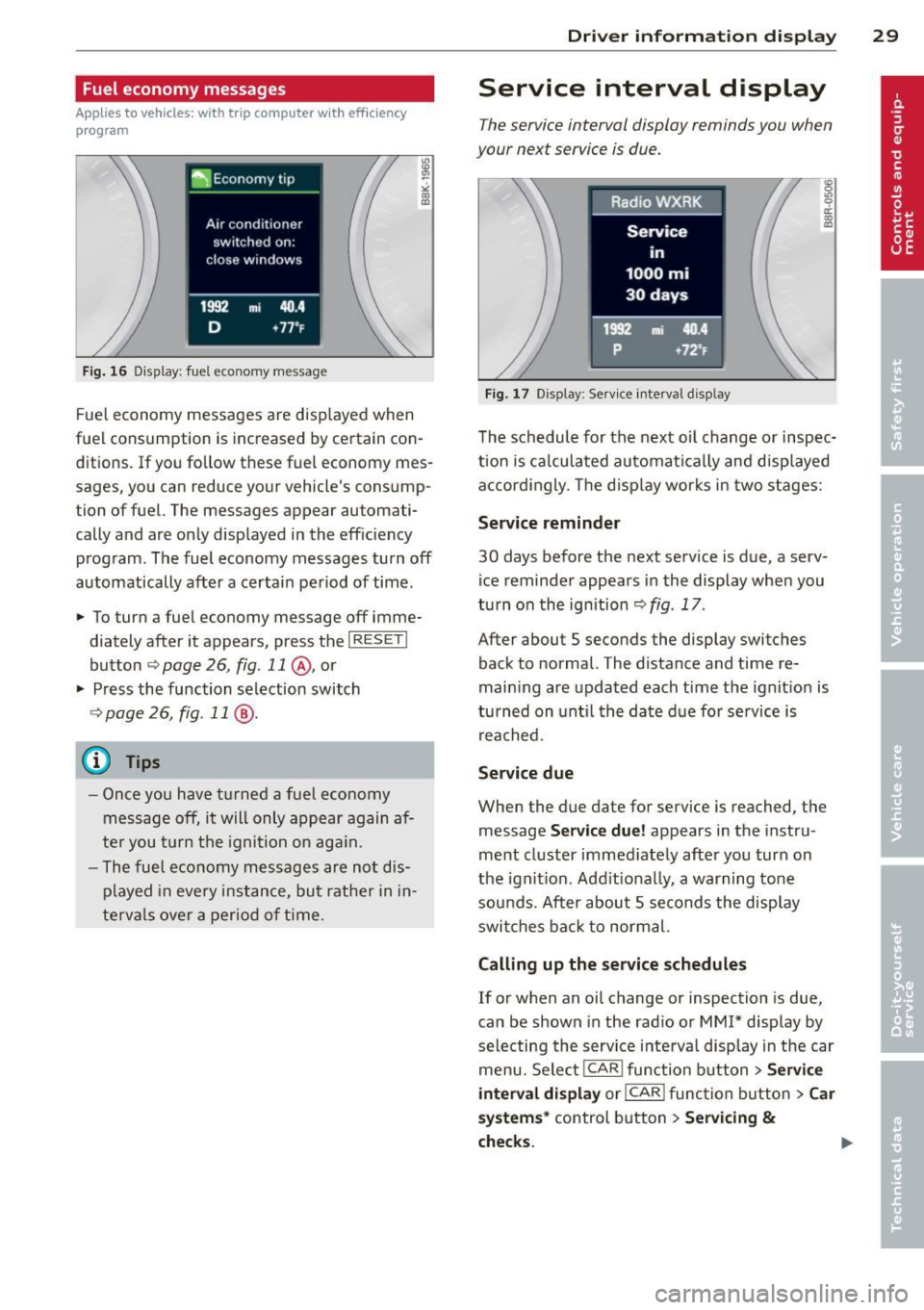
Fig . 16 Display: fuel eco nomy me ssage
F ue l economy messages are disp layed when
fuel consumption is increased by certa in con
ditions. If you follow th ese fu el economy mes
sages, you can reduce your vehicle's consump
tion of fuel. The messages appear automati
cally and are only displayed in the eff ic iency
program . The fuel economy messages turn off
automatically after a certain period of time .
• To turn a fuel economy message off imme
diately after it appear s, press the
I RES ET I
button ¢ page 26, fig . 11 @ , or
• Press the function selection switch
¢ page 26, fig. 11 @ .
(D Tips
- Once you have turned a fuel economy
message off, it will only appear again af
te r you turn the ignition on aga in.
- The fuel economy messages are not dis
played in every instance, but rathe r in in
te rva ls over a period of time .
Driver inform ation di spl ay 29
Service interval display
The service interval display reminds you when
your next service is due .
Fig. 17 Disp lay: Se rvice i nterval d is pl ay
The schedule for the next oi l change or inspec
tion is ca lculated automatica lly and disp layed
accord ingly. The d isp lay works in two stages:
Service reminde r
30 days before the next service is due, a serv
ice reminder appears in the display whe n you
turn on the ignition ¢
fig. 17 .
After about S seconds the display switches
back to normal. The distance and time re
main ing are updated each time the ignit ion is
tu rned on unt il th e date due for service is
reached.
Service due
When the due da te for service is reached , the
message
Ser vice due! appears in the in stru
ment cluster immed iately after you turn on
the ignit ion. Add it iona lly, a warning tone
sou nds . After about S seconds the disp lay
switches bac k to normal.
Calling up the service schedule s
If or when an oil change or inspection is due,
can be shown in the rad io or
MMI* disp lay by
selecting the service interva l display in the car
menu. Select !CAR ! func tion button>
Servic e
interval d ispl ay
o r! CAR ! function button> C ar
sys te m s*
control button > Serv icing &
check s.
Page 34 of 302
32 Openin g and clo sing
Opening and closing
Power locking system
General description
The power locking system locks or unlocks all
doors and the rear lid simultaneously.
You can lock and unlock the vehicle centrally.
You have the following choices:
- Remote master key~
page 35,
-Door handles with convenience key*
~page 36,
-Lock cy linder at the dr iver's door
~ page 38, or
- Power loc king switch inside
~ page 36.
Automatic l ocking
The automatic locking feature locks all the ve
h icle doors and the rear lid when you drive
faster than 9 mph ( 15 km/h) .
The car is unlocked again once the ignition key is removed. In addition, the veh icle can be un
locked if the opening function in the power
lock ing system switch or at one of the door
leve rs is actuated. The Auto Loc k function can
be turned on and off in the rad io or
MMI*
~ page 37.
Addit ionally, in the event of a crash with a ir
bag deployment the doors are automatically
un locked to allow access to the veh icle.
Selective unlocking
When you lock the vehicle, the power locking
system w ill lock the doors and the rear lid .
When unlocking, you can set in the rad io or
MMI* whether
only the dr iver's door or the
enti re ve hicle should be unlocked
~ page 37.
Anti -th eft alarm warning system
If the anti-theft alarm warning system de
tects a break- in into the vehicle, acoust ic and
visua l wa rning signals are triggered.
The anti -theft warn ing system is act ivated au
tomatically when you lock the vehicle .
It is de
activated when u nlocking using the remote key, with the mechanica
l key, and when yo u
switch on the ignition.
T he alarm a lso t urns off when t he a la rm cycle
has expired.
Turn signals
When you u nlock the veh icle, the turn s ignals
flash twice , when you lock it once . If they do
not flash, one of the doo rs, the luggage com
partment lid or the hood is not locked or the
ignition is s till sw itched on.
Unint entionally locking yourself out
In the follow ing cases there safegua rds to
prevent you lock ing you r remote master key in
the vehicle:
- The vehicle does not lock w ith the power
lock ing switch ~
page 36 if the drive r's
door is open .
- On veh ides with convenience key*, if the
most recently used master key is in the lug
gage compa rtment, the rear lid is automat i
cally un locked again after it is closed.
Do not lock your veh icle w ith the remote mas
ter key or convenience key* unt il all doors and
the rea r lid a re closed . In this way you avoid
locking yourself out accidentally .
_& WARNING
-
-When you leave the veh icle, alw ays re
move the ignition key and take it with
you . This will prevent passengers (chil
dren, for example) from acc identally be
ing locked in the vehicle should they acci
dentally press the power locking switch in the front doors .
- Do not leave ch ildren inside the vehicle
unsuperv ised. In an emergency it would
be imposs ible to open the doors from
the o utside without the key .
(D Tips
- In the event of a crash with airbag de
ployment all locked doors will be auto
matically unlocked to give access to the
vehicle occupants from the outside.
Page 35 of 302
-If the power lock ing system should ma l
function, you can lock the driver's door
using the mechanical key~
page 38.
-If the power locking system should fail,
you can still open the fue l tank flap in an
emergency <=>
page 218.
-You are well advised not to keep valua
bles inside an unattended vehicle, visible
or not . Even a properly locked vehicle
cannot provide the security of a safe .
- If the LED in the upper edge of the driv
er's door panel comes on for about 30
seconds after the vehicle is locked, there
i s a malfunction in the power locking or
the anti-theft warning system. Have the
malfunction corrected by an author ized
Audi dealersh ip or qua lified repair fac ili
ty.
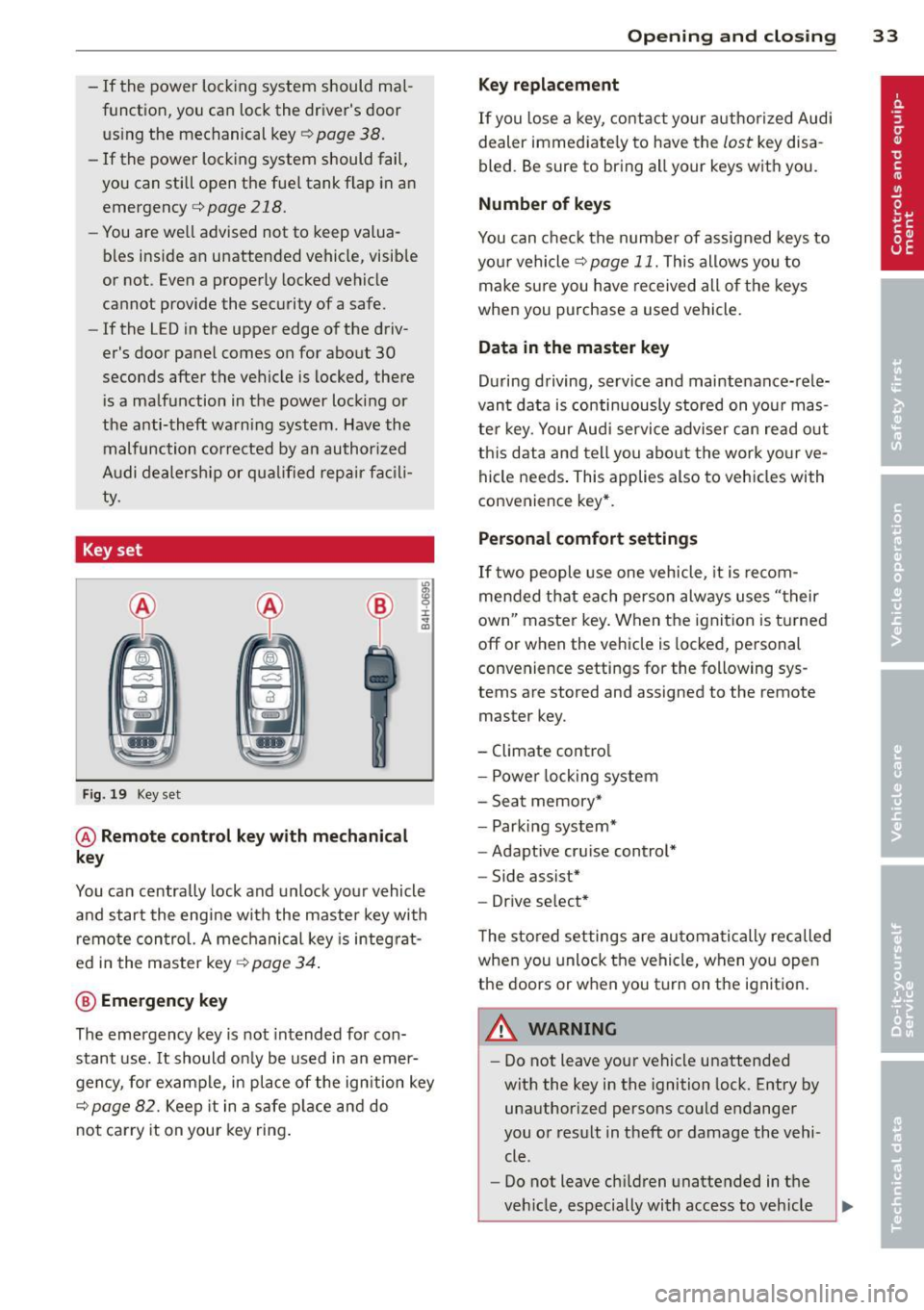
Key set
Fig. 19 Key set
@ Remote cont rol k ey with me chanical
ke y
You can centrally lock and unlock your vehicle
and start the engine with the master key with
remote control. A mechanical key is integrat
ed i n the master key
<=> page 34 .
@ Emerg ency key
The emergency key is not intended for con
stant use.
It should on ly be used in an emer
gency, for example, in place of the ign ition key
<=> page 82. Keep it in a safe p lace and do
not carry it on your key ring .
Openin g an d clos ing 33
Ke y re plac ement
If you lose a key, contact your author ized Audi
dealer immediate ly to have the
lost key disa
bled. Be sure to bring all your keys with you .
Number of keys
You can check the number of assigned keys to
you r vehicle <=>
page 11. This allows you to
make sure you have re ceived all of the keys
when you purchase a used vehicle.
Data in th e mast er ke y
During driving, service and maintenance-rele
vant data is continuously stored on your mas
ter key. Your Audi service adviser can read out
this data and tell you abo ut the work yo ur ve
hicle needs . This applies also to vehicles with
convenience key*.
Person al comf ort settings
If two people use one vehicle, it is recom
mended that each person always uses "their
own'' master key. When the ignition is turned
off or when the vehicle is locked, pe rsonal
convenience settings for the following sys
tems are stored and assigned to the remote
master key.
- Climate control
- Powe r locking system
- Seat memory*
- Parking system*
- Adaptive cruise control*
- Side assist*
- Drive select*
T he sto red settings are automatically recalled
when you unlock the vehicle, when you open
the doors or when you turn on the ignition .
A WARNING
--
-Do not leave your vehicle unattended
with the key in the ignition lock . Entry by
unauthorized persons could endanger
you or result in theft or damage the vehi
cle .
- Do not leave ch ildren unattended in t he
veh icle, especially with access to vehicle