automatic AUDI A4 2013 Owner's Manual
[x] Cancel search | Manufacturer: AUDI, Model Year: 2013, Model line: A4, Model: AUDI A4 2013Pages: 302, PDF Size: 75.61 MB
Page 51 of 302
The leavin g home function i lluminates the
area around the vehicle when unlock ing it.
T his function can be switched on and off.
The
c o ming h om e and lea ving home func
tions on ly operate when it is dark and the
light switch is in the AUTO posit ion
¢ page 47 , fig. 40 .
Auto headlight s*
When the light switch is in the A UTO
¢
page 47 posi tion, the switch-on po int of the
lights can be changed in the automatic driving
light function.
Daytime running lights
USA m odel s:
You can switch the dayt ime run
ni ng lights
on and o ff .
Canada mod els:
The function cannot be
turned off .
It is activated a utomat ica lly each
time the ignition is switched on.
Travel mode*
T he headlig ht beam is asymmetrical. This pro
v ides stronger illum ination on the s ide of the
road on wh ich you are driving .
If you are driv
i ng in a count ry that d rives on the opposite
side of the road from your own country, th is
will cau se glare for on coming dr ivers. To pre
vent glare:
- Trave l mode must be selected in vehicles
with Xenon headlights*.
- In veh icles with halogen headlights, ce rtain
areas of the head light lenses must be cov
ered w ith wate rproof adhesive covers that
prevent light from passing thro ugh. Fo r
more informat ion, please see your author
i z ed Audi dea ler or author ized repa ir faci lity .
(D Tips
When trave l mode is activated, a display in
the dr iver information system in dicates
this each time you switch the ignit io n on.
Clear vi sion 49
Emergency flashers
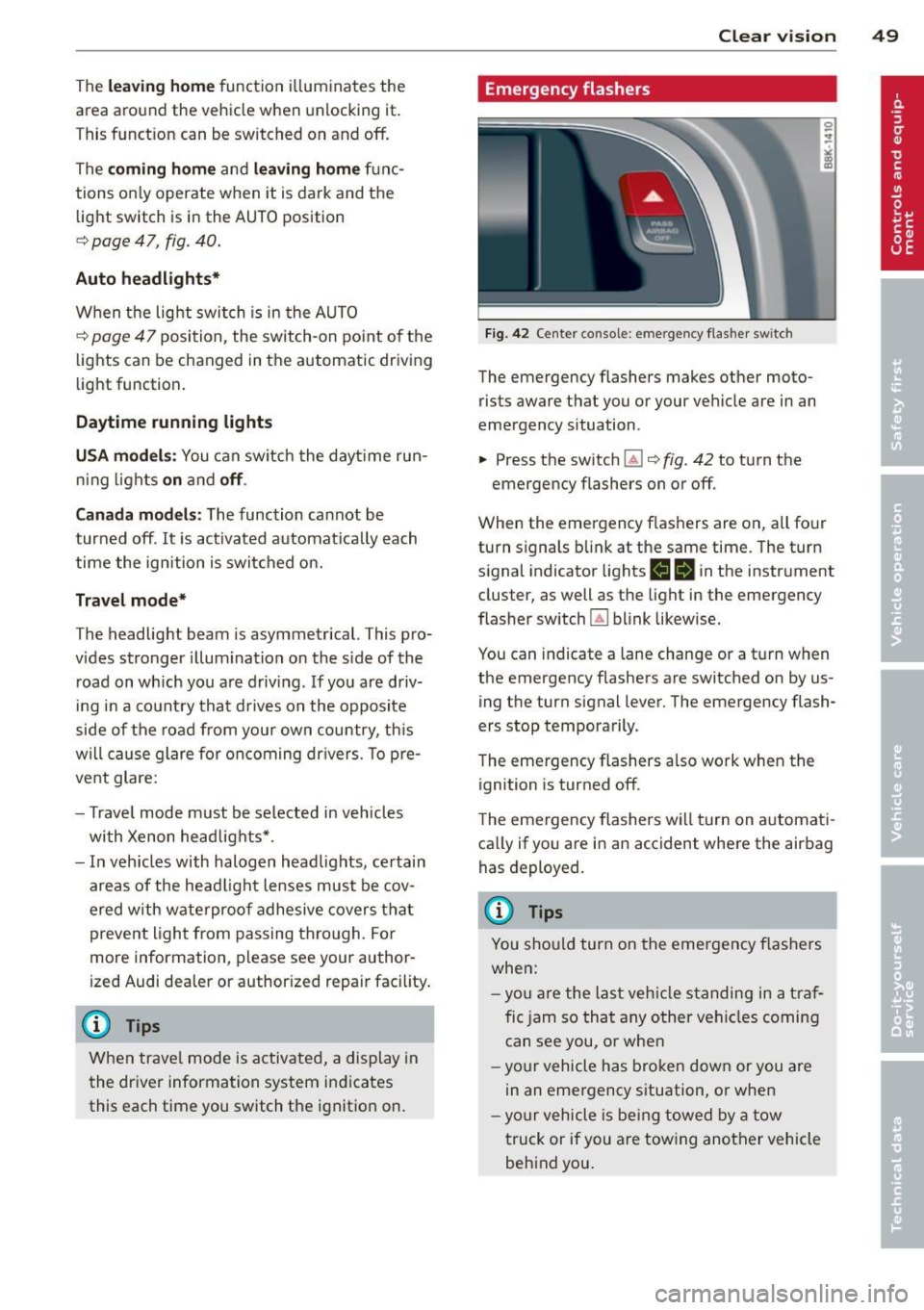
Fi g. 42 Center co n sole : em erge ncy flasher sw itc h
The emergency flashers makes other moto
rists aware that you or your vehicle are in an
emergency situation .
.,. Press the switch~¢
fig. 42 to turn the
emergency flashers on or off .
When the emergency f las hers are on, all four
turn s ignals b link at the same time. The turn
s ignal indicator lights
1111 in the instr ument
cluster, as well as the light in the emergency
fla sher switch ~ blink likewise.
You can indicate a lane change or a t urn w hen
the emergency flashers are switched on by us
ing the turn signal lever. The emergency flash
ers stop temporarily .
T he emergency flashers a lso work when the
ign ition is turned off .
T he emergency flashers wi ll turn on a utomat i
ca lly if yo u are in an accident where the airbag
has deployed.
(D Tips
You sho uld turn on the emergency f las hers
when:
- yo u are the last veh icle standing in a t ra f
fic jam so that any other vehi cles coming
can see you , or whe n
- your vehicle has bro ken down or you are
in an eme rgency s ituation, o r when
- yo ur vehicle is be ing towed by a tow
truck or if you are tow ing another vehicle
beh ind you .
Page 52 of 302
50 Clear vis ion
Interior lights
Front /rear interior lights
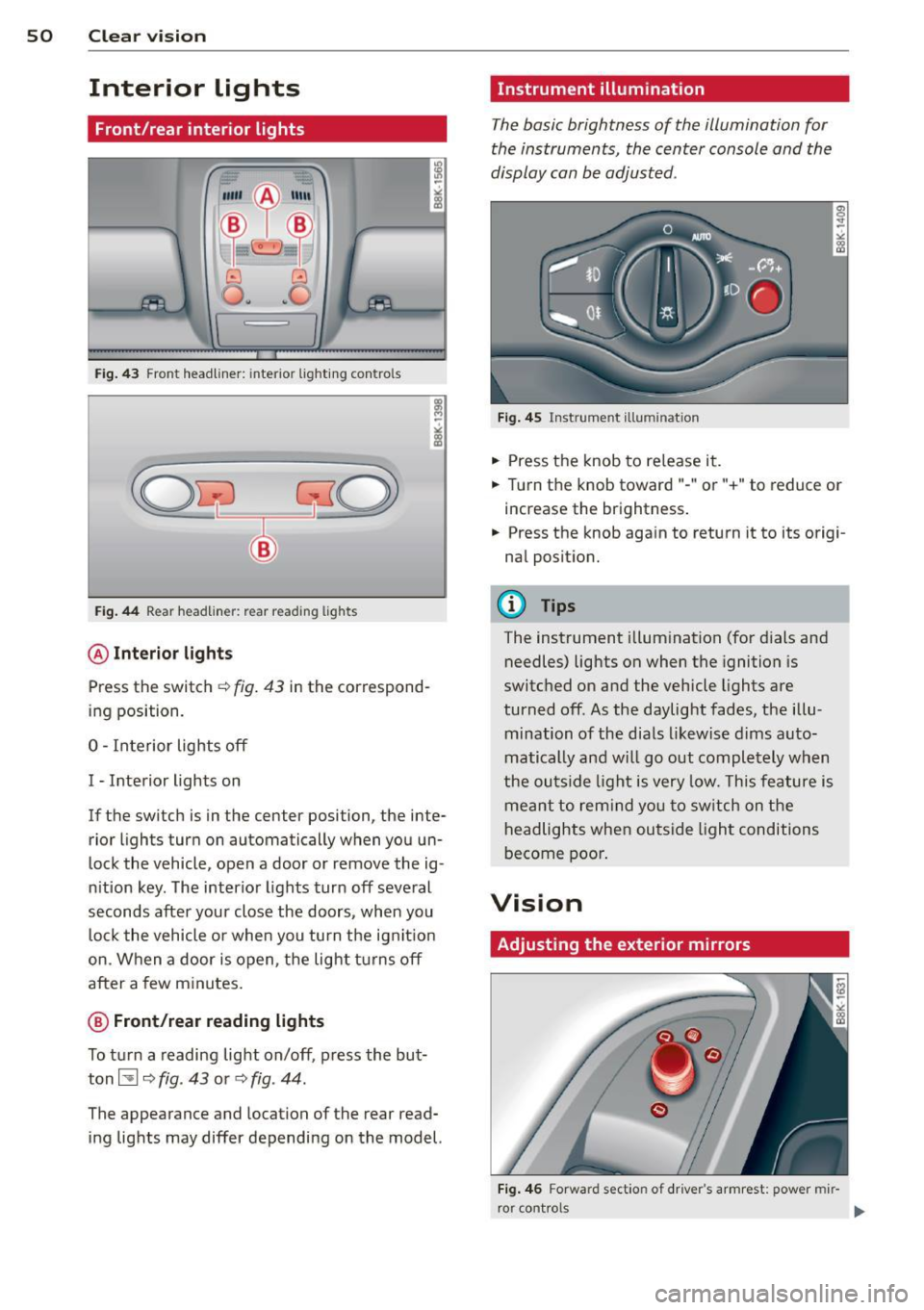
Fig . 43 Fro nt headliner : interior lig htin g con tro ls
Fig. 44 R ear headlin er: r ear rea ding lights
@ Interio r ligh ts
Press the switch ~ fig. 43 in the correspond
ing position.
0 -Interior lights off
I -Interior lights on
If the switch is in the cente r position, the inte
rior l ights turn on automatically when you un
lock the vehicle, open a door or remove the ig
n ition key . The interior lights turn off several
seconds after your close the doors , when you
lock the vehicle or when you turn the ign it ion
on. When a door is open, the light tu rns off
after a few m inutes.
@ Fr ont /rear r eading lights
To turn a reading light on/off , press the but
ton~
c::> fig . 43 or c::> fig . 44.
The appearance and location of the rear read
ing lights may differ depending on the model.
Instrument illumination
T he basic brightness of the illumination for
the instruments, the center console and the
display can be adjusted .
Fig . 45 Ins trum ent ill umin atio n
.,. Press the knob to re lease it .
.,. Turn the knob toward " -" or"+" to reduce or
increase the brightness .
.,. Press the knob aga in to return it to its origi
nal posit ion.
(!') Tips
The instrument illumination (for dials and
needles) lights on when the ignition is
switc hed on and the vehicle lights are
turned off . As the daylight fades, the illu
mination of the dia ls likewise dims auto
matically and wi ll go out completely when
the ou tside light is very low. This feature is
meant to rem ind yo u to sw itch on the
headlights when ou tside light conditions
become poo r.
Vision
Adjusting the exterior mirrors
Fig . 4 6 Forwar d sect io n of drive r's armr est: powe r mir
r o r contro ls
Page 53 of 302
Turn the knob to the desired position:
Q/ P -In this position , you can adjust the
driver's and front passenger's exterior mirrors
by turning the knob in the desired direction.
(ijjl -The mirrors are heated depending on the
outside temperature.
8 -The exterior mirrors fold in*. You can ad
just whether or not the mirrors fold in auto
matically when locking the vehicle using the
radio/MM I*
c::> page 3 7.
Passenger exterior mirror tilt function*
(only with memory for exterior mirrows)
To help you see the curb when backing into a
parking space, the surface of the mirror tilts
slightly . The knob must be in the
P position
for this to happen .
You can adjust the tilted mirror surface by
turning the knob in the desired direction .
When you move out of reverse and into anoth
er gear, the new mirror position is stored and
assigned to the key you are using.
The mirror goes back into its original position
once you d rive forward faster than 9 mph
(15 km/h) or switch the ignition off .
,&. WARNING
Curved mirror surfaces (convex or spheri
cal*) increase your field of view. Remem
ber that vehicles or other objects will ap
pear smaller and farther away than when
seen in a flat mirror. If you use this mirror
to estimate distances of following vehicles
when changing lanes, you could estimate incorrectly and cause an accident.
(D Note
- If the mirror housing is moved uninten
tionally (for example, while parking your
vehicle), then you must first fold the mir ror electrically. Do not readjust the mir
ror housing manually. You could damage
the motor which controls the mirror .
-If you wash the vehicle in an automatic
car wash, you must fold the exterior mir
rors in to reduce the risk of damage to
-
Clear vision 51
the mirrors . Never fold power folding ex
terior mirrors* by hand. Only fold them
in and out using the power controls.
(D Tips
- The exterior mirror settings are stored
with the memory function*
c::> page 62.
- If there should be a malfunction in the
electrical system, you can still adjust the
exterior mirrors by pressing the edge of
the mirror.
Dimming the mirrors
N
:!
"' ~:::====~~=~====~ :ll
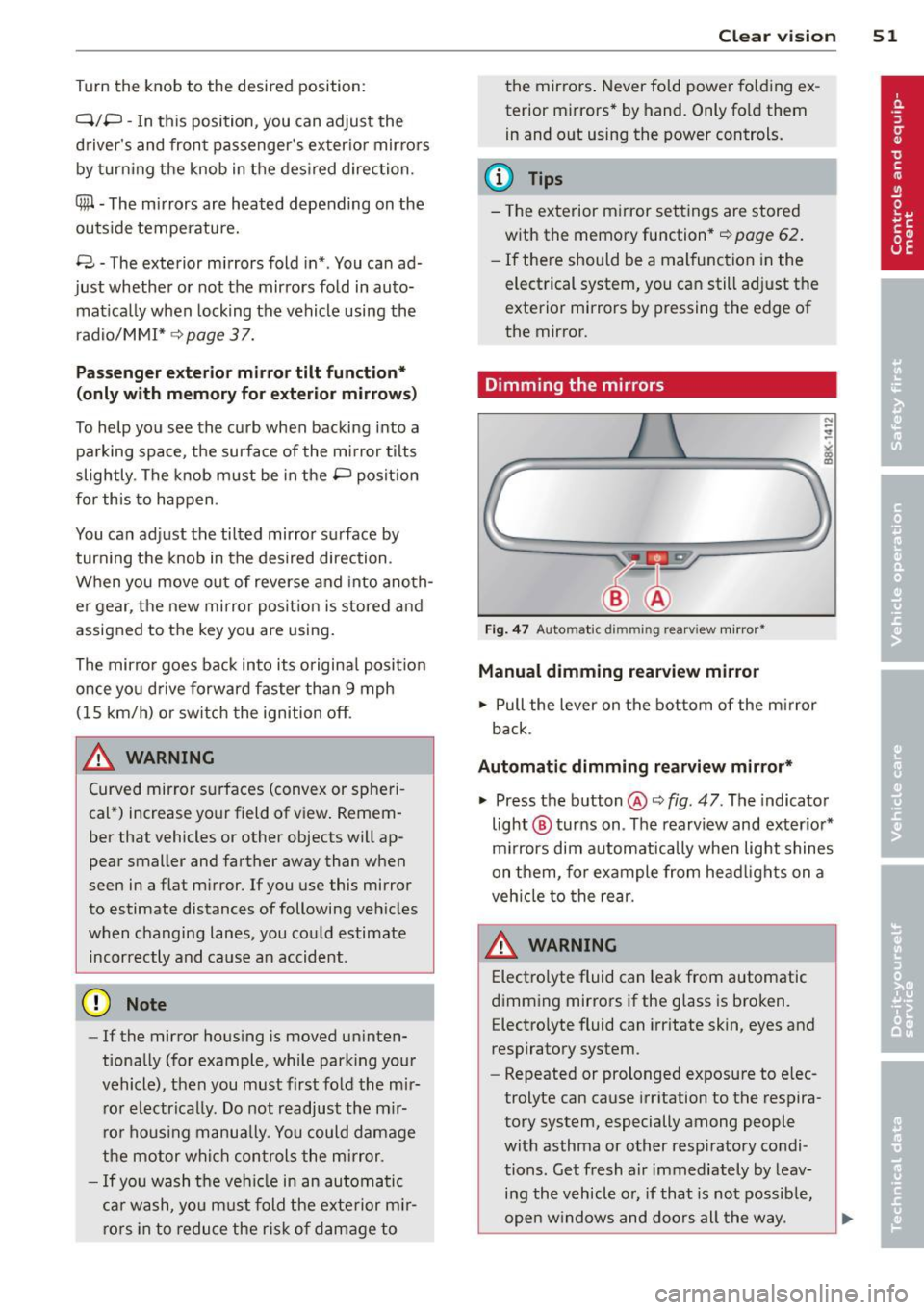
Fig. 47 Auto mat ic dimming re arv iew mirror*
Manual dimming rearview mirror
.. Pull the lever on the bottom of the mirror
back .
Automatic dimming rearview mirror*
.. Press the button @c::> fig. 47. The indicator
light @ turns on . The rearview and exterior*
mirrors dim automatically when light shines
on them, for example from headlights on a
vehicle to the rear.
A WARNING -
Electrolyte fluid can leak from automatic
dimming mirrors if the glass is broken. Electrolyte fluid can irritate skin, eyes and
respiratory system .
- Repeated or prolonged exposure to elec
trolyte can cause irritation to the respira
tory system, especially among people
with asthma or other respiratory condi
tions. Get fresh a ir immediately by leav
ing the vehicle or, if that is not possible,
open windows and doors all the way.
Page 54 of 302
52 Clear vision
-If electrolyte gets into the eyes, flush
them thoroughly with large amounts of
clean water for at least 15 minutes;
medical attention is recommended .
- If electrolyte contacts skin, flush affect
ed area with clean water for at least 15
minutes and then wash affected area
with soap and water; medical attention
is recommended . Thoroughly wash af
fected clothing and shoes before reuse.
-If swallowed and person is conscious,
rinse mouth with water for at least 15
minutes . Do not induce vomiting unless
instructed to do so by medical professio
nal. Get medical attention immediately.
Liquid electrolyte leaking from broken mir
ror glass will damage any plastic surfaces
it comes in contact with. Clean up spilled
electrolyte immediately with clean water
and a sponge.
(D} Tips
- Switching off the dimming function of
the inside rear view mirror also deacti
vates the automatic dimming function of
the exterior mirrors.
- Automatic dimming for the mirror only
operates properly if the sun shade* for
the rear window is not in use or the light
striking the inside mirror is not hindered
by other objects.
- The automatic dimming mirrors do not
dim when the interior lighting is turned
on or the reverse gear is selected .
, Sun visors
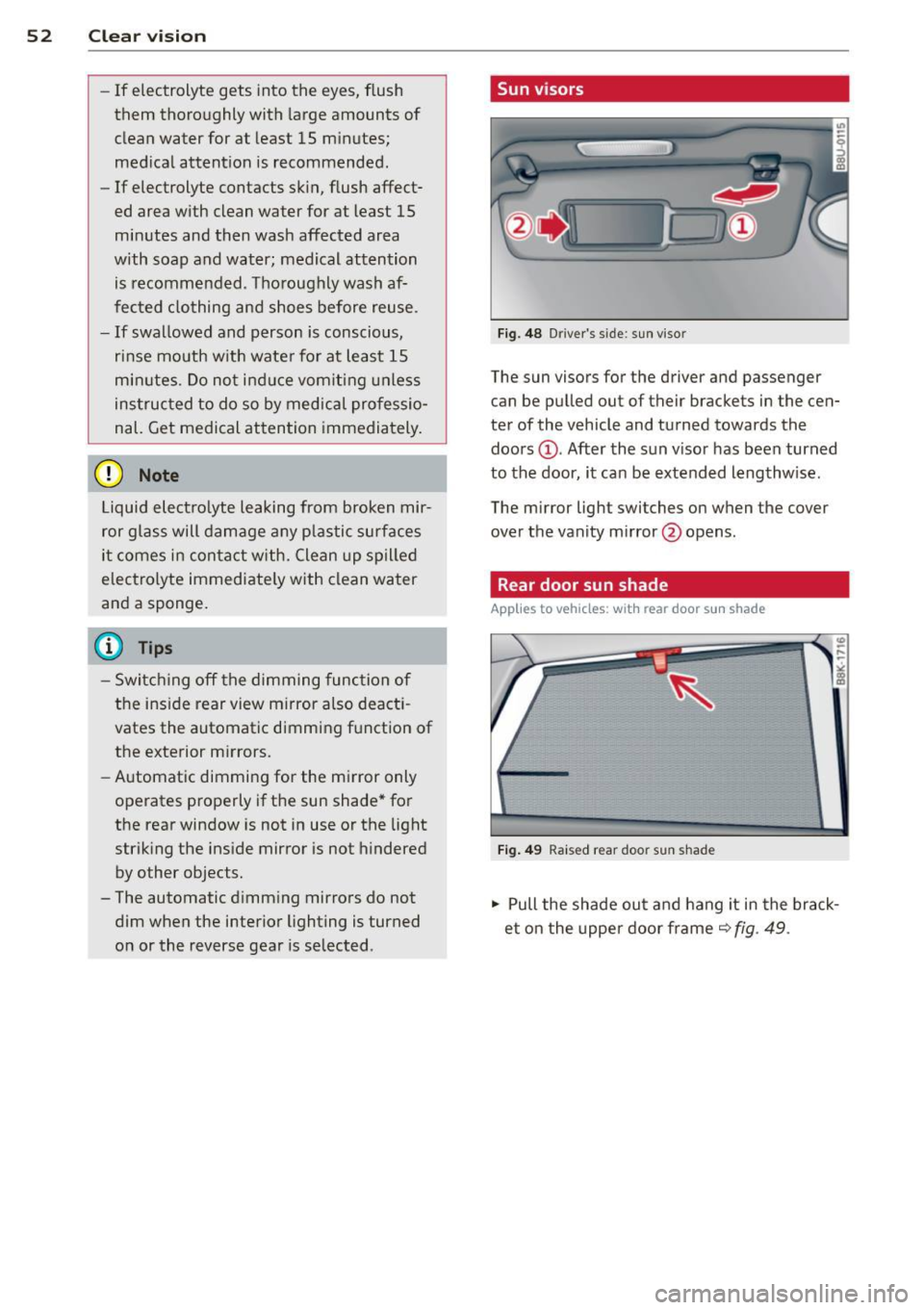
Fig. 48 Driver 's s ide; sun viso r
The sun visors for the driver and passenger
can be pulled out of their brackets in the cen
ter of the vehicle and turned towards the
doors @. After the sun visor has been turned
to the door, it can be extended lengthw ise.
The mirror ligh t switches on when the cover
over the vanity mirror @opens.
Rear door sun shade
Applies to vehicles: with rear door sun shade
Fig. 49 Raised rear door sun shade
.,. Pull the shade out and hang it in the brack
et on the upper door frame
~ fig. 49 .
Page 55 of 302
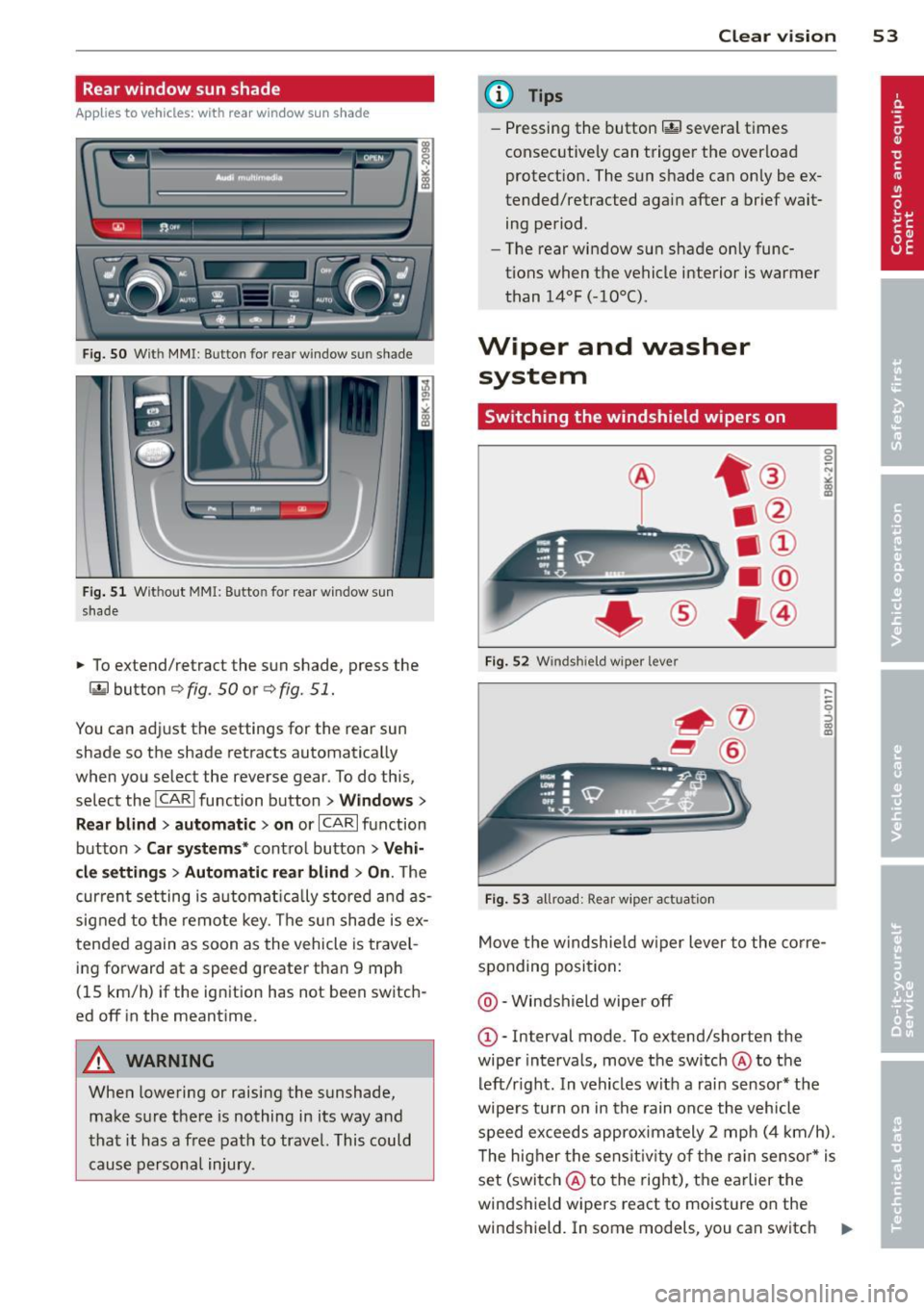
Rear window sun shade
Applies to vehicles: with rear window su n shade
Q;l I flc.i" , ~---
Fig. SO W it h MMI : Button for re ar window su n shade
Fig . 51 W it h out MMI: B utto n fo r rear wi ndow s un
s hade
• To extend/retract the sun shade, press the
laf.l button r=;> fig . 50 or ¢ fig. 51.
You can adj ust the settings for the rear sun
shade so the shade retracts automatica lly
when you select the reverse gear . To do this,
select the
! CARI function button> W indow s>
R ear blind > aut omati c> on
or ICARI function
button >
Car sy stem s* contro l button > V ehi
cl e s ett ings
> Autom atic re ar blind > On . The
cur rent setting is automat ica lly stored a nd as
signed to the remote key . T he sun shade is ex
tended again as soon as the vehicle is travel
ing forward at a speed greater than 9 mph
(15 km/h) if the ignit ion has not been switch
ed off in the meantime.
A WARNING
When lowering or raising the sunshade, make sure the re is nothing in its way and
that it has a free path to travel. This could
cause persona l injury .
-
Clear vi sion 5 3
@ Tips
-Pressing the button~ several t imes
consecutive ly can trigger the overload
protect ion. The sun shade can only be ex
tended/retracted aga in after a brief wait
ing period.
- The rear window sun shade only func
tions when the vehicle interior is warmer
than 14°F (-10°C) .
Wiper and washer
system
Switching the windshield wipers on
F ig . 5 2 Winds hie ld w iper leve r
Fig . 53 all road: Rear w iper ac tua tio n
0 0 N
"' :8
.....
-
-0 ::, a) m
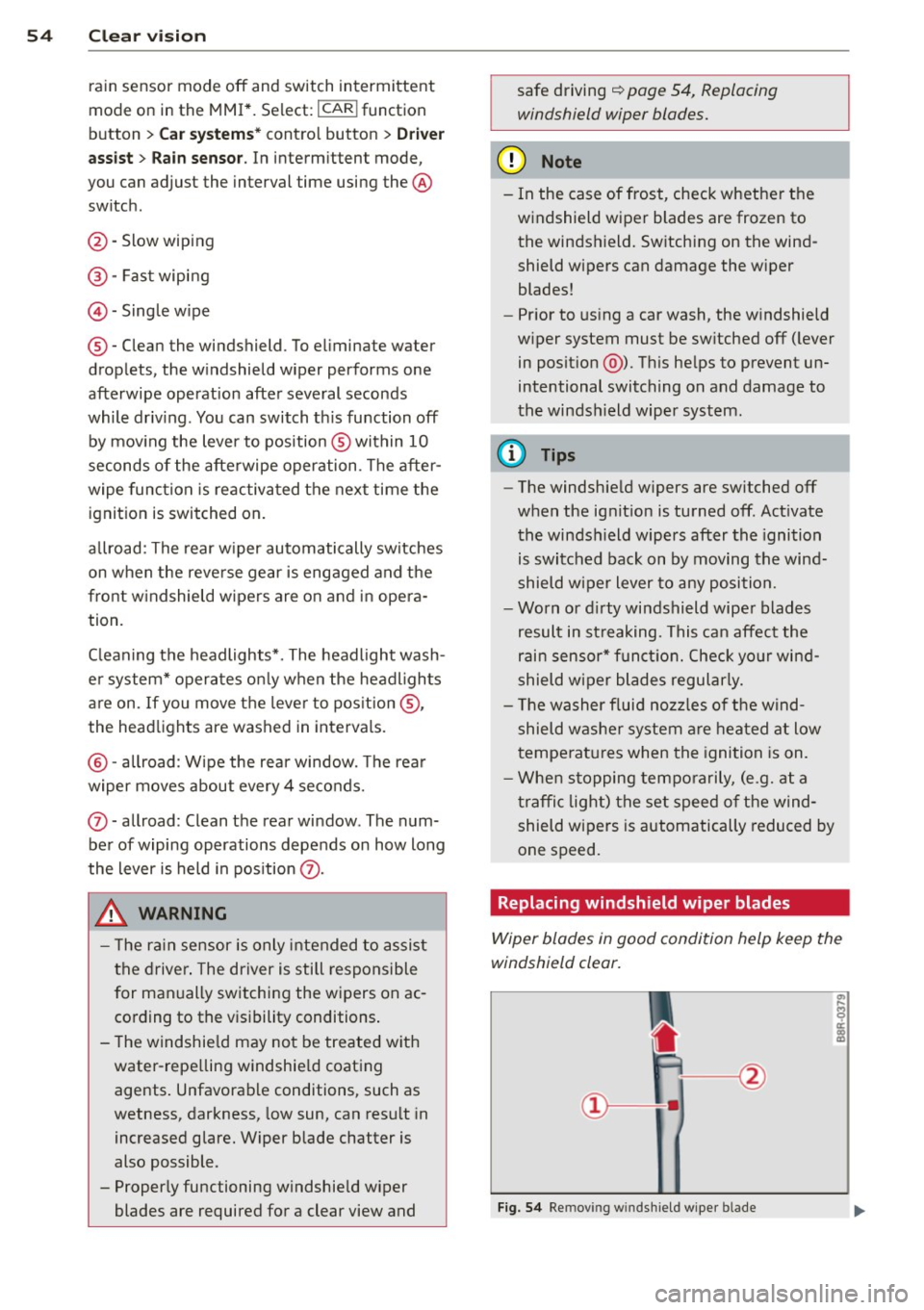
Move the windshie ld w iper lever to the co rre
sponding posi tion:
@ -Windshield wiper off
G)-Interval mode . To ex tend/shorten the
wiper intervals, move the switch @to the
left/r ight. In vehicles w it h a rai n sensor* the
wipe rs turn on in the rain once the vehicle
speed ex ceeds approximately 2 mph (4 km/h) .
T he higher the sens it iv ity of the ra in sensor * is
set (switch @to the right), the earlier the
windshield wipers react to moisture on the
w indshield. In some models, you can switch
II-
Page 56 of 302
54 Clear vis ion
ra in sensor mode off and switch intermittent
mode on in the MMI*. Se lect:
I CAR ! function
button
> C ar sys tem s* contro l button > Dri ver
assi st> Rain s enso r.
In interm ittent mode,
you can adjust the interval time using the ®
switch .
@-Slow wiping
@-Fas t wiping
© -Sing le w ipe
® -Clean the windshield . To eliminate water
drop lets, the w indshield wiper performs one
afterwipe operation after several seconds
while driv ing . You can switch th is fu nction off
by mov ing the lever to position ® within 10
seconds of the afte rwipe operation . The after
wipe func tion is reactiva ted the next time the
ignition is switched on.
a llroad: The rear w iper automatically switches
on when the reve rse gear is engaged and the
front w indshield w ipers are on and in opera
tion .
C lean ing the headlights*. The headlight wash
e r system* opera tes on ly when the headl ights
a re on. If you move the leve r to pos ition @,
the head lights are washed in intervals.
@ -allroad : Wipe the rear window. The rear
wiper moves about every 4 seconds.
(J) -allroad : Clean the rear window . The num
ber of wiping operations depends on how long
the lever is held in pos ition
(J) .
_& WARNING
- T he ra in sensor is only inte nded to assist
the drive r. The driver is still responsible
for man ually switching the wipers on ac
cording to the v isibility conditions .
- T he windshie ld may not be treated w ith
water-repe lling windshie ld coating
agents . Unfavorable conditions, such as
wetness, darkness, low sun, can res ult in
increased glare. Wiper blade chatter is
also possible .
- Proper ly functioning windshie ld w iper
blades are required for a clear view and safe driving
~ page 54, Replacing
windshield wiper blades.
@ Note
- In the case of frost, check whethe r the
windshield wiper blades are frozen to
the windshield. Sw itching on the wind
shield wipers can damage the wiper
blades!
- Pr ior to us ing a car wash, the w indshield
w iper system must be sw itched off ( lever
in posit ion @). Th is he lps to prevent un
intentional switching on and damage to
the windsh ield wiper system .
@ Tips
- The windshie ld wipers are switched off
when the ignit ion is turned off. Act ivate
the winds hield wipers after the ignition
is switched back on by moving the wind
shield w iper lever to any position.
- Worn or d irty windshield wiper blades
result in st reaking. This can affect the
rain sensor* function. Check your wind
shield w ipe r blades regularly.
- The washer fluid nozz les of the wind
shield w asher system a re heated at low
temperat ures when the igni tion is on.
- When stopping tempo rarily, (e .g. at a
t raffic light) the set speed o f the wind
shield wipers is automatically reduced by
one speed.
· Replacing windshield w iper blades
Wiper blades in good condition help keep the
windshield clear.
F ig. 5 4 Remov ing wi nd sh ie ld w ipe r bl ade
Page 67 of 302
(upholder
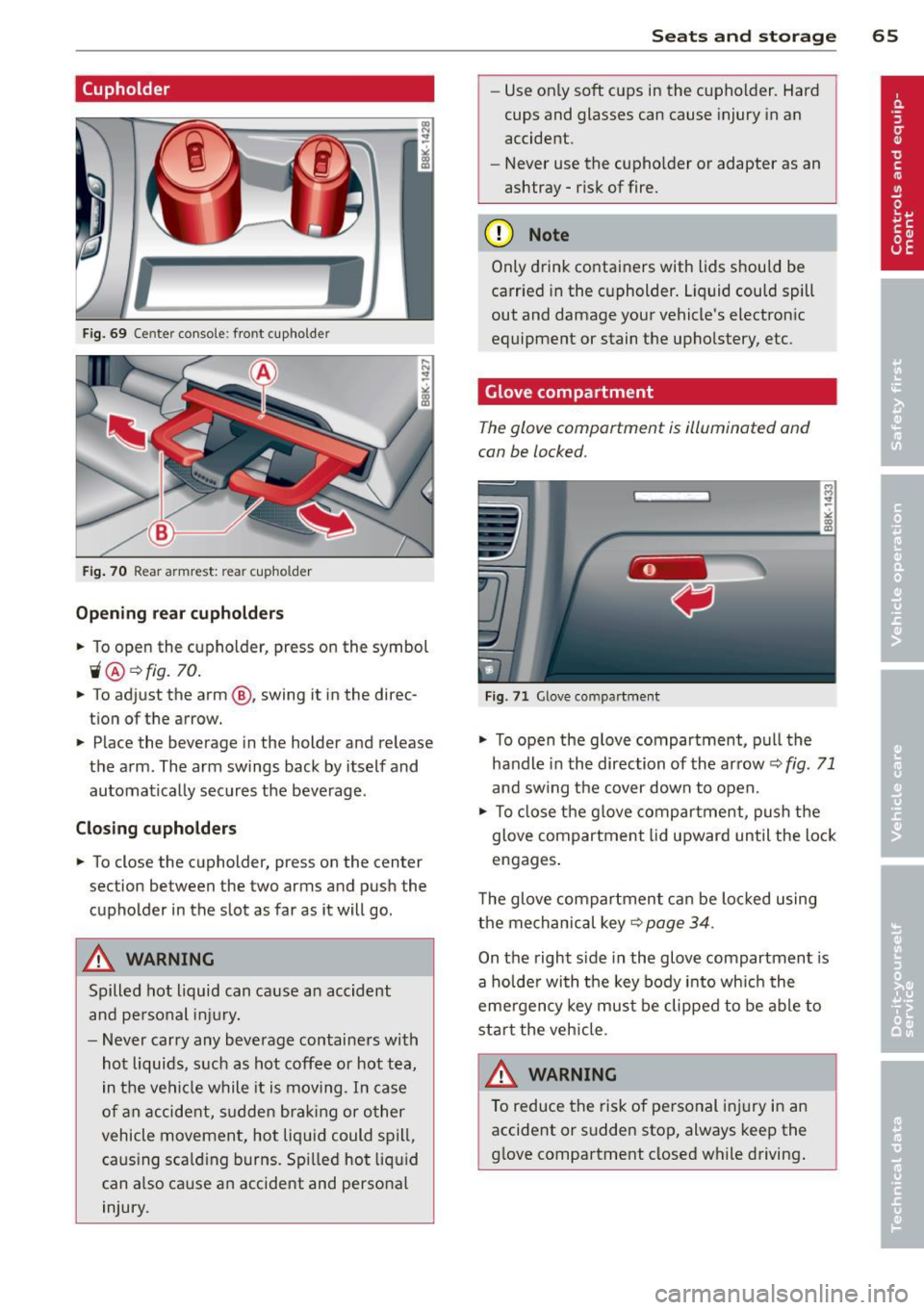
Fig. 69 Ce nter console: front cupholder
Fig. 70 Rear armrest: rea r cupho lder
Opening rear cupholders
~ To open the cupholder, press on the symbol
ii@ ~ fig. 70 .
~ To adjust the arm @, swing it in the direc
tion of the arrow.
~ Place the beverage in the holder and release
the arm. The arm swings back by itself and
automatically secures the beverage .
Closing cupholders
~ To close the cupholder, press on the center
section between the two arms and push the
cupholder in the slot as far as it will go.
A WARNING
Spilled hot liquid can cause an accident
and personal injury.
- Never carry any beverage containers with
hot liquids, such as hot coffee or hot tea,
in the vehicle while it is moving . In case
of an accident, sudden braking or other
vehicle movement, hot liquid could spill,
caus ing scald ing burns . Spilled hot liquid
can also ca use an accident and personal
injury.
Seats and storage 65
-Use on ly soft cups in the cupholder. Hard
cups and glasses can cause injury in an
accident.
- Never use the cupho lder or adapter as an
ashtray -risk of fire.
(D Note
Only drink containers with lids should be
carried in the c upholder. Liquid could spill
out and damage your vehicle's electronic
equipment or stain the upholstery, etc.
Glove compartment
The glove compartment is illuminated and
can be locked.
Fig . 71 G love compar tment
~ To open the glove compartment, pull the
handle in the direction of the arrow~
fig. 71
and swing the cover down to open.
~ To close the glove compartment, push the
glove compartment lid upward until the lock
engages .
T he glove compartment can be locked using
the mechanical key~
page 34.
On the right side in the glove compartment is
a holder with the key body into which the
eme rgency key must be clipped to be able to
start the veh icle.
&_ WARNING
To reduce the risk of personal injury in an
accident or sudden stop, always keep the
glove compartment closed while driving.
-
Page 69 of 302
Roof rack
Description and mounting locations
Additional cargo can be carried with a roof
luggage rack .
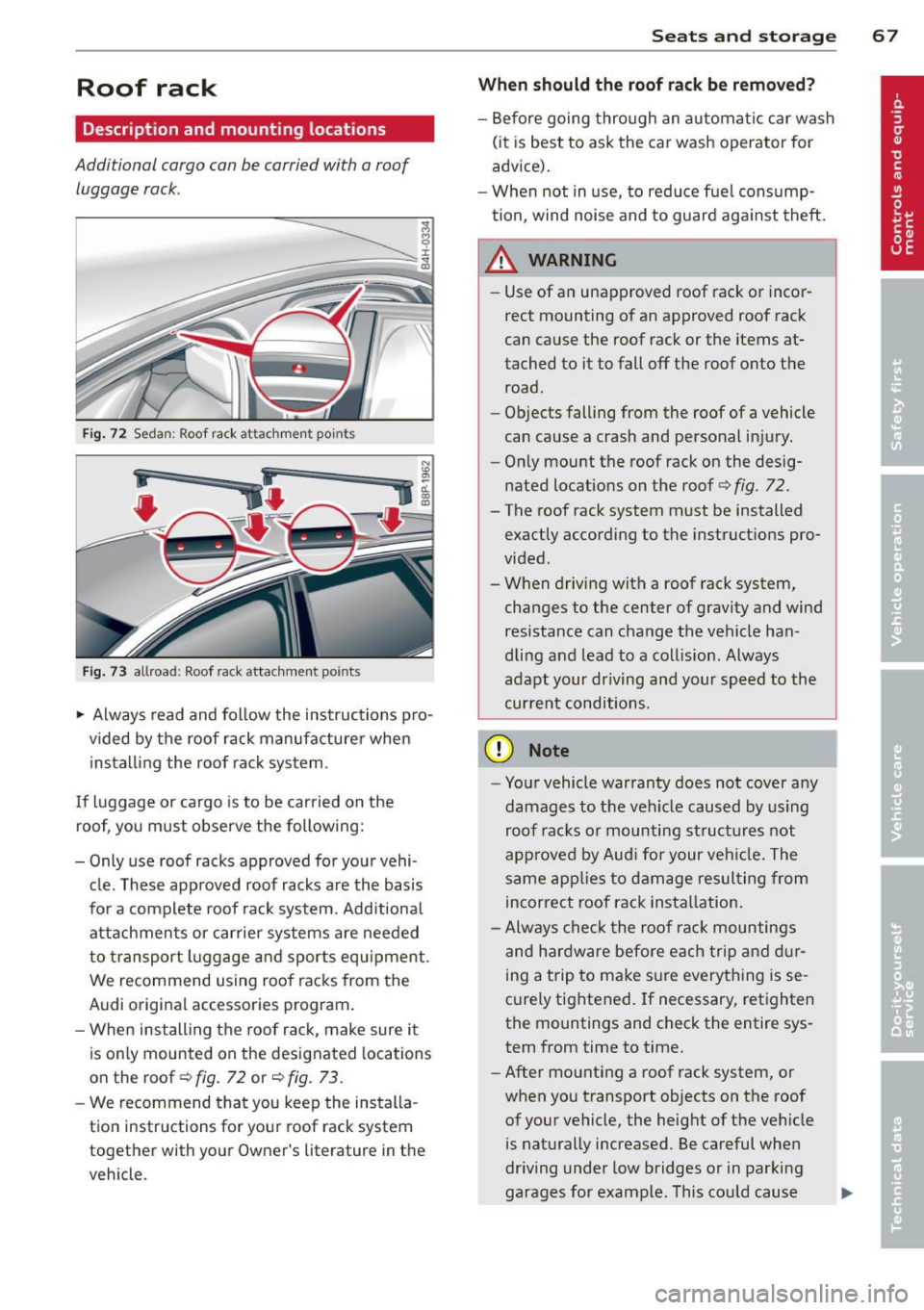
Fig. 72 Seda n: Roof ra ck atta chmen t po ints
Fig. 73 allroa d: Roof ra ck atta chm ent points
~ Always read and follow the instructions pro
vided by the roof rack manufacturer when
installing the roof rack system.
If luggage or cargo is to be carried on the roof, you must observe the following:
- Only use roof racks approved for your vehi
cle. These approved roof racks are the basis
for a complete roof rack system. Additional
attachmen ts or carrier systems are needed
to transport luggage a nd sports equ ipment .
We recommend using roof racks from the
Audi original accessories program.
- When installing the roof rack, make sure it
is only mounted on the designated locations
on the roof ¢
fig. 72 or¢ fig. 73 .
-We recommend that you keep the installa
tion instructions for your roof rack system
together with your Owner 's literature in the
veh icle .
Sea ts a nd s to rage 67
Wh en should th e ro of rack be r emo ved ?
-Before going through an automatic car wash
(it is best to ask the car wash operator for
advice).
- When not in use, to reduce fuel cons ump
tion, wind noise and to guard against theft.
A WARNING
=
- Use of an unapproved roof rack or incor-
rect mounting of an approved roof rack
can cause the roof rack or the items at
tached to it to fall off the roof onto the road.
- Objects falling from the roof of a vehicle
can cause a crash and personal injury.
- Only mount the roof rack on the desig
nated locations on the roof
i:> fig . 72.
- The roof rack system must be installed
exactly according to the instruct ions pro
vided.
- When driving with a roof rack system,
changes to the center of gravity and wind
resistance can change the vehicle han
dling and lead to a collision . Always
adapt your driving and your speed to the
cur ren t conditions.
(D Note
- Your vehicle warranty does not cover any
damages to the veh icle caused by using
roof racks or mounting structures not
approved by Aud i for your veh icle. The
same app lies to damage resulting from
incorrect roof rack installation.
- Always check the roof rack mountings
and hardware before each trip a nd d ur
ing a trip to make sure everything is se
curely tightened. If necessary, retighten
the mountings and check the entire sys
tem from time to time.
- After mounting a roof rack system, or
when you transport objects on the roof
of your vehicle, the height of the veh icle
is naturally increased. Be careful when
dr iving under low bridges or in parking
garages for example . This cou ld cause
111>
Page 79 of 302
Warm and cold 77
Operation
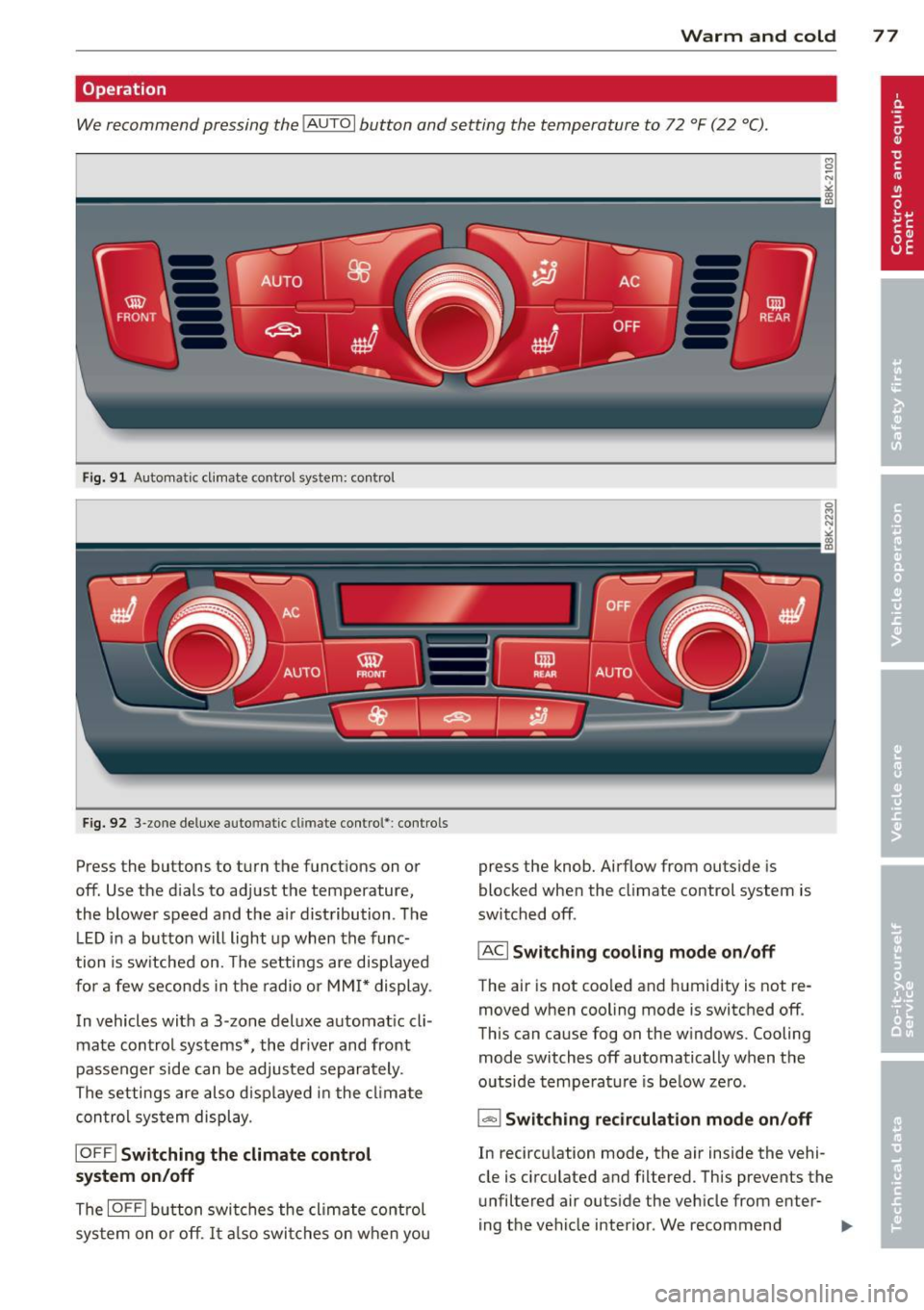
We recommend pressing the IAUTO I button and setting the temperature to 72 °F (22 °C).
Fig. 91 Automatic cl imate control system: control
Fig. 92 3-zone deluxe automatic climate control': controls
Press the buttons to turn the functions on or
off. Use the d ials to adjust the temperature,
the blower speed and the a ir distribution. The
L ED in a button will light up when the func
tion is switched on. The settings are displayed
for a few seconds in the radio or MMI* display.
In vehicles with a 3-zone deluxe automat ic cl i
mate control systems *, the dr iver and front
passenger side can be adjusted separately.
The settings are also d isplayed in the climate
con trol system display.
IOFFI Switching the climate control
system on/off
The IOF FI button switches the climate control
sys tem on or off.
It also switches on when you press the knob. Airflow from outs
ide is
blocked when the climate control system is
switched off.
IACI Switching cooling mode on/off
The air is not coo led and humidity is not re
moved when cooling mode is switched off.
This can cause fog on the w indows. Cooling
mode switches off automatically when the
outside temperature is be low zero.
1- 1 Switching recirculation mode on/off
In recircu lation mode, the air inside the vehi
cle is circulated and filtered. This prevents the
unfiltered air outside the vehicle from enter
ing the vehicle interior. We recommend
Page 80 of 302
78 Warm and cold
switching rec irculat ion mode on when driving
throug h a t unnel or when sitting in traffic
c:::> &. .
The IAU TO I button or I@ FRON T I butt on
switches recircu lation mode off .
IAUTO I Switching automatic mode on
Automatic mode ma inta ins a constant tem
perature inside the vehicle. Air temperature,
airflow and air distribution are controlled au
tomatically.
Adjusting the temperature
Temperatures between 60 °F (+16 °C) and
84 °F ( +28 °C) can be set . Outside of this
range,
LO or HI will appea r in the climate con
trol system disp lay. At both of these settings,
the climate control system runs continuously
at maximum cooling or heating power . There
is no temperature regu lation.
~ Adjusting the airflow
You can adjust the a irflow manually to su it
your needs . To have the airflow regulated au
tomatically , press the
!AUTO ! button.
~ Adjusting the air distribution
You can manually select the ve nts where the
a ir will flow . T o have the air d istribution regu
la ted automatically, press the
IAUTOI button .
~ Adjusting seat heating*
Pressing the button switches the seat heat ing
on at the highest sett ing (level 3) . The LEDs
indicate the tempe rature leve l. To reduce the
temperature, press the button again . To
switch the seat heating off , press the button
repeatedly until the LED turns off .
After 10 minutes , the seat heating automati
cally switches from level 3 to leve l 2.
I@ FR ON T I Switch the defroster on/off
The windshield and s ide windows are defrost
ed or cleared of condensation as quickly as
possible . The max imum amount of air flows
mainly from the vents below the windshield.
Recirculation mode switches off . Th e tempera
ture is controlled automatically. T
he
!AUTO I button switches the defroster off.
l !iiil R EAR I Switching rear window heater
on/off
T he rea r window heater only operates when
the engine is running . It switches off auto
matically after a few m inutes, depending on
the outside temperature .
T o prevent the rea r window heater from
switching off automatically, press and hold
the
l oo REAR I button for more than 2 seconds .
This remains stored until the ignition is
switched off.
Air vents
You can open and close the center and rear air
vents using the thumbwhee ls . T he levers ad
just the direction of the airflow from the
vents.
In veh icles with a 3-zone deluxe automatic cli
mate control system*, you can adjust the air
temperature in the rear by turning the thumb
whee l toward the red side to make it warmer
or toward the b lue s ide to make it cooler.
A WARNING
-- Do not use the recirculation for extended
periods of time . The windows could fog
up since no fresh air can enter the vehi
cle . If the windows fog up, press the air
recir culation butto n aga in imm ediately
to switch off the air recirculation func
tion or se lect defrost.
- I ndivid uals w ith reduced sensitivity to
pa in or temperature could develop burns
when using the seat heating function . To
red uce the risk of injury, these individu
als shou ld not use seat heating.
(D Note
To avoid damage to the heating elements
in the seats, do not kneel on the seats or
place heavy loads on a small area of the
seat.