automatic AUDI A4 2013 Service Manual
[x] Cancel search | Manufacturer: AUDI, Model Year: 2013, Model line: A4, Model: AUDI A4 2013Pages: 302, PDF Size: 75.61 MB
Page 97 of 302
-Do not ride the brakes or press the brake
pedal too often or too long when driving
down a hill. Constant braking causes the
brakes to overheat and substantially re
duces braking performance, increases
braking distance or causes complete fail
ure of the brake system.
- To prevent the vehicle from rolling back
when stopping on inclines, always hold it
in place with the brake pedal or parking
brake.
- Never hold the vehicle on an incline with
a slipping clutch. The clutch opens auto
matically when it becomes too hot from
the overload. An indicator lamp
[O] illu
minates and a driver message appears
¢ page 9 7 when the clutch is overload
ed .
- If the engine must remain running, never
have any driving position engaged when
checking under the hood. Make sure the
selector lever has securely engaged and
is locked in P with the parking brake set
¢ page 213, Engine compartment . Oth
erwise, any increase in engine speed may
set the vehicle in motion, even with the
parking brake applied .
0 Note
-S tronic ®- and tiptronic transmission:
When stopping on an incline, do not try
to hold the vehicle in place by pressing
the accelerator pedal while a driving gear
is selected. This can cause the transmis
sion to overheat and can damage it. Acti
vate the parking brake or press the brake
pedal to prevent the vehicle from rolling.
- S tronic ®- and tiptronic transmission: Al
lowing the vehicle to roll when the en
gine is stopped and the selector lever is in N will damage the transmission be
cause it is not lubricated under those cir
cumstances .
(D Tips
For safety reasons, the parking brake is re
leased automatically only when the driv
er's safety belt is engaged in the buckle.
Transmission 95
Hill descent control
App lies to veh icles: w it h m ult itro nic/S tro nic/t iptro nic
The hill descent control system assists the
driver when driving down declines .
Hill descent control is activated when these
lector lever is in D/S and you press the brake
pedal. The transmission automatically selects
a gear that is suitable for the incline. Hill de scent control tries to maintain the speed ach
ieved at the time of braking, within physical
and technical limitations. It may still be nec
essary to adjust the speed with the brakes.
Hill descent control switches off once the de
cline levels out or you press the accelerator
pedal.
On vehicles with the cruise control system*
¢ page 89 , hill descent control is also activat
ed when the speed is set.
.&_ WARNING
-
Hill descent control cannot overcome
physical limitations, so it may not be able
to maintain a constant speed under all
conditions. Always be ready to apply the brakes.
Page 98 of 302
96 Transmission
Manual shift program
Appl ies to vehicles: with multitronic/S tronic/t iptronic
Using the manual shift program you can
manually select gears .
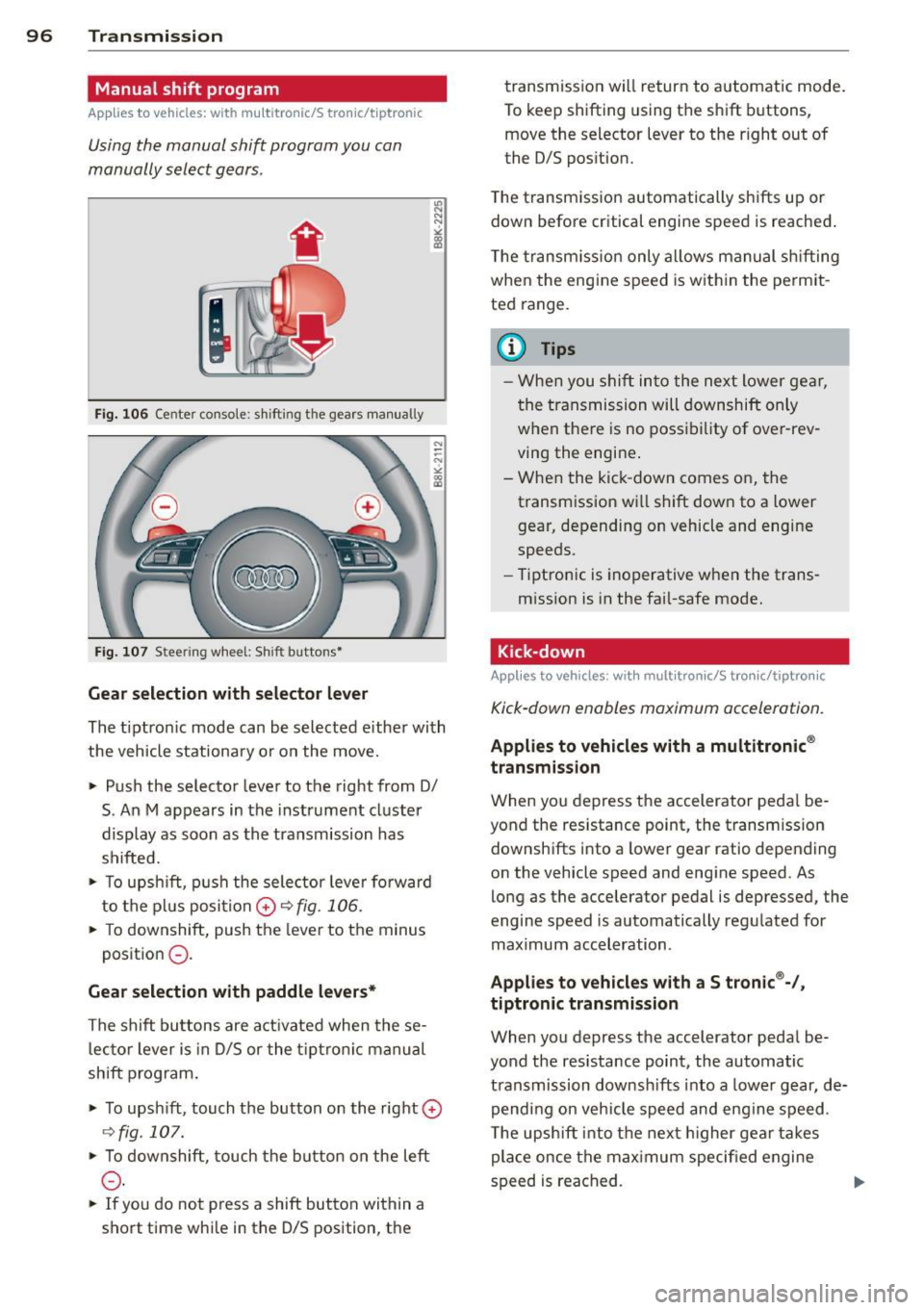
Fig . 10 6 Center co nsole: s hifting the gears manu ally
Fig . 10 7 Steer ing w heel: Shift buttons•
Gear selection with selector lever
"' N
N
~
" a> CD
The tiptron ic mode can be selected e ither with
the vehicle stationa ry or on the move.
• Push the selector lever to the right from 0/
S. An M appears in the instrument cl uster
display as soon as the transmission has
shifted.
• To upsh ift, p ush the sele ctor leve r fo rw ard
to the pl us posi tion
0 r:::,fig . 106.
• To downshift , push the lever to the minus
position
0 -
Gear selection with paddle levers*
The s hift bu ttons are act ivated when the se
l ec to r lever is in D/S or the t ip tr on ic manu al
shift program .
• To upsh ift, touch the button on th e right
0
C:, fig . 107.
• To downshift, touch the bu tton on the left
0 -
• If you do not press a shift button wi thin a
s h ort time whi le in the D/S position, t he transmission will return to a
utomatic mode .
To keep shifting using t he sh ift bu ttons,
move the selector lever to the r ight out of
the 0/S pos ition.
T he t ransm iss io n automatically sh ifts up or
down before critical engine speed is reached .
T he transm iss io n only a llows manual sh ifting
when the engine speed is w it hi n the pe rmit
ted range .
@ Tips
-Whe n you s hift into the ne xt l ower ge ar,
the transmission will downshift only
w hen the re is no poss ib ility of ove r-rev
ving the engine .
- W hen the kic k-down comes on, the
transm ission w ill shift d ow n to a lower
gear, depending on vehicle and engine
speeds.
- Tiptro nic is inoperative when the trans
m ission is in the fai l-safe mode.
Kick-down
Applies to vehicles : wit h mult itronic/S t ro ni c/tip tro nic
Kick-down enables maximum acceleration.
Applies to vehicles with a multitronic ®
transmission
W hen you depress the accelerator peda l be
yond the res istance point, the transm ission
downsh ifts into a lower gear ratio depend ing
on the vehicle speed and engine speed. As
lo ng as the acce lerator pedal is depressed, the
engine speed is automatically regu lated for
maximum acceleration .
Applies to vehicles with a S tronic ®-/,
tiptronic transmission
When you depress the accelerator peda l be
yond the resistance point, the automatic t ra nsmission downsh ifts into a lowe r gear, de
pend ing on veh icle s peed an d eng ine speed .
T he upsh ift int o th e nex t higher gea r takes
place once the max imum speci fied engine
s p eed is reached .
Page 102 of 302

100 Audi adaptive cruise control and braking guard
confirmed by the video camera, an acute
collision warning.
- For safety reasons, do not use adaptive
cruise control when driving on roads with
many curves, when the road surface is in
poor condition and/or in bad weather
(such as ice, fog, gravel, heavy rain and
hydroplan ing). Using the system under
these conditions could result in a colli
sion.
- Switch adaptive cruise control off tempo
rar ily when driv ing in turning lanes, on
expressway exits or in construc tion
zones. This prevents the vehicle from ac
celerating to the set speed when in these
situations.
- Th e adaptive cruise control system w ill
not brake by itse lf if you put your foot on
the accelerator pedal. Doing so can over
ride the speed and distance regulation.
- When approaching stationary objects
such as stopped traffic, adaptive cruise
control will not respond and braking
guard w ill have limited function.
- The adaptive cr uise control system and
braking guard do not react to people, an
ima ls, objects crossing the road or on
coming objects .
- The function of the radar sensor can be
affected by reflective objects such as
guard rails, the entrance to a tunnel,
heavy rain or ice.
- Never follow a vehicle so closely that you cannot stop your vehicle safely. The
adaptive cruise control cannot slow or
brake the vehicle safely when you follow
ano ther vehicle too closely . Always re
member that the automatic braking
function cannot bring the vehicle to a sudden or emergency stop under these
conditions.
- To prevent unintended operation, always
switch ACC off when it is not being used.
{[) Note
The sensor can be d isp laced by impacts or
damage to the bumper, whee l housing and
underbody . That could affect the adaptive cruise control system and b
raking guard.
Have your authorized Audi dea ler or au
thorized Audi Service Facility check their
function.
, In curves
Applies to vehicles: wit h Aud i adapt ive cr uise contro l
Fig . 111 Examp le: driv ing into a curve
When driving into a curve <=> fig. 111 and out
of a curve, the adaptive cruise control may re act to a vehicle in the next lane and app ly the
brakes. You can override or prevent the brak
ing by pressing the accelerator pedal briefly.
Stationary objects
Applies to vehicles: with Aud i adaptive crui se contro l
Fig. 112 Examp le: object chang ing lanes a nd station
a ry object
The adaptive cru ise control system only reacts
to objects that are moving or that the system
has a lready detected as moving. For example,
if a vehi cle@ , which has already been detect
ed by the adaptive cruise control, turns or
changes lanes and another stationary vehicle
@ is located in front of that vehicle, the sys
tem will not react to the stationary vehicle.
Page 104 of 302
102 Audi adaptive cruise control and braking guard
Switching on and off
Applies to vehicles: with Audi adaptive cruise control
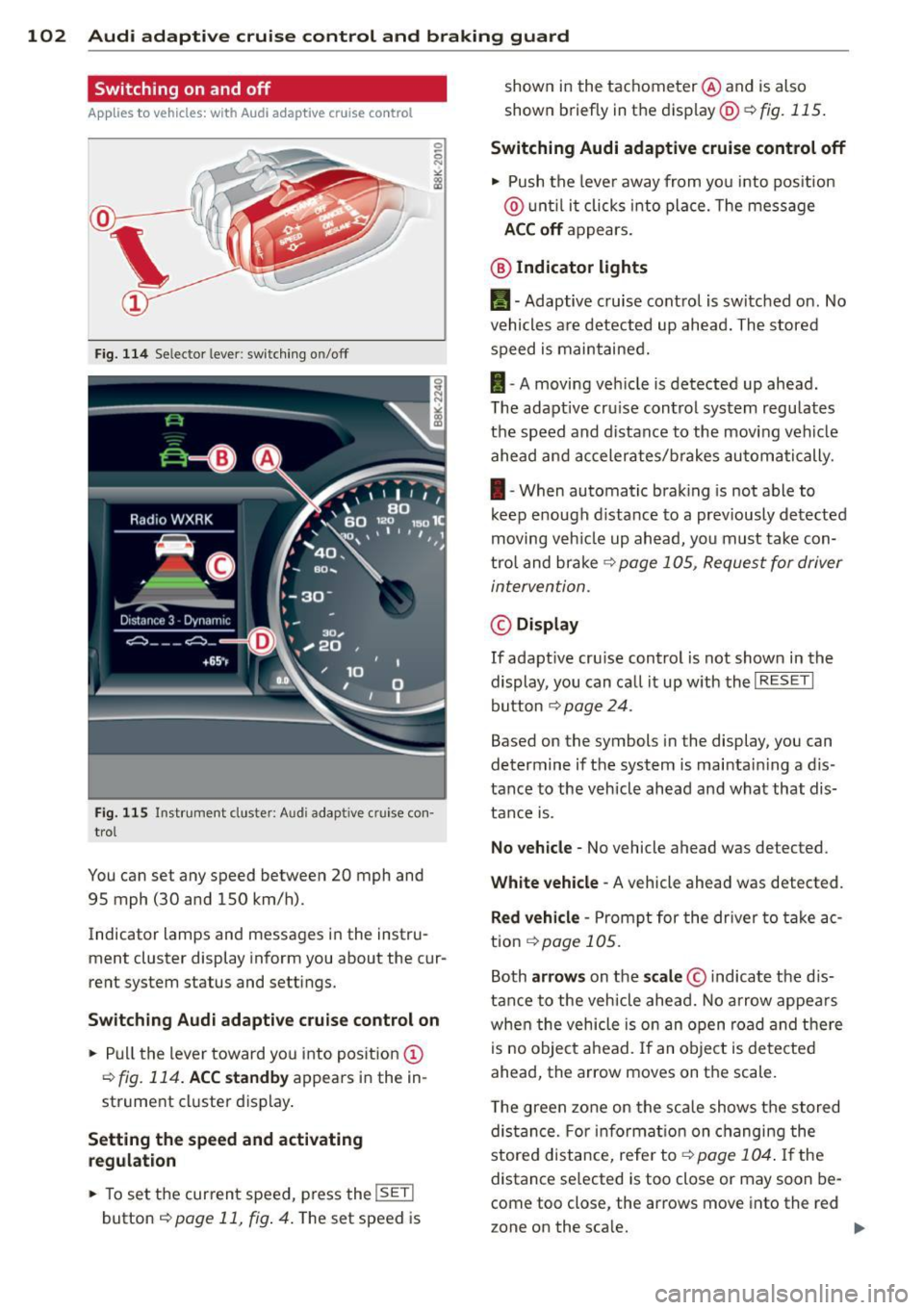
Fig. 114 Se lec tor lever: switching on/off
Fig. 115 Instrument clus te r: A udi adap tive c ru ise co n·
trol
You can set any speed between 20 mph and
95 mph (30 and 150 km/h).
Indicator lamps and messages in the instru·
ment cluster display inform you about the cur·
rent system status and settings.
Switching Audi adaptive cruise control on
• Pull the lever toward you into position@
r=;,fig. 114. ACC standby appears in the in ·
strument cluster display.
Setting the speed and activating
regulation
.. To set the current speed, press the !SE T!
button r=;, page 11, fig . 4. The set speed is shown in
the tachometer @and is also
shown briefly in the display@~
fig. 115.
Switching Audi adaptive cruise control off
• Push the lever away from you into position
@ until it clicks into place. The message
ACC off appears.
@ Indicator lights
11 · Adaptive cruise control is switched on. No
vehicles are detected up ahead. The stored
speed is maintained.
I-A moving vehicle is detected up ahead.
T he adaptive cru ise control system regulates
the speed and distance to the moving vehicle
ahead and accelerates/brakes automatically.
I-When automatic braking is not able to
keep e nough distance to a previously detected
moving veh icle up ahead, you must take con·
trol and brake ~
page 105, Request for driver
intervention.
© Display
If adapt ive cru ise control is not shown in the
display, you can call it up w ith the
I RESET I
button r=;, page 24.
Based on the symbols in the display, you can
determine if the system is maintain ing a d is ·
tance to the vehicle ahead and what that dis
tance is.
No vehicle· No vehicle ahead was detected .
White vehicle· A vehicle ahead was detected .
Red vehicle -Prompt for the driver to take ac
tion
,=;, page 105.
Both arrows on the scale© indicate the dis·
tance to the vehicle ahead. No arrow appears
when the vehicle is on an open road and there
is no object ahead. If an object is detected
ahead, the arrow moves on the scale .
T he green zone on the scale shows the stored
distance. For information on changing the
stored distance, refer tor=;,
page 104 . If the
distance se lected is too close or may soon be·
come too close , the arrows move into the red
zone on the sca le. .,..
Page 106 of 302
104 Audi adapti ve cruise control and br aking guard
Setting the distance
App lies to vehicles: with Audi adaptive cruise control
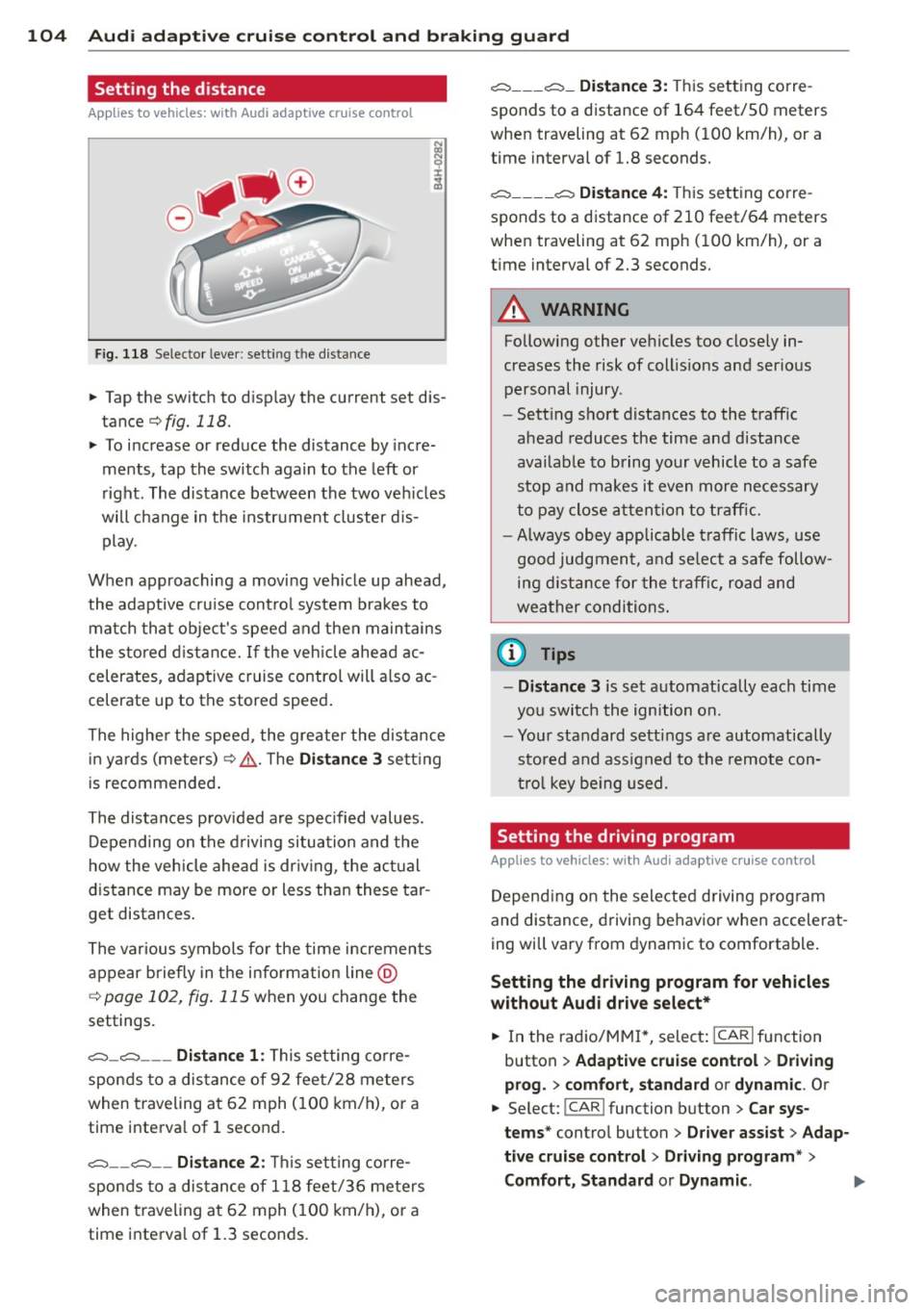
Fig. 118 Selector lever: setting the distance
~ Tap the switch to display the current set dis
tance ¢fig.
118.
~ To increase or reduce the distance by incre
ments, tap the switch again to the left or
right. The distance between the two veh icles
will change in the instrument cluster d is
play.
When approaching a moving vehicle up ahead,
the adaptive cru ise cont rol system brakes to
matc h that object's speed and then maintains
the stored d istance. If the vehicle ahead ac
celerates, adaptive cruise control will also ac
celerate up to the stored speed.
The highe r the speed, the greater the distance
in yards (meters)¢ ,&.. T he
Di st a nc e 3 setting
is recommended .
The distances p rov ided are specified values.
Depending on the driving situation and the
how the vehicle ahead is dr iving, the actual
distance may be more or less than these tar
get distances .
The various symbols fo r the time increments
appear briefly in the information line @
c;, page 102, fig. 115 when you change the
settings.
c::::::,_c::::::, ___ Dist ance 1: This setting corre-
sponds to a distance of 92 feet/28 meters
when traveling at 62 mph (100 km/h), or a
time interva l of 1 second.
c::::::, __ c::::::, __ Dista nce 2 : This setting corre
sponds to a distance of 118 feet/36 meters
when traveling at 62 mph (100 km/h), or a
time interva l of 1.3 seconds .
c::::::, ___ c::::::, _ Dista nce 3 : This setting corre-
sponds to a distance of 164 feet/SO meters
when traveling at 62 mph (100 km/h), or a
time interval of 1.8 seconds.
c::::::, ____ c::::::, Dista nce 4 : This setting corre-
sponds to a distance of 210 feet/64 meters
when traveling at 62 mph (100 km/h), or a
t ime interval of 2.3 seconds.
A WARNING
Following other vehicles too closely in
creases the risk of collis ions and ser ious
personal injury .
- Sett ing short distances to the traffic
ahead reduces the time and distance
availab le to bring your vehicle to a safe
stop and makes it even more necessary
to pay close attention to traffic.
-
- Always obey applicable t raffic laws, use
good judgment, and select a safe follow
ing d istance for the t raff ic, road and
weather conditions .
0) Tips
-Distan ce 3 is set automatically each time
you switch the ignition on.
- Your standard settings are automatically
stored and ass igned to the remote con
tro l key be ing used.
Setting the driving program
Applies to vehicles: with Audi adaptive cruise control
Depending on the selected driving program
and distance, driving behavior when accelerat
ing will vary from dynamic to comfortable .
Setting the dri ving program for vehicles
without Aud i d riv e se le ct*
~ In the radio/MM!*, select: ICARlfunction
button
> Ad apti ve crui se cont rol > Drivi ng
p ro g.
> comfort, sta nd ard or dyn amic . Or
~ Select: !CAR ! function button> Ca r sys
tem s*
control button > Driver a ssist > Adap
ti ve c ruis e c ontr ol
> D rivi ng program * >
Co mfort, Standard or Dynam ic .
Page 107 of 302

Audi adaptive cruise control and braking guard 105
Setting the driving mode for vehicles with
Audi drive select*
Refer to r=;,poge 1 14 .
(D Tips
Yo ur setti ngs a re automatically store d an d
assig ned to the remote contro l key be in g
used.
Request for driver intervention
A pp lies to vehicles: w ith Audi a daptive cruise control
Fig. 119 Inst rumen t cl uster: reques t fo r drive r in te r·
ve ntio n
In ce rtain si tuations, t he sys tem w ill prom pt
you to take actio n. This cou ld ha ppen, for ex
ample, if braking by the a daptive cr uise con
trol system is not enough to maintain enough
d istance to the vehicle ahead.
The inst rument cluste r will war n you about
the danger
r=;,fig. 119:
- A red ve hicle is pic tured in the d is pla y.
- The text
DISTANCE! appea rs in the s ta tus
b ar.
- T he r ed indi cator lig ht
I blinks .
- In add it ion, a warning tone sounds.
Audi braking guard
Description
App lies to vehicles: wi th Audi ada ptive c ruise con tro l
Fig. 120 In str um ent clus ter: approach warnin g
Brak ing guard uses a radar sensor. It also
funct ions wit hin the lim its of the system
whe n adapt ive cruise control is switched off.
What can Audi braking guard do?
When detected in time, the system can assess
situations when a veh icle ahead brakes s ud
denly or if your own vehicle is t raveling at a
high speed and approac hing a ve hicle up
ahead that is movi ng mo re sl ow ly. B raking
guard does not reac t if it cannot detec t the
s ituation.
The system advis es yo u of various s ituations:
- The
distance wa rning is given if yo u are too
close to the vehicle ahead for a long time. If
the vehicle ahead bra kes sharply , yo u will
not be ab le to avoid a collision . The ind icator
light
I in the d isp lay comes o n.
- The
approach warning is given when a de
tected ve hicle up ahead i n your lane is mov
ing m uch mo re sl owly than you are or if i t
brake s sh arp ly. W hen t his war ning is g iven,
it may on ly be poss ible to avoi d a co llision
by swe rving or b ra kin g sharp ly. The indic ator
light
I a nd indic ator in t he di spl ay w ill war n
you abo ut the d ange r¢
fig . 120. You will a l
so hear an aco ustic s ignal.
If y o u do no t rea ct fas t eno ugh o r do not r eact
at all to the si tuat ion, B rak ing guard will in
t e rvene by b rak ing and t he message
braking
guard intervention
w ill appea r.
Page 108 of 302

106 Audi adap tive cruise control and br aking guard
- If a co llision is imminent, the system will
first provide an
acute warning by bri efly and
sharp ly app ly ing the brakes .
- If you do not react to the ac ute warning ,
braking guard can brake within the limits of
the system. This reduces the veh icle speed
in the event of a collision.
- At speeds under 20 mph (30 km/h), the sys
tem can in it iate a complete deceleration
s hortly before a collision .
1>.
- If the braking guard senses that you are not
braking hard enough when a collision is im
minent, it can increase the braking force.
Which funct ion s can be contr oll ed ?
You can switch braking guard and the dis
tance/approach warning on or off in the radio
or MM I c> poge 106, Settings in the radio/
MMI.
A WARNING
Lack of attention can cause col lisions, oth
er accidents and serious personal injuries.
The braking guard is an assist system and
cannot prevent a collis ion by itself. The
driver must always intervene . The driver is
always responsib le for bra king at the cor
rect time.
- Always pay close attention to traffic,
even when the brak ing guard is switched
on. Be ready to intervene and be ready to
take complete control whenever necessa
ry. A lways keep the safe and legal dis
tance between your vehicle and vehicles
up ahead.
- Braking guard works w ith in limits and
will not respond outs ide the system lim
its, for example when approaching a
stopped vehicle or stationary obstacle
(end of a traff ic jam or veh icle that has
broken down in traffic).
- Always remember that the radar sensor
for the braking guard works only within
defined detection and range limits that
l ) Th is is not available in some c oun tri es.
may prevent the proper detection of oth
er vehicles.
- The radar sensor's function and range
can be reduced by rain, snow and heavy
spray. Moving veh icles up ahead may not
be prompt ly detected or may not be de
tected at all .
- Reflective surfaces including crash barri
ers or tunne l entrances may impair the
function of the radar sensor .
(D Tips
- You can cancel the braking that is in it iat
ed by the system by braking yourse lf, by
accelerating not iceably or by swerving .
- Braking guard error messages
c>poge 107.
- Keep in mind that brak ing guard can
brake unexpectedly. Always secure any
cargo or objects that you are transport
ing to reduce the risk of damage or in
jury .
Settings in the radio/MMI
Applies to vehicles: with Audi adaptive cruise control
., Select: I CAR I function button > Car sys
tem s*
contro l button > Driv er a ssist > Au di
br aki ng g ua rd .
Or
., Select: !CAR ! function b utton > Aud i brak-
ing gu ard .
S ys tem -
Switch A udi braking guard On and
Off . When you switch the ignition on, the
message
Audi b raking gu ard off appears if
the system is switch ed off .
Ea rly warnin g -The distance and approach
warnings in the display can be switched
On /
Off .
(D Tips
-Yo ur settings are automatically stored
and assigned to the remote contro l key
being used at the times the settings are
made.
Page 109 of 302
Audi adaptive cru ise control and brakin g guar d 107
-Sedan: I f you switch the A SR/ESC off,
braking guard switches off automatically
¢ page 187 .
-allroad : If you switch the offroad mode
on, braking g uard switches off automati
cally
¢ page 188.
-Switch braking guard off when you are
l oading the veh icle onto a vehicle carr ier,
tra in, sh ip or other type of transporta
tion. This can prevent undesired warn i ngs from the braking guard system .
Messages
Applies to vehicles: with Audi adaptive cruise co ntrol
B rak ing guard: Off
This driver message appears if the system is
turned off via the radio/MM I*. Otherwise, if
the system is turned off, the information ap
pears every time shortly after the start of the
tr ip.
B ra king gua rd: Act ivated
This drive r message appe ars if sharp brake
pressu re was applied due to an acute warning.
•••
Three white dots appear if a setting cannot be
selected with the operat ing lever . For exam
p le, this happens if you want to raise/lowe r
the speed even though there was no p revious
l y saved speed.
AC C: D eactiv ation
The driver message appears in vehicles with
manual transmission . If the clutch pedal was
pressed down for too long, the adaptive cruise
control turns off. A chime sounds as a rem ind
er.
ACC : Sensor blocked
This message appears if the sensor view is ob
structed, for example by leaves, snow, heavy
spray or dirt. C lean the sensor ¢
page 99,
fig. 110.
ACC: not available
The drive r message appears if there is a ma l
f u nction. The adap tive cruise cont rol tu rns off. A chime sounds as a
reminder. Have the sys
tem checked by an authorized Audi dea ler or
authorized Aud i Service Fac ility.
ACC: unavailable
The driver message appears if, for example,
t h e b ra ke tempe ratu re is too hig h. T he adap
tive cru ise con trol is temporarily u nav ail able.
A ch ime sounds as a remin der .
Engine sp eed !
This dr iver message appears in vehicles with
manua l transm ission if the drive r had not up
shifted or dow nsh ifted in t ime w hile using
adaptive c ruise contro l braking or accelerat
ing, caus ing the veh icle to exceed or not reach
the pe rm itted lim it speed. The adap tive cruise
control turns off. A chime sounds as a remind
er.
Shift lev er po sition!
Vehicles with an automat ic t ransm iss ion: the
drive r message appears if the se lecto r lever is
sh ifted to the N position. The adapt ive cruise
c o ntrol is not ava ilable while in th is posit ion.
Vehicles with manua l transm ission: the driver
message appears for vehicles with manua l
transmission if there is no forward gea r en
gaged, meaning if the reverse gea r or the 1st
ge ar is engaged o r if the sele ctor leve r is i n
the ne utra l posi tion. The ad apt ive cr uise con
tro l is not available while in th is posi tion.
Stabilization control (ESC )
This message appears if the e lectronic stab ili
zation control (ESC) is taking action to stab i
liz e the veh icle. The adaptive c ruise co ntrol
turns off. A chime sounds as a reminder .
Speed too low
This message appears if the current speed is
too low
to set or to maintain the desired
speed.
T he speed being saved must be at least
20 mp h (30 km/h). The cru ise contro l is
turned off for speeds lowe r than 12 mph
(20 km/h). The adaptive cruise control re
mains turned on for speeds above 95 mph
Page 113 of 302

-Improper reliance on the side assist sys
tem can cause collisions and serious
personal injury:
- Never rely only on side assist when
changing lanes.
- Always check rear view mirrors to make
sure that it is safe to change lanes.
- Side assist cannot detect all vehicles un
der all conditions- danger of accident!
- Please note that side assist indicates
there are approaching vehicles, or
vehicles in your blind spot, only after
your vehicle has reached a driving speed
of at least 19 mph (30 km/h).
- In certain situations, the system may not
function or its function may be limited.
For example:
- if vehicles are approaching or being left
behind very quickly. The display may
not turn on in time.
- in poor weather conditions such as
heavy rain, snow or heavy mist .
- on very wide lanes, in tight curves or if
there is a rise in the road surface .
Vehicles in the adjacent lane may not
be detected because they are outside
of the sensor range.
(D Note
The sensors can be displaced by impacts or
damage to the bumper, wheel housing and
underbody. This can affect the system .
Have your authorized Audi dealer or au
thorized Audi Service Facility check their
function.
(D Tips
- If the window glass in the driver's door
or front passenger's door has been tint
ed, the display in the exterior mirror may be misinterpreted.
- For Declaration of Compliance to United
States FCC and Industry Canada regula
tions
~page 283.
Audi side assist 111
Activating and deactivating
Applies to vehicles : wi th Aud i side ass ist
Fig. 125 Driver 's doo r: Side assis t button
.,. Press the button c> .&. in General informa
tion on page 110
to switch the system on/
off . The LED in the button turns on when
side assist is switched on.
Adjusting the display brightness
App lies to vehicles: wit h Audi side ass ist
The signal brightness can be set in the radio
orMMI* .
.,. Select: I CAR I function button > Audi side as
sist.
.,. Select: I CAR ! function button > Car sys
tems*
control button > Driver assist > Audi
side assist .
The display brightness adjusts automatically
to the brightness of the surroundings, both in
the information and in the warning stage . In
very dark or very bright surroundings, the dis play is already set to the minimum or maxi
mum level by the automatic adjustment. In
such cases, you may notice no change when
adjusting the brightness, or the change may
only be noticeable once the surroundings
change.
Adjust the brightness to a level where the dis
play in the information stage will not disrupt
your view forward. If you change the bright
ness, the display in the exterior mirror will
briefly show the brightness level in the infor
mation stage. The brightness of the warning
stage is linked to the brightness in the infor
mation stage and is adjusted along with the
information stage adjustment.
Page 114 of 302

112 Audi side assist
- Side assist is not active wh ile you are
making the adjus tment.
- Your settings are automatica lly sto red
and ass igned to the remote control key
being used.
Driver messages
App lies to vehicles: with Audi side assist
If s ide ass ist switches off by itse lf, t he LED in
the butto n tur ns off a nd a message will ap
pear in t he instr ume nt cl uster d is p lay:
Audi side assist unavailable : Sensors blocked
T he radar sensors' vision is a ffected. Do not
cover the area in front of the senso rs with bike
wheels, stickers, dirt or other objects . Clean
the area in front of the sensors, if necessary
c::;,page 110, fig. 124.
Audi side assist : Currently unavailable
Side assist can not be swi tched on tempora ril y
bec ause there is a mal func tio n (for ex am ple,
the ba ttery cha rge leve l may be too low) .
Audi side assist : System fault!
The system ca nnot guara ntee that it w ill de
tec t ve hicles co rrec tly and it is sw itched off .
Th e senso rs have been displaced o r are faulty .
H ave the sys tem che cked by an au thor ized
Au di d eale r or auth oriz e d Au di S ervice Fa cility
soon .
Audi side assist : Unavailable when towing
Side assist sw itches off automatically when a
factory- insta lled trailer hitch is connected to
the elec trical connector on the trailer . There is
no guarantee the system will switc h off when
usi ng a retrofitted t railer hi tch . Do not use
si de assis t when towing a tra iler .