warning AUDI A4 2018 Owner's Guide
[x] Cancel search | Manufacturer: AUDI, Model Year: 2018, Model line: A4, Model: AUDI A4 2018Pages: 403, PDF Size: 66.81 MB
Page 56 of 403
Lights and Vision
Lights and Vision
Exterior lighting
Switching the lights on and off
--- --------...... ~
I
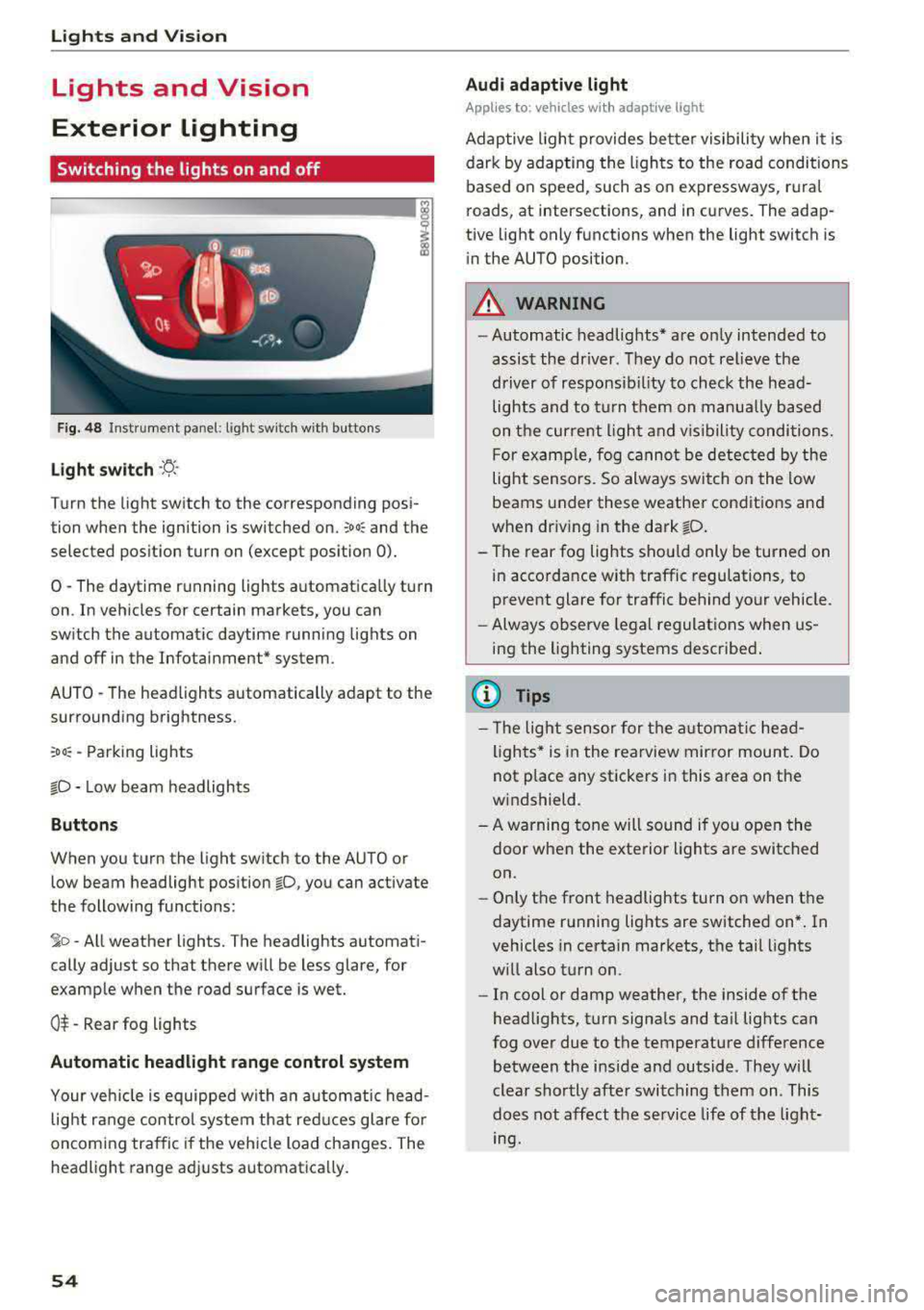
Fig. 48 Instrument panel: light sw itch w ith buttons
Light switch ·ti :
Turn the light switch to the corresponding posi
tion when the ignition is switched on.
;oo: and the
selected pos ition turn on (except pos ition 0).
0 -The daytime r unning lights a utomat ica lly turn
on . In veh icles for certain markets, you can
switch the automatic daytime runn ing lights on
and off in the Infotai nment* system.
AUTO -T he head lights automatically adapt to the
surrounding brightness.
:oo: -Parking lights
io -Low beam headlights
Buttons
When you turn the light sw itch to the AUTO or
low beam headlight position
io, you can activate
the following functions:
jo -All weather lights. The headlights automati
cally adjust so that there will be less glare, for
examp le when th e road surface is wet.
0$ -Rear fog lights
Automatic headlight range control system
Your veh icle is equipped wi th a n automatic head
light r ange control system th at red uces glare fo r
oncoming tra ffic if the vehicle load changes. The
headlight range ad justs automatica lly.
54
Audi adaptive light
App lies to: vehicles wi th adaptive light
Adap tive ligh t provides be tter visibility when it i s
dark by adapting the ligh ts to the road conditions
based on speed, such as on expressways, r ura l
roads, at intersections, and in curves. The adap
tive light only functions when the light switch is
i n the AUTO position.
A WARNING
-Automatic headlig hts* are on ly intended to
assist the driver. They do not relieve the
driver of responsib il ity to check the head
lights and to t urn them on manua lly ba sed
on t he curre nt ligh t and v is ibility conditions.
F or examp le, fog cannot be detec ted by the
light sensors. So always switch on the low
beams under these weather condit ions and
when dr iv ing in the dark
fD .
- The rear fog lights shou ld only be turned on
in accordance w ith traffic regulations, to
prevent glare for traffic behind your vehicle.
- Always observe legal regulat ions when us
ing the lighting systems desc ribe d.
{l) Tips
- Th e light sensor for the a utomat ic he ad
lights * is in the rearview mir ror mount. Do
not p lace any stickers in this area on the
w indshield.
- A warning tone will sound if yo u ope n the
door when the exte rior lights a re switched
on.
- On ly the front headlights turn on when t he
daytime running lights are switched on* . In
vehicles in certain markets, t he tail lights
w ill also t urn on.
- In cool or damp weather, the inside of the
head lights, t urn signa ls and ta il lig hts can
fog over due to the temperature difference between the inside and outside. They w ill
clear shortly afte r switching them on. This
does not affect the service life of t he light
mg.
Page 57 of 403

Turn signal and high beam lever
The lever operates the turn signals, the high
beams and the headlight flasher .
Fig. 49 Turn signal and high beam lever
Turn signals ¢¢
N
0 0
> u. C0
The turn signals activate when you move the lev
e r i nto a turn s ignal position when the ign ition is
switched on.
(D -Right turn signa l
@-Left turn signal
The turn s ignal blinks three times if you just tap
the lever.
High beams and headlight flasher ~D
Move the lever to the corresponding position:
@ -High beams on (vehicles with high beam as
sistant*) ¢
page 55
©-High beams off or headlight flasher
The
II ind icator light in the instrument cluster
turns on.
A WARNING
H igh beams can cause glare for other drivers,
which increases the risk of an acc ident. For
this reason, only use the h igh beams or the
head light flasher when they will not create
glare for other drivers.
Lights and V ision
High beam assistant
Applies to: vehicles with high beam assistant
The high beam assistant automatically turns the
high beams on or off depending on the surround
ing conditions .
A camera on the rearview mirror mount can de
tect light sources from other road users . The high
beams sw itch on or off automatically depending
on the posit io n of vehicles driving ahead and on
coming vehicles, the vehicle speed and other en
vironmental and traffic conditions.
Activating high beam assistant
Requirement: the light sw itch must be set to the
AUTO posit ion and the high beam ass istant must
be switched on in the Infota inment system
¢p age 56.
.,. To act ivate the high beam ass istant, tap the
lever forward @¢
page 55, fig . 49 . The lj!a in
d icator light appears in the instrument cluster
disp lay and the high beams a re switched on/off
automatically. If the high beams were com
p letely or partially switched on, the
II indica
to r light turns on.
Switching the high beams on/off manually
If the high beams did not switch on/off automat
ically as expected, yo u may swi tch them on or off
man ua lly ins tead:
.,. To switch the h igh beams on manua lly, tap the
lever forwa rd @ ¢
page 55, fig. 49. The II in
dicator light turns on.
.,. To switch the high beams off manually, pull the
lever back©¢
page 55, fig. 49. The high beam
assistant is deactivated .
Operating the headlight flasher
.,. To operate the headlight flasher when the high
beam ass istant is activated and high beams are
sw itched off, pull the lever back ©¢
page 55,
fig. 49.
The high beam assistant remains ac
tive .
Messages in the instrument cluster display
ml Audi adaptive light: malfun ction! See own-
er's manual
..,.
55
Page 58 of 403

Lights and Vision
Ir.a Head light a ssista nt: malf unction! See own
er' s manual
Drive to an a utho rized Aud i de aler or authorized
Aud i Serv ice Facility immediately to have the
malfunction corrected . You can still switch the
high beams on or off manually .
II Headlight assi stant : currently unavail able .
Camera view re stricted due to surroundings .
See owner's manual
The camera view is b lo cked , fo r example by a
s t icker o r debr is.
The sensor is located between the interior rear
view mir ror and the windshield . Do not p lace any
stickers in th is area on the windshield .
_& WARNING
High beam assistant is only i ntended to assist
t he driver. The dr iver is still res ponsible for
cont ro lling the headlights and may need to
switch them on and off manually depend ing
on light and visib ility co nditions . It may be
necessary to ope rate them manua lly in s itua
tions such as:
- In adve rse weathe r cond itions such as fog,
heavy ra in, b low ing snow or sp raying water .
- On roads where oncoming traffic may be
partia lly obscured, s uch as exp ressways .
- When there a re road users that do not have
s uf ficient lighting, s uch as bicyclers o r
vehicles with dirty ta il lamps.
- In tight curves and o n steep hills .
- In poorly lit areas .
- Wi th stro ng reflecto rs, such as s igns.
- If the area of the windsh ield near the senso r
is fogged ove r, dirty, i cy or covere d with a
st icker .
Adjusting the exterior lighting
The functions ar e adjust ed in the Infotainm ent
system.
• Se lect in the Infotainment system: I M ENU I but
ton
> Vehi cle > left contro l button > Vehicle
setting s
> Exterior lighting .
56
Automatic headlights
You can adjus t the following se ttings in the Au
to-dimming high beam s
menu:
Activation time -you can adjust if the headlights
swi tch on
Early , Medium or Late accor ding to t he
sens itivity of t he lig ht sen sor .
Headlight assistant * -you can switch the high
bea m assis tant* on and off.
Entry/exit lighting
When it is dark, the Ent ry /exit lighting ill umi
nates the area a round the vehicle when unlocking
the veh icle and after switch ing off the ig nition
and opening the dr ive r's door .
The
Entry /e xit lighting only works when it is
dark and the light sw itch is in the
AUTO posit ion.
Daytime running lights
USA models :
the daytime r unning lights can be
switch ed on/off . S elect
On or Off.
Canada models: this f unction canno t be sw itched
off. They activate automatically each time the ig
nit ion is switched on.
Emergency flashers
-- - ---
] -~ ~-
-------
Fig. SO Ce nter conso le: emerge ncy flashe r bu tt o n
The emergen cy fl ashe rs m akes ot her d rivers
aware of your veh icle in dangerous situations.
• Press the ~ b utton to switch the emergency
flashe rs on or off .
Yo u can indicate a la ne change or a turn when the
eme rgency flashers are switched o n by using the
turn s ignal leve r. T he eme rgency f lashe rs stop
tempor arily .
ll-
Page 60 of 403

Lights and Vision
@ Tips
The setting is automatica lly stored and as
signed to the remote control key that is be ing
used.
Instrument illumination
The brightness of th e illumination for the instru
ments , display and head-up display* can be ad
jus ted.
F ig . 53 Instru ment i llumi natio n
"' Press the knob to release it.
"'T urn the knob toward"-" o r"+" to reduce or in
crease the brightness .
,,, Press the knob again to return it to its or iginal
pos ition .
(D Tips
Depending on vehicle equipment, the inst ru
ment illumination (needles and gauges) may
turn on when the lights are off and the igni
tion is switched on . The illumination for the
gauges reduces automatically and eventually
tur ns off as brightness outside increases . This
function reminds the driver to turn the low
beams on at the app ropr iate time.
58
Vision
Adjusting exterior mirrors
Fig. 54 Driver 's doo r: kno b fo r t he e xterio r mirrors
Turn the knob to the des ired position:
0
-a ll adjustment functions are deactivated.
q / P -adjus ts the left/right exter io r mirror.
Move the knob in the desired direct ion.
(@ -Heats* the mir ror glass depend ing on the
outside temperature.
8 -F olds the exterior mirrors* . To fold the m ir
rors out, turn the knob to one of the other posi
tions . In the I nfota inment system, you can select
i f the m irro rs fo ld in au tomatically when yo u lock
the
ve hicl e~ page 41 .
Front passenger's exterior mirror tilt
function *
To help you see the curb when backing into a
parki ng space, the su rface of the m irro r til ts
slight ly. For this to happen, the knob must be in
the position for the front passenger's exterior
mirror.
Yo u can adjust the tilte d mir ror s urface by t urn
i ng t he knob in the desired di rect io n. When you
move out of reverse and into another gear, the
new m irror position is stored and assigned to the
key you are using .
The m irror goes back into its or iginal pos ition
once you drive forward faster than 9 mp h
(15 km/h) or turn the ignition off.
&_ WARNING
Cu rved mi rror sur faces (for example convex)
enla rge the field of vision. However, they
Page 61 of 403

a co .... N ,....
N .... 0 0
3 co
make objects in the mirror appear smaller
and farther away. Your may estimate incor
rectly when you use these mirrors to gauge
your distance from the vehicles behind you
when changing lanes, which increases the risk of an accident .
Q) Note
- Applies to vehicles with power folding exte
rior mirrors: if the mirror housing was
moved by outside forces (such as an impact
when maneuvering), you must use the pow
er folding function to fold the mirror all the
way out. The mirrors will make a loud noise
when they latch into place. The mirror hous
ing must not be moved back into place by
hand because this would impair the func
tion of the mirror mechanism.
-Applies to vehicles without power folding
exterior mirrors: if the mirror housing was
moved by outside forces (such as an impact
when maneuvering), you must move it back
in place by hand.
- If you wash
th@ vehicle in an automatic car
wash, you must fold the exterior mirrors in
to reduce the risk of damage to the mirrors.
Never fold power folding exterior mirrors*
by hand . Only fold them in and out using
the power controls.
{!) Tips
-If the power adjusting function malfunc
tions, the glass in both mirrors can be ad
justed by pressing on the edge of it by hand.
- The exterior mirror settings are stored with
the memory function*
9 page 67.
Dimming the mirrors
Your vehicle is equipped with a manual or auto
matic* dimming rearview mirror .
Manual dimming rearview mirror
.,. Pull the lever on the bottom of the mi rror back .
Lights and Vision
Automatic dimming rearview mirror*
.,. The interior and exterior mirrors dim automati
cally when light shines on them, for example
from headlights on a vehicle behind you.
A WARNING ,-
If the glass on an automatic dimming mirror
breaks, electrolyte can leak out. This liquid
can irritate the skin, eyes and respiratory sys
tem. If there is contact with the fluid, flush
immediately with plenty of water. Consult a
physician if necessary .
- Repeated or long -term exposure to electro
lyte fluid can lead to irritation of the air
ways, especially in people with asthma or
other respiratory conditions. Take deep
breaths immediately after leaving the vehi
cle or, if this is not possible, open all of the
doors and windows as wide as possible.
- If electrolyte fluid enters the eyes, flush
them thoroughly with a large amount of
clean water for at least 15 minutes and then
seek medical attention.
- If electrolyte fluid comes into contact w ith
the skin, flush the affected area with clean
water for at least 15 minutes and then clean
with soap and water and seek medical at
tention . Clean affected clothing and shoes
thoroughly before wearing again.
- If the fluid was swallowed and the person is
conscious, flush the mouth with water for at least 15 minutes . Do not induce vomiting
unless this is recommended by medical pro
fessionals . Seek medical attention immedi
ately .
0 Note
If the glass on an automatic dimming mirror
breaks, electrolyte can leak out. This liquid
damages plastic surfaces and paint . Clean
this liquid as quickly as possible, for example
with a wet sponge .
(D Tips
-If the light reaching the rearview mirror is
obstructed, the automatic dimming mirror
will not function correctly,
59
Page 63 of 403

a co .... N ..... N .... 0 0
3 co
®-Clean the windshield . The wipers wipe one
time after severa l seconds of driving to remove
water drop lets. You can switch this function off
by moving the lever to position ® within 10 sec
onds of the afterwipe. The afterwipe function is
reactivated the next time you switch the ignition
on .
C lean the headlights*. The headlight washer sys
tem" operates only when the low beam head
lights are on . If you move the lever into position
@, the headlights will be cleaned at fixed inter
va ls .
Applies to: allroad:
@ -Wiping the rear window.
T he number of wipes depends on the windsh ield
wiper movement .
The rear wiper automatically switches on when
the reverse gear is selected and the front wind
shield wipers are on and running .
Applies to: allroad:
0 -Clean ing the rear win
dow. The number of wipes depends on how long
the lever is held in position
(J).
A WARNING
-The rain sensor is only intended to assist the
dr iver . The driver may still be responsible
for manually sw itching the w ipers on based
on v is ibi lity conditions.
- The windshie ld may not be treated with wa
ter-repelling windshield coating agents . Un
favorable conditions, such as wetness, dark
ness or low sun, can result in increased
glare, which increases the risk of an acc i
dent . Wiper blade chatter is also possible.
- Properly functioning windsh ield wiper
blades are required for a clear view and safe
driving
¢ page 62, Replacing wiper
blades.
(D Note
- If there is frost, make sure the windshie ld
wiper blades are not frozen to the wind
shield. Switching on the windshield wipers
when the blades are frozen to the wind
shield can damage the wiper blades .
- The windshield wiper system must be
switched off ( lever in position 0) before us-
Lights and Vision
ing a car wash. This prevents the wipers
from switching on unintentionally and caus ing damage to the windsh ield wiper system .
(D Tips
- The windshie ld wipers switch off when the
ignition is switched off . You can activate the
windshield wipers after the ignition is
switched back on by moving the w indshield
wiper lever to any position.
- Worn or dirty windshie ld wiper blades resu lt
in streaking. Th is can affect the rain sensor
function . Check your windshield w iper
blades regularly .
- The washer fluid nozzles for the windshield
washer system are heated at low tempera
tures when the ign ition is on .
- When stopping temporarily, such as
at a
traffic light, the speed of the windshield
w ipers automatically reduces by one level.
Cleaning the wiper blades
Clean the wiper b lades when you see w iper
streaks. Use a soft cloth and a glass cleaner.
Windshield wiper
.,. Place the windshield wiper arms in the service
position
¢ page 62.
.,. Fold the windsh ie ld wiper arms away from the
w indshie ld.
Rear window wiper
Applies to : all road
.,. Fold the wiper arm away from the rear window.
A WARNING
D irt y windshield wiper blades can impa ir vi
sion, wh ich i ncreases the risk of an accident .
-
61
Page 64 of 403
Lights and Vi sion
Replacing wiper blades
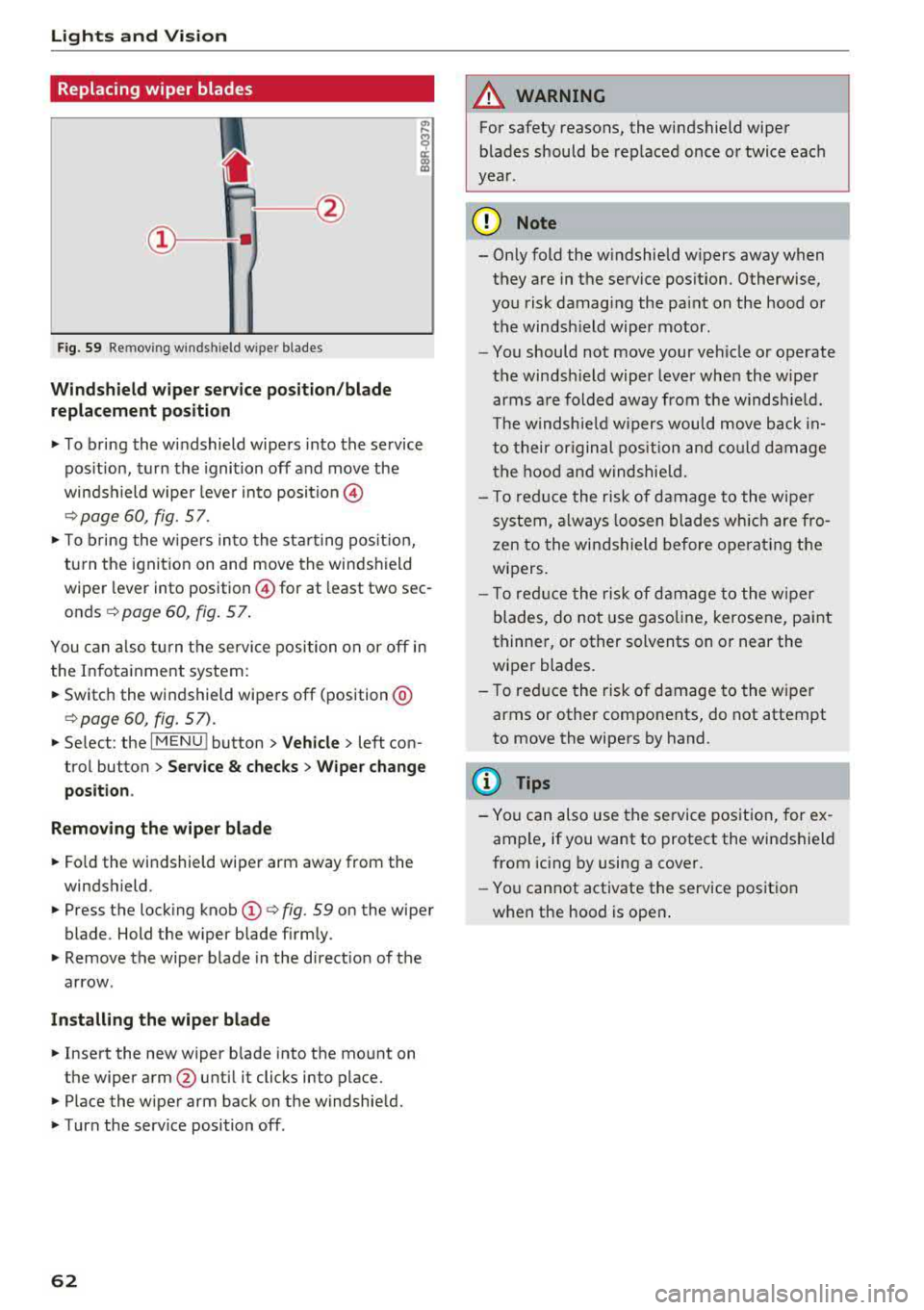
Fig. 59 Re mov ing w indshi eld w iper blades
Windshield wiper service position/blade
replacement position
.,. To bring the windshield wipers into the service
pos ition, turn the ignition off and move the
winds hield wiper leve r into position @
¢page 60, fig. 57 .
.,. To bring the wipers into the starting pos it io n,
tu rn the ignition on and move the windshield
wiper lever into position @for at least two sec
onds
¢ page 60, fig. 57 .
You can also turn the service position on o r off in
the Infota inment system :
... Switch the windshield wipers off (position @
¢page 60, fig. 57) .
.,. Select : the IMENU ! button> Vehicle> left con
trol button >
Service & checks > Wiper change
position .
Removing the wiper blade
... Fo ld the windshield wiper arm away from the
windshield .
.,. Press the locking knob (D ¢ fig. 59 on the wiper
blade . Hold the wiper blade firmly .
.,. Remove the wiper blade in the d irection of the
arrow .
Installing the wiper blade
.,. Insert the new wiper b lade into the mount on
the wiper arm
@ until it clicks into place .
.,. Place the wiper arm back on the windshield .
.,. Turn the serv ice position off .
62
A WARNING
,--
For safety reasons, the windshield wiper
blades should be replaced once or twice each
year .
(]) Note
- Only fold the w indshield w ipers away when
they are in the service pos ition. Otherwise,
you risk damaging the paint on the hood or
the windsh ield wiper motor.
- You should not move your veh icle or operate
the windsh ield wiper lever when the wiper
arms are folded away from the windshie ld.
Th e windshie ld wipers would move back
in
to their original position and could damage
the hood and windshie ld.
- To reduce the risk of damage to the wiper
system, always loosen blades which are fro
zen to the windshield before operating the
wipers.
- T o reduce the risk of damage to the wiper
blades, do not use gasoline, kerosene, pa int
thinner, or other solvents on or near the
wiper blades.
- To reduce the risk of damage to the wiper
arms or other components, do not attempt
to move the wipers by hand .
(D Tips
- You can also use the service position, for ex
ample, if you want to protect the windshield
from icing by using a cover .
- You cannot activate the service position
when the hood is open .
Page 65 of 403

Replacing rear wiper blade
Applies to: vehicles with rear window wiper
Fig . 60 Rear window w iper : in stall ing the wiper b lade
Removing the wiper blade
... Fold the w iper arm away from the rear window .
... Remove the wiper blade from its holder.
Installing the wiper blade
... Press the wiper blade mount into the retainer.
... Fold the window wiper arm back onto the rear
window.
A WARNING
For safety reasons, the windshield wiper
blades should be replaced once or tw ice each
year .
Digital compass
Switching the compass on and off
Applies to: vehicles with digital compass
Fig. 61 Rearview mirror: digita l compass is sw itc hed on
Lights and Vision
.,. To turn the compass on or off, press the button
@ until the compass in the mirror appears or
disappears.
T he dig ital compass only works when the ignition
is turned on . The directions are indicated with ab
breviations:
N (north), NE (northeast), E (east),
SE (southeast), S (south), SW (southwest), W
(west), NW (northwest).
(0 Tips
To prevent inaccurate compass readings, do
not bring any remote controls, electrical devi
ces or metallic objects near the mirror.
63
Page 66 of 403

Lights and Vision
Adjusting the magnetic zone
Applies to: ve hicles w ith d ig ital compass
The magnetic zone must be adjusted correctly for the compass to read accurately.
Fig. 62 Magnetic zone map
• Press and hold the button@~ page 63, fig. 61
unt il the number of the selected magnetic zone
appears in the rea rview mir ror .
• Press the b utton @repeatedly to select the
correc t magnetic zone . The sele ct ion mode
turns off after a few seconds .
Calibrating the compass
App lies to: ve hicles with d ig ital compass
If the display is incorrect or inaccurate, the com
pass must be recalibrated .
• Press and hold the button @ until a C appears
in the rearv iew mirror.
• Drive in a circle at about 6 mph ( 10 km/h) unt il
a d irec tion is displayed i n the in terior rearv iew
mirror .
64
A WARNING
To reduce the ris k to yourse lf and o ther driv·
e rs, calibra te the compass in an area where
there is no traffic .
Page 67 of 403
Seats and storage
General information
A WARNING
See¢ page 254, Driving safety for important
information, tips, suggestions and warnings
that you sho uld read and follow for your own
safety and the safety of yo ur passengers.
Front seats
Power seat adjustment
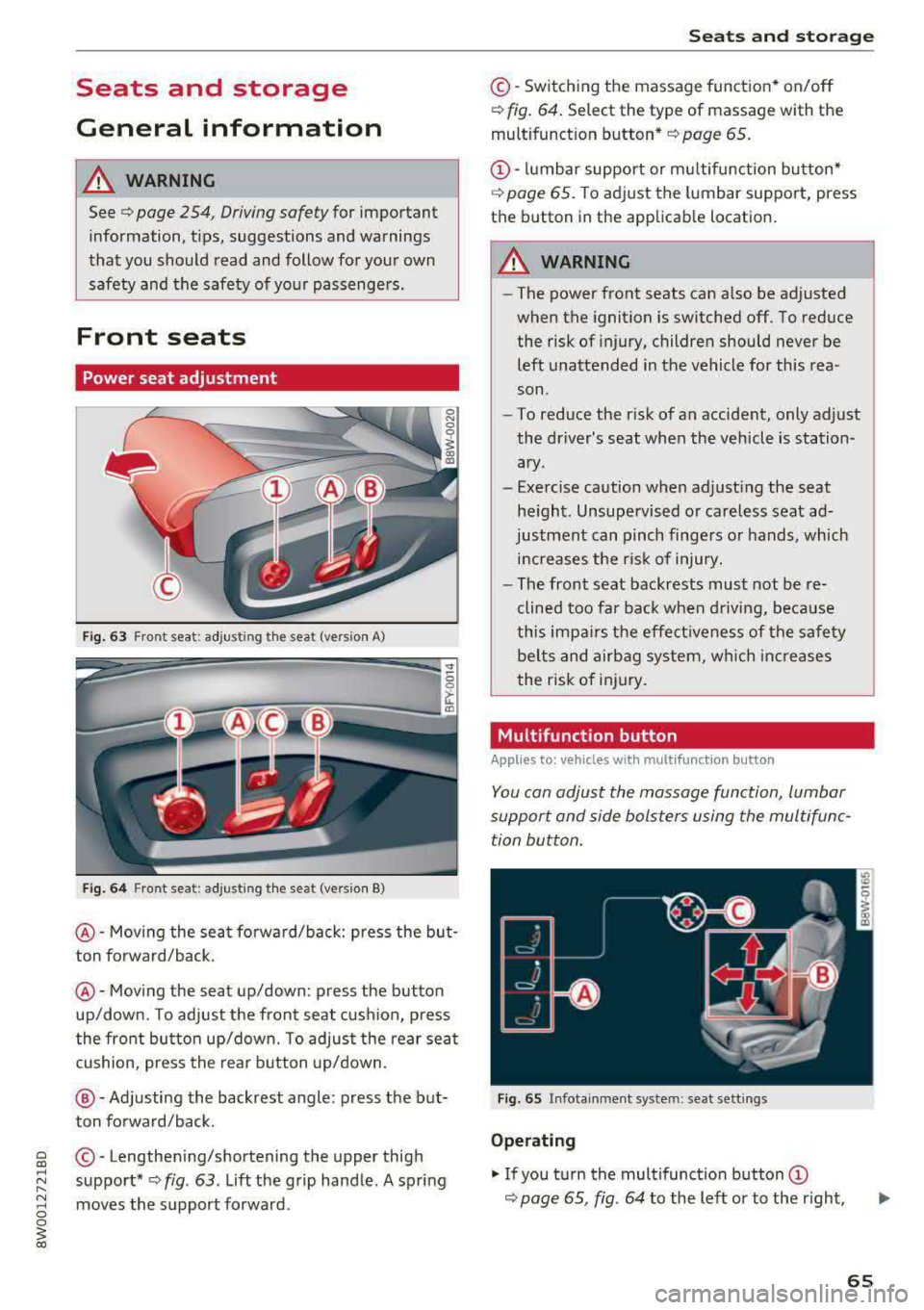
Fig. 63 Front seat: adjusting the seat (ve rsion A)
F ig . 6 4 Front seat: adjusting the seat (ve rs ion B)
@-Moving the seat fo rward/back: press the but
ton forward/back.
@ -Moving the seat up/down: press the button
up/down. To adjust the front seat cus hion, press
the front bu tton up/down. To adjust the rear sea t
cushion, press the rear b utton up/down.
@ -Adjusting the backrest angle: press the but
ton forward/back.
~ © -Lengthen ing/shortening the upper thigh
~ ~ support* ¢ fig. 63. Lift the g rip hand le . A spring
~ moves the support forward. 0 0
~ co
Seats and storag e
©-Switching the massage function* on/off
¢ fig. 64. Select the type of massage with the
multifunction
button*¢ page 65.
@ -lumbar support or mu ltifunction button*
¢
page 65. To adjust the lumbar support, press
the button in the applicab le location.
A WARNING
-
-The power front seats can a lso be adjusted
when the ignition is switched off. To reduce the risk of injury, children should never be
left unattended in the vehicle for this rea
son .
-To reduce the r isk of an accident, only adjust
the dr iver's seat when the vehicle is station
ary.
-Exercise caution when adjust ing the seat
he ight. Unsupervised or careless seat ad
justment can pinch finge rs or hands, which
increases the risk of injury.
-The front seat backrests must not be re
clined too far back when driving, because
this impa irs t he effect iveness of the safety
be lts and airbag system, which increases
the risk of injury.
Multifunction button
Applies to: vehicles wit h mult ifunct ion butto n
You can adjust the massage function, lumbar
support and side bolsters using the multifunc tion button.
F ig. 65 Infotain ment system: seat sett ings
Operating
"' If you turn the multifunction button (D
¢ page 65, fig. 64 to the left or to the r ight,
65