light AUDI A4 AVANT 2008 Owner's Guide
[x] Cancel search | Manufacturer: AUDI, Model Year: 2008, Model line: A4 AVANT, Model: AUDI A4 AVANT 2008Pages: 368, PDF Size: 46.19 MB
Page 58 of 368
Opening and clo sing
& W ARNI NG (c onti nued )
• Do not le ave ch ildr en in side th e vehicle uns upervi sed. In an
em erge ncy it would be i mpos sible to open t he doors from the
out side w it h out the key .
[ i] Tips
• In the event of a crash with airbag deployment all locked doors
wi ll be automatically unlocked to give access to the vehicle occu
pants from the outside .
• If the power locking system should fail, you can still open the
fue l tank flap in an emergency =>
page 271.
• You are well advised not to keep va luables inside an unattended
vehicle, visible or not. Even a properly locked vehicle cannot provide
the security of a safe!
•
Keyless entry remote control
General description
The remote controls allows you to :
• lock or unlock the vehicle
• selectively unlock the rear lid.
The turn signals will flash briefly whenever you lock or unlock the
veh ic le . Also, the interior light will come on or go off whenever you
open or close the driver's door.
T he transmitter and battery are located in the head of the remote
control. The receiver is located inside the vehicle. The maximum
effective range depends on several things. Remember, if the battery
is weak, the effective range decreases .
The remote-contro l key contains a fold-out key that you can use to
manually lock or unlock the vehicle and to start the engine . I
f you need to replace the remote control, or if you need to have it
repaired, you must see your authorized Audi dealer. Only then can
you use the key again .•
Unlocking and locking the vehicle with the
remote control
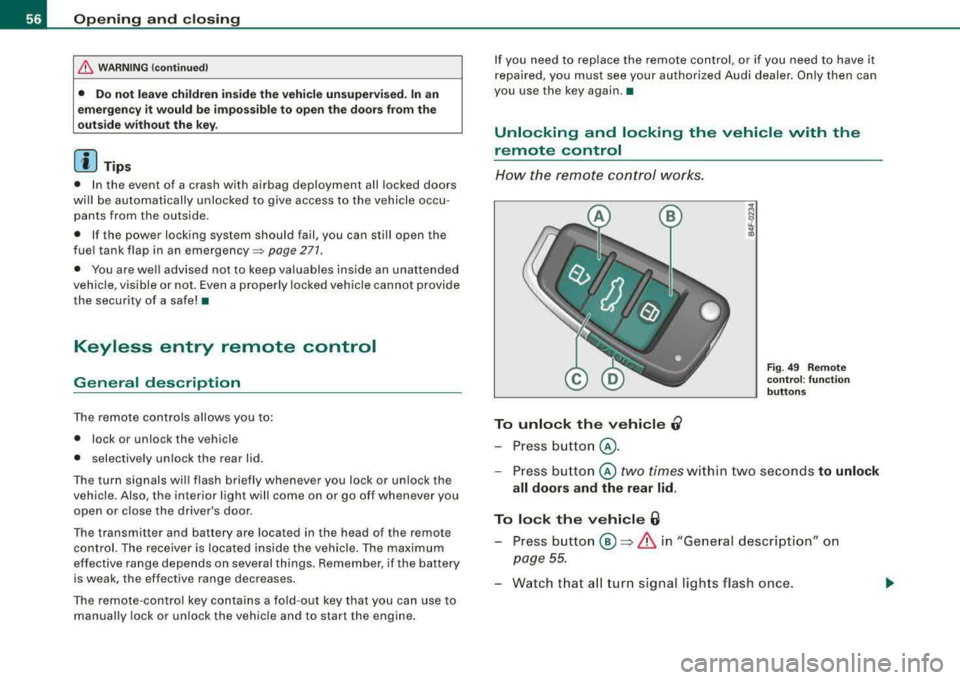
How the remote cont rol works.
To unlock the vehicle 0
- Press button @.
Fig. 4 9 Rem ote
co ntrol: fu nct ion
b utto ns
- Press bu tton @ two times within two seconds to unlock
all doors and th e rear lid .
To lock the v ehi cle 6
- Press button ® => & in "General description" on
page
55.
- Watch that a ll turn signal lights flash once .
Page 66 of 368
Openin g and closing
Anti-theft alarm system
Description
The anti-theft alarm triggers an alarm if anyone attempts
to break int o the vehicle.
The anti-theft alarm system triggers an audible alarm and turns on
t he emergency flasher if an unauthorized interference with the
vehic le is sensed by the system .
How is the anti-theft al arm sy stem swit ched on ?
The anti -theft alarm system is switched on when you lock the
dr iver's door manually using your key, o r w hen you use the remote
control. The system is activated approximate ly 30 seconds after the
vehic le is locked. T he indicator light on top of the door trim s tart
flashing rapidly for 30 seconds and then b link slowly.
How is th e anti -theft alarm system switched off ?
The anti-theft alarm system is switched off only when you use the
r emote contro l to unlock your vehicle. If you do not open a doo r
within 60 seconds after you have un locked with the remote control,
the vehicle wi ll loc k itse lf aga in automat ical ly .
If you lock just the driver's door using your key , the front
passenger 's door, the rear and the fue l filler flap remain locked.
I f you use the veh icle key to unlock the driver's door, the other
doors , the rear lid and the fuel tank flap will remain locked . The
a lar m system wil l not be deactivated u nless you insert the key in the
ignition switch within 15 seconds and turn on the ignition . If you fail
to do this, the alarm wi ll sound.
Wh en w ill t he anti th eft ala rm sys tem b e trigg ere d?
When the vehicle is locked, the ala rm system monitors and pr otects
the fo llowing parts of the vehic le:
• engine compartment
• luggage compartment •
doors
• veh ic le incline
• ignition
• factory installed radio .
When the system is activated , the alarm will be triggered if one of
the doors, the engine hood or the rear lid are opened, or if the igni
tion is turned on or the radio removed or if the vehicle incline has
been changed .
The anti -theft alarm system wi ll also go off when you unlock the rear
lid with yo ur key and open it. The alarm is switched off again when
you c lose the rear lid .
The anti -theft alarm system wil l also go off when the battery is
disconnected.
You can also trigger the alarm by pressing the PANIC button on your remote c ontro l. This wil l a lert other people in case of emergency.
Press the
PANI C button again to turn off the a larm .
How i s the anti-theft alarm switched off when
trigg ere d ?
The ala rm system is switched off when you un lock the veh ic le using
the remote contro l or when the ignition is switched on . The a larm
wi ll also switch itse lf off when it co mes to the end of its cyc le .
Em ergen cy flash er
The emergency flasher wil l b link briefly when the doors, engine
hood and rear lid are properly closed .
I f the emergency flashers do not blink, check the doors, engine hood
and rear l id to make sure t hey are proper ly c losed . If you close a
door, the hood or the rear lid with the anti -theft a larm switched on,
the emergency flas hers wil l b link only after you have closed the
door or lid .
.,_
Page 67 of 368

[ i J Tips
• For the anti-theft a larm system to function properly, make sure
all vehicle doors and windows are closed before leaving the vehicle.
• When you open the vehicle from the driver's door using the key,
the central locking switch will work only after you have switched on
the ignition .•
$ Tilt sensors ~
The tilt sensors trigger an alarm if they detect vehicle
movement.
Fig. 62 Driver's door,
rear bottom: tilt sensor
switch
Switch off the tilt sensors if you are going to have your
vehicle transported.
Switch off the tilt sensors
- Press the switch~ located in the driver's door~ fig. 62.
- Lock the vehicle.
Controls and equip
ment
Opening and closing
When you turn off the tilt sensors, the diode in the switch -IQ will illu
minate. Also, the indicator light in the door trim will illuminate for
about three seconds . After you lock the vehicle, the indicator light
in the door trim will blink quickly for about three seconds. After that,
the blinking slows down.
The next time the vehicle is locked, the tilt sensors are automatically
turned on again. •
Power windows
Controls
Fig. 63 Driver's door :
power window
switches
The switches are located in the driver's door. The front passenger's
door has a own power window switch of its own .
To open/close If the respective switch is pushed or pulled, the
window will, respectively .
Switches for front door windows
@ operates the window in the driver 's door.
@ operates the window in the front passenger's door.
irechnical data
Page 68 of 368
Opening and closing
Switches for rear windows
© operates the left rear window.
@ operates the right rear window.
Safety switch
© Safety switch for rear window operation.
_& WARNING
• Do not leave children unattended in the vehicle, especially with
access to vehicle keys. Unsupervised use of the keys can result in
starting of the engine and use of vehicle systems such as power
windows, etc. which could result in serious injury.
• Remember -you can still open or close the power windows for
about ten minutes after the ignition is switched off. Only when
either of the front doors are opened are the power windows
switched off.
• Be careful when closing the windows. Check to see that no one
is in the way, or serious injury could result!
• Always remove the ignition key whenever you leave your
vehicle.
• If you lock your vehicle from the outside, no one, especially chil
dren, should remain in the vehicle.
• Do not stick anything on the windows or the windshield that
may interfere with the driver's field of vision. •
Switches in the driver's door
The driver can operate all windows.
If the respective switch is pushed or pulled the window will
open or close. The power window switches have a
two-posi
tion function:
Opening the windows
- Push the switch to the first stop and hold it there until the
window has lowered to the desired position.
- Push the switch briefly to the
second stop: the window
wi ll automatically open all the way.
Closing the windows
- Pull the switch up to the first stop and hold it there until
the window has risen to the desired position.
- Pull the switch quickly to the
second position: the
window will automatically close all the
way => & in
"Controls" on page 65.
Activating/deactivating rear windows
- Push the switch to the depressed position to activate the
rear windows - the light in the switch will go out.
- Briefly press the switch to deactivate the rear windows -
the switch will return to the safety position and the light
~ will illuminate.
The safety switch©~ page 65, fig. 63 in the armrest on the driver's
door turns off the rear power windows. Only when the safety switch
is depressed can the rear windows be opened or closed . The symbol
in the safety switch illuminates when the power windows in the rear
doors are switched off (button NOT depressed) . This feature has
been provided for the safety of small children riding in the rear of
the vehicle.
[ i] Tips
The windows can still be opened and closed for about ten minutes
after the ignition has been turned off. The power windows are not
shut off until one of the front doors is opened .•
Page 69 of 368
Switch in the front passenger's door and on
the rear doors
Fig . 6 4 Switch loca
t ion fr ont pass enge rs
d oo r
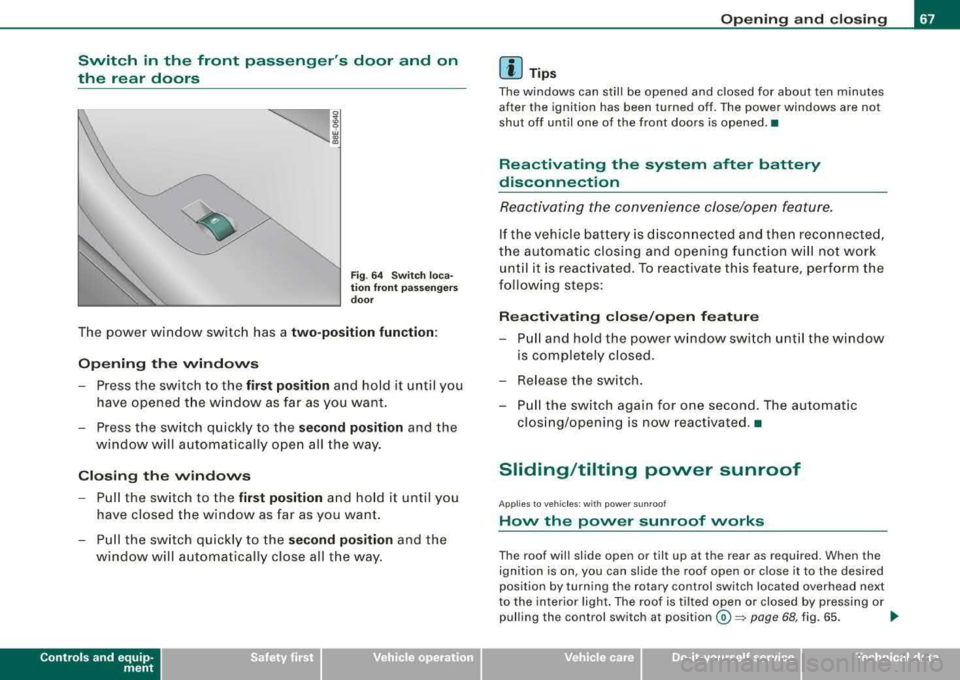
The power window sw itch has a two -position function :
Opening the windows
Press the switch to the fir st po sition and hold it until you
have opened t he wi ndow as far as you want .
- Press the switch q uickly to the
sec ond position and the
window will automa tically open all the way.
Closing th e windows
- Pull the switch to the first po sition and ho ld it until you
ha ve closed t he window as far as you want .
- P ull the sw itch quickly to the
s e cond po sition and the
window will a utoma tically close all t he way.
Controls and equip
ment
Op ening and closing
[ i] Tip s
The windows can still be opened and closed for about ten minutes
after the ignition has been turned off. The power windows are no t
shut off until one of the front doors is opened .•
Reactivating the system after battery
disconnection
Re activating the convenience close/open feature.
If the vehicle b attery is discon nected an d th en reconnecte d,
t h e automatic closing and opening function wi ll no t work
unti l it is react ivated. To reactivate this feature, perform the
following steps :
Reactivating close /op en feature
- Pu ll and ho ld the power w indow switch until the window
is completely closed .
- Release the switch .
- Pu ll the switch again for one second . The automat ic
clos ing/opening is now reactivated .•
Sliding/tilting power sunroof
A pp lies to v ehic les : wi th pow er s unroof
How the power sunroof works
The roo f will slide open or t ilt up at the rear as required. Wh en the
ignition is on , you can slide the roof open or close it to the desired
posit ion by turning th e rotary control switch located overh ead next
to the interior light . The roof is tilted open or closed by pressing or
pulling the control switch at
position @~ pag e 68, fig. 65. ..
Technical data
Page 70 of 368
Opening and clo sing
You can still close or open the sunroof for up to ten minut es after
y ou have switched off the igni tion with the key remaining in the igni
tion lock. If either door is opened , powered opera tion of the sunroof
wi ll be deactivated .
[ i ] Tips
Always close the roof completely if you are going to park and leave
your vehicle unattend ed. •
Ap plies to ve hic les : w ith po wer s unroof
Sliding /tilting the power sunroof open
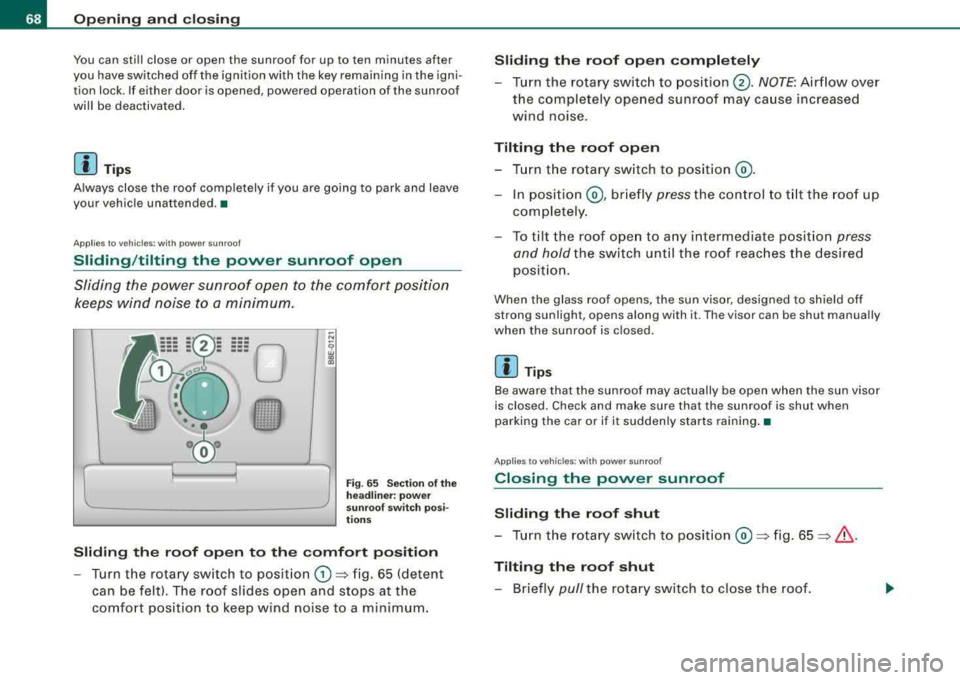
Sliding the power sunroof open to the comfort position
kee ps wind noise to a minimum.
Fig . 6 5 S ectio n of the
h eadliner: p ow er
s un roof sw itch p osi
ti ons
Sliding the roof open to the comfort position
- Turn the rotary sw itch to posit ion G) => fig. 65 (detent
can be felt). The roof slides open and stops at the
comfo rt pos ition to keep wind noise to a m inimum .
Sliding the roof open completely
- Turn the rotary swi tc h to position @. NOTE : Airflow over
the complete ly opened sunroof may ca use increased
wind noise.
Tilting the roof open
- T urn the rotary sw itch to posit ion @ .
- In position @, br iefly pre ss the c ontrol to t ilt the roof up
co mpletely .
- To til t the roof ope n to a ny intermediate positio n
press
and hold
the sw itch unt il the roof reac hes the desired
p osi tion.
When the glass roof opens, the sun visor , designed to sh ield off
strong sunlight , opens along with it . The visor can be shut manually
when the sunroof is c losed .
[ i] Tips
Be aware that the sunroof may actually be open when the sun visor
is closed . Check and make sure that the sunroof is shut when
parking the car or if it suddenly starts raining .•
Ap plies to ve hicl es: wit h power sunroof
Closing the power sunroof
Sliding the roof shut
- Tu rn the rotary sw itch to posit ion @ =>fig. 65 => & .
Tilting the roof shut
- Briefly pull the rotary sw itch to close the roof.
Page 72 of 368
Opening and closing
& WARNING (continued)
• The power sunroof will continue to operate until the ignition
key has been removed and one of the front doors has been
opened .•
App lies to vehic les : wit h power sunroof
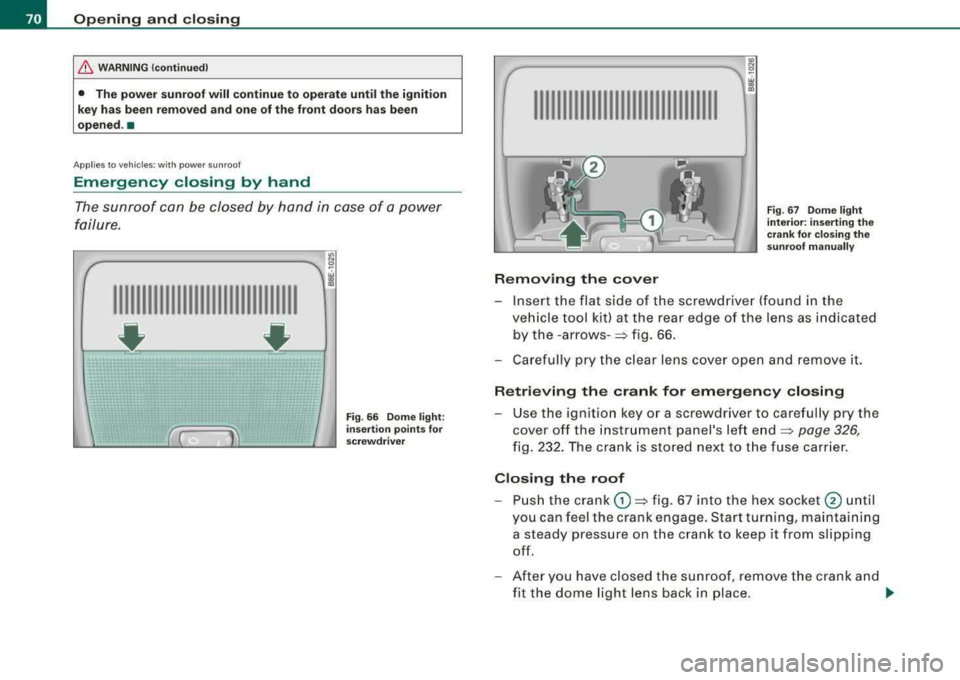
Emergency closing by hand
The sunroof can be closed by hand in case of a power
failure.
IIIIIIIIIIIIIIIIIIIIIIIIIIIIIIII
- ~ ~
Fig . 66 Dome light:
insertion points for
screwdriver
IIIIIIIIIIIIIIIIIIIIIIIIIIIIIIII
Removing the cover
Fig . 67 Dome light
interior: inserting the
crank for closing the
sunroof manually
-Insert the flat side of the screwdriver (found in the
vehicle tool kit) at the rear edge of the lens as indicated by the
- arrows- => fig. 66.
- Carefully pry the clear lens cover open and remove it.
Retrieving the crank for emergency closing
-Use the ignition key or a screwdriver to carefully pry the
cover off the instrument panel's left end
=> page 326,
fig. 232. The crank is stored next to the fuse carrier.
Closing the roof
-Push the crank (D => fig. 67 into the hex socket @ until
you can feel the crank engage. Start turning, maintaining
a steady pressure on the crank to keep it from slipping
off.
- After you have closed the sunroof, remove the crank and
fit the dome light lens back in place .
~
Page 74 of 368
Clear vision
Clear vision
Lights
Switching the headlights on and off ·f!-·
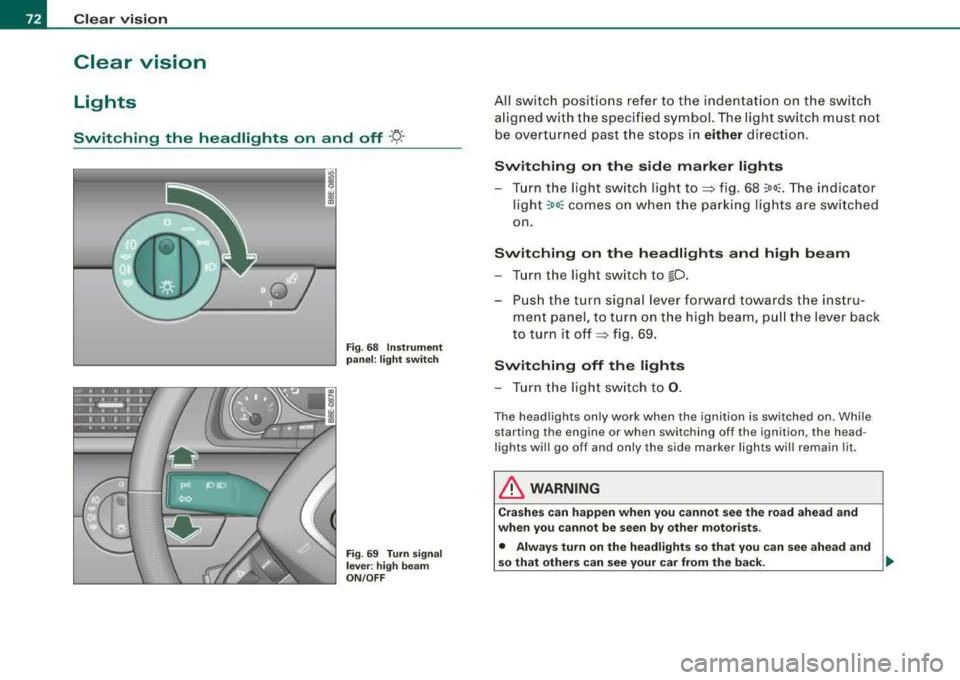
Fig. 68 Instrument
panel: light switch
Fig .
69 Turn signal
lever : high beam
ON /OFF
All switch positions refer to the indentation on the switch
aligned with the specified symbol. The light switch must not
be overturned past the stops in
either direction.
Switching on the side marker lights
-Turn the light switch light to~ fig. 68 ;oo~. The indicator
ligh t
;oo; comes on when the parking lights are switched
on.
Switching on the headlights and high beam
-Turn the light switch to lD .
-Push the turn signal lever forward towards the instru-
ment panel, to turn on the high beam, pull the lever back
to turn it
off ~ fig. 69.
Switching off the lights
-Turn the light switch to 0.
The headlights only work when the ignition is switched on. While
starting the engine or when switching off the ignition, the head
lights will go off and only the side marker lights will remain lit.
& WARNING
Crashes can happen when you cannot see the road ahead and
when you cannot be seen by other motorists .
• Always turn on the headlights so that you can see ahead and
so that others can see your car from the back.
I)),
Page 75 of 368
![AUDI A4 AVANT 2008 Owners Guide [ i] Tip s
• If you remove the ignition from the ignit ion lock whi le the head
lights are still on, a buzzer wi ll sound as long as the drivers door is
open to remind](/img/6/57552/w960_57552-74.png "AUDI A4 AVANT 2008 Owners Guide [ i] Tip s
• If you remove the ignition from the ignit ion lock whi le the head
lights are still on, a buzzer wi ll sound as long as the drivers door is
open to remind")
[ i] Tip s
• If you remove the ignition from the ignit ion lock whi le the head
lights are still on, a buzzer wi ll sound as long as the driver's door is
open to remind you to switch off the lights.
• Always observe the specific loca l regu lat ions for your area when
to use your lights. •
Applies to veh icles : w ith ligh t sens or p ackag e
Sensor activated head- and tail light control
In the "AUTO" position light sensors switch the head -and
tail lights on and off.
Activating
Fig . 70 In stru ment
pane l: light swit ch in
A UTO po siti on
-Tur n th e light swi tch => fig. 70 to pos iti on AUTO.
Deactivating
-Tu rn the light sw itch to posit ion 0.
Controls and equip
ment
Cl ea r vision
In the switch position AUTO the aut omatic head -and taillight
control is activated . The correspo nding symbol on the light sw itch
is li t.
Light sensors located in the inside mirror housing and stem
constantly check the lig ht conditio ns surrounding t he ve hicle . If
ambient brightness falls below a factory set value (e.g . when driving
into a tunnel!, the head -and tai llights i nc ludi ng the l icense plate
il lumination are automatically turned on. When ambient brightness
increases again, t he external lights are turned off
aga in => & .
& WARNING
• Autom atic head - and taillight control is only intended to as sis t
the dri ver . Th is feature does not rel ieve the driver of h is respons i
bili ty to check the headlights and to turn them on manually
a ccord ing to the current light and visibility conditions . For
example , fog and rain cannot be detected by the light sen sors.
Consequently , alway s swit ch the headlight s
io on under these
weather condition s and when driving in the dark .
• Cras hes c an happen when you c annot see the road ahe ad and
when you cannot be seen by other motori sts.
• Alwa ys turn on the headlight s so that you can see ahead and
s o that others can see your car from the back.
[ i ] Tips
• In the AUTO mode, the low bea ms are turned off w hen t he ign i
tion is turned off. The remaining lights are turned off when th e ke y
is take n out of the ignition lock .
• Do not attach stickers to the windshie ld in front of the sensors as
this can disab le the automat ic head -and taill ight contro l and the
automa tic glare-dimming of the rearview mirror(sl.
• Always observe the spec ific loca l regulations for your area when
to use your lights.
• In the event of a light sensor ma lfunction, the drive r inf ormat ion
display wi ll show the
symbol ~. If a light sensor malfunction is indi -..,
Page 76 of 368
Clear vision
cated, you must use the light switch to turn the low beams on and
off. •
App lies to th e market: USA mode ls
App lies to vehicles: with daytime running lights
Daytime running lights (DRL) (USA models)
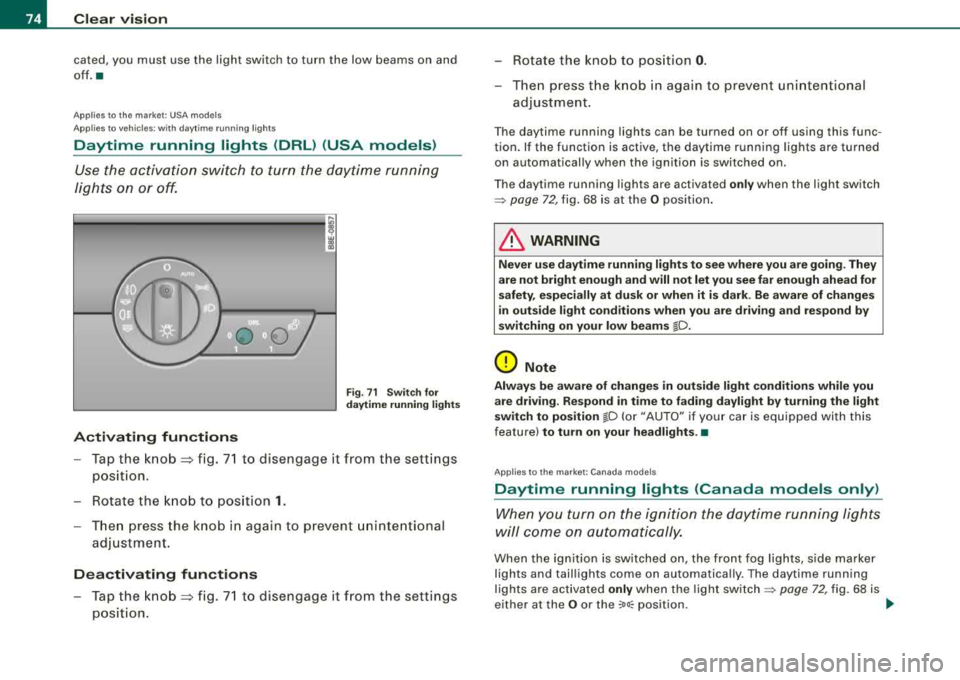
Use the activation switch to turn the daytime running
lights on or off.
Activating functions
Fig. 71 Switch for
daytime running lights
- Tap the knob ~ fig. 71 to disengage it from the settings
position .
- Rotate the knob to position
1.
-Then press the knob in again to prevent unintentional
adjustment.
Deactivating functions
- Tap the knob ~ fig. 71 to disengage it from the settings
position. - Rotate the knob to
position
0.
-Then press the knob in again to prevent unintentional
adjustment.
The daytime running lights can be turned on or off using this func
tion. If the function is active, the daytime running lights are turned
on automatically when the ignition is switched on.
The daytime running lights are activated
only when the light switch
=> page 72, fig. 68 is at the O position.
& WARNING
Never use daytime running lights to see where you are going. They
are not bright enough and will not let you see far enough ahead for
safety, especially at dusk or when it is dark. Be aware of changes
in outside light conditions when you are driving and respond by
switching on your low beams
io.
0 Note
Always be aware of changes in outside light conditions while you
are driving. Respond in time to fading daylight by turning the light
switch to position
lD (or "AUTO" if your car is equipped with this
feature)
to turn on your headlights .•
App lies to t he market: Canada models
Daytime running lights (Canada models only)
When you turn on the ignition the daytime running lights
will come on automatically.
When the ignition is switched on, the front fog lights, side marker
lights and taillights come on automatica lly. The daytime running
lights are activated
only when the light switch=> page 72, fig. 68 is
either at the
O or the coo:; position . _.,,