warning light AUDI A4 CABRIOLET 2009 Service Manual
[x] Cancel search | Manufacturer: AUDI, Model Year: 2009, Model line: A4 CABRIOLET, Model: AUDI A4 CABRIOLET 2009Pages: 340, PDF Size: 77.32 MB
Page 109 of 340
________________________________________________ S_e_ a_ ts_ a_ n_d _ s_t _o _r_ a ....; g::. e _ ___,_
The outlet may be used for 12-volt appliances with maximum
consumption of up to 100 watts, such as a flash light, small vacuum
cleaner, etc.
Before you purchase any accessories, a lways read and follow the
information in~
page 318, "Additional accessories and parts
replacement".
& WARNING
The outlet plus any appliances plugged into it remain functional
even if the ignition is switched off or the ignition key is removed.
Never leave children inside the vehicle without supervision.
0 Note
To avoid damaging the socket, only use plugs that fit properly.
[ i] Tips
When the engine is off and accessories are still plugged in and are
on, the vehic le battery can still be drained. •
Storage
General
& WARNING
• Always remove objects from the instrument panel. Any items
not put away could slide around inside the vehicle while driving or
when accelerating or when applying the brakes or when driving
around a corner.
• When you are driving make sure that anything you may have
placed in the center console or other storage locations cannot fall
Contro ls and eq uip
ment
& WARNING (continued)
out into the footwells . In case of sudden braking you would not be
able to brake, depress the clutch or accelerate .
• Any pieces of clothing that you have hung up must not interfere
with the driver's view. The coat hooks are designed only for light
weight clothing . Never hang any clothing with hard , pointed or
heavy objects in the pockets on the coat hooks . During sudden
braking or in an accident -especially if the airbag is deployed -
these objects could injure any passengers inside the vehicle. •
Glove compartment
The glove compartment is illuminated and can be locked.
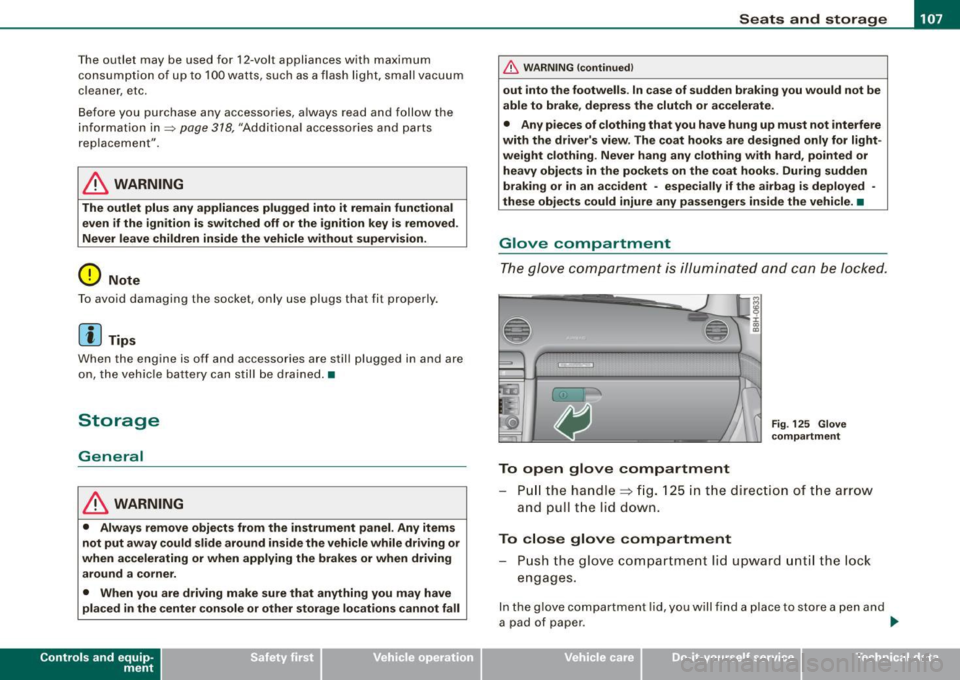
To open glove compartment
Fig. 125 Glove
compartment
P ull the handle~ fig. 125 in the direction of the arrow
and pull the lid down.
To close glove compartment
Push the glove compartment lid upward until the lock
engages.
In the glove compartment lid, you w ill find a place to store a pen and
a pad of paper . ..,_
~ehicle care irechnical data
Page 113 of 340
Warm and cold -
----------------
If a different driver uses your key and changes the air conditioner
settings, the latest adjustments will erase and replace the settings
you have stored.
& WARNING
Reduced visibility is dangerous and can cause accidents .
• For safe driving it is very important that all windows be free of
ice, snow and condensation.
• Fully familiarize yourself with the proper use and function of
the heating and ventilation system and especially how to defog
and defrost the windows.
• Never use the windshield wiper/washer system in freezing
weather until you have warmed the windshield first, using the
heating and ventilation system. The washer solution may freeze
on the windshield and reduce visibility.
0 Note
• If you suspect that the air conditioner has been damaged, switch
on ECON and contact an authorized Audi dealer to have the system
inspected.
• Repairs to the Audi air conditioner require special technical
knowledge and special tools. Contact an authorized Audi dealer for
assistance.
[ i] Tips
• Keep the air intake slots (in front of the windshield) free from ice,
snow and debris in order to maintain the proper function of the
climate control system.
• Air escapes through vents under the rear window. When placing
items of clothing on the luggage compartment cover, ensure that
the openings are not covered.
Controls and equip
ment
• If the inside temperature is very high (for example, if the vehicle
has been parked in sun), open the windows and allow the hot air to
escape before turning on the air conditioner. •
Controls
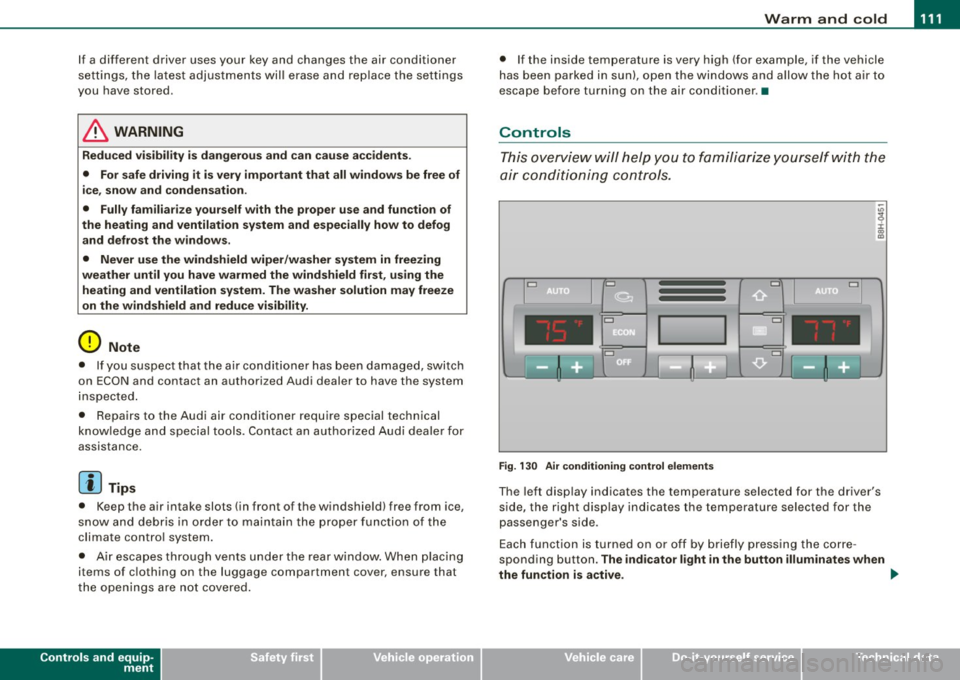
This overview will help you to familiarize yourself with the
air conditioning controls.
Cl Cl
Cl •
I I
•
Fig. 130 Air conditioning control elements
The left display indicates the temperature selected for the driver's
side, the right display indicates the temperature selected for the
passenger's side.
Each function is turned on or off by briefly pressing the corre
sponding button.
The indicator light in the button illuminates when
the function is active. _,.
Page 115 of 340
Warm and cold -------------------------------.J
Switching between Fahrenheit and
Centigrade
You can change the temperature display from °F (Fahren
heit) to
°C (Centigrade) and vice versa.
- Press and hold[~] and press the p lus button on the
driver's s ide temperature switch =>
page 111, fig. 130. •
Air recirculation [ <8?)
The air recirculation prevents exhaust fumes or other
pollution from entering the vehicle.
Switching on th e air re cir culation
- Press[ ~]=> page 777,fig.130 =>&
Switching off the air recirculation
- Press~ again, or
- press (AUTO], or
press[ @].
In the air recirculation mode , the air in the passenger compar tment
is recircula ted to p revent exhaust fumes and other pollution from
entering the vehicle . We recommend that you use the manua l air
recircula tion under the following conditions :
• when driving through tunnels
• in a traffic jam .
& WARNING
Do not use this setting for extended period s of time . The windo ws
c o uld fog up since no fresh air ca n enter the veh icle . If th e
Controls and equip
ment
& WAR NING (c onti nued)
wind ows fog up, pre ss th e air r ecirculat ion butt on a gai n immed i
atel y to s witch off the air re circula tion function or sel ect defro st. •
ECON [ECO N]
Using ECON helps save fuel
-Press [ECON] to switch on=> page 111 , fig. 130 .
- Press [ECON] o r pre ss [AUTO] to switch off.
In ECON mode the air condit ioner is shut off and heating and venti
lation are automat ically controlled. "ECON" translates "Economy"
s ince driving with the air conditioning compressor
disengaged
improves your mileage noticeably.
When operating in ECO N mode make sure the temperature inside
the vehicle is not lower than the outside temperature. The air is
neither cooled nor dehumidified, so there is a risk that the windows
can fog up. •
Switching the air conditioning on and off [ OFF ]
Switching the air conditioning off
- Press [ OFF] to tu rn the air condit ioner off a nd block
o utside a ir from entering the vehicle .
Switching the air conditioning on
- Press [ OFF] aga in (indicator light comes on aga in), or
- Press [AUTO], or
- Press one of the following butto ns: [ {)' ], [@ ]or
I -0, ].
Page 121 of 340
___________________________________________________ O_ n_ t_h _e_ r_o _a_ d _ ___,11111
Ignition lock and ignition switch
Ignition lock
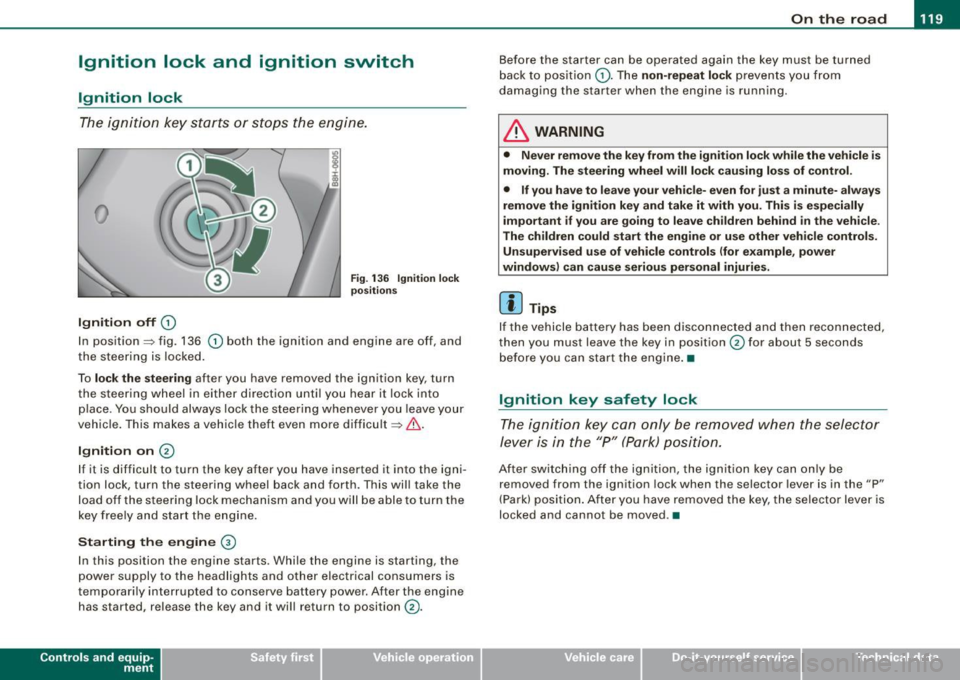
T he i gnition k ey sta rts or st ops t he e ngin e.
0
Ignition off 0
Fig. 13 6 Ignition lock
positi ons
In position~ fig. 136 0 both the ignition and engine are off, and
t he stee rin g is locke d.
To
lo ck the steering after you have removed the ignit ion key, turn
t he stee rin g wheel in either direc tion un til you hear it loc k into
p lace . You should always lock the steering whenever you leave your
vehicle . This ma kes a vehic le theft even more difficult ~ & .
Ignition on 0
If it is difficult to turn the key afte r yo u have inserted it into the igni
tion lock, turn the steering wheel back and forth. This will take the
load off the steering lock mechanism and you will be able to turn the
key free ly an d start the engine.
Starting the engine @
In th is position the engine starts . While the engine is starting, the
power supply to the headlights and other electrical consumers is
temporarily interrupted to conserve battery power. After the engine has started, release the key and it wi ll return to position
(v.
Contro ls and eq uip
ment
Before the starter can be operated again the key must be turned
b ack to position
(D . Th e non -repeat lock p re vents y ou fr om
damag ing the starter when the engine is running .
& WARNING
• Never remove the key from the ignit ion lock while the vehicle is
moving. The steering wheel will lock causing loss of control .
• If you have to leave your vehi cle- even for just a minute- always
remove the ignition key and take it with you. This is especially
important if you are going to leave children behind in the vehicle.
The children could start the engine or use other vehicle controls. Unsupervised use of vehicle controls (for e xample , power
windows) can cause serious personal injuries.
[ i ] Tips
If the vehicle battery has been disco nnec ted and then recon nected,
then you must leave the key in position
0 for about 5 seconds
be fore you can start the eng ine .•
Ignition key safety lock
T he i gnit ion key ca n only be remove d when the se lector
lever is in the "P " (Pa rk) pos itio n.
A fte r swi tc h ing o ff th e ig nition, the ig nition key can only be
removed from the ignition lock when the selector lever is in the "P"
(Park) posi tio n. Af ter y ou h ave remo ved the key, the selec to r lever is
locked and cannot be moved. •
~ehicle care irechnical data
Page 122 of 340
• .___O_ n_ t_h _e _ r_o _a_ d __________________________________________________ _
Starting and stopping the engine
Starting the engine
The engine can only be started with your original Audi
key.
- Set the parking brake.
- Move the selector lever to the neutral position (automatic
transmission: selector lever in P or N)
=> &.
- On vehicles with manual transmission, fully depress the
clutch pedal.
- Turn the ignition key to position
0 => page 119, fig. 136
- do not depress the gas pedal when starting the engine!
- Let go of the key as soon as the engine starts.
A cold engine may at first be loud after it has been started. This is
due to the hydraulic valves building up the oil pressure. This normal
and no need for concern.
If the engine does not start immediately, stop trying after 10
seconds and then try to restart the engine about 30 seconds later.
What to do if the engine does not start
• ~ page 304, "Starting with jumper cables"
• ~ page 306, "Emergency towing with commercial tow truck".
& WARNING
Never start or let the engine run in a confined or enclosed area .
Exhaust fumes from the engine contain carbon monoxide, a color
less and odorless gas. Carbon monoxide can be fatal if inhaled.
• Never leave the engine idling unattended. An unattended
vehicle with a running engine poses a danger of personal injury or
theft.
0 Note
• Avoid high engine speeds, fast acceleration or heavy engine
loads while the engine is still cold. This could damage the engine.
• The engine cannot be started by pushing or towing the vehicle.
~ For the sake of the environment
To avoid unnecessary engine wear and to reduce exhaust emis
sions, do not let your vehicle stand and warm up. Be ready to drive
off immediately after starting your vehicle. Maintain moderate
speed until the engine is completely warm. Remember, the engine
performs best at operating temperature.•
Stopping the engine
- Turn the ignition key to position (D => page 119, fig. 136.
& WARNING
• Never turn off the engine until the vehicle has come to a
complete stop.
• The brake booster and servotronic only work when the engine
is running . With the ignition turned off, you have to apply more
force when steering or braking. Since you cannot steer and stop
normally, this can lead to accidents and serious injuries.
• The radiator fan can continue to run for up to 10 minutes even
after you have turned off the engine and removed the ignition key.
The radiator fan can also turn on again if the engine coolant heats
up because of intense sunlight or heat build-up
in the engine
compartment. _,.
Page 123 of 340

On the road -_______________ ____,
0 Note
Do not stop the engine immediately after hard or extended driving.
Keep the engine running for approximately two minutes to prevent
excessive heat build-up. •
Parking brake
Parking brake
When the parking brake is set, it prevents the vehicle from
rolling away unintentionally.
Setting the parking brake
Fig . 137 Center
console: Parking brake
set
- Pull the parking brake lever all the way up.
Releasing the parking brake
- Pull the parking brake lever up slightly
and press the
release button at the same time=:> fig. 137 -arrow-.
- Keep the release button pressed and lower the parking
brake =>
&-
Contro ls and eq uip
ment
If you should drive off with the parking brake still set, a warning tone
will sound and the following will appear in the instrument cluster to
remind you to release the parking brake:
Parking brake set
The parking brake warning comes on only after you have driven for longer than 3 seconds and faster than 5 mph (5 km/h).
The parking brake warning light Brake (Canada:
{(j))) illuminates
when the parking brake is set and you switch on the ignition .
& WARNING
Always release the parking brake completely. A partially engaged
brake will overheat the rear brakes, reduce their effectiveness and
cause excessive wear. This could lead to brake failure and an acci
dent.
0 Note
Only after the vehicle has come to complete stop, should you firmly
set the parking brake and either move the gearshift lever into 1st.
gear (manual transmission) or move the selector lever into P (Auto
matic transmission). •
Parking
To prevent a parked vehicle from rolling away, there are a
few things you should do.
When you park your vehicle, do the following:
- Stop the vehicle using the brake pedal.
- Set the parking brake firmly.
- Move the selector lever into the
P position =:> &.
~ehicle care Technical data
Page 125 of 340

On the road ------------------------------.J
Keep the sensors in the rear bumper clean and free from ice so that
the acoustic park assist system can function properly.
& WARNING
• Sensors have dead spaces in which objects cannot be
detected . Be especially alert for small children and animals, since
they are not always detected by the sensors.
• The acoustic park assist system is not a substitute for the
driver's own caution and alertness. Ultimate responsibility always
remains with the driver during parking and similar maneuvers .
Always watch where you are driving.
0 Note
• Remember that low obstacles for which a warning has already
been issued may "dive" below the system's sensing zone if the
vehicle is being backed up closer. In this case, the warning sound
shutting off does
not indicate that you have cleared the obstacle .
Instead, impact is imminent.
• Objects such as trailer hitches, barrier chains, narrow posts or
fences covered by a thin layer of paint may not always be detected
by the system . They can still damage your vehicle without a
warning.
[ i] Tips
Keep the sensors in the rear bumper clean and free of snow and ice
so that the acoustic parking assist system can function properly. •
Controls and equip
ment
Cruise control
General information
The cruise control system allows you to maintain a
constant speed.
The cruise control system allows you to maintain a constant driving
speed when driving faster than 18 mph (30 km/h) -to the extent this
is possible with the given engine power and braking characteristics .
This allows you to take your foot off the "gas" and rest it, especially
on long trips.
The indicator light (U.S. models :
CRUISE , Canadian models:•(') ) in the
instrument cluster illuminates when the system is on.
& WARNING
• To help keep the vehicle under control, do not use the cruise
control system when driving on winding or slippery roads (as
caused by heavy rain or loose gravel on the road surface), or in
heavy or varying traffic.
• Only use the cruise control when traffic, road and weather
conditions allow you to drive at a steady speed.
[ i] Tips
The cruise control cannot maintain a constant speed when driving
downhill. The vehicle will accelerate under its own weight. Down
shift to a lower gear or use the brakes to slow down .•
Page 130 of 340
• .___T_ r_a _n_ s_ m_ is_ s_io _ n ______________________________________________________ _
R -Reverse
The transmission will automatically select the lowest gear ratio
when you shift into reverse.
Select
R only when the vehicle is at a full stop and the engine is
running at idle speed~
& in "Driving the automat ic transmission"
on
page 126 .
Before you move the selector lever to R, press both the button in the
handle of the selector lever
and the brake pedal at the same time.
When the ignition is on, the backup lights illuminate when the selector lever is moved into
R.
N -Neutral
The transmission is in neutral in this position. Shift to this position
for standing with the brakes applied~
page 128.
When the vehicle is stationary or at speeds below 3 mph (5 km/h),
you must always apply the footbrake before and while moving the
lever out of
N.
D -Normal position for driving forward
Position Dis for normal city and highway driving. It ranges from zero
to top speed and all six gears shift automatica lly, depending on
engine load, driving speed and automatically selected shift
programs. The gear engaged is shown in the right of the display
~ page 127, fig. 140.
When the vehicle is stationary or at speeds below 3 mph (5 km/h),
you must always apply the foot brake before and whi le moving the
lever to
D out of N .
In certain circumstances it may be advantageous to temporarily
switch to the manual shift program to manua lly se lect gear ratios to
match specific driving conditions~
page 130.
S -Sport position
Select this position for sportier performance. In this position, the
t ransmission will not upshift as soon, allowing the vehic le to use the increased power available at higher engine speeds
to achieve live
lier accelera tion .
When the vehicle is stationary or at speeds below 3 mph (5 km/h),
you must always apply the foot brake before and while moving the lever to
S out of N.
& WARNING
Read and follow all WARNINGS ~ & in "Driving the automatic
transmission" on
page 126.
(D Note
Coasting downhil l with the transmission in N and the engine not
running w ill result in damage to the automatic transmission and
possibly the catalytic converter. •
Applies t o veh icles: with 6-speed automat ic transmission
Automatic Shift Lock (ASL)
The Automatic Shift Lock safeguards you against acciden
tally shifting into a forward or the reverse gear and
causing the vehicle to move unintentionally.
Fig. 141 Shift gate:
se lector leve r lock
position s and interlock
butt on highlighted
The selector lever lock is released as follows :
Page 131 of 340
_______________________________________________________ T_ ra_ n_s_ m __ is_s_ io_ n ____ llJIII
- Tur n t he ignition on.
- Step on the brake pedal.
At the same time press and hold
the interlock butto n on the side of the gear selector knob
=> page 128, fig. 141 with your thumb until you have
moved the selector lever to the desi red posi tion .
Autom atic s elect or l ever l ock 53
The se lector lever is locked in the
P and N positions when the igni
tion is turned on. To move the lever from these positions the driver must depress the brake pedal. As a reminder to the driver, the
f ollow ing warning appears in the instrument c luster display when
the selector is in
P and N :
When sta tionary apply footbr ake whil e selecting gear
In addition, the symbol 53 will light up on the shift gate at the base
of the selector lever.
A time delay e lement prevents the selecto r lever from locking when
it is moved through the
N position (going from R to Dl. The locking
element will lock the selector lever if the lever is left in N (Neutral)
for more than approx imately 1 second, without the brake pedal
being pressed .
At speeds above about 3 mph (5 km/h) t he Automatic Shif t Lock is
automatically deactivated in the
N position.
Int erlock button
The lock button on the selector lever prevents the lever from be ing
accidentally shifted into certain positions . Pressing this bu tton
deactivates the selector lever lock . Depending on the direction of
the shift, the se lec tor lever locks at different posi tions. The positions
are highlighted in the illustration~
page 128, fig. 141 .
Ignition key safety int erlo ck
The key cannot be removed from the ignition un less the selector
lever is in the
P park position. When the ignitio n key is re moved, the
selector lever wil l be locked in the
P position. •
Controls and equip
ment
App lies to veh icles: with 6-speed automatic transmission
Kick-down
T he kick-down feature allows the vehicle to generate
ma ximum acceler ati on.
When you press the accelerator peda l beyond the resistance point
that is reached at ful l throttle, the transmission will select a lower
gear ratio based o n vehicle speed and engine RPM. The engine RP M
wil l be control led to produce maximum vehicle acceleration as long
as you continue to press the acce lerato r pedal beyond this resis
tance point.
& WARNING
Be care ful when using the ki ck-down feature on slippery road s.
Rapid acceleration may cause the vehicle to skid . •
App lies to vehicles: with 6-speed automatic transm iss ion
Dynamic shift program (DSP)
T he aut omatic transmission is electronically controlle d.
The transmission is se lf adapting and will auto matically se lect the
best sh ift program suited to the driving conditions and driving style.
The transmission wil l select one of the
e conomy programs when
you drive at a steady speed or a gradually changing speed without
heavy acceleration. This achieves optimum fuel efficiency, with early
upshifting and delayed downshifting.
The transmiss ion w ill automatically select the
s porty shift programs
when you drive at higher speeds, or with heavy acceleration and
frequently changing speeds . Upshifts are delayed to make full use
of engine power. Downshifting takes place at higher engine speeds
than in the economy p rog rams . _,.
Page 136 of 340
....... _T _r_a _ n_ s_m _ i_s _s _i_o _n ______________________________________________________ _
Engage P only when the vehicle is completely stopped=> & in
"Driving the multitronic®" on
page 132
To shift into or out of position P, you must first press and hold the
brake pedal
and then press the release button in the selector lever
handle while moving the selector lever to
P.
R -Reverse
The transmission will automatically select the lowest gear ratio
when you shift into reverse.
Select R only when the vehicle is at a
full stop and the engine is
running at idle speed=>
& in "Driving the multitronic®" on
page 132.
Before you move the selector lever to R, press both, the button in the
handle of the selector lever
and the brake pedal at the same time.
When the ignition is on, the backup lights illuminate when the
selector lever is moved into
R.
N -Neutral
Shift to this position for standing with brakes applied=> page 135.
When the vehicle is stationary or at speeds below 3 mph (5 km/h),
you must always apply the footbrake before and while moving the
lever out of
N.
Do not use N for coasting downhill.
D -Normal driving position for forward
Depending on the load on the engine, vehicle speed and the
dynamic control program, the transmission will select the
optimal
gear ratio.
In certain circumstances it may be advantageous to temporarily
switch to the manual shift program to manually select gear ratios to
match specific driving conditions=>
page 136.
When the vehicle is stationary or at speeds below 3 mph (5 km/h),
you must always apply the footbrake before and while moving the lever to
D out of N.
S -Sport position
Select this position for sportier performance. In this position, the
transmission will not upshift as soon, allowing the vehicle to use the increased power available at higher engine speeds to achieve live
lier acceleration.
When the vehicle is stationary or at speeds below 3 mph (5 km/h),
you must always apply the foot brake before and while moving the
lever to
S out of N.
& WARNING
Read and follow all WARNINGS=> & in "Driving the multitronic®"
on
page 132.
0 Note
Coasting downhill with the transmission in N and the engine not
operating will result in damage to the automatic transmission and
possibly the catalytic converter. •