warning AUDI A5 CABRIOLET 2010 Owner's Manual
[x] Cancel search | Manufacturer: AUDI, Model Year: 2010, Model line: A5 CABRIOLET, Model: AUDI A5 CABRIOLET 2010Pages: 364, PDF Size: 86.51 MB
Page 30 of 364
Driver information display
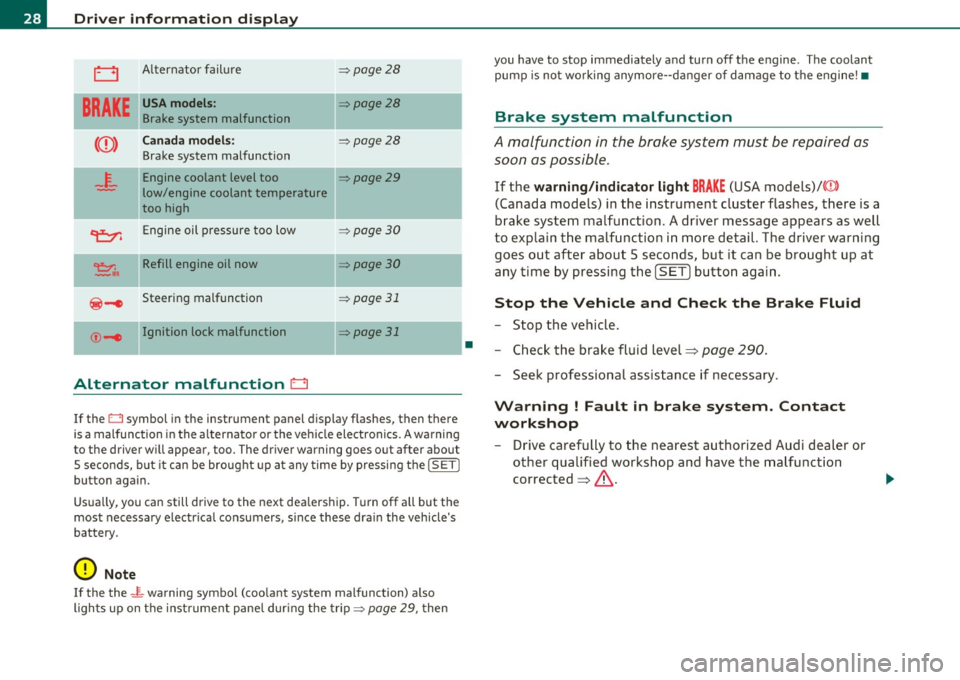
0 Alternator failure => page 28
BRAKE
USA models: ::::>page28
Brake system malfunction
Canada models: ::::>page28
Brake system malfunction
4.
Engine coolant level too ::::>page29
low/engine coolant temperature
too high
II
~ Engine oil pressure too low =:>page 30
~,. Refill engine oil now =:> page 30
@-e Steering malfunction => page 31
©-1 Ignition lock malfunction II=> page 31
Alternator malfunction D
If the O symbol in the instrument panel display flashes, then there
is a malfunction in the alt ernator or the vehicle electronics. A warning
to the driver will appear, too. The driver warning goes out after about
5 seconds, b ut it can be brought up at any time by pressing the
!SET I
button again.
Usually, you can still drive to the next dealership. T urn off all but the
most necessary e lectr ica l consumers, s ince these dra in the vehicle's
battery.
0 Note
If the the _ i,_ warning symbo l (coo lant system malfunction) a lso
lights up on the instrument panel during the trip::::>
page 29, then
•
you have to stop immediately and turn off the engine . The coolant
pump is not work ing anymore- -danger of damage to the engine! •
Brake system malfunction
A malfunction in the brake system must be repaired as
soon as possible .
If the warning/indicator light BRAKE (USA models)/ ((D)
(Canada models) in the instrument cluster flashes, there is a
brake system malfunction. A driver message appears as well
to explain the malfunction in more detail. The driver warning
goes out after about 5 seconds, but it can be brought up at
any time by pressing the
[SET ] button again.
Stop the Vehicle and Check the Brake Fluid
-Stop the vehicle.
- Check the brake fluid level=>
page 290.
-Seek professional assistance if necessary .
Warning ! Fault in brake system. Contact
workshop
- Drive carefully to the nearest authorized Audi dealer or
other qualified workshop and have the malfunction
corrected =>,& .
Page 31 of 364
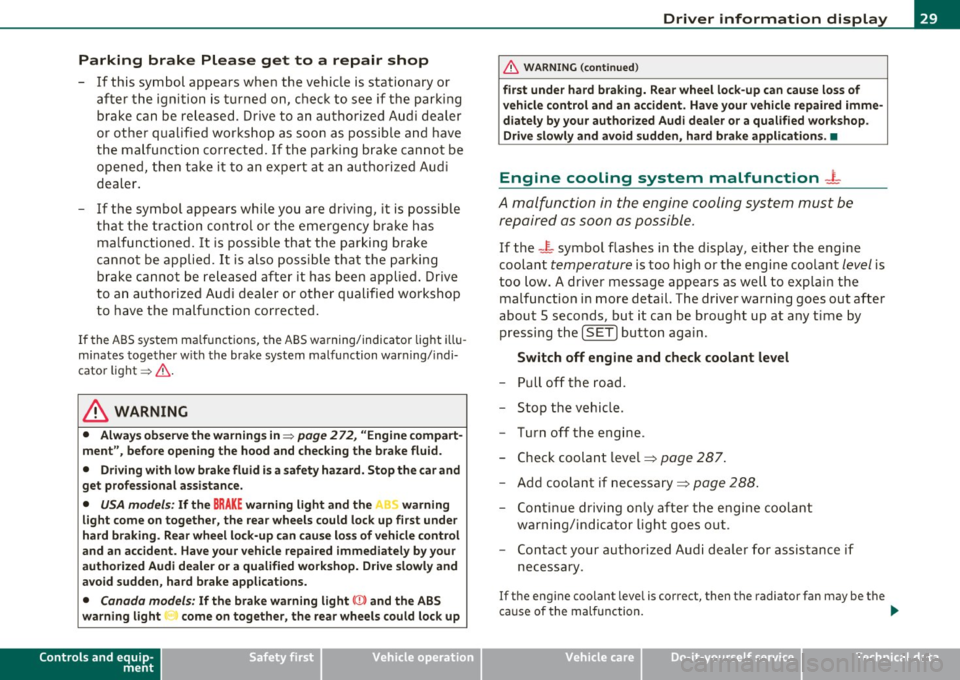
Parking brake Please get to a repair shop
- If this symbol appears when the vehicle is stationary or
after the ignition is turned on, check to see if the parking brake can be released. Drive to an authorized Audi dealer
or other qualified workshop as soon as possible and have
the malfunction corrected. If the parking brake cannot be
opened, then take it to an expert at an authorized Audi
dealer.
- If the symbol appears while you are driving, it is possible
that the traction control or the emergency brake has
malfunctioned . It is possible that the parking brake
cannot be applied. It is also possible that the parking brake cannot be released after it has been applied. Drive
to an authorized Audi dealer or other qualified workshop
to have the malfunction corrected.
If the ABS system malfunctions, the ABS warning/indicator light illu
minates together with the brake system malfunction warning/indi
cator light=>&, .
& WARNING
• Always observe the warnings in=> page 2 72, "Engine compart
ment", before opening the hood and checking the brake fluid.
• Driving with low brake fluid is a safety hazard. Stop the car and
get professional assistance.
• USA models: If the BRAKE warning light and the P warning
light come on together, the rear wheels could lock up first under
hard braking. Rear wheel lock-up can cause loss of vehicle control
and an accident. Have your vehicle repaired immediately by your
authorized Audi dealer or a qualified workshop. Drive slowly and
avoid sudden, hard brake applications.
• Canada models: If the brake warning light (Ci)) and the ABS
warning light come on together, the rear wheels could lock up
Controls and equip
ment Safety first
Driver information display
&, WARNING (continued)
first under hard braking. Rear wheel lock-up can cause loss of
vehicle control and an accident. Have your vehicle repaired imme
diately by your authorized Audi dealer or a qualified workshop.
Drive slowly and avoid sudden, hard brake applications. •
Engine cooling system malfunction _t_
A malfunction in the engine cooling system must be
repaired as soon as possible .
If the -~- symbol flashes in the display, either the engine
coolant
temperature is too high or the engine coolant level is
too low. A driver message appears as well to explain the
malfunction in more detail. The driver warning goes out after
about 5 seconds , but it can be brought up at any time by
pressing the
(SET] button again.
Switch off engine and check coolant level
- Pull off the road.
- Stop the vehicle.
- Turn off the engine .
- Check coolant level==>
page 287.
-Add coolant if necessary==> page 288.
- Continue driving only after the engine coolant
warning/indicator light goes out .
- Contact your authorized Audi dealer for assistance if
necessary .
If t he engine coolant level is correct, then the radiator fan may be the
cause of the malfunction .
~
Vehicle care Technical data
Page 32 of 364
Driver information display
in. WARNING
• If your vehicle should break down for mechanical or other
rea son s, park at a safe di stan ce from movin g traffic , turn off the
e ngine and turn on th e hazard warning lights =>
page 66, "Emer
gency fl ashe rs A ".
• Never open th e hood if you see or hear steam or coo lant
es caping from the engine compartment -you ri sk being scalded.
Wait until you can no longer see or hear steam or coo lant
escaping.
• The engine compartment of any vehicle is a dangerous area .
Before you perform any work in the engine compartment, turn of
the engine and allow it to cool. Follow the warning stickers
=> page 2 72 , "Engine compartment" .
(D Note
Do not continue d riving if the _f_ symbol illuminates . There is a
ma lf u nction in the e ngine cooling system -you co uld damage you r
engine .•
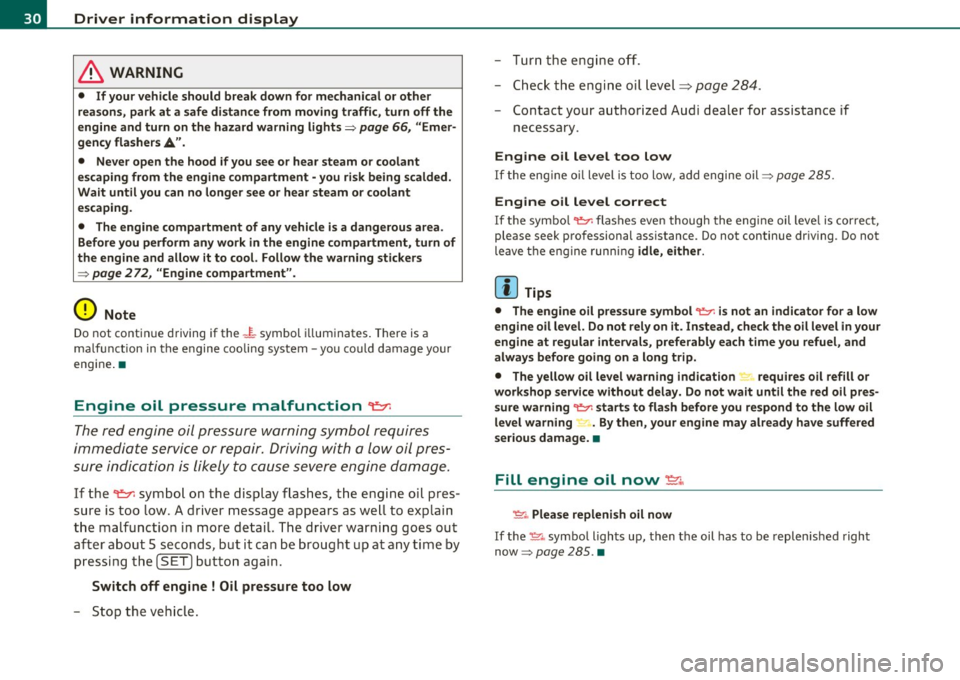
Engine oil pressure malfunction "t::7:
The red engine oil pressure warning symbol r equires
imm ediat e service or repair . Driving with a low oil pres
sure indication is likely to cause severe engine damage.
If the ~ symbo l on the display flashes , th e eng ine o il pres
sure is too low . A driver message appea rs as well to exp lain
t h e malfunc tion in more detail. The driver warning goes ou t
a ft er a bout 5 seco nds, but it can be b roug ht up at a ny time by
p ressin g th e
(SET ] butto n again .
Switch off engine ! Oil pressure too low
-Sto p the veh icl e. - Tur
n the eng ine off.
- Chec k the engi ne oil level=>
page 284 .
-Contact your a uthor ized Audi dealer for assistance if
necessary .
Engine o il level too low
If the eng ine o il level is too low, add engine oil=> page 285 .
Engine oil level correct
If the symbo l~ flashes ev en though the eng ine oil leve l is cor rect,
please seek pro fessional assistance . Do not continue dr iv ing. Do not
leave t he e ngine runn ing
idle, either .
(I] Tips
• The engine oil pre ssure symbol ~ is not an indi cator for a low
engine oil level. Do not rely on it. Instead , check the oil level in your
engine at regular intervals, preferably each time you refuel, and
always before going on a long trip.
• The yellow oil level warning indication "" requires oil refill or
workshop service without delay. Do not wait until the red oil pre s
sure warning ~ starts to flash before you respond to the low oil
level warning ~ . By then, your engine may already h ave suffered
serious damage. •
Fill engine oil now~
~-Please repleni sh oil now
If the ~-symbo l ligh ts up, then t he oil has to be replen is hed right
now =>
page 285. •
Page 33 of 364

Steering malfunction@-
If there is a malfunction in the electronic steering column
lock, the steering cannot be unlocked.
If the ~- symbol in the display blinks, there is a malfunction
in the electronic steering column lock . A driver message
appears as well to explain the malf unction in more detail.
The driver warning goes out after about 5 seconds, b ut it can
be brought up at any time by pressing the
[ SET] button
again.
Stop the vehicle and turn off the engine. Steering
defecti ve
- Obtain professional assistance .
- Do
not tow you r vehicle .
& WARNING
Your vehicle must not be towed in t he e vent of a malfun ctio n in
the e lec tronic ste ering column lo ck because it cannot b e steered
due t o the lo cked steering.
If it is t owed with the stee ring locked ,
t her e is th e risk of an ac cident.
(I) Tips
The symbo l's appearance m igh t be d ifferen t in some mode ls. •
Ignition lock malfunction@-
A malfunction in the ignition lock must be repaired imme
diately.
If the ©- symbol in the display blinks, there is a malfunct ion
in the electronic ignition lock . A driver message appears as
well to explain the malfunct ion in more deta il. The dr iver
Controls and equip
ment Safety first
Dri
ver information display
warning goes out after about 5 seconds, but it can be
brought up at any time by pressing the
(S ET] button aga in
Defective ignition switch Get it serviced!
- Do not turn the engine off.
- Drive immed iately to an author ized serv ice facility to have
the malfunct ion corrected.
If the re is a ma lf u nction in the e lectronic ignition lock , the ignit ion
cannot be tur ned off . Drive immediately to an authorized service
facility to have the cause of the ma lfunct ion corrected.
On vehicles with convenience key*, t he eng ine shou ld not be sw itched
off using the start/stop button because the engine cannot be started
again after the ignition has been swi tched o ff.
[ i ] Tips
Th e symbo l's appea ra nce m ight be different in some models. •
Yellow symbols
Ayellow symbol means WARNING.
-0)
9 a:
ill
Fig. 22 Displ ay:
Yello w warni ng
s ymb ol
Yellow symbols ind icate a prior ity 2 malfunction -Warning!
Vehicle care Technical data
Page 34 of 364
Driver information display
When a yellow warning symbol appears, one warning tone sounds. A
dr iver message appears as well to explain the ma lfunction in more
detail. The driver warning goes out after about 5 seconds, but it can
be brought up at any time by pressing the !SET] button again.
Check the function displayed as soon as possible. The yellow symbol
will not go out again until the reason for the malfunction has been
corrected.
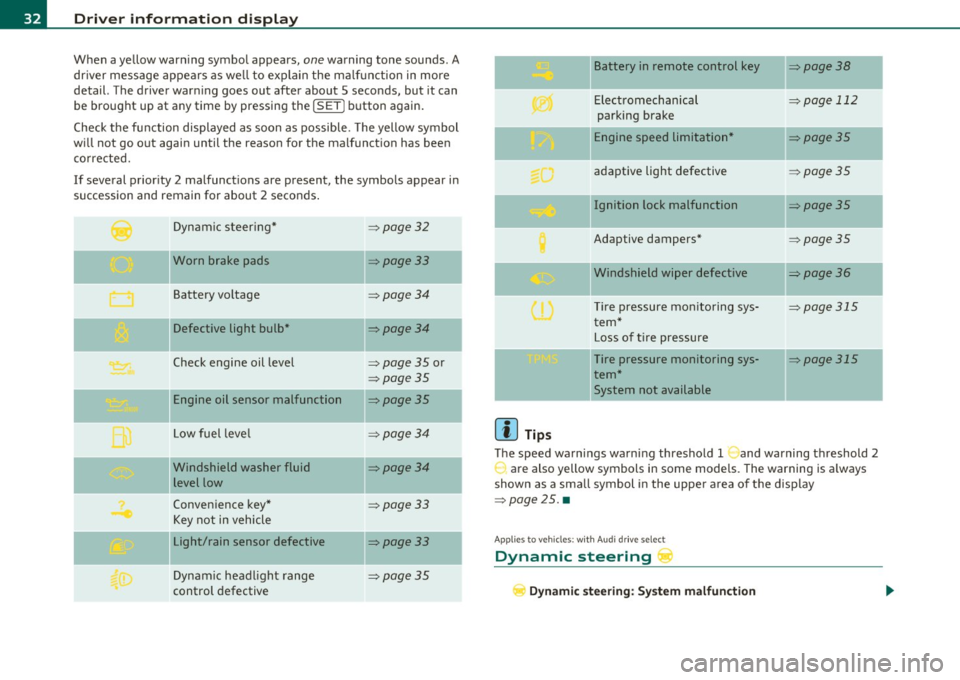
If several priority 2 malfunctions are present, the symbols appear in
succession and remain for about 2 seconds .
Dynamic steer ing*
=:>page 32
'O' I I , Worn brake pads =:>page33
Battery vo ltage => page34
Defective light bulb* =>page34
Check engine oil level => page 35 or
=>page 35
Engine oil sensor malfunction =:>page35
--
Low fuel leve l =>page34
Windshield washer fluid =>page34
level low
Convenience key*
=>page 33
Key not in vehicle
Light/rain sensor defective
=:>page33
--
Dynamic headlight range => page 35
control defective
[{] Tips
Battery in remote control key
Electromechanical
parking brake
Engine speed limitation*
adaptive light defective
Ignition lock malfunction
Adaptive dampers*
Windshield wiper defective
T ire pressure monitoring sys
tem*
Loss of tire pressure
Tire pressure monitoring sys
tem* System not available
=>page 38
-
=> page 112
-
=>page 35
=> page 35
=> page 35
=>page 35
=>page 36
-
=> page 315
=> page 315
The speed warnings warning threshold 1 and warning threshold 2
are also yellow symbols in some models. The warning is a lways
shown as a small symbol in the uppe r area of the display
=>page 25. •
Appli es to vehicles : wit h Au di dr iv e se lec t
Dynamic steering r
Dynamic steering: System malfunction
Page 35 of 364

This driver message and the symbol,;;:;,. appear when a system
malfunction occurs during travel. You can continue to drive carefully
at a reduced speed to a qualified workshop. Steering can be more
difficult or sensitive than usual. The steering whee l can also be at an
angle when driving straight .
Dynamic steering: initialization
If this driver message appears and the indicator lightl, is flash ing on
the instrument panel, dynamic steering is being reinitialized . Once
you start the engine after this is finished, the steering wheel wi ll be
easy to move. Re -initializat ion might be necessary if the steering
wheel was moved hard to the left and right while the vehicle was not
moving. The display goes out as soon as initial izat io n is complete.
& WARNING
Have the dynamic steering system malfunction repaired as soon
as possible by an authorized Audi dealer or any qualified workshop
- risk of accident!
[I) Tips
The dynamic steer ing stability systems are not ava ilab le in the event
of a system ma lfunct ion .•
Ap plies to ve hicles : w it h c onven ien ce key
Key not in vehicle
Key not in vehicle
This reminder appears along with the symbol if the master key is
removed from the vehicle with the engine running. It is int ended to
remind you (e.g. when chang ing drivers) not to continue the journey
without the master key.
If the master key is no longer in the veh icle, you cannot sw itch off the
ignition after stopping the engine and you a lso cannot start the
engine again. You also cannot lock the veh icle from the outs ide .•
Controls and equip
ment Safety first
Driver information display
Light/rain sensor defective
·)
Automatic headlights/automatic wipers defective
If the symbol ill um inates , the light sensor has failed. For safety
reasons the low beams are turned o n permanently with the switch in
AUTO . However, you can continue to turn the lights on and off using
the light switch . In the case of a defect in the ra in sensor, the wind
shield wiper lever functions are still avai lable . Have the light/rain
sensor checked as soon as possib le by an autho rized Audi dealer. •
Worn brake pads ~
Brake pads!
If the warning light illuminates, immediately contact your authorized
Audi dealer or qualified workshop to have all brake pads inspected .
On USA mode ls the warning light comes on together with the
war ning light BRAKE . Both sets of b rake pads on an axle must always
be replaced at the same time.
& WARNING
Driving with bad brakes can cause a collision and serious personal
injury .
• If the warning light and the warning light
BRAKE1> with the
message Brake pads! comes on in the instrument cluster display,
immediately contact your authorized Audi dealer or qualified
workshop to have all brake pads checked or replaced if necessary. •
ll BRAKE : USA mode ls on ly
Vehicle care Technical data
Page 36 of 364

Driver information display
Applies to veh icles : w ith defective lig ht bulb warning
Defective light bulb warning
The defective light bulb warning monitors the function of
the light bulbs in the vehicle.
T he defect ive light bulb war ning moni tors t he f unct io n of the light
bulbs. If a defective light b ulb is detected, or if a light bu lb has
burned o ut, a ye llow sym bol appe ars as we ll as a not ifica tion th at
shows which light bulb is defective .
Defective bulb~
If this symbol I") lights up, a t urn signa l (front or rear), a head lamp, a
bra ke light, t he b ack-up light, a fog l amp o r a rear fog lamp h as
fa iled.
& WARNING
• Light bulbs are unde r pre ssure and can explode when bulbs are
replaced - risk of injury.
• With gas-discharge lamp s* (xenon headlights ), the high
voltage component must be handled appropriately . Doing other
wise poses a risk of death!
[I] Tips
Have an aut horized Audi dealer or other q ualified workshop perform
t he rep lacement or the rep air .•
Windshield washer fluid level too low o
- Plea se refill washer fluid
If the symbo l illum inates, add w indshield washer f lu id to the washer
system and a lso to the headlight w asher system =>
page 295. •
Fuel supply too low )
When the symbol illum inates, this means t here are about 2.1
ga llons (8 l ite rs) of f ue l left in the f uel t ank. T ime to re fuel!
=>page 275.
If the symbol lights up, even when there is ample fue l in the tank, an d
the text
TANK SYSTEM MALFUNCTION! CONTACT WORKSHOP
appea rs in the disp lay, there is a fa ult in the system. Contact a quali
fied wo rkshop to have t he fa ult rectified. •
Applies to veh icles: with ba ttery voltage warn ing
Battery voltage 0
If battery powe r d rops into the range where it can lim it the ability of
the engine to start, t his the symbol ~ appears in the i nstr ument
cl uste r d isp lay with the following driver message
battery charge low:
Indicates charging by being driven .
While this driver not ification is displayed, you have to be prepa red for
limited sta rting ca pability.
Driver message appears and goes out again
If th is drive r mess age appears a fter the igni tion i s tur ned o n or whil e
dr iving and it goes o ut agai n after a while, the battery has been
a de qua tely rech arged.
Driver message appears and does not go out again
If th is dr iver no tifi cati on appears after the ign it ion is tu rned on o r
w hil e driving and does not go out again, the battery 's state of charge
is not in th e o ptim al r ange. Startin g cap abili ty is rest ric ted. H ave t he
battery c hecked at an a uth orized A udi dea ler or othe r qua lified work
shop as soon as possible. •
Page 39 of 364

Opening and closing
Keys
Key set
Fig. 23 Key set
© Master key with remote control
You can centrally lock a nd u nlock your ve hicle and start the eng ine
with the master key with remote contro l.
® Emergency key
The emergency key is not intended for cons tant use. It should o nly be
used in an emergency . Keep it in a safe place and do not carry it on
your key ring.
Key replacement
If you lose a key , contact your a uthori zed Audi dea le r immedi ately to
have the
lost key disabled . Be sure to bring all your keys w ith you .
Data in the master key
During driving, service and maintenance-relevant data is cont inu
o usly s tore d on yo ur maste r key. Your Aud i service adviser can re ad
out this data and tell you about the work your veh icle needs . This
a pp lies a lso to ve hicles with convenience key* .
Controls and equip
ment Safety first
Opening and closing
Personal comfort
settings
If two peop le use one veh icle, it is recommended that eac h person
a lw ays uses "t heir own " mas ter key. When t he ig nitio n is tu rned off
or when the vehicle is locked, personal conven ience settings for the
following systems are sto red and assigned to the remo te maste r key .
• Climate co ntrol
• C entra l lo ck ing system
• Seat memory*
• Parking sys tem *
• Audi s ide assist*
• Audi dr ive select*
T he sto red sett ings a re a utomatica lly recalled w hen you unlock the
vehicle, when you open the doors o r when you tu rn o n the ignition .
& WARNING
• Do not leave your vehicle unattended w ith the key in the igni
tion lock. Entry by unauthorized per sons could endanger you or
result in theft or damage the vehicle. Alway s lock all doors and
take the key.
• Do not leave children unattended in the veh icle, especially with
access to vehicle key s. Unguarded acce ss to the ke ys pro vide s chil
dren the opportun ity to start the engine and /or activate vehicle
s y stem s such as the power windows etc . Unsupervi sed operation
of any vehicle system by children can result in serious injury.
• Do not remove the ke y from the ignition lock until the vehicle
ha s come to a complete stop. Otherwise the ste ering column lock
could suddenly engage -causing the ri sk of an accident. .,_
Vehicle care Technical data
Page 42 of 364
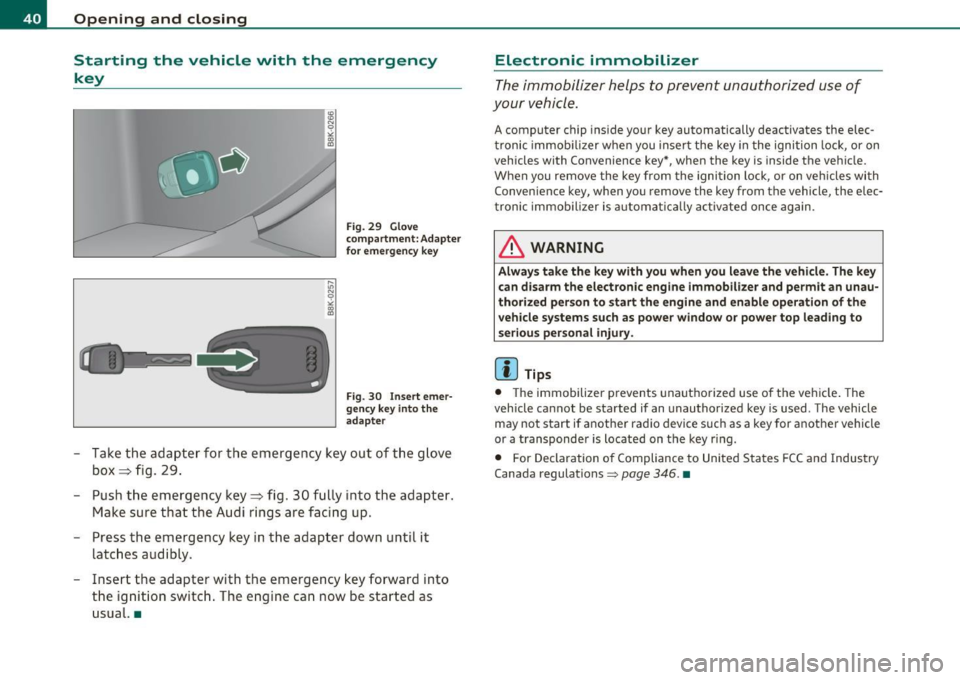
Opening and closing
Starting the vehicle with the emergency key
Fig. 29 Glove
compartment: Adapter
for emergency key
Fig . 30 Insert emer
gency key into the
adapter
- Take the adapter for the emergency key out of the glove
box ~ fig. 29.
- Push the emergency key~ fig. 30 fully into the adapter.
Make sure that the Audi rings are facing up.
- Press the emergency key in the adapter down until it
latches audibly.
- Insert the adapter with the emergency key forward into
the ignition switch. The engine can now be started as
usual. •
Electronic immobilizer
The immobilizer helps to prevent unauthorized use of
your vehicle.
A computer chip inside your key automatically deactivates the elec
tronic immobilizer when you insert the key in the ignition lock, or on
vehicles with Convenience key*, when the key is inside the vehicle.
When you remove the key from the ignition lock, or on vehicles with
Convenience key, when you remove the key from the vehicle, the elec
tronic immobilizer is automatically activated once again.
& WARNING
Always take the key with you when you leave the vehicle. The key
can disarm the electronic engine immobilizer and permit an unau
thorized person to start the engine and enable operation of the
vehicle systems such as power window or power top leading to
serious personal injury.
[ i] Tips
• The immobilizer prevents unauthorized use of the vehicle. The
vehicle cannot be started if an unauthorized key is used . The vehicle
may not start if another radio device such as a key for another vehicle
or a transponder is located on the key ring .
• For Declaration of Compliance to United States FCC and Industry
Canada regulations
=> page 346 . •
Page 43 of 364

Power locking system
General description
The power locking system locks or unlocks all doors and
the rear lid simultaneously.
You can lock and u nlock the ve hicle centrally. You have the following
choices:
• Remote master key::::>
page 42
• Door hand les with convenience key* => page 43,
• Lock cylinder at the driver's door ::::> page 44, or
• Powe r locking switch inside~
page 45.
Selecti ve unlocking
When they are closed, the door and rea r lid are locked . When
unlocking, you can set in the radio or in the MMI * whether
only the
dr ive r's door or th e entire vehicl e shou ld b e unloc ked::::>
pag e 42.
Automatic Locking
The automat ic lock ing feature locks all the veh icle doors and the rear
lid when you drive faster than 9 mph (15 km/h).
T he car is unlocked agai n once the ignit io n key is removed. I n add i
tion, the vehicle can be un locked if the open ing function in the power
lo cki ng sys tem swit ch o r at one of t he d oor leve rs is a ctuated. The
Auto Lock function can be turned on and off in the rad io or in the
MM I*
~ page 42 .
Add itiona lly, in the event of a crash w ith a irbag dep loymen t the doors
are automatically u nlocked to allow access to the ve hicle .
Anti-theft alarm warning system
If the anti -theft alarm warning system detects a break-in into the
vehicle, acoustic and visual warning signals are triggered .
Controls and equip
ment Safety first
Opening and closing
T
he anti-theft warning system is activated a utomat ica lly when you
lock the vehi cle. It is dea ctivated w hen unl ocking us ing t he
remote
key ,
with the mechanical key , and when you switch on the ignition .
T he alarm a lso turns off when the alarm cycle has expired .
Turn signals
When you unlock the vehi cle, the tu rn s ignals flash twi ce , when yo u
lock it once . If they do not flash, one of the doors, the rear lid or the
hood is not locked.
Unintentionally Locking yourself out
In the following cases there safeguards to preve nt yo u loc king your
remote master key in the vehicle:
• The vehicle does not lock with the centra l locking sw itch
=>
page 45 if the drive r's door is open.
• On vehicles with convenience key*, if the most recently used
master key is in the luggage compartment, the rea r lid is automati
ca ll y unlo cked again after it is closed;;;> page 46.
Do not lock yo ur vehi cle w it h t he remote m aster key u ntil all doors
and t he rear lid are closed . In this way you avoid locking yourself out
acc iden tally .
& WARNING
• When you leave th e vehicle, alwa ys remove the ignition key
and take it with you. Th is will prevent passengers (children , for
example ) from accidentally being locked in the vehicle should
they accidentally p ress the power locking switch in the front
door s.
• Do not leave child ren inside the vehicle unsupervised . In an
emergency it would be impossible to open the door s from the
outside without the key.
Vehicle care Technical data