warning AUDI A5 CABRIOLET 2010 Service Manual
[x] Cancel search | Manufacturer: AUDI, Model Year: 2010, Model line: A5 CABRIOLET, Model: AUDI A5 CABRIOLET 2010Pages: 364, PDF Size: 86.51 MB
Page 55 of 364

Power top convenience opening and
closing
Fig . 4 4 Remote
m aste r key: butt ons
Fig . 4 5 Turnin g the
k ey to o pen and clos e
Convenience opening with the driver door
lock
-Press the@ button on the remote master key to u nlock the
vehicle .
- Turn the key o nce in the dr iver door loc k to the opening
position @=> fig. 45 .
- Turn the key to the opening posit ion aga in
within two
seconds
and hold it there until the power top opens
completely .
Contro ls a nd e quip
m en t Vehicle
OP-eration
Power top
Convenience closing with the driver door Lock
- Turn t he key once in the dr iver door lock to the closing
position ®=> fig. 45.
- Turn the key to the closing position aga in
within two
seconds
and hold it there until the power top closes
completely .
Convenience opening with the convenience
key*
- Press the@ button on the conven ience key * to un lock the
vehicle.
Convenience closing with the convenience
key *
Press the (fJ button on the convenience key* to lock the
v e h icle.
Releasing the key stops the opening o r clos ing process immediatel y.
& WARNING
• When op enin g and closing th e power top , make sure no one
will be injured by the supports and othe r moving parts .
• Operat ing the power top redu ces the hea droom in the rear of
the vehicle. Make sure there is enough clearan ce be tween the rear
pas senger and th e pow er top wh en opening and closing it .•
Vehicle care Do-it-yourselt service iTechnical data
Page 57 of 364

Fig. 49 Inser tin g th e
wi nd d eflec to r (2)
Retaining pins are located on the long ends of the wind
deflector . They secure the deflector in the mounts on the
vehicle's rear side trim . For safety reasons, inserting the wind
deflector from the side farthest from traffic.
Ins erting and positioning the wind deflector
- Open the rear side window on the side farthest from
traffic.
- Read the assembly instructions on the wind deflector storage bag.
- Remove the wind deflector from the storage bag and fold
it apart
once . The wind deflector is installed in the correct
position when the longest side is toward the front and the
wind deflector frame is at the top.
- Insert both retain ing pins in the mounts in the tr im above
the rear seat on the d river s ide =:,
page 54, fig. 48 (0 .
- Fold the handle @at the front and center of the w ind
deflector upward and lift the deflector slight ly in the
center ~ fig. 49
®·
Con tro ls a nd e quip
m en t Vehicle
OP-eration
Power top
-Now guide the wind deflector into the mounts in the side
trim o n the passenger side@ and press lightly in the
m iddle ® until the handle locks in place.
- Set the wind deflector up com ple tely .
Removing the wind deflector
- Fold the w ind deflector frame back .
- Fold the handle ~
page 54, fig. 48 ® at t he front and
center of the wind deflector upward and lift the deflector
slightly in the center .
- Remove the wi nd deflector from t he mo unts in the side
trim on the passenger side .
- Pull the wind deflector out of the mounts on the driver
side and lift it out.
- Fold it togethe r.
- Store the wind deflector in the storage bag.
& WARNING
• Do not use the w ind deflector t o secure cargo.
• Be ca reful when in stalling so you do no t pinch you r fi ngers.
• Pay attenti on to the traffic when installing the wind defle ctor ,
if necessar y.
0 Note
Do not lean against the veh icle when install ing the w ind deflector .
Ha rd objects and decorations o n clothing such as be lt buck les can
scratch the paint . Your clothing could also become dirty .
ti>
Vehicle care Do-it-yourselt service iTechnical data
Page 58 of 364
Power top
(I) Tips
• The w ind deflector works best when all of the windows are ro lled
up while driving.
• Only store the wind deflector in the storage bag when it is dry .•
Power top emergency operation
General information
The power top can be closed by hand if there is a malfunc
tion.
- Activate the parking brake.
- Open the windows
- Remove the key from the ignitio n.
Only close the power top manually in an emergency . The best solut ion
is to have yo ur a uthorized Audi dealer correct the ca use of the
malfunct ion .
Powe r top emergency operation consists of the fo llowing steps:
• Unlocking the power top compartm ent cover : The cover on t he
power top compartment must be released by hand.
• Closing the power top : The power top must be lifted out of the
tray and closed.
• Locking the p ower top: The powe r top la tc h es must be locked
with the emergency key.
& WARNING
• When positioning the power top , avoid contact with the
s upport s or other moving part s. Make sure all of the w indows are
lowered . Otherwise you could pi nch your hand s.
& WARNING (contin u ed )
• Never drive when the powe r top i s not locked correctly. The
wind from dr iving coul d caus e the po wer top to open . Thi s can
re sult in injurie s and damage to the vehicle.
(I) Tips
Have a second person assist when closing the power top. Positioning
the power top is easie r whe n there is a second perso n to help. •
Step 1: Unlocking the power top
compartment cover
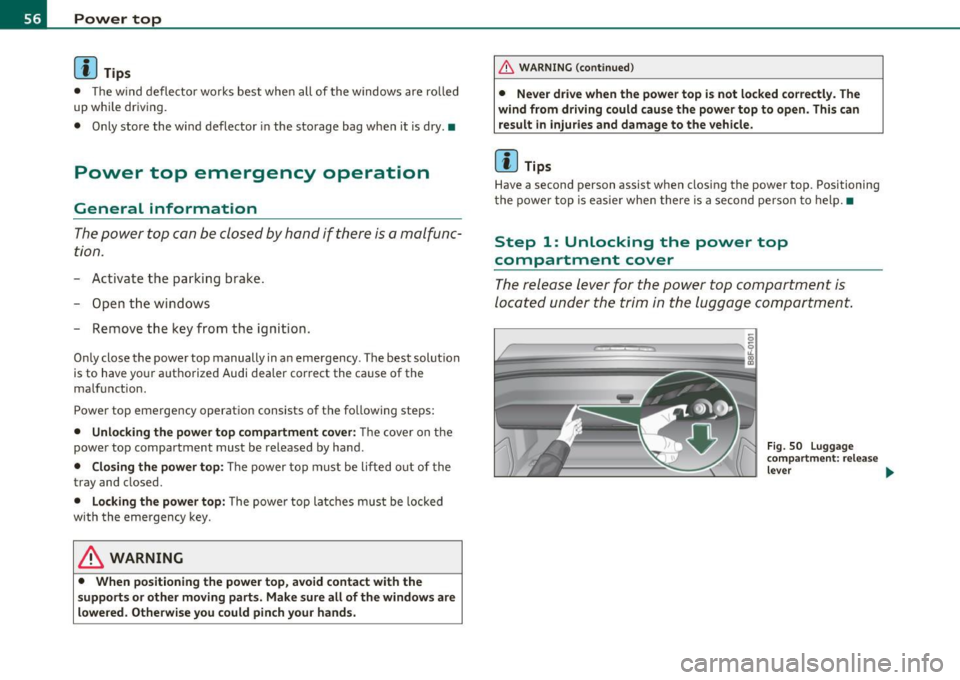
The release lever for the po wer top compartment is
located under the trim in the luggage compartment.
-
---
Fig . 50 L uggage
c omp artment : re lease
leve r ...
Page 60 of 364
Power top
& WARNING
When raising the power top compartment cover, avoid contact
with the supports or other moving parts. Otherwise you could
pinch your hands. •
Step 3: Lifting the power top storage bay
cover out
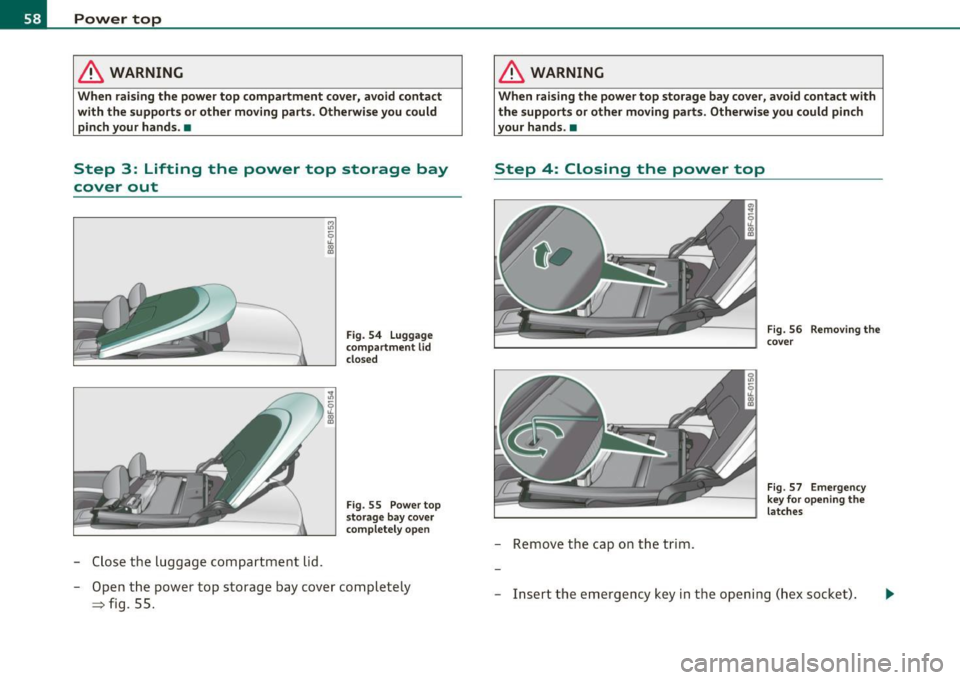
-Close the luggage compartment lid.
Fig. 54 Luggage
compartment
lid
closed
Fig . 55 Power top
storage bay cover
completely open
- Open the power top storage bay cover completely
=> fig. 55.
& WARNING
When raising the power top storage bay cover, avoid contact with
the supports or other moving parts. Otherwise you could pinch
your hands. •
Step 4: Closing the power top
-Remove the cap on the trim.
Fig. 56 Removing the
cover
Fig. 57 Emergency
key for opening the
latches
- Insert the emergency key in the opening (hex socket).
Page 61 of 364

-Turn the release key counterclockwise until it stops to
open the latch.
- Remove the emergency key. •
Step 5: Closing the power top
The power top must be positioned by hand.
Fig. 58 Power top
partially open
Fig . 59 Windshield:
Power top
- Raise the power top out of the tray=> & in "Step 2:
Lifting the power top compartment cover out" on
page 57.
- Pull the power top out completely .
- Press the power top onto the windshield frame~ fig. 59.
Contro ls a nd e quip
m en t Vehicle
OP-eration
Power top
Have a second person assist when positioning the power top. That
person should stand on the opposite side of the vehicle and perform
the same steps.
& WARNING
• When positioning the power top, avoid contact with the
supports or other moving parts. Otherwise you could pinch your
hands.
• When pressing the power top down onto the windshield frame,
make sure that you do not pinch yourself or anyone else. •
Step 6: Retracting the power top
compartment cover
The power top compartment cover must be retracted by
hand.
Fig. 60 Power top
raised
- Raise the rear of the power top and hold it in place
=> fig. 60 (D => & in "Step 2: Lifting the power top
compartment cover out" on
page 57.
- Slide the power top compartment forward until it reaches
the end position => fig. 60
@. Release the power top. ..,
Vehicle care Do-it-yourselt service iTechnical data
Page 62 of 364
Power top
& WARNING
Do not pinch yourself or others when closing the power top
compartment. •
Step 7: Locking the power top
The locking system for the power top latches are located
on the inside of the power top.
Fig. 61 Ins ide of the
power top: hex key for
emergency operation
- Insert the emergency key in the opening and turn it clock
wise until it stops to lock the power top.
- Remove the emergency key.
- Cover the opening with the cap.
[I] Tips
Make sure the locking mechanisms are locked securely. •
Step 8 : Loosening the headliner
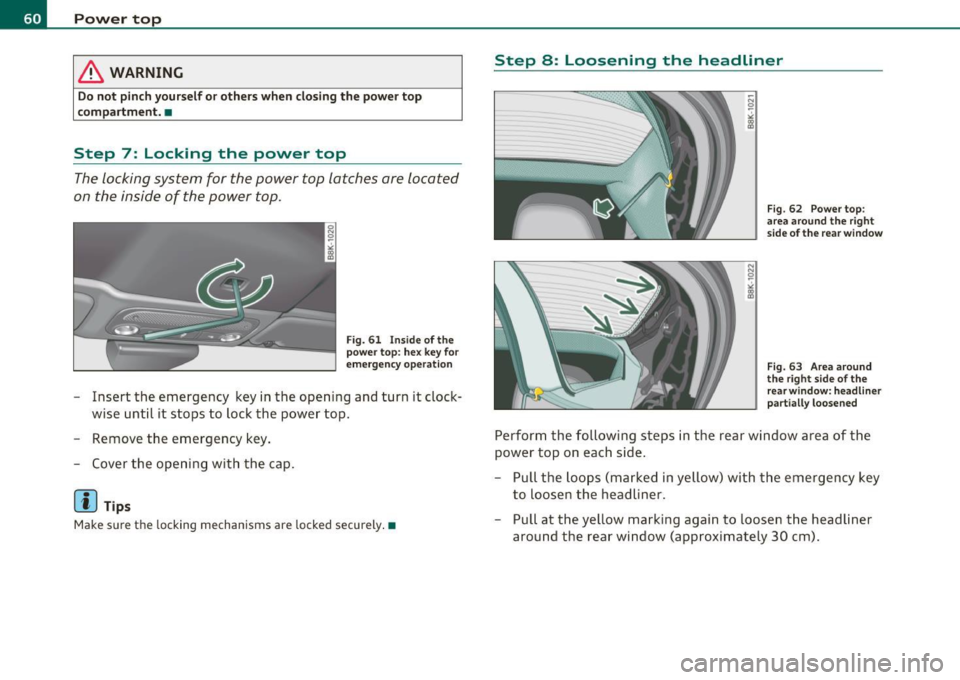
Fig. 62 Power top :
area around the right
side of the rear window
Fig. 63 Area around
the right side of the
rear w indow: headliner
part ially loosened
Perform the following steps in the rear window area of the
power top on each side.
- Pull the loops (marked in yellow) with the emergency key
to loosen the headliner.
- Pull at the yellow marking again to loosen the headliner
around the rear window (approximately 30 cm).
Page 63 of 364

Step 9: Securing the latch
Fig. 64 Rear of th e
power top: Se curing
th e latch
The latches must be secured on the left and right sides of the
vehicle.
- Pull the power top headliner to the side in the area around
the rear headrests to secure the latches=> fig. 64 =>
& in
"Step 2: Lifting the power top compartment cover out" on
page 57.
- Then remove the emergency key and insert the short end
into the power top support at the yellow marking.
- Press the emergency key in the direction of the arrow
=> fig. 64
0 until the latc h is secure .
& WARNING
Do not pin ch yourself or othe rs when clo sing the power top
c ompa rtment. •
Con tro ls a nd e quip
m en t Vehicle
OP-eration
Power top
Vehicle care Do-it-yourselt service iTechnical data
Page 65 of 364

& WARNING
Automatic headlights are only intended to assist the driver. They
do not relieve the driver of his responsibility to check the head
lights and to turn them on manually a ccording to the current light
and visibility conditions . For example , fog cannot be detected by
the light sensors . So always switch on the headlights under these
weather conditions and when driving in the dark
tD .
[ i J Tips
• Th e light sensor for head light control is located in the rea r view
m irror mount. You shou ld therefore not app ly any st ickers to the
windshield in th is area in order to prevent m alfunct ions or fa ilure s.
• Th e sensitivity level fo r the light senso r se t a t the factory can be
changed in the MMI menu ~
page 64 in the automatic d riving lights
fu nction .
• When you remove your key from the ign ition wh ile the veh icle's
ligh ts ar e tu rned on, a bu zzer sounds as long as the d river 's door is
open.
• Please obey all laws when using the lighting systems described
here .
• The coming home/ leav ing home fu nction is avai lab le o nly with the
switch in the AU TO position. •
Contro ls a nd e quip
m en t Vehicle
OP-eration
Applies to vehicl es: with fog lights
Fog Lights
Clear vision
Fig . 66 Fo g light
s witch
- To t urn o n the fo g lights tD, press butto n (D:::} fig. 66.
- To turn o n the rear fog lights
0$, press butt on @ .
Fog lights
The side marker lights or low beams must be sw itched on . When the
fog lights a re switc hed on, the green check lig ht at the edge of the
switch comes on .
I f automat ic dr iv ing light cont rol AUTO is act ivated , the low beams
a re switched on whe n the fog ligh ts are turned on.
Rear fog lights
Lo w beam s or sid e ma rke r lig hts wi th f og l igh ts mus t be t urne d o n.
Wh en the rea r fog l ights are turned o n, the y ellow check light at the
edge o f the swi tch comes on .
0 Note
The rea r fog lig hts sho uld only be turned on in accor dance w it h traffic
reg ulation, as t he lights are brig ht for fo llow ing traffic .•
Vehicle care Do-it-yourselt service iTechnical data
Page 66 of 364
Clear vision
Adjusting exterior Lighting
The functions are selected in the radio or in the MMI.
- Sel ect: Function button [CARI> E x terior lighting.
Com ing home
The coming home function ensures that after
tu rning off the ignition
and op ening th e driver' s door
the vehi cle periphery is illum inated i n
the dark . In addition, the front fog lights, the ta il lights and the
license p late ligh t are tu rned on. The power-on time can be set for a
per iod from O (off) to 60 seconds .
Leaving home
The leaving home funct ions ensures that
when unlocking , the vehicle
per iphery is illuminated in t he da rk. In addi tion, the front fog l igh ts,
the tai l lights and t he license p late light are turned on . This function
can be tu rned on and off.
Automatic driving ligh ts*
W hen the light switch is in the AUTO=> page 62 position, the switch
on point of the l ights can be changed in the automatic driving light
function.
Daytime running lights*
T he daytime running light s ca n be tu rn ed on o r off using this f unc
tion. If the funct ion is active, the dayt ime runn ing lights are turned
on a utomat ica lly when the ignition is switched on.
In the vers ions for some co unt ries it is not poss ible to switc h off the
daytime running lights or they may not have daytime running lights.
(I) Tips
The coming home/ leaving home f unction is avai lab le only with the
switch in the AUTO position .•
Daytime running Lights (DRL) (USA models)
T he daytime running lights are turned on au tomatically
w hen the ignition is switched on.
On vehicles w ith xenon lights the daytime running lights will come on
autom atically when the ig ni tio n is t urned on and t he lig ht switch
=>
page 62, fig. 65 is in the O position or the AUTO position (only in
d aylig ht co ndit ions). T he
Daytime running light s fu nct ion can be
turned on and off in the MMI menu
E xterior lighting => page 64. On
vehicles wi th
halogen lights there is no dayt ime runn ing lights func
tion .
& WARNING
Neve r use daytime running lights to see where you are going. They
are not bright enough and will not let you see far enough ahead
fo r safety , especiall y at dusk or when it is dark. Be aware of
c hange s in out side light condition s when you are driv ing and
r espond by switching on your low b eams
~D.
0 Note
Always be aware of changes in outside light conditions while you
are d riving. Re spond in t ime to fading daylight by tu rning the light
switch to position
~D (or "AUTO" if your ca r is equ ipped with this
feature)
to turn on your hea dlights. •
Daytime running Lights (Canada models
only)
When you turn on the ignition the daytime running lights
will come on automatically.
T he d aytime running lights a re a ct ivated only when the light sw itch
=>
page 62, fig. 65 is e it h er at the O or the coo: pos it io n. When the .,_
Page 67 of 364
ignition is switched on, there is a difference between vehicles with bi
xenon lights and halogen lamps:
• On vehicles with b i-xenon lights only the dayt ime running lamps in
the headlights will come on.
• On vehicles with halogen lights the front fog lights, side marker
lights and tail lights come on automatically.
& WARNING
Never u se daytime running lights to see where you are going . They
are not bright enough and will not l et you see fa r en ough ah ead
for safety , espe ciall y at dusk or when it i s dark. Be awar e of
c hanges in out side l ight condit ion s wh en you are dri ving and
respond b y switching on your l ow be am s
tD .
0 Note
• Alw ays be aware of changes in out side light condit ion s while you
are drivin g. Re spond in tim e to fadin g daylight b y turning the light
s witch to po sition
tD (or "AUTO") to turn on yo ur headlight s.
[I) Tips
The daytime running lights function cannot be turned off. •
Contro ls a nd e quip
m en t Vehicle
OP-eration
Clear vision
Instrument lighting
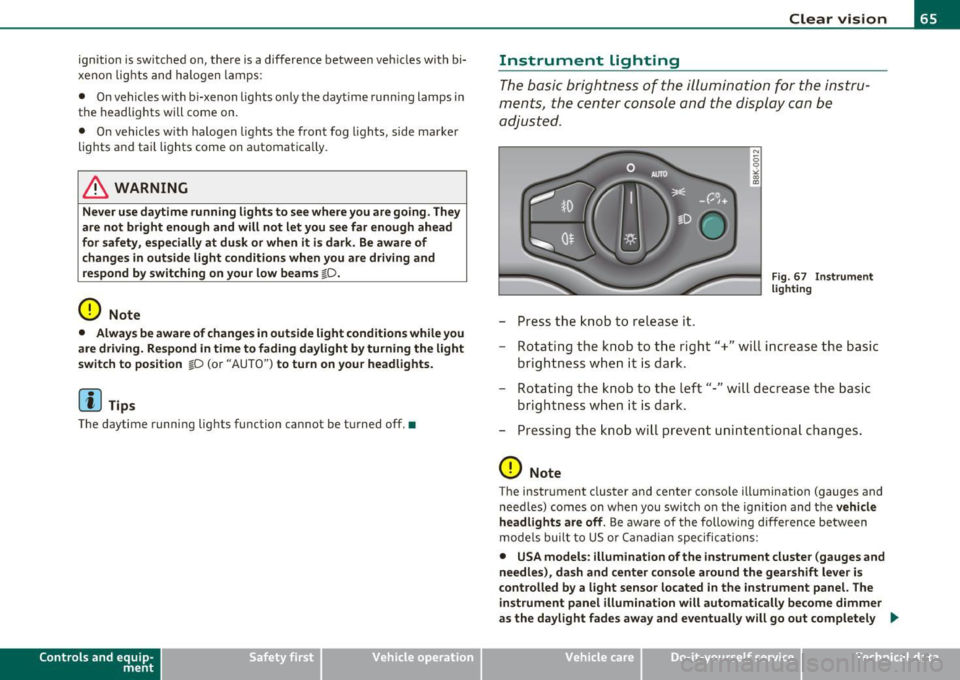
The basic brightness of the illumination for the instru
ments, the center console and the display can be
adjusted.
- Press the knob to release it.
N
-0 0 >< 00
"'
Fi g. 6 7 I nst rume nt
l ighti ng
- Rotating the knob to the right"+" will increase the basic
brightness when it is dark.
- Rotating the knob to the left"-" will decrease the basic
brightness when it is dar k.
- Pressing the knob will prevent unin tentiona l changes .
0 Note
The instrument cluster and center conso le illumination (gauges and
need les) comes on when you switch o n the ignition and the
veh icle
h eadlights are off .
Be aware of the following difference between
mode ls built to US or Canadian specifications:
• USA models : illumination of the inst rument cluste r (gauges and
needle s), da sh and center c onsol e around the gearshift l ever i s
c o ntrolled b y a light senso r lo cated in the instrument panel. The
in strument panel illumination will autom atically be come dimmer
as the day light fades away and eventu all y will go out completel y .,
Vehicle care Do-it-yourselt service iTechnical data