door lock AUDI A5 COUPE 2010 User Guide
[x] Cancel search | Manufacturer: AUDI, Model Year: 2010, Model line: A5 COUPE, Model: AUDI A5 COUPE 2010Pages: 360, PDF Size: 84.39 MB
Page 48 of 360
Opening and closing
& WARNING
Read and follow all WARNINGS :::::, & in "General description " on
page 41.
[ i J Tips
• Aft er the ig niti on is sw itc hed on, the po wer l ocking sy st em
switch and the unlockin g button for the rear lid
,c:j in the door are
enable d.•
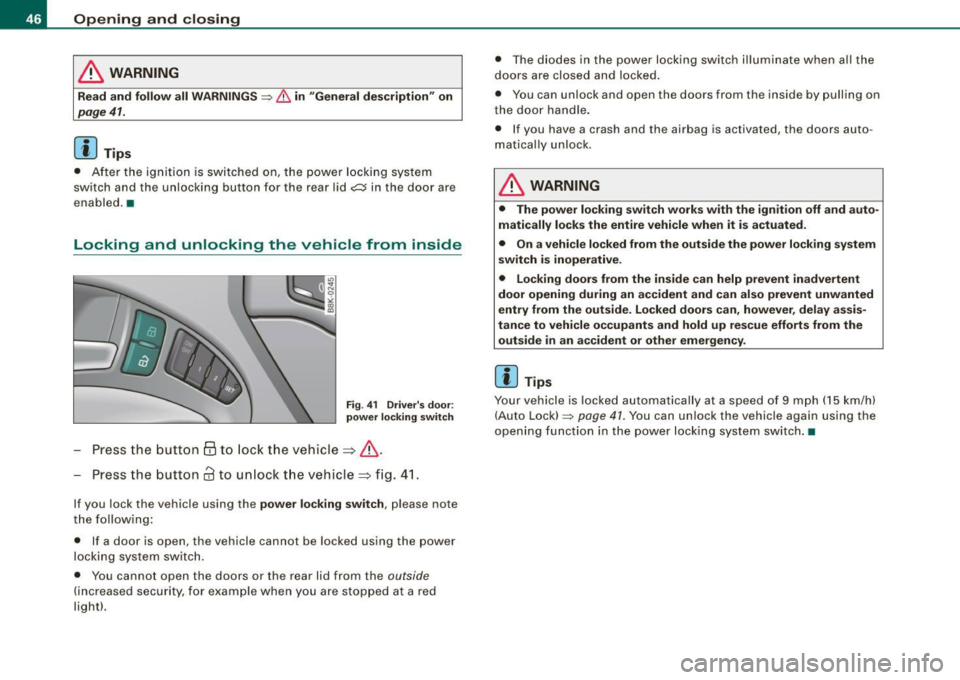
Locking and unlocking the vehicle from inside
Fig . 41 Driver' s do or:
power locking sw itch
P ress the button 63 to lock t he vehicle=> &.
Press the button
63 to un lock t he vehicle => fig. 41.
If you lock the vehicle using the power lock ing switch , please note
t he f ollowing :
• If a door is open, the vehicle cannot be locked using the power
l o cki ng sy ste m sw itch .
• You cannot open the doors or the rear lid from the
outside
(inc reas ed secu rity, for exa mple when yo u are stop ped a t a red
light!. • T
he diodes in the power locking swi tch illuminate when a ll the
door s ar e close d and l ock ed .
• Y ou can unlock and open the doors from the inside by pull ing on
t h e do or handle.
• I f you have a crash and the airbag is activated, the doors auto
m ati cal ly unl ock .
& WARNING
• The power lock ing switch works with the ignition off and auto
matically locks the entire vehicle when it is actuated.
• On a vehicle locked from the outside the power locking system
switch is inoperative .
• Locking doors from the inside can help prevent inadvertent
door opening during an accident and can also prevent unwanted
entry from the outside . Locked doors can , however , delay assis
tance to vehicle o ccupants and hold up rescue efforts from the
outside in an accident or other emergency .
[ i J Tips
Your vehicle is locked automatical ly at a speed of 9 mph ( 15 km/h)
( A uto Loc k) :::::,
page 4 1. You can un loc k the vehicle again using the
open ing fu ncti on in the po wer loc king sys tem sw itch. •
Page 49 of 360
Emergency locking of the passenger's door
If the power locking system fails (power failure), you will
need to lock the passenger door separately.
! a,
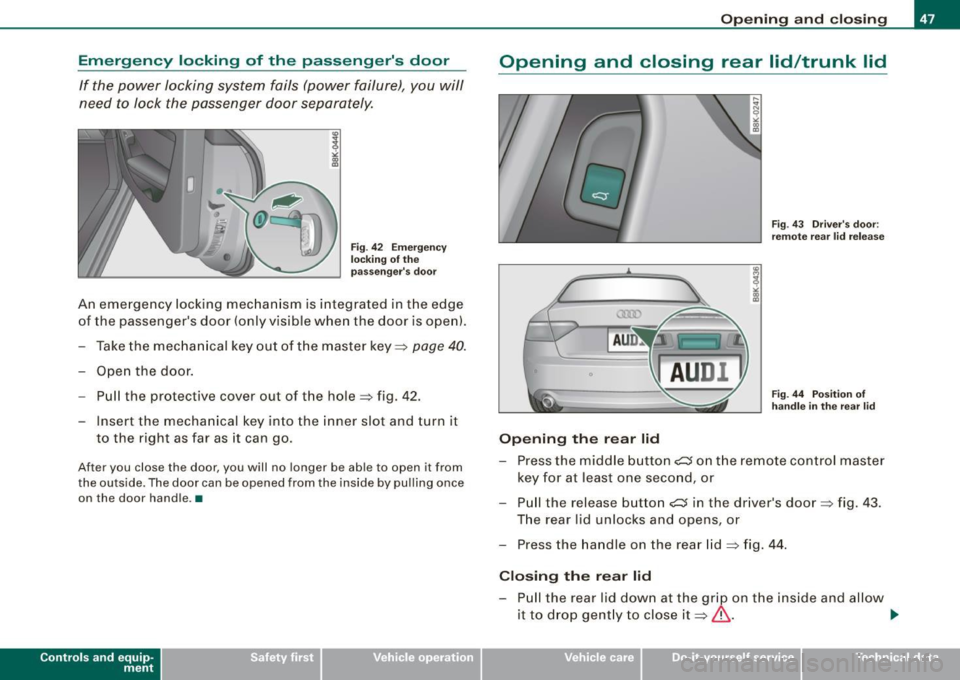
Fig. 42 Emergency
locking of the
passenger's door
An emergency locking mechanism is integrated in the edge
of the passenger's door {only visible when the door is open).
- Take the mechanical key out of the master key~
page 40.
- Open the door.
-Pull the protective cover out of the hole ~ fig . 42.
- Insert the mechanical key into the inner slot and turn it to the right as far as it can go .
After you close th e door, you will no longer be able to open it from
the outside. The door can be opened from the inside by pulling once on the door handle. •
Contro ls and eq uip
ment
Opening and closing
Opening and closing rear lid/trunk lid
Opening the rear lid
Fig. 43 Driver's door:
remote rear lid release
Fig . 44 Position of
handle in the rear lid
- Press the middle button c:::5 on the remote control master
key for at least one second, or
- Pull the release bu tton
c:::5 in the driver's door~ fig. 43.
The rear lid unlocks and opens, or
- Press the handle on the rear lid
~ fig. 44.
Closing the rear lid
- Pull the rear lid down at the grip on the inside and allow
it to drop gently to close it~ & .
~
Vehicle care I I irechnical data
Page 50 of 360
Opening and closing
& WARNING
• After closing the rear lid, always pull up on it to make sure that
it is properly closed. Otherwise it could open suddenly when the
vehicle is moving .
• To help prevent poisonous exhaust gas from being drawn into
the vehicle, always keep the rear lid closed while driving . Never
transport objects larger than those which fit completely into the
luggage area, because then the rear lid cannot be fully closed.
• Never leave your vehicle unattended especially with the rear lid
left open. A child could crawl into the car through the luggage
compartment and pull the lid shut, becoming trapped and unable
to get out. To reduce the risk of personal injury, never let children
play in or around your vehicle. Always keep the rear lid as well as
the vehicle doors closed when not in use.
• Always ensure that no one is within range of the rear lid when
it is moving, in particular close to the hinges -fingers or hands can
be pinched .
[ i J Tips
• When the vehicle is locked, the rear lid can be opened separately
by pressing the button
cs on the master key. When you close the
rear lid again, it locks automatically.
• If the rear lid is open or not properly closed when the ignition is
turned on, the door and rear lid warning=>
page 21 appears in the
instrument cluster display. •
Power windows
Controls
The driver can operate the window regulator for the
driver's door with the left switch and the window regu
lator for the passenger's door with the right switch.
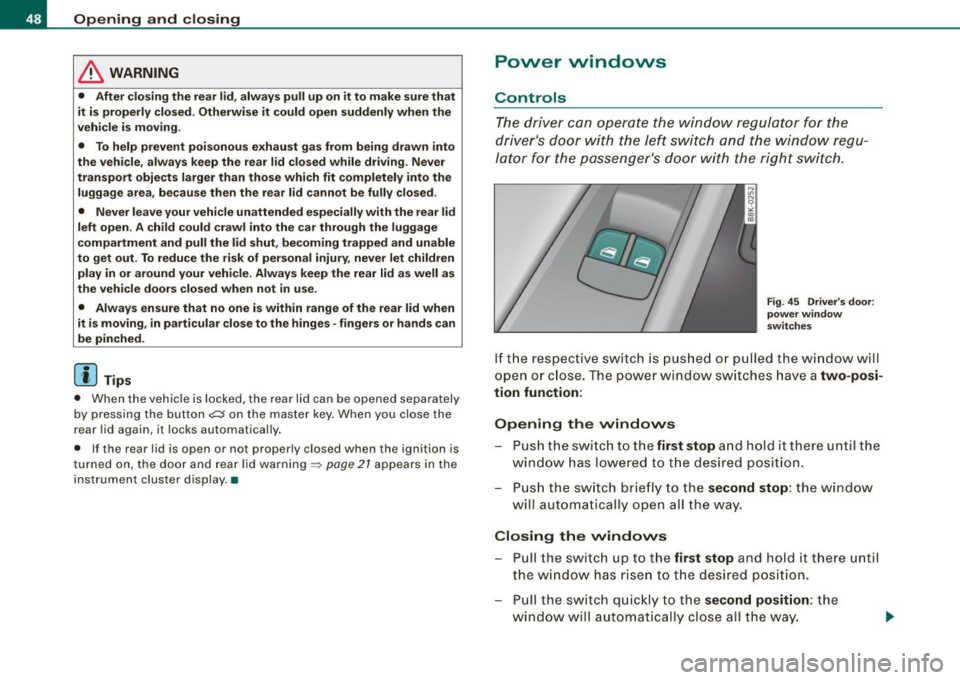
Fig. 45 Driver's door:
power window
switches
If the respective switch is pushed or pulled the window will
open or close. The power window switches have a
two-posi
tion function:
Opening the windows
- Push the switch to the first stop and hold it there until the
window has lowered to the desired position.
- Push the switch briefly to the
second stop: the window
will automatically open all the way.
Closing the windows
- Pull the switch up to the first stop and hold it there until
the window has risen to the desired position.
- Pull the switch quickly to the
second position: the
w indow will automatically close all the way. .,
Page 51 of 360
& WARNING
• Do not leave children unattended in the vehicle, especially with
access to vehicle keys. Unsupervised use of the keys can result in
starting of the engine and use of vehicle systems such as power
windows, etc. which could result in serious injury.
• Remember -you can still open or close the power windows for
about ten minutes after the ignition is switched off. Only when
either of the doors are opened are the power windows switched
off.
• Be careful when closing the windows . Check to see that no one
is in the way, or serious injury could result!
• Always remove the ignition key whenever you leave your
vehicle.
• If you lock your vehicle from the outside, no one, especially chil
dren, should remain in the vehicle.
• Do not stick anything on the windows or the windshield that
may interfere with the driver's field of vision.
[ i) Tips
• When you open the doors, the windows automatically lower
about 10 mm .
• Afte r the ignition has been switched off , the windows can still be
opened or closed for about 10 minutes . The window regulators are
not switched until the driver's or passenger 's door is opened. •
Controls and equip
ment
Opening and closing
Convenience opening /closing
The windows and the panoramic tilting sunroof can be
opened and closed with the mechanical key or the emer
gency key.
Convenience opening feature
~ N 0
"' "' m
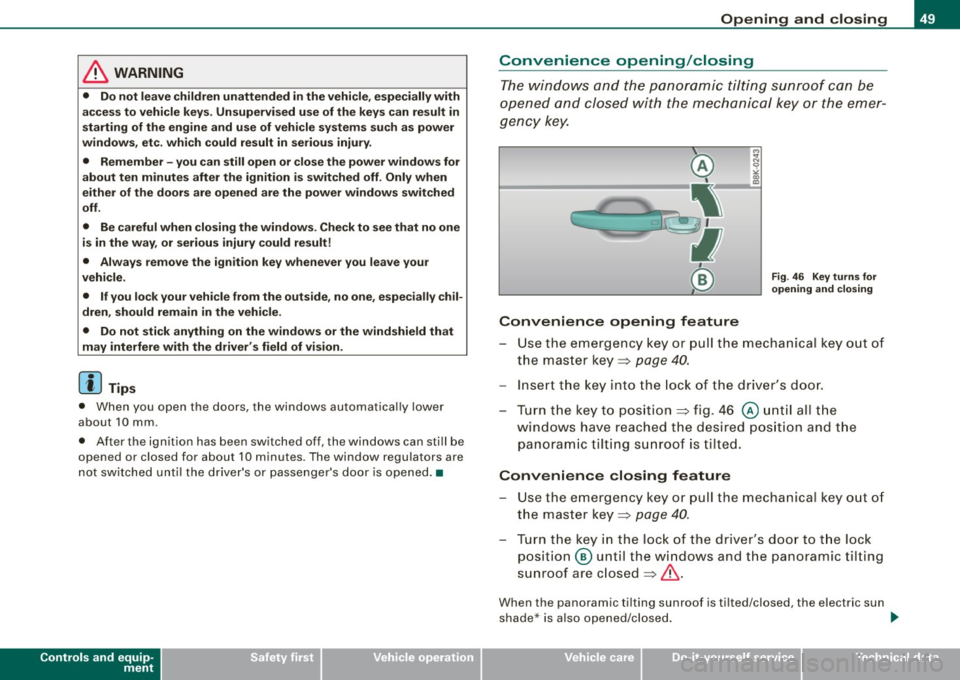
Fig. 46 Key turns for
opening and closing
- Use the emergency key or pull the mechanical key out of
the master key::} page
40.
- Insert the key into the lock of the driver's door.
Turn the key to position ::} fig. 46
@ until all the
windows have reached the desired position and the
panoramic tilting sunroof is tilted.
Convenience closing feature
-Use the emergency key or pull the mechanical key out of
the master key::} page
40.
Turn the key in the lock of the driver's door to the lock
position @ until the windows and the panoramic tilting
sunroof are closed::}& .
When the panoramic tilting sunroof is tilted/closed, the electric sun
shade * is also opened /closed. ._
I • •
Page 53 of 360
• the unlocking button for the rear lid~ in the driver's door is
inactive
• the button
~ on the master key is inactive
• the opening hand le in the rear lid is inactive.
T he vehic le can be driven and locked and unlocked with the master
key. Access to the luggage compartment is blocked. •
Panoramic tilting sunroof
Tilting and closing
""' CT;B ,;;.
;i N 0 ,;
"' CX)
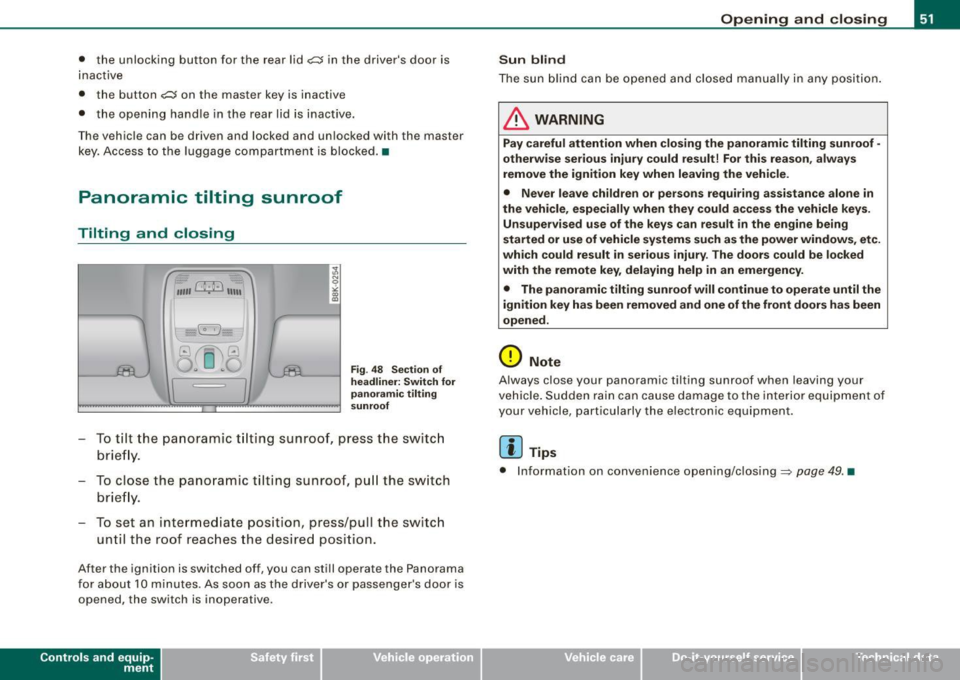
Fig. 4 8 Sec tio n of
he adlin er: Sw itch fo r
pa noram ic til ting
s u nro of
To tilt the panoramic t ilting sunroof, press the switc h
brie fly.
To close the panoramic tilting sunroof, pu ll the sw itch
brie fly.
To set an intermediate position, press/pull the switch until the roof reaches the desired position.
After the ignition is switched off, you can sti ll operate the Panorama
for about 10 minutes . As soon as the driver's or passenger's door is
opened, the switch is inoperative.
Con tro ls and eq uip
ment
Op ening and clo sing
S un blind
The sun b lind can be opened and closed manually in any position .
& WARNING
Pay careful attention when clo sing the panoramic tilting sunroof -
other wise seriou s injury could re sult! For t his r easo n, a lwa ys
remove the ignition key when leaving the vehi cle.
• Never le ave children or per sons requiring a ssist ance alone in
the v ehicle , e spe cially when they cou ld acce ss the vehi cle ke ys.
Un supervised use of the ke ys c an re sult in the engine being
s ta rted or use of vehicle system s such as the pow er windows, etc.
whi ch co uld r esult in serio us injur y. The door s could b e locked
with th e re m ote ke y, del aying h elp in an em ergency .
• The panor ami c tilting sunro of w ill continue to operate until the
igniti on ke y has been r em oved and one of th e front d oors ha s been
o pened .
0 Note
Always close your panoramic tilting sunroof when leaving your
vehicle . Sudden rain can cause damage to the interior equipment of
your vehicle, particularly the electronic equipment.
[ i ] Tip s
• Information on convenience opening/closing=> page 49. •
Vehicle care I I irechnical data
Page 57 of 360
![AUDI A5 COUPE 2010 User Guide Adjusting exterior lighting
The functions are selected in the radio or MM/*.
Fig. 53 MMI Display:
Exterior l ighting
-Select: Function button [CAR]> Exterior lighting .
Coming home](/img/6/57582/w960_57582-56.png "AUDI A5 COUPE 2010 User Guide Adjusting exterior lighting
The functions are selected in the radio or MM/*.
Fig. 53 MMI Display:
Exterior l ighting
-Select: Function button [CAR]> Exterior lighting .
Coming home")
Adjusting exterior lighting
The functions are selected in the radio or MM/*.
Fig. 53 MMI Display:
Exterior l ighting
-Select: Function button [CAR]> Exterior lighting .
Coming home*
The coming home function ensures that after
turning off the igni
tion and opening the driver's door
the vehicle periphery is illumi
nated in the dark. In addition, the front fog lights, the tail lights and
the license plate light are turned on. The power-on time can be set
for a period from
O (off) to 30 or 60 seconds.
Leaving home*
The leaving home functions ensures that
when unlocking, the
vehicle periphery is illuminated in the dark. In addition, the front fog
lights, the tail lights and the license plate light are turned on. This
function can be turned on and off.
Auto headlights*
When the light switch is in the AUTO~
page 53 position, the switch
on point of the lights can be changed in the automatic driving light
function.
Controls and equip
ment
Clear vision
Daytime running lights
The daytime running lights can be turned on or off using this func
tion. If the function is active, the daytime running lights are turned
on automatically when the ignition is switched on.
[ i] Tips
The coming home/leaving home function * is available only with the
switch in the AUTO position . •
Daytime running lights
When you turn on the ignition the daytime running lights
will come on automatically .
USA models
The daytime running lights are activated when the light switch
~ page 53, fig. 51 is in the O position or the AUTO position (only in
daylight conditions). The daytime running lights function can be
turned on and off in the radio or
MMI* menu Exterior lighting
~ page 55.
Canada models
The daytime running lights are activated when the light switch
~ page 53, fig. 51 is in the O position, ooo: position or the AUTO posi
tion (only in daylight conditions). The daytime running lights func
tion cannot be turned off.
& WARNING
Never use daytime running lights to see where you are going. They
are not bright enough and will not let you see far enough ahead for
safety, especially at dusk or when it is dark. Be aware of changes
in outside light conditions when you are driving and respond by
switching on your low beams
io. ~
I • •
Page 61 of 360

Interior lights
Front interior lights
The front interior lights also contain reading lights for the
driver and passenger.
M N N
-
!
Fig. 58 Headliner :
Front interior lights
The rocker switch @~fig . 58 for operating the interior
lighting has the following functions:
Door contact switch
- Place the switch @ in the middle position.
Interior light switched on
- Place the switch@ in posit ion
I.
Interior light switched off
- Place the switch @in position 0 .
Front reading lights
«~
- Press one of the switches ® to turn the right or left
reading light on or off .
Contro ls and eq uip
ment
Clear vision
With the door contact switch turned on, the interior lights turn on
as soon as you unlock the vehicle or open the doors. The lighting is
also turned on when the ignition key is removed. The lights go out
about 30 seconds after the doors are closed . When the vehicle is
locked or when the ignition is turned on, the interior lights are
turned off.
When a door is open, the interior lights are turned off after about 10
minutes to preven t draining of the battery .
The brightness of the lights is controlled automatically by a dimmer
when they are switched on and off. •
Rear interior lights
There are reading lights in the rear for the passengers.
Q)
Fig. 59 Headliner : R ea r
reading lights
The reading lights are switched on and off using the buttons "< ~. •
Vehicle care I I Technical data
Page 77 of 360
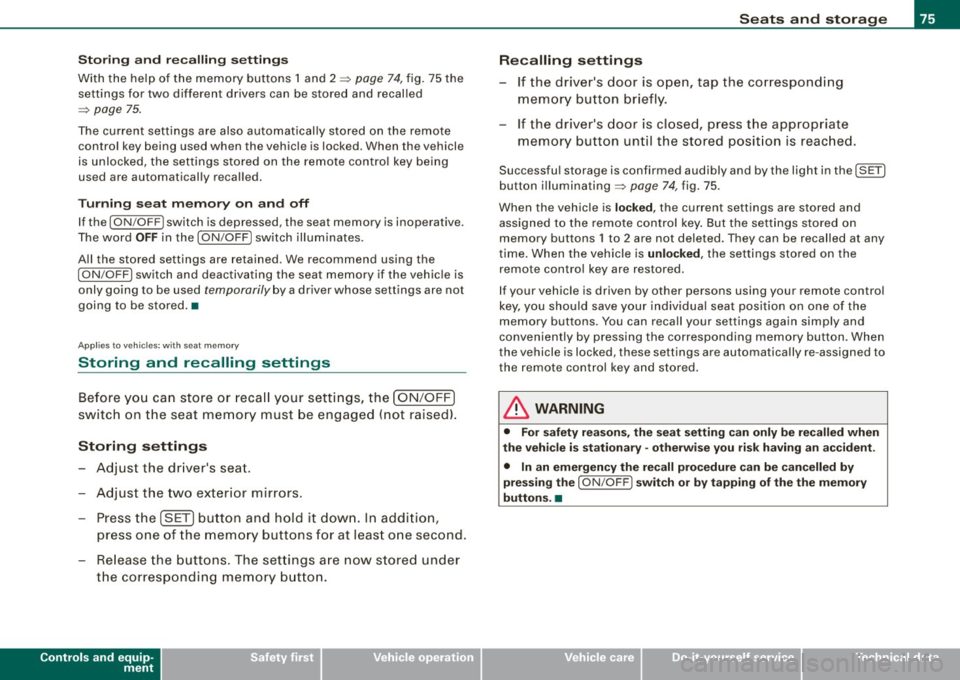
Storing and recalling settings
With the help of the memory buttons 1 and 2
~ page 74, fig. 75 the
settings for two different drivers can be stored and recalled
~ page 75.
The current settings are also automatically stored on the remote
control key being used when the vehicle is locked. When the vehicle
is unlocked, the settings stored on the remote control key being
used are automatically recalled.
Turning seat memory on and off
If the [ ON /OFF
I switch is depressed, the seat memory is inoperative.
The word
OFF in the [ON/OFF I switch illuminates.
All the stored settings are retained . We recommend using the
I ON/OFF I switch and deactivating the seat memory if the vehicle is
only going to be used
temporarily by a driver whose settings are not
going to be stored. •
Applies to vehicles : w ith seat m emo ry
Storing and recalling settings
Before you can store or recall your settings, the [ON/OFF]
switch on the seat memory must be engaged (not raised).
Storing settings
- Adjust the driver's seat .
- Adjust the two exterior mirrors.
- Press the [SET] button and hold it down. In addition ,
press one of the memory buttons for at least one second.
- Release the buttons. The settings are now stored under
the corresponding memory button.
Controls and equip
ment
Seats and storage
Recalling settings If the driver's door is open, tap the corresponding
memory button briefly.
If the driver's door is closed, press the appropriate
memory button until the stored position is reached.
Successful storage is confirmed audibly and by the light in the [SETI
button illuminating ~ page 74, fig. 75.
When the vehicle is
locked, the current settings are stored and
assigned to the remote control key. But the settings stored on
memory buttons 1 to 2 are not deleted. They can be recalled at any
time. When the vehicle is
unlocked, the settings stored on the
remote control key are restored.
If your vehicle is driven by other persons using your remote control
key, you should save your individual seat position on one of the
memory buttons. You can recall your settings again simply and
conveniently by pressing the corresponding memory button. When
the vehicle is locked, these settings are automatically re-assigned to
the remote control key and stored.
& WARNING
• For safety reasons, the seat setting can only be recalled when
the vehicle is stationary -otherwise you risk having an accident .
• In an emergency the recall procedure can be cancelled by
pressing the [
ON/OFF I switch or by tapping of the the memory
buttons. •
I • •
Page 110 of 360

• ..__O_ n_ t_h _ e_ r_ o_ a_ d ____________________________________________________ _
Ignition lock and ignition switch
Starting engine with the key
The ignition is switched on and the engine started with
the ignition key.
Fi g. 11 7 Ignit ion key
Insert the key into the ignit ion lock .
Manual transmission : Fully depress the clutch pedal a nd
move t he shi ft lever to the neutra l posi tion .
Automatic transmission*: Step on the brake peda l and
move the selector lever to the
P or N posit ion.
Press the key=::> fig . 117 -the eng ine will sta rt.
By pressing the key w ithout stepping on the clutch or the brake, the
ign ition is switched on and off. With the ignition on, the steering
whee l is unlocked.
You can only remove the key with the ignition switched off. To do
this, you have to press on the key again. With an automatic trans mission, the selector lever m ust be in the
P position.
When starting the engine, major electrical loads are switched off
temporarily. After starting a cold engine
, there may be a brief period of increased
noise because the o il pressure must first build up in the hydraulic
valve adjusters . This is normal and not a cause for concern .
I f the engine should not start immediately, the starting process is
automatically stopped a fter a short t ime . Repeat starting procedure.
Driv er me ssage in the instrument clust er di spl ay
Pre ss b rake ped al to s ta rt engine
This message appears if you do not step on the brake pedal to start
the engine on a vehicle with an automatic transmission .
Press clut ch pedal to sta rt engine
T his message appears if you do not step on the c lutch peda l to start
the engine on a vehicle with a manua l transmission .
Engage N or P to start engine
This message appea rs when attempting to start the engine if the
selector lever for the automatic transmission is not in the
P or N
position . The engine can only be started with the selec tor in these
positions.
S hift to P, othe rwis e veh icle can roll away. Doors do not lock if le ver
is not in
P.
This message appears for safety reasons along with a warning
signal. It appears if the selector lever for the automatic transmiss ion
is not in the
P p o sition after the ign it ion is switched off. Move the
selector lever to the
P position, otherwise the vehicle is not secured
aga inst ro lling away. You a lso cannot l ock the vehicle using the
locking bu tton on the door handle or using the remote key .
& WARNING
• Always take the key with you wheneve r you leave yo ur vehi cle .
Otherwi se , the engine could be start ed or electr ical equipment
s u ch as the po wer windows could be oper ated . Th is ca n lead to
seri ous injury.
Page 111 of 360

___________________________________________________ O _n_ t_h _ e_ r_ o _ a_ d __ lfflll
& WA RN IN G ( continu ed )
• Never le ave children or per son s requiring a ssis ta nce unat
te nded in the veh icle . The do ors can be locked u sing the remote
tr ansmitter, pre venting people from es caping fro m the vehi cle on
their own in t he event of an emergen cy. D epending on the time of
year , people inside the veh icle can be e xpo sed to ver y high or very
low t emperature s.
• Never remove the ignit ion key from t he ig nition loo k while the
v ehic le is moving . Othe rwi se, the steering lock could sudden ly
e ngage and you w ould not be able to steer the ve hicle .
0 Note
• In the event of a malfunction in the electronic ignition lock a
symbol in the ins trument cluster flashes with the message
Ign ition
l ock defe cti ve .
• Avo id high engine speeds, fast acce leration or heavy engine
loads while the engine is sti ll cold. This could damage the engine.
sions, do not let your vehic le stand and war m up. Be ready to drive
off immediate ly after starting your vehicle . Maintain moderate
speed until the engine is completely warm . Remember, the engine
performs best a t operating temperature .
[ i J Tip s
• If the key cannot be removed from the ignition lock, you have to
pul l the mechanica l key out of the master key in orde r to be ab le to
lock the vehic le The vehicle can be locked with the mechanical key
=> page 40.
• I f you open the driver's door with the ignition switched on , a
buzzer sounds and the message
Ignition i s on appears in the instru
ment cluster display. Switch the ignition off .•
Controls and equip
ment
Stopping the engine
Bring t he vehicle to a full s to p.
- Automatic transmission*: Move t he selector lever to the P
or N posi tion.
Press on the ignition key . The engine is turned off.
Emergen cy off
If it is necessary in unusual circumstances, the engine can be
switched off while the vehic le is moving. The engine will be
switched o ff if you press on the key for an extended pe riod .
& WARNING
• Nev er turn off the engine until the vehicle h as come t o a
c omplete stop.
• The b ra ke boo ster and se rvot ronic onl y work w hen the eng ine
is running . With the ignition turned off , you have to app ly mo re
force when ste ering or br aking . Since you cannot stee r and stop
norm ally, th is c an le ad to a ccidents and serious injurie s.
• The rad iator f an ca n cont inu e to ru n fo r up t o 10 minute s eve n
after you have turned off the engine and remo ved the ign ition ke y.
The r adi ator fan can als o tu rn on ag ain if the engine coolant he ats
up be cau se of inten se sunl ight or heat build-up in the engine
compartment.
0 Note
Do not s top the engine immed iately after hard or extended driving .
Keep the engine running for approxima te ly two minut es to prevent
excessive heat bui ld-up. •
I • •