wheel AUDI A5 COUPE 2010 User Guide
[x] Cancel search | Manufacturer: AUDI, Model Year: 2010, Model line: A5 COUPE, Model: AUDI A5 COUPE 2010Pages: 360, PDF Size: 84.39 MB
Page 98 of 360
Warm and cold
tioning component. Please cons ult an authori zed dealersh ip if there
is an operating problem. •
Applies t o ve hicles: w it h d elu xe au to m ati c clim ate con tro l
Rear air vents
The rear air vents are located in the center console.
- Rotate the thumbwheel to open and close the vents.
- To ad just the direction of the airflow from the outlet,
move the tab in the center of the outlet in the desired
direction. The direction of the air delivered from the
vents can be adjusted horizontally and vertically.
The air vents are actuated either automatically or manually d e pending on the op erating mode selec ted . H eated or unh eated
fresh air, or cooled air flows from the vents.
i he ai r ven ts to heat the rear footwell are located under the front
seats.
[ i J Tips
If the climate control is operating in cooling mode, air flows prima
rily from the vents in the center console. To achieve adequate
cooling, you should never close these v ents completely. •
Applies to ve hicles: with delu xe au to m atic c limate con tro l
Economical use of the climate control system
Economical use of the climate control system helps save
fuel.
When the climate control system is working in cooling mode, engine performance is reduced and fuel consump- tion is affected. To keep the time
the climate control system
is on as short as possible, you should do the following:
- To save fuel, turn off cooling mode by pressing the
[AC )
button (ind icator light goes out).
- In addition, if you open the window or the
panorama/tilting sunroof* while driving, turn off cooling
mode by pressing the
[AC) button (indicator light goes
out).
- If the vehicle is extremely hot due to the heat of the sun,
briefly open doors and windows .
c£> For the sake of the environment
When you save fuel, you reduce emissions from the vehicle. •
Deluxe automatic climate control
plus
Applies to vehicle s: with D elu xe a utoma tic cl ima te co ntrol p lus
Description
The air conditioner is fully automatic and is designed to
maintain a comfortable and uniform climate inside the
vehicle.
We recommend the following settings :
- Set the temperature to 75 °F (+23 °Cl.
- Press the [AUTO
I button.
With this setting, you attain maximum comfort in the least amount
of time . Change th is s etting, as des ired, to meet your personal
needs .
~
Page 105 of 360
___________________________________________________ W_ a_ r_m _ a_ n_d_ c_ o_ ld _ __.11111
component. Please consult a authorized dealership if there is an
operating problem. •
Applies to v ehicl es: with De lux e autom atic c lim ate contro l plus
Air vents
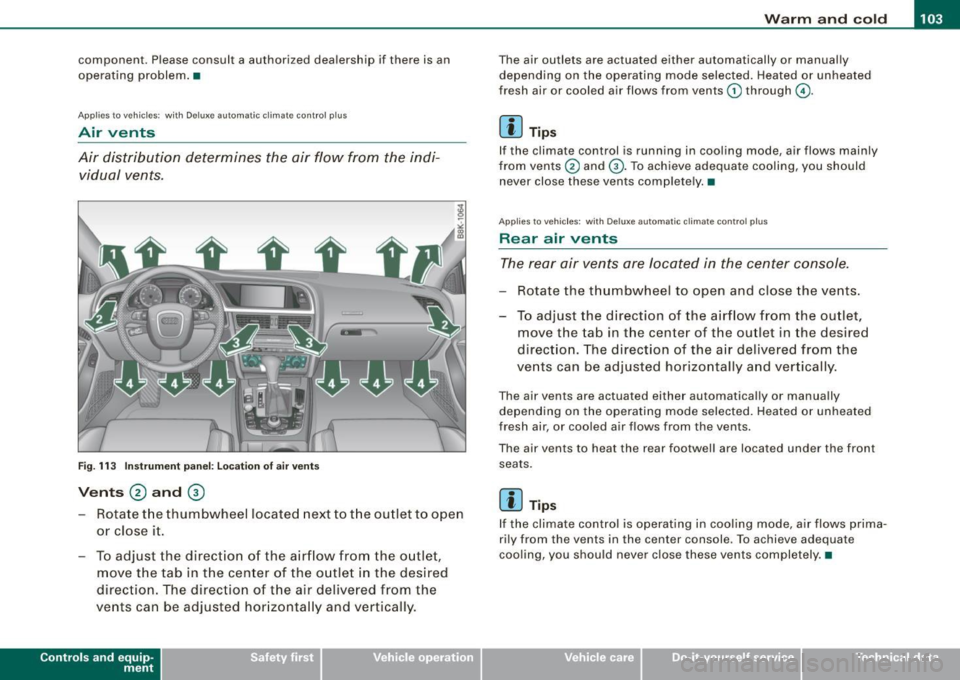
Air distribution determines the air flow from the indi
vidual vents.
Fig. 113 Instrument panel: Locat ion of air vents
Vents @ and ®
- Rotate the thumbwheel located next to the outlet to open
or close it.
- To adjust the direction of the airflow from the outlet,
move the tab in the center of the outlet in the desired
direction . The direction of the air delivered from the
vents can be adjusted hor izontally and vertically .
Contro ls and eq uip
ment
The air outlets are actuated either automatically or manual ly
depending on the operating mode selected. Heated or unheated
fresh air or cooled air flows from vents
G) through G).
[ i ] Tips
If the climate control is running in cooling mode, air flows mainly
from vents
0 and G). To achieve adequate cooling, you should
never close these vents comp lete ly. •
Applies to ve hic les : with Deluxe automa tic clima te cont ro l p lus
Rear air vents
The rear air vents are located in the center console.
Rotate the thumbwheel to open and close the vents.
To adjust the direction of the airflow from the outlet,
move the tab in the center of the outlet in the desired
direction. The direction of the air delivered from the
vents can be adjusted horizontally and vertically.
The air vents are actuated either automatically or manually
depending on the operating mode selected. Heated or unheated
fresh air, or cooled air f lows from the vents.
The air vents to heat the rear footwell are located under the front
seats .
[ i ] Tips
If the climate control is operating in cooling mode, air flows prima
rily from the vents in the center console . To achieve adequate
cooling, you should never close these vents completely. •
Vehicle care I I irechnical data
Page 109 of 360

----------------------------------------------~O~n~t:!..h~ e:...!.:ro~a~d!._ _J-
On the road
Steering
Manually adjustable steering wheel
The height and reach of the steering wheel can be
adjusted.
First, adj ust t he drive r's seat correct ly.
F ig . 116 L ev er unde r
th e steeri ng col umn
- Pull the lever~ fig . 11 6 -A rrow- ~ /n..
- Move the steering wheel to the desired position.
Push the lever against the steering column until it locks.
T here must be at l east 10 inches (25 cm) between your chest and the
center of the steering wheel. If you cannot sit more than 10 inches
(25 cm) from the steering wheel, see if adaptive equipment is avail
able to help you reach the pedals and increase the distance from the
steering wheel.
F or detailed information on how to ad just the driver's seat, see
=> page 72.
Con tro ls and eq uip
ment
The steering wheel can be adjusted even when the ignition is turned
off. For vehicles with seat memory, the individual positions for the
steering whee l can be stored along with the seat position.
& WARNING
Improper u se of ste ering wheel adju stme nt and improper se ating
po sition can cau se seriou s per sonal injury .
• Adju st the steering wheel column onl y when the vehi cle is not
moving to preven t los s of vehicl e control.
• Adjust the dr iver' s se at or steering wheel so that there is a
minimum of 10 inch es (25 cm ) b etwe en your che st and the
s tee ring wheel
=> pag e 170 , fig. 1 8 0. If you cannot maintain th is
minimum di stance, the airbag sy ste m cannot protect you prop
erly .
• If physical limitation s prevent you from sitting 1 O inche s (25
c m ) or mo re from the steering whee l, check with your authori zed
Audi dealer t o see if adaptive equipment i s available .
• If the stee ring whe el i s a ligned with you r fa ce, the supple
men tal driver' s airbag cannot provide as much prot ect ion in an
a c cident . A lw ays m ake sure that the steering wheel i s aligned with
your chest .
• Alway s hold t he steer ing wheel with yo ur h and s at the 9 o'c lock
a nd 3 o'clock po sition s to reduce the ri sk of per son al injury if the
dri ver' s airb ag dep lo ys .
• Neve r hold the steering wheel at the 12 o'clock po siti on or with
your hand s insid e the steeri ng wheel rim or on the steer ing wheel
hub. H olding the steerin g wheel th e wrong way can cause seri ous
i nj urie s to the h ands , arm s and head if the dr iver' s a irbag
deploy s.•
Vehicle care
I I irechnical data
Page 115 of 360

On the road -
----------------
& WARNING
If a gear or a drive range (automatic transmission) is engaged with
the vehicle stationary and the engine running, you must in no
instance accelerate or release the clutch carelessly . Otherwise the
vehicle will start to move immediately -risk of an accident.
0 Note
If the symbol (CD) in the display or the indicator light BRAKE (USA
models)/ {(i)) (Canada models) in the instrument cluster flashes, there
is a malfunction in the brake system. By pressing the
[SET] button,
you can bring up a driver message which explains the malfunction in more detail. If the driver message
Parking brake! appears, there
is an operating malfunction in the parking brake which you should
have repaired immediately by an authorized Audi dealer or other
qualified workshop ~
page 29.
[ i] Tips
• You can apply the parking brake at any time -even with the igni
tion turned off. The ignition must be turned on in order to release
the parking brake.
• Occasional noises when the parking brake is applied and
released are normal and are not a cause for concern.
• When the vehicle is parked, the parking brake goes through a
self -test cycle at regular intervals. Any associated noises are
normal. •
Parking
Various rules apply to prevent the parked vehicle from
rolling away accidentally.
Parking
- Stop the vehicle with the foot brake.
Controls and equip
ment
- Pull the switch to apply the parking brake.
- Automatic transmission*: Move the selector lever to
P.
- Turn the engine off=:,& .
- Manual transmission: Shift into 1st gear.
In addition on inclines and grades
-Turn the steering wheel so that your vehicle will roll
against the curb in case it should start to move.
& WARNING
• When you leave your vehicle -even if only briefly -always
remove the ignition key. This applies particularly when children
remain in the vehicle. Otherwise the children could start the
engine, release the parking brake or operate electrical equipment
(e.g. power windows). There is the risk of an accident.
• When the vehicle is locked, no one -particularly not children
should remain in the vehicle. Locked doors make it more difficult
for emergency workers to get into the vehicle -putting lives at
risk. •
Starting from rest
The starting assist function ensures that the parking
brake is released automatically upon starting.
Stopping and applying parking brake
-Pull the switch to apply the parking brake.
Starting and automatically releasing the parking
brake
-When you start to drive as usual, the parking brake is
automat ically released and your vehicle begins to move . .,..
I • •
Page 116 of 360

• .___O_ n_ t_h _e_ r_o _a_ d __________________________________________________ _
When stopping at a traffic signal or stopping in city traffic on vehi
cles with an automatic transmission, the parking brake can be
applied. The vehicle does not have to be held with the footbrake . The
parking brake eliminates the tendency to creep with a drive range
engaged . As soon as you drive off as usual , the parking brake is
released automatically and the vehicle starts to move.
Starting on slopes
When starting on inclines, the starting assist prevents the vehicle
from unintentionally rolling back . The braking force of the parking
brake is not released until sufficient driving force has been built up
at the wheels .
[ i] Tips
For safety reasons , the parking brake is released automatically only
when the driver's safety belt is engaged in the buckle .•
Starting off with a trailer
To prevent rolling back unintentionally on an incline, do
the following:
- Keep the switch pulled and depress the accelerator . The
parking brake stays applied and prevents the vehicle
from rolling backward.
- You can release the switch once you are sure that you are
developing enough driving force at the wheels by
depressing the accelerator.
Depending on the weight of the rig (vehicle and trailer) and the
severity of the incline, you may roll backwards as you start. You can
prevent rolling backwards by holding the parking brake switch
pulled out and accelerating -just as you would when starting on a
hill with a conventional hand brake. •
Emergency braking
In the event that the conventional brake system fails or
locks.
- In an emergency, pull the switch and continue to pull it to
slow your vehicle down with the parking brake.
- As soon as you release the switch or accelerate, the
braking process stops.
If you pull the switch and hold it above a sp eed of about 5 mph (8
km/h), the emergency braking function is initiated. The vehicle is
braked at all four wheels by activating the hydraulic brake system .
The brake performance is similar to making an emergency stop
=>& .
In order not to activate the emergency braking by mistake, an
audible warning tone (buzzer) sounds when the switch is pulled. As
soon as the switch is released, or the accelerator pedal is depressed,
emergency braking stops.
& WARNING
Emergency braking should only be used in an emergency, when
the normal foot brake has failed or the brake pedal is obstructed .
Using the parking brake to perform emergency braking will slow
your vehicle down as if you had made a full brake application. The
laws of physics cannot be suspended even with ESP and its asso
ciated components (ABS, ASR, EDS) .
In corners and when road or
weather conditions are bad, a full brake application can cause the
vehicle to skid or the rear end to break away -risking an
accident. •
Page 120 of 360

-Adaptive cruise control .._ _ ______,:,.._ _______________________________________ _
Adaptive cruise control
Speed and distance control system
Applies to vehicles: with adaptive cruise contro l
Description
The adaptive cruise control driver assistance program is
a combined speed and distance control system.
Fig . 122 Front
bumper: Position of
radar sensor
Any speed between about 20 mph (30 km/h) and about 95 mph
(150 km/h) can be set and held with the adaptive cruise control. The
system also regulates a pre-set distance from the vehicle ahead
within the limits of the system described.
Driving can be more relaxed, particularly on long trips on interstates
or on other highways that are generally straight.
How does it work?
You can operate the adaptive cruise control using the lever on the
steering wheel column:::::,
page 121, "How is the speed stored?" and
~ page 123, "How is the distance (time interval) set?".
Driver information
Important information is brought up in the speedometer and in the
instrument cluster display as the vehicle is being driven
=:> page 124, "Driver information".
What is important for you to know
The adaptive cruise control is set with system -specified limits, that
is, as a driver, you will have to adjust the speed and distance to the
vehicle ahead in some instances~
page 128, "Driver intervention
prompt" and~
page 130, "System limitations".
& WARNING
Improper use of the adaptive cruise control can cause collisions,
other accidents and serious personal injury.
• Never drive at speeds that are too high for traffic, road and
weather conditions.
• Never follow the vehicle in front so closely that you cannot stop
your vehicle safely. The adaptive cruise control cannot brake the
vehicle safely when you follow another vehicle too closely. Always
remember that the adaptive cruise control has a braking power
that is only about 25% of the vehicle's maximum braking ability,
the automatic braking function cannot bring the vehicle to a stop.
• Never use adaptive cruise control on roads where you cannot
drive safely at a steady speed, including city, stop-and-go or heavy
traffic, on winding roads or when road conditions are poor (for
example, on ice, gravel , in fog, heavy rain or on wet roads that
increase the risk of hydroplaning).
• The radar sensor's
vision can be reduced by rain, snow and
heavy spray. This can result in vehicles driving ahead being inade
quately detected or, in some circumstances, not detected at all. If
necessary, take action yourself! ..,
Page 133 of 360

Adaptive cruise control -____________ ____,_ __ ___.
Applies to vehic les: with adapt ive c ruise contro l
Vehicles offset to one side
I IL
F==================;;;g
Fig. 137 Vehicle trav
eling ahead outside the
detection range of the
radar sensor
Vehicles traveling ahead and to one side cannot be detected by the
adaptive cruise control unti l they are within the detection range of
the sensor. •
Appl ies to vehic les: with adaptive cru ise con trol
Lane changes by other vehicles
Fig . 138 A vehicle
changes lanes
Vehicles which move into your lane a short distance ahead cannot
be identified by the adaptive cruise contro l until they are in the
radar sensor's detection range.•
Contro ls and eq uip
ment
Ap plies to veh ic les: with adaptive cruise contro l
Vehicles that are difficult to detect
I IL F==================-;g
Fig . 139 Two-wheeled
vehicle driving ahead
Vehicles that are difficult to detect, e.g. two -wheeled vehicles
ahead, vehicles with high ground clearance, protruding load, are
frequently detected late or not at al l, under some circumstances .•
A pplies to veh ic les : with ada ptive c ruise cont rol
Stationary vehicles
Fig . 140 Turning and
stationary vehicle ....
Vehicle care I I irechnical data
Page 150 of 360

• ..__T_ ra _ n_s_ m_ i_ s _s_ i_ o _ n ___________________________________________________ _
The transmission is also equipped with tiptronic. It allows the driver
t o shift gears
manually if desired => page 152. •
Applies to v ehi cles : w ith aut omati c tra nsm iss io n
Driving the automatic transmission
St artin g th e e ngin e
- The selector lever must be in
N or P.
Starting off
- Press and hold the brake pedal.
Fig. 159 S hift gate on
t h e ce nter co nso le :
selector lever with
re lease button
- Press and hold the release button in the selector lever
handle and move t he selector lever f rom
P or N to D and
release the button => & .
- Wait briefly until the transm ission has shif ted (you will
feel a sligh t movement).
Remove your foot from the brake pedal and accelerate.
Rocking back and forth to become unstu ck
- Sh ift only between
D and R w hen the vehicle is at a full
stop and the eng ine is running at idle speed . S
topp ing
- Press and hold the brake pedal until the vehicle has come
to a comp lete stop.
- Keep the brake pedal depressed so that the vehic le
cannot ro ll forward or backward while it is idling =>& .
- Once s topped,
do not depress the acce lerator pedal to
rev up the engine=>&.
P a rk in g
- Press and hold the brake pedal until the vehicle has come
to a comp lete stop.
Set the parking brake firmly=>
page 113, "Parking".
- Press and hold the release button in the selector lever
handle, move the selector leve r into
P and then let go of
the release button => & .
The selector lever must be in Nor P. If one of the driving positions
is engaged a safety switch will prevent the eng ine from being
started. See also=>
page 108 .
Before you move the selector lever from the P position, you must
a lways apply the brake pedal before and while depressing the
button in the handle of the se lector lever .
& WARNING
• Unintende d vehicle mov ement can cau se se rio us injur y.
- Wh en the sel ector l ever is in a driving posit io n, th e ve hicle
may c reep, ev en at idle speed . Th erefore d o no t re lease the
p ar king brak e or fo ot b ra ke u ntil you are rea dy to move,
be caus e po wer is tran sm itt ed to the wheels as s oon as a
dri ving po sition i s engag ed . ..,
Page 151 of 360
_______________________________________________________ T_ ra_ n_s_ m __ is_s_ io_ n __ BII
& WA RNIN G (continu ed )
- Do not accelerate while sele cting a driving pos ition. At this
time the engine mu st be at idle speed so that undue stre ss is
not placed on the clutches in the transmiss ion .
- Remember: Even when stopped briefly with the automatic
transmission in D ,S or R, engine power is being transmitted to
the wheels. Your vehicle could "creep " forward or back ward .
When stopped , keep the brake pedal fully depressed and use
the parking brake if necess ary to keep the vehicle from rolling.
• If the selector lever i s unintentionally moved into N while you
are driving, take your foot off the accele rator pedal and wait for
the eng ine to return to idle speed before selecting a dr iving posi
tion.
• Never shift into R or P when the vehicle is in mot ion .
• Never get out of the driver 's seat when the engine is running .
• If you mu st get out of the vehicle , move the selector lever
securely into the
P pos ition and apply the parking brake firmly .
• If the engine must remain running , never have any driving po si
tion engaged when che cking under the hood. Make sure the
selector lever has securely engaged and is locked in
P with the
parking brake firmly set~ page
263 , "Engine compartment ".
Otherwise , any increase in engine speed may set the vehicle in
motion , even with the parking brake applied. •
Controls and equip
ment
Ap plies to vehicles: wit h auto matic tra nsmiss io n
Selector lever positions
This sec tion describes the selec tor l ever positi ons an d
dr iv ing ra ng es.
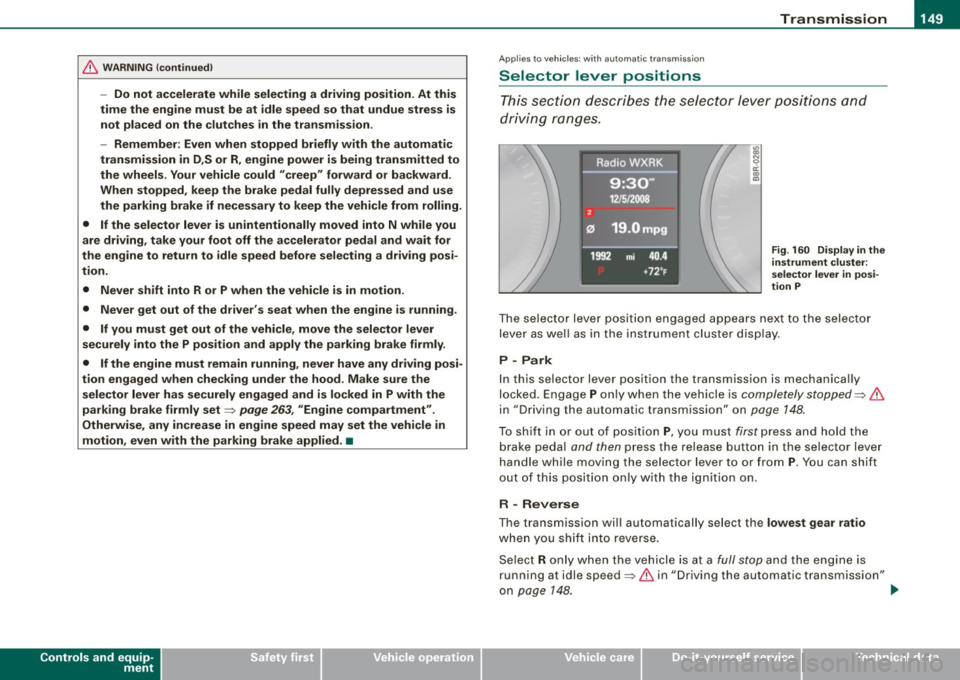
Fig . 160 Display in the
instrument clu ste r:
se lector lever in posi
tion P
The se le cto r lev er p osit io n engaged ap pears ne xt to the selec to r
lever as wel l as in the instrument cluster display .
P -Park
In this selecto r lever position the transmission is mechanica lly
lo cked. Engage
P o nly w hen th e vehicle is comple tely stopped ~ &
in "Driving the automatic transm ission" on page 148.
To s hift i n or out of positi on P, yo u m us t first p ress and h old the
b rake peda l and then press the re lease button in the se lector lev er
handle while moving the selector lever to o r from
P . You can shift
out o f this pos it io n only with the ig niti on on .
R - Reverse
The transmission wi ll automatically sel ect the lowest gear ratio
whe n you sh ift i nto reverse.
Se lec t R only w hen th e ve hicle is a t a
full stop an d the en gin e is
running at idle speed~
& in "Driving the automatic transmission"
on page
14 8. ~
I • •
Page 155 of 360

Transmi ssion -_______________ ___.
Applies to vehi cles : wi th tip troni c st eer ing w heel
Steering wheel with tiptronic
The shift buttons on the steering wheel allow the driver to
shift gears manually.
F ig . 164 Steer in g
whee l: S hift b utt ons
- To downshift, touch the button on the left Q .
- To upshift , touch the button on t he r ight G) .
The shift buttons are activated when the selector lever is in D, S or
in the manual shift program (tip tronic) .
Of course, you can continue to use the manual shift program with
t he selector lever on the center console .•
A pplies to vehicle s: with automatic t ran sm iss ion
Fail -safe mode
If tiptronic suffers a malfunction, the f ail-safe mode main
tains minimum drivability .
In the event of particular system malfunctions, the automatic trans
mission switches to the fail-safe mode . This is signaled by all the
segments in the display illuminating or going out.
Con tro ls and eq uip
ment
You can continue to move the selector lever to a ll positions . The
manual shift p rogram (tiptronic) is switched off in the fail -safe
mode.
I n selector lever positions D and Sand in the manual shift program,
the transm ission remains in 3rd gear if 1st, 2nd or 3rd gear was
engaged previously. The transmission remains in 5th gear, if 4th, 5th
or 6th gear was engaged previously .
The next time you drive off or start the engine, 3rd gear is engaged .
You can continue to use reverse gear. But the electronic loc kout for
reverse gear is turned off .
0 Note
If the transmission switches to fail-sa fe mode, you should take the
vehicle to an authorized Audi dea le rship as soon as possib le to have
t he condition corrected .•
A pplies to vehi cles : w ith au to m atic t ran smi ssio n
Automatic transmission malfunction t'.!>
In the event of a system malfunction, the automatic transm ission
switches to emergency operation mode .
Gearb ox malfun cti on: you can continue dr iving
You can continue to drive the veh icle. See an authori zed Audi dealer
or other qua lified workshop at the next opportunity .
Gearbo x m alfun ction : you can continue driving !limited
fun ctionality )
There is a serious system ma lfunction:
• The program shifts only into certain gears .
• The engine may stall.
• I t is not poss ib le to restart the engine if it has been switched of f.
• Continuing to drive could resu lt in subsequent damage . .,,_
Vehicle care I I Technical data