light AUDI A5 COUPE 2012 User Guide
[x] Cancel search | Manufacturer: AUDI, Model Year: 2012, Model line: A5 COUPE, Model: AUDI A5 COUPE 2012Pages: 316, PDF Size: 78.59 MB
Page 20 of 316
18 Instrum ent s and w arn ing /indic ato r light s
BRAKE/ CQ)) Brake system
The warning/indicator light flashes if brake
fluid level is low, if there is an ABS system
malfunction or a parking brake malfunction.
The 1111 (USA models)/ . (Canada models)
light illuminates when the ign ition is turned
on .
It goes out after the engine has been
started. This indicates t hat the brake war ning
light is funct ion ing properly.
If th e br ake w ar ning light d oes not light up
w hen the engin e is c ranking , th ere ma y be a
ma lfun cti on in th e ele ctric al sys tem. In thi s
case, c ontact an auth oriz ed Audi d eale r.
If the brake system warning/ind icator light
flashes, there is a brake system malfunction .
By pressing the
ISE TI button, you can br ing up
a driver message which exp la ins the ma lfunc
tion in more detail
Q page 30.
If the ABS fails, the ABS warning/ind icator
light
B (USA mode ls)/ 11] (Canada mode ls)
flashes together w it h the brake system warn
ing/i ndicator light
Q & .
(USA models): If the 1111 warn ing light and
the
El warning light illuminate togethe r, im
mediately contact your author ized Audi dealer
or qualified workshop to have all bra ke pads
inspected
q page 34 .
When the light comes on, an audib le warni ng
signal is also give n.
A WARNING
- USA models: If the 1111 warning l ight
and
the m warning light come on to
gether, the rear wheels could lock up
first under hard braking . Rear wheel lock
up can cause loss of vehicle control and
an acc ident. Have your vehicle repaired
immediately by your authorized Audi
dealer or a qualified workshop . Dr ive
slowly and avoid sudden, hard brake ap·
plicat ions.
- Canada models: If the brake warn ing
light . and the ABS warning light
II]
come on together, the rear wheels could
.
lock up first under hard braking . Rear
wheel lock-up can cause loss of vehicle
control and an accident . Have your vehi
cle repaired immed iately by your author·
ized Audi dealer or a qualified workshop .
Drive s low ly and avoid sudden, hard
brake applications.
- If the brake warning/ind icator light does
not go ou t after a few seconds and the
pa rking brake released, or lights up wh ile
you are driv ing, the fluid level in the
brake fluid reservoir is too low. If yo u be
lieve that it is safe to do so, proceed im
mediately at low speed to the nearest
author ized Audi dealer or qualif ied repair
facility and have the brake system in·
spected.
- Always keep in mind that after severa l
brake applications, you will need greater
pressure on the brake pedal to stop your
veh icle. Do not rely on strained brakes to
respond with max imum stopping power
in critical s ituations. You must allow fo r
increased braking dis tances. The extra
distance used up by fading brakes could
lead to an accident.
Page 21 of 316
Driver information
display
Introduction
General notes
The driver informa tion display inside the in
strument cluster provides you, the driver,
with much useful information.
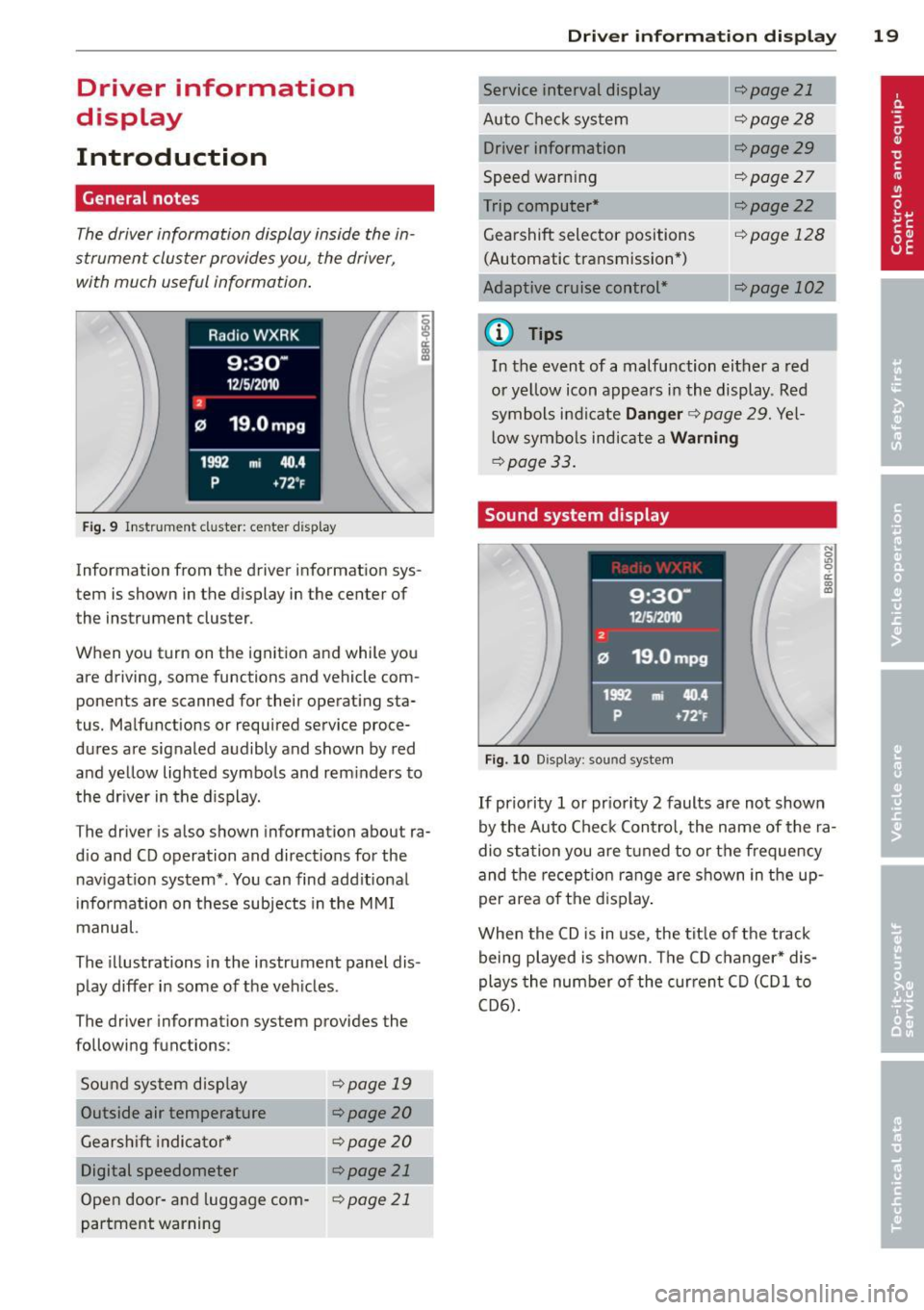
Fig. 9 Instr ument cluster: center d isplay
Information from the driver information sys
tem is shown in the display in the center of
the instrument cluster.
When you turn on the ignition and while you
are driving, some functions and vehicle com
ponents are scanned for their operating sta
tus. Malfunctions or required service proce
dures are signaled audibly and shown by red
and yellow lighted symbols and rem inders to
the dr iver in the display.
The driver is also shown information about ra
d io and CD operation and directions for the
nav igation system*. You can find add itional
i n formation on these subjects in the M MI
manual.
The illustrations in the instrument panel dis
play differ in some of the vehicles .
The driver information system provides the
following functions:
Sou nd system disp lay
¢page 19
Outside air temperature ¢ page 20
Gearshift indica tor * ¢ page 20
Digital speedometer ¢ page 21
Open door -and luggage com-¢page 21
partment warning
Driver inform ation di spl ay 19
Service interval display
Auto Chec k sys tem
Driver information
Speed warn ing
Trip computer*
Gearshift selector positions (Automatic transmission *)
Adaptive c ruise control*
a) Tips
¢page 21
¢page28
¢page29
¢page27
¢page22
cf) page 12 8
c::.page 102
In the event of a malfunction either a red
or yellow icon app ears in the display. Red
symbols indicate
Danger ¢ page 29. Yel
l ow symbo ls indicate a
Warning
¢page 33.
Sound system display
Fig. 10 Display: sound system
If priority 1 or pr iority 2 faults are not shown
by the Auto Check Contro l, the name of the ra
dio station you are t uned to o r the frequency
and the recept ion ran ge are shown in the up
per area of the d isplay .
When the CD is in use, the tit le of the track
being played is shown. The CD changer* dis
plays the number o f the cur rent C D (CDl to
CD6) .
Page 22 of 316
20 Driver in formation d ispl ay
Outside temperature display
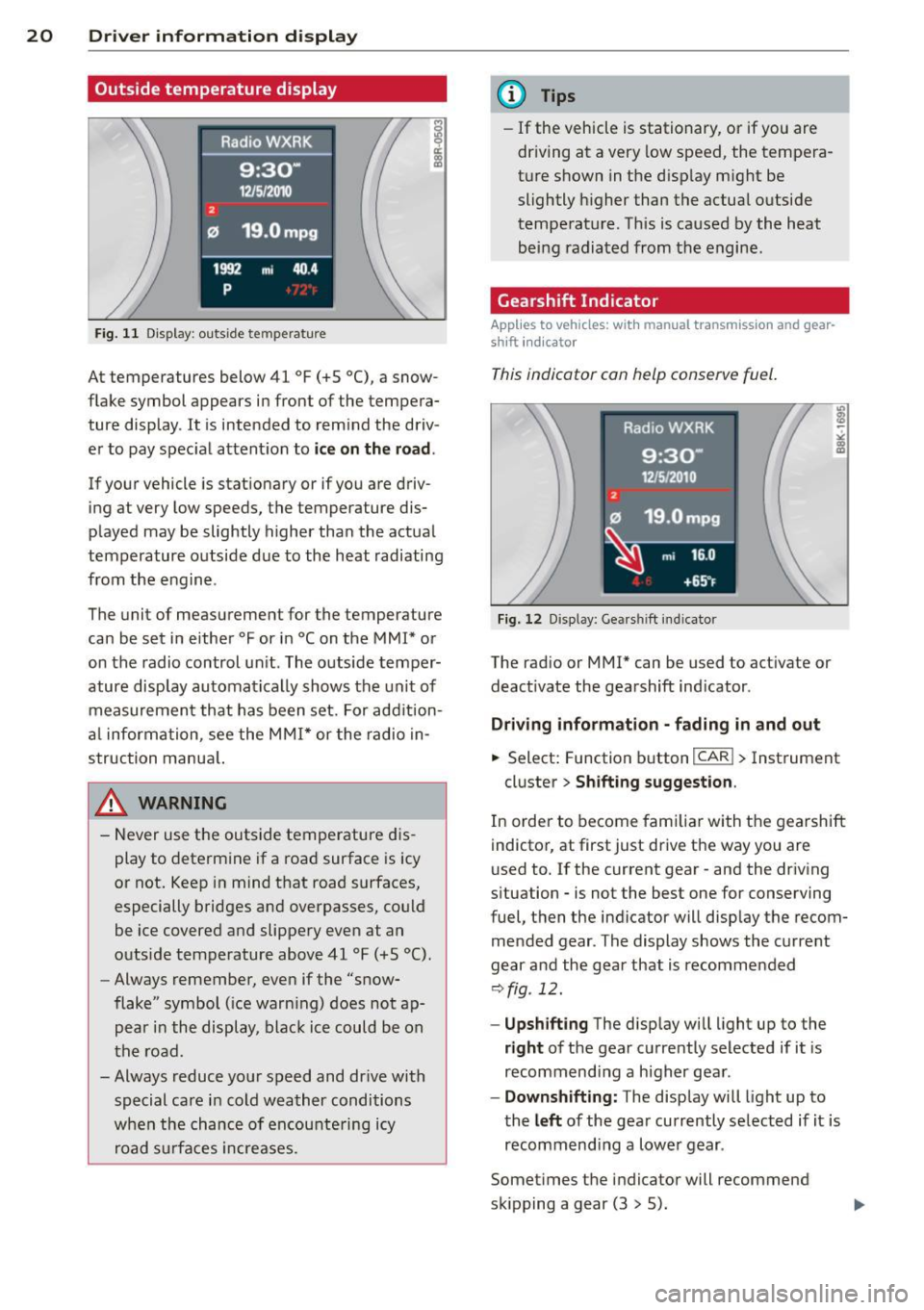
Fig. 11 Display : outside te mperature
At temperatures below 41 °F (+S °C), a snow
flake symbol appears in front of the tempera ture display . It is intended to remind the driv
er to pay spec ial attent ion to
ic e on the roa d.
If your vehicle is stat ionary or if you are driv
ing at very low speeds, the temperature dis
played may be slightly higher than the actual
temperature outside due to the heat radiating
from the eng ine .
The unit of measurement for the temperature
can be set in either °For in °Con the MM I* or
on the radio control un it . The outside temper
ature display automatically shows the unit of
measurement that has been set. For addition
a l information, see the MMI* or the radio in
struction manua l.
_& WARNING
- Never use the outside temperature d is
play to determine if a road surface is icy
or not. Keep in mind that road surfaces,
especially bridges and overpasses, could
be ice covered and slippery even at an
outside temperature above 41 °F (+S
0 ().
-Always remember, even if the "snow
flake" symbol ( ice warn ing) does not ap
pear i n the display, blac k ice could be on
the road.
- Always reduce you r speed and drive with
special care in cold weather conditions
when the chance of encountering icy
road s urfaces increases .
'
(D Tips
-If the vehicle is stationary, or if you are
dr iving at a very low speed, the tempera
t u re shown in the d isp lay m ight be
slightly h igher than the actual outside
temperat ure. Th is is caused by the heat
being radiated from the engine .
Gearshift Indicator
Applies to vehicles: wit h manual transmiss ion and gear
shift indicato r
This indicator can help conserve fuel.
Fig. 12 D isp lay: Gea rs hi ft indicator
The rad io or MMI* can be used to act ivate or
deact ivate the gearshift ind icator .
Driving info rmati on· fading in and out
.,. Select: Function button ICAR ! > Instrument
cluster>
Shifting sugg estion .
In order to become familiar with the gearshift
indicter, at first just drive the way you are
used to.
If the current gear -and the dr iv ing
s ituation - is not the best one for conserving
fuel, then the indicator will disp lay the recom
mended gear . The display shows the current
gear and the gear that is recommended
r:::> fig . 12.
- Up shifting The display will light up to the
right of the gear cu rrently selected if it is
recommend ing a higher gear .
-Downshift ing: The display will light up to
the
left of the gear currently se lected if it is
recommend ing a lowe r gear .
Somet imes the i ndicator will recommend
sk ipping a gear (3
> 5).
Page 23 of 316
If there is no gearshift recommendation, then
just drive in the appropriate gear for conserv
ing fuel.
@ Tips
-This indicator can help you conserve fuel.
This indicator is not meant to show you
which gear you should a lways be in in all
driving situations. Sometimes, in s itua
tions such as passing, driving through mountains or when towing a trailer,
there won't be any gearsh ift recommen
dat ion.
- The display does not light up when the
clutch pedal is be ing depressed .
Digital speedometer
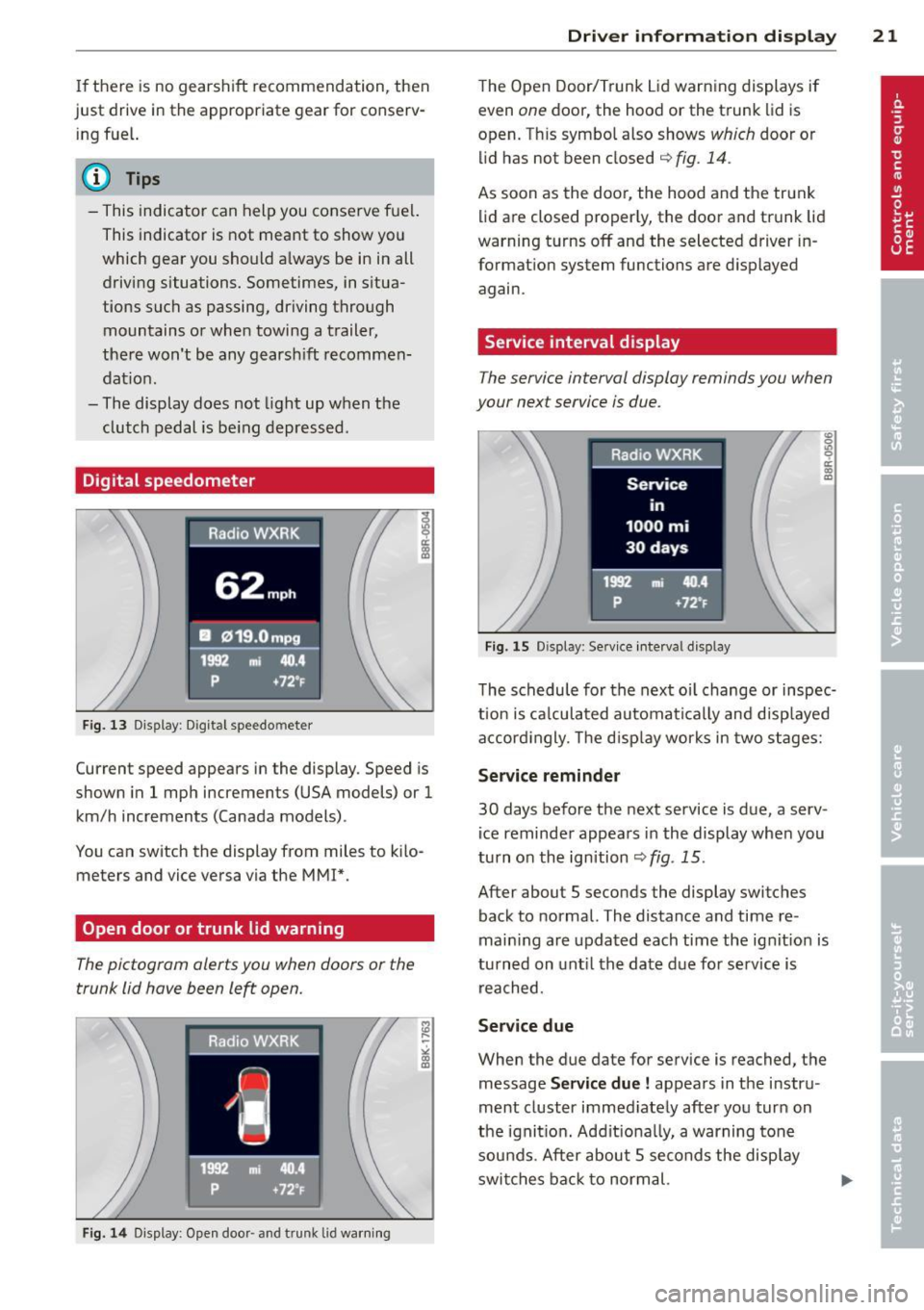
Fig. 13 Display : Dig ital speedo mete r
Current speed appears in the display . Speed is
shown in 1 mph increments (USA models) or 1
km/h increments (Canada models) .
You can switch the display from miles to kilo meters and vice versa via the MMI*.
Open door or trunk lid warning
The pictogram alerts you when doors or the
trunk lid have been le~ open.
Fig. 14 Display: Open doo r- and trunk lid warning
Driver information display 21
The Open Door/Trunk Lid warning displays if
even
one door, the hood or the trunk lid is
open. Th is symbol also shows
which door or
lid has not been closed
q fig. 14 .
As soon as the door, the hood and the trunk
lid are closed properly, the door and trunk lid
warning turns off and the selected driver in
formation system functions are displayed
again.
Service interval display
The service interval display reminds you when
your next service is due .
Fig. 15 Disp lay : Se rv ice interval d isplay
The schedule for the next oil change or inspec
t ion is calculated automatically and d isp layed
accord ingly. The d isp lay works in two stages:
Service reminder
30 days before the next service is due, a serv
i ce reminder appears in the display when you
turn on the ignition
qfig . 15 .
After about 5 seconds the display switches
back to normal. The distance and time re
main ing are updated each time the ignit ion is
turned on until the date due for serv ice is
reached.
Service due
When the due date for service is reached, the
message
Service due! appears in the instru
ment cluster immed iately after you turn on
the ignition. Addit ionally, a warning tone
sounds. After about 5 seconds the disp lay
switches back to normal.
Page 27 of 316
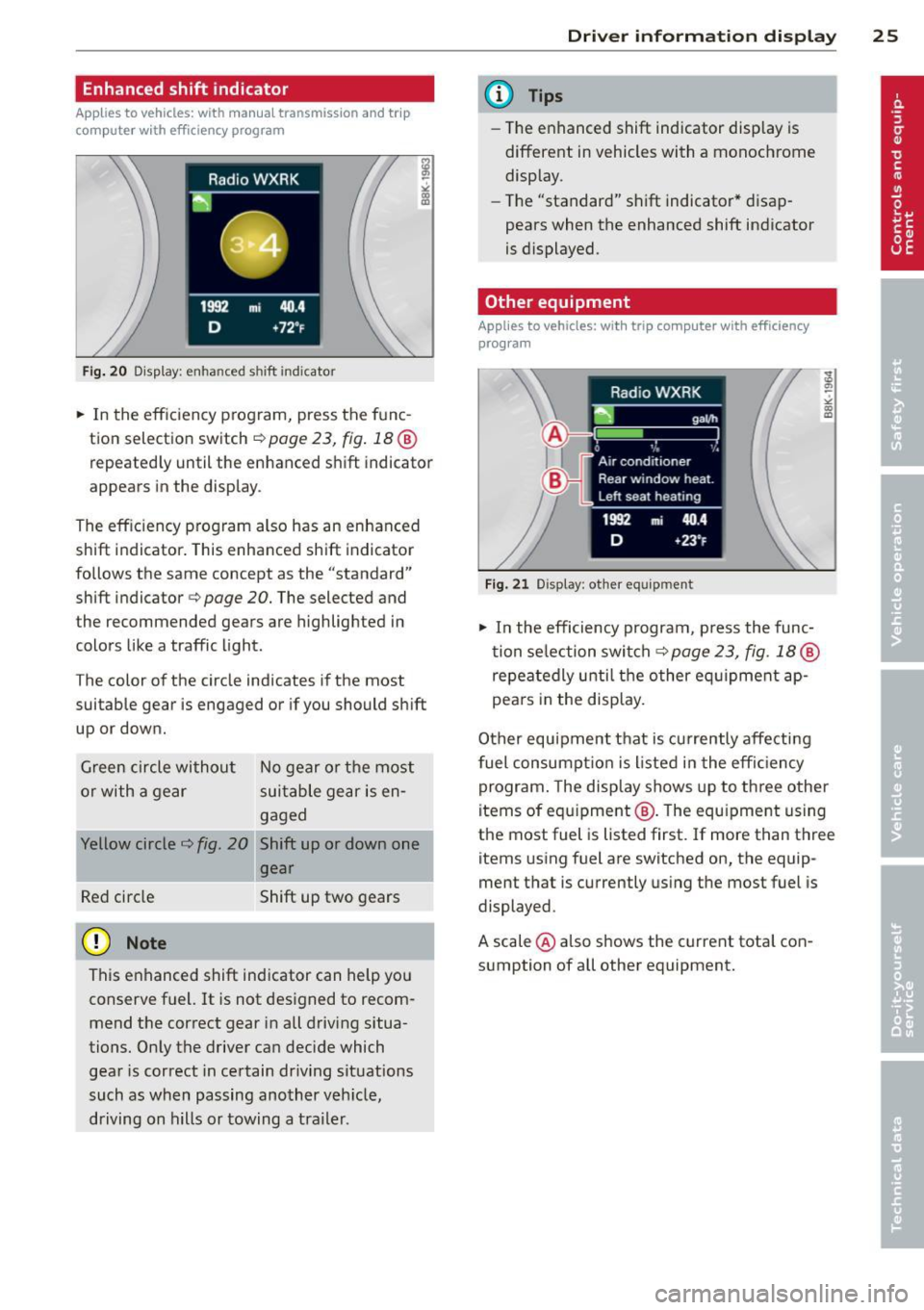
Enhanced shift indicator
Applies to vehicles: with manua l transmission and trip
computer with efficiency program
Fig. 20 Display: e nhan ce d shi ft ind icato r
.,.. In the eff ic iency p rogram, press the f unc
tion selection switch
r:!;> page 2 3, fig . 18 @
repeated ly until the enhanced shift indicator
appears in the display .
The eff ic iency program also has an enhanced
shift indicator . This enhanced shift indicator
follows the same concept as the "standard" shift indicator
c:> page 20. The selected and
t he recommended gears are highligh ted in
colors like a traffic light.
T he color of the circle indicates if the most
suitable gear is engaged or if you should shift
up or down.
Green circle without
or with a gear No gear or t
he most
suitable gear is en
gaged
Yellow circle
c:> fig. 20 Shift up or down one
gear
Red circle Shift up two gears
(D Note
This enhanced shift ind icator can help you
conserve fuel. It is not des igned to recom
mend the correct gear in all driving situa
tions. Only the driver can decide which
gear is correct in certain dr iving situations
such as when passing another veh icle,
driving on hills or towing a trailer .
Driver inform ation di spl ay 25
@ Tips
-The e nhanced shift indicator disp lay is
different in vehicles with a monochrome
display .
- Th e "standard" shift indicator* d isap
pears when the enhanced shift indicator
is displayed.
Other equipment
Applies to vehicles: with trip computer with efficiency
program
F ig. 21 Disp lay : other eq uipment
.,.. In the efficiency program, p ress the func
t ion se lection swi tch
c:> page 23, fig. 18 @
repeatedly until t he other eq uipment ap
pea rs in the display.
Other equipment t hat is cu rrently affecting
fuel consumpt io n is l isted in the effi ciency
program . The display shows up to three other
items of equ ipment @. The equ ipment us ing
the most fuel is listed first. If more than three
items using fuel are switched on, the equip
ment that is currently us ing the most fuel is
displayed .
A scale @also shows the c urrent tota l con
sumpt ion of all other equipment.
Page 28 of 316
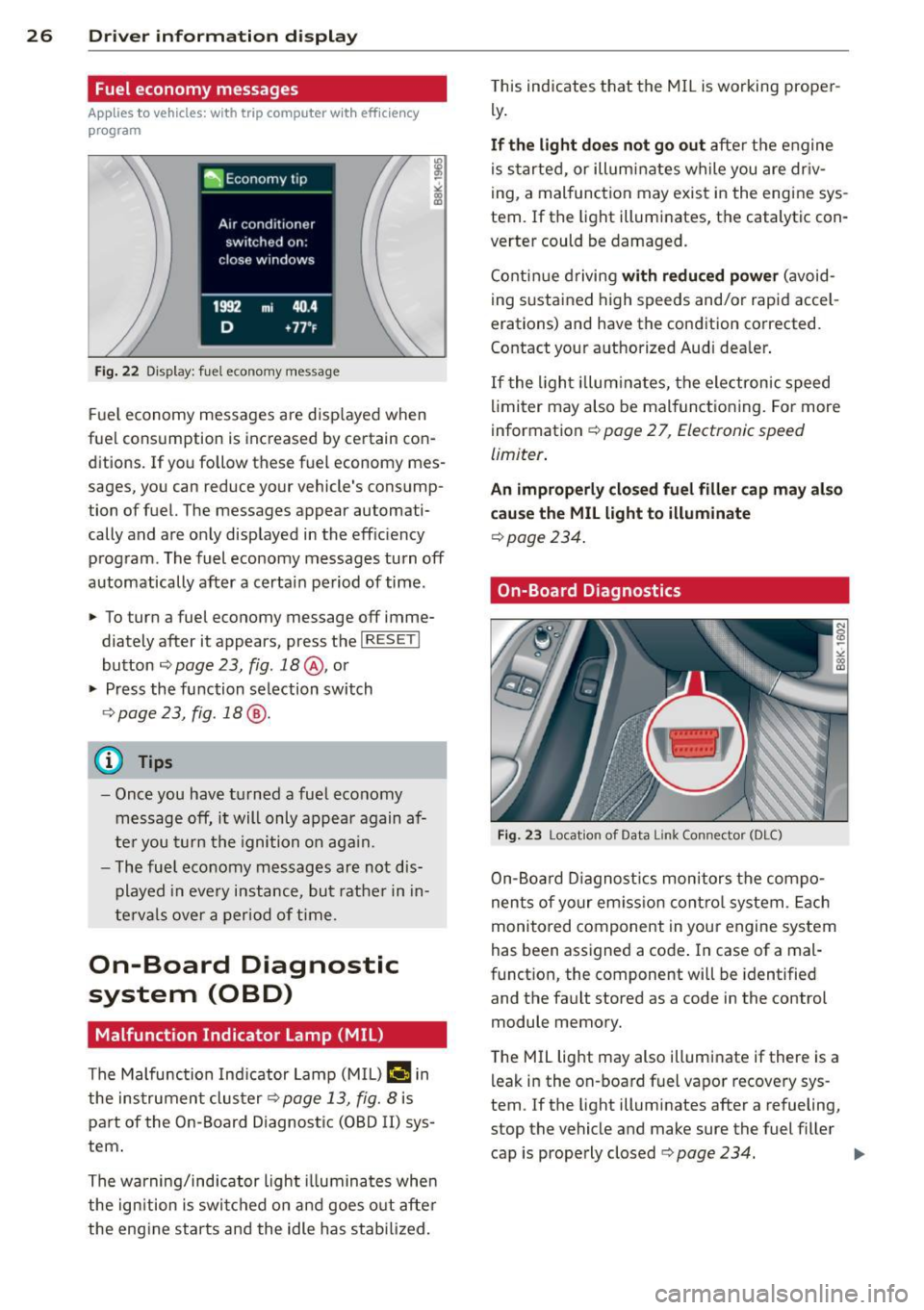
26 Driver information d isplay
Fuel economy messages
App lies to vehicles: with trip computer w ith eff ic iency
program
Fig. 22 Display: fuel economy message
F ue l economy messages are disp layed when
fuel consumption is increased by certain con ditions. If you follow these fuel economy mes
sages, you can reduce your vehicle's consump
tion of fuel. The messages appear automati
cally and are only displayed in the efficiency program. The fuel economy messages turn
off
automatically after a certain period of time .
~ To turn a fuel economy message off imme-
diately after it appears, press the
I RESETI
button ¢ page 23, fig. 18@, or
~ Press the function selection switch
9page23, fig.18@.
(D Tips
-Once you have turned a fuel economy
message
off, it will only appear again af
ter you turn the ignition on aga in.
- The fuel eco nomy messages are not dis
played in every instance, but rather in in
tervals over a period of time.
On-Board Diagnostic
system (OBD)
Malfunction Indicator Lamp (MIL)
The Malfunction Indicator Lamp (MIL) flllifi in
the instrument clus ter
9 page 13, fig. 8 is
part of the On-Board Diagnostic (OBD II) sys
tem .
The warning/indicator light illuminates whe n
the ign ition is switched on and goes out after
the engine starts and the idle has stabilized. T
his indicates that the MIL is working proper
ly .
If the light does not go out after the engine
is started, or illuminates while you are dr iv
ing, a malfunction may exist in the engine sys
tem. If the light illuminates, the catalytic con
verter could be damaged.
Continue driving
with reduced power (avoid
ing sustained high speeds and/or rapid accel
erations) and have the condition corrected.
Contact your authorized Audi dealer .
If the light illum ina tes, the electronic speed
limiter may also be mal functioning. For more
information ¢
page 2 7, Electronic speed
limiter .
An improperly closed fuel filler cap may also
cause the MIL light to illuminate
¢ page 234.
On-Board Diagnostics
Fig. 23 Location of Data Link Connector (OLC)
On-Board Diagnostics monitors the compo
nents of your em iss ion contro l system . Each
monitored component in your engine system
has been assigned a code . In case of a mal
function, the component will be identified
and the fault stored as a code in the control
module memory.
T he MIL light may also illuminate if there is a
leak in the on-board fuel vapor recovery sys
tem . If the light illuminates after a refueling,
stop the vehicle and make sure the fuel filler cap is properly closed¢
page 234. .,..
Page 32 of 316
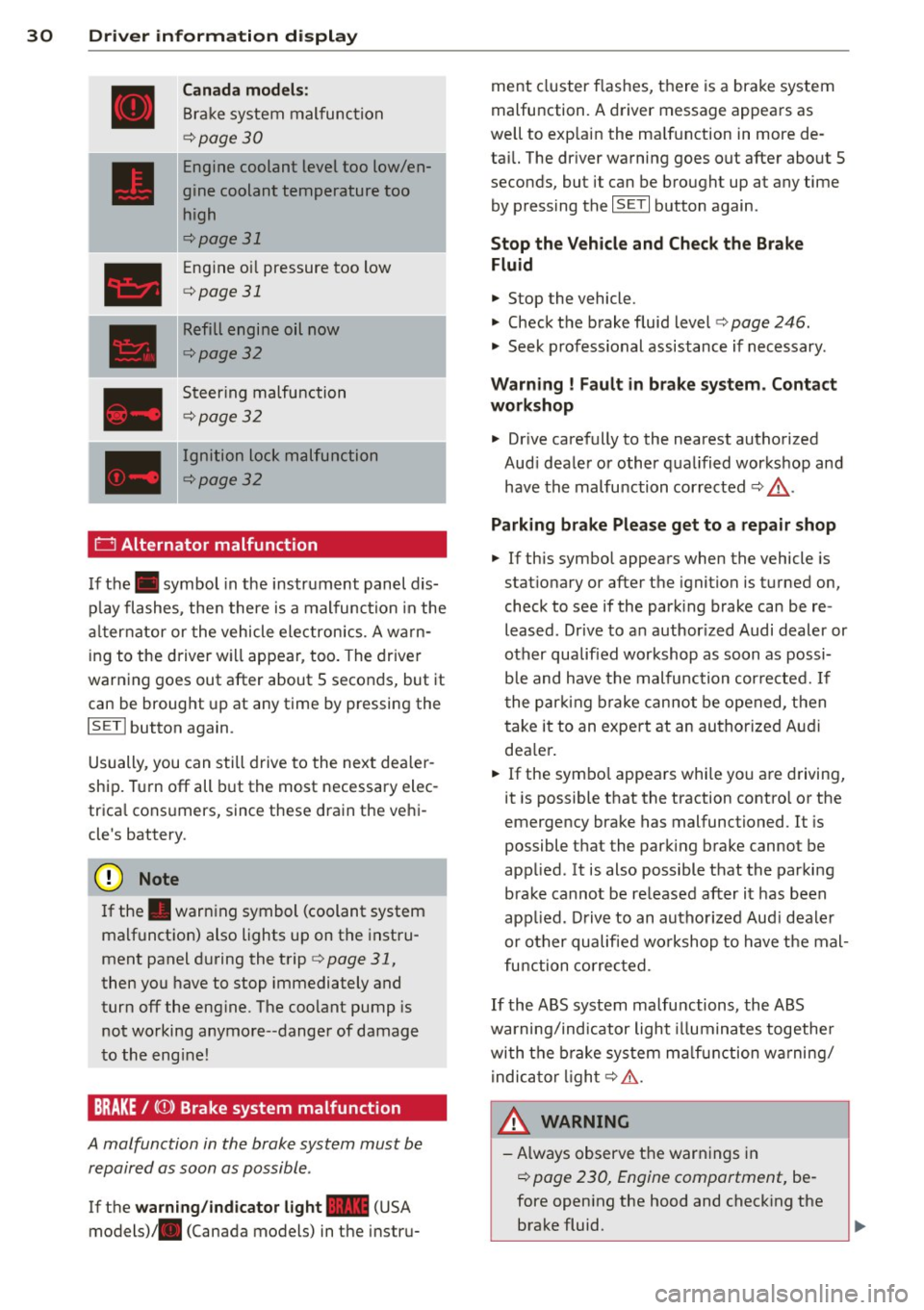
30 Driver in formation d isplay
Canada m odel s:
Bra ke system malfunction
c:>page30
Engine coolant level too low/en
gine coolant temperature too
high
c:>page 31
Engine oi l pressure too low
c:>page 31
Refill engine oil now
c:>page32
Steering malfunction
c:>page 32
Ignition lock malfunction
c:>page32
0 Alternator malfunction
If the . symbol in the instrument panel dis
p lay flashes, the n there is a malfunc tion in the
a lt ernator or the vehicle electron ics. A warn
ing to the driver will appear, too. The driver
warning goes out after about 5 seconds, but it
can be brought up at any time by pressing the
ISETI button again.
Usually, you can still drive to the next dea ler
ship. T urn off all b ut the most necessary elec
tr ica l cons umers, since these dra in the veh i
cle's battery.
(J;) Note
If the . war ning symbol (coolant system
malfunction) also lights up on the instru
ment panel during the trip
c:> page 31,
then you have to stop immediately and
turn off the eng ine. The coolant pump is
not working anymore--danger of damage
to the eng ine!
BRAKE/
A malfunction in the brake system must be
repaired as soon as possible .
If the warn ing /indicator light-(USA
models)/ . (Canada models) in the instru- me
nt cluster flashes, there is a brake system
malfunction. A driver message appears as
we ll to exp la in the ma lfunction in more de
ta il. The dr iver warning goes out after about S
seconds, but it can be brought up at any time by press ing the
ISE TI button again .
Stop the Vehicle and Check the Brake
Fluid
.,. Stop the vehicle .
.,. Check t he brake fluid level
c:> page 246 .
.,. Seek professional assistance if necessary .
Warning ! Fault in br ake system . Contact
workshop
.,. Drive ca refully to the nearest authorized
Aud i dea le r or other q ualified workshop and
have the malfu nction corrected
c:> &_ .
Parking b ra ke Plea se get to a repair shop
.,. If this symbol appears when the vehicle is
stat ionary or after the ignition is t urned on,
check to see if the par king brake can be re
leased. Dr ive to a n author ized Audi dealer or
other qualified workshop as soon as possi
b le and have the malfunc tion cor re ct ed. If
t he par king b rake cannot be opened, t hen
take it to an expe rt at an authorized A udi
dea ler .
.,. If the symbo l appea rs whi le yo u are d riving,
it is possible that the traction contro l or the
emergency brake has malfunctioned. It is
possible that the parking brake cannot be
app lied. It is also possible that the parking
brake cannot be released after it has been
app lied. Drive to an autho rized Aud i deale r
or other qualified workshop to have t he mal
fu nction corrected.
If the ABS system malfu nctions, the ABS
warning/indicator light illuminates togethe r
with the brake system ma lfunction w arning/
i ndica to r li ght
c:> .&..
A WARNING
-A lways observe t he warn ings in
c:> page 230, Engine compartment, be
fore open ing the hood and check ing the
brake fluid.
Page 33 of 316

-Driving wi th low brake fluid is a safe ty
haza rd. S to p the car and get professional
assistance.
- USA models: If the - warning light
and
the m warning light come on to
gether, the rear wheels could lock up
first under hard braking. Rear wheel lock
up can cause loss of vehicle control and
an acc ident. Have your vehicle repaired
immediately by your authorized Audi
dealer or a qualified workshop. Dr ive
slowly and avoid sudden, ha rd b rake ap
plications.
- Canada models: If the brake warn ing
ligh t. and the ABS warning light
[i]
come on together, the rear wheels could
lock up first under hard brak ing. Rear
wheel lock- up can cause loss of veh icle
control and an accident. Have your vehi
cle repaired immediately by your author
ized Aud i dealer or a qualified workshop .
Drive slowly and avo id sudden, hard
brake applicat io ns.
-L Engine cooling system malfunction
A malfunction in the engine cooling system
must be repaired as soon as possible .
If the . symbol flashes in the display , e ither
the eng ine coolant
temperature is too h igh or
the eng ine coolant
level is too low. A dr iver
message appears as we ll to explain the mal
f u nction in more detail. The drive r warning
goes o ut after abo ut S seconds, but it c an be
b rought up at any time by press ing the
!SE Tl
button again.
Sw itch off engin e and check coolant lev el
.,. Pu ll off the road .
... Stop the veh icle .
.,. Turn off the engine .
.,. Check coolant level¢
page 244.
.,. Add coolan t if necessa ry ¢ page 245 .
.,. Contin ue driving only after the eng ine cool
ant war ning/indicato r light goes o ut.
... Contact your a uthorized Audi dea ler for as
s istance if necessary .
Driver information di spla y 31
If the engine coo lant level is correct, then the
radiator fan may be the ca use of the malfunc
t ion .
_& WARNING
-If your vehicle should brea k down for
mechanical or other reasons, park at a
safe distance from moving traffic, turn
off the eng ine and tu rn on the haza rd
warn ing lights
~ page 52, Em ergency
flashers.
-
- Never ope n the hood if you se e or hear
steam or coo la nt escaping from the en
gine com partmen t -yo u ris k being scald
e d . Wai t until yo u ca n no longer see o r
hea r steam o r coolan t escap ing.
- Th e engine compa rtme nt o f any vehicle
is a dangerous area. Be fore you perform
any wo rk in the engine compartmen t,
tur n of the engine and allow it to coo l.
Follow the warn ing stickers ¢
page 230,
Engine compartment .
(D Note
Do not continue driv ing if the . symbo l
ill uminates . There is a malfunction in the
engine cooling system -you could damage
your engine.
"t::7: Engine oil pressure malfunction
The red engine oil pressure warning symbol
requires immediate service or repair. Driving
with a low oil pressure indication is likely to
cause severe engine damage.
If the . symbo l on the d isplay flashes, the
engine oil pressure is too low. A driver mes
sage appears as well to exp la in the malfunc
tion in more detail. The driver warning goes
o ut after about 5 seconds, b ut i t can be
brought up at any t ime by pressing the
~ IS- ET~ I
bu tton aga in .
Switch off eng ine ! Oil pr essure too low
... Stop the vehicle .
.,. Turn the engine off.
.,. Check the engine oi l level ¢
page 242.
Page 34 of 316

32 Driver information display
• Co ntac t you r authorized Audi dea ler if nec -
essa ry .
Engine oil level too low
If th e e ngine o il leve l is too l ow, ad d eng ine
oil
<> page 242.
Engine oil level correct
If th e . symbo l flash es even t houg h the en
g ine o il lev el is co rrec t, p lease seek prof essio
na l assis tan ce. Do not cont inu e dr iv in g. Do
no t leave the eng ine run nin g
idle, either .
{O) Tips
- The engine oil pressure symbol. is
not an indicator for a low engine oil lev
el. Do not rely on it. Instead, che ck the
oil level in your engine at regular inter
vals, preferably each time you refuel,
and always before going on a long trip.
- The yellow oil level warning indication
II requires oil refill or workshop serv
ice without delay . Do not wait until the
red oil pressure warning. starts to
flash before you respond to the low oil level warning
II. By then, your engine
may already have suffered serious dam
age .
~ . Fill engine oil now
WARNING: Please add oil immediately
If t he . symbo l lights up, t hen the oil has to
be rep lenished r ight now
c:> page 242 .
Q31-e Steering malfunction
If there is a malfunction in the electronic
steering column lock, th e steering cannot b e
unlocked .
If th e . symbol in the disp lay blinks, there
is a malfunction in the elect ronic steer ing col
u m n lock. A dr iver message app ears as well to
explain the malfunc tion in mo re de ta il. The
dr iver war ning goes out after about 5 sec
on ds, but it can be broug ht up a t any time by
p res sing t he
ISE TI bu tton again .
Stop the vehicle and turn off the engine.
Steering defective
• Obtain profess ional a ssista nc e.
• Do
not tow your ve hicle.
A WARNING
-
Your veh icle must not be towe d in t he
event of a malfunction in the electronic
steering co lumn lock beca use it cannot be
steered due to the locked steering. I f it is
t o we d wit h the steeri ng locked, there is
t h e risk o f an accident.
I
{i) Tips
The symbol's ap pearance might be differ
ent in some mode ls.
© -e Ignition lock malfunction
A malfunction in the ignition lock must be re
paired immediately.
If the . symbol in the display blinks , there
is a ma lf u nction in the e lectronic ignition lock .
A driver message appears as we ll to explain
t h e malfunction in mo re deta il. The dr iver
warning goes out after about 5 seconds, but it can be b rought up a t any time by press ing the
ISE TI bu tton again
Defective ignition switch Get it serviced!
• Do not turn the e ngine off .
• Drive imme diate ly to a n author ized service
facility to have the malfunct io n corrected.
If there is a mal funct ion i n the elect ron ic ign i
tion loc k, the ignition cannot be t urne d off .
D rive immed iate ly to an autho rized serv ice fa
c ili ty to have the cause of the malfunct ion c or
rected.
On vehicles with conve nience key*, the engi ne
sho uld not be switched off us ing the start/
stop button because the engine cannot be
started again afte r the ignit io n h as been
switched off .
Page 35 of 316
(D Tips
The symbol's appearance might be different in some models .
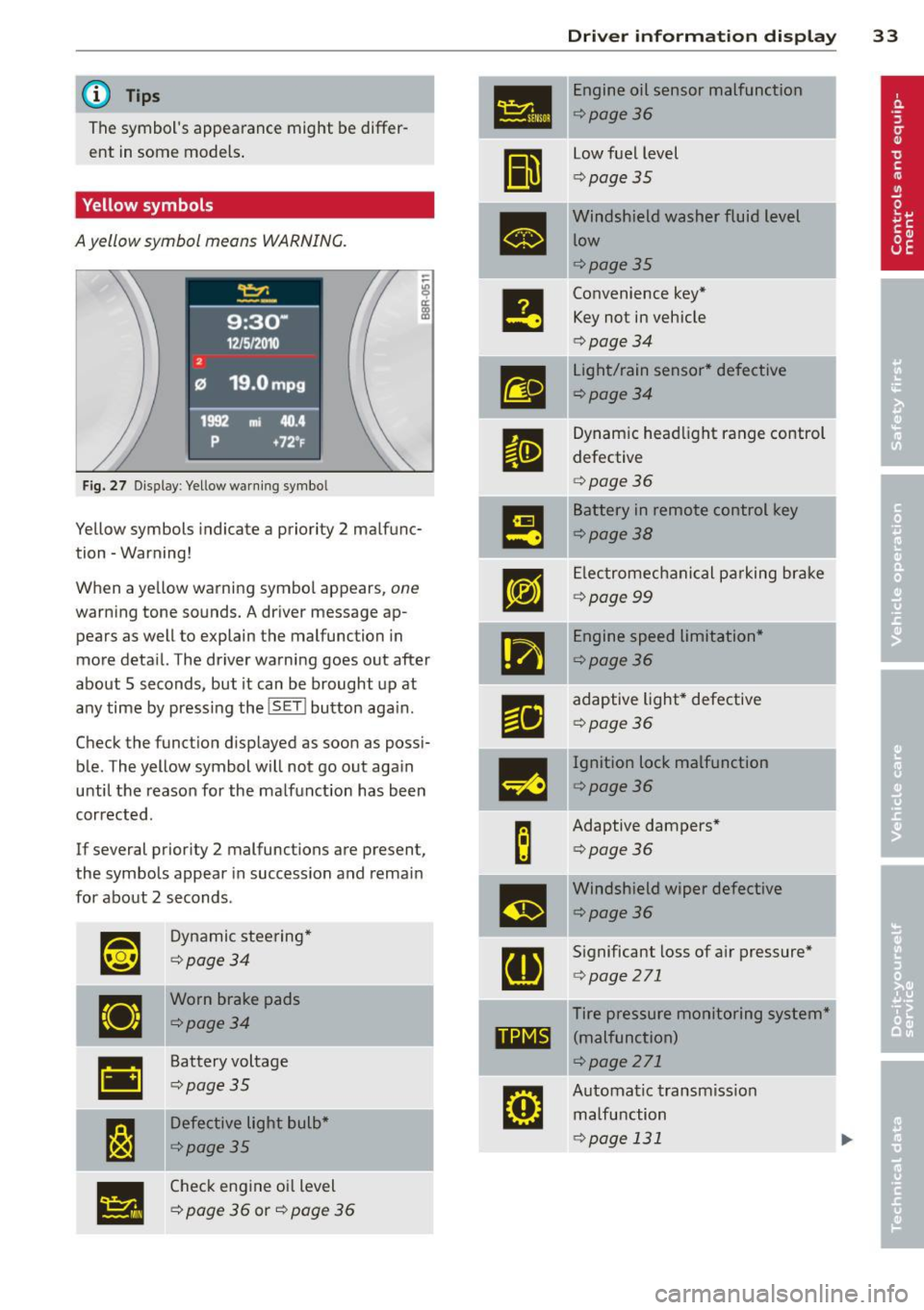
Yellow symbols
A yellow symbol means WARNING.
Fig. 27 Display: Yellow warning symbo l
Yellow symbols indicate a priority 2 malfunc
tion -Warning!
When a yellow warning symbol appears,
one
warning tone sounds. A driver message ap
pears as well to explain the malfunction in
more deta il. The driver warning goes out after
about 5 seconds, but it can be brought up at
any time by pressing the
! SET I button aga in.
Check the funct ion displayed as soon as possi
ble. The yellow symbol will not go out again
until the reason for the malfunction has been
corrected.
If several priority 2 malfunctions are present ,
the symbols appear in succession and remain
for about 2 seconds .
~~
Dynamic steering*
¢page34
•
Worn brake pads
¢page34
•
Battery voltage
¢page35
I:~
Defective light bulb*
¢page35
•
Check engine oil level
¢
page 36 or¢ page 36
Dri ver inform ation di spl ay 33
•
Engine oil sensor malfunction
¢page36
II
low fuel level
¢ page 35
•
Windshield washer fluid level
low
¢page35
e
Convenience key* Key not in vehicle
¢ page 34
m
light/rain sensor* defective
¢page34
II
Dynamic headl ight range control
defective
¢ page 36
m
Battery in remote control key
¢page38
rm
Electromechanical pa rking brake
¢ page 99
•
Engine speed limitation*
¢page36
r1i
adaptive light* defective
¢page 36
-
m
Ignition lock malfunction
¢page36
B
Adaptive dampers*
¢page36
m
Windshield wiper defective
¢page36
[ti
Significant loss of air pressure*
¢page 271
Tire pressure monitoring system*
11111 (malfunction)
¢page 271
rm
Automatic transmiss ion
malfunction
¢page 131