light AUDI A5 COUPE 2012 Owner's Manual
[x] Cancel search | Manufacturer: AUDI, Model Year: 2012, Model line: A5 COUPE, Model: AUDI A5 COUPE 2012Pages: 316, PDF Size: 78.59 MB
Page 36 of 316

34 Driver in formation d isplay
The speed warnings warning threshold 1
[i and warning threshold 2 HIil are also
yellow symbols in some models. The warn
ing is always shown as a small symbol in
the upper area of the display
c> page 27 .
~ Dynamic steering
App lies to vehicles: with Audi drive select
&1rJ D ynamic steering: Sy ste m m alfun ctio n
This driver message and the &1r-1 symbol ap
pear when a system malfunction occurs dur
ing travel. You can continue to dr ive carefully
at a reduced speed to a qualified workshop .
Steer ing ca n be mo re d iff icult or sensitive
tha n usual. The stee ring wheel can also be at
an angle when dr iv ing str aight.
&1rJ Dynamic steering: initial ization
If th is driver message appears and the &1rJ in
d icator light is flash ing on the instrument
panel, dynam ic steering is being re initialized .
Once you sta rt the eng ine after this is f inish
ed, the steering wheel will be easy to move.
Re-initialization might be necessary if the
steer ing whee l was moved ha rd to t he left and
right whi le the vehicle was not moving . The
d isplay goes out as soon as initia lization is
comp lete.
A WARNING
-
Have the dynamic steering system mal
function repaired as soon as poss ible by an
authorized Audi dealer or any qualified
workshop -risk of accident!
(D Tips
The dynam ic steering stability systems are
not ava ilable in the event of a system mal
function .
2e Key not in vehicle
Applies to vehicles : wit h co nvenience key
I! Key no t in vehicl e
This rem inder appears along with the I! sym
bol if the master key is removed from the ve
hicle with the eng ine runn ing .
It is intended
to rem ind you (e.g . whe n cha nging dr ivers)
not to cont inue t he journey withou t the m as
te r k ey.
If the master key is no longer in the ve hicle,
you cannot swi tch off the ig nit ion after stop
ping the engine and you also canno t start the
engine aga in. Yo u also cannot lock the vehicle
from the outside .
· fi.. D Light/rain sensor defective
Appl ies to vehicles: wit h ligh t/rain sensor
B Automatic headlights /automati c wipers
defective
If the symbol illumina tes, the ligh t sensor has
failed. For safety reasons the low beams are
turned on permanently with t he switch in AU
TO . However, yo u can cont inue to turn the
lights on and off using the light switch. In the
case of a defect i n the rain sensor, the wind
shield wipe r lever functions are still ava ilab le.
Have the light/ rain senso r checked as soon as
poss ible by an authori zed Audi dealer.
(0) Worn brake pads
EiJ Brake pad s!
If the warning light illuminates, immed iately
co ntact your authorized Audi dea ler or qua li
fied workshop to have all brake pads i nspect
ed. On USA mode ls t he
EiJ w arni ng lig ht
comes on together with the - warning
light . Both sets of brake pads on an ax le must
always be replaced at the same time.
A WARNING
'-
Driving w ith bad brakes can cause a colli-
sion and ser ious personal injury.
Page 37 of 316

-If the El war ning light and the -
warning light
l ) w ith the message Br ake
pads !
comes on in the instrument cluster
display, immediately contact your au
thorized Aud i dealer o r qualified work
shop to have a ll brake pads checked or
replaced if necessary.
~ Defective light bulb warning
Applies to vehicles: with defective light bulb warning
The defective light bulb warning monitors the
function of the light bulbs in the vehicle.
The defective l ight bulb warning monitors the
function of the light bulbs . If a defect ive lig ht
bu lb is detected, or if a light bulb has burned
out, the
I symbol appears as well as a notifi
cation that shows wh ic h light bulb is defe c
tive.
A WARNING
- Ligh t bul bs are under pressure and can
exp lode when bulbs a re replaced -risk o f
injury.
- W it h gas -discharge lamps* (xenon head
lights), the high-voltage component
must be handled approp riately. Doing
otherwise poses a risk of death!
(D Tips
Have an author ized Audi dealer or other
qua lified workshop perform the rep lace
ment or the repai r.
c:> Windshield washer fluid level too
low
f-4 "lease refill washer fluid
-
If the symbo l illuminates, add windshield
washer fluid to the washer system and also to
the head light washer system*
c::> page 251 .
1) - : USA mod els on ly
Dri ver information di spla y 35
Ehl Fuel supply too low
When the 11)1 symbol illum inates, t his means
th ere are abo ut 2.1 gallons (8 lite rs) of fuel
l eft in the fue l tank . Time to re fuel!
<=:> page 233.
If the symbol lights up, even when there is
amp le fue l in the t ank, and the text
TANK
SYSTEM MALFUNCTION
! CONTACT WORK
SHOP
appears in the disp lay, there is a fa ult in
the system . Contact a qualified works hop to
have the fa ult rectif ied .
0 Battery voltage
App lies to vehicles : with battery voltage warn ing
If battery power drops into the range where it
can limit the ability of the engi ne to start, this
thP
(•i symbol appears i n the instrumen t
cluster d isp lay with the fo llow ing drive r mes
sage
batter y charge low : Indicates charging
by being driven .
While this d river notification is d isp layed, you
have to be prepa red fo r limited starting capa
bility.
Driver message appears and goes out
again
If this drive r message appea rs after the ign i
t ion is tu rned on or while dr iv in g and it goes
o ut again afte r a while, t he battery has been
adequate ly re charged.
Driver message appears and does not go
out again
If this d rive r notifi cation appea rs after the ig
ni tion is t urne d on o r wh ile dr iving and does
not go out again, the ba tte ry's state of charge
is not in the optima l range . Starting capab ility
is restricted . Have the battery checked at an
authorized Aud i dea ler or other q ualified
wor kshop as soon as possib le.
Page 38 of 316

36 Driver in formation d isplay
'l:"::71 , Check engine oil
II Add o il, ma x x qt (l). You may c ontinu e
drivin g
If the ll!I symbol lights up d isplay ing th is
driver message, then add a maximum of
I li
ter at you r earliest oppo rtunity
c:> page 242.
'l:":?J. Engine oil level
II Please c heck oil l evel
When the symbol illuminates, check the en
g ine oil level as soo n as poss ible
c:> page 242.
Top off the oil at yo ur earliest oppo rtunity
c:> page 2 42.
'IY ..,. Engine oil sensor defective
II Oil le vel! Sen sor defecti ve
If the symbol illum inates, contact your au
thor ized Audi dealer and have the o il sensor
inspected . Until you have th is done, check the
oil leve l each time you refuel just to be on the
safe side
¢ page 242.
! ?) Engine speed limitation
Applies to vehicles : with engine speed limi tation
IP,I Do not e xceed ma x. engine spee d of XXXX
rpm
The II! symbo l illuminates when there is an
engine contro l malfunction. The
(m indicator
light in the instrument cluster also illumi
nates. The engine speed is limited to the
speed displayed in the driver information sys
tem . Keep in mind that the eng ine speed will
not exceed the va lue disp layed in the driver in
formation system, fo r example when down
shifting.
Please go to an authorized Aud i dealer or oth
er qualified workshop to have the ma lfunction
repaired.
~(D Headlight range control defective
II Headlight range control d efe cti ve !
If the fl symbo l ill uminates , the dynamic
headlight range contro l is no longer working
properly . Have the system checked and re
paired at your authori zed Audi dealer.
§0 Adaptive light defective
Applies to vehicles: with adaptive light
l/ll adapt ive Light defecti ve
When the l/ll symbol illuminates, it means
that adaptive light is defective. Go to an au
thorized Audi dealer to have the headlights or
the control un it for the adaptive light re
paired .
~ Ignition lock malfunction
I!! Ignition lock def ectiv e
If the I!! symbol in the display comes on,
there is a malfunction in the e lectronic igni
tion lock . Please go to an author ized Audi
dealer or other qualified workshop to have the
malfu nction repa ired.
Q Adaptive dampers
Applies to vehicles: with Audi drive select
E Adapti ve damper s: syste m malfunc tion
If the E symbol in the d isplay comes on, there
is a ma lfunction in the adaptive dampers.
Please go to an authori zed A udi dealer or oth
er qualified workshop to have the mal funct ion
repaired .
~ Windshield wipers faulty
ti Windscreen wipe r defective!
When the fw,j symbol illum inates, it means
that the elect ronics for the winds hield wipers
are defective . Please go to an authorized A udi
dealer or qualified workshop to have the
windshield wiper system repaired.
Page 40 of 316

38 Openin g and clo sing
- Fo r security reasons, replacement keys
are on ly availab le from Audi dea lers .
- For Declaration of Compliance to United
States FCC and Industry Canada regula
tions
c::> page 296.
Check light in the master key
The check light in the master key provides in
formation about different conditions.
Fig. 29 Check light in the master key
The check light comes on br iefly once when a
button is pressed, and during an "inquiry" by
the convenience key system .
If the check light does not come on , the bat
tery is dead and has to be replaced . In addi
tion, when the battery is dead
the m symbol
appears in the instrument cluste r display as
well as the message:
Please change key batte ry
Battery replacement c::> page 38.
Master key battery replacement
Fig. 30 Remote mas ter key: Remov ing th e mechanica l
key
N 5 9 CJ .. ID
Fig. 31 Remote master key: Remov ing the battery
holde r
We recommend having the battery changed
by an authorized Audi dealer . However, if you
wish to replace the dead battery yourse lf, pro
ceed as follows:
... Press the re lease button @c::>
fig. 30 .
... Pull the mechanical key ® out of the mas
ter key .
... Press the release button@c::>
fig. 31 on the
battery holder and at the same time pull the
battery ho lder out of the master key in the
direction of the arrow .
"' Insta ll the new battery CR 2032 with the
"+" sign facing down.
... Push the battery holder carefu lly into the
maste r key.
... Insta ll the mechanical key.
@ For the sake of the envi ronment
D ispose of dead batteries properly so as
not to poll ute the environment.
(D Tips
The replacement battery must be the
same specification as the o rigina l.
Page 45 of 316
convenience functions. It is possible that
you wi ll not be able to unlock your vehi
cle using these convenience funct ions.
- For Declaration of Compliance to United
States FCC and Industry Canada regula
tions ¢
page 296.
Operating locks with the mechanical key
In the event of a failure of the power locking
system, the driver 's door can locked and un
locked with the mechanical key at the lock
cylinder .
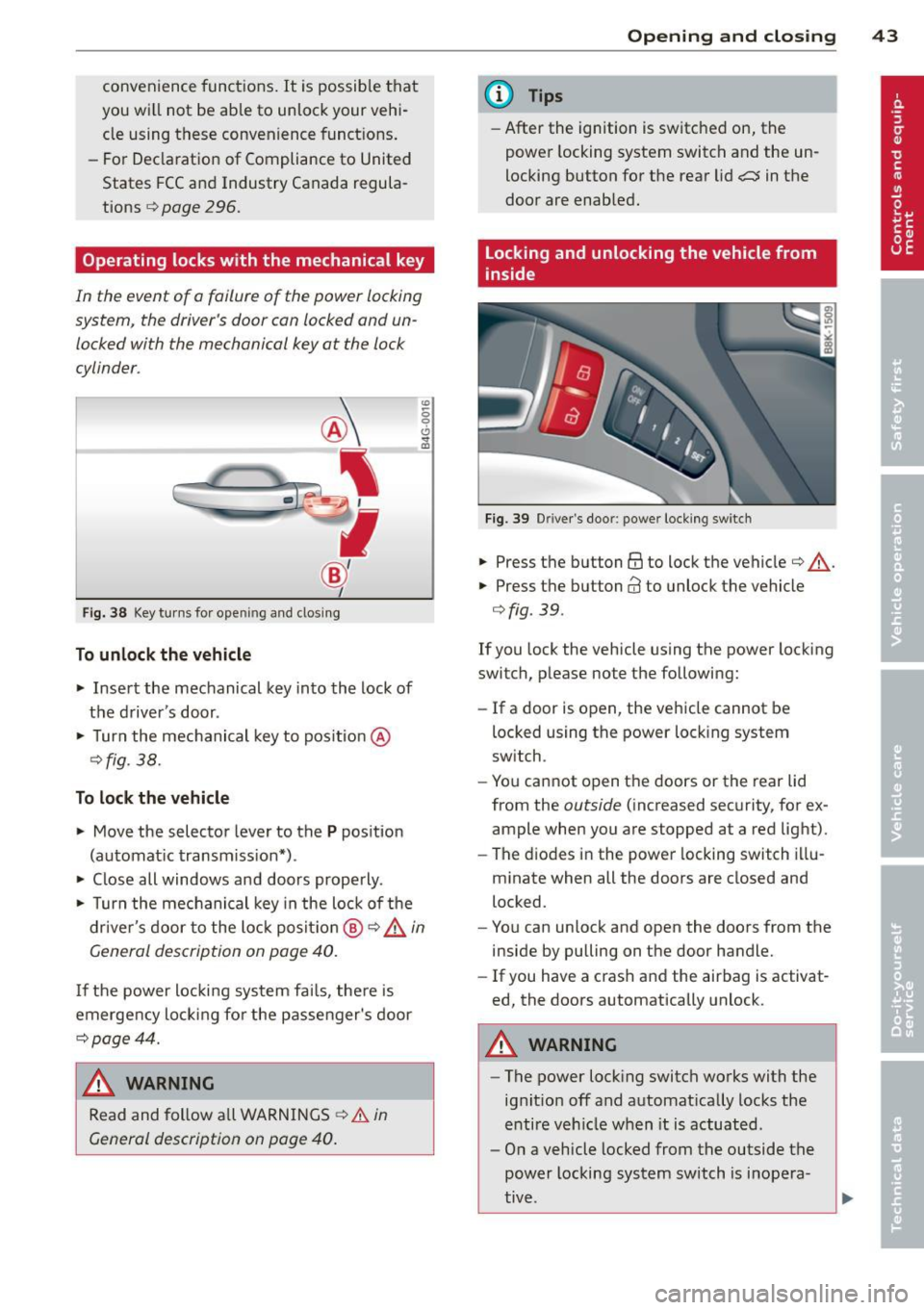
Fig. 38 Key turns for ope ning and clo sin g
To unlock the vehicle
... Insert the mechanical key into the lock of
the driver 's door .
... Turn the mechanical key to pos ition @
¢fig . 38.
To lock the vehicle
... Move the selector lever to the P position
(automat ic transmission*) .
... Close all windows and doors properly .
"' -0 0 0
"' m
... Turn the mechanical key in the lock of the
driver's door to the lock positio n @ ¢ &
in
General description on page
40.
I f the power locking system fai ls, the re is
emergency locking fo r the passenger's door
¢page 44.
A WARNING
Read and follow all WARNINGS ¢.&. in
General description on page
40.
-
Opening and closing 43
@ Tips
-After the ignition is switched on, the
power locking system switch and the un
locking button for the rear lid
a in the
door are enabled.
Locking and unlocking the vehicle from
inside
Fig . 39 D river's door: power locking switch
... Press the button @to lock the vehicle¢ & .
... Press the button@ to unlock the vehicle
¢fig. 39.
If you lock the vehicle using the power locking
switch, please note the following:
- If a door is open, the vehicle cannot be
locked using the power locking system
switch .
- You cannot open the doors or the rear lid
from the
outside (increased security, for ex
ample when you are stopped at a red light) .
- The diodes in the power locking switch illu
minate when all the doors are closed and
locked.
- You can unlock and open the doors from the
inside by pulling on the door handle.
- If you have a crash and the airbag is activat
ed, the doors automatically unlock.
A WARNING
-The power locking switch works with the
ignit ion off and automat ically locks the
entire vehicle when it is actuated.
- On a vehicle locked from the outside the
power locking system switch is inopera
tive .
Page 49 of 316
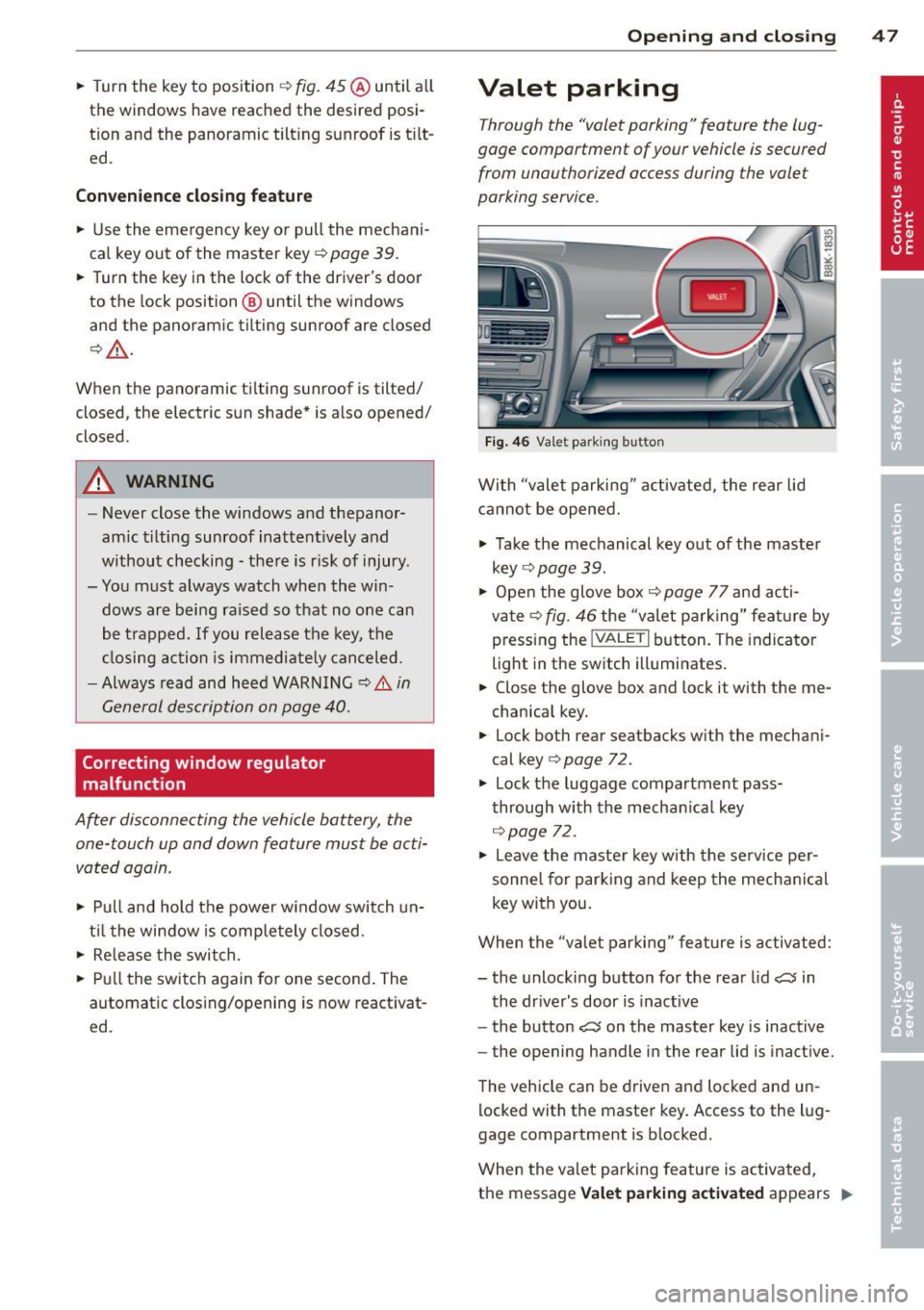
.. Turn the key to position ¢ fig. 45 @until a ll
the windows have reached the desired posi
t ion and the panoramic tilt ing sunroof is t ilt
ed .
Convenience closing feature
.. Use the emergency key or pull the mechani
ca l key out of the master key ¢
page 39 .
.. Turn the key in the lock of the driver's door
to the lock position ® until the windows
and the panoramic tilting sunroof are closed
¢ ,& .
When the panoramic ti lting sunroof is tilted/
closed, the electric sun shade* is also opened/
closed.
A WARNING
- Never close the windows and thepanor
amic tilting sunroof inattentively and
without checking -there is risk of injury .
- You must always watch when the win dows are being raised so that no one can
be trapped. If you release the key, the
closing action is immediate ly canceled .
- Always read and heed WARNING ¢
IJ::,. in
General description on page 40.
Correcting window regulator
malfunction
After disconnecting the vehicle battery, the
one-touch up and down feature must be acti
vated again.
.. Pull and hold the power w indow switch un
til the window is completely closed.
.. Re lease the switch.
.. Pu ll the switch again for one second. The
automatic clos ing/opening is now reactivat
ed .
Opening and closing 47
Valet parking
Through the "valet parking" feature the lug
gage compartment of your vehicle is secured
from unauthorized access during the valet
parking service .
Fig . 46 Vale t parking button
With "valet parking " activated, the rear lid
cannot be opened.
.,. Take the mechanical key out of the master
key
r::!;> page 39.
.. Open the glove box¢ page 77 and acti
vate¢
fig. 46 the "valet parking" feature by
pressing the
! VALET I button. The indicator
light in the switch illuminates.
.. Close the glove box and lock it with the me
chanica l key .
.. Lock both rear seatbacks with the mechani
cal key ¢
page 72.
.,. Lock the luggage compartment pass
through with the mechan ica l key
¢ page 72.
.. Leave the master key with the service per
sonne l for parking and keep the mechanica l
key with you .
When the "va let parking" feature is activated:
- the unlocking button for the rear lid
~ in
the driver's door is inact ive
- the button~ on the master key is inactive
- the opening handle in the rear lid is inactive.
The vehicle can be driven and locked and un
locked with the master key. Access to the lug
gage compartment is b locked.
When the valet parking feature is activated,
the message
Valet parking activated appears II>
Page 51 of 316

Clear vision Lights
· r/.· Switching the lights on and off
Fig . 48 Instr ument pane l: Head light control switch
Switching on AUTO - Automatic headlight
control*
• Turn the light switch to AUTO ¢ fig. 48.
Tu rning on th e side ma rker light s
• Turn the head light contro l switch to :oo~.
Switching on low beams
• Turn the head light control sw itch to gD .
Swi tching off the lights
• Turn the head light control switch to 0.
The low beams only illuminate with the igni
tion turned on.
With the s ide marker lights or headlights
switched on, the symbol next to the light
switch illuminates
:oo:.
AUTO -Automatic headlight control*
With the switch in the AUTO position, the low
beams are swi tched on automatically depend
ing on the ambient light, for example in a tun
ne l, at dusk and when it is raining or snowing.
When the low beams are switched on, the
:oo:
symbol comes on. The low beams remain
switched on regardless of the ambient light
when you turn on the fog lights .
When you turn
off the ignition, the low beams
are automatically switched
off.
On vehicles w ith a rain sensor* the headlights
switch on automatica lly after a few wind-
Clear vi sion 49
shield wiper passes. However, the instrument
lighting will not be switched on.
Wi th a utomatic head light cont ro l, you also
have the high-beam function available. How
ever, if you have not switched high beams
back to low beams while driving with auto
matic headlight control, only the low beams
come on the next time yo u turn on automatic
headlight control. In order to return to high
beams aga in, you first have to pull the high
beam lever back to the normal position and
then push the lever forward .
Light sensor* malfunction
In the event of a light sensor* ma lfunction,
the driver is not ified in the instrument cluster
display:
l;I Automat ic d rivi ng light s/automati c wip
ers defect ive
For safety reasons, the low beams are turned
on permanently with the switch in
AUTO.
However, you can continue to turn the lights
on and
off using the light switch . Have the
light sensor checked as soon as possible at an
authorized Aud i dealer or other qualified
workshop.
A WARNING
Automatic h eadlights are only intended to
assist the d river. They do not relieve the
driver of his responsib ility to che ck the
headlights and to turn them on manually
according to the current light and visibility
conditions. For example, fog cannot be de
tected by the light sensors. So a lways
switch on the headlights gD under these
weather conditions and when driving in
the dark.
(D Tips
- The light sensor* for headlight control is
located in the rear view mirror mount.
You should therefore not apply any stick
ers to the windshield in th is area in order
to prevent malfunct ions or fai lures .
- The sensitivity level for the light sensor*
set at t he factory can be changed in the ..,_
Page 52 of 316

50 Clear vis ion
MM I* men u r=> page 50 in the automat
ic driving Lights function .
- When you remove your key from the igni
tion wh ile the vehicle's lights a re turned
on, a buzze r sounds as long as the driv
er's door is open.
- Please obey all laws when using t he
li ghting systems described here .
- The coming home/leaving home func
tion * is availab le only with the sw itch in
the AUTO position.
Fog lights
F ig. 49 F og light sw itch
,. To turn on the fog lights JO, press button @
r=>fig. 49.
,. To turn on the rear fog lights Ot press but-
ton @.
Fog lights
The s ide mar ker Lig hts or low beams must be
switched on. When the fog Lights are switched
on, the g reen check Light at the edge of the
switch comes on .
If autom atic driving light control AUTO is act i
vated, t he low beams are switched on when
the fog l igh ts are turned on .
Rear fog lights
Low beams or side marker Lights with fog
l ight s must be turned on.
When the rear fog lights are turned on, the
yellow check light at the edge of the switch
comes on .
(D Note
The rear fog Lights sho uld only be turned
on in accordance with traff ic regu lation, as
the lights are bright for following traffic .
Adjusting exterior lighting
The functions are selected in the radio or
MM!*.
,. Select: Function b utton ICAR ! > Exterio r
lighting .
Coming home*
T he coming home funct ion ensures tha t after
turning off the ignition and opening the
driver' s door
the veh icle per iphery is illum i
nated in the da rk . I n addition, the front fog
lights, the tai l lights and the License plate
li ght are turned on. The power -on t ime can be
set for a per iod from O (off) to 30 or 60 sec
onds.
Leav ing home*
The leaving home functions ensures that
when unlo cking , the vehicle perip hery is illu
minated in the dark . In add it ion, the front fog
lights, the tail Lights and the license plate
light are turned on. This function can be
tu rned on and off .
Auto headlights*
When the light switch is in the AUTO
r=> page 49 position, the switch-on point of the
lights can be changed in the automatic driving
li ght function.
Daytime running lights
The daytime r unning lights can be turned on
or off using this function* . If the f unction is
active, the dayt ime runn ing lights are turned
on automatically when the ignition is sw itch
ed on .
(D Tips
The coming home/leaving home function*
i s available only with the sw itch in t he AU
TO position .
Page 53 of 316

Daytime running lights
When you turn on the ignition the daytime
ru nning lights will com e on automatically.
USA mode ls
The daytime runni ng lights are activated when
the light switch
c:> page 49, fig. 48 is in the 0
position or the AUTO pos ition (only in daylight
conditions). The daytime running lights func
tion can be turned on and off in the rad io or
M MI* menu
Exterior light ing c:> page 50 .
Canada model s
The daytime run ning lights are activated when
the light switch
c:> page 49, fig. 48 is in the 0
position, oooc position or the AUTO posit io n
(o nly in daylight cond it ions) . T he daytime run
ni ng lig hts fu nction cannot be tu rned off.
_& WARNING
N ever u se day time ru nning ligh ts to see
w here y ou are goin g. They are no t bright
e n oug h an d wi ll not l et yo u see far enou gh
ahead for safety, especia lly at dusk o r
w hen it is dark. Be aware of cha nges in
outs ide light conditions when you are driv
ing and respond by sw itching on your low
beams
jD.
(D Note
Always be aware of changes in outside light conditions while you are driving. Re
spond in time to fading daylight by turn
ing the light switch to position
jD (or
"AUTO")
to turn on your headlights .
-
Clear vision 51
Instrument lighting
The basic brightness of the illumination for
the instruments, the center console and the
display can be adjusted.
Fi g. S O Instrument light ing
.,. Press t he knob to re lease i t.
.. Rotating the kno b to the r ight"+" w ill in
crease t he basic brightness when it is da rk .
.. Rotating the knob to the left"-" will de
crease the basic brightness when it is dark.
.,. Pressing the knob will prevent u nintention
al c hanges .
(D Tips
The ill umination for the instrument cluste r
li ghts up whenever you switc h on the igni
tion w ith th e vehicle headlights off. As the
d ay ligh t fad es, th e inst ru m ent cluste r illu
mina tio n lik ewise dims a utomatic a lly a nd
will g o out comp le tely whe n the o utsi de
ligh t is very low . This feature is me ant to
r emi nd you to switch o n the hea dlights
whe n outs ide lig ht conditions beco me
p oor .
Xenon headlights
App lies to vehicles : wit h xe non head lig hts
After starting the eng ine, the xenon head
li ghts are automatically adjusted to the load
and angle of the veh icle (for example, dur ing
acce lerat io n an d bra ki ng) . Th is prevents on
com ing t raff ic fro m experiencing un necess ary
he ad light glare from y our xe non headli ghts.
If the system is not ope rat ing properly, a
warning symbol in the Auto-Ch eck Control is
displayed
c:> page 36.
Page 54 of 316

52 Clear vis ion
Adaptive light
App lies to vehicles: with adaptive lig ht
When driving around bends, the relevant area
of the road is better illuminated .
Fig. S1 Adaptive light whe n dr iving
The benefit of adaptive l ight is that the c urve
and the edge of the road are better illuminat
ed
c:::> fig . 51. Dynamic adaptive light is con
trolled a utomatica lly, depending on vehicle
speed and steering wheel angle.
When driving around bends, the headlights
are contro lled according to steering wheel an
g le. So that there is no black hole ahead of the
vehicle, the two main beams pivot at different
angles.
(D Tips
The system works above a speed of about
6 mph (10 km/h).
Emergency flashers
The emergency flashers makes other moto
rists aware that you or your vehicle ore in an
emergency situation.
F ig. S2 Eme rgency flasher switc h
.. Press the switch J}. c:::> fig . 52 to turn the
eme rgency flashers on or
off.
When the emergency flashers are on, all four
turn signals blink at the same time. The turn
s ignal indicator lights
RII in the instrument
cluster, as well as the light in the emergency
flasher sw itch
J}. blink likewise. The emergen
cy flashers a lso work when the ignition is
tu rned
off.
The emergency flashers will turn on automat i
cally if you are in an accident where the airbag
has deployed .
@ Tips
You should turn on the emergency f lashers
when:
- you are the last vehicle standing in a traf
fic jam so that any other vehicles coming
can see you, or when
- your vehicle has broken down or you are
in an emergency situation, or when
- your vehicle is be ing towed by a tow
truck or if you are towing another vehicle beh ind you.
Turn signals and high beam lever
The lever on the left side of the steering col
umn is used to operate the turn signals and
the high beam as well as the headlight flash
er .
t
'
Fi g. S3 Tu rn signal and high bea m lever
The turn signa l and hig h beam lever has the
f o llow ing funct ions:
Turn signals ¢ ¢
.. Lift the leve r up a ll the way c:::> fig . 53 (D to
use t he right turn s ignals, or push the lever
down a ll th e way @to use the left tur n sig-
na ls. ..,