light AUDI A5 COUPE 2012 Owner's Guide
[x] Cancel search | Manufacturer: AUDI, Model Year: 2012, Model line: A5 COUPE, Model: AUDI A5 COUPE 2012Pages: 316, PDF Size: 78.59 MB
Page 55 of 316
Auto-blink
• Move the lever (up or down) just to the
point of resistance to use the turn signa ls
for as long as you need them, for example
when changing lanes .
• Move the lever (up or down) just to the
point of resistance and then release it right
away to make the turn signals blink
three
times .
You can use th is feature for example
when changing lanes on highways .
High beam ~D
• Push the lever forward @ to switch on the
high beam.
• Pull the lever back towards you to switch off
the high beam .
Headlight flasher ~D
• Pull the lever toward the steering wheel@
to use the headlight flasher.
Notes on these features
- The turn signals only work with the ignition
turned on. The indicator lights
R or Bin
the instrument cluster also blink.
- After you have turned a corner, the turn sig
nal switches off automatica lly.
- Th e
high beam works only when the head
lights are on. The indicator light
II in the
instrument cluster illuminates when the
high beams are on.
- The
headlight flasher works only as long as
you hold the lever -even if there are no
lights switched on. The indicator light
II in
the instrument cluster illum inates when you
use the head light flasher.
(D Note
Do not use the high beam or headlight
flasher if you know that these could blind
oncoming traffic.
Clear vision 53
Interior Lights
Front interior lights
The front interior lights also contain reading
lights for the driver and passenger .
Fig. 54 Headliner: Front inter ior lights
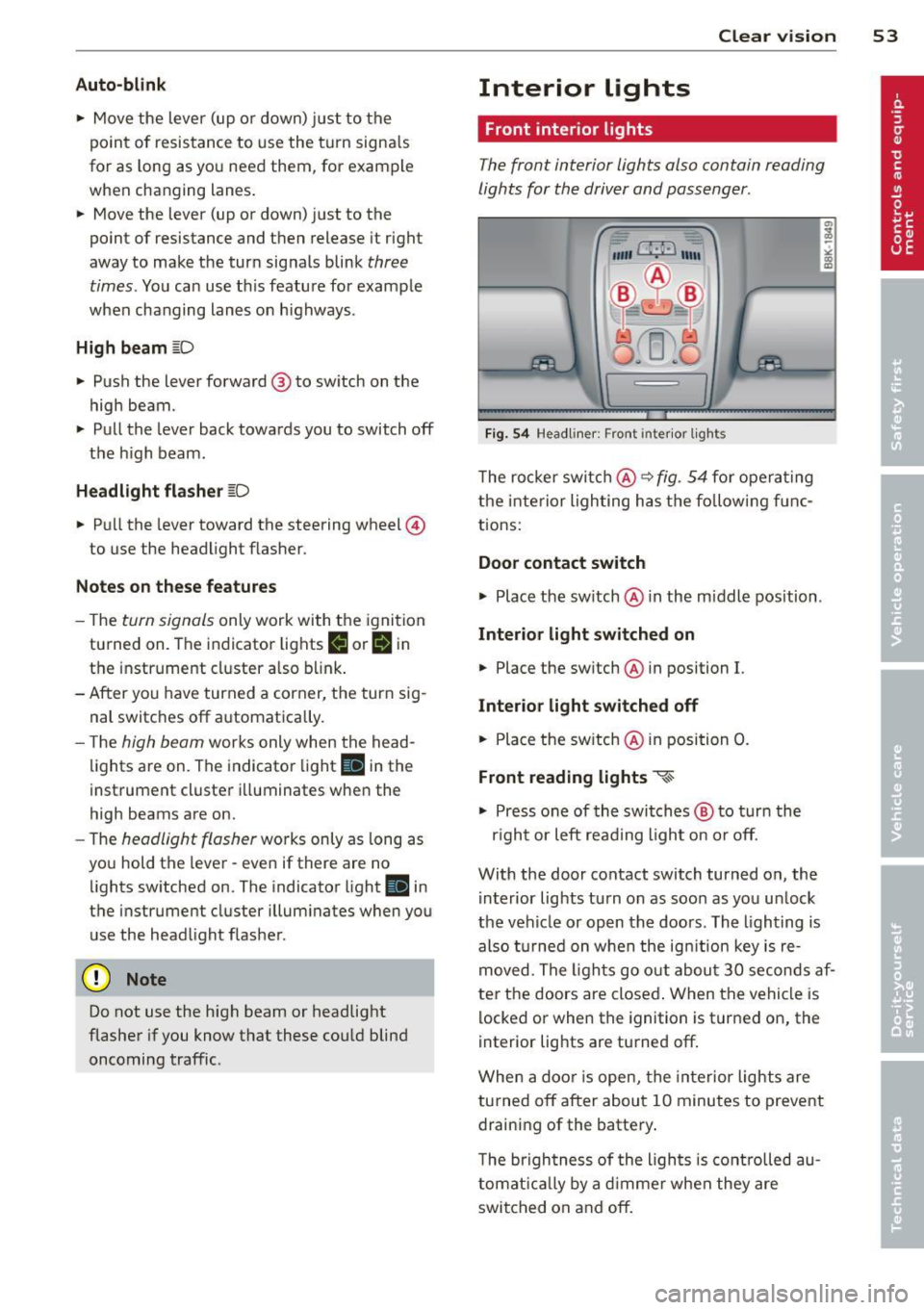
The rocker switch@ ~ fig. 54 for operating
the interior lighting has the follow ing f unc
tions:
Door contact switch
.,.. Place the switch @ in the m iddle position .
Interior light switched on
• Place the sw itch @ in position I.
Interior light switched off
• Place the switch @ in position 0.
Front reading lights ~
.,.. Press one of the switches @ to turn the
r ig ht or left read ing l ight on or off.
With the door contact switch turned on, the i nterior lights tu rn on as soon as you un lock
the vehicle or open the doors. The lighting is
also turned on when the ignit ion key is re
moved. The lights go out about 30 seconds af
ter the doors are closed . When the vehicle is
locked or when the ignition is turned on, the
interior lights are turned off.
When a door is open, the interior lights are
turned off after about 10 minutes to prevent
draining of the battery.
T he brigh tness of the ligh ts is controlled au
tomatically by a dimmer when they are
switched on and off.
Page 56 of 316

54 Clear vis ion
Rear interior lights
There are reading lights in the rear for the
passengers.
Fi g. 55 Headliner: Rear read ing lights
The reading lights are switched on and off us
ing the but tons
~~-
Vision
Sun visors
Using the sun visors makes driving safer.
Fig. 56 Sun viso r
The sun visors for the dr iver and passenger
can be pulled out of the ir brackets in the cen
ter of the vehicle and turned towards the the doors
q fig. 56 (D .
Vanity mirror
The vanity mir rors on the sun visors are cov
e red. When the l id is opened @, the m irror
light in the headline r turns on automa tically.
It tur ns off when the lid is closed and the visor
i s folded up again.
Sun shade
Applies to vehicles: with sun shade
'ii,) ~Clf • -----
Fig . 57 with MMJ: Button for rear window su n s hade
F ig . 58 without MMI: Button for rear window sun
s h ade
"' To extend/retract the rear window sun
shade, press the bu tton
0 ¢ fig. 58 . In ve
hicles with MM I*, the bu tton is l ocated
above the climate c ontrol system¢
fig. 57.
The rea r window sun shade can be set in the
MM I* so that it retracts autom atically when
dr iv ing in reverse. Sele ct
!CAR !> Wind ow >
Rear wind ow sun shade > On
to do this. The
s u n shade is extended again as soon as the ve
hicle is traveling forward at a speed greater
than 9 mph (1S km/h) if the ignition has not
been switched off in the meant ime. The cur
rent setting is automatically stored and as
s igned to the remote key .
@ Tips
-Pressing the button likl severa l times
consecutive ly can trigge r the overload
protect ion . The sun shade can on ly be ex
t ended/retracted agai n after a brief wait
ing period.
- The rear window sun shade only func
tions when the vehicle interior is warmer
t han 14°F (- 10°().
Page 57 of 316

Wiper and washer system
Switching the windshield wipers on
Fig. S9 W indshield w iper leve r
Move the windshield wiper lever to the corre
spond ing pos ition:
@ -Windshie ld w iper off
(D -Interva l mode. To extend/shorten the
wipe r intervals , move the switch @ to the
left/right. In veh icles with a rain sensor*, the
windshie ld wipers are act ivated automat ically
start ing at a speed of 2 mp h (4 km/h) . The
h igher the sensitivity of the rain sensor* is set
(switch @ to the right), the earlier the wind
shie ld wipers react to mois ture on the wi nd
shield.
@ -Slow wiping
®-Fast wiping
©-Sing le wipe
® -Clean the wi ndshield . T o e liminate water
d ro pl ets , the w indshield wiper performs one
afterwipe operation after several seconds
while driving. You can switch this function off
by mov ing the lever to position ® within 10
seconds of the afterw ipe operation . The after
wipe function is reactivated the next time the
ignit io n is switched on .
C lea ning the headlights *. The headlight wash
er system* only functions when the light is
switched on . The headlights are automatically
cleaned the first t ime and every fifth time the
lever is moved to position ®· T hey are also
cleaned every time you hold the lever in posi
tion ® for longer than 2 seconds. Clear vi
sion 55
A WARNING
- The rain sensor is only intended to assist
the dr iver. The driver is st ill responsible
for manually switch ing the wipers on ac
cording to the visibility cond it ions .
- The windsh ield may not be treated with
wate r-repell ing windsh ield coating
age nts. Unfavo rable cond it io ns, such as
we tness, dar kne ss, low sun, can result in
increased glare. Wiper blade chatter is
also possib le .
- Prope rly f unct ion ing windsh ield wiper
blades are req uired for a clea r view and
safe driving
~ page 56, Replacing
windshield wiper blades .
(D Note
-In the case of fros t, check whethe r the
w indshield wiper blades are frozen to
t he windsh ield. Sw itch ing on the wind
shield wipe rs can damage the wiper
blades!
- Prior to using a car wash, the windshield
wiper system must be switched off ( lever
in posit ion 0). Th is helps to prevent unin
tentional switch ing on and damage to
the windsh ield wiper system.
(D Tips
- The windshield w ipers are switched off
when the ign it ion is turned off. Act ivate
the windsh ield wipers after the ignition
is switched bac k on by moving the wind
shield w iper lever to any position .
- Worn or d irty windshield wipe r blades
result in streaking . This ca n affect the
rain sensor* funct ion . Check yo ur wind
shield wiper blades regularly.
- T he ra in sensor* is part of the interval
w ip ing system. Turning off the ignition
w ill also deactivate the ra in se nsor* . To
reactiva te the sensor, swit ch off the in
terval wiping function, then switch it
back on aga in .
- Th e washer f luid no zz les o f the w ind
shield washer system are heated at low
temperatures when the ignition is on .
Page 58 of 316

56 Clear vis ion
- When stopping temporarily, e .g. at a
traffic light , the set speed of the wind·
s h ield wipers is automatically red uced by
one speed.
Service position
Th e windshi eld wiper blades ore replaced in
the service position.
Fig. 6 0 Service pos it ion
The serv ice position is set in the rad io or
MMI* .
,. If the wiper bl ades are no t fro zen to the
wind shield , bring the windshield wiper lever
to the basic position @¢
page 55, fig. 59.
,. Se lect : Function button
IC ARI > Windshield
wi per s> Serv ice po siti on.
- On · changing the windsh ield wiper blades
can only be done if you bring the wiper arms
to the serv ice position
9 fig . 60. You will al
so avoid paint damage to the hood when
working on the wipe rs in this po sitio n.
- Off · the w indshield wipers are moved to
their initial position aga in.
(D Note
Never maneuve r your vehicle with the
front windshield wipe r arms ra ised since
they will automat ica lly be moved back to
t heir bas ic posi tion above a speed of 3
mph (6 km/h) and can sc ra tch the hood.
@ Tips
- You can also use the servic e pos ition, for
example , if you want to protect the
windsh iel d from icing by using a cover . -
The service position automatically
switches to
Off when you operate the
w indshield wiper lever, or speed exceeds
3 mph (6 km/h).
Replacing windshield wiper blades
Wiper blad es in good condition help ke ep the
windshield clear .
Fig . 6 1 Re movin g the w ipe r bl ade
Removing the wiper bl ade
,. Bring the w indshield wipers to the service
position ¢
page 56.
,. lift the windsh ield wiper arm up from the
w indshield .
,. Press the lock ing knob @¢
fig. 61 on the
w iper blade. Ho ld the wiper blade firmly.
.,, .... .., 0 rr: ig
,. Remove the wipe r blade in the di rect ion of
the arrow.
Attaching the wiper blade
,. Insta ll the new w iper blade in the reta iner
on the wiper arm @ unt il you hear it click in ·
t o p lace on the w iper arm .
,. Place the wiper arm back on the windsh ield.
-
- Clean your wiper blades regu larly with a
w indshie ld washer so lution to prevent
streaking.
If the w iper blades are very
d irty, for example with insects, carefully
clean the wiper blades with a sponge or a
soft br ush .
- For your safety, you should replace the
wiper blades once or twice a year . See
your author ized Audi dealer for replace·
men t bla d es.
Page 59 of 316

CD Note
-The windshield wiper blades must only
be replaced when in the serv ice position
<=> page 56! Otherwise, you risk damag
i ng the pa int on t he hood or the wind
s hi eld wiper motor.
- To he lp prevent damage to the wiper sys
tem, a lways loosen blades which are fr o
zen to the windsh ield befo re ope rat ing
wipe rs.
- To he lp prevent damage to w ipe r blades,
do no t use gasoline, ke rose ne, pa int
t hi nn er, or o the r so lvents on or near t he
wipe r blades .
- To he lp prevent damage to the wiper
a rms or other components, do not at
temp t to move the wipers by han d.
@ Tips
Commercial hot waxes applied by a uto
mat ic car washes affect the how easily the
g la ss surfa ce can be cleaned.
Mirrors
Adjusting the exterior mirrors
Fig. 62 Forward sectio n of driver's armrest : power mir
ro r contro ls
Adjusting e xterio r mirrors
• Rotate the knob to the© posit ion (driver 's
exter ior mirror) or to the® pos ition (pas
senger's exter io r mir ror) ¢
fig. 62.
• Rotate the knob and the mirror so t hat you
have a clear view to t he rear.
Heated mirrors
• Ro tate the knob to pos it io n @ . Clear vi
sion 5 7
Depend ing on the o utside temperature, the
mirro r sur faces are heated until the ig nition is
switched off -even if the knob is no longer in
pos ition @.
You are we ll-advised to fold the ex ter ior mir
rors in when maneuvering in tight spaces o r
when leaving the car parked close to other ve
hicles.
Memory for e xterior mirrors*
On vehicles wi th memory for t he drive r's sea t,
the cur rent setting for the exter ior mir ro rs is
automat ica lly stored a long with the seat posi
tion
¢page 65.
Tilt function for the passenger's mirror* (only w ith memory fo r exterior mirror s)
When the reverse gear is e ngaged, the mirro r
surface tilts downward slightly if the setting
i s for the passenger's mirror (knob in pos ition
® ¢fig . 62). This allows you to see the curb
dur ing parallel parking .
The mirror returns to its initial position as
soon as reverse gear is disengaged and veh icle
speed is above about 9 mph
(15 km/h) . The
mirror also retur ns to its init ial position if the
switch is moved to the dr iver's ex terior m irror
© or the ignition is sw itched off .
If the pos ition of the mirror surface is
c hanged on a tilted mirro r, this new position
will be automatically ass igned to th e remote
key w hen the veh icle is taken o ut of reverse
gear.
CD Note
Cu rved mirror surfaces (co nvex o r sph eri
ca l*) increase your f ie ld of view . Remem
b er that ve hicl es o r othe r ob jects w ill ap
p ear sm aller and farthe r away t han when
seen in a fla t mirro r. If you use t his mirror
to estimate distances of fo llowing vehicles
when chan ging lanes, you could est imate
i ncorrect ly and cause an accident.
Page 60 of 316

58 Clear vis ion
@ Tips
If there shou ld be a malfunction in the
electrical system, you can still adjust the
exterior mirrors by pressing the edge of
the mirror .
Dimming the mirrors
N
..
-
" ~==============~ l8
Fig. 63 Aut oma tic d imm ing re arview mirror*
Manual anti -glar e adju stm ent
.. Move the small lever (located on the bot
tom edge of the mirror) to the rear.
Automaticall y dimming mirrors *
.. To d im the rearv iew mirror and both exteri
or mirrors, p ress the @button. The d iode
@ turns on . The rearview and exterior m ir
rors dim automatically when light shines on
them, for example from head lights on ave
hicle to the rear .
A WARNING
Electrolyte fluid can leak from automatic
dimming mirrors if the glass is broken.
Electrolyte fluid can irritate skin, eyes and
respi ratory system .
- Repeated or prolonged exposure to elec
trolyte can cause irritation to the resp ira
tory system, espec ially among people
with asthma or other respiratory cond i
t ions. Get fres h air immedia tely by leav
ing t he vehicle or, if that is not possible,
o pen windows and doors all the way.
- If elec trolyte gets in to the eyes, flush
them thoro ughly with large amounts of
clean water for at least 15 min utes;
medica l attention is recommended .
-If electrolyte contacts skin, flush affect
ed area with clean water for at least 15 minutes and then wash affected area
with soap and water; medical attention is recommended . Thoroughly wash af
fected clothing and shoes before reuse.
- If swallowed and person is conscious,
rinse mouth with water for at least 15
minutes. Do not induc e vomiting unless
instructed to do so by medi cal professio
na l. Get medical attention immediately .
(D Note
Liquid electrolyte leaking from b roken m ir
r o r glass w ill damage any plastic surfaces
i t comes in contac t with. Clean up spilled
electrolyte imme diately wi th clean water
and a sponge .
(D Tips
-Switching off the dimming function of
the inside rear view mir ror also deacti
va tes the automatic dimming func tion of
the exterior mirrors .
- The automatic dimming m irrors do not
dim when the interior lighting is turned
on or the reverse gear is selected .
- Au toma tic dimm ing for t he mirror on ly
operates properly if the sun shade * for
the rear window is not in use or the light
striking the inside mirror is not hindered
by other objects .
Page 63 of 316

Seats and storage
General recommen
dations
Why is your seat adjustment so important?
The safety belts and the airbag system can
only provide maximum protection if the front
seats are correctly adjusted.
There are various ways of adjusting the front
seats to provide safe and comfortable support
for the driver and the front passenger. Adjust
your seat properly so that :
- you can easily and quick ly reach all the
switches and controls in the instrument
panel
- your body is properly supported thus reduc ing physical stress and fatigue
- the safety belts and airbag system can offe r
maximum protection
¢ page 162.
In the following sections, you will see exactly
how you can best adjust your seats .
There are special regulations and instructions
for installing a child safety seat on the front passenger's seat. Always follow the informa
tion regard ing child safety provided in
¢ page 186, Child Safety.
A WARNING
Incorrect seating position of the driver and
all other passengers can result in serious
personal injury.
- Always keep your feet on the f loor when
the vehicle is in motion -never p ut your
feet on top of the instrument panel, out
of the w indow or on top of the seat cush
ion. Th is applies especially to the passen
gers . If your seating position is incorrect,
you increase the r isk of injury in the case
of sudden braking or an acc ident. If the
airbag inflates and the seating position
is incorrect, this could result in persona l
injury or even death.
- It is important for bo th the driver and
front passenger to keep a distance of a t
Seat s an d sto rage 61
least 10 inches (25 cm) between them
selves and the steering wheel and/or in
strument panel. If you're s itting any
closer than th is, the airbag system can
not protect you properly. In addition, the
front seats and head restraints must be
adjusted to your body height so that t hey
can give you maximum protect ion.
- Always try to keep as much distance as
possible between yourself and the s teer
ing wheel o r instrument pane l.
- Do not adjust the driver's or front pas
senger's seat whi le the vehicle is moving.
Your sea t may move unexpected ly, caus
ing sudden loss of vehicle cont rol and
personal injury . If you adjust yo ur seat
while the veh icle is moving, yo u are out
of posit ion.
Driver's seat
The correct seat position is important for safe
and relaxed driving.
We recommend that you adjus t the dr iver's
seat in the fo llowing manner:
.,. Adjust t he seat in fore and aft direction so
that you can easily push the peda ls to the
floor wh ile keeping your knees s lightly bent
i:::> A in Why is your seat adjustment so im
portant? on page 61.
.,. Adjust the seatback so that when you sit
w ith your back against the seatback, you can
still grasp the top of the steering wheel.
.,. Adjust the head restraint so the upper edge
is as even as possible with the top of your head . If that is not poss ible , try to adjust
the head res traint so that it is as close to
this pos ition as possib le
i:::> page 67.
A WARNING
Never place any objects in the dr iver's foot
well. An object could get into the pedal
area and interfere with pedal funct ion . In
case of sudden braking or an acc ident, you
wo uld not be able to brake or accelerate.
Page 67 of 316

When the front seats are moved forward,
their origina l position is stored . When it is
moved back, the seat automatically stops in
this position. To move the seat even further
back, you have to release the switch @ and re
activate it.
The head restraints from the front seats, de
pending on the seat height that has been set,
are automatically retracted when the seat
backs are folded down . They return to their
or iginal pos ition aga in when the seatbacks for
the front seats are raised .
(D Tips
With the driver's or passenger's door
closed, the correspond ing switch to move
the seat is inoperative.
Seat memory
Memory for driver's seat
Applies to vehicles: with seat memo ry
The seat adjustment settings for two drivers
can be stored using the memory buttons in
the driver's door.
Fig. 70 Drive r's door: Seat memory
In addition to the setting for the driver's seat ,
the exterior rear view mirror setting can be
stored and recalled through seat memory if
the vehicle is properly equipped.
Storing and recalling settings
With the help of the memory buttons 1 and 2
c:> fig. 70 the settings for two different drivers
can be stored and recalled
c:> page 65.
The current settings are also automatically as signed to the remote control key being used
Seats and storage 65
when the vehicle is locked . When the vehicle
is un locked, the settings assigned to the re
mote control key being used are automatica lly
recalled.
Turning seat memory on and off
If the I ON/OFF I switch is depressed, the seat
memory is inoperative. The word
OFF in the
I ON/O FF I switch illuminates.
Al l the stored sett ings are retained. We rec
ommend using the
ION/O FF I switch and deac
tivating the seat memory if the vehicle is only
going to be used
temporarily by a driver
whose settings are not going to be stored.
Storing and recalling settings
Applies to vehicles : with seat memory
Before you can store or recall your settings,
the
ION/OFF I switch on the seat memory must
be engaged (not ra ised) .
Storing settings
.,. Adjust the driver's seat .
.,. Adjust the two exterior mirrors.
.,. Press the
ISETI button and hold it down . In
addition, press one of the memory buttons
for at least one second .
.,. Release the buttons . The settings are now
sto red under the corresponding memory
button.
Recalling settings
.,. If the driver's door is open, tap the corre
sponding memory button briefly .
.,. If the driver's door is closed, press the ap
propriate memory button until the stored
position is reached.
Successful storage is confirmed audibly and by the light in the
ISETI button i llum inating
c:> page 65, fig. 70 .
When the vehicle is locked , the current set
tings are stored and assigned to the remote control key. But the settings stored under
memo ry buttons 1 to 2 are not deleted. They
can be recalled at any time. When the vehicle ..,.
Page 71 of 316
.. Secure the items of luggage with the cargo
net* or with non-elastic retaining straps to
the tie-down rings*¢
page 69.
A WARNING
-Loose objects in the luggage compart
ment can slide about suddenly and alter
the vehicle's handling characterist ics.
- Loose objects in the passenger compart
ment can fly forward during abrupt ma
neuve rs or accidents and injure occu
pants.
- Always store objects in the luggage com partment and use su itab le straps, partic
ularly with heavy objects.
- When you transport heavy objects, al
ways remembe r that a change in the cen
ter of gravity may resul t in a change in
the vehicle's handling characterist ics.
- Follow a ll warnings¢
page 144, Driving
Safely.
(D Tips
The tire pressure must be adjusted to the
load -see the tire pressure sticker on the
edge of the driver's door.
T ie -down rings
A ppl ies to vehicles: with tie -dow n rings
The luggage compartment is equipped with
four tie-down rings to secure luggage and
other items.
F ig . 77 Locat ion of the tie-down rings in the luggage
compartment
.. Secure the cargo to the tie-down rings
¢fig . 77-Arrows- .
.. Observe the safety notes ¢page 151.
Sea ts a nd s to rage 69
Cargo net/Storage net
Applies to vehicles : wi th cargo net
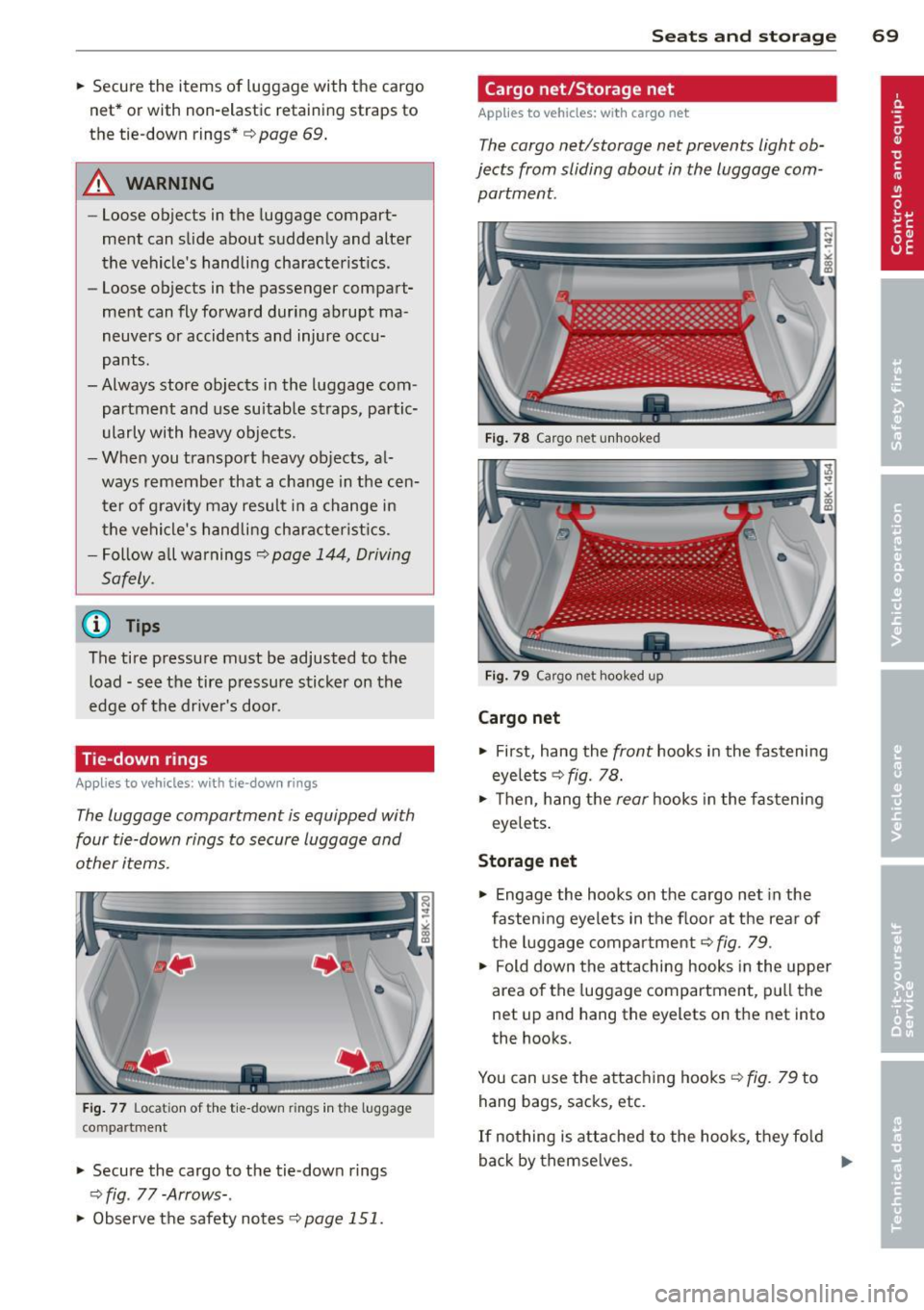
The cargo net/storage net prevents light ob
jects from sliding about in the luggage com partment.
Fig . 78 Cargo n et unhooked
Fi g. 79 Cargo net hooked up
Cargo net
.. First, hang the front hooks in the fastening
eyelets ¢
fig. 78.
.. Then, hang the rear hooks in the fas tening
eyelets .
Storage net
.,. Engage the hooks on the cargo net in the
fastening eyelets in the floor at the rear of t he luggage compartment¢
fig . 79 .
.. Fold down the attaching hooks in the upper
area of the luggage compartment, pull the
net up and hang the eyelets on the net into
the hooks.
You can use the attaching hooks ¢
fig. 79 to
hang bags, sacks, etc.
If no thing is attached to the hooks, they fold
back by themse lves .
Ill>-
Page 74 of 316
7 2 Seats and storage
locking the seatback
Appli es to vehicles: with fold ing rear seatback
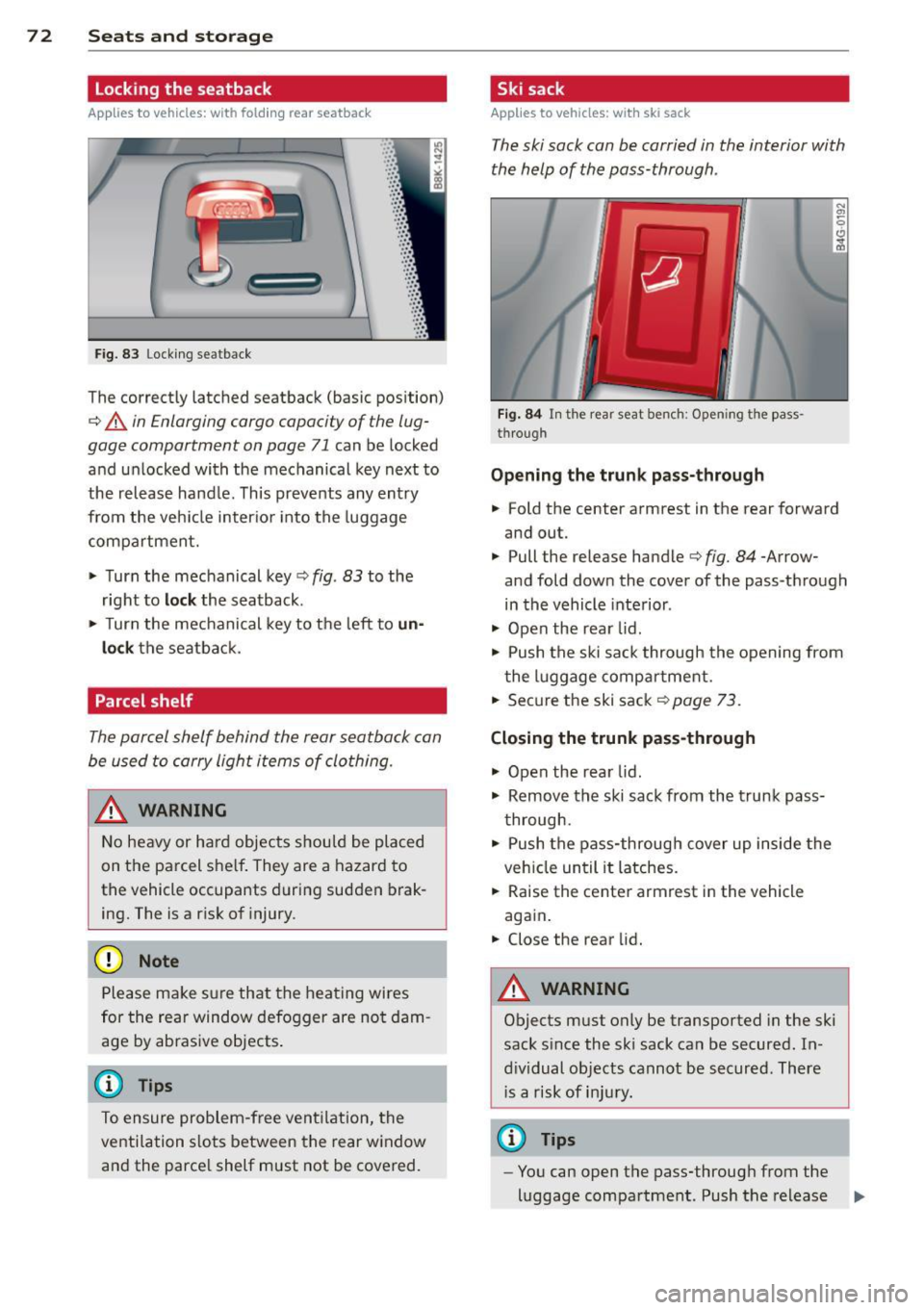
Fig. 83 Lock ing seatback
.. ... ,:: ·:: ·: : ·:: • :: ... ,: ·: ... .. ·::
· ::
•: : ·:: · :: ·:: · ::
· ::
· ::
· :: ·:: ·:: · :: ...
The correctly latched seatback (basic pos ition)
¢ A in Enlarging cargo capacity of the lug
gage compartment on page 71
can be locked
and unlocked with the mechanical key next to
the release hand le . This prevents any entry
from the vehi cle inter io r i nto the luggage
compartment.
.. Turn the mechanical key¢
fig. 83 to the
r ight to
loc k the seatback .
.. Turn the mec hani cal key to the left to
un
lock
the seatba ck.
Parcel shelf
The parcel shelf behind the rear seatback can
be used to carry light items of clothing.
A WARNING
N o heavy or ha rd objec ts shou ld be placed
on the parcel she lf . They are a hazard to
the vehicle occupants during sudden brak
ing. The is a r is k of injury .
(D Note
Please ma ke s ure that the heating wires
for the rear window defogger are no t dam
age by abrasive objects .
@ Tips
To ensure problem-free ventilation, the
ventilation s lots between the rear window
and the parce l shelf must not be cove red.
Ski sack
Applies to vehicles: w ith ski sack
The ski sack can be carried in the interior with
the help of the pass-through .
Fig . 84 In t he rear seat bench: Opening the pass
through
Opening the trunk p ass-through
.. Fold the center armrest in the rear forward
and out.
.. Pull the release handle¢
fig. 84 -Arrow
and fold dow n the cover of the pass -through
in the vehicle inte rior .
.. Open the rea r lid.
.. Push the ski sa ck through the opening from
the l uggage compar tment.
.. Secure the ski sack¢
page 73.
Closing the trunk pass -through
.. Open the rear lid .
.. Remove the ski sack from the trunk pass
through .
.. Push the pass-through cover up inside the
veh icle until it latches.
.. Raise the center armrest in the vehicle
aga in .
.. Close the rear lid.
A WARNING
=
Objects must only be transported in the ski
sack s ince the ski sack can be secured. In
d iv idual objects cannot be secured. There
i s a risk of in ju ry.
@ Tips
- You can open the pass-through from the
luggage compartment. Push the release
II>