lock AUDI A5 COUPE 2012 User Guide
[x] Cancel search | Manufacturer: AUDI, Model Year: 2012, Model line: A5 COUPE, Model: AUDI A5 COUPE 2012Pages: 316, PDF Size: 78.59 MB
Page 33 of 316

-Driving wi th low brake fluid is a safe ty
haza rd. S to p the car and get professional
assistance.
- USA models: If the - warning light
and
the m warning light come on to
gether, the rear wheels could lock up
first under hard braking. Rear wheel lock
up can cause loss of vehicle control and
an acc ident. Have your vehicle repaired
immediately by your authorized Audi
dealer or a qualified workshop. Dr ive
slowly and avoid sudden, ha rd b rake ap
plications.
- Canada models: If the brake warn ing
ligh t. and the ABS warning light
[i]
come on together, the rear wheels could
lock up first under hard brak ing. Rear
wheel lock- up can cause loss of veh icle
control and an accident. Have your vehi
cle repaired immediately by your author
ized Aud i dealer or a qualified workshop .
Drive slowly and avo id sudden, hard
brake applicat io ns.
-L Engine cooling system malfunction
A malfunction in the engine cooling system
must be repaired as soon as possible .
If the . symbol flashes in the display , e ither
the eng ine coolant
temperature is too h igh or
the eng ine coolant
level is too low. A dr iver
message appears as we ll to explain the mal
f u nction in more detail. The drive r warning
goes o ut after abo ut S seconds, but it c an be
b rought up at any time by press ing the
!SE Tl
button again.
Sw itch off engin e and check coolant lev el
.,. Pu ll off the road .
... Stop the veh icle .
.,. Turn off the engine .
.,. Check coolant level¢
page 244.
.,. Add coolan t if necessa ry ¢ page 245 .
.,. Contin ue driving only after the eng ine cool
ant war ning/indicato r light goes o ut.
... Contact your a uthorized Audi dea ler for as
s istance if necessary .
Driver information di spla y 31
If the engine coo lant level is correct, then the
radiator fan may be the ca use of the malfunc
t ion .
_& WARNING
-If your vehicle should brea k down for
mechanical or other reasons, park at a
safe distance from moving traffic, turn
off the eng ine and tu rn on the haza rd
warn ing lights
~ page 52, Em ergency
flashers.
-
- Never ope n the hood if you se e or hear
steam or coo la nt escaping from the en
gine com partmen t -yo u ris k being scald
e d . Wai t until yo u ca n no longer see o r
hea r steam o r coolan t escap ing.
- Th e engine compa rtme nt o f any vehicle
is a dangerous area. Be fore you perform
any wo rk in the engine compartmen t,
tur n of the engine and allow it to coo l.
Follow the warn ing stickers ¢
page 230,
Engine compartment .
(D Note
Do not continue driv ing if the . symbo l
ill uminates . There is a malfunction in the
engine cooling system -you could damage
your engine.
"t::7: Engine oil pressure malfunction
The red engine oil pressure warning symbol
requires immediate service or repair. Driving
with a low oil pressure indication is likely to
cause severe engine damage.
If the . symbo l on the d isplay flashes, the
engine oil pressure is too low. A driver mes
sage appears as well to exp la in the malfunc
tion in more detail. The driver warning goes
o ut after about 5 seconds, b ut i t can be
brought up at any t ime by pressing the
~ IS- ET~ I
bu tton aga in .
Switch off eng ine ! Oil pr essure too low
... Stop the vehicle .
.,. Turn the engine off.
.,. Check the engine oi l level ¢
page 242.
Page 34 of 316

32 Driver information display
• Co ntac t you r authorized Audi dea ler if nec -
essa ry .
Engine oil level too low
If th e e ngine o il leve l is too l ow, ad d eng ine
oil
<> page 242.
Engine oil level correct
If th e . symbo l flash es even t houg h the en
g ine o il lev el is co rrec t, p lease seek prof essio
na l assis tan ce. Do not cont inu e dr iv in g. Do
no t leave the eng ine run nin g
idle, either .
{O) Tips
- The engine oil pressure symbol. is
not an indicator for a low engine oil lev
el. Do not rely on it. Instead, che ck the
oil level in your engine at regular inter
vals, preferably each time you refuel,
and always before going on a long trip.
- The yellow oil level warning indication
II requires oil refill or workshop serv
ice without delay . Do not wait until the
red oil pressure warning. starts to
flash before you respond to the low oil level warning
II. By then, your engine
may already have suffered serious dam
age .
~ . Fill engine oil now
WARNING: Please add oil immediately
If t he . symbo l lights up, t hen the oil has to
be rep lenished r ight now
c:> page 242 .
Q31-e Steering malfunction
If there is a malfunction in the electronic
steering column lock, th e steering cannot b e
unlocked .
If th e . symbol in the disp lay blinks, there
is a malfunction in the elect ronic steer ing col
u m n lock. A dr iver message app ears as well to
explain the malfunc tion in mo re de ta il. The
dr iver war ning goes out after about 5 sec
on ds, but it can be broug ht up a t any time by
p res sing t he
ISE TI bu tton again .
Stop the vehicle and turn off the engine.
Steering defective
• Obtain profess ional a ssista nc e.
• Do
not tow your ve hicle.
A WARNING
-
Your veh icle must not be towe d in t he
event of a malfunction in the electronic
steering co lumn lock beca use it cannot be
steered due to the locked steering. I f it is
t o we d wit h the steeri ng locked, there is
t h e risk o f an accident.
I
{i) Tips
The symbol's ap pearance might be differ
ent in some mode ls.
© -e Ignition lock malfunction
A malfunction in the ignition lock must be re
paired immediately.
If the . symbol in the display blinks , there
is a ma lf u nction in the e lectronic ignition lock .
A driver message appears as we ll to explain
t h e malfunction in mo re deta il. The dr iver
warning goes out after about 5 seconds, but it can be b rought up a t any time by press ing the
ISE TI bu tton again
Defective ignition switch Get it serviced!
• Do not turn the e ngine off .
• Drive imme diate ly to a n author ized service
facility to have the malfunct io n corrected.
If there is a mal funct ion i n the elect ron ic ign i
tion loc k, the ignition cannot be t urne d off .
D rive immed iate ly to an autho rized serv ice fa
c ili ty to have the cause of the malfunct ion c or
rected.
On vehicles with conve nience key*, the engi ne
sho uld not be switched off us ing the start/
stop button because the engine cannot be
started again afte r the ignit io n h as been
switched off .
Page 35 of 316
(D Tips
The symbol's appearance might be different in some models .
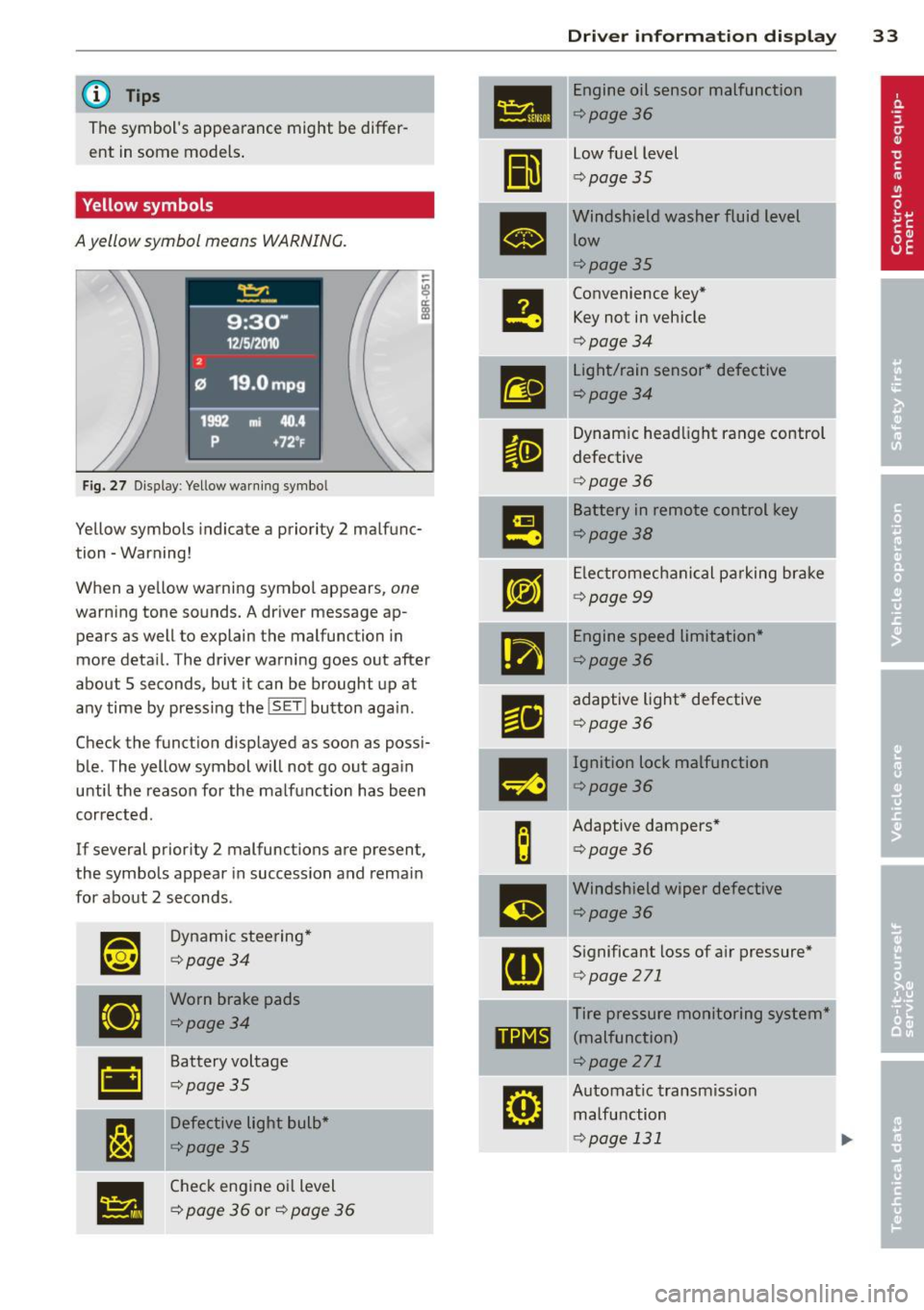
Yellow symbols
A yellow symbol means WARNING.
Fig. 27 Display: Yellow warning symbo l
Yellow symbols indicate a priority 2 malfunc
tion -Warning!
When a yellow warning symbol appears,
one
warning tone sounds. A driver message ap
pears as well to explain the malfunction in
more deta il. The driver warning goes out after
about 5 seconds, but it can be brought up at
any time by pressing the
! SET I button aga in.
Check the funct ion displayed as soon as possi
ble. The yellow symbol will not go out again
until the reason for the malfunction has been
corrected.
If several priority 2 malfunctions are present ,
the symbols appear in succession and remain
for about 2 seconds .
~~
Dynamic steering*
¢page34
•
Worn brake pads
¢page34
•
Battery voltage
¢page35
I:~
Defective light bulb*
¢page35
•
Check engine oil level
¢
page 36 or¢ page 36
Dri ver inform ation di spl ay 33
•
Engine oil sensor malfunction
¢page36
II
low fuel level
¢ page 35
•
Windshield washer fluid level
low
¢page35
e
Convenience key* Key not in vehicle
¢ page 34
m
light/rain sensor* defective
¢page34
II
Dynamic headl ight range control
defective
¢ page 36
m
Battery in remote control key
¢page38
rm
Electromechanical pa rking brake
¢ page 99
•
Engine speed limitation*
¢page36
r1i
adaptive light* defective
¢page 36
-
m
Ignition lock malfunction
¢page36
B
Adaptive dampers*
¢page36
m
Windshield wiper defective
¢page36
[ti
Significant loss of air pressure*
¢page 271
Tire pressure monitoring system*
11111 (malfunction)
¢page 271
rm
Automatic transmiss ion
malfunction
¢page 131
Page 36 of 316

34 Driver in formation d isplay
The speed warnings warning threshold 1
[i and warning threshold 2 HIil are also
yellow symbols in some models. The warn
ing is always shown as a small symbol in
the upper area of the display
c> page 27 .
~ Dynamic steering
App lies to vehicles: with Audi drive select
&1rJ D ynamic steering: Sy ste m m alfun ctio n
This driver message and the &1r-1 symbol ap
pear when a system malfunction occurs dur
ing travel. You can continue to dr ive carefully
at a reduced speed to a qualified workshop .
Steer ing ca n be mo re d iff icult or sensitive
tha n usual. The stee ring wheel can also be at
an angle when dr iv ing str aight.
&1rJ Dynamic steering: initial ization
If th is driver message appears and the &1rJ in
d icator light is flash ing on the instrument
panel, dynam ic steering is being re initialized .
Once you sta rt the eng ine after this is f inish
ed, the steering wheel will be easy to move.
Re-initialization might be necessary if the
steer ing whee l was moved ha rd to t he left and
right whi le the vehicle was not moving . The
d isplay goes out as soon as initia lization is
comp lete.
A WARNING
-
Have the dynamic steering system mal
function repaired as soon as poss ible by an
authorized Audi dealer or any qualified
workshop -risk of accident!
(D Tips
The dynam ic steering stability systems are
not ava ilable in the event of a system mal
function .
2e Key not in vehicle
Applies to vehicles : wit h co nvenience key
I! Key no t in vehicl e
This rem inder appears along with the I! sym
bol if the master key is removed from the ve
hicle with the eng ine runn ing .
It is intended
to rem ind you (e.g . whe n cha nging dr ivers)
not to cont inue t he journey withou t the m as
te r k ey.
If the master key is no longer in the ve hicle,
you cannot swi tch off the ig nit ion after stop
ping the engine and you also canno t start the
engine aga in. Yo u also cannot lock the vehicle
from the outside .
· fi.. D Light/rain sensor defective
Appl ies to vehicles: wit h ligh t/rain sensor
B Automatic headlights /automati c wipers
defective
If the symbol illumina tes, the ligh t sensor has
failed. For safety reasons the low beams are
turned on permanently with t he switch in AU
TO . However, yo u can cont inue to turn the
lights on and off using the light switch. In the
case of a defect i n the rain sensor, the wind
shield wipe r lever functions are still ava ilab le.
Have the light/ rain senso r checked as soon as
poss ible by an authori zed Audi dealer.
(0) Worn brake pads
EiJ Brake pad s!
If the warning light illuminates, immed iately
co ntact your authorized Audi dea ler or qua li
fied workshop to have all brake pads i nspect
ed. On USA mode ls t he
EiJ w arni ng lig ht
comes on together with the - warning
light . Both sets of brake pads on an ax le must
always be replaced at the same time.
A WARNING
'-
Driving w ith bad brakes can cause a colli-
sion and ser ious personal injury.
Page 38 of 316

36 Driver in formation d isplay
'l:"::71 , Check engine oil
II Add o il, ma x x qt (l). You may c ontinu e
drivin g
If the ll!I symbol lights up d isplay ing th is
driver message, then add a maximum of
I li
ter at you r earliest oppo rtunity
c:> page 242.
'l:":?J. Engine oil level
II Please c heck oil l evel
When the symbol illuminates, check the en
g ine oil level as soo n as poss ible
c:> page 242.
Top off the oil at yo ur earliest oppo rtunity
c:> page 2 42.
'IY ..,. Engine oil sensor defective
II Oil le vel! Sen sor defecti ve
If the symbol illum inates, contact your au
thor ized Audi dealer and have the o il sensor
inspected . Until you have th is done, check the
oil leve l each time you refuel just to be on the
safe side
¢ page 242.
! ?) Engine speed limitation
Applies to vehicles : with engine speed limi tation
IP,I Do not e xceed ma x. engine spee d of XXXX
rpm
The II! symbo l illuminates when there is an
engine contro l malfunction. The
(m indicator
light in the instrument cluster also illumi
nates. The engine speed is limited to the
speed displayed in the driver information sys
tem . Keep in mind that the eng ine speed will
not exceed the va lue disp layed in the driver in
formation system, fo r example when down
shifting.
Please go to an authorized Aud i dealer or oth
er qualified workshop to have the ma lfunction
repaired.
~(D Headlight range control defective
II Headlight range control d efe cti ve !
If the fl symbo l ill uminates , the dynamic
headlight range contro l is no longer working
properly . Have the system checked and re
paired at your authori zed Audi dealer.
§0 Adaptive light defective
Applies to vehicles: with adaptive light
l/ll adapt ive Light defecti ve
When the l/ll symbol illuminates, it means
that adaptive light is defective. Go to an au
thorized Audi dealer to have the headlights or
the control un it for the adaptive light re
paired .
~ Ignition lock malfunction
I!! Ignition lock def ectiv e
If the I!! symbol in the display comes on,
there is a malfunction in the e lectronic igni
tion lock . Please go to an author ized Audi
dealer or other qualified workshop to have the
malfu nction repa ired.
Q Adaptive dampers
Applies to vehicles: with Audi drive select
E Adapti ve damper s: syste m malfunc tion
If the E symbol in the d isplay comes on, there
is a ma lfunction in the adaptive dampers.
Please go to an authori zed A udi dealer or oth
er qualified workshop to have the mal funct ion
repaired .
~ Windshield wipers faulty
ti Windscreen wipe r defective!
When the fw,j symbol illum inates, it means
that the elect ronics for the winds hield wipers
are defective . Please go to an authorized A udi
dealer or qualified workshop to have the
windshield wiper system repaired.
Page 39 of 316
Opening and closing Keys
Key set
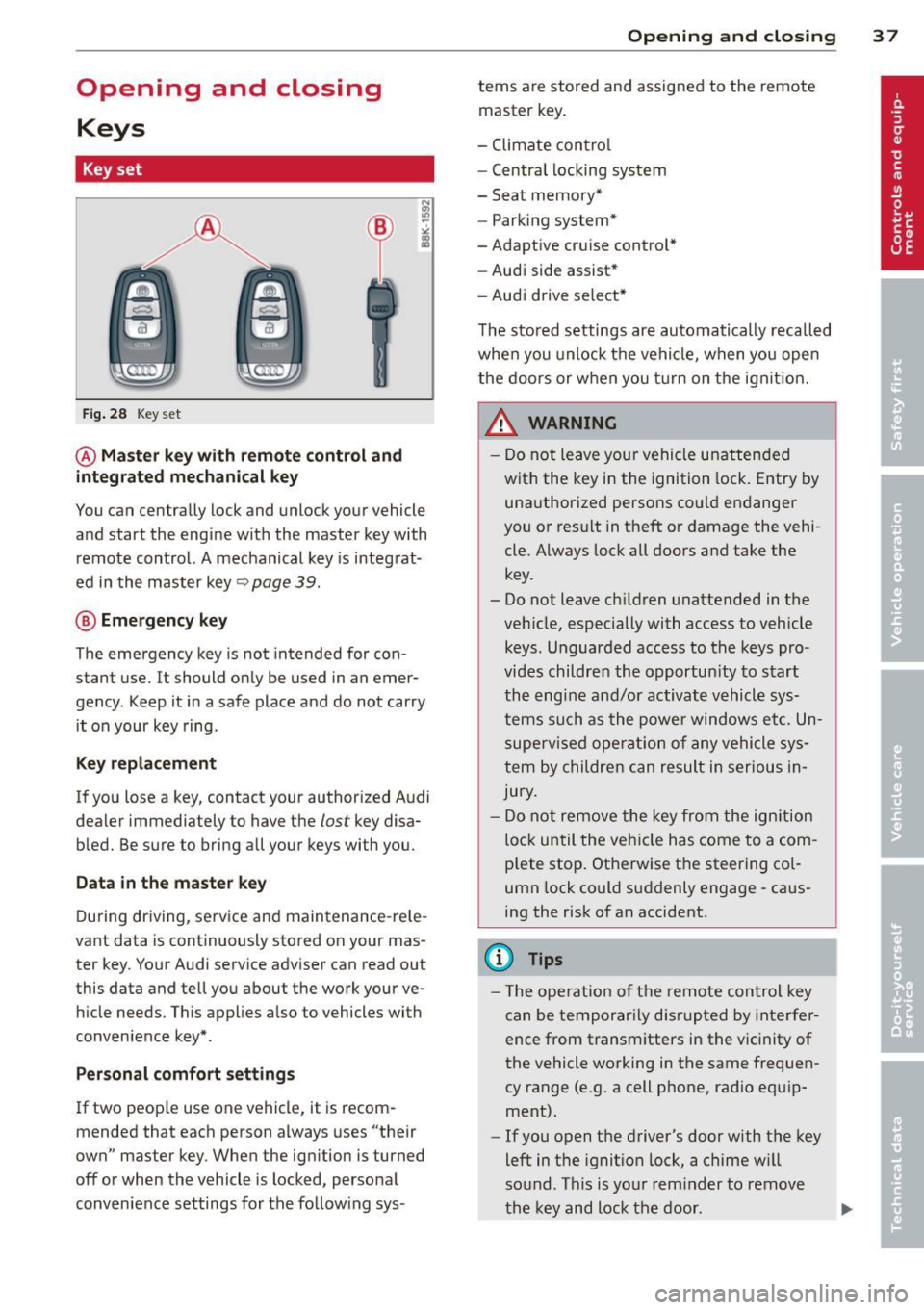
Fig. 28 Key set
@ Master key with remote control and
integrated mechanical key
You can centrally lock and unlock your vehicle
and start the engine with the master key with
remote control. A mechanical key is integrat
ed in the master key~
page 39.
® Emergency key
The emergency key is not intended for con
stant use.
It should only be used in an emer
gency . Keep it in a safe place and do not carry
it on your key ring .
Key replacement
If you lose a key, contact your authorized Audi
dealer immediately to have the
lost key disa
bled. Be sure to bring all your keys with you.
Data in the master key
During driving, service and maintenance-rele
vant data is continuously stored on your mas
ter key. Your Audi service adviser can read out
this data and tell you about the work your ve hicle needs. This applies a lso to vehicles with
conven ience key*.
Per sonal comfort settings
If two people use one vehicle, it is recom
mended that each person always uses "their
own" master key . When the ign ition is turned
off or when the vehicle is locked, personal
conven ience settings for the follow ing sys-
Opening and closing 3 7
terns are stored and assigned to the remote
master key.
- Climate contro l
- Centra l locking system
- Seat memory*
- Parking system*
-Adaptive cruise control*
- Audi side assist*
- Audi drive se lect*
The stored settings are automatically recalled
when you unlock the vehicle, when you open
the doors or when you turn on the ignit ion.
A WARNING
-
- Do not leave your vehicle unattended
with the key in the ignition lock. Entry by
unauthorized persons could endanger
you or result in theft or damage the vehi
cle . Always lock all doors and take the
key .
- Do not leave ch ildren unattended in the
veh icle, especially with access to vehicle
keys . Unguarded access to the keys pro
vides children the opportun ity to start
the engine and/or activate vehicle sys
tems such as the power windows etc. Un
supervised operation of any vehicle sys
tem by children can result in serious In
jury.
- Do not remove the key from the ignition
lock until the vehicle has come to a com
plete stop. Otherwise the steering col
umn lock could suddenly engage -caus
ing the risk of an accident.
@ Tips
- Th e operation of th e remote control key
can be temporarily disrupted by interfer
ence from transmitters in the vicinity of
the vehicle working in the same frequen
cy range (e .g. a cell phone, radio equ ip
ment).
- If you open the driver's door with the key
left in the ignit ion lock, a chime w ill
sound. Th is is your reminder to remove
the key and lock the door.
Page 41 of 316
Removing the mechanical key
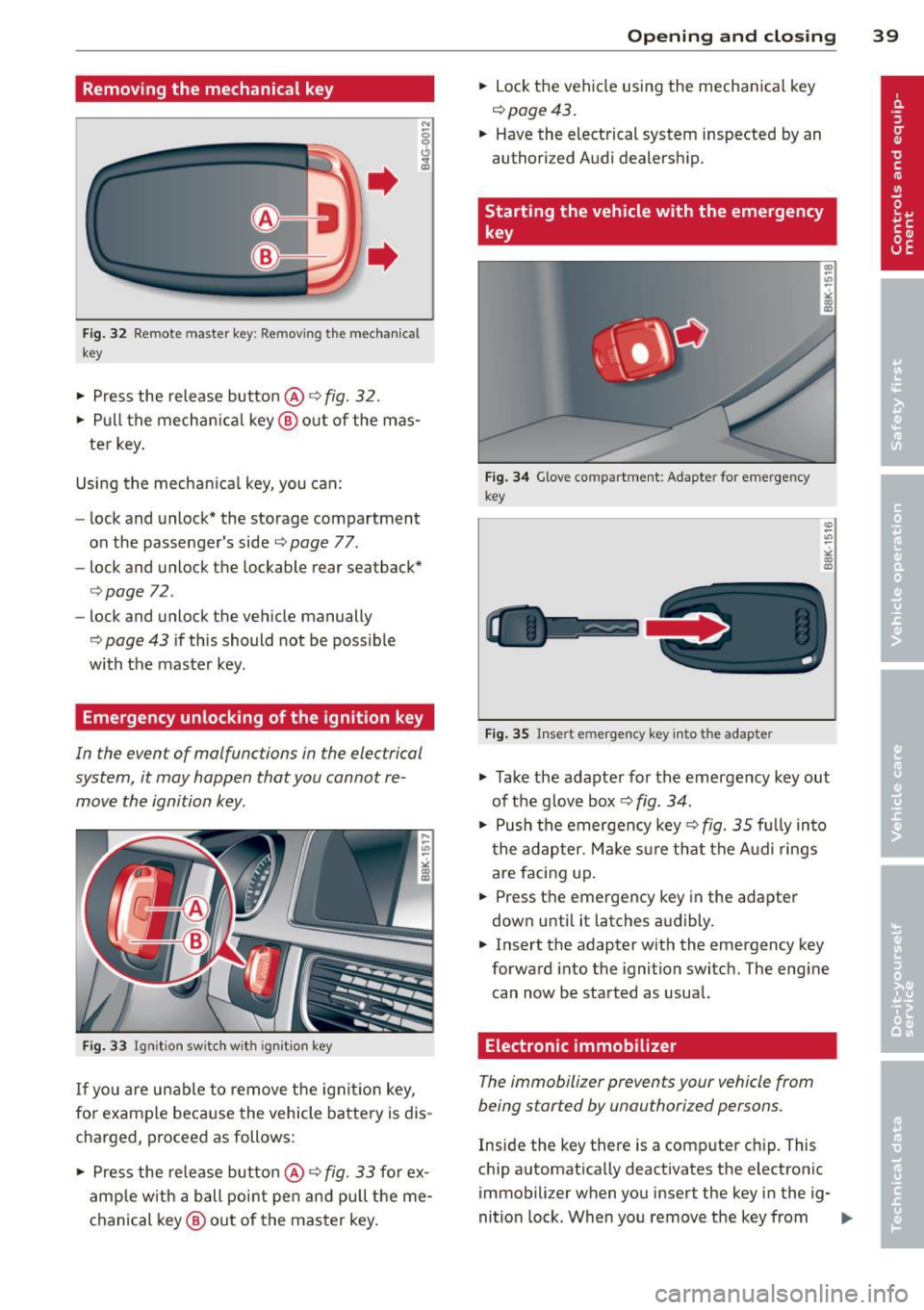
Fig. 32 R emo te master key: Removing the mechanic al
key
• Press the release butto n@ r=> fig. 32.
• Pull the mechanica l key @ out of the mas
ter key.
Using the mechan ica l key, you can:
- lock and unlock* the storage compartment
on the passenger's side
c::> page 77.
- lock and unlock the lockable rear seatback*
c::>page 72 .
- lock and unlock the vehicle manually
r=> page 43 if this should not be poss ible
with the master key .
Emergency unlocking of the ignition key
In the event of malfunctions in the electrical
system, it may happen that you cannot re move the ignition key .
Fig. 33 Ignition switch with ign ition key
If yo u are unable to remove the ignition key,
for example because the vehicle battery is dis
charged, proceed as follows:
• Press the release butto n@
r=> fig. 33 fo r ex
amp le w ith a ball point pen and pull the me
chanical key@ out of the master key.
Opening and closing 39
• Lock the vehicle using the mechanical key
c::> page 43.
• Have the electrical system inspected by an
authorized Audi dealership.
Starting the vehicle with the emergency
key
Fig. 34 Glove compart ment: Adapte r for emergency
key
Fig. 35 Insert emergency key into the adapter
U)
-.,,
->< co m
"' Take the adapter for the emergency key out
of the g love box
r=> fig. 34.
• Push the emergency key c::> fig. 35 fu lly into
t he adapter. Make s ure that the Audi rings
are facing up.
• Press the emergency key in the adapter
down unti l it latches a udibly.
• Insert the adapter with the emergency key
forward into the ignition switc h. The eng ine
can now be started as usual.
Electronic immobilizer
The immobilizer prevents your vehicle from
being started by unauthorized persons.
Inside the key there is a computer chip. This
chip automatically deactivates the electronic
immobilizer when you insert the key in the ig-
nition lock. When you remove the key from .,..
Page 42 of 316
40 Openin g and clo sing
the ignition lock, the e lectronic immob ilizer is
automatically activated once again.
0) Tips
- The vehicle cannot be s tarted if an unau
thorized key is used. The vehicle may not
start if another radio device such as a key
for another vehicle or a transponder is located on the key ring.
- For Declarat ion of Compliance to United
States FCC and Industry Canada regu la
tions
Q page 296.
Power locking system
General description
The power locking system locks or unlocks all
doors and the rear lid simultaneously.
You can lock and unlock the vehicle centrally.
You have the following choices:
- Remote master key
Q page 41,
-Door handles with convenience key*
c:>page 42,
- Lock cylinder at the driver's door
Q page43, or
- Power locking switc h inside
Q page 43 .
Selective unlocking
When they a re closed, the door and rea r lid
a re locked. When unlocking, you can set in the
radio or MM!* whether
only t he drive r's door
or the entire vehicle shou ld be un locked
Q page 41.
Automatic locking
The automat ic loc king featu re locks all the ve
h icle doors and the rear lid when you drive
faste r than 9 mph ( 15 km/h).
The car is un locked again once the ignition key
is removed. In addition, the veh icle can be un
l ocked if the opening fu nction in the power
l o cki ng system switch or a t one of the door
l evers is act uated . The Auto Lock function can
be turned on and off in the rad io or
MMI*
c:::> page41.
Additionally , in the event of a crash with air
bag dep loyment the doors are automatically
u nlocked to allow access to the vehicle .
Anti-theft alarm warning system
If the an ti- theft alarm warning system de
tects a b reak-in into the vehicle, acoustic and
vis ual warning signals are triggered .
T he anti-theft wa rning system is activated au
tomat ica lly when you lock the vehi cle. It is de
activated when unlocking using the
remot e
k ey,
with the me chanical key , and when you
switch on the ignition.
T he alarm also t urns off when the a larm cy cle
has expired .
Turn signal s
When you unlock the veh icle, the turn s ignals
flash twice, when you lock it once. If they do
not flash, one of the doo rs, the rear lid o r the
hood is not lo cked.
Unintentionally locking yourself out
In the following cases there safeguards to
prevent yo u lock ing your remote master key in
the ve hicle:
- The vehicle does not lock w ith the central
locking switc h
Q page 43 if the driver's
door is open .
- On veh ides w ith convenience key*, if the
most recently used master key is in the lug
gage compa rtment, the rear lid is a utomat i
cally u nlocked again after it is closed.
Do not lock your veh icle w ith the
r e mot e m as
ter key or con ven ienc e ke y*
until all doors
and the rear lid are closed . In this way you
avo id lock ing you rself out a ccidentally.
_& WARNING
-
- W hen you leave the ve hicle, always re
move the ignition key and take it with
you . This will prevent passengers (chil
dren, for example) from acc identally be
ing locked in the vehicle shou ld they acci
dentally press the power locking switch in the front doors.
Page 43 of 316
-Do not leave children inside the vehicle
unsupervised. In an emergency it would
be impossible to open the doors from
the outside without the key.
(D Tips
- In the event of a crash with airbag de
ployment all locked doors will be auto
matically unlocked to give access to the
vehicle occupants from the outside .
- If the power lock ing system should mal
function, you can lock the driver's door
using the mechanical key
q page 44.
- If the power lock ing system should fail,
you can still open the fuel tank flap in an
emergency
c:> page 235 .
-You are well advised not to keep valua
bles inside an unattended vehicle, visible
or not . Even a properly locked vehicle
cannot provide the security of a safe.
- If the LED in the upper edge of the driv
er's door panel comes on for about 30
seconds after the vehicle is locked, there
i s a ma lfunction in the power locking or
the anti-theft warning system. Have the
malfunction corrected by an authorized
Audi dealership or qualified repair facili
ty.
Setting power locking
The driver can determine the functions for
power locking in the radio or MMI*.
In the Central locking menu you can decide
which doors should be unlocked when open
ing the vehicle.
.,. Se lect :
I CAR I funct ion button > Central lock-
ing .
For example, if you switch the item Unlocking
single door On ,
the passenger 's doo r is no
longer included in the power Locking system,
and will not be unlocked by p ress ing the un
l ock button on the master key remote control.
You can continue to unloc k all the doors and
the rear lid as before. Press the open ing but
ton on the master key tw ice.
Opening and closing 41
In addition to this, the Auto locking can be
switched on and off.
When locki ng the vehicle, all doors and the
trunk lid are locked automatically.
If you switch
Trunk lid/tailgate On, then the
handle on the rear lid
c:> page 44 , fig. 42 is
locked . In this case the rear lid can be opened
with the button
cs on the master key
c:> page 41, fig. 36 or with the un locking
button in the dr iver 's door
c:> page 44,
fig .
41 .
When yo u se lect Confirmation tone On, a
confirmation tone sounds when yo u lock the
vehicle.
Unlocking and locking the vehicle with
the remote control
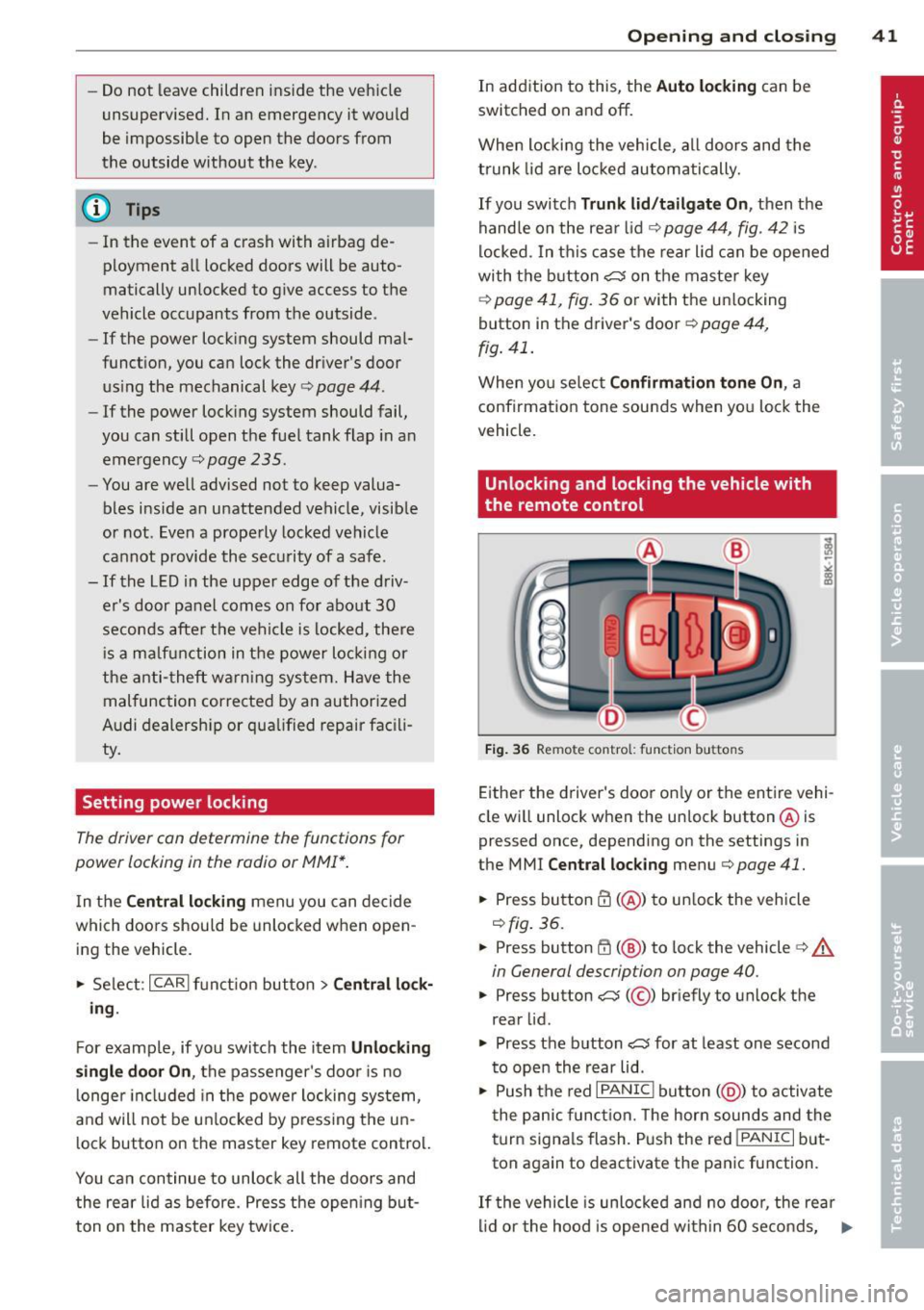
Fig. 36 Remote control: f unc tion buttons
Either the driver's door on ly or the entire vehi
cle wi ll unlock when the unlock button @is
pressed once, depending on the settings in
the MMI
Central locking menu c:> page 41 .
.,. Press button ffi (@ ) to unlock the vehicle
c:> fig. 36.
.,. Press button ffi (@ ) to lock the vehicle ¢ A
in General description on page 40 .
.,. Press button cs( @) briefly to unlock the
rear lid .
.,. Press the button
cs for at least one second
to open the rear lid .
.,. Push the red
I PANIC I button ( @ ) to activate
the panic function. The horn sounds and the
turn signa ls flash . P ush the red
!PANIC I but
ton again to deactivate the panic function.
If th e vehicle is unlocked and no door, the rear
lid or the hood is opened within 60 seconds, .,._
Page 44 of 316

42 Openin g and clo sing
the vehicle locks itself again automatically.
This feature prevents the vehicle from being
accidentally left unlocked over a long period
of time.
It depends on the settings in the radio or
MMI* whether the entire vehicle is unlocked
or only certain doors
c::> page 41.
On vehicles w ith automatic transmission*, the
se lector lever must be in the
P position, other
wise the vehicle cannot be locked .
A WARNING
Read and follow all WARNINGS ¢.& in
General description on page 40.
(D Tips
- In order to make sure the locking func
tion is working, you shou ld always keep
your eye on the vehicle to make sure it is proper ly locked.
- Do not use the remote control if you are
inside the car, otherwise you may unin
tentionally lock the vehicle, and then you
would set off the anti-theft alarm when
you try to start the engine or open a door. In case this happens anyhow, push
the un lock button
0.
- Use the panic funct ion only if you are in
an emergency situation.
Unlocking and locking with convenience
key
Applies to vehicles: with co nve nience key
The doors and the rear lid can be unlocked
and locked without operating the master key.
Fig . 37 Conve nien ce key: Locking the vehicle
Unlocking v ehicle
.,. Take ho ld of the door handle. The door is
un locked automatically.
.,. Pull the handle to open the door.
Locking vehicle
.,. Move the selector lever to the P position
(automatic transmission*), otherwise the
veh icle canno t be locked.
.,. Touch the sensor at the door handle
on ce
c::> fig. 3 7 to lock the vehicle¢ A. in General
description on page 40.
Do not reach inside
the door handle.
The vehicle can be locked and un locked at any
door .
It depends on the settings in the radio
or MMI* whether the ent ire vehicle is un
locked or one of the doors ¢
page 41. The
master key must be w ith in a range of about
1.5 m from the appropriate door or the rear
l id .
It makes no difference whethe r the mas
te r key is in your jacket pocket or in you r brief
case.
If you grip the door handle while locking, this
can adversely affect the locking function .
It is not possible to re-open the door for a
brief period directly after closing it. This al
lows you to ensure that the doors are properly
locked .
A WARNING
Read and follow all WARNINGS c::> .& in
General description on page 40.
(D Tips
-
If your vehicle has been standing for an ex
tended per iod, please note the following:
- The prox imity sensors are deactivated af-
ter a few days to save power. You then
have to pull on the door handle once to
unloc k the vehicle and a second t ime to
open the vehicle.
- T o prevent the battery from bei ng d is
charged and to preserve you r vehicle's
ability to sta rt for as long as possib le,
t he energy management sys tem gradu
ally switches off unnecessary