lock AUDI A5 COUPE 2012 Service Manual
[x] Cancel search | Manufacturer: AUDI, Model Year: 2012, Model line: A5 COUPE, Model: AUDI A5 COUPE 2012Pages: 316, PDF Size: 78.59 MB
Page 97 of 316

If the engine does not start immediately, stop
trying after 10 seconds and then try to restart
the eng ine about 30 seconds later .
After a cold engine is star ted, there may be a
brief period of increased noise because oil
pressure must first bui ld up in the hydraulic
va lve adjusters. This is normal and not a cause
for concern.
Driv er m essa ge in th e in strument clu ster
disp lay
No ke y ident ified
This message appears when the
I S TAR T ENGINE STOP ! button is pressed if
there is no master key inside the vehicle or if
the system does no t recogni ze it. For exam
ple, the master key cannot be recognized if it
is covered by an object (e .g . aluminum brief
case) which
screens the radio signal. Electron
i c devices such as ce ll phones can also inter
fere wi th the radio signal.
Press brake ped al to start engine
This message appears if you press the
I STAR T ENGIN E ST OP ! button to start the en
g ine and do not depress the b rake pedal. The
engine can on ly be sta rted if the brake pedal
is depressed.
Press clutch ped al to start engin e
This message appears with a manual trans
miss ion when you press the
I S TAR T ENGIN E ST OP ! button to start the en
g ine and do not depress the clu tch pedal. The
engine can on ly be started when the clutch
pedal is dep ressed .
Engage Nor P to st art engine
This message appears when attempting to
start the engine if the selector lever fo r the
automatic t ransmission is not in the
P or N
position . Th e engine can on ly be started w ith
the selector in these posit ions.
!II Key not in vehicle
This message appears along with the II! sym
bo l if t he maste r key is removed from the ve
h icle w ith the engine r unning. It is intended
On th e ro ad 95
to remind you (e .g. when changing dr ive rs)
not to continue the journey without the mas
ter key.
If t he mas ter key is no longer in the ve hicle,
you cannot switch on the ignition after stop
ping the engine and you also cannot start the
engine aga in. Moreover, you cannot lock the
vehicle from the outside with the key.
Shift to P, oth erwise vehicle can roll away.
D oors do not lock if le ver i s not in P .
This message app ears for safety reasons
a long with a warn ing signal. It appears if the
selector leve r for the automa tic transmission
is not in the
P position when sw itching off the
ignition with the
I STAR T ENGIN E ST OP ! but
ton . Move the se lector lever to the
P position,
othe rwise the veh icle is not se cured against
ro lling away. You also cannot lock the veh icle
u sing the lock ing b utton on the door hand le
or using the remote key.
Convenience key defective ! Use ignition
lock
T his message appears if the vehicle has to be
started not w ith the
I S T AR T ENGINE ST OPI
button but with the ig nition key.
A WARNING
- Never a llow the engine to run in confined
spaces - danger of asphyx iation.
- Never turn off t he engine until the vehi
cle has come to a complete stop.
- The brake booster and servotron ic only
work when the engine is runn ing . With
the ignition turned off, you have to apply
more force when steering or brak ing.
Since you can not steer and stop normal
ly, th is can lead to acc idents and serious
in ju ries .
(D Note
-Avo id h igh engine rpm, full thrott le and
heavy engine loads until the eng ine has
reached operating temperature - other-
w ise you risk engine damag e.
- T he engine cannot be started by pushing
o r towing the vehicle.
Ill-
Page 100 of 316

98 On the road
-When the vehicle is locked, no one - par
t icu larly not ch ildren should remain in
the vehicle. Locked doors make it more
difficult for emergency workers to get in
to the vehicle - putt ing lives at risk.
Starting from rest
The starting assist function ensures that the
parking brake is released automatically upon
starting .
Stopping and applying parking brake
.. Pu ll the switch to apply the parking brake.
Starting and automatically releasing the
parking brake
.. When you start to drive as usua l, the park
ing brake is automatically re leased and your
vehicle begins to move.
When stopping at a traffic signal or stopping
in city traffic on vehicles with an automatic
transmission, the park ing brake can be ap
plied. The veh icle does not have to be held
with the footbrake. The park ing brake elimi
nates the tendency to creep with a drive range
engaged. As soon as you dr ive off as usual,
the park ing brake is released automatically
and the veh icle sta rts to move.
Starting on slopes
When starting on inclines, the start ing ass ist
prevents the vehicle from unintentionally roll
i ng back . The braking force of the parking
brake is not released until sufficient dr iving
fo rce has been built up at the whee ls.
(D Tips
For safety reasons, the park ing brake is re
leased automatically only when the dr iv
er 's safety belt is engaged in the buck le.
Starting off with a trailer
To prevent rolling back unintentionally on an
incline, do the following:
• Keep the switch pulled and depress the ac
celerator . The parking brake stays applied
and prevents the vehicle from roll ing back
ward .
• You can re lease the switch once you a re sure
that you are developing enough driving
force at the wheels by depressing the accel
erator.
Depending on the weight of the rig (vehicle
and t railer) and the severity of the incline, yo u
may roll backwa rds as you start . You can pre
vent rolling backwards by holding the parking
brake switch pulled out and accelerating -just
as you would when starting on a hill with a
convent ional hand brake.
Emergency braking
In the event that the conventional brake sys
tem fails or locks.
.. In an emergency, pull the switch and con
tinue to pull it to slow your vehicle down
w ith the park ing brake.
• As soon as you release the switch or acceler-
ate, the brak ing process stops.
If you pull the switch and hold it above a
speed of about 5 mph (8 km/h), the emergen cy brak ing funct ion is initiated . The vehicle is
braked at all four wheels by activating the hy
draulic brake system . The brake performance
i s sim ilar to making an emergency stop~& .
In order not to act ivate the emergency brak
i ng by mistake, an audib le warning tone (buz
zer) sounds when the switch is pulled. As soon
as the switch is re leased, or the accelerator
pedal is depressed, emergency braking stops.
A WARNING
Emergency braking should only be used in
an emergency, when the norma l foot brake
has failed or the brake pedal is obstructed. .,..
Page 105 of 316

react when you drive towards an obstacle
or something else on or near the road
t h at is not moving, such as vehicles stop
ped in a traffic jam, a stalled or disabled
vehicle .
- Always remember that the adaptive
cruise control cannot detect a vehicle
that is driving towards you in your traffic lane and that it cannot detect narrow ve
hicles such as motorcycles and bicycles.
(D Tips
- Fo r safety reasons, the stored speed is
deleted when the ignition is turned off .
- The Electronic Stabilization Program
(ESP) and the Anti-Slip Regulation (ASR)
cannot be deactivated when the adaptive
cruise control is switched on. If the ESP
and the Anti-Slip Regulation (ASR) has been deactivated and you then switch on
the adaptive cruise control, the ESP func
tion will also be activated automatically.
- Damage caused by accidents (e.g. if the
vehicle is damaged when parking) can af
fect the radar sensor settings. This can
cause the system to malfunction or
switch off complete ly.
- The radar sensor cover is heated. In win
ter cond itions, you should still check be
fore driving to make sure it is free of ice
and snow. If necessary, clean the area
near the radar sensor carefully
9 fig. 110.
-To ensure that the radar sensor is not
blocked, foreign objects (e.g . stickers,
add-on parts) must not cover the area near the radar sensor
9 fig. 110. The
area near the radar sensor must not be painted, either.
- For Declaration of Compliance to United
States FCC and Industry Canada regula
tions
~ page 296.
Adaptive cruise control 103
How does adaptive cruise control work?
App lies to veh icles: w ith adaptive cru ise control
Vehicles traveling ahead are detected with
the aid of a radar sensor.
Fig. 111 Radar sensor measu re m ent range
A radar sensor is built into the front of the ve
hicle
9 fig. 111, which is subject to certain
system limits~
page 112. Stationary objects
are not taken into consideration. The system
is intended to measure the distance to reflec
tive surfaces. The system responds after the
distance measurement has taken place. If a
measurement is not possible, the system does
not respond .
Open road
When the road is clear, the adaptive cruise
control works like cruise control. It maintains
a constant target speed specified by the driv
er.
Driving in traffic
If a vehicle driving ahead is detected, the
adaptive c ruise control decelerates (within the
Limits of the system)
9 page 111, Driver in
tervention prompt
and 9 page 112, System
limitations
to its speed and after adjusting,
tries to maintain the set distance from the ve
hicle ahead . Th e vehicle may temporarily drive
slower than the set speed while adjusting
~.&. in Description on page 102.
If the vehicle in front accelerates, adaptive
cruise control also accelerates up to the speed
that you have set.
Situation requiring driver intervention
In some situat ions you will have to use the
footbrake to slow the vehicle down in order to .,..
Page 112 of 316

110 Adaptive cruise control
any objects over an extended time period. For
the time being, the distance to vehicles up
ahead is not being controlled. The ACC system
is not switched off, so increased alertness is
required. The following may be reasons for
the text message ACC Functionally limited:
- The ACC sensor is dirty. The ACC system is
not reacting, or is not reacting correctly, to
vehicles traveling ahead .
- It is possible that you are driving on a road
with very light traffic
without anything at
the side of the road (e.g. guard rails, traffic
signs, trees). As soon as a vehicle is detected
by the system again, it returns to its control
range and the text message disappears.
The ACC sensor is located in the right front
trim grille
¢ page 102, fig . 110. If there is a
loss of operation due to heavy contamination,
this area should cleaned to restore proper op
eration.
ACC not available
The text message ACC not available appears,
for example, if the temperature of the brakes
is excessive . Adaptive cruise control is tempo
rarily not available. A warning tone sounds as
a reminder.
ACC not available!
The text message ACC not available! appears
in the event of a malfunction. Adaptive cruise
control is turned off. A warning tone sounds
as a reminder. Have the system inspected by a
qualified dealership.
ACC sensor blocked !
The text message ACC sensor blocked ! ap
pears when the ACC system can no longer
guarantee safe detection of objects. Adaptive
cruise control is turned off. A warning tone
sounds as a reminder.
To decide whether it is necessary to switch off
the ACC (ACC sensor blocked
!) or if it is only a
temporary condition (ACC Functionally limit
ed), the system will also takes into considera
tion the outside temperature and/or the wind
shield wiper operation. The
ACC sensor is dirty or blocked (e.g. leaves,
snow).
The sensor should be cleaned to restore prop
er sensor function¢
page 102, fig. 110.
Engine speed !
The text message Engine speed ! appears in
vehicles with manual transmission when the driver did not shift up or down in time while
using adaptive cruise control braking or accel
erating, causing the vehicle to exceed or not
reach the permitted limit speed. This causes
adaptive cruise control to deactivate automat
ically. A chime sounds as a reminder.
Parking brake!
The text message Parking brake! appears if
emergency braking was manually initiated
with the Electromechanical Parking Brake
(EPB). The adaptive cruise control is turned
off. This is accompanied by a warning tone.
Stabilisation program
The text message Stabilisation program ap
pears if the Electronic Stabilization Program
(ESP) has intervened. In this case the adaptive
cruise control is automatically turned off. This
is accompanied by a warning tone.
Speed
The set speed in mph (Canada km/h) always
appears when saving or changing the speed in
adaptive cruise control¢
page 104, How is
the speed stored?
and ¢ page 105, Changing
stored speed.
Speed too low
The text message Speed too low appears if
the current speed is too low
to set or to hold
the requested speed.
When setting a desired speed, it must be at
least 20 mph (30 km/h). At speeds below 12
mph (20 km/h), the cruise control is turned
off.
In speeds over 95 mph (150 km/h), the sys-
tem remains active and resumes the speed of .,..
Page 119 of 316

-The radar sensor's vision can be reduced
or entirely blocked by rain, snow, and
heavy spray. This can result in side assist
not adequately detecting vehicles or, in
some cases, not detecting them at all.
Always keep an eye on the d irection you
are traveling and the relevant area
around the vehicle.
- Please note that side assist indicates
there are approaching vehicles, o r vehi
cles in your blind spot, only after your ve
hicle has reached a driving speed of at
least 19 mph (30 km/h).
- Side ass ist signal does not work around
tight corners (turning radius less than
328 feet or 100 m).
- Side assist is no replacement for the driv
er's full attention . The driver alone is re
sponsible for lane changes and similar
driving maneuvers. A lways keep an eye
on the direction you are traveling and the
relevant area around the vehicle.
(D Note
-To ensure that you do not adversely af
fect side assist, do not block the area on
the rear bumper where the radar sensors
are located with foreign objects (such as
stickers or bicycle racks).
- Make sure that the signal light on the
outside m irror is not blocked by st ickers
or other items.
@ Tips
- Side assist automatically deactivates if it
detects that the radar sensors are
blocked
9 page 122. The indicator light
on the button goes out .
- The area on the bumper where the radar
sensors are located must consistently re
main free of snow, ice, and heavy soiling
so that side assist can function properly.
Follow the additional notes on
.:!>page 122 .
-Additional tinting on the front side w in
dows can make it harder to see and cor
rectly understand the signal light on the
outside mirror.
Aud i side assist 11 7
-For Declaration of Compliance to United
States FCC and Industry Canada regula
t ions ¢
page 296.
Sensor detection area
Applies to vehicles: wit h side assist
t
Fig. 133 Schemat ic illustrat ion : Sensor detect ion area
The detection¢ fig. 133 of the radar sensor
detection area is made up of:
- the approach area (light red area)
(D, about
230 feet (70 m) behind the vehicle, and
- the "blind spot" (dark red area)@.
The radar sensors cover the adjacent left and
right lanes. Other lanes are
not covered by the
radar sensors.
(D Tips
Side assist does not measure actual lane
width. The system assumes a fixed lane
width . Detection in the left and right lanes
i s based on this assumed lane width .
When driving on narrow roads o r when
driving to the left or right of the center of
a travel lane, it is possib le that vehicles
will be detected that are
not in the lane
next to the lane you are using
¢page 121.
Operation
App lies to vehicles: wit h side assist
Side assist compares the distance and differ
ence in speed of detected vehicles with the
speed of your vehicle . Whenever the differ
ence in speed and distance is registered as no·
table if you were to change lanes, a signal
light appears on the respective m irror.
Ill-
Page 124 of 316

122 Audi side assist
whether you drive in the center of your lane or
closer to the edge.
If you d rive in narrow lanes, side assist's de
tection area may also incl ude other lanes -es
pecia lly if you tend to drive on the edge of
your lane¢
fig. 139. Under these conditions,
ve hicles can also be detected that are two
lanes away, and side assist then could switch
between the informat ional and warn ing stage
signals .
When dr iv in g in very w ide lanes, vehicles in
the adjacent lane may not be detected be
cause they are not inside the detection area.
Notes
Messages in instrument cluster display
Applies to vehicles: with side assist
If side assist turns off automatically, the indi
cator light on the button wi ll go out and you
will see a message in the instrument cluster
d isplay:
Audi side assist not available : sensors
blocked
The s ide assist sensors are built into the rear
bumper on the left and right (not visible on
the outside)
¢page 116, fig. 130. To ensure
that you do not adversely affect the way side
assist funct ions, foreign objects (such as st ick
e rs or b icycle racks) should not be attached to
the area on the rear bumper where the sen
sors are located. If side assist functions are
adversely affected, you will see this message
in the instrument cluster display. Remove any
thing that may be blocking the sensors .
If no ve hicl e is detected for a longer period of
time while driving , side assist will also switch
off a utomatica lly.
Audi side assist currently not available
If there is a temporary problem (such as the
vehicle's batte ry charge being low), s ide ass ist
cannot be activated temporarily .
Audi side assist: system fault
Have the system checked by an authorized Au
di dealer or qualified workshop.
Safety tips
Applies to vehicles: with side assist
The side assist detection may be limited when
driving aro und narrow street corners, on hilly
streets, and under poor weather conditions.
It is possible that the radar sensors may a lso
detect other objects, such as high or stag
gered guardrails.
Side assist does not measure actual lane
width. The system assumes a fixed lane width.
Detection in the left and right lanes is based
on this assumed lane width. When driving on
narrow roads or when driv ing to the left or
right of the center of a trave l lane, it is poss i
ble that vehicles will be detected that are
not
in the lane next to the lane you are using.
A WARNING
-
- I mproper reliance on the side assist sys-
tem can cause collis ion s and serio us per
sonal injury:
- Never rely on ly on s ide assist when
changing lanes.
- Always check rear view mirrors to make
sure that it is safe to change lanes.
- Side assist cannot detect all vehicles un
der all conditions- danger of accident!
- Side assist cannot detect vehicles in time
to a lert you when they approach from
behind at very high speed, or fall drop
back very qu ickly.
- The radar sensor's
vision can be reduced
or entire ly blocked by rain, snow, and
heavy spray. This can result in side assist
not adequately detecting vehicles or, in
some cases, not detecting them at all.
Always keep an eye on the direction you
are traveling and the relevant area
around the vehicle.
Page 125 of 316

-Please note that side assist indicates
there are approaching vehicles, or vehi
cles in your blind spot, only after your ve
hicle has reached a driving speed of at
least 19 mph (30 km/h).
- Side assist signal does not work around
tight corners (turning radius less than 328 feet, or 100 m) .
- Side assist is no replacement for the driv
er's full attention. The driver alone is re
sponsible for lane changes and similar driving maneuvers. Always keep an eye
on the direction you are traveling and the
relevant area around the vehicle.
{[) Note
To ensure that side assist is not adversely
affected, you should not block the area on
the rear bumper where the radar sensors
are located with foreign objects (such as
with stickers or bicycle racks).
@ Tips
If the positions of the radar sensors have
been changed as a result of a rear end-col
lision, for instance, have side assist
checked by an authorized Audi dealer for
safety reasons.
Audi side assist 123
Page 128 of 316
126 Transmission
Transmission Manual transmission
Gearshift lever
Applies to vehicles: with manual transmission
The clutch pedal must be depressed all the
way before you can start the engine.
The manual transmission in your Audi is
equipped with an
interlock-feature.
• Depress the clutch pedal a ll the way.
• Start the engine with the gearshift lever in
Neutral and the clutch pedal depressed.
(D Note
Always depress the clutch pedal fully when
changing gears. Do not hold the vehicle on
a hill with the clutch pedal partially de
pressed. This may cause premature clutch
wear or damage.
@ Tips
- Resting your hand on the gearshift lever
knob while driving will cause premature
wear in the transmission.
- The back-up lights go on when you sh ift
in to Reverse with the ignition on.
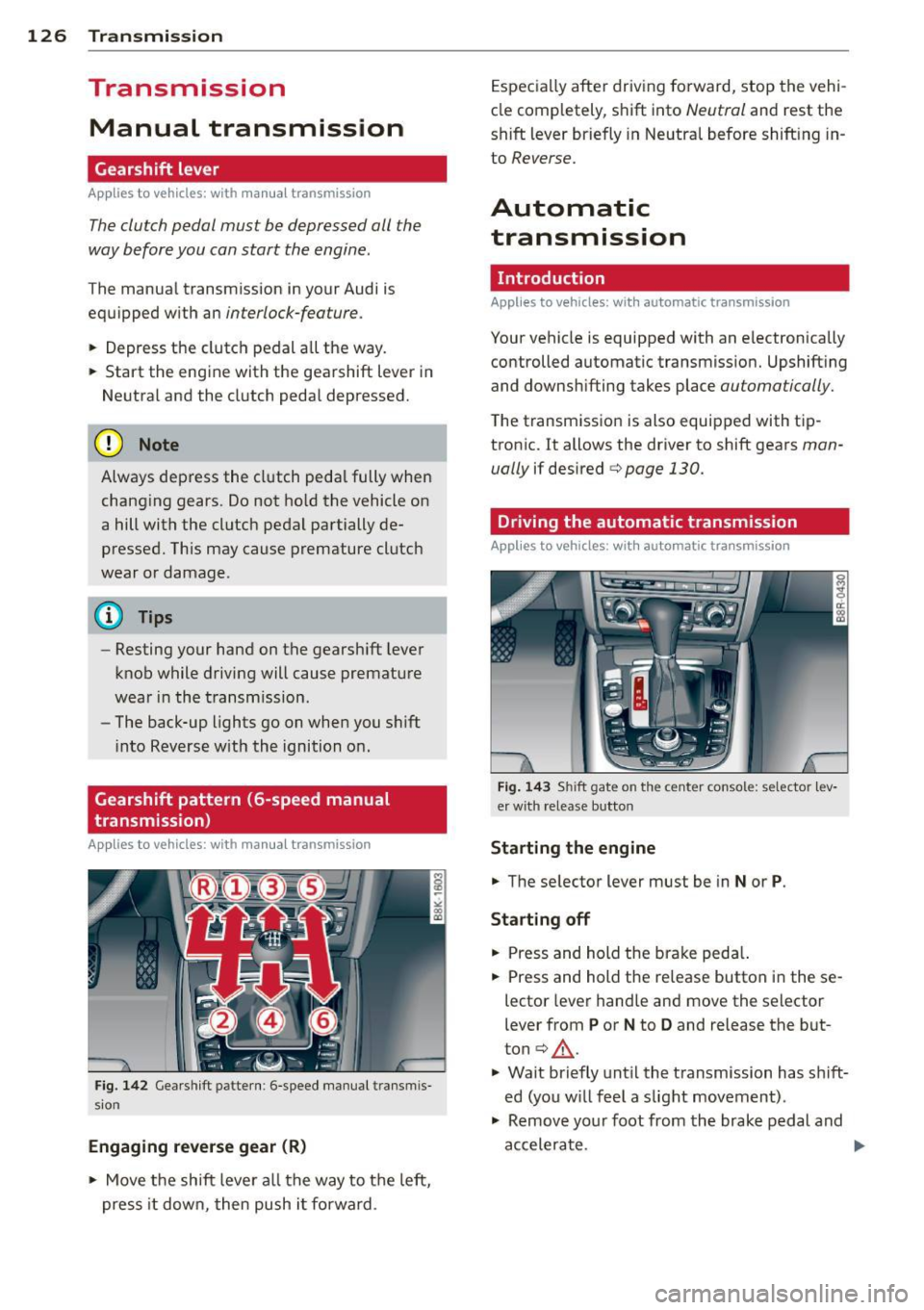
Gearshift pattern (6-speed manual
transmission)
Applies to vehicles: with manual transmission
Fig. 142 Gearshift patte rn: 6 -speed manual transmis
sion
Engaging reverse gear (R)
• Move the shift lever all the way to the left,
press it down, then push i t forward . Especially
after driving forward, stop the vehi
cle comp letely, shift into
Neutral and rest the
shift lever briefly in Neutral before shift ing in
to
Reverse.
Automatic
transmission
Introduction
Applies to vehicles: with automatic transmission
Your vehicle is equipped with an electronically
controlled automatic transmission. Upshift ing
and downshifting takes place
automatically.
The transmission is also equipped with tip
tronic. It allows the driver to shift gears
man
ually
if desired c:> page 130.
Driving the automatic transmission
Applies to vehicles: with automatic transmission
Fig. 143 Shift gate on the center console: selector lev
er with release button
Starting the engine
• The selector lever must be in
Nor P.
Starting off
• Press and hold the brake peda l.
• Press and hold the release button in these
lector lever hand le and move the selector
lever from
P or N to D and release the but
ton
c:> .&_ .
• Wait briefly until the transmission has s hift
ed (you w ill feel a slight movement) .
• Remove your foot from the brake pedal and
accelerate.
Page 129 of 316
Rocking back and forth to becom e
un stuc k
~ Shift on ly between D and R when the vehi
cle is at a full stop and the e ngine is r unni ng
at idle speed .
Stopping
~ Press and ho ld the brake pedal unti l the ve
hicle has come to a complete stop .
~ Keep the brake pedal depressed so that the
vehicle cannot roll forward or backward
while it is idling¢ &_.
~ Once stopped, do not depress the accelera
tor pedal to rev up the engine ¢&_ .
Parkin g
~ Press and ho ld the brake pedal unti l the ve
hicle has come to a complete stop.
~ Set the parking brake firmly¢ page 97,
Parking.
~ Press and hold the release button in these
lector lever handle, move the selector lever
into
P a nd the n let go of the release button
¢,&_ .
The selector lever must be in Nor P. If one of
the dr iving pos it ions is engaged a safety
sw itch w ill prevent the engine from be ing
started. See also ¢
page 92.
Before you move the selecto r lever from the P
position, you must always apply the brake
pedal before and whi le dep ress ing t he button
i n the hand le of the se lec to r lever .
A WARNING
-Unintended ve hicle movement can cause
serious injury.
- When the selector lever is i n a dr iving
position, the ve hicle may creep, even at
i dl e speed . Therefo re do not release
the par king brake or foot b rake until
you are re ady to move, because powe r
is transmit ted to the whee ls as soon as
a dr iving position is engaged.
- Do not ac celera te while selecti ng a
d riving posi tion. At th is time the en
g ine must be at idle speed so t hat un-
Tran sm iss ion 12 7
due stress is not placed on the clutches
in the transmiss ion.
- Remember: Even when stopped briefly
with the automatic transmission in D,S
or R, eng ine power is being transmit
ted to the wheels. Your veh icle cou ld
"creep" forward or backward. When
stopped, keep the b rake pedal fu lly de
pressed and use the pa rking brake if
ne cessary to keep the vehicle from ro ll
i ng.
- I f the selecto r lever is un intent ionally
moved into N while you are dr iv ing, t ake
your foo t off the accelerator ped al and
wait for the engine to retu rn to idle
speed before se lecting a driving position .
- Never sh ift into
R or P when the vehicle is
in motion.
- Never get out of the driver's seat when
the engine is running.
- If you m ust ge t out of the vehicle, move
the selector lever secure ly into the P po
sition and apply the pa rking brake firmly.
- If t he eng ine mus t rem ain r unning , neve r
have any driving posit ion engaged w hen
checking under the hood. Make sure the
selector lever has securely engaged and
is locked in P w ith the park ing brake
firm ly set¢
page 230, Engine compart
ment.
Othe rwise, any inc rease in engine
speed may set the vehicle in motion,
even with the park ing brake applied .
Page 130 of 316
128 Transmi ssion
Selector lever positions
Ap plies to vehicles: wit h au to mat ic tra nsmi ssio n
This section describes the selector lever posi
tions and driving ranges .
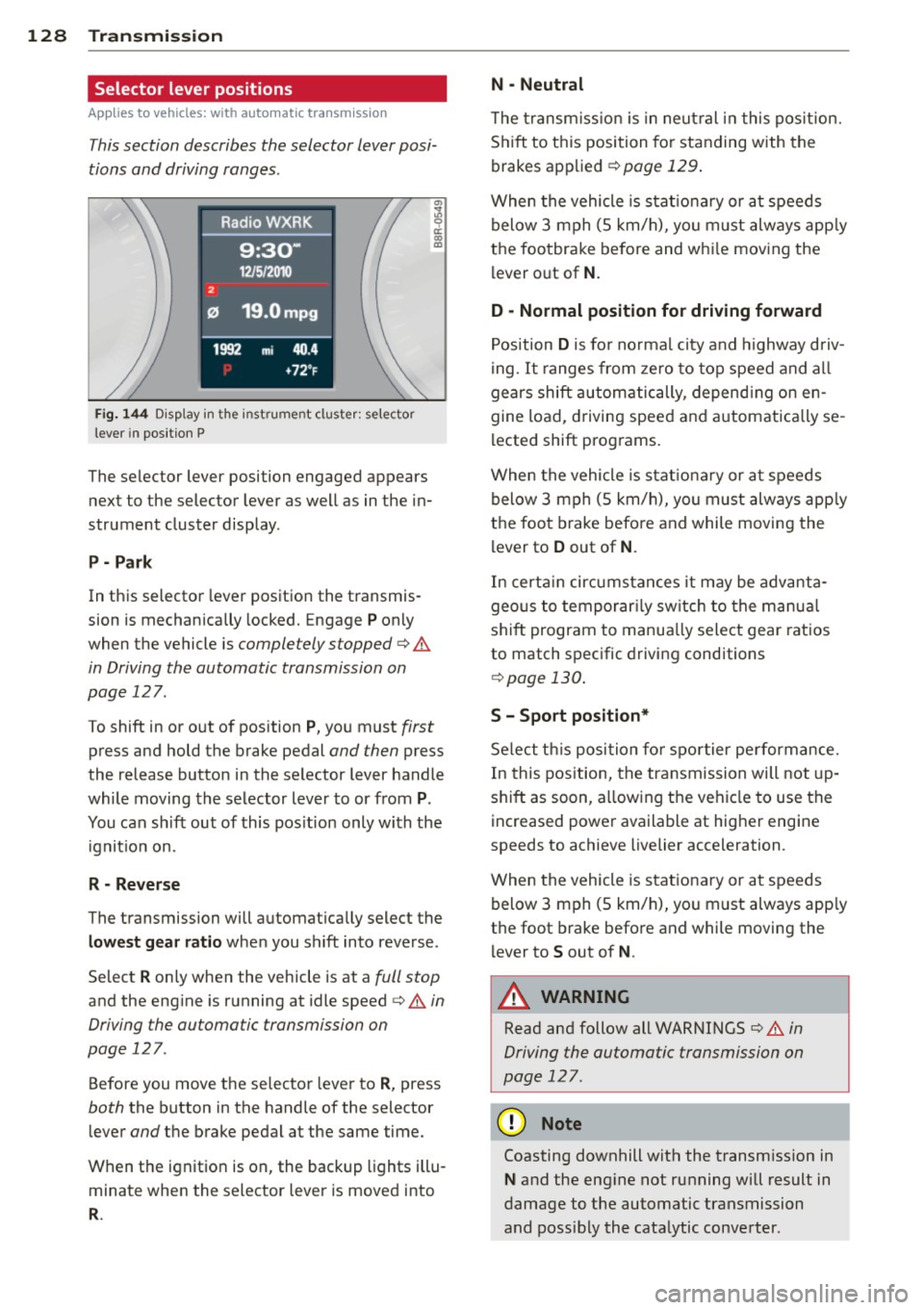
Fig. 144 D isp lay in the inst rume nt cluster: selector
lever in position P
The selector lever position engaged appears
next to the selector lever as well as in the in
strument cluster display .
P - P ark
In this selector lever position the transmis
sion is mechanically locked. Engage
P only
when the vehicle is
completely stopped q .&
in Driving the automatic transmission on
page 127 .
To shift in or out of position P, you must first
press and hold the brake pedal and then press
the release button in the selector lever handle
while moving the selector lever to or from
P .
You can sh ift out of this pos ition only with the
ignit io n on.
R - Rev ers e
The transmission will automat ically select the
l o west gear ratio when you shift into reverse .
Select
R on ly when the vehicle is at a full stop
and the eng ine is running at idle speed ¢.& in
Driving the automatic transmission on
page 127.
Before you move the selector lever to R , press
both the button in the handle of the selector
lever
and the brake pedal at the same time.
When the ignit ion is on, the backup l ights illu
minate when the selector lever is moved into
R .
N -Neutral
The transm iss ion is in neut ral in this pos ition.
S h ift to this position fo r standing with the
brakes applied
¢ page 129 .
When the vehicle is stat ionary or at speeds
below 3 mph (5 km/h), yo u must always app ly
the foo tbrake be fore and whi le moving the
lever o ut of
N .
D -Normal position fo r driving forward
Position Dis fo r normal city and highway driv
i ng .
It ranges from zero to top speed and a ll
gears shift automatically, depend ing on en
gine load, driving speed and automatically se
lected shift programs.
When the vehicle is stat ionary or at speeds
below 3 mph (5 km/h), yo u must always app ly
the foot brake befo re and while moving the
lever to
D out of N .
In certa in circ umstances it may be advanta
geous to temporar ily sw itch to the manua l
shift program to manua lly select gear ratios
to match specific driving conditions
¢ page 130 .
S - Sport position*
Select t his posi tion fo r spo rtier pe rformance.
In this pos ition, the transmission will not up
shift as soon, a llowing the vehicle to use the
increased power available at higher engine
speeds to achieve livelier acceleration .
When the vehicle is stationary or at speeds
below 3 mph (5 km/h), yo u must always app ly
the foot brake before and while moving the l ever to
S out of N .
A WARNING ,__
Read and follow all WARNINGS ¢ .& in
Driving the automatic transmission on
page 127 .
(D Note
-
Coasting downhill with the transm ission in
N and the eng ine not running wi ll result in
damage to the automatic transmission
and possibly the cata lytic converter.