light AUDI A5 COUPE 2012 Repair Manual
[x] Cancel search | Manufacturer: AUDI, Model Year: 2012, Model line: A5 COUPE, Model: AUDI A5 COUPE 2012Pages: 316, PDF Size: 78.59 MB
Page 121 of 316
@ Alert stage signal flashes
If you activate your turn signal in driving sit
uation @, the signa l briefly f lashes repeated
ly. Side assist is a lerting yo u to a vehicle that
you may not have noticed.
@ Tips
- The faster a vehicle approaches from the
rear, the sooner the signa l on the outside
mirror lights up. Side assist will signa l,
at the latest, when a detected vehicle en
ters your "blind spot".
- When vehicles approach very quickly,
changing lanes can be dangerous even if
the signal on the outside mirror does not
light up.
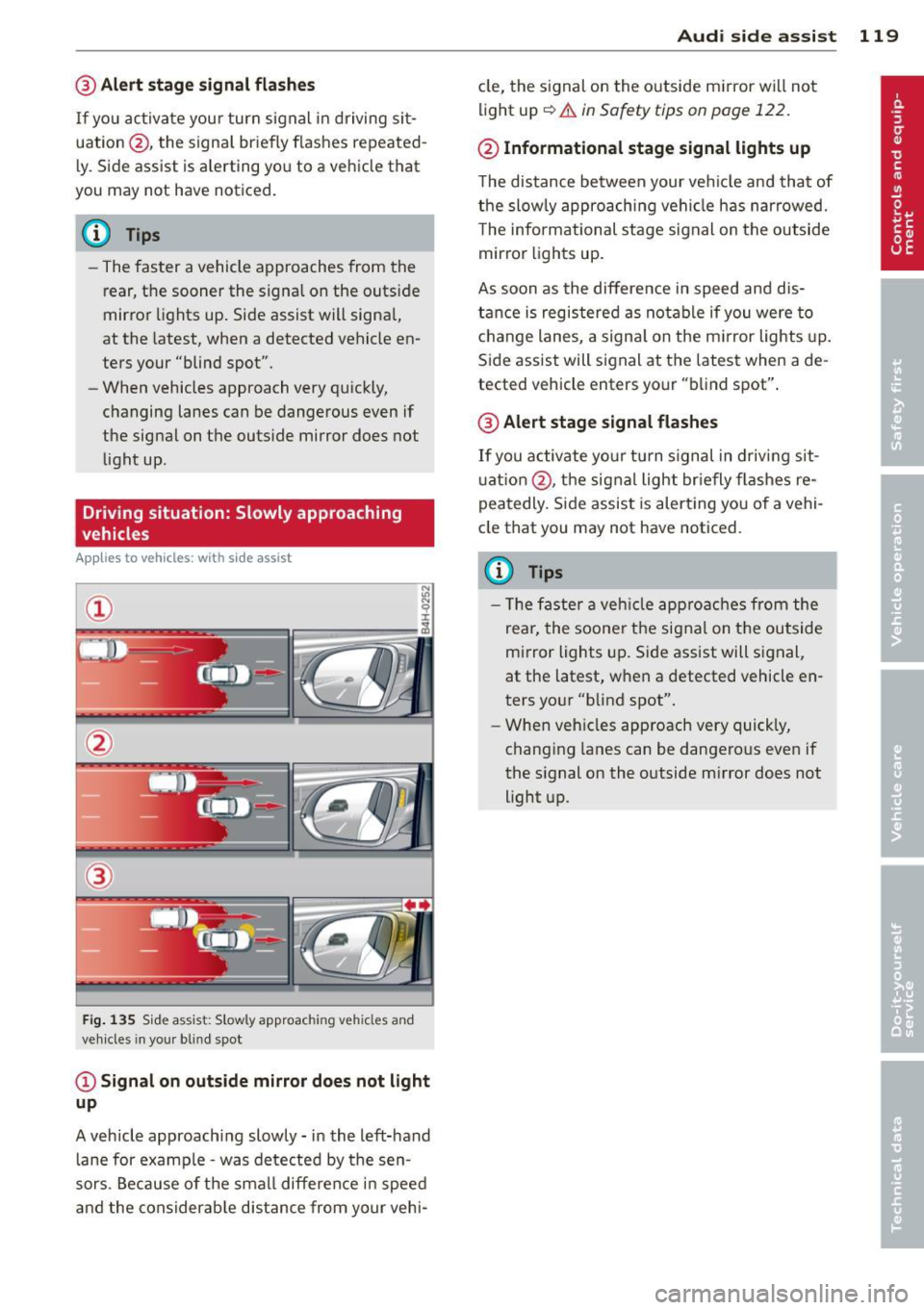
Driving situation: Slowly approaching
vehicles
A ppl ies to vehicles : wit h side ass is t
®
F ig . 135 Side assist: Slowly approac hing veh icles and
veh icles in you r b lin d spo t
@Signal on outside mirror does not light
up
A vehicle approaching slowly -in the left-hand
lane for examp le -was detected by the sen
sors. Because of the small difference in speed
and the considerab le distance from your vehi-
Audi side assist 119
cle, the signal on the outside mirror wi ll not
light up~.&
in Safety tips on page 122.
@ Informational stage signal lights up
The distance between your ve hicle and that of
the slowly approaching vehicle has narrowed.
T he informational stage signal on the outside
mirror lights up.
As soon as the difference in speed and dis
tance is registered as notable if you were to
change lanes, a signal on the m irror lights up.
Side assist will signal at the latest when a de
tected vehicle enters your "blind spot".
@ Alert stage signal flashes
If you activate your turn signal in driving sit
u ation @, the signal light briefly fla shes re
peatedly. Side assist is alert ing you of a vehi
cle that you may not have noticed.
(D Tips
- Th e faster a vehicle approaches from the
rear, the soone r the signal on the outside
mirror lights up. Side assist will signal,
at the latest, when a detected vehicle en
ters your "blind spot".
- When vehicles approach very quickly,
changing lanes can be dangerous even if
the signal on the outside m irror does not
light up.
Page 122 of 316
120 Audi side assist
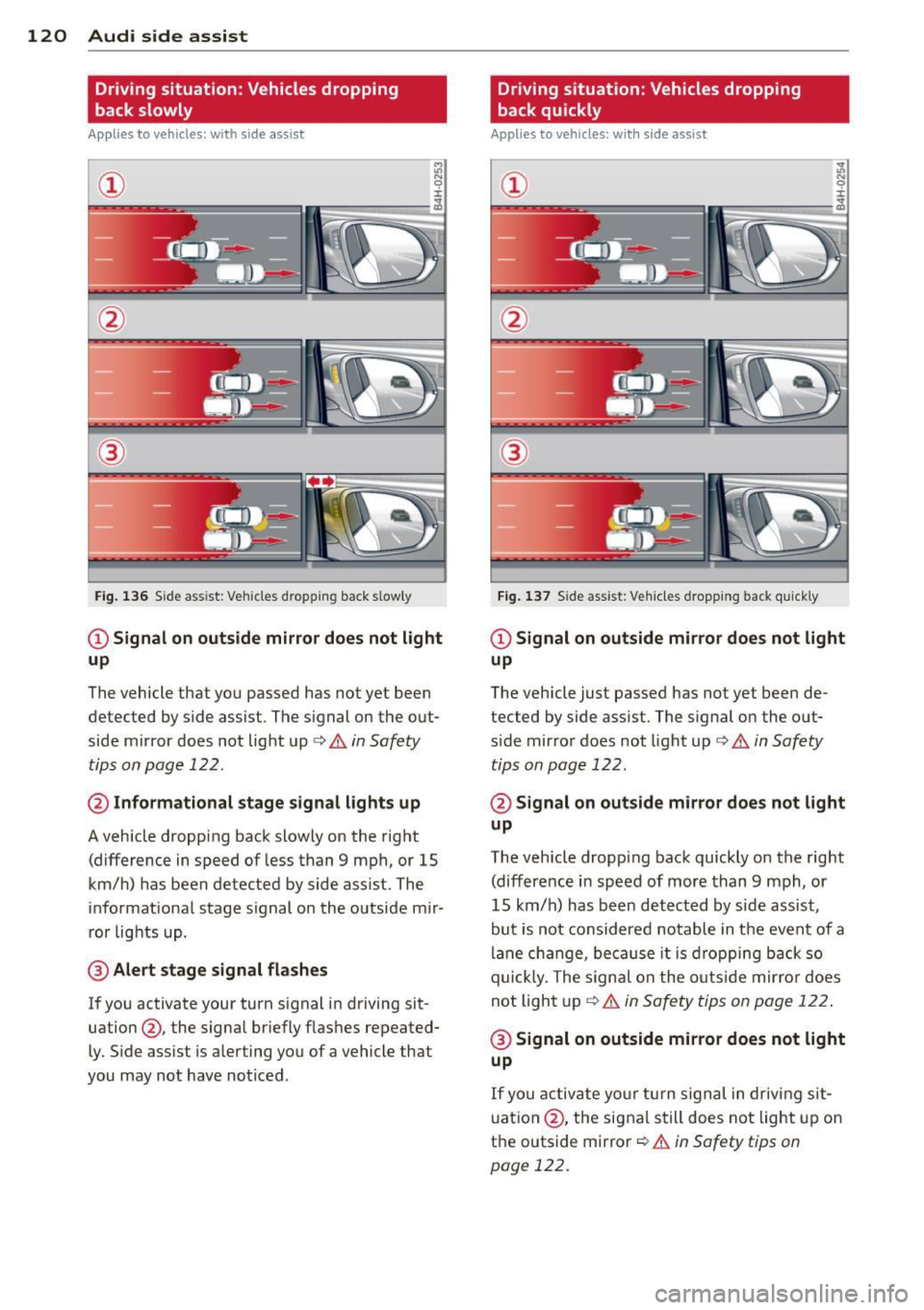
Driving situation: Vehicles dropping
back slowly
Applies to vehicles: with side assist
i:i N 9 J:
-------::~
®
Fig. 136 Side ass ist: Veh icles dropp ing back s low ly
CD Signal on outside mirror does not light
up
The vehicle that you passed has not yet been
detected by side assist . The signal on the out
side mirror does not light up¢
A in Safety
tips on page 122 .
@ Informational stage signal lights up
A vehicle dropping back slowly on the right
(difference in speed of less than 9 mph, or 15
km/h) has been detected by side assist. The
informational stage signal on the outside mir
ror lights up.
@ Alert stage signal flashes
If you activate your turn signal in driving sit
uation@, the signal briefly flashes repeated
ly. Side assist is alerting you of a vehicle that
you may not have noticed .
Driving situation: Vehicles dropping
back quickly
Applies to vehicles: with side assist
®
Fig. 137 Side assist: Ve hicles dropp ing back quickly
CD Signal on outside mirror does not light
up
The vehicle just passed has not yet been de
tected by side assist. The signal on the out
s ide mirror does not light up
Q A in Safety
tips on page 122.
@ Signal on outside mirror does not light
up
The vehicle dropping back quickly on the right
(difference in speed of more than 9 mph, or
15 km/h) has been detected by side assist ,
but is not considered notable in the event of a
lane change, because it is dropping back so
quick ly. The signal on the outs ide mirro r does
not light up¢
A in Safety tips on page 122 .
@ Signal on outside mirror does not light
up
If you activate your turn signal in driving sit
uation @, the signal still does not light up on
the outside mirror ¢
A in Safety tips on
page 122.
Page 123 of 316
Setting the signal brightness on the
outside mirror
Applies to vehicles: with s ide assist
The signal brightness can be set in the radio
orMMI* .
~ Select: Function button ICARI > Audi side
assist -lamp .
~ Rotate the control knob to adjust the dis
played brightness of the signal light on the
outside mirrors.
The brightness of the signal light for both the informational and alert stages is automatical
ly adjusted to ambient light conditions . In ad
dition, you can adjust the
basic brightness
separately, via the brightness function.
While making the adjustment, the new brightness setting is displayed briefly . The
brightness displayed is that of the informa
tional stage signal. The alert stage signal
brightness is linked to the informational stage
signal brightness.
The informational stage signal brightness
should be adjusted so that you notice the sig
nal illumination when you look in the outside
mirror, but not when you look forward
through the windshield .
In very dark or light surroundings , the auto
matic brightness setting adjusts signal light
brightness to maximum or minimum intensi
ty, as needed. In circumstances such as these,
you may not notice any change in the bright
ness on the outside mirror when adjusting the
basic brightness.
You may not notice the change until lighting
conditions are normal again .
@ Tips
-Side assist is not active when the basic
brightness is adjusted . The signal light
comes on briefly to help you make the
adjustment .
- Your settings are automatically stored
and assigned to the remote control key
being used .
Audi side assist 121
General information
Applies to vehicles: with side assist
Side assist has limits and cannot detect vehi
cles under all road and weather conditions.
Please remember system limitations and nev
er rely on the system , especially when :
- driving through curves
~page 121,
-lanes are of different widths ¢ page 121.
When driving through curves
Applies to vehicles: with side assist
Side assist cannot detect vehicles in curves
with a turning radius of less than 328 feet
(100 m).
When driving through a curve, it is possible
that side assist may register a vehicle two
lanes over, and the signal on the outside mir
ror will light up.
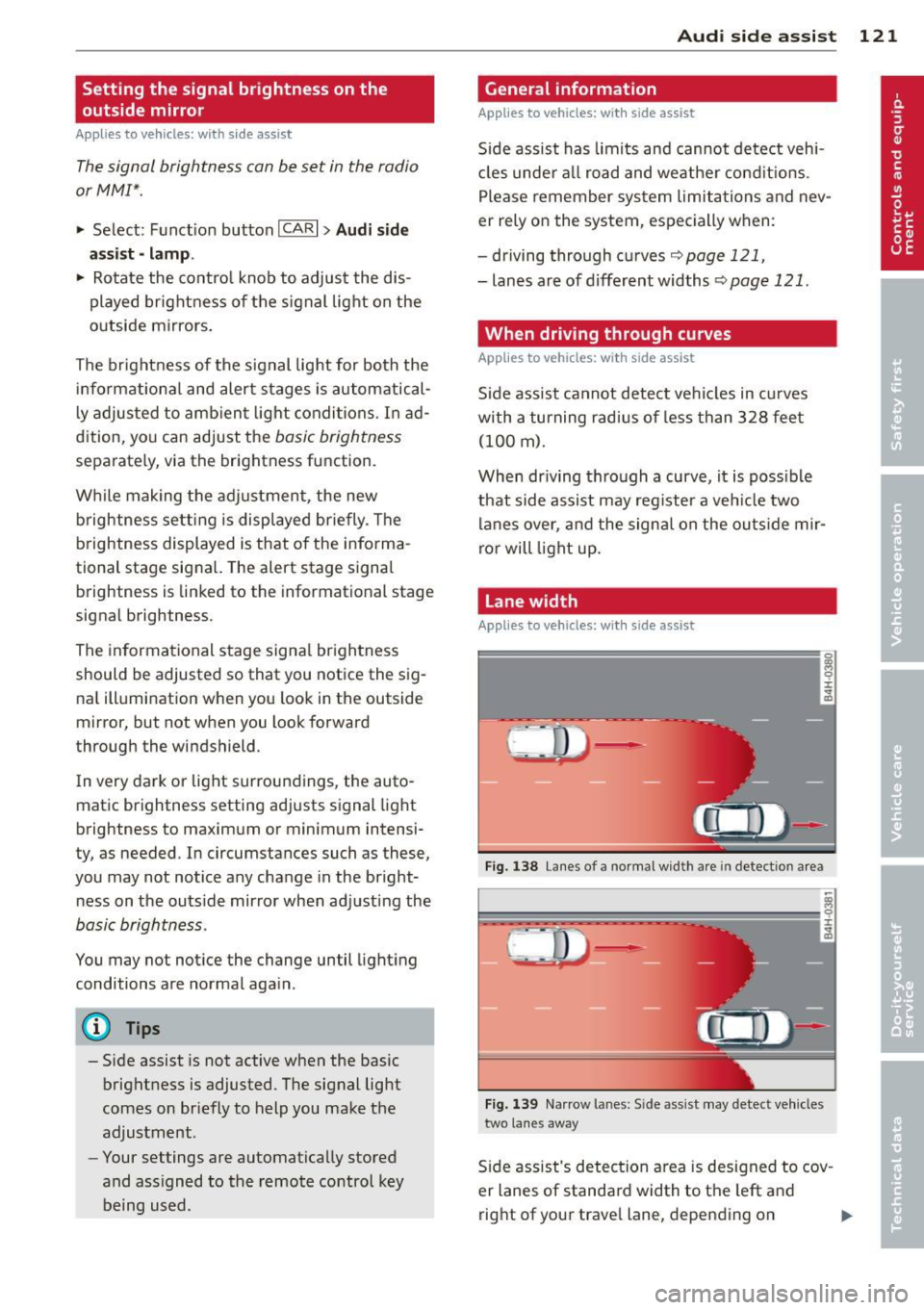
Lane width
Applies to vehicles: with side assist
Fig. 138 Lane s of a normal wid th are in detectio n area
Fig. 139 Narrow la n es: S ide assist may detect vehicles
two lanes away
Side assist's detection area is designed to cov
er lanes of standard width to the left and
right of your travel lane, depending on ..,.
Page 124 of 316

122 Audi side assist
whether you drive in the center of your lane or
closer to the edge.
If you d rive in narrow lanes, side assist's de
tection area may also incl ude other lanes -es
pecia lly if you tend to drive on the edge of
your lane¢
fig. 139. Under these conditions,
ve hicles can also be detected that are two
lanes away, and side assist then could switch
between the informat ional and warn ing stage
signals .
When dr iv in g in very w ide lanes, vehicles in
the adjacent lane may not be detected be
cause they are not inside the detection area.
Notes
Messages in instrument cluster display
Applies to vehicles: with side assist
If side assist turns off automatically, the indi
cator light on the button wi ll go out and you
will see a message in the instrument cluster
d isplay:
Audi side assist not available : sensors
blocked
The s ide assist sensors are built into the rear
bumper on the left and right (not visible on
the outside)
¢page 116, fig. 130. To ensure
that you do not adversely affect the way side
assist funct ions, foreign objects (such as st ick
e rs or b icycle racks) should not be attached to
the area on the rear bumper where the sen
sors are located. If side assist functions are
adversely affected, you will see this message
in the instrument cluster display. Remove any
thing that may be blocking the sensors .
If no ve hicl e is detected for a longer period of
time while driving , side assist will also switch
off a utomatica lly.
Audi side assist currently not available
If there is a temporary problem (such as the
vehicle's batte ry charge being low), s ide ass ist
cannot be activated temporarily .
Audi side assist: system fault
Have the system checked by an authorized Au
di dealer or qualified workshop.
Safety tips
Applies to vehicles: with side assist
The side assist detection may be limited when
driving aro und narrow street corners, on hilly
streets, and under poor weather conditions.
It is possible that the radar sensors may a lso
detect other objects, such as high or stag
gered guardrails.
Side assist does not measure actual lane
width. The system assumes a fixed lane width.
Detection in the left and right lanes is based
on this assumed lane width. When driving on
narrow roads or when driv ing to the left or
right of the center of a trave l lane, it is poss i
ble that vehicles will be detected that are
not
in the lane next to the lane you are using.
A WARNING
-
- I mproper reliance on the side assist sys-
tem can cause collis ion s and serio us per
sonal injury:
- Never rely on ly on s ide assist when
changing lanes.
- Always check rear view mirrors to make
sure that it is safe to change lanes.
- Side assist cannot detect all vehicles un
der all conditions- danger of accident!
- Side assist cannot detect vehicles in time
to a lert you when they approach from
behind at very high speed, or fall drop
back very qu ickly.
- The radar sensor's
vision can be reduced
or entire ly blocked by rain, snow, and
heavy spray. This can result in side assist
not adequately detecting vehicles or, in
some cases, not detecting them at all.
Always keep an eye on the direction you
are traveling and the relevant area
around the vehicle.
Page 126 of 316
124 Audi drive select
Audi drive select Driving settings
Introduction
App lies to vehicles: w it h drive se lect
Audi drive select provides the possibility to ex
perience different types of vehicle settings in
one vehicle. For instance, using the three
COMFORT, AUTO and DYNAMIC modes, the
driver can switch from a sporty to a comforta
ble driving mode with the press of a button.
Additionally, in vehicles with MMI*, the vehi
cle setup for INDIVIDUAL* mode can be cus
tomized by you. This makes it possible to
combine settings such as a sporty engine tun ing with light steering.
A WARNING
- Improper use of the Audi drive select can
cause collisions, other accidents and seri
ous personal injury.
- Never drive at speeds that are too high
for traffic, road and weather conditions.
Description
App lies to vehicles: w it h drive se lect
The vehicle setup in each mode depends on
the vehicle's features. However, the engine
and servotronic are always affected. The auto
matic transmission*, dynamic steering* and
adaptive dampers* are also adjustable.
Depending on the mode, the
engine and auto
matic transmission*
respond more quickly or
in a more balanced manner to accelerator
pedal movements.
The
Servotronic (steering servo assistance)
c::> page 209 can also be adapted to driving
situations.
Dynamic steering* changes the steering ratio
as a function of the driving speed in order to
optimize the driver's required steering effort.
This sets the steering to be less sensitive at
higher speeds in order to provide greater con
trol over the vehicle. At reduced speeds, how
ever, steering is more direct in order to keep the steering effort as minimal as possible
when the driver is maneuvering the vehicle. At
low and average speeds, dynamic steering ad
ditionally provides more responsive steering
performance. The driver can set the basic
steering ratio characteristics .
The
adaptive dampers* use sensors to record
information regarding steering movements,
braking and acceleration operations by the
driver, road surface, driving speed, and load.
This makes it possible to adapt damping to
the driving situation virtually in real time. Au
di drive select also makes it possible to satisfy
the desire for sporty suspension (DYNAMIC)
and comfortable suspension (COMFORT) with
out giving up balanced tuning (AUTO).
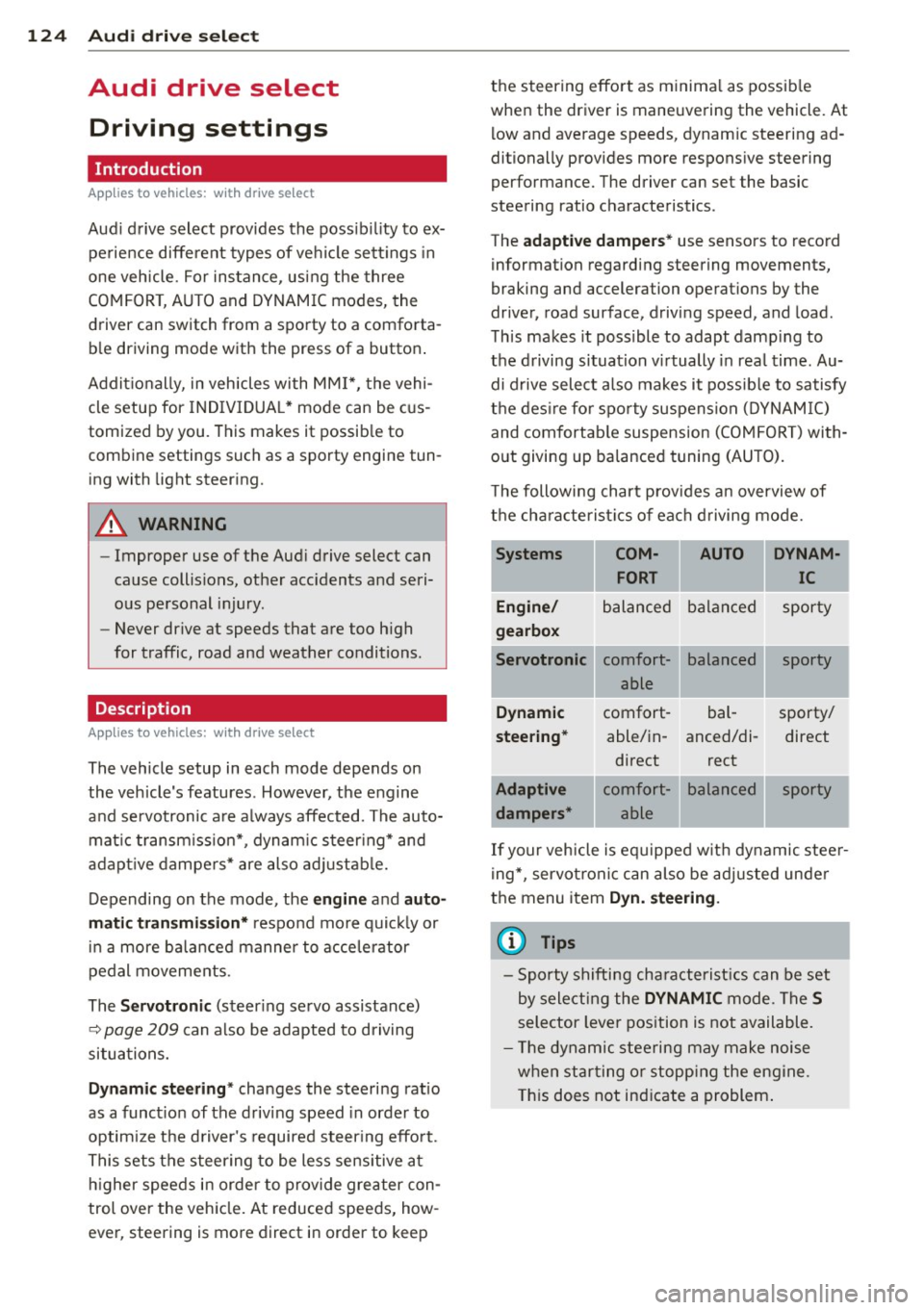
The following chart provides an overview of
the characteristics of each driving mode.
Systems
Engine/
gearbox
Servotronic
Dynamic
steering*
Adaptive dampers* COM-
AUTO DYNAM-
FORT IC
balanced balanced sporty
comfort- able
comfort- able/in-
direct
comfort- able balanced
bal-
anced/di-
rect
balanced sporty
sporty/ direct
sporty
.
.
If your vehicle is equipped with dynamic steer
ing*, servotronic can also be adjusted under
the menu item
Dyn. steering.
(D Tips
-Sporty shifting characteristics can be set
by selecting the
DYNAMIC mode. The S
selector lever position is not available.
- The dynamic steering may make noise
when starting or stopping the engine.
This does not indicate a problem.
Page 127 of 316
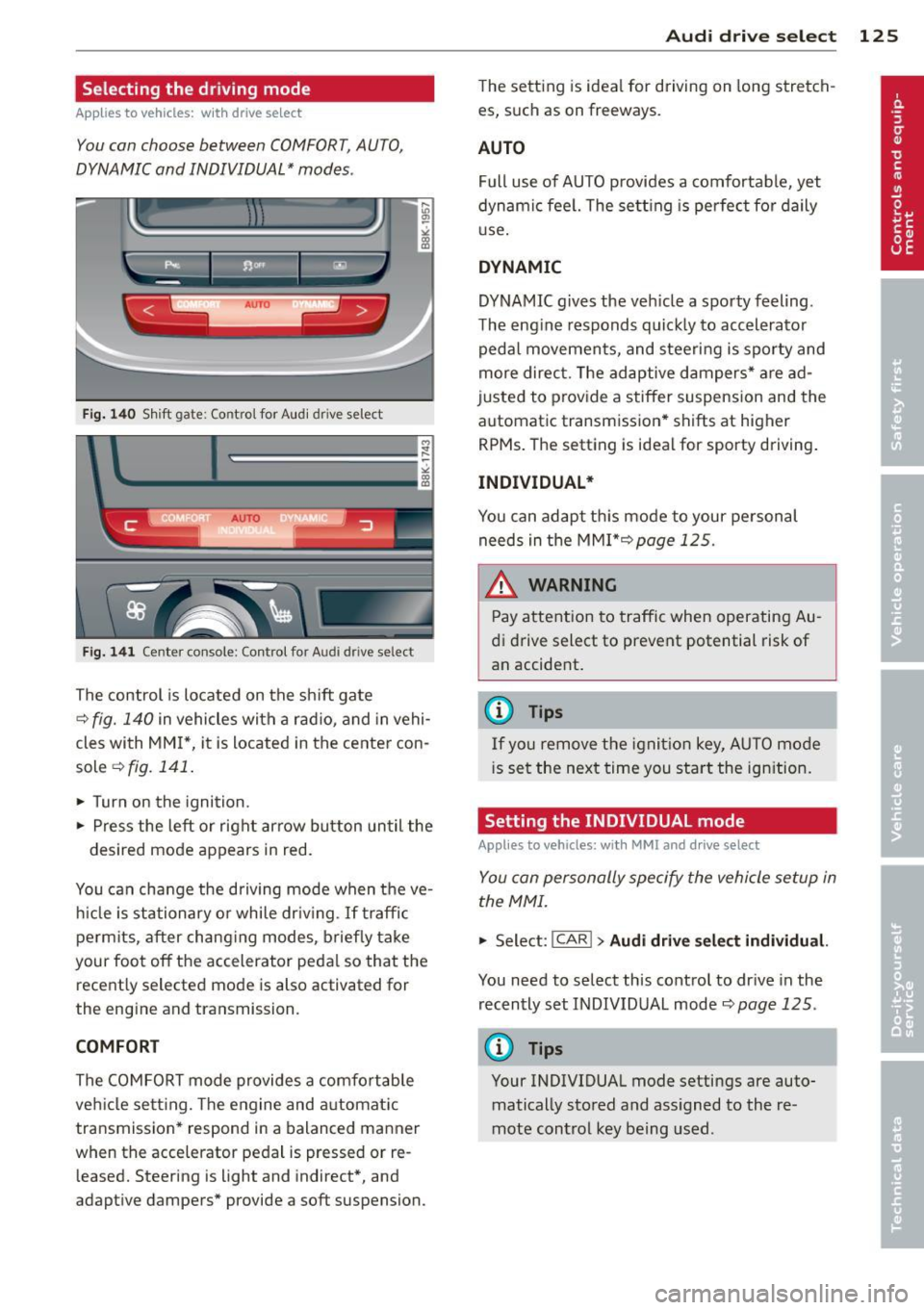
Selecting the driving mode
Applies to vehicles: w it h drive se lect
You can choose between COMFORT, AUTO,
DYNAMIC and INDIVIDUAL* modes .
Fig. 14 0 Sh ift gate : Co ntrol for Aud i d rive select
A UTO _ __ _ , :J
' --
Fig. 141 Center con sole : Con trol for Au di dri ve se lect
The control is located on the sh ift gate
~ fig. 140 in vehicles with a radio, and in vehi
cles with MM I*, it is located in the center con
sole
~ fig. 141.
• Turn on the ignition.
,. Press the left or right arrow button un til the
desired mode appears in red.
You can change the driving mode when the ve
h icle is stationary o r while dr iv ing .
If traffic
perm its, after chang ing modes, briefly take
your foot off the accelerator peda l so that the
recently selected mode is also activated for
the engine and transmission.
COMFORT
The COMFORT mode provides a comfortable
veh icle sett ing. The engine and a utomatic
transmission* respond in a balanced manner
when the acce lerator pedal is pressed or re
leased. Steering is light and indirect*, and
adaptive dampers* provide a soft suspension.
Audi dri ve sele ct 125
The setting is idea l for driving on long stretch
es, such as on freeways .
AUTO
Full use of AUTO provides a comfortable, yet
dynamic feel. The setting is perfect fo r daily
use .
DYNAMIC
DYNAMIC g ives the veh icle a sporty feeling .
The eng ine responds quick ly to accelerator
peda l movemen ts, and steering is sporty and
more direc t. T he adaptive dampers* are ad
justed to prov ide a stiffer suspension and the
automatic transm ission* shifts at higher
RPMs . The setting is ideal for sporty driving .
INDIVIDUAL*
You can adapt th is mode to your pe rsonal
needs in the MMI*~page
125 .
__& WARNING
Pay attention to traffic when operating Au
di drive select to prevent potential risk of
an accident.
@ Tips
If yo u remove the ignit ion key, AUTO mode
i s set the next time you start the ign ition.
Setting the INDIVIDUAL mode
Appl ies to vehicles: wit h MMI and drive select
You can personally specify the vehicle setup in
the MMI.
• Select: I CAR I > Audi drive select individual.
You need to select this contro l to dr ive in the
recently set INDIVIDUAL mode~
page 125 .
@ Tips
Your INDIVIDUAL mode settings are auto
matically stored and ass igned to the re
mote control key being used .
Page 128 of 316
126 Transmission
Transmission Manual transmission
Gearshift lever
Applies to vehicles: with manual transmission
The clutch pedal must be depressed all the
way before you can start the engine.
The manual transmission in your Audi is
equipped with an
interlock-feature.
• Depress the clutch pedal a ll the way.
• Start the engine with the gearshift lever in
Neutral and the clutch pedal depressed.
(D Note
Always depress the clutch pedal fully when
changing gears. Do not hold the vehicle on
a hill with the clutch pedal partially de
pressed. This may cause premature clutch
wear or damage.
@ Tips
- Resting your hand on the gearshift lever
knob while driving will cause premature
wear in the transmission.
- The back-up lights go on when you sh ift
in to Reverse with the ignition on.
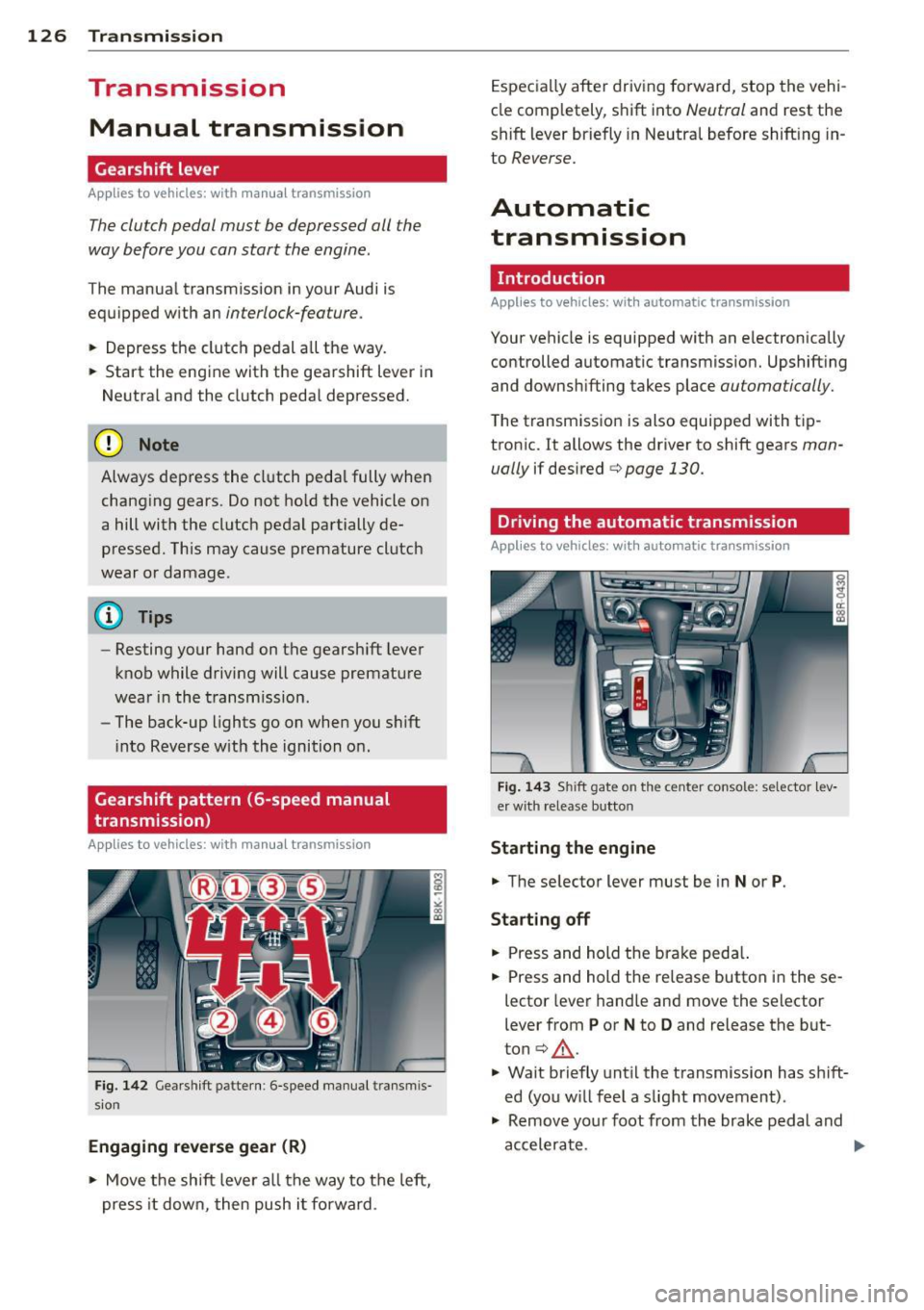
Gearshift pattern (6-speed manual
transmission)
Applies to vehicles: with manual transmission
Fig. 142 Gearshift patte rn: 6 -speed manual transmis
sion
Engaging reverse gear (R)
• Move the shift lever all the way to the left,
press it down, then push i t forward . Especially
after driving forward, stop the vehi
cle comp letely, shift into
Neutral and rest the
shift lever briefly in Neutral before shift ing in
to
Reverse.
Automatic
transmission
Introduction
Applies to vehicles: with automatic transmission
Your vehicle is equipped with an electronically
controlled automatic transmission. Upshift ing
and downshifting takes place
automatically.
The transmission is also equipped with tip
tronic. It allows the driver to shift gears
man
ually
if desired c:> page 130.
Driving the automatic transmission
Applies to vehicles: with automatic transmission
Fig. 143 Shift gate on the center console: selector lev
er with release button
Starting the engine
• The selector lever must be in
Nor P.
Starting off
• Press and hold the brake peda l.
• Press and hold the release button in these
lector lever hand le and move the selector
lever from
P or N to D and release the but
ton
c:> .&_ .
• Wait briefly until the transmission has s hift
ed (you w ill feel a slight movement) .
• Remove your foot from the brake pedal and
accelerate.
Page 131 of 316
Automatic Shift Lock (ASL)
Applies to vehicles: with a utomat ic transm ission
The Automatic Shift Lock safeguards you
against accidentally shi~ing into a forward or
the reverse gear and causing the vehicle to
move unintentionally .
;_ '"''1
·- I , . ,......._
W'.o ,)
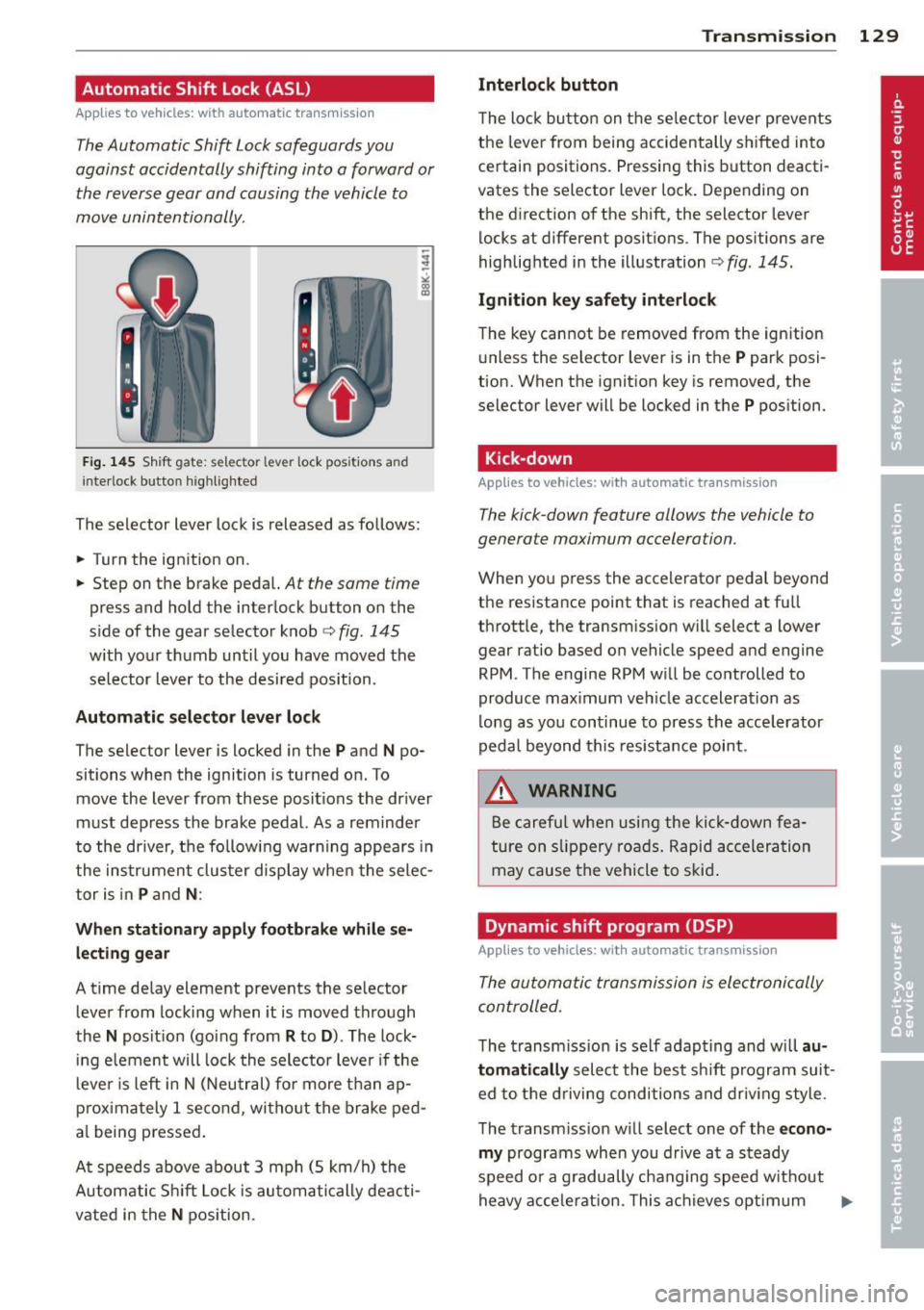
Fig. 145 Shift gate: selector lever lock positions and
in terlock b utto n highlighted
The selector lever lock is released as follows:
.. Turn the ignition on.
.. Step on the brake pedal.
At the same time
press and hold the interlock button on the
s ide of the gear selector knob
c::> fig. 145
with your thumb until you have moved the
selector lever to the desired position.
Automatic selector lever lock
The select or lever is Locked in the P and N po
sitions when the ignition is turned on. To
move the lever from these positions the driver
must depress the brake pedal. As a reminder
to the driver, the following warning appears in
the instrument cluster display when the selec
tor is in
P and N:
When stationary apply footbrake while se
lecting gear
A time delay element prevents the selector
lever from locking when it is moved through
the
N position (going from R to D ). The lock
ing element will lock the selector lever if the
lever is left in N (Neutral) for more than ap
proximately 1 second , without the brake ped
a l being pressed.
At speeds above about 3 mph (5 km/h) the
Automatic Shift Lock is automatically deacti
vated in the
N position.
Transmission 129
Interlock button
The lock button on the selector lever prevents
the lever from being accidentally shifted into
certain positions. Pressing this button deacti
vates the selector lever lock. Depending on
the direction of the shift, the selector lever
locks at different positions. The positions are
highlighted in the illustration
c::> fig . 145.
Ignition key safety interlock
The key cannot be removed from the ignition
unless the selector lever is in the
P park posi
tion. When the ignition key is removed, the
se lec tor Lever will be locked in the
P position.
Kick-down
App lies to vehicles: with automatic transmission
The kick-down feature allows the vehicle to
generate maximum acceleration .
When you press the accelerator pedal beyond
the resistance point that is reached at full
throttle, the transmission will select a lower
gear ratio based on vehicle speed and engine
RPM . The engine RPM will be controlled to
produce maximum vehicle acceleration as
long as you continue to press the accelerator
pedal beyond this resistance point.
.&, WARNING
Be careful when using the kick-down fea
ture on slippery roads. Rapid acceleration
may cause the vehicle to skid .
Dynamic shift program (DSP)
Applies to vehicles: wit h automatic transmission
The automatic transmission is electronically
controlled.
-
The transmission is self adapting and will au
tomatically
select the best sh ift program suit
ed to the driving conditions and driving style .
The transmission will select one of the
econo
my
programs when you drive at a steady
speed or a gradually changing speed w ithout
heavy acceleration. This achieves optimum ..,.
Page 132 of 316
130 Transmi ssion
fuel efficiency, with ear ly upshifting and
de layed downshifting.
The transmission will a utomat ica lly select the
s port y shift prog rams when you drive at high
e r speeds, or w ith heavy acceleration and fre
quent ly changing speeds. Upshifts are de layed
to make full use of eng ine power. Downsh ift
ing takes p lace at h igher engine speeds than
in the economy programs .
The selection of the most suitab le shift pro
gram is a cont inuous, automatic process. The
driver can also make the transmission switch
to a sporty program by quickly pressing down
the gas pedal.
This causes the transmission to shift down to
a lower gear to achieve rapid acceleration, e.g.
for quickly passing another vehicle. You do not need to press the gas pedal into the kick -down
range . After the transmission has upshifted,
the orig inal program is se lected acco rding to
your d riving s tyle.
A n addit ional shift program allows the auto
mat ic transm iss ion to select the proper gear
for uphill and downhill gradients .
This keeps the transmission from shifting up
a nd down unnecessar ily on hills . The trans
miss ion will shift down to a lowe r gear when
the dr iver presses the brake pedal on a down
hill grad ient. This makes use of t he b raking ef
fe ct of the eng ine wi thout the need to shift
down manua lly. Manual shift program
Applies to
vehicles: with automatic transmission
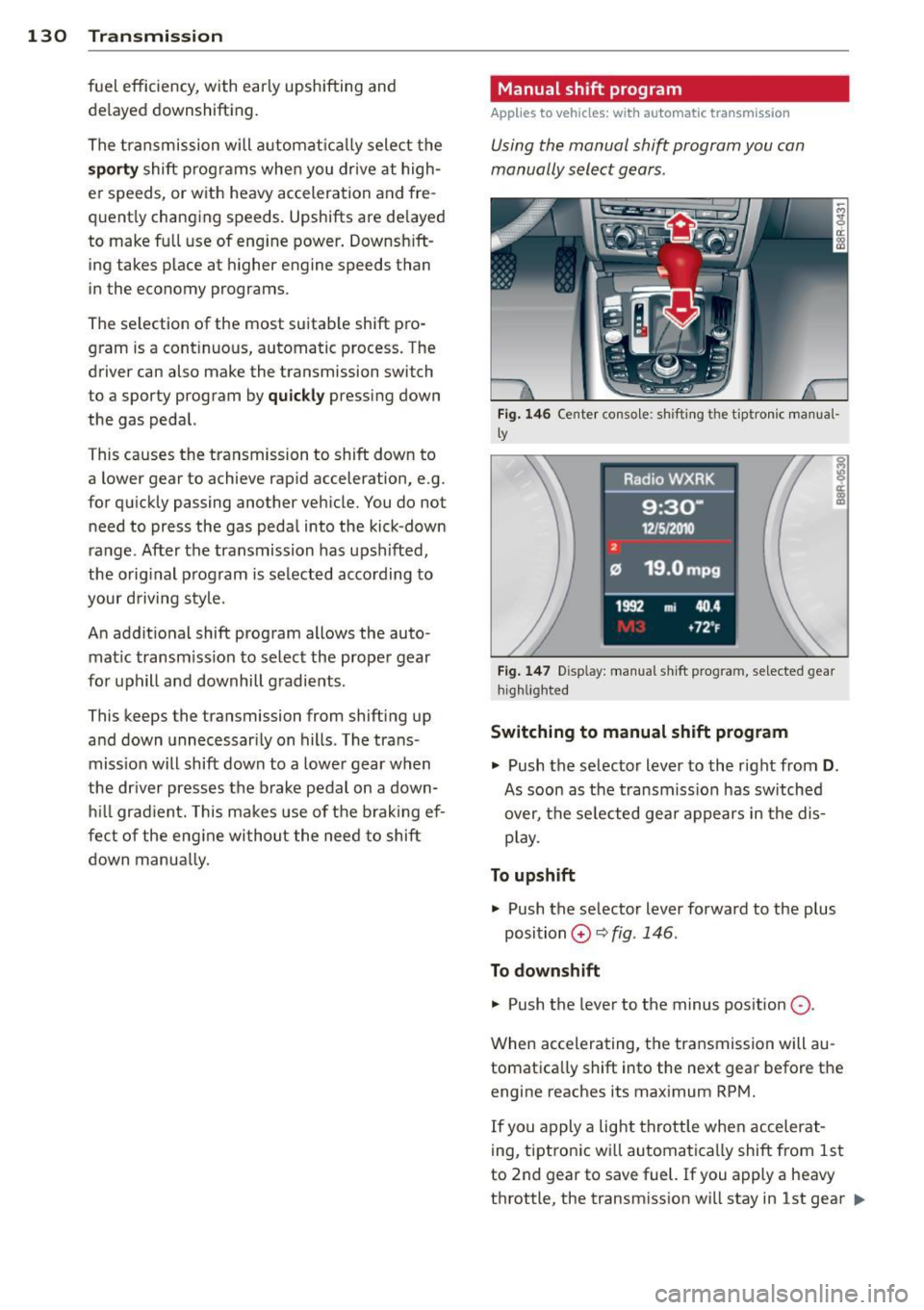
Using the manual shift program you can
manually select gears .
Fig . 14 6 Ce nter conso le: sh ift ing the t iptron ic m an ua l·
l y
F ig. 14 7 Disp lay: manu al shi ft p rog ra m , se lected gear
hi ghlight ed
Switching to manual shift program
.,. Push the selector lever to the right from
D.
As soon as the transmiss ion has sw itched
over, the se lected gea r appears in the dis
p lay .
To upshift .,. Push the selecto r lever forwa rd to the p lus
position
0 ¢ fig . 146 .
To down shift
.,. Push the lever to the minus pos ition
0 -
When accelerating, t he transmission will au
tomatica lly shift into the next gear before the
engine reaches its maximum RPM.
If you apply a light throttle whe n accelerat-
ing, tiptronic wi ll automatica lly shift from 1st
to 2nd gear to save fuel. If you apply a heavy
throttle , the transm iss ion wi ll stay in 1st gear .,.
Page 133 of 316
until near maxim um RPM is reached, or unt il
the driver shifts into 2nd gear .
I f y ou ta ke your foo t off the acceler ator ped al
when dr iving down a steep in cline, tiptronic
will downshift from the se lected gea r into the
next lowe r gear until it reaches 1st gea r,
based on road speed and eng ine RPM. A uto
mat ic downshifting is interrupted as soon as
you apply the thrott le aga in.
@ Tips
- When yo u shift into the next lower gear,
t h e transmiss io n will downs hift only
when there is no possibility of over-rev
v ing the e ngine.
- When t he kick-down comes on, the
transmission will sh ift down to a lower
gear, d epe nding on vehicle a nd e ngine
s peeds .
- tiptron ic is inoperative when the trans
mission is in th e fail-safe mode .
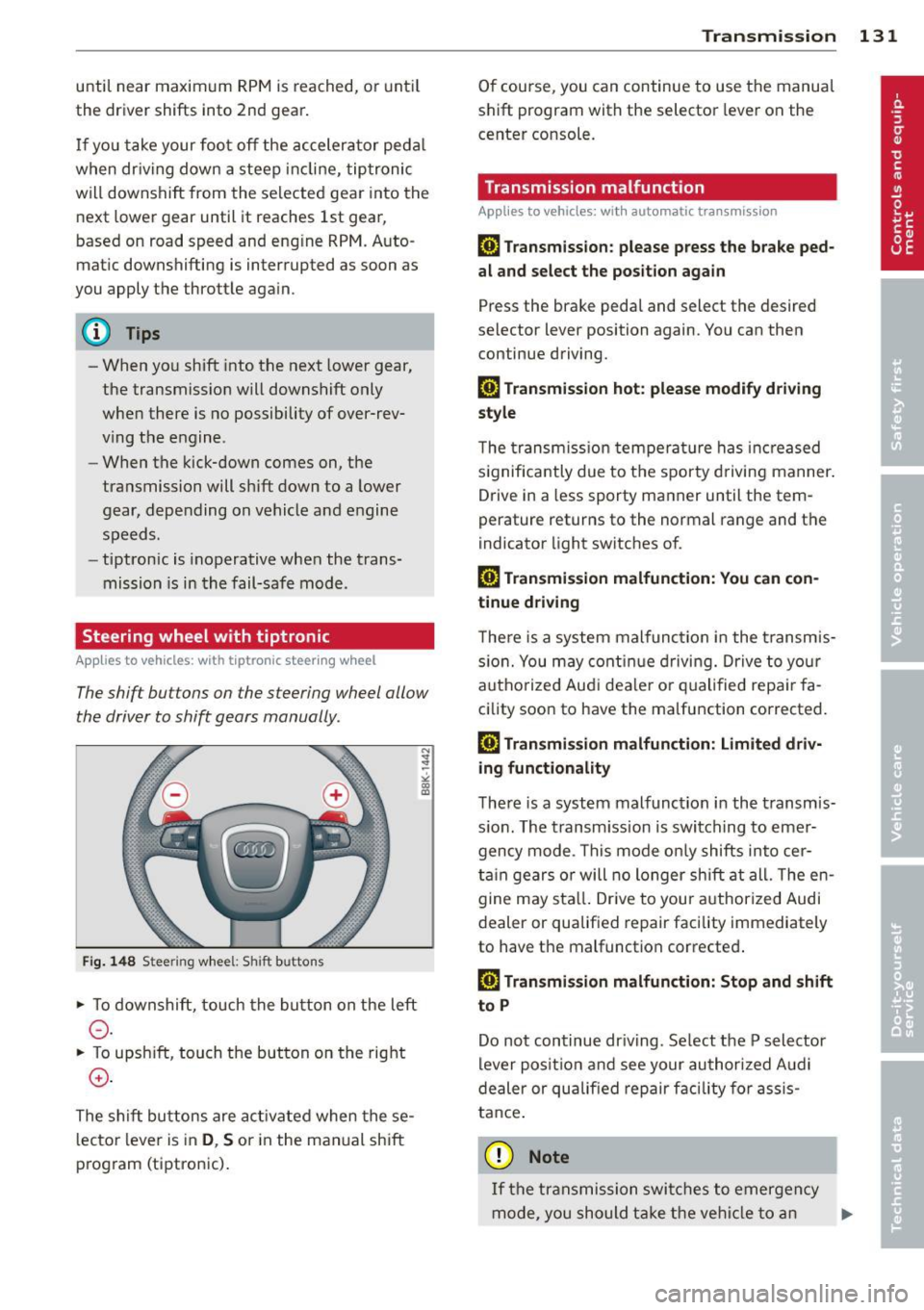
Steering wheel with tiptronic
Applies to vehicles: with tiptronic steer ing wheel
The shift buttons on the steering wheel allow
the driver to shift gears manually .
Fig. 148 S tee rin g w hee l: S hift buttons
• To downshift, to uch the button on the left
0 -
• To upsh ift, touch the but ton on the rig ht
0 -
The s hift buttons are ac tivated when the se
l ecto r lever is in
D , S or in the manual shift
p rog ram (tiptron ic) .
Transm ission 131
O f course, you can continue to use the manua l
s h ift pr ogram with the selector lever on the
cente r co nsole.
Transmission malfunction
Applies to vehicles: wit h automatic transmission
[O] Transmission : please press the brake ped
al and select the position again
Press the bra ke pedal and select the desired
selector lever position again. You can then
continue driving.
[O] Transmi ssion hot: please modify driving
style
T he trans mission tempe ra tur e has increased
s ignifica ntly due to t he spor ty dr ivin g manner .
Drive in a less sporty ma nner until the tem
perature returns to the normal range and the
indicator light switches o f.
[O] Transmission malfunction: You can con
tinue driv ing
T here is a system malfunc tion in the transm is
s io n. You may con tinu e dr ivin g. D rive to yo ur
a utho rize d Au di dea le r or qu alified repa ir fa
c ility soon to have the ma lfunction corrected .
[O] Transmission malfunction: Limited driv
ing functionality
T he re is a system mal func tion in the t ransmis
s io n. The transm iss ion is swi tching to emer
gency m ode . Th is mode o nly shifts into cer
t ain gears o r will no longer shi ft at all. The en
g ine m ay sta ll. Drive to you r author ized Audi
dealer or qualif ied repair facility immediately
to have the malfunction corrected .
[O] Transmission malfunction: Stop and shift
to P
Do n ot continue dr iving. Se lect t he P selector
lever posi tion an d see your au thori zed A udi
de aler or qu alified re pair facili ty for assis
ta nc e.
(D Note
If th e tra ns missi on swit ches to emer gen cy
mode, y ou sh oul d tak e th e ve hicl e to an
IJll>