lock AUDI A6 2011 Service Manual
[x] Cancel search | Manufacturer: AUDI, Model Year: 2011, Model line: A6, Model: AUDI A6 2011Pages: 370, PDF Size: 87.15 MB
Page 97 of 370

Fig. 91 Lock ing pin
for glove compartment
-Remove with the cover with the aid of a screwdriver
==>
page 94, fig . 90.
- Now press the locking pin inward with the screwdriver
==> fig . 91. •
Storage compartment in roof
111111 \\\H
. '
Fig. 92 Storage
compartment in roof
-To open the lid you have to touch the bar==> fig . 92
(arrow) . The lid opens automatically.
- To close the lid, push it up until it engages.
Con tro ls a nd e quip
m en t Vehicle
OP-eration
Seats and storage
& WARNING
Always keep the lid closed while driving to reduce the risk of injury
during a sudden braking maneuver or in the event of an accident. •
Coat hooks
& WARNING
Fig. 93 Coat hooks at
rear doors
• Hang clothes in such a way that they do not impair the driver's
vision .
• The coat hooks must only be used for lightweight clothing. Do
not leave any heavy or sharp edged objects in the pockets which
may interfere with the side curtain airbag deployment and can
cause personal injury in a crash.
• Do not use coat hangers for hanging clothing on the coat hooks
as this can interfere with proper deployment of the side curtain
airbags in an accident.
• Do not hang heavy objects on the coat hooks, as they could
cause personal injury in a sudden stop. •
Vehicle care Do-it-yourselt service iTechnical data
Page 100 of 370

Warm and cold Controls
This overview will help you to familiarize yourself with the
air conditioning controls.
I I
Fig. 9 4 A ir co ndit ioning co ntrol e lem en ts
The left display indicates the temperat ure selected for the driver's
side, the righ t display ind icates the temperature se lected for the
passenger's side.
Th e sett ings you make are shown in the MMI di splay fo r a few se co nds
when MMI is turned on.
Each function is turned on or off by briefly press in g t he cor responding
button . The indicator l ight in the button illuminates whe n the func
tion is active .
Button(s)
!AUTO]
ION/OFF I
Regulatora> G
Function
Automatic mode
Switch climate control on
and off
Swit ching air coo ling
on/off
Temperature selection
Fan
Air distribution Heated front seats *
Defrost M anua l recircu lation
Heated rear window
Page
~ page 99
~page99
~ page99
~ page99
~page 100
~ page 100
~ page 103
~page 100
~ page 100
~ page 101
al The regula tor is also used to set the fan speed, air d istribution and the seat
hea ting.
W Tips
• Residual heat: With the ignition t urned off, you can activate the
res idua l heat f unct ion by p ress ing the [
ON/OFF] button. The residua l
heat from the coo lant can be used to heat the vehicle i nterior. The
res idual heat function is t urned off automat ica lly afte r 30 m inutes .
• Synchronizing climate control: By pressing and ho ld ing the
cont rol knob on t he d river's side, the tempera ture setti ng on the
dr iver's side can be switc hed to the passe nger's side, and vice ve rsa.
T he new tempe rat ur e is shown i n the display.
• Do not block or tape
over the grille on the contro ls. Measur ing
sensors a re located be hind it .•
Page 101 of 370
![AUDI A6 2011 Service Manual Automatic mod e [AUTO j
The automatic mode is the standard setting for all
seasons .
- Select temperature between 60 °F (+16 °C) and 84 °F
(+28 °().
- Press the [AUTO] button.
A](/img/6/57593/w960_57593-100.png "AUDI A6 2011 Service Manual Automatic mod e [AUTO j
The automatic mode is the standard setting for all
seasons .
- Select temperature between 60 °F (+16 °C) and 84 °F
(+28 °().
- Press the [AUTO] button.
A")
Automatic mod e [AUTO j
The automatic mode is the standard setting for all
seasons .
- Select temperature between 60 °F (+16 °C) and 84 °F
(+28 °().
- Press the [AUTO] button.
Automatic operation ensures constant temperatures in the interior
and dehumidifies the air inside the vehicle. Air temperature, vol ume
and distribution are controlled automatically to reach or maintain the
desired interior temperature as quickly as possib le . Fl uctuations in
exterior temperature and the effects of temperature from the pos i
tion of the sun are compensated for automatically.
T his operating mode works only in the adjustable temperature range,
from 60
°F ( + 16 °() to 84 °F (+28 °(). If a temperature below 60 °F
(+ 16 °() is selected , LO appea rs in the display. At tempe rat ures above
84
°F (+28 °(), H I is displayed. A t both extreme set tings, climate
control runs continuously at max imum cool ing or heat ing power.
There is no temperature regulation .•
Turning on and off [ ON/OFF]
Turning the air conditioning on
Press the [ON/OFF] button, or
- Press the
[AUTO] button.
Turning the air conditioning off
- Press the [ ON/OFF] button to switch the air conditioning
off and to block the air supply from the outside.
The air conditioner turns back on when you press the t e m pe rat ure
re gulat or
or one of the buttons.
Controls and equip
ment Safety first
W
arm and cold
(I] Tip s
With the ignition turned off, you can activate the residua l heat func
tion by pressing the [ ON/OFF) button. The residual heat from the
coo lant can be used to heat the vehicle interio r. •
Swi tching air cooling on /off [AC]
Switching off the compressor which operates the air
cooling system saves fuel.
- To switch the air cooling system on/off, press the [AC]
button.
When the air cooling system is switched on, the diode in the button
is lit and the heating and ventilation are regulated automat ically .
Please note that the interior temperature cannot be lower than the
outs ide temperature when the air cooling system is switched off. The
blower does not cool or dehumidify the air in the interior. It is there
fore possible that the windows mist up. •
Setting the temperature
Separate temperatures can be selected for the driver's
and front passenger's side.
Rotate the regulator to the left to reduce the tempera
ture, or to the right to increase the temperature .
The selected temperature appears on the climate control disp lay. The
temperature setting will also appear for a few seconds in the MMI
display. •
Vehicle care Technical data
Page 106 of 370

llll..__w __ a _r _m __ a_n _ d_ c_ o_ ld ________________________________________________ _
Applie s to veh icles : wi th s teering w heel he atin g
Steering wheel heating~
The steering wheel can be heated electrically.
Fig. 97 Stee ring
wheel : button for
st eeri ng wheel heat ing
- Press the(~] button to turn the steering wheel heating on
and off =>fig. 97. The message
Steering whee l heat ing on ! or
S teer ing whee l heat ing off! appears in the instrument
cluster display .
A nearly constant temperature is maintained when the steer ing
wheel heating is switched on.
T he last setting selected for the steering wheel heating (on or off) is
automatically saved when the vehicle is shut off and is assigned to the
remote key.•
Basic settings
General
The basic climate control settings can be adjusted in the
MMI.
- Select: Function button (CAR]> Control button AC.
The following functions can be selected:
• Auto recirculat .
~ page 104
• Synchronizat ion~ page 105
• Center vents~ page 105 •
Automatic recirculation mode
An air quality sensor detects increased concentrations of
pollutants in the outside air and automatically switches
to recirculation mode.
We recommend that you always keep automatic air recirculation ON
to prevent polluted outside air from entering the vehicle interior.
If the air qu alit y sen sor located in the air conditioning system detects
polluted outside air, the sensor decides whether the air pollution can
be reduced by the factory -installed pollutant filter or whethe r it is
necessary to switch to air recirculation. With heavy concentrations of
poll utants, the a ir condit ion ing system is switched automatically to
recirculation mode and the supply of outside air is blocked . As soon
as the concen tration of pollutants in the o utside air drops, fresh air is
supplied to the vehicle in terior again .
In the event that the windows fog up during automatic air recircula
tion, you must press the® button immed iately.
Under certain operating conditions, automatic a ir recirculation is
switched off automatically. With o utside temperatures below about
SO °F ( +10 °(), automatic air recirculation is limited to 30 seconds .
With outside temperatures below about 30 °F (-1 °C) and the cooling
system is switched off, the automatic air recirculation is limited to 15
seconds. •
Page 108 of 370
1111....__0_ n_ t_h_ e_ r_ o_ a _ d _________________________________________________ _
On the road
Steering
Applies to vehicles : w ith manua lly ad justab le stee ring whee l
Manually adjustable steering wheel
The height and reach o f the steering wheel can be
adjusted.
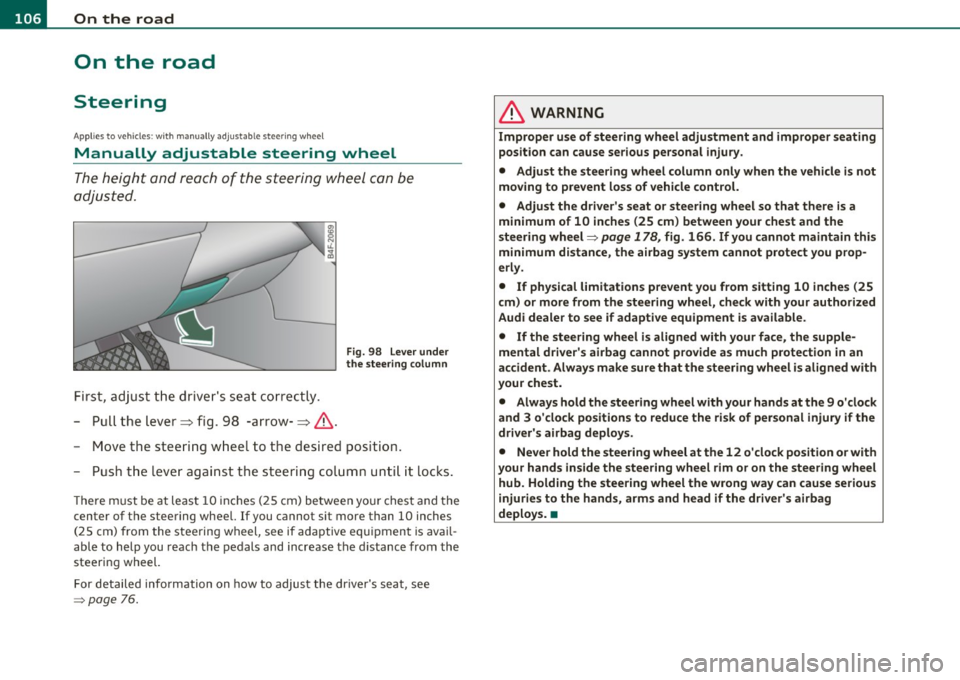
First, adjust t he driv er's seat correctly.
- Pull the lever~ fig. 98 -arrow-~ &.
Fig. 98 L ever under
the stee ring colum n
-Move the steering w heel to t he desired position.
- Push t he leve r against the s teering colum n unti l it locks .
The re m ust be at leas t 10 inc hes (25 cm) be tween yo ur chest and the
center of the steering wheel. If you cannot sit more than 10 inches
(25 cm) from the steering wheel, see if adaptive equ ipment is avail
able to help you reach the pedals and increase the d istance from the
steering wheel.
For detailed info rmation on how to adjust the dr ive r's seat, see
=> page 76.
& WARNING
Improp er use of steering wh eel adjustment and improper seating
position can cause serious personal injury .
• Adjust th e steering wheel column only when the v ehicle i s not
moving to p revent loss of vehicle control.
• Adjust the driver's seat or steering wheel so that th ere is a
minimum of 10 inches (25 cm ) between your chest and the
steering wheel=>
page 178 , fig. 166 . If you cannot maintain this
minimum distance , the airbag sy stem cannot protect you prop
erl y.
• If physical limitat ions p revent you from sitting 10 in ches (25
cm ) or more from the steering wheel, check with your authorized
Audi dealer to see if adaptive equipment is available.
• If the steering wheel is aligned with your face , the supple
mental driver' s airbag cannot provide a s much p rote ction in an
accident . Always make sure that the steer ing wheel i s aligned with
your che st.
• Always hold the ste ering wheel with your hands at th e 9 o'clock
and 3 o 'clock positions to reduce the risk of per sonal injury if the
driver' s airbag deploy s.
• Never hold the steering wheel at the 12 o 'clock position o r w ith
your hands inside the steering wh eel rim or on the steering wh eel
hub. Holding the stee ring wheel the wrong way can cause seriou s
injuries to the hands, arms and head if the driver' s airbag
deploy s. •
Page 109 of 370
_________________________________________________ O_ n_ t_ h_ e_ r _o_ a_d _ __.fflll
App lies to veh icles : w ith electrically adju stab le steer ing wheel
Electrically adjustable steering wheel
The height and reach of the stee ring wheel ca n be ele ctri
c ally adj usted to sui t th e d river.
Firs t, a djust t he dr iver's se at correct ly.
Height adjustment
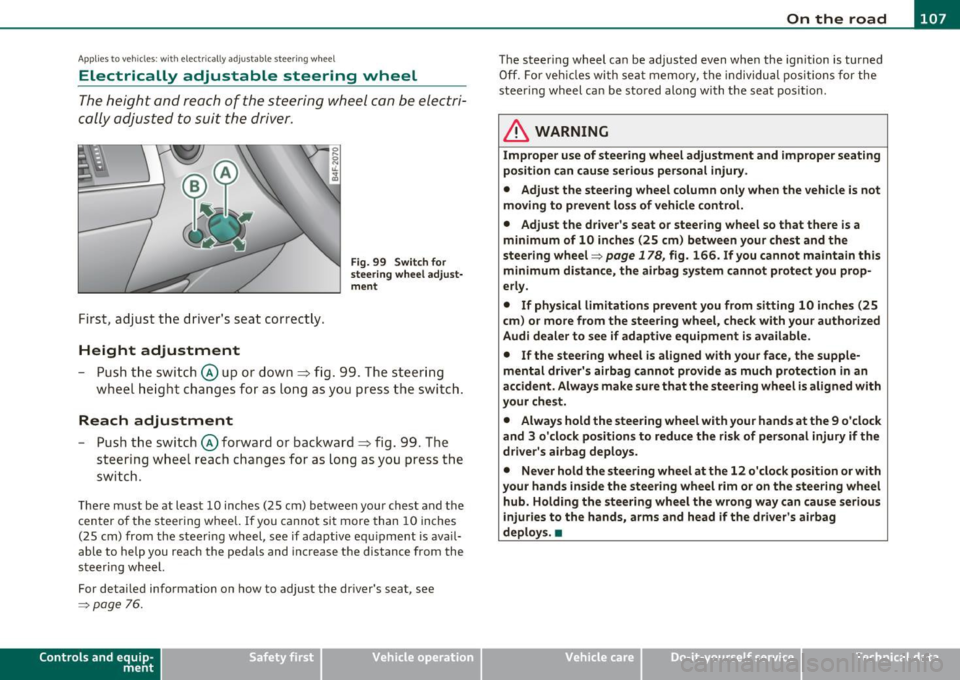
Fig . 99 Switch for
s teering whee l ad ju st
ment
- Push t he s witch © up or down=> fig. 99 . T he st ee rin g
w he el heig ht chang es f or as long as you press t he swi tch .
Reach adjustment
- Push t he switc h© forward or backward=> fig. 99 . T he
ste ering w hee l reac h changes for as long as yo u press the
swi tch .
The re m ust be at leas t 10 inches (25 cm) between you r chest and the
cen ter of the steering whee l. If you cannot sit more than 10 inches
(25 cm) from the steer ing wheel, see if adapt ive equ ipment is ava il
able to h elp you reach the pedals and increase the distance from the
steeri ng wheel.
For detailed information on how to adjust the dr iver 's seat , see
~ page 76.
Cont rols a nd e quip
m en t Vehicle
OP-eration
The steering wheel ca n be adjusted even when the ign ition is turned
O ff. For veh icles with sea t memory, the individu al pos it io ns for the
steer ing wheel can be sto red along with t he seat pos it ion.
& WARNING
Improper use of steering wheel adjustment and imprope r seating
position can cau se seriou s per sonal injury.
• Adjust the steering wheel column only when the vehicle i s not
moving to prevent loss of vehicle control.
• Adjust the driver 's seat or steering wheel so that there is a
minimum of 10 in ches (25 cm) between your chest and the
steering wheel~
page 178, fig. 166. If you cannot maintain this
minimum distance , the airbag system cannot prote ct you prop
erly.
• If phy sical limitations prevent you from sitting 10 inches (25
cm ) or more from the steering wheel, check with you r authorized
Audi dealer to see if adaptive equipment is available .
• If the steering wheel is aligned with your face , the supple·
mental driver 's airbag cannot provide as much protection in an
accident. Always make sure that the steering wheel is aligned with
your che st.
• Always hold the steering wheel with your hands at the 9 o'clock
and 3 o'clock po sition s to reduce the risk of personal injury if the
drive r's airbag deploys.
• Never hold the steering wheel at the 12 o'clock po sition or with
your hands inside the steering wheel rim or on the steering wheel
hub. Holding the steering wheel the wrong way can cause serious
injuries to the hands, arms and head if the driver's airbag
deploy s.•
Vehicle care Do-it-yourselt service iTechnical data
Page 110 of 370
ffl..__O_ n_ t_h _e_ r_o _ a_ d _________________________________________________ _
Easy entry feature
The easy entry feature makes it easier to enter and e xit
the vehicle by automatically adjusting the steering
wheel.
Press the button®~ page 107, fig. 99 to turn the easy
entry feature on or off .
When the easy entry feature is turned on (button depressed), the
steering wheel moves up to the parked position when the ignition is
t urned off . After you enter the vehicle, the steer ing wheel moves to
the stored pos ition as soon as you t urn on the ig nition .
Easy entry feature on vehi cles with memory seat *
For the stored steering whee l position to be recalled, t he driver's seat
memory must be switched on
( I ON O FF] sw itch in depressed posi
tion) .
If the easy e ntry feature i s sw itched off, the s teer ing wheel mov es to
the stored pos ition as soon as you press the seat memory button. •
Ignition Lock and ignition switch
Ignition key positions
The engine can be st arted or turned off with the ign ition
key .
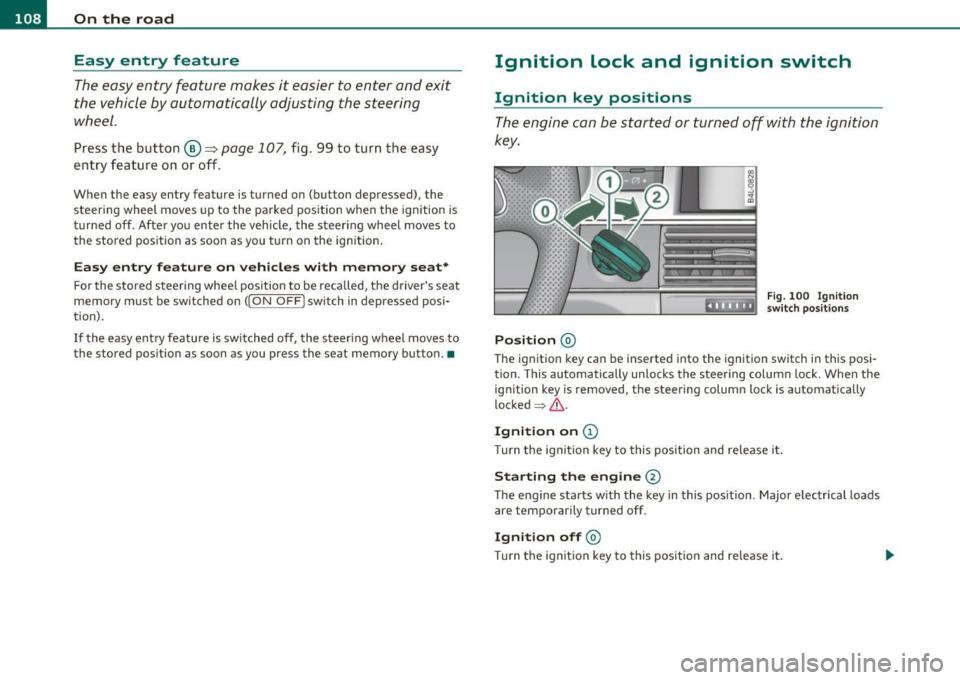
Position @
Fig. 100 Ig n ition
sw itch position s
The ig nition key can be inserted into the ignition switch i n this posi
tion. This automatically unlo cks the steering co lumn lo ck. When the
ign ition key is removed, the steer ing colum n lock is automat ically
lo ck ed
~ & .
Ignition on (D
Tu rn the ignit ion key to this position and re lease i t.
Starting the engine@
The engine starts w ith the key in this position . Major electrical loads
are temporarily tur ned off.
Ignit ion off @
Turn t he ignit ion key to thi s position and re le ase i t.
Page 111 of 370
_________________________________________________ O_ n_ t_ h_ e_ r _o_ a_d _ __._
& WARNING
• Never remove the key from the ignition lock while the vehicle
is moving. The steering wheel will lock , cau sing loss of control.
• If you ha ve to leave your vehicle, even for ju st a minute, alw ays
remove the ignition key and take it with you. This i s especially
important if you are going to leave children unattended in the
vehicle. The children could start the engine or use other vehicle c ontrols . Unsupervised us e of vehicle controls (for example, power
windows) can cause serious personal inju ries.
0 Note
• If the ~ symbol in the display blinks, there is a malfunction in the
electronic stee ring column lock. Follow the instr uctions in
~ page 28, "Steering malfu nction i" .
• If the ~ symbol in the display blinks, there is a malfunction in the
electronic ignition lock . Follow the instr uctions in~
page 29, "Igni
t ion lock malfunct ion ~" .
(I] Tips
• If you release the ignit ion key i n pos it io n @ , the key automati cally
returns to pos ition
(D .
• If you open the driver 's doo r whe n the ignition is sw itched on, a
buzze r sounds and the message
Ignition is on appears in the instru
ment cl uster d isplay. Please swi tch the ignition off. •
Ignition key safety lock
The ignition key con on ly be removed when the selector
lever is in the "P" (Pork) positi on.
After turning off the ignition, the ign ition key can only be removed
from the ignition lock when the se lector lever is in the "P " (Park) posi-
Con tro ls a nd e quip
m en t Vehicle
OP-eration
tion . After you have removed the key, the selector lever is locked and
canno t be move d.•
Starting and stopping the engine
Starting the engine
The engine can only be started with your original A udi
key.
.... _:::::•:
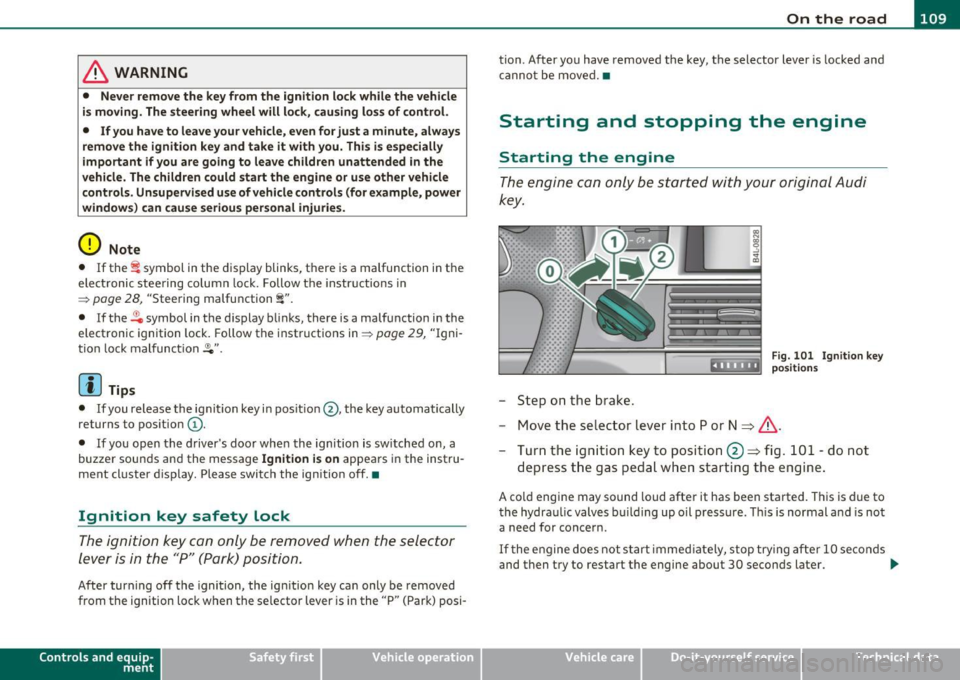
- Step on the b rak e.
Fig . 10 1 Ig nitio n key
positio ns
- Move the se lector lever into P or N ~ &,.
- Turn the ig ni tion key to position @~ fig. 101 -do not
depress t he gas pedal when start ing t he engine .
A cold engine may sound loud after it has been started . T his is due to
the hydra ulic valves bu ilding up oil p ressu re . Thi s is normal and is not
a need for concern.
If t he e ngine does no t s tart immed iate ly, stop try ing af te r 10 seco nds
and then try to restart the engine about 30 seconds later . _.,
Vehicle care Do-it-yourselt service iTechnical data
Page 113 of 370
![AUDI A6 2011 Service Manual On the road -_______________ __.
Switching the ignition on
-Press the [S TART] button once to the firs t stage to switch
on on ly the igni tion .
Starting the engine
-Step o n t](/img/6/57593/w960_57593-112.png "AUDI A6 2011 Service Manual On the road -_______________ __.
Switching the ignition on
-Press the [S TART] button once to the firs t stage to switch
on on ly the igni tion .
Starting the engine
-Step o n t")
On the road -_______________ __.
Switching the ignition on
-Press the [S TART] button once to the firs t stage to switch
on on ly the igni tion .
Starting the engine
-Step o n the bra ke.
Mov e the selector leve r to the P or N position ~& .
- Press the [START ] button to the seco nd stage to sta rt the
engine .
After a co ld eng ine is started, there may be a br ief per iod of increased
no ise because oil pressure m ust first build up in the hydraulic valve
adjusters. Th is is no rma l and no t a cause for conce rn .
If the engine does not start immediately, stop trying after 10 seconds
and then t ry to res tart the engine abou t 30 seconds later .
& WARNING
Never allow the eng ine to run in confined space s -danger of
asphy xiation.
0 Note
Avoid high engine speeds, fast acceleration o r heavy eng ine loads
wh ile the engine is st ill cold. This cou ld damage t he eng ine .
For the sake of the environment
Do not a llow the e ngine to warm up with the veh icle s tat ionary . St art
driving rig ht away. I n this way you avoid unnecessary emissions.
Con tro ls a nd e quip
m en t Vehicle
OP-eration
(I) Tips
If you open the d river 's door whe n the ignition is sw itched on, a
buzzer sounds and the message
Ignition is on appea rs i n the instru
me nt clu ster display. Ple ase swit ch the ign it ion off. •
Applies to v ehicles : w ith Co nven ience key
Switching engine off with the !STOP] button
- Bring yo ur ve hic le to a co mplete s top.
Fig. 103 Conv enien ce
ke y:
ENG INE ST OP
button
- Move t he se lector lever to t he P or N posit ion.
- Press the (STOP ] button~ fig. 103 .
Pressing the ! STOP] button once sw itches off the engine and t he igni
tion. If yo u press the
!S TO P] button again fo r more than 1 second,
the steer ing is locked, prov ide d that the selector lever is in the P posi
t ion ~& -
Emergency OFF function
If necessary, the engine ca n be switched off with the selecto r lever in
th e R, Do r S posit ions . To do so, step on th e brake pedal and press
and hold the
I S T OP I button (vehi cle spee d m ust be less than 6 mph
/ 10 km/h. .,,_
Vehicle care Do-it-yourselt service iTechnical data
Page 114 of 370
-On the road .,,, ___________________ _
in. WARNING
• Never turn off th e engine until the vehicle has come to a
c omplete stop .
• The b rake booste r and servotronic only work when the eng ine
is running . With the ignition turned off, you have to apply more
force when stee ring or braking . Since you cannot steer and stop
normally , thi s can lead to accident s and serious in juries.
• For s afety reasons , you should always park your vehicle with
the selector lever in P. Otherwi se, the vehicle could inadvertently
roll away.
• After the engine has been switched off , the radiator fan can
continue to run for up to 10 minutes - even with the ignition
s witched off. It can also switch on again after some time if the
c oolant temper ature rises as the r esult of a heat buildup or if the
engine is hot and the engine compartment is additionally heated
by the sun's rays .
0 Note
If the eng ine has been under heavy load for a n extended per iod, heat
builds up in the engine compartment after the engine is switched
off
- there is a r is k of damaging t he eng ine. Allow the e ngine to run at id le
for about 2 min utes before switc hing it
off. •
Appli es to ve hicles : w it h Conve nience key
Driver messages in the instrument cluster
display
If a function is not present, a driver mess age appea rs .
No key identified
Th is message appears when the ! START ] button is p ressed if there is
no mast er key ins ide the veh icle o r if t he sys tem does not recogn ize
it. For examp le, the master key cannot be recognized if it is covered
by an o bject (e.g . al uminum br ie f c ase) w hich
screens the r adio signal. .Electronic dev
ices such as cell phones can also interfere with
t he radio signal.
Press brake pedal to start engine
Thi s message appea rs if yo u press the !STAR T] butto n to start the
eng ine and do not depress the brake pedal. The engine can on ly be
s t ar ted i f the brake ped al is dep ressed .
Engage N or P to start engine
This message appea rs w he n th e engi ne is started if the sele cto r lever
for the automa tic transmission is not in the P o r N position. The
eng ine can only be s tarted w ith the se lec tor in these pos itions.
? Key not in vehicle
Thi s message appea rs alo ng with the symbol if the master key is
removed from the vehicle with t he engine runn ing. It is intended to
remind you (e.g. w hen c hanging dr ive rs) not to con tinue t he journey
w ithout the master key.
If t he master key is no longe r in the ve hicle, yo u cannot switch of f the
ig nitio n after stopping the engine and you a lso cannot start the
engine again. Moreover, you cannot lock the vehicle from the outside
w ith the key.
Shift to P otherwise vehicle can roll away. Doors do not lock if you
are not in P .
This message appea rs for safety reasons along with a warning buzzer
if the se lector lever for the automatic transmission is not in the P
position when t he ig nition is sw itched
off with t he !STOP] button and
t he d river's door is opened. Move t he selector lever to the P posit io n ,
otherwise the vehicle is not secured against rolling away. You also
c anno t lock the vehicle usi ng the lo cking but ton o n the door hand le
or using the remote key.
To engage steer ing lock, press and hold STOP button
Thi s message appears for safety reasons if the engine and the ignit ion
h ave bee n sw itche d off by p ress ing the
!S T O P) bu tton once, and t hen .,,_