light AUDI A6 2017 Owner's Guide
[x] Cancel search | Manufacturer: AUDI, Model Year: 2017, Model line: A6, Model: AUDI A6 2017Pages: 280, PDF Size: 70.24 MB
Page 49 of 280
co
co
.... N
" N .... 0 0 <..:l 'SI'
Sunshade on the rear window
Applies to: vehicles with a sunshade on the rear window
Applies to: sedan
F ig. 4 7 Center console: button for rear window su nshade
~ To raise/lower the sunshade, press the~ but-
ton
¢ fig. 47 in the cockpit .
The rear window sunshade can be set so that it
retracts automatically when driving in reve rse. To
do this, select: ICARlfunction button>
(Ca r)* sys
tems
control button > Vehicle settings > Auto
matic rear blind > On .
The sunshade is extended
again as soon as the vehicle is trave ling forward
at a speed greater than
9 mph (15 km/h) if the
ignition has not been switched off in the mean
time.
& WARNING
-
N ever operate the rear window sunshade
w ith out paying attention or in an uncon trol
led manner. Pinching could cause serious inju
r ies .
(0 Tips
-Pressing the~ button several times in a
row can trigger the overload protection . The
sunshade can on ly be extended/retracted
again after a brief waiting period.
- The rear window sunshade only functions
when the vehicle interior is warmer than
14° F (-1 0°C) .
Lights and V ision
Windshield wipers
Switching the windshield wipers on
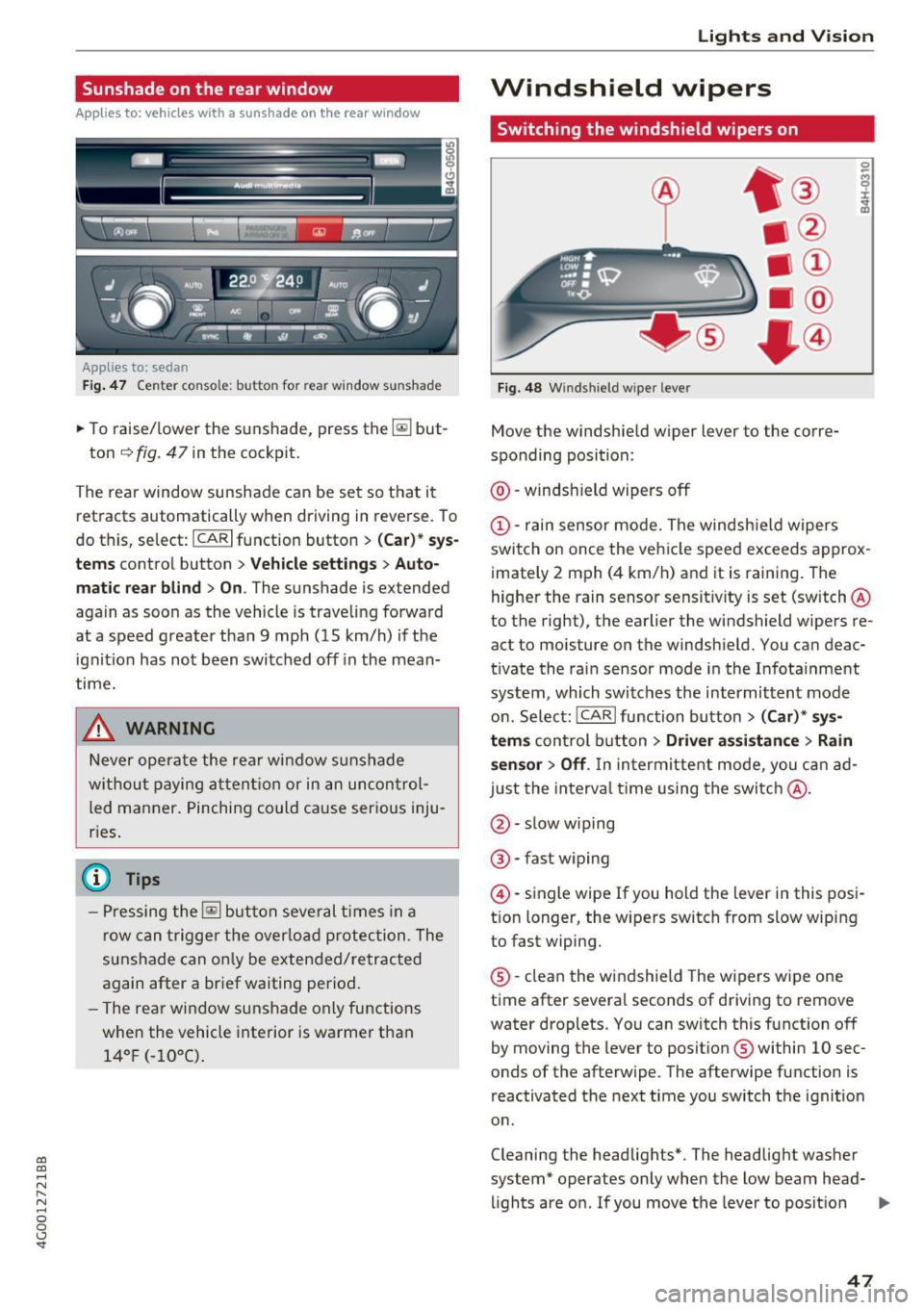
Fig. 48 W inds hield w iper leve r
Move the windshie ld wiper lever to the corre
sponding position:
@ -windsh ield wipers off
@ -rain sensor mode. The windsh ield wipers
switch on once the vehicle speed exceeds approx imately 2 mph (4 km/h) and it is raining . The
higher the rain sensor sensit ivity is set (switch @
to the right), the earlier the windshield wipers re
act to moisture on the windshie ld. You can deac
tivate the rain sensor mode in the Infota inment
system, which switches the intermittent mode
on. Select: ICARI function button>
(Car)* sys
tems
con trol button > Driver assistance > Rain
sensor> Off.
In intermittent mode, you can ad
just the interval time using the switc h@ .
@-slow wiping
®-fast w iping
@ -single wipe If you hold the lever in this posi
t ion longer, the wipers switch from slow wip ing
to fast wiping.
® -clean the windshield The wipers wipe one
time after several seconds of driving to remove
water droplets. You can sw itch this function off
by moving the lever to posit ion ® within
10 sec
onds of the afterwipe . The afterwipe function is
reactivated the next time you switch the ignit ion
o n .
Cleaning the headlights*. The headlight washer
system* operates only when the low beam head- lights are on. If you move the lever to posit ion
II>-
47
Page 50 of 280
Lights and Vi sion
® , the headlights and the night vision assist
camera* are cleaned at intervals.
A WARNING
-The rain sensor is only intended to assist the
driver. The driver may still be responsible
for manually switching the wipers on based on visibility conditions.
- The windshield may not be treated with wa
te r-repell ing windsh ield coating agents. Un
favorable conditions, such as wetness, dark
ness or low sun, can result in increased
glare, which increases the risk of an acc i
dent. Wiper blade chatter is also poss ible.
- Properly functioning windsh ield wiper
blades are required for a clear view and safe
dr iv ing¢
page 48, Replacing windshield
wiper blades.
(D Note
- If there is frost, make sure the w indshie ld
wiper blades a re not frozen to the wind
s hi eld. Sw itching on the winds hield wipers
when the blades are frozen to the wind
shield can damage the wiper blades.
- Prior to using a car wash, the windshield
wiper system must be switched off (lever in
position 0) . This prevents the wipers from
switching on unintentiona lly and causing
damage to the w indshield wiper system.
(D Tips
- The windshield wipers switch off when the
ignition is switched off. You can activate the
windsh ield wipers after the ign ition is
switched back on by moving the windsh ield
wiper lever to any pos it ion.
- Worn or dirty windshield wiper blades result
i n streak ing. This can affect the rain sensor
funct ion . Check your winds hield wiper
blades regularly.
- The washer fluid nozzles for the windshie ld
washer system are heated at low tempera
tures when the ignition is on .
- When stopp ing temporarily, such as at a
traffic l ight, the speed of the windshield
wipers automat ically reduces by one level.
48
· Cleaning windshield wiper blades
Clean the wiper b lades when yo u see w iper
streaks. Use a soft cloth and a g lass cleaner.
.. Place the w indshield w iper arms in the service
position ¢
page 48.
" Fold the windsh ie ld w iper arms away from the
w indshie ld.
A WARNING
D irty windshie ld w iper blades can impa ir vi
sion, which increases the r isk of an accident .
Replacing windshield wiper blades
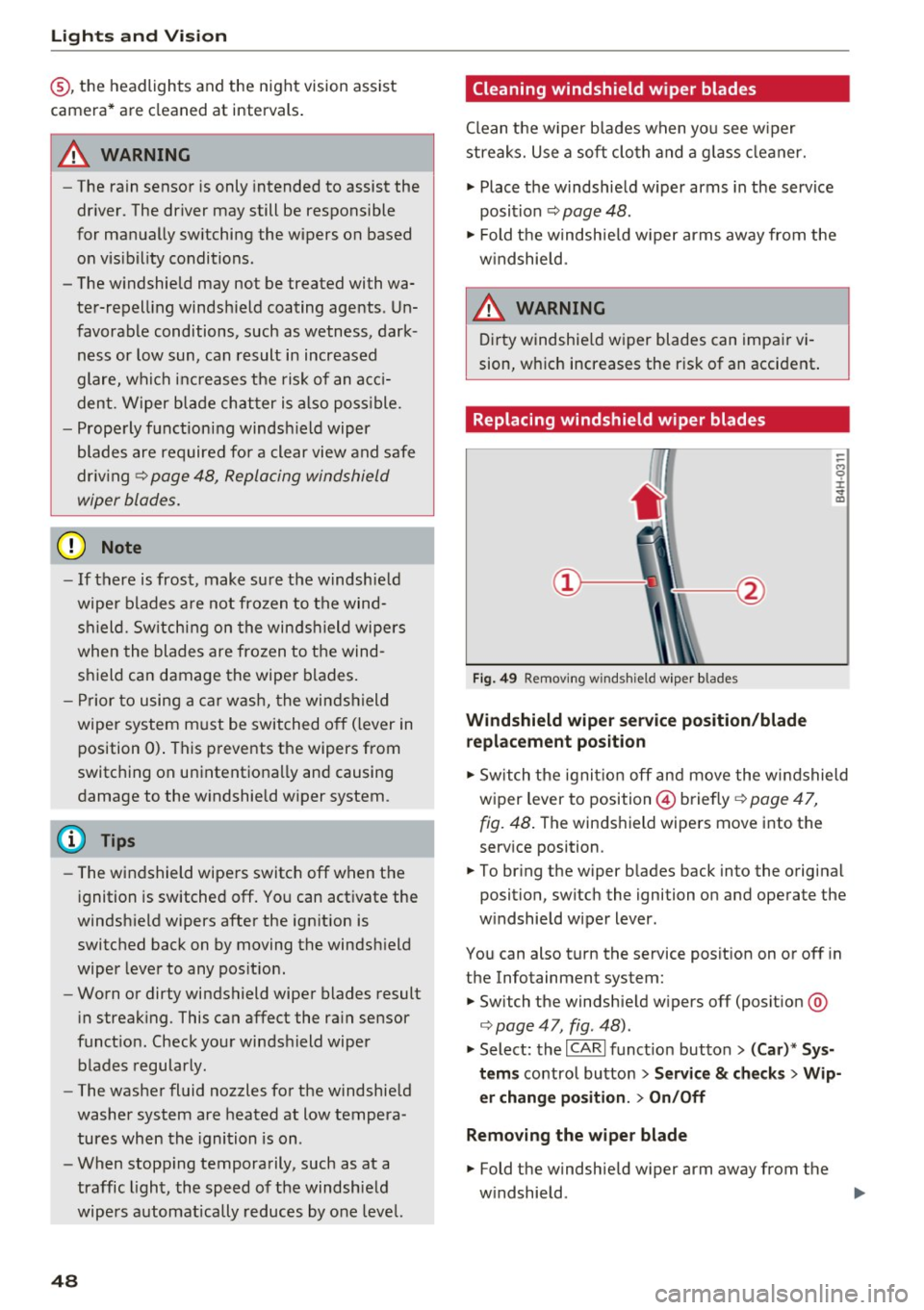
Fig. 49 Removi ng w inds hield w ipe r blades
Windshield wiper service position /blade
replacement po sition
-
-
-M 0 :i: V m
" Sw itch the ignit ion off and move the windshield
wiper lever to position © briefly ¢
page 47,
fig. 48 .
The winds hield wipers move into the
serv ice position .
.. To br ing the wiper b lades back into the original
position, switch the ignition on and operate the
w indshield wiper lever.
You can also turn the service posit ion on or off in
the Infotainment system:
.. Switch the windshie ld w ipers off (posit ion @
¢page 47, fig. 48).
" Select: the I CARI funct ion button > (Car )* Sys
tems
control button > S ervice & ch ecks > Wip
er chang e po sition .
> On/Off
Remo ving the wiper blade
.. Fold the windshield w iper arm away from the
w indshield .
1111>
Page 51 of 280
co
co
.... N
" N .... 0 0 <..:l -
blade. Hold the wiper blade firm ly.
~ Remove the wiper blade in the direct ion of the
arrow .
Install ing th e wiper blad e
~ Insert the new wiper b lade into the mount on
the wiper arm@ unti l it clicks into place .
~ Place the wiper arm back on the windshie ld .
~ Turn the service position off.
A WARNING -
For safety reasons, the windsh ield wiper
blades should be replaced once or tw ice each
year.
0 Note
- Only fo ld the windshield wipers away when
they are in the serv ice position. Otherwise,
you r isk damaging the paint on the hood or
the windshield w iper motor.
- You should not move your vehicle or operate
the windshield w iper lever when the wiper
arms are folded away from the w indshield .
The windshield wipers would move back in
to their o rig inal position and could damage
the hood and wi ndshield.
(D Tips
- You can also use the service position, fo r ex
ample, if yo u want to p rotect the windsh ield
from icing by using a cover.
- You cannot activate the service pos ition
whe n the hood is open.
Light s and Vision
49
Page 52 of 280
Sea ts and stor age
Seats and storage
General information
A WARNING
Refer to c::> page 128, Driving safety for im
portant information, tips, suggestions and
warnings that you should read and follow for
your own safety and the safety of you r pas
sengers.
Front seats
Power seat adjustment
App lies to veh icles with power adjustable seats
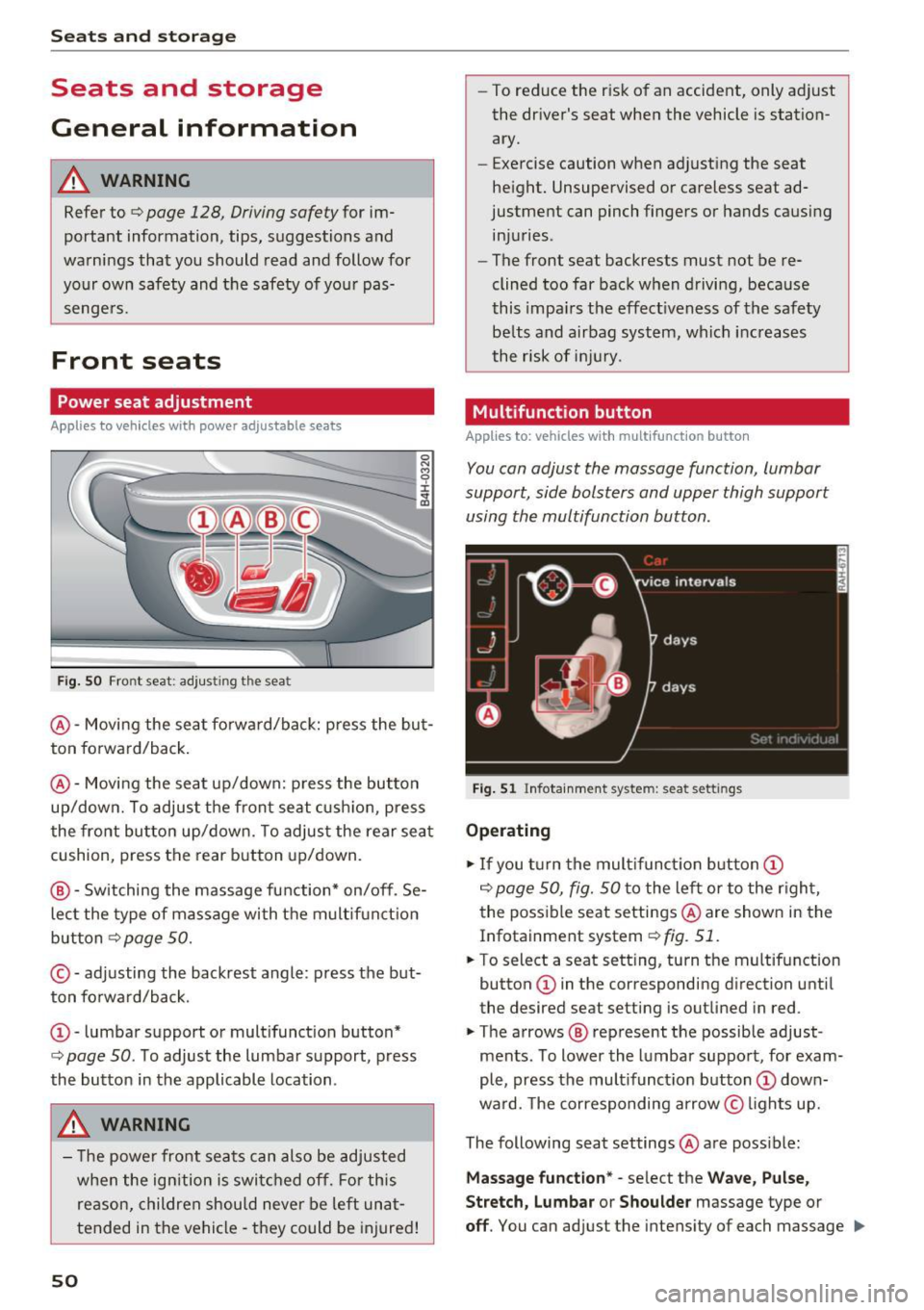
F ig. SO Front seat: adj usting the seat
@ -Movi ng the seat fo rwa rd/back: p ress the but
ton forwa rd/back .
@ -Moving the seat up/down: press the button
up/dow n. To adjust the front seat cush ion, press
the front button up/dow n. T o adjus t the rear sea t
cushion, press the rear button up/down.
@ - Switching the massage function * on/off. Se
lec t the type of massage with the multif unct ion
button
c::> page 50.
© - adjusting the backrest angle: press the but
ton fo rwa rd/back.
CD -lumbar support or multifunct ion button*
c::> page 50 . To adjust the lumbar support, press
the button in the applicable location .
A WARNING
- The power fro nt seats can also be adjusted
when the ign ition is swi tc h ed off. For this
reason, children should never be left una t
tended in the vehicle -they could be injured!
50
- To reduce the r isk of an accident, only adjust
the driver's seat when the vehicle is station ary.
- Exercise caution when adjusting the seat
height. Unsupervised or careless seat ad
justment can pinch fingers or hands causing
injuries.
- The front seat backrests must not be re
clined too far back when driving, because
this impa irs the effect iveness of the safety
be lts and airbag system, which increases
the risk of i nju ry.
Multifunction button
App lies to: vehicles wit h mult ifunct ion b utto n
You can adjust the massage function, lumbar
support, side bolsters and upper thigh support using the multifunction button.
Fig . 51 Infotainme nt system: seat settings
Operating
.,. If you t urn the mult ifunct ion b utton CD
c::> page 50, fig. 50 to the lef t or to the r igh t,
the poss ible seat settings @are shown in the
Infotainment system
c::> fig. 51.
.,. To select a seat sett ing, turn the multifunction
button
CD in the corresponding direction until
the desired seat setting is outlined in red .
.,. The arrows @ represent the possible adjust
ments . To lower the lumbar support, for exam
ple, press the mult ifunct ion button
CD down
ward. The corresponding arrow © lights up.
The following seat settings @are poss ible:
Ma ssa ge fun ctio n* -select the W ave, Pulse ,
Stretch, Lumbar or Shoulder
massage type or
off. You can adjust the intensity of each massage IIJ,,
Page 55 of 280
co
co
.... N
" N .... 0 0 <.,;) 'SI"
Remote Memory button control key
Driver D river Front
passen-ger
Seat X X X
Steering wheel* X X
Both
exterior X X
mirrors*
Remote control key
Applies to: vehicles with memory function
The driver's seat profile can be assigned to the
remote control key when the vehicle is locked.
• Select: the ICARI function button > (Car)* Sys
tems
control button > Vehicle settings > Driv
er's seat
> Remote control key > On .
(D Tips
If you do not wish to have the seat profile for
another driver assigned to the remote control
key, switch the memory function off in the In
fotainment system or using the
IOFFI button
¢page 53.
Memory buttons
Applies to: vehicles with memory function
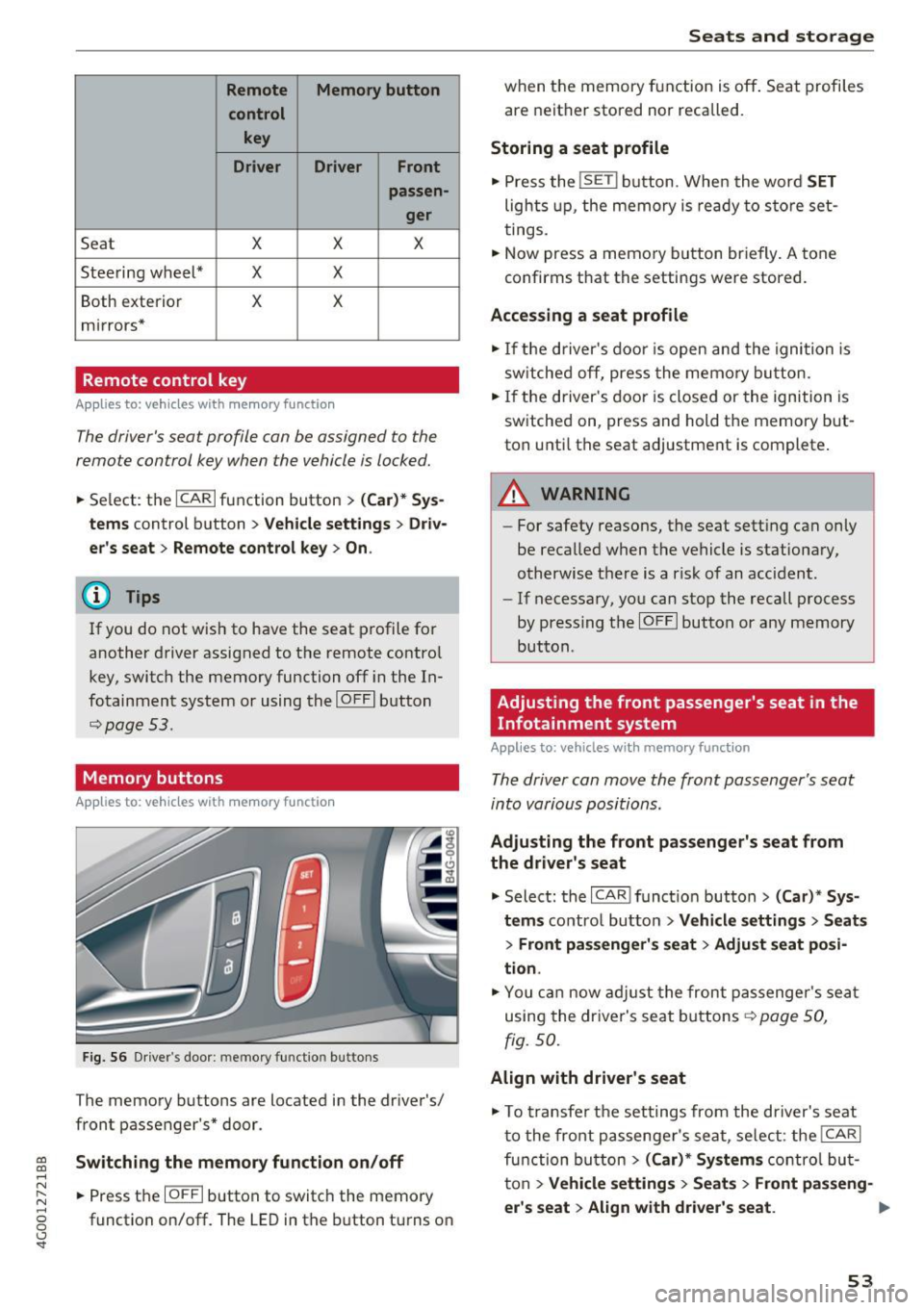
Fig. S6 Driver 's door: memory function buttons
The memory buttons are located in the driver's/
front passenger's* door.
Switching the memory function on/off
• Press the IOFFI button to switch the memory
function on/off. The LED in the button turns on
Seats and storage
when the memory function is off . Seat profiles
are neither stored nor recalled.
Storing a seat profile
• Press the ISET I button. When the word SET
lights up, the memory is ready to store set
tings .
• Now press a memory button briefly. A tone
confirms that the settings were stored.
Accessing a seat profile
• If the driver's door is open and the ignition is
sw itched off, press the memo ry button.
.. If the driver's door is closed or the ignition is
switched on, press and hold the memory but
ton until the seat adjustment is complete .
A WARNING
-For safety reasons, the seat setting can only
be recalled when the vehicle is stationary,
otherwise the re is a risk of an accident.
- If necessary, you can stop the recall process
by press ing the
IOFFI button or any memory
button.
Adjusting the front passenger's seat in the
Infotainment system
Applies to: vehicles with memory function
The driver can move the front passenger's seat
into various positions.
Adjusting the front passenger's seat from
the driver's seat
• Select: the I CAR I funct ion button > (Car) * Sys
tems
contro l button > Vehicle settings > Seats
> Front passenger's seat > Adjust seat posi
tion .
• You can now adjust the front passenger's seat
using the driver's seat buttons
¢ page SO,
fig.
so.
Align with driver's seat
• To transfer the settings from the driver's seat
to the front passenger's seat, select: the
I CAR I
function button > (Car)* Systems control but
ton
> Vehicle settings> Seats > Front passeng-
er 's seat > Align with driver 's seat. ..,.
53
Page 56 of 280
Sea ts and stor age
.. Press and hold the control knob until the ad
justing process is complete.
@ Tips
The lumbar support and upper th igh support
settings a re not transferred when aligning
the front passenger's seat with the driver's
seat.
Ashtray
A pp lies to: ve hicles w ith ashtray
F ig . 57 Center conso le : front ashtray
F ig. 58 Doo r tr im: rea r asht ray
Opening /closing
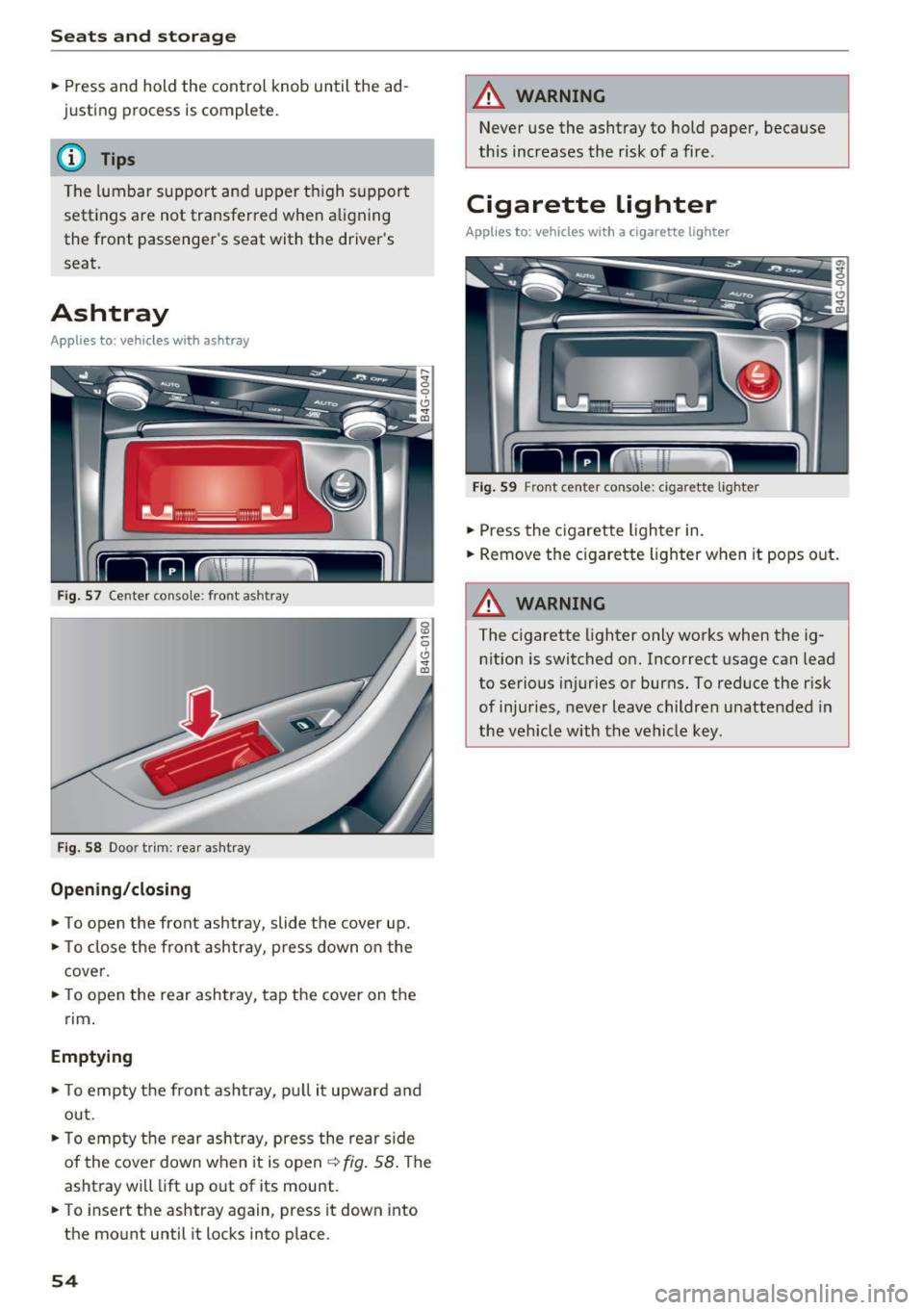
.. To open the front ashtray, slide the cover up .
.. To close the front ashtray, press down on the
cover .
.. To open the rear ashtray, tap the cover on the
rim .
Emptying
.. To empty th e front ashtray, pu ll it upward and
out .
.. To empty the rear ashtray, press the rear side
of the cover down when it is open ¢ fig. 58 . The
ashtray will lift up out of its mount .
.. To insert the ashtray again, press it down into
the mount until it locks into place.
54
A WARNING
Never use the ashtray to hold paper, because
this increases the risk of a fire .
Cigarette lighter
Applies to: vehicles wi th a ci gare tte lighter
F ig . 59 Front center conso le: cigarette lighter
.. Press the c igarette lighter in .
.. Remove the cigarette lighter when it pops out.
A WARNING
The cigarette lighter only works when the ig
n ition is switched on. Incorrect usage can lead
to serious injuries or burns. To reduce the risk
of injuries, never leave children unattended in
the vehicle with the vehicle key.
Page 57 of 280
co
co
.... N
" N .... 0 0 <..:l 'SI'
12 Volt sockets
App lies to: ve hicles with 12 volt socke ts
Fi g. 60 Luggage compartment s ide tr im: socket
Fi g. 61 Exa mple of a rear center conso le: sockets•
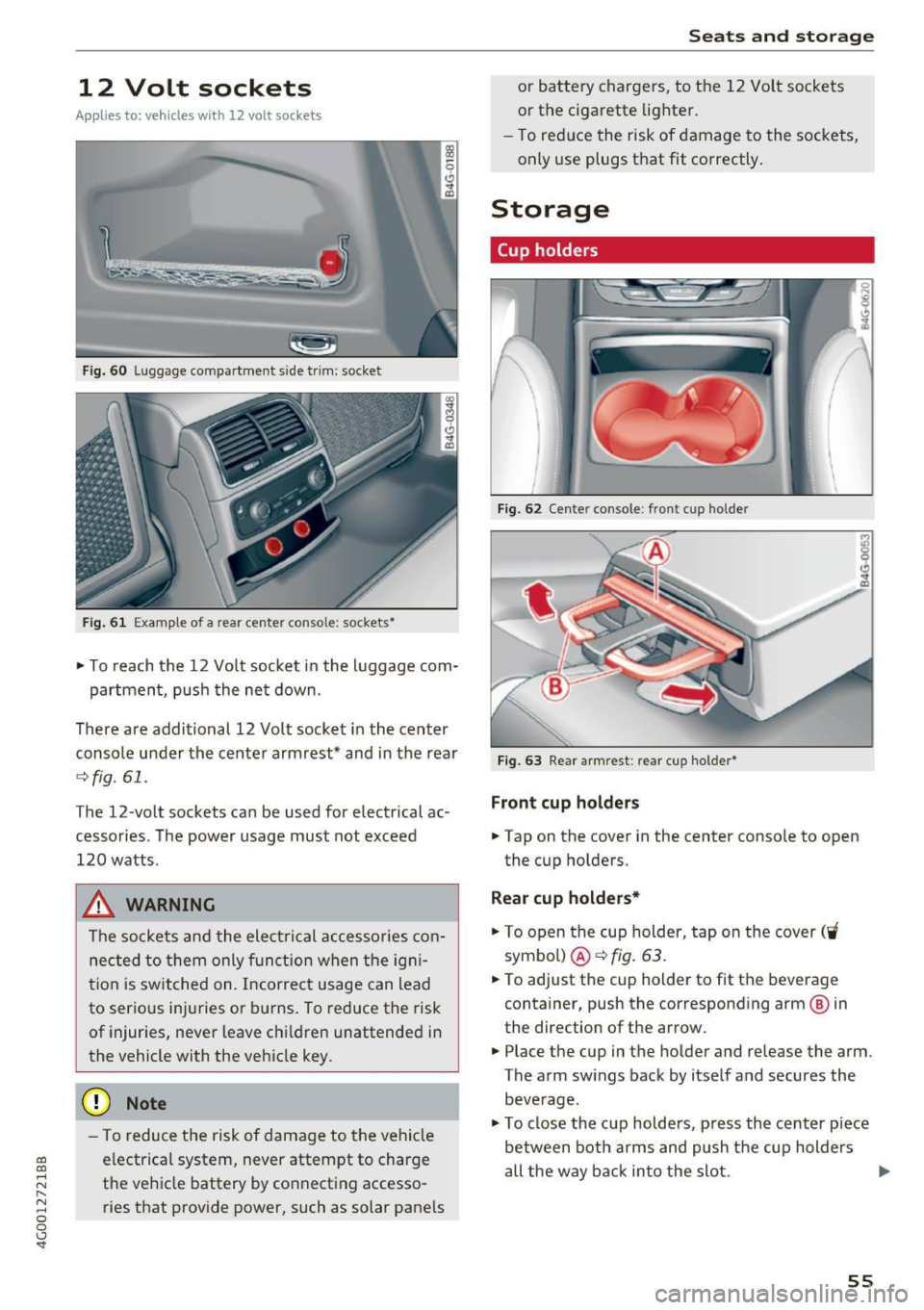
~ T o reach the 12 Vo lt socket in the luggage com-
partmen t, push the ne t down.
There are additional 12 Volt socket in the center
console under the cente r armrest* and in the rear
¢ fig.61.
The 12-volt sockets can be used for electrical ac
cessories. The power usage must not exceed
120 watts .
_& WARNING
The sockets and the electrical accessories con
nec ted to them only f unction when the ig ni
t ion is switched on. Incorrect usage can lead
to serious injuries or b urns . To reduce the risk
of injur ies, never leave chi ldren unattended in
the vehicle with the vehicle key .
(D Note
-To reduce the risk of damage to t he vehicle
electrica l system, never attempt to charge
t h e veh icle battery by co nnect ing accesso
ries that provide power, such as solar pane ls
Seats and storag e
or battery chargers, to the 12 Vol t sockets
or the cigarette lighter.
- To red uce the risk of damage to the sockets,
only use plugs t hat fit correctly .
Storage
Cup holders
I
I
Fig . 6 2 Cente r console : front cup ho lder
Fi g. 63 Rear a rmrest : rear cup holder•
Front cup holders
~ Tap on the cover in the center conso le to open
the cup holders.
Rear cup holders*
~ To open the cup holder, tap on the cover ('i
symbo l) @ ¢fig . 63.
~ To adjust the cup holder to fit the beverage
container, push the corresponding arm @ in
the direction of the arrow.
~ Place the cup in the holder and release the arm.
The arm sw ings back by itse lf and secures the
beve rage.
~ To close the cup holders, p ress the center piece
between both arms and push t he cup holders
all the way back in to the slot . .,.
55
Page 58 of 280
Seats and storage
_& WARNING
-Do not put any hot beverages in the cup
holder while the vehicle is moving. Hot bev
erages could spill, which can cause injury.
- Do not use any breakable beverage contain
ers (for example, made out of glass or por
celain) . You could be injured by them in the
event of an accident.
0 Note
Beverage containers in the cup holders should
always have a lid . If not, beverages could spill
and cause damage to vehicle equipment, such
electronics or seat covers .
Cooled glove compartment
Applies to: veh icles with cooled glove compartment
The cooled glove compartment only functions
when the
AIC system is switched on.
Fig. 64 Glove compar tm ent: s witch in g coo ling mode on/
off
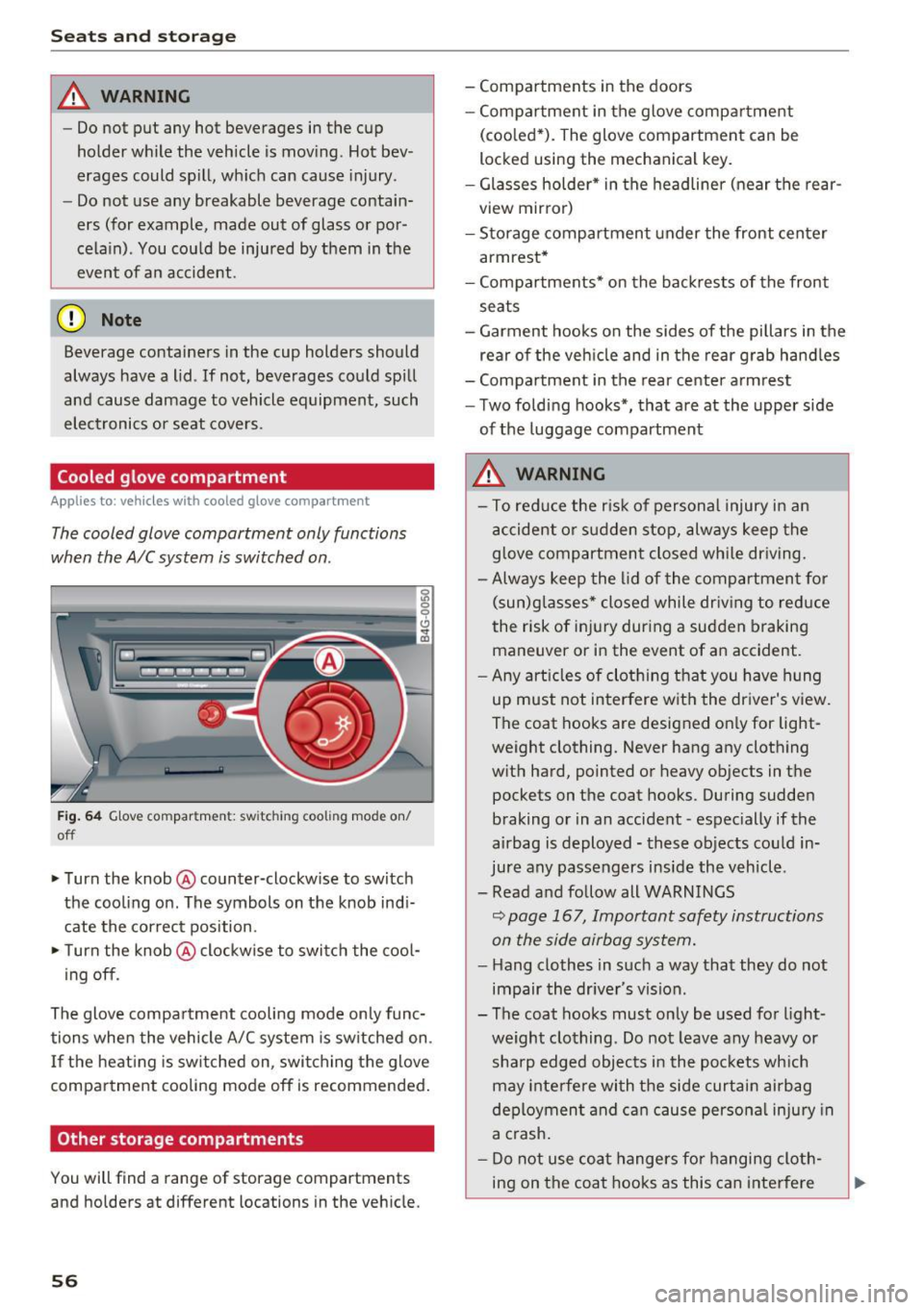
~ Turn the knob@ counter-clockwise to switch
the cooling on . The symbols on the knob indi
cate the correct position.
~ Turn the knob @ clockwise to switch the cool-
ing off .
The glove compartment cooling mode only func
tions when the vehicle A/C system is switched on .
If the heating is switched on, switching the glove
compartment cooling mode off is recommended.
Other storage compartments
You will find a range of storage compartments
and holders at different locations in the vehicle.
56
- Compartments in the doors
-Compartment in the glove compartment
(cooled*) . The glove compartment can be
locked using the mechanical key.
- Glasses holder* in the headliner (near the rear
view mirror)
- Storage compartment under the front center
armrest*
- Compartments* on the backrests of the front
seats
- Garment hooks on the sides of the pillars in the
rear of the vehicle and in the rear grab handles
- Compartment in the rear center armrest
- Two folding hooks*, that are at the upper side
of the luggage compartment
_& WARNING
- To reduce the risk of personal injury in an
accident or sudden stop, always keep the
glove compartment closed while driving.
- Always keep the lid of the compartment for
(sun)glasses* closed while driving to reduce
the risk of injury during a sudden braking
maneuver or in the event of an accident .
- Any articles of clothing that you have hung
up must not interfere with the driver's view.
The coat hooks are designed only for light
weight clothing. Never hang any clothing
with hard, pointed or heavy objects in the pockets on the coat hooks. During sudden
braking or in an accident -especially if the
airbag is deployed - these objects could in
jure any passengers inside the vehicle .
- Read and follow all WARNINGS
c::> page 167, Important safety instructions
on the side airbag system.
- Hang clothes in such a way that they do not
impair the driver 's vision .
-
- The coat hooks must only be used for light
weight clothing . Do not leave any heavy or
sharp edged objects in the pockets which
may interfere with the side curtain airbag
deployment and can cause personal injury in
a crash.
- Do not use coat hangers for hanging cloth
ing on the coat hooks as this can interfere
Page 61 of 280
co
co
... N
" N ... 0 0 <..:l 'SI'
Storage hooks
Applies to: vehicles with bag hooks
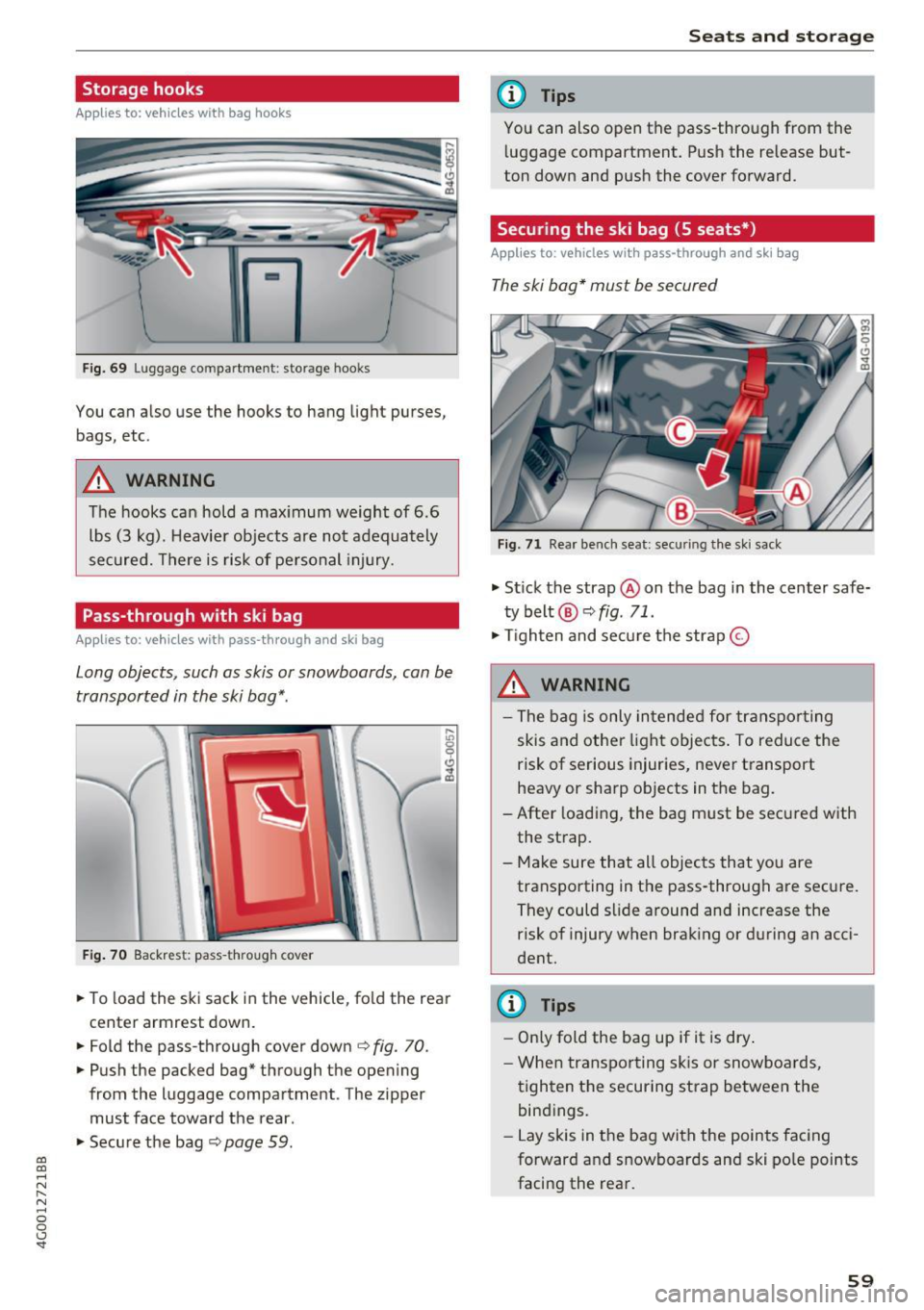
Fig. 69 Luggage compartment : storage hooks
You can also use the hooks to hang light purses,
bags, etc .
A WARNING
The hooks can hold a maximum weight of 6.6
lbs (3 kg). Heavier objects are not adequately
secured. There is risk of personal injury.
Pass-through with ski bag
Applies to: vehicles with pass-through and ski bag
Long objects, such as skis or snowboards, con be
transported in the ski bog* .
Fig. 70 Backrest : pass-through cover
.. To load the ski sack in the vehicle, fold the rear
center armrest down.
"'Fold the pass-through cover down
c:;, fig. 70.
"'Push the packed bag* through the opening
from the luggage compartment . The zipper
must face toward the rear .
.. Secure the bag
c:;, page 59.
Seats and storage
(D Tips
You can also open the pass-through from the
luggage compartment. Push the release but
ton down and push the cover forward.
Securing the ski bag (5 seats*)
Appl ies to : vehicles with pass-through and ski bag
The ski bag* must be secured
Fig. 71 Rear bench seat: sec uring the ski sack
"' Stick the strap @on the bag in the center safe
ty belt @¢
fig. 71 .
"'Tighten and secure the strap ©
A WARNING
- The bag is only intended for transporting
skis and other light objects. To reduce the
risk of serious injuries, never transport
heavy or sharp objects in the bag.
-After loading, the bag must be secured with
the strap.
- Make sure that all objects that you are transporting in the pass-through are secure.
They could slide around and increase the risk of injury when braking or during an acci
dent .
(D Tips
- Only fold the bag up if it is dry.
- When transporting skis or snowboards,
tighten the securing strap between the
bindings.
- Lay skis in the bag with the points facing
forward and snowboards and ski pole points
facing the rear.
-
59
Page 63 of 280
co
co
.... N
" N .... 0 0 <.,;) 'SI"
Warm and cold
Automatic climate control
Applies to: vehicles with deluxe automatic climate contro l
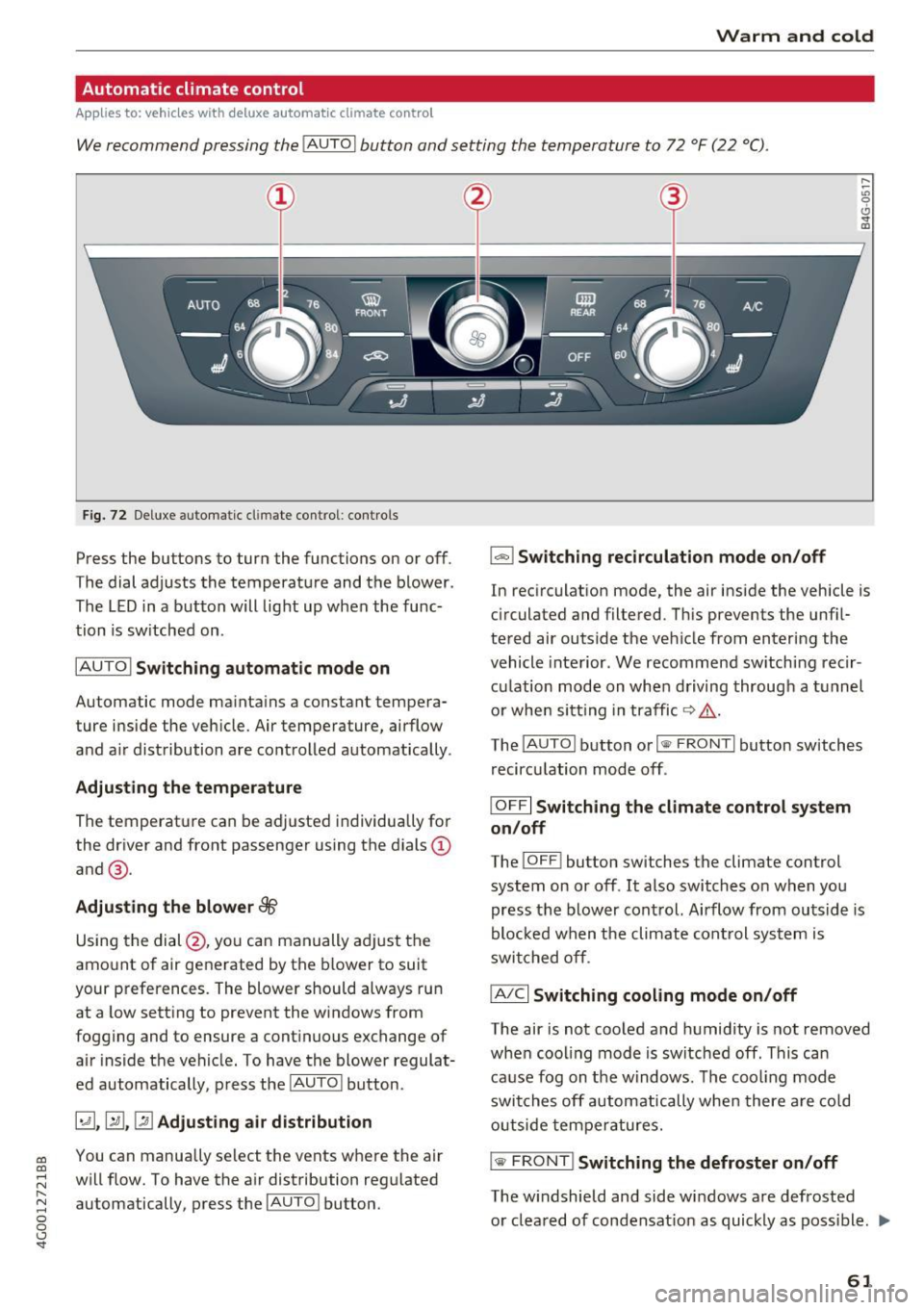
We recommend pressing the !AUTO I button and setting the temperature to 72 °F (22 °C) .
Fig. 72 Deluxe automatic cl imate con trol: contro ls
Press the buttons to turn the functions on or off .
The dial adjusts the temperature and the blower .
The LED in a button will light up when the func
tion is sw itched on .
IAUTOI Switching automatic mode on
Automatic mode maintains a constant tempera
ture inside the vehicle. Air temperature, airflow
and air distribution are controlled automatically .
Adjusting the temperature
The temperat ure can be adjusted individually for
the driver and front passenger using the dials@
and @.
Adjusting the blower~
Using the dial @, you can manually adjust the
amount of air generated by the blower to suit
your preferences. The blower should always run
at a low setting to prevent the windows from
fogging and to ensure a continuous exchange of air inside the vehicle. To have the blower regulat
ed automatically, press the
IAUTO I button.
~. [m , ~ Adjusting air distribution
You can manua lly se lect the vents where the air
will flow. To have the air distribution regulated
automatically, press the
IAUTO ! button.
1-1 Switching recirculation mode on/off
In recirculation mode, the air inside the vehicle is
cir culated and filtered . This prevents the unf il
tered air outside the vehicle from entering the
vehicle interior . We recommend sw itching recir
culation mode on when driving through a tunnel
or when sitting in traffic ~&_ .
The
! AUTO I button or I
recirculation mode off .
IOFFI Switching the climate control system
on/off
The ! OF F! button sw itches the climate control
system on or off .
It also switches on when you
press the blower control. Airflow from outside is
blocked when the climate cont rol system is
switched off.
IA/Cl Switching cooling mode on/off
The air is not cooled and humidity is not removed
when cooling mode is switched off. This can
cause fog on the windows . The cooling mode
switches off automatically when there are cold
outside temperatures.
is;,i, FRONT I Switching the defroster on/off
The w indshield and side windows are defrosted
or cleared of condensat ion as quickly as poss ible . .,,_
61