lock AUDI A7 2016 Owner's Manual
[x] Cancel search | Manufacturer: AUDI, Model Year: 2016, Model line: A7, Model: AUDI A7 2016Pages: 294, PDF Size: 73.82 MB
Page 49 of 294

M N <( I.J "". rl I.O
"' N I.O rl
.. To increase or reduce the brightness, turn the
knob and press it .
The inte rior lighting turns on when you switch
the headlights on whi le the ignition is on .
(D Tips
The setting is automat ically stored and as
signed to the remote control key that is in
use.
Instrument illumination
The brightness of the illumination for the instru
ments, display and head-up display* can be ad
justed.
Fig. 41 Instrument illumination
.. Press the knob to release it.
.. Turn the knob toward" -" or"+" to reduce or in
crease the brightness.
.. Press the knob again to return it to its original
pos ition.
@ Tips
The instrument illumination for the needles
and dia ls turns on when the ignition is turned
on and the lights are turned off. The illumina
tion for the dials reduces automatically and
eventually turns off as brightness outside in
creases. This function reminds the driver to
turn the headlights on at the appropriate
time.
Lights and Vision
Vision
Adjusting the exterior mirrors
Fig. 42 Driver 's doo r: knob fo r the exterior mirrors
Turn the knob to the desired position:
Q/P -Adjusting the left/right exterior mirror.
Move the knob in the des ired direction.
4iil -Heating the mirror glass depending on the
outside temperature.
8 -Folding exterior mirrors*. In the Infotain
ment system , you can select if the mirrors fold in
a utomat ically when you lock the vehicle
~page 33.
Front passenger's exterior mirror tilt
function*
To help you see the curb when backing into a
parking space, the surface of the mirror tilts
slight ly . For this to happen, the knob must be in
the position for the front passenger's outside
mirror.
You can adjust the tilted mirror surface by turn
ing the knob in the desired direction. When you
move out of reverse and into another gear, the
new mirror position is stored and assigned to the
key you are using.
T he m irror goes back into its orig inal position
once you drive forward faster than 9 mph (15
km/h) or switch the ign ition off.
A WARNING
-Curved (i . e. convex) mirror surfaces increase
your f ield of view . Remember that veh icles or
other objects will appear smaller and farther
away than when seen in a fla t mirror . If you
47
Page 53 of 294
M N <( (.J
'SI: ,...., \!) ..,.,
N \!) ,....,
~ Switch the windshield wipers off (position@
c:>poge49, fig. 46).
~ Select: the ICARI function button > (Car)* Sys
tems
control button > Servi ce & cont rol > W ip
er cha nge posit ion
> On /O ff.
R emoving the wip er blade
~ Fold the windshield wiper arm away from the
windshield.
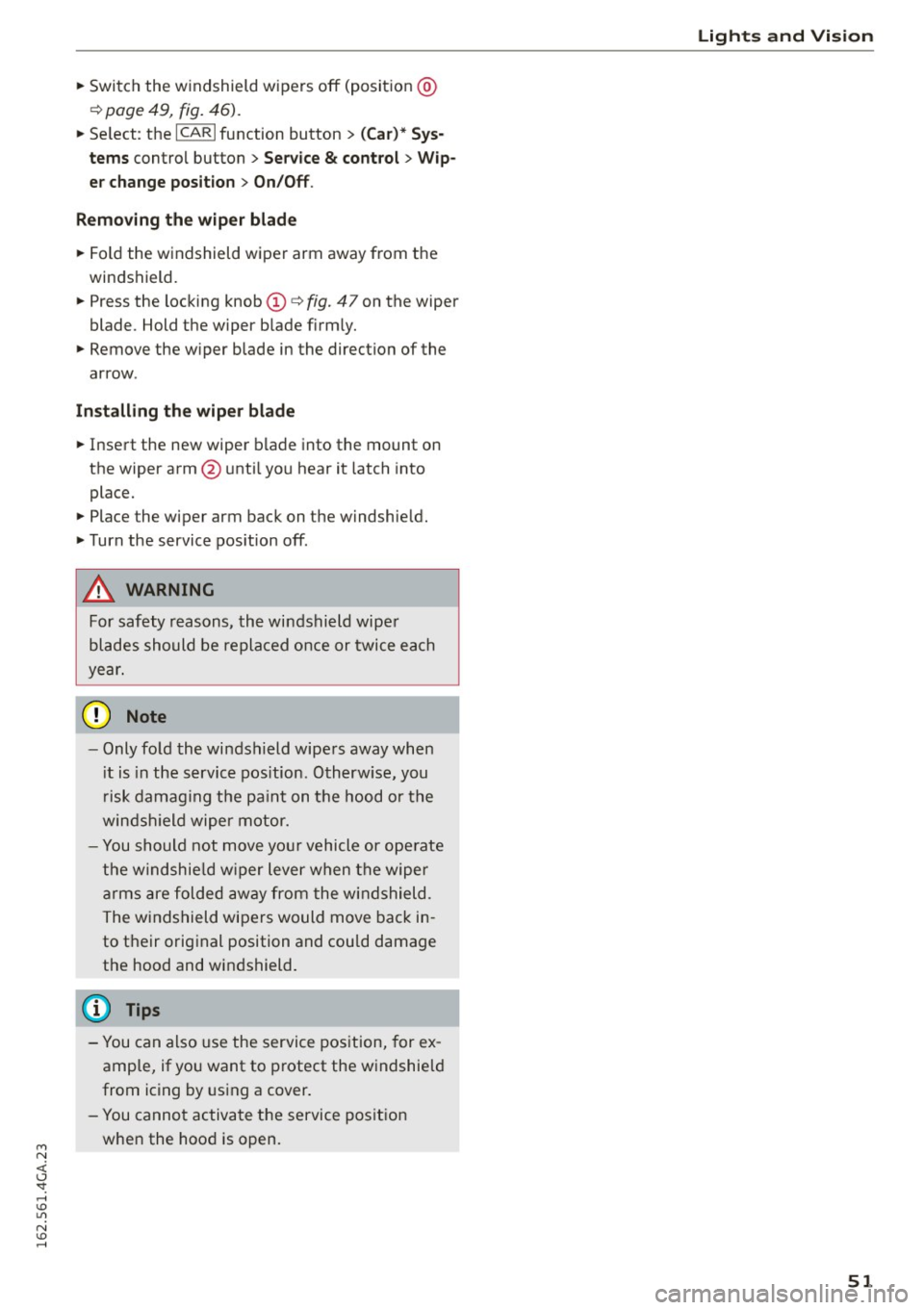
~ Press the locking knob@c:> fig. 47 on the wiper
blade. Hold the wiper blade firm ly.
~ Remove the wiper blade in the direction of the
arrow.
In sta ll in g t he w ip er bl ade
~ Insert the new wiper blade into the mount on
the wiper arm@ unti l you hear it latch into
place.
~ Place the wiper arm back on the windshield.
~ Turn the service pos ition off.
A WARNING
For safety reasons, the windshield wiper
blades should be replaced once or twice each
yea r.
0 Note
- Only fold the windshield wipe rs away when
i t is in the service pos ition. Otherw ise, you
r isk damag ing the pa int on the hood or the
windsh ield wiper motor.
- You should not move you r vehicle or ope rate
the windshie ld w iper lever when the wiper
arms are folded away from the windshield.
The windshield wipers would move back in
to t heir original position and could damage
the hood and windshield.
(D Tips
- You can also use the service pos ition, for ex
ample, if you want to protect the windshield
from icing by using a cover.
- You cannot activate the service position when the hood is open.
Light s and Vis ion
5 1
Page 57 of 294
M N <( I.J -
Armrest
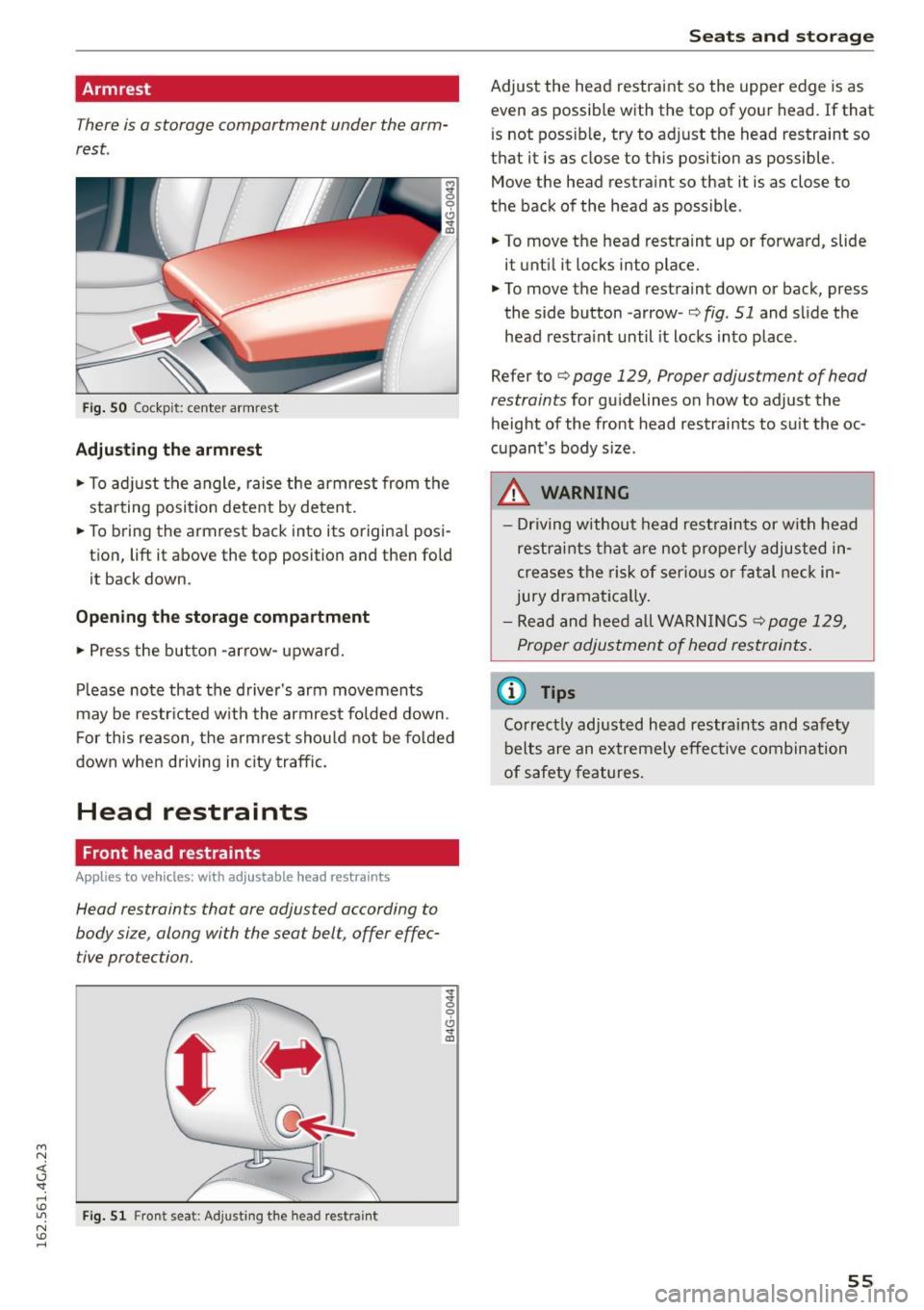
There is a storage compartment under the arm
rest.
~ 0
CJ ..,. ID
Fi g. 50 Coc kp it: center armrest
Adjusting the armrest
... To ad just the angle, raise the armrest from the
sta rting posit ion detent by deten t.
... To bring the armrest back into its original posi
tion, lift it above the top position and then fo ld
it back down.
Opening the storag e compartment
.,. Press the button -arrow- upward.
Please note that the driver's arm movements
may be restr icted w ith the armrest folded down.
F or this reason, t he a rmrest sho uld not be fo lded
down when driving in city traffic.
Head restraints
Front head restraints
App lies to vehicles: with adjustable head restraints
Head restraints that are adjusted according to
body size, along with the seat belt, offer effec
tive protection.
F ig. 51 Front seat : Adjusting the head restra int
g
0
CJ ..,. ID
Seats and storage
Adjust the head restraint so the upper edge is as
even as possib le with the top of your head. If that
is not possib le, try to adjust the head restraint so
that it is as close to this position as possible.
Move the head restra int so that it is as close to
the back of the head as possible.
... To move the head restraint up or forward, slide
it unti l it locks into place .
... To move the head restraint down or back, press
the side button -arrow-
~ fig. 51 and slide the
head restra int until it locks into place.
Refer to
~ page 129, Proper adjustment of head
restraints
for gu idelines on how to adjust the
height of the front head restraints to suit the oc
cupant's body s ize.
.&, WARNING
- Driving w ithout head rest raints or with head
restra ints that a re not properly adjusted in
creases the risk of ser ious or fatal nec k in
jury dramat ica lly.
- Re ad and heed all WARNINGS~
page 129,
Proper adjustment of head restraints .
@ Tips
Correctly adjust ed head restraints and safety
belts are an extremely effective combination
of safety features.
55
Page 58 of 294
Seats and storag e
Rear head restraints
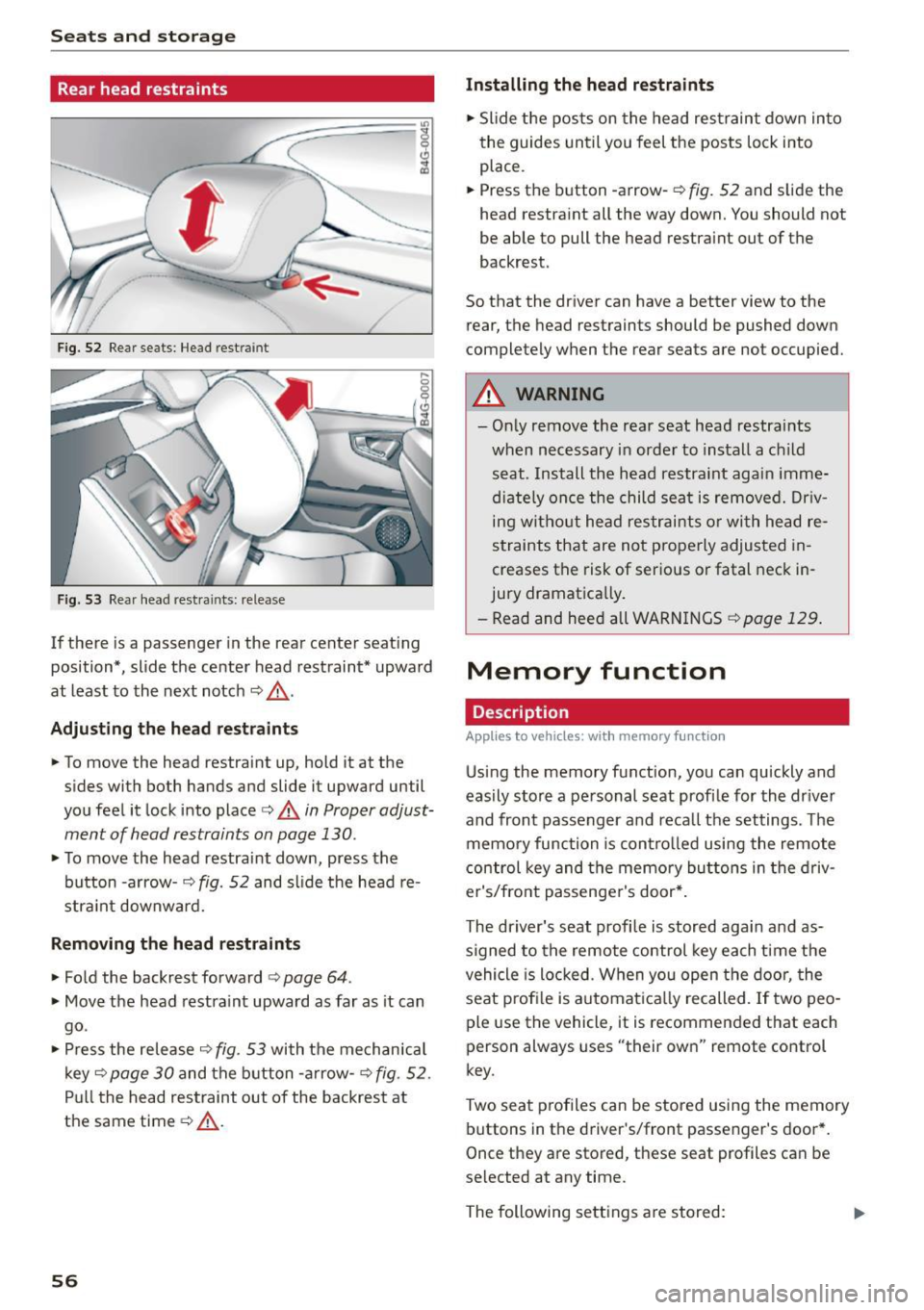
Fig. 52 Rear seats: Head rest ra in t
Fig. 53 Rear head restra ints: release
If there is a passenger in the rear center seat ing
position* , slide the center head restraint* upward
at least to the next notch
~ ,&. .
Adjust ing th e he ad res trai nts
• To move the head restra int up, hold it at the
sides with both hands and slide it upward until
you feel it lock into place
c:> A in Proper adjust
ment of head restraints on page
130.
• To move the head restraint down, press the
button -arrow-
c;> fig. 52 and slide the head re
stra int downward.
R emo ving the h ead re straint s
• Fold the backrest forward c:> page 64.
• Move the head restra int upward as far as it can
go .
• Press the release
c:> fig. 53 with the mechan ica l
key ~
page 30 and the b utton -a rrow-c:> fig . 52 .
Pull the head restraint out of the backrest at
the same time
c:> .&_ .
56
Installing the he ad re stra ints
• Slide the posts on the head restraint down into
the guides until you feel the posts lock into
place .
• Press the button -arrow-
c:> fig. 52 and s lide the
head restra int all the way down. You should not
be able to pull the head restra int out of the
backrest.
So that the driver can have a better view to the rear, the head restraints should be pushed down
completely when the rear seats are not occupied.
A WARNING
- On ly remove the rear seat head restra ints
when necessary in order to install a c hild
seat . Install the head restraint again imme
diate ly once the child sea t is removed. Dr iv
ing without head restraints o r with head re
straints that are not properly adjusted in
creases the risk of serious or fatal neck in
jury dramatically.
- Read and heed a ll WARN INGS
c:> page 129 .
Memory function
Description
Applies to vehicles : with memory f un ction
Us ing the memory function, you can quickly and
eas ily store a pe rsonal seat profi le for the driver
and front passenger and reca ll the settings . The
memory function is control led using the remote
control key and the memory buttons in the driv
er's/front passenger's door* .
-
The driver's seat profile is stored aga in and as
signed to the remote control key each time the
vehicle is locked. When you open the door, the
seat prof ile is automat ica lly recalled. If two peo
ple use the veh icle, it is recommended that each
person always uses "their own" remote control
key.
Two seat p rofiles can be stored using the memory
buttons in the dr iver's/front passenger's door *.
Once they are stored, these seat profiles can be
selected at any time.
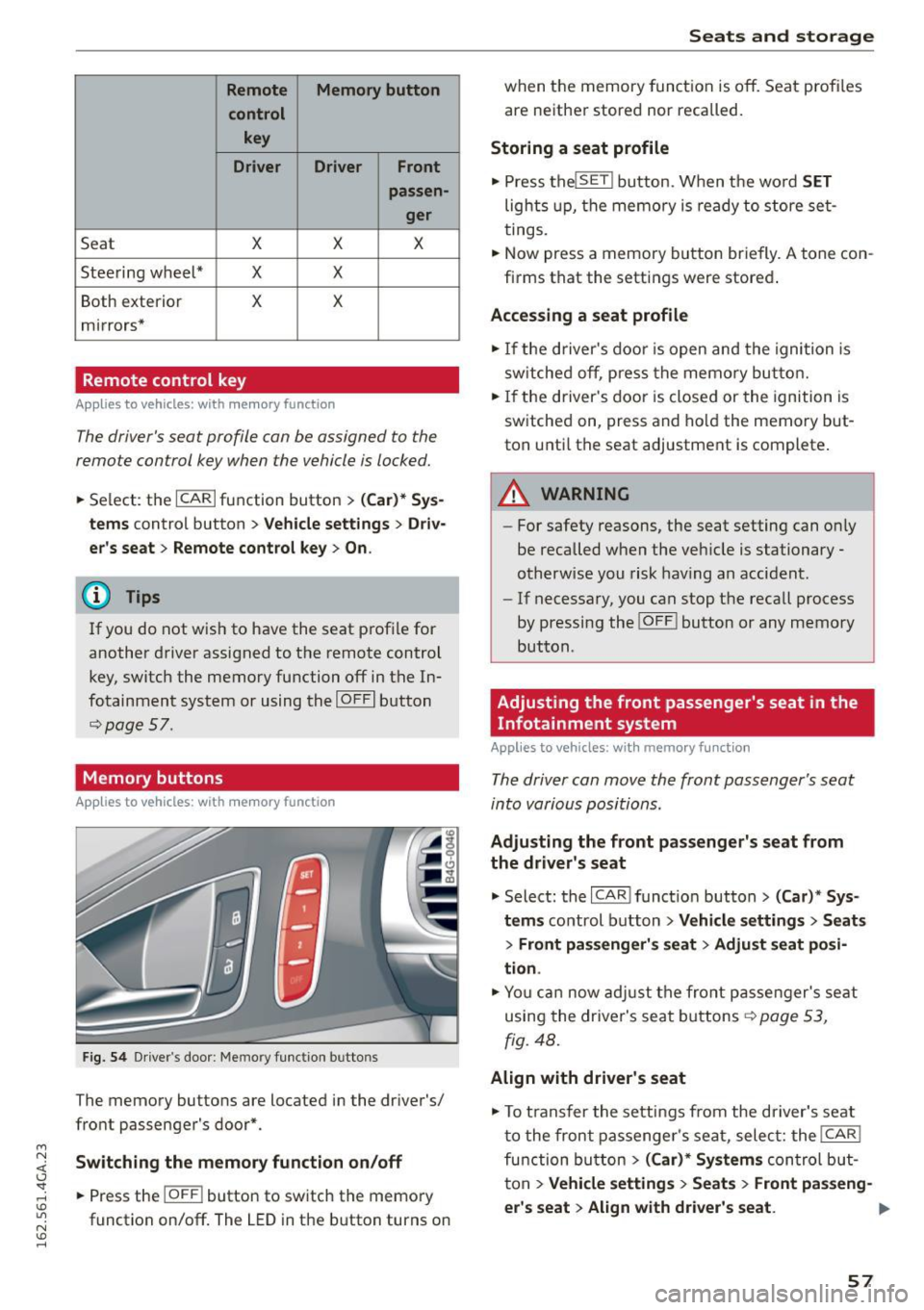
The following sett ings a re stored:
Page 59 of 294
M N <( I.J "". rl I.O
"' N I.O rl
Remote Memory button control key
Driver Driver Front passen-ger
Seat X X X
Stee ring wheel* X X
Both exterior X X
mirrors*
Remote control key
Applies to vehicles: with memory function
The
driver's seat profile can be assigned to the
remote control key when the vehicle is locked.
• Se lect: the ICARI function button > (Car)* Sys
tems
contro l button > Vehicle settings > Driv
er's seat
> Remote control key > On .
(D Tips
If you do not wish to have the seat profile for
another driver assigned to the remote control
key, switch the memory function off in the In
fotainment system or using the IOFFI button
r=;;,page 57.
Memory buttons
Applies to vehicles: with memory function
Fig. 54 Driver's door: Memory function buttons
The memory buttons are located in the dr iver's/
front passenger's door*.
Switching the memory function on/off
• Press the IOFF i button to switch the memory
function on/off. The
LED in the button turns on
Seats and storage
when the memory function is off. Seat profiles
are neither stored nor recalled.
Storing a seat profile
• Press the lSET I button. When the word SET
lights up, the memory is ready to store set
tings.
.. Now press a memory button briefly.
A tone con
firms that the settings were stored .
Accessing a seat profile
• If the driver's door is open and the ignition is
switched off, press the memo ry button.
• If the driver's door is closed or the ignition is
switched on, press and hold the memory but
ton unti l the seat adjustment is complete .
A WARNING
-For safety reasons, the seat setting can on ly
be recalled when the veh icle is stationary
otherwise you risk having an accident.
- If necessary, you can stop the recall process
by pressing the !O FF ! button or any memory
button .
Adjusting the front passenger's seat in the
Infotainment system
Applies to vehicles: with memory function
The driver can move the front passenger's seat
into various positions.
Adjusting the front passenger's seat from
the driver's seat
• Select: the I CAR I function button > (Car)* Sys
tems
control button > Vehicle settings > Seats
> Front passenger's seat > Adjust seat posi
tion .
• Yo u can now adjust the front passenger's seat
using the driver's seat buttons
r::;;, page 53,
fig. 48.
Align with driver's seat
• To transfer the settings from the driver's seat
to the front passenger's seat , select: the I CAR !
function button
> (Car)* Systems control but
ton
> Vehicle settings > Seats > Front passeng-
er 's seat > Align with driver 's seat. ...,
57
Page 60 of 294
Seats and storag e
.. Press and ho ld the control knob until the ad
justing process is complete .
@ Tips
The lumbar support and upper thigh support
settings a re not transferred when aligning the
front passenger's seat with the driver's seat .
Ashtray
Applies to vehicles: with ashtray
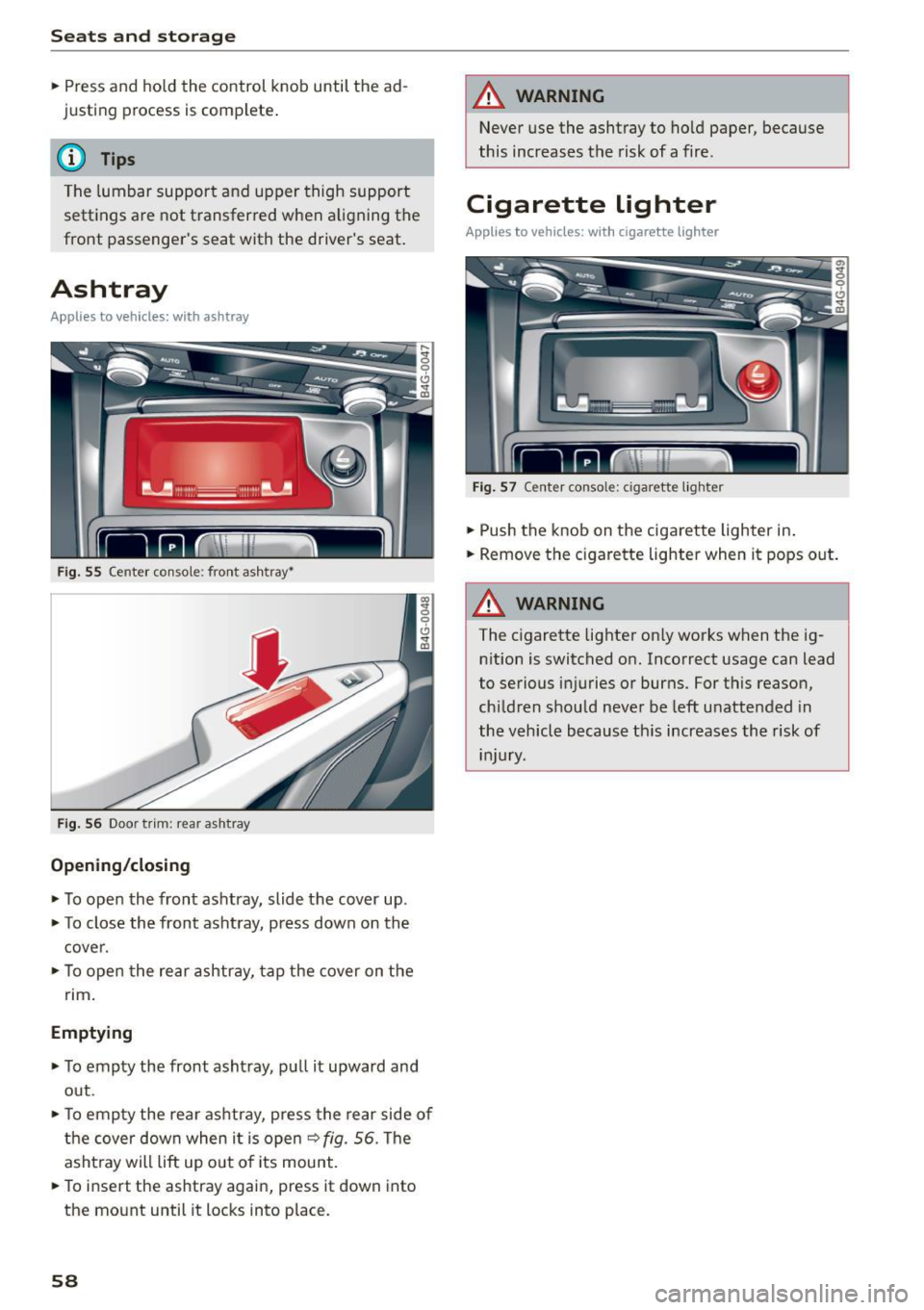
Fig. 55 Center console: front ashtray~
F ig . 56 Door trim: rear ashtray
Opening /closing
.. To open the front ashtray, slide the cover up .
.. To close the front ashtray, p ress down on the
cover .
.. To open the rear ashtray, tap the cover on the
nm .
Emptying
.. To empty the front asht ray, pu ll it upward and
out .
.. To empty the rea r ashtray, press the rear side of
the cover down when it is open
9 fig . 56. The
asht ray will lift up out o f its mount .
.. To insert the ashtray again, press it down into
the mount until it locks into place.
58
A WARNING
Never use the ashtray to ho ld paper, because
this increases the risk of a fire.
Cigarette lighter
Applies to vehicles: with cigarette lighter
F ig . 57 Center console: cigarette lighter
.. Push the knob on the cigarette lighter in .
.. Remove the c igarette lighter when it pops out .
A WARNING
The cigarette lighter on ly works when the ig
nition is switched on. Incorrect usage can lead
to serious injuries or burns. For this reason,
ch ildren should never be left u nattended in
the vehicle because th is increases the risk of
injury.
Page 62 of 294
Seats and storage
-Never carry any beverage containers with
hot liquids, such as hot coffee or hot tea, in
the vehicle while it is moving. In case of an
accident, sudden braking or other vehicle movement, hot liquid could spill, causing
scalding burns . Spilled hot liquid can also
cause an accident and personal injury.
- Use only soft cups in the cupholder. Hard
cups and glasses can cause injury in an acci
dent.
- Never use the cupholder or adapter as an
ashtray- risk of fire.
(D Note
Only drink containers with lids should be car
ried in the cupholder. Liquid could spill out
and damage your vehicle's electronic equip
ment or stain the upholstery, etc.
Cooled glove compartment
A pp lies to ve hicles: w ith coole d glove compart men t
The cooled glove compartment only functions
when the AIC system is switched on.
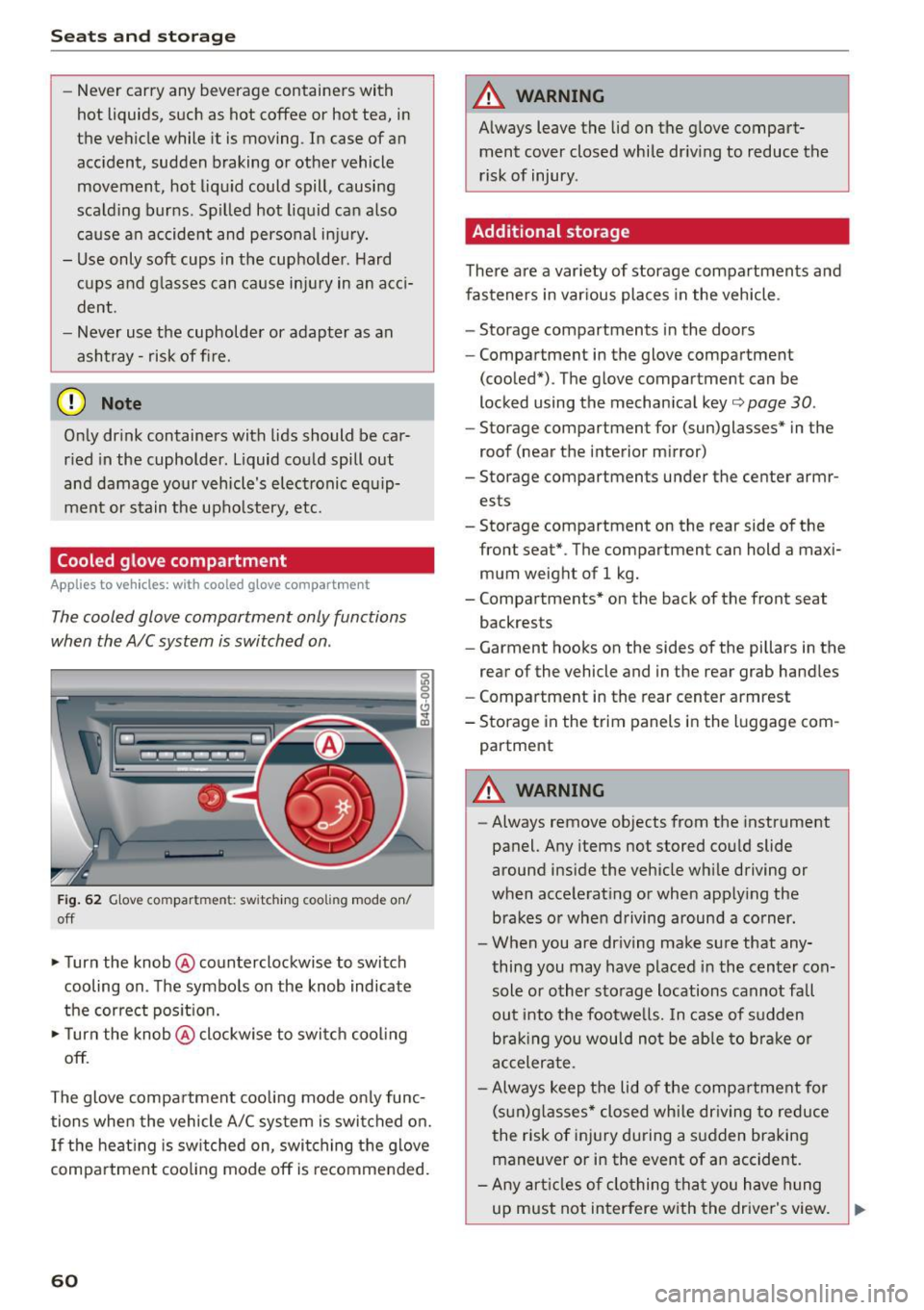
Fig. 62 Glove compartment: switching cooling mode on/
off
• Turn the knob @counterclockwise to switch
cooling on. The symbols on the knob indicate
the correct position.
• Turn the knob @clockwise to switch cooling
off.
The glove compartment cooling mode only func tions when the vehicle A/C system is switched on.
If the heating is switched on, switching the glove
compartment cooling mode off is recomme nded.
60
A WARNING
Always leave the lid on the glove compart
ment cover closed while driving to reduce the
risk of injury.
Additional storage
There are a variety of storage compartments and
fasteners in various places in the vehicle .
- Storage compartments in the doors
- Compartment in the glove compartment
(cooled*) . The glove compartment can be
locked using the mechanical key¢
page 30.
-Storage compartment for (sun)glasses* in the
roof (near the interior mirror)
- Storage compartments under the center armr
ests
- Storage compartment on the rear side of the
front
seat* . The compartment can hold a maxi
mum weight of 1 kg.
- Compartments* on the back of the front seat
backrests
- Garment hooks on the sides of the pillars in the
rear of the vehicle and in the rear grab handles
- Compartment in the rear center armrest
- Storage in the trim panels in the luggage com-
partment
A WARNING
-Always remove objects from the instrument
panel. Any items not stored could slide
around inside the vehicle while driving or
when accelerating or when applying the brakes or when driving around a corner.
- When you are driving make sure that any
thing you may have placed in the center con
sole or other storage locations cannot fall
out into the footwells. In case of sudden
braking you would not be able to brake or
accelerate .
- Always keep the lid of the compartment for
(sun)glasses* closed while driving to reduce
the risk of injury during a sudden braking
maneuver or in the event of an accident.
- Any articles of clothing that you have hung
up must not interfere with the driver's view.
~
Page 65 of 294
M N <( I.J "". rl I.O
"' N I.O rl
Luggage compartment
Loading luggage compartment
Luggage items must be stowed securely.
"' (X) 0 9 Cl .,.
"'
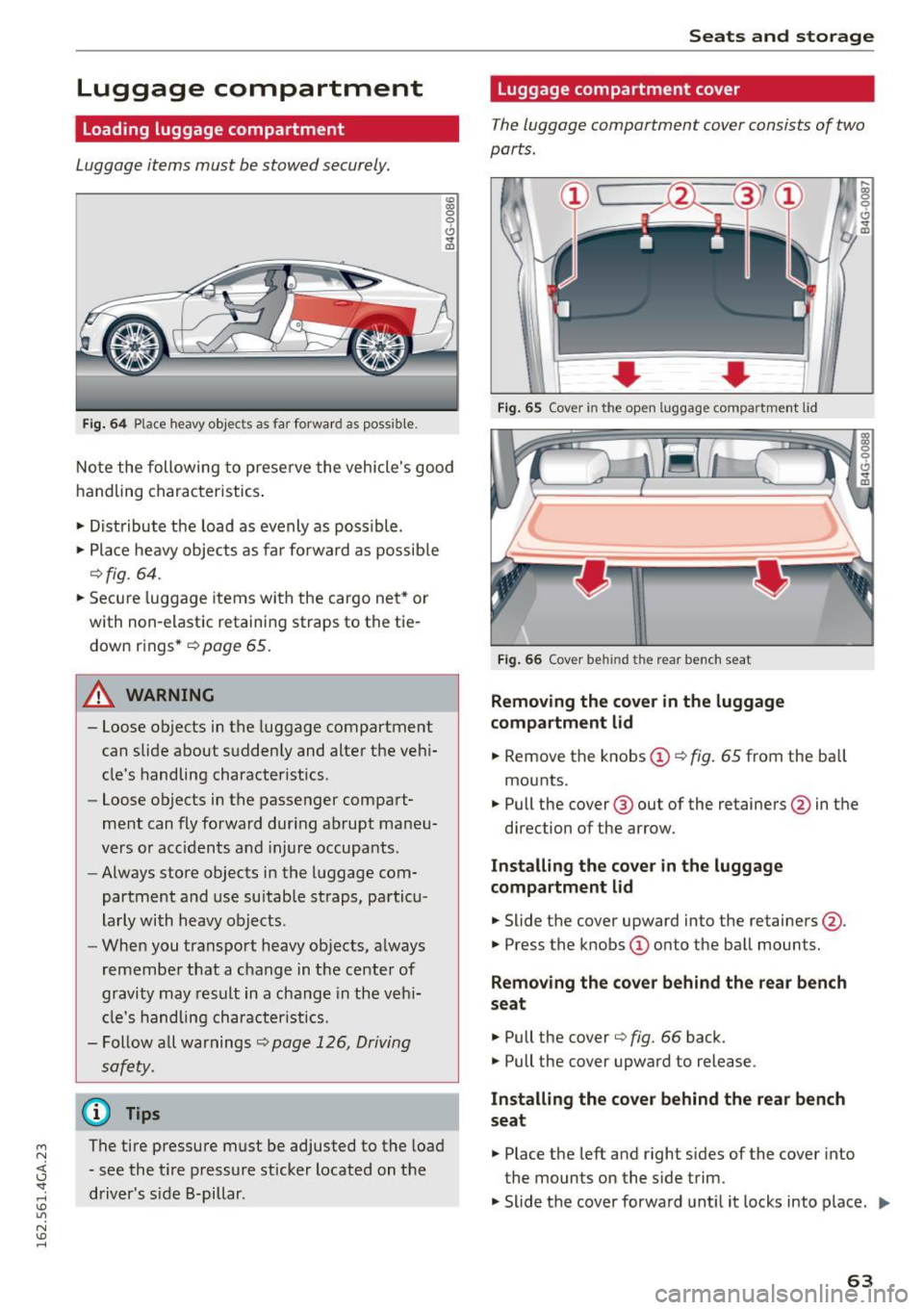
Fig. 64 P lace heavy objec ts as far fo rward as poss ib le .
Note the following to preserve the vehicle's good
handling characteristics .
.. Distribute the load as evenly as possible .
.. Place heavy objects as far fo rward as possib le
¢fig. 64 .
.. Secu re luggage items wi th the cargo ne t* or
with non-elastic retaining straps to the tie down r ings*
r=> page 65.
A WARNING
-Loose objects in the luggage compartment
can slide about suddenly and alter the vehi
cle's handling characteristics .
- Loose objects in the passenger compart
me nt can fly forward during abrupt maneu
vers or acc idents and injure occupants .
- Always store objects in the luggage com
partment and use suitab le straps, pa rticu
larly with heavy objects .
- When you transport heavy objects, always
remembe r that a change in t he center of
gravity may res ult in a change in the veh i
cl e's handling character istics.
- Follow all warnings
r=> page 126, Driving
safety.
@ Tips
The tire pressure must be adjusted to the load
- see the t ire pressure sticker located on the
driver's s ide B-pillar .
Seats and storage
Luggage compartment cover
The luggage compartment cover consists of two
parts.
,... a, 0 , 0
0 .,.
0 0. a)
F ig . 65 Cov er in the open lu ggag e compar tment lid
Fig . 66 Cov er behind the re ar bench seat
Removing the cover in the luggage
compartment lid
.. Remove the knobs @ r=> fig. 65 from the ba ll
mounts .
.. Pull the cover @ out of the retainers@in the
direction of the arrow.
Installing the co ve r in the luggage
compartm ent lid
.,._ Slide the cover upward into the retainers@.
.. Press the knobs
(I) onto the ball mounts.
Removing the cove r behind the rear bench
seat
.,._ Pull the cover r=> fig. 66 back.
.. Pull the cover upward to release.
Installing the cover behind the rea r bench
s eat
.. Place the left and right s ides of the cover into
the mounts on the side trim.
.. Slide t he cover forward unt il it locks into place.
IJI,,,
63
Page 71 of 294
M N <( I.J -
Three-zone climate control
Operating
Applies to vehicles: with three zone climate co ntrol
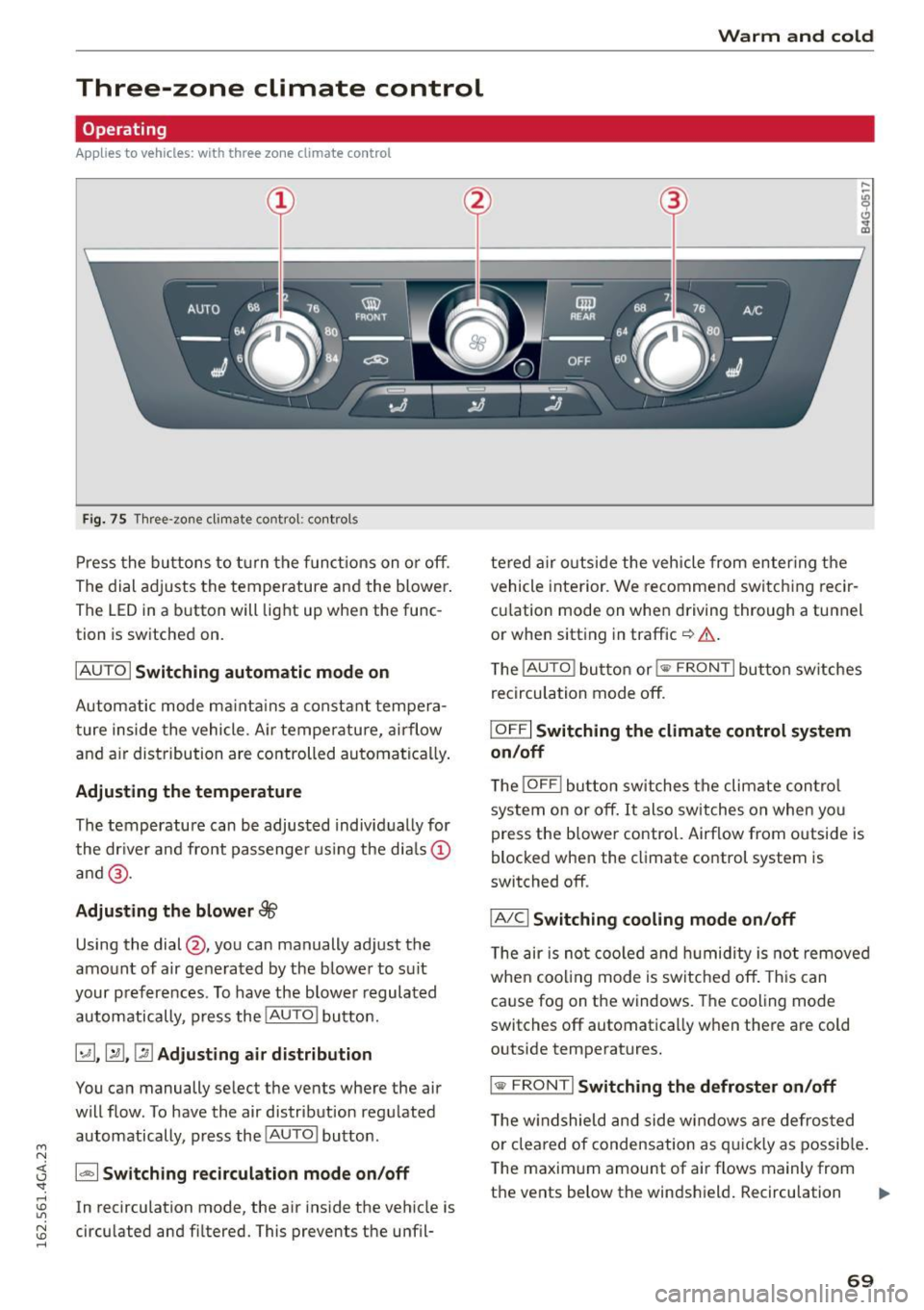
Fi g. 75 Three -zone climate co ntro l: cont rols
P ress the buttons to t urn the funct ions on o r off.
The dial adjusts the temperature and the blower.
The LED in a button will light up when the func
tion is sw itched on.
IAUTO I Switching automatic mode on
Automatic mode ma inta ins a constant tempera
ture inside the vehicle. A ir temperature, airflow
and a ir distribution are controlled automatica lly .
Adjusting the temperature
The temperature can be adjusted individ ually for
the dr iver and front passenge r us ing the dia ls ©
a nd @.
Adjusting the blower 88
Using the dial@, you can manually adjust the
amount of air generated by the blower to suit
your preferences . To have the b lowe r regulated
automatically, press the
! AUTO I button.
~ .~ .~ Adjusting air distribution
You can manually select the vents where the air
will flow . To have the air distribution regu lated
automatically, press the
! AU TO ! button .
1- 1 Sw itching recirculation mode on/off
In recirculation mode, the air ins ide the vehicle is
circu lated and fi ltered. This prevents the unfil-
Warm and cold
te red a ir o utside the vehicle from enter ing the
vehicle inte rior. We recommen d switc hing recir
cu lation mode on whe n driving through a tunnel
or when sitt ing in traffic ¢&. .
T he
!AUTO ! button or i
IOFFI Switching the climat e control system
on /off
T he !OFF ! button switches the climate con tro l
system on or off. It also switches on when yo u
press the b lower control. Airflow from outside is
blocked when the climate control system is
switched off .
IA/Cl Switching cooling mode on/off
The air is not coo led a nd hu midity i s not remove d
whe n coo ling mode is switched off. This can
ca use fog on the windows . The cooling mode
switches off automatica lly w hen there are cold
outside temperatures.
I @ F RONT I Switching th e defroster on /off
T he w indshield and side w indows a re defros ted
o r cleared of condensation as q uickl y as possib le .
The maxim um amount of air flows mainly from
the
vents below the windshield . Recirculation ..,.
69
Page 73 of 294

M N <( I.J "". rl I.O
"' N I.O rl
Warm and cold
Four-zone automatic climate control
Operating
Applies to vehicles: with four-zone a utomat ic climate control
Fi g. 76 Four -zone a utomat ic climate con trol: controls
N :g 0
Cl .,. m
Fig . 77 Four -zone automat ic climate con trol: rear contro ls
Press the buttons to t urn the funct ions on or off.
Use the con trols to ad just the temperature, the
b lower speed and the air distribution . The LED in
a button will light up when the function is
switched on. The front settings are shown in the
climate control system display and in the Info
tainment system d isplay for a few seconds. The
d river and front passenger settings can be adjust
ed sepa rately .
The settings can also be adjusted in the rear
¢ fig. 77.
IOFF ! Switching the climate control system
on /off
The IO FFI button switches the climate control
system on or off.
It a lso switches on when you
p ress the control. Airflow from outside is blocked
when the climate control system is switched off . The
I
OF F! button in the rear only switches the A/C
system on/off in the rear of the vehicle.
IA/Cl Switching cooling mod e on /off
T he air is not coo led an d humidity is not remove d
when coo ling mode is switc hed off. This can
ca use fog on the windows . The cooling mode
switches off automatica lly when there are cold
outside temperatures.
l ""'I Switching recirculation mode on /off
In recirc ulation mode, the air inside the vehicle is
c irculated and filtered. Th is prevents the unfil
tered air outside the vehicle from entering the
vehicle interior. We recommend switch ing recir
cu lation mode on when driving through a tunnel
or when sitt ing in traffic
c:> & .
The IAUTO I button orl ~ FRON T I button switches
recirculation mode off .
I AUTO I Switching automatic mode on
Automatic mode main tains a cons tan t tempera
tu re ins ide the veh icle. Air tem perature, airf low
and air distr ib ution are cont ro ll ed automatically.
Adjusting the temperature
Tempera tures betwee n 60 °F (+ 16 °() and 8 4 °F
(+ 28 °() can be set . Ou tside of this range, lo or hi
will appear in the climate control system disp lay .
lliJJ,
71