ignition AUDI A8 2018 Owner's Manual
[x] Cancel search | Manufacturer: AUDI, Model Year: 2018, Model line: A8, Model: AUDI A8 2018Pages: 356, PDF Size: 54.71 MB
Page 53 of 356
u. co .... N
" N .... 0 0 :c '
on.
C lea n the head lights. The headlight washer sys
tem operates only when the low beam headlights
are switched on . If you move the lever to position
@ , the headlights and the night vision assist
camera* are cleaned at intervals .
A WARNING
-The rain sensor is only intended to assist the
dr iver. The driver may still be responsible
for manually sw itching the w ipers on based
on v is ib il ity conditions.
-The w indshie ld may not be treated with wa
ter-repell ing windsh ield coating agents . U n
favorable conditions, such as wetness, dark ness, and whe n the s un is low, can cause in
cr eased g la re, which in cre ases the risk of a n
acc iden t. W iper blade ch atter is also poss i
ble.
-Prope rly f unct ion ing winds hield wiper
blades are require d fo r a clear view and s afe
driving¢ page 51, Replacing the wiper
blades.
(Llj) Note
-If there is frost, make s ure t he windsh ie ld
wiper b la d es are not frozen to the wind
s h ield. Switching on the windshield wipers
when the blades are frozen to the wind s h ield can damage the wiper blades.
-Prior to using a car was h, the windshield
wiper system must be switched off (lever in
pos ition @). This prevents the wipers from
switching on un intent ionally and causing
damage to the w indshie ld w iper system .
(D Tips
-The windshield wipe rs switch off when the
i gnition is sw itched off. You can act ivate the
winds hield wipers after the ig nition is
switched back on by moving the winds hield
wiper leve r to any pos it ion .
-Worn or dirty w indshield wiper blades result
i n streak ing . This can affec t the ra in se nsor
f u nct ion . Check yo ur windsh ield wipe r
b lades regu lar ly.
Light s and Vision
-The washer fluid no zz les for the windshield
washer system are heated at low tempera
tures when the ign ition is on .
-When stopping temporari ly, such as at a
traffic light, the speed of the windshield
w ipers automatica lly reduces by one level.
Cleaning the wiper blades
Clean the wiper b lades when you see w iper
streaks. Clea n the wiper blades with a soft towel
and glass cleaner .
.. Place the windshie ld w iper arms in the service
position
¢ page 51.
.. Fold the windshie ld wiper arms away from the
w indshield .
A WARNING
Dirty windsh ie ld w iper b lades can impa ir vi
sion, w hich in creases the r is k of an acc ident.
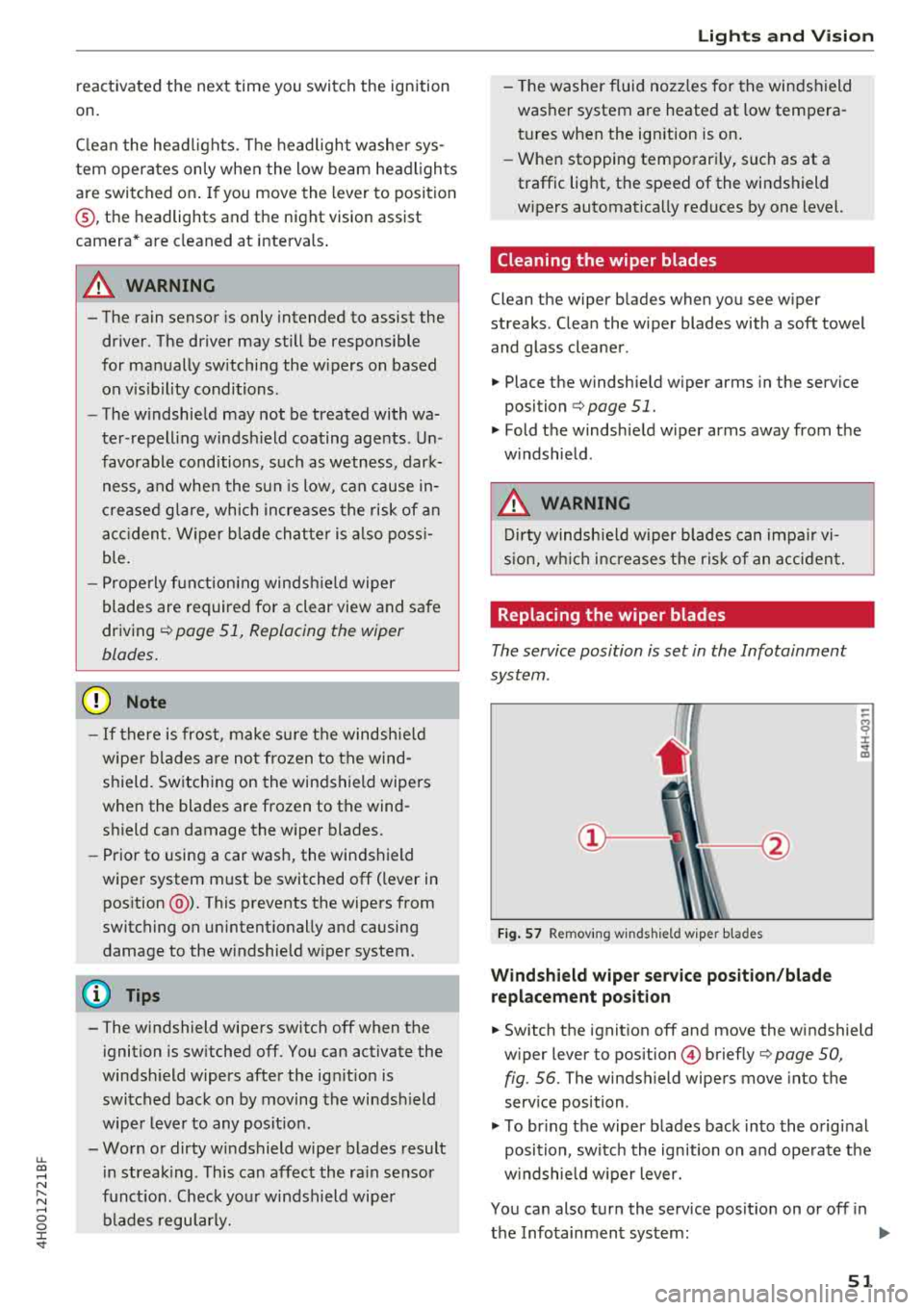
Replacing the wiper blades
The service position is set in the Infotainment
system .
Fig. 57 Remov ing w indsh ield wiper b lades
Windshield wiper s erv ice position /blade
repl ace ment posit ion
-
~ ~ M 0 :i: ... m
.. Switch the ignit ion off and move the windshield
w iper lever to
position @) briefly¢ page 50,
fig. 56. The windshield wipers move into the
serv ice position .
.. To bring the wiper blades back into the o rig inal
position, sw itch the ignition on and ope rate the
w indshie ld w iper lever.
You can also turn the se rvice posit ion on or off in
the Infotainment system:
.,.
51
Page 54 of 356
Lights and Vision
,.. Switch the windshield wipers off (position@
~page 50, fig. 56).
,.. Select: the ICARI function button > Car systems
control button > Service & control> Wiper
change position. > On.
Removing the wiper blade
,.. Fold the windshield wiper arm away from the
windshield.
,.. Press the locking knob@ c:> fig. 57 on the wiper
blade . Hold the wiper blade firmly.
,.. Remove the wiper blade in the direction of the
arrow.
Installing the wiper blade
,.. Insert the new wiper blade into the mount on
the wiper arm @until it clicks into place.
,.. Place the wiper arm back on the windshield.
,.. Turn the service position off.
.,&. WARNING
For safety reasons, the windshield wiper
blades should be replaced once or twice each
year.
@ Note
- The windshield wiper blades must only be
folded away when in the service position! Otherwise, you risk damaging the paint on
the hood or the windshield wiper motor.
- You should not move your vehicle or press
the windshield wiper lever when the wiper
arms are folded away from the windshield.
The windshield wipers would move back in
to their original position and could damage
the hood and windshield.
- You can also use the service position, for ex
ample, if you want to protect the windshield
from icing by using a cover.
- You cannot activate the service position
when the hood is open.
52
Digital compass
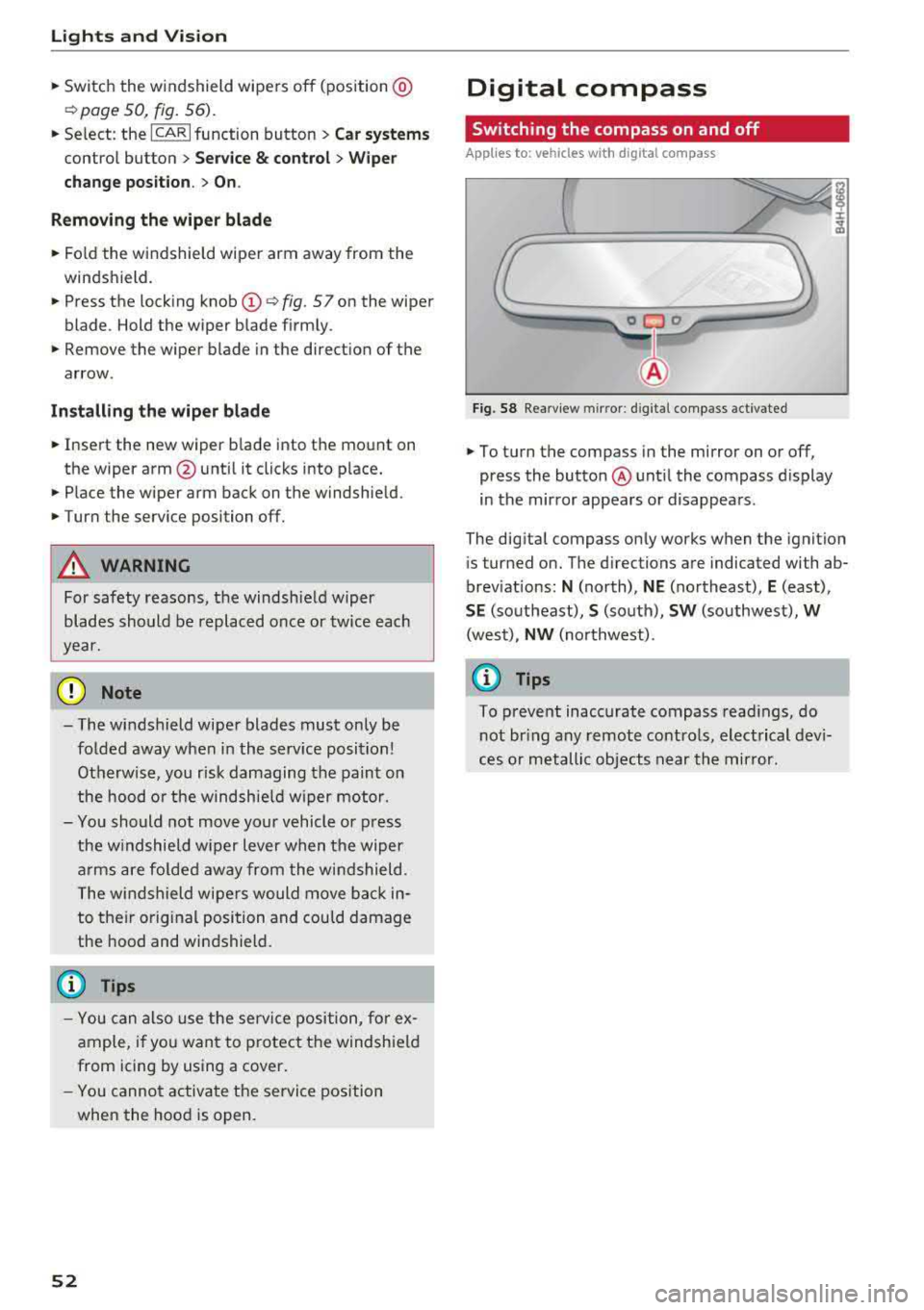
Switching the compass on and off
Applies to: vehicles with digital compass
Fig. 58 Rearview mirror : d ig ital compass activated
,.. To turn the compass in the mirror on or off,
press the button @ until the compass display
in the mirror appears or disappears.
The digital compass only works when the ignition is turned on. The directions are indicated with ab
breviations:
N (north), NE (northeast), E (east),
SE (southeast), S (south), SW (southwest), W
(west),
NW (northwest) .
(D Tips
To prevent inaccurate compass readings, do
not bring any remote controls, electrical devi
ces or metallic objects near the mirror.
Page 56 of 356
Seats and stor age
Seats and storage
General information
A WARNING
Refer to ¢ page 208, Driving safety for im
portant information, tips, suggestions and
warnings that you should read and follow for
your own safety and the safety of your pas
sengers.
Front seats
Controls
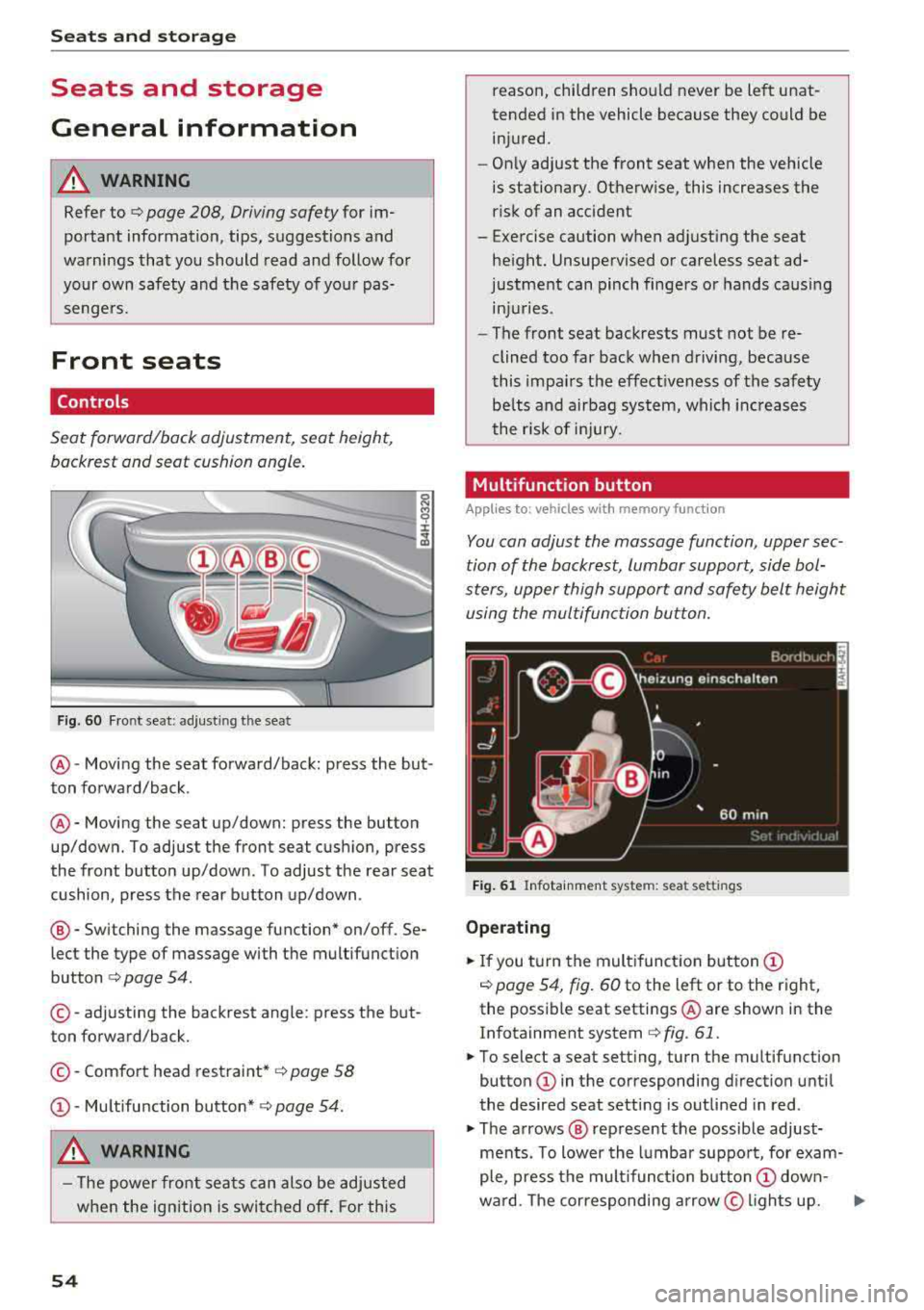
Seat forward/back adjustment, seat height, backrest and seat cushion angle.
F ig. 60 Fr ont seat: adjusting the seat
@ -Moving the seat forward/back: press the but
ton forward/back .
@-Moving the seat up/down: press the button
up/down. To adjust the front seat cush ion, press
the front button up/down . To adjust the rear seat
cushion, press the rear button up/down .
®-Switching the massage function* on/off. Se
lect the type of massage with the multifunction
button ¢ page 54.
©-adjusting the backrest angle: press the but
ton forward/back.
© -Comfort head restraint* ¢ page 58
CD-Mu ltifunction button* ¢ page 54.
A WARNING
-The power front seats can also be adjusted
when the ignition is switched off. For this
54
reason, children should never be left unat
tended in the vehicle because they could be
injured.
- Only adjust the front seat when the vehicle
is stationary. Otherwise, this increases the
risk of an accident
- Exe rcise caution when adjusting the seat
height. Unsupervised or careless seat ad
justment can pinch fingers or hands causing
injuries .
- The front seat backrests must not be re
clined too far back when driving, because
this impairs the effect iveness of the safety
be lts and airbag system, which increases
the r isk of injury.
Multifunction button
App lies to: vehicl es wi th memo ry func tion
You can adjust the massage function, upper sec
tion of the backrest, lumbar support, side bol
sters, upper thigh support and safety belt height
using the multifunction button.
Fig. 61 Infotainment system: seat settings
Operating
.. If you turn the multifunction button CD
¢ page 54, fig. 60 to the left or to the right,
the possible seat settings @are shown in the
Infotainment system
¢ fig. 61.
.. To select a seat setting, turn the multifunction
button
CD in the corresponding direction until
the desired seat setting is outlined in red .
.. The arrows @ represent the possible adjust
ments. To lower the lumbar support, for exam
ple, press the mult ifunct ion button
CD down-
wa rd. The corresponding arrow © lights up.
..,.
Page 70 of 356
Seats and storage
-If the refrigerator is not functioning correct
l y, turn it off to prevent any damage. Have it
checked by an authorized Audi dealer or au
thorized Audi Service Facility.
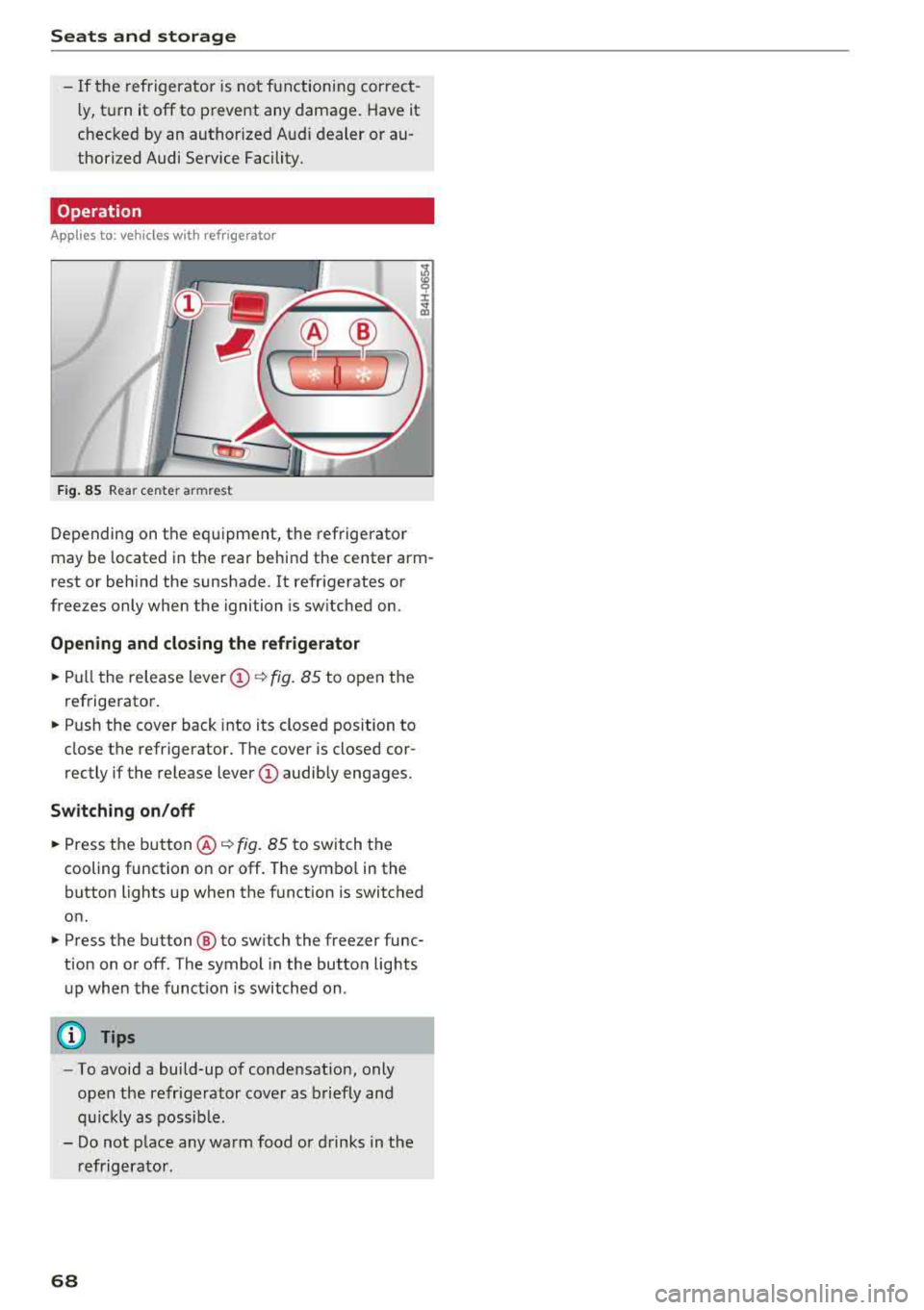
Operation
App lies to: vehicl es with refrigerator
Fig . 85 Rea r ce nte r armr est
Depending on the equipment, the refrigerator
may be located in the rear behind the center arm
rest or behind the sunshade. It refr igerates or
freezes only when the ignition is sw itched on.
Opening and closing the refrigerator
,.. Pull the release lever @~ fig. 85 to open the
refrigerator.
,.. Push the cover back into its closed position to
close the refrigerator. The cover is closed cor
rectly if the release
lever (!) audibly engages.
Switching on/off
,.. Press the button @¢ fig. 85 to switch the
cooling function on or off. The symbol in the
button lights up when the function is switched
on.
,.. Press the button ® to sw itch the freezer func
tion on or off. The symbol in the button lights
up when the function is switched on .
{I) Tips
- To avoid a build-up of condensation, only
open the refrigerator cover as briefly and
quickly as possible .
- Do not place any warm food or drinks in the
refrigerator .
68
Page 73 of 356
Adjusting the temperature
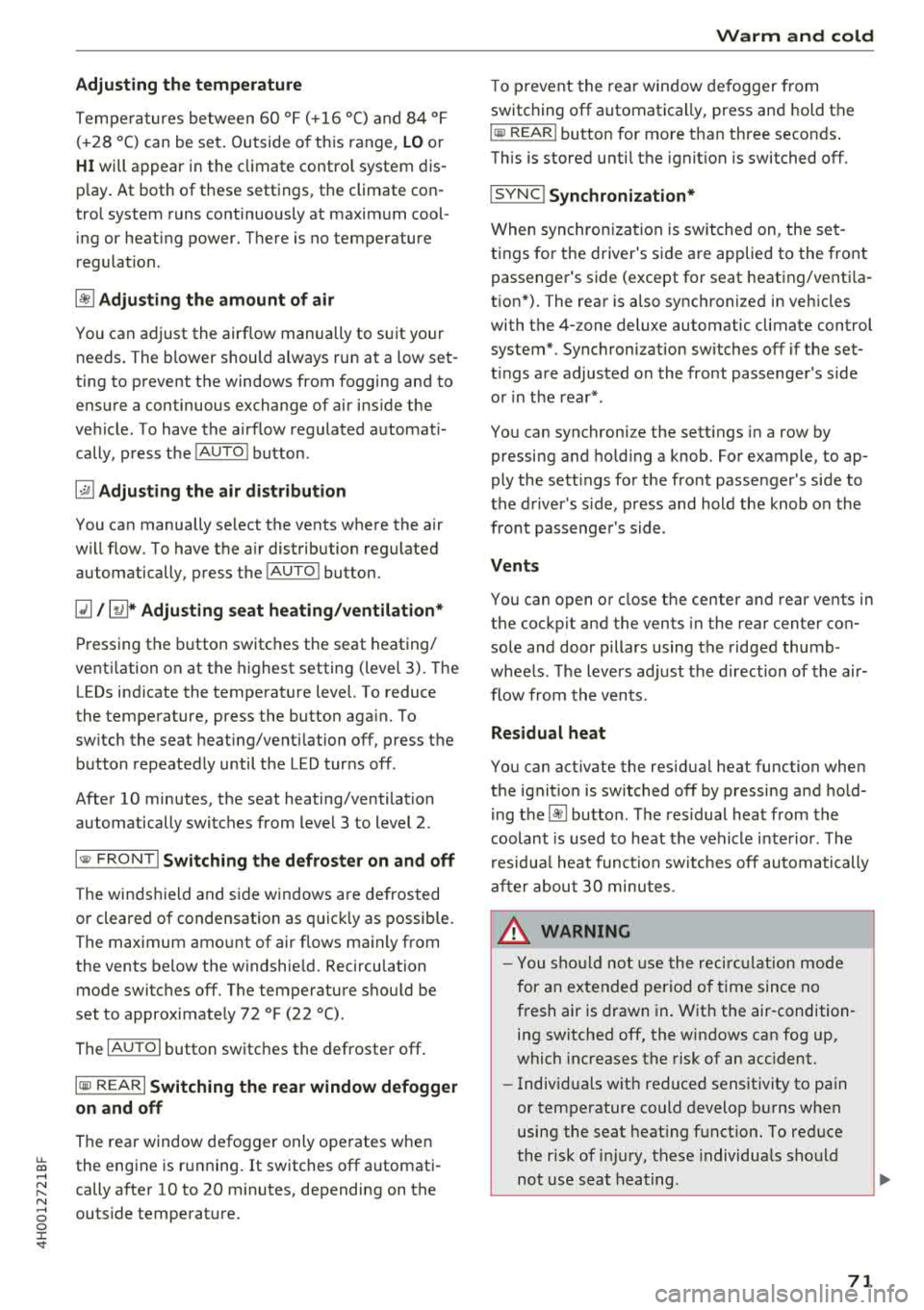
Temperatures between 60 °F ( +16 ° C) and 84 °F
(+28 °C) can be set . Outside of this range,
LO or
HI will appear in the climate contro l system dis
p lay . At both of these settings, the climate con
trol system runs continuously at maximum cool
ing or heating power. There is no temperature
regulation.
~ Adjusting the amount of air
You can adjust the airf low manually to suit your
ne eds . The blower should always run at a low set
ting to prevent the windows from fogging and to
ensure a continuous exchange of air ins ide the
vehicle. To have the airflow regulated automat i
cally, press the
IAUTO I button.
~ Adjusting the air distribution
You can manually se lect the vents where the air
will flow. To have the a ir distribution regu lated
automatically, press the
IAUTO I button.
Ill/ lil* Adjusting seat heating/ventilation*
Pressing the button switches the seat heating/
venti lation on at the highest setting (level 3). The
LEDs indicate the temperature level. To reduce
the temperature, press the button aga in. To
sw itch the seat heating/ventilation off, press the
button repeatedly until the LED turns off.
After 10 minutes, the seat heating/ventilation
automatically switches from level 3 to level 2.
l
or cleared of condensation as quickly as possible.
The maximum amount of air flows main ly from
the vents below the windshield. Recirculation
mode switches off. The temperature shou ld be
set to approximately 72 °F (22 °().
The
IAUTOI button switches the defroster off .
IQil REAR I Switching the rear window defogger
on and off
The rear window defogger only operates when
~ the engine is running. It switches off automati-....
~ cally after 10 to 20 minutes, depending on the N
~ outside temperature. 0 :c '
To prevent the rear window defogger from
switching off automatica lly, press and hold the
loo REAR I button for more than three seconds .
This is stored until the ignition is switched off.
I SYNC! Synchronization*
When synchron ization is switched on, the set
tings for the driver's side are applied to the front
pass enge r's side (except for seat heating/venti la
tion*). The rear is also synchronized in vehicles
with the 4-zone deluxe automatic climate control
system*. Synchronization switches off if the set
t ings are adjusted on the front passenger's side
or in the rear*.
You can synchronize the sett ings in a row by
pressing and holding a knob. For example, to ap
ply the sett ings for the front passenger's side to
the driver's side, press and hold the knob on the
front passenger 's side.
Vents
You can open or close the center and rear vents in
the cockpit and the vents in the rear center con
sole and door pillars using the ridged thumb
wheels. The levers adjust the direction of the air
flow from the vents.
Residual heat
You can act ivate the residual heat function when
the ignition is switched off by pressing and hold
ing the
lj) button. The residual heat from the
coolant is used to heat the vehicle interior . T he
r esidua l heat function switches off automatically
after about 30 minutes .
_&. WARNING
-You should not use the recirculation mode
for an extended period of time since no
fresh air is drawn in. With the air-condition
ing switched off, the windows can fog up,
which increases the risk of an acc ident.
- Individuals with reduced sensitivity to pain
or temperature could develop burns when
using the seat heating function. To reduce
the r isk of injury, these individua ls should
not use seat heating .
71
Page 74 of 356
Warm and cold
(D Note
To avoid damage to the heating elements in
the seats, do not kneel on the seats or place
heavy loads on a small area of the seat.
Basic settings
The climate control system basic settings ore ac
cessed in the Infotainment system.
,.. Select: the ICARI function button > Car systems
control button > AC.
Rear seat settings*
When this function is selected, all settings for
the rear can be adjusted through the climate con
trol system in the cockpit. The climate control
system settings cannot be adjusted in the rear
seat at the same time. This function switches off
after a certain period of time or when one of the
dials in the cockpit is pressed.
Auto recirculation*
The sensit ivity level of the automatic recircula
tion mode can be set at various levels from
Off to
Sensitive. When recirculation mode 1~ 1 is switch
ed on, the air recirculation is controlled automat
ically. If the windows fog up, press the
I ® FRONT I
button.
Footwell temperature
You can adjust the footwell temperature so that
it is cooler or warmer .
Solar roof*
Parking ventilation is controlled automatically in
the
Auto setting.
When the ignition is switched off, solar-powered
parking ventilation may switch on, as long as
- there is sufficient sunlight,
- the outside temperature is not too low,
- the sunroof is closed or tilted and
-Auto (Infotainment system) is set
72
Steering wheel heating
Applies to: vehicles with steering wheel heating
The steering wheel rim can be heated .
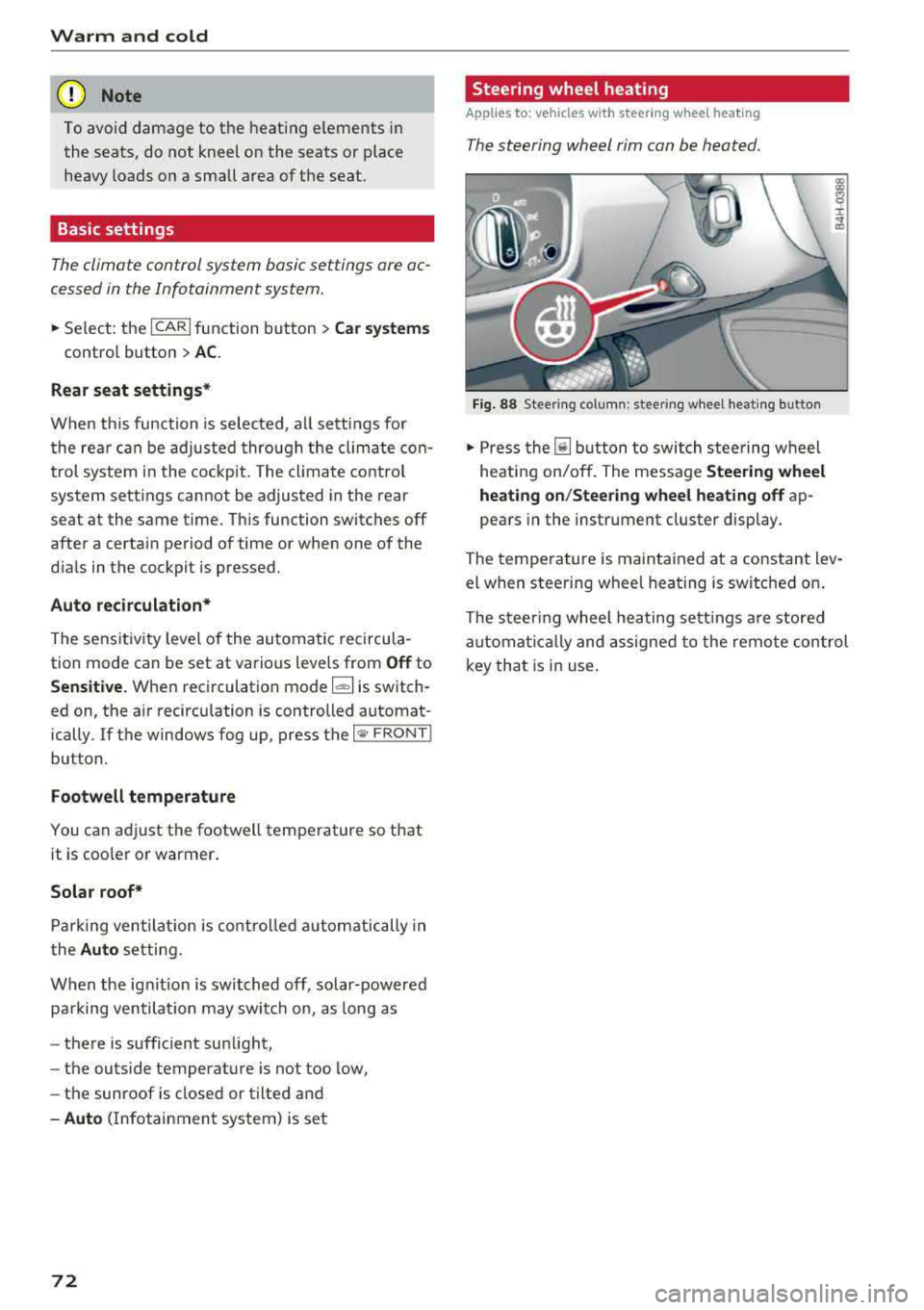
Fig. 88 Steering column: steering wheel heating button
,.. Press the [il button to switch steering wheel
heating on/off. The message
Steering wheel
heating on/Steering wheel heating off
ap
pears in the instrument cluster display.
The temperature is maintained at a constant lev
el when steering wheel heating is switched on.
The steering wheel heating settings are stored
automat ical ly and assigned to the remote control
key that is in use.
Page 77 of 356
lL t:0 ....
"" ......
"" .... 0 0 :c '
The engine drives the generator, wh ich generates
electricity; the fue l consumption also increases
with the demand for electricity. Therefore, switch
e lectrical equipment off when you no longer
need it. Examples of equipment that use a lot of
energy are air blowers at a high setting, the rear
window defogger and seat heating*.
CD Note
Do not leave engine idling unattended after
starting. If warning lights should come on to
ind icate improper operation, they would go
unheeded. Extended idling also produces
heat, wh ich could result in overheat ing or
other damage to the vehicle or other p roper-
ty.
CD Note
-Have your vehicle maintained properly and
i n accordance with the service recommenda
tions in your Warranty
& Ma intenance book
l et. Lack of proper maintenance as well as
i mproper use of the vehicle will impair the
function of the emission control system and
could lead to damage.
-Do not alter or remove any component of
the Emission Control System unless ap proved by the manufacturer.
-Do not alter or remove any device, such as
heat shie lds, switches, ignition wires,
valves, which are designed to protect your
vehicle's Emission Control System and other
important vehicle components .
@ Tips
The consumption estimates as published by
ENVIRONMENTAL PROTECTION AGENCY
(EPA) and Transport Canada may not corre
spond to your actual consumption on the
road, which will vary depending upon vehicle
load and speed, road and weather conditions
trip length, etc.
'
D rivi ng
Steering
Adjusting the steering wheel position
The steering column can be power adjusted up
and down and forward and back.
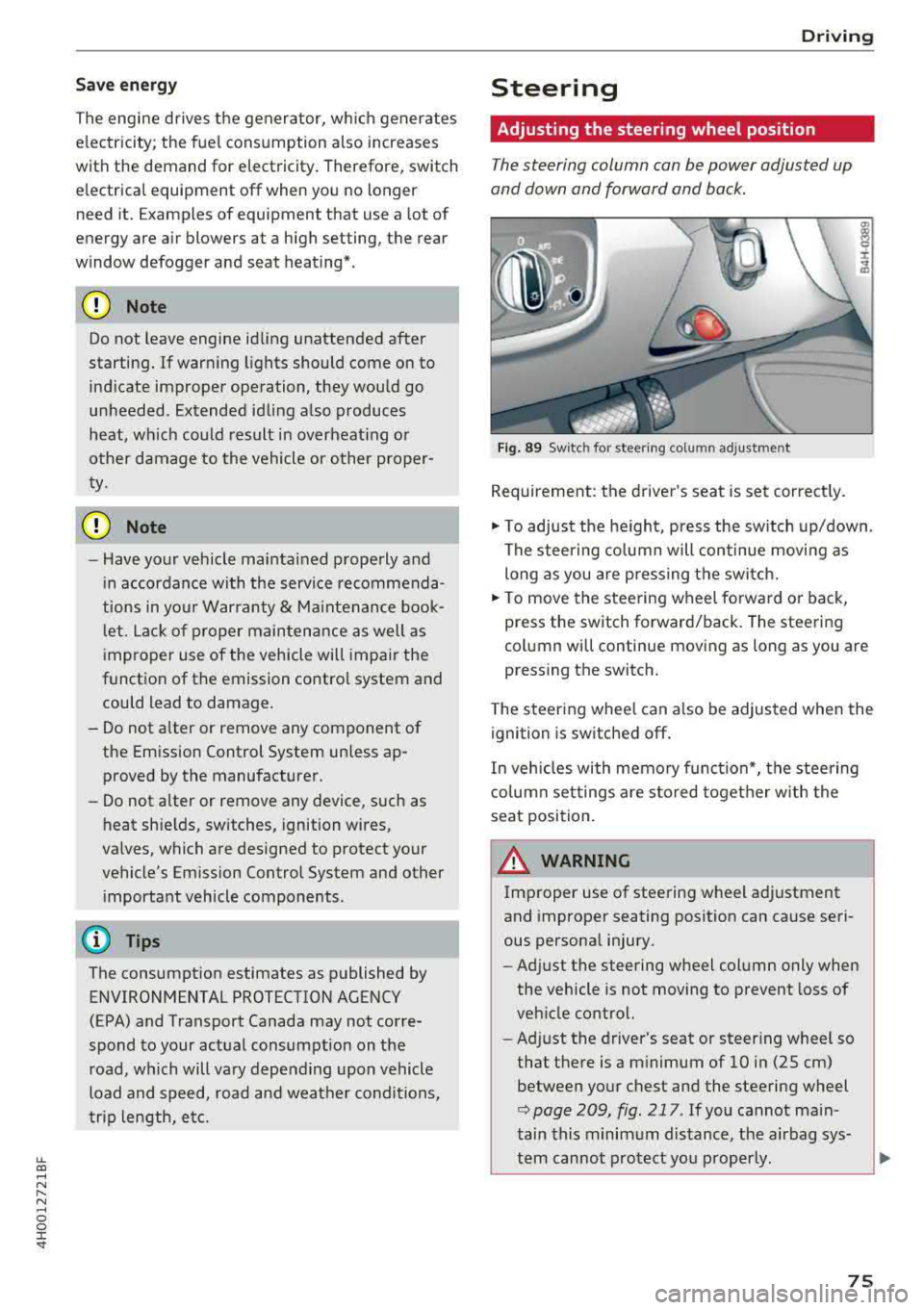
F ig . 89 Sw itc h for steering colu mn adjustment
Requirement: the driver's seat is set correct ly.
"' To adjust the he ight, press the sw itch up/down .
The steering co lumn will continue movi ng as
long as you are pressing the switch.
"' To move the steering wheel forwa rd or back,
press the switch forward/back. The steering
column will continue moving as long as you are
pressing the switch.
T he steering wheel can a lso be adjusted when the
ignition is switched off .
In veh icles with memory function*, the steering
co lumn settings are s to red toget her w ith the
seat position.
A WARNING
Improper use of steering wheel adjustment
and improper seating position can cause seri
ous personal injury.
- Adjust the steering wheel column only when
the vehicle is not moving to prevent loss of
veh icle control.
- Ad just the driver's seat or steer ing whee l so
that the re is a m inimum of 10 in (25 cm)
between your chest and the steering wheel
r::;, page 209, fig . 217 . If you cannot main
tain this minimum distance, the airbag sys-
tem cannot protect you p roperly.
~
75
Page 78 of 356
Driving
-If physica l limitations prevent you from sit
t ing 10 in (25 cm) or more from the steer
ing wheel, check with your authorized Audi
dealer to see if adaptive equ ipment is avail
able .
-If the steering wheel is aligned with your
face, the supp lemental driver's airbag can
not prov ide as m uch protection in an acci
dent. A lways make s ure that the steering
wheel is aligned w ith your che st.
-Always hold the steer ing whee l with your
hands a t the 9 o' clock and 3 o'clock pos i
t ions to reduce the ris k of person al injury if
the driver 's airbag deploys.
-Never hold the s teer ing whee l at the 1 2
o'clock pos it io n or w ith your ha nds inside
the steering wheel rim or on the steer ing
wheel hub . Holdi ng the steering whee l the
wrong way can cause serious injuries to the hands, arms and head i f the driver's airbag
deploys.
Entry assistance
Easy seat entry makes it easier to enter and exit
the vehicle by adjusting the steering column au
tomatically.
• In the Infotainment system, select the ! CARI
funct ion b utton > Car systems contro l button >
Vehicle settings > Seats > Drive r's seat > Easy
seat entry > On .
When easy seat entry is switched on, the stee ring
column goes back up into the park position when
the ignition is switched off. After entering the ve
h icle, the steering co lumn returns to the stored
position once the ignition is sw itched on .
76
Starting and stopping
the engine
Starting the engine
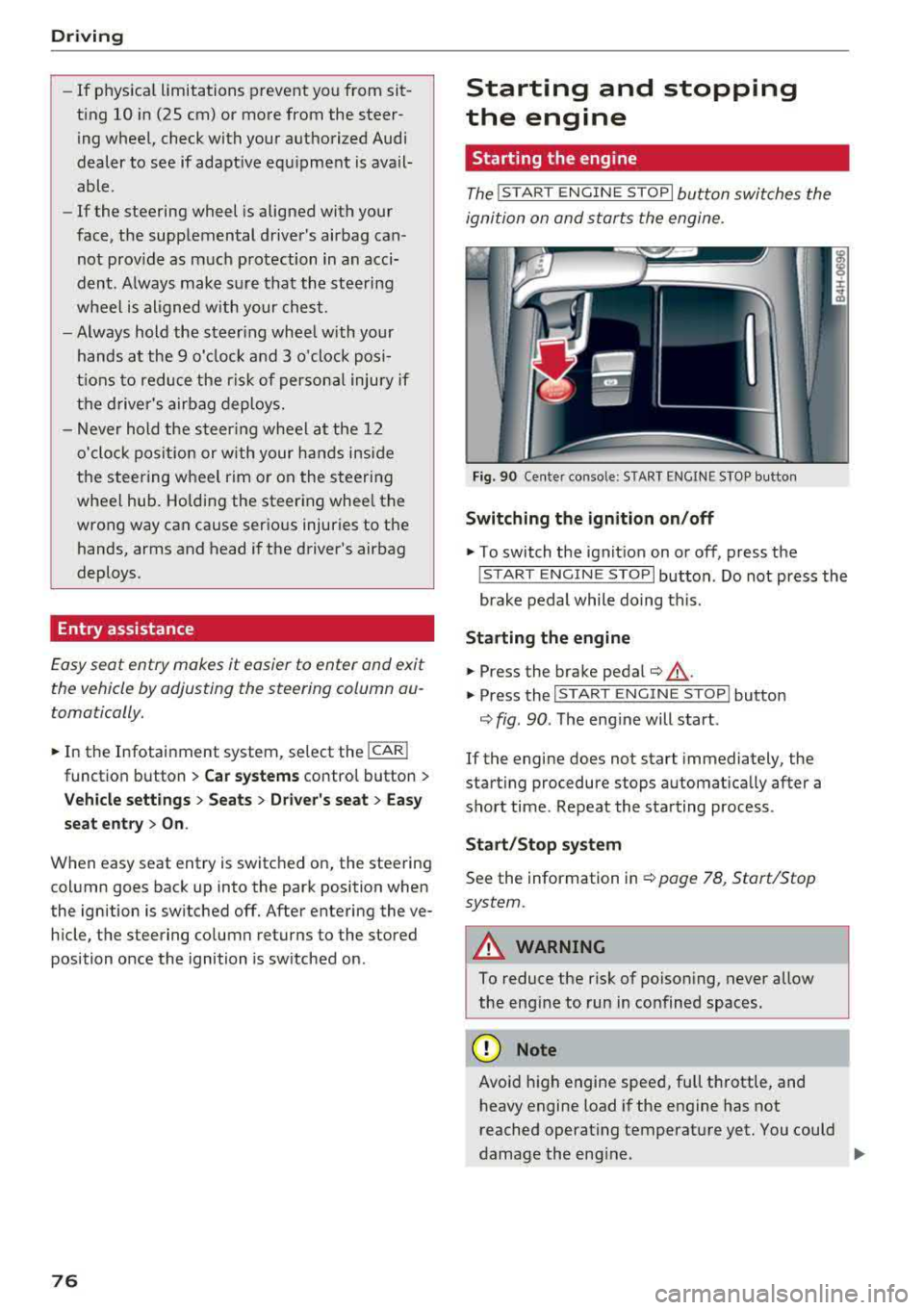
The ! START ENGINE S T OPI button switches the
ignition on and starts the engine.
Fi g. 90 Ce nter conso le: STAR T ENGINE S TOP but ton
Switching the ignition on /off
• To switch t he ign it ion on or off, press the
! S TAR T ENGINE STOPI button . Do not press the
brake pedal while do ing this.
St arting the engine
• Press the brake pedal¢ &_.
• Press the I START ENGINE STOP I button
¢ fig. 90 . The eng ine will start .
If the engine does not start immediately, the
start ing procedure stops automat ica lly after a
sho rt time . Repeat the sta rting process .
Start/Stop syst em
See the information in ¢ page 78, Start/Stop
system.
A WARNING
To reduce the risk of poison ing, never allow
the eng ine to run in co nfined spaces .
(D Note
Avoid high engine spee d, full throttle, and
h eavy engine load if the engine has not
reached operat ing temperat ure yet . You could
-
damage the eng ine. .,..
Page 79 of 356
u. co .... N
" N .... 0 0 :c '
-Some noise after starting the engine is nor
mal and is no cause for concern.
- If you leave the vehicle with the ignition
switched on, the ignition will switch off af
ter a certain amount of time. Make sure that
electrical equipment such as the exterior
lights are switched off.
Stopping the engine
.,. Bring the vehicle to a full stop.
.,. Select the P or N selector lever position .
.. Press the I START ENGI NE STOPI button
~ page 76, fig. 90.
Steering lock
The steering locks when you turn the engine off
using the lSTART
ENGINE STOPlbutton and
open the driver's door. The locked steering helps
prevent vehicle theft.
Emergency off function
If it is absolutely necessary, the engine can also
be turned off while driving in the
R, Dor S selec
tor lever position at speeds below 6 mph (10 km/
h). To stop the engine, press and hold the
I START ENGINE STOPI button and also press the
brake pedal.
& WARNING
-Never turn off the engine before the vehicle
has come to a complete stop. The full func
tion of the brake booster and the power
steering is not guaranteed. You must use
more force to turn or brake. Because you
cannot steer and brake as you usually
would, this could lead to accidents and seri
ous injuries .
-Always take the key with you whenever you
leave your vehicle. Otherwise, the engine
cou ld be started or electrical equipment
such as the power windows could be operat
ed. This can lead to serious injury.
-For safety reasons, always park the vehicle
with the selector lever in the P position .
Driving
Otherwise, there is the risk that the vehicle
could roll unintentionally.
@ Note
If the engine has been under heavy load for
an extended period of time, heat builds up in
the engine compartment after the engine is
switched off and there is a risk of damaging
the engine. For this reason, let the engine run
at idle for approximately two minutes before
shutting it off .
(D Tips
For up to 10 minutes after stopping the en
gine, the radiator fan may turn on again auto
matically or it may continue to run (even if
the ignition is switched off) for the following
reasons :
- The coolant temperature is increasing due
to trapped heat.
- If the engine is warm and the engine com
partment also heats up from strong sun
light.
Messages in the instrument cluster display
Turn off ignition before leaving car
This message appears and a warning tone sounds
if you open the driver's door when the ignition is
switched on.
Press brake pedal to start engine
This message appears when you press the
I START ENGINE STOP ! button to start the engine
and do not press the brake pedal while doing so.
The engine can only be started when the brake pedal is pressed .
Ill Is key in the vehicle?
This indicator light turns on and this message ap
pears if the ignition key was removed from the
vehicle when the engine was running. If the igni
tion key is no longer in the vehicle, you cannot
switch on the ignition or start the engine once
you stop it. You also cannot lock the vehicle from
the outside .
.,.
77
Page 80 of 356
Driving
Shift to P, otherwise vehicle can roll away.
Doors do not lock if lever is not in
P.
This driver message appears fo r safety reasons if
the transmission has not been shifted to the P
position when you switch the ignition off. Move
the selector lever to the P position . Otherwise the
veh icle is not protected from ro lling and it cannot
be locked.
(I Key is not recognized. Hold back of key
against marked area. See owner's manual
If the i ndicator light turns on and this message
appears, there is a
malfunction ~ page 78.
Turn off ignition before leaving car
This message appears if the driver's door is
ope ned while the ignition is switched on . Always
sw itch off the ignition if you are leavi ng the vehi
cle .
Shift to P and turn off ignition before leav ing
car, otherwise vehicle can roll away
This message appears if the driver's door is
opened while the ignition is switched on and the
transmission has not been shifted to the P posi
tion . Shift the transm iss ion into the P posit ion
and turn off the ign ition if you are leaving the ve
h icle . Otherwise the vehicle could roll.
Starting the engine when there is a
malfunction
It may not be possible to start the engine under
certain circumstances, for example if the battery
in the vehicle key is drained, if interference is af
fected the key or if there is a system malfunc
tion .
c:====== ~
~ _____ ___ ci5
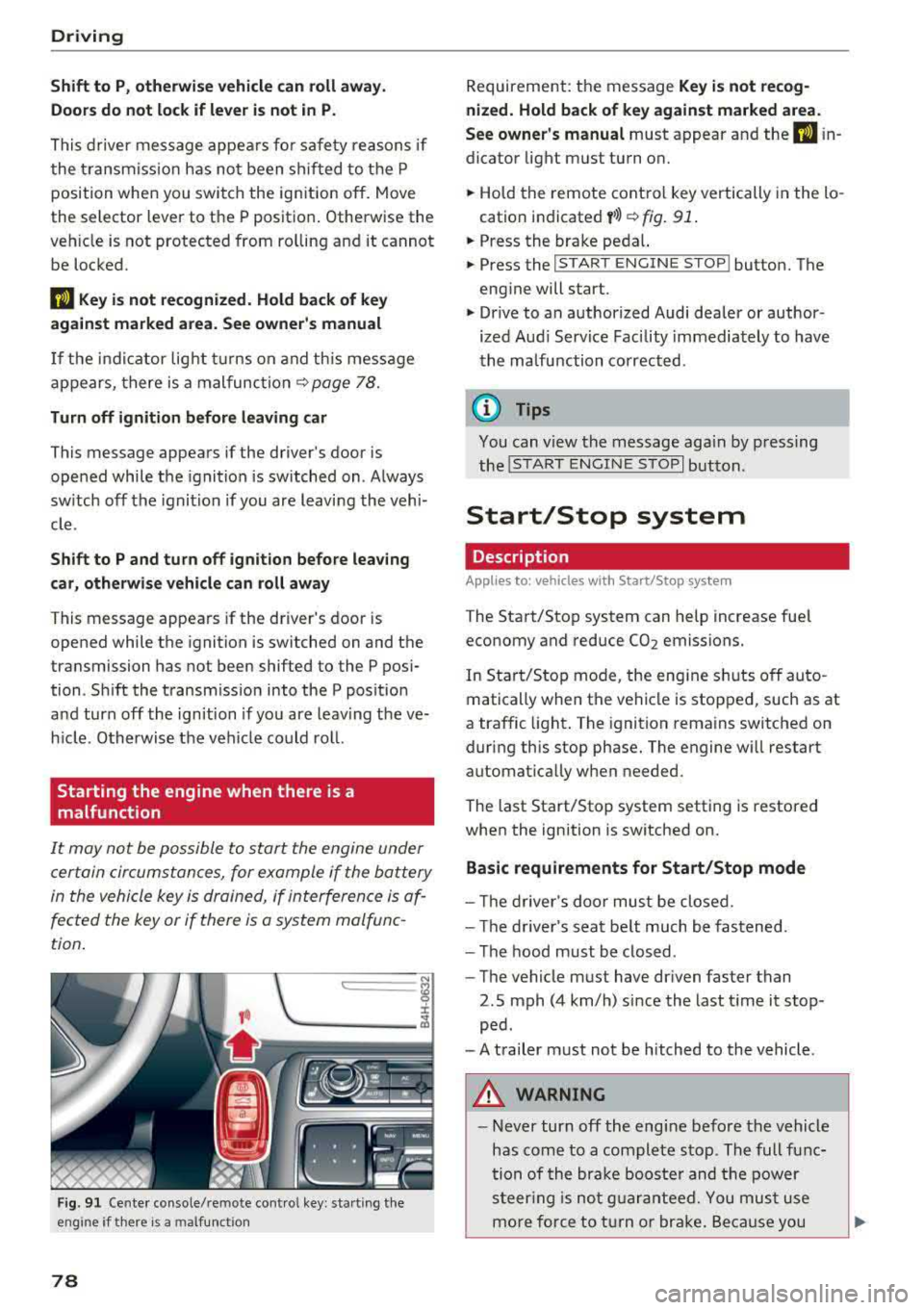
Fig . 91 Cente r console/remote cont ro l key : sta rt ing the
eng ine
if t here is a malfunc tion
78
Requirement: the message Key is not recog
nized. Hold back of key against marked area .
See owner's manual
must appear and the (I i n
dicator light must turn on.
.,. Hold the remote control key vertically in the lo
cation indicated
y >l) ~ fig. 91 .
.,. Press the brake peda l.
.,. Press the I START ENGINE STOPI button. The
engine will start.
.,. Drive to an authorized Audi dealer or author
ized Aud i Serv ice Facility immediately to have
the malfunction corrected .
(0 Tips
You can v iew the message aga in by pressing
the
I S TAR T ENGINE STOP I button.
Start/Stop system
Description
Applies to: vehicles with Start/Stop syste m
The Start/Stop system can help increase fuel
economy and reduce CO2 emissions.
In Start/Stop mode, the eng ine s hut s off auto
matically when the vehicle is stopped, such as at
a traffic light . The ignition remains switched on
during this stop phase. The engine w ill restart
automat ically w hen needed.
The last Start/Stop system setting is restored
when the ignition is switched on.
Basic requirements for Start/Stop mode
- Th e driver's door must be closed.
- The driver's seat belt much be fastened.
- The hood must be closed .
- The vehicle must have dr iven faster than
2.5 mph (4 km/h) since the last t ime it stop
ped .
- A trailer must not be hitched to the vehicle .
A WARNING
-Never turn off the eng ine before the vehicle
has come to a complete stop . The full func
tion of the brake booster and the power
steering is not guaranteed. You must use
more force to turn or brake. Because you