ignition AUDI A8 2018 Service Manual
[x] Cancel search | Manufacturer: AUDI, Model Year: 2018, Model line: A8, Model: AUDI A8 2018Pages: 356, PDF Size: 54.71 MB
Page 144 of 356
Voice recognition s ystem
Voice recognition system
Operating
A pplies to: ve hicles w ith vo ice recognition system
You con operate many Infotainment functions
conveniently by speaking.
R equirement: the ignition and the MM I must be
switched
on <=> page 135, there must be no phone
call in progress and the parking system m ust not
be active .
~ Switching on : briefly press th e ~ button @
<=> page 11, fig. 7 on the multifunction steering
whee l* and say the desired command after the
Beep .
~ Sw itching off : press and hold the~ button.
Or: press any button on the MMI control panel.
~ Canceling : press the~ button a nd say a new
command.
Or: say the command Cancel.
Input assis tance
The system gu ides you through the input with
visual and audio feedback .
-Vi sual inpu t as sistan ce : after t urning on voice
recognition, a d isp lay with a select ion of possi
ble commands appears in the Infotainment dis
play . The command d isplay can be turned on or
off in the ma in menu using the
MMI setup con
trol button .
-Audio input a ssistance : to have the poss ible
comma nds read, turn the voice recogn ition sys
tem on and say
Help.
For the s ystem to understand you:
Speak clearly and dist inct ly at a normal volume.
Speak louder when driving faster.
Emphasize the words in the commands even ly
and do not leave long pauses.
Do not speak a command when t he voice recogni
tion system is making an anno uncement.
C lose t he doors, the windows a nd the sunroof* to
reduce bac kg round noise . Make s ure t hat passen
gers a re not speaking when yo u are giving a voice
command.
142
Do not d irect the air vents toward the hands -free
microp hone, which is on the roof headliner nea r
t h e front interior lights .
Only use the system from the dr ive r's seat be
ca use the hands -free microphone is directed to
ward that seat .
Additional settings
Additional settings, s uch as individual speech
training
based on yo ur voice, Display sp eech
command s
or the prompt volume , can be adjust
ed in the main menu using the
MMI setup con
tro l button
<=> page 206.
A WARNING
- Direct your full attention to dr iv ing. As the
driver, you have complete responsibility for
safety in traff ic. On ly use the functions in
such a way that you a lways maintain com
p lete co ntro l over your veh icle in all traff ic
situat ions.
- Do not use the voice recognition system in
emergencies beca use your voice may change
in st ressfu l situ at ions.
It may t ake longe r to
d ial t he number or th e sys tem m ay no t be
a bl e to d ial it a t all. Dia l th e emer gen cy
number manually.
© Tips
- Th e dia log pauses w hen the re is a n in com
ing pho ne call and will con tinue if you ig
nore the call. T he dialog en ds if yo u answer
t h e ca ll.
- Yo u ca n sele ct an i tem in the list using ei
ther the vo ice recognit ion sys tem o r the
cont ro l knob .
Command overview
information
App lies to: vehicles wit h voice recog nitio n syste m
The following overv iews describe the commands
that can be used to operate the MMI using the
vo ice recog nition system .
A lternative commands are separated by a
" I" , for
example, say:
Telephone I (or) Na vigation I (or)
R adio .
Page 150 of 356
Telephone
Connecting a cell phone
• Select the ITEL I button > Search for new cell
phone
r=> fig. 160 . The availab le Bluetooth devi
ces are shown in the Infotainment system dis
play.
Or : search for the MMI using the Blue
tooth device search on your cell phone.
• Select and confirm the desired cell phone from
the list of displayed Bluetooth devices .
• Select and confirm Handsfree. The MMI gener
ates a PIN for the connection setup
r=> fig . 160 .
• Select and confirm Yes.
• Enter the PIN for connecting on you r cell
phone .
Or: if the PIN is already disp layed on
your ce ll phone, confirm it in the cell phone and
in the MMI. The time a llowed for entering the
PIN is limited to approximately 30 seconds .
Pay attention to any additional system prompts
dis played on your cell phone, for example if the
system should connect automatica lly in the fu
ture . Depending on the cell phone, you may have
to confirm download ing the d irectory separately .
After connecting successfully
After connecting successfully, the signal strength
symbo l®
r=> page 139, fig. 158 and the Blue
tooth symbo l@ appear in the status line of the
Infotainment disp lay. In addition, the cell phone
contacts are automatically loaded in the MMI di
rectory. This process can take several minutes,
depending on the number of contacts.
If a ll of the memory capacity is fi lled, you will be
asked to replace the contacts from one cell phone when connecting another cell phone. With
the opt ion
Restricted use of telephone , only con
tacts in the cell phone and the local
MMI memory
are available
r=> page 152.
(D Note
Always follow the information found in r=> (D in
Wi-Fi hotspot on page 161 .
(D Tips
-You only have to pair your device one t ime .
Bluetooth devices that are already pa ired
automat ica lly connect to the
MMI when
they are within range and the ignition is
switched on.
148
- Authorizing the MMI connection in your cell
phone will speed up the automatic connec
t ion .
- Several cell phones can be paired to the
MMI, but only one cell phone can be actively
connected.
- A Bluetooth device that is already paired
with the MMI will be disconnected if anoth
er device is paired.
- When leaving the vehicle, the Bluetooth
connect ion to the cell phone will automati
cally disconnect.
- You can obtain more information from your
cell phone service provider or from yo ur cell
phone user guide. For information on using
the te lephone, visit
www.audiusa .com/
bluetooth
or contact an authorized Audi
dea ler or author ized Audi Service Facility.
Opening the telephone
App lies to: vehicles wit h telepho ne
Fig. 162 Telephone functions
Requirement: a cell phone must be connected to
the MMI
r=>page 147 .
• Select the IT ELI button.
The last active telephone menu is shown in the
Infotainment display. Press the
[fEI) button in
the
Telephone menu again to access the tele
phone functions .
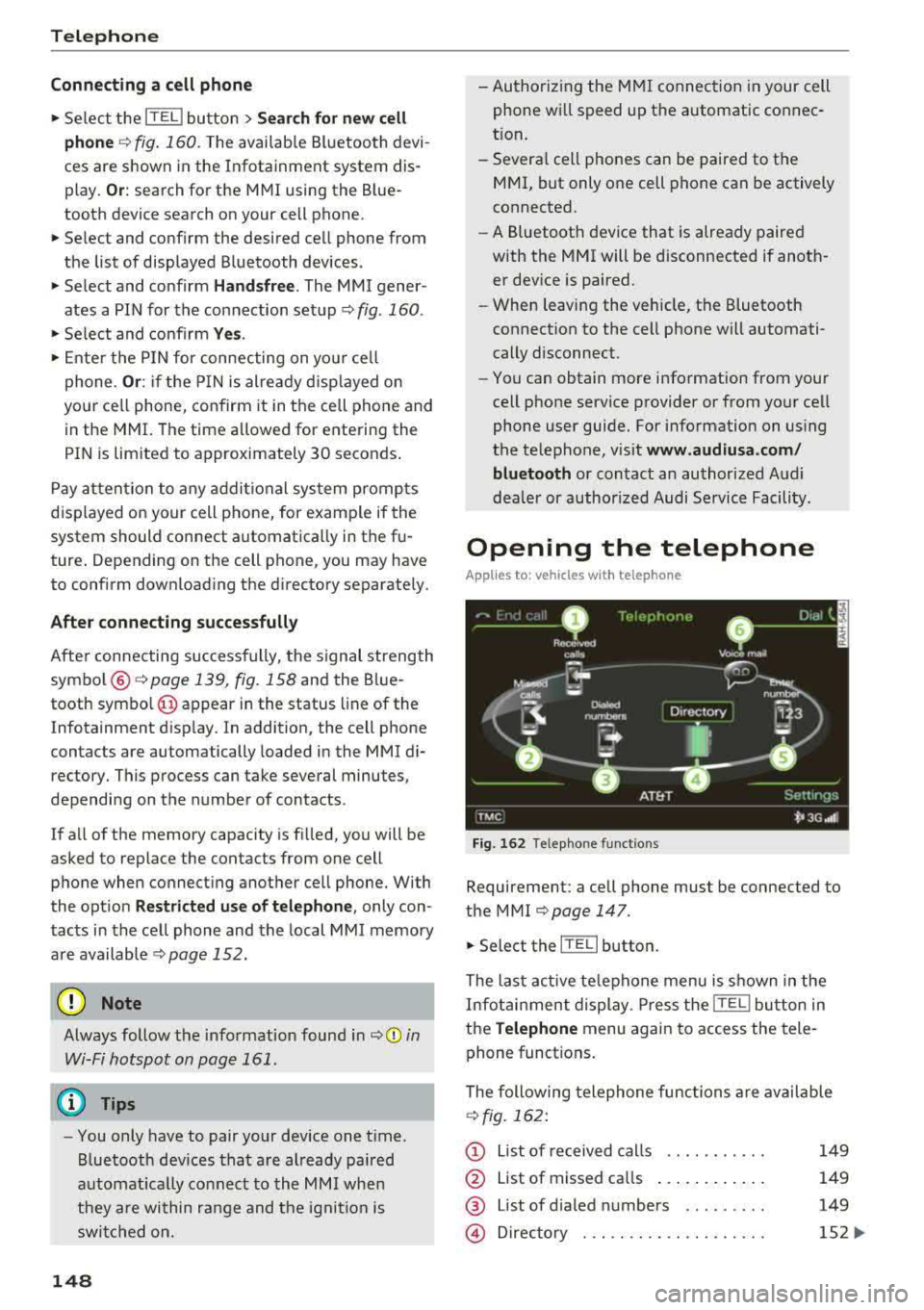
The following telephone func tions are available
r=>fig. 162:
(D List of received calls .... .. .... .
@ List of missed ca lls ...... .... . .
@ List of d ialed numbers ... ..... .
@ Directory ... ... . .. ...... .... .
149
149
149
152 ...
Page 158 of 356
Telephone
Call options
Automati c redial :
when the func tion is swit che d
On , a phone number w ill be au toma tic ally re
d ia le d up to five times if it is busy. Automatic re
d ia l can be canceled with
End call . The function is
only active when the network gives a b usy signa l.
Auto answer : when the func tion is sw itched On ,
in com ing ca lls are automatically answered afte r
a br ief time.
Three-way conference (GSM)
- On :
you can answe r an incoming call while an
othe r ca ll i s in progress by selecting
Accept.
The fi rst call is put on hold. Using the Hold op
ti on, yo u can a lso put an act ive c all on hold and
sta rt another c all or a conference c all.
-Off : you ca n replace a call w it h an incom ing c all
b y se lec ting
Replace. Yo u can ig no re an in com
i n g ca ll using the
Decline opt ion . You cannot
p ut an active ca ll on ho ld o r sta rt a new ca ll.
Telephone settings
Volume settings
1> : fo r the Ringtone volume /
Phone call volume ,
see ~ page 2 06.
Voicemail number : the voicemail number can be
e nte red o r edi ted in t he
Number input field using
t he speller. Whe n a vo icemail numb er is store d,
t he vo icemail c an b e ac ces se d w ith
the ® sym
bol in the spe ller . T he
Delete voicemail number
function deletes the sto red voicemai l num ber .
Invert call lists : the phone nu mbers i n the call
lis ts ar e sorte d ac cordin g to t he time the call
t oo k place. When the f unc tion is swi tched
On ,
the so rting o rde r is reverse d.
Bluetooth
Bluetooth:
the MMI Bluetoo th fun ctio n can be
sw itche d
On or Off . The Blu etoo th symbol @
~page 139, fig. 15 8 appe ars in t he Infotain
men t displ ay when the f unct ion is swi tched
on.
Visible:
t he visibili ty of the MMI in cell p hones o r
i n Bl ueto oth a udio players can be swit ched
On or
Off . When Auto is sele cted, the MMI will rem ain
visib le for cell phones or a Bluetooth audio player
1> Depen ds on th e co nnecte d cell p ho n e.
156
fo r about five m inu tes when the ve hicle is sta
tiona ry and t he ignition is switched on. The visi
b ility sw itches o ff after that . However, it is still
poss ib le to establish a B luetooth connection with
ce ll phones o r devices that have already been
paired when the vis ibility is switched off . The visi
bility of the MMI automatically swi tc h es
Off
wh en audio fi les a re bei ng played using a con
n ecte d B lueto oth aud io player to avoi d pro ble m s
du rin g pla yb ack .
Bluetooth audio player : th e Bluetooth audio
player
func tion mu st be switche d On to be ab le
to sele ct the
Bluetooth audio player as the
sou rce in t he
Media menu. S w itch the Bluetooth
audio player
f unc tion Off if you are no t usi ng i t
to preven t mal func tions in the
Telephone or Me
dia
men us.
Find Bluetooth devices: the sys te m s ear ches for
and lists Bluetoot h devices tha t ar e with in range .
Bonded Bluetooth devices : the B luetoot h devic e s
co nn ect ed t o the MMI are lis ted. The cur rentl y
c on necte d B luetooth device is la be le d wi th t he
Bl uetoot h sym bol. T o dele te con nect ed Blue
tooth devices in dividua lly, se lect t he dev ice a nd
d elete it with t he
Delete Bluetooth device func
tion. To disconnect or connect pa ired cell phones
i ndivid ua lly, select the B luetooth dev ice and
c h ange the p rofile us ing t he
Connect fu nct ion
wh ile t he vehicle is s tat io na ry . U se
Disconnect to
d isco nnect th e paire d Bluetooth dev ice.
Known Bluetooth devices : up to 50 known devi
ces can be listed . T hese Bluetooth dev ices may no
l onger be in range when search ing to connect .
Bluetooth name : the Bluetooth name of t he M MI
(fo r example, "AUDI MMI 2613") is shown and
can be cha nged .
Delete Bluetooth devices : all connected Blue
tooth devices can be deleted by confirming with
Yes.
Wi-Fi settings
S ee ~ page 161.
Page 160 of 356
Audi connect
Audi connect Introduction
A pp lies to: ve hicles w ith Audi co nnect
With Audi connect services, online information is
transmitted and integrated directly in the vehi
cle.
A mobi le end dev ice can be used to access the In
ternet through a Wi-Fi hotspot, either when the
vehicle is stationary or from the rear seat when
the vehicle is in motion.
A separate Aud i connect SIM card provided by
Audi connect is used to access Audi connect se rv
ices .
A WARNING
- To reduce the risk of an accident, on ly use
Audi connect serv ices when road and traff ic
condit ions permit. Read and follow the
guidelines prov ided
in c:> page 135 .
-Use the Audi connect serv ices w ith a Wi-Fi
hotspot o nly in the rear seat when the veh i
cle is in mot ion or only when the vehicle is
stationary to reduce the risk of an accident .
@ Note
Audi connect is designed for use only with the
prov ided Audi SIM card. Audi AG is not liable
for the consequences of using other SIM
cards.
(D Tips
Read and follow the notes about Audi con
nect before starting it
c:>page 163 .
Setup
Requirements for Audi connect
An Internet connection is required to use Audi
connect. The following requirements must be
met to establish a connection:
- You must be in an area that is covered by your
provider.
- Your Audi S IM card must be inserted in the
MM I SIM card reader
c:>page 158.
158
-
-A data connection must be configured for Audi
connect services
c:> page 162.
Using the SIM card reader
App lies to: vehicles wit h Audi connect
Audi multimedia
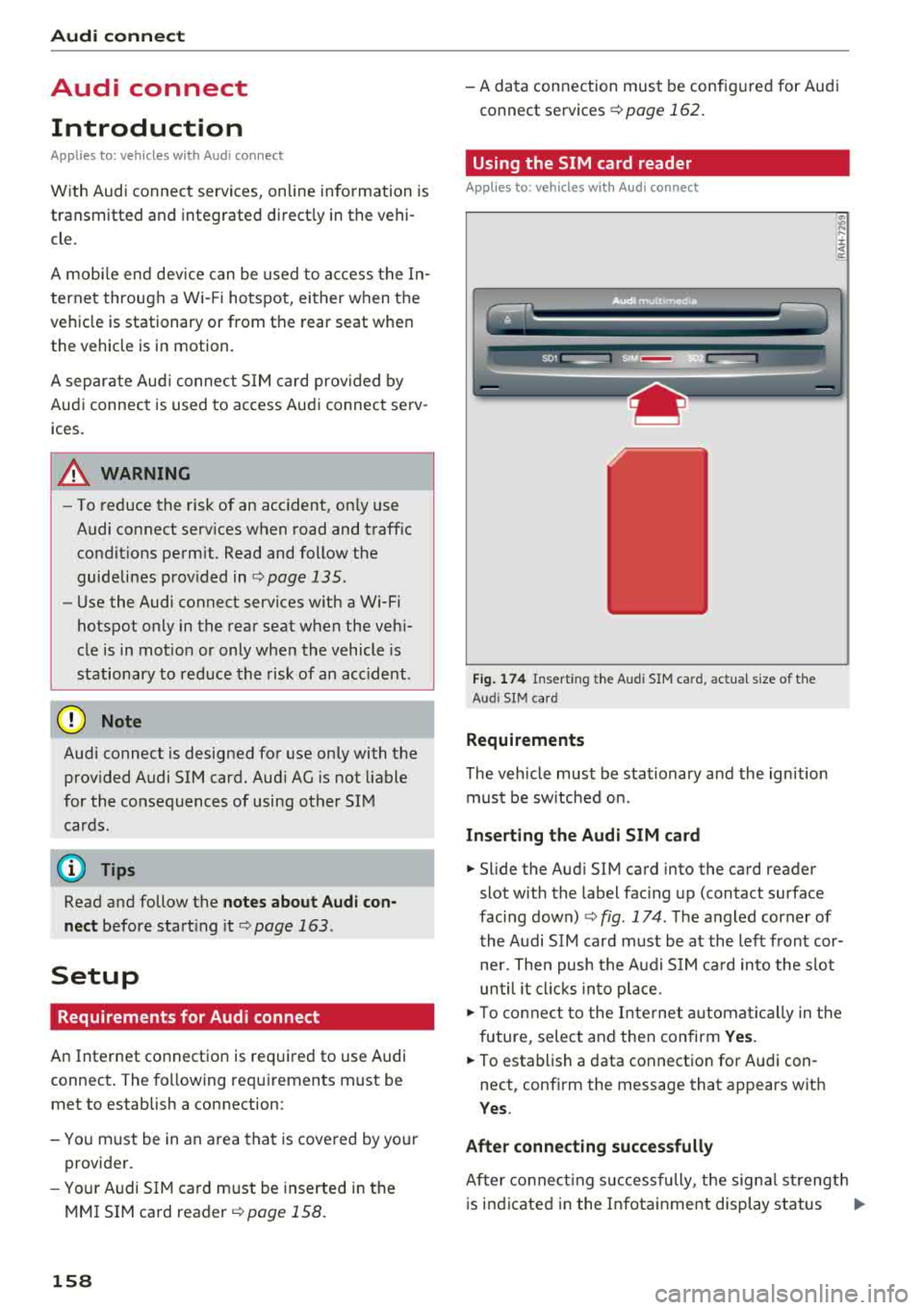
Fig. 174 Insert ing the Aud i SIM ca rd, actua l size of t he
Aud i SIM card
Requirements
The vehicle must be stationary and the ignition
must be switched on.
Inserting the Audi SIM card
~ .... :c .. a:
.,. Slide the Aud i SIM card into the card reader
slot with the label facing up (contact surface
facing down)
c:> fig . 174 . The angled corner of
the Audi SIM card must be at the left front cor
ner. Then push the Audi SIM card into the slot
until it clicks into place .
.,. To connect to the Internet automatically in the
future, select and then confirm Yes.
.,. To establish a data connection for Audi con
nect, confirm the message that appears wit h
Yes .
After connecting successfully
After co nn ectin g successfully, the signa l strength
is indicated in the Infotainment display status
..,.
Page 197 of 356
u.
The last selected menu is displayed when it is
switched on.
When the ignition is switched off, a message in
d icat ing that the RSE is in standby mode appears
in the left or right RSE display. The RSE switches
off automatically if you do not press the left or
right On/Off knob while the system is in standby
mode.
(D Tips
- The RSE switches off automatically if the
engine is not running and the vehicle bat
tery is low.
Symbols
Applies to: vehicles with Rear Seat Enter tainment
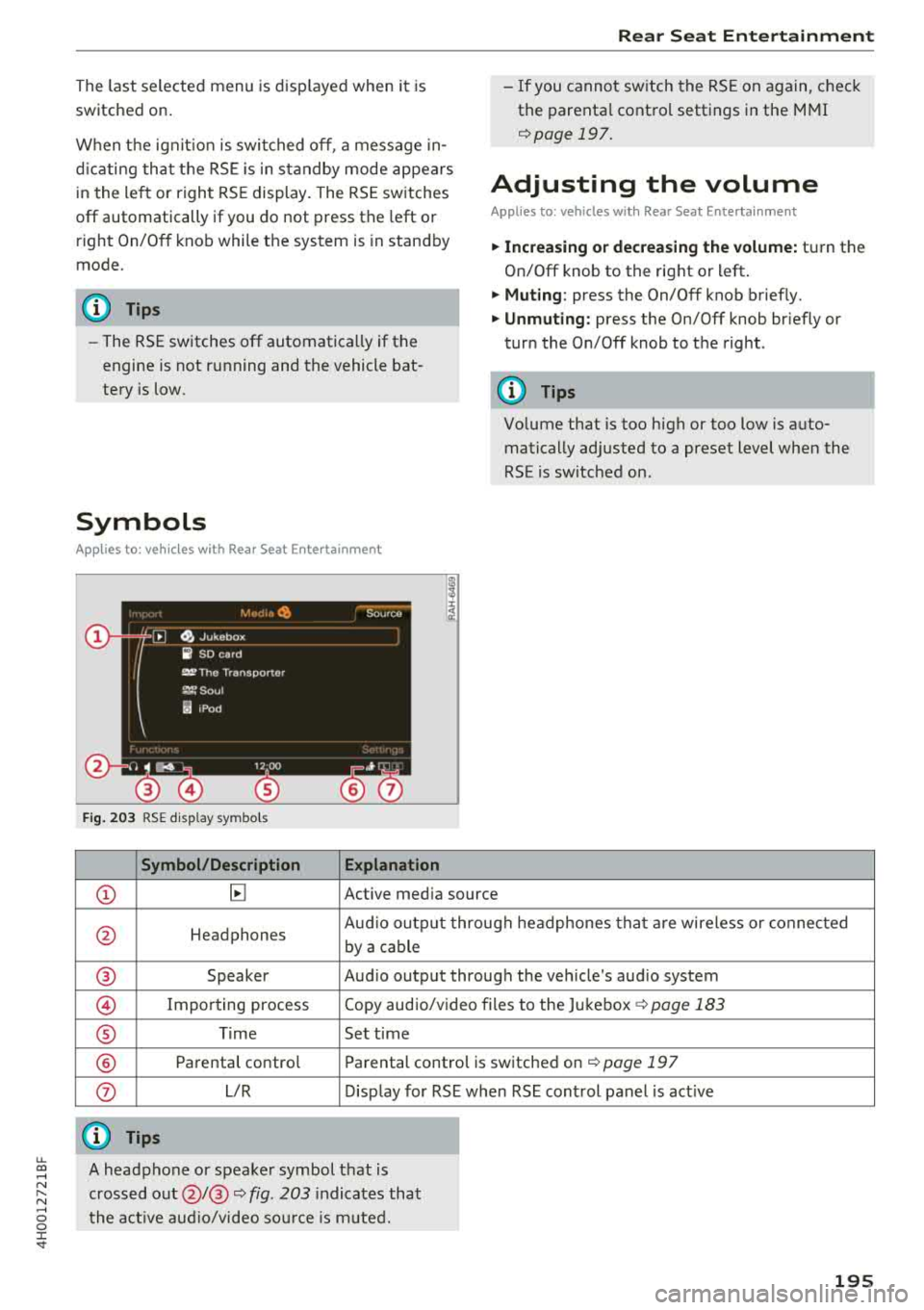
Fig. 203 RSE display symbols
Symbol/Description Explanation
Rear Seat Entertainment
- If you cannot switch the RSE on again, check
the parental control settings in the MMI
¢page 197.
Adjusting the volume
Applies to: vehicles with Rear Seat Entertainment
.,. Increasing or decreasing the volume: turn the
On/Off knob to the right or left .
.,. Muting : press the On/Off knob brief ly.
.,. Unmuting: press the On/Off knob briefly or
turn the On/Off knob to the right .
(D Tips
Volume that is too high or too low is auto
matically adjusted to a preset level when the
RSE is switched on.
CD ~ Active media source
0 Headphones Aud
io output through headphones that are wireless or connected
by a cable
® Speaker Audio output through the vehicle's audio system
@ Importing process Copy audio/video files to the Jukebox ¢
page 183
® Time Set time
® Parental control Parental control is switched on¢ page 197
0 L/R Display for RSE when RSE control panel is act ive
@ Tips
~ A headphone or speaker symbol that is
~ crossed out@/@ ¢ fig. 203 indicates that
...... o the active audio/video source is muted. 0 :c '
Page 232 of 356
Airbag syste m
-The inflating airbag will hit the child seat or
infant carrier w ith great force and will
smash the ch ild seat and c hild against the
backrest, center armrest , door or roof .
- Always install rear-facing child seats on the
rear seat.
- If you must install a rearward fac ing ch ild
seat on the front passenger seat because of exceptional c ircumstances and the
PA SSEN
GER AIR BAG OFF
light does not come on
and stay on, immediately insta ll the rear
facing child seat in a rea r seating position
and have the airbag system inspected by
yo ur Audi dealer.
- Forward-facing ch ild seats insta lled on the
front passenge r's sea t may in terfe re with
the deployment of the airbag and cause se
rious persona l injury to the child.
A WARNING
If, in exceptional circumstances, you must in
stall a forward-facing chi ld restraint on the
front passenger's seat :
- Always make sure the forward -facing seat
has been designed and cert ified by its man
ufact urer for use on a front seat with a pas
senger front and side a irbag.
- Never put the forward-facing child restraint up against or very near the instrument pan
el.
- Always move the front passenger seat to the h ighest position in the up and down ad
justment range and move it back to the
rearmost position in the seat's fore and aft
adjustment range, as fa r away from the air
bag as possib le, before insta lling the for
ward-facing child res trai nt.
- Always make sure that the safety belt upper
anchorage is beh ind the child restraint and
not next to or in front o f the child restrain t
so tha t the safety belt will be properly pos i
tioned.
- Make s ure tha t the
PASSENGER AIR BAG
OFF
light comes on and stays on all the time
whenever the ignition is switched on.
230
A WARNING
To reduce the risk of serious injury, make sure
that the
PASSENGER AIR BAG OFF light will
be d isplayed whenever a ch ild restraint is in
stalled on the front passenge r seat and the
ignit ion is switched on.
- If the
PASSENGER AIR BAG OFF light does
not stay on, perform the checks desc ribed
~ page 23 7, Monitoring the Advan ced Air
bag System.
- Take the child restra int off the front passen
ge r seat an d install it prope rly at one of the
rear sea t positions if the
PASSENGER AIR
BAG OFF
light does not stay on .
- Have the ai rb ag system inspec ted by your
Aud i dea ler immediately.
- Always carefully follow ins truc tions from
child restrain t manufacture rs when instal
ling child restra ints .
A WARNING
If, in exceptional ci rcumstances, you must in
stall a forward or rearward-fac ing child re
stra int on the front passenger's seat:
- Improper installat ion of child restraints can
reduce the ir effectiveness or even prevent
them from provid ing any protect ion.
- An improperly installed child restra int can
inter fere with the airbag as it deploys and
serious ly injure or even kill the child - even
w ith an Advanced A irbag System.
- Always carefully follow the manufacturer's instructions provided with the child seat or
car rier.
- Never p lace add itiona l items on the seat
that can increase the tota l weight registered
by the weight -sensing mat and can cause in
jury in a crash.
Page 239 of 356
the doors, over or near the area marked
"AIRBAG" on the steering wheel, instru
ment pane l, seat backrests or between
those areas and yourself . These objects
cou ld cause injury in a crash, especially
when the airbags inflate .
-Never recline the front passenge r's seat to
transport objects. Items ca n also move into
the area of the side airbag o r the front air
bag during bra king or in a sudden maneu
ver. Objects near the airbags can become
projectiles and cause in jury, particularly
when the seat is reclined.
A WARNING
T he fine dust created when airbags deploy can
cause breathing problems for people with a
history of asthma or other breathing condi
tions.
-To reduce the risk of breathing problems,
those w ith asthma or other respiratory con
ditions should get fresh air right away by
gett ing out of the veh icle or opening w in
dows or doo rs.
-If you are in a collision in which airbags de
ploy, wash your hands and face with mild
soap and water before eat ing .
-Be careful not to get the dust into your eyes,
or into any cuts or scratches .
-If the residue should get into your eyes,
flush them with water.
Monitoring the
Advanced Airbag System
~ ( USA models )/!{ (Canada models )
Airbag monitoring indicator light
Two separate indicators monitor the function of
the Advanced Airbag System: the airbag moni
toring indicator light and the
PASSENGER AIR
BAG OFF
light.
The Advanced Airbag System (including the elec
tron ic control unit, sensor c ircuits and system
~ wir ing) is monitored continuously to make sure
;:::: that it is funct ion ing prope rly whenever the igni-
" ~ tion is on. Each time you switch on the ignition,
~ the airbag monitoring indicator light fl (USA '
models)/EI (Canada models) w ill come on for a
few seconds (se lf diagnostics).
The system must be inspected when the
indicator light
II (USA models)tE,I (Canada
models) :
-does not come on when the ignition is switched
on,
-does not go out a few seconds after you have
sw itched on the ignition, or
-comes on while driving.
If an airbag system malfunction is detec ted, the
indica tor light will come on to serve as a constant
reminder to have the system inspected immedi
ately .
If a malfu nction occurs that turns the front air
bag on the passenger side off, the
PASSENGER
AIR BAG OFF
light will come on and stay on
whenever the ignition is on.
A WARNING
An airbag system that is not functioning prop
erly cannot prov ide supplemental protect ion
i n a fronta l crash.
-If the airbag indicator light ¢ page 23
comes when the veh icle is being used, have
the system inspected immediately by your
author ized Audi dealer.
It is poss ible that
the airbag will inflate when it is not sup
posed to, or w ill not inf late when it should.
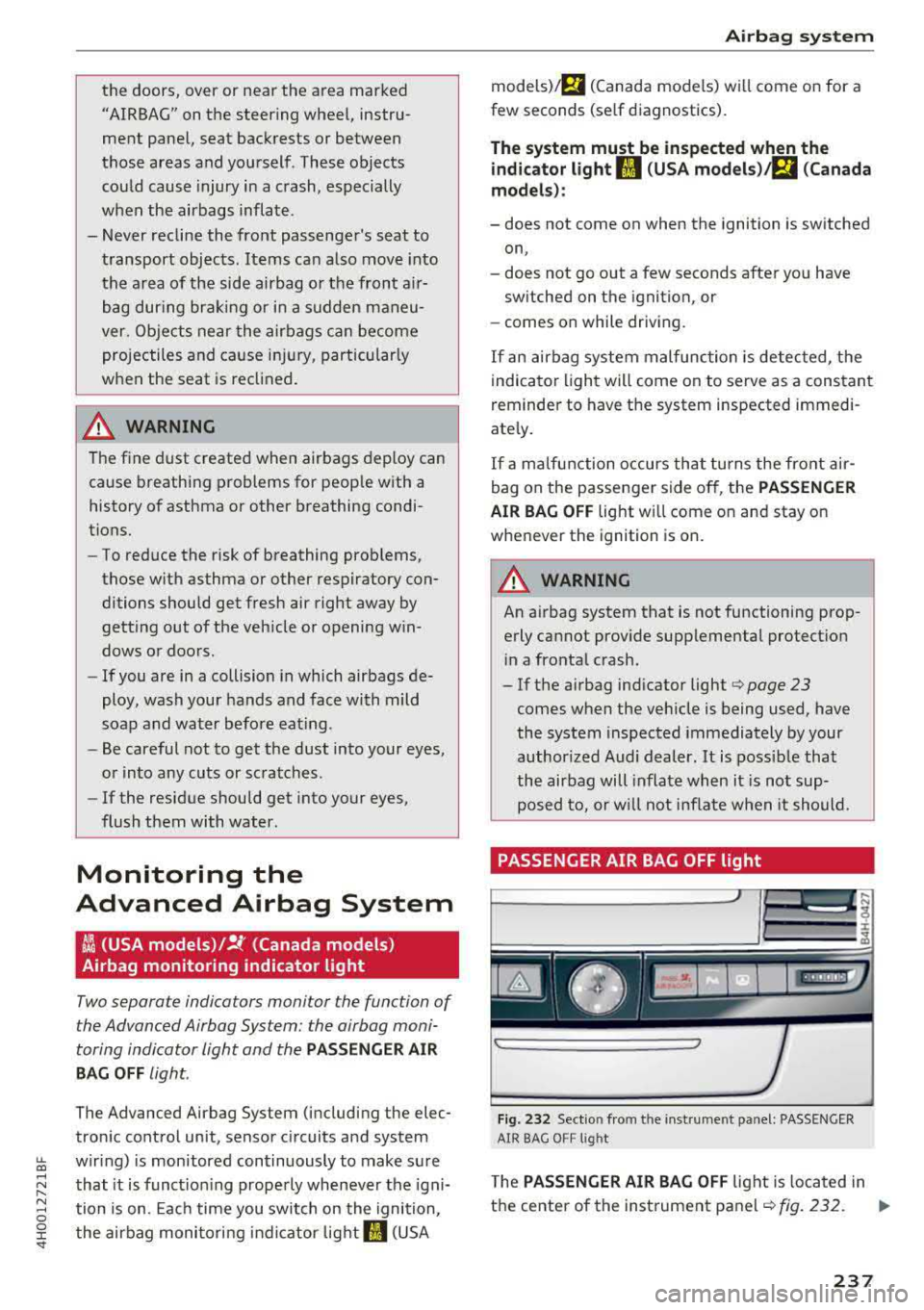
PASSENGER AIR BAG OFF light
Fi g. 232 Sect io n from th e instrument panel: PASSENGER
AIR BAG O FF lig ht
T he PASSENGER AIR BAG OFF light is located in
the center of the instrument
panel ¢ fig. 232. Ill>
237
Page 240 of 356
Airbag syste m
The PASSENGER AIR BAG OFF light will come on
and stay on to tell you when the front Advanced
Airbag on the passenger side has been turned
off
by the electronic control unit. Each time you
sw itch on the ignit ion, the
P ASS ENGER AIR BAG
OFF
light will flash for a few seconds and:
- will stay on if the front passenger seat is not
occupied,
- will stay on if there is a small c hild or child re
straint on the front passenger seat,
- will go out if the front passenger seat is occu
pied by an adult as registered by the weight
sensing mat .
The
PA SSENGER AIR BAG OFF light mu st come
on and sta y on
if the ignition is on and
- a car bed has been insta lled on the front seat,
o r
- a rearward-fac ing child rest ra in t has been in
stalled on the front passe nger seat, or
- a fo rwa rd-facing child restra int has bee n in stal
led on the front passenger seat, o r
- the weight reg istered on the fro nt passenger
seat is equal to o r less than the comb ined
we ight of a typ ica l 1 yea r-old restrained in one
of the rear -facing or forward -fac ing infant re
straints listed in Federal Motor Vehicle Safety
Standard 208 with w hich the Advanced Airbag
System in your vehicle was certified.
I f t he front passenger seat is not occupied, the
front airbag wi ll not dep loy, and the
PASSENGER
AIR BAG OFF
light will stay on . Never insta ll a
rearward-facing child restraint on the front pas
senger seat, the safest p lace for a child in any
kind of child restraint is at one of the seating po
sitions on the rear seat
¢ page 228, Child re
straints on the front seat -some important
things to know
and ¢ page 249, Child safety.
If the PA SSENGER AIR BAG OFF light comes on
when one of the condit ions listed above is met,
be sure to check the light regularly to make cer
tain that the
P A SSENGER AIR B AG OFF light
s tays o n cont inuous ly wheneve r the ig nition is
on.
If the PA SSENGER AIR BAG OFF light does
not appear on and does not stay on all the time,
stop as soon as it is safe to do so and
238
- reactivate the system by switching the ignition
off and then switching it on again;
- remove and reinsta ll the chi ld restraint . Make
sure that the child restraint is properly insta l
led and that the safety belt for the front pas
senger seat has been correct ly routed through
the child restraint as described in the ch ild re
straint ma nufacturer's instruct ions;
- make sure that the convert ib le lock ing retrac
tor on the safety belt for the front passenger
seat has been activated and that the safety belt
has been pulled t ight. The belt must not be
loose or have loops of slack so that the sensor
be low the safety belt latc h on the seat can do
i t s
job¢ page 259 .
-make sure that th ings that may increase the
weight of the ch ild and c hild seat a re not be ing
transpo rted on the front passenge r seat;
- ma ke sure that t he safety be lt te nsion sensor is
not b locked. S hake the safety belt latch on the
front passenger seatback and forth;
- If a strap or tether is being used to t ie the child
seat to t he fron t passenger sea t, make s ure
that it is not so tight that it causes the weight
sensing mat to measure more weight than is
actually on the seat.
If th e PAS SENGER AIR BAG OFF light still do es
n o t come on
and does not stay on continuously
(when the ignition is switc hed on),
- take the child restra int
off the front passenge r
seat and insta ll it p roperly a t one of the rear
seat pos itions. Have the airbag system inspect
ed by yo ur Audi dealer immediate ly .
- move the ch ild to a rear seat pos ition and m ake
sure that the child is proper ly restrained in a
child restraint that is appropriate for its size
and age .
The
PASSENGER AIR BAG OFF lig ht sho uld NOT
come on when t he ignit ion is on and an ad ult is
sitting in a proper seating position on the front
passenger seat. If the
PASSENGER AIR BAG OFF
li ght comes on and stays on or flashes for about
5 seconds while dr iv ing, under these c ircumstan
ces, make sure that:
- the adult on the front passenger seat is proper-
ly seated on the center of the seat cushion with
..,.
Page 244 of 356
Airbag system
position in a frontal collision so that the airbags
can provide supplemental protection .
The airbag system is not a substitute for your
safety belt. Rather, it is part of the overall occu
pant restraint system in your vehicle. Always re
member that the airbag system can only help to
protect you if you are wearing your safety belt
and wearing it properly . This is why you should
always wear your safety belt, not just because
the law requires you to do
so c:> page 219, Gener
al information .
Remember too, airbags will deploy only once and
only in certain kinds of accidents
-your safety
belts are always there to offer protection in those
accidents in which airbags are not supposed to
deploy or when they have already deployed, for
example when your vehicle str ikes or is struck by
another after the first collis ion.
This is just one of the reasons why an airbag is
not a substitute for the safety belt. The airbag
system works most effectively when used with
the safety belts . Th erefore , always wear your
safety belts correctly.
It is important to remember that while the sup
p lemental knee air bag system is des igned to re
duce the likelihood of serious injuries, other inju
ries, for example, swelling, bruising and minor
abrasions and friction burns can also occur when
an airbag inflates .
The knee airbag system basically consists of:
- The electronic control module
- Two inflatable airbags (airbag and gas genera-
tor), one for the driver and one for the front
passenger
- The airbag indicator light in the instrument
pane l
The knee airbag system will not deploy:
-when the ignition is switched off
- in frontal collisions when the deceleration
measured by the control unit is too low
- in side collisions
- in rear-end collisions
- in rollove rs
242
-in the event of a system malfunction (warning/
indicator light is
on) ¢ page 23 .
A WARNING
-Safety belts and the airbag system can only
provide protect ion when occupants are in
the proper seating position
r::;> page 235 .
- If the airbag indicator light c:> page 23
comes when the vehicle is being used, have
the system inspected immediately by your
author ized Audi dealer. It is possible that
the airbag will inflate when it is not sup
posed to, or will not inflate when it should.
How knee airbags work
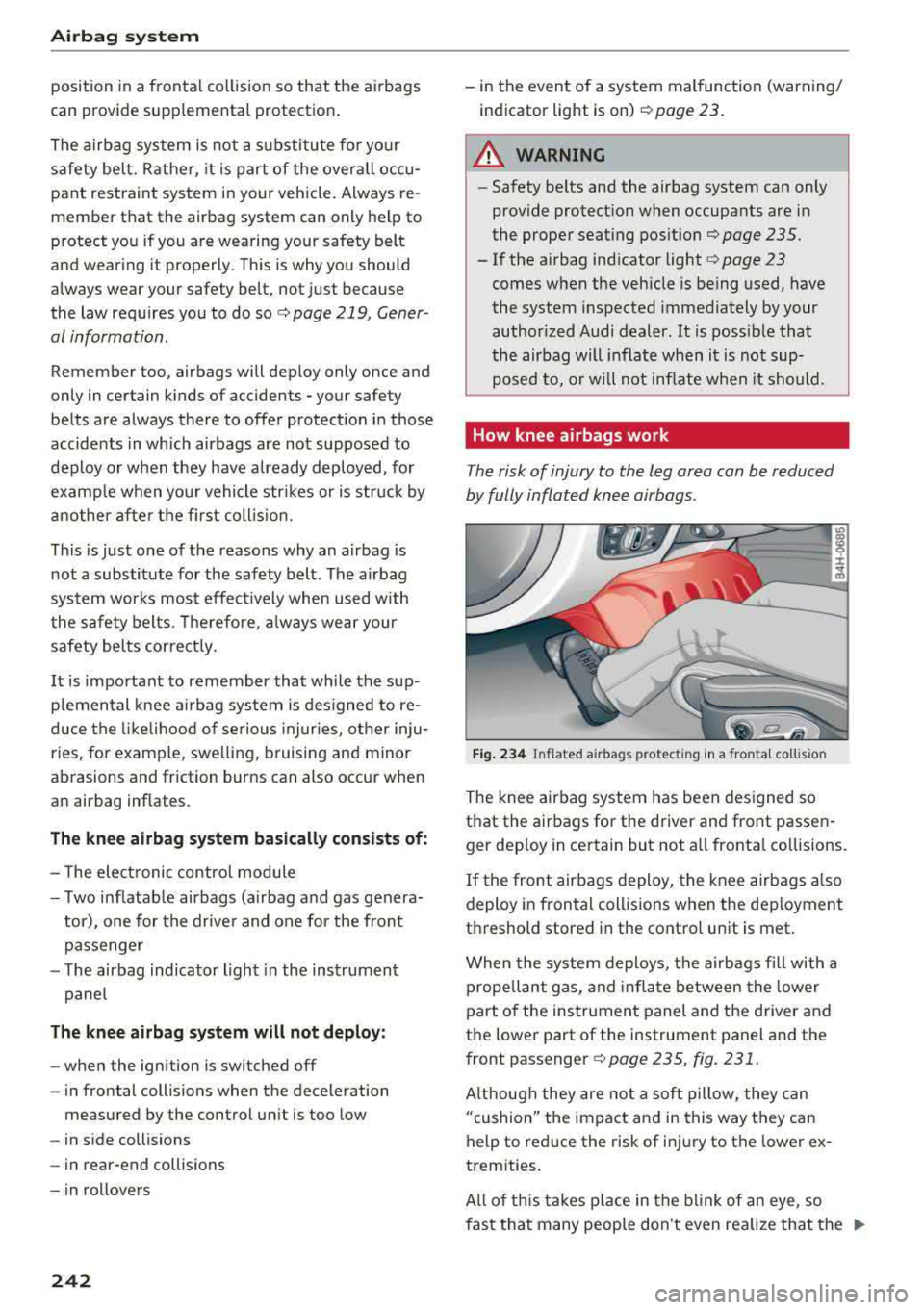
The risk of injury to the leg area can be reduced
by fully inflated knee airbags .
Fig. 234 Inflated a irbags protec ting in a fronta l co llis io n
The knee airbag system has been designed so
that the airbags for the driver and front passen
ger dep loy in certain but not all fronta l collisions.
If the front airbags deploy, the knee airbags also
deploy in frontal collisions when the deployment
threshold stored in the control unit is met .
When the system deploys, the airbags fill with a
prope llant gas, and inflate between the lower
part of the instrument panel and the driver and
the lower part of the instrument panel and the
front passenger
c:> page 235 , fig. 231.
Although they are not a soft pillow, they can
"cushion" the impact and in this way they can
help to reduce the risk of inj ury to the lower ex
tremities.
All of this takes pla ce in the blink of an eye, so
fast that many people don't even realize that the
.,,.
Page 249 of 356
lL t:0 ....
'"" " '"" .... 0 0 :c '
one co llision and another. Important factors in
clude, for example, the nature (hard or soft) of
the impacting object, the angle of impact, vehicle
speed, etc.
c> page 247, How side curtain air
bags work .
Aside from their normal safety function, safety
be lts work to help keep the driver or front pas
senger in posit ion in the event of a collision so
that the side curta in airbags can provide protec
tion .
The airbag system is not a substitute for your safety belt. Rather, it is part of the overall occu
pant restraint system in your veh icle . Always re
member t hat the airbag system can only help to
protect you if you are wea ring your safety belt
and wear ing it properly . T his is anothe r reason
why you should always wear your safety be lts,
not just because the law requi res you to do so
¢ page 219, General information.
It is important to remember that while the s ide
curta in a irbag system is des igned to he lp reduce
the likelihood of ser ious injur ies, other injuries,
for example, swe lling, bruising, and minor abra
sions can a lso be associated with these airbags
upon dep loyment. Remember too, these airbags
will deploy only once and only in certa in kinds of
accidents
-your safety belts are a lways there to
offer protect ion.
The side curtain airbag system basically
consists of:
- The electronic contro l module and external side
impact senso rs
- The side curtain airbags above the front and
rear s ide windows
- The airbag indicator light in the instrument panel
The airbag system is monitored e lectronically to
make certain it is funct ioning properly at all
times. Each time you switch on the ign ition, the
airbag system indicator light will come on for a
few seconds (self diagnostics) .
The side curtain a irbag is not a ctivated:
- if the ignition is switched off,
Airbag system
- in side co llisions whe n the acceleration meas
ured by the sensor is too low,
- in rear -end co llisions .
A WARNING
-Safety belts and the airbag system will only
provide protection when occupants are in
the proper seating position
c> page 54,
Seats and storage.
- If the airbag ind icator light i=> page 23
comes when the vehicle is being used, have
the system inspected immediately by your
author ized Audi dealer. It is possible that
the airbag will inflate when it is not sup
posed to, or w ill not inf late when it should .
How side curtain airbags work
Side curtain airbags can work together with side
airbags to help reduce the risk of head and upper
torso injuries for occupants who are properly re
strained.
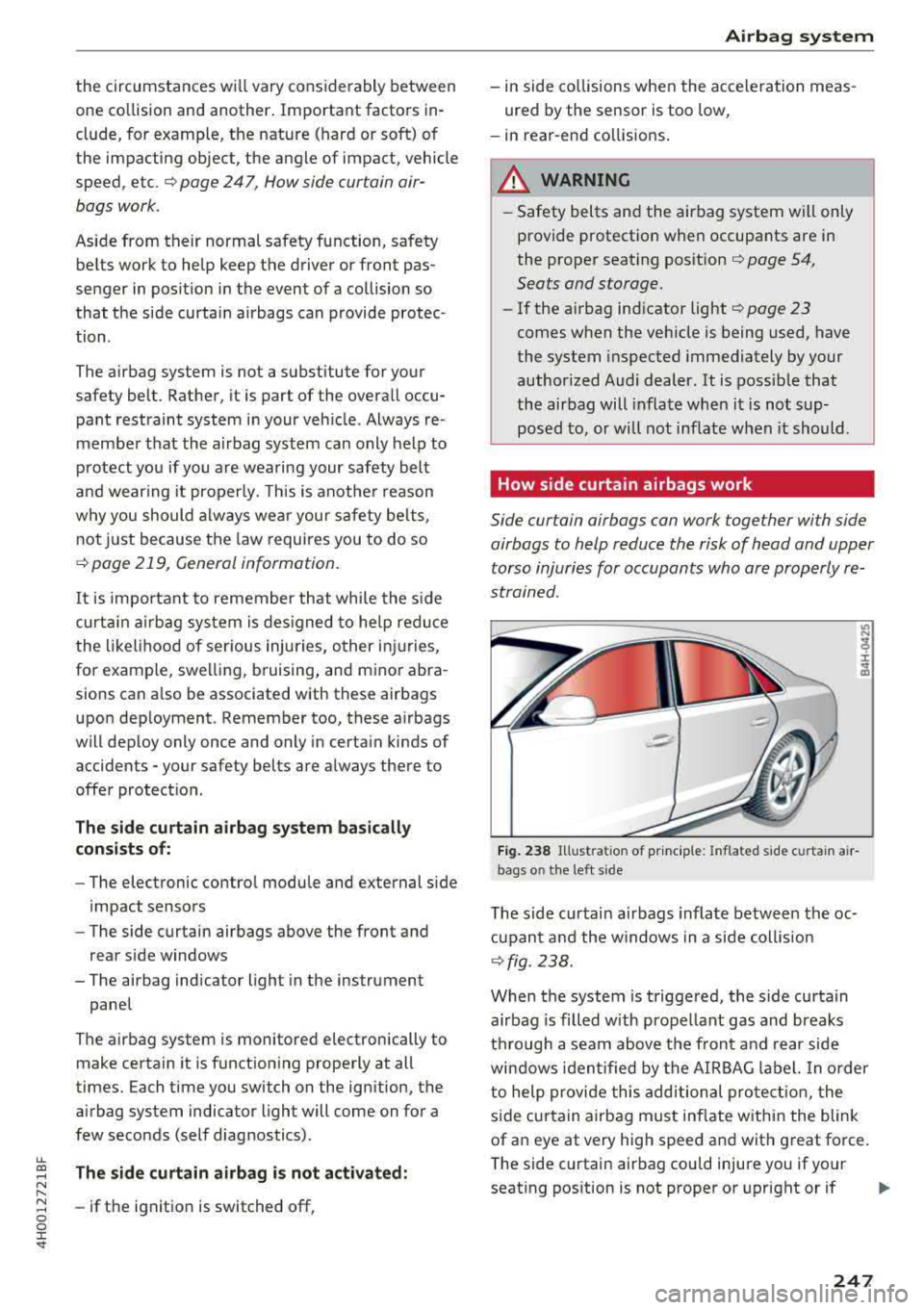
F ig . 2 38 Illus trat io n of pr incip le: Inflated side curta in a ir
bags o n the left s ide
T he side cu rtain airbags inflate between the oc
c u pant and the w indows in a side coll is ion
¢fig. 238.
When the system is triggered, the s ide curtain
airbag is filled with propellant gas and breaks
th rough a seam above the front a nd rear side
windows identified by the AIRBAG label. In order
to help provide this additional pro tect io n, the
s ide curtain airbag must inflate w ithin the blink
of an eye at very high speed and with great force.
The side curtain airbag could injure you if your
seat ing pos ition is not proper or upright or if
247