95 RON AUDI A8 2018 Manual PDF
[x] Cancel search | Manufacturer: AUDI, Model Year: 2018, Model line: A8, Model: AUDI A8 2018Pages: 356, PDF Size: 54.71 MB
Page 127 of 356
u. co .... N
" N .... 0 0 :c '
A ppl ies to : ve hicles w ith parkin g system plus/rearv iew cam
era/peripheral ca mera
The display and warning tones can be adjusted in
the Infotainment.
~ Se lect : the ICARI fu nction button > Car systems
contro l button > Driver assistance > Parking
aid .
Display
On * -
an op tical d isp lay is shown for the par kin g
system plus, a rearv iew camera image is s hown
for the rearview camera *.
Off -when the p arking sys tem is sw itche d off,
on ly audib le sign als are give n.
Signal tones
Front volume -
volume for the front area
Rear volume -volume for the rear area
Front frequency -frequency for the front area
Rear frequency -frequen cy fo r the rea r area
Music volume during nav . prompts -the volume
of the a udio/video so urce is lowe red when t he
pa rking system is turned o n
The new ly selected leve l is demonstrated briefly
by the sound generator .
(D Tips
-The wa rning tones ca n also be ad justed d i
r ectly by the vis ual d isp lay or the pictu re
from the camera. Simply p ress the
Settings
control bu tton.
- Changed sett ings are ac tivated whe n the
p arking system is switched o n aga in.
- The settings for volume and frequency are
a utomat ica lly saved and ass igned to the re
mo te con trol key be ing used.
Error messages
A pp lies to: ve hicles with parking system plus/rearview cam
era/per ipheral ca mera
There is an erro r in the system if the LED in the
Pw , button is b link ing and yo u hear a continuous
Parking systems
alarm for a few seconds after sw itch ing on the
par king system or w hen the pa rking system is a l
r eady activated. If the erro r is not cor rected be
fo re you switch off the ignition, the
LED in the Pw ,
button w ill blink the next time you switch on the
park ing system by shifting into reverse.
Parking system plus*
If a senso r is fa ulty, the~ symbo l will appear i n
front of/beh ind the vehicle in the Infotainment
display. If a rear sensor is faulty, on ly obstacles
t h at are i n areas @and @ are shown
Q page 116, fig . 129 . If a front se nsor is faulty,
o n ly obs tacles tha t are in a reas © and @are
shown. The re is a lso a sys tem ma lf u nct ion if all
seg ments arou nd the veh icle are red or if no seg
me nts are disp laye d.
Peripheral cameras*
The re is a system malfu nction if t he 00 • symbol
appea rs and the co rresponding d isp lay area is
s h own in bl ue. The camera is not wo rking in t his
are a.
Drive to an authorized A udi dealer or authorized
Audi Se rvice Facility immed iate ly to have the
malfu nction corrected.
Trailer hitch
App lies to: vehicles wit h parking system pl us/rea rv iew cam
e ra/peri phe ra l cameras an d tra ile r hitc h
When the trailer socket is in use, the par king sys
tem rear sensors are not act ivated when you sh ift
into reverse gear or when yo u press t he
p, ,1 A but
ton. This res ults in the following rest rict ions.
Parking system plus*
The re is no distance warning for the rear. The
front senso rs remain activated. T he v isua l disp lay
switches to trailer mode.
Rearview camera*/peripheral cameras*
T he re is no distance warning for the rea r. The
front senso rs remain activated . The visua l disp lay
switches to trailer mode. The rearview came ra
i mage will not s how the orie ntation lines and t he
bl ue surfaces.
IJJ,-
125
Page 129 of 356
u. co .... N
" N .... 0 0 :c '
Control (ESC)
Description
The ESC increases driving safety. It reduces the
risk of slipping and improves driving stability.
ESC detects critical situations such as when the
vehicle is oversteering and understeering or the
wheels are spinning. The vehicle is stabilized by
applying the brakes or reducing engine torque .
When the ESC engages,
the G1 indicator light
b links in the instrument cluster.
The following systems are integrated in the ESC:
Anti-lock braking system (ABS)
ABS prevents the whee ls from locking when brak
ing. The vehicle can still be steered even during
hard braking. Apply steady pressure to the brake
pedal. Do not pump the pedal. A pulsing in the
brake pedal indicates that the system is acting to
stabilize the vehicle .
Brake assist system
The brake assist system can decrease braking dis
tance. It increases braking power when the driver
presses the brake pedal quickly in emergency sit
uations . You must press and hold the brake pedal
until the dangerous situat ion is over . In veh icles
w ith adaptive cruise contro l*, the brake assist
system is more sensitive if the distance detected
to the vehicle dr iv in g ahead is too small. On
ve hicl es w ith activated and functioning night vi
sion assist*, the brake assist system can respond
more sensitively if there is a warning .
Anti-Slip Regulation (ASR)
ASR reduces engine power when the drive wheels
begin spinning and adapts the force to the road
conditions. This makes it easier to start, acceler
ate and drive up hills.
Electronic differential lock (EDL)
EDL applies the brakes to a wheel that starts
sp inn ing and transfers the drive power to the
other driving wheels. This functio n is not availa
ble at higher speeds.
Intelligent Technology
In extreme cases, EDL automatica lly switches off
to keep the brake on the braked whee l from over
heating. The vehicle is still working correct ly. ED L
will switch on again automatically when condi
tions have returned to normal.
Steering recommendation
T he ESC he lp s to stabilize the vehicle by changing
the steering torque .
In veh icles with dynamic steer ing*, ESC also
helps to stab ilize the steer ing in crit ica l situa
tions.
Selective wheel torque control
Selective wheel torque control is used when driv
in g on curves.
The front wheel on the inside of the curve or both
wheels on the inside of the curve are braked se
lectively as needed. This allows more precise driv
in g in curves . The applicable system may not acti
vate when dr iv in g in wet or snowy conditions .
Automatic post -collision braking system
Th e "automat ic post-collis ion braking system"
can help to reduce the risk of sliding and of addi
t iona l co llisions after an acc ident. If the airbag
control module detects a co llision above a certa in
vehicle speed, the veh icle is braked by the ESC.
The vehicle does not brake automatically if :
- the dr iver presses the acce lerator pedal, or
- the braking force generated by the pressed
brake pedal is greater than the braking force
that would be initiated by the system, or
- the ESC, the brake system or the vehicle electri
cal system are not functioning.
A WARNING
,--
- The ESC and its integrated systems cannot
overcome the lim its imposed by natural
p hys ical laws. This is especially important
on slippery or wet roads. If the systems be
g in acting to stabilize your vehicle, you
should immediately alter your speed to
match the road and traffic conditions. Do
not let the increased safety provided tempt
127
Page 131 of 356
u. co .... N
" N .... 0 0 :c '
New brake pads
New brake pads do no t ac hieve t heir f ull b raking
effect during the firs t 25 0 mi (4 00 km). They
must be "b roken
in" fi rst . The b rea k-in per io d can
be considerably longe r for vehicles with ce ram ic
brake roto rs*. However, yo u can compensate for
the slightly reduced br aking fo rce by p ressing
firm ly on the brake pedal. Avo id heavy braking
d uring the brea k-in period .
Wear
Brake pad wear depends largely on the way the
ve hicle is driven and on operat ing cond itions.
This is especially true if you are driving frequently
i n the c ity and on curves o r with a sporty driving
style .
Operating noise
Noises may occur when bra king depend ing on the
speed, braking force and outs ide cond itions s uch
as temperature and humidity .
Noises may become more appare nt at lowe r
speeds d ue to the nature of the mater ia ls in the
ceramic brake rotors*.
Effect of water and road salt
I n ce rtain s it u at ions, for ex ample a fter dr iving
throu gh water, in heavy ra in, afte r overnig ht con
densat io n or after washing your car, the bra king
effect can be red uced by moisture or ice on the
brake rotors and b ra ke pads. The brakes must be
"dr ied" fi rst w it h a few careful brake applica
tions .
At highe r speeds and with the windsh ie ld w ipers
turned on, the brake pads press aga inst the brake
rotors for a sho rt amount of time. T his action,
which is not felt by the d rive r, happens a t regular
in te rvals a nd ens ures a bette r reac tion time fo r
the bra kes in wet weat her.
The braking ef fect can also be reduced if you are
d riving on salted roads and you do not apply t he
b rakes fo r long pe riods of time . The laye r of sa lt
on the br ake ro to rs and pads must be wo rn off
fi rs t when the br akes are app lied.
Intelligent Technology
Du e to its s urface, the ceram ic b rake rotor * ab
sorbs moistu re in ce rtain s ituations. The refore,
t h ere w ill tempora rily be less brak ing fo rce t han
whe n the brakes are d ry . Yo u can compensate for
t hi s by press ing t he b rake pedal harder.
Corrosion
L eaving t he vehi cle pa rked fo r lo ng p eriods o f
time, low mileage and avoidin g heavy b raking
can contrib ute to corros ion on the b rake roto rs
and to dirty brake pads.
If you usu a lly avoid heavy bra king or if the re is
cor rosion prese nt, occasiona l heavy bra king at
high speeds is recommended to clean the b ra ke
r oto rs and pads
c:> ,& .
Brake system malfunction
If
you notice that the br ake pe dal trave l has sud
denly in crease d, then a brake circuit in the dua l
c ir cuit b rake system may have malfu nctioned .
Drive to an authorized A udi dealer or autho rized
Audi Se rvice Facility immed iate ly to have the
prob lem cor rected . On the way there, drive w ith
red uced speed and kee p in mind that you will
need a longer dis tance to stop an d you will need
to press the bra ke pe dal harder.
Low brake fluid level
When the bra ke fluid level is low, malfu nctions in
the b rake system may occur . T he b rake fl uid level
i s e lec tron ically moni to red .
Brake booster
The brake booster ampli fies t he p ress ure you ap
ply to the brake pedal. It on ly works w hen the en
gine is runn ing.
A WARNING
-
- Onl y app ly the brakes for the purpos e of
cleani ng the bra ke sys tem when road and
t raffic cond ition s permi t. You mu st not en
dan ger oth er r oad users . T hi s incr ea ses the
r isk of a n accid ent.
- N eve r let t he ve hicle roll wh ile th e e ngi ne is
st opp ed bec au se this incr eas es th e risk o f an
a ccide nt.
ll),
129
Page 132 of 356
Intellig ent T echn olo gy
- New brake pads do not achieve their full
braking effect during the first 250 mi
(400 km). They must be "broken in" first.
However, you can compensate for the
sl ightly reduced brak ing force by pressing
firmly on the brake pedal. Avoid heavy brak
i ng dur ing t he break- in per iod.
- Certa in weather and operat ing cond it ions
such as dr iv ing through water, driving in
heavy ra in or driving after washing your ve
hicle can impair the effectiveness of the
brakes . In the winter, ice may build up on
the brake pads, rotors and drums . Check
these components by braking carefu lly. Ap
plying the brakes carefully severa l times
dr ies the brakes and removes ice bu ild-up.
- The effic iency of the brakes can also be im
paired by driving for long stretches on roads
covered w ith salt w ithout using the brakes.
You can remove salt deposits from the brake rotors and pads by carefully applying
the b rakes severa l t imes .
- If the front spo iler is damaged or you install
another spoiler, make sure the front wheel
bra kes are vent ilated properly. Otherwise,
the brake system could ove rheat, w hich re
duces the ir effectiveness.
- Failure of a b rake circuit impa irs b raking
perfo rmance, which inc reases brak ing dis
tance . Avoid driving the vehicle and have it
towed it to the nearest authorized Audi
dealer or authorized Audi Service Facility .
- If the brake booster is not working, you will
have to press m uch harder on the brake
peda l to compensate for the lack of the
booster.
@ Note
- Never let the brakes " rub" by pressing the
pedal light ly when braking is not actually
necessary. This causes the brakes to over
heat and increases braking distance and
causes wear.
- Before driving downhill a long distance on a
steep hill, decrease your speed and select a l ower gear. This makes use of the engine
braking effect and relieves the brakes. If
130
you need to brake add itiona lly, brake in in
terva ls and not continuous ly .
(D Tips
- If the bra ke boos ter is not wor king, you
must press the brake peda l with much more
force than normal.
- If you retrof it your vehicle with a front spoi l
er, wheel covers or simi lar items, make sure
that the air flow to the front wheels is not interrupted. Otherwise the brake system
can become too hot.
Electromechanical
steering, dynamic
steering
The electromechonicol steering supports the
driver's steering movements.
Power steering adapts electronically based on
the vehicle speed .
Indicator lights and messages
• Do not drive vehi cle: S tee rin g defect ive
If this indicator light turns on and stays on and
th is message appears, the power steering may
have failed .
Stop the vehicle in a safe location as soon as pos
s ible. Do
not conti nue driving. See an authorized
Audi dealer or authorized Audi Service Fac il ity for
ass istance.
l;rfl St ee ring: System faul t You ca n cont inue
dr ivi ng
If the indicator light turns on and the message
appears, the steering wheel may be more diffi
cu lt to move or more sensitive than usual. The
steering wheel may also be at an angle when driv ing stra ight .
Drive slowly to an authorized Audi dea ler or au
thori zed Audi Serv ice Facility to have the mal
funct io n corrected.
'-r-ij Dynamic stee ring: Init ializing
If the indicato r light is blinking and this message
appears, dynamic steering* is being initialized.
IJ>-
Page 133 of 356
u. co .... N
" N .... 0 0 :c '
starting the engine. Re-initialization might be
necessary if the steering whee l was moved hard
to the left and right while the vehicle was not
moving . The display turns off if the initia liz ation
was successful.
(D Tips
- If the . or l;:r-ij indicator light only stays on
for a short time, you may continue driving.
-The dynamic steering stability systems
<=>page 127 are not available in the event of
a system malfunction.
-For additional informat ion on dynamic
steering, see
<=> page 111.
ALL wheel drive (quattro)
In all wheel drive, all four wheels are powered .
General information
In all wheel drive, the driving power is divided be
tween a ll four wheels . This happens automatical
ly depending on your driving behavior as well as
the current road conditions. Also see
<=> page 12 7, E lectronic Stabilization Control
(ESC) .
With the sport differential*, power distri
bution to the rear wheels is variable and can be
adjusted using the drive select
<=>page 111.
The all wheel drive concept is designed for high
engine power . Your vehicle is exceptionally pow
erful and has excellent driving characterist ics
both under normal driving conditions and on
snow and ice. Always read and follo w safety pre
cautions<=>.&. .
Winter tires
By using all wheel drive, your vehicle has good
forward mot ion with standard tires in winter con
ditions. However, in winter we recommend using
winter or all season tires on all four wheels, be
cause this will improve the braking effect.
Snow chains
If there are snow cha in laws, snow chains must
a lso be used on vehicles with all wheel drive
<=> page 298, Snow chains .
Intelligent Technology
Replacing tires
For vehicles with all wheel drive, only wheels with
the same rolling circumference should be used.
Avoid using tires with different tread depths
<=> page 2 90, New tires or wheels.
Offroad vehicle?
Your Audi is not an offroad vehicle -there is not
enough ground clearance. For this reason, avoid
difficu lt terrain .
A WARNING ~ -
-Also, in vehicles with all whee l drive, adapt
your driving style to the current road and
traffic cond itions. Do not let the increased
safety prov ided tempt you into taking r isks,
because this increases the risk of an acci
dent.
- The braking ability of your vehicle is limited
to the traction of the wheels. In this way, it
is not different from a two wheel drive vehi
cle. Do not be tempted to accelerate to a
high speed when the road is slipp ery, be
cause this incr eases the risk of an accident.
- Note that on wet streets, the front wheels
can "hydrop lane" if dr iv in g at speeds that
are too high . Unlike front wheel drive
vehicles, the engine does not rev higher sud
den ly when the vehicle begins hydroplaning.
For this reason, adapt your speed to the
road conditions to reduce the risk of an acci
dent.
Energy management
The starting ability is optimized
The energy management system manages the
electrical energy distribution and optimizes the
availability of electrical energy for starting the
engine.
When a vehicle with a conventiona l energy sys
tem is not driven for a long t ime, the vehicle bat
te ry is drained by equipment (for example, the
immobilizer). In certain circumstances, there
cou ld may not be enough energy to start the en-
gine.
.,.
131
Page 135 of 356
u. co .... N
" N .... 0 0 :c '
that require large amounts of energy are tempo
rari ly scaled back or switched
off. Heating sys
tems in particular require a great deal of energy .
If you notice, for example, that the seat heating*
or rear window defogger is not working, then it
has been temporar ily reduced or switched
off .
These systems are available again as soon as the
e n ergy supp ly has been restored.
In addition, you may notice that the idle speed
has slightly increased. That is normal and no
cause for concern . By increasing the idling speed,
the add itiona l required e ne rgy w ill be generated
and the vehicle battery w ill be charged.
Notice about data
recorded by the Event
Data Recorder and
vehicle control modules
Event Data Recorder
This vehicle is equipped with an Event Data Re
corde r (EDR). The main purpose of an EDR is to
record, in certain crash or near crash-like situa
tions, such as an airbag deployment or hitting a
road obstacle, data that will assist in understand
ing how a vehicle 's systems performed. The EDR
is designed to record data re lated to vehicle dy
namics and safety systems for a short period of
time, typically 30 seconds or less. The EDR in this
vehicle is designed to record such data as :
- How various systems in your vehicle were oper
ating;
- Whether or not the driver and passenger safety
belts were buckled/fastened;
- How far (if at all) the driver was depressing the
acce lerator and/or brake pedal; and,
- How fast the vehicle was traveling.
These data can he lp prov ide a better understand
ing of the circumstances in which crashes and in
ju ries occur. NOTE: EDR data are recorded by your
vehicle only if a non-trivia l crash situation occurs;
no data are recorded by the EDR under normal
driving conditions and no personal data (e.g.,
name, gender, age, and crash location) are re
corded. However, other parties, such as law en-
Intelligent Technology
forcement, could combine the EDR data with the
type of personally identifying data routinely ac
quired during a crash investigation.
T o read data recorded by an EDR, special equip
ment is required, and access to the vehicle or the
EDR is needed. In addition to the vehicle manu
facturer, other parties, such as law enforcement,
that have the special equipment, can read the in
formation if they have access to the vehicle or the
EDR .
Some state laws restrict the retrieval or down
loading of data stored by ED Rs installed in a vehi
cle for the express purpose of retrieving data af
ter an accident or crash event without the own
er's consent .
Audi will not access the EDR and/or simi lar data
or give it to others -
- un less the vehicle owner (or lessee if the vehi
cle has been leased) agrees; or
- upon the official request by the police; or
- upon the order of a court of law o r a govern-
ment agency; or
- for the defense of a lawsuit through the judicial
discovery process.
- Aud i may also use the data for resea rch about
veh icle operation and safety performance or
provide the data to a third party for research
purposes without identifying the specific vehi
cle or information about the identity of its own
er or lessee and only after the recorded vehicle
data has been accessed.
Vehicle control modules
Your vehicle is also equipped with a number of
electronic control modules for various vehicle
systems, such as engine management, emission
control, airbags, and safety belts .
These electronic control modu les record data
during normal vehicle operation that may be
needed by trained technicians for diagnostic and
repair purposes. The recording capability of these
modules is limited to data (no sound is record
ed) . Only a small amount of data is actually re
corded over a very lim ited period of time, or stor
ed when a system fault is detected by a control
module . Some of the data stored may relate to
.,.
133
Page 144 of 356
Voice recognition s ystem
Voice recognition system
Operating
A pplies to: ve hicles w ith vo ice recognition system
You con operate many Infotainment functions
conveniently by speaking.
R equirement: the ignition and the MM I must be
switched
on <=> page 135, there must be no phone
call in progress and the parking system m ust not
be active .
~ Switching on : briefly press th e ~ button @
<=> page 11, fig. 7 on the multifunction steering
whee l* and say the desired command after the
Beep .
~ Sw itching off : press and hold the~ button.
Or: press any button on the MMI control panel.
~ Canceling : press the~ button a nd say a new
command.
Or: say the command Cancel.
Input assis tance
The system gu ides you through the input with
visual and audio feedback .
-Vi sual inpu t as sistan ce : after t urning on voice
recognition, a d isp lay with a select ion of possi
ble commands appears in the Infotainment dis
play . The command d isplay can be turned on or
off in the ma in menu using the
MMI setup con
trol button .
-Audio input a ssistance : to have the poss ible
comma nds read, turn the voice recogn ition sys
tem on and say
Help.
For the s ystem to understand you:
Speak clearly and dist inct ly at a normal volume.
Speak louder when driving faster.
Emphasize the words in the commands even ly
and do not leave long pauses.
Do not speak a command when t he voice recogni
tion system is making an anno uncement.
C lose t he doors, the windows a nd the sunroof* to
reduce bac kg round noise . Make s ure t hat passen
gers a re not speaking when yo u are giving a voice
command.
142
Do not d irect the air vents toward the hands -free
microp hone, which is on the roof headliner nea r
t h e front interior lights .
Only use the system from the dr ive r's seat be
ca use the hands -free microphone is directed to
ward that seat .
Additional settings
Additional settings, s uch as individual speech
training
based on yo ur voice, Display sp eech
command s
or the prompt volume , can be adjust
ed in the main menu using the
MMI setup con
tro l button
<=> page 206.
A WARNING
- Direct your full attention to dr iv ing. As the
driver, you have complete responsibility for
safety in traff ic. On ly use the functions in
such a way that you a lways maintain com
p lete co ntro l over your veh icle in all traff ic
situat ions.
- Do not use the voice recognition system in
emergencies beca use your voice may change
in st ressfu l situ at ions.
It may t ake longe r to
d ial t he number or th e sys tem m ay no t be
a bl e to d ial it a t all. Dia l th e emer gen cy
number manually.
© Tips
- Th e dia log pauses w hen the re is a n in com
ing pho ne call and will con tinue if you ig
nore the call. T he dialog en ds if yo u answer
t h e ca ll.
- Yo u ca n sele ct an i tem in the list using ei
ther the vo ice recognit ion sys tem o r the
cont ro l knob .
Command overview
information
App lies to: vehicles wit h voice recog nitio n syste m
The following overv iews describe the commands
that can be used to operate the MMI using the
vo ice recog nition system .
A lternative commands are separated by a
" I" , for
example, say:
Telephone I (or) Na vigation I (or)
R adio .
Page 154 of 356
Telephone
Opening the directory
Applies to: vehicles with telephone
After connecting the cell phone, the contacts in
it are automatically imported into the
/\1/\11.
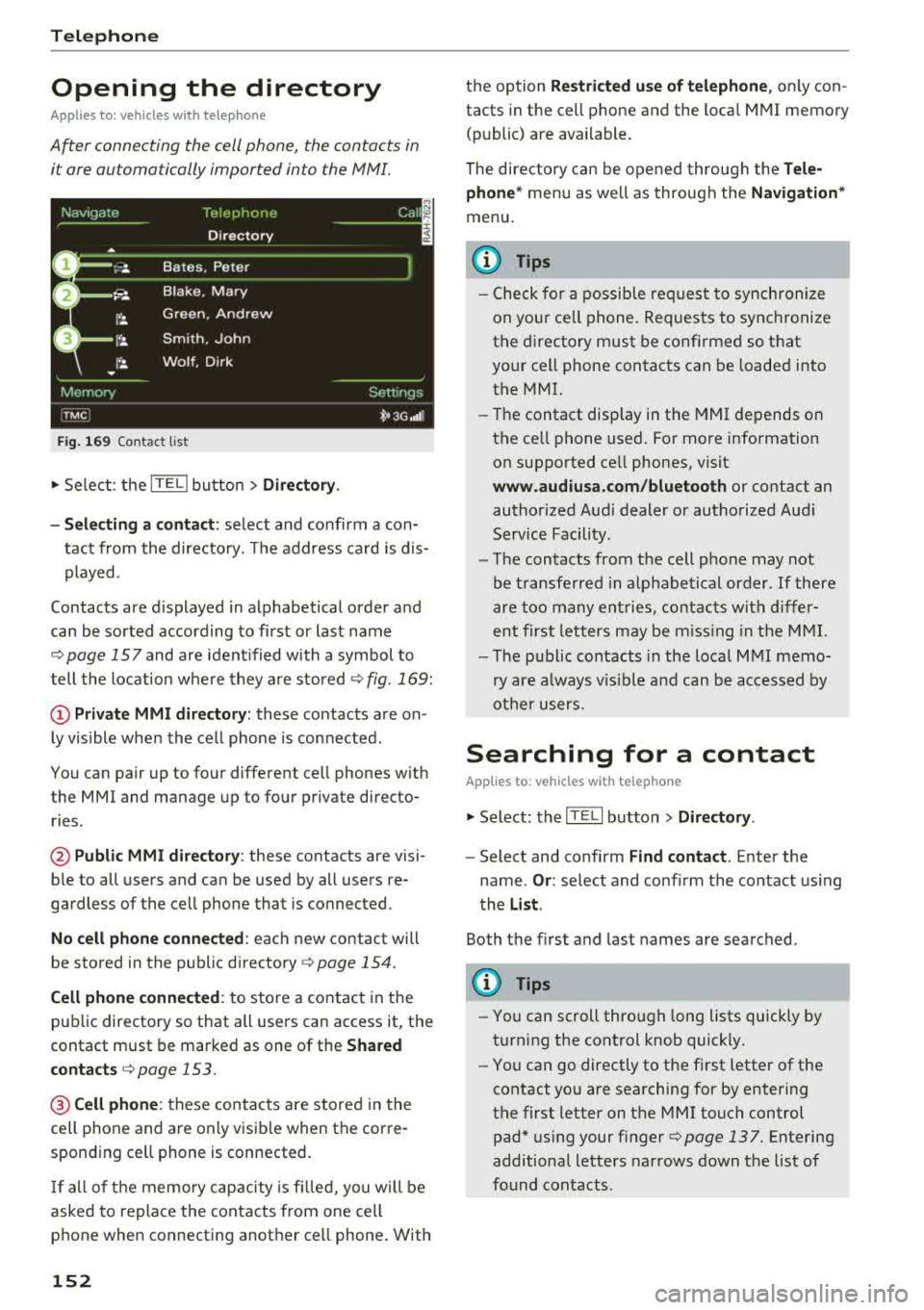
Fig. 169 Contact list
.,. Select: the ITEL! button> Directory .
- Selecting a contact :
select and confirm a con
tact from the directory. The address card is dis
played.
Contacts are displayed in alphabetical order and
can be sorted according to first or last name
¢page 157 and are ident ified with a symbol to
tell the location where they are stored
¢ fig . 169:
(D Private MMI directory: these contacts are on
ly vis ible when the cell phone is connected .
You can pair up to four different cell phones with
the MMI and manage up to four private directo
ries .
@Public MMI directory: these contacts are visi
ble to all users and can be used by all users re
gardless of the cell phone that is connected.
No cell phone connected : each new contact will
be stored in the public
directory ¢ page 154.
Cell phone connected : to store a contact in the
public directory so that all users can access it, the
contact must be marked as one of the
Shared
contacts
¢ page 153 .
@Cellphone : these contacts are stored in the
cell phone and are only visible when the corre
sponding ce ll phone is connected.
If all of the memory capacity is filled, you will be
asked to replace the contacts from one cell
phone when connecting another ce ll phone . With
152
the option Restricted use of telephone , only con
tacts in the cell phone and the loca l MMI memory
(public) are available.
The directory can be opened through the
Tele
phone*
menu as we ll as through the Navigation*
menu.
(D Tips
- Check for a possib le req uest to synch ronize
on your ce ll phone. Requests to synchronize
the directory must be confirmed so that
your cell phone contacts can be loaded into
the MMI.
- Th e contact disp lay in the MMI depends on
the ce ll phone used. For more information
on supported ce ll phones, visit
www.audiusa.com/bluetooth or contact an
authorized Audi dealer or authorized Audi
Service Facility.
- The contacts from the cell phone may not
be transferred in alphabetical order . If there
are too many entries, contacts with differ
ent first letters may be missing in the MMI.
- The publ ic contacts in the local
MMI memo
ry are always vis ible and can be accessed by
other users.
Searching for a contact
Applies to: vehicles with telephone
.,. Select: the ITELI button > Directory .
-Select and confirm Find contact. Enter the
name .
Or: select and conf irm the contact using
the
List .
Both the first and last names are searched.
(D Tips
- You can scroll through long lists quickly by
turning the control knob quickly.
- You can go directly to the first letter of the
contact you are searching for by entering
the first letter on the MMI touch control
pad* using your
finger¢ page 137. Entering
additional letters narrows down the list of
found contacts .
Page 160 of 356
Audi connect
Audi connect Introduction
A pp lies to: ve hicles w ith Audi co nnect
With Audi connect services, online information is
transmitted and integrated directly in the vehi
cle.
A mobi le end dev ice can be used to access the In
ternet through a Wi-Fi hotspot, either when the
vehicle is stationary or from the rear seat when
the vehicle is in motion.
A separate Aud i connect SIM card provided by
Audi connect is used to access Audi connect se rv
ices .
A WARNING
- To reduce the risk of an accident, on ly use
Audi connect serv ices when road and traff ic
condit ions permit. Read and follow the
guidelines prov ided
in c:> page 135 .
-Use the Audi connect serv ices w ith a Wi-Fi
hotspot o nly in the rear seat when the veh i
cle is in mot ion or only when the vehicle is
stationary to reduce the risk of an accident .
@ Note
Audi connect is designed for use only with the
prov ided Audi SIM card. Audi AG is not liable
for the consequences of using other SIM
cards.
(D Tips
Read and follow the notes about Audi con
nect before starting it
c:>page 163 .
Setup
Requirements for Audi connect
An Internet connection is required to use Audi
connect. The following requirements must be
met to establish a connection:
- You must be in an area that is covered by your
provider.
- Your Audi S IM card must be inserted in the
MM I SIM card reader
c:>page 158.
158
-
-A data connection must be configured for Audi
connect services
c:> page 162.
Using the SIM card reader
App lies to: vehicles wit h Audi connect
Audi multimedia
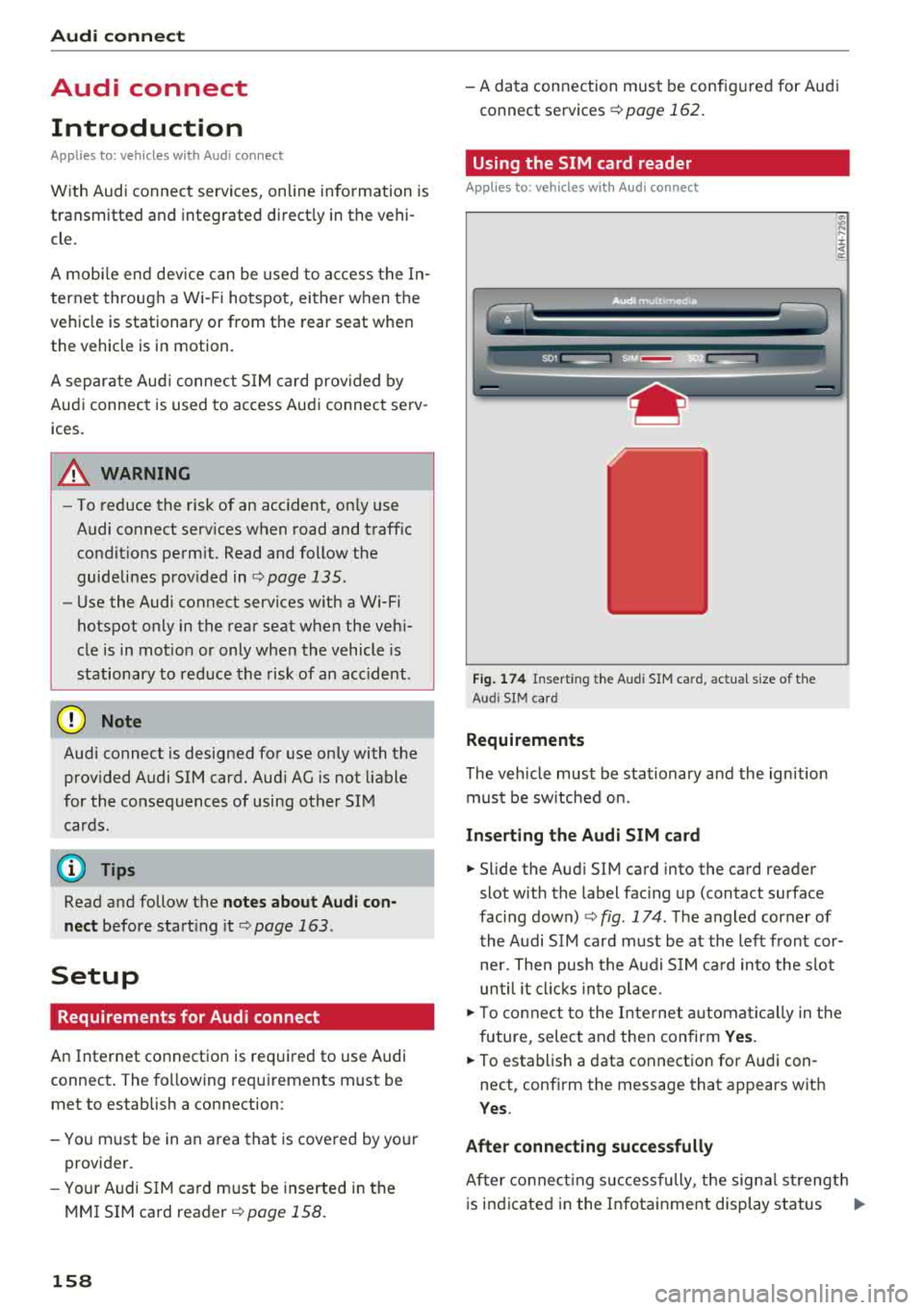
Fig. 174 Insert ing the Aud i SIM ca rd, actua l size of t he
Aud i SIM card
Requirements
The vehicle must be stationary and the ignition
must be switched on.
Inserting the Audi SIM card
~ .... :c .. a:
.,. Slide the Aud i SIM card into the card reader
slot with the label facing up (contact surface
facing down)
c:> fig . 174 . The angled corner of
the Audi SIM card must be at the left front cor
ner. Then push the Audi SIM card into the slot
until it clicks into place .
.,. To connect to the Internet automatically in the
future, select and then confirm Yes.
.,. To establish a data connection for Audi con
nect, confirm the message that appears wit h
Yes .
After connecting successfully
After co nn ectin g successfully, the signa l strength
is indicated in the Infotainment display status
..,.
Page 163 of 356
u. co .... N
" N .... 0 0 :c '
my Audi Account <=> page 168 or on line map
view
<=> page 17 2.
- Traffic information (Sirius): receive informa
tion about accidents, road construction and other incidents
c;,page 176
Audi connect services on the phone
Applies to: vehicles with Audi connect
The follow ing Audi connect serv ices are currently
ava ilable:
- Storing contacts on yo ur computer using your
myAudi Account and loading the contacts into
the MMI directory
c:;, page 154
Wi-Fi hotspot
Applies to: vehicles with Audi connect
You can use the MMI as a Wi-Fi hotspot to con
nect up to eight wireless devices to the Internet. While driving , restricted use of non-secured,
light, small wireless devices is only possible from the rear of the vehicle.
.,. Select : the IT EL! button > Settings control but-
ton
> Wi-Fi settings .
The following settings can be modified in the Wi
Fi settings
menu:
Wi-Fi active
The MMI Wi-Fi hotspot is deactivated at the fac
tory. Your Wi-Fi hotspot must be activated and
visible to establish a connection between your ve hicle and your w ireless device .
-Off : the MMI Wi-Fi hotspot is deactivated. An
Internet connection is not poss ible.
- Visible : th e MMI Wi-Fi hotspot is active and can
be used to connect to the Internet.
-Invisible : the MMI Wi-Fi hotspot is active but
not visib le to other devices. A connection can
not be established with a new w ireless device.
The Wi-Fi connection between your vehicle and
your wire less device (laptop, cell phone) is en
crypted. To establish a connection, yo u must en
ter the following settings when setting up your
wire less device. You can change them if necessa
ry.
Audi connect
- Network ID (SSID) :
name of the Wi-Fi net
work .
-Encryption type : WEP , WPA or WPA2
-Password : depending on the encrypt ion type, a
passwo rd may be generated in the MMI that is
used to encrypt the wireless connection. The
password can be changed. Be sure to se lect a
secure password. For t he WEP encryption type,
the password must be exactly 13 characters.
For the WPA or the WPA2 encrypt ion types, the
password must be at least
8 (maximum of 63)
characters.
- Apply settings : the modified settings are ap
plied to the MMI. You must then update the
changes in your mobile wirel ess device .
A WARNING
-
-As the driver, do not allow usage of the Wi
Fi hotspot to distract you from driv in g, as
this could increase the risk of an accident.
-It is only safe to use laptops and similar mo
b ile devices when the vehicl e is stationary
beca use, like all loose objects, they could be
thrown around the inside of the vehicle in a
cras h and cause serious injuries . Store these
types of devices securely while driving.
- Do not use any wireless devices on the front
seats within range of the airbags whi le driv
ing. Also read the warnings in the chapter
c:;, page 208.
@ Note
-Under some conditions, certain mobile devi
ces and operating systems may automati
cally sw itch from your vehicle's Wi-Fi hot
spot to the device's mobile data connection.
In that event, standard text and data usage
rates would apply wh ile the device's mobile
data connect ion is in use. Please refer to
documentation provided by your mobile de
vice's manufacture and your data carrier for
details, rela ted terms and privacy state
ment .
- You are respons ible for all precautions tak
en for data protection, anti-virus protection
and protection against loss of data on mo
bile devices th at are used to access the In
ternet through the Wi-Fi hotspot.
161