phone AUDI A8 2020 Owner's Manual
[x] Cancel search | Manufacturer: AUDI, Model Year: 2020, Model line: A8, Model: AUDI A8 2020Pages: 360, PDF Size: 95.38 MB
Page 203 of 360
4N0012721BD
Telephone
After connecting successfully
Information about the connected profiles will ap-
pear. You can also change the profiles later
=> page 269.
The cell phone contacts are automatically loaded
in the MMI. This process can take several mi-
nutes, depending on the number of contacts.
Depending on your cell phone and the connection
type, you can use the following functions:
Handsfree
Requirement: your cell phone must be connected
to the MMI via a Bluetooth Hands Free Profile
(Bluetooth HFP).
You can use the hands-free system. You can make
calls using the antenna on your mobile device.
Sending and receiving messages
See > page 208.
() Note
Read the information about Audi connect, and
be sure to note the connectivity costs section
=> page 216.
@) Tips
— You can apply additional settings to con-
nected mobile devices under Connected de-
vices > page 268.
— You can also search for the MMI on your mo-
bile device using the Bluetooth device
search.
— You only have to pair your device one time.
Bluetooth devices that are already paired
automatically connect to the MMI when the
Bluetooth function is switched on, when
they are within range, and when the ignition
is switched on. The last connected mobile
device is given first priority.
— Pay attention to any system prompts dis-
played on your mobile device or the MMI,
for example if the system should connect
automatically in the future. Depending on
D_ SIM card installed in the vehicle at the factory.
2) Not available in all countries.
the mobile device, you may also need to
download contacts and confirm access to
your messages separately.
— When leaving the vehicle, the Bluetooth
connection to the mobile device will auto-
matically disconnect. Depending on your
mobile device, phone calls in progress may
be automatically redirected from the MMI
to your mobile device so that you can con-
tinue the call on your phone.
— When the car phone or data module func-
tion* is switched on, Audi connect Infotain-
ment* is available through the embedded
SIM card})2).
Using two telephones
Applies to: vehicles with telephone, and Audi phone box
You can connect two mobile devices to the MMI,
for example your business and your personal mo-
bile device. You can use both mobile devices to
make calls in the vehicle.
Connecting another mobile device
Requirement: a mobile device must be connected
to the MMI.
> Applies to: MMI: Select on the home screen:
PHONE [?. Follow the system instructions, or
> Applies to: MMI: Select on the home screen:
SETTINGS > Connected devices > Telephone 1
or Telephone 2 > New connection.
See > page 200, Connecting a cell phone via
Bluetooth.
Switching between two mobile devices
Requirement: phone 1 and phone 2 must be con-
nected to the MMI.
> Applies to: MMI: Select on the home screen:
PHONE > J.
201
Page 204 of 360
Telephone
Disconnecting a mobile device
Applies to: vehicles with telephone
The mobile device will be disconnected from the
MMI and removed from the list of paired devices.
> To disconnect a connected device, use the con-
nection manager > page 268.
Using the Audi phone
box
Applies to: vehicles with Audi phone box
RAH-9151
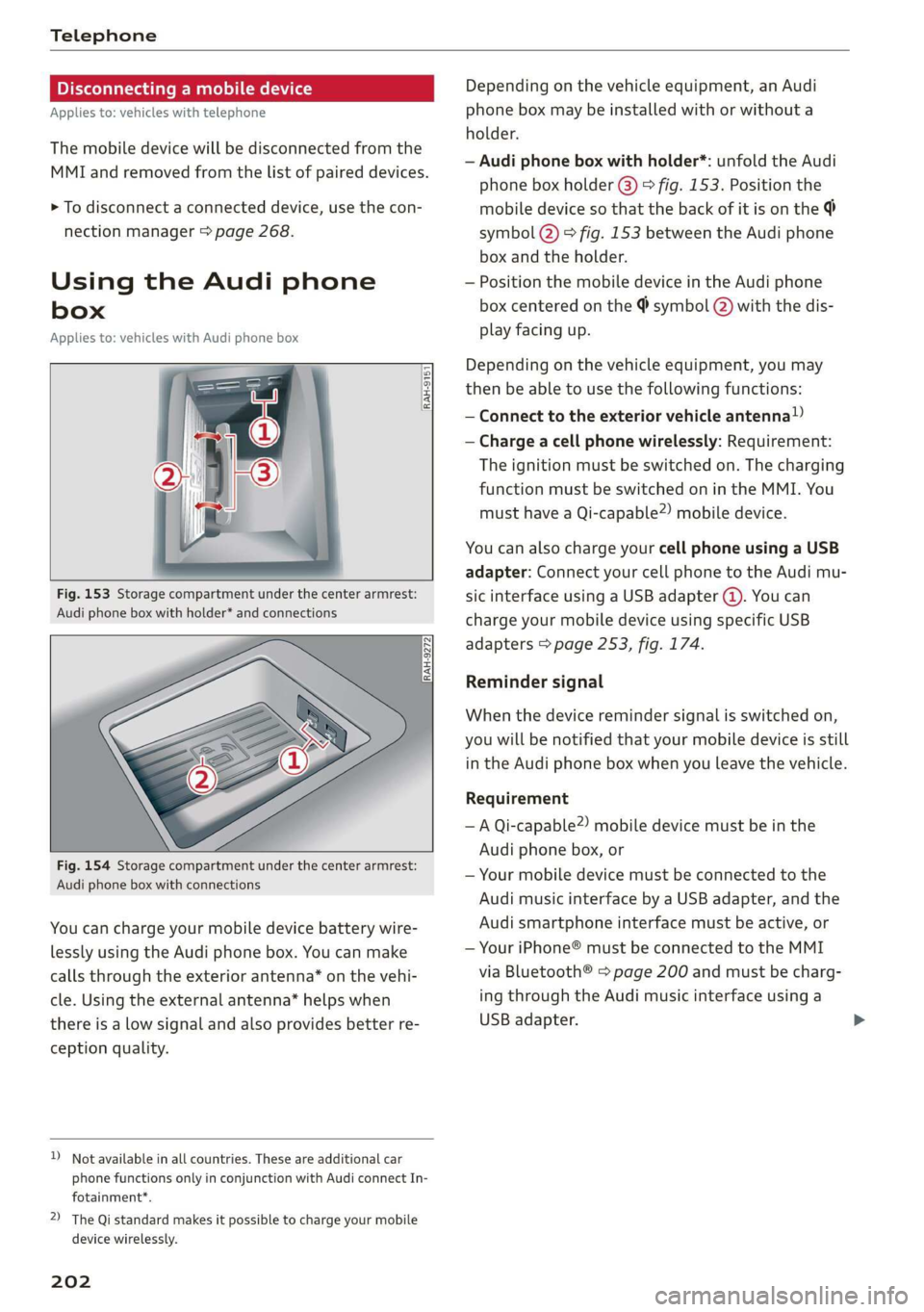
Fig. 153 Storage compartment under the center armrest:
Audi phone box with holder* and connections
Fig. 154 Storage compartment under the center armrest:
Audi phone box with connections
You can charge your mobile device battery wire-
lessly using the Audi phone box. You can make
calls through the exterior antenna” on the vehi-
cle. Using the external antenna” helps when
there is a low signal and also provides better re-
ception quality.
D_ Not available in all countries. These are additional car
phone functions only in conjunction with Audi connect In-
fotainment*.
2) The Qi standard makes it possible to charge your mobile
device wirelessly.
202
Depending on the vehicle equipment, an Audi
phone box may be installed with or without a
holder.
— Audi phone box with holder*: unfold the Audi
phone box holder @) © fig. 153. Position the
mobile device so that the back of it is on the
symbol @) © fig. 153 between the Audi phone
box and the holder.
— Position the mobile device in the Audi phone
box centered on the @ symbol @ with the dis-
play facing up.
Depending on the vehicle equipment, you may
then be able to use the following functions:
— Connect to the exterior vehicle antenna!)
— Charge a cell phone wirelessly: Requirement:
The ignition must be switched on. The charging
function must be switched on in the MMI. You
must have a Qi-capable2) mobile device.
You can also charge your cell phone using a USB
adapter: Connect your cell phone to the Audi mu-
sic interface using a USB adapter (@). You can
charge your mobile device using specific USB
adapters > page 253, fig. 174.
Reminder signal
When the device reminder signal is switched on,
you will be notified that your mobile device is still
in the Audi phone box when you leave the vehicle.
Requirement
—A Qi-capable”) mobile device must be in the
Audi phone box, or
— Your mobile device must be connected to the
Audi music interface by a USB adapter, and the
Audi smartphone interface must be active, or
— Your iPhone® must be connected to the MMI
via Bluetooth® > page 200 and must be charg-
ing through the Audi music interface using a
USB adapter.
Page 205 of 360

4N0012721BD
Telephone
Applies to: MMI: Select on the home screen: SET-
TINGS > General > Reminder signal and mobile
device wireless charging .
The following settings are available:
— Signal tone
— Spoken cue": this setting is switched on at the
factory.
— Off
— Mobile device charging notification*: when
this function is switched on, the charge status
of your mobile device is displayed. You will also
be reminded not to forget your mobile device
when leaving the vehicle. Messages will appear
in the MMI when using your Audi phone box in
the front*. Messages will appear on the Rear
Seat
Remote when using the Audi phone box in
the rear*.
— Front wireless charging: when this function is
switched on, you can charge your Qi-capable
mobile device wirelessly in the Audi phone box.
— Rear wireless charging”: when the function is
switched on, you can charge your Qi-capable
mobile device wirelessly in the rear* Audi phone
box.
If you have an implant, consult a medical
specialist if you have any questions. You can
also switch the function for wireless charg-
ing in the Audi phone box on and off sepa-
rately for the front* and rear*. You can con-
tinue to charge your mobile device using a
cable connection.
ZA WARNING
— Loose objects can be thrown around the ve-
hicle interior during sudden driving or brak-
ing maneuvers, which increases the risk of
an accident. Store objects securely while
driving.
— The mobile device may become hot during
wireless charging. Pay attention to the tem-
perature of your mobile device and be care-
ful when removing it from the Audi phone
box.
— An alternating magnetic field is used for
wireless charging. Maintain a minimum dis-
tance of approximately 2.4 in (6 cm) to the
Audi phone box charging plate. The thresh-
olds for prolonged exposure at this distance
comply with ICNIRP1998. Therefore, inter-
actions such as irritation of sensory organs,
malfunctions of active implants (such as
pacemakers, infusion pumps, or neurosti-
mulators) or effects on passive implants
(such as prosthetic limbs) is highly unlikely.
C) Note
Applicable to U.S.A.
Operation of the Audi phone box is subject to
the following requirements of the Federal
Communications Commission:
— This is a CONSUMER device.
— BEFORE USE, you MUST REGISTER THIS DE-
VICE with your wireless provider and have
your provider’s consent. Most wireless pro-
viders consent to the use of signal boosters.
Some providers may not consent to the use
of this device on their network. If you are
unsure, contact your service provider.
— You MUST operate this device with approved
antennas
and cables as specified by the
manufacturer. Antennas MUST be installed
at least 20 cm (8 inches) from any person.
— You MUST cease operating this device im-
mediately if requested by the FCC or a li-
censed wireless service provider.
— WARNING: E911 location information may
not be provided or may be inaccurate for
calls served by using this device.
() Note
Applicable to Canada
In Canada, operation of a Zone Enhancer,
such as an Audi Phone Box, is subject to the
following requirements of the Innovation,
Science and Economic Development Canada
(ISED):
— This is a CONSUMER device.
— BEFORE USE, you MUST meet all require-
ments set out in CPC-2-1-05.
— You MUST operate this device with approved
antennas
and cables as specified by the
manufacturer. Antennas MUST NOT be in-
stalled within 20 cm of any person.
203
Page 206 of 360

Telephone
— You MUST cease operating this device im-
mediately if requested by ISED or a licensed
wireless service provider.
— WARNING: £911 location information may
not be provided or may be inaccurate for
calls served by using this device.
: se) s ve
Ov - er ne
— Only one mobile device at a time can be | | Ye)
|
ees) i
Using the telephone
ONT are mat) yada mired elie
Applies to: vehicles with telephone
charged wirelessly in the Audi phone box.
— You can switch the front and rear Audi
phone box charging function on and off sep-
arately.
— Strong transmission quality* cannot be
guaranteed if more than one mobile device
is in the box.
Fig. 155 Upper display: selection menu
Requirement: A mobile device must be connected
to the MMI > page 200.
> Applies to: MMI: Select on the home screen:
—To reduce the risk of malfunctions, make PHONE
sure the mobile device is positioned correct-
ly in the Audi phone box. The following phone functions will be available:
— Make sure there are no objects between the @ Search
Audi phone box and the mobile device. @ Calllist 00.0.0... eee 204
— Placing the mobile device in a bag or protec- @® Favorites ......... 0... eee eee 205
tive sleeve inside the Audi phone box can in- @® Contacts ..............222255. 205
terfere with the connection to the external © Voicemail 206
antenna*.
Dial OP ou © snseene © w seeninss « o somnase 206
— Metallic objects in the Audi phone box block 1) 3 hn _ ised
the wireless charging of your mobile device @ Swit Ing Retweenitwemoplsise 210
MIGOS! «axons s i conve vw anaminn + x swavaws a &
and calls made using the exterior antenna’*.
—The maximum charging output is 5 W.
— The charging time and temperature will vary
depending on the mobile device being used.
— If you are not using the Audi phone box with
the holder*, you can close the holder @)
The selected telephone functions will also be
available in the instrument cluster > page 212
and the Rear Seat Remote* > page 212.
Covey em ae] Me
> fig. 153. Applies to: vehicles with telephone
— You can purchase a USB adapter from an au-
thorized Audi dealer or authorized Audi Call list @-- eos
Smith, John “@ 2018-10-28 fo)
ee caeer 9:31AM
Service Facility, or at specialty stores.
— Audi recommends using Audi Genuine Ac- Albert, Simon (3) PONE S to)
cessories. Audi has verified their reliability,
safety, and suitability.
204
Pe ee ae eT
PUTT ale aeay
ec aR en cd
PNT Me ea
Mobile 001712345678
Fig. 156 Upper display: Call list
ErEn
2018-10-28
2:01PM
PO ate}
EL CS)
Requirement: the call list must contain a phone
number.
> Applies to: MMI: Select on the home screen:
PHONE > Call list.
Page 207 of 360

4N0012721BD
Telephone
Possible call list symbols:
Missed calls
Dialed numbers
Received calls
Edit call list
Displaying a business card ....... 205
©QOOCLO Number of interactions with a con-
tact
If more than one interaction with a contact has
already taken place, the last one is always dis-
played in the form of an arrow (), @) or @).
Press and hold a contact or a phone number in
the list until the Options menu appears. Depend-
ing on your mobile device, the following options
may be available:
— Save as a shortcut > page 23, Shortcuts.
— Edit telephone number: edit a phone number
before dialing it. Press Dial and start the call.
— Show history*: Requirement: you must have al-
ready had more than one interaction with a
contact. All interactions with a contact ora
number are displayed.
— Store as favorite > page 205.
— Send text message > page 208.
— Send e-mail > page 209.
@) Tips
The call list can only be edited via the MMI.
Managing favorites
Applies to: vehicles with telephone
You can store the desired number for a contact as
a shortcut in the favorites list.
Accessing favorites
> Applies to: MMI: Select on the home screen:
PHONE > Favorites.
Storing an existing phone number as a
favorite:
> Press Call list.
> Press and hold a contact in the list until the Op-
tions menu appears.
> Press Store as favorite. The favorite has been
stored. will appear briefly.
Deleting stored favorites
> Select: Favorites > Z > one or multiple favor-
ites or Select all > Delete > Done.
(i) Tips
If there are multiple mobile devices, you can
create separate favorites in the MMI for each
mobile device.
Opening contacts
Applies to: vehicles with telephone
leleaa iol
Teen)
nin Pas
Crees
0049841123456
Auto-Union-StraBe
Ceeearecr
[email protected]
Fig. 157 Upper display: contact info
You can connect multiple mobile devices to the
MMI and manage up to four private phone books
in the MMI.
Requirement: a mobile device must be connected
to the MMI > page 200. You must have at least
one contact stored in your mobile device.
> Applies to: MMI: Select on the home screen:
PHONE > Contacts.
The contacts are displayed in alphabetical order.
You can change the sort order > page 211, Sort
order.
Displaying a business card
To open a business card, press on a contact in the
directory. The business card shows you details
about a contact.
If you press on a contact in the business card,
there are multiple options available:
@ Storinga favorite .............. 205
@® Options
® Call
@ Send text message ............. 208
© Start navigation
© Sende-mail ..............0.00- 209 >
205
Page 208 of 360
Telephone
Business card options
Press 2).
— Send contact*: you can select Text message or
E-mail > page 208.
— Add destination: you can add a business or pri-
vate address > page 235, Contacts as naviga-
tion destinations.
— Read out name: the MMI automatically cre-
ates a name tag that can be read aloud for each
entry > page 38.
— Save asa shortcut > page 23, Shortcuts.
Contact options
Press and hold a contact in the list until the Op-
tions menu appears.
— Send contact: you can select Text message or
E-mail > page 208.
— Send text message > page 208.
— Send e-mail > page 209.
— Store as favorite > page 205.
— Save as a shortcut > page 23, Shortcuts.
Deleting contacts
— Deleting all contacts: select: Contacts > Z >
Delete all. All contacts are deleted only in the
MMI.
— Deleting imported contacts: requirement: you
must have imported at least one contact. Se-
lect: Contacts > Z > one or more contacts, or
Select all > Delete imported contacts > Done.
The imported contacts are deleted.
G) Tips
— Pay attention to any synchronization
prompts on your mobile device when down-
loading contacts.
— Only the contacts of the mobile device being
actively used are displayed.
— The contacts from the mobile device may
not be transferred in alphabetical order. If
there are too many entries, contacts with
different first letters may be missing in the
MMI.
) Not available in all languages.
206
— If contacts are loaded from the mobile de-
vice into the MMI, the contacts on the SIM
card will no longer be displayed in the MMI.
— The contacts in the local MMI memory are
always visible and can be accessed by other
users.
— After switching off the ignition and exiting
the vehicle, the mobile device directory will
be loaded when the MMI is started again if
the mobile device is within range and the
Bluetooth function is switched on in the mo-
bile device and the MMI.
— Only the contacts in the local MMI memory
can be deleted.
Listening to voicemail
Applies to: vehicles with telephone
> Applies to: MMI: Select on the home screen:
PHONE > Voicemail.
Requirement: there must be no voicemail num-
ber stored.
» Entering the voicemail number: enter the de-
sired number. Press OK.
Requirement: a voicemail number must be stor-
ed.
> Dialing the voicemail number: press Voice-
mail. The call begins immediately.
@) Tips
This service must be set up and activated in
advance by the cell phone service provider.
Dialing a phone number
Applies to: vehicles with telephone
Depending on the vehicle equipment, you may
have the following options for dialing a phone
number:
— Using text input in the MMI = page 24.
— Using voice operation > page 38.
Page 209 of 360
4N0012721BD
Telephone
Making an emergency call
Applies to: vehicles with telephone
Requirement: a mobile device must be connected
to the MMI via Bluetooth.
> Applies to: MMI: Select on the home screen:
PHONE > Dial number > the emergency call
number specific to the country (for example,
911) > Dial.
ZA WARNING
— Because your phone works with radio sig-
nals, a connection cannot be guaranteed un-
der all circumstances. Do not rely on only
your phone when it comes to essential com-
munication (such as during a medical emer-
gency).
— Always follow the instructions given by the
emergency personnel during an emergency
call and only end the call when they instruct
you to do so.
Answering/ending a call
Applies to: vehicles with telephone
> To accept or end a call, press the @ button on
the multifunction steering wheel. Operating
=> page 13.
You can use the following options on the MMI
when there is an incoming call:
> Answering an incoming call: press Answer.
> Declining a call: press Decline.
> Declining a call with a text message”: Require-
ment: the function must be enabled in the set-
tings. Press Decline with text message.
> Silencing the ringtone: press Mute.
@ Tips
The radio or media playback is muted during a
phone call.
During a phone call
Applies to: vehicles with telephone
The following options may be possible during a
call depending on the mobile device being used
and the type of connection:
— End call: end the current phone call.
— Mute: the other person on the call will no lon-
ger be able to hear you. You will still be able to
hear the other person. To switch the micro-
phone back on, press Unmute.
— Hold/Resume: place your current phone call on
hold and answer another.
— Send tone sequence: press Numbers. You can
enter tone sequences (DTMF) and send them to
the other party on the call.
— Accepting an incoming call: if a phone call
comes in during another call, you can either Re-
place the current call with the incoming call, or
use Answer to put the current call on hold. The
incoming call will be answered.
— Ignoring an incoming call: If you select De-
cline, the incoming call will be declined.
— Muting the incoming call: press Mute.
— Other call options: press More.
Requirement: two phone calls must be in prog-
ress.
— Conference call*: add a call on hold and up to
five active parties (depending on the cell phone
service provider) to the conference call.
— Swap call: alternate between two phone calls
while one of the calls is on hold. Press on the
respective call. Selecting End call will end the
active phone call. A call that was placed on hold
stays on hold and can be taken off hold with Re-
sume.
— Accepting an incoming call: if a phone call
comes in during another call and when there is
a call on hold, you can either Replace the cur-
rent call with the incoming call, or use Answer
to put the current call on hold. The incoming
call will be answered.
Press More.
— Transferring a call*: press Transfer call to mo-
bile device to transfer the existing call from the
MMI to your mobile device or Bluetooth® head-
set”.
— Transfer audio to Rear Seat Remote”: press
Transfer audio to Rear Seat Remote to transfer
the current phone call from the MMI or Blue-
tooth® headset* to the Rear Seat Remote.
— Switch to hands-free mode*: Requirement: you
must have a phone call in progress on your
207
>
Page 210 of 360
Telephone
mobile device or your Rear Seat Remote*. Press
Switch to hands-free to transfer the call from
your mobile device or Rear Seat Remote* back
to the MMI.
— Add call: Select: Call list/Contacts/Favorites >
select an entry from the list or press Dial
phone number and enter a phone number.
Then the active call will be on hold.
— Remove conf. member*: Requirement: you
must have started a conference call. You can re-
move conference call members individually
when a conference call is active. Press on the
contact you would like to remove.
— Microphone input level: you can adjust the mi-
crophone input level during a phone call using
the slider.
(i) Tips
—To be notified of an incoming call during a
phone call, the call waiting function in your
mobile device must be switched on when
using the Handsfree profile.
— When leaving the vehicle, the Bluetooth
connection to the mobile device will auto-
matically disconnect. Depending on your
mobile device, phone calls in progress may
be automatically redirected from the MMI
to your mobile device so that you can con-
tinue the call on your phone.
Messages
Text messages
Applies to: vehicles with telephone
Depending on the mobile device being used and
the mobile network contract, you may be able to
receive and send text messages using the MMI.
Requirement: your mobile device must be con-
nected to the MMI via Bluetooth Message Access
Profile (Bluetooth MAP) > page 200.
> Applies to: MMI: Select on the home screen:
MESSAGES > (¢) > Text message (SIM card)*/
text message (phone 1)/text message (phone
2)*.
) Not available in all languages.
208
Inboxes
— New text message: press on a template in the
list or dictate a text message. Press Add and
select one or more recipients from your con-
tacts. To remove a recipient, press Delete. Press
Send.
— Inbox: displays all received text messages.
— Sent: displays all sent text messages.
— Outbox": displays all text messages to be sent.
— Drafts*: text messages that have not been sent
yet by the mobile device are displayed on the
MMI.
— Deleted*: deleted text messages are displayed.
— User-defined*: folders defined by the user are
transferred from your mobile device.
Message options
The following options are available when you se-
lect a text message:
— Read out* the text message”).
— Reply: a reply can be sent to the selected mes-
sage in the Inbox.
— To switch to the previous or the next message,
press < or >.
— More: options
When you press More, the following options are
available:
— Call: Requirement: a number must be stored.
You can call the contact.
— Forward: the selected text message can be for-
warded to other recipients. Text can also be
added before sending.
— Navigate: Requirement: the contact must have
a navigation address stored with it in the direc-
tory. You can start route guidance.
— Extract numbers: Requirement: the message
must contain a number. You can extract a num-
ber from a text message.
— Send again: Requirement: the text message
must be in the Outbox. The selected text mes-
sage can be resent.
Page 211 of 360
4N0012721BD
Telephone
Press and hold an entry in the Inbox until the Op-
tions menu appears.
— Reply: a reply can be sent to the selected mes-
sage in the Inbox.
— Forward: the selected text message can be for-
warded to other recipients. Text can also be
added before sending.
Settings
Press ©}.
— Automatically forward text message to mobile
device*)): when this function is switched on,
text messages will also be automatically stored
on your mobile device.
— New text message notification: when this
function is switched on, you will be notified
when new text messages are received. New text
messages are indicated with an envelope Min
the MMI status bar.
— Text message center*: the number for the text
message center of your cell phone service pro-
vider is displayed. If no number has been stor-
ed yet, you can enter the text message center
number.
— Delete text messages from SIM card”: if the
memory capacity on the SIM card is full, an en-
velope with a line through it is displayed in the
MMI status bar. You can continue to send text
messages, but you cannot receive new text
messages. To delete all sent text messages
from the SIM card, select All sent messages. To
delete all read text messages from the SIM
card, select All read messages.
Delete text message
Select: a mailbox > Z > one or more text mes-
sages > Delete > Done.
@ Tips
— Please note that you may have to activate
the receiving and sending of text messages
depending on the SIM card being used (for
example, when using a multi-SIM).
D Function is not supported on all mobile devices.
2) Not available in all languages.
— Messages that are deleted in the MMI are
also deleted in the mobile device automati-
cally.
— Only new received messages may be dis-
played depending on your mobile device.
Applies to: vehicles with telephone
Depending on the type of mobile device being
used, you may be able to receive and send e-
mails through the MMI.
Requirement: your mobile device must be con-
nected to the MMI via Bluetooth Message Access
Profile (Bluetooth MAP) > page 200.
> Applies to: MMI: Select on the home screen:
MESSAGES > (©) > e-mail (telephone 1)/e-
mail (telephone 2)*.
Inboxes
— New e-mail: press on a template in the list.
Press Add and select one or more recipients
from your contacts. To remove one or all recipi-
ents, press Delete. Press Send.
— Inbox: displays all received e-mails. To update
the list, press Q.
— Sent: displays all sent e-mails.
— Outbox: displays all e-mails to be sent.
— Drafts: e-mails that have not been sent yet are
displayed.
— Deleted*: deleted e-mails are displayed.
— User-defined*: folders defined by the user are
transferred from your mobile device.
Message options
The following options are available when you se-
lect an e-mail:
— Read out* the e-mail2).
— Reply: a reply can be sent to the selected e-mail
in the Inbox.
— To switch to the previous or the next message,
press Cor >.
— More: options
209
Page 212 of 360

Telephone
When you press More, the following options may
be displayed depending on your mobile device
and the applicable mail folder:
— Call: Requirement: a number must be stored.
You
can call the contact.
— Forward: the selected e-mail can be forwarded
to other recipients. Text can also be added be-
fore sending.
— Extract e-mail add.: you can extract the e-mail
address from an e-mail.
— Navigate: Requirement: the contact must have
a navigation address stored with it in the direc-
tory. You can start route guidance.
— Extract numbers: Requirement: the text in the
e-mail must contain a number. You can extract
a number from an e-mail.
— Show all recipients*: you can display the recipi-
ents of an e-mail.
— Show attachmts.*: you can display a list of at-
tachments to an e-mail.
— Send again: the selected e-mail in the Outbox
and Sent mailboxes can be sent again.
Press and hold an entry in the Inbox until the Op-
tions menu appears.
— Reply: a reply can be sent to the selected e-
mail.
— Reply all: a reply can be sent for the selected e-
mail and it will be sent to all of the entered re-
cipients.
— Forward: the selected e-mail can be forwarded
to different recipients.
Settings
Press ©}.
— New e-mail notification: when this function is
switched on, you will be notified when new e-
mails are received. New e-mails are indicated
with an envelope Min the MMI status bar.
Deleting e-mails
Select: a mailbox > Z > one or more e-mails >
Delete > (Done).
@) Note
Read the information about Audi connect, and
be sure to note the connectivity costs section
=> page 216.
210
Settings
Phone settings
Applies to: vehicles with telephone
> Applies to: MMI: Select on the home screen:
PHONE > ©}.
Switching between two mobile devices
Requirement: phone 1 and phone 2 must be con-
nected to the MMI.
Switch telephones: the device name of the avail-
able mobile device is displayed. You can switch
the phone by pressing the button.
Private mode: call lists only in Rear Seat
Remote*
Applies to: vehicles with Rear Seat Remote
To allow contacts and call details to only be dis-
played on the Rear Seat Remote display, activate
private mode.
Declining a call with a text message*
When this function is switched on, you can de-
cline an incoming call with a text message.
Call options*
The following options may be available depend-
ing on the mobile device:
— Call forwarding: you can switch the forwarding
of incoming calls to your voicemail or to anoth-
er phone number on and off. You can check if
the function is activated or deactivated with
Status.
— Call waiting: you will be alerted to an incoming
call during a phone call when the function is
switched on. You can check if the function is ac-
tivated or deactivated with Status.
— Send own number: sending your phone num-
ber with an outgoing call can be switched on
and off. With the Net.-depen. setting, the set-
ting listed in the contract with the cell phone
service provider is used. The settings only apply
to the PHONE menu in the MMI. Please note
that the settings on your mobile device will ap-
ply after disconnecting the Bluetooth connec-
tion. You can determine which setting is active
with Status.