display AUDI Q2 2021 Owner´s Manual
[x] Cancel search | Manufacturer: AUDI, Model Year: 2021, Model line: Q2, Model: AUDI Q2 2021Pages: 364, PDF Size: 87.77 MB
Page 314 of 364
Wheels
more tyres, the driver is alerted by an indicator
lamp
0H ar|d a
message in the instrument cluster
display. If only one tyre is affected, the display
will indicate its position.
Each time you change a tyre, change the wheels
round or change the tyre pressures on your
vehi
cle (e.g. when switching from partial load to full
load and vice-versa), you must store the new tyre
pressures in the menu display
<=>page
311.
Mon
itoring of the tyre pressures is based on the tyre
pressures you have stored. The inflation pres
sures recommended for your vehicle are given on
the tyre pressure sticker
opage
307, Fig. 253.
The rolling circumference and vibration can
change and cause a tyre pressure warning if:
- The inflation pressure in one or more tyres is
too low.
- The tyre has suffered structural damage.
- The wheels were changed or the tyre pressures
were changed and the new tyre pressures were
not stored
<>page
311.
- The vehicLe load is not balanced (more load on
one side).
- There is more load on the wheels of one of the
axles (e.g. when towing a trailer or driving up
or down a gradient).
- You are driving with snow chains.
- You are driving with the temporary spare
wheel*.
- Only one wheel of an axle has been changed.
Indicator lamps
flfl - Loss of pressure on one or more tyres
o
A-
Check and change or repair the tyre(s). Check and
adjust the tyre pressures again on all four
wheels. Then store the tyre pressures in the
menu dispLay
opage
311.
IIJ'f.1
(Tyre pressure loss indicator) Tyre pressure:
System fault!.
If llil'f>1
appears and the indicator
LampBH in the
instrument cluster dispLay flashes
for approx. one minute and then remains lit after
you have switched on the ignition or while you
are driving, there is a fault in the system. Check
and adjust the tyre pressures for all four tyres
and store the
new
tyre pressures
•=>page
311. If
the indicator lamp does not go out or if it comes
on again after
a
short time, drive to a qualified
workshop without delay and have the fault
recti
fied.
®
No
- If
a
malfunction occurs in the ESC/ABS sys
tem,
the tyre pressure loss indicator may al
so be out of action.
-When driving with snow chains, a system
malfunction can occur.
-The tyre pressure Loss indicator on your Audi
is specially matched to "Audi Genuine Tyres"
^>page
305. We recommend that you use
these tyres.
- The tyre pressure Loss indicator can only
monitor the pressures of the tyres fitted on
the car. For this reason please regularly
check the tyre pressure of the spare wheel
in the luggage compartment so it can be
used if required.
A
WARNING
- If the tyre pressure loss indicator appears in
the instrument cluster display, slow down
immediately and avoid any severe braking or
steering manoeuvres. As soon as you can do
so safely, stop and check the tyres and the
tyre pressures.
- It is the driver's responsibility to ensure that
the tyre pressures are correct. For this rea
son you must check the tyre pressures
regu
larly.
- Under certain conditions (e.g. driving at
high speeds, on ice and snow or on poor
road surfaces) the tyre pressure loss indica
tor may not appear immediately.
- The use of run-flat tyres on your vehicLe is
NOT authorised! Unauthorised use can cause
an accident or damage your vehicle.
310
Page 318 of 364
Care of vehicle and cleaning
Component(s)
Paintwork
Carbon parts
Decals
Situation
Paint damage
Fuel overflow
Surface rust
Corrosion
Water no longer
pearls off clean paint
work
Paint has Lost its
shine,
gloss cannot
be restored by waxing
Residues, e.g. in
sects,
bird droppings,
resinous tree sap,
road salt
Fat-based stains, e.g.
cosmetics
or
sun lo
tion
Dirt/deposits
Dirt/deposits
Remedy
Refer to the vehicle data sticker for the paint no. and touch
up using a paint pen
^>page
342
Rinse with water without delay
Surface rust remover, apply wax afterwards; contact your
qualified workshop with any questions
Have it removed by your qualified workshop
Apply wax (at least twice a year)
Treat with a suitable polish; finish with wax coating if
pol
ish does not contain wax compounds
Remove immediately using water and a micro-fibre cloth
Remove immediately using
miLd
detergent3'
and a soft
cloth
Same treatment as painted parts
^page
312
Soft sponge with mild
detergent3'
a)
Mild detergent: not more than two tablespoons of
pH-neutral
detergent to one litre of water
Cleaning the interior
Component(s)
Windows
Ornamental trim/
mouldings
Plastic parts
Displays/instru
ment cluster
Controls and dis
plays
Seat belts
Situation
Dirt/deposits
Dirt/deposits
Dirt/deposits
Heavier dirt/deposits
Dirt/deposits
Dirt/deposits
Dirt/deposits
Remedy
Glass cleaning agent, then wipe dry
Mild
detergent3'
Damp cloth
Mild
detergent3';
solvent-free plastic cleaning agent if nec
essary
Soft cloth with LCD cleaner
Soft brush, then soft sponge with mild detergent3'
Mild detergent3' (allow to dry before retracting)
314
Page 320 of 364
Care of vehicle and cleaning
- Never clean the camera lens with cleaning
agents which are abrasive or contain alco
hol - danger of scratches and cracks ap
pearing.
- Windows and windscreen
- Remove snow and ice from windows and
exterior mirrors with a plastic scraper on
ly. To avoid scratches, the scraper should
only be pushed in one direction and not
moved to and fro.
- Never use warm or hot water to remove
snow and ice from windows and mirrors.
This could cause the glass to crack!
-To avoid damaging the heating element,
do not put stickers on the inner side of the
rear window.
- Ornamental trim/mouldings
- Do not use chrome cleaning agents.
- Paintwork
- The vehicle must be free of dirt and dust
before applying polish/wax - otherwise
the paintwork may be damaged.
- Do not polish/wax the vehicle in direct
sunLight - this can damage the paint!
- Do not attempt to polish out surface rust
deposits - this can damage the paint!
- Remove cosmetics and sun Lotion immedi
ately - otherwise the paintwork may be
damaged.
- Displays/instrument cluster
-The displays/instrument cluster and the
surrounding trim must not be cleaned
with a dry cloth - this can scratch the sur
faces!
- Before cleaning, ensure that the instru
ment cluster is switched off and
cool.
- Do not let any Liquid get between the in
strument cluster and the trim - risk of
damage!
- Do not exert heavy pressure on the head-
up display* when cleaning it. This could
push the dispLay out of its guide rails - risk
of damage!
- Control consoles
- Do not let any liquid get inside the control
consoles - risk of damage!
- Seat belts
- Do not remove the seat belts to clean
them.
- Do not use chemical cleaning agents, cor
rosive liquids, solvents or sharp instru
ments to clean the seat belts or their com
ponents - this can damage the belt web
bing!
- If
you
find any damage to the belt web
bing,
the belt fittings, the belt retractor or
the buckle, have the belt in question re
placed by
a
qualified workshop.
- Fabrics/leatherette/Alcantara
- Do not use leather care products,
sol
vents,
wax polish, shoe cream, stain
re
movers, or any similar products on leath
erette/Alcantara fabrics.
-To avoid damage, stubborn stains should
be removed by
a
qualified workshop.
- Never use steam cleaners, brushes, hard
sponges or similar utensils.
- Do not use the seat heating* to dry the
seats.
- Sharp-edged objects on clothing, such as
zip fasteners, rivets or belts, can also
damage the surface of the fabric.
- Please make sure you close any velcro fas
teners, e.g. on your clothing, as these
could otherwise damage the upholstery.
- Natural leather
- Do not use solvents, wax polish, shoe
cream,
stain removers, or any similar
products on leather fabrics.
- Sharp-edged objects on clothing, such as
zip fasteners, rivets or belts, can also
damage the surface of the fabric.
- Never use steam cleaners, brushes, hard
sponges or similar utensils.
- Do not use the seat heating* to dry the
seats.
- Avoid exposing leather to direct sunlight
for long periods, otherwise it may tend to
lose some of its colour. If the car is
Left
for
a prolonged period in the bright sun, it is
best
to cover the leather. •
316
Page 337 of 364
Fuses and bulbs
: -•.
-
i:i
m
R2 R3
F22
F-XII
F31
F30
:-:-.'
'.,
FM F43
F49
F!)3
F52
F51
R!,
a
R6
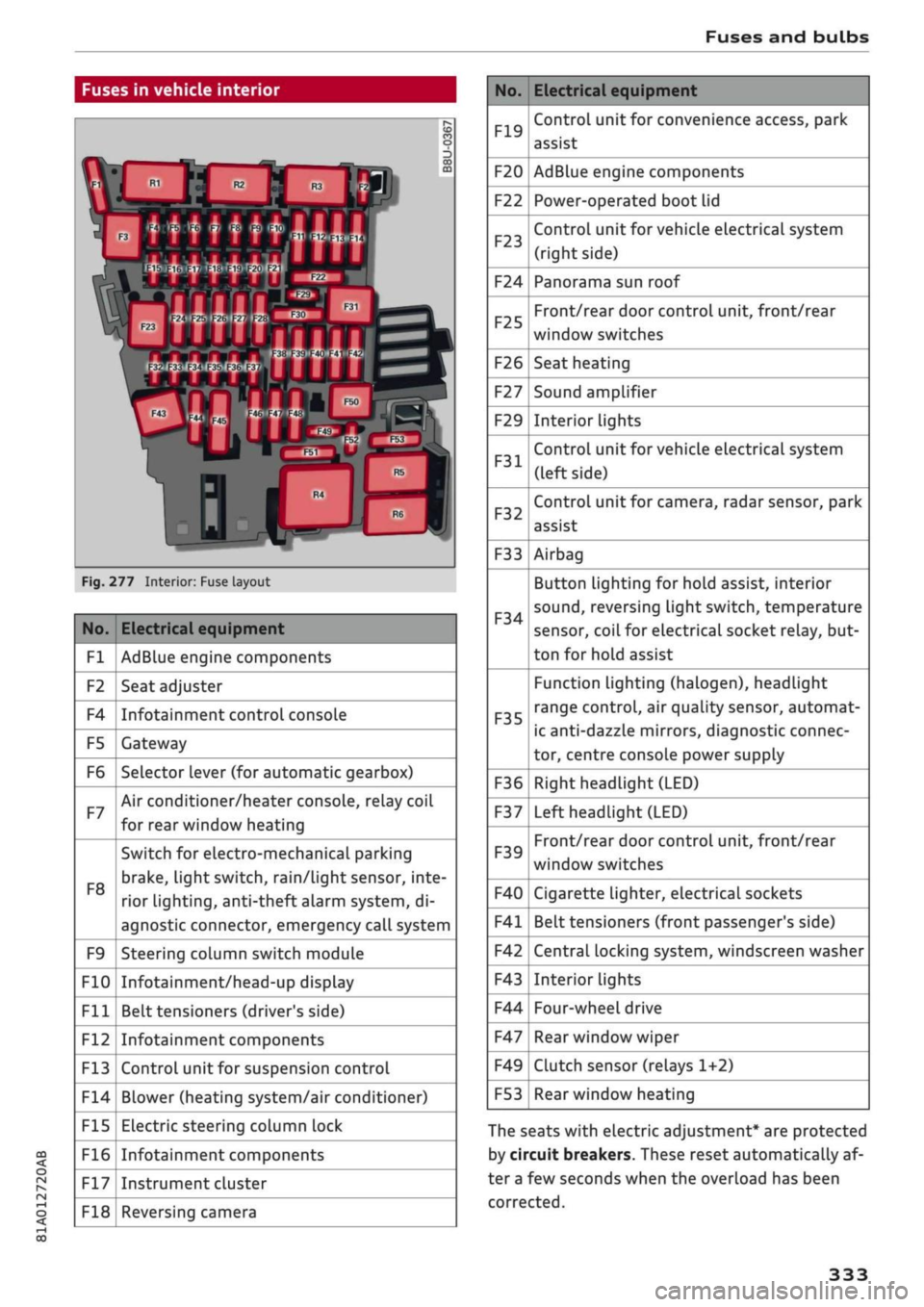
Fig.
277 Interior: Fuse layout
No.
Fl
F2
F4
F5
F6
F7
F8
F9
F10
Fll
F12
F13
F14
F15
F16
F17
F18
Electrical equipment
AdBlue engine components
Seat adjuster
Infotainment control console
Gateway
Selector lever (for automatic gearbox)
Air conditioner/heater console, relay coil
for rear window heating
Switch for electro-mechanical parking
brake,
light switch,
rain/Light
sensor, inte
rior lighting, anti-theft
aLarm
system, di
agnostic connector, emergency call system
Steering column switch module
Infotainment/head-up display
Belt tensioners (driver's side)
Infotainment components
Control unit for suspension control
Blower (heating system/air conditioner)
Electric steering column lock
Infotainment components
Instrument cluster
Reversing camera
No.
F19
F20
F22
F23
F24
F25
F26
F27
F29
F31
F32
F33
F34
F35
F36
F37
F39
F40
F41
F42
F43
F44
F47
F49
F53
Electrical equipment
Control unit for convenience access, park
assist
AdBlue engine components
Power-operated boot lid
Control unit for vehicle electrical system
(right side)
Panorama sun roof
Front/rear door control unit, front/rear
window switches
Seat heating
Sound amplifier
Interior lights
Control unit for vehicle electrical system
(left side)
Control unit for camera, radar sensor, park
assist
Airbag
Button Lighting for hold assist, interior
sound,
reversing light switch, temperature
sensor, coiL for electrical socket reLay, but
ton for hold assist
Function lighting (halogen), headlight
range control, air quality sensor, automat
ic anti-dazzle mirrors, diagnostic connec
tor, centre console power supply
Right headlight (LED)
Left headlight (LED)
Front/rear door control unit, front/rear
window switches
Cigarette lighter, electrical sockets
Belt tensioners (front passenger's side)
Central locking system, windscreen washer
Interior lights
Four-wheel drive
Rear window wiper
Clutch sensor (relays 1+2)
Rear window heating
The seats with electric adjustment* are protected
by circuit breakers. These reset automatically af
ter a few seconds when the overload has been
corrected.
333
Page 351 of 364

Index
CO
< o rN
iv
rN
t-H
o <
•H
00
Emergency braking function 82
New brake pads 147
Browser
see Media centre 244
Bulb failure
Changing bulbs 334
Bulbs,
changing 334
Buttons
Assigning functions (multi-function steering
wheel) 17
Multi-function steering wheel 15, 18
Operating unit (MMI) 152
C
Cables (USB adapter/AUX adapter) 240
Calling up media 243
Call
list 179
CalL
options 187
Capacities
AdBlue 292
Fuel
tank 343
Washer fluid reservoir 343
Caps for wheel bolts, removing 321
Car care
Washing/cleaning 312
Care
see Cleaning 312
Car phone
172,188
Catalytic converter 295
CD drive 236
Central locking system 37
Cetane number (diesel) 289
Changing settings for additional dispLay .... 19
Charging
see Power sources 60
Charging battery 242
Charging battery (mobile devices) 241
Chassis number 342
Child lock 46
DVD 246
Child seats 267
Fitting 270
Cigarette Lighter 60
Classic view 17
Cleaning 312
Cleaning/de-icing windows 314
Cleaning/treating leather 315
Cleaning Alcantara 315
Cleaning carbon parts 314, 315
Cleaning controls and displays 314
Cleaning fabrics 315
Cleaning leatherette 315
Cleaning plastic parts 314
Closing
Panorama sun roof 48
Windows 46
see also Unlocking/locking 39, 40
Closing/opening
see Unlocking/locking 39, 40
Coasting mode 91
Coat hooks 61
Colour code 342
Coming home/leaving home
see Entry/exit lights 51
Commands (speech dialogue system) 164
Compact temporary spare wheel 324
Compartments 61
Conference calls 180
Connection manager 257
Connections
see Media 234, 243
Consumption (fuel) 19, 20, 342
Contacts 185
From another directory 258
Importing/exporting 187
Memory capacity 189
Storing as a destination
216
Control buttons (MMI operation) 154
Controls and displays (overview) 10
Control units 150
Convenience key
Manual operation 79
Starting/stopping the engine 76
Unlocking/locking 39
Convenience open/close 47
Cooling mode
Automatic air conditioner 69
Manual air conditioner 67
Cooling system
Anti-freeze 299
Checking coolant level 300
347
Page 352 of 364
Index
Codant temperature
gauge 13
Topping up coolant 300
Cornering light 49
Crosshairs 209, 210
Cruise control system 104
Cup holders 61
Current fuel consumption 19,20
D
Data connection 203
Data protection 205
Date 255
Daytime running lights 49
Deactivating front passenger's airbag 288
DEF
see AdBlue 292
Defrosting (windows)
Automatic air conditioner 70
Heating/ventilation system and manual air
conditioner 67
DEF (instrument cluster) 14
Deluxe automatic air conditioner
see Air conditioner (automatic) 66, 69
Demo mode
see Presentation mode 217
Destination from map
Via
MMI touch 210
Via rotary pushbutton 209
Diagnostic connection 150
Dictating
E-mail
183
Text messages 182
Diesel
Diesel particulate filter 295
Fuel 289
Preheating (glow plugs) 74, 76
Diesel engine
Engine oil 297
Diesel Exhaust Fluid (DEF)
see AdBlue 292
Digital rights management 234
Dimensions
Vehicle dimensions 343
Dipped headlights 49
Directional tread (tyres) 324
Directory
see Contacts 185
Display 15
Cleaning 314
Infotainment display 153, 256
Instrument cluster 18
Multi-function steering wheel 15
Variants (MMI) 153
Distance covered 19, 20
Doors
Child lock 46
Courtesy lighting 52
Locking doors manually 41
see also Unlocking/locking 39, 40
Downhill speed control 89
Driver information system 19
Economy tips (analogue instrument cluster) 21
Economy tips (Audi virtual cockpit) 20
Efficiency program 21
Energy consumers (Audi virtual cockpit) .. 20
Gear-change indicator 14
On-board computer (analogue instrument
cluster) 20
On-board computer (Audi virtual cockpit) . 19
Outside temperature display 15
Service interval display 304
Switching between displays 15
View 17
Drives
see Media 234, 243
Drive select
see Audi drive select 131
Driving on right/left 52
Driving through water 72, 85
Driving time 19, 20
Dust filter
see Pollution filter 66
DVD drive (media drives) 235
Dynamic volume control
see System volume 261
E
E-mail
183
E10
see Ethanol (fuel) 289
eco mode (automatic air conditioner) 69
348
Page 354 of 364
Index
Folding down rear seats 63, 64
Four-wheel drive
see quattro (four-wheel drive) 148
Frequency band
see Waveband 228
Front seats 58
FueL 289
Consumption 342
Current fuel consumption 19,20
Ethanol 289
Fuel gauge 12, 14
Saving fuel 131
Tank capacity 343
FueL
economy
Coasting mode 91
Driving style 72
Recuperation 19
Fuel range 19, 20
Fuses 332
G
GALA
see Speed-dependent volume control ... 260
Gearbox malfunction 92
Glove box 61
Ground clearance 85
H
Halogen headlights
Changing bulbs 334
Handbrake
see Electro-mechanical parking brake .... 82
Handsfree 172
Hazard warning lights 52
Head-protection airbag 286
Head-up display 25
Adjusting brightness 53
Headlight range control 49
Headlights 49
Headlight range control 49
Washer system 55
Washing 313
Headlights (changing buLbs) 334
Head restraints
Adjusting 58,
59
Removing/installing 59
Head restraints, adjusting 266
Heated
Exterior mirrors 53
Rear window (automatic air conditioner) .. 70
Rear window (heating/ventilation system
and manual air conditioner) 68
Seats (automatic air conditioner) 70
Seats (heating/ventilation system and
man
ual air conditioner) 68
Washer
jets 55
Heater (supplementary heater for diesel en
gine) 66
Heating/ventilation system 66
Adjusting air outlets 71
Controls 67
Default settings 66
Description 66
Key-coded settings 66
Supplementary heater 66
Hill hold assist 83
Hill starting
see Hill hold assist 83
Hold assist 84
Hold assist (hill hold) 83
Home address 210, 215
Horn 10
Hubcaps, removing 321
I
i-Size
(securing child seats) 270
Ignition
Switching on/off (with button) 76
Switching on/off (with the key) 74
Immobiliser
see Electronic immobiliser 38
Importing/exporting contacts 187
Inflation pressure (tyres) 309
Input level (media) 246
Inspection intervals 304
Instrument cluster 12
Cleaning 314
Driver messages 26
350
Page 355 of 364
Index
CO
< o rN
iv
rN
t-H
o <
•H
00
Instruments
Adjusting brightness 53
Interior lights 52
Interior mirror 54
Interior monitor 42
Intermittent wipe (windscreen wipers) 55
Internet
see Audi connect (infotainment) 191
Internet radio 239
iPod
see Audi music interface 240, 241
ISOFIX (securing child seats) 270
iTunes tagging 228
]
Jack 319,322
Jacking points 322
Jack plug (3.5 mm)
see AUX input 241, 242
Jukebox 236
Jump-starting 326
K
Key-operated switch for front passenger's air-
bag 288
Keys 38
Driver messages 77
Key-coded settings 66
Key not recognised 79
Kick-down (automatic gearbox) 90
L
Lane assist
see Audi active lane assist 123
Lane change assist feature
see Audi side assist 127
Language, setting 255
Launch control programme 91
Left-hand traffic 52
Left control button 16
Letters, entering (using the speller) 159
Licence conditions (MMI) 262
Lights 49
Changing bulbs 334
Exterior 49
Interior 52
Interior/reading Lights 52
Right-hand traffic 52
Light sensor/rain sensor
Automatic headlights 49
Switching rain sensor on/off 55
Load-through hatch 64
Locking/unlocking
see Unlocking/locking 39, 40
Low-profile tyres 309
Luggage compartment 62
Boot Lid 43
Power sources 60
Stowing luggage safely 272
Lumbar support 58
M
Magnetic ride
see Suspension control 131
Mailbox 185
Main beam headlights 50
Main beam assist 50
Maintenance intervals 304
Make-up mirrors 54
Map
Display 225
How to use 219
Settings 221
Update 207
Map scale, changing 16
Map update 223
Matt paintwork, washing
312
Maximum speed 344
Media 234
Drives 235
Media centre 244
Media drives
Formats supported 249
Memory capacity
Directory 187
Jukebox 236
Memory card
Navigation 207
SD card readers (MMI) 235
Types/formats supported 249
Page 356 of 364
Index
Memory list
see Favourites 231
MENU button 152
Menus/symbols 161
Messages 182
Mileage recorder 14
Mirrors 53
Anti-dazzle setting 54
MMI
see Multi Media Interface 152
MMI search
see Search function 160, 245
MMI touch 155
Mobile hotspot
see Personal hotspot 201
Mobile phone
see Telephone 172
Mobile phone tray
see Audi phone box 177
MODE button 18
Modifications 340
Motorway light 49
Mounting pin (for changing wheels) 319
MP3
see
Jukebox 236
Multi-function steering wheel
Operation 15, 18
Speech dialogue system 17
Switching between displays 15
Switching between tabs 15, 18
Multi Media Interface 152
Music
see Media 234, 243
Music collection
see
Jukebox 236
Mute 261
myAudi 196, 212
Importing contacts 187
Logging on in the vehicle 196
PIN 196
Update 224
N
Natural commands (speech dialogue
system) 170
NAV/MAP button 207
Navigation 207
Voice guidance 218
see also Map 219
Navigation (instrument cluster) 24, 25
Network connection (Wi-Fi) 201
Network selection (telephone mode) 188
NOx
catalytic converter
see AdBlue 292
Numbers/characters, entering (using the
speller) 159
O
Occupant protection 120
Octane rating (petrol) 289
Off-road driving 84
Oil
see Engine oil 297, 298
On-board computer (analogue instrument
cluster) 20
On-board computer (Audi virtual cockpit) ... 19
On-board Handbook 260
ON/OFF button (MMI) 152
Online destinations
see Point of interest search 212
Online map update 223
Online media 239
Online services
see Audi connect
(infotainment)
191
Opening 37
Boot lid 43
Doors 39
Fuel tank flap 290
Panorama sun roof 48
Power-operated boot lid 44
Windows 46
Opening/closing
see Unlocking/locking 39, 40
Operation
Multi-function steering wheel 15, 18
Multi Media Interface 153
Speech dialogue system 164
Options menu 16, 154, 158
Outside temperature display 12
Overrun fuel cut-off 72
Overview (controls and displays) 10
352
Page 358 of 364
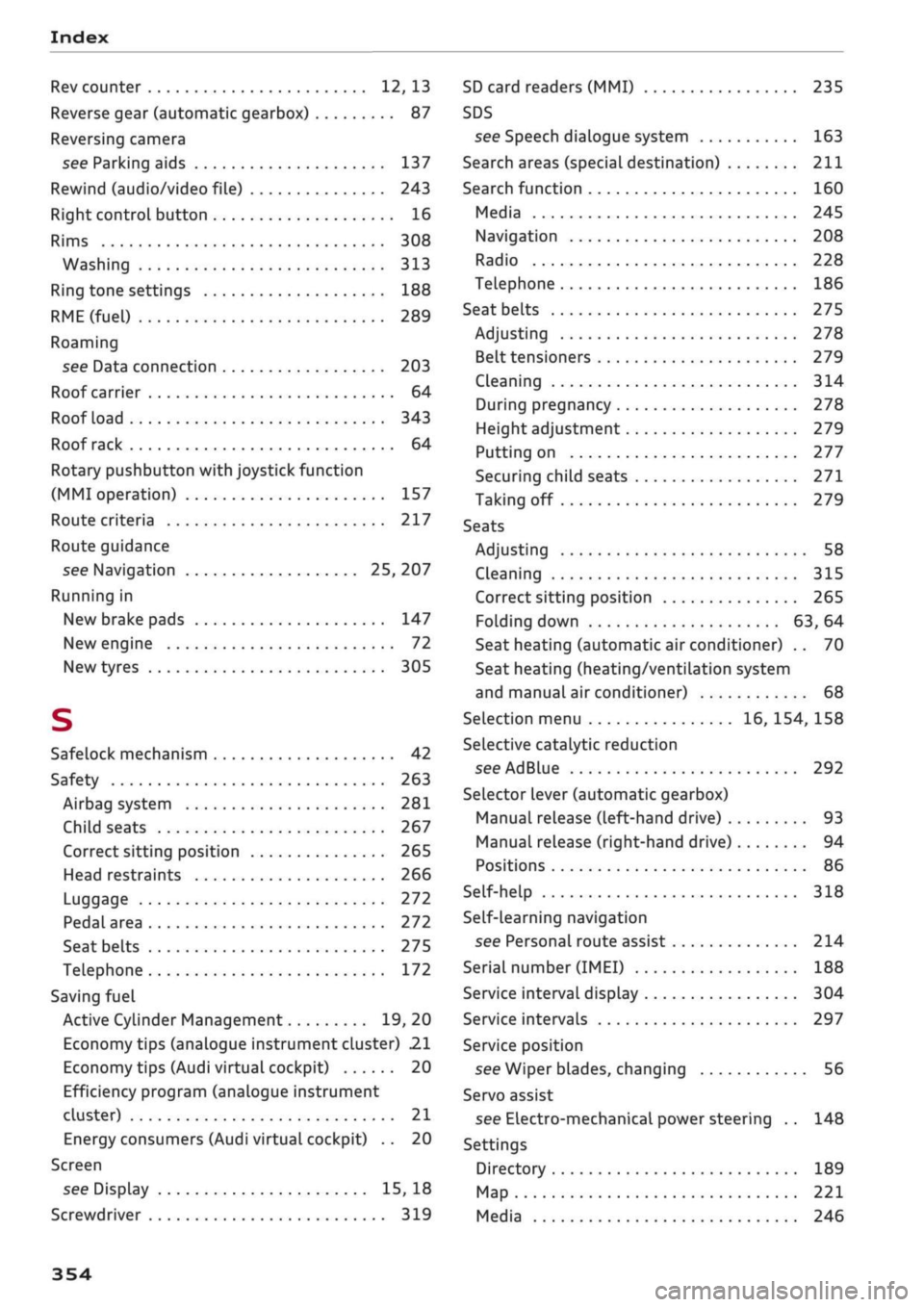
Index
Rev counter 12, 13
Reverse gear (automatic gearbox) 87
Reversing camera
see Parking aids 137
Rewind (audio/video file) 243
Right control button 16
Rims 308
Washing 313
Ring tone settings 188
RME(fuel)
289
Roaming
see Data connection 203
Roof carrier 64
Roof load 343
Roof rack 64
Rotary pushbutton with joystick function
(MMI operation) 157
Route criteria 217
Route guidance
see Navigation 25, 207
Running in
New brake pads 147
New engine 72
New tyres 305
S
Safelock mechanism 42
Safety 263
Airbag system 281
Child seats 267
Correct sitting position 265
Head restraints 266
Luggage 272
Pedal area 272
Seat belts 275
Telephone 172
Saving fuel
Active Cylinder Management 19, 20
Economy tips (analogue instrument cluster) 21
Economy tips (Audi virtual cockpit) 20
Efficiency program (analogue instrument
cluster) 21
Energy consumers (Audi virtual cockpit) .. 20
Screen
see Display 15, 18
Screwdriver 319
SD card readers (MMI) 235
SDS
see Speech dialogue system 163
Search areas (special destination) 211
Search function 160
Media 245
Navigation 208
Radio 228
Telephone 186
Seat belts
275
Adjusting 278
Belt tensioners 279
Cleaning 314
During pregnancy 278
Height adjustment 279
Putting on 277
Securing child seats 271
Taking off 279
Seats
Adjusting 58
Cleaning 315
Correct sitting position 265
Folding down 63, 64
Seat heating (automatic air conditioner) .. 70
Seat heating (heating/ventilation system
and manual air conditioner) 68
Selection menu 16, 154, 158
Selective catalytic reduction
see AdBlue 292
Selector lever (automatic gearbox)
Manual release (left-hand drive) 93
Manual release (right-hand drive) 94
Positions 86
Self-help 318
Self-learning navigation
see Personal route assist 214
Serial number
(IMEI)
188
Service interval display 304
Service intervals 297
Service position
see Wiper blades, changing 56
Servo assist
see Electro-mechanical power steering .. 148
Settings
Directory 189
Map 221
Media 246
354