tow AUDI Q2 2021 Owner´s Manual
[x] Cancel search | Manufacturer: AUDI, Model Year: 2021, Model line: Q2, Model: AUDI Q2 2021Pages: 364, PDF Size: 87.77 MB
Page 47 of 364

Doors and windows
A WARNING
CO
s
rN rN
•-i
00
- After closing the boot lid, always check that
the catch has engaged properly. The boot lid
could otherwise open suddenly when the ve
hicle is moving - this could result in an
acci
dent.
- Always make sure that no-one is in the boot
lid's area of movement (especially near the
hinges) when it is moving. Risk of severe in
juries to fingers or hands!
- The boot lid must always be completely
closed when the vehicle is moving; other
wise toxic exhaust fumes can be drawn into
the interior.
- If
a
luggage rack (e.g. a bicycle carrier) is at
tached to the boot lid, the boot lid may not
open completely or may move downwards
by itself due to the added weight. For this
reason,
make sure you support the boot lid
or
take the luggage off the carrier before
opening the boot lid - risk of injury!
© Note
- When towing a trailer* the automatic open
function can only be operated via the re
lease catch on the boot lid.
- If the battery is low, the boot lid can still be
opened and closed manually; however, this
will require more effort. If
you
move the
boot lid slowly less effort will be required.
- When the vehicle is locked, you can unlock
the boot Lid separately by pressing the
button on the remote control key. The boot
lid will Lock automatically when you close it
again.
Releasing boot lid manually from inside
Applies to: vehicles with manual release on inside
The
boot lid can be released manually from the
inside.
Fig.
32 Detail of inside of boot lid: Access to manual re
lease
•
Fold the rear seat backrest forwards
opoge
63.
*•
Use the blade of the ignition key to prise off the
cover
(Tj^F/'g.
32.
•
Insert the key in the opening behind the cover
(D
and press the key in the direction of the ar
row until the boot is unlocked.
45
Page 51 of 364
Lights and vision
Lights and vision
Exterior lights
Switching lights on and off
Fig.
37 Dashboard: Light switch with buttons
CO
<
O
rN rN
•-i
00
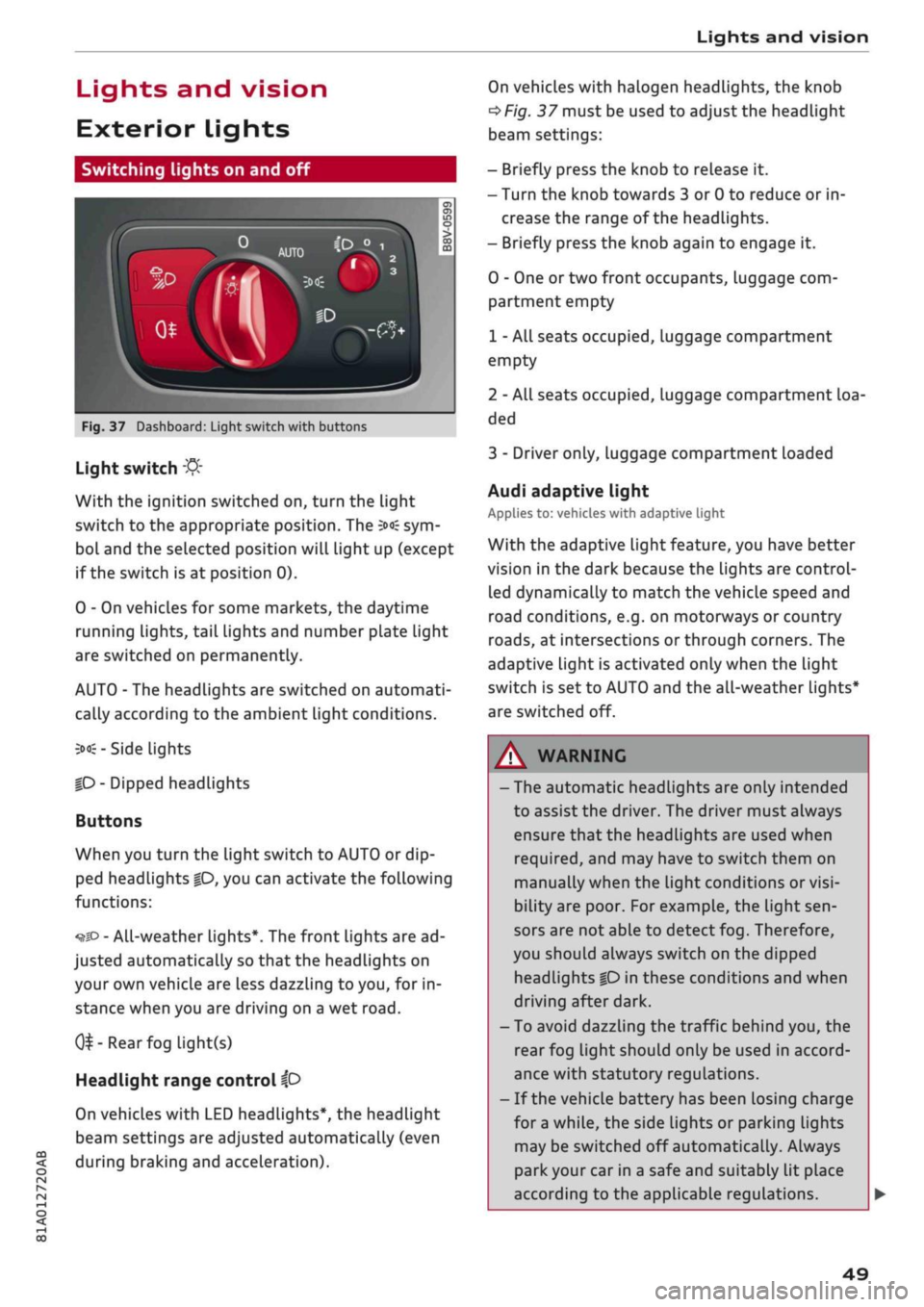
Light switch
:&
With the ignition switched on, turn the light
switch to the appropriate position. The
3»€
sym
bol and the selected position will light up (except
if the switch is at position 0).
0 - On vehicles for some markets, the daytime
running lights, tail lights and number plate Light
are switched on permanently.
AUTO - The headlights are switched on automati
cally according to the ambient light conditions.
3><£-
Side lights
|D
- Dipped headlights
Buttons
When you turn the light switch to AUTO or dip
ped headlights
|0,
you can activate the following
functions:
•^SD
- All-weather lights*. The front lights are ad
justed automatically so that the headlights on
your own vehicle are less dazzling to
you,
for in
stance when you are driving on a wet
road.
0^-Rear
fog light(s)
Headlight range control
ip
On vehicles with LED headlights*, the headlight
beam settings are adjusted automatically (even
during braking and acceleration).
On vehicles with halogen headlights, the knob
^Fig.
37 must be used to adjust the headlight
beam settings:
- Briefly press the knob to release it.
- Turn the knob towards 3 or 0 to reduce or in
crease the range of the headlights.
- Briefly press the knob again to engage it.
0 - One or two front occupants, luggage com
partment empty
1 - All seats occupied, luggage compartment
empty
2 - All seats occupied, Luggage compartment loa
ded
3 - Driver only, luggage compartment loaded
Audi adaptive light
Applies to: vehicles with adaptive light
With the adaptive light feature, you have better
vision in the dark because the Lights are control
led dynamically to match the vehicle speed and
road conditions, e.g. on motorways or country
roads,
at intersections or through corners. The
adaptive light is activated only when the Light
switch is set to AUTO and the all-weather Lights*
are switched off.
WARNING
- The automatic headlights are only intended
to assist the driver. The driver must always
ensure that the headlights are used when
required,
and may have to switch them on
manually when the light conditions or
visi
bility are poor. For example, the light
sen
sors are not able to detect fog. Therefore,
you should always switch on the dipped
headlights
|0
in these conditions and when
driving after dark.
- To avoid dazzling the traffic behind you, the
rear fog light should only be used in accord
ance with statutory regulations.
- If the vehicle battery has been losing charge
for
a
while, the side lights or parking lights
may be switched off automatically. Always
park your car in a safe and suitably lit place
according to the applicable regulations.
49
Page 53 of 364
Lights and vision
CO
<
O
rN rN
•-i
00
• Press the lever forwards (3)
^>page
50,
Fig. 38
to activate the main beam assist. The indicator
lamp
^/fi8
will light up in the instrument
cluster display and the main beams will be
switched on/off automatically. An indicator
lampBS
lights up when the main beams are
switched on.
Switching the main beams on/off manually
If the main beams are not switched on or if the
headlights are not dipped as expected, you can
control the dip function manually:
• To switch on the main beams manually, push
the lever forwards
(3).
The indicator Lamp
g
will
Light
up. To dip the headlights again, pull
the lever towards you 0.
• To dip the headlights manually, pull the lever
towards you
@.
The main beam assist will be
deactivated.
Flashing the headlights
• Pull the lever towards you
@
to flash the
head
lights when the main beam assist is activated
and the main beams are dipped. The main
beam assist will remain activated.
Driver messages in the instrument cluster
display
13
Main beam assist: system fault!
1H
Main beam assist: fault. See owner's manual
Drive to a qualified workshop soon and have the
fault rectified. You can still switch the main
beam headlights on and off manually.
13
Main beam assist: currently unavailable. No
camera view
HI
Main beam assist: currently unavailable.
Camera view restricted due to surroundings.
See owner's manual
The camera vision is impaired, e.g. by stickers or
dirt. Please clean the windscreen.
The sensor is located in the mounting for the in
terior mirror. Do not affix any stickers on this sec
tion of the windscreen.
A WARNING
The main beam assist is only intended to as
sist the driver. The driver must always ensure
that the headlights are used when required,
and may have to switch them on or off
man
ually, e.g. when the Light conditions or visibili
ty are poor. In the following situations
man
ual intervention may be necessary:
- Hazardous weather conditions such as fog,
heavy rain and snow or water splashes
- Roads on which oncoming traffic is partially
concealed (e.g. on motorways)
- Indiscernible road users (e.g. cyclists with
poor lighting)
- Tight corners, steep hill crests or valleys
- Poorly lit towns
- Highly reflective objects, such as road signs
-Windscreen misted up, dirty, frosted or cov
ered by stickers in front of the sensor
Adjusting the settings for the exterior
lighting
You
can change the settings for these functions
on the infotainment system.
• Select the following on the infotainment sys
tem:
IMENUI
button > Car
>
left control button
> Vehicle settings > Exterior lighting.
Automatic headlights*
The following settings are available in the Auto
matic headlights menu:
Activation time* - You can determine how soon
the lights are switched on by using the settings
early*, medium* or late* to adjust the sensitivity
of the light sensor.
Main beam assist* - You can switch the main
beam assist* on/off.
Entry/exit
lights*
You can switch the entry/exit lights* on and off.
They illuminate the area around the vehicle after
dark when you unlock the vehicle or when the ig
nition has been switched off and the driver's door
opened.
•
51
Page 55 of 364
Lights and vision
CO
<
O
rN
iv
rN
i—i
o
< 00
Background lighting
Applies
to: vehicles with background lighting
The
background lighting can be adjusted via the
infotainment system.
• Select the following on the infotainment sys
tem:
|MENU| button > Car
>
left control button
> Vehicle settings > Background lighting.
It may be possible to adjust the brightness of the
individual zones, depending on the equipment
fitted in your vehicle:
• Press the right control button and select one of
the zones displayed.
The background lighting will be switched on
when you switch on the headlights with the
igni
tion on.
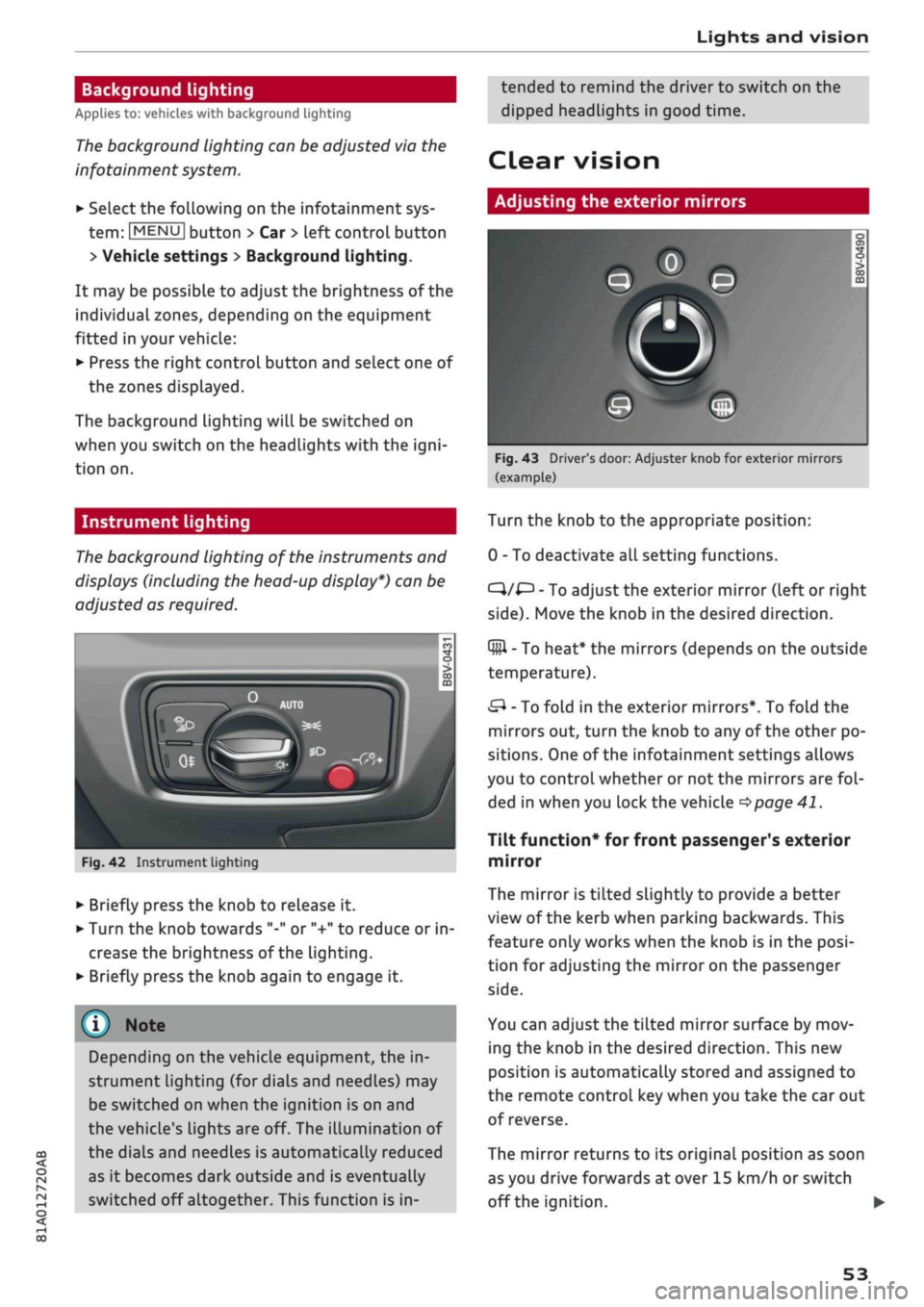
Instrument lighting
The
background lighting of the instruments and
displays (including the head-up display*) can be
adjusted as required.
Fig.
42 Instrument lighting
• Briefly press the knob to release it.
• Turn the knob towards "-" or "+" to reduce or in
crease the brightness of the lighting.
• Briefly press the knob again to engage it.
Depending on the vehicle equipment, the in
strument lighting (for dials and needLes) may
be switched on when the ignition is on and
the vehicle's lights are off. The illumination of
the dials and needles is automatically reduced
as it becomes dark outside and is eventually
switched off altogether. This function is in
tended to remind the driver to switch on the
dipped headlights in good time.
dear
vision
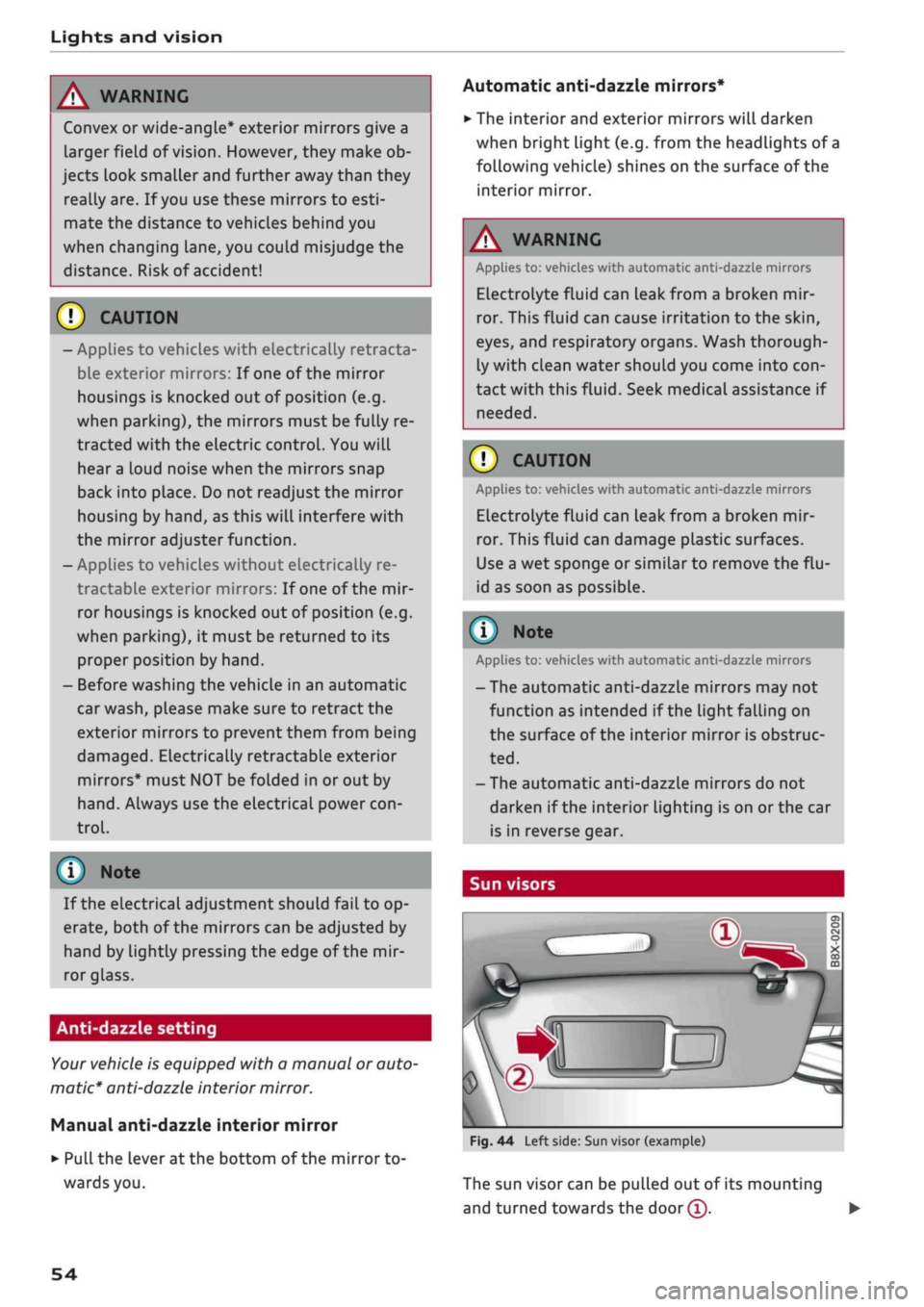
Adjusting the exterior mirrors
Fig.
43 Driver's door: Adjuster knob for exterior mirrors
(example)
Turn the knob to the appropriate position:
0 - To deactivate all setting functions.
C}/^
- To adjust the exterior mirror (left or right
side).
Move the knob in the desired direction.
Q#l
- To heat* the mirrors (depends on the outside
temperature).
&
- To fold in the exterior mirrors*. To fold the
mirrors out, turn the knob to any of the other po
sitions. One of the infotainment settings allows
you to control whether or not the mirrors are
fol
ded in when you lock the vehicle
•=>page
41.
Tilt function* for front passenger's exterior
mirror
The mirror is tiLted slightly to provide a better
view of the kerb when parking backwards. This
feature only works when the knob is in the
posi
tion for adjusting the mirror on the passenger
side.
You can adjust the tilted mirror surface by mov
ing the knob in the desired direction. This new
position is automatically stored and assigned to
the remote control key when you take the car out
of reverse.
The mirror returns to its original position as soon
as you drive forwards at over 15 km/h or switch
off the ignition. •
53
Page 56 of 364
Lights and vision
A WARNING
Convex or wide-angle* exterior mirrors give a
larger field of
vision.
However, they make ob
jects look smaller and further away than they
really are. If
you
use these mirrors to
esti
mate the distance to vehicles behind you
when changing Lane, you could misjudge the
distance. Risk of accident!
CAUTION
- Applies to vehicles with electrically retracta
ble exterior mirrors: If one of the mirror
housings is knocked out of position (e.g.
when parking), the mirrors must be fully re
tracted with the electric control. You will
hear
a
loud noise when the mirrors snap
back into place. Do not readjust the mirror
housing by hand, as this will interfere with
the mirror adjuster function.
- Applies to vehicles without electrically re
tractable exterior mirrors: If one of the mir
ror housings is knocked out of position (e.g.
when parking), it must be returned to its
proper position by hand.
- Before washing the vehicle in an automatic
car wash, please make sure to retract the
exterior mirrors to prevent them from being
damaged.
Electrically retractable exterior
mirrors* must NOT be folded in or out by
hand.
Always use the electrical power
con
trol.
©
If the electrical adjustment should fail to op
erate,
both of the mirrors can be adjusted by
hand by Lightly pressing the edge of the mir
ror glass.
Anti-dazzle setting
Your vehicle is equipped with a manual or auto
matic* anti-dazzle interior
mirror.
Manual anti-dazzle interior mirror
•
Pull
the lever
at
the bottom of the mirror to
wards you.
Automatic anti-dazzle mirrors*
• The interior and exterior mirrors will darken
when bright light (e.g. from the headlights of
a
following vehicle) shines on the surface of the
interior mirror.
A
WARNING
Applies to: vehicles with automatic anti-dazzle mirrors
Electrolyte fluid can leak from a broken mir
ror. This fluid can cause irritation to the
skin,
eyes,
and respiratory organs. Wash thorough
ly with clean water should you come into
con
tact with this
fluid.
Seek medical assistance if
needed.
© CAUTION
Applies to: vehicles with automatic anti-dazzle mirrors
Electrolyte fluid can
leak
from a broken mir
ror. This fluid can damage plastic surfaces.
Use a wet sponge or similar to remove the
flu
id as soon as possible.
(T) Note
Applies to: vehicles with automatic anti-dazzle mirrors
-The automatic anti-dazzle mirrors may not
function as intended if the light falling on
the surface of the interior mirror is obstruc
ted.
-The automatic anti-dazzle mirrors do not
darken if the interior lighting is on
or
the car
is in reverse gear.
Sun visors
Fig.
44 Left side: Sun visor (example)
The sun visor can be pulled out of its mounting
and turned towards the
door
(T).
•
54
Page 64 of 364
Seats and storage
A WARNING
Applies to: vehicles with coat hooks
- Make sure
that
any items of clothing hang
ing from the coat hooks do not obstruct
your view to the rear.
- Only use the coat hooks for light items of
clothing and make sure that there are no
heavy or sharp objects in the pockets.
- Do not use clothes hangers to hang up the
clothing,
as this could interfere with the
function of the head-protection airbags.
Luggage compartment
General notes
A
WARNING
Please refer to the important safety notes on
<=>page
272, Stowing luggage safely.
Luggage compartment cover
Applies to: vehicles with luggage compartment cover
The
luggage compartment cover blocks the view
into the luggage compartment.
c
Fig.
57
Open boot lid with luggage compartment cover
Removing
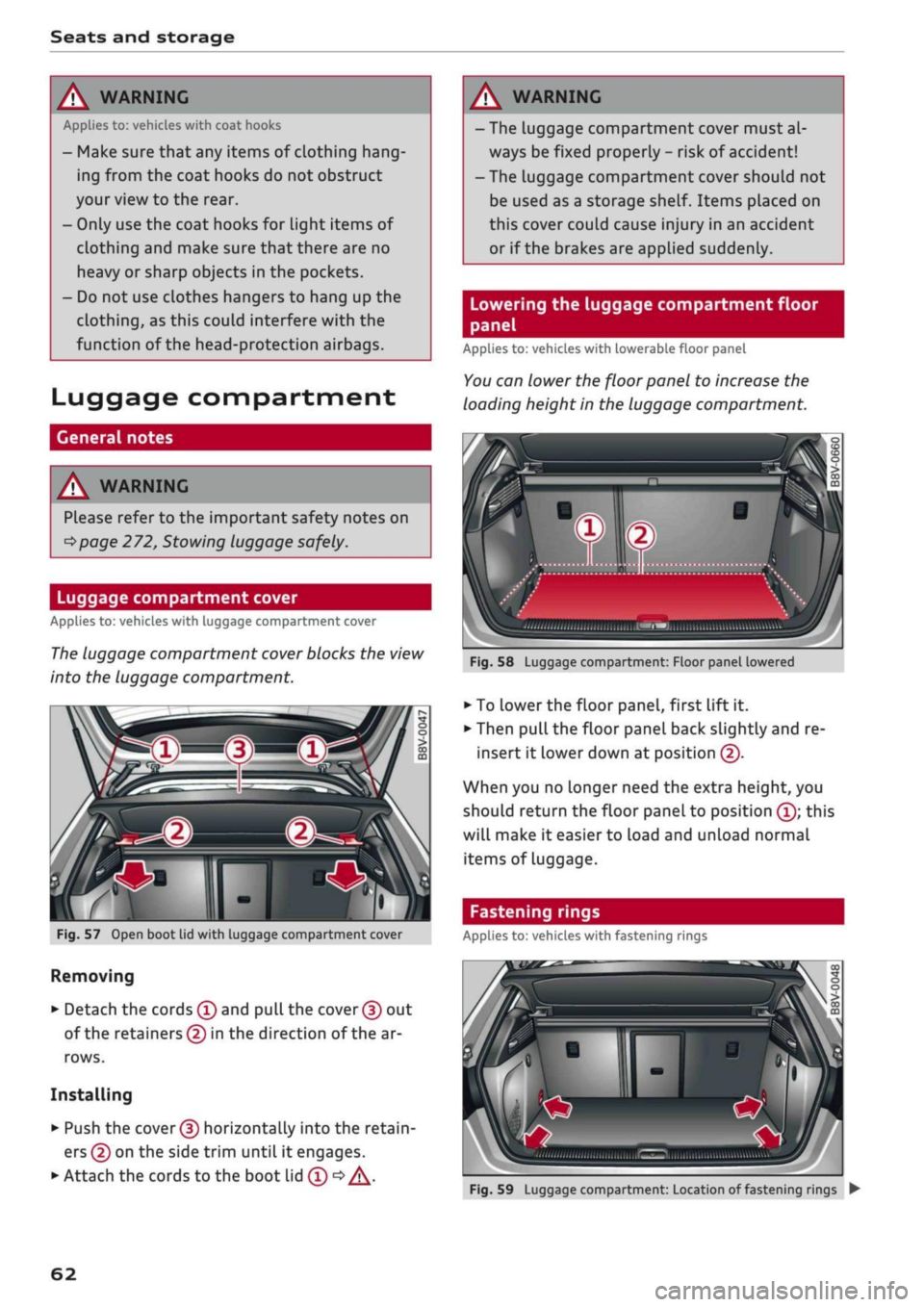
• Detach the cords
(f)
and
pull
the
cover (f)
out
of the retainers (5) in the direction of the ar
rows.
Installing
• Push the
cover (D
horizontally into the retain
ers
(?)
on the side trim until
it
engages.
• Attach the cords to the boot lid
(T) •=>
A.
A WARNING
- The luggage compartment cover must al
ways be fixed properly
-
risk of accident!
- The luggage compartment cover should not
be used as a storage shelf. Items placed on
this cover couLd cause injury in an accident
or if the brakes are applied suddenly.
Lowering the luggage compartment floor
panel
Applies to: vehicles with lowerable floor panel
You
can lower the floor panel to increase the
loading height in the luggage compartment.
'•iii.nii,,,,
,„„„
„„,,
iilSMBIiimi
ulwu'l
Fig.
58
Luggage compartment: Floor panel lowered
• To
Lower
the floor panel, first lift
it.
• Then pull the floor panel back slightly and re
insert
it
lower down at position
(f).
When you no longer need the extra height, you
should return the floor panel to position
(Î);
this
will make
it
easier to load and unload normal
items of Luggage.
Fastening rings
Applies to: vehicles with fastening rings
Fig.
59
Luggage compartment: Location of fastening rings
•
62
Page 74 of 364
Driving
Driving
General notes
Running in
A new vehicle should be run in over
a
distance of
1,500 km. For the first 1,000 km the engine
speed should not exceed 2/3 of the maximum
permissible engine speed - do not use full throt
tle and do not tow a trailer or caravan. From
1,000 to 1,500 km you can gradually increase
the engine rpm and road speed.
During its first few hours of running, the internal
friction in the engine is greater than later on
when all the moving parts have bedded down.
How the vehicle is driven for the first 1,500 km
also influences the engine quality. After this
peri
od you should continue driving at moderate en
gine speeds, in particular when the engine is
cold.
This helps to reduce wear and tear on the
engine and increases the potential mileage which
can be covered by the engine.
You should also avoid driving with the engine
speed too low. Change down to a lower gear
when the engine no longer runs "smoothly". Ex
cessively high engine speeds are prevented by an
automatic rev limiter.
A WARNING
After driving through water, mud, sludge,
etc., the braking effect can be delayed slightly
due to moisture on the discs and brake pads.
Applying the brakes carefully several times
will remove the moisture and restore the full
braking effect.
© CAUTION
- Parts of the vehicle (e.g. engine, gearbox,
running gear or electrical components) can
be badly damaged when driving through
water.
- Always switch off the start/stop system*
^>page
79 before driving through water.
© ' Note
- It is advisable to check the depth at the
deepest point before approaching the wa
ter.
- Do NOT stop the vehicle, drive in reverse or
switch off the engine before you are out of
the water.
- Bear in mind that waves created by oncom
ing traffic could exceed the permissible
wading depth of your vehicle.
- Avoid driving through salt water (corrosion).
Avoiding damage to the car
© CAUTION
Take care not to damage
Low-mounted
parts
of the car (such as the spoiler or exhaust sys
tem) on steep ramps, uneven road surfaces or
roadside kerbs, etc. This applies especially to
vehicles with low ground clearance and to all
vehicles when fully laden.
Driving through water on roads
Please note the following in order to prevent
damage to the vehicle when driving through wa
ter (e.g. on flooded roads):
- The water level must not be higher than the ve
hicle's underbody.
- Do not drive faster than walking pace.
How to improve economy and minimise
pollution
Fuel economy, environmental impact and wear
on the engine, brakes and tyres depend largely
on the way you drive the vehicle. By adopting an
economical driving style and anticipating the
traffic situation ahead, you can reduce fuel
con
sumption by 10
-15
%. The following section
gives you some tips on Lessening the impact on
the environment and reducing your operating
costs at the same time.
Anticipate well in advance
A car uses most fuel when accelerating. If
you
an
ticipate hazards and speed changes well in ad
vance,
you will need to brake less and thus accel
erate Less. Wherever possible, Let the car slow
down gradually with a gear engaged, for •
72
Page 76 of 364

Driving
Steering
Adjusting the steering wheel position
The height and reach of the steering wheel can
be adjusted as required to suit the
driver.
Fig.
68 Steering column: Lever for steering column adjust
ment
•
Push the Lever
^>Fig.
68 down
<=> /\.
•
Move the steering wheel to the desired
posi
tion.
•
Then push the lever towards the steering
col
umn until the catch engages.
WARNING
- Never adjust the position of the steering
wheel when the vehicle is moving - this
could cause an accident.
- Press the lever upwards so it is secure and
so that the position of the steering wheel
cannot shift unexpectedly while the vehicle
is moving - risk of accident!
Starting and stopping
the engine (vehicles with
ignition Lock)
Starting the engine
Applies to: vehicles with ignition lock
Insert the key in the ignition lock to switch on
the ignition and start the engine.
Fig.
69 Ignition lock: Ignition key positions
Switching the ignition on/off
•
To switch on the ignition, turn the ignition key
to position ®. Vehicles without start/stop sys
tem*:
The rev counter needle will move to the
READY position.
• To switch off the ignition, turn the ignition key
to position ©. The rev counter needle will
move to the OFF position.
Diesel engines are automatically preheated when
you switch on the ignition.
Starting the engine
•
Manual gearbox: Press the clutch pedal all the
way down and move the gear lever into neutral.
•
Automatic gearbox: Press the brake pedal and
move the selector lever to position P or N.
•
Turn the ignition key briefly to position @. The
ignition key automatically returns to position
®. Do not press the accelerator.
Applies to: vehicles with diesel engine
•
The engine may take a few seconds Longer than
usual to start on cold days. Please keep your
foot on the clutch pedal (manual gearbox) or
brake pedal (automatic gearbox) until the en
gine starts. The indicator Lamp
E g
lights up
while the glow plugs are preheating.
74
Page 84 of 364
Driving
Electro-mechanical
parking brake
•_ -_-
:c
2C
Fig.
74 Centre console: Button for parking brake and hold
assist
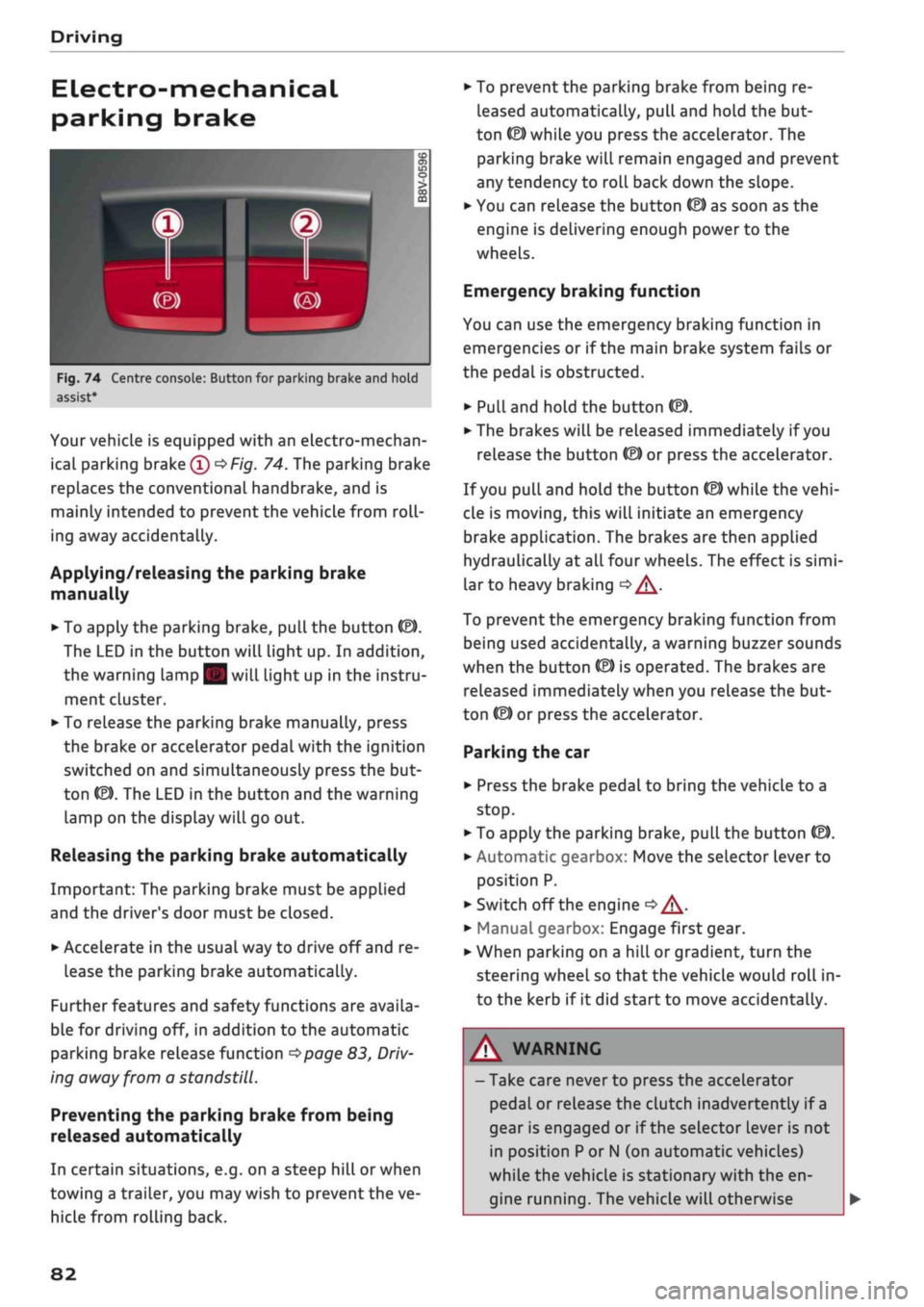
Your vehicle is equipped with an electro-mechan
ical parking brake
(l)
^>Fig.
74. The parking brake
replaces the conventional handbrake, and is
mainly intended to prevent the vehicle from
roll
ing away accidentally.
Applying/releasing the parking brake
manually
• To apply the parking brake, pull the button (®).
The LED in the button will light up. In addition,
the warning lamp || will light up in the instru
ment cluster.
•
To release the parking brake manually, press
the brake or accelerator pedal with the ignition
switched on and simultaneously press the but
ton
©).
The LED in the button and the warning
lamp on the display will go out.
Releasing the parking brake automatically
Important: The parking brake must be applied
and the driver's door must be closed.
•
Accelerate in the usual way to drive off and re
lease the parking brake automatically.
Further features and safety functions are availa
ble for driving off, in addition to the automatic
parking brake release function
^>page
83,
Driv
ing away from a standstill.
Preventing the parking brake from being
released automatically
In certain situations, e.g. on a steep hill or when
towing a trailer, you may wish to prevent the ve
hicle from rolling back.
•
To prevent the parking brake from being re
leased automatically, pull and hold the but
ton ©) while you press the accelerator. The
parking brake will remain engaged and prevent
any tendency to roll back down the slope.
•
You can release the button
(®)
as soon as the
engine is delivering enough power to the
wheels.
Emergency braking function
You can use the emergency braking function in
emergencies or if the main brake system fails or
the pedal is obstructed.
•
PuLl
and hold the button
«EJ.
• The brakes will be released immediately if you
release the button
®
or press the accelerator.
If
you
pull and hold the button
(®)
while the
vehi
cle is moving, this will initiate an emergency
brake application. The brakes are then applied
hydraulically at all four wheels. The effect is
simi
lar to heavy braking
<=> /\.
To prevent the emergency braking function from
being used accidentally, a warning buzzer sounds
when the button
(®)
is operated. The brakes are
released immediately when you release the but
ton (®) or press the accelerator.
Parking the car
•
Press the brake pedal to bring the vehicle to a
stop.
•
To apply the parking brake, pull the button
©).
• Automatic gearbox: Move the selector lever to
position P.
• Switch off the engine
•» A-
•
Manual gearbox: Engage first gear.
•
When parking on a hill or gradient, turn the
steering wheel so that the vehicle would roll in
to the kerb if it did start to move accidentally.
A
WARNING
- Take care never to press the accelerator
pedal or release the clutch inadvertently if
a
gear is engaged or if the selector Lever is not
in position
P
or
N
(on automatic vehicles)
while the vehicle is stationary with the en
gine running. The vehicle will otherwise
82
Page 90 of 364

Driving
©
y Note
If the selector lever does not lock automati
cally, a malfunction has occurred. In this case,
the power transmission is interrupted to pre
vent the vehicle from moving unintentionally.
Proceed as follows to engage the selector lev
er lock again:
- Applies to vehicles with 6-speed gearbox:
Briefly press the brake pedal.
- Applies to vehicles with 7-speed gearbox:
Press the brake pedal. Move the selector
lever to position
P
or
N
and then select a
gear.
- If the vehicle does not move forwards or
backwards even though a gear is selected,
proceed as follows:
- If the vehicle does not move in the desired
direction,
the system may have failed to en
gage the gear correctly. In this case, press
the brake pedal and select the gear again.
- If the vehicle still does not move in the de
sired direction, a system malfunction has
occurred.
Seek professional assistance and
have the system checked.
General notes on driving an automatic
Applies to: vehicles with automatic gearbox
Fig.
77 Detail of the centre console: Selector lever with in
terlock button
Starting the engine
•
Move the selector Lever to
P
or N. In the case of
Low outside temperatures (below -10 °C), the
engine can only be started when the selector
lever is in position P.
Driving away from a standstill
•
Press and hold the brake pedal.
•
Press and hold the interlock button (the button
in the selector lever handle), set the selector
lever to the desired position (e.g. D)
^>page
86
and release the interlock button.
•
Wait for the gearbox to engage the gear (a
slight movement can be felt).
•
Release the brake and press the accelerator
There are several convenient functions to help
you drive away on gradients
^page
83.
Stopping briefly
•
Press the brake pedal to hold the vehicLe when
stationary (for instance at traffic lights).
•
Do not press the accelerator.
•
To prevent the vehicLe from rolling away, apply
the parking brake before moving off on steep
gradients
•=>^
and
•=>(]).
• As soon as you acceLerate as normal, the park
ing brake will automatically be released and
the vehicLe will start moving. Important: The
driver's door must be closed.
Stopping/parking the car
If
you
open the driver's door while the selector
lever is not in position P, the vehicle can roll
away. The message Shift to P, otherwise vehicle
can roll away. Doors do not lock if lever is not in
P. appears on vehicles with convenience key*. A
buzzer will also sound.
•
Press and hold the brake pedal
<=>
A..
•
Apply the parking brake.
•
Move the selector Lever to P.
In some situations (such as on mountain roads or
when towing a trailer or caravan) it can be advan
tageous to switch temporarily to the manual
shift programme so that the gear ratios can be
selected manually to suit the driving conditions
^>page
90.
On level ground it is sufficient to move the selec
tor lever to P. On a gradient the parking brake
should be applied first and the selector Lever
should be moved to
P ^>page
82. This reduces
the load on the locking mechanism and makes it
easier to move the selector lever out of position
P. •
88