ESP AUDI Q2 2021 Owner´s Manual
[x] Cancel search | Manufacturer: AUDI, Model Year: 2021, Model line: Q2, Model: AUDI Q2 2021Pages: 364, PDF Size: 87.77 MB
Page 100 of 364
Towing a trailer
Requirements for correct functioning of the
trailer stabilisation system
If these conditions are not met in
full,
the trailer
stabilisation system will only intervene to a
limi
ted extent or not at all
>=>
A-
- The electrical connection between the towing
vehicle and the trailer must be functioning cor
rectly.
- The load on the trailer must be properly se
cured.
- The tyre pressures on both the vehicLe and the
trailer must be adapted to the load that is be
ing carried.
- Where possible, operate the trailer with the
maximum permitted draw bar weight.
- The trailer overrun brake must be set correctly.
This is important to ensure that the trailer can
be braked correctly, to avoid the vehicle and
trailer "jack-knifing" and to prevent excess
braking of the trailer.
- At low outside temperatures, both the towing
vehicle and the trailer should be fitted with
winter tyres.
A WARNING
It is essential that you adjust your speed to
suit the weather, road and traffic conditions.
Do not let the trailer stabilisation system
tempt you into taking any risks when driving -
this can cause accidents.
- The ESC and trailer stabilisation system
can
not defy the Laws of physics. This should be
kept in mind, particularly on slippery and
wet roads and when towing a trailer with a
light Load.
- The trailer stabilisation system is function
al,
regardless of whether the trailer has a
mechanical overrun brake or not.
- The trailer stabilisation system is not always
able to detect swaying of trailers with a
light load and will therefore not intervene.
- A trailer can still "jack-knife" on slippery
roads with little grip, even if the towing ve
hicle is equipped with the trailer stabilisa
tion system.
-Trailers with a high centre of gravity may
even tip over before they start to sway
side
ways.
-If
you
are not towing a trailer,
but
the
trail
er socket is being used (e.g. for an illumina
ted bicycle rack), the trailer stabilisation
system may be activated in extreme driving
conditions.
- Please note the additional information and
warnings
^>page
98, Driving tips.
Driving tips
Driving with a trailer always requires extra care.
Weight distribution
Try to avoid towing a loaded trailer with an unla
den vehicle. If this cannot be avoided, drive extra
slowly to allow for the unbalanced weight distri
bution.
Speed
Normally, you must not exceed 80 km/h when
towing a trailer or caravan. However, if the
trail
er/caravan is equipped with a trailer stabilisation
system,
you can drive at max. 100 km/h. Please
observe any other regulations applicable in the
country in which you are travelling.
The stability of the car and trailer is reduced with
increasing speed. For this reason it is advisable
not to drive at the maximum permissible top
speed in unfavourable
road,
weather or wind
con
ditions. This applies especially on a downhill gra
dient.
You should always reduce speed immediately if
the trailer shows the slightest sign of swaying.
Never try to stop the swaying by accelerating fur
ther.
Always brake in good time. If the trailer has an
overrun brake, apply the brakes gently at first
and then firmly. This will prevent the jerking that
can be caused by the trailer wheels locking.
Change down in good time before going down a
steep hill so
that
you can use the engine braking
effect to slow down the vehicLe.
Swaying and pitching can be reduced by attach
ing an extra stabiliser to the trailer. It should •
98
Page 108 of 364
Driver assist systems
Automatic deactivation
Cruise control system: currently unavailable.
See owner's manual
The cruise control system has been automatically
deactivated because the system has detected a
fault which could impair its function. Try switch
ing the cruise control system on again later.
A WARNING
Do not resume the programmed cruising
speed if this is too high
for
the traffic condi
tions - this can cause accidents.
Speed Limiter
Description
Applies to: vehicles with speed limiter
®
LIM
•
km/h
|
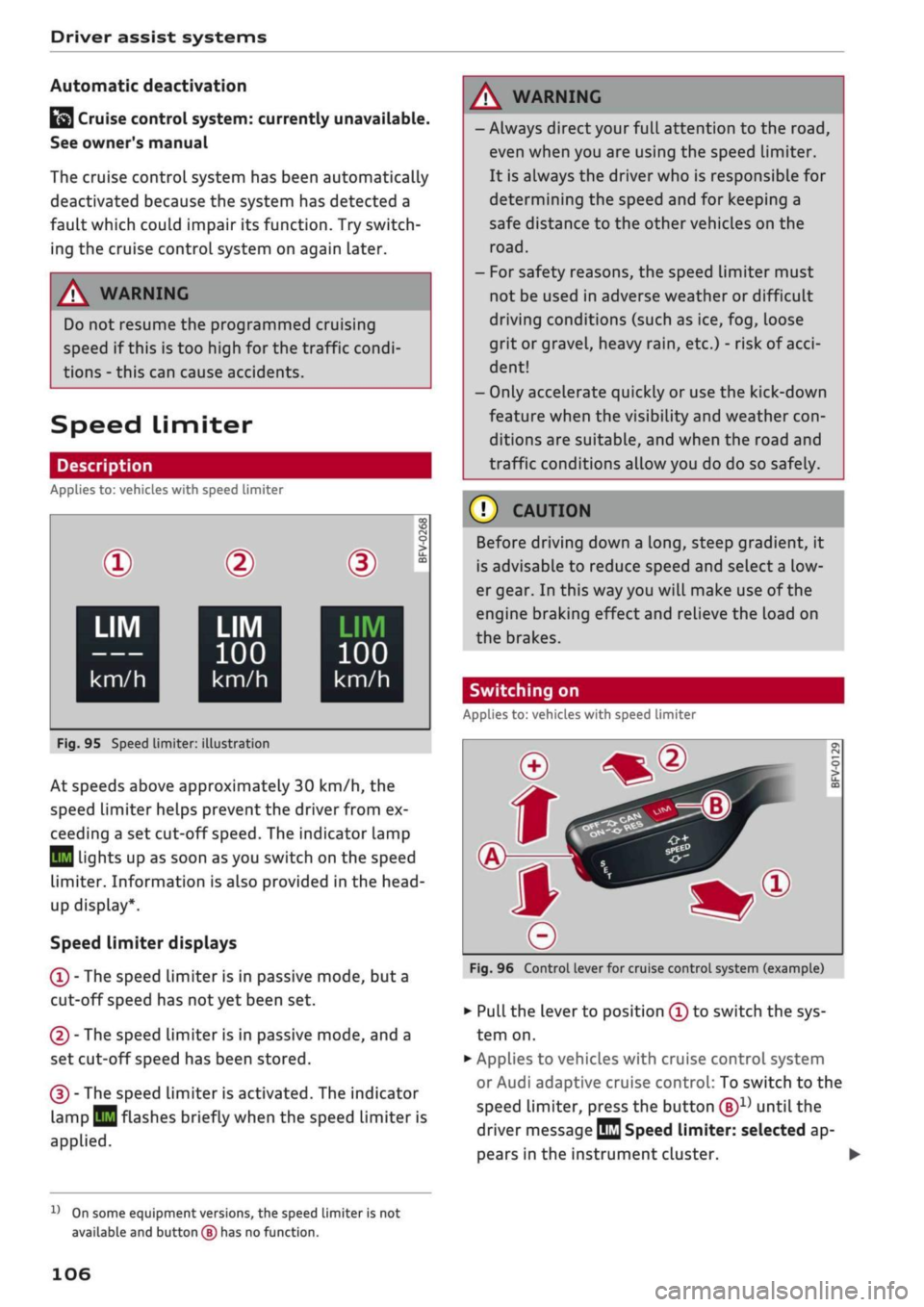
Fig.
95 Speed limiter:
©
LIM
100
km/h
illustration
BFV-0268
LIM
100
km/h
At speeds above approximately 30 km/h, the
speed limiter helps prevent the driver from ex
ceeding a set cut-off
speed.
The indicator lamp
Q
Lights up as soon as you switch on the speed
limiter. Information is also provided in the head-
up display*.
Speed limiter displays
© - The speed limiter is in passive mode, but a
cut-off speed has
not
yet been set.
®
- The speed limiter is in passive mode, and a
set cut-off speed has been stored.
® - The speed limiter is activated. The indicator
lamp
BH
flashes briefly when the speed limiter is
applied.
A WARNING
- Always direct your full attention to the
road,
even when you are using the speed limiter.
It is always the driver who is responsible for
determining the speed and for keeping a
safe distance to the other vehicles on the
road.
- For safety reasons, the speed limiter must
not be used in adverse weather or difficult
driving conditions (such as ice, fog, loose
grit or gravel, heavy
rain,
etc.) - risk of
acci
dent!
- Only accelerate quickly or use the kick-down
feature when the visibility and weather
con
ditions are suitable, and when the road and
traffic conditions allow you do do so safely.
Before driving down a
long,
steep gradient, it
is advisable to reduce speed and select a low
er gear. In this way you will make use of the
engine braking effect and relieve the Load on
the brakes.
Switching on
Applies to: vehicles with speed limiter
Fig.
96 Control lever for cruise control system (example)
•
Pull the lever to position © to switch the sys
tem on.
•
Applies to vehicles with cruise control system
or Audi adaptive cruise control: To switch to the
speed limiter, press the button
®1)
until the
driver message
QQ
Speed limiter: selected ap
pears in the instrument cluster. •
l)
On some equipment versions, the speed limiter is not
available and button
(B)
has no function.
106
Page 109 of 364
Driver assist systems
CO
<
O
rN
iv
rN
t-H
o < 00
•
Press button ® to store the cut-off speed while
the car is moving.
The instrument cluster display will indicate the
stored cut-off
speed,
and the indicator lamp
Q
will light up.
Applies to: vehicles with cruise control system or Audi adap
tive cruise control
While the speed Limiter is switched on, you can
switch to the cruise control
^>page
104 or adap
tive cruise control
^>page 111
systems. Press
button
®1)
until the corresponding system is
displayed in the instrument cluster.
The last cut-off speed set for the speed limiter
remains stored and can be applied again when
you switch back into speed limiter mode.
Changing the cut-off speed
Applies to: vehicles with speed limiter
•
Briefly push the Lever towards ©/©
^>page
106, Fig. 96 to increase or reduce the
cut-off speed in small steps.
•
To increase or reduce the cut-off speed in
big
ger steps, hold the lever towards ©/© until
you reach the desired cruising speed.
Overriding the cut-off speed
Applies to: vehicles with speed limiter
To override the speed limiter temporarily, press
the accelerator fully past the point of resistance
(kick-down feature).
Speed limiting is suspended temporarily. The in
dicator lamp
QB
flashes while the system is deac
tivated;
the cut-off speed setting will remain
stored.
The system is reactivated automatically
as soon as your speed drops below the original
stored setting.
Switching off
Applies to: vehicles with speed limiter
Switching off temporarily
•
Push the lever towards © (click stop not en
gaged)
^>page
106, Fig. 96. The instrument
cluster display will indicate the stored cut-off
speed,
and the indicator
lamp^will
light up.
Switching off completely
•
Push the lever to position © (click stop engag
ed),
or
•
Switch off the ignition.
The cut-off speed setting will remain stored after
the system is temporarily deactivated. To resume
the programmed cut-off
speed,
pull
the lever to
position ©. The vehicle speed is limited to the
stored cut-off setting as soon as your current
driving speed drops below the stored cut-off
speed.
The stored cut-off speed will be deleted once the
ignition is switched off.
Automatic deactivation
QQ
Speed limiter: currently unavailable. See
owner's manual
The speed Limiter has been automatically deacti
vated because the system has detected a fault
which could impair its function. Try switching on
the speed limiter again Later.
A WARNING
The speed limiter may be deactivated if a
fault occurs in the brake system (e.g. if the
brakes overheat) while the speed limiter is ac
tivated.
©
Not
If
a
system fault requires the speed limiter to
switch off automatically, for safety reasons it
does not switch off completely until the driver
releases the accelerator pedal once or deacti
vates the system manually.
l)
On some equipment versions, the speed limiter is not
available and button
(S)
has no function.
107
Page 110 of 364
Driver assist systems
Camera-based traffic
sign recognition
Description
Applies to: vehicles with camera-based traffic sign recogni
tion
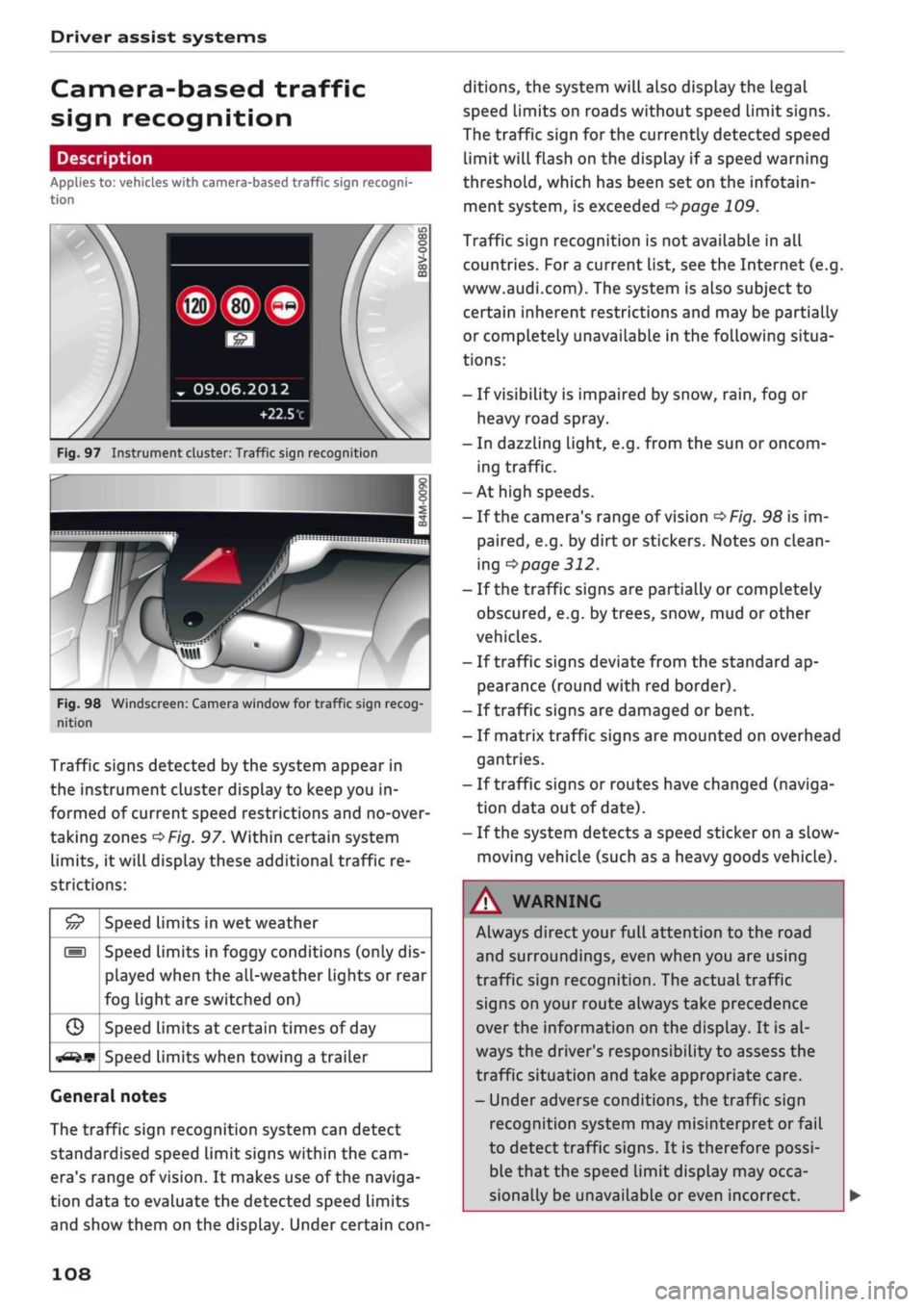
Fig.
97 Instrument cluster: Traffic sign recognition
Fig.
98 Windscreen: Camera window for traffic sign recog
nition
Traffic signs detected by the system appear in
the instrument cluster display to keep you in
formed of current speed restrictions and no-over
taking zones
^>Fig.
97. Within certain system
limits,
it will display these additional traffic re
strictions:
£5
///
s
G
^-if?
Speed limits in wet weather
Speed limits in foggy conditions (only dis
played when the all-weather lights or rear
fog light are switched on)
Speed limits at certain times of day
Speed limits when towing a trailer
General notes
The traffic sign recognition system can detect
standardised speed Limit signs within the cam
era's range of
vision.
It makes use of the naviga
tion data to evaluate the detected speed limits
and show them on the display. Under certain
con
ditions, the system will also display the legal
speed limits on roads without speed Limit signs.
The traffic sign for the currently detected speed
limit will flash on the display if
a
speed warning
threshold,
which has been set on the infotain
ment system, is exceeded
^page
109.
Traffic sign recognition is not available in all
countries. For
a
current list, see the Internet (e.g.
www.audi.com). The system is also subject to
certain inherent restrictions and may be partially
or completely unavailable in the following situa
tions:
- If visibility is impaired by snow,
rain,
fog or
heavy road spray.
- In dazzling light, e.g. from the sun or oncom
ing traffic.
-At high speeds.
- If the camera's range of vision
^>Fig.
98 is im
paired,
e.g. by dirt or stickers. Notes on clean
ing
•=>
page 312.
- If the traffic signs are partially or completely
obscured,
e.g. by trees, snow, mud or other
vehicles.
- If traffic signs deviate from the standard ap
pearance (round with red border).
- If traffic signs are damaged or bent.
- If matrix traffic signs are mounted on overhead
gantries.
- If traffic signs or routes have changed (naviga
tion data out of date).
- If the system detects a speed sticker on a slow-
moving vehicle (such as a heavy goods vehicle).
WARNING
Always direct your full attention to the road
and surroundings, even when you are using
traffic sign recognition. The actual traffic
signs on your route always take precedence
over
the information on the display. It is al
ways the driver's responsibility to assess the
traffic situation and take appropriate care.
- Under adverse conditions, the traffic sign
recognition system may misinterpret or fail
to detect traffic signs. It is therefore possi
ble that the speed limit display may occa
sionally be unavailable or even incorrect.
108
Page 111 of 364
Driver assist systems
CO
<
O
rN rN
t-H
o <
- The traffic sign detection system does not
adjust the speed of your vehicle to the speed
limits.
The speed limit displayed in the instrument
cluster is given in the units applicable in a
particular country.
Controls
Applies to: vehicles with camera-based traffic sign recogni
tion
-22.0-C
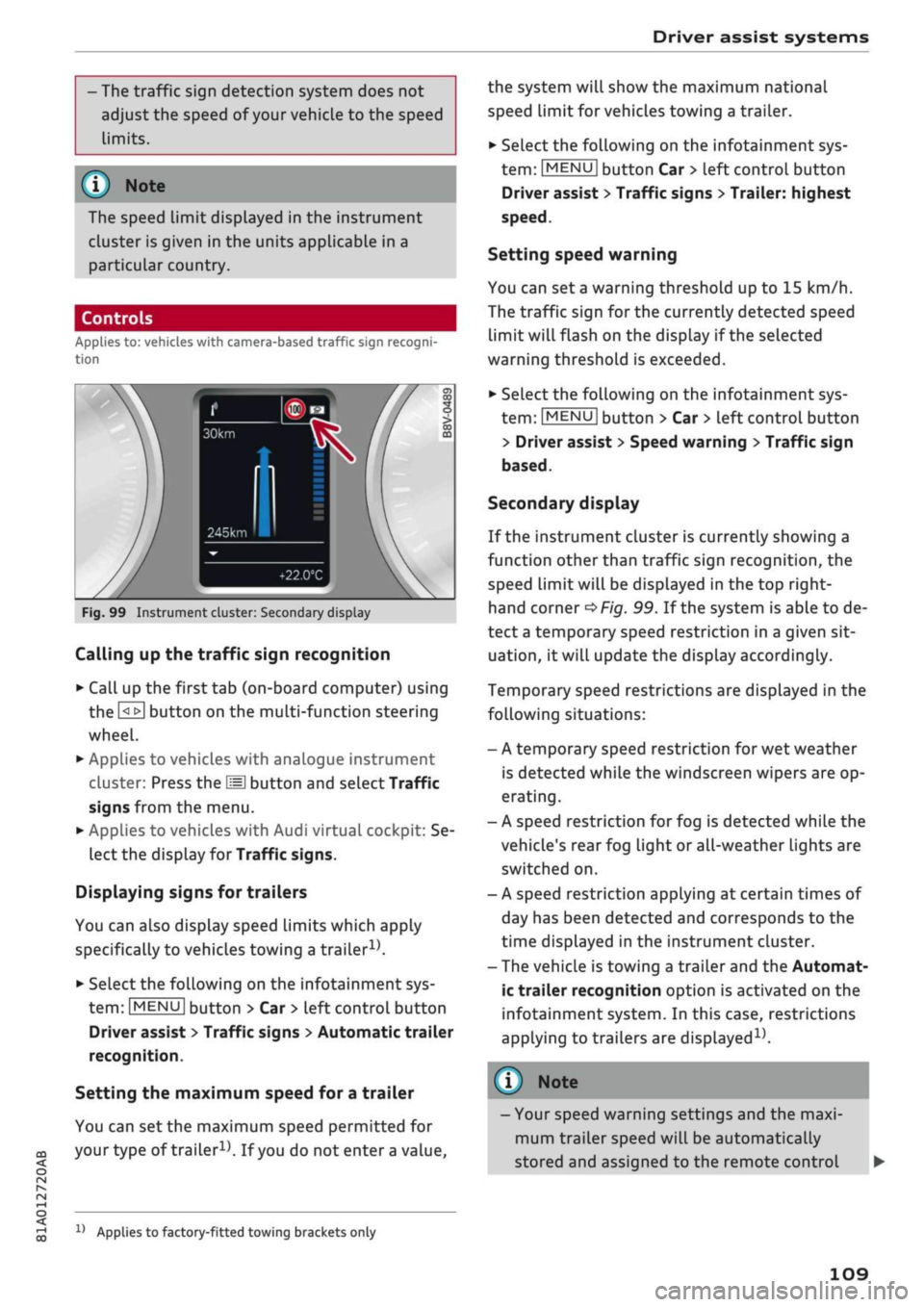
Fig.
99 Instrument cluster: Secondary display
Calling up the traffic sign recognition
•
Call up the first tab (on-board computer) using
the
GL>]
button on the multi-function steering
wheel.
•
Applies to vehicles with analogue instrument
cluster: Press the
LU]
button and select Traffic
signs from the menu.
•
Applies to vehicles with Audi virtual cockpit: Se
lect the display for Traffic signs.
Displaying signs for trailers
You can also display speed limits which apply
specifically to vehicles towing a trailer1).
•
Select the following on the infotainment sys
tem:
|MENU|
button > Car
>
left control button
Driver assist
>
Traffic signs
>
Automatic trailer
recognition.
Setting the maximum speed for a trailer
You can set the maximum speed permitted for
your
type of
trailer15.
If
you
do not enter
a
value,
x)
Applies to factory-fitted towing brackets only
the system will show the maximum national
speed limit for vehicles towing a trailer.
•
Select the following on the infotainment sys
tem:
|MENU|
button Car
>
left control button
Driver assist
>
Traffic signs
>
Trailer: highest
speed.
Setting speed warning
You can set a warning threshold up to
15
km/h.
The traffic sign for the currently detected speed
limit will flash on the display if the selected
warning threshold is exceeded.
•
Select the following on the infotainment sys
tem:
IMENU|
button > Car
>
left control button
> Driver assist
>
Speed warning
>
Traffic sign
based.
Secondary display
If the instrument cluster is currently showing a
function other than traffic sign recognition, the
speed limit will be displayed in the top right-
hand corner
^Fig.
99. If the system is able to de
tect
a
temporary speed restriction in a given sit
uation,
it will update the display accordingly.
Temporary speed restrictions are displayed in the
following situations:
- A temporary speed restriction for wet weather
is detected while the windscreen wipers are op
erating.
- A speed restriction for fog is detected while the
vehicle's rear fog light or all-weather lights are
switched on.
- A speed restriction applying at certain times of
day has been detected and corresponds to the
time displayed in the instrument cluster.
- The vehicle is towing a trailer and the Automat
ic trailer recognition option is activated on the
infotainment system. In this case, restrictions
applying to trailers are
displayed15.
© Note
- Your speed warning settings and the maxi
mum trailer speed will be automatically
stored and assigned to the remote control
109
Page 112 of 364
Driver assist systems
key in use. If you change to a different type
of trailer, you may need to change the maxi
mum trailer speed setting.
- Information is also provided in the head-up
display*.
- Please note
that
the navigation system (SD
card)*
is immediately no longer available if
the SD card is removed from the SD card
reader.
Driver messages
Applies to: vehicles with camera-based traffic sign
recogni
tion
EJ
Traffic sign recognition: currently unavaila
ble.
No camera view
This message will appear if the camera view is
obstructed
^>page
108. The system will switch
it
self off.
EJ
Traffic sign recognition: currently restricted
This message appears, for instance, in the event
of a navigation system fault. The Limited func
tionality may cause fewer speed limits to be dis
played (which increases the possibility of an er
ror).
Traffic sign based speed warning: currently
unavailable. See owner's manual
No warning will be given if the selected warning
threshold is exceeded.
Traffic sign recognition: system fault
The function of the system is impaired; the sys
tem will be deactivated. Drive to a qualified
workshop soon.
No traffic sign recognised
No relevant navigation data are available, and no
speed limit has been detected.
Traffic sign recognition: outside operational
area
Function unavailable in this country
The vehicLe is being driven in a country outside
the system's operational area.
Rest recommendation
General notes
Applies to: vehicles with rest recommendation
Under certain conditions, the system can detect
that the driver needs to take a break.
At the beginning of a trip, the system monitors
the driver's general steering style. Using this as a
reference, the system continuously compares the
current steering input at speeds of between 60
km/h and 200 km/h. If the evaluation of the
steering input implies a lapse in the driver's
con
centration,
the system will then recommend a
break
^>page
111,
Instrument cluster display.
The rest recommendation function is designed
for journeys on motorways and major roads.
System limitations
The rest recommendation function may misinter
pret the steering input in certain driving situa
tions,
such as the following:
- On twisty roads.
- On rough roads.
- In poor weather.
- During performance driving.
- When the driver's attention is distracted.
Resetting the system
The system is automatically reset if
you...
- switch off the ignition.
- release the driver's seat belt and open the driv
er's door.
- drive slower than 60 km/h for a while. If you
subsequently increase your speed again, the
system will reevaluate the driving style.
/\
WARNING
- Never drive when you are
tired.
As a driver
you are always responsible for ensuring that
you
are
fit to drive.
- On
Long
journeys, make sure to take
quate breaks at regular intervals.
ade-
- The system cannot always tell if
you
need a
break.
110
Page 114 of 364
Driver assist systems
General notes
Applies to: vehicles with Audi adaptive cruise control/Audi pre
sense front
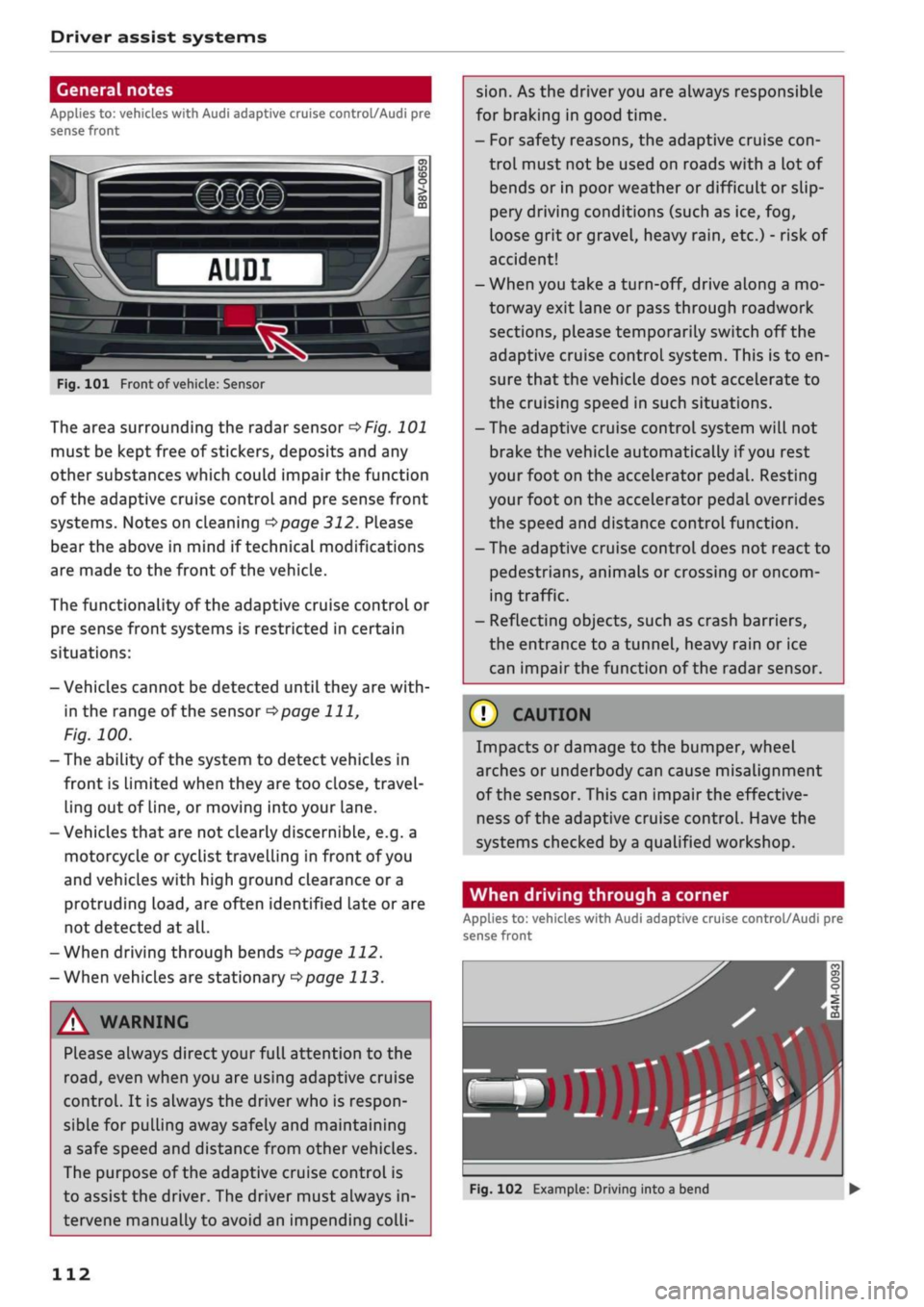
Fig.
101 Front of
vehicle:
Sensor
The area surrounding the radar sensor
of/g.
101
must be kept free of stickers, deposits and any
other substances which could impair the function
of the adaptive cruise control and pre sense front
systems. Notes on cleaning
^>page
312. Please
bear the above in mind if technical modifications
are made to the front of the vehicle.
The functionality of the adaptive cruise control or
pre sense front systems is restricted in certain
situations:
- Vehicles cannot be detected until they are
with
in the range of the sensor
^>page
111,
Fig.
100.
- The ability of the system to detect vehicles in
front is Limited when they are too close, travel
ling out of line, or moving into your lane.
- Vehicles that are not clearly discernible, e.g. a
motorcycle or cyclist travelling in front of you
and vehicles with high ground clearance or a
protruding
load,
are often identified late or are
not detected at all.
-When driving through bends
opage
112.
-When vehicles are stationary
^page
113.
A WARNING
Please always direct your full attention to the
road,
even when you are using adaptive cruise
control.
It is always the driver who is respon
sible for pulling away safely and maintaining
a safe speed and distance from other vehicles.
The purpose of the adaptive cruise control is
to assist the driver. The driver must always in
tervene manually to avoid an impending
colli
sion.
As the driver you are always responsible
for braking in good time.
- For safety reasons, the adaptive cruise
con
trol must not be used on roads with a lot of
bends or in poor weather or difficult or slip
pery driving conditions (such as ice, fog,
loose grit or gravel, heavy
rain,
etc.) - risk of
accident!
- When you take a turn-off, drive along a mo
torway exit lane or pass through roadwork
sections, please temporarily switch off the
adaptive cruise control system. This is to en
sure that the vehicle does not accelerate to
the cruising speed in such situations.
- The adaptive cruise control system will not
brake the vehicle automatically if
you
rest
your foot on the accelerator pedal. Resting
your foot on the accelerator pedal overrides
the speed and distance control function.
- The adaptive cruise control does not react to
pedestrians, animals or crossing or oncom
ing traffic.
- Reflecting objects, such as crash barriers,
the entrance to a tunnel, heavy rain or ice
can impair the function of the radar sensor.
© CAUTION
Impacts or damage to the bumper, wheel
arches or underbody can cause misalignment
of the sensor. This can impair the effective
ness of the adaptive cruise control. Have the
systems checked by a qualified workshop.
When driving through a corner
Applies to: vehicles with Audi adaptive cruise control/Audi pre
sense front
»)
Fig.
102 Example: Driving into a bend
112
Page 120 of 364
Driver assist systems
both sides of the lane you are in
^page
124.
The early setting must be selected for the
steering input on the infotainment system
^>page
126.
•
The adaptive cruise control must be switched
on and activated
^page
113.
Switching the traffic jam assist on/off
•
Press the button
^>Fig.
110 to switch the sys
tem on/off.
Always switch off the traffic jam assist in the
following situations:
- In situations requiring extra care and attention
from the driver.
- In poor weather, for instance in snow or heavy
rain.
- In poor road conditions.
- In roadwork areas.
-In city traffic.
Indicator lamps
|
and
||
-
Traffic
jam assist is switched on. Ve
hicle detected in front. The system is controlling
your vehicle as it moves
^Fig.
111.
If the driver does not take over the steering after
being prompted with several severity levels, the
traffic jam assist
wilL
be switched off and the
emergency assist will be activated
^>page
126.
A
WARNING
Always leave your hands on the steering
wheel and be ready to steer at all times. It is
always the driver's responsibility to keep in
the traffic lane and to assess the traffic situa
tion and take appropriate care. Please observe
the safety warnings
^A in
General notes on
page 112. Never use the traffic jam assist in
the following situations - risk of accident!
- On off-road terrain or unsealed roads.
- In city traffic or roadwork areas.
-On twisty roads.
- In narrow traffic lanes.
- In unpredictable traffic situations, e.g. at
intersections or toll gates.
118
© Note
The system does not always keep the vehicle
in the centre of the lane.
Distance indicator and
distance warning
Applies to: vehicles with Audi adaptive cruise control
This
function measures the distance to the
vehi
cle in front in time units and shows the result on
the instrument cluster display.
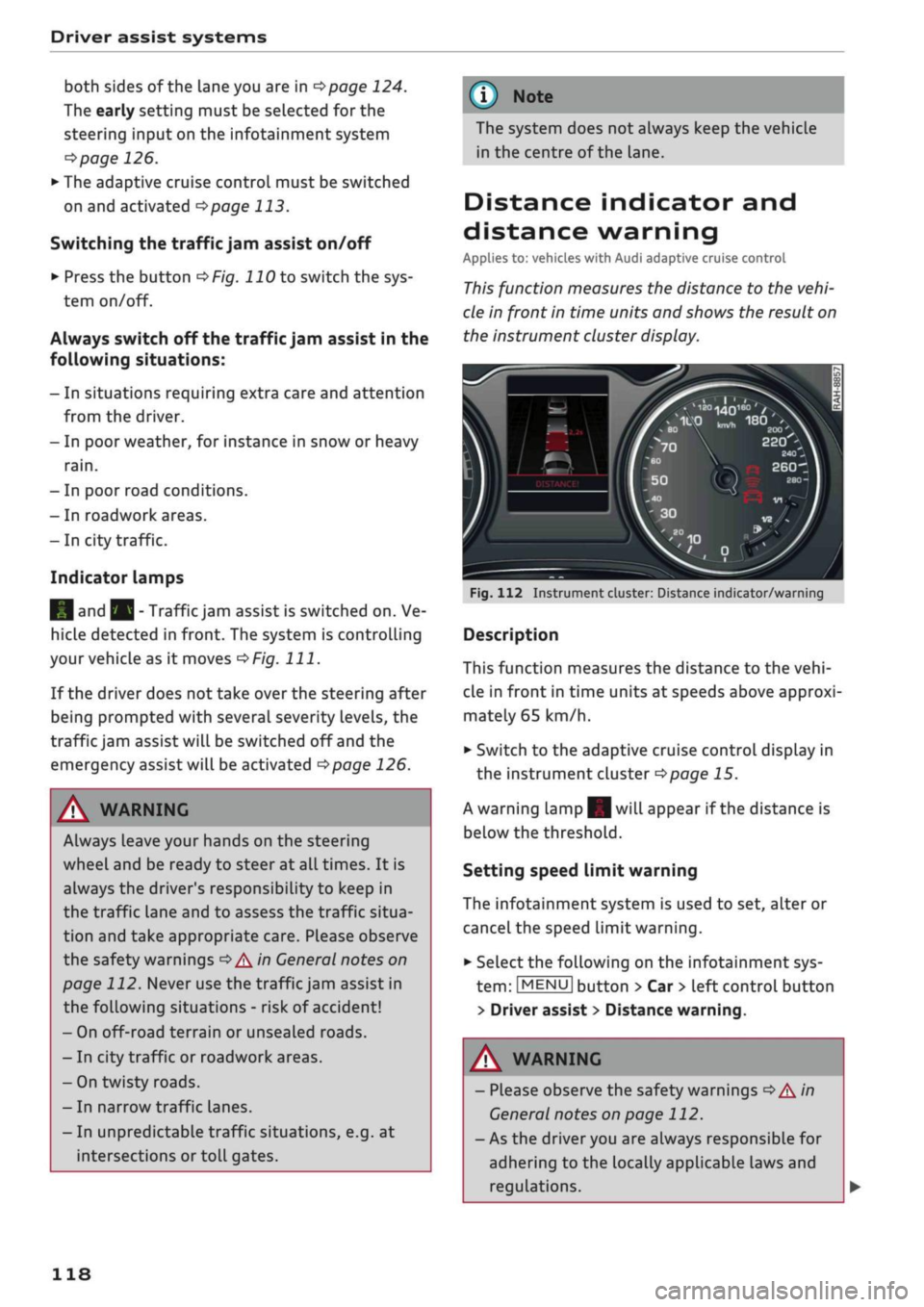
Fig.
112 Instrument cluster: Distance indicator/warning
Description
This function measures the distance to the
vehi
cle in front in time units at speeds above approxi
mately
65
km/h.
•
Switch to the adaptive cruise control display in
the instrument cluster
^>page
15.
A warning lamp|| will appear if the distance is
below the threshold.
Setting speed limit warning
The infotainment system is used to set, alter or
cancel the speed limit warning.
•
Select the following on the infotainment sys
tem:
|MENU|
button
>
Car
>
left control button
> Driver assist
>
Distance warning.
A
WARNING
- Please observe the safety warnings
General notes on page 112.
- As the driver you are always
•=>A''n
responsible for
adhering to the locally applicable la
regulations.
ws and
Page 123 of 364
Driver assist systems
Audi pre sense front
Description
Applies to: vehicles with Audi pre sense front
In certain situations and at certain speeds, pre
sense front can warn you if there is a danger of
collision with crossing
pedestrians1^
or station
ary, parked and moving vehicles, and can apply
the brakes if necessary.
Pre sense front will not react if it is not in a
posi
tion to detect the danger.
In conjunction with pre sense basic, the following
functions may be initiated, depending on how
fast the vehicle is travelling:
- Activation of reversible front seat belt tension
ers.
-Automatic closing of windows and panorama
sun
roof*.
Warnings and braking
Applies to: vehicles with Audi pre sense front
Audi
pre sense
CO
rN
rN
t-H
o <
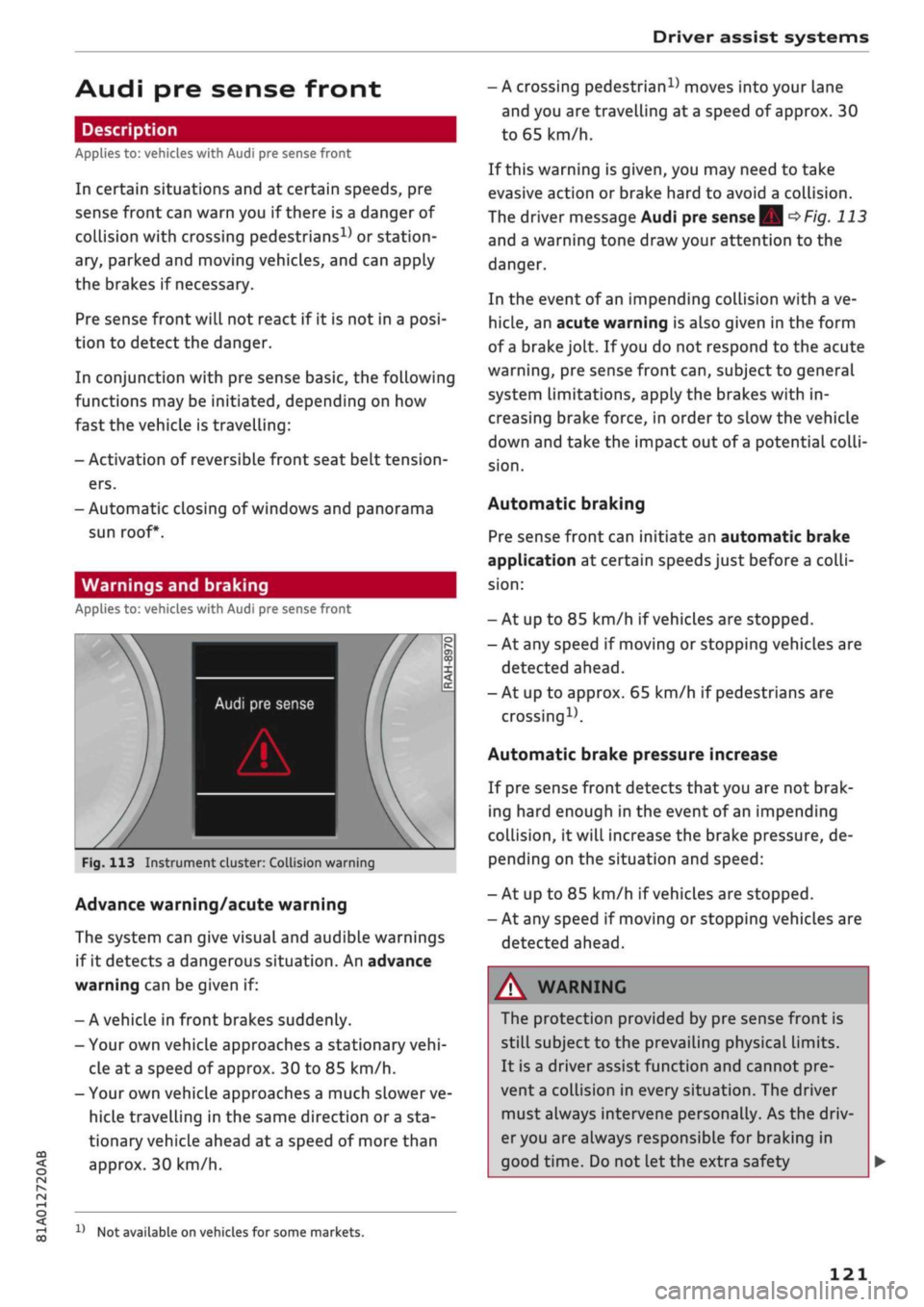
Fig.
113 Instrument cluster: Collision warning
Advance warning/acute warning
The system can give visual and audible warnings
if it detects a dangerous situation. An advance
warning can be given if:
- A vehicle in front brakes suddenly.
- Your own vehicle approaches a stationary
vehi
cle at
a
speed of approx. 30 to 85 km/h.
- Your own vehicLe approaches a much slower ve
hicle travelling in the same direction or
a
sta
tionary vehicle ahead at
a
speed of more than
approx. 30 km/h.
x)
Not available on vehicles for some markets.
- A crossing
pedestrian15
moves into your lane
and you are travelling at a speed of approx. 30
to 65 km/h.
If this warning is given, you may need to take
evasive action or brake hard to avoid a collision.
The driver message Audi pre sense
| Sj
^>Fig.
113
and a warning tone draw your attention to the
danger.
In the event of an impending collision with a ve
hicle,
an acute warning is also given in the form
of
a
brake jolt. If
you
do not respond to the acute
warning,
pre sense front
can,
subject to general
system limitations, apply the brakes with in
creasing brake force, in order to slow the vehicle
down and take the impact out of
a
potential
colli
sion.
Automatic braking
Pre sense front can initiate an automatic brake
application at certain speeds just before a
colli
sion:
- At up to 85 km/h if vehicles are stopped.
- At any speed if moving or stopping vehicles are
detected ahead.
- At up to approx. 65 km/h if pedestrians are
crossing15.
Automatic brake pressure increase
If pre sense front detects
that
you are not brak
ing hard enough in the event of an impending
collision,
it will increase the brake pressure, de
pending on the situation and speed:
- At up to 85 km/h if vehicles are stopped.
- At any speed if moving or stopping vehicles are
detected ahead.
WARNING
The protection provided by pre sense front is
still subject to the prevailing physical limits.
It is a driver assist function and cannot pre
vent
a
collision in every situation. The driver
must always intervene personally. As the driv
er you are always responsible for braking in
good time. Do not let the extra safety
121
Page 125 of 364

Driver assist systems
H
Audi pre sense: currently restricted. Sensor
view restricted due to surroundings.
This message appears if the radar sensor vision is
impaired,
e.g. by leaves, snow, heavy road spray
or dirt. If necessary, clean the sensor
*$
page 112, Fig. 101.
[^
Audi pre sense: currently restricted
This message appears in certain situations, e.g.
when the ESC is partially or fully deactivated.
Q
Audi pre sense: currently restricted. See
owner's manual
Applies to: vehicles with Audi side assist
If
you
operate the turn signals while the active
lane assist and side assist are active, the steering
will be corrected just before you cross the lane
demarcation if the side assist detects vehicles ap
proaching quickly or travelling at about the same
speed as your own vehicle and judges the situa
tion to be critical. This intervention is intended to
keep the vehicle in the Lane.
Applies to: vehicles without Audi side assist
The system does not warn you if
you
operate the
turn signal before crossing a Lane marking. In
this case, it assumes that you intend to change
lanes.
Applies to: vehicles with traffic jam assist
The traffic jam assist can be activated at speeds
below approximately 65 km/h if the correspond
ing conditions have been met
^page
117.
•
123
This driver message appears if one or more sub
systems, such as the
ESC,
fails temporarily. If the
message is displayed several times, drive to a
qualified workshop and have the fault rectified.
[g]
Audi pre sense: emergency braking system
off
This message appears if the functions of the pre
sense system are deactivated via the infotain
ment system or if the system is not available.
Audi active Lane assist
Description
Applies to: vehicles with Audi active lane assist
The active lane assist (lane departure warning
feature) uses a camera in the windscreen to de
tect lane markings (subject to general system
limitations). If
you
approach one of the detected
lane markings, the system corrects the steering
to warn you that the vehicle might be about to
cross one of the markings. You can override this
steering input at any time. The steering wheel vi
brates slightly if
you
cross a lane marking. The vi
bration warning must be activated beforehand on
the infotainment system. The active lane assist is
functional when it detects a demarcation line on
at least one side of the lane in which you are driv
ing.
As the system is designed for driving on motor
ways and other major roads, it is only active
§
above a speed of about 65 km/h (may vary in dif-
£
ferent export markets).
r\i
.-H
00
A WARNING
- The system initiates a corrective steering in
put to warn the driver that the vehicle is
about to leave the lane. As the driver you
are always responsible for staying in your
own lane.
- The system can assist you to keep the
vehi
cle in the lane, however it is not capable of
driving on its own. Never take your hands
off the steering wheel.
- In certain situations, e.g. during heavy brak
ing,
the system may not correct the steer
ing.
- In certain circumstances, not all of the lane
markings may be detected by the camera. A
corrective steering input can only be
initi
ated if the system detects a lane marking on
the side in question.
- Variations in the road surface or objects on
the road may be misinterpreted as lane
markings. In this case, the steering may be
corrected unexpectedly or not at all.
- The camera's view might be obstructed, for
example by vehicles travelling in front,
rain,
snow, a lot of water on the
road,
adverse
light
or
dirt on the windscreen. If this hap
pens,
the active lane assist may not detect