parking brake AUDI Q2 2021 Owner´s Manual
[x] Cancel search | Manufacturer: AUDI, Model Year: 2021, Model line: Q2, Model: AUDI Q2 2021Pages: 364, PDF Size: 87.77 MB
Page 95 of 364
Driving
CO
< o rN
iv
rN
i—i
00
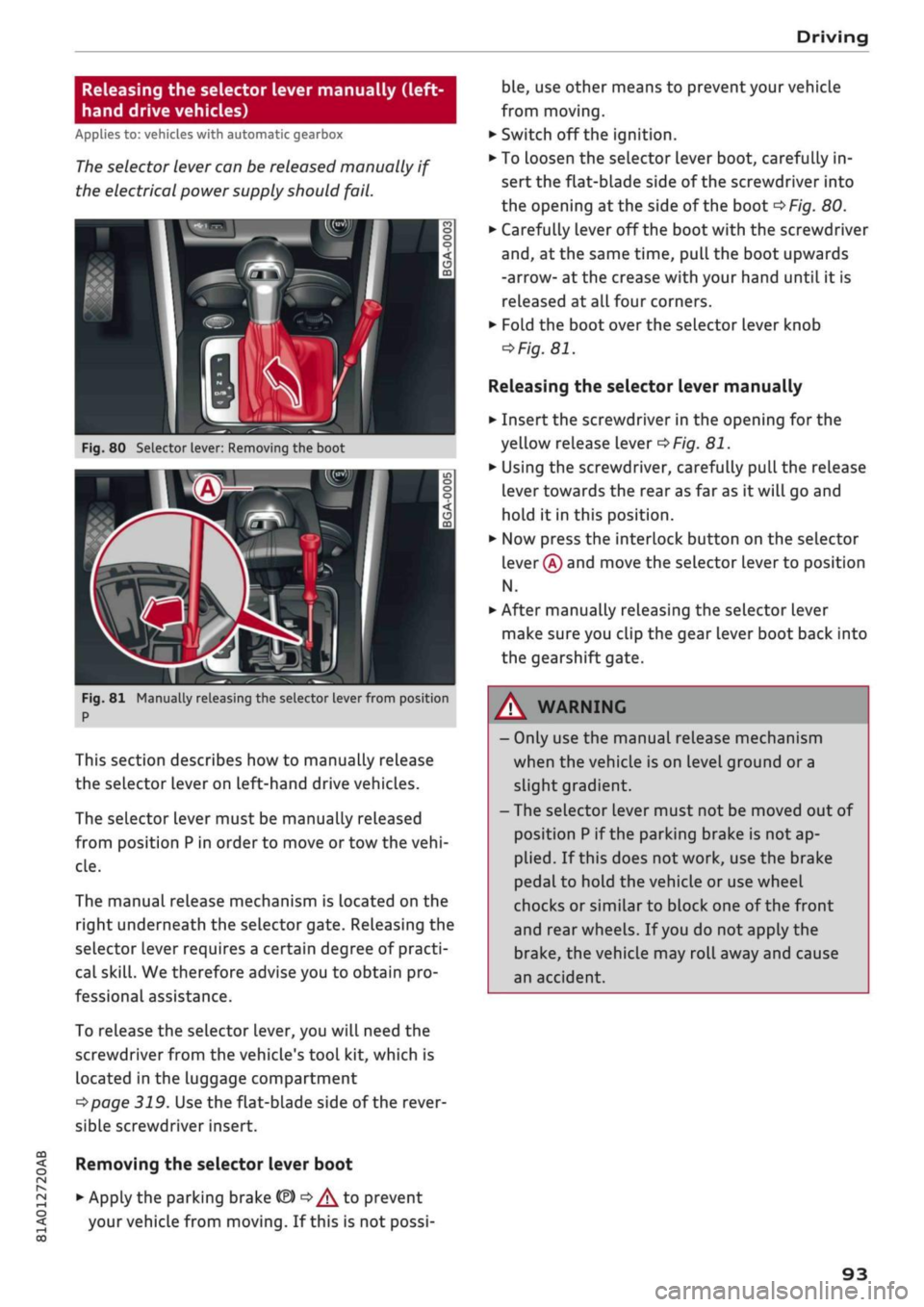
Releasing the selector lever manually (left-
hand drive vehicles)
Applies to: vehicles with automatic gearbox
The
selector lever can be released manually if
the electrical power supply should
fail.
K
Fig.
80 Selector lever: Removing the boot
Fig.
81 Manually releasing the selector lever from position
P
This section describes how to manually release
the selector Lever on Left-hand drive vehicles.
The selector lever must be manually released
from position
P
in order to move or tow the
vehi
cle.
The manual release mechanism is Located on the
right underneath the selector gate. Releasing the
selector lever requires a certain degree of practi
cal
skill.
We therefore advise you to obtain pro
fessional assistance.
To release the selector lever, you
wilL
need the
screwdriver from the vehicle's tool kit, which is
located in the luggage compartment
^>page
319. Use the flat-blade side of the rever
sible screwdriver insert.
Removing the selector lever boot
• Apply the parking brake
& ^/^
to prevent
your vehicle from moving. If this is not possi
ble,
use other means to prevent your vehicle
from moving.
•
Switch off the ignition.
• To loosen the selector lever boot, carefully in
sert the flat-blade side of the screwdriver into
the opening
at
the side of the boot
^>Fig.
80.
•
Carefully lever off the boot with the screwdriver
and,
at the same time, pull the boot upwards
-arrow- at the crease with your hand until it is
released at all four corners.
•
Fold the boot over the selector lever knob
=>
Fig.
81.
Releasing the selector lever manually
•
Insert the screwdriver in the opening for the
yellow release lever
^>Fig.
81.
•
Using the screwdriver, carefully pull the release
lever towards the rear as far as it will go and
hold it in this position.
•
Now press the interlock button on the selector
lever
®
and move the selector lever to position
N.
•
After manually releasing the selector lever
make sure you clip the gear lever boot back into
the gearshift gate.
A WARNING
- Only use the manual release mechanism
when the vehicle is on level ground or a
slight gradient.
- The selector lever must not be moved out of
position
P
if the parking brake is not ap
plied.
If this does not work, use the brake
pedal to hold the vehicle or use wheel
chocks or similar to block one of the front
and rear wheels. If
you
do not apply the
brake,
the vehicle may roll away and cause
an accident.
93
Page 96 of 364
Driving
Releasing the selector lever manually
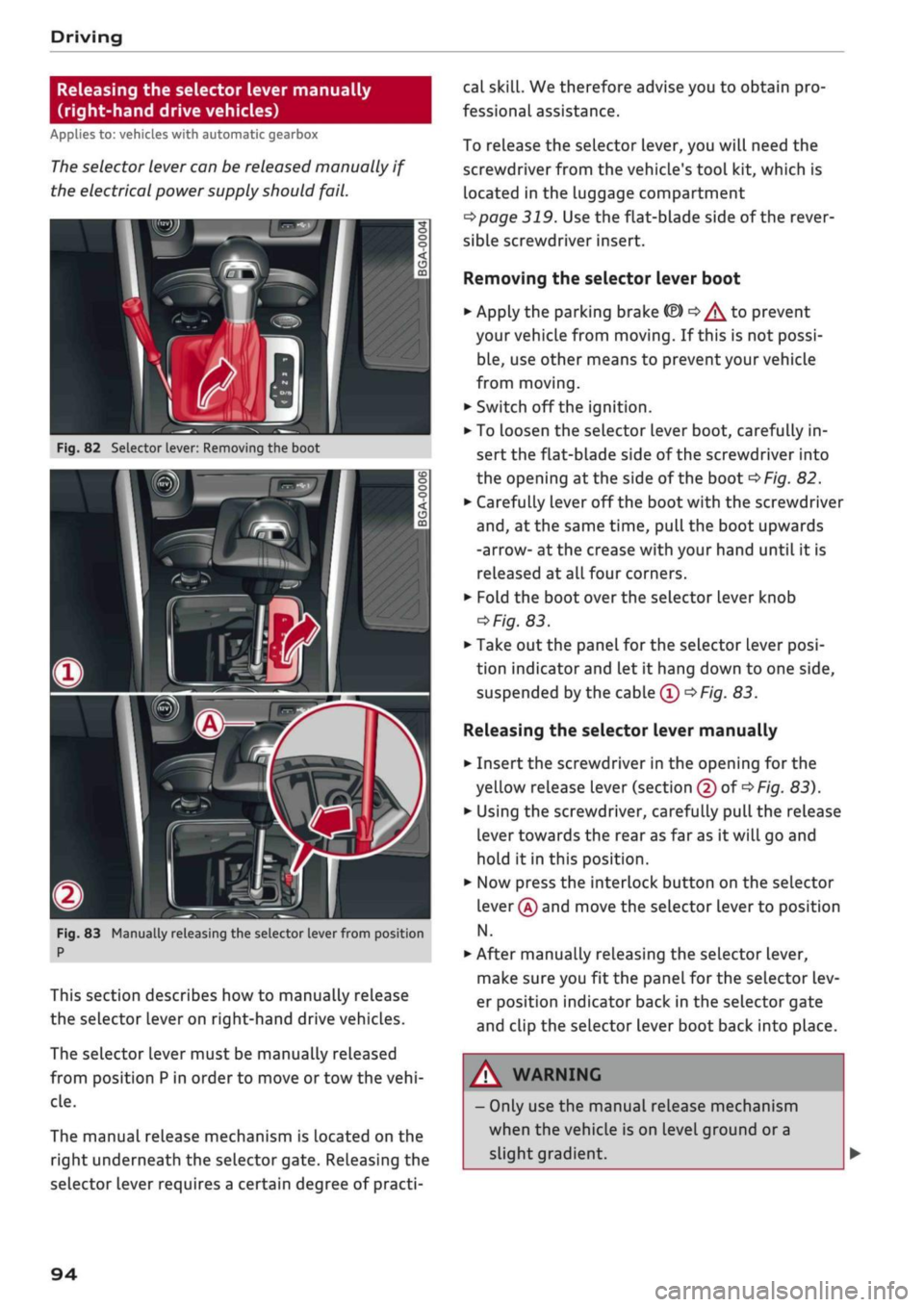
(right-hand drive vehicles)
Applies to: vehicles with automatic gearbox
The
selector lever can be released manually if
the electrical power supply should
fail.
n
Fig.
82 Selector lever: Removing the boot
m
i
Fig.
83 Manually releasing the selector lever from position
P
This section describes how to manually release
the selector lever on right-hand drive vehicles.
The selector lever must be manually released
from position
P
in order to move or tow the
vehi
cle.
The manual release mechanism is located on the
right underneath the selector gate. Releasing the
selector lever requires a certain degree of practi
cal
skill.
We therefore advise you to obtain pro
fessional assistance.
To release the selector lever, you will need the
screwdriver from the vehicle's tool kit, which is
located in the luggage compartment
^>page
319. Use the flat-blade side of the rever
sible screwdriver insert.
Removing the selector lever boot
•
Apply the parking brake fâ)
o^
to prevent
your vehicLe from moving. If this is not possi
ble,
use other means to prevent your vehicle
from moving.
•
Switch off the ignition.
• To Loosen the selector lever boot, carefully in
sert the flat-blade side of the screwdriver into
the opening
at
the side of the boot
^>Fig.
82.
*•
Carefully lever off the
boot
with the screwdriver
and,
at the same time, pull the boot upwards
-arrow- at the crease with your hand until it is
released at
alL
four corners.
•
Fold the boot over the selector lever knob
^Fig.
83.
•
Take out the panel for the selector Lever
posi
tion indicator and Let it hang down to one side,
suspended by the cable
0 •=>
Fig.
83.
Releasing the selector lever manually
•
Insert the screwdriver in the opening for the
yellow release lever (section
@
of
<$
Fig.
83).
•
Using the screwdriver, carefully pull the release
lever towards the rear as far as it will go and
hold it in this position.
•
Now press the interlock button on the selector
lever
@
and move the selector Lever to position
N.
•
After manually releasing the selector lever,
make sure you fit the panel for the selector lev
er position indicator back in the selector gate
and clip the selector lever boot back into place.
A WARNING
- Only use the manual release mechanism
when the vehicle is on level ground or a
slight gradient.
94
Page 97 of 364
- The selector lever must not be moved out of
position P if the parking brake is not ap
plied.
If this does not work, use the brake
pedal to hold the vehicle or use wheel
chocks or similar to block one of the front
and rear wheels. If
you
do not apply the
brake,
the vehicle may roll away and cause
an accident.
Page 121 of 364
Driver assist systems
© Note
The distance may be below the warning
threshold for a short time when overtaking or
approaching a slower vehicle quickly from be
hind.
In this case, no warning will be given. A
warning is only given if the distance is consis
tently below the threshold.
Driver messages
Applies to: vehicles with Audi adaptive cruise control
El
ACC:
not available
The system cannot detect vehicles reliably and
will be deactivated. The sensor is out of align
ment or defective. Drive to a qualified workshop
and have the fault rectified.
EH
ACC:
currently unavailable. No sensor vision
Eo3
ACC:
currently unavailable. Sensor view re
stricted due to surroundings. See owner's
man
ual
These messages appear if the radar sensor vision
is impaired, e.g. by leaves, snow, heavy road
spray or dirt. Clean the sensor
^>page
112,
Fig. 101.
E3
ACC:
currently unavailable. Speed too low
Manual gearbox: This message appears if the cur
rent speed is too low for
ACC
mode. You cannot
store speed settings below 30 km/h. The cruise
control system switches off if the speed falls
be
low 20 km/h.
Esi
ACC:
available from 2nd gear up
Manual gearbox: The adaptive cruise control only
operates in 2nd gear or higher.
B
ACC:
currently unavailable. Gradient too
steep
The maximum possible road gradient for safe op
eration of the adaptive cruise control has been
exceeded.
The adaptive cruise control cannot be
switched on.
ffl
Ea3
ACC:
only
available in D, S or M < o
PI
Automatic gearbox: Move the selector lever to
g
position D/S or M. <
00
Eol
ACC:
clutch pedal pressed
Automatic gearbox: Cruise control mode is deac
tivated if the clutch pedal is pressed for
a
rela
tively long period.
Bf
ACC:
engine speed
Manual gearbox: This message appears if the
driver does not change gear in time when the
adaptive cruise control accelerates or brakes the
vehicle and the engine speed is too high or low as
a result. The adaptive cruise control is switched
off.
EJACC:
parking brake applied
The adaptive cruise control system is deactivated
if the parking brake is applied. The adaptive
cruise control will be available again when the
parking brake is released.
Eo3
ACC:
currently unavailable. Stabilisation
control input
This message appears if the electronic stabilisa
tion control (ESC) intervenes. In this case, the
adaptive cruise control will automatically be
switched off.
Eo3 ACC
off: manual control!
This message appears if the vehicLe rolls back
wards when driving away on a slight gradient,
even though the adaptive cruise control is active.
Press the brake pedal to prevent the vehicle from
rolling back or colliding with an object behind.
EM
ACC:
currently unavailable. Park assist ac
tive
The systems are switched off when the park as
sist* is active. The systems will be available again
when the parking manoeuvre is finished.
Distance warning: fault. Please contact work
shop
The system cannot detect vehicles reliably and
will be deactivated. The radar sensor is out of
alignment or defective. Drive to a qualified work
shop and have the fault rectified.
Distance warning: currently unavailable. Sensor
view restricted due to surroundings •
119
Page 132 of 364
Driver assist systems
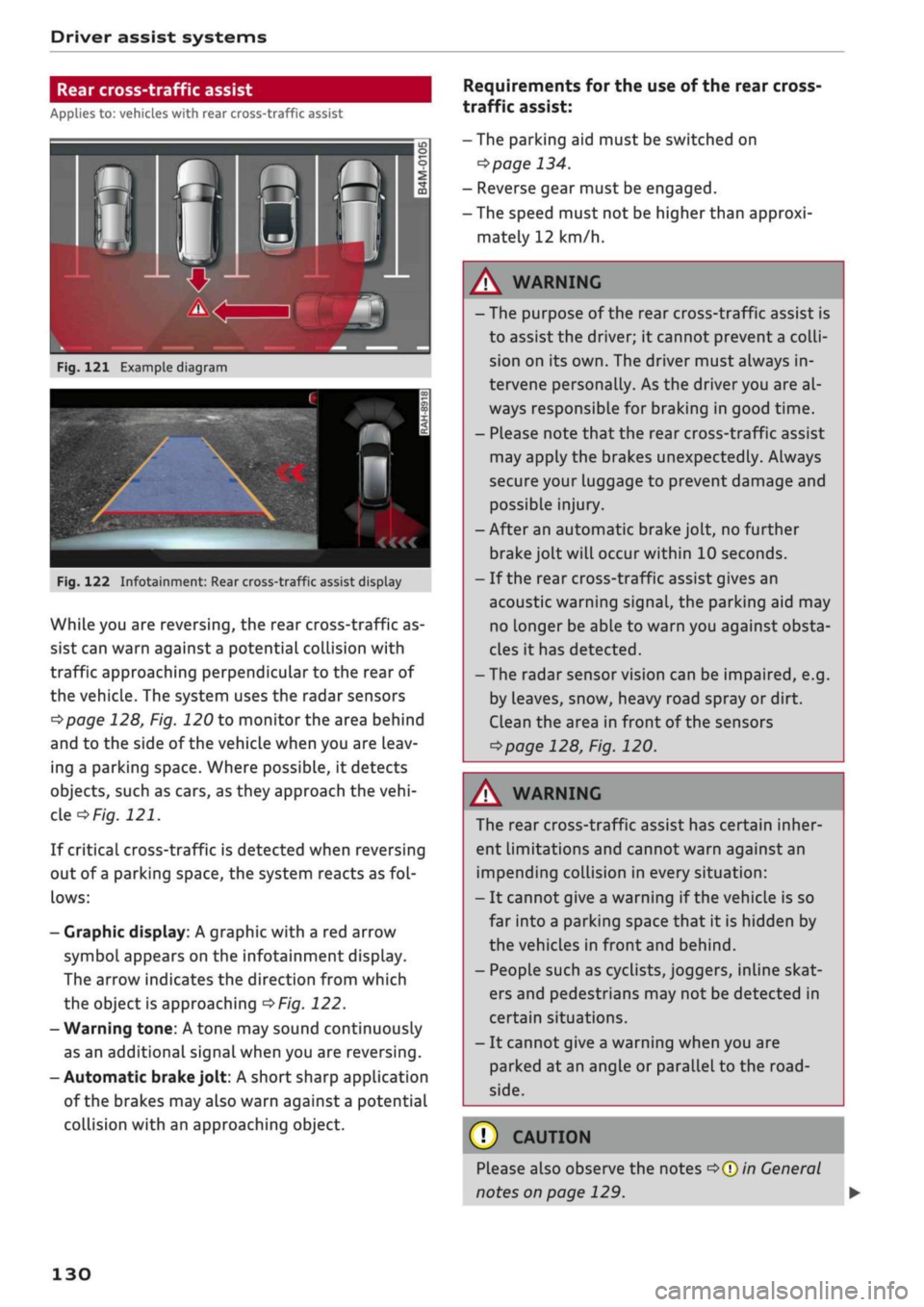
Rear cross-traffic assist
Applies to: vehicles with rear cross-traffic assist
Fig.
121 Example diagram
Fig.
122 Infotainment: Rear cross-traffic assist display
While you are reversing, the rear cross-traffic as
sist can warn against a potential collision with
traffic approaching perpendicular to the rear of
the vehicle. The system uses the radar sensors
^page
128, Fig. 120 to monitor the area behind
and to the side of the vehicle when you are leav
ing a parking space. Where possible, it detects
objects, such as cars, as they approach the
vehi
cle
of/g.
121.
If critical cross-traffic is detected when reversing
out of a parking space, the system reacts as
fol
lows:
- Graphic display: A graphic with a red arrow
symbol appears on the infotainment display.
The arrow indicates the direction from which
the object is approaching
^>Fig.
122.
- Warning tone: A tone may sound continuously
as an additional signal when you are reversing.
-Automatic
brake
jolt: A short sharp application
of the brakes may also warn against a potential
collision with an approaching object.
Requirements for the use of the rear cross-
traffic assist:
-The parking aid must be switched on
^>page
134.
- Reverse gear must be engaged.
- The speed must not be higher than approxi
mately 12 km/h.
A
WARNING
- The purpose of the rear cross-traffic assist is
to assist the driver; it cannot prevent a
colli
sion on its own. The driver must always in
tervene personally. As the driver you are al
ways responsible for braking in good time.
- Please note that the rear cross-traffic assist
may apply the brakes unexpectedly. Always
secure your luggage to prevent damage and
possible injury.
-After an automatic brake jolt, no further
brake jolt will occur within 10 seconds.
- If the rear cross-traffic assist gives an
acoustic warning signal, the parking aid may
no Longer be able to warn you against obsta
cles it has detected.
- The radar sensor vision can be impaired, e.g.
by leaves, snow, heavy road spray or dirt.
Clean the area in front of the sensors
*>page
128, Fig. 120.
A
WARNING
The rear cross-traffic assist has certain inher
ent limitations and cannot warn against an
impending collision in every situation:
- It cannot give a warning if the vehicle is so
far into a parking space that it is hidden by
the vehicles in front and behind.
- People such as cyclists, joggers, inline skat
ers and pedestrians may not be detected in
certain situations.
- It cannot give a warning when you are
parked at an angle or parallel to the
road
side.
(T)
CAUTION
Please also observe the notes
^>©in
General
notes on page 129.
130
Page 133 of 364
Driver assist systems
CO
< o rN
r>
rN
t-H
o < 00
-The automatic brake application with in
creasing brake force can be cancelled by ap
plying the brakes yourself or by pressing the
accelerator firmly.
- In certain situations, a warning may be giv
en by the rear cross-traffic assist even if
there is no traffic in the critical zone, for in
stance when parking or manoeuvring the ve
hicle in reverse.
- The rear cross-traffic assist is deactivated
automatically if you deactivate the
ESC.
-The rear cross-traffic assist is switched on/
off via the parking aid
^>page
134.
-The system is not available in towing mode.
Driver messages
Applies to: vehicles with Audi side assist
Should the side assist be deactivated automati
cally, a driver message will appear in the instru
ment cluster display.
O
Audi side assist: system fault!
The system cannot detect vehicles reliably and
will be deactivated. The sensors are out of align
ment or defective. Have the system checked by a
qualified workshop soon.
O
Audi side assist: currently unavailable. No
sensor vision
O
Audi side assist: currently unavailable.
Sen
sor view restricted due to surroundings. See
owner's manual
The radar sensors are blocked. The area in front
of the sensors must not be obstructed by bicycle
racks,
stickers, deposits or any other substances.
If necessary, clean the area in front of the
sen
sors
^>page
128, Fig. 120.
O
Audi side assist: currently unavailable
The side assist is temporarily inoperative and
cannot be switched on (for instance if the battery
is not sufficiently charged).
O
Audi side assist: unavailable in towing mode
2
Audi side assist: unavailable in towing mode
The side assist function will be switched off auto
matically after a short time when the electrical
connector for the trailer socket is plugged in on
vehicles with a factory-fitted towing bracket. If
the towing bracket is not factory-fitted the side
assist function may not be switched off automat
ically. The side assist must not be used when
towing a trailer.
O Rear
parking aid: obstacle detection limited
The rear cross-traffic assist is not available. Ei
ther the ESC is switched off or the radar sensors
may be obstructed by a bicycle rack, stickers,
leaves, snow or similar objects. Switch on the ESC
or, if necessary, clean the area in front of the
sen
sors
<3page
128, Fig. 120. If this message re
mains displayed, drive to a qualified workshop
soon and have the fault rectified.
Audi drive select
Introduction
Applies to: vehicles with Audi drive select
Audi drive select alLows you to use different set
ups on your vehicle. The modes efficiency*, com
fort, auto and dynamic allow the driver, for ex
ample,
to change from a sporty mode to a more
comfortable one via the
&&
button in the centre
console or via the infotainment system. In
addi
tion,
the individual* mode allows you to adapt
the vehicle set-up to
suit
your personal driving
style.
For example, you might choose to combine
a more dynamic engine set-up with a lighter
steering response.
Description
Applies to: vehicles with Audi drive select
The possible vehicle set-up in each mode de
pends on which equipment is installed on your
vehicle. The engine and steering are basic parts
of your vehicle which are always included in the
set-up.
Engine and automatic gearbox*
The response of the engine and automatic
gear
box* to accelerator pedal movements will be
more spontaneous or balanced, depending on
131
Page 138 of 364
Parking aids
comes
closer than before, the tone will sound
again.
If the tone is muted and the obstacLe is
further away than before, no tone will sound.
Please watch the area surrounding the vehicle
when driving off.
©
Zone
(§)*
is detected and analysed as the
vehi
cLe is moving past. When you switch the
igni
tion off and on again or open the door, or af
ter the vehicle has been stationary for
a
while,
the ambient surroundings may have changed.
Zone
0*
is displayed in black on the infotain
ment display for this reason.
Switching on/off
Applies to: vehicles with parking system plus/park assist
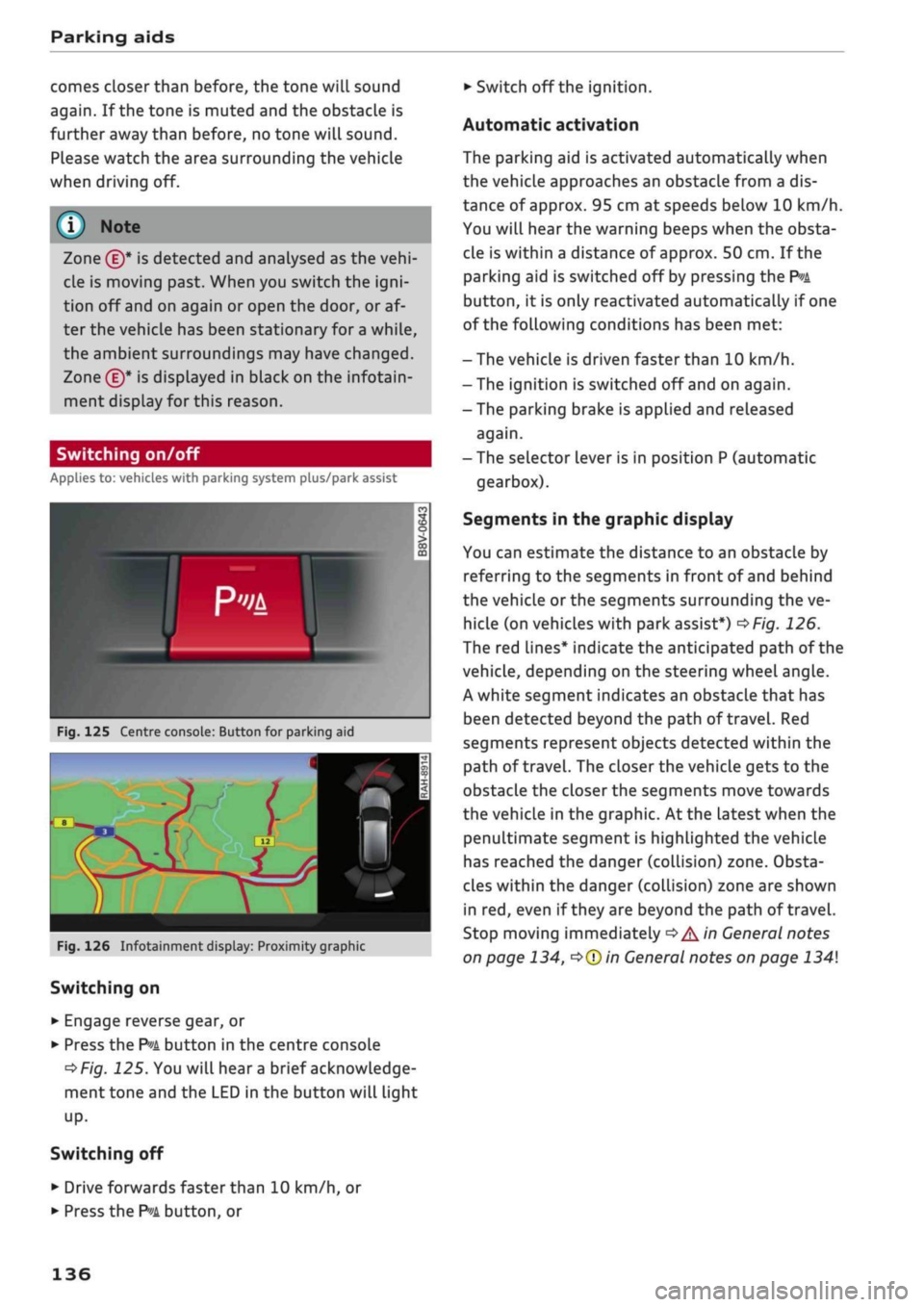
Fig.
125 Centre console: Button for parking aid
^H i m
1 •rif/^^^y^H <
12|
1 )
'.•;"
•BiHiSi
-
Fig.
126 Infotainment display: Proximity graphic
Switching on
•
Engage reverse gear, or
•
Press the
P»i
button in the centre console
^>Fig.
125. You will hear
a
brief acknowledge
ment tone and the LED in the button will light
up-
Switching
off
• Drive forwards faster than 10 km/h, or
*•
Press the
?">k
button, or
•
Switch off the ignition.
Automatic activation
The parking aid is activated automatically when
the vehicLe approaches an obstacLe from a dis
tance of approx. 95 cm at speeds below 10 km/h.
You will hear the warning beeps when the obsta
cle is within a distance of approx. 50 cm. If the
parking aid is switched off by pressing the
P*A
button,
it is only reactivated automatically if one
of the following conditions has been met:
- The vehicle is driven faster than 10 km/h.
- The ignition is switched off and on again.
-The parking brake is applied and released
again.
- The selector lever is in position P (automatic
gearbox).
Segments in the graphic display
You can estimate the distance to an obstacle by
referring to the segments in front of and behind
the vehicLe or the segments surrounding the ve
hicle (on
vehicLes
with park assist*)
^>Fig.
126.
The red lines* indicate the anticipated path of the
vehicle, depending on the steering wheel angle.
A white segment indicates an obstacle that has
been detected beyond the path of
travel.
Red
segments represent objects detected within the
path of
travel.
The closer the vehicle gets to the
obstacLe the closer the segments move towards
the vehicLe in the graphic. At the Latest when the
penultimate segment is highlighted the vehicle
has reached the danger (collision) zone. Obsta
cles within the danger (collision) zone are shown
in red, even if
they
are beyond the path of travel.
Stop moving immediately
•=>
A in General notes
on page 134,
•=>©
in General notes on page 134
136
Page 299 of 364

Checking and topping up fluids
CO
rN
IV
rN
•-i
00
Emission controL
systems
Catalytic converter
Applies to: vehicles with petrol engine
The vehicle must only be used with unleaded pet
rol,
otherwise the catalytic converter will be ir
reparably damaged.
Never allow the fuel tank to run completely dry,
as the irregular supply of fuel can cause misfir
ing.
This allows unburnt fuel to enter the exhaust
system,
which can cause overheating and dam
age to the catalytic converter.
Diesel particulate filter
Applies to: vehicles with diesel engine
The diesel particulate filter can filter out almost
all soot particles contained in the exhaust gas. In
normal driving conditions the filter is self-clean
ing.
Should the self-cleaning function of the filter
not be able to operate, e.g. when the vehicle is
continuously used only for short trips, the filter
becomes obstructed with soot and the indicator
lampnf°r
the
diesel particulate filter Lights up
cépage
34.
A WARNING
The exhaust system is very hot when the
vehi
cle is being driven and after the engine has
been switched off.
- Never touch the tailpipes when they are hot
- risk of burns!
- Because of the high temperatures which can
occur in the emission controL system, do not
park the vehicle where the exhaust can
come into contact with flammable materials
under the car (e.g. on grass or at the forest
edge) - risk of fire!
- Do not apply any underseal agents in the
area around the exhaust system - risk of
fire!
Engine compartment
Working on components in the engine
compartment
Extra caution is necessary when working on com
ponents in the engine compartment.
Always be aware of the danger of injury and
scalding as well as the risk of accident or fire
when working in the engine compartment (e.g.
when checking and refilling fluids). Always ob
serve the warnings listed below and follow all
normal safety precautions. The engine compart
ment of any motor vehicle is a potentially haz
ardous area
oA-
A WARNING
- Switch off the engine.
-Switch off the ignition.
-Applythe
parking brake.
- On vehicles with manual gearbox place the
gear lever in neutral, on vehicles with auto
matic gearbox move the selector lever to
position P.
- To avoid the risk of being scalded, never
open the bonnet if
you
see steam or coolant
escaping from the engine compartment.
Wait until no steam or coolant can be seen
before opening the bonnet.
- Wait for the engine to cool down.
- Keep children away from engine compart
ment.
- Never spill fluids on a hot engine. These
flu
ids can cause a fire (e.g. radiator
anti
freeze).
- Take care not to cause short circuits in the
electrical system.
- When working in the engine compartment
be aware that the radiator fan may start
running suddenly, even if the ignition is
switched off - risk of injury!
- Do not unscrew the cap on the expansion
tank when the engine is hot. The cooling
system is under pressure.
- Protect face, hands and arms by covering
the cap with a large, thick rag to protect
against escaping coolant and steam.
295
Page 322 of 364
Mobility
Mobility
General notes
•
If your vehicle experiences technical problems,
stop the car well away from moving traffic. If
you have a flat tyre, you should park the car on
a level surface. Be particularly careful if you are
on a slope.
•
Apply the parking brake.
•
Switch the hazard warning lights on.
•
Put on a high-visibility vest if one is available.
•
Place the warning triangle in a visible location
tapage
318.
•
Instruct all passengers to leave the car when it
is safe to do so. They should wait in a safe place
(for instance behind the roadside crash barrier).
A
WARNING
You should note the procedure described
above for your own safety and that of other
road users.
Equipment
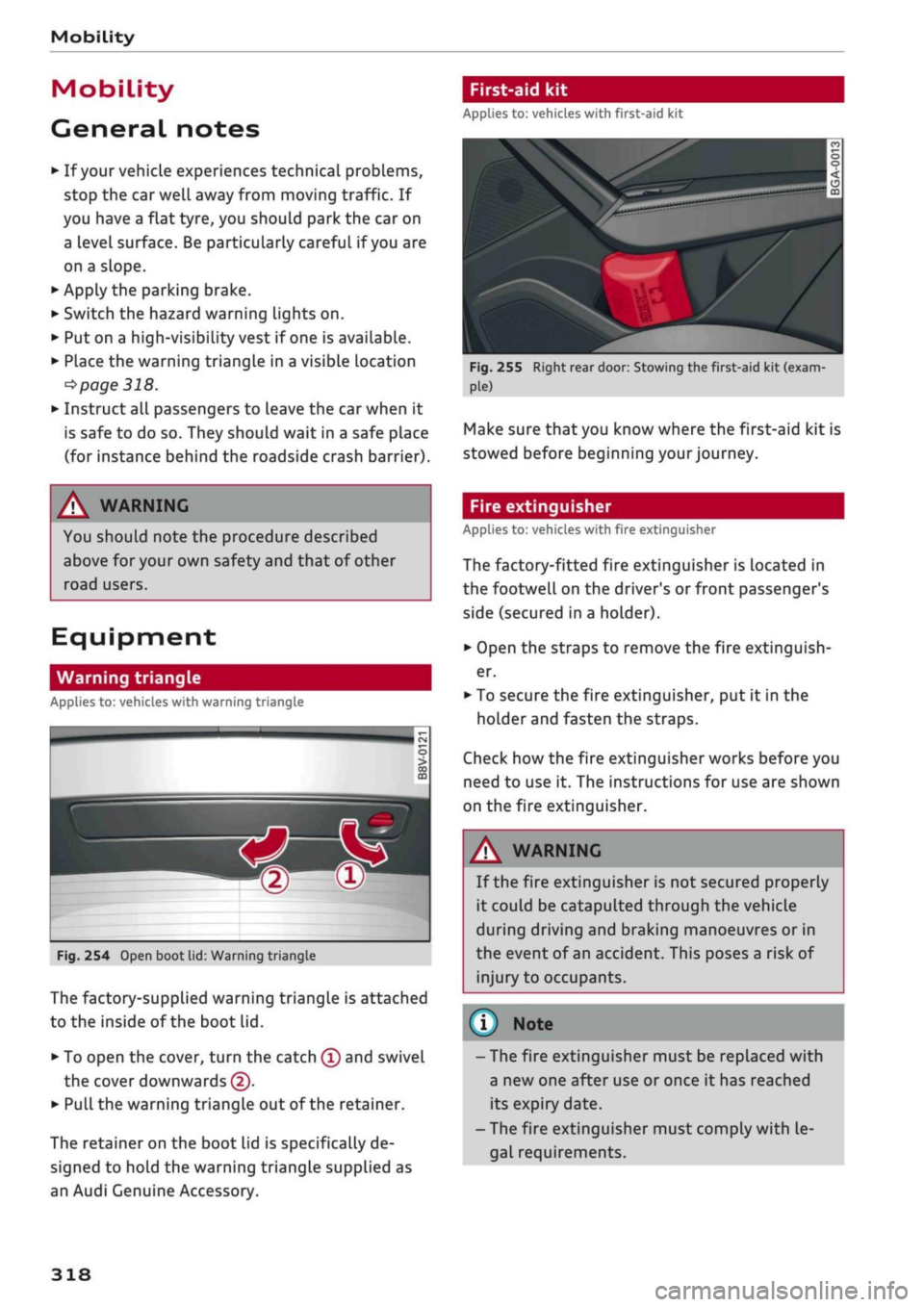
Warning triangle
Applies to: vehicles with warning triangle
w®
Fig.
254 Open boot lid: Warning triangle
The factory-supplied warning triangle is attached
to the inside of the boot lid.
• To open the cover, turn the catch
©
and swivel
the cover downwards (5).
• Pull
the warning triangle out of the retainer.
The retainer on the boot lid is specifically de
signed to hold the warning triangle supplied as
an Audi Genuine Accessory.
First-aid kit
Applies to: vehicles with first-aid kit
V
Fig.
255 Right rear door: Stowing the first-aid kit (exam
Make sure that you know where the first-aid kit is
stowed before beginning your journey.
Fire extinguisher
Applies to: vehicles with fire extinguisher
The factory-fitted fire extinguisher is located in
the footwell on the driver's or front passenger's
side (secured in a holder).
•
Open the straps to remove the fire extinguish
er.
•
To secure the fire extinguisher, put it in the
holder and fasten the straps.
Check how the fire extinguisher works before you
need to use it. The instructions for use are shown
on the fire extinguisher.
A WARNING
If the fire extinguisher is not secured properly
it could be catapulted through the vehicle
during driving and braking manoeuvres or in
the event of an accident. This poses a risk of
injury to occupants.
© Note
- The fire extinguisher must be replaced with
a new one after use or once it has reached
its expiry date.
- The fire extinguisher must comply with le
gal requirements.
318
Page 323 of 364
Mobility
Tool kit/tyre repair kit/compressor Using the tyre repair kit
Applies to: vehicles with tool kit/tyre repair kit/compressor Applies to: vehicles with tyre repair kit
CO
rN
IV
rN
•-i
00
Fig.
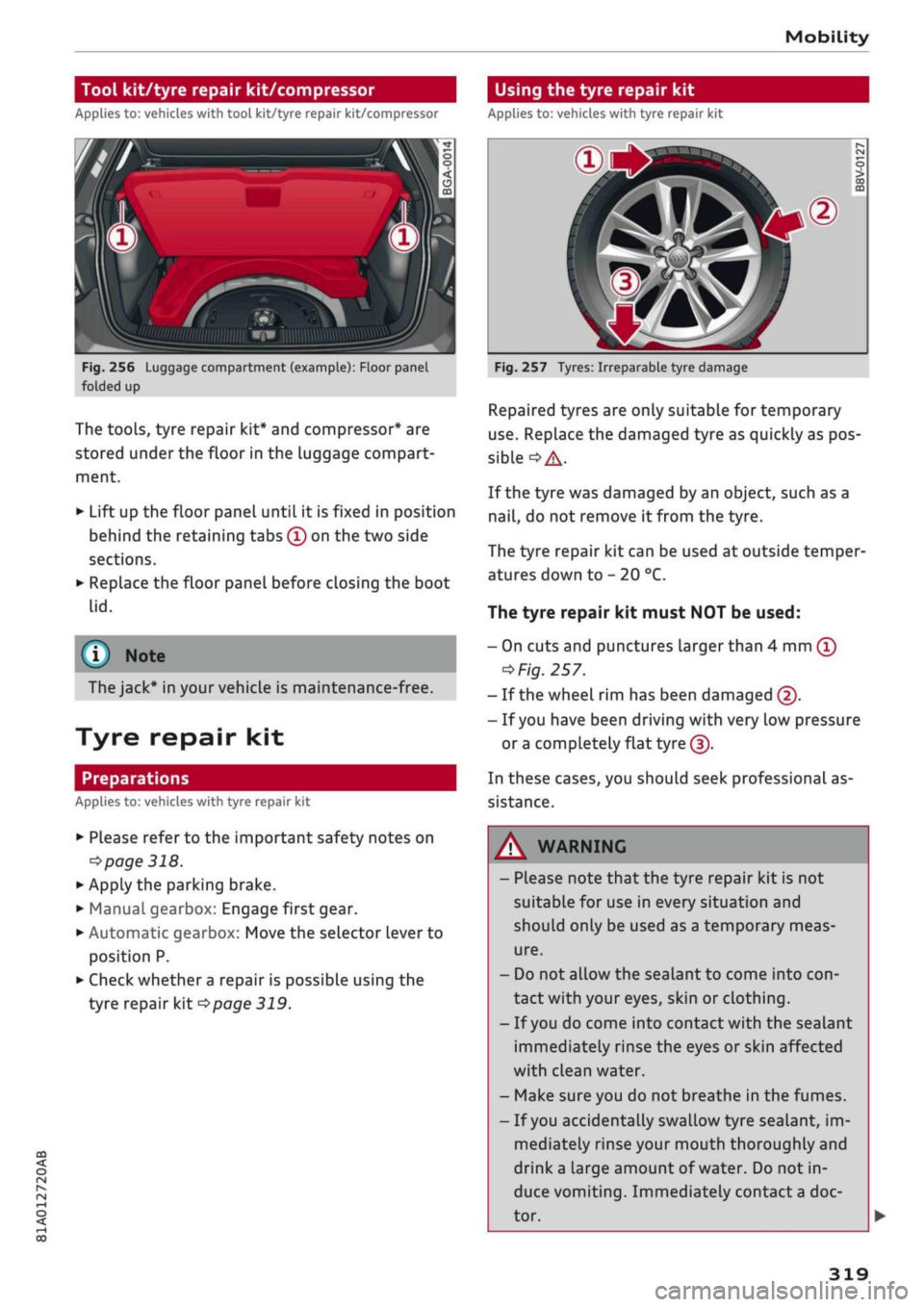
256 Luggage compartment (example): Floor panel
folded up
The tools, tyre repair kit* and compressor* are
stored under the floor in the luggage compart
ment.
•
Lift up the floor panel until it is fixed in position
behind the retaining tabs
©
on the two side
sections.
•
Replace the floor panel before closing the boot
lid.
(T)
Note
The jack* in your vehicle is maintenance-free.
Tyre repair kit
Preparations
Applies to: vehicles with tyre repair kit
•
Please refer to the important safety notes on
•=>
page 318.
•
Apply the parking brake.
•
Manual gearbox: Engage first gear.
• Automatic gearbox: Move the selector lever to
position P.
•
Check whether
a
repair is possible using the
tyre repair kit
^page
319.
Fig.
257 Tyres: Irreparable tyre damage
Repaired tyres are only suitable for temporary
use.
Replace the damaged tyre as quickly as pos
sible
°=>A-
If the tyre was damaged by an object, such as a
nail,
do not remove it from the tyre.
The tyre repair kit can be used at outside temper
atures down to - 20 °C.
The tyre repair kit must NOT be used:
- On cuts and punctures larger than 4 mm
©
^Fig.
257.
- If the wheel rim has been damaged ©.
- If
you
have been driving with very low pressure
or a
completely flat
tyre(|).
In these cases, you should seek professional as
sistance.
A
WARNING
- Please note that the tyre repair kit is not
suitable for use in every situation and
should only be used as a temporary meas
ure.
- Do not allow the sealant to come into
con
tact with your eyes, skin or clothing.
- If
you
do come into contact with the sealant
immediately rinse the eyes or skin affected
with clean water.
- Make sure you do not breathe in the fumes.
- If
you
accidentally swallow tyre sealant, im
mediately rinse your mouth thoroughly and
drink
a
large amount of water. Do not in
duce vomiting. Immediately contact
a
doc
tor.
319