warning engine AUDI Q2 2021 Owner´s Manual
[x] Cancel search | Manufacturer: AUDI, Model Year: 2021, Model line: Q2, Model: AUDI Q2 2021Pages: 364, PDF Size: 87.77 MB
Page 77 of 364

Driving
CO
<
O
rN
iv
rN
•-i
00
Electrical components with a high power
con
sumption are switched off temporarily while you
start the engine.
If the engine fails to start immediately, switch
off the starter by turning the ignition key to
posi
tion (5) and try again after about 30 seconds.
Start/stop
system*
Please note the information on
^>page
79,
Start/stop system.
A WARNING
- Never run the engine in confined spaces.
The exhaust gases are toxic - risk of poison
ing!
- Never remove the key from the ignition
while the vehicle is moving. The steering
lock would engage, and you would not be
able to steer the car - risk of accident!
© CAUTION
Avoid high engine speeds, full throttle and ex
treme load conditions until the engine has
reached its normal operating temperature;
otherwise this can damage the engine.
© For the sake of the environmen
Do not warm up the engine by running it with
the car stationary. You should drive off imme
diately whenever possible. This will help avoid
unnecessary exhaust emissions.
© Note
- If it is difficult to turn the ignition key to po
sition ®, move the steering wheel (to take
the load off the steering lock mechanism)
until the key turns freely.
- Any noises which may be heard when the
engine is started are quite normal and no
cause for concern.
Switching off the engine
Applies to: vehicles with ignition lock
Switching off the engine
•
Stop the vehicle.
•
Turn the ignition key to position
@.
The rev
counter needle will move to the OFF position.
Engaging the steering lock
Important: The selector lever must be in position
P (automatic gearbox*).
•
Remove the ignition key while it is in position
(§) ^>page
76, Fig. 70
=> A
•
Turn the steering wheel until you hear the
steering lock engage.
The steering lock acts as a theft deterrent.
A,
WARNING
- Never switch off the engine until the vehicle
is stationary. Otherwise you may not have
the full benefit of the brake servo and pow
er steering. You may need more strength to
steer and brake the vehicle than you nor
mally would. This would mean a greater risk
of accidents and serious injury, because you
cannot steer and brake in the normal
man
ner.
- Never remove the key from the ignition
while the vehicle is moving. The steering
lock could engage suddenly, and you would
not be able to steer the car.
- Always take the key with you when you leave
the vehicle. Otherwise the engine can be
started or power-operated equipment such
as the electric windows can be used. This
could result in serious injury.
- When parking, always move the selector
lever to position
P
to prevent the vehicle
from rolling back accidentally.
© CAUTION
If the engine has been working hard
fora
long
time,
there is a risk of heat building up in the
engine compartment after the engine has
been switched off; this could cause engine
damage. For this reason, you should Leave the
engine idling for about 2 minutes before
switching
it
off.
75
Page 78 of 364
Driving
©
y
Note
After the engine is stopped, the radiator fan
may remain on or turn itself back on for up to
10 minutes, even if the ignition is switched
off. This may occur for the following reasons:
- Residual heat has raised the coolant
tem
perature.
- Direct sunlight has additionally heated up
the engine compartment while the engine is
warm.
- Applies to vehicles with diesel particulate
filter: The emission control system is hot
because of the regeneration process, even
though the engine has
not
yet reached oper
ating temperature.
Starting and stopping
the engine (vehicles with
convenience key)
Starting the engine
Applies to: vehicles with convenience key
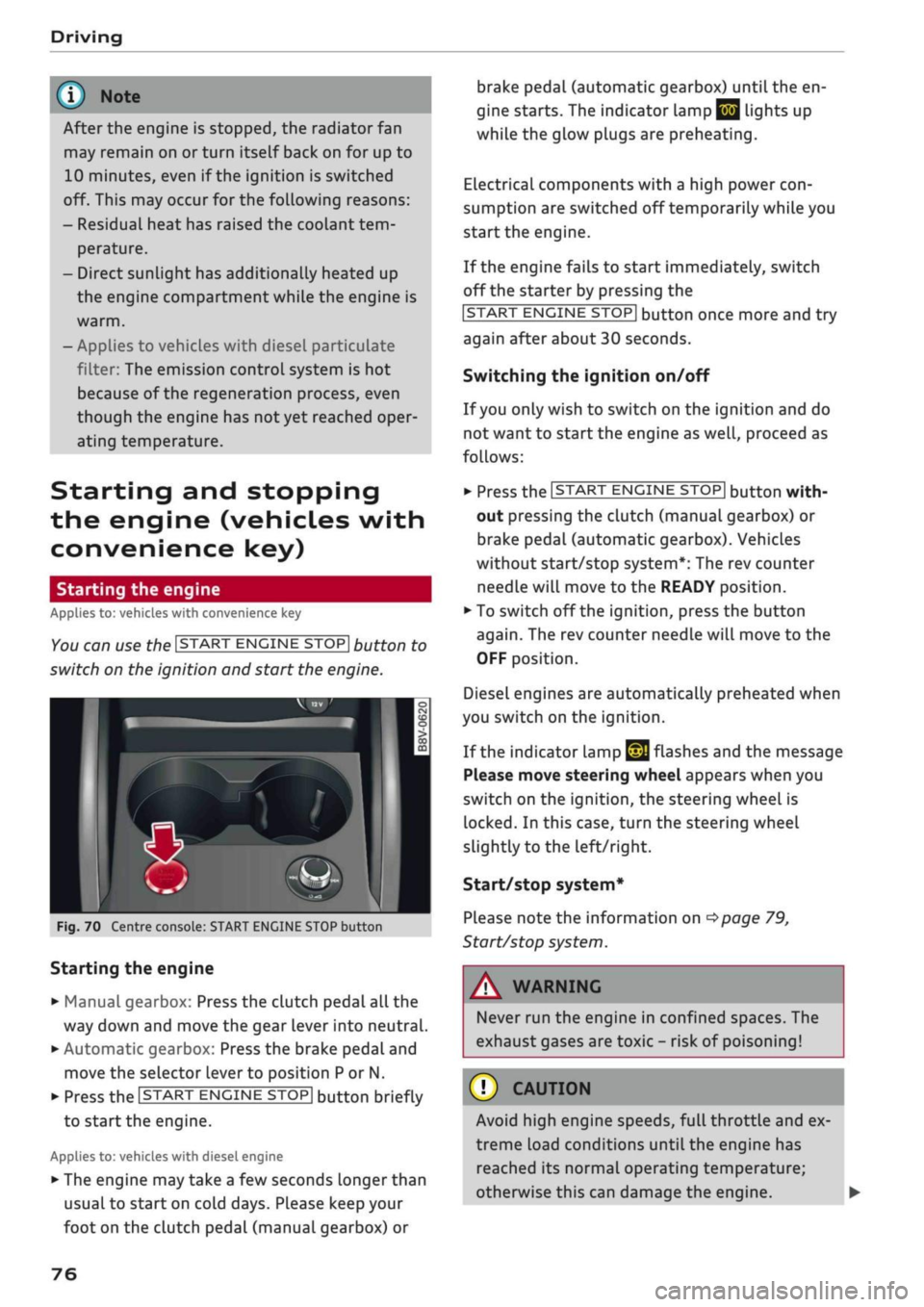
You can use the ISTART ENGINE STOP| button to
switch on the ignition and start the engine.
Fig.
70 Centre console: START ENGINE STOP button
Starting the engine
•
Manual gearbox: Press the clutch pedal all the
way down and move the gear lever into neutral.
•
Automatic gearbox: Press the brake pedal and
move the selector lever to position P or N.
•
Press the ISTART ENGINE
STOP!
button briefly
to start the engine.
Applies to: vehicles with diesel engine
•
The engine may take a few seconds longer than
usual to start on cold days. Please keep your
foot on the clutch pedal (manual gearbox) or
brake pedal (automatic gearbox) until the en
gine starts. The indicator Lamp
E 3
lights up
while the glow plugs are preheating.
Electrical components with a high power
con
sumption are switched off temporarily while you
start the engine.
If the engine fails to start immediately, switch
off the starter by pressing the
ISTART
ENGINE
STOPI
button once more and try
again after about 30 seconds.
Switching the ignition on/off
If you only wish to switch on the ignition and do
not want to start the engine as
well,
proceed as
follows:
•
Press the ISTART ENGINE STOP| button with
out pressing the clutch (manual gearbox) or
brake pedal (automatic gearbox). Vehicles
without start/stop system*: The rev counter
needle will move to the READY position.
•
To switch off the ignition, press the button
again.
The rev counter needle will move to the
OFF position.
Diesel engines are automatically preheated when
you switch on the ignition.
If the indicator lamp
£21
flashes and the message
Please move steering wheel appears when you
switch on the ignition, the steering wheel is
locked.
In this case, turn the steering wheel
slightly
to
the left/right.
Start/stop system*
Please note the information on
<^>page
79,
Start/stop system.
WARNING
Never run the engine in confined spaces. The
exhaust gases are toxic - risk of poisoning!
© CAUTION
Avoid high engine speeds, full throttle and ex
treme load conditions until the engine has
reached its normal operating temperature;
otherwise this can damage the engine. •
76
Page 79 of 364
Driving
CO
<
O
rN
IV
rN
t-H
o <
® For the sake of the environment
Do not warm up the engine by running it with
the car stationary. You should drive off imme
diately whenever possible. This will help avoid
unnecessary exhaust emissions.
© Note
- Any noises which may be heard when the
engine is started are quite normal and no
cause for concern.
- If
you
leave your vehicle with the ignition
switched on, it will be switched off auto
matically after
a
while. Please note that
electrical equipment such as the exterior
lighting will also be switched off.
Switching off the engine
Applies to: vehicles with convenience key
•
Stop the vehicle.
•
Automatic gearbox: Move the selector lever to
position P.
•
Press the ISTART ENGINE STOP| button
tapage
76, Fig. 70.
Steering
lock15
The steering will be locked if
you
switch off the
engine with the ISTART ENGINE STOP| button,
move the selector lever to position P (on vehicles
with automatic gearbox*) and open the driver's
door. The steering lock acts as a theft deterrent.
Emergency Off function
If necessary in an emergency, the engine can be
switched off while the vehicle is still moving at
speeds of 7 km/h and above. To switch off the
engine, press the ISTART ENGINE STOP| button
twice in quick succession or hold it in for longer
than two seconds.
A WARNING
- Never switch off the engine until the vehicle
is stationary. Otherwise you may not have
the full benefit of the brake servo and pow
er steering. You may need more strength to
steer and brake the vehicle than you nor
mally would. This would mean a greater risk
of accidents and serious injury, because you
cannot steer and brake in the normal
man
ner.
- Always take the key with you when you Leave
the vehicle. Otherwise the engine can be
started or power-operated equipment such
as the electric windows can be used. This
could result in serious injury.
- When parking, always move the selector
lever to position
P
to prevent the vehicle
from rolling back accidentally.
If the engine has been working hard for
a
long
time,
there is a risk of heat building up in the
engine compartment after the engine has
been switched off; this could cause engine
damage. For this reason, you should leave the
engine idling for about 2 minutes before
switching it off.
©
Note
After the engine is stopped, the radiator fan
may remain on or turn itself back on for up to
10 minutes, even if the ignition is switched
off. This may occur for the following reasons:
- Residual heat has raised the coolant
tem
perature.
- Direct sunlight has additionally heated up
the engine compartment while the engine is
warm.
- Applies to vehicles with diesel particulate
filter: The emission control system is hot
because of the regeneration process, even
though the engine has
not
yet reached oper
ating temperature.
Driver messages
Engine running. Warning! Switch off ignition
before leaving car
1J
This function is not available on all export versions.
77
Page 83 of 364

Driving
- The power consumption is
high.
The engine switches off again when the condi
tions for start/stop mode are once again
fulfil
led1).
Ignition is switched off automatically
To prevent the vehicle battery from being dis
charged,
the ignition will be switched off auto
matically if certain conditions are met. For in
stance:
- The start/stop system has switched off the en
gine.
- The vehicle is stationary.
- The driver has left the vehicle.
If the dipped beam headlights are switched on in
this case, the side lights will be turned on in
stead.
After approx. 30 minutes, or when you
lock the vehicle, the side Lights will be switched
off.
If the start/stop system has not stopped the en
gine or if
you
have switched off the start/stop
system manually, the engine will continue
run
ning and the ignition will not be switched off au
tomatically
^A-
A WARNING
Never run the engine in confined spaces. The
exhaust gases are toxic - risk of poisoning!
© Note
If
you
select
D
or
N
after selecting reverse
gear on a vehicle with automatic gearbox, the
car must have been moving at over 10 km/h
before the system can switch off the engine
again.
Switching the start/stop system on/off
manually
Applies to: vehicles with start/stop system
You
can switch the system off manually if you
don't want to use it.
_.
rA^OFF
un
S
o
>
CO CO
Fig.
73 Centre console: Switch for start/stop system
•
To switch the start/stop system off or on
man
ually, press the
\OE1
button. The LED in the but
ton will light up when the system is switched
off.
© Note
If
you
switch off the system during a stop
phase,
the engine will start again automati
cally.
Driver messages in the instrument cluster
display
Applies to: vehicles with start/stop system
H
Automatic
start/stop
deactivated: Please re
start engine manually
This message appears if certain conditions have
not been met during the stop phase and the
start/stop system cannot start the engine again
automatically. In this case, the engine must be
started manually.
2]
Automatic
start/stop:
system fault! Func
tion unavailable
There is a malfunction in the start/stop system.
Drive to a workshop soon and have the fault
recti
fied.
CO
rN
IV
rN
t-H
o <
1)
May vary in different countries
81
Page 84 of 364
Driving
Electro-mechanical
parking brake
•_ -_-
:c
2C
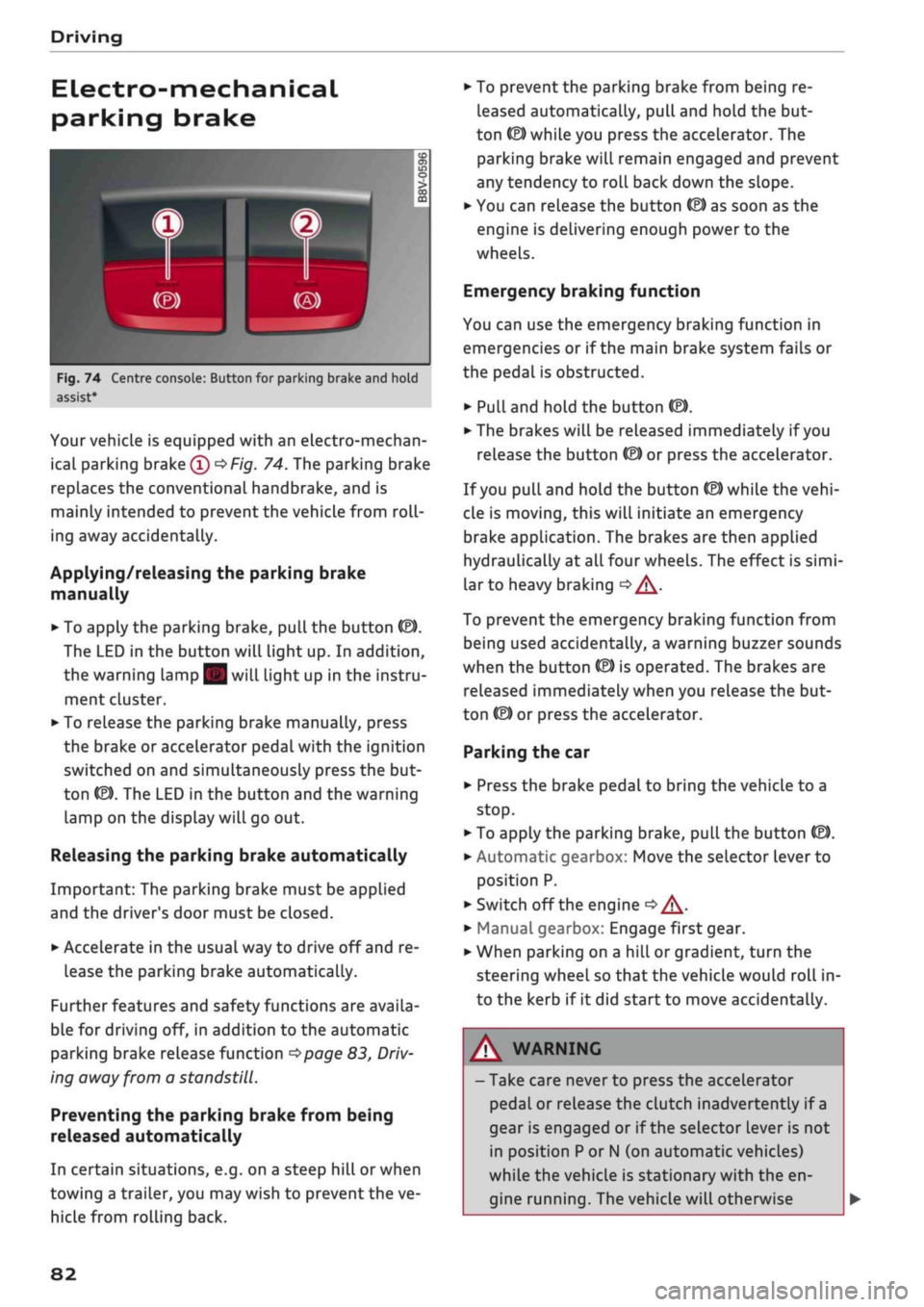
Fig.
74 Centre console: Button for parking brake and hold
assist
Your vehicle is equipped with an electro-mechan
ical parking brake
(l)
^>Fig.
74. The parking brake
replaces the conventional handbrake, and is
mainly intended to prevent the vehicle from
roll
ing away accidentally.
Applying/releasing the parking brake
manually
• To apply the parking brake, pull the button (®).
The LED in the button will light up. In addition,
the warning lamp || will light up in the instru
ment cluster.
•
To release the parking brake manually, press
the brake or accelerator pedal with the ignition
switched on and simultaneously press the but
ton
©).
The LED in the button and the warning
lamp on the display will go out.
Releasing the parking brake automatically
Important: The parking brake must be applied
and the driver's door must be closed.
•
Accelerate in the usual way to drive off and re
lease the parking brake automatically.
Further features and safety functions are availa
ble for driving off, in addition to the automatic
parking brake release function
^>page
83,
Driv
ing away from a standstill.
Preventing the parking brake from being
released automatically
In certain situations, e.g. on a steep hill or when
towing a trailer, you may wish to prevent the ve
hicle from rolling back.
•
To prevent the parking brake from being re
leased automatically, pull and hold the but
ton ©) while you press the accelerator. The
parking brake will remain engaged and prevent
any tendency to roll back down the slope.
•
You can release the button
(®)
as soon as the
engine is delivering enough power to the
wheels.
Emergency braking function
You can use the emergency braking function in
emergencies or if the main brake system fails or
the pedal is obstructed.
•
PuLl
and hold the button
«EJ.
• The brakes will be released immediately if you
release the button
®
or press the accelerator.
If
you
pull and hold the button
(®)
while the
vehi
cle is moving, this will initiate an emergency
brake application. The brakes are then applied
hydraulically at all four wheels. The effect is
simi
lar to heavy braking
<=> /\.
To prevent the emergency braking function from
being used accidentally, a warning buzzer sounds
when the button
(®)
is operated. The brakes are
released immediately when you release the but
ton (®) or press the accelerator.
Parking the car
•
Press the brake pedal to bring the vehicle to a
stop.
•
To apply the parking brake, pull the button
©).
• Automatic gearbox: Move the selector lever to
position P.
• Switch off the engine
•» A-
•
Manual gearbox: Engage first gear.
•
When parking on a hill or gradient, turn the
steering wheel so that the vehicle would roll in
to the kerb if it did start to move accidentally.
A
WARNING
- Take care never to press the accelerator
pedal or release the clutch inadvertently if
a
gear is engaged or if the selector Lever is not
in position
P
or
N
(on automatic vehicles)
while the vehicle is stationary with the en
gine running. The vehicle will otherwise
82
Page 86 of 364

Driving
Driving off with the hold assist
Applies to: vehicles with hold assist
The hold assist helps the driver if the vehicle is
stationary for a Long period or very often, for in
stance at traffic lights, on steep gradients or in
stop-and-go traffic.
Important: The driver's door must be closed and
the engine must be running.
• To switch the hold assist on/off, press the but
ton
«59 © ^>page
82, Fig. 74,
•=»^.
The LED in
the button will light up or go out.
•
Once it detects that the vehicle has stopped,
the hold assist keeps the vehicle stationary. In
this case, a green indicator Lamp
^
Lights up in
the instrument cluster. You can now take your
foot
off the brake pedal.
•
Drive off in the normal way: the brake will be
released automatically and the vehicle will
start moving.
In certain situations, the hold assist transfers the
job of holding the vehicle to the parking brake.
As soon as the parking brake is holding the
vehi
cle
still,
the warning lamp || appears in the in
strument cluster. In addition, the LED in the ®)
button will light up.
Driver messages in the instrument cluster
display
P.]
Hold assist: unavailable
If this message appears, the hold assist is un
available or the system requirements have not
been met.
A WARNING
Applies to: vehicles with hill hold assist
If
you
do not drive away immediately after re
leasing the brake pedal, or if the engine
stalls,
the vehicle could start to roll back. You
should therefore immediately press the brake
pedal or apply the parking brake.
A WARNING
The intelligent technology in the hold assist*
and hill hold assist functions cannot defy the
laws of physics. Do not let the extra conven
ience afforded by the hold assist* and hill
hold assist functions tempt you into taking
any risks when driving - this can cause
acci
dents.
- The hold assist* and hill hold assist func
tions cannot keep the vehicle stationary in
all conditions on a gradient (e.g. if the road
is slippery or icy).
- Always ensure that the vehicle is stopped
properly and safely - risk of accident!
(T)
CAUTION
Switch off the hold assist* function before
driving the vehicle into a car wash.
©
r
Note
Applies to: vehicles with automatic gearbox
When the hold assist* function is switched
on,
it stops the vehicle from creeping for
wards when you take
your
foot off the brake
pedal.
Off-road driving
General notes
The functions of the electronic stabilisation
con
trol (ESC) have been augmented to provide extra
assistance when driving off-road. The
ESC
off-
road mode can be activated in situations when it
would be advantageous for the wheels to lock, or
when a differential Lock would normally be re
quired
^>page
146.
This Audi model is not an off-road vehicle, how
ever. When driving off-road you are advised to
avoid tracks or terrain which are not suited to
the design of the car and your own driving skills
and experience. Do not take any risks.
After driving off-road
- After driving, remove any pieces of foliage or
other objects which may be caught in the radia
tor grille, under the car or in the wheels. In par
ticular, inspect the tyre treads for stones.
- Clean the bodywork and underside of the
vehi
cle and check the underside for possible dam
age.
- Remove dirt from the windows, headlight
len
ses and number plates. •
84
Page 89 of 364
Driving
R - Reverse gear
Reverse gear should only be engaged when the
vehicle is stationary and the engine is idling
^A-
To move the selector lever to position R, release
the selector Lever lock and at the same time
press the brake pedal.
N - Neutral
In this position, the gearbox is in neutral.
D/S - Drive/Sport (standard position for
driving forwards)
In selector Lever position D/S, the gearbox can be
operated in either the standard drive mode (D) or
in sport mode (S). To select sport mode (S), brief
ly pull the selector lever back. The gearbox will
switch back to drive mode (D) if
you
pull the se
lector lever again. The selected driving mode is
shown in the instrument cluster display.
In the standard drive mode (D), the gearbox au
tomatically selects the best gear ratio. This de
pends on the engine
load,
the road speed and the
driving style.
In Sport mode S, the gearbox makes full use of
the engine power. When accelerating the gear
shifts may be noticeable.
Press the brake pedal when moving the selector
lever from N to D/S if the vehicle is stationary or
at speeds below 2 km/h
o A-
E - Efficiency*
In efficiency mode
^>page
131, Audi drive se
lect,
the gearbox selects the next gear at lower
engine speeds. Earlier upshifts give improved
fuel economy because the full power reserves of
the engine are not used.
In this mode, an
E
is shown on the instrument
cluster display instead of
a D
^>Fig.
75.
CO
< o rN
iv
rN
t-H
o < 00
A,
WARNING
- The car can roll away even if the ignition is
switched off.
- Never move the selector lever to
R
or P
when driving, as this could cause an
acci
dent.
- In all selector lever positions (except P) the
vehicle must always be held with the foot
brake when the engine is running. This is be
cause an automatic gearbox still transmits
power even at idling speed, and the vehicle
tends to "creep" - risk of accident!
- The accelerator pedal must on no account
be pressed inadvertently when a gear is en
gaged with the vehicle stationary. The
vehi
cle could otherwise start moving immedi
ately (in some cases even if the parking
brake is engaged) and possibly cause an ac
cident.
- Do not press the accelerator while selecting
a gear with the vehicle stationary and the
engine running, as this could cause an
acci
dent.
- The driver should never get out of the
vehi
cle when the engine is running and a gear is
engaged.
If
you
have to Leave your vehicle
while the engine is running, you must apply
the parking brake and engage the parking
lock P.
- To avoid accidents, apply the parking brake
and
put
the selector lever in position
P
be
fore opening the bonnet and working on the
vehicLe with the engine running. Please ob
serve the important safety warnings
^>page
295, Working on components in
the engine compartment.
© Note
- Audi drive select: You can select the sport
program for gear changes by activating the
dynamic mode
^>page
131. The instru
ment cluster display will show
S
instead of
D.
- If the lever is moved accidentally to
N
when
driving,
take
your
foot off the accelerator
and
let
the engine speed drop to idling be
fore selecting
D
or
S
again.
- It is not possible to move the selector lever
out of position
P
if the electrical power sup
ply fails. In this case, the selector lever can
be released manually. Left-hand drive
vehicles
^page
93, right-hand drive
vehicles
<^>page
94.
87
Page 91 of 364

Driving
A WARNING
- The driver should never get out of the
vehi
cle when the engine is running and a gear is
engaged.
If you have to leave your vehicle
while the engine is running, you must apply
the parking brake and engage the parking
lock P.
-If the engine is running and a gear is engag
ed (D/S or R) or the vehicle is in "tiptronic"
mode,
you will need to hold the car with the
footbrake. Otherwise, the car will "creep"
forwards as the power transmission is not
fully interrupted even when the engine is
idling.
- The accelerator pedal must on no account
be pressed inadvertently when the vehicle is
stationary. The vehicle could otherwise start
moving immediately (in some cases even if
the parking brake is engaged) and possibly
cause an accident.
- Do not press the accelerator while selecting
a gear with the vehicle stationary and the
engine running, as this could cause an
acci
dent.
- Never move the selector lever to R or P
when driving at normal speeds, as this could
cause an accident.
- Before you drive down a steep gradient, re
duce the speed and use "tiptronic" to select
a low gear.
- Never allow the brake to drag when driving
downhill and do not use the brake pedal too
often
or
for long periods. Constant braking
will cause the brakes to overheat and will
considerably reduce the effectiveness of the
brakes. It will increase the braking distance
and could cause the brake system to
fail.
- To avoid rolling back on gradients always
hold the vehicLe with the footbrake or park
ing brake if you have to stop.
- Never attempt to hold the vehicle with the
clutch when stopping on a gradient. The
clutch is disengaged automatically if it is
overloaded and becomes too hot - accident
risk! If the clutch is overloaded, the indica
tor lamp
0
will light up and a message will
appear
^>page
92.
© CAUTION
- When you have stopped on a gradient, do
not try to stop the vehicle rolling back by ac
celerating when a gear is engaged. This
could cause the automatic gearbox to over
heat and become damaged. Apply the park
ing brake or press the brake pedal in order
to prevent the vehicle from rolling back.
- If you allow the car to roll with the selector
lever in position N with the engine switched
off, the automatic gearbox will be damaged
as it will not be lubricated
^page
328,
Tow-starting / towing
away.
- In certain driving and traffic conditions, for
instance in stop-and-go traffic, if you have
to pull away frequently or if the vehicle
creeps forwards over a long distance, the
gearbox can overheat and become dam
aged.
If the indicator Lamp
[5J
or the warn
ing
lampH
Lights up, stop the vehicle at
the first opportunity and let the gearbox
cool down
^>page
92.
© Note
For safety reasons the parking brake will only
release automatically if the driver's door is
closed.
Downhill speed control
Applies to: vehicles with automatic gearbox
The downhill speed control function helps the
driver when driving down steep gradients.
Downhill speed control is activated on a downhill
gradient when the selector lever is in D/S and the
driver presses the brake pedal. The gearbox auto
matically selects a suitable gear for the gradient.
The downhill speed control function attempts to
maintain the speed at which the vehicLe was trav
elling when the foot brake was applied (subject
to the laws of physics and technical limitations of
the power train). It may be necessary to adjust
the speed again using the foot brake. The down
hill speed control can change down to 3rd gear
but no further, so it may be necessary to change
to tiptronic mode on very steep gradients. In this
case,
change down manually to 2nd or 1st gear in •
CO
89
Page 92 of 364
Driving
tiptronic mode to use the engine braking effect
and reduce the load on the brakes.
Downhill speed control is deactivated as soon as
the road Levels out again or you press the acceler
ator pedal.
On vehicles with cruise control system*
<^>page
104, downhill speed control is activated
when you set
a
cruising speed.
A WARNING
The downhill speed control function cannot
defy the Laws of physics and may therefore
not be able to maintain a constant speed in
certain circumstances. Always be prepared to
use the brakes!
Manual gear selection (tiptronic mode)
Applies to: vehicles with automatic gearbox
The
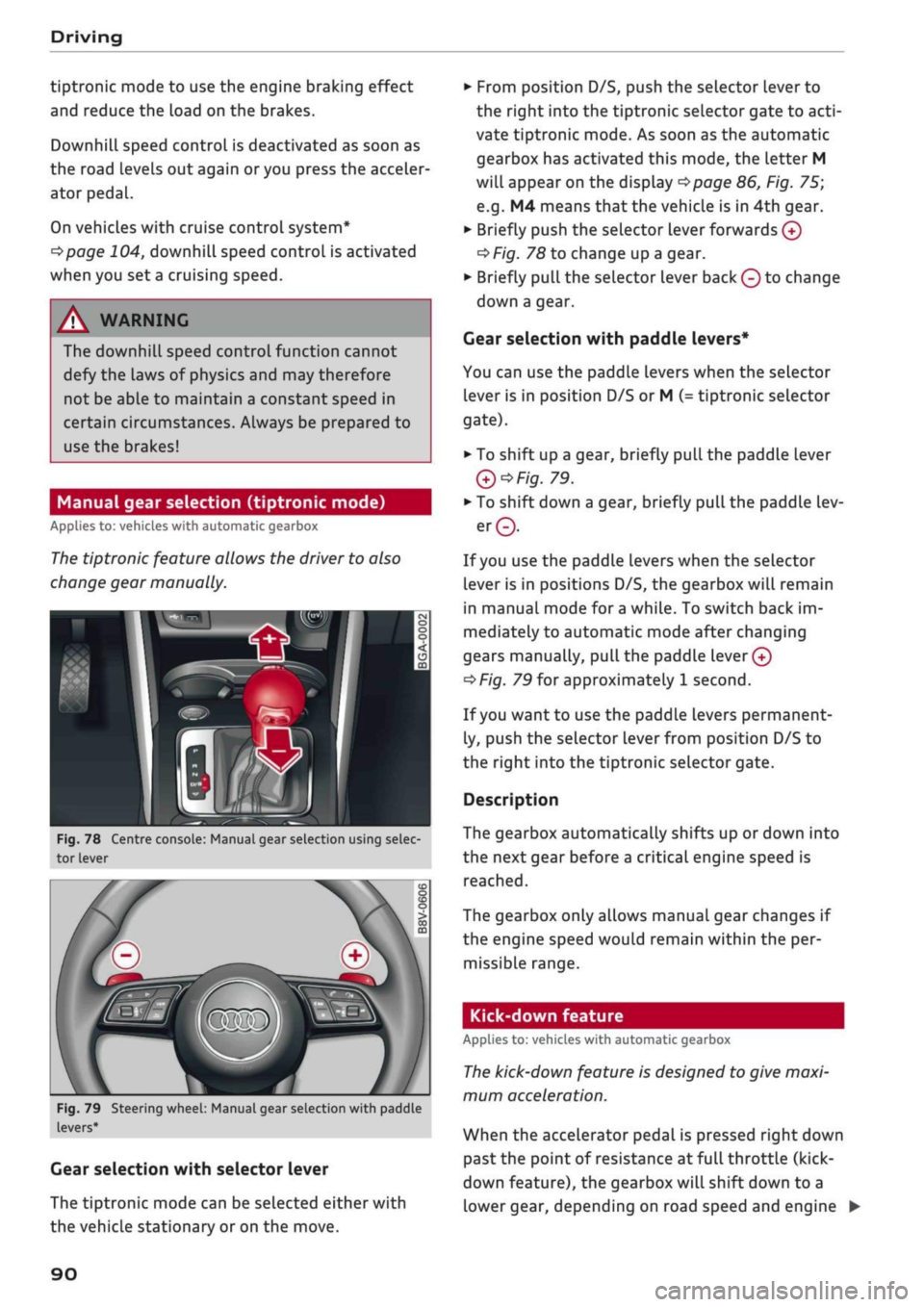
tiptronic feature allows the driver to also
change gear manually.
Fig.
78 Centre console: Manual gear selection using selec
tor lever
Fig.
79 Steering wheel: Manual gear selection with paddle
levers*
Gear selection with selector lever
The tiptronic mode can be selected either with
the vehicLe stationary or on the move.
•
From position D/S, push the selector lever to
the right into the tiptronic selector gate to
acti
vate tiptronic mode. As soon as the automatic
gearbox has activated this mode, the letter M
will appear on the display
opage
86, Fig. 75;
e.g.
M4 means
that
the vehicle is in 4th gear.
•
Briefly push the selector lever forwards
0
oF/'g.
78 to change up a gear.
•
Briefly pull the selector lever back
Q
to change
down a gear.
Gear selection with paddle levers*
You can use the paddle levers when the selector
lever is in position D/S or M
(-
tiptronic selector
gate).
• To shift up a gear, briefly pull the paddle lever
Q*Fig.
79.
•
To shift down a gear, briefly pull the paddle lev
er©.
If
you
use the paddle levers when the selector
lever is in positions D/S, the gearbox will remain
in manual mode for
a
while. To switch back im
mediately to automatic mode after changing
gears manually,
pull
the paddle
lever 0
^>Fig.
79 for approximately 1 second.
If
you
want to use the paddle levers permanent
ly, push the selector lever from position D/S to
the right into the tiptronic selector gate.
Description
The gearbox automatically shifts up or down into
the next gear before a critical engine speed is
reached.
The gearbox only allows manual gear changes if
the engine speed would remain within the per
missible range.
Kick-down feature
Applies to: vehicles with automatic gearbox
The
kick-down feature is designed to give maxi
mum acceleration.
When the accelerator pedal is pressed right down
past the point of resistance at full throttle (kick-
down feature), the gearbox
wilL
shift down to a
lower gear, depending on road speed and engine •
90
Page 93 of 364

Driving
speed.
The upshift to the next higher gear is de
layed until the engine reaches maximum rpm.
WARNING
Please note that if the road surface is slippery
or wet, the kick-down feature could cause the
driven wheels to
spin,
which could result in
skidding.
Coasting mode
Applies to: vehicles with S tronic gearbox and coasting mode
In coasting
mode1)
you can use the vehicle's mo
mentum to freewheel, for instance when ap
proaching a speed restriction in a built-up area.
The engine is disengaged from the gearbox. This
allows you to save fuel by anticipating the traffic
situation ahead.
Requirements for using coasting mode
•
Efficiency mode selected in drive select*
^>page
131.
*•
The selector lever must be in position D.
•
Road speed less than approx. 130 km/h.
•
Road relatively level.
Activating coasting mode
•
Take your foot off the accelerator.
The
message1)
Coasting will then appear in the
"on-board computer" display. The engine ticks
over at idling speed while the vehicLe is coasting.
Stopping coasting mode
•
Press the brake or accelerator pedal or briefly
pull the paddle lever
^page
90, Fig. 79.
A WARNING
- When coasting mode is activated, there is
no engine braking effect and the vehicle
does not slow down as quickly as usual or
may even pick up speed if
you
are driving
down a slope - risk of accident!
- If other people are using your car, you
should draw their attention to the coasting
mode.
© Note
- The gear is no longer displayed when you
are in coasting mode (e.g.
E
instead of E7).
- The coasting mode is deactivated tempora
rily on gradients of
15
% or greater.
- Coasting mode is not available while the
cruise control system* or adaptive cruise
control*
is switched on.
Launch control programme
Applies to: vehicles with S tronic gearbox and launch control
programme
The
launch control programme enables maxi
mum acceleration.
The launch control programme is not available
for all engine/gearbox combinations.
Important: The engine must be warm and the
steering wheel must be pointing straight ahead.
•
Deactivate^
the start/stop system*
^>page
81.
The LED in the
Sj
button will light up.
•
Deactivate25
the hold assist*
^page
84. The
LED in the button will go out.
•
Press the
|aQFF|
button once briefly while the
engine is running
3) 4).
CO
rN
IV
rN
t-H
o < 00
1)
Not available for all countries.
2)
The system does not need to be deactivated on all gearbox
versions.
3'
On vehicles with driver information system, the ESC lamp
lights up permanently and the message Stabilisation
con
trol (ESC): offroad. Warning! Restricted stability appears
temporarily in the instrument cluster to indicate the deac
tivation status.
4)
Vehicles without driver information system: The indicator
lamp flashes slowly.
91