sim AUDI Q2 2021 Owner´s Manual
[x] Cancel search | Manufacturer: AUDI, Model Year: 2021, Model line: Q2, Model: AUDI Q2 2021Pages: 364, PDF Size: 87.77 MB
Page 5 of 364
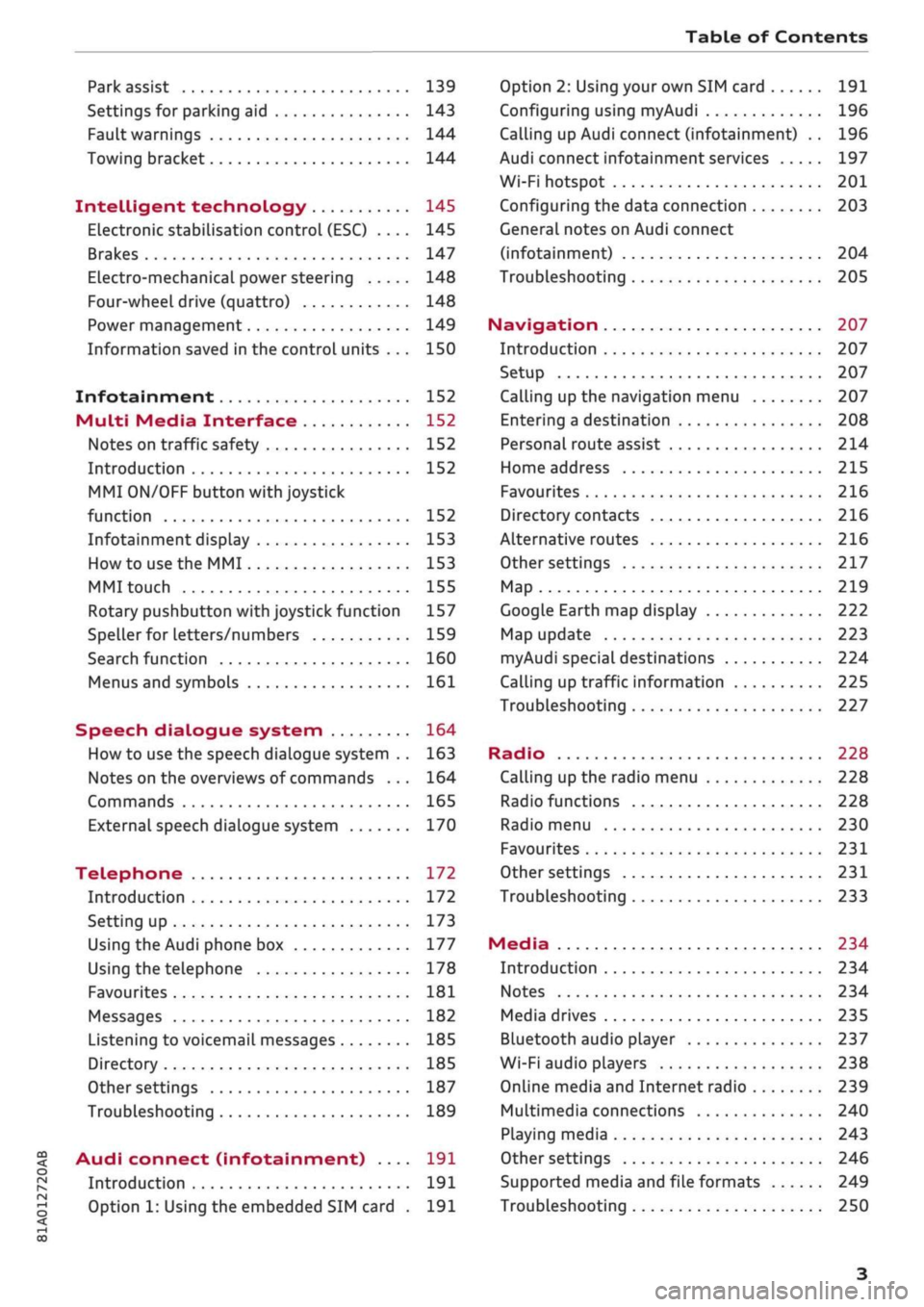
Table of Contents
CO
< o
rN
r^
rs
t-H
O
<
•H
00
Park assist 139
Settings for parking aid 143
Fault warnings 144
Towing bracket 144
Intelligent technology 145
Electronic stabilisation control (ESC) .... 145
Brakes 147
Electro-mechanical power steering 148
Four-wheel drive (quattro) 148
Power management 149
Information saved in the control units . . . 150
Infotainment 152
Multi
Media Interface 152
Notes on traffic safety 152
Introduction 152
MMI
ON/OFF button with joystick
function 152
Infotainment display 153
How to use the MMI 153
MMI touch 155
Rotary pushbutton with joystick function 157
Speller for letters/numbers 159
Search function 160
Menus and symbols 161
Speech dialogue system 164
How to use the speech dialogue system .. 163
Notes on the overviews of commands ... 164
Commands 165
External speech dialogue system 170
Telephone 172
Introduction 172
Setting up 173
Using the Audi phone box 177
Using the telephone 178
Favourites 181
Messages 182
Listening to voicemail messages 185
Directory 185
Other settings 187
Troubleshooting 189
Audi connect (infotainment) .... 191
Introduction 191
Option 1: Using the embedded SIM card . 191
Option 2: Using your own SIM card 191
Configuring using
myAudi
196
Calling up Audi connect (infotainment) .. 196
Audi connect infotainment services 197
Wi-Fi hotspot 201
Configuring the data connection 203
General notes on Audi connect
(infotainment) 204
Troubleshooting 205
Navigation 207
Introduction 207
Setup 207
Calling up the navigation menu 207
Entering a destination 208
Personal route assist
214
Home address 215
Favourites 216
Directory contacts 216
Alternative routes 216
Other settings 217
Map 219
Google Earth map display 222
Map update 223
myAudi special destinations 224
Calling up traffic information 225
Troubleshooting 227
Radio 228
Calling up the radio menu 228
Radio functions 228
Radio menu 230
Favourites 231
Other settings 231
Troubleshooting 233
Media 234
Introduction 234
Notes 234
Media drives 235
Bluetooth audio player 237
Wi-Fi audio players 238
Online media and Internet radio 239
Multimedia connections 240
Playing media 243
Other settings 246
Supported media and file formats 249
Troubleshooting 250
Page 13 of 364
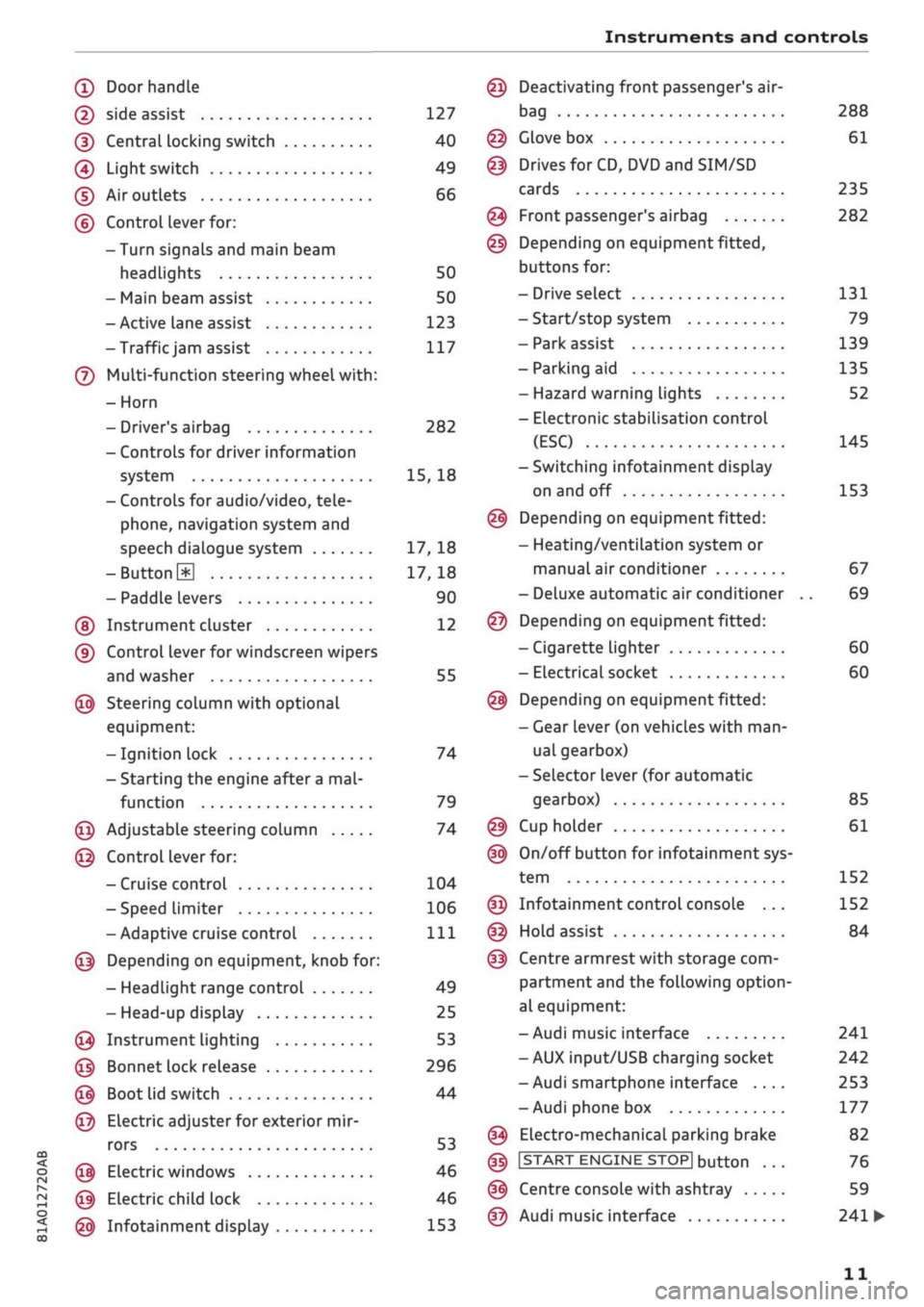
Instruments and controls
CO
<
o
IV
tN
t-H
o <
(D
Doorhandle
(D side assist 127
(D CentraL
locking switch 40
@
Light switch 49
(D Air outlets 66
(?) Control lever for:
- Turn signals and main beam
headlights 50
- Main beam assist 50
- Active lane assist 123
-Trafficjam
assist 117
(7) Multi-function steering wheel
with:
- Horn
- Driver's airbag 282
- Controls for driver information
system 15, 18
- Controls for audio/video, tele
phone,
navigation system and
speech dialogue system 17, 18
-ButtonH
17,18
- Paddle levers 90
(5) Instrument cluster 12
(?) Control lever for windscreen wipers
and washer 55
@
Steering column with optional
equipment:
- Ignition lock 74
- Starting the engine after a
mal
function 79
@
Adjustable steering column 74
@
Control lever for:
- Cruise control 104
- Speed limiter 106
-Adaptive cruise control
Ill
@
Depending on equipment, knob for:
- Headlight range control 49
- Head-up display 25
@
Instrument lighting 53
@
Bonnet lock release 296
@
Boot lid switch 44
@
Electric adjuster for exterior mir
rors 53
@
Electric windows 46
@
Electric child lock 46
@
Infotainment display 153
Deactivating front passenger's air-
bag
Glove box
Drives for CD, DVD and
SIM/SD
cards
Front passenger's airbag
Depending on equipment fitted,
buttons for:
- Drive select
- Start/stop system
- Park assist
- Parking aid
- Hazard warning lights
- Electronic stabilisation control
(ESC)
-Switching infotainment display
on and off
Depending on equipment fitted:
- Heating/ventilation system or
manual air conditioner
- Deluxe automatic air conditioner
Depending on equipment fitted:
- Cigarette lighter
- Electrical socket
Depending on equipment fitted:
- Gear lever (on vehicles with
man
ual gearbox)
- Selector lever (for automatic
gearbox)
Cup holder
On/off button for infotainment sys
tem
Infotainment control console ...
Hold assist
Centre armrest with storage com
partment and the following option
al equipment:
- Audi music interface
- AUX input/USB charging socket
- Audi smartphone interface ....
- Audi phone box
Electro-mechanical parking brake
|START
ENGINE STOP] button
Centre console with ashtray
Audi music interface
288
61
235
282
131
79
139
135
52
145
153
67
69
60
60
85
61
152
152
84
241
242
253
177
82
76
59
241
•
11
Page 56 of 364
Lights and vision
A WARNING
Convex or wide-angle* exterior mirrors give a
larger field of
vision.
However, they make ob
jects look smaller and further away than they
really are. If
you
use these mirrors to
esti
mate the distance to vehicles behind you
when changing Lane, you could misjudge the
distance. Risk of accident!
CAUTION
- Applies to vehicles with electrically retracta
ble exterior mirrors: If one of the mirror
housings is knocked out of position (e.g.
when parking), the mirrors must be fully re
tracted with the electric control. You will
hear
a
loud noise when the mirrors snap
back into place. Do not readjust the mirror
housing by hand, as this will interfere with
the mirror adjuster function.
- Applies to vehicles without electrically re
tractable exterior mirrors: If one of the mir
ror housings is knocked out of position (e.g.
when parking), it must be returned to its
proper position by hand.
- Before washing the vehicle in an automatic
car wash, please make sure to retract the
exterior mirrors to prevent them from being
damaged.
Electrically retractable exterior
mirrors* must NOT be folded in or out by
hand.
Always use the electrical power
con
trol.
©
If the electrical adjustment should fail to op
erate,
both of the mirrors can be adjusted by
hand by Lightly pressing the edge of the mir
ror glass.
Anti-dazzle setting
Your vehicle is equipped with a manual or auto
matic* anti-dazzle interior
mirror.
Manual anti-dazzle interior mirror
•
Pull
the lever
at
the bottom of the mirror to
wards you.
Automatic anti-dazzle mirrors*
• The interior and exterior mirrors will darken
when bright light (e.g. from the headlights of
a
following vehicle) shines on the surface of the
interior mirror.
A
WARNING
Applies to: vehicles with automatic anti-dazzle mirrors
Electrolyte fluid can leak from a broken mir
ror. This fluid can cause irritation to the
skin,
eyes,
and respiratory organs. Wash thorough
ly with clean water should you come into
con
tact with this
fluid.
Seek medical assistance if
needed.
© CAUTION
Applies to: vehicles with automatic anti-dazzle mirrors
Electrolyte fluid can
leak
from a broken mir
ror. This fluid can damage plastic surfaces.
Use a wet sponge or similar to remove the
flu
id as soon as possible.
(T) Note
Applies to: vehicles with automatic anti-dazzle mirrors
-The automatic anti-dazzle mirrors may not
function as intended if the light falling on
the surface of the interior mirror is obstruc
ted.
-The automatic anti-dazzle mirrors do not
darken if the interior lighting is on
or
the car
is in reverse gear.
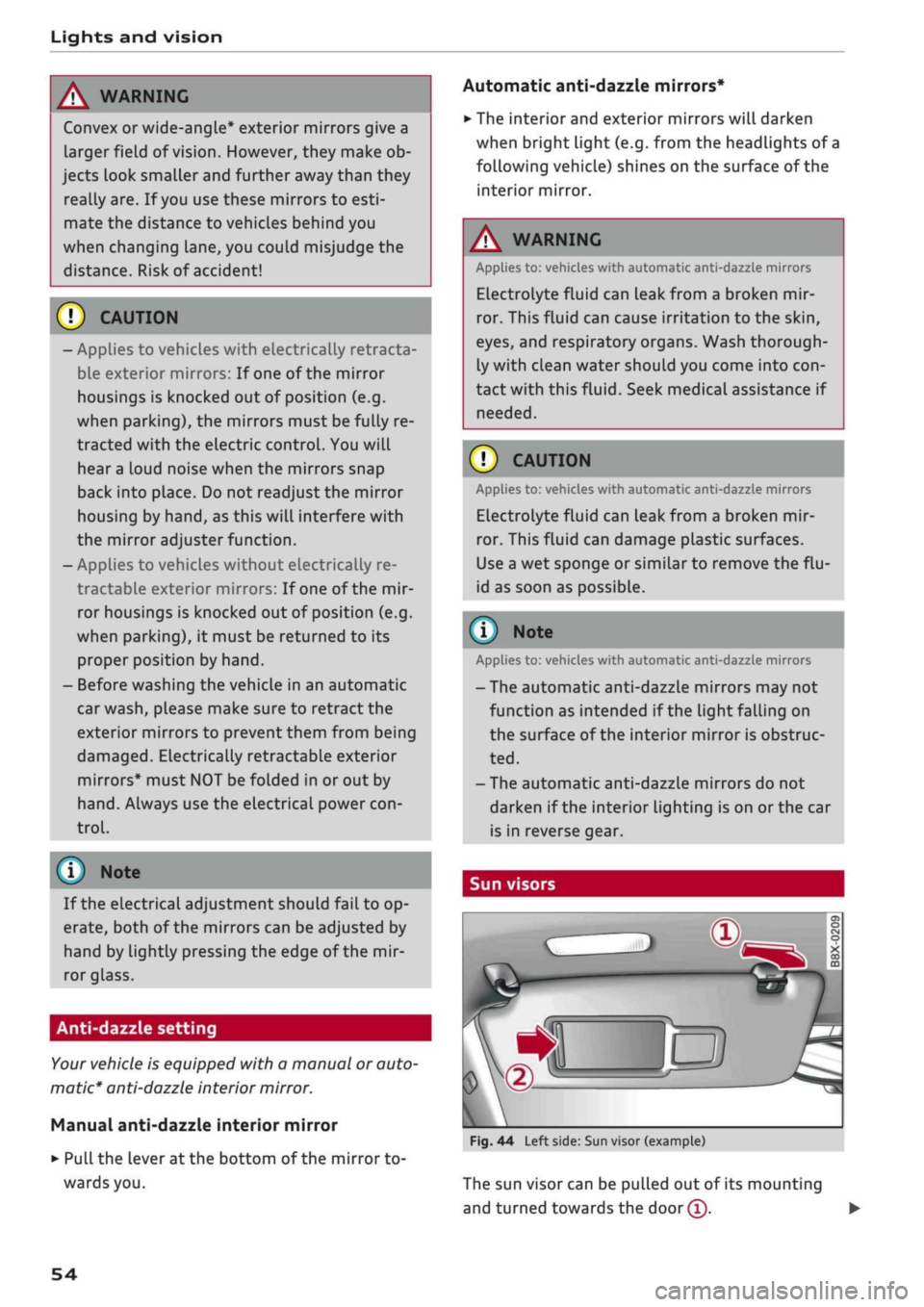
Sun visors
Fig.
44 Left side: Sun visor (example)
The sun visor can be pulled out of its mounting
and turned towards the
door
(T).
•
54
Page 80 of 364

Driving
This message appears
and a
buzzer sounds
if
you
open
the
driver's door while
the
engine
is
run
ning.
Pressing start/stop button again will switch
off
engine.
This message appears
if
you press
the
ISTART
ENGINE
STOPI*
button while
the
vehicle
is moving
<^>page
77,
Emergency
Off
function.
Engine start system: fault. Please contact work
shop
A fault
has
occurred when starting
the
engine
au
tomatically (automatic start function). Drive
to a
qualified workshop soon
and
have
the
fault
recti
fied.
To
start
the
engine, turn
the
ignition
key to
position
@
^>page
74 or
press
the
ISTART
ENGINE
STOPl
button and hold the
key/button until
the
engine starts.
D
Key not
recognised. See owner's manual
This message appears
if
there
is no
convenience
key inside
the
vehicle
or if
the system cannot
de
tect
or
identify
the
key. This
can
happen,
for ex
ample,
if
the radio signal from
the key is
obstruc
ted
by a
metal briefcase
or
similar,
or if the key
battery
is
weak. Electronic equipment, such
as
mobile phones,
can
also interfere with
the
radio
signal from
the key.
The engine
can
still
be
started
or
stopped
if
this
happens (please refer
to
^page
79).
C]
Remote control key: hold back
of key
against marked area.
See
owner's manual
If
the
indicator lamp lights
up and the
message
appears,
a
malfunction
has
occurred
^>page
79.
3
Key not in
vehicle?
3
Remote control key:
key not
recognised.
Is
key still
in
vehicle?
If
the
indicator
lampGB
Lights
up and the
mes
sage appears,
the
convenience
key
was removed
from
the
vehicle while
the
engine
was
running.
If
the convenience
key is not in the
vehicle
you
will
not
be
able
to
switch
on the
ignition
or
restart
the engine after
it has
been switched
off. You
will
also
not be
able
to
lock
the
vehicle from
the
out
side.
Please press brake pedal
This message appears
on
vehicles with
an
auto
matic gearbox
if
you
try to
start
the
engine
with
out first pressing
the
brake pedal.
Please press clutch pedal
This message appears
if
you
try to
start
the en
gine without first pressing
the
clutch pedal.
The
engine will only start
if
you press
the
clutch
ped
al.
Please engage
N or P
This message will appear
if
you
try to
start
or
switch
off the
engine when
the
selector lever
is
not
in N or P. The
engine
can
then
not be
started
or switched
off.
Switch
off
ignition before leaving
car.
Battery
is
being discharged
This message appears
and the
buzzer sounds
if
you open
the
driver's door while
the
ignition
is
switched
on.
Switch
off
the ignition
to
prevent
the vehicle battery from being discharged.
Shift
to P,
vehicle can roll away. Doors can only
be locked
in P
For safety reasons, this message will appear
if
the selector Lever
of the
automatic gearbox
is not
in position P when
you
switch
off the
ignition.
Put
the selector lever
in
position
P;
otherwise
the ve
hicle
can
roll away
and
cannot
be
locked.
78
Page 84 of 364
Driving
Electro-mechanical
parking brake
•_ -_-
:c
2C
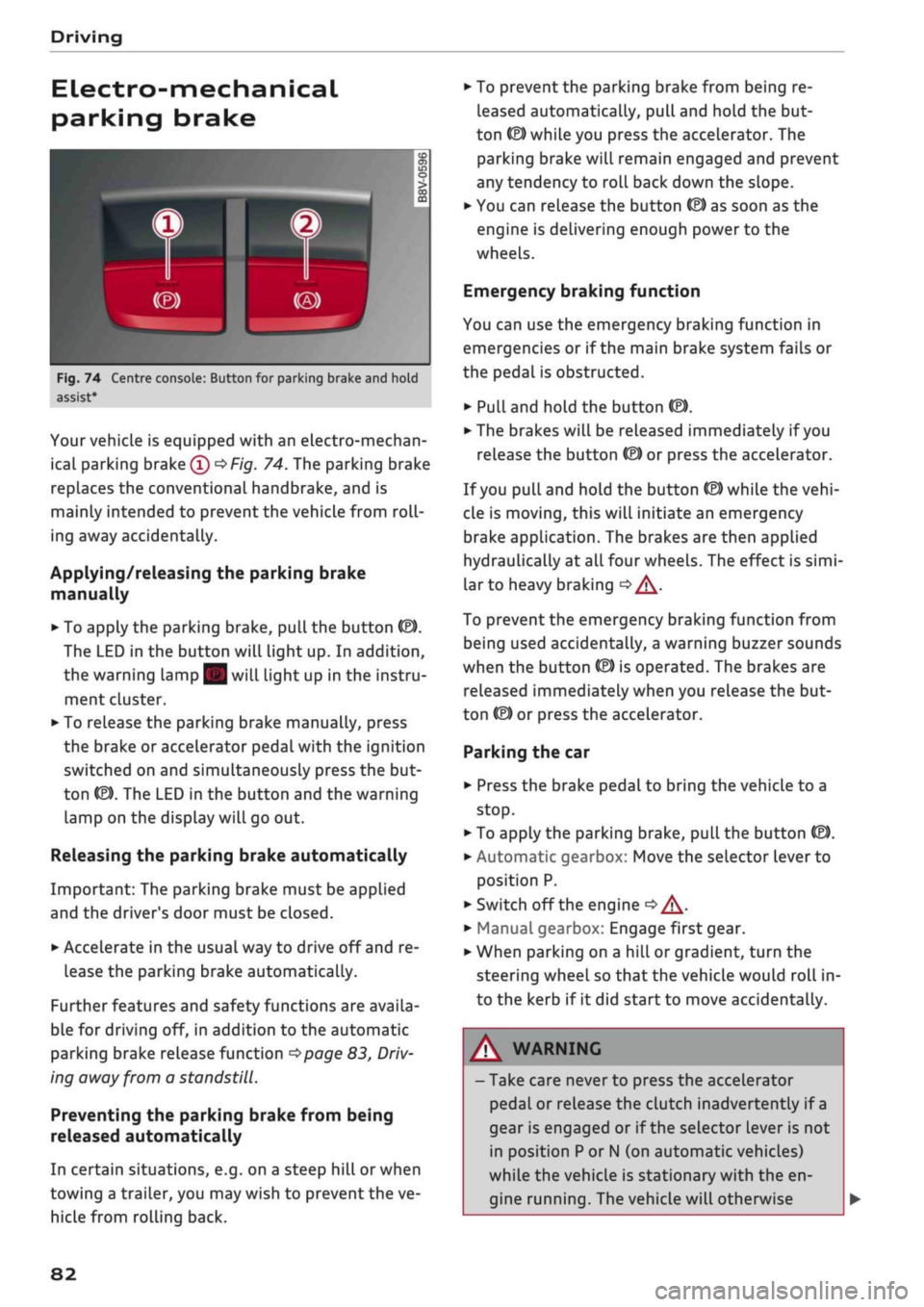
Fig.
74 Centre console: Button for parking brake and hold
assist
Your vehicle is equipped with an electro-mechan
ical parking brake
(l)
^>Fig.
74. The parking brake
replaces the conventional handbrake, and is
mainly intended to prevent the vehicle from
roll
ing away accidentally.
Applying/releasing the parking brake
manually
• To apply the parking brake, pull the button (®).
The LED in the button will light up. In addition,
the warning lamp || will light up in the instru
ment cluster.
•
To release the parking brake manually, press
the brake or accelerator pedal with the ignition
switched on and simultaneously press the but
ton
©).
The LED in the button and the warning
lamp on the display will go out.
Releasing the parking brake automatically
Important: The parking brake must be applied
and the driver's door must be closed.
•
Accelerate in the usual way to drive off and re
lease the parking brake automatically.
Further features and safety functions are availa
ble for driving off, in addition to the automatic
parking brake release function
^>page
83,
Driv
ing away from a standstill.
Preventing the parking brake from being
released automatically
In certain situations, e.g. on a steep hill or when
towing a trailer, you may wish to prevent the ve
hicle from rolling back.
•
To prevent the parking brake from being re
leased automatically, pull and hold the but
ton ©) while you press the accelerator. The
parking brake will remain engaged and prevent
any tendency to roll back down the slope.
•
You can release the button
(®)
as soon as the
engine is delivering enough power to the
wheels.
Emergency braking function
You can use the emergency braking function in
emergencies or if the main brake system fails or
the pedal is obstructed.
•
PuLl
and hold the button
«EJ.
• The brakes will be released immediately if you
release the button
®
or press the accelerator.
If
you
pull and hold the button
(®)
while the
vehi
cle is moving, this will initiate an emergency
brake application. The brakes are then applied
hydraulically at all four wheels. The effect is
simi
lar to heavy braking
<=> /\.
To prevent the emergency braking function from
being used accidentally, a warning buzzer sounds
when the button
(®)
is operated. The brakes are
released immediately when you release the but
ton (®) or press the accelerator.
Parking the car
•
Press the brake pedal to bring the vehicle to a
stop.
•
To apply the parking brake, pull the button
©).
• Automatic gearbox: Move the selector lever to
position P.
• Switch off the engine
•» A-
•
Manual gearbox: Engage first gear.
•
When parking on a hill or gradient, turn the
steering wheel so that the vehicle would roll in
to the kerb if it did start to move accidentally.
A
WARNING
- Take care never to press the accelerator
pedal or release the clutch inadvertently if
a
gear is engaged or if the selector Lever is not
in position
P
or
N
(on automatic vehicles)
while the vehicle is stationary with the en
gine running. The vehicle will otherwise
82
Page 95 of 364
Driving
CO
< o rN
iv
rN
i—i
00
Releasing the selector lever manually (left-
hand drive vehicles)
Applies to: vehicles with automatic gearbox
The
selector lever can be released manually if
the electrical power supply should
fail.
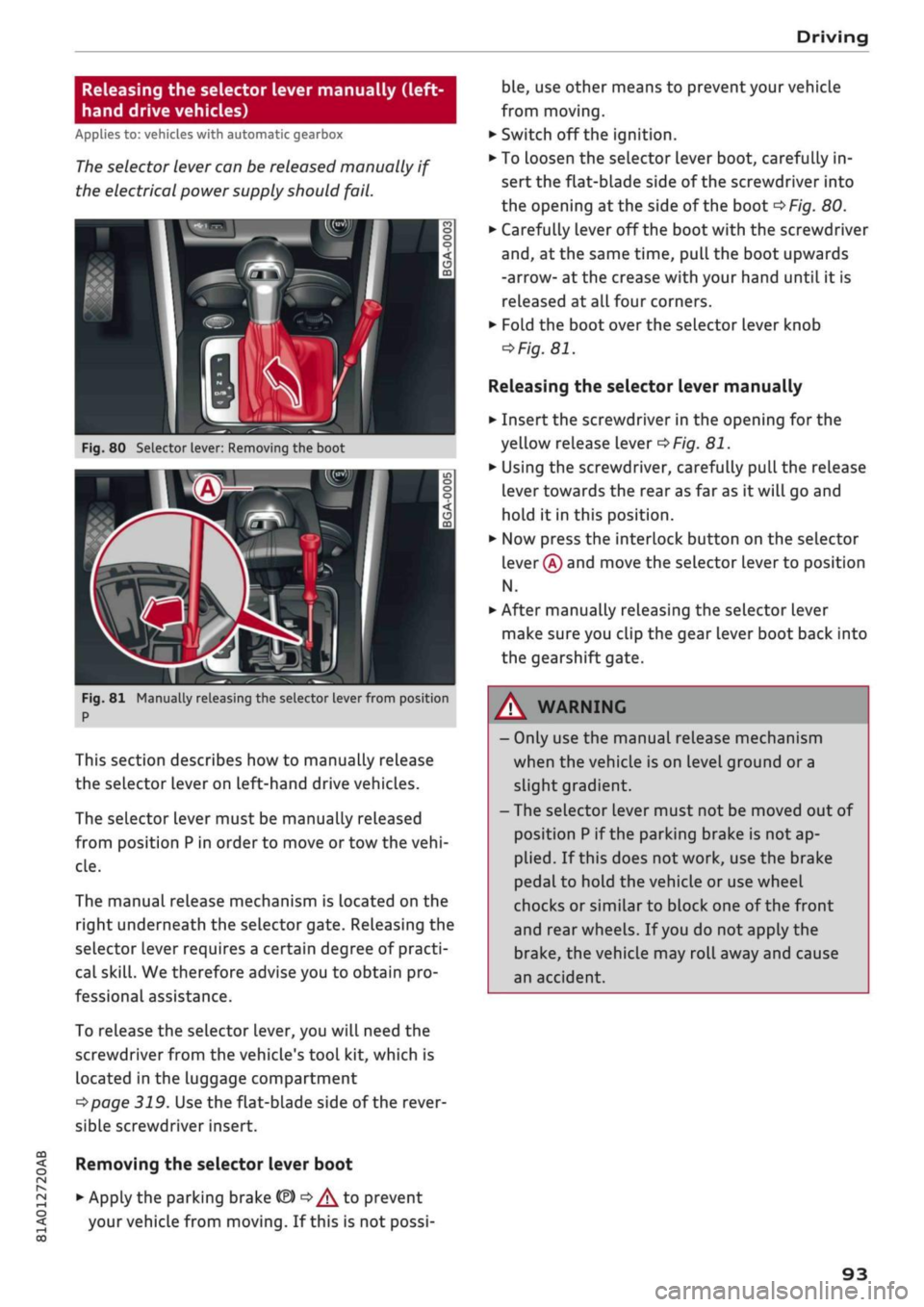
K
Fig.
80 Selector lever: Removing the boot
Fig.
81 Manually releasing the selector lever from position
P
This section describes how to manually release
the selector Lever on Left-hand drive vehicles.
The selector lever must be manually released
from position
P
in order to move or tow the
vehi
cle.
The manual release mechanism is Located on the
right underneath the selector gate. Releasing the
selector lever requires a certain degree of practi
cal
skill.
We therefore advise you to obtain pro
fessional assistance.
To release the selector lever, you
wilL
need the
screwdriver from the vehicle's tool kit, which is
located in the luggage compartment
^>page
319. Use the flat-blade side of the rever
sible screwdriver insert.
Removing the selector lever boot
• Apply the parking brake
& ^/^
to prevent
your vehicle from moving. If this is not possi
ble,
use other means to prevent your vehicle
from moving.
•
Switch off the ignition.
• To loosen the selector lever boot, carefully in
sert the flat-blade side of the screwdriver into
the opening
at
the side of the boot
^>Fig.
80.
•
Carefully lever off the boot with the screwdriver
and,
at the same time, pull the boot upwards
-arrow- at the crease with your hand until it is
released at all four corners.
•
Fold the boot over the selector lever knob
=>
Fig.
81.
Releasing the selector lever manually
•
Insert the screwdriver in the opening for the
yellow release lever
^>Fig.
81.
•
Using the screwdriver, carefully pull the release
lever towards the rear as far as it will go and
hold it in this position.
•
Now press the interlock button on the selector
lever
®
and move the selector lever to position
N.
•
After manually releasing the selector lever
make sure you clip the gear lever boot back into
the gearshift gate.
A WARNING
- Only use the manual release mechanism
when the vehicle is on level ground or a
slight gradient.
- The selector lever must not be moved out of
position
P
if the parking brake is not ap
plied.
If this does not work, use the brake
pedal to hold the vehicle or use wheel
chocks or similar to block one of the front
and rear wheels. If
you
do not apply the
brake,
the vehicle may roll away and cause
an accident.
93
Page 97 of 364
- The selector lever must not be moved out of
position P if the parking brake is not ap
plied.
If this does not work, use the brake
pedal to hold the vehicle or use wheel
chocks or similar to block one of the front
and rear wheels. If
you
do not apply the
brake,
the vehicle may roll away and cause
an accident.
Page 102 of 364
Towing a trailer
- Never disengage the ball joint with the cara
van / trailer still hitched or with a bicycle
rack or similar accessory still attached.
- It is advisable to remove the ball joint when
you are not towing a trailer. Check whether
the plug is properly inserted in the mount
ing fixture and that the bumper cover is fit
ted.
-The
ball
joint must be removed if
you
intend
to clean the car with a steam cleaning at
tachment. Check whether the plug is prop
erly inserted in the mounting fixture and
that the bumper cover is fitted.
- For installation and removal of the ball joint
we recommend using the gloves provided
for
this purpose.
Fitting the ball joint (step 1)
Applies to: vehicles with removable towing bracket
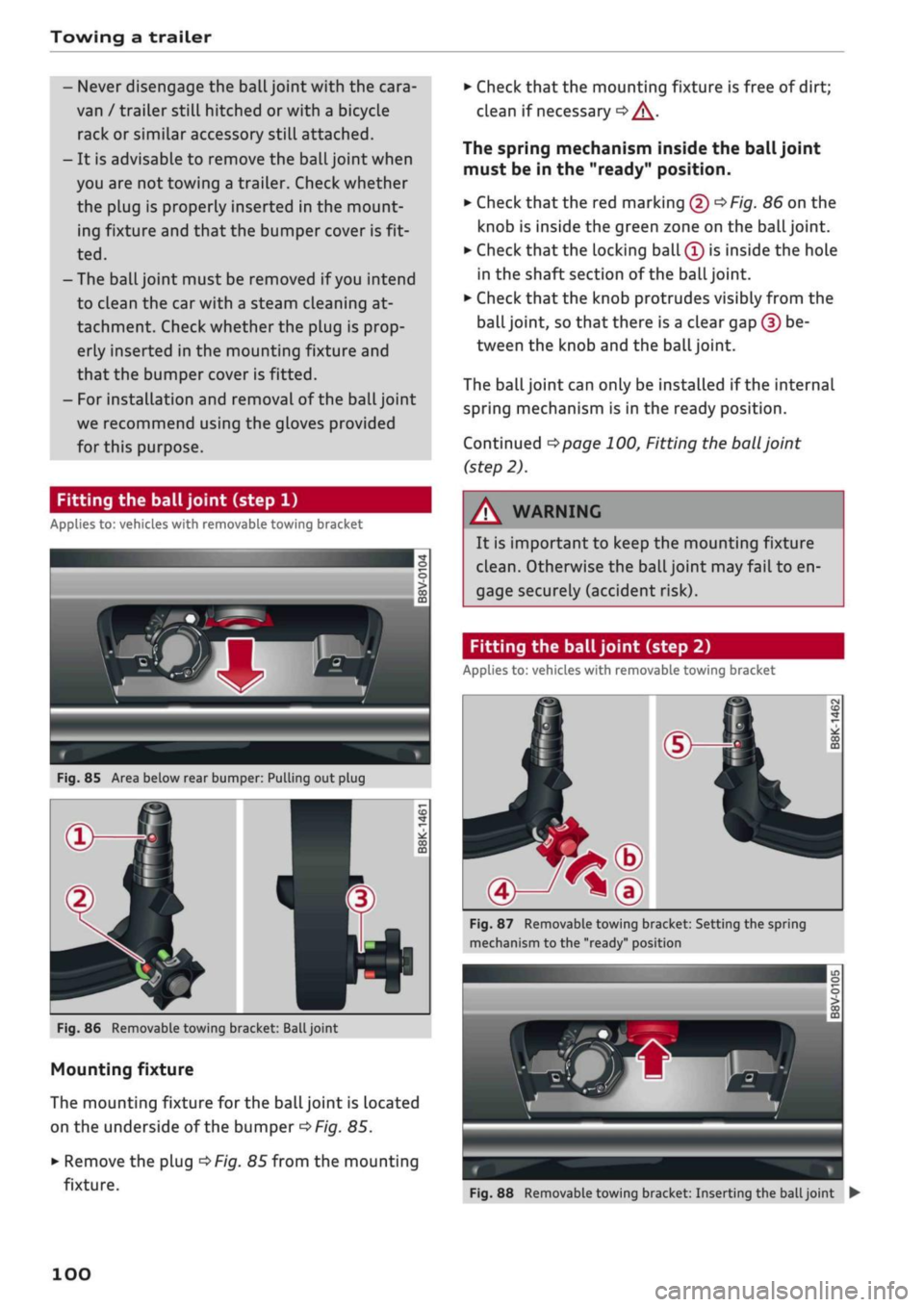
Fig.
85 Area below rear bumper: Pulling out plug
Fig.
86 Removable towing bracket:
Ball
joint
Mounting fixture
The mounting fixture for the ball joint is located
on the underside of the bumper
^>Fig.
85.
•
Remove the plug
^>Fig.
85 from the mounting
fixture.
•
Check that the mounting fixture is free of dirt;
clean if necessary
•=> /\.
The spring mechanism inside the ball joint
must be in the "ready" position.
•
Check
that
the red marking (5)
^>Fig.
86 on the
knob is inside the green zone on the
ball
joint.
•
Check that the locking ball
(Î)
is inside the hole
in the shaft section of the
ball
joint.
•
Check that the knob protrudes visibly from the
ball joint, so that there is a clear gap (?) be
tween the knob and the
ball
joint.
The
ball
joint can only be installed if the internal
spring mechanism is in the ready position.
Continued
^>page
100, Fitting the
ball
joint
(step 2).
WARNING
It is important to keep the mounting fixture
clean.
Otherwise the ball joint may fail to en
gage securely (accident risk).
Fitting the ball joint (step 2)
Applies to: vehicles with removable towing bracket
Fig.
87 Removable towing bracket: Setting the spring
mechanism to the "ready" position
Fig.
88 Removable towing bracket: Inserting the
ball
joint •
100
Page 126 of 364

Driver assist systems
the lane markings or may respond incorrect-
iy.
- In certain circumstances, for instance if
visi
bility is poor, the setting for the steering in
put may temporarily be switched from "ear
ly"
to "late"
«.
- In certain driving conditions, such as ruts in
the road surface, adverse cambers or side
winds, the assistance provided by the steer
ing correction may be insufficient to keep
the vehicle in the middle of the lane.
- For safety reasons, the active lane assist
must not be used in poor weather or in
diffi
cult or slippery road conditions (such as ice,
fog,
loose grit or gravel, heavy
rain,
snow,
etc.) - risk of accident!
Switching on/off
Applies to: vehicles with Audi active lane assist
Fig.
114 Turn signal lever: Button for active lane assist
--•
In
s^\
l'fV
A
Fig.
115 Wind
sist
SSS1M
screen:
Ca
o
o
o o
5
^Aw ^
mera
window for active lane as-
•
Press the button
^Fig.
114 to switch the sys
tem on/off. The indicator lamp in the instru
ment cluster will light up or go out.
Analogue in
strument clus
ter
Green lines
7
V
-
Yellow lines
•/
V
Audi virtual
cockpit/head-
up display*
Green Line(s)
(left/right)
7
V
Red line
(Left/right)
7 V
Grey Line(s)
(left/right)
7 V
Meaning on
corresponding
side
The active Lane
assist is
switched on
and ready to
warn.
The active lane
assist warns
you before you
cross the Lane
demarcation.
In addition,
the steering
wheel vibrates
slightly.
The active Lane
assist is
switched on
but not ready
to warn.
The system may be switched on but not ready to
warn due to the following reasons:
- There are no Lane markings.
- The system cannot detect the relevant lane
markings (e.g. temporary markings for road
works or markings obscured by snow, dirt, rain
or adverse light).
- The vehicle's speed is below 65 km/h, the
speed at which the lane assist system is activa
ted (the threshold may vary in different export
markets).
- The traffic lane is too narrow or too wide.
- The bend is too tight.
- You have taken your hands off the steering
wheel.
- Make sure that the camera window
^>Fig.
115
is not covered with stickers or
similar objects. Notes on cleaning
^>page
312.
l)
This function is not available on all export versions.
124
Page 130 of 364
Driver assist systems
General notes
Applies to: vehicles with Audi side assist
•IB
in—
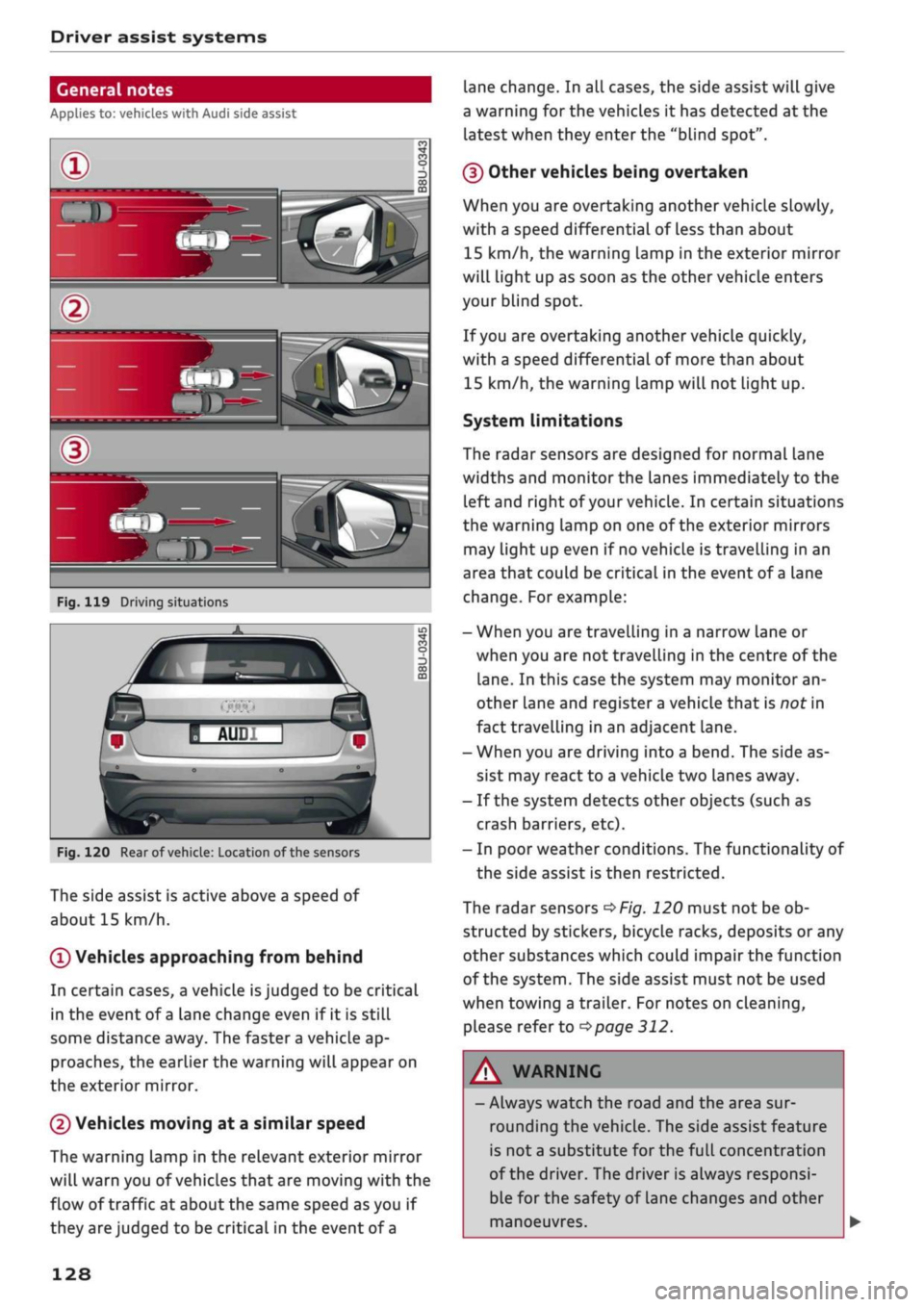
Fig.
119 Driving situations
Fig.
120 Rear of
vehicle:
Location of the sensors
The side assist is active above a speed of
about 15 km/h.
0
Vehicles approaching from behind
In certain cases, a vehicle
is
judged to be critical
in the event of
a
lane change even if it is still
some distance away. The faster a vehicle ap
proaches, the earlier the warning will appear on
the exterior mirror.
(2) Vehicles moving at a similar speed
The warning lamp in the relevant exterior mirror
will warn you of vehicles that are moving with the
flow of traffic at about the same speed as you if
they are judged to be critical in the event of
a
lane change. In all cases, the side assist will give
a warning for the vehicles it has detected at the
latest when they enter the "blind spot".
(§)
Other vehicles being overtaken
When you are overtaking another vehicle slowly,
with a speed differential of Less than about
15 km/h, the warning lamp in the exterior mirror
will light up as soon as the other vehicle enters
your blind spot.
If
you
are overtaking another vehicle quickly,
with a speed differential of more than about
15 km/h, the warning lamp will not light up.
System limitations
The radar sensors are designed for normal lane
widths and monitor the lanes immediately to the
left and right of your vehicle. In certain situations
the warning lamp on one of the exterior mirrors
may light up even if no vehicle is travelling in an
area that could be critical in the event of
a
lane
change. For example:
- When you are travelling in a narrow Lane or
when you are not travelling in the centre of the
lane.
In this case the system may monitor an
other lane and register a vehicle that is nor in
fact travelling in an adjacent lane.
- When you are driving into a bend. The side as
sist may react to a vehicle two lanes away.
- If the system detects other objects (such as
crash barriers, etc).
- In poor weather conditions. The functionality of
the side assist is then restricted.
The radar sensors
^>Fig.
120 must not be ob
structed by stickers, bicycle racks, deposits or any
other substances which could impair the function
of the system. The side assist must not be used
when towing a trailer. For notes on cleaning,
please refer to
^>page
312.
WARNING
- Always watch the road and the area sur
rounding the vehicle. The side assist feature
is not
a
substitute for the full concentration
of the driver. The driver is always responsi
ble for the safety of Lane changes and other
manoeuvres.
128