lock AUDI Q3 2019 Repair Manual
[x] Cancel search | Manufacturer: AUDI, Model Year: 2019, Model line: Q3, Model: AUDI Q3 2019Pages: 280, PDF Size: 72.73 MB
Page 244 of 280
Emergency assistance
Emergency assistance
General information
> Park the vehicle as far as possible from moving
traffic in the event of a breakdown. In the event
of a flat tire, park the vehicle ona level surface.
It you are ona steep hill, be especially careful.
> Set the parking brake.
> Switch the emergency flashers on.
> Have the passengers exit the vehicle. They
should move to a safe place, for example be-
hind a guard rail.
Z\ WARNING
Follow the steps given above. This is for your
protection and the for the safety of other driv-
ers.
Equipment
Vehicle tool kit/vehicle jack
Applies to: vehicles with vehicle tool kit and vehicle jack
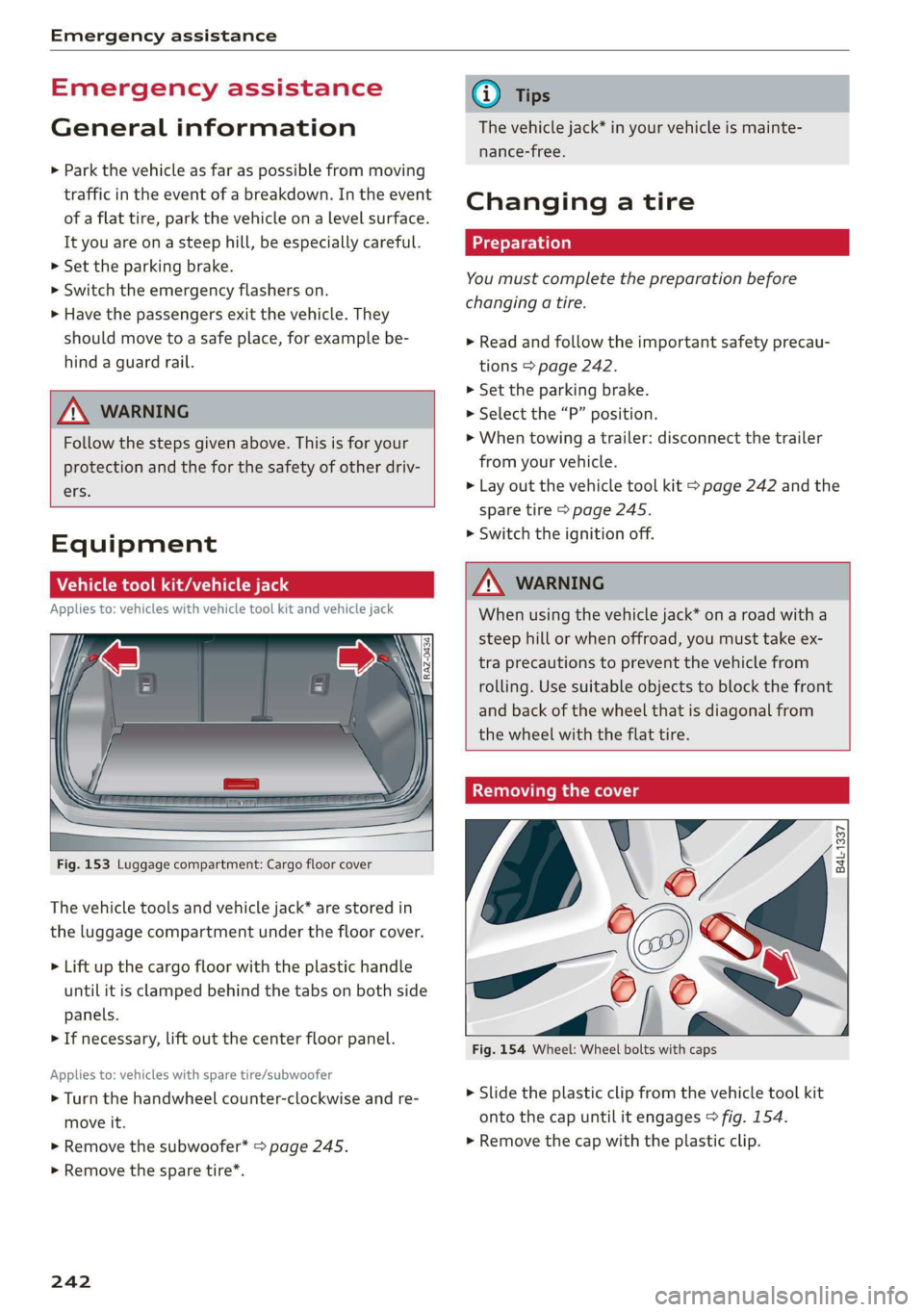
Fig. 153 Luggage compartment: Cargo floor cover
The vehicle tools and vehicle jack* are stored in
the luggage compartment under the floor cover.
> Lift up the cargo floor with the plastic handle
until it is clamped behind the tabs on both side
panels.
> If necessary, lift out the center floor panel.
Applies to: vehicles with spare tire/subwoofer
> Turn the handwheel counter-clockwise and re-
move it.
> Remove the subwoofer* > page 245.
> Remove the spare tire*.
242
@ Tips
The vehicle jack* in your vehicle is mainte-
nance-free.
Changing a tire
You must complete the preparation before
changing a tire.
> Read and follow the important safety precau-
tions > page 242.
> Set the parking brake.
> Select the “P” position.
>» When towing a trailer: disconnect the trailer
from your vehicle.
> Lay out the vehicle tool kit > page 242 and the
spare tire > page 245.
> Switch the ignition off.
Z\ WARNING
When using the vehicle jack* on a road with a
steep hill or when offroad, you must take ex-
tra
precautions to prevent the vehicle from
rolling. Use suitable objects to block the front
and back of the wheel that is diagonal from
the wheel with the flat tire.
Removing the cover
\
i
Fig. 154 Wheel: Wheel bolts with caps
X
me) 4
> Slide the plastic clip from the vehicle tool kit
onto the cap until it engages > fig. 154.
> Remove the cap with the plastic clip.
Page 247 of 280
83A012721BA
Emergency assistance
The wheel bolts must be clean and loosen and
tighten easily. Check the contact surfaces for the
wheel and hub. Contaminants on these surfaces
must be removed before installing the wheel.
Z\ WARNING
— Read and follow the important information
and notes under > page 223.
— Never use the hex socket in the screwdriver
handle to tighten the wheel bolts. Using the
hex socket will not achieve the required
tightening torque, which increases the risk
of an accident.
C) Note
When removing or installing the wheel, the
rim
could hit the brake rotor and damage the
rotor. Work carefully and have a second per-
son help you.
Unidirectional tires
A unidirectional tire profile is identified by arrows
on the tire sidewall that point in the running di-
rection. You must always maintain the specified
running direction. This is necessary to ensure the
tire's optimal performance in regard to adhesion,
running noise, and friction, and to reduce the risk
of
hydroplaning.
To benefit fully from the advantages of the uni-
directional tire design, you should replace faulty
tires as soon as possible and restore the correct
running direction on all of the tires.
> Reinstall the caps on the wheel bolts if necessa-
ry.
> Store the vehicle tool kit in its designated
place.
> If the removed wheel does not fit in the spare
wheel well, store it securely in the luggage
compartment > page 73.
> Check the tire pressure on the installed wheel
as soon as possible.
> Correct the tire pressure and store it
=> page 235.
> The wheel bolt tightening specification must be
100 ft lbs (140 Nm). Have it checked as soon as
possible with a torque wrench. Drive carefully
until then.
> Have the faulty wheel replaced as quickly as
possible.
Spare tire
tute Mae eis
Applies to: vehicles with subwoofer
The subwoofer must be removed before the
spare tire*/temporary spare tire* can be re-
moved.
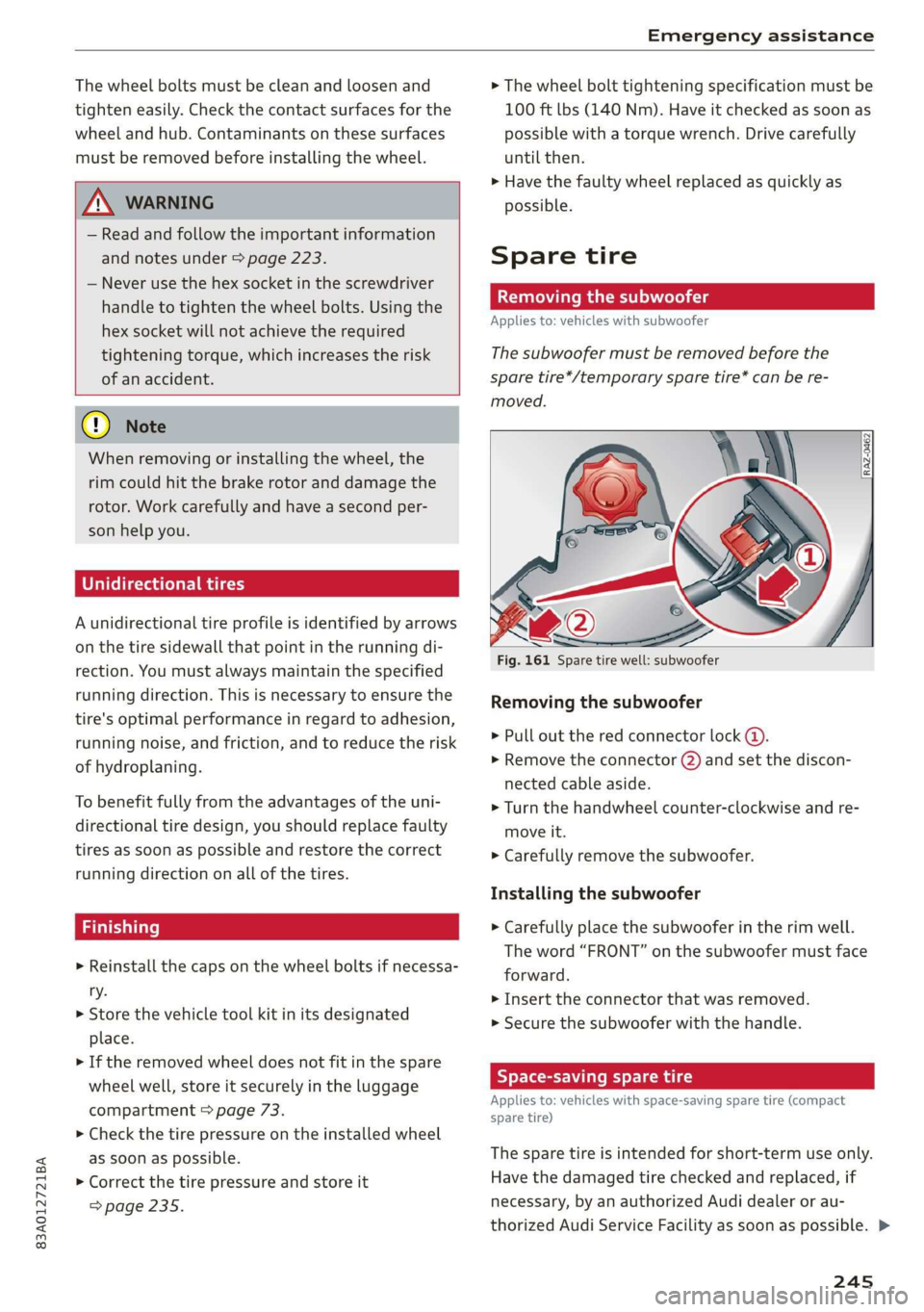
Fig. 161 Spare tire well: subwoofer
Removing the subwoofer
> Pull out the red connector lock @).
>» Remove the connector (2) and set the discon-
nected cable aside.
> Turn the handwheel counter-clockwise and re-
move it.
> Carefully remove the subwoofer.
Installing the subwoofer
> Carefully place the subwoofer in the rim well.
The word “FRONT” on the subwoofer must face
forward.
> Insert the connector that was removed.
> Secure the subwoofer with the handle.
Byer leet Ue iy re
Applies to: vehicles with space-saving spare tire (compact
spare tire)
The spare tire is intended for short-term use only.
Have the damaged tire checked and replaced, if
necessary, by an authorized Audi dealer or au-
thorized Audi Service Facility as soon as possible. >
245
Page 250 of 280
Emergency assistance
bolted securely to the engine block, or to
the engine block itself. If the vehicle battery
in the vehicle being jump started is not
vented to the outside, there is a risk of ex-
plosion due to hydrogen gas.
Gi) Tips
Make sure that the connected jump start ca-
bles have sufficient contact with metal.
Towing
erasure)
You should only perform the steps that follow if
you have the necessary tools and technical ex-
pertise.
Towing requires a certain amount of practice. Au-
di recommends contacting a towing company to
have the vehicle transported.
You should only have your vehicle towed by an-
other vehicle when disabled in exceptional cir-
cumstances. Inexperienced drivers should not
tow.
Notes on towing
When the engine is stopped, the transmission
will not be sufficiently lubricated if traveling at
high speeds and long distances:
— The maximum permitted towing speed is 30
mph (50 km/h).
— The maximum permitted towing distance is 30
miles (50 km).
Additional information on towing with a tow
truck
The vehicle may only be towed with the front axle
raised. Do not wrap any chains or cables around
the brake lines.
If the vehicle should be towed with the axle
raised, then the ignition must be switched off to
reduce the risk of damage to the drivetrain.
Tow bar and towing cable
The vehicle can be towed with a tow bar or tow-
ing cable. Both drivers should be familiar with
248
the special considerations when towing, especial-
ly when using a towing cable.
Always make sure the traction force does not ex-
ceed the permitted level and there are no shock
loading conditions. There is always the risk of the
coupling becoming overloaded when driving off-
road.
For the most safety and security, drive with a tow
bar. You should use a towing cable only if a tow
bar is not available. Use a towing cable made of
synthetic elastic cable similar elastic material.
ZA\ WARNING
— Towing highly increases the risk of an acci-
dent, for example from colliding with the
towing vehicle.
—To reduce the risk of an accident, do not al-
low anyone to remain inside the vehicle
when it is being transported by a tow truck
or a special transporter.
@) Note
— If normal towing is not possible, for exam-
ple if the transmission is faulty or if the
towing distance is greater than 30 miles
(50 km), then transport the vehicle on a
special carrier.
— If the vehicle is towed by a tow truck at the
axle that is not permitted, this can cause se-
vere damage to the transmission.
— The vehicle must not be tow started for
technical reasons.
(i) Tips
— If the power supply is interrupted, then it
will not be possible to move the selector
lever out of the "P" position. The parking
lock must be released using the emergency
release before towing the vehicle
> page 85.
— Switch Audi pre sense* off > page 123 when
loading the vehicle onto a vehicle carrier,
train, ship, or other type of transportation,
or when towing the vehicle. This can prevent
an undesired intervention from the pre
sense* system.
Page 251 of 280
83A012721BA
Emergency assistance
— Follow the local legal regulations for tow-
ing.
Read and follow the important information under
=> page 248.
Preparations
> Only secure the towing cable or tow bar at the
designated towing loops > page 249,
=> page 249.
> Make sure the towing cable is not twisted. Oth-
erwise it could disconnect from the towing loop
while towing.
> Switch the emergency flashers on in both vehi-
cles > page 45. However, do not do this if it
prohibited by law.
Towing vehicle (front)
> Only start to drive when the towing cable is
taut.
> Press the brake pedal very carefully.
> Avoid sudden braking or driving maneuvers.
Vehicle being towed (rear)
> Make sure the ignition is switched on so that
the steering wheel is not locked and so that you
can use the turn signals, the horn, and the
windshield wipers if needed > A\.
> Switching it off before the vehicle has stopped
may impair the function of the brake booster
and power steering. You would then need to
use more force to steer and brake the vehicle.
> Release the parking brake > page 90.
> Select the “N” selector lever position.
> Make sure the towing cable is always taut.
A WARNING
Never tow a vehicle using a tow bar or towing
cable if the vehicle does not have electrical
power.
Front towing loop
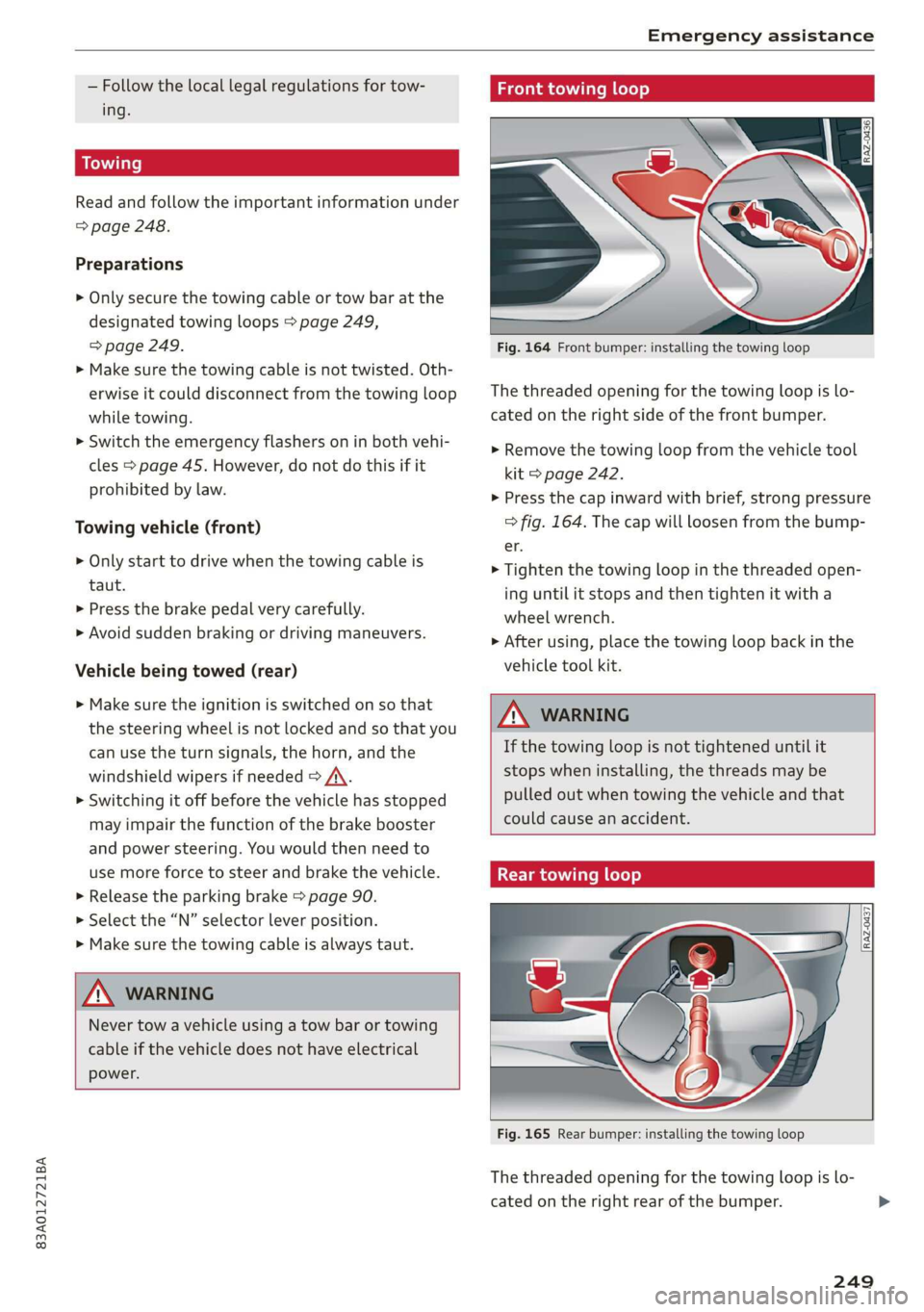
Fig. 164 Front bumper: installing the towing loop
The threaded opening for the towing loop is lo-
cated on the right side of the front bumper.
> Remove the towing loop from the vehicle tool
kit > page 242.
> Press the cap inward with brief, strong pressure
> fig. 164. The cap will loosen from the bump-
er.
> Tighten the towing loop in the threaded open-
ing until it stops and then tighten it with a
wheel wrench.
> After using, place the towing loop back in the
vehicle tool kit.
ZX WARNING
If the towing loop is not tightened until it
stops when installing, the threads may be
pulled out when towing the vehicle and that
could cause an accident.
Rear towing loop
Fig. 165 Rear bumper: installing the towing loop
The threaded opening for the towing loop is lo-
cated on the right rear of the bumper.
249
Page 254 of 280
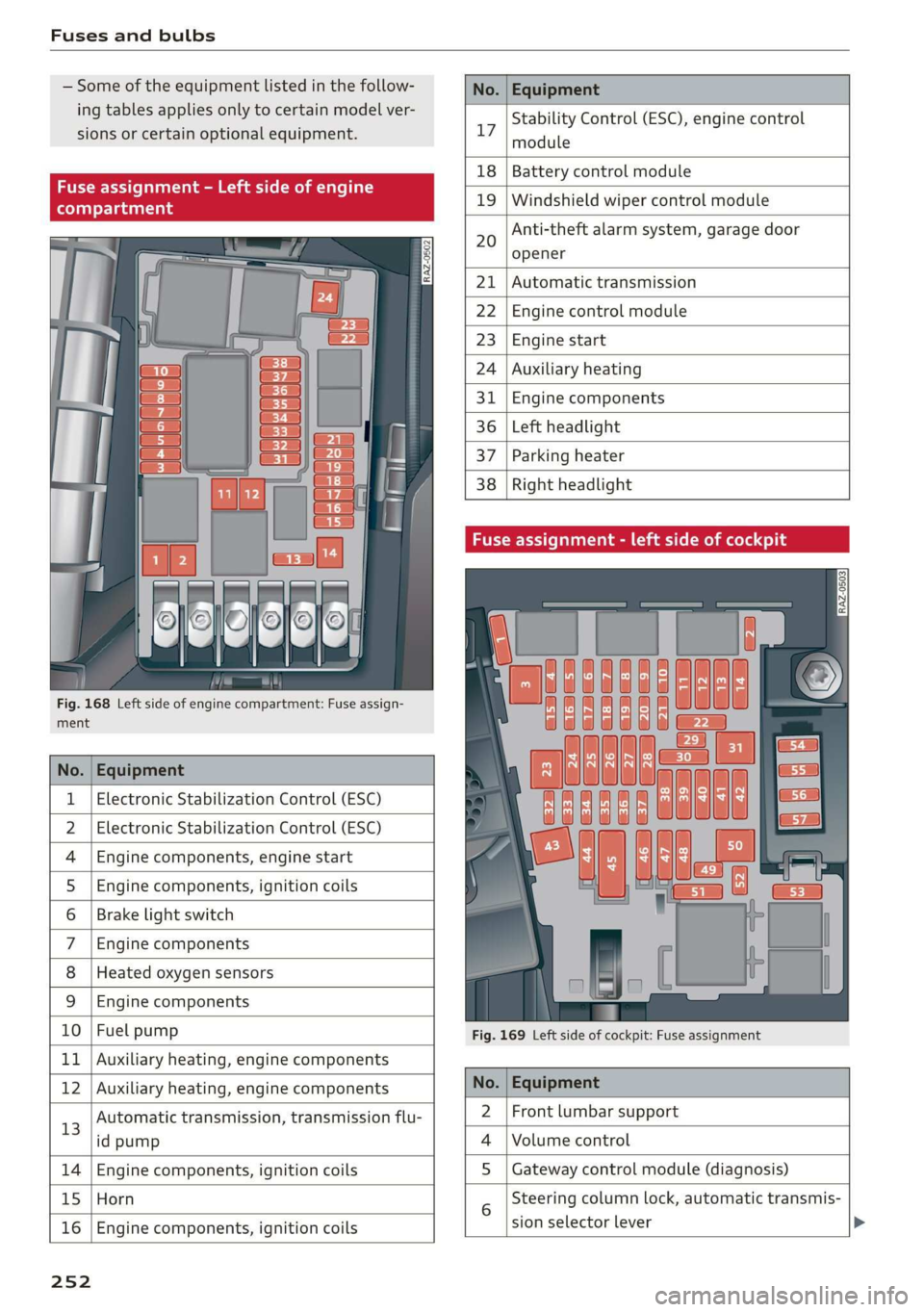
Fuses and bulbs
Some of the equipment listed in the follow-
ing tables applies only to certain model ver-
sions or certain optional equipment.
No. | Equipment
Stability Control (ESC), engine control
17
module
le of e
OVye OVOVO
Fig. 168 Left side of engine compartment: Fuse assign-
RAZ-0502
18 | Battery control module
19 | Windshield wiper control module
Anti-theft alarm system, garage door
opener
20
Automatic transmission
Engine control module
Engine start
Auxiliary heating
Engine components
Left headlight
Parking heater
Right headlight
ment
No. | Equipment
1 | Electronic Stabilization Control (ESC)
2 | Electronic Stabilization Control (ESC)
4 |Engine components, engine start
5 |Engine components, ignition coils
6 | Brake light switch
7 |Engine components
8 | Heated oxygen sensors
9 | Engine components
10 | Fuel pump
11 | Auxiliary heating, engine components
Fig. 169 Left side of cockpit: Fuse assignment
bh N Auxiliary heating, engine components No. | Equipment
13
Automatic transmission, transmission flu-
id pump
2 |Front lumbar support
Volume control
14 Engine components, ignition coils S | Gateway control module (diagnosis)
15 Horn
16
Engine components, ignition coils
sion selector lever
25 2
Steering column lock, automatic transmis-
Page 255 of 280
83A012721BA
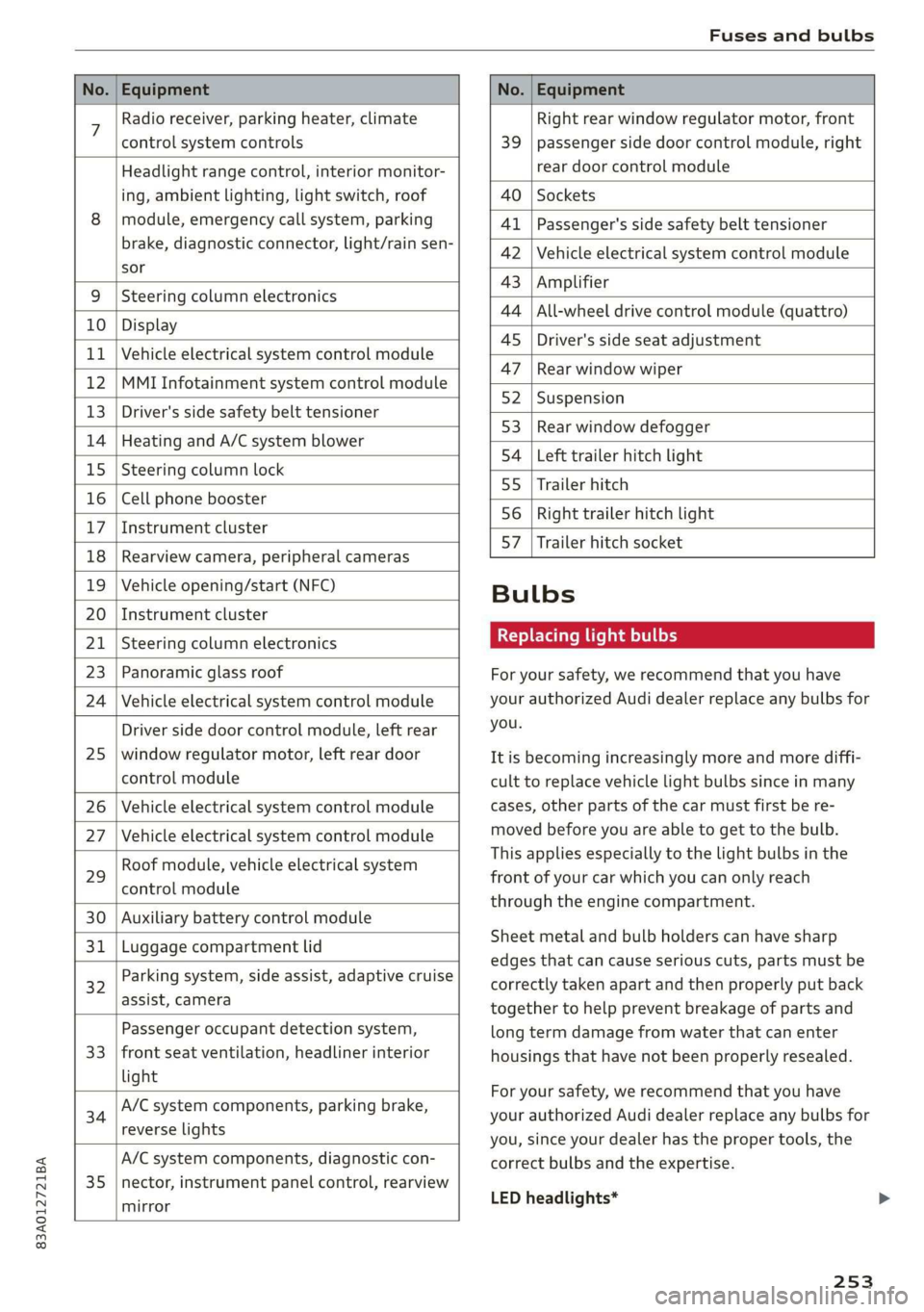
Fuses and bulbs
No. | Equipment No. | Equipment
7 Radio receiver, parking heater, climate Right rear window regulator motor, front
control system controls 39 | passenger side door control module, right
Headlight range control, interior monitor- rear door control module
ing, ambient lighting, light switch, roof 40 | Sockets
8 | module, emergency call system, parking 41 |Passenger's side safety belt tensioner
brake, diagnostic connector, light/raih'sen- 42 |Vehicle electrical system control module
sor
= - 43 |Amplifier
9 |Steering column electronics
- 44 | All-wheel drive control module (quattro)
10 | Display
- - 4S | Driver's side seat adjustment
11 | Vehicle electrical system control module
: 47 | Rear window wiper
12 |MMI Infotainment system control module
- ; - 52 | Suspension
13 | Driver's side safety belt tensioner
- 53 | Rear window defogger
14 | Heating and A/C system blower
: 54 | Left trailer hitch light
15 | Steering column lock
55 | Trailer hitch
16 | Cell phone booster
56 | Right trailer hitch light
17
|Instrument cluster
- - 57 | Trailer hitch socket
18 | Rearview camera, peripheral cameras
19 | Vehicle opening/start (NFC) Bulbs
20 | Instrument cluster
21 | Steering column electronics BETS Ae ha tele
23 | Panoramic glass roof For your safety, we recommend that you have
24 | Vehicle electrical system control module your authorized Audi dealer replace any bulbs for
Driver side door control module, left rear YOU
25 | window regulator motor, left rear door It is becoming increasingly more and more diffi-
control module cult to replace vehicle light bulbs since in many
26 | Vehicle electrical system control module cases, other parts of the car must first be re-
27 | Vehicle electrical system control module meved before youre able to get to the bulb:
HooFmodule,vehieleeleckrical system This applies especially to the light bulbs in the
29 front of your car which you can only reach
control module :
through the engine compartment.
30 | Auxiliary battery control module
: Sheet metal and bulb holders can have sharp
31 | Luggage compartment lid .
: - - - - edges that can cause serious cuts, parts must be
ey) Rarking system, side assist, adaptive cruise correctly taken apart and then properly put back
assist, Cameta together to help prevent breakage of parts and
Passenger occupant detection system, long term damage from water that can enter
33 | front seat ventilation, headliner interior housings that have not been properly resealed.
light
; ingbrak For your safety, we recommend that you have
34 aa io tll Deeg renee your authorized Audi dealer replace any bulbs for
reverseilights you, since your dealer has the proper tools, the
A/C system components, diagnostic con- correct bulbs and the expertise.
35 |nector, instrument panel control, rearview
mirror
LED headlights*
253
Page 267 of 280
83A012721BA
Index
Numbers and
Symbols
2-zone deluxe automatic climate control.... 78
A
ALC cooling MOde ss « « vesiev «sass w © wernin eon 78
Accelerator pedals sais se cai sv aac oe ews 84
also refer to Accelerator pedal........... 84
AGCOSSOFIES « crvcei. 5 cesses « ceeness a & arene ww wnat 260
Active lane assist
refer to Lane departure warning......... 119
Adaptive cruise assist................04. 111
Cleaning the sensors........... 0c been 237
Adaptive dampers ...........-.00ee esau 96
Adaptive speed assist 111
also refer to Adaptive cruise assist....... 111
Adjusting the air distribution............. 78
Adjusting the brightness................. 47
Adjusting the sound.................005 195
Adjusting the temperature..............- 78
Adjusting the vents... 0... .... eee eee ee 79
Adjusting the volume................-005 26
Adjusting the volume (announcements).... 195
Adjusting the welcome sound............ 195
Airbag System « « sae« s sees ¢ v wees ee reese ee 61
Alarm system
refer to Anti-theft alarm system.......... 31
Alignment pin (changing the wheel)....... 242
All-weather lights...............-..20--- 43
Allseason tires. ...........000200200005 231,
All wheel drive
POPEP CO GUAT Oia 5 = yess s 5 meee Heme « 98
AMI
refer to Audi music interface........... 184
Android Auto
refer to Audi smartphone interface...... 193
Anti-freeze
Windshield washer system............. 214
Anti-lock braking system. ...........000-. 98
Anti-Slip Regulation.................0004 99
Anti-theft alarm system ...........-..000- 31
Anti-theft wheel bolts........0........4. 243
Apple CarPlay
refer to Audi smartphone interface...... 193
Aspect ratio (video).............00. 187, 189
ASR
refer to Anti-Slip Regulation............. 98
Audi adaptive light...............-..0000. 43
Audi connect
refer to connect..............00 154,155
Audi drive select. ...... 0. cece eee eee eee 96
Audimusicinterfacesic «scenes a0 oem 0 0 ote 184
AUdiOFMeS ricco cossoe wa concn ow anew wv x asite 185
Audi phone box. esi. ss ecw se eee ye ewe 141
Audi pre sense...........2+--eee eee eee 121
MOSSAGES cwssins so secnsas a a menage We imeuinis wo omen 124
Audi side assist
refer to Side assist............ 0.000005 124
Audi smartphone interface.......... 193, 197
Audi virtual cockpit
refer to Instrument cluster.............. 11
AUTO
Automatic headlights................5. 43
Climate control system.............0005 78
Auto Lock (central locking) ............... 28
Automatic luggage compartment lid.... 36,37
Automatic transmission............-..00- 82
Automatic wipe/wash system............. 49
Average consumption...............0-5. 14
Average speed .... 2... .- cee eee eee 14
B
Bag hooks
Batteny, sscsnn oo saosin 6 a anoxia ov aeiuie © ¥ oxneeRe
Charging
Winter operation...............0 ee eee 212
Blinds
refer to Sunshade (roof)...............-. 39
Block roWte ices « ¢ sawa x 2 ews 2 8 cage ¥ 8 oe 167
BIGWEP's « woven s 2 wome 4 @ noses © yee Ho toeee a 78
Bluetooth
‘Audio player cscs % cress =o reosae ve nese 182
Connecting a mobile device............ 140
Deleting
adevice.................000. 197
DeViC OVETVIOW': esrns 5 & coven s » ease 5 @ exes 196
Disconnecting a device................ 197
Displaying profiles................000. 197
Searching foradevice...............4. 197
Selecting adevice.................00. 197
Specifying a favorite.................. 197
Page 268 of 280
Index
Brake fluid
Checking the brake fluid level........... 211
Brakes... 2... eee eee 89
BrakevassiSt': scase < « seme 2s ae a eee eB: 98
Brakerflidl: «2 cso 2 assim 2 a conse oo emai 9 2A,
Emergency braking function............. 91
New brake pads..............---000-0- 89
Break-in security feature...........-....- 31
Breaking in
New brake pads « sews ss aemy ss ese : eam « 89
New tires: si iwi 2s amie 4 amiss ao oriee a a 223
Browser
refer to Mediacenter................4. 186
BULBS. asceone 2 o seems 2 a cuasenie wo weviens Eww we 253
BUSINESS. Address wie ss aren os ams a oo 168
Cc
California Proposition 65 Warning........ 204
Battery specific...............00.000. 212
Calllist. 00.0... cece eee ene 144, 146
Capacities
Fueltank.....................000005 264
Washer fluid reservoir...............-. 264
Cargo floor... 2.2... eee 76
Cargo net... .... eee eee eee eee ee eee 75
Car key... icc eeeeeeeee 32
Car phone
Serial number (IMEI) ...............05- 151
SWitching Oficws : s sesa s pave a i demas ere 150
Using the car phone function........... 139
GCarwashiss « wes 2 2 awe so wae oo een oe cee 236
Gatalyticconverter', env = s weve sv eewe x vow 202
Cell phone
refer to Telephone ...........eeeee eens 139
Cell phone compartment
refer to Audi phone box............... 141
Central locking.............0 eee eee eee 28
Auto Lock... 2... 0. eee eee eee 28
Convenience key..........-: cece eee ees 33
Convenience opening and closing......... 39
Luggage compartment lid............... 35
Mechanically unlocking and locking....... 30
MeSSAGES wissians oo severe » o scwnare oo acatave ow owen 30
Remote control key.............--.0005 33
SGtting « = sews ¢ o neves ¢ e fewS & e Eetes xo ees 29
Vehicle Key) cress i 2 sccue o 2 eseueve © v eweaue ov erecene 33
266
Central locking switch.................0. 29
Ceramic brakeSrisscs «oases x » owen & 8 averse «0 ae 89
Certificationia: « 2 mews «x enw «2 mews 4 2 eR 261
Charging
refer to Power sourceS...........-000005 72
Charging the battery (mobile devices). 141, 184
Child safety lock
Power windows.........--.00 eee eee ee 38
Rear doors... .... 2... cece ee eee eee 38
Child
safety seats ......... cc cece eee eee ee 66
Securing to the top tether anchor........ 69
Securing with a safety belt.............. 69
Securing with LATCH.................-. 68
Cleaning... ... cece eee eee eee 236
Cleaning Alcantara...............000005 239
Cleaning artificial leather............... 239
Cleaning carbon parts.............. 238, 239
Clédning controls’: « sess << esas x ¥ oes go oe 238
Cleaning decorative parts andtrim........ 238
Cleaning exhaust tail pipes.............. 238
Cleaning plastic parts.................. 238
Cleaning textiles..................000. 239
Climate control system............-..0-- 77
Closing
Automatic luggage compartment lid...... 36
Convenience closing..........0.eeeeees
HOGG sw = aosune x 3 casas 2 smawesce w cuaangos o aeRees
Luggage compartment lid
Luggage compartment lid with foot motion . 37
PanoramicglassirOof wsi« 6 2 susie « e sowsere 9 & 3 39
Sunshade (roof) ..............000000 eee 39
WiTidOWS%: + © sees x ¢ sees co eR i 8 ee Ee 38
Cockpit dimming ..............000e sees 47
Cockpit (overview) .........--.00 022 e eee ee 6
Colornumber..............00c eee e eens 263
Compact:sparestire:. . « sesces so comin ov cesta» 245
COMPArLtMeNtSccses vs ssc ve ees vo meeT vw oes 7
Compass inthe mirror...............0005 51
Compliance:ss + ¢ saws ss eee se cas s ewes 261
Configuration wizard « « « wwe se eee ae came x 18
COMMECE ccscg s Haws ss Here sy HeeE FE ORE Ee 154
Data plans: «= sssen ss cen ov ewan eo crn o 157
Data Privacy..... 0.0... cece eee eee eee 257
INfOtaiiMeNtsen « 3 scam x x em as Ree FS 155
Infotainment services..............0048 155
Page 269 of 280
83A012721BA
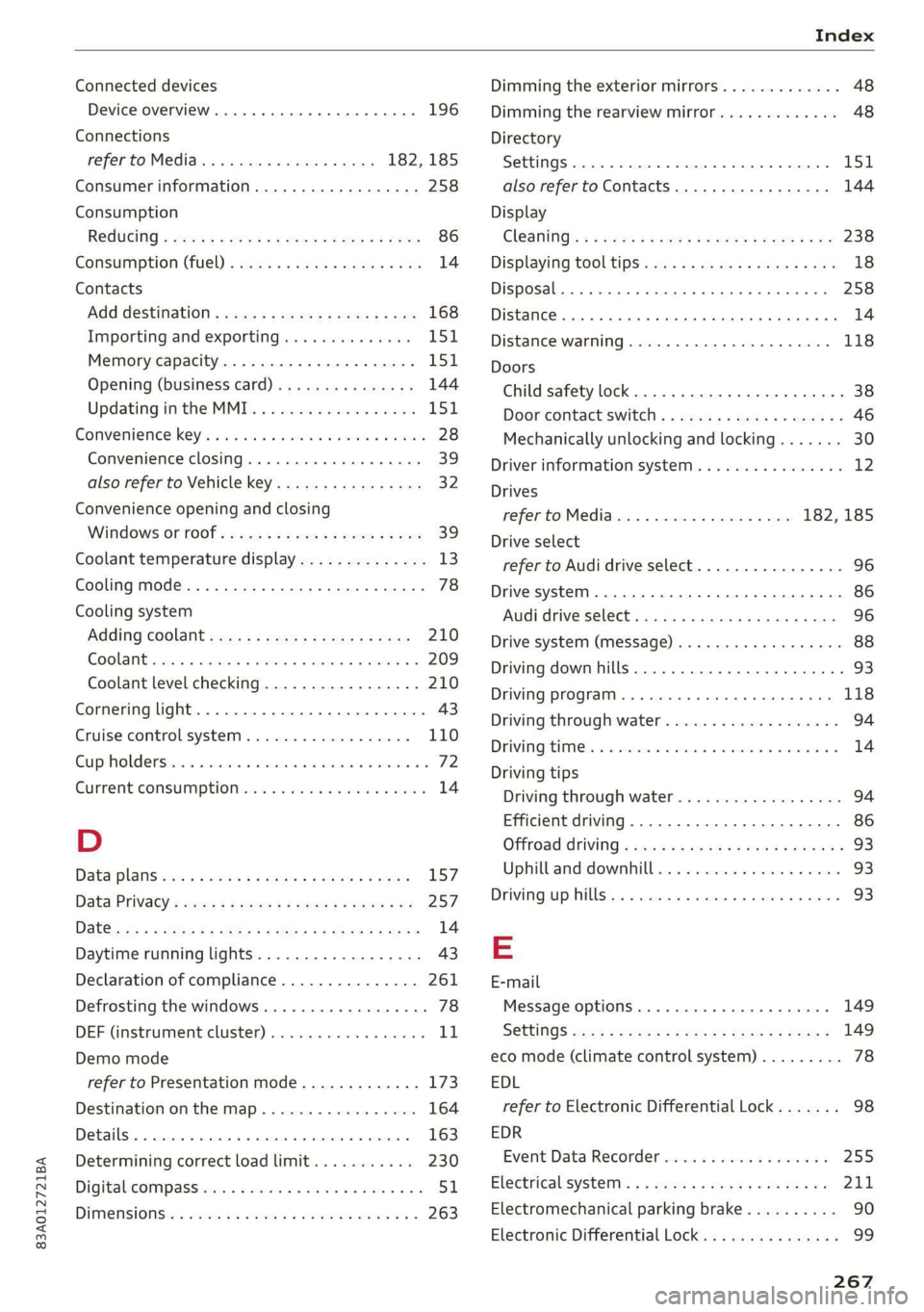
Connected devices
Device overview......... 2.0.00 cee
Connections
referto Media...........ceeeeeee
Consumer information..............0005
Consumption
ROdUGING « meee < e aeee = oes 6 s See es ree
Consumption (fuel) ..............00eeuee
Contacts
Add destination sxc. x + sexs se ees ye ee
Importing and exporting..............
Memory capacity..................00.
Opening (business card)...............
Updating inthe MMI..................
Convenience keys s wecc es ews se cece ss eevee
Convenience closing.............000008
also refer to Vehicle key..............05
Convenience opening and closing
WindoWs OF TOOT: an « s wean os gem « x eee
Coolant temperature display..............
Cooling mode........ 2... cee eee eee eee
Cooling system
Adding COOlANt wx x « www e > qemm x v samce
Coolant level checking.................
Cornering light................00 eee eae
Cruise control system..............000.
Cup holdersiics i a acess a s essen o esecaue «2 cone es
Current consumption «sce ss wows s swe
Daytime running lights..................
Declaration of compliance...............
Defrosting the windows...............00.
DEF (instrument:cluster) . 0... ee ee
Demo mode
Determining correct load limit...........
DigitalicOMPass:siics 6 x vie so sins 4 w mares ooo
DIMENSIONS:. « wiz ss sen 2 e eee se eeee ees
258
Dimming the exterior mirrors............. 48
Dimming the rearview mirror............. 48
Directory
SOGUINGS. cece
Display
Cl@aning': z x 2s ¢ » ees ¢ e een so wees 2: 238
Displaying tooltips.................0008 18
Disposal... . 0.0.0... cee eee eee eee eee 258
Distance . 6... eee e ete ete aee 14
Distance: Warning sicsse + scores 6 seers + 6 meen 118
Doors
Child safety lock..... 0.0... cee ee eee eee 38
Door contact switch..............00000. 46
Mechanically unlocking and locking....... 30
Driver information system................ 12
Drives
referto Media................... 182,185
Drive select
refer to Audi drive select.............0.. 96
Drive system... 1.2.0.2 0 02 eee eee eee 86
Audi drive Select); 00.6. ceases eseeee cine 96
Drive system (message) ........0. 0s ee eee 88
Driving down hills... 0.0.0.0... 0.000 e eee 93
DrivinG:PrOGrarn:. « «sense + 6 suse 0 4 somece a 9 we 118
Driving through water...............200. 94
Driving?tiimess 5 a serene vo vessiews os coouun 6s een vo 14
Driving tips
Driving through water...............4.. 94
Efficient driving.............-..020-00- 86
Offroad Griving « wean oe wean es cones wenn es 93
Uphill and downhill.................00. 93
Drivingsup:hillse: . & crssice i 6 aon eo eevee @ 8 severe 93
E
E-mail
Message options................00005 149
S@ttinGS
zens ¢ » mens : Seen cs Seen se seme 149
eco mode (climate control system)......... 78
EDL
refer to Electronic Differential Lock....... 98
EDR
Event Data Recorder............0.0040. 255
Electrical system). « «ise sees a cease oe 211
Electromechanical parking brake.......... 90
Electronic Differential Lock.............-. 99
Page 272 of 280
Index
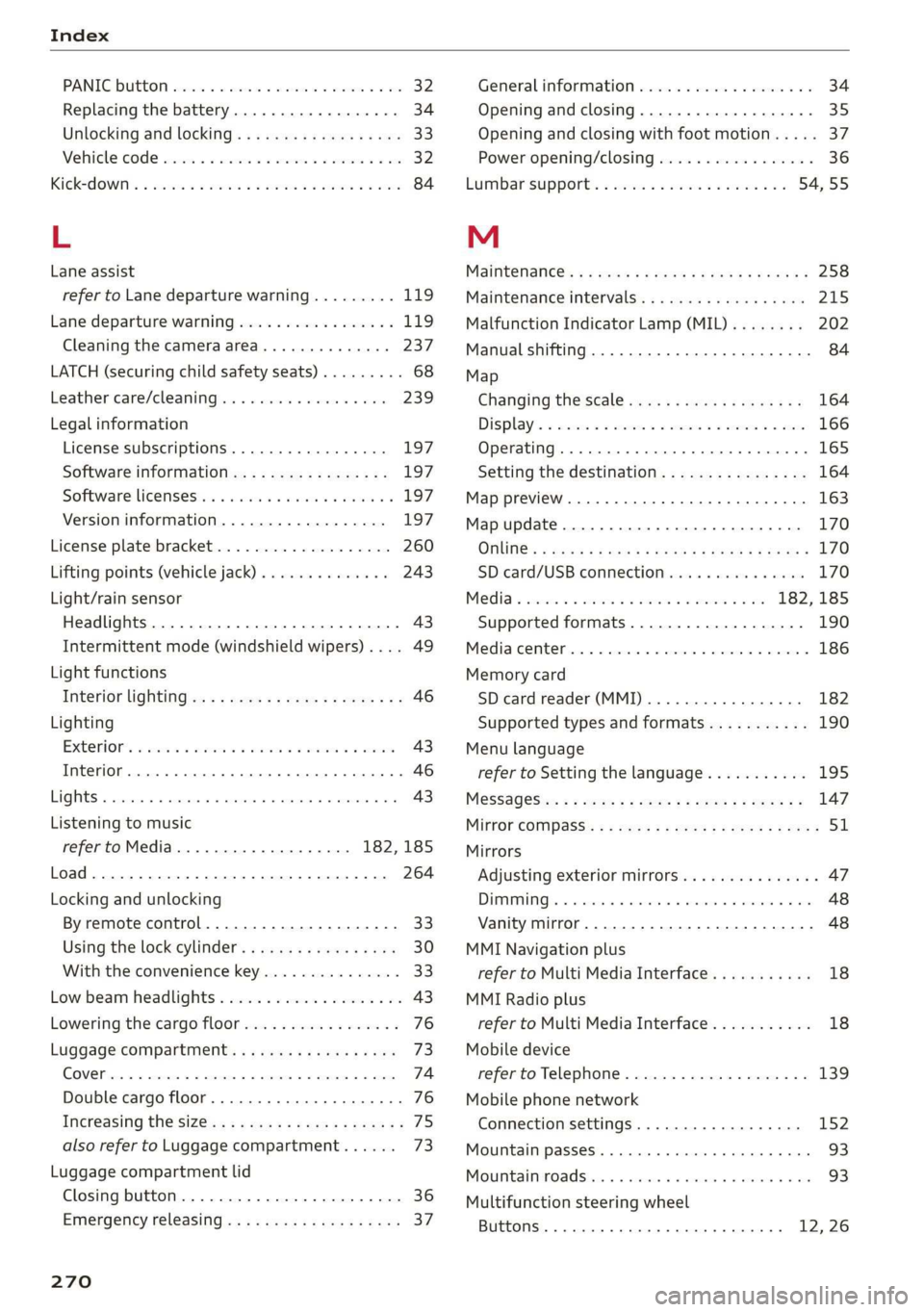
PANIC Button ssicsooe © 2 cocvise © avant ww rumen @ eee 32
Replacing the battery...............0-. 34
Unlocking and locking...............005 33
Vehicle Code ssicve x + swine ee etre oe eas a 2 one 32
Kick#dOWn'. 2 scons e senea oe ae ao ca @ eee 84
L
Lane assist
refer to Lane departure warning......... 119
Lane departure warning................. 119
Cleaning the camera area.............. 237
LATCH (securing child safety seats)......... 68
Leather care/cleaning...............005 239
Legal information
License subscriptions................. 197
Software information................. 197
Software:licensesies . sowie ae iawn ws nsenn a 6 197
Version
information.................. 197
License plate bracket................0.. 260
Lifting points (vehicle jack).............. 243
Light/rain sensor
Headlights...............00 020-0 ee eee 43
Intermittent mode (windshield wipers) .... 49
Light functions
Interior lighting!sc . = ssw = 2 ese sy eee eee 46
Lighting
Exterior. « ic © wesen ae ease a 2 wane vo ore 43
Interior... 0... eee eee 46
Lights 0.0... eee eee eee 43
Listening to music
refertoMedia................005. 182,185
Load... 6.6... eee 264
Locking and unlocking
By remote control............2.2.0005. 33
Using the lock cylinder................. 30
With the convenience key............... 33
Low beam headlights.................... 43
Lowering the cargo floor................. 76
Luggage compartment...............05. 73
COVER ime x x cena % 2 soamere # x wemnER oo en aw Re 74
Double cargo floor..............0..000- 76
Increasing the size............0--.00 ee 75
also refer to Luggage compartment...... 73
Luggage compartment lid
Closing button. ...............000 ee eee 36
Emergency releasing:ss : < waa x x aeax ¢ gaee 37
270
General information 34
Opening and closing 35
Opening and closing with foot motion..... 37
Power opening/closing................. 36
Lumbar'support:s + ses so sews oo owen oo 54,55
M
Maintenance’: « « sews + » sen + e awe + pores a 258
Maintenance intervals................-. 245
Malfunction Indicator Lamp (MIL)........ 202
Manual shifting ................0020 eee 84
Map
Changing the scale ............ee eves 164
Display’ « sncine 2 2 setese a a comes ow anes ve to 166
Operating. ..... 0.0... cece eee eee eee 165
Setting the destination................ 164
Map preview...............0- 00-00 e eee 163
Map update................0 20. e ee eee 170
Oli: 2 gems + 2 wise = pense & ¥ em ee See = 170
SD card/USB connection........0.. 00006 170
Media somes: i sxonns ao eevee ¥ oe orem wae 182,185
Supported formats.................-. 190
Media Cemberin. « . acewus « w snonsue = auarems wo meriite 186
Memory card
SD card reader (MMI).............0... 182
Supported types and formats........... 190
Menu language
refer to Setting the language........... 195
MeSSaQeSixc: « ¢ sews & ¢ ese 2s ees § oe ees es 147
MIrforcompass:s « « ues cs wean: 2 meee + eee 51
Mirrors
Adjusting exterior mirrors............... 47
DUUANTING Ss, « scersiss ow snouts om exons 6 x oxmanm x 48
Vanity mirror... 1.2... eee ee eee 48
MMI Navigation plus
refer to Multi Media Interface........... 18
MMI Radio plus
refer to Multi Media Interface........... 18
Mobile device
referto Telephone..............0.0005 139
Mobile phone network
Connection settings...............00. 152
Mountain passeS....... 00.0. e cece ee eee 93
MouintainirOadsivn. « scins a 6 vimses a 6 nraeiise #6 om 93
Multifunction steering wheel
Buttons......... 0... ee eee eee eee 12, 26