radio AUDI Q5 2013 Owner's Guide
[x] Cancel search | Manufacturer: AUDI, Model Year: 2013, Model line: Q5, Model: AUDI Q5 2013Pages: 316, PDF Size: 78.89 MB
Page 269 of 316
When the malfunction indicator is illuminat
ed, the system may not be able to detect or
signal low tire pressure as intended. TPMS
malfunctions may occur for a variety of rea
sons, including the installation of replace
ment or alternate tires or whee ls on the veh i
cle that prevent the TPMS from funct io ni ng
p roperly . Always check the T PMS malfunct ion
tellta le afte r replacing one or more t ires or
wheels on your veh icle to ensure that the re
p lacement or a lternate tires and wheels allow
the TPMS to continue to function properly .
Tire pressure indicator appears
Applies to vehicles: with tire pressure monitoring system
The tire pressure indicator in the instrument
cluster informs you if the tire pressure is too
low or if there is a system malfunction.
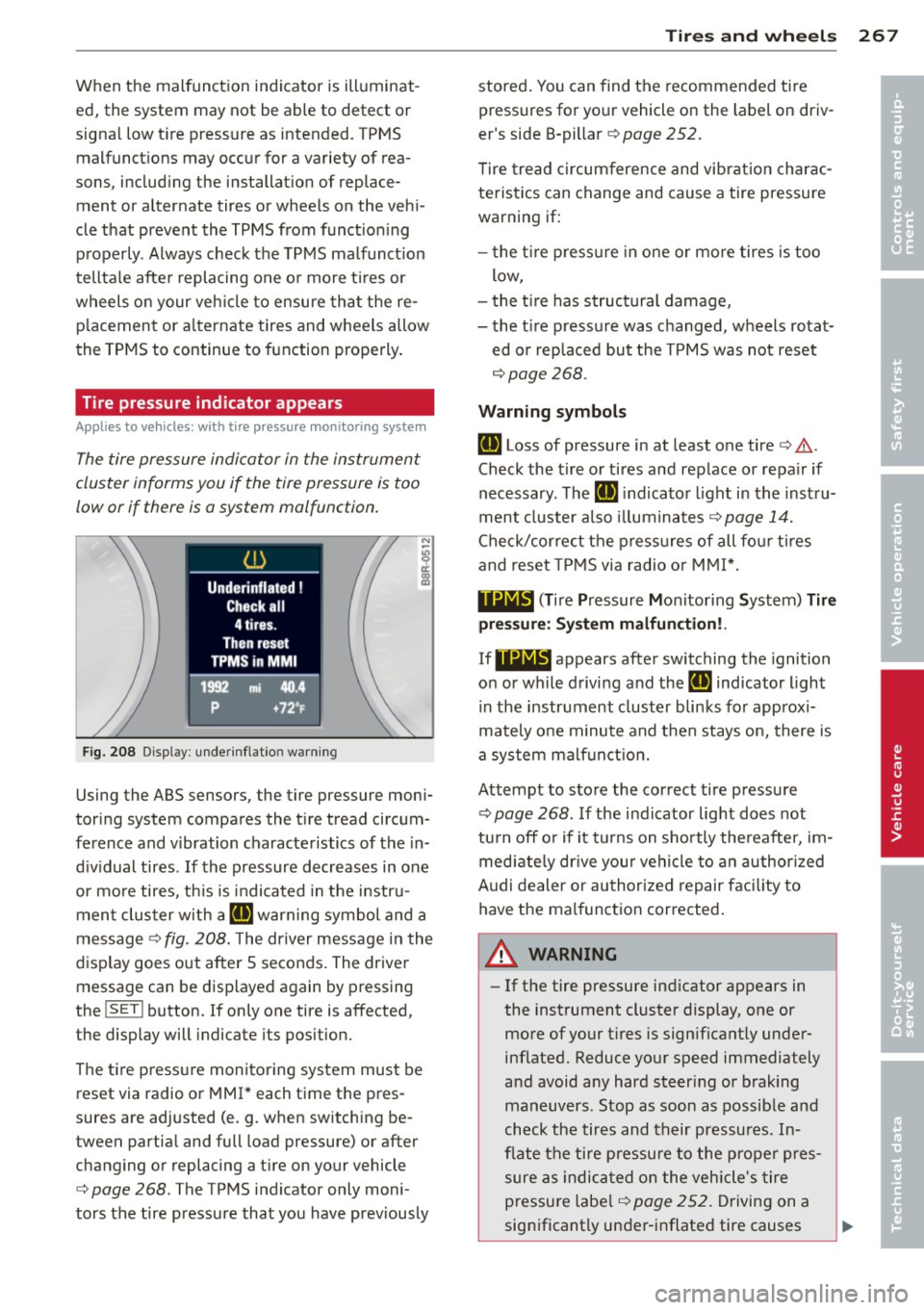
Fig. 208 Display : underinflatio n warning
Using the ABS sensors, the tire pressure moni
toring system compares the t ire tread circum
ference and vibration characteristics of the in
d iv idual tires . If the pressure decreases in one
or mo re tires, th is is indica ted in the instru
ment clus ter with a
IE warning symbol and a
message ¢
fig. 208. The driver message in the
display goes out after 5 seconds. The driver message can be displayed again by pressing
the
! SET ! button. If only one tire is affected,
the display will indicate its pos ition.
The ti re press ure monitoring system must be
reset via radio or MMI* each time the pres
sures are adjusted (e.g . when switching be
tween partia l and full load pressure) or after
changing or replacing a t ire on your vehicle
¢
page 268 . The TPMS indicator only moni
tors the tire pressure that you have prev iously
Tire s an d wheel s 267
stored . You can find the recommended t ire
pressures for yo ur vehicle on the label on driv
er's side B-pillar ¢
page 252.
Tire tread circum ference and vibration charac
teristics can change and cause a tire pressure
warning if:
- the t ire p ress ure in one or more tires is too
low,
- t he t ire has structural damage,
- the t ire pressure was changed, wheels rotat-
ed or replaced but the TPMS was not reset
¢ page 268.
Warning symbo ls
IE Loss of pressure in at least one tire¢.&,.
Check the tire or tires and replace or repa ir if
necessary. The
IE indicato r light in the inst ru
ment cluster a lso illuminates
c::!;> page 14.
Check/correct the press ures of all fou r tires
and reset TPMS via radio o r MMI*.
119;~, (T ir e Pressure Mon itoring System) Tire
pre ssure: Syst em malfun ction!.
If 11Nlf:1 appears afte r switching the ignition
on or while driving and the
IE indicator light
i n the instrument cluster blinks fo r approx i
mately one minute and then stays on, there is
a system malf unct ion.
Attempt to store the correct tire pressure
¢ page 268 . If the ind icator light does not
tu rn off o r if it turns on sho rtly the reafter, im
med iate ly dr ive your vehicle to a n author ized
Audi dealer or au thorized repair faci lity to
have the malfunc tion corrected .
A WARNING
-=
-If the tire pressure indicator appears in
the instrument cluster display, one or
more of your t ires is significant ly under
inflated. Reduce your speed immediately
and avoid any hard steer ing or braking
maneuvers. Stop as soon as possible and
check the tires and their pressures. In
flate the tire p ressure to the prope r pres
sure as indica ted on the vehicle's tire
pressu re labe l
¢page 252. Driving on a
significantly under-i nflated tire causes
•
•
Page 270 of 316
268 Tires and wheels
the tire to overheat and can lead to tire
failure. Under-inflation also is likely to
impair the vehicle's handling and stop
ping ability.
- The driver is responsible for maintaining
the correct tire pressures. You must
check the tire pressures regularly.
- Under certain conditions (such as a spor
ty driving style, winter conditions or un paved roads), the pressure monitor indi
cator may be delayed.
-Ask your authorized Audi dealer if run flat tires may be used on your vehicle.
Your vehicle registration becomes invalid
if you use these tires when not permit
ted. Damage to your vehicle or accidents
could also result.
@ Tips
- The tire pressure monitoring system
stops working when there is an ESC/ABS
malfunction.
- Using snow chains may result in a system
malfunction.
- The tire pressure monitoring system on
your Audi was developed using tires with the "AO" or "RO" identification on the
tire sidewall¢
page 259. We recom
mend using these tires.
Reset tire pressure monitoring system
Applies to vehicles: with tire pressure monitoring system
If the tire pressure is adjusted, wheels are ro
tated or changed, the TPMS must be reset via
radio or MMI*.
11> Befo re resetting the TPMS, the current pres
sures of all four tires must correspond to
the specified values. Adjust the tire pressure
and reset the pressure in the tire pressure
monitoring system according to the load
you are carry ing
¢page 252.
11> Turn on the ignition.
11> Select: ICARI function button > Tire pres
sure monitoring
> Store now . Or
i,. Select: ICARI function button > Car sys
tems *
control button > Servicing & checks >
Tire pressure monitoring > Store tire pres
sures.
@ Tips
Do not store the tire pressure if there are
snow chains on the tire.
Page 284 of 316
282 Fuses and bulbs
I
-
No. Consumer
2 Wi-Fi
3 MMI/Radio
4 Instrument cluster
5 Gateway (instrument cluster
control
module)
6 Ignition lock
7 Light switch
8 Climate control system blower
9 Steering column lock
10 Climate control system
11 Terminal 30 diagnostic connec-
tor
12 Steering column switch module
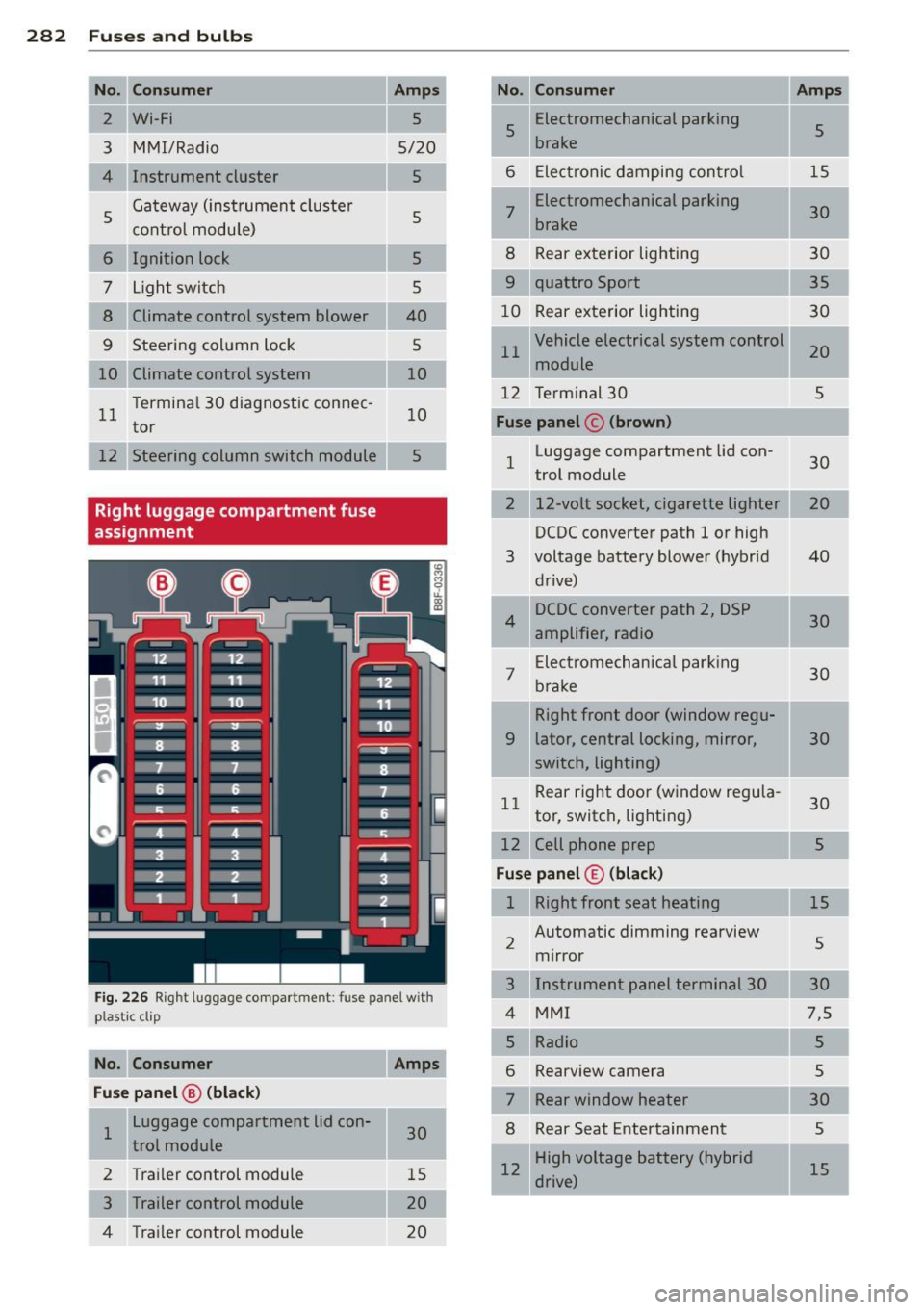
Right luggage compartment fuse
assignment
Amps
5
5/20
5
5
5 5
40
5
10
10
5
Fig. 226 Right luggage compartment: fuse panel with
plastic cl ip
No. Consumer Amps
Fuse panel
@ (black)
1 Luggage compartment lid con-
30
trol module
2 Trailer control module 15
3 Trailer control module 20
4 Trailer control module
20
-No. Consumer Amps
5 Electromechanical
parking
5
brake
•
6 Electronic damping control 15
7 Electromechanical parking
30
brake
8 Rear exterior lighting 30
9 quattro Sport
35
10 Rear exterior lighting 30
11 Vehicle electrical system control
20
module
12 Terminal 30
5
Fuse panel c (brown)
1 Luggage compartment lid con-
30
trol module
2 12-volt socket, cigarette lighter
DCDC converter path 1 or high
3 voltage battery blower (hybrid 40
drive)
4 DCDC
converter path 2, DSP
30
amplifier, radio
7 Electromechanical
parking
30
brake
Right front door (window regu-
9 later, central locking, mirror, 30
switch, lighting)
11 Rear
right door (window regula-
30
tor, switch, lighting)
12 Cell phone prep 5
Fuse panel© (black)
1 Right front seat heating
15
2 Automatic dimming rearview
5
mirror
3 Instrument panel terminal 30
4 MMI 7,5
Rearview camera
Rear window heater
8 Rear Seat Entertainment
12 High voltage battery (hybrid
drive)
Page 292 of 316
2 90 General information
General information Explanation of
technical data
Some of the technical data listed in this man
ual requires further explanation .
The technical data for your vehicle is listed in
the charts starting on
r:::> page 292. This sec
tion provides general information, notes and restrictions which apply to this data .
Vehicle identification
The key data is given on the vehicle identifica
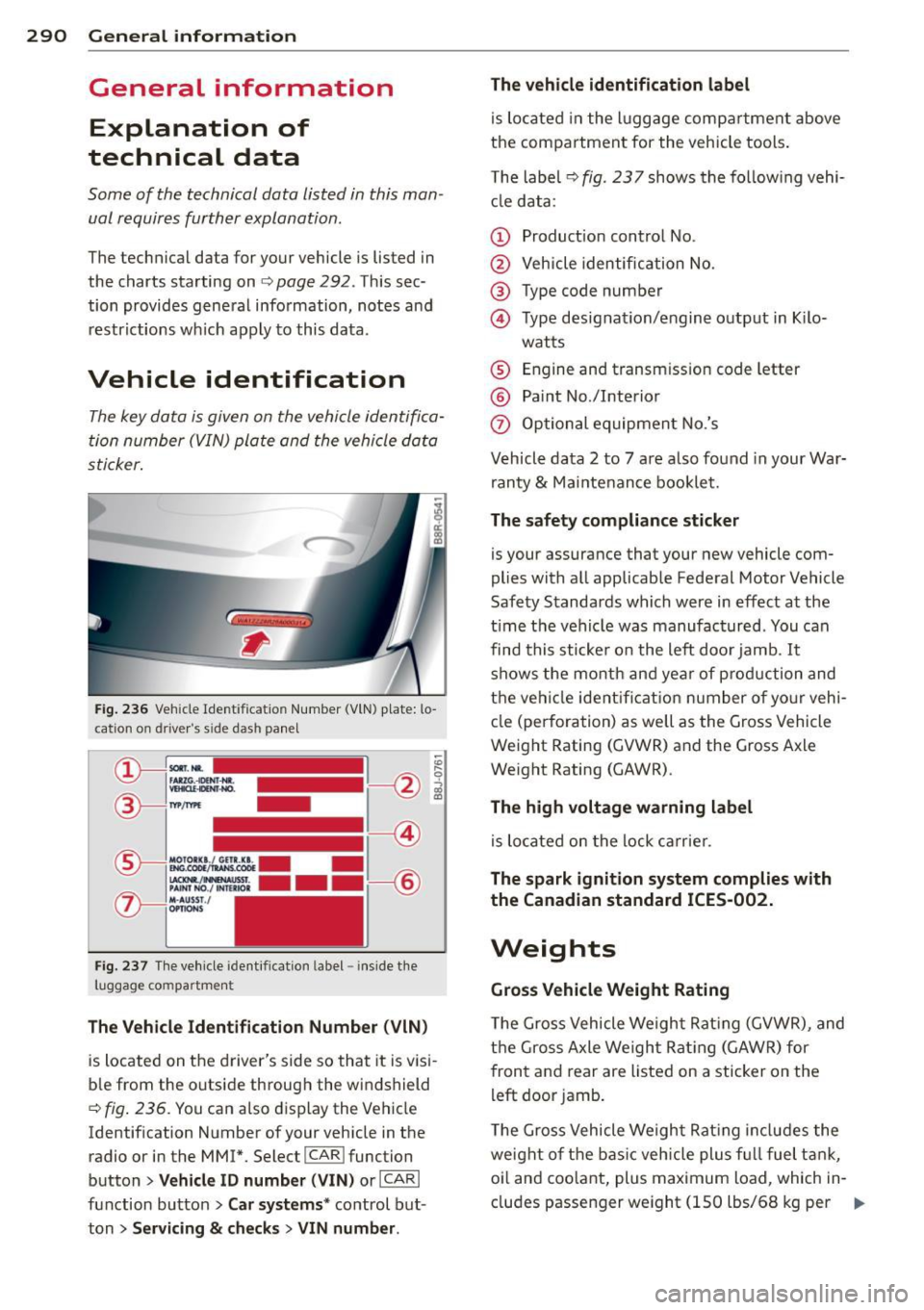
tion number (VIN) plate and the vehicle data
sticker.
Fig. 236 Veh icle Ide ntific atio n Number (VlN) p late: lo
cation on driver 's sid e das h panel
Fig. 237 The vehicle identi fication label -inside the
luggage co mpa rtmen t
The Vehicle Identification Number (VIN)
is located on the driver's side so that it is visi
b le from the outside through the windshield
r:::> fig . 236. You can also display the Vehicle
Identification Number of your vehicle in the
radio or in the MM!*. Select
! CAR ! function
button>
Vehicle ID number (VIN) or !CARI
function button> Car systems* control but
ton >
Servicing & checks > VIN number . The
vehicle identification label
is located in the luggage compartment above
the compartment for the vehicle tools.
The label¢
fig. 23 7 shows the follow ing vehi
cle data :
(D Production control No.
@ Vehicle identification No.
® Type code number
@ Type designation/engine output in Kilo-
watts
® Engine and transmission code letter
@ Paint No./Interior
(f) Optional equipment No.'s
Vehicle data 2 to 7 are also found in your War
ranty
& Maintenance booklet.
The safety compliance sticker
is you r assurance that your new vehicle com
plies with all applicable Federal Motor Vehicle
Safety Standards which were in effect at the
t ime the vehicle was manufactured . You can
find this sticker on the left door jamb .
It
shows the month and year of production and
the vehicle ident ification number of your vehi
cle (perforation) as well as the Gross Vehicle
Weight Rating (GVWR) and the Gross Axle
Weight Rating (GAWR) .
The high voltage warning label
is located on the lock carrier.
The spark ignition system complies with
the Canadian standard ICES-002.
Weights
Gross Vehicle Weight Rating
The Gross Vehicle Weight Rating (GVWR), and
the Gross Axle Weight Rating (GAWR) for
front and rear are listed on a sticker on the
left door jamb.
The Gross Vehicle Weight Rating includes the
weight of the basic vehicle plus fu ll fuel tank,
oi l and coolant, plus maximum load , which in
cludes passenger weight (150 lbs/68 kg per
Ill>
Page 300 of 316
298 Consumer Information
Technical Modifications
Our guidelines must be complied with when technical modifications are made .
Always consult an authorized Audi dealer be
fore starting work on any modifications.
This will help ensure that vehicle function,
performance and safety are not impaired
¢ &. .
Attempting to work on electronic components
and the software used with them can cause
malfunctions. Because of the way electronic
components are interconnected with each
other, such malfunctions can also have an ad
verse affect on other systems that are not di
rectly involved. This means that you risk both
a substantial reduction in the operational
safety of your vehicle and an increased wear of
ve hicle parts ¢
A:,..
Author ized Audi dealers will perform th is
wo rk in a professiona l and competent manner
or, in special cases, refer you to a professional
company that specializes in such modifica
tions .
A WARNING
Improper repairs and modifications can
change the way vehicle systems work and
cause damage to the veh icle and serious
personal injury.
-
If emergency repairs must be performed
elsewhere, have the vehicle examined by
an authorized Audi dealer as soon as possi
ble.
Declaration of
Compliance, Telecom
munications and
Electronic Systems
Radio Frequency Devices and Radiocommuni
cation Equipment User Manual Notice.
The manufacturer is not responsib le for any
radio or TV interference caused by unauthor
ized modifications to this equipment.
Devices
T he following devices each comply with FCC
Part 15.19, FCC Part 15.2 1 and RSS-Gen Iss ue
1:
- Adapt ive cru ise control*
- Conven ience key*
- Aud i side assist*
- Cell phone package*
- Electron ic immobilizer
- Homelink ® universal remote contro l*
- Remote control key
FCC Part 15.19
This device complies with part 15 of the FCC
Rules . Operation is subject to the follo wing
two conditions:
(1) This device may not cause harmful inter
ference, and
(2) this device must accept any interference
received, including interference that may
cause undesired operation.
FCC Part 15 .21
CAUTION:
Changes or modifications not expressly ap
proved by the party responsible for compli
ance could void the user's authority to operate
the equipment.
RSS-Gen Issue 1
Operation is subject to the following two con
ditions:
(1) this device may not cause inte rfe rence,
and
Page 304 of 316
302 Index
Chassis Undercoating
Chec king
222
Eng ine coolant leve l ................ 240
Tire pressure ...................... 254
Child restra ints
Danger of us ing ch ild restra ints in the
front seat ... ............ .. .. .. .. .
158
System anchors .......... .. .. .... . 191
Where can I get add it ional information
about child restraints and their use? ..
196
Ch ild safety .................... ... . 178
Conve rtible locking retracto r .. .. .. .. . 188
Important safety instructions for using
chi ld safety seats ..................
181
Important things to know when driving
with chi ldren .. .. ..... ... .. .. .... .
178
Installing a child restraint using the
LATCH system .. ............ .. .... .
193
Mount ing and releasing the anchorage
hook .. .. .... ........ ...... .... ..
193
Tether anchors ................ .... 194
Tether straps ................. .... 194
Chi ld safety locks
Rear doors ... ........... .. .. .... ..
46
Child safety seats .. ..... ... .. .. .... . 184
Booster seats .... ..... ... .. .. .... . 186
Convertible c hild seats .. .. .. ... ... . 185
Convertible locking retractor .. .. ..... 188
Danger of us ing child restra ints in the
front seat ................. .. .... .
158
How do I properly install a child safety
seat in my vehicle? ..... ... .. .. .. .. .
18 1
Infant seats ... .......... .. .. .. .. . 184
Install ing .. ............. .. .. .... . 188
LA T CH system ..................... 193
Lower anchorages ..... ... .. .. .... . 192
Safety instructions ..... ... .. .. .... . 181
Unused safety belts on the rear seat . . 183
C igare tte lighte r ............. .. .... .. 75
Cleaning
Eng ine compartment ........... ....
226
Exhaust tail p ipes .......... .... .... 223
Fabrics and fabr ic coverings ......... 223
Ins trument panel .................. 224
In ter ior .. .. ... .......... .. .. .. .. . 223
Leather .... ... .. ..... ... .. .. .... . 225
Matte finish paint ..... ... .. .. .... . 219
MMI control console . .. ..... .... . .. 223
MMI display ..... ... .. ..... ... .. .. 223
Plastic and vinyl . .... ....... ... .. .. 220
Plastic parts ... .. ............. .... 224
Radio display ..................... 223
Safety belts ..... ................ . 226
Trim strips . . . . . . . . . . . . . . . . . . 220,221
Climate control .... ... .. ..... ... .. .. . 79
Air vents .......................... 81
Automatic recirculation ........... .. . 81
Operation . . . . . . . . . . . . . . . . . . . . . . . . . 80
Setup ...... .. .. .. ... ....... ... .. . 81
Supplementary .. ................ .. 82
Sync hronizing ...................... 81
Cli matized cupholder . . . . . . . . . . . . . . . . . 7 4
Clock . ... .. .... .. .. ... ..... ... .. .. .
12
Closing
Panoramic sliding sunroof ........ .... 4 7
Coat hooks ..... .. ............. .... .
78
Cold tire inflation pressure ..... ... .. .. 252
Compass mirror . . . . . . . . . . . . . . . . . . . . . 59
Compliance ..... .. .. ... ..... ... .. .. 298
Consumer Informa tion . . . . . . . . . . 146, 295
Contac ting NHTSA . ............. .... 146
Convenience
Closing ... .... .. ... .. ..... .... . .. .
47
Opening .. .. .. .. ............. ..... 47
Convenience key . . . . . . . . . . . . . . . . . . . . . 40
Indicator lights ... .............. .. . 88
Locking and unlock ing vehicle .. .. .. .. . 40
Starting engine (START ENGINE STOP
button) ...........................
86
Stopping the engine (START ENGINE
STOP button) ......................
87
Switching on ignition ................ 86
Convertib le child safety seats ... .. .. .. 185
Convertib le loc king ret ractor
A t· t· c 1va mg ... .. .. .... ......... .... 190
D t' . eac 1vatmg . . . . . . . . . . . . . . . . . . . . . . 191
U sing to secure a child sa fety seat lB8, 190
Coolant system . ... .. ... ....... ... .. 240
Cooled cupholder .. ... .......... ..... 7 4
Cooling box in glove compartment . .. .. . 77
Cooling mode (climate control) ...... .. .
80
Cooling System
Expansion tank ... .. ... ..... ...... .
240
Cornering l ight . . . . . . . . . . . . . . . . . . . . . . 51