ignition AUDI Q5 2014 Service Manual
[x] Cancel search | Manufacturer: AUDI, Model Year: 2014, Model line: Q5, Model: AUDI Q5 2014Pages: 316, PDF Size: 78.41 MB
Page 89 of 316
@ Tips
-After starting a cold engine, there may
be a brief period of increased noise be
cause the o il pressure m ust first build up
i n the hydraulic valve adjusters. T his is
norma l and not a cause for concern.
- If you leave the vehicle with the ignition
switched on, the ignition will switch off
after a certain period of time. Please
note that electr ical equipment such as
exter ior lights wi ll switch off as well
when that happens.
Switching engine off
A ppl ies to vehicles: with Convenie nce key
.,. Bring your vehicle to a complete stop.
.,. Move the selector lever to the P or N posi
tion.
.,. Press the
!START ENGINE STOPI button
c> page 86, fig. 99.
St eering lock
The stee ring locks when you turn the engine
off using the
I START ENGINE STOP I button
and open the driver's door . The locked steer
ing helps prevent vehicle theft.
Emergency off
If necessary, the eng ine can be sw itched off
with the selector leve r in the R or D/S posi
tions . To do so, step on the brake peda l and
press and hold the
I START ENGINE STOP I but
ton. The vehicle speed must be less than 6 mph/ 10 km/h.
A WARNING
- Never turn off the eng ine before the ve
hicle has come to a complete stop. The
full function of the brake booste r and the
powe r steering is not guara nteed. You
must use mo re fo rce to turn or b rake if
necessary. Because yo u cannot steer and
brake as you usua lly would, this could
lead to c rashes and serious injur ies.
- F or safety reasons, you should always
par k your vehicle with the se lector lever
On th e ro ad 87
in P. Otherwise, the vehicle could inad
vertently roll away.
- The radiator fan can continue to run for
up to 10 minutes even after you have
turned off the engine and removed the
ignit ion key. The radiator fan can a lso
turn on again if the engine coo lant heats
up because of intense sunlight or heat
bui ld-up in the engine compa rtment.
- Always take the key w ith you whenever
you leave your veh icle . Otherwise, the
eng ine could be sta rted or elect rical
equ ipme nt such as the power windows
co uld be ope rated. This can lead to seri
ous injury.
- Never leave children or persons req uiring
assistance unattended in the vehi cle. The
doors can be locked using the remote
transmitter, preventing people from es
caping from the veh icle on their own in
the event of an emergency. Depending
on the time of year, peop le inside the ve
hicle can be exposed to very high or very
low tempe ratu res.
(D Note
If the engine has been under heavy load
for an extended period, heat bu ilds up in
the e ng ine compartment after the engine
i s sw itched off - there is a r isk of damag ing
the e ngine. A llow the engi ne to run at id le
for abo ut two minute s before switching it
off.
Driver messages
I g nition i s on
This message appears and a warning tone
sounds if you open the driver's door when the
ignition is sw itched on.
No key identified
This message appears when the
I S TART E NGINE STOPI* button is pressed if
there is no master key ins ide the veh icle or if
the system does not recognize it . For exam
ple, the master key cannot be recognized if it
is covered by an object (e .g . aluminum brief ..,.
Page 90 of 316
88 On the road
case) which screens the radio sig nal. Electron
ic devices such as ce ll phones can also inter
fere with the rad io signa l.
Press brake pedal to start engine
This message appea rs if you do not press the
brake pedal to start the engine.
Shift to N or P to start engine
This message appears when attempting to
start the engine if the selector lever for the
automatic transmission is not in the P or N
position . The engine can o nly be started w ith
the selector in these pos itions.
I!) Is the key in the vehicle?
This message appears in a veh icle with Con
venience key* if the master key is removed
from the vehicle w ith the engine running . If
the master key is no longer in the vehicle, you
cannot switch on the ignition after stopping
the eng ine and you also cannot start the en
g in e again. Moreover, you cannot lock the ve
hicle from the o utside with the key .
Shift to P otherwise vehicle can roll away.
Doors do not lock if lever is not in P.
This message appears fo r safety reasons
a long w ith a warning signa l. It appears if the
selector lever for the automatic transm iss ion
is not in the P position when switch ing off the
ig nit ion. Move the selector lever to the P pos i
tion, otherwise the veh icle is not sec ured
against rolling away. You also cannot lock the
vehi cle using the locking button* on the door
handle or using the remote key.
Turn off ignition before leaving car
This message appears if the driver's door is
opened while the ignition is switched on . Al
ways sw itch off the ignition if you are leaving
the vehicl e. See also
~ page 92 .
Shift to P and turn off ignition, otherwise ve
hicle can roll away
This message appears if the driver's door is
opened while the ignition is switched on and
the selector lever is not in the P position. Shift
the selector lever into the P position and switch off the
ignition when you exit the vehi
cle. Otherwise the vehicle could roll . See also
~ page 92.
Convenience key defective! Use ignition lock
This message appears if the engine must be
sta rted o r stopped using the ign ition key and
not the
I START ENGINE STOP I* button .
Electromechanical
parking brake
' Operation
The electromechanical parking brake replaces
the hand brake.
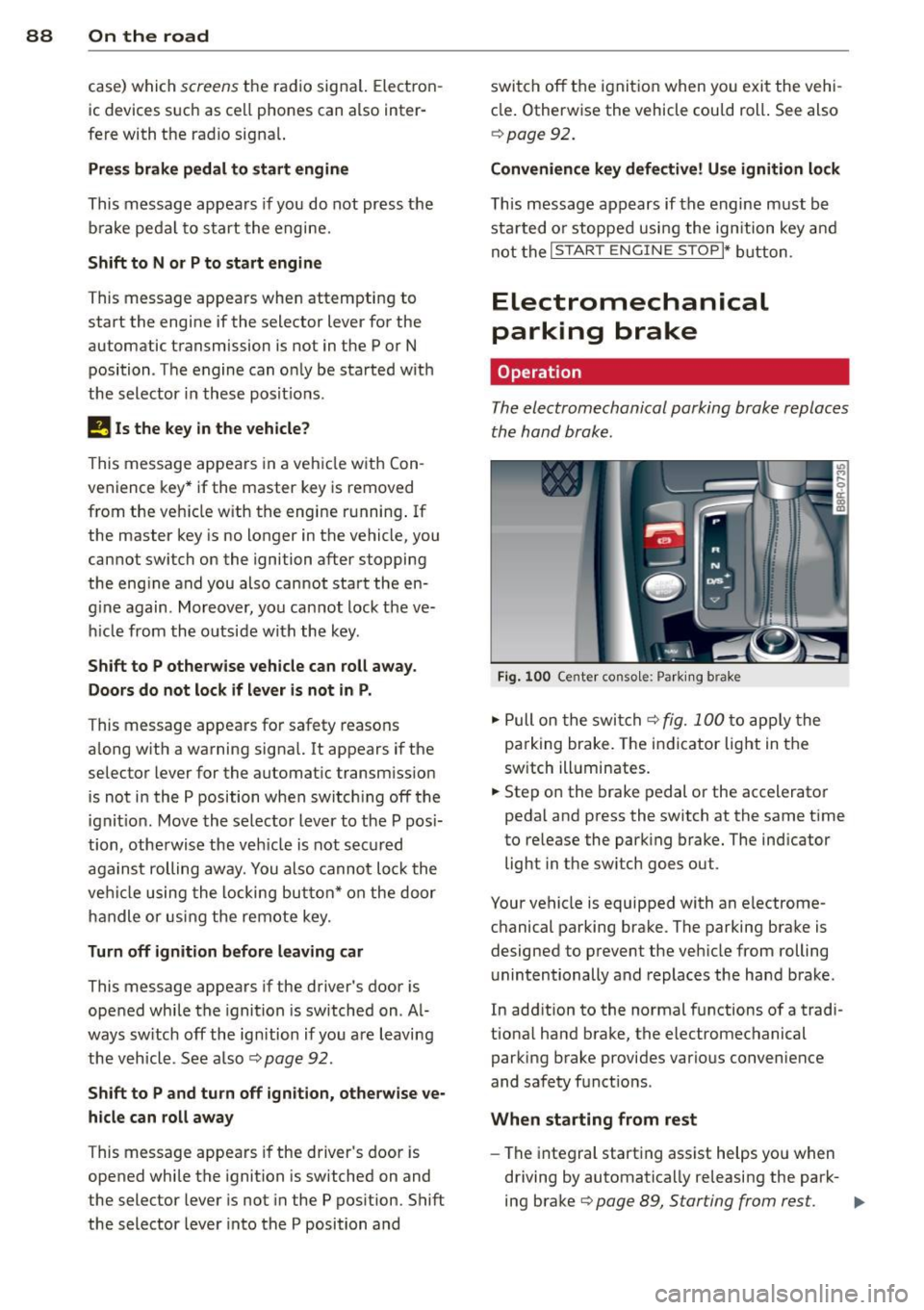
Fig. 100 Center conso le: Par king brake
.,. Pull on the switch~ fig. 100 to apply the
parking brake. The indicator light in the
sw itch ill uminates.
.,. Step on the brake pedal or the accelerator
pedal and press the switch at the same time
to re lease the parking brake. The ind icator
light in the sw itch goes out.
Your vehicle is equipped with an electrome
chanical parking brake. The parking brake is
designed to prevent the vehicle from rolling
unintentionally and replaces the hand brake.
In add ition to the normal functions of a tradi
tiona l hand brake, the electromechanical
parking brake provides various convenience
and safety funct ions .
When starting from rest
-The integral starting assist helps yo u when
driving by automatica lly releasing the park-
ing brake
~ page 89, Starting from rest. .,.
Page 91 of 316
-When starting on inclines, the starting as
sist prevents the vehicle from unintentional
ly rolling back. The braking force of the
parking brake is not released until sufficient
driv ing force has been built up at the
wheels .
Emergency brake function
An emergency brake ensures that the vehicle
can be slowed down even if the
normal brakes
fa il
c::> page 90, Emergency braking.
Indicator light s
-If the parking brake is closed with the igni
tion
s witched on the indicator lights come
on . (USA mode ls)/ . (Canada mode ls) in
the instrument cluster and the switch.
- If the parking brake is closed with the igni
tion
s witched off the indicator lights come
on . (USA mode ls)/ . (Canada mode ls) in
the instrument cluster and the switch for
about 20 seconds.
A WARNING
If a drive range is engaged with the veh icle
stat iona ry and the engine running, you
must in no instance accele rate ca re lessly.
Otherw ise the vehicle will sta rt to move
immediately -risk of an accident .
(D Note
If the symbo l. in the display or the ind i
cato r light .. (USA models) . (Cana
da mode ls) in the instrument clus ter flash
es, the re is a malfunction in the brake sys
tem . By pressing the
ISETI button, you can
bring up a driver message which explains
the malfunction in more detail.
If the driv
er message
Parking brake system fault!
See owner's manua l
appears, there is an
operating malfunction in the park ing brake
which you should have repaired immedi ately by an author ized Audi dealer or other
qua lified workshop
c::> page 29.
@ Tips
- You can apply the pa rking brake at any
time -even w ith the ignition switched
'
On th e ro ad 89
off. The ignition must be turned on and
the brake pedal must be pressed in order
to release the parking b rake .
- Occasional noises w hen the parking
brake is app lied and released are normal
and are not a cause for concern.
- When the vehicle is pa rked, the parking
brake goes through a self -test cycle at
regu lar inte rva ls. Any associated noises
are normal.
Parking
"' Press the brake pedal to stop the veh icle.
"' Pull the sw itch
c::> page 88, fig. 100 to set
the parking b rake.
"' Move the selector lever to P.
"' Tu rn the engine off
c::> ,&. .
"'When on inclines or decl ines, turn the steer
ing wheel so that the vehicle will roll into
the cu rb if it begins to move.
A WARNING
-When you leave your vehicle -even if on
ly briefly- always remove the ignition
key. T his app lies particularly whe n chil
dren remain in the vehicle. Otherwise the
children could start the eng ine, release
the par king brake or operate elect rical
eq uipment (e.g. power w indows). The re
is the risk of an acc ident.
- When the veh icle is locked, no one -par
ticularly not children should rema in in
the vehicle. Locked doors make it more difficult for emergency workers to get in
to the vehicle -putting lives at risk.
Starting from rest
The starting assist function ensures that the
parking brake is released automatically upon
starting .
Stopping and applying parking brake
"' Pull the sw itch to app ly the parking b rake. .,.
Page 93 of 316
Press brake pedal to release parking brake
This driver message appears when the switch
to release the parking brake was pressed. The
parking brake can only be released if yo u step
on the brake pedal and at the same time press
the switch or you automatically re lease the
parking brake with the starting assist
<=>page 89.
fpii Parking brake malfunction!
This driver message appears together with
the yellow
rm symbol when there is a parking
brake malfunction.
Start-Stop-System
Descript ion
A ppl ies to vehicles: with Sta rt-Stop-System
The Start-Stop -System can help increase fuel
economy and reduce CO
2 emissions.
In the Start-Stop-mode, the eng ine shuts off
automatically when the vehicle is stopped,
such as at a traffic light. The ignition remains
sw itched on during this stop phase. The en
gine will be automatically restarted when
needed.
The last Start-Stop-System setting (o n/off us
ing the button
lr.;, .. I) will be restored when the
ignition is turned on. The LED in the
1r.;, .. 1 but
ton turns on when the Start-Stop-System is
switched off manually.
Basic requirements for the Start-Stop
mode
- The driver's door is closed .
- The driver's seat belt is latched.
- The hood is closed.
- The vehicle must have been driven faster
than 2.5 mph (4 km/h) since the last stop .
- A tra iler is not hitched to the veh icle .
A WARNING
- Never turn off the engine before the ve
hicle has come to a complete stop. The
full function of the brake booster and the
power steering is not guaranteed. You
On the road 91
must use more force to turn or brake if
necessary. Because you cannot steer and
brake as you usually would, this could
lead to crashes and ser ious injuries.
- To reduce the risk of injuries, make sure
that the Start-Stop-System is turned off
when working in the engine compart
ment
c:> page 93.
(D Note
Always switch off the Start-Stop-System
when driving through water
c:> page 93.
Starting /stopping the engine
App lies to vehicles: wit h Start -Stop -System
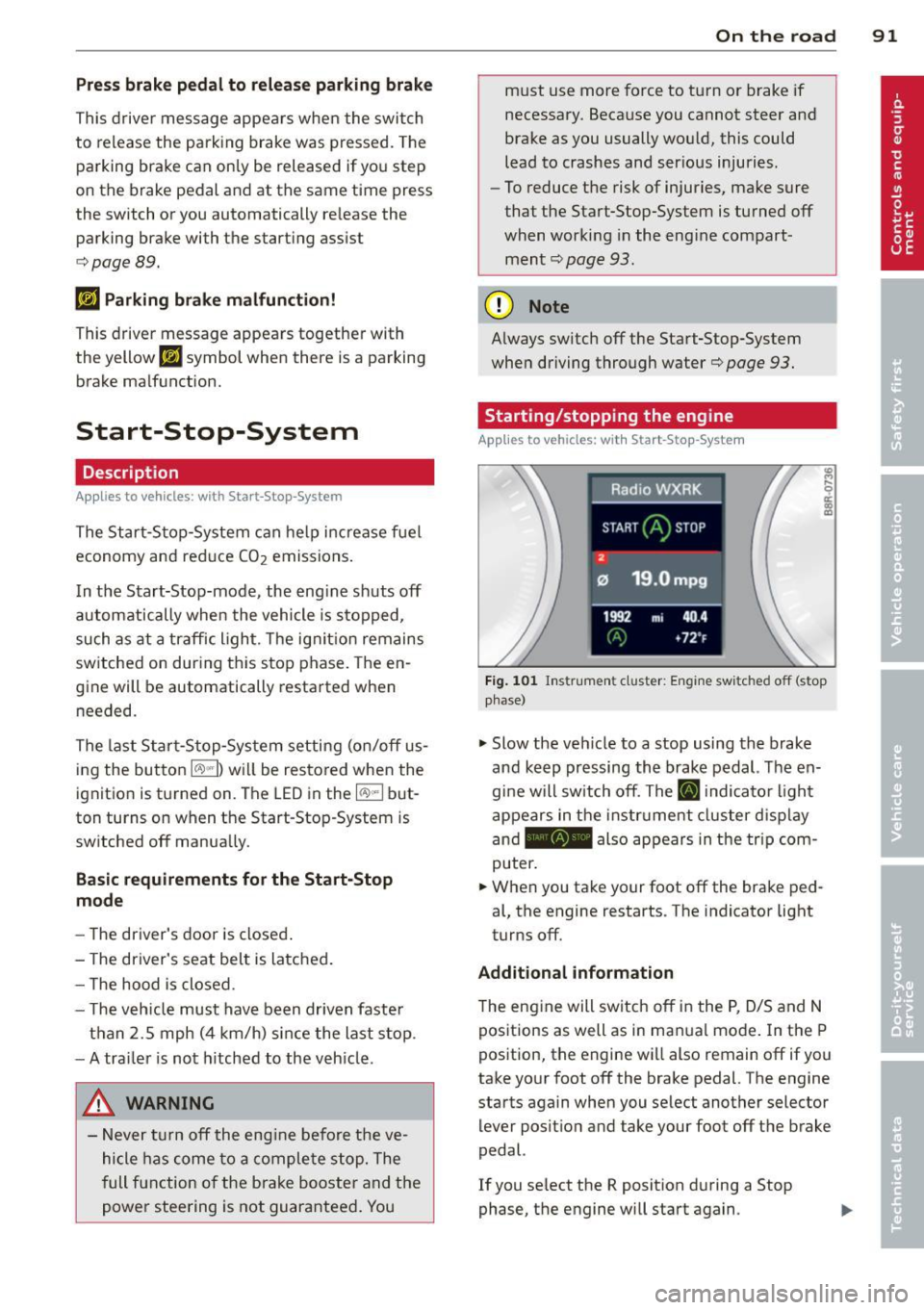
Fig. 101 Instrum ent cluster: Engine switched off (stop
phase)
.,. Slow the veh icle to a stop using the brake
and keep pressing the brake pedal. The en
gine will switch off. The
ti] indicator light
appears in the instrument cluster disp lay
and - also appears in the trip com
puter .
.,. When you take your foot off the brake ped
al, the engine restarts . The indicator light
turns off.
Additional information
T he engine will switch off in the P, D/S and N
positions as well as in ma nual mode. In the P
position, the engine will also remain off if you
take your foot off the brake pedal. The engine
starts again when you select another selector lever position and take your foot off the brake
pedal.
If you se lect the R position during a Stop
phase, the engine will start again .
Page 95 of 316
marker lights will switch off after approxi
mately 30 minutes or when you lock the vehi
cle.
If the Start-Stop-System has not turned off
the engine or if you have switched the Start
Stop-System off manually, the ignition will
not be automatically switched off and the en
g ine will continue to run
i::> &. .
A WARNING
Never allow the engine to run in confined
spaces -danger of asphyxiation .
@ Tips
If you shift into the D/S or N positions af
ter shift ing into reverse, the vehicle must
be driven faster than 6 mph (10 km/h) in
order for the engine to switch off again .
Switching the Start-Stop-System on/off
manually
Applies to vehicles: with Start-Stop-System
If you do not wish to use the system, you can
switch it off manually.
Fig. 103 Ce nter con sole : Star t-Stop-Sy stem butto n
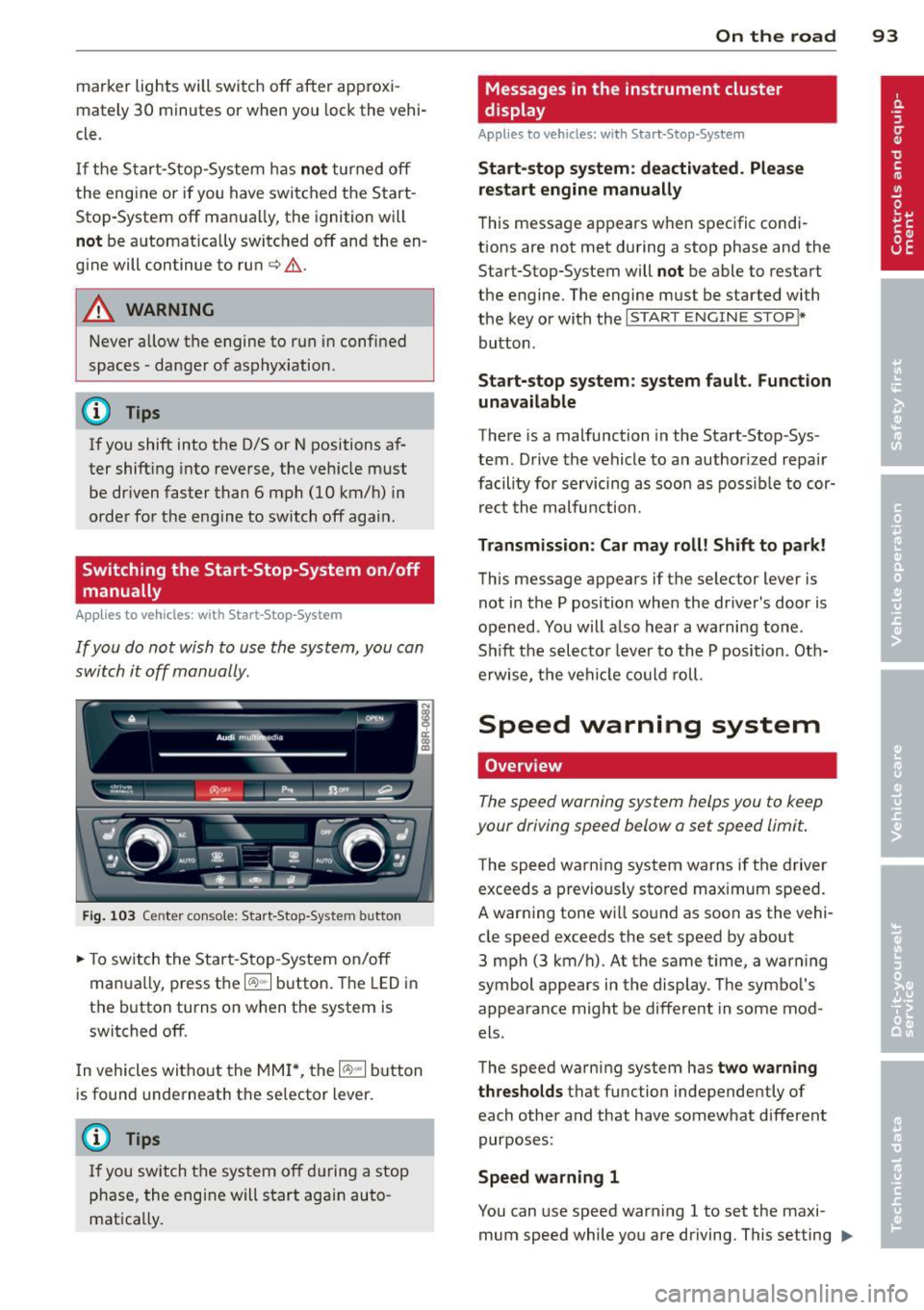
.. To switch the Start -Stop-System on/off
manua lly, press the
1/A) "'I button. The LED in
the button turns on when the system is
switched off.
In vehicles witho ut the MMI *, the
1/A) "'I b utton
is found underneath the se lector lever.
(D Tips
If you switch the system off during a stop
phase, the engine will start again auto
matically.
On the road 93
Messages in the instrument cluster
display
Appl ies to vehicles: with Start-Stop-System
Start-stop system: deactivated. Please
restart engine manually
This message appears when specific condi
tions are not met during a stop phase and the
Start-Stop-System will
not be able to restart
the engine. The engine mus t be started with
the key or with the
I START ENGIN E STOP !*
button .
Start-stop system: system fault. Function
unavailable
There is a malfunction in the Start -Stop -Sys
tem . Drive the vehicle to an author ized repair
facility for servicing as soon as possible to cor
rect the malfunction .
Transmission: Car may roll! Shift to park!
This message appears if the selector lever is
not in the P position when the driver 's door is
opened . You will also hear a warning tone.
Sh ift the selector lever to the P position. Oth
erwise, the vehicle could roll.
Speed warning system
Overview
The speed warning system helps you to keep
your driving speed below a set speed limit.
T he speed warning system warns if the driver
exceeds a previous ly stored maximum speed.
A warning tone will sound as soon as the vehi
cle speed exceeds the set speed by about
3 mph (3 km/h) . At the same time, a warning
symbol appears in the display . The symbol 's
appearance might be different in some mod
els .
The speed warning system has
two warning
thresholds
tha t function independen tly of
each other and that have somewhat different
purposes :
Speed warning 1
You can use speed warning 1 to set the m axi
mum speed while you are driving . This setting ..,.
Page 100 of 316
98 Hybrid -Do not transport fluids in open contain
ers in the luggage compartment. Spilled
fluids can seep underneath the cargo
floor. This can damage the high voltage
system.
Starting the vehicle
App lies to vehicles: with hybrid drive
The vehicle is started and turned off either
with the ignition key~
page 83 or with the
I START ENGIN E STOP ! button* ~ page 86 in
the same way as a conventional vehicle .
When starting the vehicle, the needles in the instrument cluster move upward briefly .
When the vehicle enters drive ready mode,
the status message
hybrid ready appears
briefly in the instrument cluster display and
the needle in the power meter points to
READY ~ page 98.
Depending on the operation mode of the hy
brid system, there are two possible drive
ready modes after the vehicle has been start
ed:
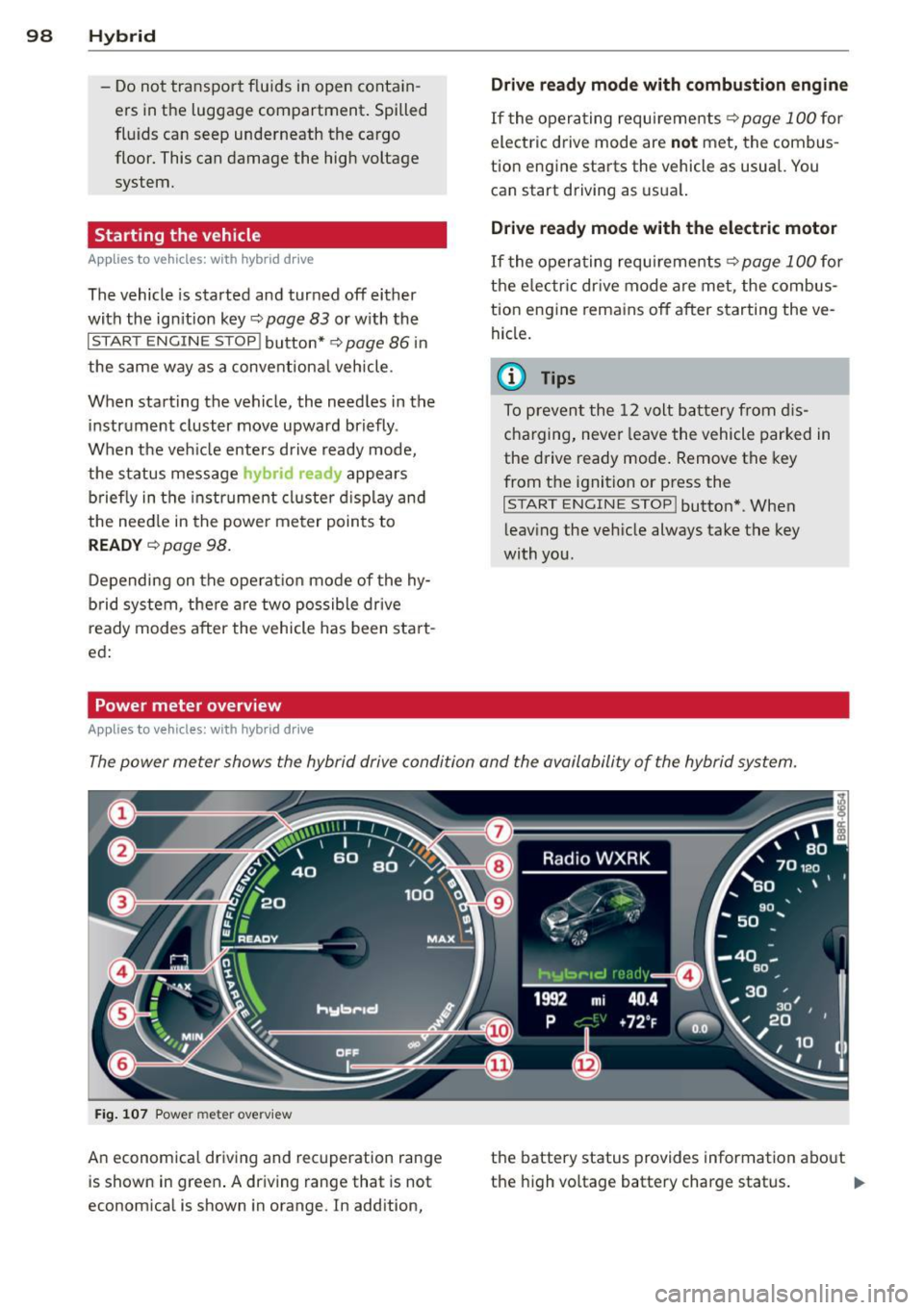
Power meter overview
Applies to vehicles: with hybrid dr ive
Drive ready mode with combustion engine
If the operating requirements~ page 100 for
electric drive mode are
not met, the combus
tion engine starts the vehicle as usual. You can start driving as usual.
Drive ready mode with the electric motor
If the operating requirements~ page 100 for
the electric drive mode are met, the combus
tion engine remains off after starting the ve
hicle.
(0 Tips
To prevent the 12 volt battery from dis
charging, never leave the vehicle parked in
the drive ready mode. Remove the key
from the ignition or press the
I START ENGINE STOP! button* . When
leaving the vehicle always take the key
with you.
The power meter shows the hybrid drive condition and the availability of the hybrid system.
Fig. 107 Power meter overv iew
An economical driving and recuperation range
is shown in green. A driving range that is not
economical is shown in orange. In addition, the battery status
provides information about
the high voltage battery charge status.
lill-
Page 101 of 316
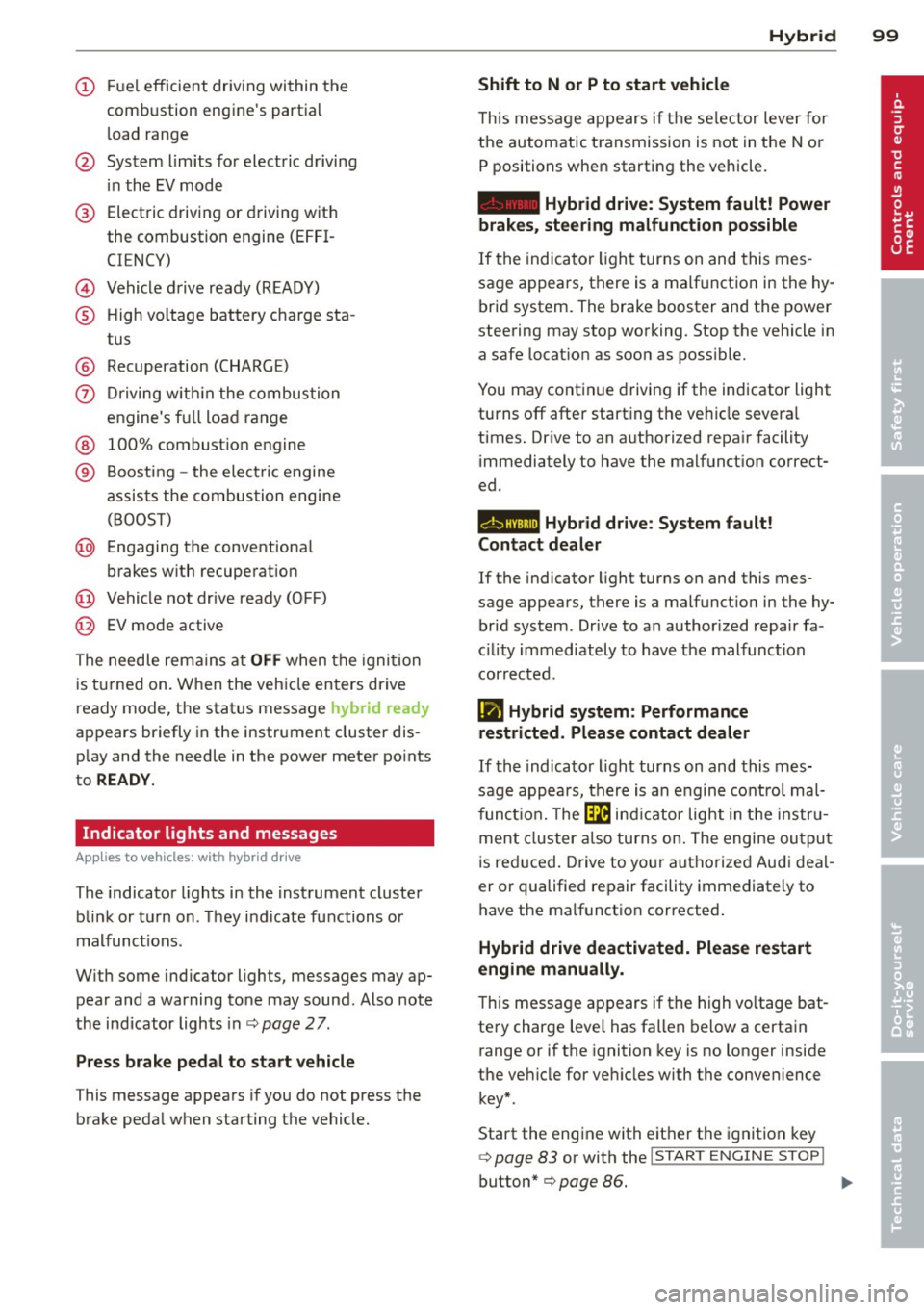
(!) Fuel efficient driv ing within the
comb ustion engine's partia l
l oad range
@ System limits fo r electric d riving
i n the EV mode
® Elect ric driving or d riving w it h
the combustion engine (EFFI -
CI ENCY)
© Vehicle d rive ready (READY)
® H igh vo ltage bat tery c ha rge sta -
tus
® Recuperation (CHARGE)
0 Dr iving w it hi n the combus tion
engine's fu ll loa d range
® 100% combust io n engine
® Boost ing -the elect ric e ngine
assists the combus tion engine
( B OOST)
@ Engaging the conventiona l
brakes w ith recuperat ion
@ Vehicle not drive ready ( OFF)
@ EV mode active
The needle rema ins at
OFF when the igni tion
is tur ned on. W hen the veh icle en ters drive
ready mode, t he stat us message
hybrid ready
ap pears briefly in the instrument cluster dis
p lay and the needle in the power meter po ints
to
READY .
Indicator lights and messages
Applies to vehicles: with hybrid drive
The indicator lights in the instrument cluste r
b link or t urn on . Th ey i ndicate fu nctions o r
malfunct ions .
W ith some ind icator lights, messages may ap
pear and a warning tone may sound. Also note
the indicator lights in c::,;,
pag e 27.
Press brake pedal to start vehicle
This message appea rs if you do not press the
brake peda l when starting the vehicle.
Hybrid 99
Shift to N or P to start vehicle
T his mess age appears if the se lector lever for
the automatic t ransmission is not in t he N or
P positions when starting the vehicle.
- Hybrid drive: System fault! Power
brakes, steering malfunction possible
I f the indica tor ligh t turns on and this mes
sage a ppears, t here is a ma lf u nction in the hy
bri d system. The brake booster and the power
steering may stop working. Stop the vehicle i n
a safe l ocat io n as soo n as poss ible.
You may cont in ue dr iving if the indicator light
turns
off afte r start ing the ve hicle severa l
times. Dr ive to an a uthorized repa ir facility
immediately to have the malfunct ion correct
ed .
EHithjj,j Hybrid drive : Sy stem fault!
Contact dealer
If the indicator light turns on and this mes
sage appears , there is a malfunct ion in the hy
br id system . Drive to a n author ized repair fa
c ili ty immediat ely to hav e th e m alfunc tion
corrected.
Ill Hybrid system: Performance
restricted. Please contact dealer
If th e i ndica to r light turns on and this mes
sag e appea rs, there is an engine contro l ma l
f unct io n .
The @B indi cator light in t he instr u
m ent cluster also tur ns on. The engine ou tput
i s re duced. Drive to yo ur autho rize d Au di dea l
er or qualifie d repair facility immediately to
have the malfunct io n corrected .
Hybrid drive deactivated. Please restart
engine manually.
Th is message ap pears if the high vo ltage bat
te ry charge leve l has fallen below a certa in
range or if the ignition key is no longer inside
the ve hicle for ve hicles with the convenience
key *.
Start the eng ine with e it h er the ignitio n key
¢page 83 or with the !STAR T EN GINE STOPI
button* c::> page 86.
Page 106 of 316
104 Hybrid
Component Color
® High voltage battery green
green (animated
in MMI)
gray
(§) Movement arrow g
reen
orange
green-orange
@ Movement arrow green
@ Tips
The Energy flow dis play will not shown in
the MMI display when the reverse gear is engaged, due to safety reasons.
Consumption display
Ap plies to vehicles: with hybri d drive
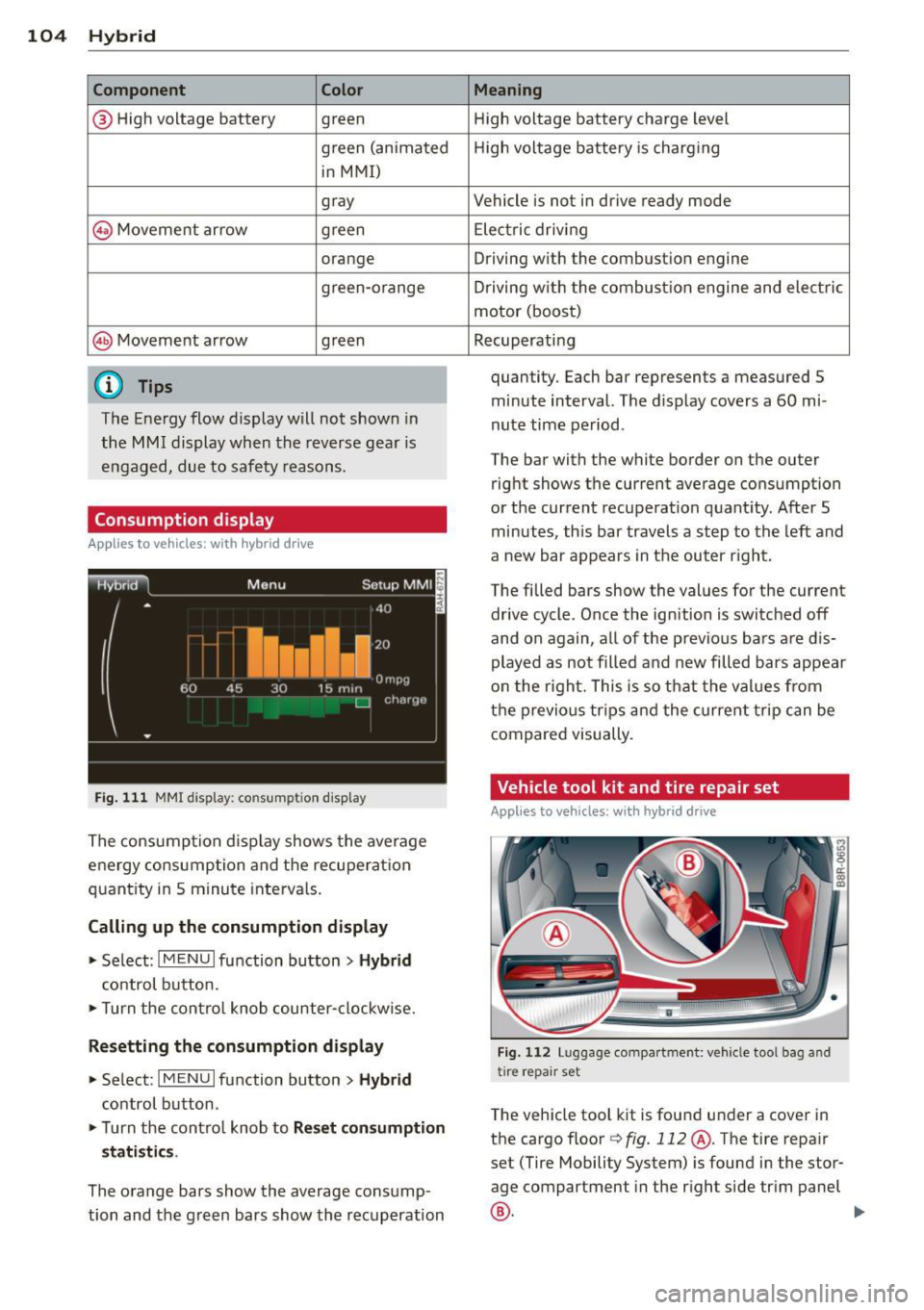
Fig. 111 MMI display: consumpt io n disp lay
The consumpt ion d isplay shows the average
energy consumption and the recuperation
quantity in 5 minute interva ls.
Calling up th e co nsumpti on displa y
• Se lect : I MENU I function button> Hybrid
control button.
• Turn the cont ro l knob counter-clockw ise.
R esetting the c onsumption displ ay
• Se lect : IM ENU I function button > Hybr id
control button.
• Turn the cont ro l knob to
R es et con sumpt ion
s tati sti cs.
The orange bars show the average consump
tion and the green bars show the recuperation
Meaning
High voltage battery charge level
High voltage battery is charging
Vehicle is not in drive ready mode
E lectric driving
Driving with the combustion engine
Driving w ith the combust ion engine and electric
motor (boost)
Recuperating
quantity. Each bar represents a measured 5
minute interval. The display covers a 60 mi
nute time period.
The bar with the white border on the outer
right shows the current average consumption
or the current recuperation quant ity . After 5
minutes, this bar travels a step to the left and
a new bar appears in the outer r ight.
The filled bars show the values for the current
drive cycle . Once the ignition is switched off
and on again, all of the previous bars a re d is
played as not filled and new filled bars appear
on the right. This is so that the values from
the p revious trips and the current trip can be
compared visually.
Vehicle tool kit and tire repair set
Appl ies to v ehicles: wi th hybrid drive
Fig. 112 Lu ggage compa rtment: vehicle tool bag and
tire repair set
The vehicle tool kit is found under a cover in
the cargo floor Qfig .
112 @. The tire repair
set (Tire Mobility System) is found in the stor
age compartment in the right side trim panel
®· ~
Page 107 of 316

Additional information about the vehicle tool kit may be found under
c::> page 268 and
about the tire repa ir set under
c::> page 2 71 .
(D Tips
The right storage compartment in the lug
gage compartment and its contents must
always be kept in the vehicle. The veh icle
m ust not be operated w ithout the tire re
pa ir set.
Charging the batteries
Applies to vehicles: with hybrid drive
The vehicle is equipped with two 12 volt bat
ter ies and a h igh voltage battery.
If the 12 volt batter ies are dead, they may be
charged with a charger or the vehicle may be
jump started with assistance from another ve
hicle in the same way as a conventional vehi
cle .
The same applies to the high voltage battery
if it is d ischarged . However, in this case, the
charg ing process is accompanied w ith mes
sages in the inst rument cluste r display. The
i gnit ion m ust be switched on and all unneces
sary electric components m ust be turned off.
The connections in the engine compartment
are used for both charging and jump starting
c::> page 244 or c::> page 283.
Vehicle not ready to start. See owner's
manual
This message appears if the high voltage bat
tery charge level is too low. The vehicle can no
l onge r be started with its own power. The
high voltage battery must be charged with a
charger or the vehicle must be jump started
with the aid of another vehicle.
Afte r the connecting the cha rger or jumper ca
b les, the ignition must be turned off for ap
proximately two minutes and then turned on
again. After no more than one m inute, one of
the following indicator lights turns on in the instrument cluster d isp lay. Hybrid 105
II Charging battery. Please wait ...
If
the indicator light turns on and this mes
sage appears, the high voltage battery is
charging or the vehicle is being jump started
with assistance from another vehicle.
If the 12 vo lt batteries are dead, the -
indicator light turns on. The charging proce
dure takes longer in this case because the 12
vo lt batteries are charged first. The procedure
goes faster with the ignition switched off.
Vehicle ready to start.
This message appears if the charging proce
dure was successfu l. The vehicle may be start
ed again.
Battery could not be charged enough to
start vehicle.
This message appears if the charging proce
dure was not successful or it was interrupted.
This may happen if the charger or the battery
in the veh icle that is assist ing is too weak.
If
the vehicle cannot be started, see an author
ized repa ir facility for assistance .
(D Tips
- The charger should deliver a current of at
least
30 A. Otherwise charging the high
voltage battery will take considerably longer. A current between
50 A and 70 A
is ideal.
- The ve hicle that is assist ing should be
somewhat within the same vehicle class
when jump starting a vehicle. A smaller
vehicle's battery may be drained.
- After approximately
30 minutes, the
c harging procedure ends because the ig
nition is automatically turned off.
If you
would like to continue to charge the bat
tery, turn the ignition on again.
Page 112 of 316

110 Audi adaptive cruise control and braking guard
@ Indicator lights
r• 1-Adaptive cruise control is switched on . No
vehicles are detected up ahead. The stored
speed is maintained.
I-A moving vehicle is detected up ahead.
The adaptive cruise control system regulates
the speed and distance to the moving vehicle
ahead and accelerates/brakes automatically.
I -When automatic braking is not able to
keep enough distance to a previously detected
moving vehicle up ahead, you must take con
trol and brake<=:>
page 112, Request for driver
intervention.
© Display
If adaptive cruise control is not shown in the
display, you can call it up with the
I RESET !
button ¢ page 20.
Based on the symbols in the display, you can
determine if the system is maintaining a dis
tance to the vehicle ahead and what that dis
tance is.
No vehicle -No vehicle ahead was detected.
White vehicle -A vehicle ahead was detected.
Red vehicle -Prompt for the driver to take ac
tion
<=:> page 112.
Both arrows on the scale © indicate the dis
tance to the vehicle ahead. No arrow appears
when the vehicle is on an open road and there
is no object ahead. If an object is detected
ahead, the arrow moves on the scale.
The green zone on the scale shows the stored
distance. For information on changing the
stored distance, refer to <=:>
page 111. If the
distance selected is too close or may soon be
come too close, the arrows move into the red
zone on the scale .
A WARNING
Improper use of the adaptive cruise con
trol can cause collisions, other accidents
and serious personal injuries.
- Pressing the
ISETI button when driving at
speeds below 20 mph (30 km/h), will au- tomatically accelerate the vehicle to
20 mph (30 km/h), which is the mini
mum speed that can be set.
(D Tips
- If you switch the ignition or the adaptive
cruise control off, the set speed is erased
from the system memory.
- The Electronic Stabilization Control (ESC)
is automatically turned on when the
adaptive cruise control is turned on. You
cannot switch the ESC into offroad mode
while the adaptive cruise control is
turned on
<=:> page 198 .
Changing the speed
Applies to veh icles: w ith Audi adaptive cruise co ntro l
0
f
• 0
Fig. 119 Selector lever: ch an gin g the speed
.,. To increase or reduce the speed in incre
ments,
tap the lever up or down .
.,. To increase or reduce the speed quickly,
hold
the lever up or down until the red LED@
reaches the desired speed <=:>
page 109,
fig . 118.
Following any changes, the new stored speed
will be displayed briefly in the display @
<=:>page 109, fig . 118.