ignition AUDI Q5 2015 Owner's Manual
[x] Cancel search | Manufacturer: AUDI, Model Year: 2015, Model line: Q5, Model: AUDI Q5 2015Pages: 302, PDF Size: 75.01 MB
Page 38 of 302
Opening and closing
Opening and closing
Keys
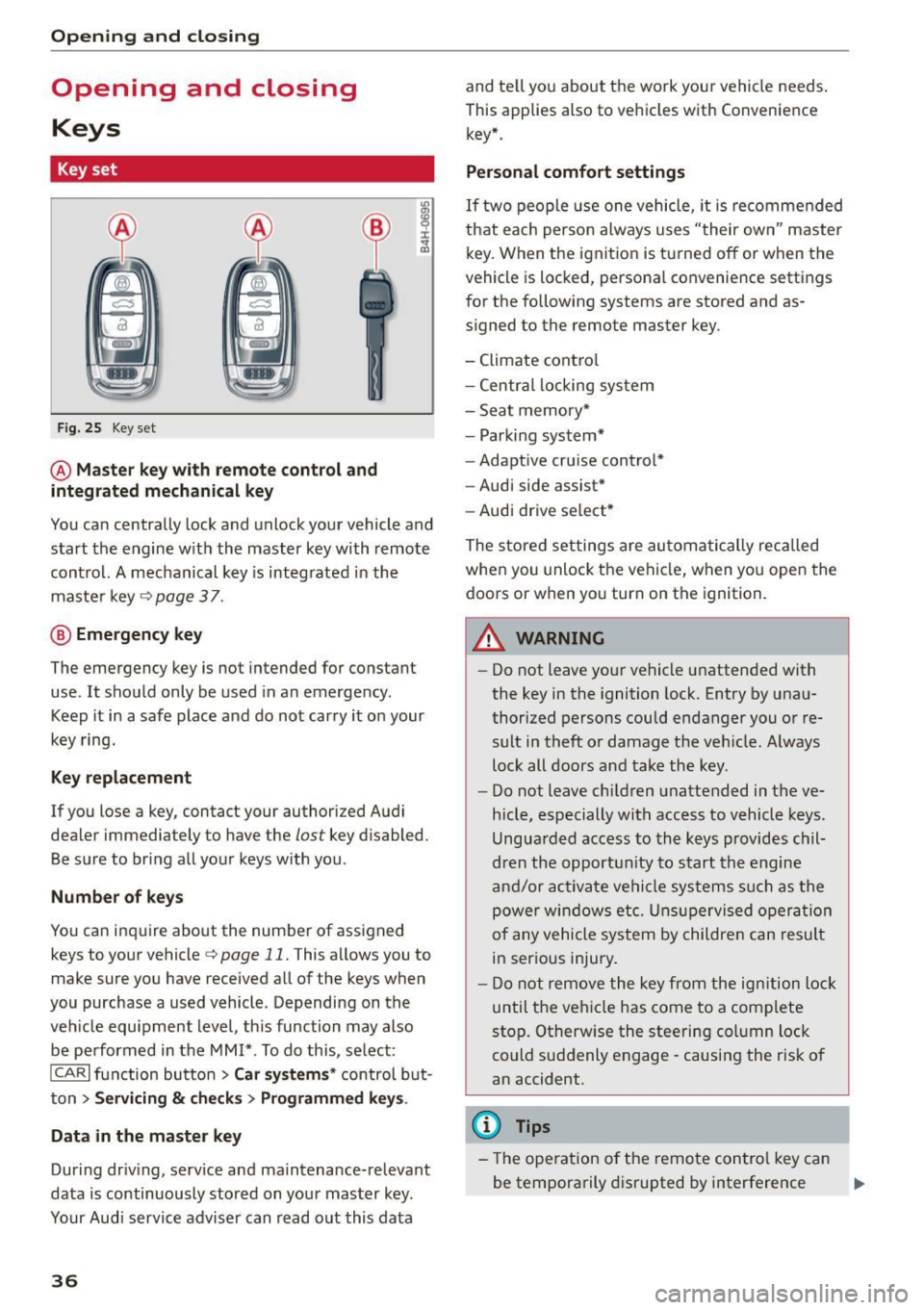
Key set
F ig . 25 Key set
@ Master key with remote control and
integrated mechanical key
You can centrally lock and unlock your vehicle and
start the engine w ith the master key with remote
contro l. A mechanical key is integ rated in the
maste r key
¢page 37 .
@ Eme rgency key
The emergency key is not intended for constant
use . It shou ld only be used in an emergency .
Keep it in a safe place and do not carry it on your
key ring.
Key replacement
If you lose a key, contact your authorized Audi
dealer immediately to have the
lost key disabled.
Be sure to bring all your keys with you .
Number of key s
You ca n inquire about the number of assigned
keys to your vehicle¢
page 11. This allows you to
make sure you have received all of the keys when
you purchase a used vehicle . Depending on the
veh icle equ ipment level , th is function may also
be performed in the
MM I* . To do this, se lect:
ICARI function button > Car systems * control b ut
ton
> Servicing & c h eck s> Programmed key s.
Data in the master key
During dr iv ing, serv ice and ma intenance-relevant
data is continuously stored on you r mas ter key.
Your Audi service adviser can read o ut this data
36
and te ll yo u about the work you r vehicle needs .
This applies also to vehicles with Convenience key* .
Personal comfort settings
If two people use one vehicle, it is recomme nded
that each perso n always uses "their own" master
key. When the ignition is tu rne d off or when the
vehicle is locked, persona l convenience settings
for the following systems are stored and as
signed to the remote master key.
- Climate cont ro l
- Centra l locking system
- Sea t memory*
- Parki ng system*
- Adaptive cru ise cont rol*
- Audi side assist*
- Aud i drive se lect *
The store d settings are au toma tic ally reca lled
when you unlock the vehi cle, when yo u open the
doors or when yo u turn on the ignition.
A WARNING
-
- Do not leave your ve hicle unattended with
the key in the ignition lock. Entry by una u
thorized persons could endanger you or re
sult in theft or damage the ve hicle. Always
loc k all doors and take the key .
- Do not leave ch ild ren unattended in the ve
hicle, especially with access to vehicle keys .
Ungua rded access to the keys provides chil
dren the opportu nity to s tart the engine
a nd/or ac tiva te ve hicle sys te m s su ch as the
power w ind ow s etc. Unsup ervised op eration
of any vehicle system by childre n can resul t
in ser ious injury.
- Do not remove the key fr om the ign ition lock
until the ve hicle has come to a com plete
sto p. Otherwise the steering co lumn lock
could suddenly engage -causing the risk of
an accident.
(D Tips
- The operation o f the remote con trol key ca n
be temporarily d isrupted by interference .,..
Page 40 of 302
Opening and closing
Emergency unlocking of the ignition key
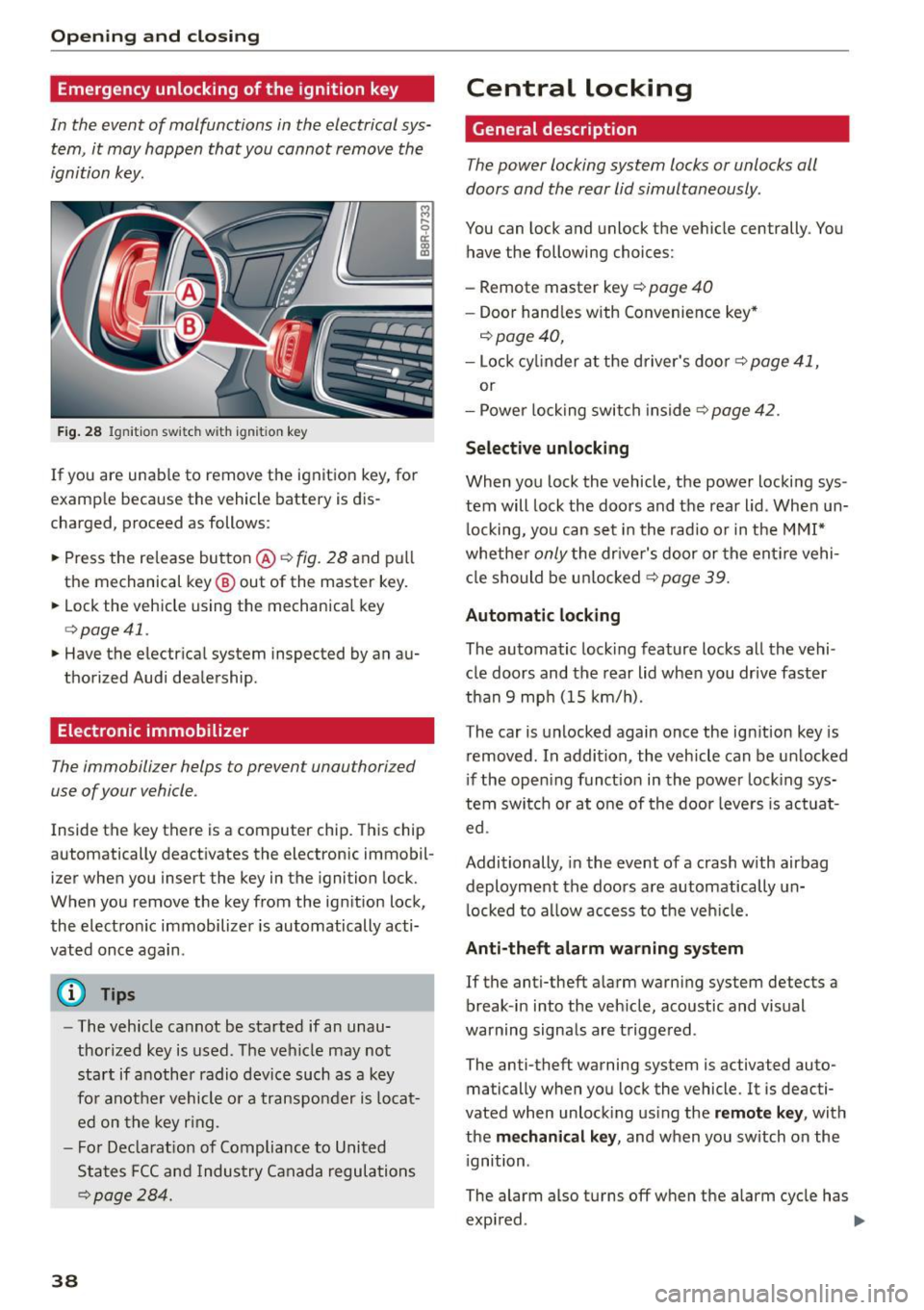
In th e event of malfunctions in the electrical sys
tem, it may happen that you cannot remove the
ignition key.
F ig. 28 Ig nit io n sw it ch w it h ig nition key
If you are unab le to remove the ignition key, for
examp le because the vehicle battery is d is
charged, proceed as follows:
.. Press the re lease button @~
fig. 28 and pull
the mechanical key @ out of the master key .
.. Lock the vehicle using the mechanical key
q poge 41.
.. Have the electr ical system inspected by an au
thorized Audi dealership .
Electronic immobilizer
The immobilizer helps to prevent unauthorized
use of your vehicle .
Inside the key there is a computer chip . This ch ip
automatically deact ivates the electronic immobil
izer when you insert the key in the ignition lock.
When you remove the key from the ig nition lock,
the electro nic immobilizer is automatically acti
vated once again .
(D Tips
-The vehicle cannot be started if an unau
thorized key is used . T he vehicle may no t
start if another radio device such as a key
fo r anot her vehicle o r a transpo nder is locat
ed on the key r ing.
- F or De clarat io n of Compliance to United
States FCC and Indus try Canada regula tio ns
~ page 28 4 .
38
Central locking
General description
The power locking system locks or unlocks oil
doors and the rear lid simultaneously .
You can lock and unlock the ve hicle centrally . You
have the following choices:
- Remote master key
c::> page 40
- Doo r hand les with Convenie nce key *
c::> page 40,
-Lock cy linder at the d river's doo r c::> page 41,
or
- Power lo ck ing swit ch inside
~page 42.
Selective unlocking
When you lock the vehicle, the power locki ng sys
tem will lock the doors and t he rear lid . When un
l ocking, yo u can set in the rad io or in the MMI*
whethe r
only the dr iver's door or the ent ire vehi
cl e should be u nlocked
c::> page 39.
Automatic locking
The automatic locking feature locks all the vehi
cle doors and the rear lid whe n you drive faster
than
9 mp h (15 km/h).
The car is unlocked again once the ig nition key is
removed . In a ddi tion, the vehicle can be un locked
i f the open ing funct ion in th e power lock ing sys
tem swit ch or at o ne of the door leve rs is act uat
ed .
Additionally , in the event of a crash with airbag
deployment the doors a re automatically un
l ocked to a llow access to t he veh icle.
Anti-theft alarm w arning system
If the anti-theft a larm warning system detects a
break -in i nto the veh icle, acoustic and visual
warning signals are t rigge red .
The anti-theft warning system is activated auto ma tically when you lock the vehicle. It is deacti
vated when unloc king us ing the
remote key , with
the
me chanical key , and when you switch on the
i gnition .
The alarm also turns off w hen the alarm cycle has
expi red. ..,.
Page 41 of 302
M N
co
a:
co
...... \!) 1.1'1
N 1.1'1 ......
Turn signals
When you unlock the vehicle, the turn signa ls
flash twice. When you lock the vehicle, the turn
signals flash once. If they do not flash, one of the
doors, the rear lid or the hood is not locked.
Unintentionally locking yourself out
In the following cases there safeguards to pre
vent yo u locking yo ur remote master key in the
vehicle:
- Th e veh icle does not lock with the power lock
ing switch ~
page 42 if the dr iver's door is
open .
- On vehicles with Convenience key*, if the most
recently used master key is in the luggage com
partment, the rear lid is automatically un locked
again after it is closed.
Do not lock your vehicle with the
remote master
key or Convenience key*
until all doors and the
rear lid are closed . In this way you avoid locking
yourself out accidenta lly.
& WARNING
- When you leave the vehicle, always remove
the ignition key and take it with you. This
will prevent passengers (children, for exam
ple) from accidentally being locked in the
vehicle should they acc identally press the
power locking switch in the front doors .
- Do not leave children ins ide the veh icle un
supervised . In an emergency it wou ld be im
poss ible to open the doors from the outside
without the key.
(D Tips
-In the event of a crash with airbag deploy
ment all locked doors will be automatically
unlocked to give access to the vehicle occu
pants from the outside.
- If the power locking system should mal
function, you can lock the dr iver's door us
in g the mechanical key~
page 42.
-If the power locking system should fail, you
can still open the fuel tank flap in an emer
gency~
page 217.
- You are we ll advised not to keep valuables
insi de an unattended vehicle, vis ible or not.
Opening and closing
Even a properly locked vehicle cannot pro
vide the security of a safe.
- If the LED in the upper edge of the driver's
door pane l comes on for about 30 seconds
after the vehicle is locked, there is a mal
function in the power locking or the ant i
theft warning system. Have the malfunction corrected by an authorized Audi dealership
or qualified repair facility .
Setting power locking
The driver can determine the functions for power
locking in the radio or in the MMI*.
.. Select: !CARI function button> Cent ral locking .
Or
.,. Select:
!CARI function button > Car systems*
control button > Vehicle settings > (Central
locking )*.
Unlocking single door/Unlock doors -
you can
specify wh ich doors unlock when you open the ve
hicle .
- Select ing Off /All and press ing the ~ button on
the remote control key unlocks the entire vehi
cle .
- Select ing
On /Driver and press ing the ~ button
on the remote control key once unlocks only the
driver's door. In vehicles with a convenience
key*, only the door whose handle you pull will
unlock. If you press the
[ru butto n twice, the en
tire vehicle will unlock. If you p ress the~ but
ton, the entire vehicle will always lock.
Trunk lid/tailgate /Lock exterior trunk handle -if
you select
On , the rear lid handle locks
~ page 43, fig. 35. In this case, the rear lid can
be opened with the
l""'I button on the master key
Q page 40, fig. 29 or with the~ button in the
driver's door~
page 43, fig . 34.
Fold mirrors * -if you select On , the outside mir
rors will fold in automatically when you press the
~ button on the remote control key Q page 59.
Confirmation tone /Tone when locking -if you
select
On , a tone w ill sound when you lock the ve
hicle.
39
Page 43 of 302

M N
co ~ co
rl I.O
"' N
"' rl
must be within a range of about 5 feet (1.5 me
ters) from the appropriate door or the rear lid.
It
makes no difference whether the master key is in
your jacket pocke t or in your brief case .
I f you grip the door handle while locking, this can
adversely affect the locking function.
It is not possible to re-open the door for a brief
period direc tly after closing it. This allows yo u to
ens ure that t he doors are properly locked .
WARNING .!!!!!!!!!!.. -
Read and follow a ll WARNINGS ¢ & in Gener-
al description on page 39.
@ Tips
I f your vehicle has been stand ing for an ex
tended period, please note the fol low ing :
- The proxim ity sensors are de act ivated after
a few days to save power. Yo u then have to
pull on the door handle once to unlock the
vehicle and a second time to open the vehi
cle.
- To prevent the battery from being dis
charged and to preserve your veh icle's abili
ty to start for as long as possib le, the ener
gy management system gradually switc hes
off unnecessary convenience functions . It is
possible that you w ill not be able to unloc k
you r vehicle using these convenie nce func
tions.
- Fo r Decla rat ion of Compliance to United
Sta tes FCC and Industry Canada regulations
¢ page 284.
Open ing and clo sing
Operating locks with the mechanical key
In the event of a failure of the power locking sys
tem, the driver's door con locked and unlocked
with the mechanical key at the lock cylinder .
Fig . 31 Key turn s for openin g an d clos ing
To unlock the vehicle
""I nsert the mechan ica l key into the lock o f the
driver's door.
.. Turn the mechanical key to position @
¢fig. 31.
To lock th e vehicle
"" Move the selector lever to the P pos it ion ( auto
matic t ransm ission).
.. Close a ll windows and doors properly.
.. Tur n the mechanica l key in th e lock of the driv
er's door to the lock position
@ ¢A in Gener
al description on page 39.
If the power locking system fails, there is emer
gency locking for the passenger's door and the
rear doors
¢ page 42 .
A WARNING
Read and follow all WAR NINGS ¢ & in Gener
al description on page 39 .
(D Tips
-After the ignition is switched on, the power
locking system sw itch and the unlocking
butto n for the rear lid~ in the door are en
abled.
41
Page 48 of 302
Opening and closing
The rear doors are equipped with child safety
locks . The lock is only visib le when the door is
open . Take the mechan ica l key out of the master
key
c> page 3 7.
Switch ing the child safety loc ks on
"Turn the key in the direction of the arrow
<:>fig. 39.
Switching the child safety locks off
"Turn the key in the opposite d irection of the ar
row.
When the child safety locks are activated, the in
side door hand les do not work and the doors can
only be opened from the outside.
Power Windows
Controls
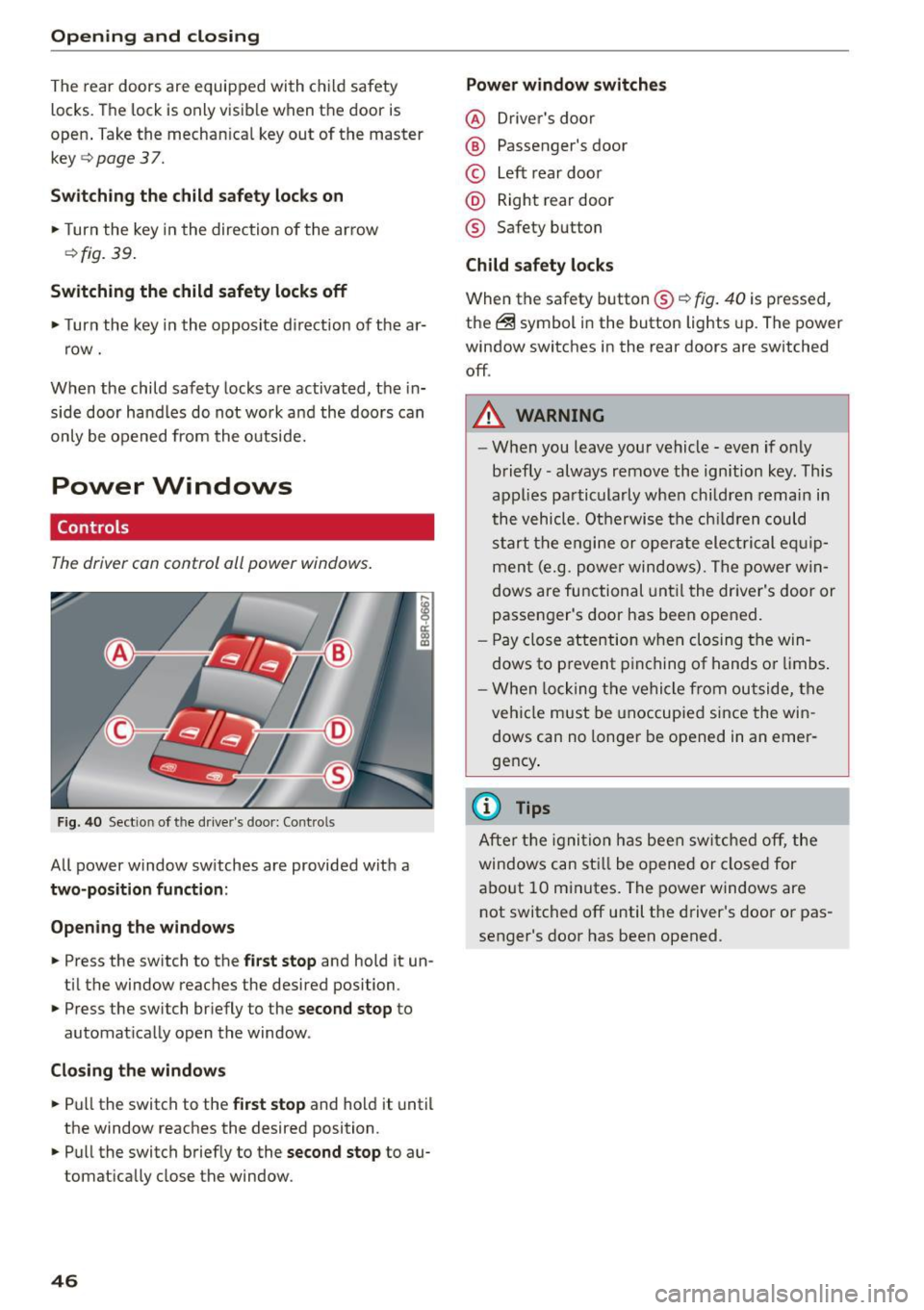
The driver con control all power windows .
Fig . 40 Sect ion of the driver 's doo r: Con trols
All power window sw itches are provided with a
two-position function :
Open ing th e windows
... Press the switch to the first stop and hold it un
ti l the window reaches the desired position .
... Press the switch br iefly to the
second stop to
automat ica lly open the window.
Clo sing the window s
... Pu ll the switch to the first stop and hold it until
the window reaches the desired position .
... Pull the switch briefly to the
second stop to au
tomatically close the window.
46 Power window switches
@ D
river 's doo r
® Passenger's door
© Left rear doo r
@ Right rear door
® Safety button
Child safety locks
When the safety button® c> fig. 40 is pressed,
the ~ symbol in the button lights up. The power
window switches in the rear doors are switched
off .
A WARNING
-W hen you leave you r vehicle - even if only
briefly -always remove the ignition key. This
applies pa rticula rly when children remain in
the vehicle. Otherwise t he ch ild ren could
s t art the e ngi ne or operate ele ct rical eq uip
men t (e.g. p ower windows). The power w in
dows are functional unt il the dr iver's door or
passenger's door has been ope ned.
- Pay close attention w he n closing t he win
dows to p revent p inching of hands o r limbs .
- W hen locking the ve hicle from outside, the
vehi cle must be unoccupied since the win
dows can no longer be opened in an emer
gency .
(D Tips
After t he ig nit ion has bee n swi tc h ed off , th e
windows can st ill be o pened or closed for
a bo ut 10 m inutes. The power windows are
not switched off until the driver's door or pas
senger's door has been opened .
Page 50 of 302
Open ing a nd clos ing
Op en ing and cl osing th e s unshade
.. To automatically open the sunshade comp lete
ly, briefly press th e switch @ in the desired ar
row direction.
.. To stop the sunshad e in an intermediate posi
tion, press the switch again, or
.. Press and hold the swi tch in the desired arrow
direction .
.. Release the switch when sunshade is at desired
pos ition .
After the ignit ion is switched off, you can st ill op
erate the Panoramic sliding sunroof for about 10
minutes . As soon as the driver's or passenger's
door is opened, the switch is inoperative .
The power sunshade can also be closed when the Panoramic sliding sunroof is open .
A WARNING
Pay careful attention when closing the Panor
amic sliding sunroof -otherwise serious injury
cou ld result! For th is reason, always remove
the ignition key when leaving the vehicle .
(D Note
Always close your Panoram ic sliding sunroof
when leav ing you r vehicle. Sudden rain can
cause damage to the interior equipment of
your veh icle, particularly the electron ic equ ip
ment.
(j) Tips
I nformat ion regarding convenience opening/
closing
¢ page 47.
Emergency closing of the Panoramic sliding
sunroof
Applies to veh icles: w ith Panora mic slidi ng sunroo f
If the Panoramic sliding sunroof detects an ob
ject in its path when it is clos ing , it will open
aga in automatically . In this case, you can close
the roof with the power emergency closing func
tion .
.. Within
five seconds after the sunroof opens au
tomat ically, pull the switch until the roof
closes .
48
Garage door opener
(Homelink)
Description
App lies to vehicles: wit h garage door opener (Homelink)
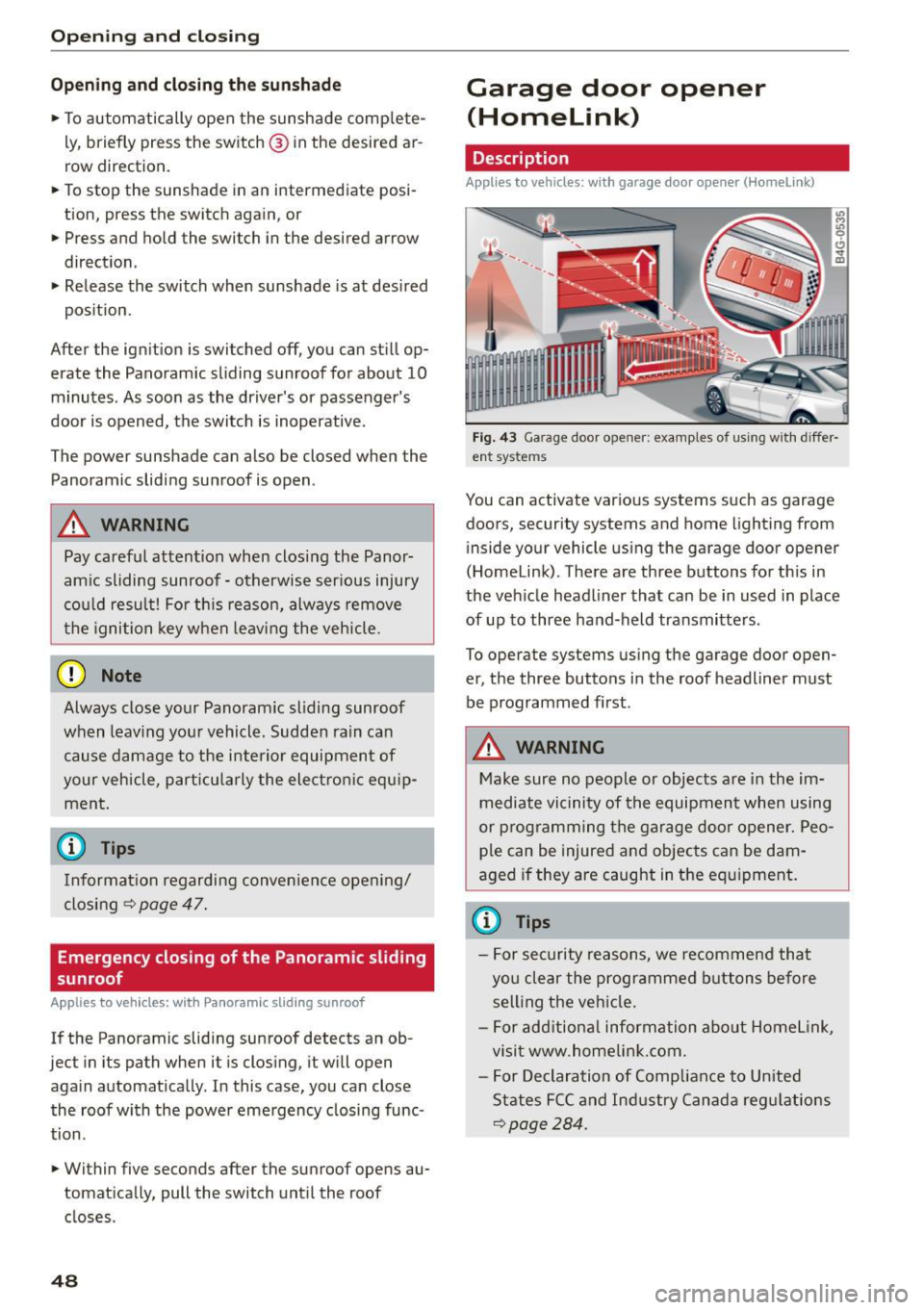
Fig. 43 Ga rage door o pen er: examples of us in g w ith differ·
ent syste ms
You can activate var ious systems such as garage
doors, security systems and home lighting from in side your vehicle using the garage door opener
(Homelink). There are three buttons for th is in
the vehicle headliner that can be in used in place
of up to three hand-held transmitters.
To operate systems using the garage door open
er, the three buttons in the roof headliner must
be programmed first .
A WARNING
Make sure no people or objects are in the im
mediate vicinity of the equipment when using
or programming the garage door opener. Peo ple can be injured and objects can be dam
aged if they are caught in the equipment.
(D Tips
- For security reasons, we recommend that
you clear the programmed buttons before
selling the vehicle.
- For add itiona l information about Homel ink,
visit www.homelin k.com .
- For Declaration of Compliance to United
States FCC and Industry Canada regulations
~page 284.
-
Page 52 of 302
Opening and closing
Programming the buttons (version 8)
Applies to vehicles: with garage door opener (Homelink)
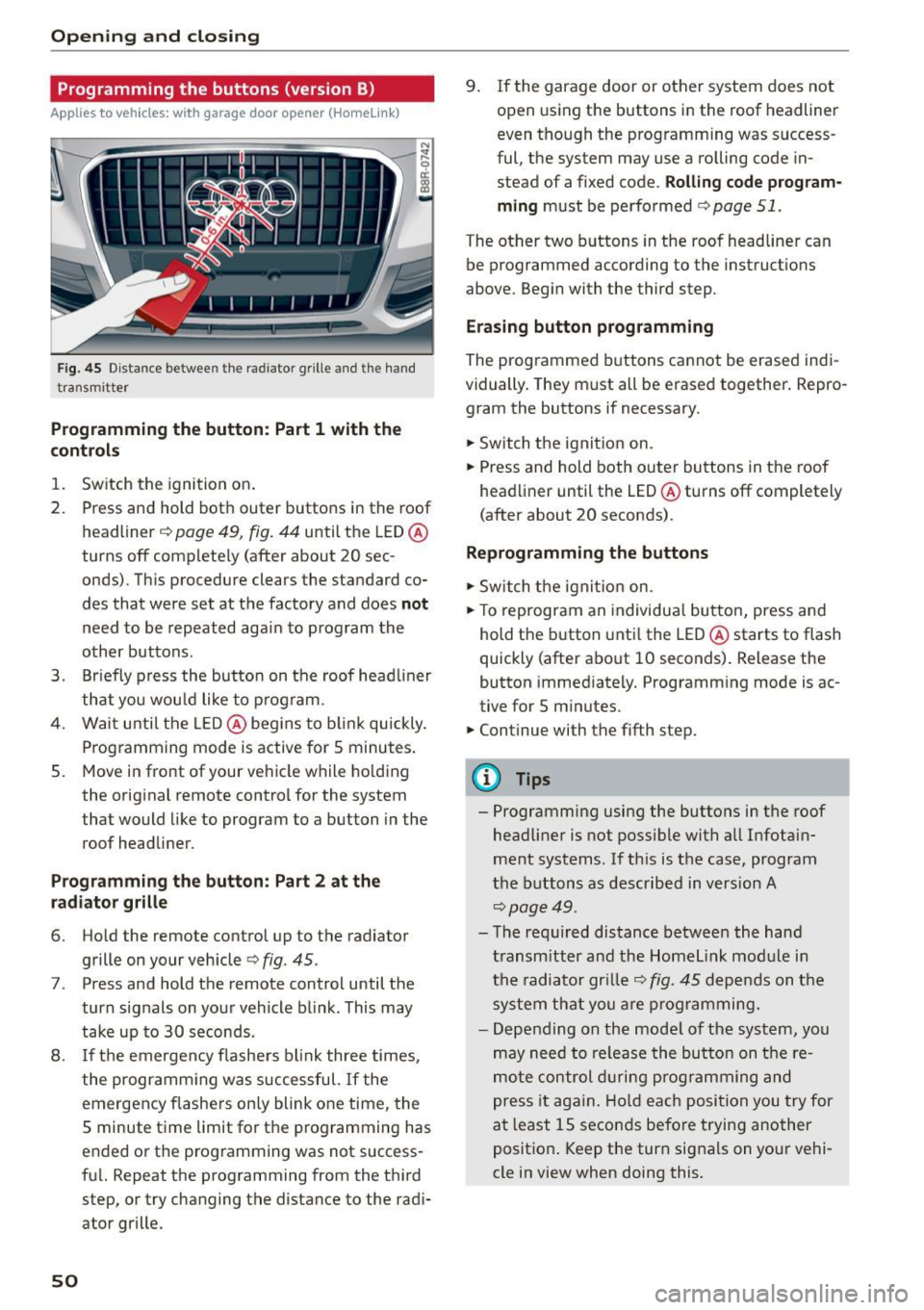
Fig . 4 5 Dis tan ce betwee n th e ra diato r grille a nd the hand
t ra n sm itter
Programming the button : Part 1 with th e
controls
1. Switch the ignition on .
2. Press and hold both outer buttons in the roof headliner
c;, page 49, fig. 44 until the LED @
turns off comp lete ly (after about 20 sec
onds). This procedure clears the standard co
des that were set at the factory and does
not
need to be repeated again to p rogram the
other buttons .
3. Br iefly p ress the button on the roof head liner
that you wou ld like to p rog ram.
4. Wai t unti l the LED @ beg ins to b link quickly.
P rog ramming mode is active for S minutes .
5. Move in front of your ve hicle while ho ld ing
the orig inal remote control for the system
that would like to program to a button in the
roof headliner.
P rogramming the button : Part 2 at the
radiator grille
6. Ho ld the remote control up to the radiator
grille on your vehicle
c;, fig . 45.
7. Press and hold the remote control until the
turn sig nals on yo ur vehicle b link . This may
take up to 30 seconds .
8 . If th e emergen cy flashe rs bl ink three times,
the programm ing was s uccessful.
If the
emergency flashers on ly blink one time, the
5 minute t ime limit for t he p rogramming has
e nded o r the p rog ramming was not success
fu l. Repeat the programming from the t hird
step, or try changing t he distance to the radi
ator grille.
50
9 . If the garage door or other system does not
open using the buttons i n the roof headliner
even tho ugh the programming was success
ful, the system may use a rolling code in
stead of a fixed code.
Rolling code program
ming
must be perfo rmed c;, page 51.
The other two b uttons in the roof headliner can
be programmed according to the instruct io ns
above. Beg in with the third step.
Erasing button programming
The programmed buttons cannot be erased indi
vidually. They m ust all be erased together . Repro
gram the buttons if necessary .
.,.. Sw itch t he ignit io n on.
.,.. Press and hold both outer buttons in the roof
head liner until the LED @turns off completely
(after about 20 seconds) .
Reprogramming the buttons
.,.. Switch the ignit io n o n.
.,.. To reprogram an individua l bu tto n, press and
hold the button unti l the LED @starts to flash
quickly (after a bout 10 seconds) . Release the
button immed iately . Programm ing mode is ac
tive for S m inutes .
.,.. Continue with the fifth step.
@ Tips
- Programming using the buttons in the roof
headliner is not poss ible with all Infotain
ment systems. If th is is the case, program
t he b uttons as descr ibe d in version A
c;, page 49 .
-Th e re quired dis tance between the hand
t ransm itt er an d th e H ome link mo dule i n
t h e radiator gr ille
c;, fig. 45 dep end s on t he
s y st em t hat you are pr ogra mming.
- Depen ding on the mode l of the sys tem, you
m ay need to re lease the bu tton on t he re
m ote co nt rol dur ing p rog ramming an d
p ress i t ag ain. H old ea ch posi tion you try for
a t l east 15 seco nds be fo re trying another
p osit io n. K eep the tur n signa ls on you r vehi
cle in view when doing this .
Page 54 of 302

Lights and Vi sion
Lights and Vision
Exterior Lighting
Switching the lights on and off
Fig. 46 Inst rume nt pane l: ligh t sw itc h
Sw itch ing on AUTO -Automati c headlight
controls
• Turn the light switch to AUTO ¢ fig . 46 .
Sw itch ing on the side m arker lights
• Turn the light switch to ;o o: .
Switching on low beams
• Turn the light swit ch to io.
Switch ing off the lights
• Turn the ligh t sw itch to 0 .
The low beams only illuminate with the ignition
t urned on.
With the side marker lights or headlights switch
ed on , the symbol next to the light switch illumi
nates
~oo :.
AU TO - Automatic headlight control
W ith the swi tch i n the AUTO position, the low
beams are switched o n automatically depend ing
on the ambient light, fo r example in a tunnel, at
dusk and when it is raining or sno win g . When th e
low beams are switched on, the
oe> o: symbol comes
on . The low beams rema in switched on regard
less of the amb ient light when you turn on the
fog lights .
When you turn
off the ignition, the low beams
are automatically switched
off .
52 With automatic headlight cont
ro l, you also have
t he high-b eam function available . However , if you
have not switched high beams back to low beams
while dr iving with automatic headlight control ,
on ly the low beams come on the next time you
turn o n automatic headlight control. In order to
r etu rn to high beams again, you f irs t h ave to pull
the high beam lever back to the no rma l posit ion
and t hen push the lever forwa rd .
Light sensor malfunction
In the event o f a light sensor malfunction, the
driver is notified in the instrument cluster dis
play:
El Automatic headlights / automatic wipers
defective
For safety reasons, the low beams are turned on
permanently with the switch in
AUTO . However,
you can continue to turn the lights o n and
off us
i ng the light switch. Have the light sensor
checked as soon as possib le at an authorized Audi
dealer or other qualified wo rkshop.
_&, WARNING
- Automatic headlights are only intended to
as sis t the driver. T hey do no t re lieve the
driver of his re sponsibili ty to c heck th e
headligh ts and to turn them o n manually
according to the c urrent light and visibility
conditions . For e xamp le, fog cannot be de
tected by the light sensors. So always switch
on t he headlights
io unde r these weather
conditions and whe n driving in the dark .
- Cras hes can happen when you cannot see
the road ahead and when you cannot be
seen by ot her motorists. Always turn on the
headl ights so that you ca n se e ahead a nd so
that others can se e yo ur car fro m the back.
- Please obey all laws when usi ng the lighting
sys tems described her e.
(D Tips
- The light sensor for headlight control is lo
cated in the rear v iew mirror mount . You
should therefore not app ly any st ickers to
the windsh ield in this area in o rder to pre
vent malfunctions or fail ures.
Page 55 of 302
M N
co ~ co
rl I.O
"' N
"' rl
-Some exterior lighting functions can be ad
j u sted
¢page 53.
-W hen yo u remove your key from the ignition
while the vehicle 's lights are turned on, a
buzzer sounds as Long as the driver 's doo r is
open.
- In coo l or damp weather, t he inside of the
headlig hts, turn signals and tail lights can
fog over d ue to the temperature difference
between the inside and outs ide. They will
clea r sho rtly after sw itching them on. This
does not affect t he service life of the light
ing .
- In the event of a light sensor malfunct ion,
the driver is not ified in the instr ument clus
te r d is play ¢
pag e 32.
Fog lights
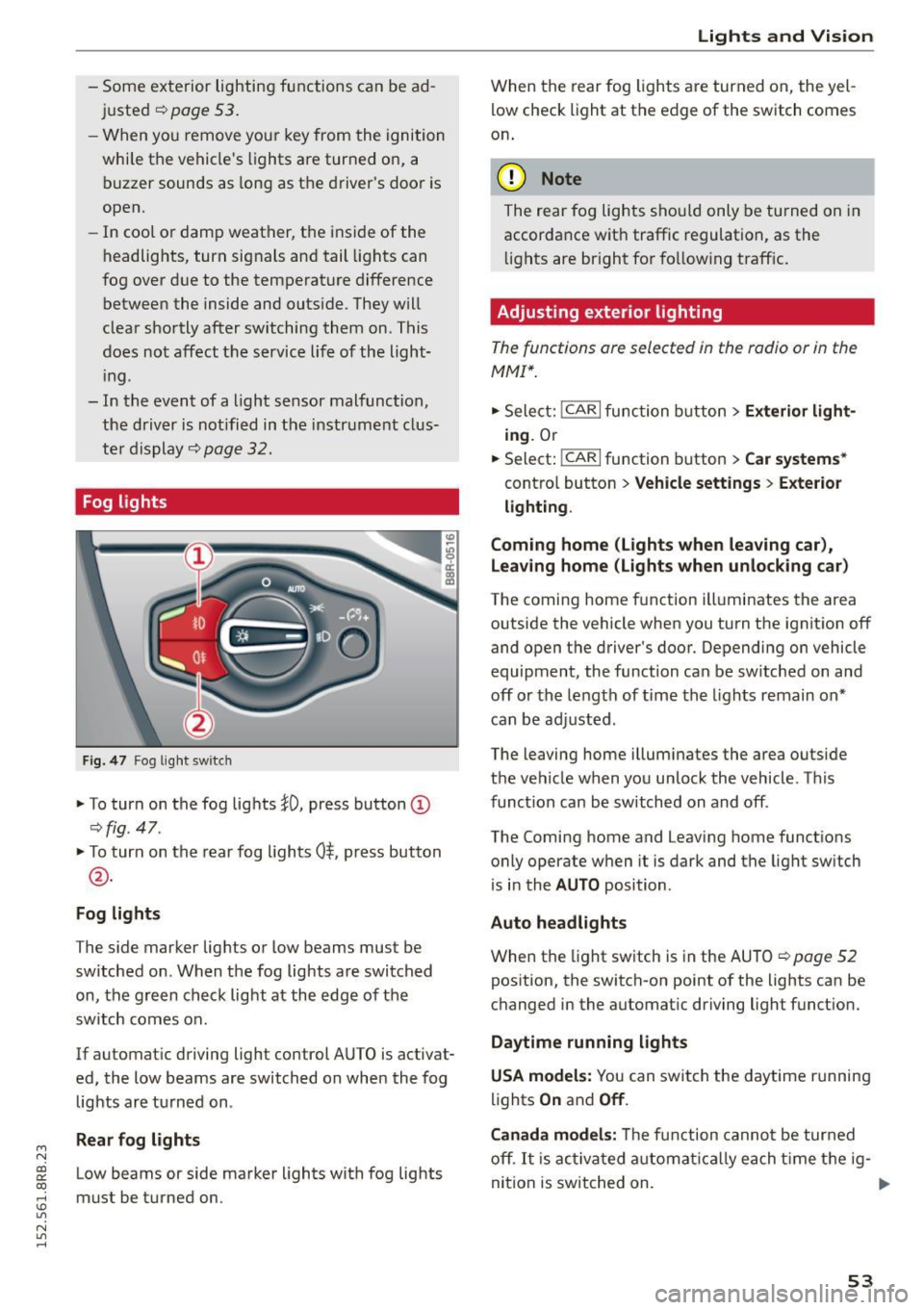
Fig . 4 7 Fog lig ht sw itch
" To turn on the fog lights }D, press button (D
¢fig. 47.
"To turn on the rear fog lights 0$. p ress button
@ .
Fog lights
The s ide marker lights or Low beams must be
switched on. When the fog lights are swi tched
on, the g re e n check light at the edge of the
sw itch comes on.
If automat ic driving light control AUTO is activat
ed, the low beams are switched on whe n the fog
lights a re turned on .
Rear fog light s
Low beams or side marker lights with fog lights
must be turned on.
Lights and Vis ion
W hen the rear fog ligh ts are turned on, the yel
low check light at the edge of the s witch comes
o n.
(D Note
The rear fog lights sho uld only be turned on in
accorda nce with traffic regulation, as the
li g hts are bright fo r fo llow ing traff ic .
Adjusting exterior lighting
The functions are selected in the radio or in the
MMI* .
"Sele ct: !CARI func tion button> Exterior light
ing.
Or
.. Select:
~,c- A- R~ I function button > Car systems *
contro l button > Vehicle settings > Exterior
lighting .
Coming home (Lights when leaving car) ,
Leav ing home (Lights when unlocking car )
The coming home function ill uminates the area
outside the vehicle when you turn the ignit io n off
and open t he d river 's doo r. Depending on vehicle
equipment, the function ca n be sw itched on an d
off or the le ngth of time the lights remain on"
can be ad justed .
The leaving home i llum inates the area outside
t h e ve hicle w hen you un lock the vehicle. T his
func tion can be switched on and off .
The Comi ng home and Leaving home funct ions
o nly operate w hen it is dark and t he lig ht sw itch
is i n the
AUTO position .
Auto headlights
When the light sw itch is in the AU TO ¢ page 52
pos ition, the switch-on point of the lights can be
c h anged in the automat ic dr iving light funct ion.
Daytime running lights
USA models: Y ou can swit ch the d aytime r unning
lig hts
On and Off .
Canada models:
Th e f unc tion cann ot be tur ned
off .
It is acti vat ed a utom aticall y each t ime t he ig-
ni tion is switched on. .,,_
53
Page 56 of 302
Lights and Vi sion
Travel mode (Canada mod els )*
The headlig ht beam is asymme trical. T his pro
vides stronger illum inat ion on the s ide of the
road on which you are drivi ng. If yo u are driving
in a country that drives on the opposite side of
the road from your own country, this will cause
glare for oncoming drivers. To prevent glare:
- Trave l mode must be se lected in vehicles with
Xenon headlights* .
- In vehicles with halogen headlights, ce rtain
areas of the headlight lenses must be covered
with waterproof adhesive covers that prevent
li ght from pass ing t hrough. For more informa
tion, please see your authorized Audi dea le r or
autho rized repair facility .
(!) Tips
When travel mode* is activated, a disp lay in
the dr iver information system indicates this
each t ime yo u switch the ignition on .
Adaptive light
Applies to vehicles: w ith adaptive lig ht
When driving around bends, the relevant area of
the road is better illuminated.
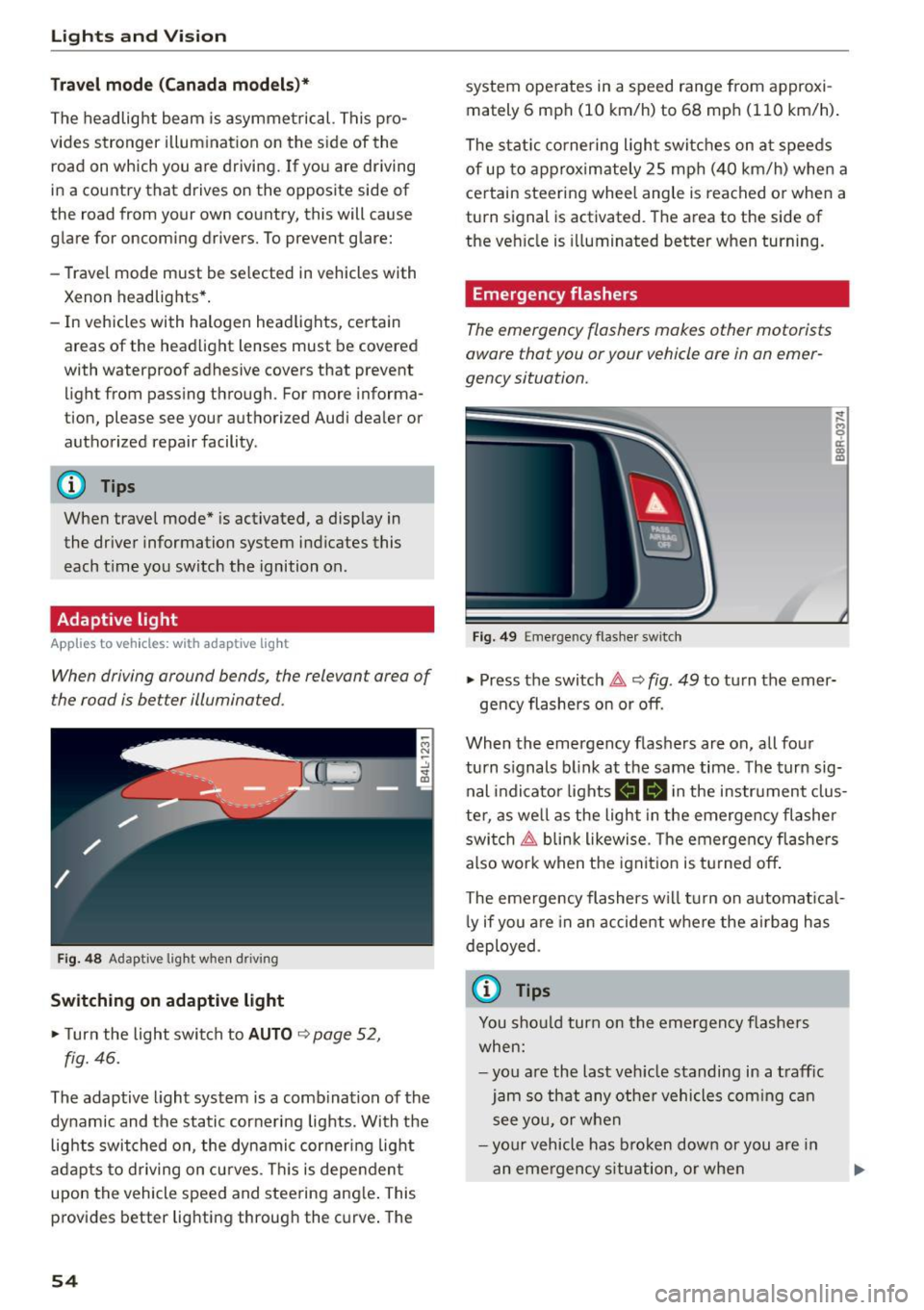
Fig. 48 Adaptive light when d riving
Switching on adaptive light
~ T urn the light swit ch to AUTO ~ page 52,
fig. 46.
The adaptive light system is a com bi nation of the
dynamic and the static corneri ng lights. With the
lig hts switched on, the dynami c cornering light
a dapts to driving on cu rves . Thi s is dependen t
upon the vehicle speed and stee ring ang le . This
p rovides better lig hti ng throug h the c urve . The
54
system ope rates in a speed range from approxi
mately 6 mph (10 km/h) to 68 mp h (1 10 km/h) .
The stat ic cornering ligh t switc hes on a t spee ds
of up to ap proximately 25 mp h (4 0 km/h) whe n a
ce rtain steering wheel angle is reached o r when a
turn signal is activated. T he a rea to the side of
the ve hicle is illuminated better when turning.
Emergency flashers
The emergency flashers makes other motorists
aware that you or your vehicle ore in an emer
gency situation.
Fig . 49 Eme rge ncy flas her switc h
~
9 a: (X) m
~ Press the switch 1t1t, ~ fig. 49 to tu rn the em er-
ge ncy flashers on or off.
When the emergency flashers are on, all fo ur
turn s ignals b link at the same time . The turn sig
nal indicato r lights
II Bi n the instrument clus
te r, as we ll as the light in the emerge ncy fl asher
swi tc h ~ blin k likewise . T he emergen cy flashe rs
a lso wor k w hen t he ignit io n is tu rne d off .
The eme rgency flashers w ill turn on a utomat ica l
l y if y ou a re in an a ccide nt w here the a irb ag h as
deployed .
(j) Tips
You sho uld turn on t he emergen cy f lashe rs
whe n:
- yo u are the last veh icle standi ng in a t raff ic
j am so t hat any othe r vehicles c oming c an
s ee y ou, or whe n
- your v ehicle has broke n dow n or you a re in
a n em ergency s ituat ion, or when