lock AUDI Q5 2015 Owner's Manual
[x] Cancel search | Manufacturer: AUDI, Model Year: 2015, Model line: Q5, Model: AUDI Q5 2015Pages: 302, PDF Size: 75.01 MB
Page 45 of 302
M N
co ~ co
rl I.O
"' N
"' rl
Opening and closing rear
lid
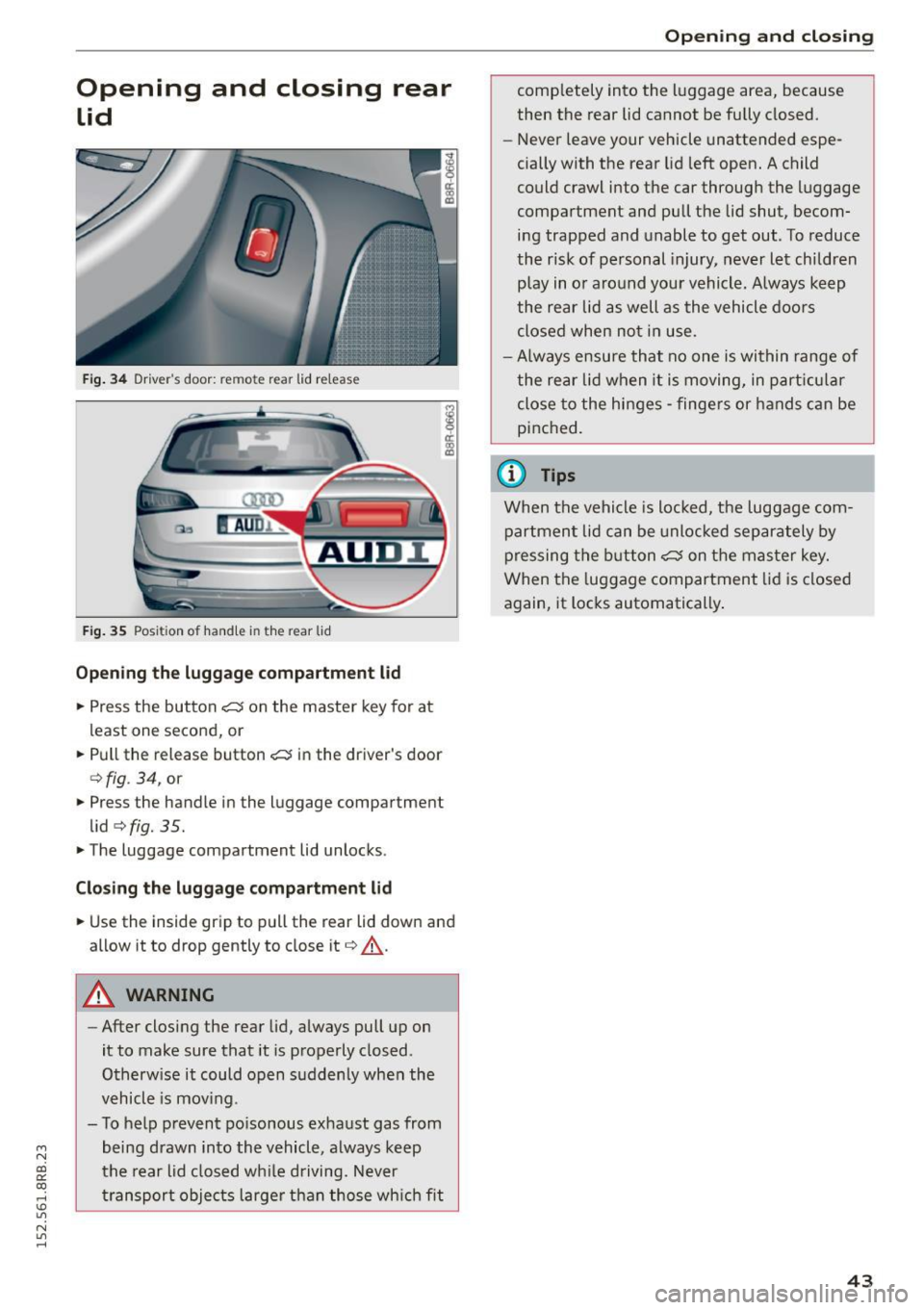
Fig. 34 Driver's door: remote rear lid release
Fig. 35 Position of handle in the rear l id
Opening the luggage compartment l id
.,. Press the button <:::::5 on the master key for at
least one second, or
.. Pull the release button
<:::::5 in the driver's door
c:>fig . 34, or
.,. Press the handle in the luggage compartment
lid
c:> fig. 35 .
.. The luggage compartment lid unlocks.
Closing the luggage compartment lid
.. Use the inside grip to pull the rear lid down and
allow it to drop gently to close it
c:> A .
A WARNING
-After closing the rear lid, always pull up on
it to make sure that it is properly closed .
Otherwise it could open suddenly when the
vehicle is mov ing.
- To help prevent po isonous exhaust gas from
being drawn into the vehicle, always keep
the rear lid closed while driving. Never
transport objects larger than those which fit
Opening and closing
completely into the luggage area, because
then the rear lid cannot be fully closed.
- Never leave your vehicle unattended espe
cially with the rear lid left open. A child
could crawl into the car through the luggage
compartment and pull the lid shut, becom ing trapped and unable to get out. To reduce
the risk of personal injury, never let children
play in or around your vehicle. Always keep
the rear lid as well as the vehicle doors
closed when not in use.
-Always ensure that no one is within range of
the rear lid when it is moving, in particular
close to the hinges -fingers or hands can be
pinched.
(0 Tips
When the vehicle is locked, the luggage com
partment lid can be unlocked separately by
pressing the button
<:::::5 on the master key.
When the luggage compartment lid is closed
again, it locks automatically .
43
Page 46 of 302
Opening and closing
Automatic rear lid/trunk
lid operation
Applies to vehicles: w ith automatic rear lid/trunk lid opera
t io n
The trunk lid con be opened and closed automat
ically.
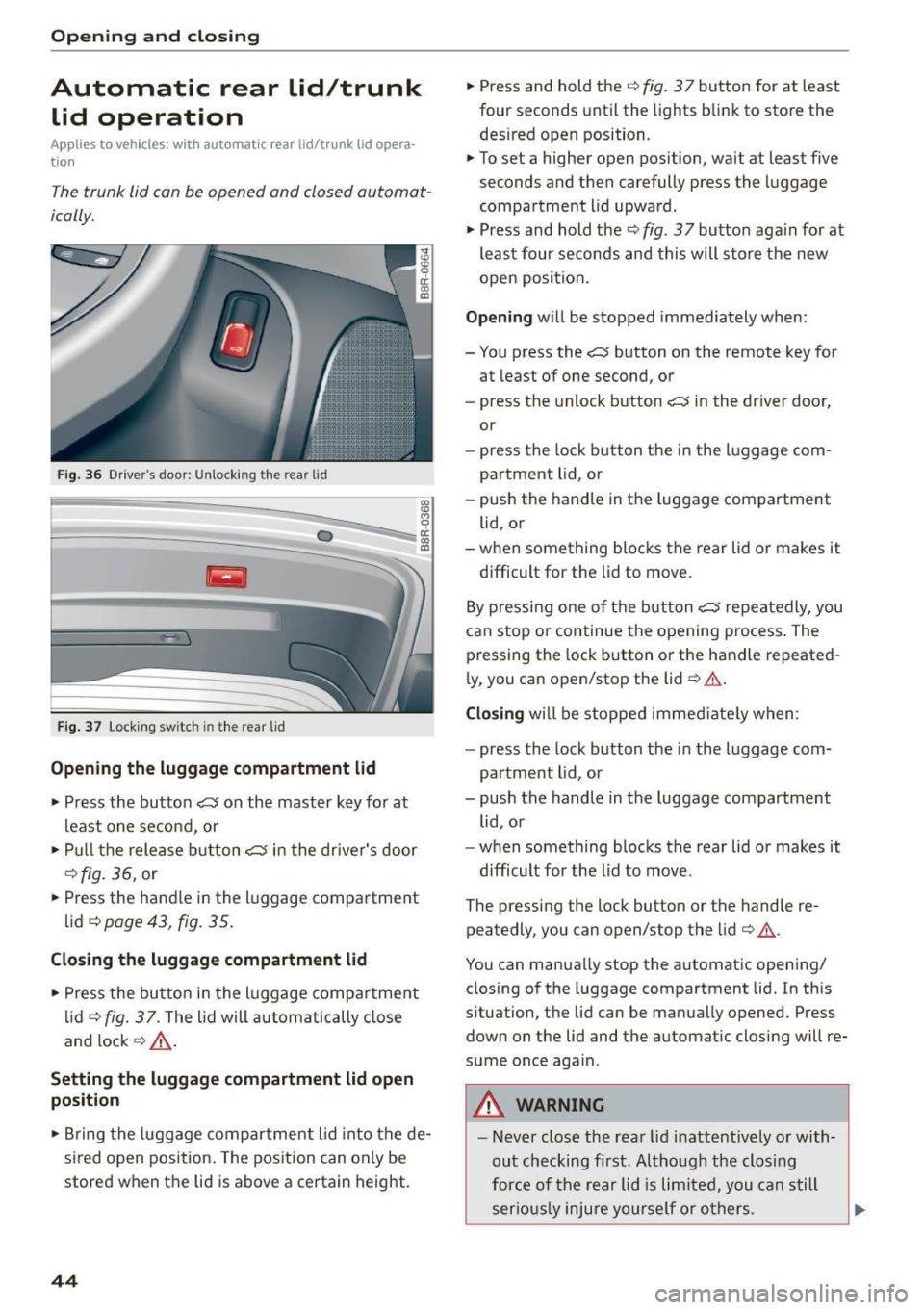
F ig . 36 D river's doo r: Unlock ing the rear lid
Fig . 37 Loc king sw itc h in th e rea r lid
Opening th e luggage compartment lid
., Press the button ~ on the master key for at
least one second, or
., Pu ll t he release button~ in the dr iver's door
¢ fig. 36, or
., Press the handle in the luggage compartment
lid ~
page 43, fig. 35.
Closing th e luggage compartment lid
., Press the but to n in t he luggage compa rtment
li d ¢
fig. 37. The lid will autom atically close
and lock ¢,& .
Setting the luggage compartment lid open
position
0 cl:
"' al
., Bring the luggage compar tment l id into the de
sired open position. The position can only be
stored when the lid is above a certain height .
44
., Press and hold the¢ fig. 3 7 button for at least
four seconds until the lights blink to store the
desired open position.
., To set a higher open position, wait at least five
seconds and then carefully press the luggage
compartment lid upward.
., Press and hold the¢
fig. 37 button aga in fo r at
least four seconds and this will sto re the new
open position.
Opening wi ll be stopped immediately when:
- You press the
~ button on the remote key for
at least of one second, or
- press the unlock button~ in the driver door,
or
- press the lock b utton t he i n the l uggage com
partment lid, or
- push the handle in t he luggage compartment
lid, or
- when something blocks the rear lid or makes it
difficult for the lid to move.
By pressi ng one o f the butt on~ repeatedly, you
can stop or continue the opening process . The
pressing the lock b utton or the handle repeated
ly, you can open/stop the lid~.&. .
Closing will be stoppe d immed iate ly when :
- press the lock button the in the l uggage com
partment lid, or
- push the handle in the luggage compartment
lid , o r
- when something blocks the rear lid or makes it
difficult for the lid to move .
The pressing the lock button or the handle re peatedly, you can open/stop the lid ¢ .&. .
You can manua lly stop the a utomatic opening/
closing of the luggage compartment lid. In this
situation, the lid can be manua lly opened. Press
down on the lid and the automatic closing will re
sume once again .
_& WARNING
-Never close the rea r lid inattentively o r with
ou t checking fi rst. Although the clos ing
for ce of the rear lid is lim ite d, you can s till
serio usly inju re yourse lf or o thers.
Page 47 of 302
M N
co ~ co
rl I.O
"' N
"' rl
-Always ensure that no one is with in range of
the rear lid when it is mov ing, in particular
close to the hinges and the upper and lower
edges - f ingers or hands can be pinched.
- To help prevent po isonous exhaust gas from
being drawn into the vehicle, a lways keep
the rear lid closed wh ile driving . Never
transport objects large r than those wh ich fit
compl etely into the luggage area , because
then the rea r lid cannot be fully closed .
- Never leav e your vehicle unattended espe
c ially w ith the rear lid left open. A ch ild
c ou ld craw l in to the car through t he luggage
c ompartment and pull the lid s hut, becom
ing t rapped and unable to get ou t. To red uce
the risk of perso nal in jury, never let children
play i n or around your veh icle . Always keep
the rear lid as well as the vehicle doors
closed when not in use.
- If there is a luggage rack or bicycle rack
mounted on the rear lid, it may not be able
to open completely or an ope ned rear lid
may close by itse lf because of the added
we ight. So the open rear lid must be sup
ported or the weight m ust be removed from
the luggage ra ck fi rst .
(O} Tips
- As soon as the electrical connection to the
tra ile r socket is completed on veh icles with
a f actory insta lled towing hitch, o r a trailer
hitch that was insta lled later acco rding to
fac tory spe cifi ca tions , th e au tomat ic rear li d
fu nct ion can only be operate d via the hand le
in the rea r lid .
- If th e vehicle battery charge drops below a
certain level, yo u can sti ll open or close the
r ear lid manua lly, however, you w ill need to
apply more force to close it.
- If the rear lid on a locked vehicle is un locked
with the middle button
,c:$ on the remote
key, the rear lid is automatically locked
again immediately after closing. This is indi
cated by the turn s ignals bli nking.
- The f ollowing applies to veh icles equipped
with the Conve nience key" feature: if the re
mote control key is left in the luggage com
partment, luggage compartment will auto-
Open ing and clo sing
matically unlock itse lf after yo u loc k the ve
hicle. This prevents you from unintentional·
Ly locking yo ur key in the luggage compart
ment.
Emergency unlocking of
the luggage compartment Lid
The luggage compartment lid can be released in
an emergency from the inside.
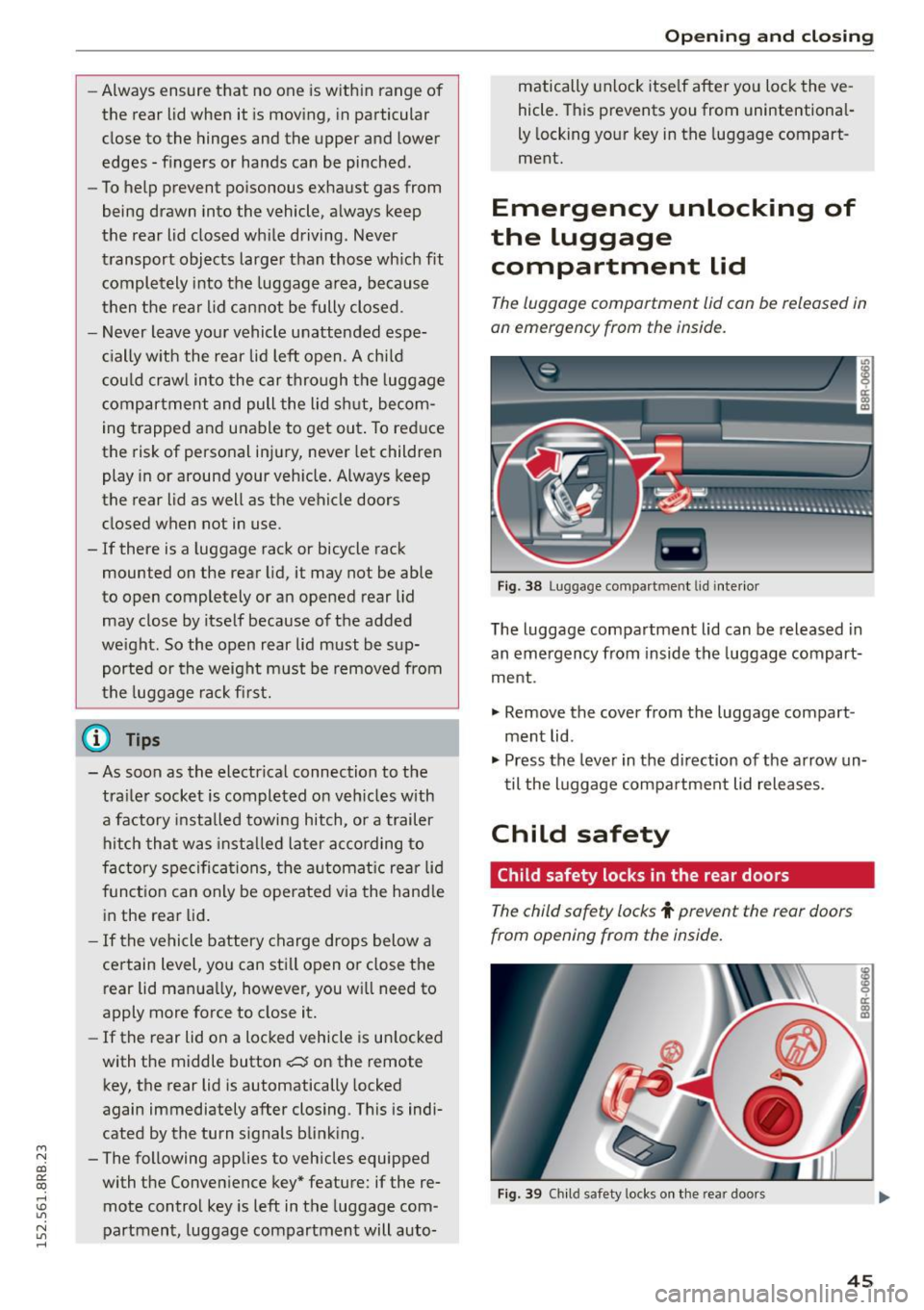
Fi g. 3 8 Luggage co mpa rtment lid i nte rior
T he luggage compartment lid can be released in
an emergency from inside the luggag e compart
me nt.
., Remove the cover from t he luggage compart
ment lid .
., Press the leve r in the di rection of the arrow un
t il the luggage compa rtment lid releases.
Child safety
Child safety locks in the rear doors
The child safety locks t prevent the rear doors
from opening from the inside.
Fig . 39 Chil d safety locks o n th e rea r doo rs
45
Page 48 of 302
Opening and closing
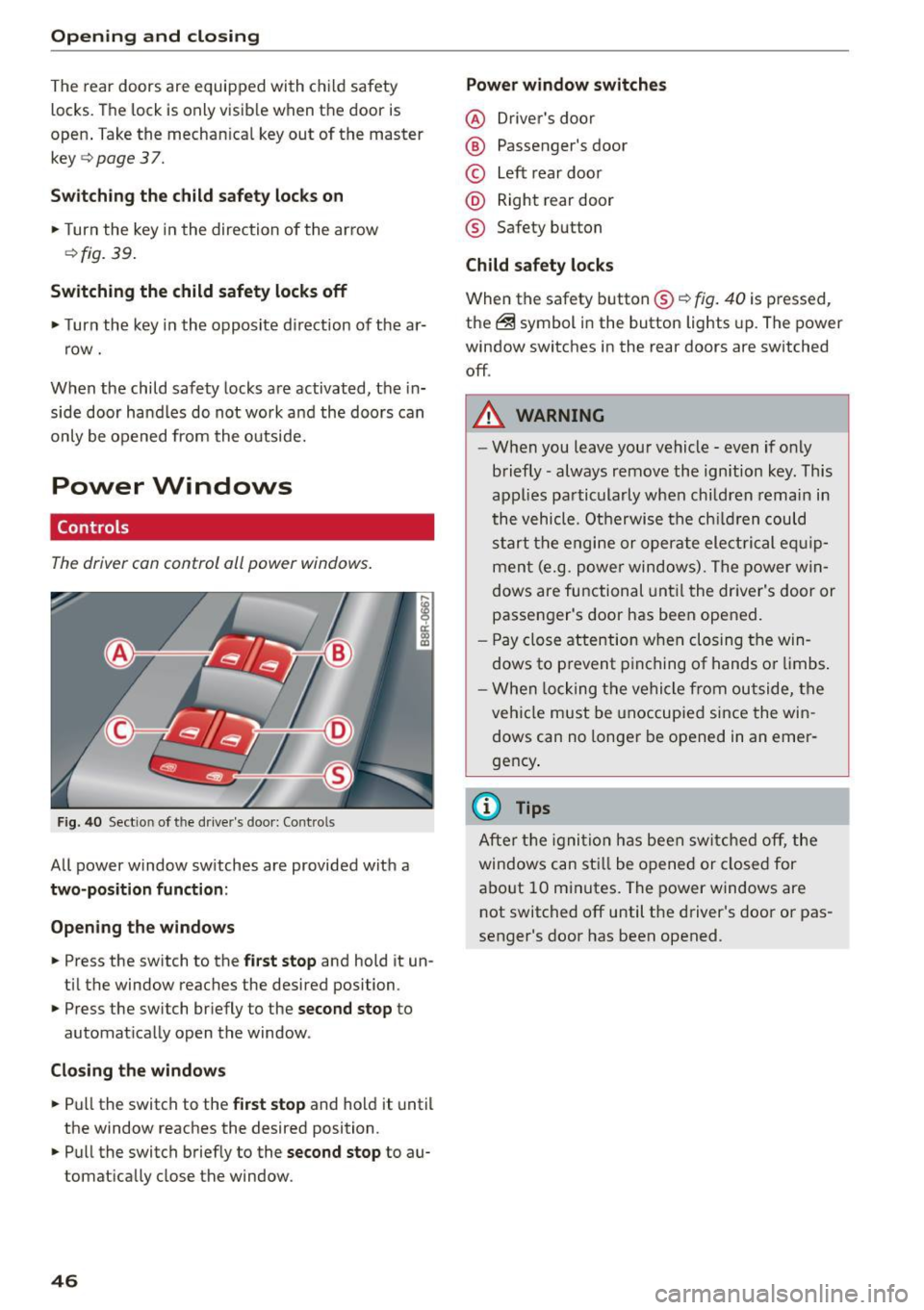
The rear doors are equipped with child safety
locks . The lock is only visib le when the door is
open . Take the mechan ica l key out of the master
key
c> page 3 7.
Switch ing the child safety loc ks on
"Turn the key in the direction of the arrow
<:>fig. 39.
Switching the child safety locks off
"Turn the key in the opposite d irection of the ar
row.
When the child safety locks are activated, the in
side door hand les do not work and the doors can
only be opened from the outside.
Power Windows
Controls
The driver con control all power windows .
Fig . 40 Sect ion of the driver 's doo r: Con trols
All power window sw itches are provided with a
two-position function :
Open ing th e windows
... Press the switch to the first stop and hold it un
ti l the window reaches the desired position .
... Press the switch br iefly to the
second stop to
automat ica lly open the window.
Clo sing the window s
... Pu ll the switch to the first stop and hold it until
the window reaches the desired position .
... Pull the switch briefly to the
second stop to au
tomatically close the window.
46 Power window switches
@ D
river 's doo r
® Passenger's door
© Left rear doo r
@ Right rear door
® Safety button
Child safety locks
When the safety button® c> fig. 40 is pressed,
the ~ symbol in the button lights up. The power
window switches in the rear doors are switched
off .
A WARNING
-W hen you leave you r vehicle - even if only
briefly -always remove the ignition key. This
applies pa rticula rly when children remain in
the vehicle. Otherwise t he ch ild ren could
s t art the e ngi ne or operate ele ct rical eq uip
men t (e.g. p ower windows). The power w in
dows are functional unt il the dr iver's door or
passenger's door has been ope ned.
- Pay close attention w he n closing t he win
dows to p revent p inching of hands o r limbs .
- W hen locking the ve hicle from outside, the
vehi cle must be unoccupied since the win
dows can no longer be opened in an emer
gency .
(D Tips
After t he ig nit ion has bee n swi tc h ed off , th e
windows can st ill be o pened or closed for
a bo ut 10 m inutes. The power windows are
not switched off until the driver's door or pas
senger's door has been opened .
Page 49 of 302
M N
co ~ co
rl I.O
"' N
"' rl
Convenience opening/closing
The windows and the Panoramic sliding sunroof*
can be opened and closed with the mechanical
key or the emergency key.
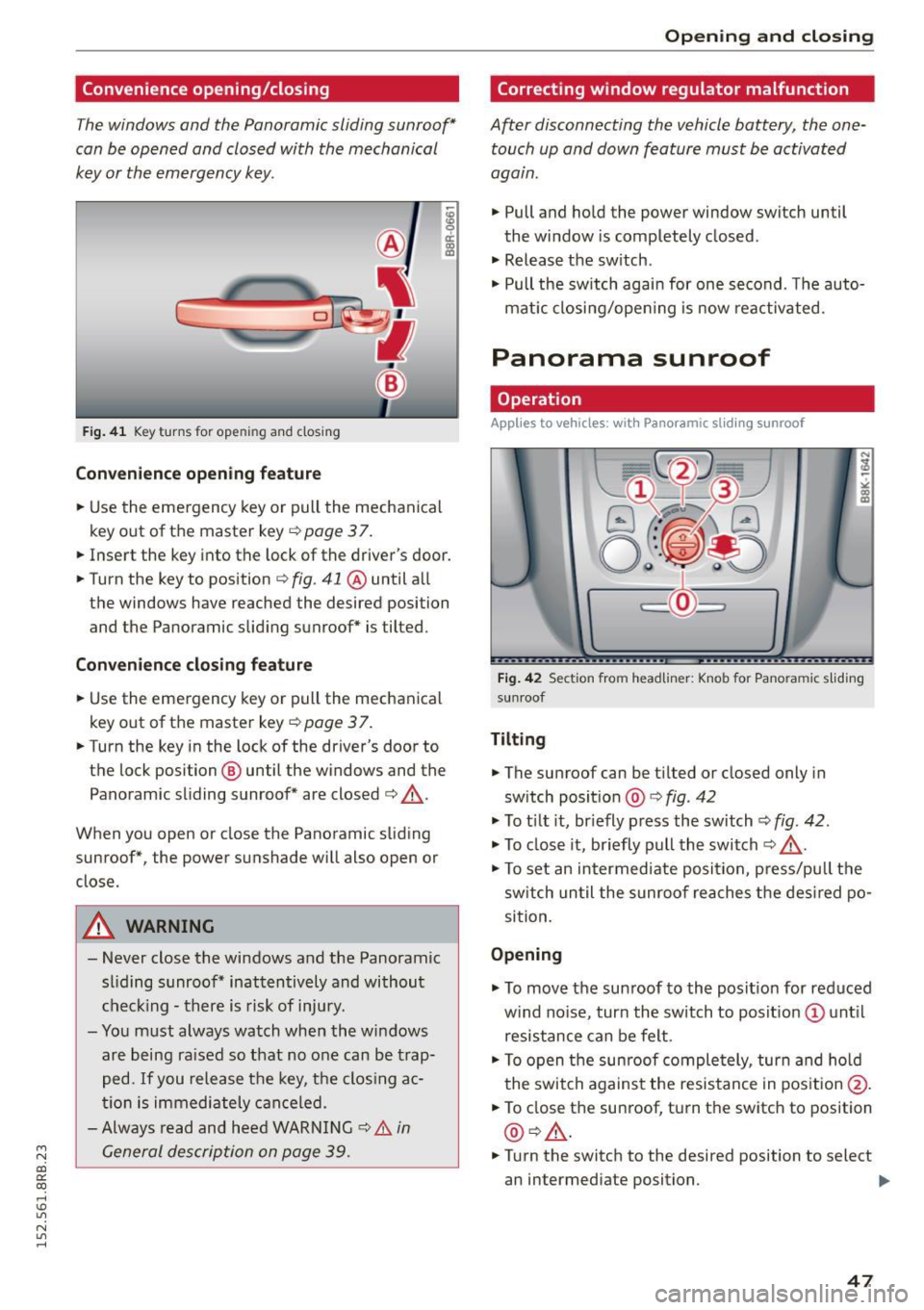
F ig . 41 K ey turns for ope ning and closing
Convenience opening feature
.. Use the emergency key or pull the mechanical
key out of the master key ¢
page 3 7 .
18 9 a::
"' a,
.. Insert the key into the lock of the driver's door .
.. Turn the key to position ¢
fig. 41 @ until a ll
the windows have reached the desired position and the Panoramic slid ing sunroof* is tilted.
Convenience closing feature
.. Use the emergency key or pull the mechanical
key out of the master key
¢ page 37.
.. Turn the key in the lock of the driver's door to
the lock position @ until the windows and the
Panoramic sliding sunroof* are closed ¢ ,&..
When you open or close the Panoramic sliding
sunroof*, the power sunshade will also open or
close.
A WARNING
- Never close the windows and the Panoramic
sl iding sunroof* inattentively and without
checking -there is risk of injury.
- You must always watch when the windows
are being ra ised so that no one can be trap
ped.
If you release the key, th e clos ing ac
tion is immediately canceled.
- Always read and heed WARNING ¢
& in
General description on page 39.
Opening and closing
Correcting window regulator malfunction
After disconnecting the vehicle battery , the one
touch up and down feature must be activated
again .
.. Pull and hold the power window switch until
the window is completely closed .
.. Release the sw itch .
.. Pull the switch again for one second . T he auto
mat ic closing/opening is now reactivated.
Panorama sunroof
Operation
Applies to veh icles: w ith Panoramic sl iding sunroof
Fig. 42 Section fro m headliner : Knob fo r Pano ra m ic s liding
sun roof
Tilting
.. The sunroof can be t ilted or closed only in
sw itch posit ion @ ¢
fig. 42
.. To t ilt it, briefly press the switch
<=;>fig. 42.
.. To close it, briefly pull the switch¢.&. -
.. To set an intermediate posi tion, press/pu ll the
switch until the sunroof reaches the desired po
sition.
Opening
.. To move the sun roof to the position for reduced
w ind no ise, turn the switch to posit ion (!) until
resistance can be felt.
.. To open the sunroof completely, turn and hold
the switch against the resistance in position @.
.. To close the sunroof, turn the switch to position
@ ¢,&. .
.. Turn the switch to the desired position to select
an intermediate position. .,,_
47
Page 55 of 302
M N
co ~ co
rl I.O
"' N
"' rl
-Some exterior lighting functions can be ad
j u sted
¢page 53.
-W hen yo u remove your key from the ignition
while the vehicle 's lights are turned on, a
buzzer sounds as Long as the driver 's doo r is
open.
- In coo l or damp weather, t he inside of the
headlig hts, turn signals and tail lights can
fog over d ue to the temperature difference
between the inside and outs ide. They will
clea r sho rtly after sw itching them on. This
does not affect t he service life of the light
ing .
- In the event of a light sensor malfunct ion,
the driver is not ified in the instr ument clus
te r d is play ¢
pag e 32.
Fog lights
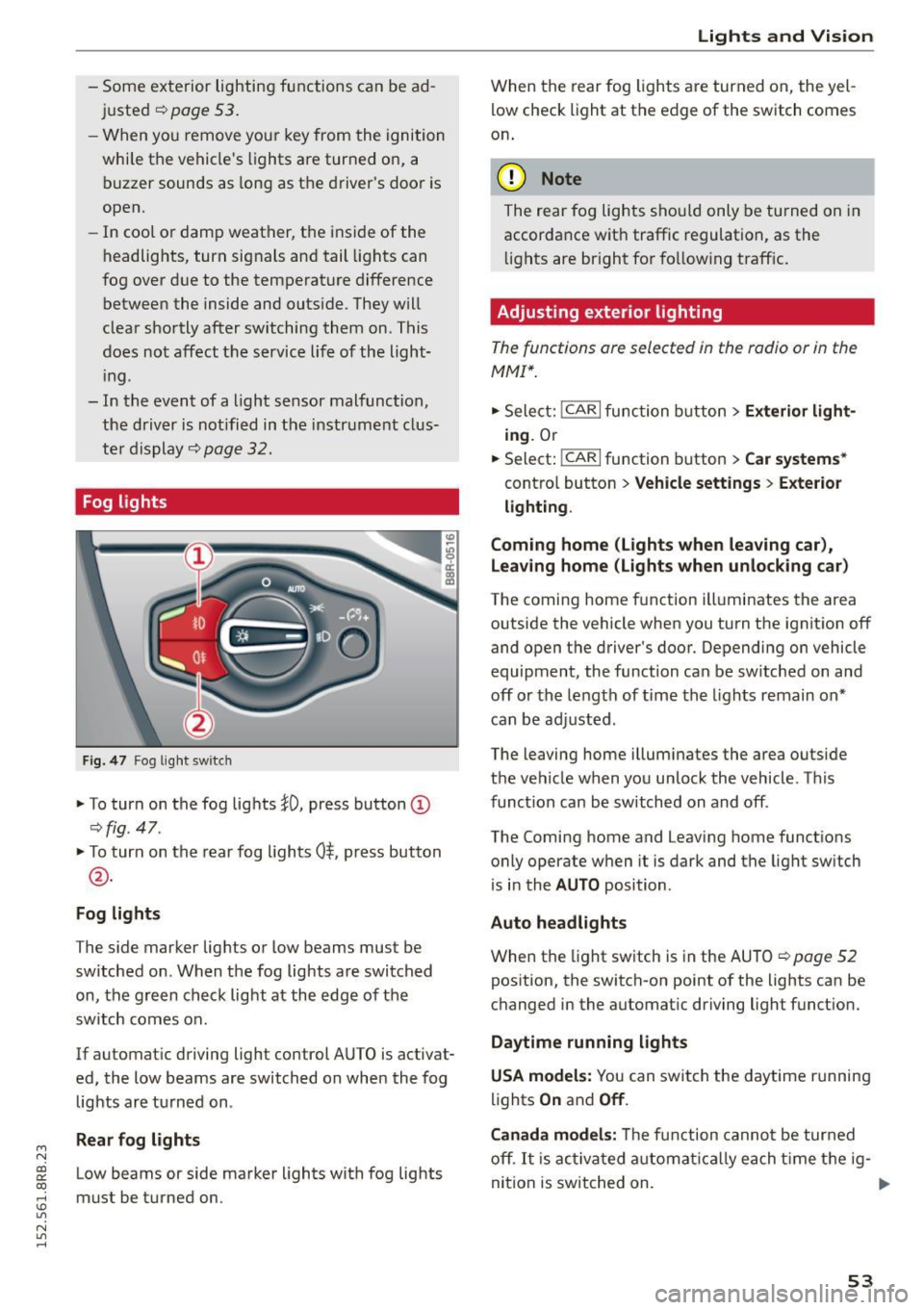
Fig . 4 7 Fog lig ht sw itch
" To turn on the fog lights }D, press button (D
¢fig. 47.
"To turn on the rear fog lights 0$. p ress button
@ .
Fog lights
The s ide marker lights or Low beams must be
switched on. When the fog lights are swi tched
on, the g re e n check light at the edge of the
sw itch comes on.
If automat ic driving light control AUTO is activat
ed, the low beams are switched on whe n the fog
lights a re turned on .
Rear fog light s
Low beams or side marker lights with fog lights
must be turned on.
Lights and Vis ion
W hen the rear fog ligh ts are turned on, the yel
low check light at the edge of the s witch comes
o n.
(D Note
The rear fog lights sho uld only be turned on in
accorda nce with traffic regulation, as the
li g hts are bright fo r fo llow ing traff ic .
Adjusting exterior lighting
The functions are selected in the radio or in the
MMI* .
"Sele ct: !CARI func tion button> Exterior light
ing.
Or
.. Select:
~,c- A- R~ I function button > Car systems *
contro l button > Vehicle settings > Exterior
lighting .
Coming home (Lights when leaving car) ,
Leav ing home (Lights when unlocking car )
The coming home function ill uminates the area
outside the vehicle when you turn the ignit io n off
and open t he d river 's doo r. Depending on vehicle
equipment, the function ca n be sw itched on an d
off or the le ngth of time the lights remain on"
can be ad justed .
The leaving home i llum inates the area outside
t h e ve hicle w hen you un lock the vehicle. T his
func tion can be switched on and off .
The Comi ng home and Leaving home funct ions
o nly operate w hen it is dark and t he lig ht sw itch
is i n the
AUTO position .
Auto headlights
When the light sw itch is in the AU TO ¢ page 52
pos ition, the switch-on point of the lights can be
c h anged in the automat ic dr iving light funct ion.
Daytime running lights
USA models: Y ou can swit ch the d aytime r unning
lig hts
On and Off .
Canada models:
Th e f unc tion cann ot be tur ned
off .
It is acti vat ed a utom aticall y each t ime t he ig-
ni tion is switched on. .,,_
53
Page 60 of 302

Lights and Vision
switched back on by moving the windshield
wiper lever to any position .
- Worn or dirty windshie ld wiper blades result
in streaking . This can affect the rain sensor
function . Check your windshield wiper
blades regularly.
- The washer fluid nozzles of the windshield
washer system are heated at low tempera
tures when the ignit ion is on.
- When stopp ing temporarily, e.g. at a traffic
light, the set speed of the windshield wipers
i s automatically reduced by one speed.
Cleaning windshield wiper blades
Clean the windshield wiper blades when they be
g in to leave streaks. Use a soft cloth and glass
cleane r to clean the windshield wiper blades .
Front wiper
.,. Place the windshield wiper arms in the service
position. Refer to
c> page 58.
.,. Lift the w iper arm away from the front w indow.
Rear wiper
.,. Lift the wiper arm away from the rear window.
A WARNING
Dirty w indshield wiper blades can impair your
view. This can lead to acc idents.
Replacing windshield wiper blades
Fig. 58 Removing the w iper blade
Wiper service position/blade replacement
posit ion
"' ij
a: CX) ID
.,. Switch the ignition off and move the windshield
wiper lever to posit ion ©
c> page 57, fig. 56.
58
The windshie ld wipers move into the service po
sition .
.,. To bring the wipers back into the origina l posi
tion, switch the ignition on and press the wind
shield w iper lever.
You can also turn the service position on or off in
the radio or MMI*:
.,. Switch the windshie ld wipers off (position @
c>page 57, fig. 56).
.,. Select: !CAR I function button> Windshield
wipers
> Service position > On /Off . Or
.,. Select:
!CAR I function button> Car systems*
cont rol butto n > Servicing
& checks > Wiper
s ervice position
> On/Off .
Removing the wiper blade
.,. Lift the windsh ield wiper arm up from the wind
shield .
.,. Press the locking knob@
c> fig. 58 on the wiper
blade. Ho ld the wiper blade firmly .
.,. Remove the wiper blade in the direction of the
arrow .
Attaching the wiper blade .,. Insert the new wiper blade into the mount on
the wipe r arm @until you hear it latch into
place .
.,. Place the wiper arm back on the winds hield.
.,. Tur n the se rvice position off.
A WARNING
F or your safety, you shou ld rep lace the wiper
b lades once or twice a year. See your author
ized Audi dealer for rep lacement blades.
(D Note
- Th e windshie ld wiper blades must only be
replaced when in the service position! Oth
erwise, you risk damaging the paint on the
hood or the w indshield wiper motor.
- Yo u should not move your vehicle or press
the windsh ield wiper lever when the wiper
arms are fo lded away from the windshield.
The windshield w ipers would move back in
to their original position and could damage
the hood and windshie ld .
Page 67 of 302
M N
co
a:
co
,...., \!) ..,.,
N ..,., ,....,
In addition to the setting for the drive r's seat ,
the exterior rear view mirror setting can be stor
ed and reca lled through seat memory if the veh i
cle is properly equipped.
Storin g and recallin g se tting s
With the help of the memory buttons 1 and 2
¢ fig. 65 the settings for two different drivers
can be stored and reca lled
r::!> page 65.
The cu rrent settings are also a utomat ica lly as
signed to the remote control key being used
when the vehicle is locked . When the vehicle is
un locked, the settings assigned to the remote
contro l key being used are automatica lly recalled .
Turnin g seat m emo ry on and off
If the IO FF I sw itch is depressed, the seat memory
is inoperative . When the Memory function is off,
the LED in the button lights up.
All the stored settings a re retained. We recom
mend using the
I O FF I sw itch and de activating the
seat memory if the vehicle is only go ing to be
used
temporarily by a driver whose settings are
not going to be stored .
Storing and recalling settings
Applies to vehicles: with seat memory
Storing settings
~ Adjust the driv er's seat.
~ Adjust the two exter ior mirrors.
~ Press the !SET I button. The light in the button
will come on.
~ Now p ress a memory button (III or~). If the
stor ing procedure is correct, a confirmation
tone w ill sound .
Recall ing setting s
~ If the dr iver 's door is open and the ignit ion is
switched off, tap the correspond ing memory
button br iefly .
~ If the dr iver's door is closed or the ignit ion is
switched on, p ress the approp riate memo ry
button until the s to red pos ition is rea ched .
Successful storage is confirmed audibly and by
the light in the
ISET I button illum inat ing
r::!> page 64, fig . 65.
S eat s and stor age
When the vehicle is lo cked , the current settings
are stored and assigned to the remote contro l
key . But the settings stored on memory buttons
1 to 2 are not deleted . They can be recalled at
any time . When the vehicle is
unlocked , the set
t ings assigned to the remote control key a re re
stored .
If your vehicle is driven by other persons using
your remote control key, you should save your in
dividua l seat position on one of the memory but
tons . You can recall your settings again simply
and conveniently by p ress ing the corresponding
memo ry butto n. When the vehicle is locked,
these settings are automatica lly re-assigned to
the remote control key and stored .
& WARNING
- For safety reasons, the seat setting can only
be recalled when the vehicle is stationary -
otherwise you risk hav ing an accident.
- In an emergency the recall proced ure can be
cancelled by pressing the
I OFF I switch or by
tapp ing of the memory buttons.
Activating remote control key memory
Applies to vehicles: wit h seat memory
To assign the dr iver 's seat settings to the remote
control key when locking the vehicle, the function
must be activated in the radio or MMI*.
~ Select: ! CAR I function button > Seat adju st
ment > Dri ver's seat > Key mem. p ro fi le > On .
Or
~ Select: !CARI function button> Car sy ste ms*
cont ro l butto n > Vehicl e se tting s > Seats >
Driver 's seat > Remote control ke y> On .
(j) Tips
If you do not want anothe r driver's sett ings to
be assigned to the remote control key, switch
off the memory function usi ng the rad io or
M MI* or t he
I OFF I button r::!> page 64.
65
Page 73 of 302
M N
co ~ co
rl I.O
"' N
"' rl
the lugg age compartment to help prevent
items from flying forward into the passen
ger compartment.
- Never attach a child safety seat tether strap
to a tie-down.
Luggage compartment cover
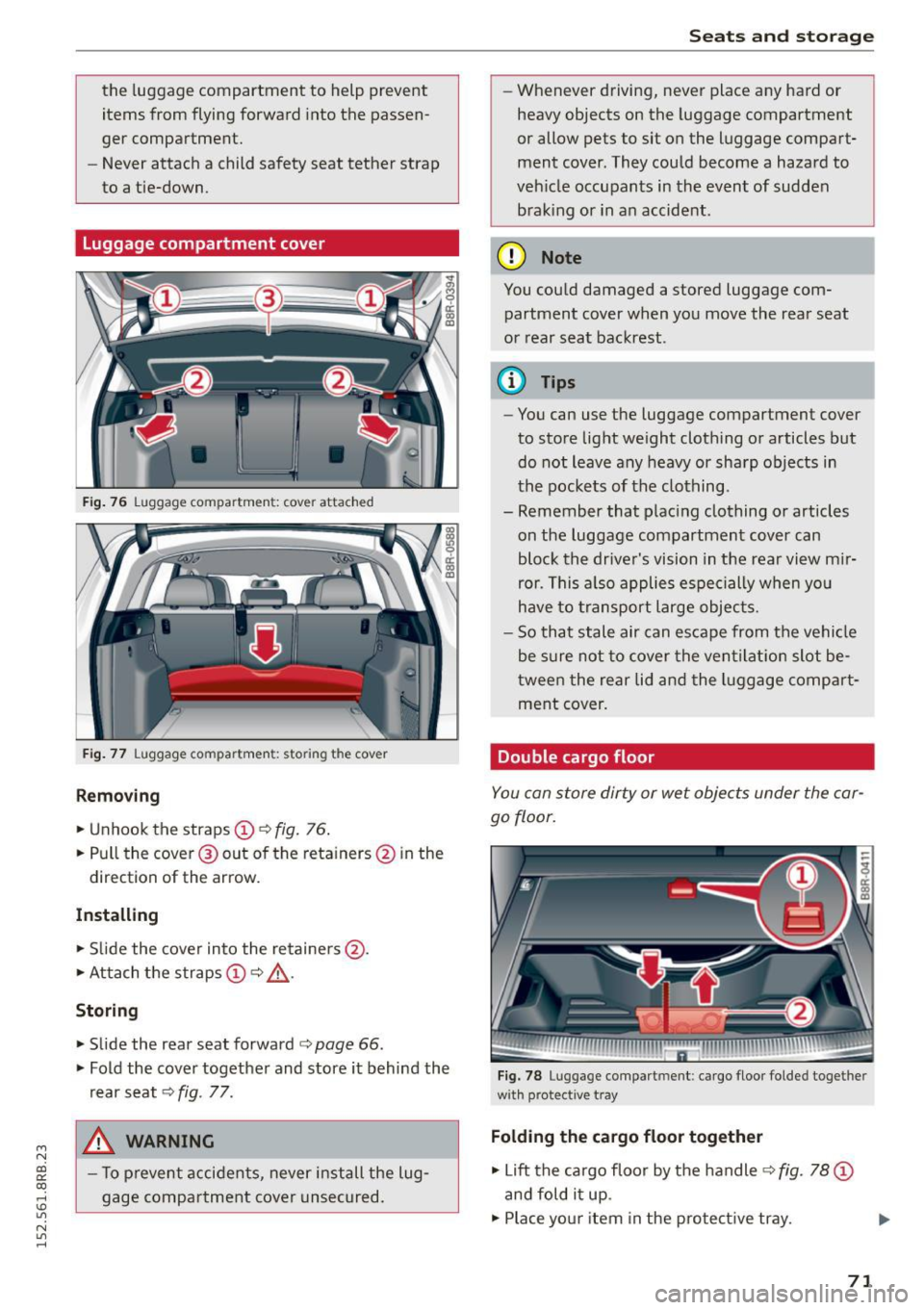
Fig. 76 Luggage compartment: cover attached
Fig. 77 Luggage compartment: storing the cover
Removing
"'Unhook the straps (!) c:> fig. 76.
"'Pull the cover @out of the reta iners @ in the
direction of the arrow.
Installing
"'Slide the cover into the retainers @.
"'Attach the straps
(D c:> ,&.
Storing
"' Slide the rear seat forward c:> page 66.
"' Fold the cover together and store it behind the
rear seat
c:> fig . 77.
A WARNING
- To prevent accidents, never install the lug
gage compartment cover unsecured.
-
Seats and storage
- Whenever driving, never place any hard or
heavy objects on the luggage compartment
or allow pets to sit on the luggage compart
ment cover . They could become a hazard to
vehicle occupants in the event of sudden
braking or in an accident .
(D Note
You could damaged a stored luggage com
partment cover when you move the rear seat
or rear seat backrest.
@ Tips
-You can use the luggage compartment cover
to store light weight clothing or articles but do not leave any heavy or sharp objects in
the pockets of the clothing .
- Remember that placing clothing or articles
on the luggage compartment cover can
block the driver's vision in the rear view mir
ror. This also applies especially when you
have to transport large objects.
- So that stale air can escape from the vehicle
be sure not to cover the ventilation slot be
tw een the rear lid and the luggage compart
ment cover.
Double cargo floor
You can store dirty or wet objects under the car
go floor.
Fig. 78 Luggage compartment: cargo floor folded togethe r
with protective tray
Folding the cargo floor together
"' Lift the cargo floor by the handle c:> fig. 78 (D
and fold it up .
"'Plac e your item in the protective tray. .,,.
71
Page 80 of 302
Seats and storag e
_& WARNING
-Always remove objects from the instrument
panel. Any items not put away could slide
around inside the vehicle while dr iving or
when accelerating or when applying the brakes or when dr iv ing aro und a corner .
- When you are driving make sure that any
thi ng you may have placed in the cente r con
so le or other storage loca tions cannot fall
o ut into the footwells. I n case of sudden
braking you would not be able to brake or
acce lerate .
- Any pieces of cloth ing that you have hung
up must not interfere with the driver's view .
The coat hooks are designed only for light
weight cloth ing . Never hang any clothing
with hard, pointed or heavy objects in the
pockets on the coat hooks. During sudden
braking or in an acc ident -especially if the
airbag is deployed -these objects could in
jure any passengers ins ide the veh icle.
Glove compartment
The glove comportment is illuminated and con
be locked .
C
Fig. 93 Glove compar tmen t
To open glov e compartment
,.. Pu ll t he hand le in the d ire ct io n of the arrow
¢
fig. 93 and swing the cover down to open .
To close glove compartment
.,. Push the glove compartment lid upward until
the lock engages .
There are holders for a pen and a pad of paper in the glove compartment lid .
78
On the right side in the glove compartment is a
ho lder with the key body into which the emergen
cy key must be clipped to be able to start the ve
hicle.
_& WARNING
To reduce the risk of personal inj ury in an acci
dent or sudde n stop, always keep the glove
compartmen t closed while dr iv ing .
Cooling box in glove compartment
The cooling box works only when the air-condi
tioning is in cooling mode.
Fig . 9 4 Glove box w it h coo li ng box ope n and s wit c hed on
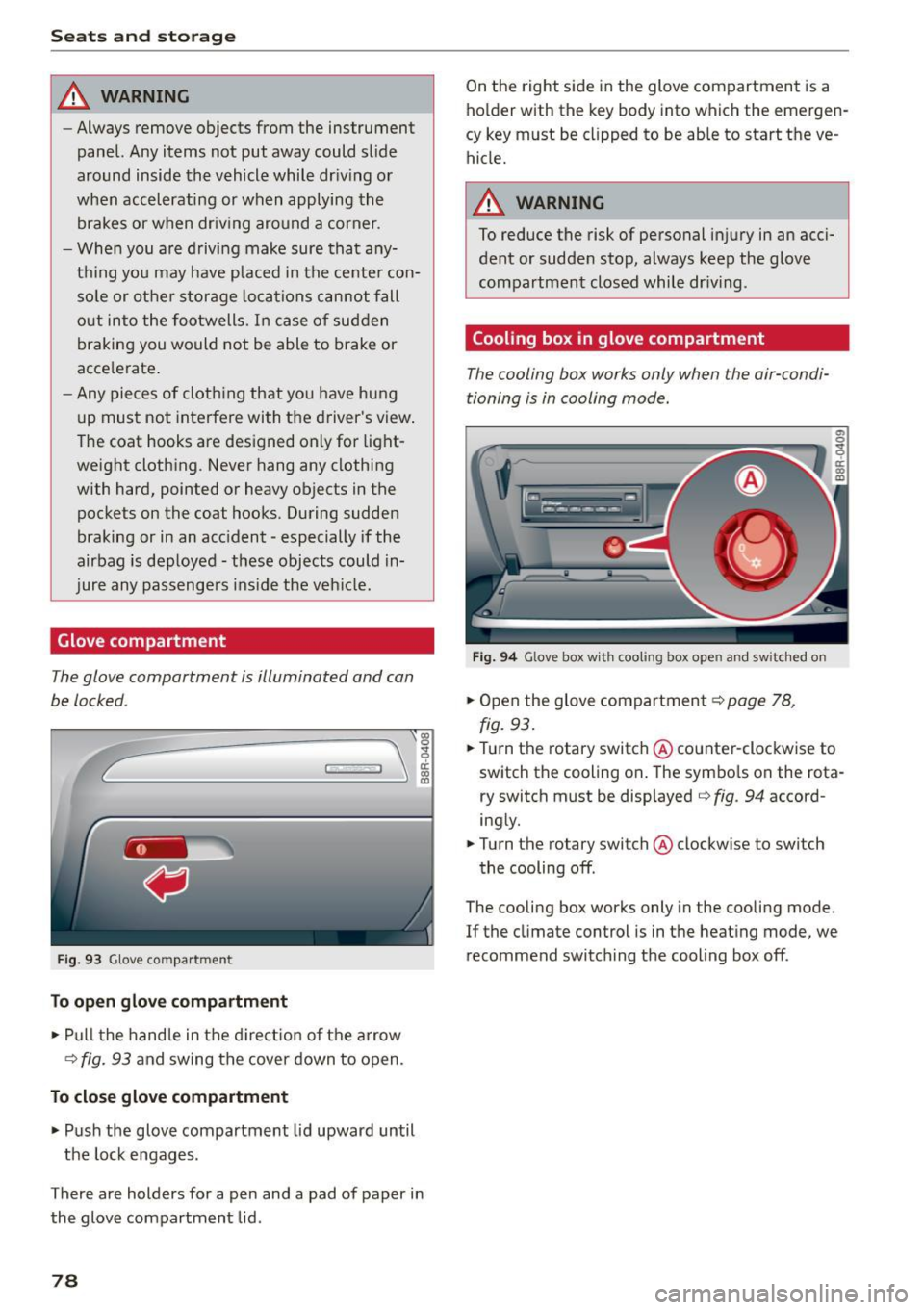
.,. Open the glove compartment¢ page 78,
fig.
93 .
.,. Turn the rotary switch @counter-clockwise to
switch the cooling on . The symbo ls on the rota
r y switch must be displayed ¢
fig. 94 accord
ing ly .
.,. Turn the ro tary switch @clockw ise to switch
the cooling off .
The cooling box works only in the cooling mode.
If the climate con trol is in t he heat ing mode, we
recommend switch ing the cooling box off .