ECU AUDI Q5 2016 User Guide
[x] Cancel search | Manufacturer: AUDI, Model Year: 2016, Model line: Q5, Model: AUDI Q5 2016Pages: 300, PDF Size: 75.02 MB
Page 91 of 300

..... N
co ~ CX)
..... I.Cl U"I
..... I.Cl .....
!I Is the ke y in the vehicle ?
This message appears in a veh icle w ith Conven
ience key* if the master key is removed from the
ve hicle w ith the engine r unning.
If the master
key is no longer in the vehicle, you cannot switch
on the ignition after stopping the engine and you
also cannot start the eng ine again. Moreover, you
cannot lock the veh icle from the outside with the
key.
Shift to P othe rwis e vehicle c an roll away . Doors
do not l ock if lever i s not in
P.
This message appears for safe ty reasons a long
with a warning s ignal.
It appears i f the selector
lever for the automatic transmission is not in the
P posit ion when switching
off the ignition. Move
the selector lever to the P posit ion, otherwise the
vehicle is not secured aga inst rolling away . You
also cannot lock the vehicle using the locking button* on the door handle or using the remote
key .
Turn off ignit io n befo re lea ving car
Th is message appears if the driver's door is
opened while the ignition is switched on . Always
switch
off the ignition if you are leaving the vehi
cle . See also
c:;, page 93.
Turn off ignit ion befo re lea ving car. Batte ry is
dis charging
This message appears if the d river's door is
ope ned while the ignition is switched on. Always
switch
off the ignition if you are leaving the vehi
cle . See a lso
c:;, page 93.
Shift to P and turn off ignition, otherwi se vehi
cle can roll awa y
This message appears if the driver 's door is
opened while the igni tion is sw itched on and t he
selec to r lever is not in t he P posit ion. Shift the
se lector lever into the P pos ition and switch of f
the ignition when you exit the vehicle . Otherwise
the vehicle cou ld roll . See also
c:;, page 93.
Con venien ce k ey defe cti ve ! Use igniti on lo ck
This message appears if the engine must be
started or stopped using the ignit ion key and not
the
! S TAR T ENGINE ST OPI* button .
Electromechanical
parking brake
Operation D
rivi ng
The electromechanical parking brake replaces
the hand brake.
F ig. 103 Center co nsole : P ark ing brake
.,. Pull on the switch Wl c:;, fig. 103 to apply the
parking brake. The indicator lights in the switch
and . (USA models)/ . (Canada models) in
the inst rument cluster illuminate .
.,. With the ignition switched on, step o n the
brake pedal or the accelerator pedal and press
t he swit ch(® at the same time to re lease the
parking brake . The indicator lights in the switch
and . (USA mode ls)/ . (Canada models) in
the instrument cluster go out.
You r vehicle is equ ipped wi th an electromechan i
ca l parking brake . The parking brake is designed
to prevent the vehicle from ro lling unintentional
ly and replaces the hand brake.
In add ition to the normal functions of a trad i
t iona l han d brake, the electromechanical parking
brake provides va rious convenience and safety
funct ions .
When starting from rest
-The integra l sta rting assist he lps yo u when
driving by automati cally releas ing the pa rking
brake
c:;, page 90, Starting from res t.
-When start ing on incline s, t he s tart ing assist
prevents the vehicle from uninten tionally ro ll
ing back . The braking force of the parking brake
is not re leased unti l sufficient driving force has
been built up at the wheels. .,.
89
Page 100 of 300
Hybrid
Starting the vehicle
Applies to vehicles: with hybrid drive
The vehicle is started and turned off either with
the ignition key~
page 84 or w it h the
I S T AR T ENG INE S TOPI button* ¢ page 87 in the
same way as a conven tional vehicle .
When start ing the veh icle, the needles in the in
s trumen t clus ter move upward briefly . When the
veh icle enters drive ready mode, the status mes
sage
hybrid ready appears briefly in the instru
ment cluster display and the needle in the power
meter points to
READ Y¢ page 98 .
Depending on the operation mode of the hybrid
system, there are two possible drive ready modes
after the vehicle has been started:
Driv e re ady mode with combustion engine
If the operat ing req uirements ¢page l00for
elec tric drive mode are n ot met, the combust ion
Power meter overview
Applies to vehicles: with hybrid drive
engine starts the vehicle as usual. You can start
driving as usual.
Drive ready mod e with the el ectric motor
If the operating requirements ¢ page 100 for
the e lec tric dr ive mode are met, the comb ustion
engine rema ins off after starting the vehicle .
(D Tips
To prevent the 12 volt batte ry from discharg
i ng , never leave the vehicle parked in t he d rive
r eady mode . Remove the key from the igni
tion or press the
I S TAR T ENGINE STOP ! but
ton* . When leaving the ve hicle always take
the key with you.
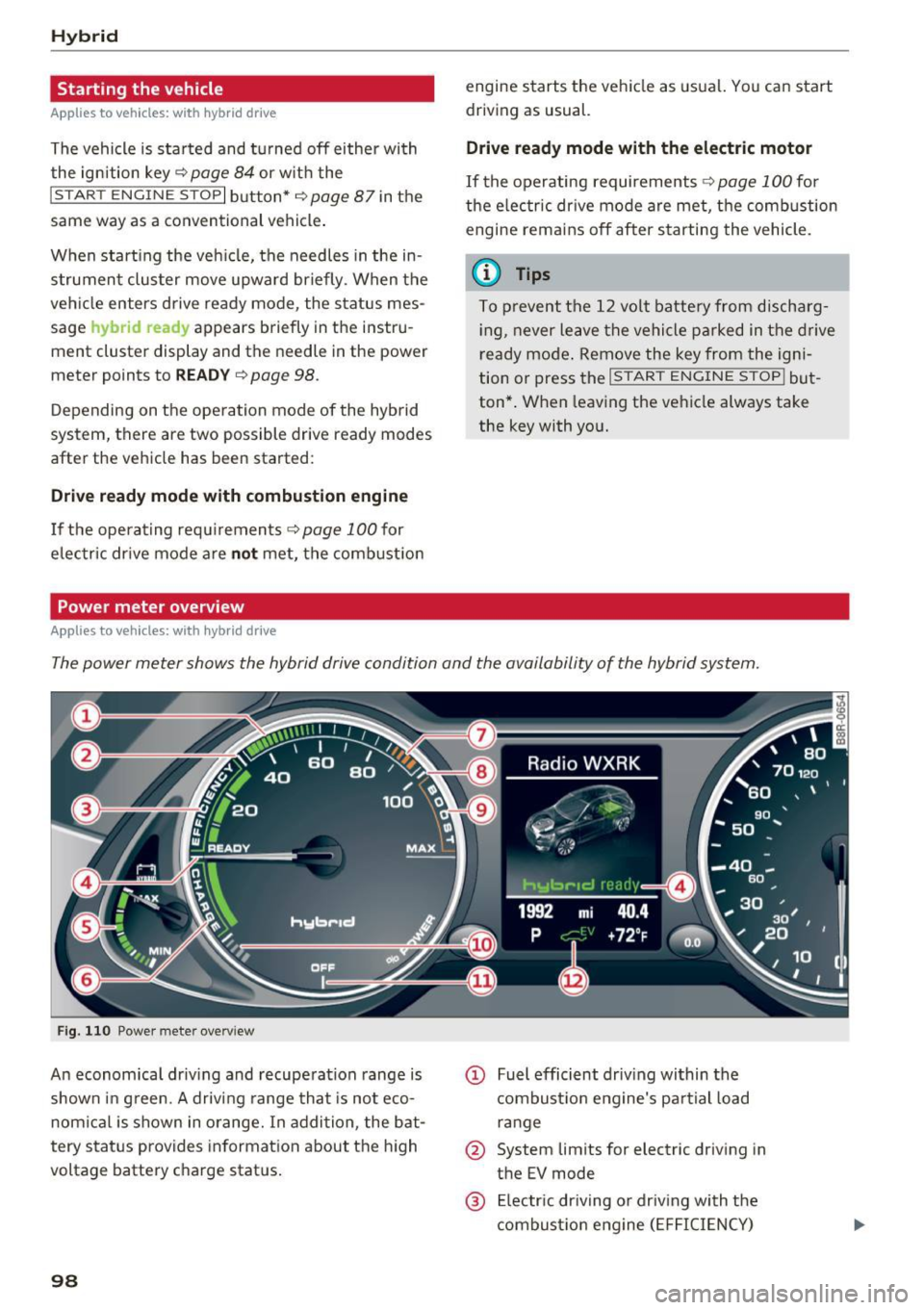
The power meter shows the hybrid drive condition and the availability of the hybrid system.
Fi g. 11 0 Power meter overv iew
An economica l driv ing and recuperation range is
shown in g reen. A driving range that is not eco
nom ical is shown in o range. In addition , the bat
tery status provides informat ion a bout the h igh
voltage battery charge stat us.
98
@ Fuel efficient dr iv ing within the
combust io n eng ine's pa rtial load
r an ge
@ System lim its for electr ic driving in
the EV mode
@ El ectr ic dr iving o r driving with the
combustio n eng ine ( EFFICIENCY)
Page 101 of 300

© Vehicle drive ready (READY)
® H igh voltage battery charge status
@ Recupe ration (CHARG E)
(J) Driving within the combustion en
g ine's full load range
@ 100% combust ion engine
® Boosting - the elect ric engine as
sists the combustion engine (BOOST)
@ E ngaging the conve ntiona l brakes
with recuperat ion
@ Vehicle not drive ready (OFF)
@ EV mode act ive
The need le remains at
OFF whe n the ignition is
turned on. When the veh icle enters drive ready
mode, the status message
hybrid ready appears
briefly in the instrument cluster d isplay and the
needle in the powe r meter poi nts to
READY .
Indicator lights and messages
Applies to vehicles: with hybrid drive
The indica to r li gh ts in the inst rument cluste r
b link or tur n on. They indicate functions or mal
f u nctions .
W ith some ind icator lights, messages may ap
pear and a warning tone may sou nd . A lso note
the ind icator lights in
<=:> page 2 7.
Press brake pedal to start vehicle
This message appears if you do not press the
b rake pedal whe n starting the vehicle.
Shift to N or P to start vehicle
This message appea rs if the selecto r leve r fo r the
automatic transm iss ion is not in the Nor P posi
tions whe n starting the vehicle .
-Hybrid drive: System fault! Power
brakes , steering malfunction pos sible
If the indicator lig ht turns on and th is message
appears, there is a malfunction in the hybrid sys
tem. The brake booster and the power steeri ng
~ may stop working . Stop the vehicle in a safe loca -
co g:; tion as soon as possible.
Hybrid
You may con tinue dr iving i f the indicator light
tu rns off after sta rt ing the ve hicl e several times .
Drive to an authorized repa ir facility immed iate ly
to have the malfunction cor rected .
f#iifj:j;jj,j Hybrid drive: System fault! Contact
dealer
If the indicator light turns on and this message
appea rs, there is a ma lfunction in the hybrid sys
tem. Drive to an autho rized repair fac ility imme
diately to have the malfunct io n corrected.
(II Hybrid system : Performance rest ricted .
Please contact dealer
If the indicator light turns on and this message
appears, there is an eng ine control malfunction .
The
[Ia i ndica to r li ght in the ins trument clus te r
also t urns on. The engine ou tput is red uced .
Dr ive to your authori zed A udi dealer or qualified
r ep air fa cility i mme diate ly to h ave the m alfu n c
t io n corre cte d.
Hybrid drive deactivated. Please restart
engine manually.
T h is m ess age appe ars if t he high vo lt a ge b attery
c h arge leve l h as fallen below a cer tain range or i f
t h e ig nition key is no longer i nsid e the veh icle for
vehicles with the convenience key* .
Start the engi ne w it h eithe r th e ig nitio n key
<=:> page 84 o r wi th the !START ENGI NE STOPI
button* <=:> page 87.
Hybrid battery: Low battery charge. Battery
will be charged while driving.
T h is mess age app ea rs if the high vo lt a ge b att ery
c h arge leve l has fallen be low a certa in range . If
t hi s message turns off afte r a litt le while, the
high voltage battery cha rged enoug h while driv
ing .
If the message does not turn off, have an au thor
ized repair facility cor rect the ma lf u nction as
soon as possib le .
EV mode is currently unavailable.
Th is me ssa ge appears if the con ditions
<=:> page 10 0 for enhanced ele ctric drivi ng ar e not
met. Try aga in at a late r time .
99
Page 103 of 300
,....,
N
co
er::
co
,....,
The combustion engine is operated on ly as need
ed . Gene rally, the combustion engine turns off
when the vehicle is stationary and the high vo lt
age battery powers the electrical vehicle sys
tems.
The purpose of automatica lly shutting the com
bustion engine off in hybrid drive mode is to save
fuel. All of the important vehicle systems, such
as steering, brakes and the A/C system, continue
to rema in active. In some cases, systems may re
qu ire the combustion eng ine to continue running
when the vehicle is stationary . When dr iving in
congested traffic for long periods of t ime, the
combustion engine will cycle on when the veh icle
is stat iona ry to keep the h igh voltage battery
charged.
Gliding
If the gas pedal is not pressed and the D posit ion
is selected, the combustion engine remains
turned off up to speeds of app roximately 99 mph
(160 km/h) . D riving conservat ively like th is can
reduce fuel c:on5umption .
Energy recovery (recuperation )
When braking, the electric motor will act as a
generator creating electr ic energy that is then
sto red in the high voltage battery. This also oc
curs when the ve hicle is coasting or dr iving down
hill. The combustion engine is automatica lly
turned off in this case.
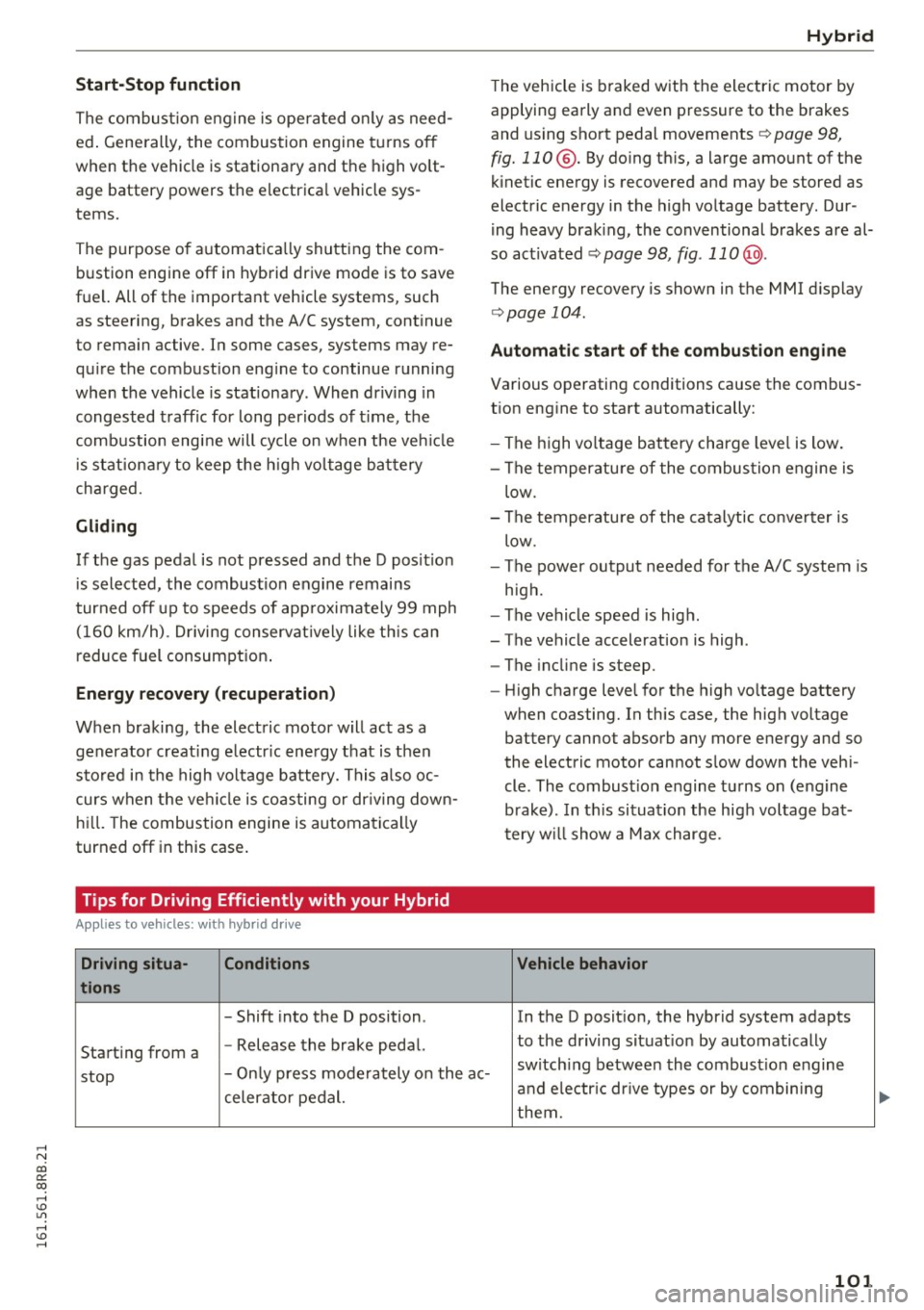
Tips for Driving Efficiently with your Hybrid
A ppl ies to vehicles: with hybr id drive
Driving situa- Conditions
tions
- Shift into the D position .
Starting from a -
Release the brake pedal.
Hybrid
The vehicle is braked with the electric motor by
applying early and even pressure to the brakes
and using short pedal movements~
page 98,
fig. 110 @. By doing this, a large amount of the
kinetic energy is recovered and may be stored as
electric energy in the high voltage battery. Dur
i ng heavy brak ing, the conventional brakes are al
so act ivated
~ page 98, fig . 11 0@ .
The energy recovery is shown in the MMI d isplay
~ page 104 .
Automatic start of the combustion engine
Various operating conditions cause the combus
t ion eng ine to start automatically:
- The high vo ltage battery charge level is low.
- The temperatu re of the combustion engine is
low.
- The temperature of the catalytic converter is
low.
- The power output needed for the A/C system is
high.
- The vehicle speed is high .
- The vehicle acceleration is high .
- The incline is steep .
- High charge level for the high voltage battery
when coasting. In this case, the high voltage battery cannot absorb any more energy and so
the electric motor cannot slow down the veh i
cle . The combust ion engine turns on (engine
brake). In th is situation the high voltage bat
tery will show a Max charge.
Vehicle behavior
In the D posit ion, the hybrid system adapts
to the dr iving situat ion by automatically
stop -
Only press moderately on the ac- switch
ing between the combust ion engine
and e lectr ic dr ive types or by combining
celerator pedal.
them.
101
Page 104 of 300
Hybrid
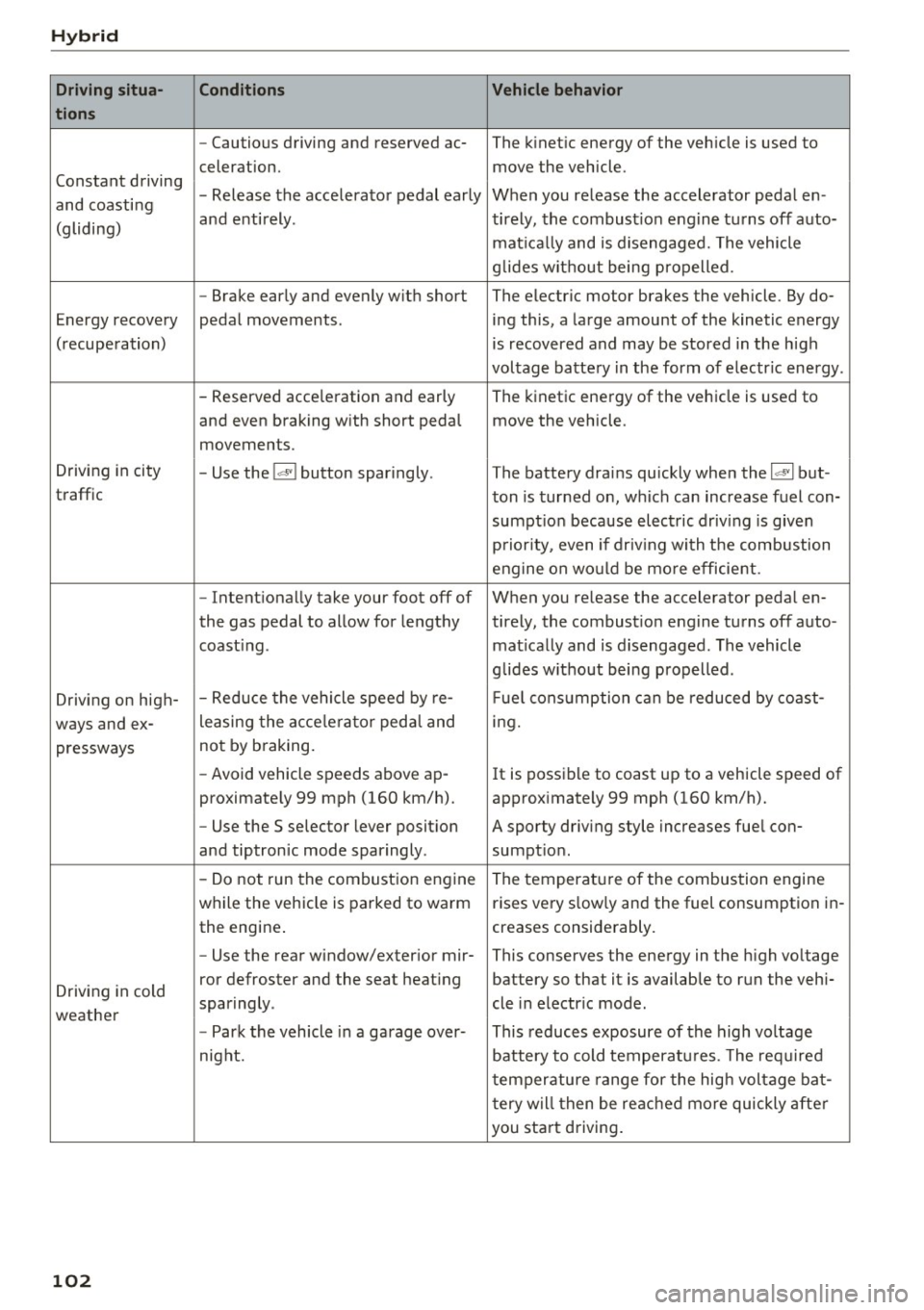
Driving situa- Conditions Vehicle behavior
tions
- Cautious driving and reserved ac- The kinetic energy of the vehicle is used to
celeration. move the vehicle.
Constant driving - Release the accelerator pedal early When you release the accelerator pedal en-
and coasting
and entirely. tirely, the combust ion engine turns off auto-
(gliding)
matically and is disengaged. The vehicle
g lides without being propelled.
- Brake early and evenly with short The electric motor brakes the vehicle . By do-
Energy recovery pedal movements. ing this, a large amount of the kinetic energy
(recuperation) is recovered and may be stored in the high
voltage battery in the form of electr ic energy .
- Reserved acce leration and early The kinetic energy of the vehicle is used to
and even braking w ith short pedal move the vehicle .
movements.
Driving in city
- Use the
l~I button sparingly. The battery drains quickly when the 1~ 1 but -
traffic ton is turned on, which can increase fuel con-
sumpt ion because electric driv ing is given
priority, even if driv ing with the combustion
engine on would be mo re efficient.
- Intentionally take your foot off of When you release the accelerator pedal en-
the gas pedal to allow for lengthy ti rely, the combustion engine turns off auto-
coast ing . matically and is disengaged. The vehicle
glides w ithout being propelled .
Driving on high- - Reduce
the vehicle speed by re- Fuel consumption can be reduced by coast-
ways and ex- leasing
the acce lerato r peda l and ing.
pressways not
by braking.
- Avoid vehicle speeds above ap -
It is possible to coast up to a vehicle speed of
proximately 99 mph (160 km/h). approximately 99 mph (160 km/h).
- Use the S selector lever posit ion A sporty driving style increases fuel con-
and tiptronic mode sparingly . sumption .
- Do not run the combustion engine
The temperature of the combustion engine
while the vehicle is parked to warm rises very s
low ly and the fuel consumption in-
the engine . creases considerably.
- Use the rear window/exterior
mir-This conserves the energy in the high voltage
Driving in cold ror defroster and the seat
heating battery so that it is available to run the vehi-
sparingly . cle in electric mode .
weather
-Park the vehicle in a garage over- This reduces exposure of the high voltage
night. battery to cold temperatures. The required
temperature range for the high voltage bat-
tery will then be reached more quickly after
you start driving.
102
Page 105 of 300
..... N
co ~ CX)
..... I.Cl U"I
..... I.Cl .....
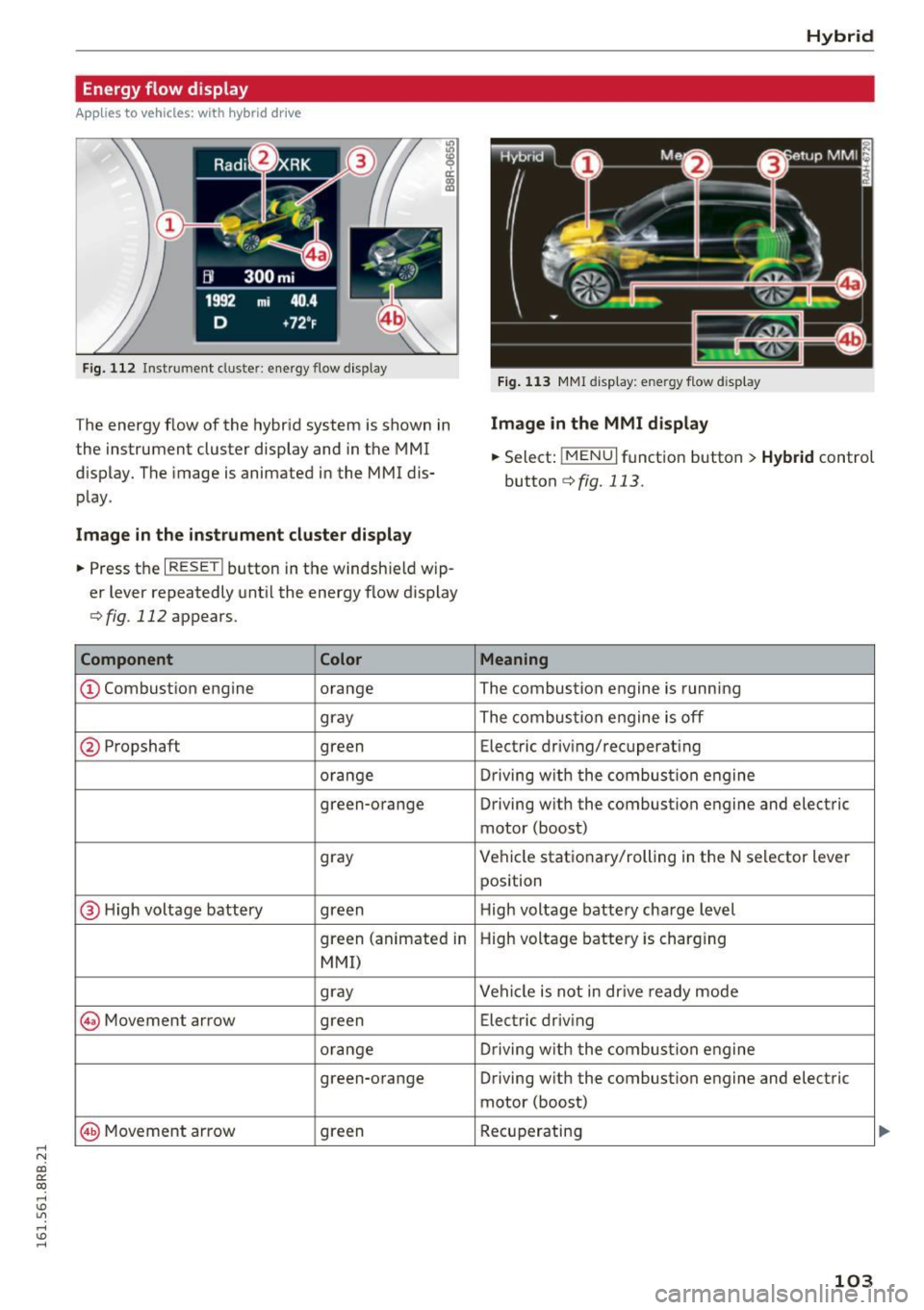
Energy flow display
Applies to vehicles: with hybrid drive
Fig . 112 Instrument cluster : ene rgy flow display
The energy flow of the hybrid system is shown in
the instrument cluster display and in the MMI
d isplay. The image is animated in the MMI dis
play.
Image in the instrument cluster display
.. Press the I RESET I button in the windsh ield wip
er lever repeatedly until the energy flow display
¢fig. 112 appears.
Component Color
@Combustion engine orange
gray
@ Propshaft green
orange
green-orange
gray
@ H
igh voltage battery green
green (animate d in
MMI)
gray
@ Movement arrow green
orange
green-orange
@ M
ovement arrow green
Hybrid
Fig. 113 MMI disp lay: energy flow d isplay
Image in the MMI display
.,. Select: I MEN u I fun ction button > Hybrid control
button
¢ fig. 113.
Meaning
The combustion engine is running
The comb ustion eng ine is off
Electric driv ing/recuperat ing
Driving with t he combustion engine
Driving with the combustion engine and electric
motor (boost)
Vehicle stationary/rolling in the N selector lever
position
High voltage battery charge level
High voltage battery is charging
Vehicle is not in drive ready mode
Electric driv ing
Dr iving w ith the combustion engine
Driving with the combustion engine and electric
motor (boost)
Recuperating
103
Page 106 of 300
Hybrid
@ Tips
The Energy flow display will not shown in the MMI display when the reverse gear is engag-
ed, due to safety reasons.
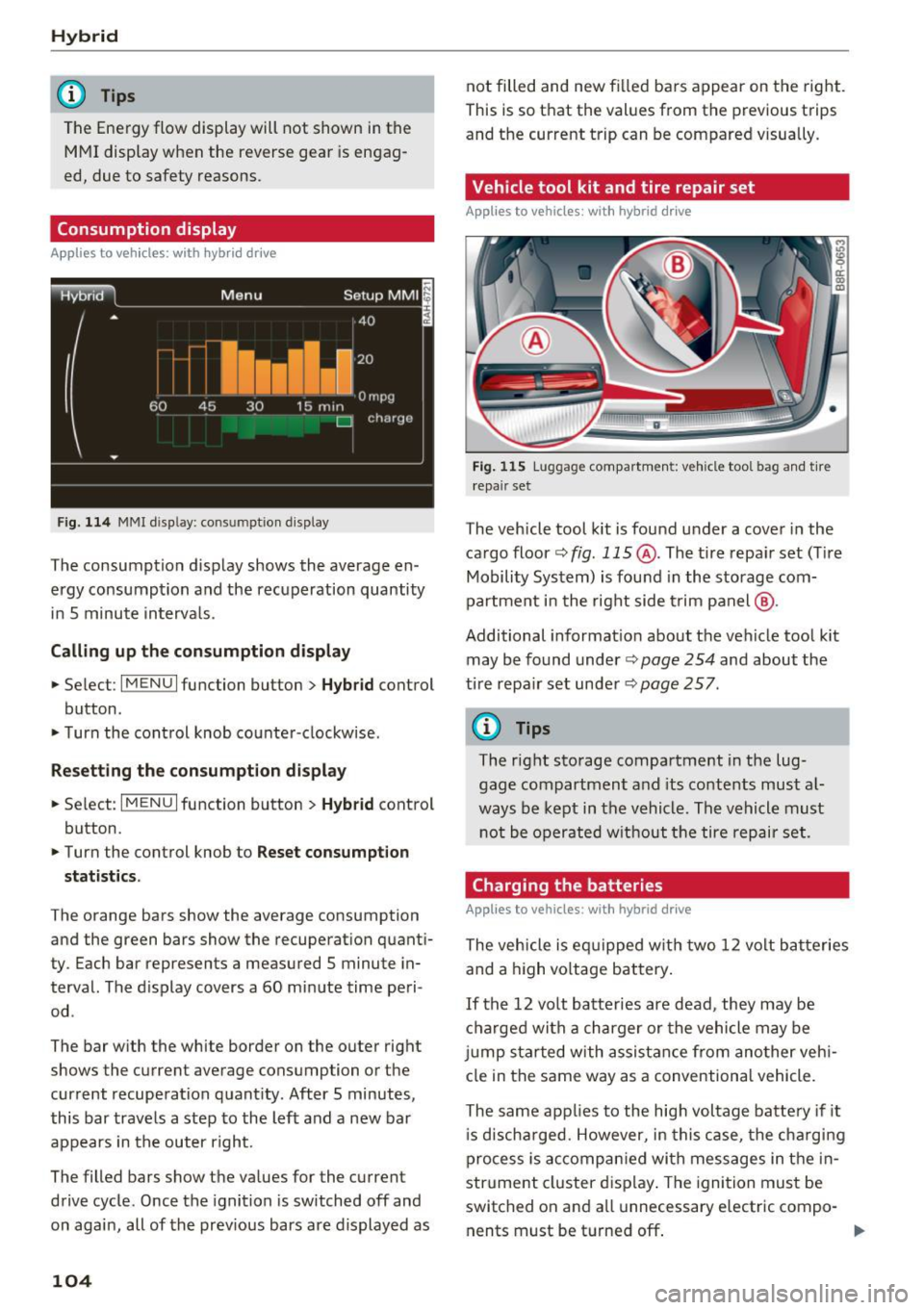
Consumption display
App lies to veh icles: w ith hybrid drive
Fig. 114 MMI disp lay : co nsum ption display
The consumption display shows the average en
ergy consumption and the recuperation quantity
in 5 minute intervals .
Calling up the consumption display
• Select : I MENU I function button> Hybrid control
button .
• Turn the control knob counter -clockwise.
Resetting the consumption display
• Select : I MENU I function button > Hybrid control
button.
• Turn the control knob to
Reset consumption
statistics.
The orange bars show the average consumption
and the green bars show the recuperation quanti
ty . Each bar represents a measured 5 minute in
terval. The display covers a
60 minute time peri
od .
The bar with the white border on the outer right shows the current average consumption or the
current recuperation quantity. After 5 minutes,
this bar travels a step to the left and a new bar
appears in the outer right.
The filled bars show the values for the current
drive cycle. Once the ignition is switched off and
on again, all of the previous bars are displayed as
104
not filled and new filled bars appear on the right.
This is so that the values from the previous trips
and the current trip can be compared visually .
Vehicle tool kit and tire repair set
Applies to vehicles: with hybrid drive
Fig. 115 Luggage compartmen t: v ehicle tool bag and tir e
repair set
The vehicle tool kit is found under a cover in the
cargo floor~
fig. 115 @. The tire repair set (Tire
Mobility System) is found in the storage com
partment in the right side trim panel @.
Additional information about the vehicle tool kit
may be found under~
page 254 and about the
tire repair set under
~page 257 .
@ Tips
The right storage compartment in the lug
gage compartment and its contents must al
ways be kept in the vehicle. The vehicle must
not be operated without the tire repair set .
Charging the batteries
Applies to vehicles: with hybrid drive
The vehicle is equipped with two 12 volt batteries
and a high voltage battery.
If the 12 volt batteries are dead , they may be
charged with a charger or the vehicle may be
jump started with assistance from another vehi
cle in the same way as a conventional vehicle.
The same applies to the high voltage battery if it
is discharged. However, in this case, the charging
process is accompanied with messages in the in
strument cluster display. The ignition must be
switched on and all unnecessary electric compo- nents must be turned off. ..,.
Page 115 of 300
,....,
N
co
er::
co
,....,
promptly detected or may not be detected
at all.
- Reflective surfaces including crash barriers
or tunnel entrances may impair the function
of the radar sensor.
(D Tips
- You can cancel the braking that is initiated
by the system by braking yourse lf, by accel
erating noticeably or by swerving.
- Braking guard error messages
¢page 113 .
-Keep in mind that braking guard can brake
unexpected ly. Always secure any cargo or
objects that you are transporting to reduce
the risk of damage or injury.
Settings in the radio/MMI*
App lies to vehicles: with Audi adaptive cruise co ntro l
... Se lect : I CARI funct ion button > Au di bra king
guard .
Or
... Select:
~ I C~ A~ R~ I funct ion button > Car sy stem s*
contro l bu tton > Driv er a ssis t> A udi br aking
g uard .
S ystem -
Switch braking guard On and Off. When
you switch the ig nition on, the message
Brak ing
guard: Off
appears if the system is switched off .
Early warning -The distance and approach warn
ings in the display can be switched
On /Off .
{D) Tips
-Your settings are automatically stored and
ass igned to the remote control key being
used at the times the sett ings are made
¢ page 36.
-If you restrict the ESC, the braking guard al
so switches itse lf off ¢
page 191.
-Switch braking guard off when you are load
i ng the veh icle onto a vehicle carr ier, train,
sh ip or other type of transportation . This
can p revent undesired warnings from the
braking gua rd system.
Messages
App lies to vehicles: with Audi adaptive cruise contro l
Braking guard : Off
This driver message appears if the system is
turned off via the radio/MM I *. Otherwise, if the
system is turned off, the information appears ev
ery time shortly after the start of the trip.
The driver message a lso appears if the system is
not availab le due to a malfunction or if the ESC is
not switched on
¢ page 191 . If th is is the case,
the system w ill not provide warnings about a
poss ible coll is ion.
B rak ing guard : Activated
T h is dr iver message appears if sharp b rake pres
s ur e was applied due to an acute warning.
•••
Three white dots appear if a setting cannot be se
lected w ith the operating lever . For example, this
happens if you want to ra ise/lower the speed
even though the re was no p reviously saved
speed.
A CC : Sensor bloc ked
This message appears if the sensor v iew is ob
structed, for examp le by leaves, snow, heavy
spray or dirt. Clean the sensor¢
page 106,
fig. 116.
ACC: Unavailable
The driver mess age appears if, for examp le, the
brake tempera ture is too high. The adaptive
cruise contro l is temporarily unavailable. A chime
sounds as a reminder .
ACC: Not available
The driver message appears if there is a malfunc
t ion. The adaptive cruise control tu rns off. A
c hi me so unds as a reminde r. Have the system
c hec ked by an author ized Audi dealer or au thor
ized Audi Service Facility .
Shift lever position!
The driver message appears if the selector lever
is shifted to the N pos ition . The adapt ive cru ise
control is not available wh ile in this position .
Stabilization cont rol (ESC)
T his message appears if the E lectronic Stabi liza
t ion Control (ESC) is taking action to stabi lize the ..,.
113
Page 127 of 300
,....,
N
co
er::
co
,....,
running while in gear. If you must leave
your vehicle when the engine is running, ac tivate the parking brake and move the selec
tor lever to P.
- Power is still transmitted to the wheels
when the engine is running at idle. To pre
vent the vehicle from "creeping", you must keep your foot on the brake when the en
gine is running and the selector lever is in D/
5 or R or "tiptronic" mode is selected .
- Do not press the accelerator pedal when
changing the selector lever position while
the vehicle is stationary and the engine is running.
- Never shift into R or P while driving.
- Before driving down a steep slope, reduce
your speed and shift into a lower gear with "tiptronic" .
- Do not ride the brakes or press the brake
pedal too often or too long when driving
down a hill. Constant braking causes the
brakes to overheat and substantially re
duces braking performance, increases brak
ing distance or causes complete failure of
the brake system .
- To prevent the vehicle from rolling back
when stopping on inclines, always hold it in
place with the brake pedal or parking brake.
- Never hold the vehicle on an incline with a
slipping clutch. The clutch opens automati
cally when it becomes too hot from the
overload . An indicator lamp
[ijJ illuminates
and a driver message appears
c> page 126
when the clutch is overloaded .
- If the engine must remain running, never
have any driving position engaged when
checking under the hood.
Make sure these
lector lever has securely engaged and is
locked in P with the parking brake set
c> page 220. Otherwise, any increase in en
gine speed may set the vehicle in motion,
even with the parking brake applied.
(D Note
- When stopping on an incline, do not try to
hold the vehicle in place by pressing the ac
celerator pedal while a driving gear is se-
Automatic transmission
lected. This can cause the transmission to
overheat and can damage it. Activate the
parking brake or press the brake pedal to
prevent the vehicle from rolling.
- Allowing the vehicle to roll when the engine
is stopped and the selector lever is in N will
damage the transmission because it is not
lubricated under those circumstances.
(!) Tips
For safety reasons, the parking brake is re
leased automatically only when the driver's
safety belt is engaged in the buckle.
Hill descent control
The hill descent control system assists the driver
when driving down decline s.
Hill descent control is activated when the selec
to r lever is in D/S and you press the brake pedal.
The transmission automatically selects a gear
tha t is suitable for the incline. Hill descent con
trol tries to maintain the speed achieved at the
time of braking, within physical and technical
limitations. It may still be necessary to adjust the
speed with the brakes .
Hill descent control switches off once the decline
levels out or you press the accelerator pedal.
When the speed is set in the cruise control sys
tem
c> page 95 , hill descen t control is also ac ti
vated .
A WARNING
Hill descent control cannot overcome physical
limitations, so it may not be able to maintain
a constant speed under all conditions . Always
be ready to apply the brakes.
125
Page 136 of 300
Driving sa fe ty
Driving safety
Basics
Safe driving habits
Please remember -safe ty first!
This chapter contains important information,
tips, instruct ions and warn ings that you need to
read and observe for your own safety, the safety
of your passengers and others. We have summar ized here what you need to know about safety
be lts, a irbags, child restra ints as well as child
safety. Your safety is for us
priority number 1 . Al
ways observe the i nfo rmation and wa rn ings in
this section - for your own safety as well as that
of your passengers.
The information i n this section applies to all
model versions of yo ur vehicle . Some of the fea
tures descr ibed in t his sections may be s tanda rd
equipment on some models, or may be optional
equipment on others . If you are not sure, ask
your authorized Audi dealer.
A WARNING
- Always make sure that you follow the in
structions and heed the WARNINGS in th is
Manual.
It is in your interest and in the in
te rest of your passengers .
- Always keep the comp lete Owner's Litera
ture in your A udi when you lend or sell your
vehicle so that this important information
will always be available to the d river and
passenge rs.
- Always keep the Owner 's literature handy so
that you can find it easily if you have ques
t ions.
Safety equipment
The safety features are part of the occupant re
straint system and work together to help reduce
the risk of injury in a wide variety of occident si t
uations.
Your safety and the safety of your passenge rs
should not be left to chance. Advan ces i n tech
nology have made a var iety of features avai lab le
to help reduce t he risk of injury in an accident .
134
The following is a list of just a few of the sa fety
features in your Audi :
- sophis tica ted safety be lts fo r dr ive r and all pas-
senge r seat ing pos itions,
- belt fo rce limi ters for the front seats,
- be lt pretensione rs fo r the seats,
- belt height adjustment for the front seats,
- head restraints for each seating position,
- front airbags,
- side airbags in the front seats and outer rear
seats *,
- side curtain airbags,
- special LAT CH anchorages for ch ild rest rai nts,
- adj ustab le steer ing column.
T hese ind iv idual safety features , can work to
gether as a system to help protect you and your
passengers in a wide range of acc idents. These
features cannot wo rk as a system if they are not
a lways correc tly ad justed a nd cor rect ly used.
Safety i s everybody' s responsibil ity!
Important things to do before driving
Safety is everybody 's job! Vehicle and occupant
safety always depends on the informed and care
ful driver .
For your safety and the safety of your passen
gers,
before driving always:
.,. Make sure that a ll lights and signals are operat
ing correctly .
.,. Make sure that the tire pressure is correct .
.,. Make sure that all windows are clean and afford
good vis ibility to the outs ide .
.,. Secure all luggage and othe r items ca refully
i=> page 77 .
.,. Ma ke sure that noth ing ca n interfere wi th the
pedals.
.,. Adjust front seat, head rest raint and mirrors
correctly for yo ur height.
.,. Instruct passeng ers to adjust the head re
straints according to their he ight.
.,. Make sure to use the rig ht child restraint cor
rectly to protect children
c> page 171 , Child
safety . ..,.