lights AUDI Q5 2016 Owner's Guide
[x] Cancel search | Manufacturer: AUDI, Model Year: 2016, Model line: Q5, Model: AUDI Q5 2016Pages: 300, PDF Size: 75.02 MB
Page 67 of 300
..... N
co ~ CX)
..... I.Cl U"I
..... I.Cl .....
Memory function
Memory for driver's seat
Applies to vehicles: with seat memory
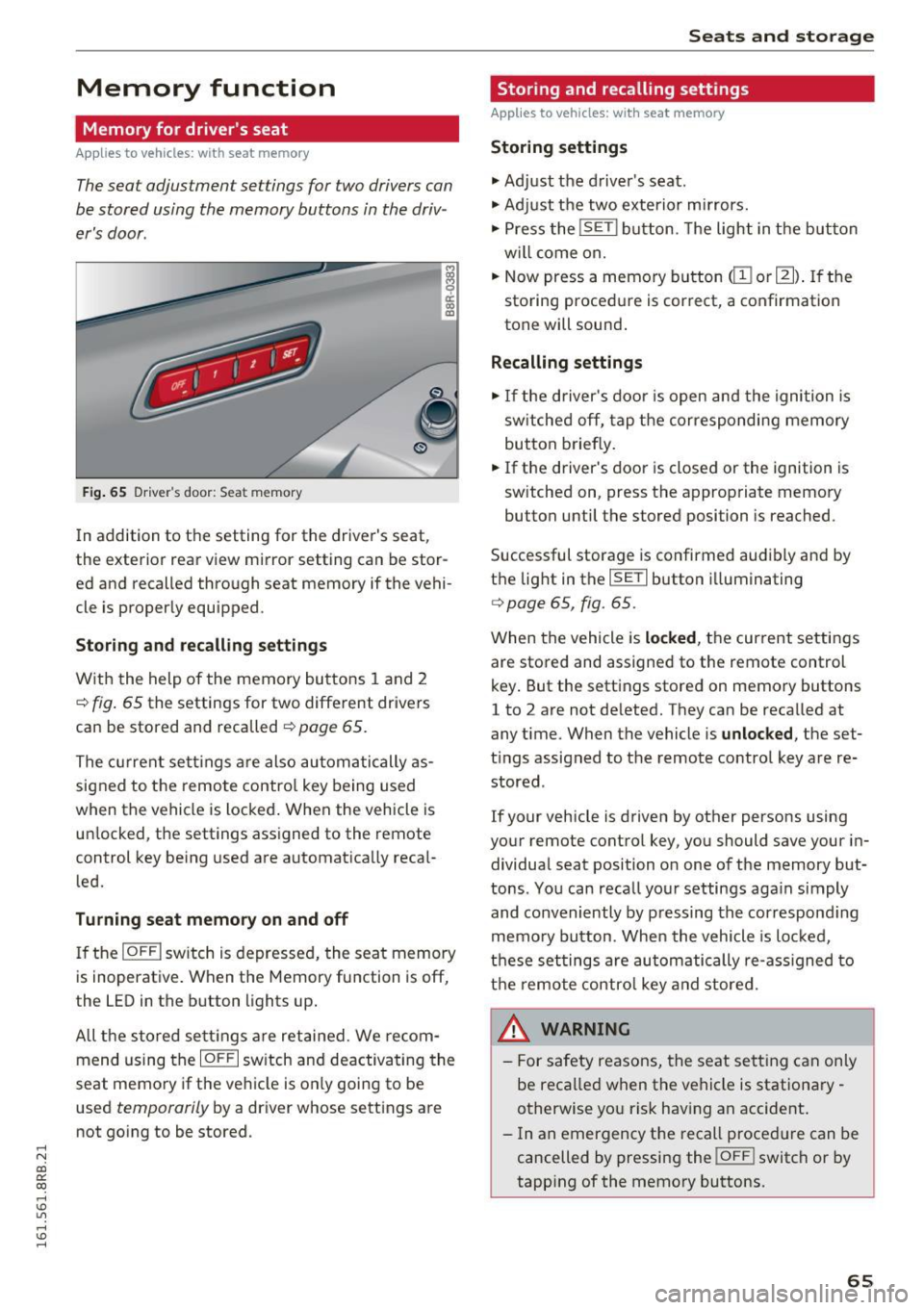
The seat adjustment settings for two drivers con
be stored using the memory buttons in the driv
er's door .
Fig . 65 D ri ver's door : Sea t memory
! co ID
In addition to the setting for the driver's seat ,
the exterior rear view mirror setting can be stor
ed and recalled through seat memory if the vehi
cle is proper ly equ ipped .
Storing and recall ing s ettings
With the help of the memory buttons 1 and 2
¢ fig . 65 the settings for two different drivers
can be stored and recalled
¢ page 65.
The cu rrent sett ings are also automatically as
signed to the remote contro l key being used
when the vehicle is locked . When the vehicle is
un locked, the settings ass igned to the remote
control key being used are automatica lly reca l
led.
Turning seat memory on and off
If the IO FFI sw itch is depressed, the seat memory
is inoperat ive . When the Memory fu nction is off,
the LED in the button lights up .
All the sto red se ttings a re retained. We recom
mend us ing the
IO FF I sw itch and deactivating the
seat memory if the ve hicle is on ly going to be
used
temporarily by a driver whose settings are
not go ing to be stored .
Seats and storag e
Storing and recalling settings
Applies to vehicles: with seat memory
Storing settings
.,. Adj ust the d river's seat.
.,. Adjust the two exterior mirrors.
.,. Press the
!S ET I button. The light in the button
w ill come on.
.,. Now press a memory button
(ill or 121) . If th e
sto ring procedure is correct, a confirmation
tone will sound .
Recalling settings
.,. If the driver's door is open and the ignition is
sw itched off, tap the corresponding memory
button briefly .
.,. If the driver's door is closed or the ignition is
sw itched on, press the approp riate memory
button until the stored position is reached.
Successful storage is confirmed audibly and by
t h e light in the
ISET I button i lluminating
r=> poge 65, fig. 65.
When the vehicle is locked , the current settings
are stored and assigned to the remote control
key . But the settings stored on memory buttons
1 to 2 are not de leted. They can be reca lled at
any time . When the vehicle is
unlocked , the set
t ings assigned to the remote control key are re
stored .
If your vehicle is driven by other persons using
your remote control key, you should save your in
dividua l seat position o n one of the memory but
tons . You can reca ll you r settings aga in simply
and conveniently by pressing the correspond ing
memo ry button. When the vehicle is loc ked,
t h ese settings are automatically re-ass igned to
t h e remo te contro l key and stored.
_& WARNING
-
- For safety reasons, the seat sett ing can on ly
be recalled when the vehicle is stationa ry -
otherwise yo u risk having an accident .
- In an emergency the recall proced ure can be
cancelled by pressing the
! OF FI switch or by
tapp ing of the memory bu ttons.
65
Page 87 of 300
,....,
N
co
er::
co
,....,
when starting the engine for diesel vehicles* in
colder temperatures. Therefore, you must hold
the brake pedal down until the engine starts.
The indicator lamp
1,1 illuminates when the en
gine is preheated .
Switching the ignit ion on /off
If you would like to switch the ignition on with
out starting the engine, follow these steps:
~ Inse rt the key into the ignition lock .
~ Press the key briefly without press the brake
pedal.
~ To switch the ignition off, press the key again.
Diese l vehicles* are preheated while the ignition
is switched on.
When start ing the e ngine, major electrical loads
are switched off tempora rily.
You can on ly remove the key with the ignition
switched off. To do th is, you have to press on the
key aga in.
I f the engine should not start immediately, the
starting process is automat ically stopped after a
short time. Repeat sta rting procedu re .
St art-Sto p-S ystem*:
Note the information on c:> page 91, Start/Stop
system .
A WARNING
-Never allow the engine to run in confined
spaces -dange r of asphyxiation .
- Never remove the ignit ion key from the ign i
t ion lock while the vehicle is moving . Other
wise, the stee ring lock cou ld suddenly en
gage and you would not be able to stee r the
vehicle .
- Always ta ke the key with you whenever you
leave you r vehicle. Othe rw ise, the engine
c ou ld be started or electrical eq uipment
such as the power windows cou ld be operat
ed. This can lead to serious injury.
- Never leave children or persons requiring as
sistance unattended in the vehicle. The
doors can be locked using the remote trans-
-
Driv ing
mitter, preventing peop le from escaping
from the vehicle on their own in the event of
an emergency. Depending on the time of
year, people ins ide the veh icle can be ex
posed to very h igh or very low tempera
tures.
(D Note
Avo id h igh engine rpm, full throttle and heavy
engine loads until the engine has reached op
erating temperature -otherw ise you risk en
gine damage .
@ For the sake of the environment
Do not let the engine run wh ile parked to
warm up. Beg in driving immed iately. T his re
duces unnecessa ry emissions.
(D Tips
- If the key cannot be removed from the ign i
tion lock, you have to pull the mechanical key out of the master key in o rder to be able
to lock the vehicle
c:> page 38.
- Some noise after start ing the engine is nor
ma l and is no cause for conce rn.
- If you leave the vehicle w ith the ignition
switched on, the ignit ion w ill switch off af
ter a ce rtain per iod of t ime. Please note that
elect rical eq uipment such as exterior lights
w ill switch off as we ll when that happens.
85
Page 90 of 300
Driving
electrical equipment such as exterior lights
will switch off as well when that happens.
Switching engine off
Applies to veh icles: w ith Conven ience key
~ Bring your vehicle to a complete stop.
~ Move the selector lever to the P or N position.
~ Press the I START ENGIN E STOPI button
¢page 87, fig. 10 2.
Steering lock
The steering locks when you turn the engine off
using the
!START ENGINE STOP ! button and
open the driver 's door. The locked steering helps
prevent vehicle theft.
Emergency off
If necessary, the engine can be switched off with
the s ele ctor lever in the R or D/S position. The
engine stops if you press and hold the
!START ENGINE STOP! button at speeds below
6 mph (10 km/h) and press the brake pedal.
A WARNING
- Never turn off the engine before the vehicle
has come to a complete stop. The full func
t ion of the brake booster and the power
steering is not guaranteed. You must use
more force to turn or brake if necessary. Be
cause you cannot steer and brake as you
usually would, this could lead to crashes
and serious injuries.
- For safety reasons, you should always park
your vehicle with the selector lever in P.
Otherwise, the vehicle could inadvertently
roll away .
- The radiator fan can continue to run for up
to 10 minutes even after you have turned
off the engine and removed the ignition key.
The radiator fan can also turn on again if the
engine coolant heats up because of intense
sunlight or heat build-up in the engine com
partment.
- Always take the key with you whenever you
leave your vehicle. Otherwise, the engine
could be started or electrical equipment
88
such as the power windows could be operat
ed. This can lead to serious injury.
- Never leave children or persons requiring as
sistance unattended in the vehicle. The
doors can be locked using the remote trans
mitter, preventing people from escaping
from the vehicle on their own in the event of
an emergency. Depending on the time of
year, people inside the vehicle can be ex
posed to very high or very low tempera
tures.
0 Note
If the engine has been under heavy load for
an extended period, heat builds up in the en
gine compartment after the engine is switch
ed off -there is a risk of damaging the engine.
Allow the engine to run at idle for about two
minutes before switching it off.
Driver messages
Ignition is on
This message appears and a warning tone sounds
if you open the driver 's door when the ignition is
switched on.
No key identified
This message appears when the
ISTART E NGIN E STOP !* button is pressed if there
is no master key inside the vehicle or if the sys
tem does not recognize it. For example, the mas
ter key cannot be recognized if it is covered by an
object (e .g . aluminum brief case) which
screens
the radio s ignal. Electronic devices such as cell
phones can also interfere with the radio signal.
Press brake pedal to start engine
This message appears if you do not press the
brake pedal to start the engine .
Shift to N or P to start engine
This message appears when attempting to start
the engine if the selector lever for the automatic
transmission is not in the P or N position. The en
gine can only be started with the selector in
these positions.
ll-
Page 91 of 300

..... N
co ~ CX)
..... I.Cl U"I
..... I.Cl .....
!I Is the ke y in the vehicle ?
This message appears in a veh icle w ith Conven
ience key* if the master key is removed from the
ve hicle w ith the engine r unning.
If the master
key is no longer in the vehicle, you cannot switch
on the ignition after stopping the engine and you
also cannot start the eng ine again. Moreover, you
cannot lock the veh icle from the outside with the
key.
Shift to P othe rwis e vehicle c an roll away . Doors
do not l ock if lever i s not in
P.
This message appears for safe ty reasons a long
with a warning s ignal.
It appears i f the selector
lever for the automatic transmission is not in the
P posit ion when switching
off the ignition. Move
the selector lever to the P posit ion, otherwise the
vehicle is not secured aga inst rolling away . You
also cannot lock the vehicle using the locking button* on the door handle or using the remote
key .
Turn off ignit io n befo re lea ving car
Th is message appears if the driver's door is
opened while the ignition is switched on . Always
switch
off the ignition if you are leaving the vehi
cle . See also
c:;, page 93.
Turn off ignit ion befo re lea ving car. Batte ry is
dis charging
This message appears if the d river's door is
ope ned while the ignition is switched on. Always
switch
off the ignition if you are leaving the vehi
cle . See a lso
c:;, page 93.
Shift to P and turn off ignition, otherwi se vehi
cle can roll awa y
This message appears if the driver 's door is
opened while the igni tion is sw itched on and t he
selec to r lever is not in t he P posit ion. Shift the
se lector lever into the P pos ition and switch of f
the ignition when you exit the vehicle . Otherwise
the vehicle cou ld roll . See also
c:;, page 93.
Con venien ce k ey defe cti ve ! Use igniti on lo ck
This message appears if the engine must be
started or stopped using the ignit ion key and not
the
! S TAR T ENGINE ST OPI* button .
Electromechanical
parking brake
Operation D
rivi ng
The electromechanical parking brake replaces
the hand brake.
F ig. 103 Center co nsole : P ark ing brake
.,. Pull on the switch Wl c:;, fig. 103 to apply the
parking brake. The indicator lights in the switch
and . (USA models)/ . (Canada models) in
the inst rument cluster illuminate .
.,. With the ignition switched on, step o n the
brake pedal or the accelerator pedal and press
t he swit ch(® at the same time to re lease the
parking brake . The indicator lights in the switch
and . (USA mode ls)/ . (Canada models) in
the instrument cluster go out.
You r vehicle is equ ipped wi th an electromechan i
ca l parking brake . The parking brake is designed
to prevent the vehicle from ro lling unintentional
ly and replaces the hand brake.
In add ition to the normal functions of a trad i
t iona l han d brake, the electromechanical parking
brake provides va rious convenience and safety
funct ions .
When starting from rest
-The integra l sta rting assist he lps yo u when
driving by automati cally releas ing the pa rking
brake
c:;, page 90, Starting from res t.
-When start ing on incline s, t he s tart ing assist
prevents the vehicle from uninten tionally ro ll
ing back . The braking force of the parking brake
is not re leased unti l sufficient driving force has
been built up at the wheels. .,.
89
Page 92 of 300
Driving
E m erg ency b ra ke function
An emergency b rake ensures that the veh icle can
be slowed down even if the normal brakes fai l
¢ page 91, Emergency broking.
A WARNING
If a drive range is engaged with the vehicle
stationary and the engine running, you must
in no instance accelerate care lessly. Other
w ise the vehicle will start to move immediate
ly -risk of an accident.
(D Tips
- If the parking brake is app lied with the igni
tion switched off, the indicator lights in the
switch and. (USA models)/ . (Cana-
da models) in the instrument cluster will go
out after a ce rtain per iod of t ime.
- Occasiona l noises whe n the parking b rake is
applied and released are normal and are not
a cause for conce rn.
- When the vehicle is par ked, the park ing
brake goes thro ugh a self-test cycle at regu
l a r i nte rvals. Any associa ted noises a re nor
mal.
Parking
" Press the brake ped al to stop the vehicle.
" Pull the switch
¢ page 89, fig. 103 to set the
parking brake.
" Move the selector lever to P.
" Turn the eng ine off¢ &_.
-
"When on incl ines or declines, turn the steering
wheel so that the vehicle w ill roll into the curb
if it beg ins to move .
A WARNING
-When you leave your vehi cle - even if on ly
br iefly- always remove the ign ition key. This
applies particular ly when c hildren remain in
the vehicle . Otherwise the children could
sta rt the engine, release the pa rking brake
or operate electrical eq uipment (e .g. power
windows). There is the risk of an acc ident.
- When the vehicle is loc ked, no one - particu
larly not children shou ld remain in the vehi-
90
-
cle. Locked doors make it more d ifficult for
emergency wo rkers to get into the vehicle -
putting lives at risk.
Starting from rest
The starting assist function ensures that the
parking broke is released automatically upon
starting.
Stopping and applying park ing brake
" Pull the switch to app ly the parking b rake.
Starting and automat ically releasing the
park ing brake
" When you start to d rive as usua l, the par king
brake is automatically released and yo ur vehicle
beg ins to move.
When stopp ing at a t raffic sig na l or s topping in
c ity traff ic on vehicles with an automat ic t rans
mission, the pa rking brake can be applied . The
vehicle does not have to be held with the foot brake. The parking brake eliminates the tendency
to c reep w ith a dr ive range engaged . As soon as
you drive off as usual, the parking brake is re
leased automat ica lly and the vehicle starts to
move.
Starting on slope s
When starting on incl ines, the starting assist pre
vents the vehicle from un intent iona lly rolling
back. The braking force of the parking brake is
not re leased u nti l sufficient dr iv ing fo rce has
been built up at the wheels.
@ Tips
For safety reasons, the park ing brake is re
l eased automatically on ly when the d river's
safety be lt is engaged in the b uckle.
Starting off with a trailer
To prevent rolling bock unintentionally on on in
cline, do the following:
" Keep the switch pu lled and depress the acceler
ator. The park ing brake stays applied and pre-
vents the ve hicle from roll ing backward.
IJ,,
Page 95 of 300
..... N
co ~ CX)
..... I.Cl U"I
..... I.Cl .....
engine will no t be switched off in the following
situations:
- The eng ine has not reached the m in imum re
quired temperature for Start-Stop-mode.
- T he interior temperature selected by the A/C
system has not been reached.
- The outs ide temperatu re is ext remely h igh/low.
- The w indshield is being defrosted
¢ page 82.
-The parking system* is switched on.
- The battery charge level is too low.
- The steering whee l is sharply turned or there is
a steering movement.
- After engaging the reverse gear.
- On sharp inclines .
IIJ appears in the instrument cluster display and
§ii;Ff&Ff ~lso appears in the tr ip comp ute r.
Engine automatically re starts
The stop phase is interrupted in the following sit
uations, for example . The eng ine restarts without
any action by the driver .
- The interior temperature varies from the tem
perature se lected in the A/C system .
- The windshield is beeing defrosted
¢ page 82.
- The brake pedal is pressed several times in a
row.
- The battery charge level becomes too low.
- High power cons umption .
IIJ appears in the instrument cluster display and
H§;Ff&Fii ~lso appears in the tr ip comp ute r.
Switching the ignition off autom atically
To prevent the battery from draining, the ignition
will switch off
automati cally when all of the fol
lowing cond itions have been met:
- The veh icle has already been driven.
- The eng ine has been turned off by the Start-
Stop-System .
- The driver's door is opened .
- T he dr iver's seat bel t is removed.
- The brake pedal is not pressed down.
- T he veh icle is stationary .
In this case, the activated low beam will be re
placed by the s ide marker lights . The side marker
D rivi ng
lights will switch of f after approximate ly 30 m i
nutes or when you lock the veh icle.
If t he Start-S top-System has not turned off the
engine or if you have swi tched the S tart -Stop
System off manually, the ignition will
not be au
tomatica lly switched off and the eng ine wi ll con
t in u e to run¢& .
A WARNING <= -
Never allow the engine to run in confined
spaces -danger of asphyx iation.
(D Tips
If you shift into the 0/S or N positions after
shifting into reverse, the vehicle must be dr iv
en faster than 6 mph (10 km/h) in order for
the engine to switch off again .
Switching the Start-Stop -System on /off
manually
App lies to vehicles: wi th Start -S top-Syste m
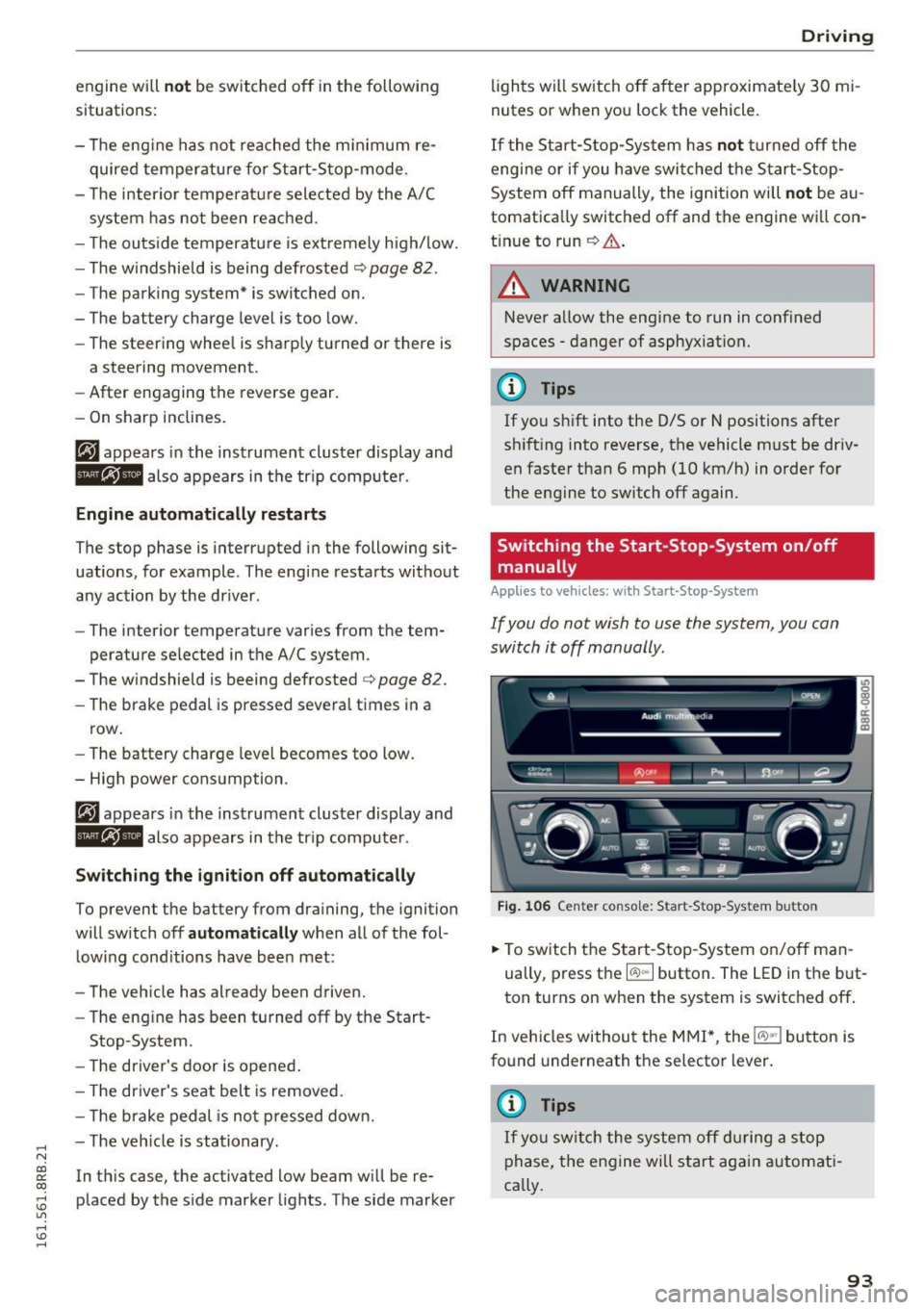
If you do not wish to use the system, you can
switch it off manually.
= , __ (A)Off _ --"'-- f'~-.::a-----
Fig . 10 6 Cen ter co nsole: S ta rt -Stop -System button
.. To switch the Start -Stop-System on/off man
ually, press the
I CAJ ,,.I button. The LED in the b ut
ton turns on when the system is switched off .
In vehicles without the M MI*, the
!CA.> "'! button is
found underneath the se lector lever.
(D Tips
If y ou swit ch the system off d uring a stop
phase, the engine will st art aga in automati
ca lly.
93
Page 98 of 300
Driving
-For reasons of safety, cruise control should
not be used in the city, in stop-and-go traf
fic, on twisting roads and when road condi
tions are poor (such as ice, fog, gravel, heavy rain and hydroplaning) -you could
have an accident.
- Switch the cruise control off temporarily when driving in turning lanes, highway exits
or in construction zones.
- Please note that unconsciously "resting"
your foot on the accelerator pedal causes cruise control not to brake . This is due to
the control system being overridden by the
driver's acceleration.
- Never use the cruise control when driving
off-road or on unpaved roads. The cruise
control is intended for use only when the ve
hicle is being operated on paved roads, and
is not suitable for use off-road or on un
paved roads.
- If a brake system malfunction such as over
heating occurs when the cruise control sys
tem is switched on, the braking function in
the system may be switched off. The other
cruise control functions remain active as
long as the indicator light
tii;(O~i4 (US mod
el)/lil (Canadian model) is on .
{D) Tips
The brake lights illuminate as soon as the
brakes apply automatically.
Changing speed
.,. To increase/decrease the speed in increments,
tap the lever in the
010 direction ¢ page 95,
fig. 108 .
.,. To increase/decrease the speed quickly, hold
the lever in the
010 direction until the de
sired speed is displayed.
You can also press the accelerator pedal down to
increase your speed, e.g. if you want to pass
someone. The speed you saved earlier will re
sume as soon as you let off of the accelerator
pedal.
If, however, you exceed your saved speed by
S mph
(10 km/h) for longer than 5 minutes, the
96
cruise control will be turned off temporarily. The
green symbol in the display turns white, the
saved speed is retained.
Pre-selecting speed
You can pre-select your desired speed while the
vehicle is not moving.
.,. Turn on the ignition.
.,. Pull lever into position
(D ¢page 95, fig. 108.
.,. Press the lever in the 0 or 0 direction to in-
crease or decrease your speed.
.,. Let go of the lever to save that speed .
This function makes it possible, for example, to
save the speed you want before driving on the
highway. Once on the highway, activate the
cruise control by pulling the lever toward
(D .
Switching off
Temporary deactivation
.,. Step on the brake pedal, or
.,. Press the lever into position @ (not clicked into
place) ¢
page 95, fig . 108, or
.,. Drive for longer than 5 minutes at more than
5 mph (10 km/h) above the stored speed.
Switching off completely
.,. Press lever into position @ (clicked into place),
or
.,. Switch the ignition off .
The speed you saved will be retained if the cruise control has been switched off temporarily . To re
sume the saved speed , let up on the brake and
pull the lever to position
(D.
The saved speed will be erased after turning the
ignition off.
A WARNING
You should only resume the saved speed if it
is not too high for existing traffic conditions.
Otherwise you risk an accident.
Page 101 of 300

© Vehicle drive ready (READY)
® H igh voltage battery charge status
@ Recupe ration (CHARG E)
(J) Driving within the combustion en
g ine's full load range
@ 100% combust ion engine
® Boosting - the elect ric engine as
sists the combustion engine (BOOST)
@ E ngaging the conve ntiona l brakes
with recuperat ion
@ Vehicle not drive ready (OFF)
@ EV mode act ive
The need le remains at
OFF whe n the ignition is
turned on. When the veh icle enters drive ready
mode, the status message
hybrid ready appears
briefly in the instrument cluster d isplay and the
needle in the powe r meter poi nts to
READY .
Indicator lights and messages
Applies to vehicles: with hybrid drive
The indica to r li gh ts in the inst rument cluste r
b link or tur n on. They indicate functions or mal
f u nctions .
W ith some ind icator lights, messages may ap
pear and a warning tone may sou nd . A lso note
the ind icator lights in
<=:> page 2 7.
Press brake pedal to start vehicle
This message appears if you do not press the
b rake pedal whe n starting the vehicle.
Shift to N or P to start vehicle
This message appea rs if the selecto r leve r fo r the
automatic transm iss ion is not in the Nor P posi
tions whe n starting the vehicle .
-Hybrid drive: System fault! Power
brakes , steering malfunction pos sible
If the indicator lig ht turns on and th is message
appears, there is a malfunction in the hybrid sys
tem. The brake booster and the power steeri ng
~ may stop working . Stop the vehicle in a safe loca -
co g:; tion as soon as possible.
Hybrid
You may con tinue dr iving i f the indicator light
tu rns off after sta rt ing the ve hicl e several times .
Drive to an authorized repa ir facility immed iate ly
to have the malfunction cor rected .
f#iifj:j;jj,j Hybrid drive: System fault! Contact
dealer
If the indicator light turns on and this message
appea rs, there is a ma lfunction in the hybrid sys
tem. Drive to an autho rized repair fac ility imme
diately to have the malfunct io n corrected.
(II Hybrid system : Performance rest ricted .
Please contact dealer
If the indicator light turns on and this message
appears, there is an eng ine control malfunction .
The
[Ia i ndica to r li ght in the ins trument clus te r
also t urns on. The engine ou tput is red uced .
Dr ive to your authori zed A udi dealer or qualified
r ep air fa cility i mme diate ly to h ave the m alfu n c
t io n corre cte d.
Hybrid drive deactivated. Please restart
engine manually.
T h is m ess age appe ars if t he high vo lt a ge b attery
c h arge leve l h as fallen below a cer tain range or i f
t h e ig nition key is no longer i nsid e the veh icle for
vehicles with the convenience key* .
Start the engi ne w it h eithe r th e ig nitio n key
<=:> page 84 o r wi th the !START ENGI NE STOPI
button* <=:> page 87.
Hybrid battery: Low battery charge. Battery
will be charged while driving.
T h is mess age app ea rs if the high vo lt a ge b att ery
c h arge leve l has fallen be low a certa in range . If
t hi s message turns off afte r a litt le while, the
high voltage battery cha rged enoug h while driv
ing .
If the message does not turn off, have an au thor
ized repair facility cor rect the ma lf u nction as
soon as possib le .
EV mode is currently unavailable.
Th is me ssa ge appears if the con ditions
<=:> page 10 0 for enhanced ele ctric drivi ng ar e not
met. Try aga in at a late r time .
99
Page 107 of 300
.... N
co
er::
co
....
used for both charging and jump starting
¢ page 231 or¢ page 2 70.
Vehicle not ready to start. See owner's
manual
This message appears if the high voltage battery
charge level is too low. The vehicle can no longer
be started with its own power. The high voltage
battery must be charged with a charger or the ve
hicle must be jump started with the a id of anoth
er vehicle.
After the connecting the charger or jumper ca bles, the ignition must be turned off for approxi
mately two minutes and then turned on again.
After no more than one m inute, one of the fol
l owing indicator lights turns on in the instrument
cluster display .
B Charging battery. Please wait ...
If the indicator light turns on and this message
appears, the high voltage battery is charging or
the vehicle is be ing jump started with assistance
from another veh icle .
If the 12 volt batteries are dead, the -indi
cator light turns on . The charging procedure
takes longer in this case because the 12 volt bat
ter ies a re charged first. The procedure goes fast
er with the ignit ion switched off.
Vehicle ready to start.
This message appears if the charging procedure
was successful. The vehicle may be started again .
Battery could not be charged enough to start
vehicle.
This message appears if the charging procedure
was not successful or it was interrupted. This
may happen if the charger or the battery in the
veh icle that is assist ing is too weak. If the ve hicle
cannot be started, see an authorized repair facili
ty for ass istance.
(D Tips
- The charger should deliver a current of at
l east 30 A. Otherwise charging the high
voltage battery will take considerably Ion-
Hybrid
ger . A current between 50 A and 70 A is ide
al.
- The vehicle that is assisting should be some
what within the same vehicle class when
jump starting a vehicle. A smaller vehicle's
battery may be drained.
- After approximately 30 minutes, the charg
ing procedure ends because the ignition is
automatically turned off. If you wou ld like
to cont inue to charge the battery, turn the
ign ition on again .
Vehicle transport
App lies to vehicles: wit h hybrid drive
The following contains information you should
know about transporting your vehicle.
The lithium ion battery (SANYO 72 UF 121 285)
installed in your vehicle has passed test 38.3 in
accordance with UN handbook tests and criter ia.
The vehicle may be transported with the battery
installed as conventional class 9 hazardous mate
rials without addit ional officia l consent for a ir
and sea transportation (current law ICAO- TI and
IMDG-Code 01.01.2012).
105
Page 111 of 300
..... N
co ~ CX)
..... I.Cl U"I
..... I.Cl .....
Audi adaptive cruise control and braking guard
@ Indicator lights
Ill-Adaptive cru ise control is switched on. No
vehicles are detected up ahead. The stored speed
is maintained.
• -A moving vehicle is detected up ahead. The
adaptive cruise control system regulates the
speed and distance to the moving vehicle ahead
and accelerates/brakes automatically.
• -When automatic braking is not ab le to keep
enough distance to a previously detected moving
vehicle up ahead, you must take control and
brake
~ page 111, Request for driver interven
tion.
© Display
If adaptive cruise control is not shown in the dis
play, you can call it up with the
I RESETI button
¢page 20.
Based on the symbols in the display, you can de
termine if the system is maintaining a distance to
the vehicle ahead and what that distance is.
No vehicle -No vehicle ahead was detected.
White vehicle -A vehicle ahead was detected.
Red vehicle -Prompt for the dr iver to take action
¢page 111.
Both arrows on the scale © indicate the distance
to the vehicle ahead . No arrow appears when the
vehicle is on an open road and there is no object
ahead . If an object is detected ahead, the arrow
moves on the scale .
The green zone on the scale shows the stored dis
tance. For information on changing the stored
distance, refer to
¢page 110. If the distance se
lected is too close or may soon become too close,
the arrows move into the red zone on the scale.
A WARNING
Improper use of the adaptive cruise control
can cause collis ions, other acc idents and seri
ous personal injur ies.
- Pressing the
!SET ! button when driving at
speeds below 20 mph (30 km/h), will auto
matically accelerate the vehicle to 20 mph (30
km/h), which is the minimum speed
that can be set.
(D Tips
- If you switch the ignition or the adaptive
cruise control off, the set speed is erased
from the system memory.
- Th e Electronic Stabilization Control (ESC) is
automatically turned on when the adaptive
cruise control is turned on . You cannot
switch the ESC into offroad mode while the
adaptive cru ise control is turned on
¢page 191.
Changing the speed
Applies to vehicles: with Audi adapt ive cru ise control
0
f
•
0
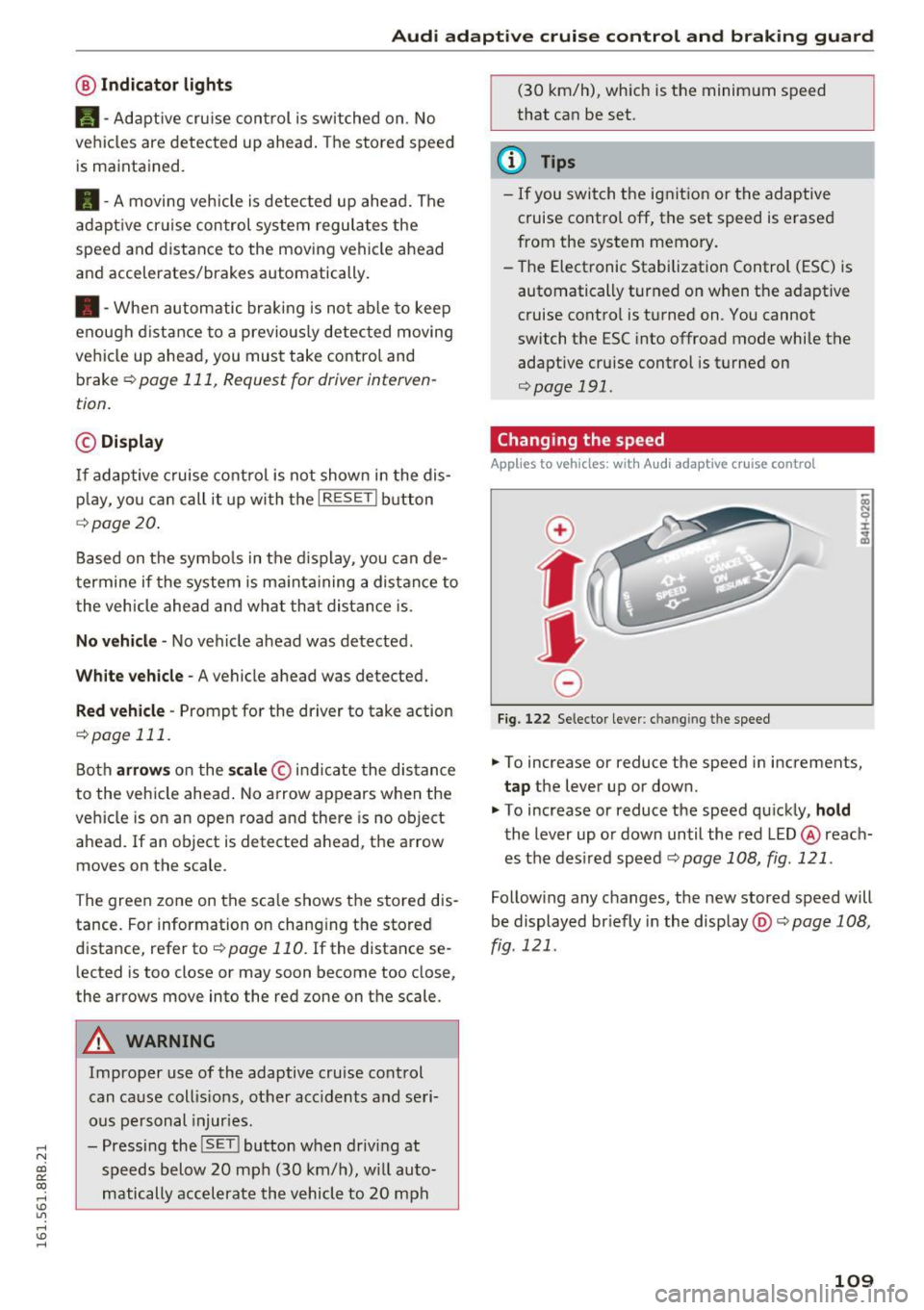
Fig. 122 Selector lever: ch an gin g the speed
.,. To increase or reduce the speed in increments,
tap the lever up or down.
" To increase or reduce the speed quickly,
hold
the lever up or down until the red LED @ reach
es the des ired speed c::>
page 108, fig. 121 .
Following any changes, the new stored speed will
be displayed br iefly in the display @c::>
page 108,
fig. 121 .
109