wheel AUDI Q5 2017 User Guide
[x] Cancel search | Manufacturer: AUDI, Model Year: 2017, Model line: Q5, Model: AUDI Q5 2017Pages: 296, PDF Size: 74.43 MB
Page 98 of 296
Driving
Driving the automatic transmission
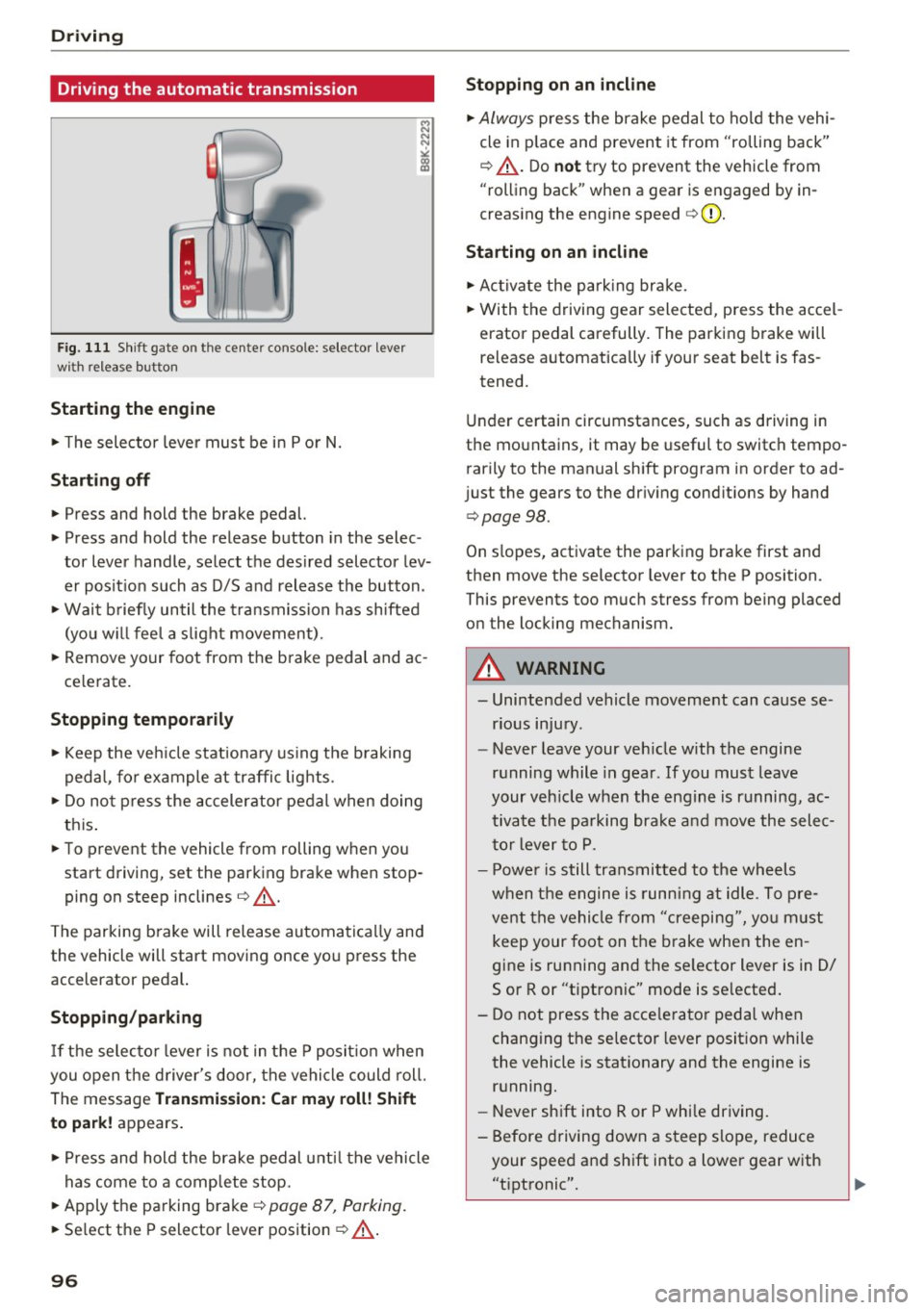
F ig. 111 Shift gate o n the cen te r co nso le: selecto r lever
wi th re lease button
Starting the engine
.. The selector leve r must be in P o r N.
Starting off
.. Press and hold the brake pedal.
.. Press and hold the release button in the selec
tor lever handle, select the des ired selector lev
er posit ion such as D/S and release t he button.
.. Wai t briefly until the transmission has shifted
(you w ill feel a s light movement) .
.. Remove your foot from t he b rake pedal and ac
ce lerate.
Stopping temporarily
.. Keep the veh icle stat iona ry using the b raking
pedal, fo r example at traffi c lights .
.. Do not p ress the accelerator pe dal when doing
th is .
.. To preve nt the vehicle from rolling when you
start driving, set the parking brake w hen stop
ping on steep inclines¢_&. .
The parking b rake will release automatica lly and
the vehicle will start moving once you press the
accelerator pedal.
Stopp ing /parking
If t he se lec to r l ever i s not in t he P posit io n w hen
you open t he d river's door, the vehicle could roll.
The message
Transmission: Ca r ma y roll! Shift
to pa rk!
appears .
.. Press and hold the brake pedal unti l the vehicle
has come to a comp lete stop.
.. Apply t he parking brake¢
page 87, Parking .
.. Se lect the P selector lever position ¢ _&. .
96
Stopping on an incline
.. Always press the brake pedal to ho ld the vehi
cle in p lace and prevent it from "rolling back"
¢ _&. . D o
not try to prevent the vehicle from
"rolling back" when a gear is engaged by in
creas ing the engine speed ¢(D .
Starting on an incline
.. Ac tivate the pa rk ing br ake .
.. With the driving gear selected, press the accel
erator pedal carefully. The parking brake will
re lease a utomatically if your seat belt is fas
tened.
Under certain circumstances, such as driving in
the mountains, it may be useful to switch tempo rarily to the manual sh ift program in order to ad
j ust the gears to the dr iv ing cond it ions by hand
¢ page 98 .
On slopes, activate the parking brake first and
then move the selector lever to the P position.
This prevents too m uch stress from being placed
on the locking mechanism.
A WARNING
- Unintended vehicle moveme nt can cause se
rious injury .
- Never leave your veh icle with the engine
r u nning while in gear . If you mus t leave
your veh icle when the engine is running, ac
tiva te t he pa rking bra ke and move the selec
t o r lever to P .
- P owe r is still transmitted to the wheels
w hen t he engine is running at idle . To pre
vent the vehi cle from "creeping", yo u m ust
keep your foot on the brake when the en
gine is running and the se lector lever is in 0/
Sor R or "tiptronic" mode is se lected .
- Do not press the acce le ra tor pedal when
changing t he se lector lever posit ion while
the vehicle is stat ionary and the engine is
running.
- Never shift into R or P whi le driving.
- Before driving down a s teep slope, reduce
your spee d and sh ift into a lower gear with
"t i pt ronic" .
Page 100 of 296
Driving
Manual shift program
Using the manual shift program you can man
ually select gears .
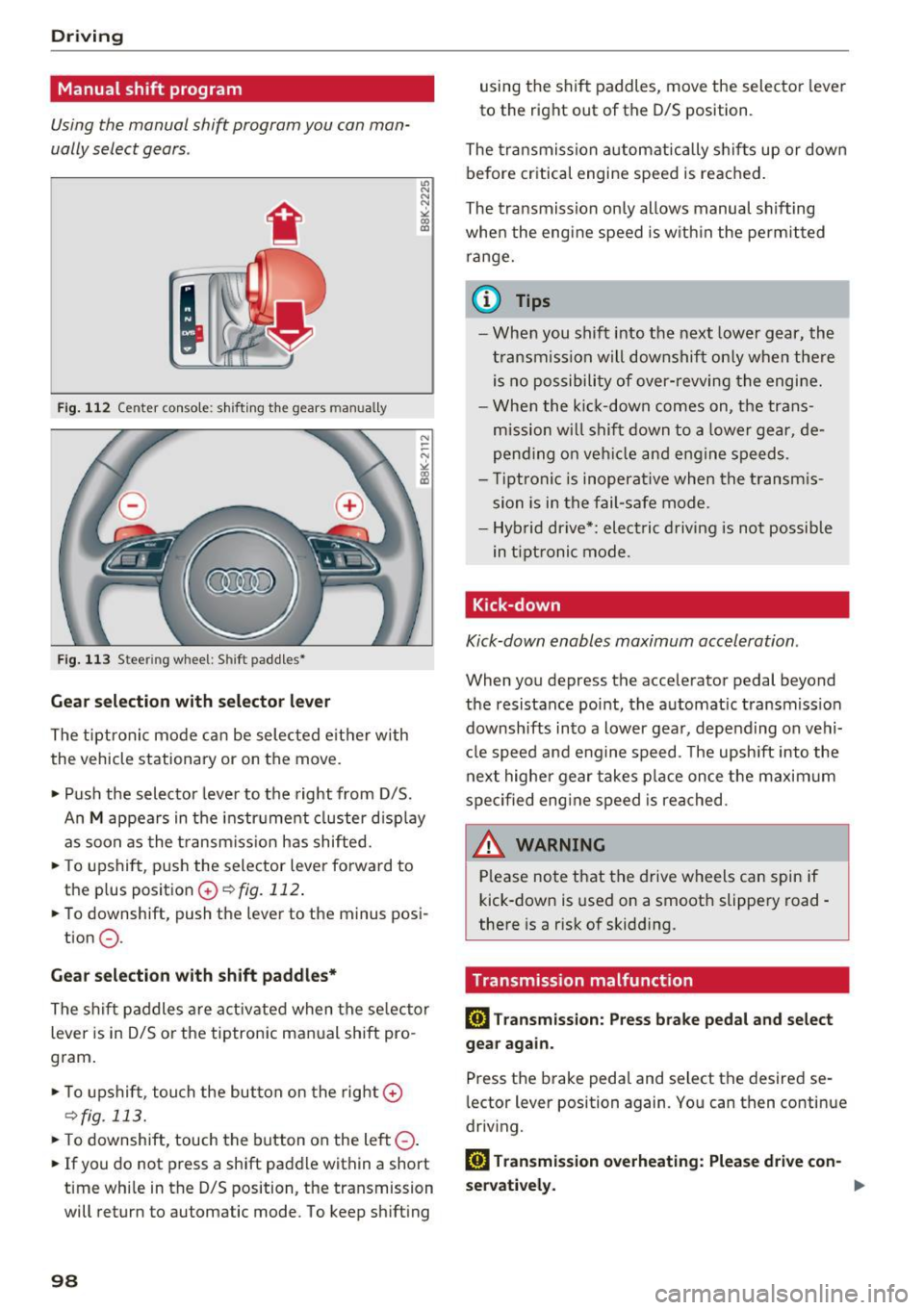
Fig . 1 12 Center console: s hift ing t he gears manually
F ig. 11 3 Steering wheel: Shift padd les•
Gear selection with selector lever
The tipt ron ic mode can be selected e it h er with
the vehicle stationary or on the
move.
• Pu sh the selector lever to t he right from D/S.
u, N
N
N
" ll1
An M appears in the i nstr ume nt cl uster d isp lay
as soon as the t ransm iss ion has shifted.
• To upshift, push the selector lever forward to
the plus posit ion
G) ¢ fig. 112 .
• To downshift, push the lever to the minus posi-
tion
0 .
Gear selection with shift paddl es*
The shif t paddles are activated when the se lector
lever is in D/S or the tiptronic manual shift pro
gram .
• To upshift, touch the but ton on the right
G)
¢fig. 113.
• To downshift, touch the button on the left 0-
• If you do not press a shift paddle within a short
t ime whi le in the D/S position, the transmission
will return to automatic mode. To keep sh ift ing
98
using the shift paddles, move the selector lever
to the right out of the D/S position.
The tra nsmissron auto matica lly s hifts up or down
before critical engine speed is reached.
The tra nsmiss ion on ly allows manual sh ifting
whe n the engine speed is w ith in the permit ted
range.
(D Tips
- When you shift into t he next lowe r gear, the
t ransmiss ion will downshift on ly when the re
is no possibili ty of over-revving the engi ne.
- Whe n the ki ck-down comes on, the trans
mission w ill shif t down to a lowe r gear, de
pend ing o n ve hicl e and engine speeds.
- Ti ptroni c is inoperat ive when the transm is
sion is in the fail-safe mode.
- Hyb rid drive*: elect ric dr iving is not po ssib le
in t ipt ronic mode.
Kick-down
Kick-down enables maximum acceleration.
When you depress the accelerator pedal beyond
the resistance point, the a utomat ic transmiss ion
downshifts into a lower gear, depending on vehi
cl e speed and engine speed. The upsh ift into the
next highe r gear takes p lace on ce t he maxim um
spec ified eng ine speed is reached .
A.::!!.ARNING
-Please no te that t he drive wheels can spin if
kick-down is used on a smooth slippe ry road -
there is a risk of skidd ing.
Transmission malfunction
ml Tran smission: Pre ss brake pedal and select
gear again.
Press the brake pedal and select the desired se
l ector lever position again. Yo u can then conti nue
driv ing.
ml Transmission o verheating: Plea se dri ve con-
servatively . .,,.
Page 112 of 296
Audi adaptive cruise control and braking guard
-For safety reasons, do not use adaptive
cruise control when driving on roads with
many curves, when the road surface is in
poor condition and/or in bad weather (such
as ice, fog, gravel, heavy ra in and hydroplan
ing). Using the system under these condi·
tions could result in a collision.
- Switch adaptive cruise control off tempora
rily when driving in turning lanes, on ex
pressway exits or in construction zones. This
prevents the vehicle from accelerating to
the set speed when in these situations .
- The adaptive cruis e control system will not
brake by itself if you put your foot on the ac
celerator pedal. Doing so can override the
speed and distance regu lation.
- When approaching stationary objects such
as stopped traffic, adaptive cruise control
will not respond and braking guard will have
limited function.
- The adaptive cruise control system and
braking guard do not react to people, ani
mals, objects crossing the road or oncom ing
objects.
- The function of the radar sensor can be af
fected by reflective objects such as guard
rails, the entrance to a tunnel, heavy rain or
ice.
- Never follow a vehicle so closely that you
cannot stop your vehicle safely. The adap·
t ive cruise control cannot slow or brake the
vehicle safely when you fo llow another veh i
cle too closely. Always remember that the
automatic braking function cannot bring the
vehicle to a sudden or emergency stop un
der these conditions .
- To prevent unintended operation, always
switch adaptive cruise control off when it is
not being used.
(D Note
The sensor can be displaced by impacts or
damage to the bumper, wheel housing and
underbody. That could affect the adaptive
cruise control system and braking guard .
Have your authorized Audi dealer or author
ized Audi Service Facility check their function.
110
In curves
App lies to : vehicles wit h Audi adapt ive cruise control
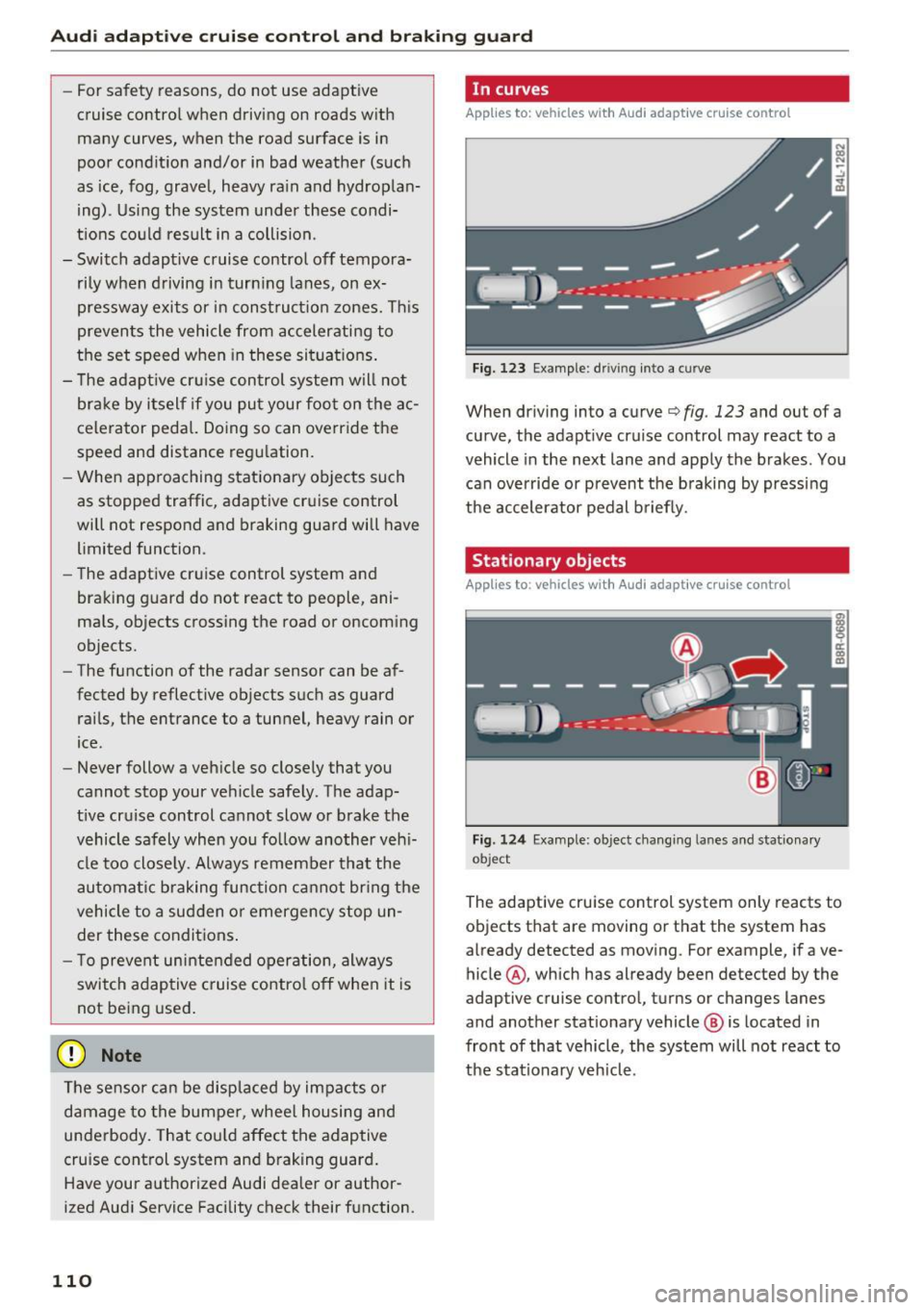
Fig. 123 Example: driv ing into a curve
When driving into a curve c:::> fig . 123 and out of a
curve, the adapt ive cruise control may react to a
vehicle in the next lane and apply the brakes . You
can override or prevent the braking by pressing
the accelerator pedal briefly.
Stationary objects
Applies to: vehicles wi th Audi adaptive cruise control
Fig . 124 Examp le: object chang ing lanes and stat ionary
ob ject
The adaptive cruise control system only reacts to
objects that are moving or that the system has
already detected as moving . Fo r example, if ave
hicle @, which has already been detected by the
adaptive cruise control, turns or changes lanes
and another stationary vehicle @ is located in
front of that vehicle, the system will not react to
the sta tionary veh icle.
Page 121 of 296

a,
a,
..... N r-N ..... 0 0
0:
co
General information
Applies to: vehicles with Audi side assist
®
®
Fig. 1 35 D riving s it u at io ns
F ig. 136 Rear of the ve hicle: Pos it ion of th e se nso rs
S ide a ssist fu nctions a t spee ds above app roxi
ma te ly 19 mph (30 km/h).
(D Vehicles that are approaching
In ce rtain cases, a vehicle will be classified as
cr itica l for a lane change even if it is still some
what far away. The faste r a ve hicle app roaches,
t he soo ner the d isplay in the exterio r mirror w ill
t urn on.
@ Vehicles traveling with you
Vehicles traveli ng w ith you are ind icated i n the
exte rior m irro r if they are classified as critical for
a lane change. All vehi cles detec ted by side assist
Aud i side assist
are ind icate d by the time they ente r your "blind
spot", at the latest.
@ Vehicles left behind
If you s low ly pas s a vehi cle that s ide ass ist has
de te cted ( the differe nce in speed between t he
vehicle and you r vehicle is less than 9 mph or
15 km/h), the disp lay in t he exterior mirro r turns
o n as soon as the vehicle e nters your blind spot.
T he disp lay w ill not turn on if you quickly pass a
vehicle th at side ass ist h as de te cte d (t he differ
ence in speed between the vehicle and your vehi
cle is greater tha n 9 mp h or 15 km/h) .
Functional limitations
The radar se nsors are des igned to detect the le ft
and right adj ace nt lane s when the ro ad l anes are
the normal width . In certa in situations, the dis
play in the exterior mirror may turn on eve n
though there is no vehicle located in the area
that is critical for a lane change. For example:
- if the lanes a re narrow or i f yo ur are dr iv ing on
the edge o f you r lane. If t his is the case, the
system may have detected t he vehicle in anoth
er lane that is
not adjacent to your cu rrent lane.
- if you are dr iv ing through a curve. Si de assist
may react to a vehicle that is one lane over
from the adjacent lane.
- if s ide assist reacts to ot her objects (such as
high or disp laced guard ra ils).
- In poor weather conditions. The side assist
fu nctions a re limited .
D o no t cover the r adar senso rs
c> fig. 136 wit h
stickers, deposits, b icycle wheels or other o b
jects, because th is wi ll affect the f unction . Do not
u se side assist when towing a t railer . For info r
mation on cleaning , refer to
c> page 204.
A WARNING
- Always pay attention to traffic and to the
area around your veh icle . S ide assist cannot
replace a driver' s attention . T he driver alone
is always respo nsib le for la ne cha nges and
s im ila r dr iv in g ma neuve rs .
119
Page 122 of 296
Audi side assist
-Improper reliance on the side assist system
can cause collisions and serious personal in
jury:
- Never rely only on side assist when chang
ing lanes.
- Always check rear view mirrors to make
sure that it is safe to change lanes.
- Side assist cannot detect all vehicles under
all conditions -danger of accident!
- Please note that side assist indicates there
are approaching vehicles, or vehicles in your blind spot, only after your vehicle has
reached a driving speed of at least 19 mph
(30 km/h).
- In certain situations, the system may not
function or its function may be limited. For
example:
- if vehicles are approaching or being left
behind very quickly . The display may not
turn on in time .
- in poor weather conditions such as heavy
rain, snow or heavy mist .
- on very wide lanes, in tight curves or if
there is a rise in the road surface . Vehicles
in the adjacent lane may not be detected
because they are outside of the sensor
range.
(D Note
The sensors can be displaced by impacts or damage to the bumper, wheel housing and
underbody . This can affect the system . Have
your authorized Audi dealer or authorized
Audi Service Facility check their function.
(D Tips
-If the window glass in the driver's door or
front passenger's door has been tinted, the
display in the exterior mirror may be misin
terpreted.
- For Declaration of Compliance to United
States FCC and Industry Canada regulations
c::> page 2 79.
120
Activating and deactivating
Applies to : vehicles wit h Audi side ass ist
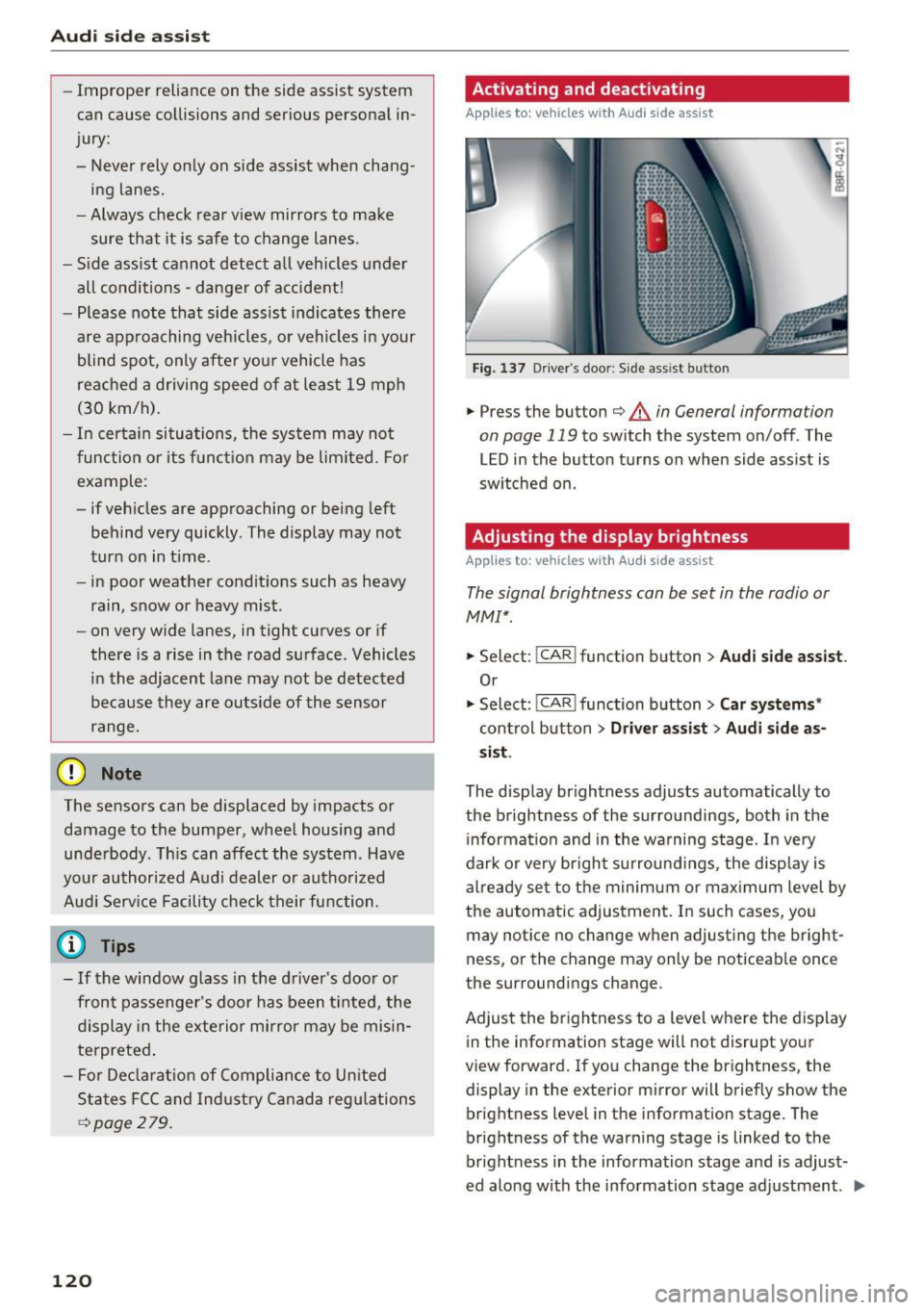
Fig. 137 D riv er's doo r: Side ass ist butto n
.,.. Press the button c::> &. in General information
on page 119
to switch the system on/off . The
LED in the button turns on when side assist is
switched on .
Adjusting the display brightness
Applies to: vehicles wit h Aud i side ass ist
The signal brightness can be set in the radio or
MMI* .
.,.. Select: I CAR I function button > Audi side assist.
Or
.,.. Select: I CAR I function button > Car systems*
control button > Driver assist> Audi side as
sist.
The display brightness adjusts automatically to
the brightness of the surroundings, both in the
information and in the warning stage. In very
dark or very bright surroundings, the display is
already set to the minimum or maximum level by
the automatic adjustment. In such cases, you may notice no change when adjusting the bright
ness, or the change may only be noticeable once
the surroundings change.
Adjust the brightness to a level where the display
in the information stage will not disrupt your
view forward. If you change the brightness, the
display in the exterior mirror will briefly show the
brightness level in the information stage . The
brightness of the warning stage is linked to the
brightness in the information stage and is adjust
ed along with the information stage adjustment . .,,.
Page 123 of 296
CD
CD
.... N ,-... N .... 0 0 C<'. 00
@ Tips
-Side assist is not active whi le you are ma k
i ng the ad justment .
- Your settings are automatically stored and
ass igned to the remote control key being
u sed.
Driver messages
A ppl ies to: ve hicl es w ith Audi side assis t
If side ass ist switches off by itself, the LED in the
button turns off and a message will appear in the
i nstr ument cluster d is pl ay :
Audi side assist unavailable: Sensors blocked
The rada r senso rs ' vision is affected. Do not cover
the area in front of the sensors with b ike wheels,
sticke rs, dirt or other ob jects . Clean the area in
front of the senso rs, if necessary
c:> page 119,
fig . 136.
Aud i side assist: Currently unavailable
Side assist cannot be switched o n tempo rar ily be
cause there is a malfunction (for exam ple, the
battery charge level may be too low).
Audi side assist: System fault!
The system cannot guarantee that it will detect
ve hicl es co rrectly and it is switched off. The sen
sors have been d isp laced or are faulty. Have the
system checked by an authorized Audi dealer or
author ized Audi Service Facility soon.
Audi side as sist: Unavailable when towing
Side assist sw itches off automatically when a fac
tory-installed trailer hitch is connected to the
e lectrical connector on the trailer. T he re is no
gua rantee the system will sw itch off when using
a retrofitted tra ile r hi tc h. Do not use s ide ass ist
when towing a trailer.
Aud i side assist
121
Page 130 of 296
Parking aid
Reverse Parking
Applies to: vehicles w ith Aud i park ing system p lus w ith rear
view c amera
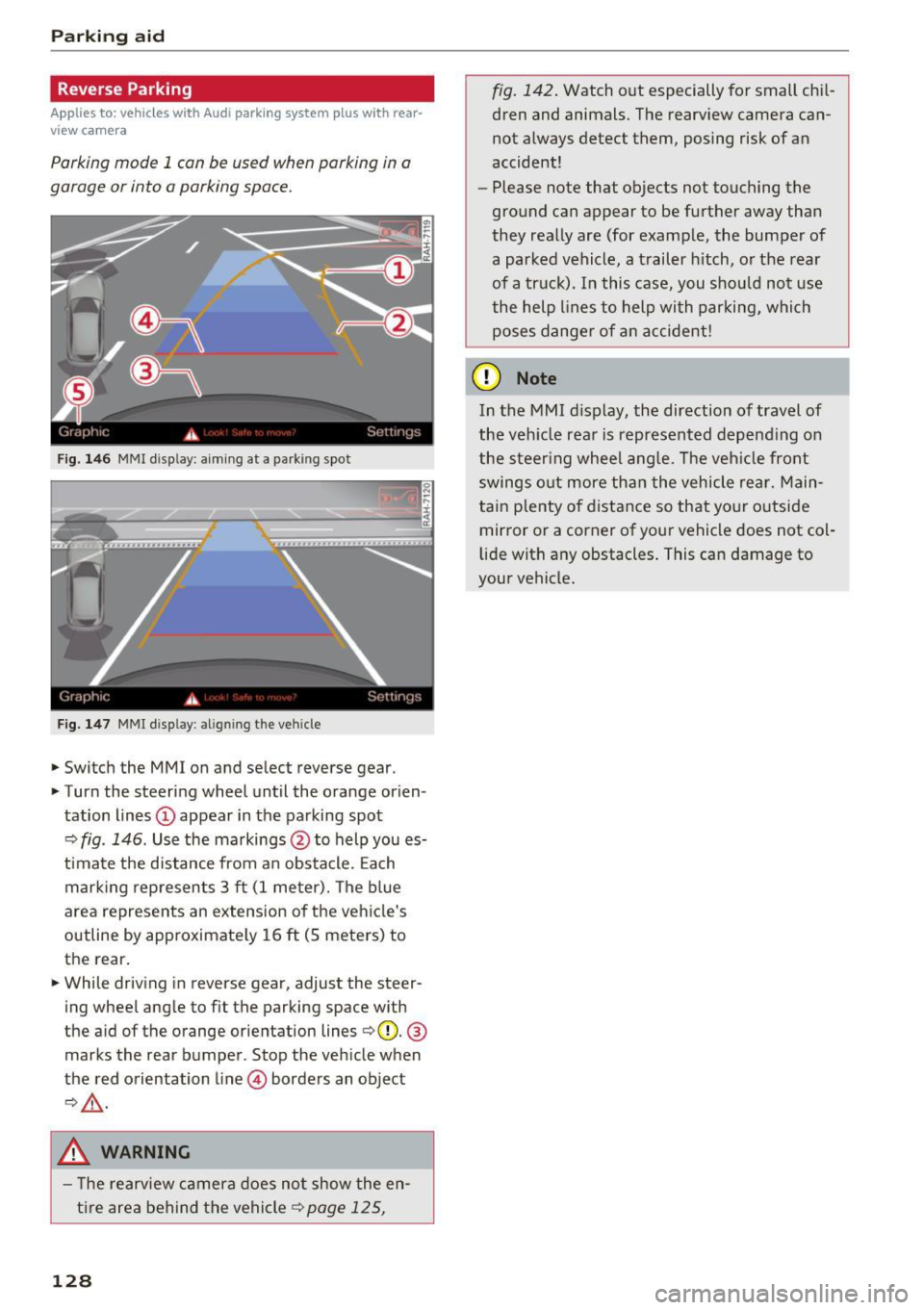
Parking mode 1 con be used when parking in a
garage or into a parking space.
Fig. 146 MMI disp lay: a iming at a parking spot
Fig. 147 MMI disp lay: align ing the vehicle
.,. Switch the MMI on and se lect reverse gear .
.,. Turn the steering wheel until the orange orien
tation lines
(D appear in the parking spot
¢ fig . 146. Use the markings @to help you es
timate the distance from an obstacle. Each
marking represents 3 ft (1 meter). The blue
area represents an extension of the vehicle's
outline by approximately 16
ft (S meters) to
the rear .
.,. While driving in reverse gear, adjust the steer
ing wheel angle to fit the parking space with
the a id of the orange orientation lines ¢(D.
®
marks the rear bumper . Stop the vehicle when
the red orientation line© borders an object
¢,&. .
.&_ WARNING
- The rearview camera does not show the en
tire area behind the vehicle¢
page 125,
128
fig. 142. Watch out especially for small chil
dren and animals. The rearview camera can
not always detect them, posing risk of an
accident!
- Please note that objects not touching the
ground can appear to be further away than
they really are (for example, the bumper of
a parked vehicle, a trailer hitch, or the rear
of a truck). In this case, you should not use
the help lines to help with parking, which
poses danger of an accident!
(D Note
In the MMI display, the direction of travel of
the vehicle rear is represented depending on
the steering wheel angle. The vehicle front
swings out more than the vehicle rear. Main
tain plenty of distance so that your outside
mirror or a corner of your vehicle does not col
lid e with any obstacles. This can damage to
your vehicle.
Page 131 of 296
a,
a,
..... N ,....
N ..... 0 0
0:
co
Parallel Parking
Applies to: vehicles with Aud i parking system plus with rear
view camera
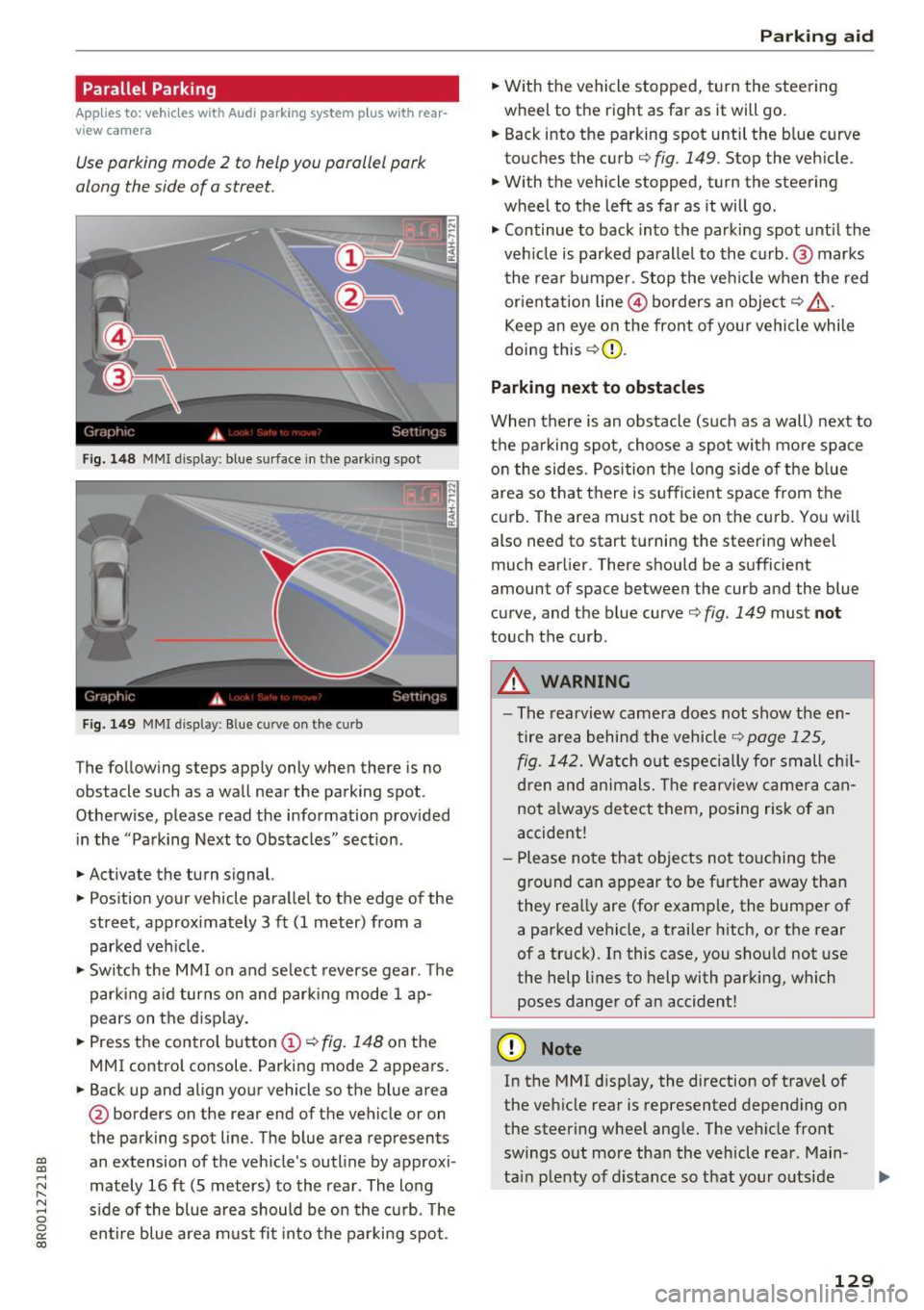
Use parking mode 2 to help you porollel pork
along the side of a street.
Fig. 148 MMI display: blue surface in the parking spot
Fig. 1 49 MMI display : Blue curve on the curb
The following steps apply only when there is no
obstacle such as a wall near the parking spot.
Otherwise, please read the information prov ided
in the "Parking Next to Obstacles" sect ion.
.,. Activate the turn signal.
.,. Pos ition your vehicle paralle l to the edge of the
street, approx imately 3 ft (1 meter) from a
parked veh icle.
.,. Swi tch the M MI on and se lect reverse gear. The
park ing a id turns on and park ing mode 1 ap
pears on the d isplay .
.,. Press the control button
(D ¢ fig. 148 on the
MMI control console. Parking mode 2 appears.
.,. Back up and align yo ur vehicle so the b lue area
@ borders on the rear end of the vehicle or on
the parking spot line. The blue area represents
an extension of the vehicle's outline by approxi
mately 16 ft (S meters) to the rear. The long
s ide of the blue area should be on the curb. The
en tire blue area must fit into the parki ng spot.
P ark ing aid
.,. With the vehicle stopped, turn the steering
wheel to the right as far as it will go.
.,. Back into the parking spot until the b lue curve
touches the curb¢
fig. 149. Stop the vehicle.
.,. With the vehicle stopped, turn the steering
wheel to the left as far as it will go .
.,. Continue to back into the parki ng spot unt il the
veh icle is parked parallel to the c urb. @ marks
the rear bumpe r. Stop the ve hicle when the red
orientat ion line @ borders an object¢
&
Keep an eye on the front of yo ur vehicle while
doing this ¢(D.
Parking next to obstacles
When there is an obstacle (such as a wall) next to
th e parking spot, choose a spot with mo re space
o n t he sides. Pos ition the long side of the b lue
area so that there is sufficient space from the
curb. The area must not be on the curb. You wi ll
also need to start turning the steering wheel
much earlier. There should be a sufficient
amount of space between the curb and the blue
curve, and the blue curve¢
fig. 149 must not
touch the curb.
A WARNING
-The rearview camera does not show the en
tire area behind the vehicle¢
page 125 ,
fig. 142.
Watch o ut especially fo r small ch il
d ren and animals. The rearview came ra can
not a lways detect them, posing risk of an
accide nt!
- P lease note that o bjects no t touching the
g ro und can appear to be further away tha n
they rea lly are (for e xamp le, the bumper of
a parked vehicle, a trailer h itch, or the rear
of a truck). In this case, you shou ld not use
the help lines to help with parking, which poses danger of an accident!
(D Note
In the M Ml d is play, the direction o f travel of
the veh icle rear is represented depend ing on
the steer ing whee l ang le. The ve hicle front
swings o ut more tha n the vehicle rea r. Main
ta in plenty of distance so that your o utside
129
Page 134 of 296
Driving safety
• Sit properly in your seat and make sure that
your passengers do the same
c:> page 60,
General information.
• Fasten your safety belt and wear it properly . Al
so instruct your passengers to fasten their safe
ty belts properly
c:> page 140 .
What impairs driving safety?
Safe driving is directly related to the condition of
the vehicle, the driver as well as the driver 's abili
ty to concentrate on the road without being dis
tracted .
The driver is responsible for the safety of the ve
hicle and all of its occupants. If your ability to
drive is impaired, safety risks for everybody in the
vehicle increase and you also become a hazard to
everyone else on the road
c:> Li').. Therefore :
• Do not let yourself be distracted by passengers
or by using a cellular telephone .
• NEVER drive when your driving ability is im
paired (by medications, alcohol, drugs, etc.).
• Observe all traffic laws, rules of the road and
speed limits and plain common sense.
• ALWAYS adjust your speed to road, traffic and
weather conditions.
• Take frequent breaks on long trips. Do not drive
for more than two hours at a stretch.
• Do NOT drive when you are tired, under pres
sure or when you are stressed.
A WARNING
Impaired driving safety increases the risk of
ser ious personal injury and death whenever a
vehicle is being used.
132
Correct passenger
seating positions
Proper seating position for the driver
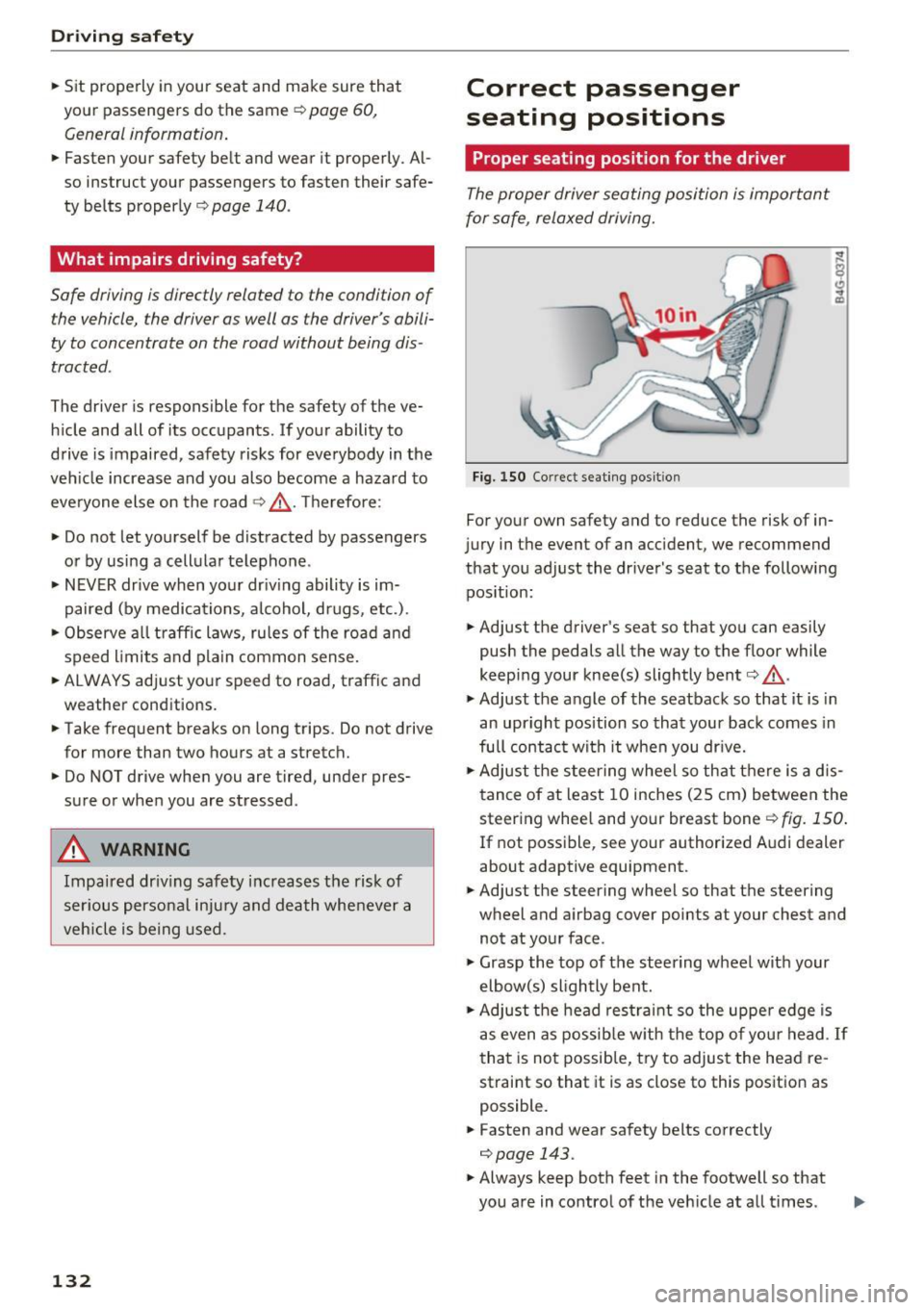
The proper driver seating position is important
for safe, relaxed driving.
Fig. 150 Correct seating posit ion
For your own safety and to reduce the risk of in
jury in the event of an accident, we recommend
that you adjust the driver's seat to the following position:
• Adjust the driver's seat so that you can easily
push the pedals all the way to the floor while
keeping your knee(s) slightly bent
c:> .&_ .
• Adjust the angle of the seatback so that it is in
an upright position so that your back comes in
full contact with it when you drive.
• Adjust the steering wheel so that there is a d is
tance of at least 10 inches (25 cm) between the
steering wheel and your breast boner::!)
fig. 150.
If not possible, see your authorized Audi dealer
about adaptive equipment.
• Adjust the steering wheel so that the steering
wheel and airbag cover points at your chest and
not at your face.
• Grasp the top of the steering wheel with your
elbow(s) slightly bent.
• Adjust the head restraint so the upper edge is
as even as possible with the top of your head .
If
that is not possible, try to adjust the head re
straint so that it is as close to this position as
possible.
• Fasten and wear safety belts correctly
c:> page 143.
• Always keep both feet in the footwell so that
you are in control of the veh icle at all times .
Page 135 of 296
CD
CD
.... N ,-... N .... 0 0 C<'. 00
For detailed information on how to adjust the
driver's seat, see
¢ page 61.
A WARNING
Drivers who are unbelted, out of position or
too close to the airbag can be seriously in
jured by an airbag as it unfolds. To help re
duce the risk of serious personal injury:
- Always adjust the driver's seat and the
steering wheel so that there are at least 10 inches (25 cm) between your breastbone
and the steering wheel.
- Always hold the steer ing wheel on the out
side of the steering wheel rim with your
hands at the 9 o'clock and 3 o'clock posi
tions to help reduce the r isk of persona l in
jury if the driver's airbag inflates.
- Never hold the steer ing whee l at the
12 o'clock position or w ith your hands at
other pos it ions inside the steering wheel
rim or on the steering wheel hub. Holding
the steering wheel the wrong way can cause
serious injuries to the hands, arms and head if the driver's airbag deploys.
- Pointing the steering wheel toward your
face decreases the ability of the supplemen
tal driver's airbag to protect you in a colli sion.
- Always sit in an upright position and never lean against or place any part of your body
too close to the area where the airbags are
located .
- Before driving, always adjust the front seats
and head restraints properly and make sure
that all passengers are properly restrained.
- Never adjust the seats while the vehicle is
moving . Your seat may move unexpectedly
and you could lose control of the vehicle .
- Never drive with the backrest reclined or
t il ted far back! The farther the backrests are
tilted back, the greater the risk of injury due
to incorrect positioning of the safety belt
and improper seating position.
- Children must always ride in child safety
seats¢
page 168. Spec ial precaut ions ap
ply when installing a ch ild safety seat on the
front passenger seat
c:::;, page 148.
Driving safety
Proper seating position for the front
passenger
The proper front passenger seating position is
important for safe, relaxed driving.
For your own safety and to reduce the risk of in
jury in the event of an acc ident, we recommend
that you adjust the seat for the front passenger
to the follow ing position:
"' Adjust the angle of the seatback so that it is in
an upright position and your back comes in full
contact with it whenever the vehicle is moving.
"' Adjust the head restraint so the upper edge is
as even as possible with the top of your head. If
that is not possible, try to adjust the head re
straint so that it is as close to this position as
possible
¢ page 134.
"' Keep both feet flat on the floor in front of the
front passenger seat.
"' Fasten and wear safety belts correctly
c:::;, page 143.
For detailed information on how to adjust the
front passenger's seat, see
c:::;, page 60.
A WARNING
--
Front seat passengers who are unbelted, out
of position or too close to the airbag can be
seriously injured or killed by the airbag as it
unfolds. To help reduce the risk of serious
personal injury:
- Passengers must always s it in an upright po
sition and never lean against or place any
part of their body too close to the area
where the airbags are located.
- Passengers who are unbelted, out of posi
tion or too close to the airbag can be seri
ously injured by an airbag as it unfolds with
great force in the blink of an eye.
- Always make sure that there are at least
10 inches (25 cm) between the front pas
senger's breastbone and the instrument
panel.
- E ach passenger must always sit on a seat of
their own and properly fasten and wear the
safety belt belonging to that seat .
- Before driving, always adjust the front pas
senger seat and head restraint properly.
133