warning light AUDI Q5 2017 Workshop Manual
[x] Cancel search | Manufacturer: AUDI, Model Year: 2017, Model line: Q5, Model: AUDI Q5 2017Pages: 296, PDF Size: 74.43 MB
Page 98 of 296
Driving
Driving the automatic transmission
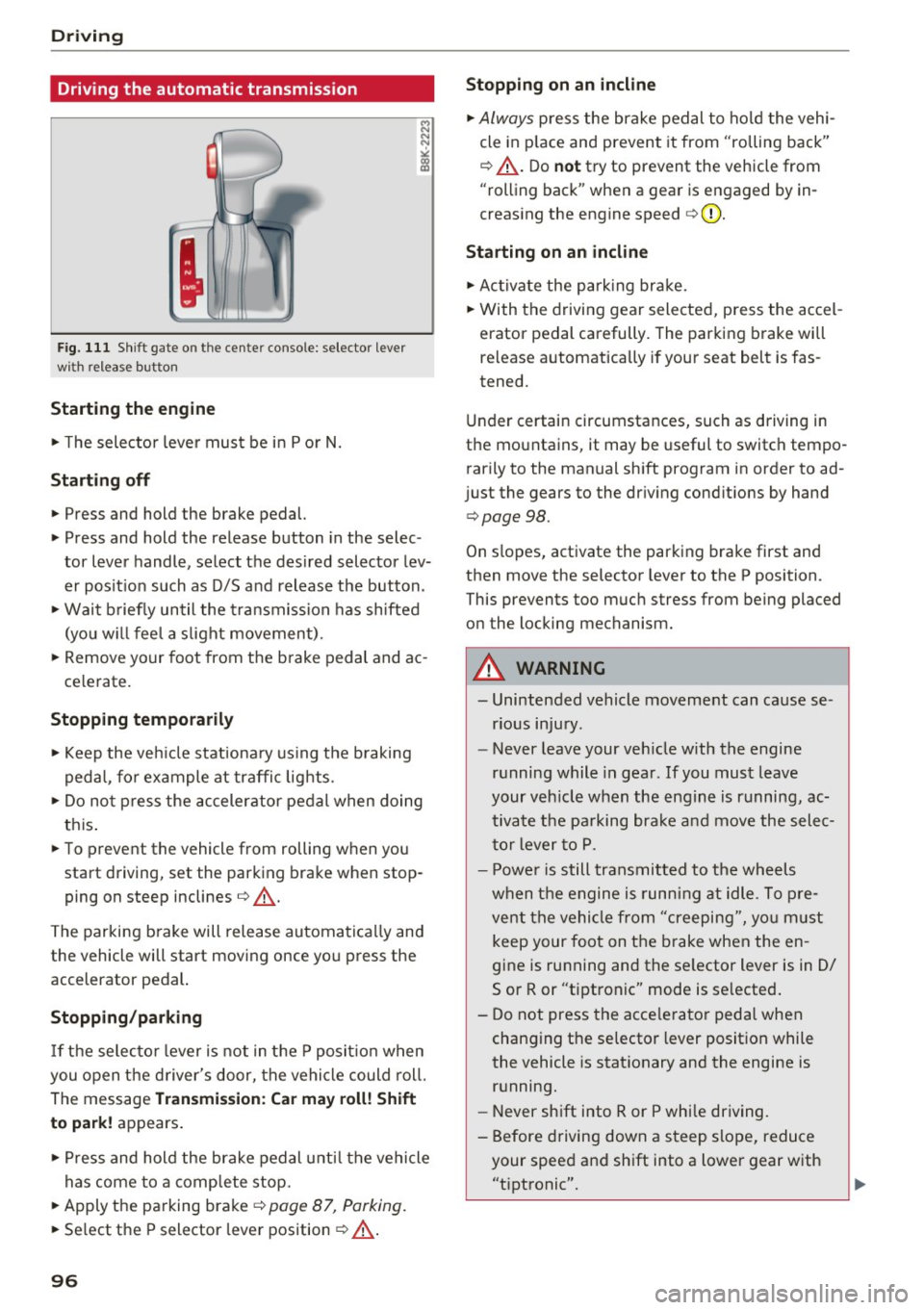
F ig. 111 Shift gate o n the cen te r co nso le: selecto r lever
wi th re lease button
Starting the engine
.. The selector leve r must be in P o r N.
Starting off
.. Press and hold the brake pedal.
.. Press and hold the release button in the selec
tor lever handle, select the des ired selector lev
er posit ion such as D/S and release t he button.
.. Wai t briefly until the transmission has shifted
(you w ill feel a s light movement) .
.. Remove your foot from t he b rake pedal and ac
ce lerate.
Stopping temporarily
.. Keep the veh icle stat iona ry using the b raking
pedal, fo r example at traffi c lights .
.. Do not p ress the accelerator pe dal when doing
th is .
.. To preve nt the vehicle from rolling when you
start driving, set the parking brake w hen stop
ping on steep inclines¢_&. .
The parking b rake will release automatica lly and
the vehicle will start moving once you press the
accelerator pedal.
Stopp ing /parking
If t he se lec to r l ever i s not in t he P posit io n w hen
you open t he d river's door, the vehicle could roll.
The message
Transmission: Ca r ma y roll! Shift
to pa rk!
appears .
.. Press and hold the brake pedal unti l the vehicle
has come to a comp lete stop.
.. Apply t he parking brake¢
page 87, Parking .
.. Se lect the P selector lever position ¢ _&. .
96
Stopping on an incline
.. Always press the brake pedal to ho ld the vehi
cle in p lace and prevent it from "rolling back"
¢ _&. . D o
not try to prevent the vehicle from
"rolling back" when a gear is engaged by in
creas ing the engine speed ¢(D .
Starting on an incline
.. Ac tivate the pa rk ing br ake .
.. With the driving gear selected, press the accel
erator pedal carefully. The parking brake will
re lease a utomatically if your seat belt is fas
tened.
Under certain circumstances, such as driving in
the mountains, it may be useful to switch tempo rarily to the manual sh ift program in order to ad
j ust the gears to the dr iv ing cond it ions by hand
¢ page 98 .
On slopes, activate the parking brake first and
then move the selector lever to the P position.
This prevents too m uch stress from being placed
on the locking mechanism.
A WARNING
- Unintended vehicle moveme nt can cause se
rious injury .
- Never leave your veh icle with the engine
r u nning while in gear . If you mus t leave
your veh icle when the engine is running, ac
tiva te t he pa rking bra ke and move the selec
t o r lever to P .
- P owe r is still transmitted to the wheels
w hen t he engine is running at idle . To pre
vent the vehi cle from "creeping", yo u m ust
keep your foot on the brake when the en
gine is running and the se lector lever is in 0/
Sor R or "tiptronic" mode is se lected .
- Do not press the acce le ra tor pedal when
changing t he se lector lever posit ion while
the vehicle is stat ionary and the engine is
running.
- Never shift into R or P whi le driving.
- Before driving down a s teep slope, reduce
your spee d and sh ift into a lower gear with
"t i pt ronic" .
Page 104 of 296
Hybrid
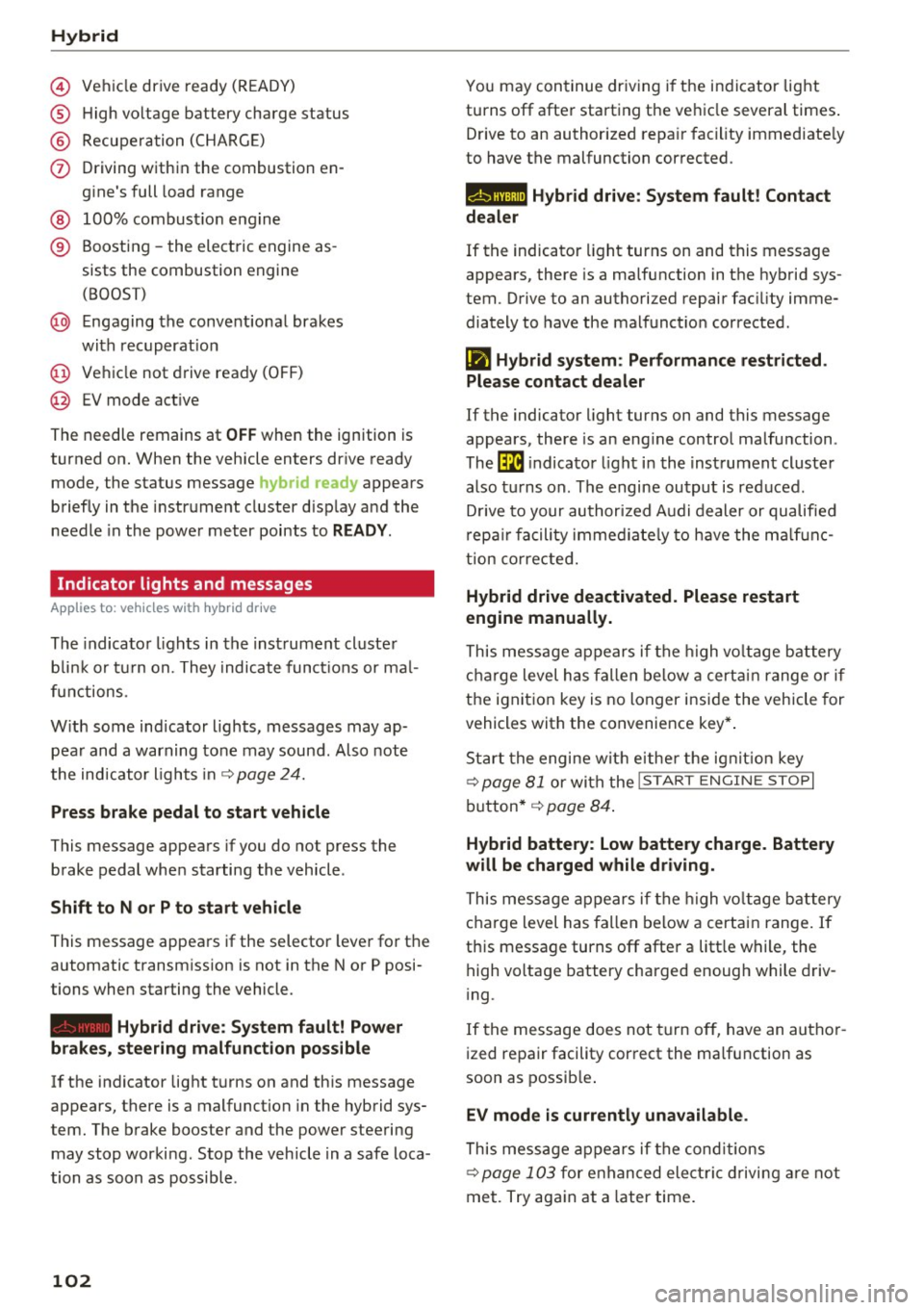
© Vehicl e drive ready (READY)
® High voltage battery charge status
® Recuperation (CHARGE)
(j) Driving within the combustion en-
gine's full load range
® 100% combust ion engine
® Boosting -the electric engine as-
sists the combustion engine
(BOOST)
@ Engaging the conventional brakes
with recuperat ion
@ Vehicle not drive ready (OFF)
@ EV mode act ive
The needle remains at
OFF when the ignition is
turned on. When the vehicle enters drive ready
mode, the status message
hybrid ready appears
briefly in the instrument cluster display and the
needle in the power meter points to
READY.
Indicator lights and messages
App lies to: ve hicles w ith hyb rid drive
The indicator lights in the instrument cluster
b lin k or tu rn on. They indicate functions or mal
f unct ions.
With some indicator lights, messages may ap
pear and a warning tone may sound . Also note
the indicator l ights in
¢page 24.
Press brake pedal to start vehicle
This message appears if you do not press the
brake pedal when starting the vehicle .
Shift to N or P to start vehicle
This message appears if the selector lever for the
automatic transmission is not in the Nor P posi
tions when starting the vehicle.
- Hybrid drive: System fault! Power
brakes, steering malfunction possible
lfthe indicator light turns on and this message
appears, there is a malfunction in the hybrid sys
tem . The brake booster and the power steering
may stop working. Stop the vehicle in a safe loca
tion as soon as possible.
102
You may continue driving i f the i ndicator light
turns off after starting the vehicle several times .
Drive to an authorized repair facility immediate ly
to have the malfunction corrected .
Q/ij:@,j rlybrid drive: System fault! Contact
dealer
If the indicator light turns on and this message
appears, there is a malfunction in the hybrid sys
tem. Drive to an authorized repair fac ility imme
diately to have the malfunct ion corrected.
(II Hybrid system: Performance restricted.
Please contact dealer
If the indicator light turns on and this message
appears, there is an eng ine control malfunction .
The
ffa i ndicator light in the instrument cluster
also turns on. The engine output is reduced.
D rive to your authorized Audi dealer or qualified
r epa ir facility immediate ly to have the malfunc
tion corrected.
Hybrid drive deactivated. Please restart
engine manually.
This message appears if the high vo ltage battery
charge level has fallen below a certain range or if
the ignition key is no longer inside the vehicle for
vehicles with the convenience key* .
Start the engine wit h eithe r the ignition key
¢
page 81 or with the !START ENGINE STOPI
button* ¢ page 84.
Hybrid battery: Low battery charge. Battery
will be charged while driving.
This message appears if the high vo ltage battery
charge level has fallen below a certain range. If
this message turns off after a litt le while, the
high voltage battery charged enough while driv
i ng.
If the message does not turn off, have an author
ized repair facility correct the ma lfunction as
soon as possib le .
EV mode is currently unavailable .
This message appears if the conditions
¢ page 103 for enha nced elect ric driving are not
met. Try again at a la ter time .
Page 114 of 296
Audi adaptive cruise control and braking guard
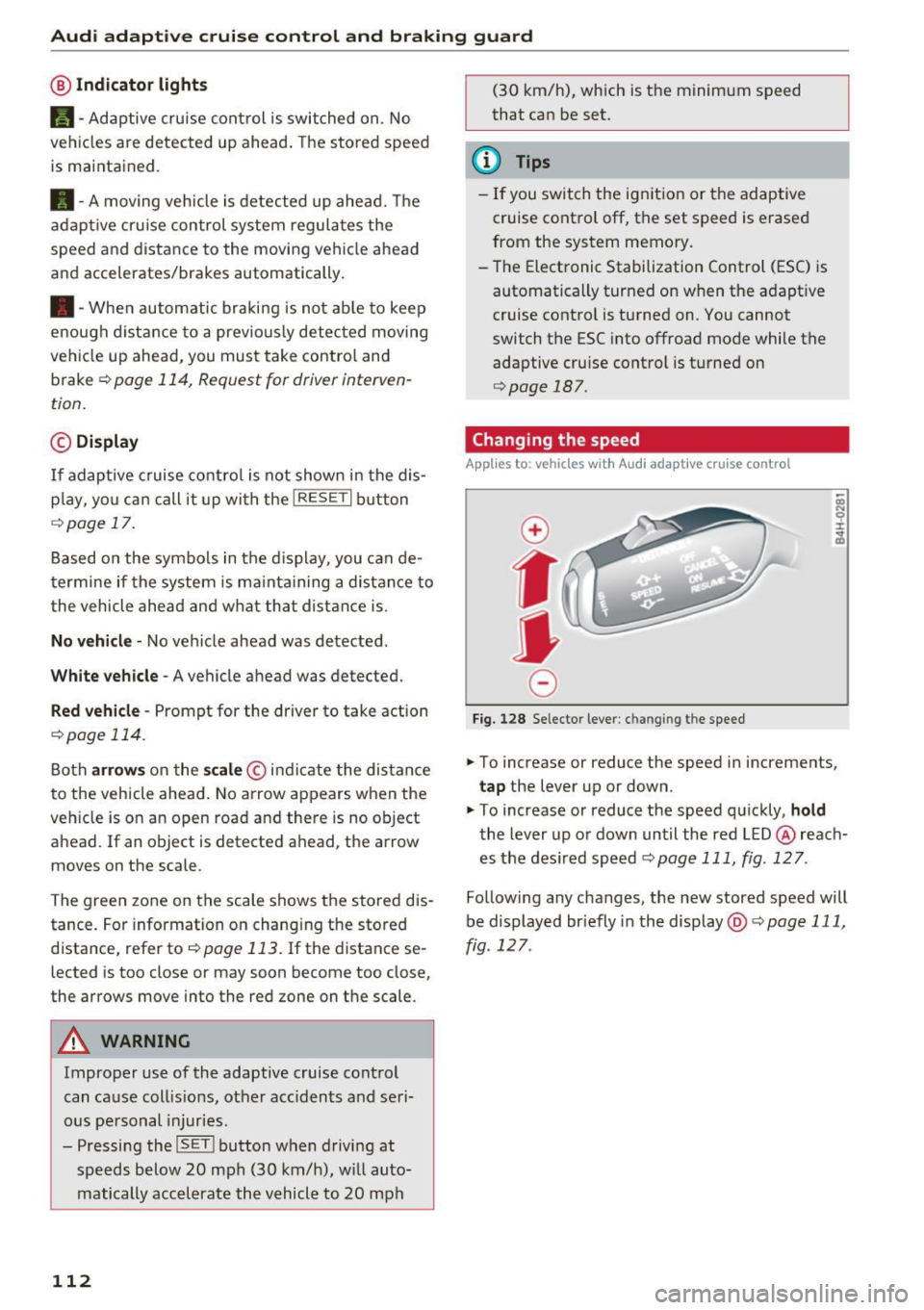
@ Indicator lights
Ill -Adaptive cruise control is switched on. No
vehicles are detected up ahead. The stored speed
is maintained .
• -A moving veh icle is detected up ahead. The
adaptive cruise control system regulates the
speed and distance to the moving vehicle ahead
and accelerates/brakes automatically.
• -When automatic braking is not able to keep
enough distance to a previously detected moving
vehicle up ahead, you must take contro l and
brake
¢ page 114, Request for driver interven
tion.
© Display
If
adaptive cruise control is not shown in the dis
play, you can call it up with the
IRESETI button
¢page 17.
Based on the symbo ls in the display, you can de
termine if the system is ma inta ining a distance to
the vehicle ahead and what that distance is .
No vehicle -No vehicle ahead was detected .
White vehicle -A vehicle ahead was detected.
Red vehicle -Prompt for the driver to take action
¢page 114.
Both arrows on the scale© indicate the distance
to the vehicle ahead . No arrow appears when the
veh icle is on an open road and there is no object
ahead. If an object is detected ahead, the arrow
moves on the scale .
The green zone on the scale shows the stored dis
tance . For information on changing the stored
distance, refer to
¢page 113. If the distance se
lected is too close or may soon become too close,
the arrows move into the red zone on the scale .
A WARNING
Improper use of the adaptive cruise control
can cause collis ions, other accidents and seri
ous personal injuries.
- Pressing the
! SET ! button when driving at
speeds below 20 mph (30 km/h), will auto
matically accelerate the vehicle to 20 mph
112
(30 km/h), which is the minimum speed
that can be set.
@ Tips
- If you switch the ign it ion or the adaptive
cruise control off, the set speed is erased
from the system memory.
- The Electronic Stabilization Control (ESC) is
automatically turned on when the adapt ive
cruise control is turned on. You cannot
switch the ESC into offroad mode while the
adaptive cruise control is turned on
¢page 187.
Changing the speed
App lies to: vehicles with Audi adaptive cru ise control
0
f
•
0
Fig. 128 Selector lever: ch an gin g the speed
.,. To increase or reduce the speed in increments,
tap the lever up or down.
.,. To increase or reduce the speed quickly,
hold
the lever up or down until the red LED @ reach
es the desired speed
¢page 111, fig . 127 .
Follow ing any changes, the new stored speed will
be displayed br iefly in the display @¢
page 111,
fig . 127 .
Page 116 of 296
Audi adaptive cruise control and braking guard
c:::::, ___ c:::::,_ Distance 3 : This setting corresponds
to a distance of 164 feet/SO mete rs when trave l
ing at 62 mph (100 km/h), or a time interval of 1.8 seconds .
c:::::, ____ c:::::, Distance 4 : This setting corresponds
to a distance of 210 feet/64 meters when trave l
ing at 62 mph (100 km/h), or a time interval of
2 .3 seconds .
_&. WARNING
Following ot her vehicles too closely increases
the risk of collisions and ser ious personal in
jury.
- Setting short distances to the traffic ahead
reduces the t ime and distance ava ilable to
br ing your vehicle to a safe sto p an d makes
i t eve n mo re necessary to pay close atten
t ion t o traffic.
- Always obey applicable traffic laws, use
g ood ju dgment, and select a safe f ollow ing
di st ance f or th e tra ffic, road and we athe r
c ondition s.
¢j) Tips
- Distance 3
is set au tomati cally e ach time
yo u sw itch th e ig nit io n o n.
- Y our sta ndard setti ngs a re a uto mat ica lly
stor ed and as signed to th e re m ote contro l
k ey be ing used ¢
page 33 .
Setting the dr iving program
A pp lies to: ve hicles w ith Audi adaptive cruise co ntro l
Depending on t he se lec ted dr iv ing program and
d istance, dr iv ing behavior whe n accelerating wi ll
vary from dynamic to comfo rtable.
Setting the driving program for vehicles
without Audi drive select*
~ In the radio/ MM!*, selec t: !CARI function but
ton
> adaptive cruise control > Driving pro
gram
> Comfort , Standard or Dynamic. Or
~ Se lect : I CARI funct ion button > Car systems*
contro l button > Driver assist > Adaptive cruise
control
> Driving program > Comfort, Stand
ard
o r Dynamic .
114
Setting the driving mode for vehicles with
Audi drive select*
Refer to ¢page 123 .
(D Tips
Your set tings are automatic ally store d and as
signed to t he remote contro l key being used
¢ page 33 .
Request for driver intervention
App lies to: vehicles wi th Audi ada ptive c ru ise control
Fig. 131 I n str um ent cl uste r: re quest for driver interve n
t io n
In certain situations, the system will prompt yo u
to take ac tion . This could happen, for example, if
braki ng by the adaptive cruise cont rol sys tem is
not en ough to ma in tain enough dis tance to t he
vehicle a he ad .
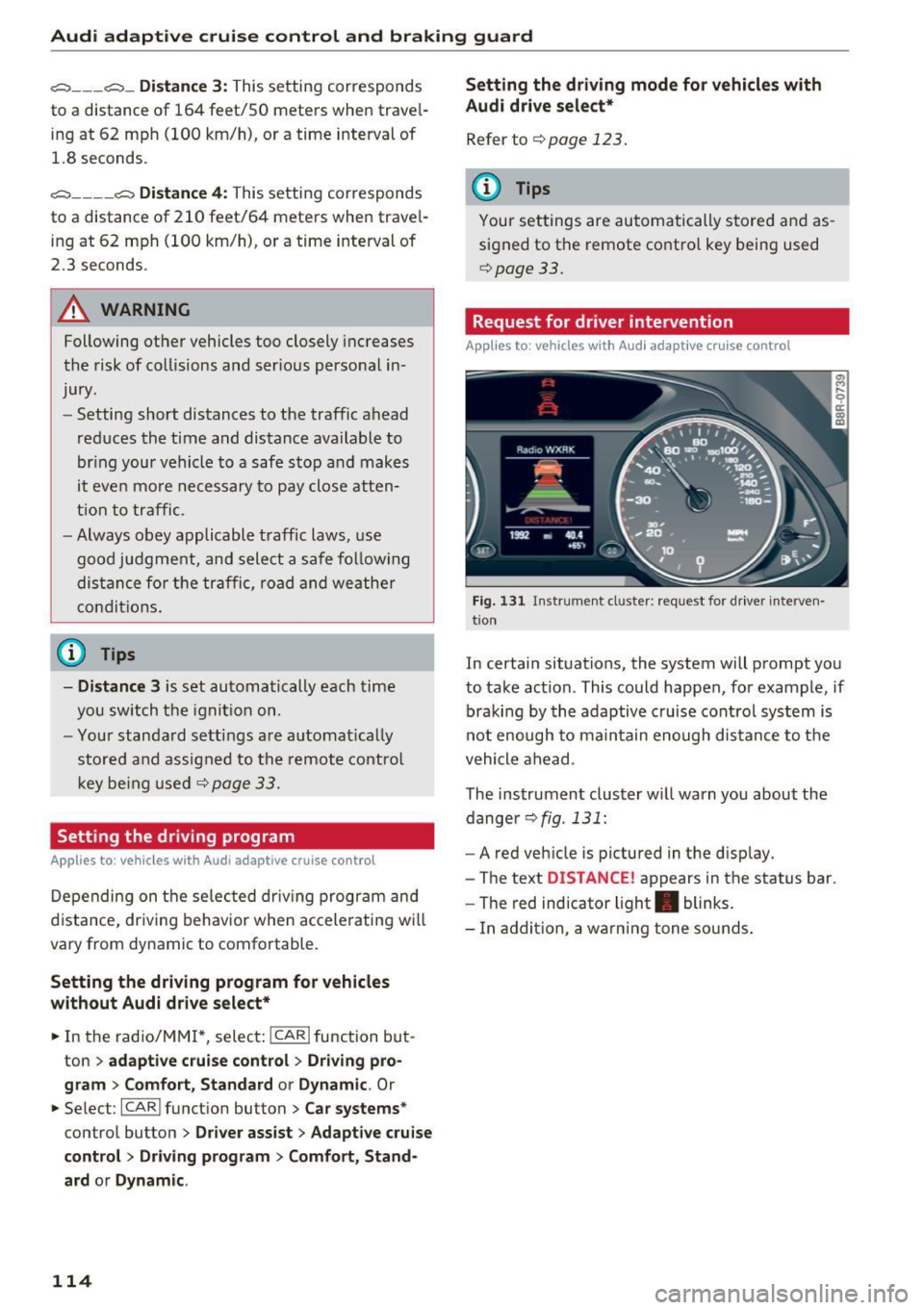
The ins trument cluster w ill warn you about the
dange r¢
fig . 131 :
-A red veh icle is pictured in the d isp lay.
- The te xt
DISTANCE! appears in the status bar .
- The red indicator light . blinks .
- In ad dition, a wa rni ng tone so unds .
Page 117 of 296
a,
a,
..... N r-N ..... 0 0
0:
co
Audi adaptive cruise control and braking guard
Audi braking guard
Description
Applies to: ve hicles with Audi adaptive cruise co ntro l
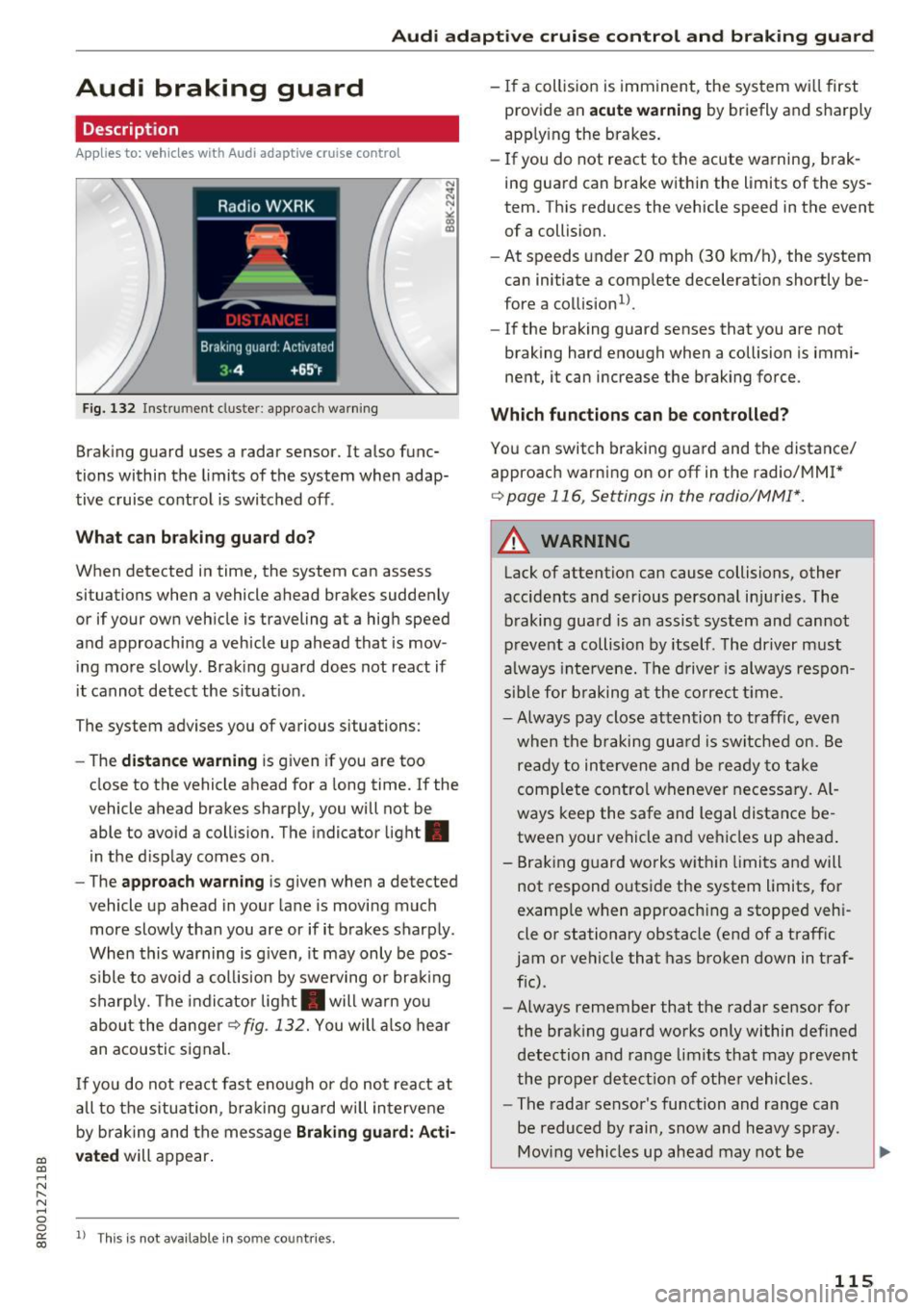
Fig. 132 Instrument cluste r: approach warning
Braking guard uses a radar sensor. It also func
tions within the limits of the system when adap
tive cruise control is switched off .
What can braking guard do?
When detected in time, the system can assess
situations when a vehicle ahead brakes suddenly
or if your own vehicle is traveling at a high speed
and approaching a vehicle up ahead that is mov
ing more slowly . Braking guard does not react if
it cannot detect the situat ion.
The system advises you of various situations:
- The
distance warning is g iven if you are too
close to the vehicle ahead for a long time.
If the
vehicle ahead brakes sharply, you will not be
able to avoid a collision. The indicator light .
in the display comes on.
- The
approach warning is given when a detected
vehicle up ahead in your lane is moving much
more slowly than you are or if it brakes sharply .
When this warning is g iven, it may only be pos
s ible to avo id a col lision by swerving or brak ing
sharp ly. Th e indicator light . will warn you
about the danger
¢fig. 132. You will also hear
an acoustic signal.
If you do not react fast enough or do not react at
all to the situation, braking guard will intervene
by braking and the message
Braking guard: Acti
vated
will appear.
1> Th is is not ava ilab le in some coun tries.
-If a collision is imminent, the system wi ll first
provide an
acute warning by briefly and sharply
apply ing the brakes.
- If you do not react to the acute warning, brak
ing guard can brake within the limits of the sys
tem. This reduces the vehicle speed in the event
of a collision.
- At speeds under 20 mph (30 km/h), the system
can initiate a comp lete decelerat ion shortly be
fore a collision
ll.
- If the braking guard senses that you are not
braking hard enough when a collision is immi
nent, it can increase the braking force .
Which functions can be controlled?
You can switch braking guard and the distance/
approach warn ing on or
off in the radio/MM!*
¢ page 116, Settings in the radio/MM!*.
A WARNING
-
Lack of attention can cause collisions, other
accidents and ser ious personal in juries. The
braking guard is an assist system and cannot
prevent a collision by itself. The driver must
always intervene. The driver is always respon
sible for braking at the correct tim e.
- Always pay close attention to traffic, even
when the braking guard is switched on. Be
ready to intervene and be ready to take
comp lete control whenever necessary. Al
ways keep the safe and legal distance be
tween your vehicle and vehicles up ahead .
- Braking guard works wit hin limits and will
not respond outside the system limits, for
examp le when approaching a stopped veh i
cle or stationary obstacle (end of a traffic
jam or vehicle that has broken down in traf
fic).
- Always remember that the radar sensor for
the braking guard works only within defined
detection and range limits that may prevent
the proper detect ion of other vehicles.
- The radar sensor's function and range can
be reduced by rain, snow and heavy spray.
Moving vehicles up ahead may not be
,.
115
Page 128 of 296
Parking aid
Rearview cam era cov erage area
The MM I display shows the area covered by the
rearview camera
c:> fig . 142 @. Objects that a re
not in the area covered @are not shown on the
MMI disp lay.
We recommend th at yo u pract ice pa rking with
the rearview camera in a traffic-free location or
parking lot to become familiar with the system,
the orientation lines, and their function . When
doing this, there should be good light and weath
er cond itions .
I n the MMI disp lay, objects or vehicles appear
closer or further away if :
- yo u are driving in reverse ge ar from a level su r
f ace onto an incl ine, or a downward s lope,
- yo u are d rivi ng in reverse gea r toward protr ud
ing obje cts,
- the ve hicl e is ca rry ing too much load in the
rear.
The accuracy of the orientation lines and b lue
surfaces d imin ishes if:
- the rearv iew camera does not provide a reliab le
image, for example, in poor visibility cond itions
or if the lens is d irty,
- the image on the screen is not visib le due to
sun glare and reflection .
Caring for the rearview camer a lens
The rearview camera is located above the rear li
cense plate bracket. For the parking system to
operate, the lens
c:> fig. 143 must be kept clean:
- Dampen the lens with a househo ld alcoho l-
based glass cleaner, and then wipe the lens
clean with a dry cloth
i::> (!).
-Remove snow with a hand br ush and ice pref
erab ly with a de -icing spray
i::> (!) .
A WARNING
-The parking system ca nnot replace the dr iv
er's attention . The dr iver alone is responsi
ble for parking a nd s imilar dr iv ing mane u
vers.
- Sensors have blind spots in wh ich objects
cannot be detected . Pay spec ial atten tion to
126
sma ll children and anima ls because the sen
sors cannot a lways detect them.
- Always keep your eyes on the vehicle's sur
roundings, us ing the rearv iew mirror as
wel l.
- Do not allow yourself to be dist racted from
traffic by the rearview camera pictures.
- If the position and the installation angle of
the camera has changed, for example, after
a rea r end co llision, do not continue to use
the system for safety reasons. Have it
checked by a q ualified dealership .
(D Note
-Low obstacles a lready signa led by a warning
can disappear from the system's detect ion
range as they are approached and w ill not
cont inue to be signaled . Objects such as
barrier cha ins, tra iler draw bars, t hin paint
ed vertical po les or fences may not be de
tecte d by the system, posi ng ris k of dam
age.
- Never use wa rm o r hot wate r to remove
s now or ice from the rearview came ra le ns ·
this could cause the lens to c rack!
- Whe n cleani ng the lens, never use products
tha t are abr asive .
Page 129 of 296
Switching on and off
Applies to: vehicl es wit h Aud i parking system p lus w ith rear
view came ra
The rearview camera switches an automatically
together with the acoustic and visual park assist
when you put the vehicle in reverse.
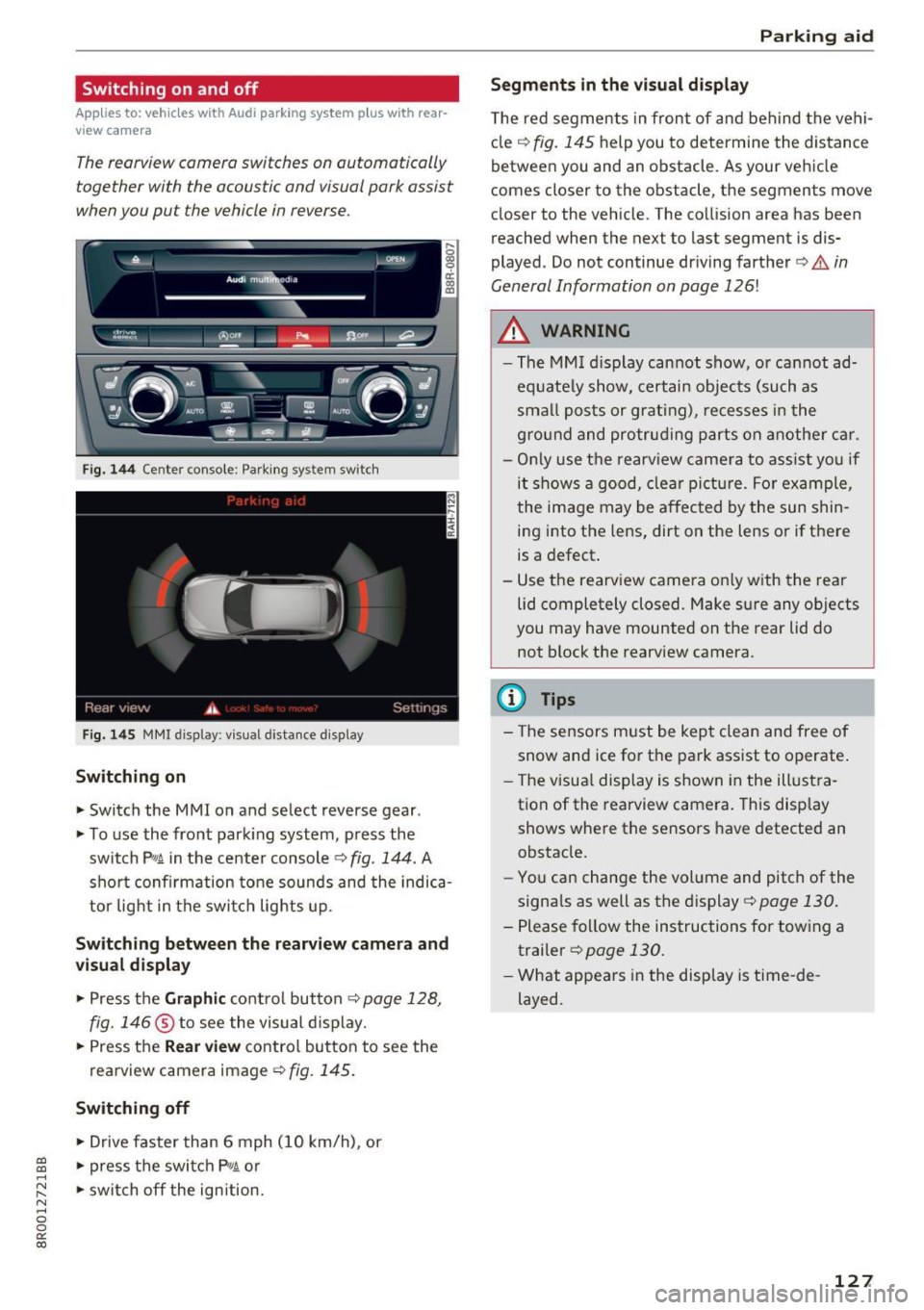
Fig. 144 Center console: Park ing system switch
Fig . 1 45 MMI display: visual distance display
Switching on
.. Switch the MMI on and select reverse gear .
.. To use the front park ing system, press the
switch
p,, 1A in the center console c::> fig . 144. A
sho rt confirmation tone sounds and the indica
tor light in the switc h lights up.
Switching between th e re arview came ra and
vi sual displa y
.. Press the Graphi c co ntrol button c::>page 128,
fig. 146
® to see the visual d isplay .
.. Press the
Rear view contro l butto n to see the
rearview camera image
¢fig. 145.
Switching off
.. Drive faster than 6 mph ( 10 km/h), or
~ .. press the switch P'#A or .....
~ .. switch off the ign ition. N ..... 0 0
0:
co
P ark ing aid
Segments in the visual di splay
T he red segments in front of and behind the vehi
cle
c:::> fig. 145 help you to determine the distance
between you and an obstacle. As your vehicle
comes closer to the obstacle, the segments move
closer to the vehicle. The collision area has been
reached when the next to last segment is dis
played . Do not continue dr iving farther
c:::> .&. in
General Information on page
126!
A WARNING
-- The MM I display cannot show, o r cannot ad-
equate ly show, certain objects (such as
smal l posts or grating), recesses i n the
g ro und and protruding parts on another car.
- On ly use the rearv iew camera to ass ist yo u if
it shows a good, clea r pi ctu re. For example,
the image may be affected by the sun shin
ing into the lens, dirt on the lens or if there
is a defect.
- Use the rearv iew camera on ly w ith the rea r
lid completely closed. Make sure any objects
you may have mounted on the rear lid do
not block the rearv iew camera.
(D Tips
- The sensors must be kept clean and free of
snow and ice for t he park ass ist to operate .
- The visua l display is shown in the illust ra
tion of the rearview camera. This display shows where the sensors have detected an
obstacle.
- You can change the volume and pitch of the
signa ls as well as the display
c:::> page 130.
- Please fol low the instructions for tow ing a
trailer
c:::> page 130.
- What appears in the display is time -de
layed.
127
Page 133 of 296
CD
CD
.... N ,-... N ,....,
0 0 C<'. 00
Driving safety
Basics
Safe driving habits
Please remember -safety first!
This chapter contains important information,
tips, instructions and warnings that you need to
read and observe for your own safety, the safety
of your passengers and others . We have summar
ized here what you need to know about safety
belts, airbags, child restraints as well as child
safety. Your safety is for us
priority number 1. Al
ways observe the information and warnings in
this section - for your own safety as well as that
of your passengers.
The information in this section applies to all
model versions of your vehicle. Some of the fea
tures descr ibed in this sections may be standard
equipment on some models, or may be optional
equipment on others. If you are not sure, ask
your authorized Audi dealer.
A WARNING
- Always make sure that you follow the in
structions and heed the WARNINGS in this
Manual. It is in your interest and in the in
terest of your passengers .
-
-Always keep the complete Owner's Litera
ture in your Audi when you lend or sell your
vehicle so that this important information
will always be available to the driver and
passengers.
- Always keep the Owner's literature handy so
that you can find it easily if you have ques
tions.
Safety equipment
The safety features are part of the occupant re
straint system and work together to help reduce
the risk of injury in a wide variety of accident sit
uations.
Your safety and the safety of your passengers
should not be left to chance. Advances in tech
nology have made a var iety of features available
to help reduce the risk of injury in an accident.
Driving safety
The following is a list of just a few of the safety
features in your Audi:
- sophisticated safety belts for driver and all pas-
senger seat ing pos itions,
- be lt force limiters for the front seats,
- belt pretensioners for the seats,
- belt height adjustment for the front seats,
- head restraints for each seating position,
- front airbags,
- side airbags in the front seats and outer rear
seats *,
- side curtain airbags,
- special LATCH anchorages for child restraints,
- adjustab le steering column.
These individual safety features, can work to gether as a system to help protect you and your
passengers in a wide range of accidents . These
features cannot work as a system if they are not
always correctly adjusted and correctly used.
Safety is everybody's responsibility!
Important things to do before driving
Safety is everybody 's job! Vehicle and occupant
safety always depends on the informed and care
ful driver .
For your safety and the safety of your passen
gers,
before driving always:
.,. Make sure that all lights and signals are operat
ing correctly.
.,. Make sure that the tire pressure is correct .
.,. Make sure that all windows are clean and afford
good visibility to the outside .
.,. Secure all luggage and other items carefully
~page 74 .
.,. Make sure that nothing can interfere with the
pedals.
.,. Adjust front seat, head restraint and mirrors
correctly for your height.
.,. Instruct passengers to adjust the head re
straints according to their height.
.,. Make sure to use the right child restraint cor
rectly to protect children
¢ page 168, Child
safety. ..,.
131
Page 134 of 296
Driving safety
• Sit properly in your seat and make sure that
your passengers do the same
c:> page 60,
General information.
• Fasten your safety belt and wear it properly . Al
so instruct your passengers to fasten their safe
ty belts properly
c:> page 140 .
What impairs driving safety?
Safe driving is directly related to the condition of
the vehicle, the driver as well as the driver 's abili
ty to concentrate on the road without being dis
tracted .
The driver is responsible for the safety of the ve
hicle and all of its occupants. If your ability to
drive is impaired, safety risks for everybody in the
vehicle increase and you also become a hazard to
everyone else on the road
c:> Li').. Therefore :
• Do not let yourself be distracted by passengers
or by using a cellular telephone .
• NEVER drive when your driving ability is im
paired (by medications, alcohol, drugs, etc.).
• Observe all traffic laws, rules of the road and
speed limits and plain common sense.
• ALWAYS adjust your speed to road, traffic and
weather conditions.
• Take frequent breaks on long trips. Do not drive
for more than two hours at a stretch.
• Do NOT drive when you are tired, under pres
sure or when you are stressed.
A WARNING
Impaired driving safety increases the risk of
ser ious personal injury and death whenever a
vehicle is being used.
132
Correct passenger
seating positions
Proper seating position for the driver
The proper driver seating position is important
for safe, relaxed driving.
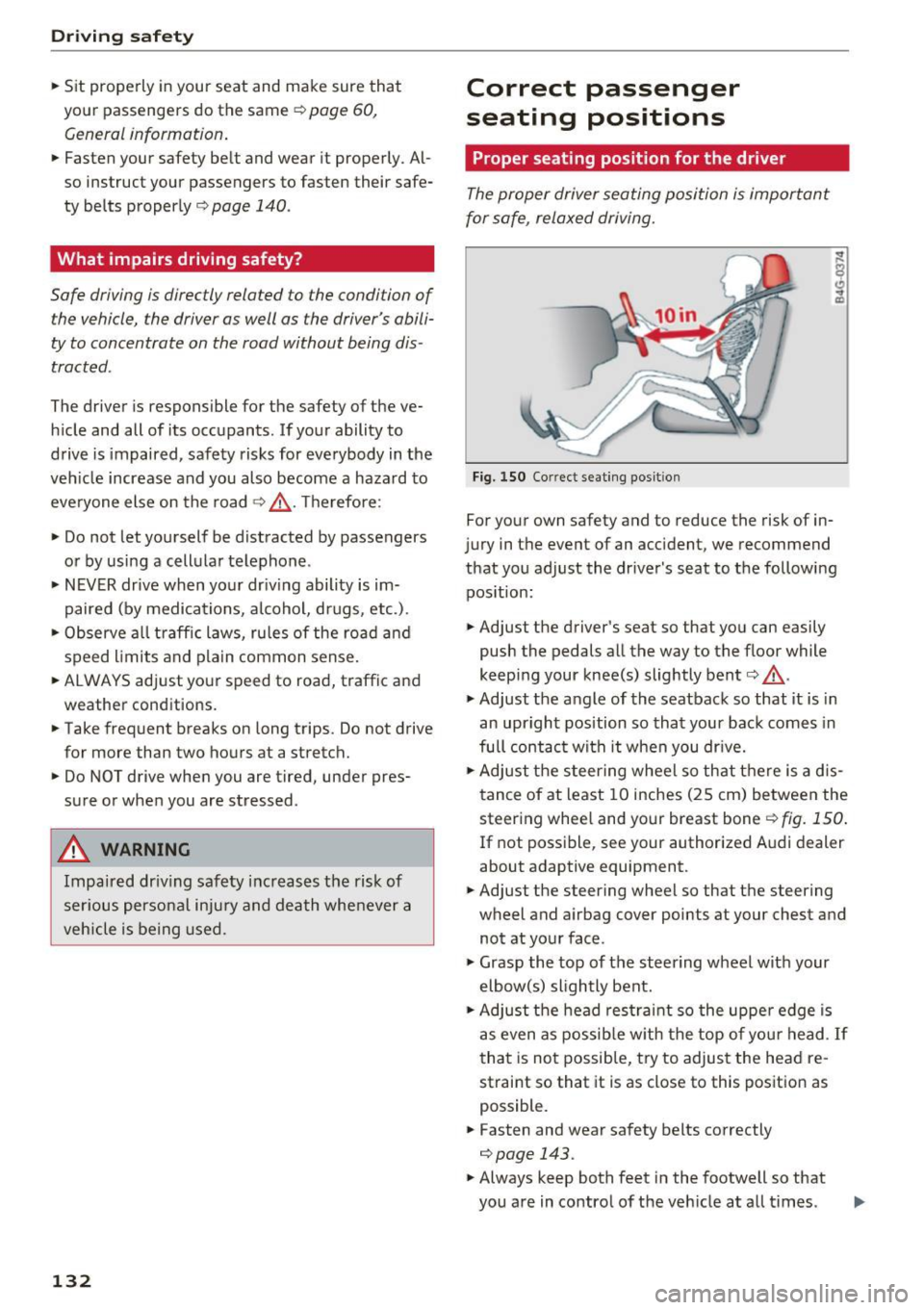
Fig. 150 Correct seating posit ion
For your own safety and to reduce the risk of in
jury in the event of an accident, we recommend
that you adjust the driver's seat to the following position:
• Adjust the driver's seat so that you can easily
push the pedals all the way to the floor while
keeping your knee(s) slightly bent
c:> .&_ .
• Adjust the angle of the seatback so that it is in
an upright position so that your back comes in
full contact with it when you drive.
• Adjust the steering wheel so that there is a d is
tance of at least 10 inches (25 cm) between the
steering wheel and your breast boner::!)
fig. 150.
If not possible, see your authorized Audi dealer
about adaptive equipment.
• Adjust the steering wheel so that the steering
wheel and airbag cover points at your chest and
not at your face.
• Grasp the top of the steering wheel with your
elbow(s) slightly bent.
• Adjust the head restraint so the upper edge is
as even as possible with the top of your head .
If
that is not possible, try to adjust the head re
straint so that it is as close to this position as
possible.
• Fasten and wear safety belts correctly
c:> page 143.
• Always keep both feet in the footwell so that
you are in control of the veh icle at all times .
Page 142 of 296
Safety belt s
Safety belts
General information
Always wear safety belts!
Wearing safe ty belts correctly saves lives!
This chapte r explains why safety be lts a re neces
sary, how they work and how to adjust and wear
them correct ly.
.. Read all the information that follows and heed
all of the instructions and WARNINGS.
&_ WARNING
Not wea ring safety belts or wearing them im
properly increases the risk of ser ious personal
injury and dea th .
- Safety belts are the s ingle most effective
mea ns ava ilab le to reduce the risk of serious
injury and dea th in automob ile accidents .
For yo ur protect ion and that of your passe n
gers, alw ays co rre ctly wea r sa fety be lt s
when the veh icle is moving .
- Pregnant wom en, in ju re d, o r physically i m
paired persons mus t also use s afety be lts.
L ik e all vehi cle o ccu pants, they are mo re
li kely to be serio usly injure d if th ey do no t
wea r safety be lts. The best way to protect a
fetus is to protect the mothe r -th roughout
the ent ire pregnancy .
Number of seats
Your Audi has a total of five seating positions:
two in the front and three in the rear. Each seat
i n g position has a safety belt.
&_ WARNING
N ot wea ring safety bel ts or weari ng them im
properly increases th e r isk of ser ious personal
inju ry and dea th.
- N ever st rap more tha n one perso n, includ
ing small ch ildren, into a ny be lt .
It is espe
ci ally dan gerous to pla ce a sa fety bel t over a
c hild s itting on you r lap.
- N ever le t mo re people ride in t he vehicle
t h an t he re are saf ety bel ts availab le.
140
-Be sure everyone riding in the vehicle is
properly restrained with a separate safety
be lt or ch ild restraint.
Safety belt warning light
Your vehicle has a warning system for the driver
and (on USA models only) front seat passenger
to remind you about the importance of buckling
up .
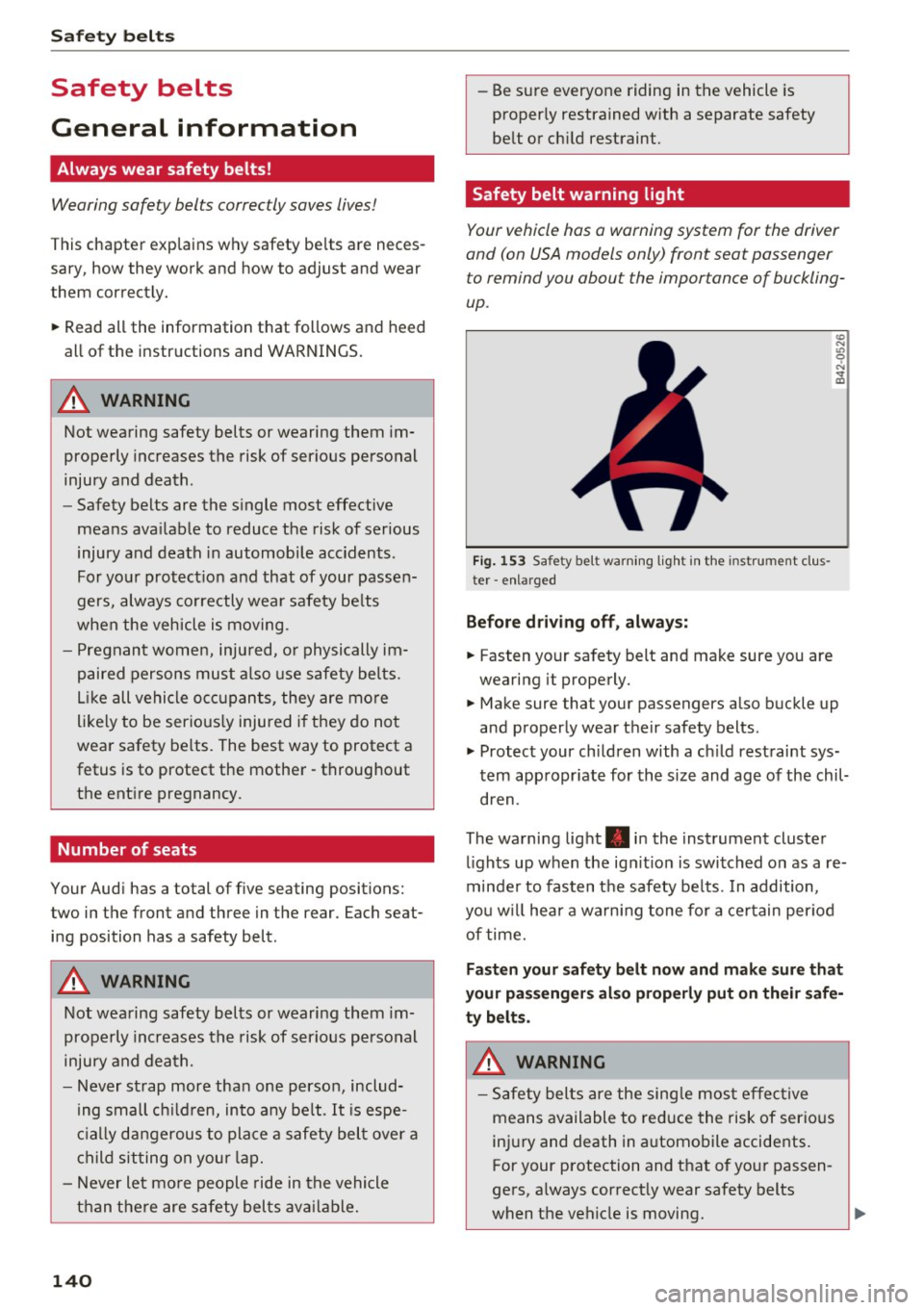
Fig. 153 Safety belt wa rning lig ht in th e in st rument clu s
ter -enl arged
Before driv ing off , alway s:
.. Fasten your sa fety belt and make sure you are
wearing it prope rly .
(0
"'
"' 0 N
and proper ly wea r th eir safety belts .
.. Protec t your ch ildren with a ch ild rest raint sys
tem app ropr iate for the size and age of the chil
dren .
The wa rning lig ht . in the instrument cluste r
l ights up when the ig nition is swi tched on as a re
minde r to fas ten t he safety be lts. In addition,
yo u w ill hea r a wa rn ing tone for a ce rt ain per io d
of time.
Fasten your safety belt now and make sure that
your passengers also properly put on their safe
ty belts.
&_ WARNING
-
- Safety belts are the sing le mos t eff ec tive
means available to re duce the risk of serio us
in jur y and death in a utomo bile accidents.
For your protection and t hat of yo ur passen
ge rs , a lways cor rect ly wear safety belts
when t he veh icle is moving .