ECO mode AUDI Q5 2018 User Guide
[x] Cancel search | Manufacturer: AUDI, Model Year: 2018, Model line: Q5, Model: AUDI Q5 2018Pages: 392, PDF Size: 60.56 MB
Page 73 of 392
u co ..... N ,..._
N ..... 0 <( 0 00
system operates most efficiently in eco cooling
mode.
A/C MAX Cooling mode*
You can switch the maximum cooling mode on or
off using the rocker switch@. Th e air is not
cooled and humidity is not removed when coo ling
mode is switched off. This can cause fog on the
windows . Cooling mode switches off automati
cally when the o utside temperature is below
ze ro. When the cooling mode is switched on, the
vehicle interior is cooled as quickly as possible
and dehumidified.
<::E::> Recirculation mode
In recirculation mode, the air inside the vehicle is
circu lated and fi ltered. This prevents the unfil
tered air outside the vehicle from entering the
ve hicle interior . Switch ing recirculation mode on
when dr iv ing through a tunnel or when s itting in
traffic is recommended
~ ,&. .
You can switch the recircu lation mode on or off
using the
6<:> button . You can also sw itch the re
circulation mode off by pressing the knob(!) or
the Sfx button.
AUTO automatic mode
Automatic mode ma inta ins a constant tempera
ture ins ide the veh icle. Air temperature, airflow
and a ir distribution are controlled automatically .
You can switch automatic mode on or off by pressing the
knob @.
Temperature
You can adjust the temperature between 60°F
(+16°() and 84°F (+28°() by turn ing the knob
@. If outs ide of this range, LO or HI will appear
in the climate control system display. In both
sett ings, the climate control runs constantly at
the maximum cooling or heating level. The tem
perature is not regulated.
The temperature can be adjusted in the rear us
in g the rea r controls
~ fig . 83 .
<%'~ Blower
You can adjust the vo lume of air generated by the
blower to your preference using the rocker sw itch
@ . The blower should always run at a low setting
Warm and cold
to prevent the windows from fogging and to en
sure a continuous exchange of air inside the ve hi
cle . To have the blower regulated a utomatica lly,
press one of the
knobs @.
Air distribution
You can use the rocker sw itches @to adjust the
vents where the air wi ll flow out o f. Press the
rocker switches @repeatedly until the desired
air distrib ution setting is disp layed in the climate
contro l system controls. To have the air distribu
t ion regulated automat ically, press one of the
knobs @.
.JI~ Seat heating/ventilation*
Pressing the JI~ button switches the seat
heating/ventilation on at the highest setting
(level 3). The LEDs indicate the temperature lev
el. To reduce the temperature, press the button
again. To switch the seat heat ing/ventilat ion off,
press the button repeatedly until the LED turns
off.
:.f% Defrosting
The w indshield and side windows are defrosted
or cleared of condensat ion as quickly as poss ible.
The maximum amount of a ir flows mainly from
the vents below the windsh ield. Rec ircu lat ion
mode switches off. The temperatu re should be
set at +72°F (+22°() or hig her. Th e temperature
is controlled automat ically.
You can switch the defroster on or off using the
3R button. You can switch the fu nction off by
pressing a
knob @.
[ffi) REAR Rear window defogger
You can switch the rear w indow defogger on by
pressing the
!!P. button . It only operates when the
engi ne is run ning .
It switches off automatically
after 10 to 20 minutes , depending on the outside
temperature.
T o prevent the rear window defogger from
switching off automat ically, press and hold the
QiP REAR button for more than thr ee seconds.
T his is stored until the ignition is switched off .
.,.
71
Page 75 of 392
u co ..... N r--N ..... 0 <( 0 00
Driving
General information
Breaking in
A new vehicle must be broken in for the first
1,000 miles (1,500 km). Do not drive at speeds
that will exceed 2/3 of the maximum permitted
engine speed (RPM) for the first 600 miles
(1,000 km), and avoid full acceleration during
this period . You may gradually start increasing
the RPM and the speed between 600 miles
(1,000 km) and 1,000 miles (1,500 km) .
During the first hours of use, the engine has a
higher internal friction than later on when all
moving parts have settled into p lace with each
other.
How the vehicle is driven during the first 1,000
miles (1,500 km) also affects the engine quality .
Drive at moderate engine speeds after the initial
break-in per iod, part icu larly when running a cold
engine. This will reduce engine wear and improve
the m ileage .
Do not drive at too low of an engine speed (RPM).
Shift down if the engine stops running "smooth ly". Extremely high eng ine speeds are automati
cally reduced.
Reducing the risk of vehicle damage
@ Note
When driving on poor roads, by curbs and on
steep ramps, make sure that low-hang ing
components such as the spoiler and ex haust
system do not come into contact with these
or they cou ld be damaged. This especia lly ap
plies to vehicles with low ground clearance
and veh icles that are heavily loaded.
Driving through water on roads
Note the following to reduce the r isk of vehicle
damage when driv ing through water, for example
on flooded roads:
- The water must not be any higher than the bot
tom of the vehicle body .
Driving
-Do not drive faster than walking speed.
A WARNING
= -
After driving thro ugh water or m ud, the effec
tiveness of the brakes may be reduced due to
moisture on the brake rotors and brake pads.
A few careful brake applications shou ld dry
off the brakes and restore the fu ll braking ef
fect.
@ Note
- Vehicle components such as the engine, transmission, suspens ion or electrical sys-
tem can be severely damaged by driving
through water.
- Always switch the Start/Stop system* off
when driving through water
¢page 78.
(D Tips
-Determine the depth before driving through
water.
- Do not stop the vehicle, drive in reverse or
switch the engine off when driving through
water.
- Keep in mind that oncom ing vehicles may
create waves that raise the water level and
make it too deep for your vehicle to drive
through safely.
- Avoid dr iv in g through salt water, because
this can cause corrosion.
Economical and environmentally-friendly
driving
T he amount of fuel consumption, the environ
menta l impact and the wear to the engine,
brakes and tires depends most ly on your driving
sty le. With an anticipatory and economic driving
style, fuel consumption can be reduced by ap prox imately 10-15%. The following t ips will help
you conserve the environment and your money at the same time .
Anticipatory driving
A vehicle uses the most fuel when accelerating.
When you drive w ith anticipation, you do not
need to brake as often and so you accelerate less.
When poss ible, let your vehicle coast with a gear
.,.
73
Page 80 of 392
Driving
you stop it. You also cannot lock the vehicle from
the outside.
Shift to P, otherwise vehicle can roll away.
Doors do not lock if gearshift is not in
P
This message appears for safety reasons if the
selecto r lever is in the "N" position when you
switch the ignition off. Move the selector lever to
the "P" posit ion. Otherwise the vehicle is not pro
tected from rolling and it cannot be locked.
I) Remote control key : hold back of key
against the designated area. See owner's man
ual
I f the indicator light turns on and this message
appears, there is a malfunction
c:> page 78.
Shift to P before leaving vehicle, otherwise vehi
cle can roll away
This message appears if the driver's door is
opened while the ignition is switched on and the
transmission has not been shifted to the "P" posi
tion . Sh ift the transm iss ion into the "P" position
and turn off the ignition if you are leav ing the ve
h icle. Otherwise the vehicle could roll. Also see
<=:>page 79.
Starting the engine when there is a
malfunction
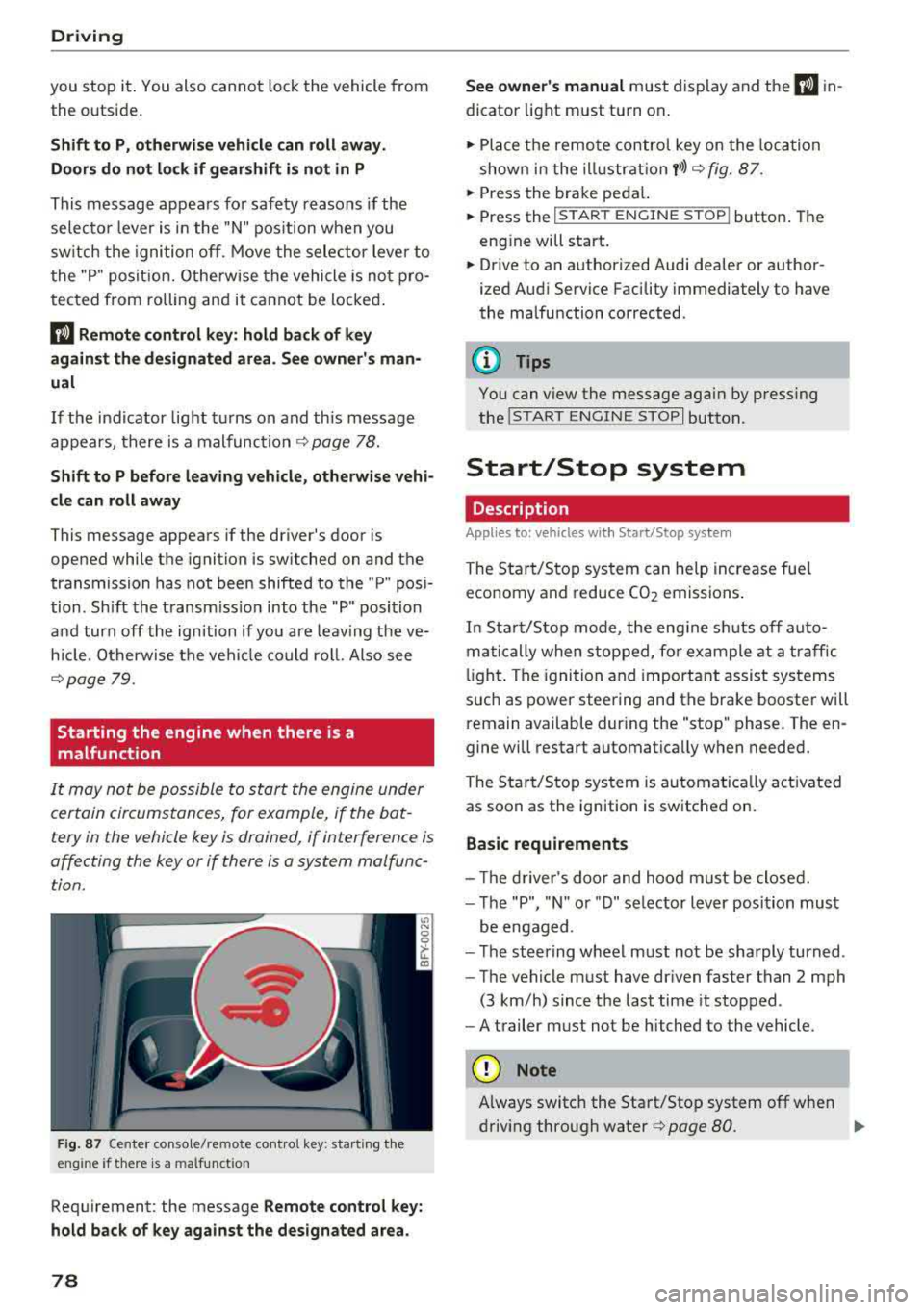
It may not be possible to start the engine under
certain circumstances, for example, if the bat
tery in the vehicle key is drained, if interference is
affecting the key or if there is a system malfunc tion.
F ig. 87 Center console/remote contro l key : start ing the
eng ine if there is a malfunct ion
Requirement: the message Remote control key:
hold back of key against the designated area.
78
See owner's manual must display and the I) in
dicator light must turn on .
.,. Place the remote control key on the loca tion
shown in the illu strat ion
y >l) c:> fig. 87.
... Press the brake pedal.
... Press the I START ENGINE STOPI button. The
eng ine will start.
... Drive to an authorized Audi dealer or author
ized Aud i Service Facility immediately to have
the malfunction corrected .
(!) Tips
You can view the message aga in by pressing
the lS TART
ENGINE STOP I button.
Start/Stop system
Description
Appl ies to : vehicles wi th Start/Stop sys te m
The Start/Stop system can help increase fue l
economy and reduce CO2 emissions.
In Sta rt/S top mode, the engine sh uts off auto
matically when stopped, for example at a traffic
li ght . The ignition and important assist systems
such as power steering and the brake booster will
remain available dur ing the "stop" phase. The en
gine will restart automatically when needed.
The Start/Stop system is automat ica lly act ivated
as soon as the ignition is switched on.
Basic requirements
- Th e driver's door and hood must be closed.
- The "P", "N " or "D" selector lever position must
be engaged .
- The steering wheel must not be sharply turned .
- The vehicle must have dr iven faster than
2 mph
(3 km/h) since the last time it stopped.
- A trailer must not be hitched to the vehicle.
(D Note
Always switch the Start/Stop system off when
driving through water
r=;, page 80.
Page 84 of 392
Driving
-The parking brake goes through a se lf -test
cycle at regular intervals when the vehicle is
stopped . Any noises associated w ith this are
normal.
- If there is a power failure , the parking brake
will not set if it is re leased, and it will not
release if it is
set¢,&. See an authorized
Audi dealer or authorized Audi Service Fa
cility for ass istance .
Starting to drive
Various convenience and safety functions may be
ava ilable when the vehicle begins driving , de
pending on vehicle equipment.
Starting on hills with the parking brake set
Requirement: the doors must be closed and the
driver's safety belt must be fastened .
~ To start driving comfortably when on a hill, set
the parking brake and begin driving as usual.
The braking force of the parking brake does not
release automatically until the wheels build up
enough dr iv ing force .
Starting on hills with hill hold assist
Hill hold assist makes it easier to start on hills .
Requirement: the driver's door must be closed
and the engine must be running.
~ To activate hill hold assist, press and hold the
brake peda l for several seconds. The veh icle
must be in an uph ill direction of travel.
After releasing the brake pedal, the brak ing pow
er is ma intained for a brief
moment ¢.& to pre
ve nt the vehicle from rolling back when starting.
During this time, you can easily beg in to move
your ve hicle.
A WARNING
-If you do not begin driving immediately or
the engine stalls after releasing the brake
pedal, your vehicle may begin to roll back
ward . Press the brake pedal or set the park
ing brake immed iate ly.
- The intelligent techno logy of hill hold assist
cannot overcome the limitations imposed by
82
-
natural physica l laws. The increased comfort
offered by hill hold assist should not cause
you to take safety risks .
- Hill hold assist cannot hold the vehicle in
place on all hills (for examp le, if the ground
is s lippery or icy).
- To reduce the r isk of an accident, always
make sure the veh icle is situated safely
while stationary .
Off road driving
General information
The Electronic Stabilization Control (ESC) func
tions were enhanced for driving offroad. Offroad
mode can be activated when driving in situations
where slippage or a differential lock function is
necessary ¢ page 141. The hill descent assist is
also available, wh ich automatically brakes the ve
hicle to maintain a constant speed
¢ page 142 .
In add it ion, your Audi provides cont inuous all
whee l drive .
However, your Audi is not a purely offroad vehi
cle . Your vehicle was not designed to dr ive under
extreme operating conditions such as driving in
an expedition style.
Only drive on terrain that is suitable for the ve
hicle and your driving ability. Never take any
unnecessary risks!
Before driving offroad
- Check the engine oil level, the tire pressure, the coo lant level and the fluid level in the washer
fluid reservoir.
- Store pieces of luggage and other objects in the
luggage compartment and secure them from
sliding out of place .
After driving offroad
-After driving offroad, remove branches and
other debris from the radiator grille, under
body, and wheels. Look especially for foreign
objects (such as s tones) that may be stuck in
the t ire tread .
- Clean the vehicle body and underbody and in-
spect the vehicle for possible damage .
.,,.
Page 86 of 392
Driving
Drive quick ly through sandy or marshy off-road
sections and do not stop , if at all poss ibl e.
Driving through water
Also read the information found in ¢ page 73.
Driving on a slope
If you a re ever unable to dr ive up a hill , do not try
to turn around . Drive back down in
re verse in
stead. Otherwise you r un the r isk o f tipping over .
If the vehicle threatens to tip over when dr iving
across a slope , you mu st immediately stee r
downhill in the direction of the slope.
Do not park your vehicle on steep hills.
To reduce the r isk of t ipping over, dr ive on hills in
the direction of the downward s lope (fa ll line)
-
never crosswise .
Tilt angle display
Description
Applies to: vehicles with a ti lt angle display
F ig. 89 I nfo ta in me nt syste m: tilt ang le d ispla y
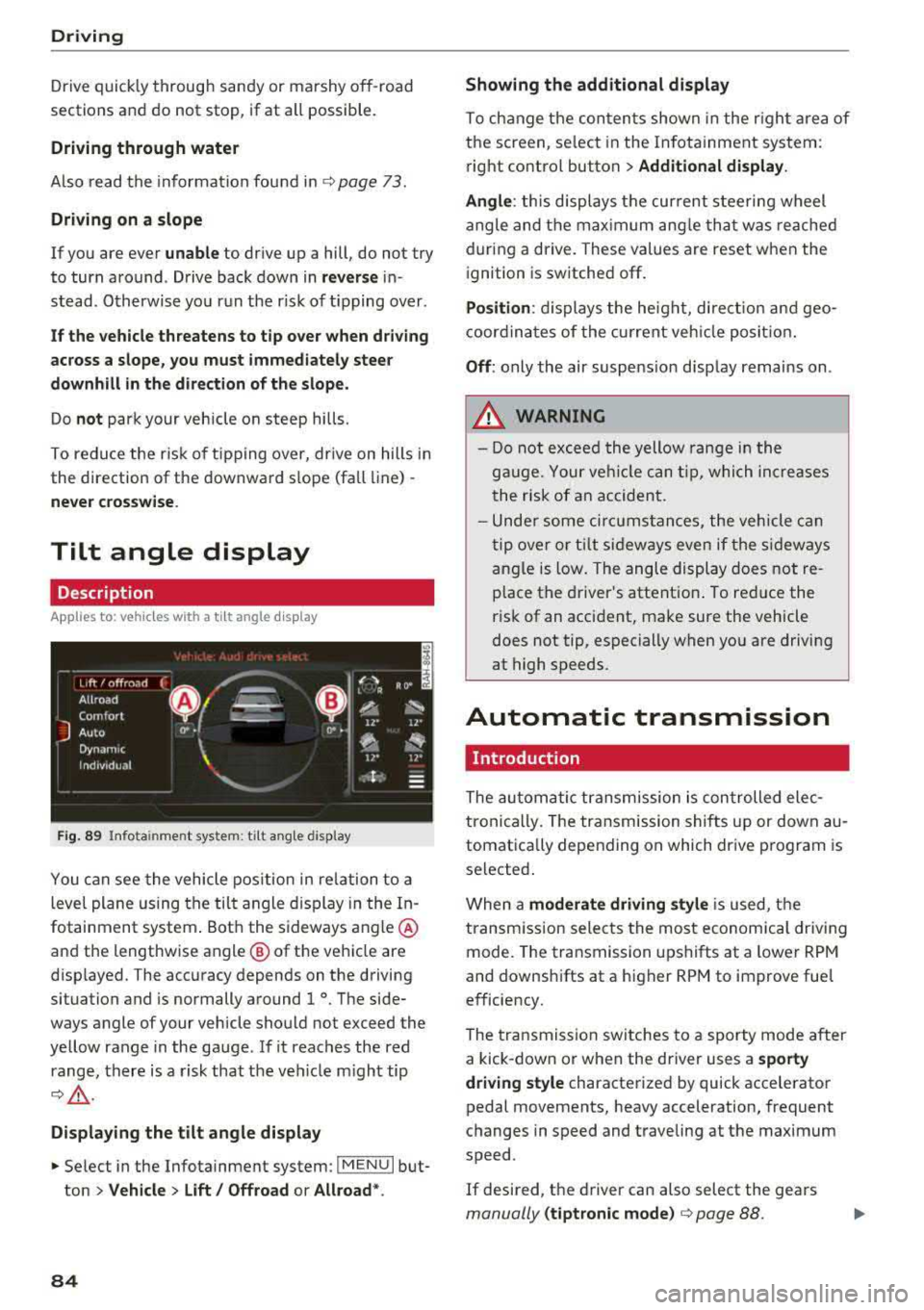
You c an see the vehicle pos ition in re lation to a
leve l plane us ing the tilt angle display in the In
fotainment system . Bot h the sideways angle @
and the lengthwise angle @ of the vehicle are
disp layed. The accuracy depends on the driving
situation and is normally a round 1
°. The side
ways angle of your vehicle should no t exceed the
ye llow range in the gauge . If it reaches the red
range, there is a risk that the ve hicle m ight tip
¢ ,&. .
Displaying the tilt angle display
~ Select in the Infotainment system : IME NUI but
ton
> Vehicle > Lift / Offroad or Allroad *.
84
Showing the additional display
To ch ange the con ten ts shown in the r igh t ar ea of
t h e screen, se lect in the In fo ta inment system :
r ight contro l button
> Additional display.
Angle :
this displays t he cur rent stee ring wheel
angle and t he max imum ang le th at was re ached
dur ing a drive . These values are reset when the
i gnition is switche d off .
Position : displays the he ig ht, di re ct io n a nd geo
coor din at es of the cur rent veh icle posit io n.
Off : only the air suspe nsio n disp lay remains on .
A WARNING
- Do not excee d the yellow range in the
g au ge. Your ve hicle can t ip, whi ch in cre as es
t he risk of an accident.
- Unde r some ci rcumstan ce s, the vehicle can
t ip ove r or til t sid eways eve n if the s ideways
angle is low. The angle display does not re
p lace the driver's attent io n. To re duce the
risk of an accident, make sure the vehicle
does not tip, especially when yo u are driving
at high speeds.
Automatic transmission
Introduction
The au tom atic transmission is con trolled ele c
tronically. The transmission shifts up or down au
tomat ica lly depending on which dr ive p rogram is
selected .
When a
moderate driving style i s used, t he
transm iss ion selec ts the most economica l driv ing
mode. The transmission upshifts at a lower RPM
and downshifts at a higher RPM to improve fue l
e fficiency.
The tra nsmission switches to a sporty mode after
a kick-down or when the driver uses a
sporty
driving style
characterized by quick accelerator
pedal movements, heavy acceleration, frequent
changes in speed and t raveling at the max imum
speed .
If desired, th e driver can also select the gears
manually (tiptronic mode ) ¢ page 88.
Page 87 of 392
S tronic transmission
The S tronic is a dual-clutch transmiss ion. Power
is transferred using two clutches that work inde
pendently from one another. They replace the
torque converter used in conventional automatic
transmissions and allow the vehicle to accelerate
without a noticeable interruption in traction.
tiptron ic transmission
In the tiptronic transmission, power is transfer
red by a torque converter.
Selecting a selector lever position
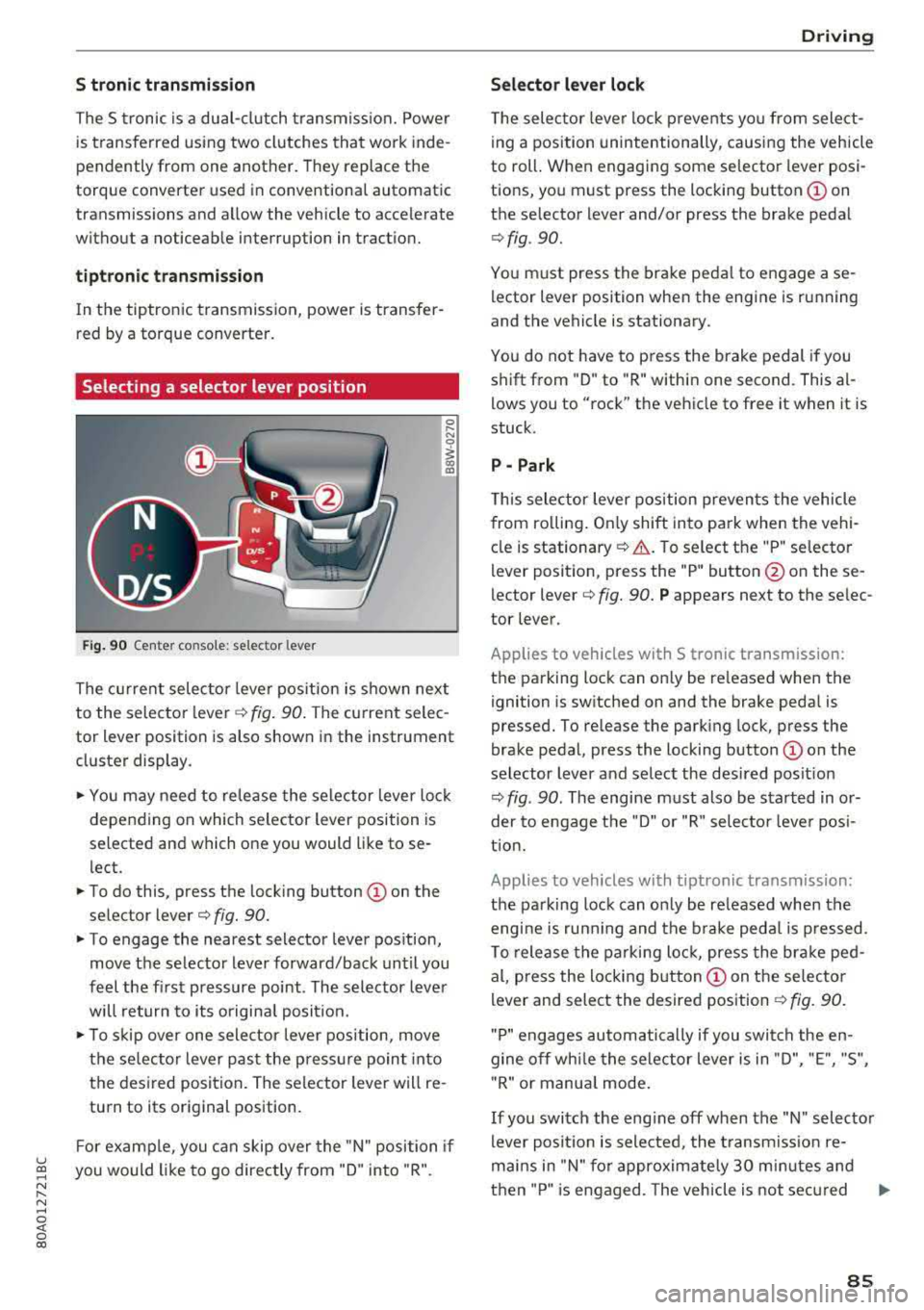
Fig. 90 Center co nso le: selector lever
0 ,.... N
0
1 a,
The current selector lever position is shown next
to the selector
l ever ¢ fig. 90. The current selec
tor lever position is also shown in the instrument
cluster display .
... You may need to release the selector lever lock
depending on which selector lever position is
selected and which one you would like to se
l ect.
... To do this, press the locking button © on the
selector
lever¢ fig. 90.
... To engage the nearest selector lever position,
move the selector lever forward/back until you
feel the first pressure point . The selector lever
will return to its original posit ion.
.., To skip over one selector lever position, move
the selec tor lever past the pressure point into
the desired position . The selector lever will re
turn to its original position.
F or example, you can skip over the "N" position if
u ~ you would like to go directly from "D" into "R".
N ...... N ......
~ 0 co
Driving
Selector lever lock
The selector lever lock prevents you from select
ing a position unintentionally, causing the vehicle
to roll. When engaging some selector lever posi
tions, you must press the locking
button © on
the selector lever and/or press the brake pedal
¢ fig . 90.
You must press the brake pedal to engage a se
lector lever position when the engine is running
and the vehicle is stationary.
You do not have to p ress the brake pedal if you
shift from "D" to "R" within one second. This
al
lows you to "rock" the vehicle to free it when it is
stuck.
P - Park
This selector lever position prevents the vehicle
from ro lling . On ly shift into pa rk when the vehi
cle is
stationary ¢.&. . To select the "P" selector
lever position, press the "P" button @ on these
lector
lever¢ fig. 90. P appears next to the selec
tor lever.
Applies to vehicles with S t ronic transm ission:
the parking lock can only be re leased when the
ignition is switched on and the brake pedal is
pressed. To release the parking lock, press the
brake pedal, press the locking
button @ on the
selector lever and select the desired posit ion
¢ fig . 90. The engine must also be started in or
der to engage the "D" or "R" selector leve r pos i
tion.
Applies to vehicles with tiptronic transmission:
the parking lock can only be re leased when the
engi ne is ru nning and the brake pedal is pressed .
To release the parking lock, press the brake ped
al, press the locking
button @ on the selector
lever and select the desired position
¢ fig. 90.
"P " engages automatically if you switch the en
gine off whi le the selector lever is in "D", "E", "S",
" R" or manua l mode.
If you switch the eng ine off when the "N" selector
lever position is selected, the transmission re
mai ns in "N" for approximately 30 m inutes and
then "P" is engaged. The vehicle is not secured
..,
85
Page 88 of 392
Drivin g
from rolling in t he "N " selector lever position, so
you need to set the pa rking
brake<®> ¢ page 80.
You must use the parking lock emergency release
before towing the
vehicle ¢ page 90.
R-Reverse
The reverse gear is engaged in this pos ition . Only
select reverse gear when the veh icle is stationary
and the eng ine is running at idle
speed ¢.& . To
engage the "R" se lecto r lever posit ion, p ress the
brake pedal , press the lock ing button
CD on the
selector lever, and select the "R " position
¢ fig . 90.
A confirmation tone w ill sound when the reve rse
gear is engaged .
N
· N eutral (idle )
The transm ission is in idle in this pos ition . To en
gage the "N" selector lever position, press the loc king button
CD on the se lector lever and sh ift
into t he "N " posit io n
¢ fig. 90.
If you sw itch the engine off when the "N" selector
lever position is se lected, the transmission re
mains in "N " for app rox imately 30 minutes and
t hen "P " is engaged.
You cannot select the "N " pos ition when the ign i
tion is sw itched off. When d riving through an au
tomatic ca r wash, first select the "N " posi tion and
t hen t urn the engine off.
For safety reasons, the vehicle cannot be locked
when the transm ission is in the "N" pos ition .
DIS· Dr iving forward
When the transmission is in the "D/S" pos it ion, it
can be operated e ither in the normal "D " mode or
in the "S" sport mode . Move the selector lever
back to engage the "S" spo rt mode . You can o nly
select the "S" se lector lever position when the "D"
or " E" pos it io n is selected. To sele ct the "D" or " E"
position again w hen "S " is engaged, move these
lecto r leve r
back ¢.& . To shi ft from "N" to "D"
when traveling at speeds below 1 mph (2 km/h), pr ess th e brak e pedal and s hift into the "D" posi
tion ¢_& .
In t he normal mode "D" , the transmission a uto
matica lly selects the suitab le gear ratio . It de -
86
pends on engine load , vehicle speed and driving
sty le.
Se lect t he sport mod e "S " for sporty dr iv ing. The
vehicle makes f ull use of the eng ine's power.
S hi ft ing may become noticeable when accelerat
ing .
The "S" se lector lever posi tion engages automati
c all y w hen you select the dynam ic* mode in drive
select.
A WARNING
Read and fo llow all WARNINGS .
- The vehi cle can roll even i f the ig nit ion is
switched off .
- P owe r is s till tra nsmi tted to t he wheels
when t he engine is running at idle . To pre
vent the vehicle from "creeping", yo u must
keep your foot on the b rake in a ll selector
lever positions (except "P " and "N") when
the engine is ru nning.
- Before open ing the hood, select the "P " se
lector lever pos it ion and set the parking
brake. This reduces the risk of an acc ident .
Always read and follow the app licab le warn
ings ¢ page 314, Working in the engine
compartment.
(D Tips
If you accide nta lly select "N" while dr iv ing,
take your foot off the accelerator pedal and
wait fo r the e ng ine to slow down to idle be
fo re selecti ng "D " or "S" .
Driving tips
Starting the engine
.,. The "P" or "N " pos it io n m ust be selected.
St arting from a stop
.,. Press and hold the brake peda l.
.,. Start the engine ¢ page 76.
.,. Press the locking button CD on the selector lev
er a nd se lect the "D", "E", "S " or "R " pos it io n
¢ page 85.
.,. Wa it a mome nt until the t ransmiss ion sh ifts.
You will notice a slig ht movement when the
gear engages .
Page 91 of 392
u co ..... N ,..._
N ..... 0 <( 0 00
Launch control program
App lies to: ve hicles with S tro nic tra nsm issio n
The launch control program provides the best
possible acceleration when starting from a stop.
Requirement: the eng ine must be at operating
temperature and the steer ing whee l must not be
turned .
~ Deactivate the Start/Stop system* c:> page 80.
The LED in the 10~ ·1 button turns on.
~ With the engine runn ing, press the ~
l fl - O~FF =I but
ton briefly
c> page 141 . The Ill indicator light
tu rns o n and the message
Stabil ization control
( ESC ): offroad . Warning! Reduc ed stabilit y
ap
pears in the inst rumen t cluste r display.
~ Pull the selector lever back o ut of t he "D/S" po
s it ion briefly to select the "S " position or se lect
the
D ynamic driving mode in drive se -
lect* ¢ page 12 7.
~ Press the brake pedal firmly with your left foot
and hold it all the way down for at least one
second.
~ At the same t ime, press the gas pedal all the
way dow n with your right foot unt il the engi ne
reaches and stays at a h igh RPM level.
~ Remove yo ur foot from t he b rake pedal within
five seconds
c:> ,&. .
A WARNING
-Always adapt yo ur driving to the traffic flow.
- O nly use the La unch contro l prog ram when
road and traffic conditions allow it and ot h
er drivers wi ll not be endangered or both
ered by your driving and the vehicle's accel
eration.
- Please note that the drive whee ls can spin
and the vehicle can break away when off
road mode is switched on, espec ia lly when
the road is slippery.
- Once the vehicle has started moving, press the
I~ OF F! button briefly to turn the offroad
mode off .
(D Tips
-The transmiss ion temperature may increase
s ignificantly after using the launc h control
program. If that happens, the program may
Driving
not be ava ilab le for a few minutes. It will be
avai lab le agai n after a coo l-down period.
- Whe n accelerati ng usi ng the launch cont ro l
program, all vehicle parts are s ubject to
heavy loads. This can lead to increased
wear.
Transmission malfunction
• Tran smiss ion: too hot. Please stop vehicle
Do not continue driving. Se lect the "P" selector
l ever posit ion and contact an authorized A udi
dealer or authorized Audi Service Fac ility for as
s istance.
• Tran smiss ion: malfunction! Plea se stop ve
hicle and shift to P
Do not continue dr iv ing . Se lect t he "P" selec to r
l ever posit ion and contact an authori zed A udi
dealer or authorized Audi Service Facility for as
s istance.
[O] Selector lever : malfunction ! You can con tin
ue d riving. Please contact Se rvice
The re is a system malfu nction in t he transmis
s io n. Dr ive to an a uth orized Aud i de aler o r au
tho rized Aud i Serv ice Facili ty immedia tely to have
the mal function corrected.
[i'J P button : malfun ction! Auto P when engine
off . Pl ea se conta ct Servi ce
T here is a malfunct ion in the "P" button on the
selector lever . The transm ission automatically
engages "P " when you sw itch off t he engine.
D rive to an author ized A udi dealer or autho riz ed
Audi Se rvice Faci lity immed iate ly to have the
malfunction corrected.
[i'J Select or lever : malfun ction! Gear change on
l y pos sibl e using both paddl e le ver s. Plea se con
ta ct Service
T here is a system malfunction in the transmis
s io n. You can con tinue dr iv ing with restr icted
funct ion. The se lector lever is not wo rk ing . Gea rs
can on ly be selected by tapping bo th shift pad
dles at the same time when the vehicle is station
ary
c> page 88 , fig . 92 . Pay attention to these-
l ected transmission position in the instrument
.,.
89
Page 95 of 392
u co ..... N r--N ..... 0 <( 0 00
Tongue weight
The maximum permitt ed tongue weight of the
trailer drawbar on the trailer hitch ball head may
not be exceeded .
I f the tongue we ight is too low, th is affects t he
trailer's handling. For driv ing safety, we recom
mend to always utilize the maximum permitted
tongue weight, but not exceed it. You can reach
it, for example, by distributing the cargo in the
trailer correctly.
You can determine the tongue weight, for exam
p le, with a bathroom scale or a public weigh sta
tion .
The permitted tongue we ight of your veh icle can
be found in the vehicle documentation or in
¢page 370.
Load distribution
Poor cargo load and distribution can negatively
i mpact ve hicle handl ing .
-Store objects preferably in the vehicle luggage
compartment. The vehicle shou ld always carry
the heaviest possible load and the trailer
shou ld have the lightest possible load.
-Distribute the load in the tra iler so that the
heavy objects are as close to the axle as possi
ble.
-Secure objects from slid ing out of p lace.
-Utilize the maximum permitted tongue weight
if possible .
Tires
Set the tire pressure on your vehicle for a "full
load"; see the t ire pressure
sticker¢ page 335 .
If necessary, also adjust the tire pressure on the
trailer according to the manufacturer's recom
mendation .
W inter tires should be mounted on the vehicle
and on the trailer during winter temperatures .
Outside mirrors
If you cannot see the traffic behind the trailer
with the standard exterior mirrors, then you must attach addit ional exterior m irrors. Adjust
them so you have a sufficient visibility behind
you .
Trailer towing
Exterior lighting
Follow the legal regu lations rega rding the light
ing equipment on your trailer. Contact an author
ized Audi dea ler or authorized Audi Service Facili
ty for more information.
Before starting to drive , check all lighting eq uip
ment on the hitched trailer.
T he headlight range cont rol adjusts automat ica l
ly to the light range of the headlights .
Safety chains
Make sure the safety chains are correctly applied
when pulling a trailer . The cha ins should hang
enough so that the trailer can drive around
curves . Howeve r, th ey must not touch the
ground.
Air suspension
Applies to: vehicles with air suspension
The air suspens ion must be at the standard vehi
cle height before you set the tongue weight on
the tra iler and hitch the
trailer ¢@ , ¢page 128,
Raising/lowering the vehicle.
For vehicles with a factory-installed trailer hitch,
the a ir suspension trailer mode w ill automatically
switch on if you connect the trailer cable to the
socket.
For vehicles with a retrofitted trailer hitch, you
must sw itch on the a ir suspension trailer mode
manua lly . Select in the Infotainment system:
IMENU I button> Vehicle> left cont rol button>
Vehicle settings > Air suspension: trailer. Switch
i t off again after towing a tra iler .
You can also sw itch off trailer mode manually
wh ile dr iving, for example, whe n using a bicycle
rack system.
If you have to dr ive through d ifficult road cond i
tions, you can ra ise the vehicle again after hitch
i ng the tra iler o r after adjusting the tongue
we ight.
(UJ} Note
Applies to: vehicles with air suspension
-Changes in temperature or load can affect
the height of the vehicle .
93
Page 97 of 392
u co ..... N r-N .....
~ 0 co
Assistance systems Speed warning system
Description
App lies to: vehicles with speed warning system
The speed warning system helps you to stay be
low a specified maximum speed that can be set,
changed or deleted in the Infotainment system .
The speed warning system warns you if you are
exceeding the maximum speed that you have set .
A warning tone will sound as soon as your speed
exceeds the stored value slightly. The
(Ol (USA
models)/
(01 (Canada models) indicato r light
and a message appear i n the ins trumen t cluster
d isplay at the same time. The
(Sl / (Ol indicator
light and the message turn
off if the speed falls
back below the stored maximum speed .
Sett ing a threshold is recommended if you would
like to be reminded when yo u reach a certa in
maximum speed . Situations where you may want
to do so include driving in a country with a gener
al speed limit or if there is a specified maximum
speed for winter tires.
Setting the warning threshold
Select in the I nfotai nment system: IMENU I but
ton
> Ve hicle > le ft control button > Dri ver a ssis
tan ce
> Speed warning > Manual.
@ Tips
Regard less of the speed warning system, you
should always monitor your speed using the
speedometer and make sure you are following
the legal speed limit.
A ssi st a nce systems
Cruise control system
Switching on
Applies to: vehicles with cruise control system
The cruise control system makes it possible to
drive at a constant speed starting at 15 mph
(20 km/h).
0
f
~
0
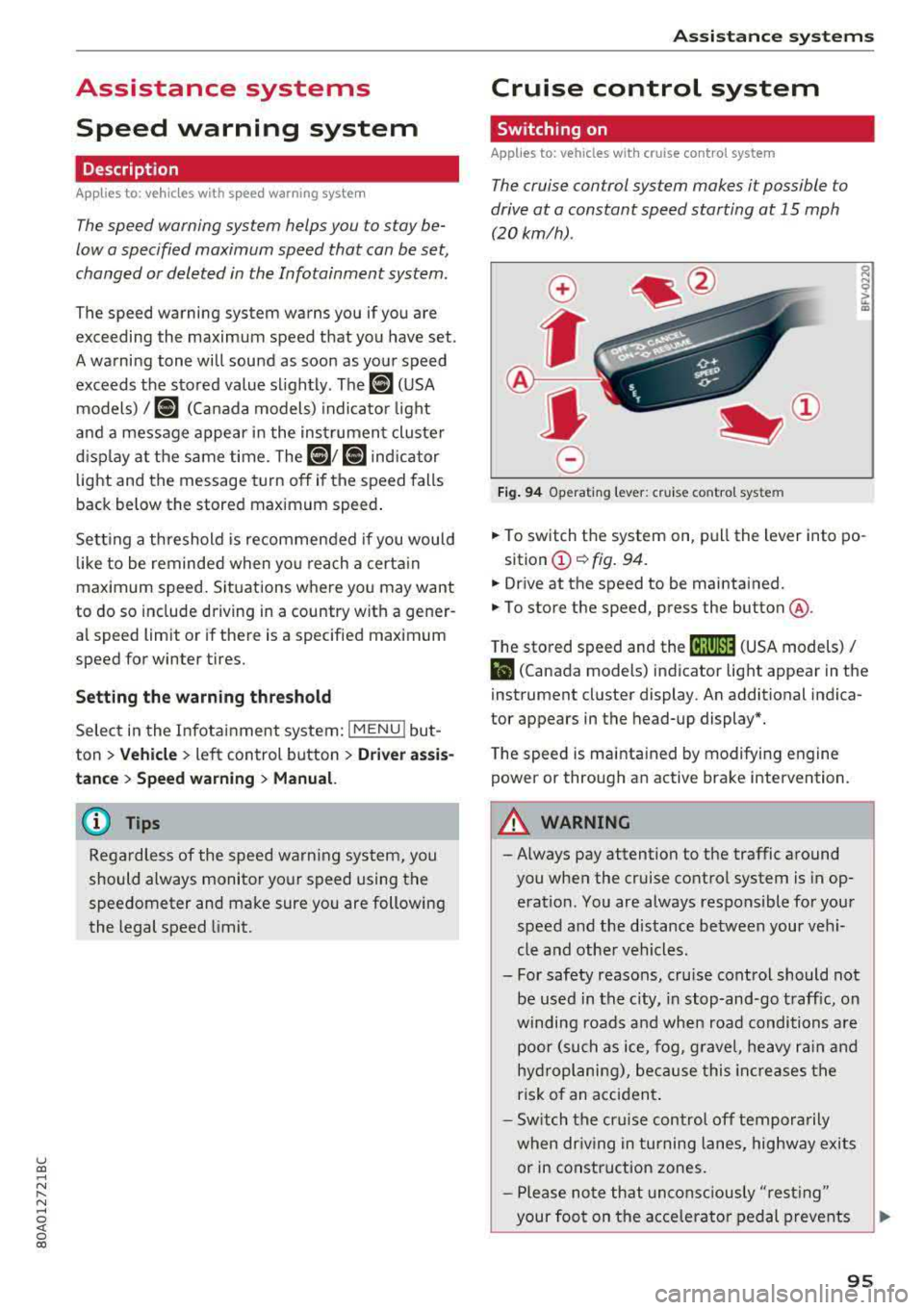
Fig . 94 Operat ing leve r: cru ise control system
.,. To switch t he system on, pull the lever into po-
sition
(D ¢ fig. 94.
.,. Drive at the speed to be maintained.
.,. To store the speed, press the button @.
T he stored speed and the
@jltJ~i, (USA models) /
l'I (Canada models) ind icator lig ht appear in the
instrument cluster display. An additional indica
tor appears in the head-up display*.
T he speed is mainta ined by modifyi ng engine
power or through an active brake intervention.
A WARNING
-Always pay attention to the traffic around
you when the cruise control system is in op
eration. You are always responsible for you r
speed and the distance between your vehi
cle and othe r vehicles .
- For safety reasons, cru ise control should not
be used in the city, in stop -and-go t raff ic, on
winding roads a nd when road conditions a re
poor (such as ice, fog, g rave l, heavy ra in and
hy droplani ng), bec ause this in cr eases the
risk of an acciden t.
- S witch the cr uise con trol
off tempor arily
when dr iv ing in turning lanes, highway exits
or in construction zones.
- P lease no te th at unconsc iously
"rest ing"
your foot on the accelerator ped al prevents
95