wheel AUDI Q5 2018 Owner's Manual
[x] Cancel search | Manufacturer: AUDI, Model Year: 2018, Model line: Q5, Model: AUDI Q5 2018Pages: 392, PDF Size: 60.56 MB
Page 85 of 392
u co ..... N ,..._
N ..... 0 <( 0 00
-Clean the windows, headlights, tail lights and
the license plate if they are dirty.
-Perfo rm a brake test (especially a fter dr iving
t h rough water) .
A WARNING
-Be especia lly caut io us and aware when driv
ing under difficult conditions and when off
road. Vehicle damage and injur ies may occ ur
whe n drivi ng at excessively high speeds o r
w ith incorrect dr iv ing ma neuvers .
-Always adjust your speed and driv ing style
to the roads, te rra in, traffic and weather
co ndi tions. Dr ive espec ially slowly if the re is
low v is ibi lity when offroad .
-Please note that the wheels can spin more
and the vehicle can swe rve w hen in off road
mode, especially whe n the road is s lip pery
o r has loose su rface m ater ial.
- Driv ing stab ility is reduced w hen in off road
mode.
@ For the sake of the environment
Avoid harmi ng the enviro nment and show
considera tion for nature .
(D Tips
Only dr ive where it is permitted a nd a lways
stay on the provided roads a nd paths.
Explanation of technical terms
The follow ing data is based on ideal cond it io ns.
The val ues may d iffe r depend ing o n the vehicle
l oad, road character ist ics, and the a rea. The d riv
e r i s therefo re res ponsible for dec iding w hethe r a
ve hicl e can hand le a spe cific
s ituation ¢.&. .
Pitch angle
The amount of ver tica l elevation c hange (grade)
in a dis tances of 109 yards (100 mete rs) is speci
fied as a percentage o r in degrees. Spe cifica tion
of how s teep of a grade t he ve hicle can dr ive up
usi ng its own power (de pends on the road sur
face and the eng ine power, among other things) .
M axim um permitted pitch ang le : 3 1
°.
Driving
Ground clearance
T he dis ta n ce be tween the road surface and the
l owest point of the vehicle underbody. Gro und
clearance : 8 .1 in (205 mm)
A WARNING
= -
Exceeding the max imum specified va lues can
l ead to serious injuries or vehicle damage.
-A ll sp ec ificat ions were determine d base d on
a level, f irm, an d non -slippe ry road s urface
in dry weather conditions.
-The ideal cond itions do not apply in offroad
d riving. Do not always go a ll the way up to
the maximum val ues . Stay slightly below
them for safety .
Messages
There is only one motto when driving in difficult
condi tions and off road: drive slowly and with
caution!
Observe the following when driv ing on unpaved
roads :
.. Only dr ive in ter ra in tha t is sui table fo r the ve
hicle and yo ur dr iv ing ability . Never take any
unnecessa ry risks!
.. Dr ive slow ly and caref ully.
.. Pay attent ion to the ground clearance of your
veh icle .
.. Activa te the offroad mode as needed
¢ page 141 .
.. Use the hill de scent assist when d riving down
s teep
hills ¢ page 142 .
Difficult terrain and off-road
When driving in unfam iliar areas and off road,
dr ive slowly and keep o n the watch for unexpect
ed obstacles (such as pot ho les, rocks, tree
stumps , etc.).
To p reve nt the vehicle from bottom ing o ut and to
reduce the risk of underbody damage, you should
dr ive across uneven gro und o n only o ne si de of
t h e ve hicle so that on ly two of you r whee ls c ross
t h e u neven a re a, ins tead of drivin g ac ross the
cente r of the u neven area wit h all four wheels.
..,
83
Page 86 of 392
Driving
Drive quick ly through sandy or marshy off-road
sections and do not stop , if at all poss ibl e.
Driving through water
Also read the information found in ¢ page 73.
Driving on a slope
If you a re ever unable to dr ive up a hill , do not try
to turn around . Drive back down in
re verse in
stead. Otherwise you r un the r isk o f tipping over .
If the vehicle threatens to tip over when dr iving
across a slope , you mu st immediately stee r
downhill in the direction of the slope.
Do not park your vehicle on steep hills.
To reduce the r isk of t ipping over, dr ive on hills in
the direction of the downward s lope (fa ll line)
-
never crosswise .
Tilt angle display
Description
Applies to: vehicles with a ti lt angle display
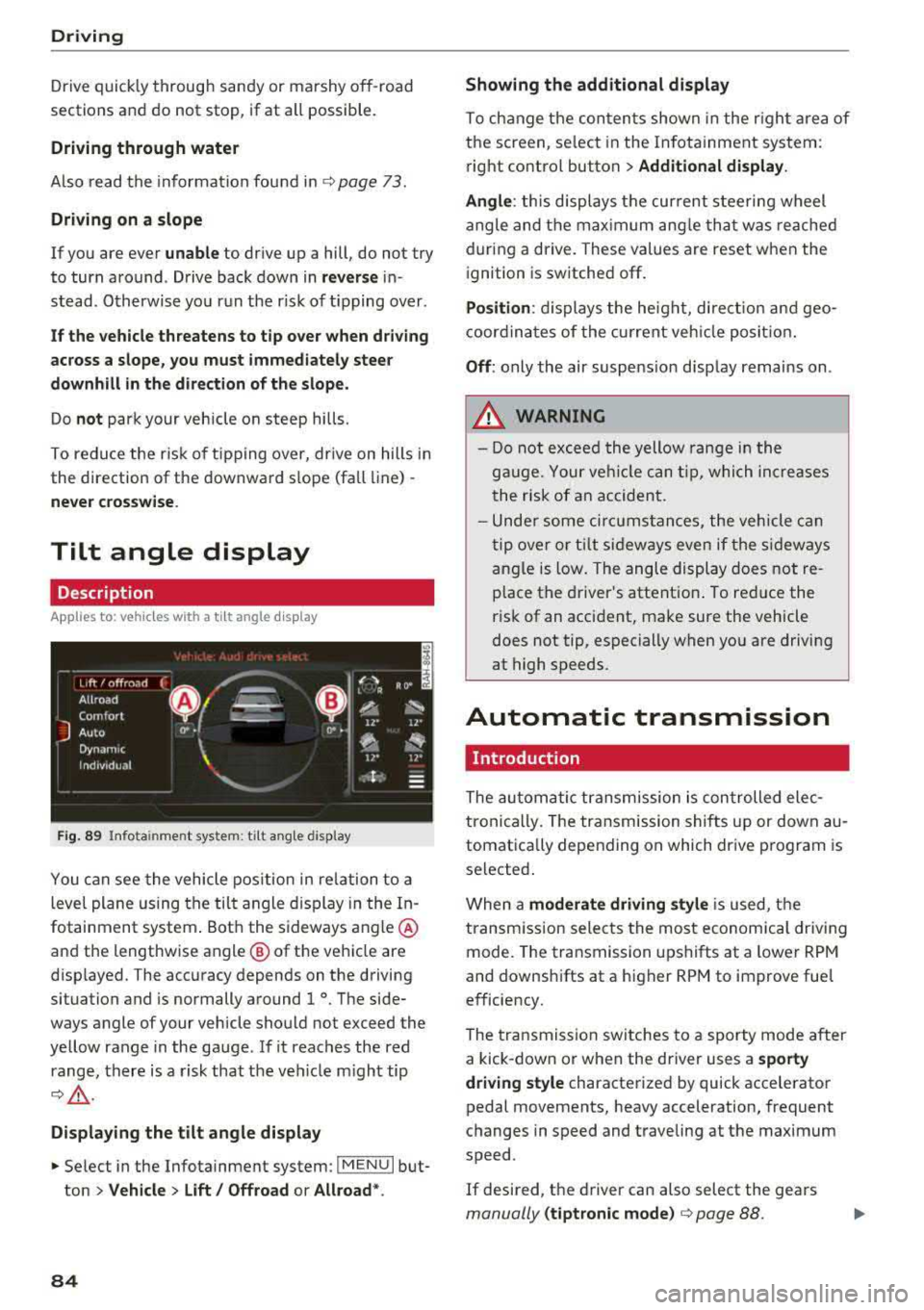
F ig. 89 I nfo ta in me nt syste m: tilt ang le d ispla y
You c an see the vehicle pos ition in re lation to a
leve l plane us ing the tilt angle display in the In
fotainment system . Bot h the sideways angle @
and the lengthwise angle @ of the vehicle are
disp layed. The accuracy depends on the driving
situation and is normally a round 1
°. The side
ways angle of your vehicle should no t exceed the
ye llow range in the gauge . If it reaches the red
range, there is a risk that the ve hicle m ight tip
¢ ,&. .
Displaying the tilt angle display
~ Select in the Infotainment system : IME NUI but
ton
> Vehicle > Lift / Offroad or Allroad *.
84
Showing the additional display
To ch ange the con ten ts shown in the r igh t ar ea of
t h e screen, se lect in the In fo ta inment system :
r ight contro l button
> Additional display.
Angle :
this displays t he cur rent stee ring wheel
angle and t he max imum ang le th at was re ached
dur ing a drive . These values are reset when the
i gnition is switche d off .
Position : displays the he ig ht, di re ct io n a nd geo
coor din at es of the cur rent veh icle posit io n.
Off : only the air suspe nsio n disp lay remains on .
A WARNING
- Do not excee d the yellow range in the
g au ge. Your ve hicle can t ip, whi ch in cre as es
t he risk of an accident.
- Unde r some ci rcumstan ce s, the vehicle can
t ip ove r or til t sid eways eve n if the s ideways
angle is low. The angle display does not re
p lace the driver's attent io n. To re duce the
risk of an accident, make sure the vehicle
does not tip, especially when yo u are driving
at high speeds.
Automatic transmission
Introduction
The au tom atic transmission is con trolled ele c
tronically. The transmission shifts up or down au
tomat ica lly depending on which dr ive p rogram is
selected .
When a
moderate driving style i s used, t he
transm iss ion selec ts the most economica l driv ing
mode. The transmission upshifts at a lower RPM
and downshifts at a higher RPM to improve fue l
e fficiency.
The tra nsmission switches to a sporty mode after
a kick-down or when the driver uses a
sporty
driving style
characterized by quick accelerator
pedal movements, heavy acceleration, frequent
changes in speed and t raveling at the max imum
speed .
If desired, th e driver can also select the gears
manually (tiptronic mode ) ¢ page 88.
Page 88 of 392
Drivin g
from rolling in t he "N " selector lever position, so
you need to set the pa rking
brake<®> ¢ page 80.
You must use the parking lock emergency release
before towing the
vehicle ¢ page 90.
R-Reverse
The reverse gear is engaged in this pos ition . Only
select reverse gear when the veh icle is stationary
and the eng ine is running at idle
speed ¢.& . To
engage the "R" se lecto r lever posit ion, p ress the
brake pedal , press the lock ing button
CD on the
selector lever, and select the "R " position
¢ fig . 90.
A confirmation tone w ill sound when the reve rse
gear is engaged .
N
· N eutral (idle )
The transm ission is in idle in this pos ition . To en
gage the "N" selector lever position, press the loc king button
CD on the se lector lever and sh ift
into t he "N " posit io n
¢ fig. 90.
If you sw itch the engine off when the "N" selector
lever position is se lected, the transmission re
mains in "N " for app rox imately 30 minutes and
t hen "P " is engaged.
You cannot select the "N " pos ition when the ign i
tion is sw itched off. When d riving through an au
tomatic ca r wash, first select the "N " posi tion and
t hen t urn the engine off.
For safety reasons, the vehicle cannot be locked
when the transm ission is in the "N" pos ition .
DIS· Dr iving forward
When the transmission is in the "D/S" pos it ion, it
can be operated e ither in the normal "D " mode or
in the "S" sport mode . Move the selector lever
back to engage the "S" spo rt mode . You can o nly
select the "S" se lector lever position when the "D"
or " E" pos it io n is selected. To sele ct the "D" or " E"
position again w hen "S " is engaged, move these
lecto r leve r
back ¢.& . To shi ft from "N" to "D"
when traveling at speeds below 1 mph (2 km/h), pr ess th e brak e pedal and s hift into the "D" posi
tion ¢_& .
In t he normal mode "D" , the transmission a uto
matica lly selects the suitab le gear ratio . It de -
86
pends on engine load , vehicle speed and driving
sty le.
Se lect t he sport mod e "S " for sporty dr iv ing. The
vehicle makes f ull use of the eng ine's power.
S hi ft ing may become noticeable when accelerat
ing .
The "S" se lector lever posi tion engages automati
c all y w hen you select the dynam ic* mode in drive
select.
A WARNING
Read and fo llow all WARNINGS .
- The vehi cle can roll even i f the ig nit ion is
switched off .
- P owe r is s till tra nsmi tted to t he wheels
when t he engine is running at idle . To pre
vent the vehicle from "creeping", yo u must
keep your foot on the b rake in a ll selector
lever positions (except "P " and "N") when
the engine is ru nning.
- Before open ing the hood, select the "P " se
lector lever pos it ion and set the parking
brake. This reduces the risk of an acc ident .
Always read and follow the app licab le warn
ings ¢ page 314, Working in the engine
compartment.
(D Tips
If you accide nta lly select "N" while dr iv ing,
take your foot off the accelerator pedal and
wait fo r the e ng ine to slow down to idle be
fo re selecti ng "D " or "S" .
Driving tips
Starting the engine
.,. The "P" or "N " pos it io n m ust be selected.
St arting from a stop
.,. Press and hold the brake peda l.
.,. Start the engine ¢ page 76.
.,. Press the locking button CD on the selector lev
er a nd se lect the "D", "E", "S " or "R " pos it io n
¢ page 85.
.,. Wa it a mome nt until the t ransmiss ion sh ifts.
You will notice a slig ht movement when the
gear engages .
Page 100 of 392
Ass is tance sy stem s
Operating
Applies to: vehicles with camera -based traffic sign recogni
tion
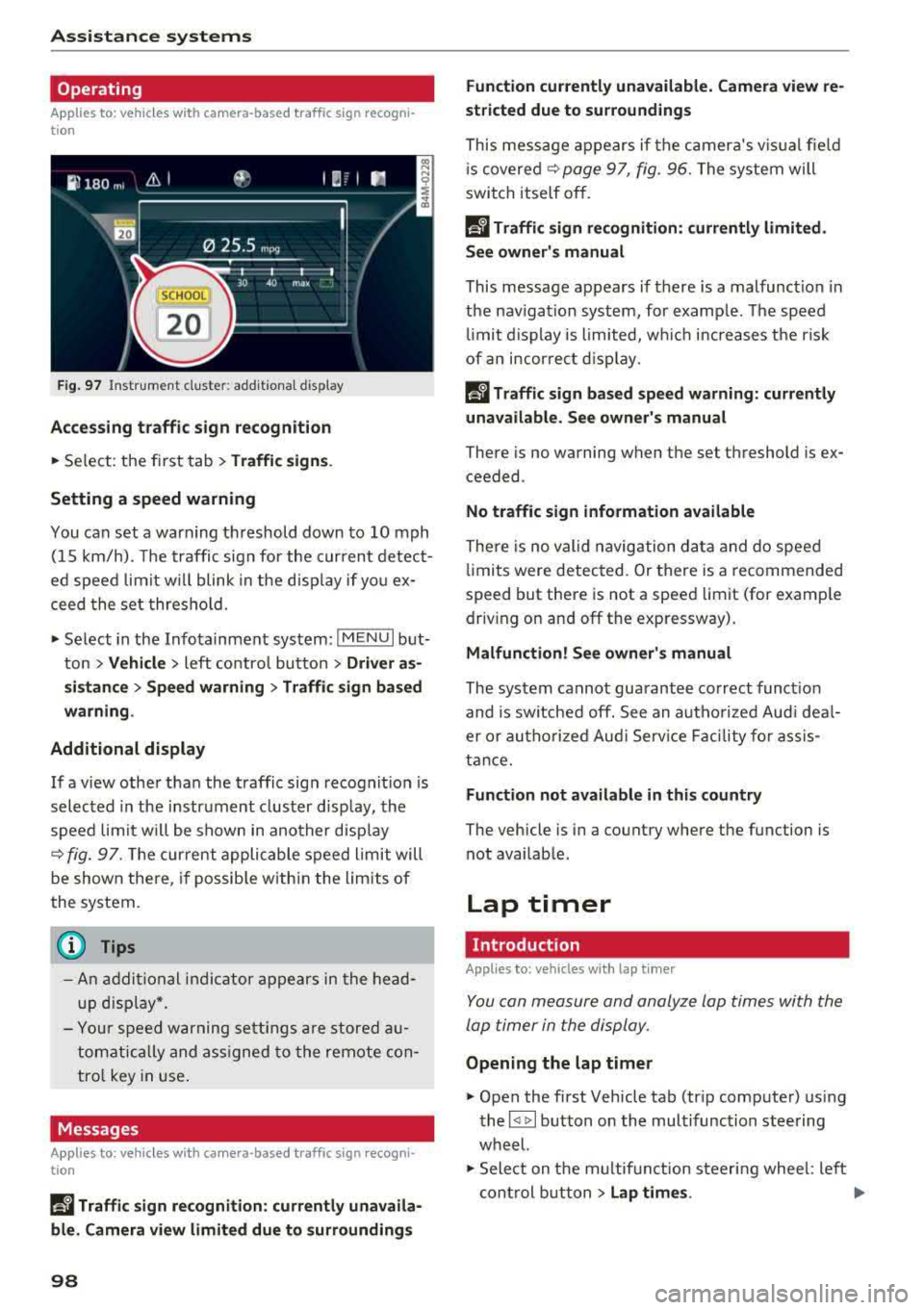
F ig . 97 Instrument clus te r: addi tiona l d isplay
Ac ces sing traffic sign recogn iti on
... Se lect: the first tab> T ra ffic si gns.
Setting a speed warning
You can set a warn ing th reshold down to 10 mph
(15 km/h). The traffic sign for the current detect
ed speed limit w ill blink in the disp lay if you ex
ceed the set thresho ld.
... Select in the Infotainment system: IM ENU I but
ton >
V ehi cle> left contro l button > Driver a s·
s is tan ce
> S pe ed war ning > Tr affic sign ba sed
w arning .
Add itional display
If a view other than the traffic sign recognit ion is
selected in the instrument cluster disp lay, the
speed limit w ill be shown in another disp lay
~ fig. 97 . The cur rent applicable speed limit will
be shown there , if possib le with in the limits of
the system.
(D Tips
- An additional indicator appears in the head
up d isplay*.
- Your speed warning settings a re stored au
tomatically and ass igned to the remote con
tro l key in use .
Messages
Applies to: vehicles with camera-based traffic sign recogn i
tion
P!\i Traffi c sign recognition : curren tly unavaila
ble _ Camera view limit ed du e to su rrounding s
98
Function currentl y una va ilable. Camera view re
stricted due to surroun ding s
This message appears if the camera's v is ual fie ld
i s
covered ~ page 97, fig. 96. The system will
switch itself o ff.
la Tr affic sign r ecog nition : currentl y limit ed .
Se e owner' s manua l
This message appears if there is a malfunct ion in
the nav igation system, for example . The speed
li mit d isplay is limited, wh ich inc reases the risk
of an incorrect d isp lay.
P!\i Traffic sign based speed warnin g: current ly
una vail able . Se e own er' s manual
There is no warning when the set threshold is ex
ceeded .
No traffic sign inf ormation available
There is no valid navigation data and do speed
li mits were detected. Or there is a recommended
speed but there is not a speed lim it (for examp le
driv ing on and off the expr essway) .
Malfun ction! S ee owner's manu al
The system cannot guarantee correct funct ion
and is switched off. See an autho rized Aud i dea l
er or autho rized Aud i Serv ice Faci lity for assis
tance.
Functi on not av ailable in this country
The vehicle is in a country where the function is
not availab le .
Lap timer
Introduction
Applies to: vehicles with lap t imer
You can measure and analyze lap times with the
lap timer in the display.
Opening the lap timer
... Open the first Vehicle tab (trip computer) using
the
l <1 1>I button on the multifunction steering
wheel.
... Sele ct on the m ultifunction steering wheel : lef t
cont rol b utton
> Lap time s. Ill-
Page 101 of 392
u co .... N ,..._
N ..... 0 <( 0 00
Operating the lap timer
.,. On the mult if u nct ion s teer ing whee l, tur n the
l e ft thumbw hee l
0 ~ page 12 unt il t he desired
menu item is displayed in the instrument cl us
ter .
.,. Press the left thumbwhee l to confirm the selec
t ion.
A WARNING
Your focus should always be on driving your
veh icle safely . As the dr ive r, yo u have com
plete responsib ility for safety in traffic. Only
use t he f unctions s uch as the lap time r in s uch
a way tha t you alw ays ma int ain com plete con
tr ol ove r your vehicle in all tra ffic s itu ations.
(D Tips
You ca n ret rieve information from the t rip
computer while t he lap t ime r stopwatch i s
r u nning.
Lap times and timing
Applies to: vehicles with lap timer
Requirement: the lap t imer must be o pen
~ page 98 .
Timing laps
.,. To start tim ing manually, se lect Start lap 1 in
the menu .
-
.,. To start tim ing a utomat ica lly as soon as you
begin to drive, select
Drive off to start lap 1 or
Start by driving off in the men u .
.,. To measure the lap t ime, select New lap in the
menu. T his starts timing the next lap at the
same t ime.
After completing a lap, the difference between
the last lap and the previous best lap time w ill be
ind icated with
a" -" or" +".
Pausing timing and displaying a split time
.,. To insert a pa use m , se lect Pau se in t he menu.
.,. T o resume timing, se lect Re sume in the men u .
.,. To display a split time, se lect Split time in the
men u. The split t ime
[fw] appears for approxi
mately 10 seconds in the instrument cluste r.
The timing of the current lap continues.
A ss istance systems
Resetting timing
.,. Using the mul tifun cti on steer ing whee l, sele ct
Re set time s in the menu.
(D Tips
- A m axim um of 99 lap t imes can be meas
ure d.
- If tim ing is pa used, you can continue i t later
even if yo u swi tc h t he ign ition o ff.
- Saved lap ti mes ca nnot be indiv id ua lly de
le ted from the tot al results.
- Th e saved lap t ime r va lues w ill remain after
sw itching the ign ition off.
Lap statistics
Applies to: vehicles with lap timer
Displaying lap statistics
You can display the numbe r of laps dr iven, the
fas test lap" +", the slowes t lap" -", and the aver
age t ime
"0" in t he instr ument cluster .
.,. On the multifunc tion steering w heel, select the
left contro l bu tton
> Lap stati stic s o r Sta tis
tics .
.,. Turn the thumbwheel down o r up to display the
individual lap times .
.,. To return to t he lap timing that was begun,
press the left thumbwheel.
Resetting lap statistics
.,. On the mul tif unc tion stee ring w heel, selec t:
the right control button
> Reset statistics.
(D Tips
The lap st atis tic s lis t the lap t imes fo r th e l ast
3 0 l aps . The fastest and slowes t lap time o ut
of up to 99 meas ured laps are a lso d isplayed.
Predictive efficiency
assist
Introduction
T he predict ive e fficiency assist he lps the driver to
drive with anticipation and therefore helps to
save fuel. The system accesses p redictive t rip da -
ta (including speed limits, inclines and the radius
Iii"
99
Page 106 of 392
Assistance systems
-When approaching stationary obstacles
such as stopped traffic, adaptive cruise con
trol will respond with limited function.
- Adaptive cruise control does not respond to
people, animals, or cross ing or oncoming
objects.
- The function of the radar sensors can be af
fected by reflective objects such as guard
rails, the entrance to a tunnel, heavy rain or
ice.
(D Note
The sensors can be displaced by impacts or
damage to the bumper, wheel housing and
underbody . Th is can impair the adaptive
cruise control. Have an authorized Audi dealer
or authorized Audi Service Facility check their
function.
@ Tips
For an explanation on conformity with the
FCC regulations in the United States and the
Industry Canada regulations, see
¢page 374.
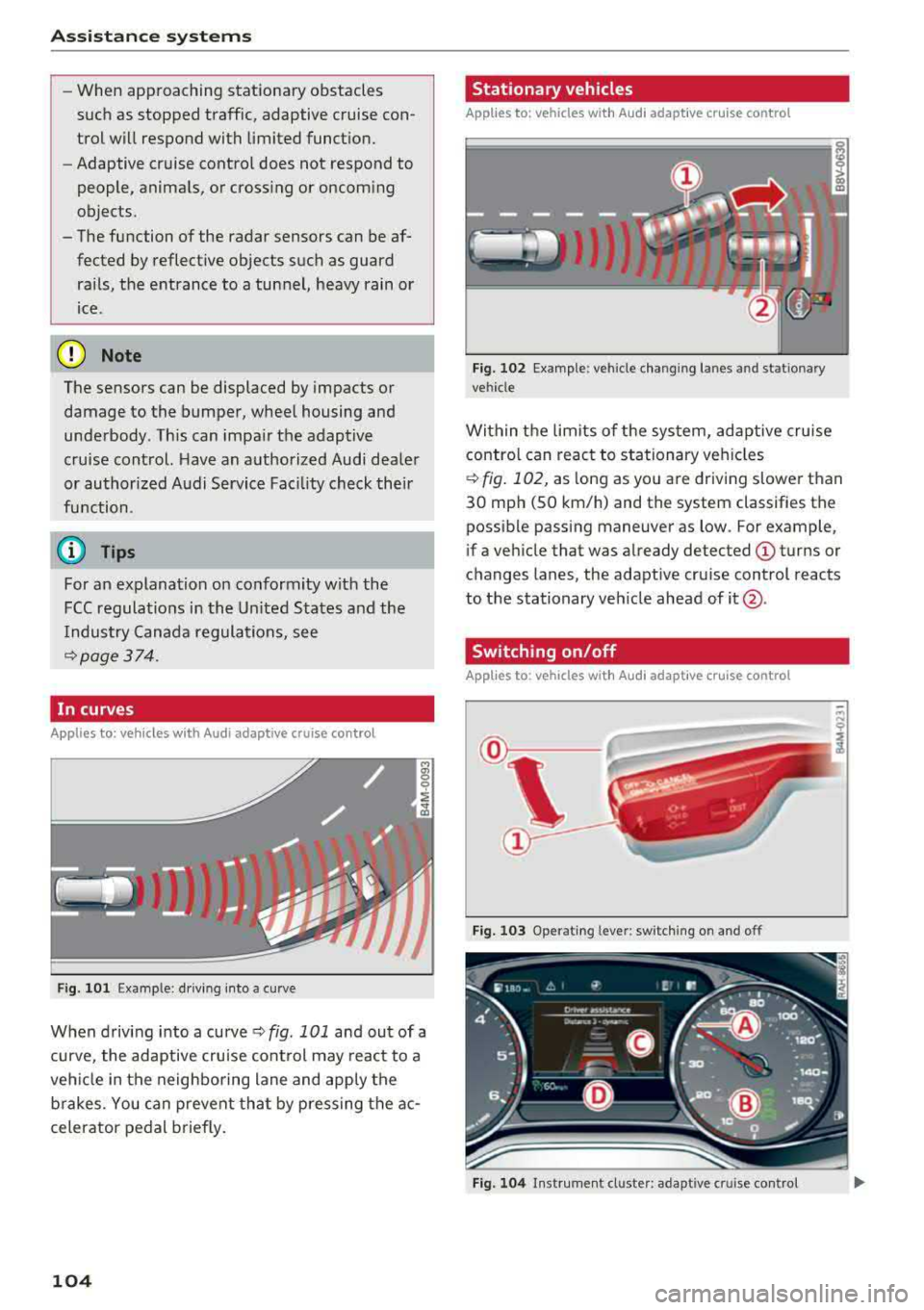
In curves
Applies to: vehicles w ith Audi adaptive cruise control
Fig . 101 Example: driving into a curve
When driving into a curve ¢ fig. 101 and out of a
curve, the adaptive cruise control may react to a
vehicle in the neighboring lane and apply the
brakes. You can prevent that by pressing the ac
celerator pedal briefly.
104
Stationary vehicles
Applies to: vehicles with Audi adapt ive cruise control
))
Fig . 102 Example: vehicle changing lanes and stationary
vehicle
Within the limits of the system, adaptive cruise control can react to stationary vehicles
¢
fig. 102, as long as you are driving slower than
30 mph (SO km/h) and the system classifies the
possible passing maneuver as low . For example,
if a vehicle that was already detected
(D turns or
c h anges lanes, the adaptive cruise control reacts
to the stationary vehicle ahead of
it @ .
Switching on/off
App lies to: vehicles with Audi adapt ive cruise control
Fig. 103 Operat ing leve r: sw itching on and off
Fig. 104 Instrument cl uster : adapt ive cruis e con trol
Page 119 of 392
u co ..... N r--N ..... 0 <( 0 00
This message appears if the pre sense functions
are switched off through the Infotainm ent sys
tem or if the system is not ready.
Audi active lane assist
Description
Applies to: vehicles with Audi active lane assist
Active lane assist (lane departure warning) de
tects lane marker lines within the limits of the
system using a camera in the windshield. If you
are approaching a detected lane marker line and
it appears likely that you will leave the lane, the
system will warn you with corrective stee ring .
You can override this steering at any time . If you
pass over a line, the steering wheel will vibrate
lightly . In order for this warning vibration to oc
cur, it must first be switched on in the Infotain
ment system. Active lane assist is ready for oper
ation when the lane marker line is detected on at
least one side of the vehicle.
The system is designed for driving on express
ways and highways and therefore only activates
at speeds above approximately 40 mph (65 km/
h).
Applies to: veh icles w ith side assist: if you acti
vate a turn signal when active lane assist is ready
and it classifies a lane change as critical because
of vehicles traveling alongside you or approach
ing you, there will be noticeable corrective steer
ing shortly before you leave the lane. This will at
tempt to keep your vehicle in the lane.
Applies to: veh icles w it h out s ide ass ist: the ready
system does not warn you if you activate a turn
signal before crossing the lane marker line. In
this case, it assumes that you are changing lanes
intentionally.
Applies to: vehicles with adaptive cruise control:
there is no corrective steering or warnings if the
syst em recognizes a distinct passing maneuver.
If the conditions are met, traffic jam assist
switches on at speeds under approximately
40 mph (65 km/h)
¢ page 109 .
Assistance systems
A WARNING
--
-The system warns the driver that the vehicle
is leaving the lane using corrective steering .
The driver is always responsible for keeping
the vehicle within the lane.
- The system can help you keep the vehicle in
the lane, but it does not drive by itself. Al
ways keep your hands on the steering
wheel.
- Corrective steering may not occur in certain
situations, such as during heavy braking.
- There may be cases where the camera does
not recognize all lane marker lines. Correc
tive steering can only take place on the side
of the vehicle where lane marker lines are
detected.
- Other road structures or objects could possi
bly be identified unintentionally as lane
marker lines. As a result, corrective steering
may be unexpected or may not occur.
- The camera view can be restricted, for ex
ample by vehicles driving ahead or by rain,
snow, heavy spray or light shining into the
camera. This can result in active lane assist
not detecting the lane marker lines or de
tecting them incorrectly .
- In certain situations where visibility is low,
the vehicle may switch from an "early" to
"late" steering correction.
- Under certain conditions such as ruts in the
road, an inclined roadway or crosswinds, the
corrective steering alone may not be enough
to keep the vehicle in the middle of the lane .
- For safety reasons, active lane assist must
not be used when there are poor road and/
or weather conditions such as slippery roads, fog, gravel, heavy rain, snow and the
potential for hydroplaning. Using active lane
assist under these conditions may increase
the risk of a crash.
117
Page 120 of 392
Assistance systems
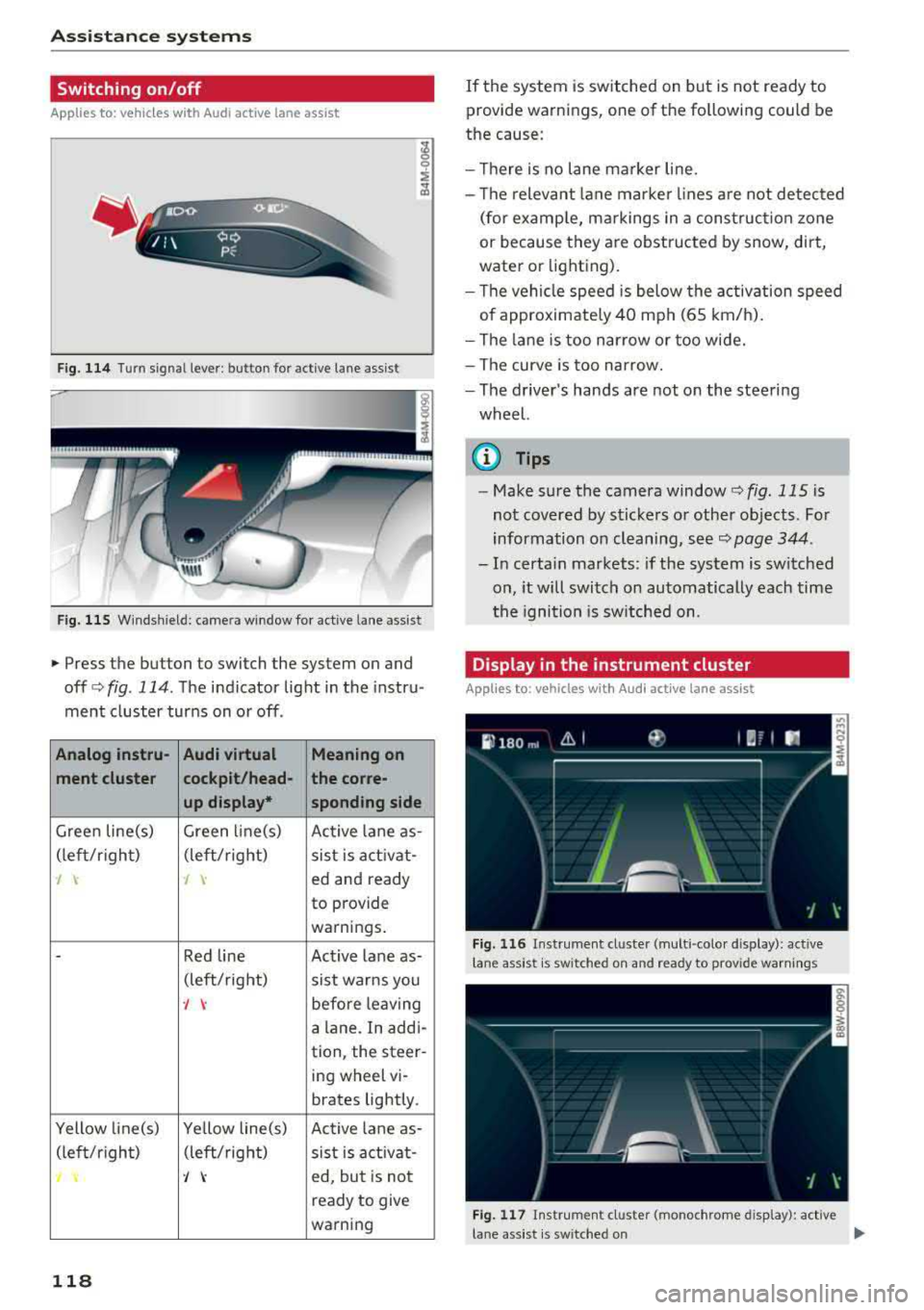
Switching on /off
Applies to: vehicles with Audi active lane assist
F ig. 114 Turn signal lever: butto n for act ive lane assist
F ig. 115 Windsh ield: camera window fo r ac tive lane assist
• Press the button to switch the system on and
off c:':>fig . 114. The indicator light in the instru
ment cluster turns on or off.
Analog instru- Audi virtual Meaning on
ment cluster cockpit/head- the corre-
up display• sponding side
Green line(s) Green li ne(s)
Active lane as-
(left/r ig ht) (left/right)
sist is activat-
-J 'I ed and ready
to provide
warnings .
-Red line Act ive lan e as-
(left/ right)
sist warns you
-J \: before leaving
a lane . In addi-
tion, the steer-
ing wheel vi-
brates lightly.
Yellow line(s) Yellow line(s)
Active lane as-
(left/r ig h t) (left/right)
sist is activat-
'/ \: ed, but is not
ready to give
warning
118
If the system is switched on but is not ready to
provide warnings, one of the following could be
the cause:
- Th ere is no lane marker line.
- Th e relevant lane marker lines are not detected
(for examp le, markings in a construction zone
or because they are obstructed by snow, dirt,
water or lighting).
- Th e vehicle speed is below the activation speed
of approximately 40 mph (65 km/h).
- The lane is too narrow or too wide.
- The curve is too narrow.
- The driver's hands are not on the steering
wheel.
{i) Tips
- Make sure the camera window<=> fig. 115 is
not covered by stickers or other objects. For
information on cleaning, see¢
page 344.
-In certa in markets: if the system is switched
on, it will switch on automatically each time
th e igni tion is switched on .
Display in the instrument cluster
Applies to: vehicles with Audi active lane assist
Fig. 116 Instr ument cluster (mult i- colo r dis play): active
l ane assist is sw itched on and ready to provide warn ings
Fig. 117 Instrument cluster (monochrome disp lay): active
lane assist is switched on
...
Page 121 of 392
u co ..... N ,..._
N ..... 0 <( 0 00
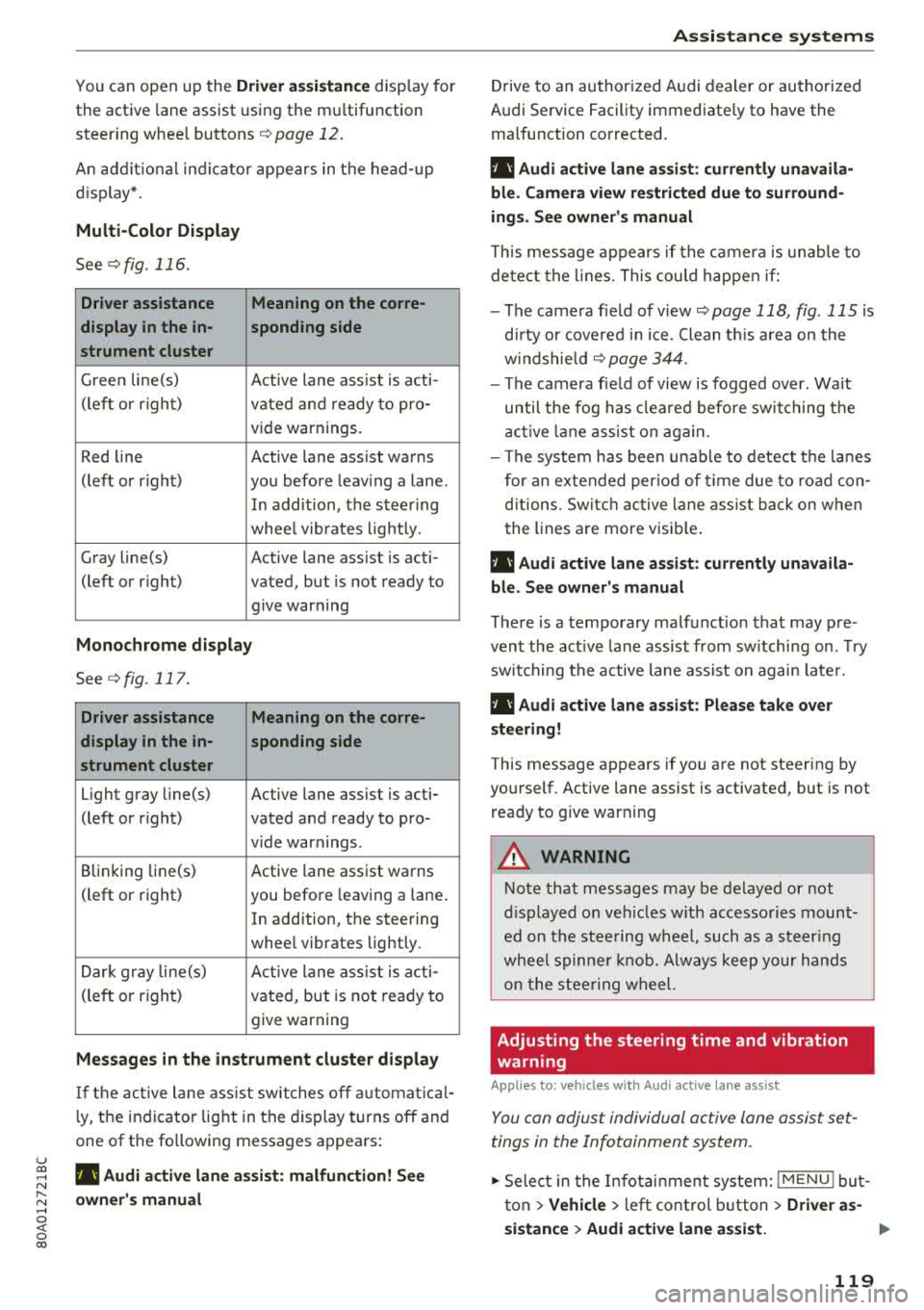
You can open up the Driver assistance disp lay for
the active lane assist using the m ultifunction
steer ing whee l buttons
¢ page 12 .
An addit ional ind ic a tor appears in the head- up
d isp lay* .
Multi-Color Display
See ¢fig . 116.
Driver assistance Meaning on the corre-
display in the in- sponding side
strument cluster
G ree n line(s)
Active lane assist is acti-
(left or r ight)
vated and ready to pro -
v ide warnings.
Red line Active lane assist warns
(left or r ight) you before leav ing a la ne .
In add ition, the steer ing
whee l vibrates lightly.
Gray line(s) Active lane assist is acti-
(left or right) vated, but is not ready to give warning
Monochrome display
See c>fig. 117.
Driver assistance Meaning on the corre-
display in the in- sponding side
strument cluster
Light gray line(s) Active lane assist is acti-
(left or r ight) vated and ready to pro-
vide warnings .
B linking Li ne(s)
Active lane assist warns
(left or right) you before leaving a lane .
In addition, the steering
whee l vibrates lightly.
Dar k gray line(s)
Active lane assist is acti -
(le ft or righ t)
vated, but is not ready to
give warning
Messages in the instrument cluster display
I f t he active lane ass ist swit ches off automat ic al
l y, t he indicator lig ht in the display turns off and
one of the following messages appea rs :
rl! Audi a ctiv e lan e assi st : malfunction! See
owner 's manu al
A ss istance systems
Drive to an authori zed A udi dealer or authori zed
Audi Service Facility immediate ly to have the
malfunction corrected.
rl! Audi active lane as sist: currently unavaila
ble . Camera view rest ricted due to surround
ings . See owne r's manual
T his message appears if the c amera is unab le to
de te ct the lines. This could happen if:
- The camera fie ld of view
c> page 118, fig . 115 is
d irty or covered i n ice . Clean t his area on the
w indshie ld
c> page 344.
- The camera fie ld of view is fogged over. Wait
until the fog has clea red befo re switching the
a cti ve lane ass ist o n again.
- The system has bee n unab le to detect the la nes
for an extended per io d of time due to roa d con
ditions . Switc h ac tive lane ass ist back on w hen
the lines are more visib le .
rl! Audi active lane assist: currently unavaila
bl e. See owner's manual
T here is a temporary malfunct ion that may pre
vent the act ive lane assis t from sw itchi ng on . Try
switching t he active lane assist on again late r.
rl! Audi active lane a ssist : Pl ease take over
steering!
This message appears if you are not steering by
yourself . Active lane assist is activated, but is not
ready to g ive war ning
A WARNING
-
No te that messages may be de layed or not
d isp layed o n ve hicl es w ith accesso ries moun t
ed on the stee ring w heel, such as a steer ing
whee l spinne r knob. Alw ays keep yo ur han ds
on the s tee ring wheel.
Adjusting the steering time and vibration
warning
Applies to: veh icles w it h Aud i act ive lane ass ist
You can adjus t individual active lane assist set
tings in the Infotainment system.
.,. Select in the Infotai nment system: I MENU ! but
t on >
Vehicle > le ft con trol b utton > Driver as-
sistance
> Audi active lane a ssis t. ..,.
119
Page 122 of 392
Ass is tance sy stem s
Stee ring time
Earl y: in th is sett ing, the correct ive steering hap
pens continuously to help keep the vehicle in the
center of the lane.
La te : in this setting, the system provides correc
tive steering just before a w heel goes over a de
tected lane marker line .
Vibration warning
You can switch the additional vibration warning
i n the stee ring wheel on or off .
,&. WARNING
-
With the vibration warning switched off,
t here will also be no visual warn ing in the in
strument cluster display when crossing a lane
marker line.
© Tips
I n certain mar kets: you r settings are stored
automatically and ass igned to the remote
control key in use .
Audi side assist
Description
App lies to: ve hicles w it h Aud i side ass ist
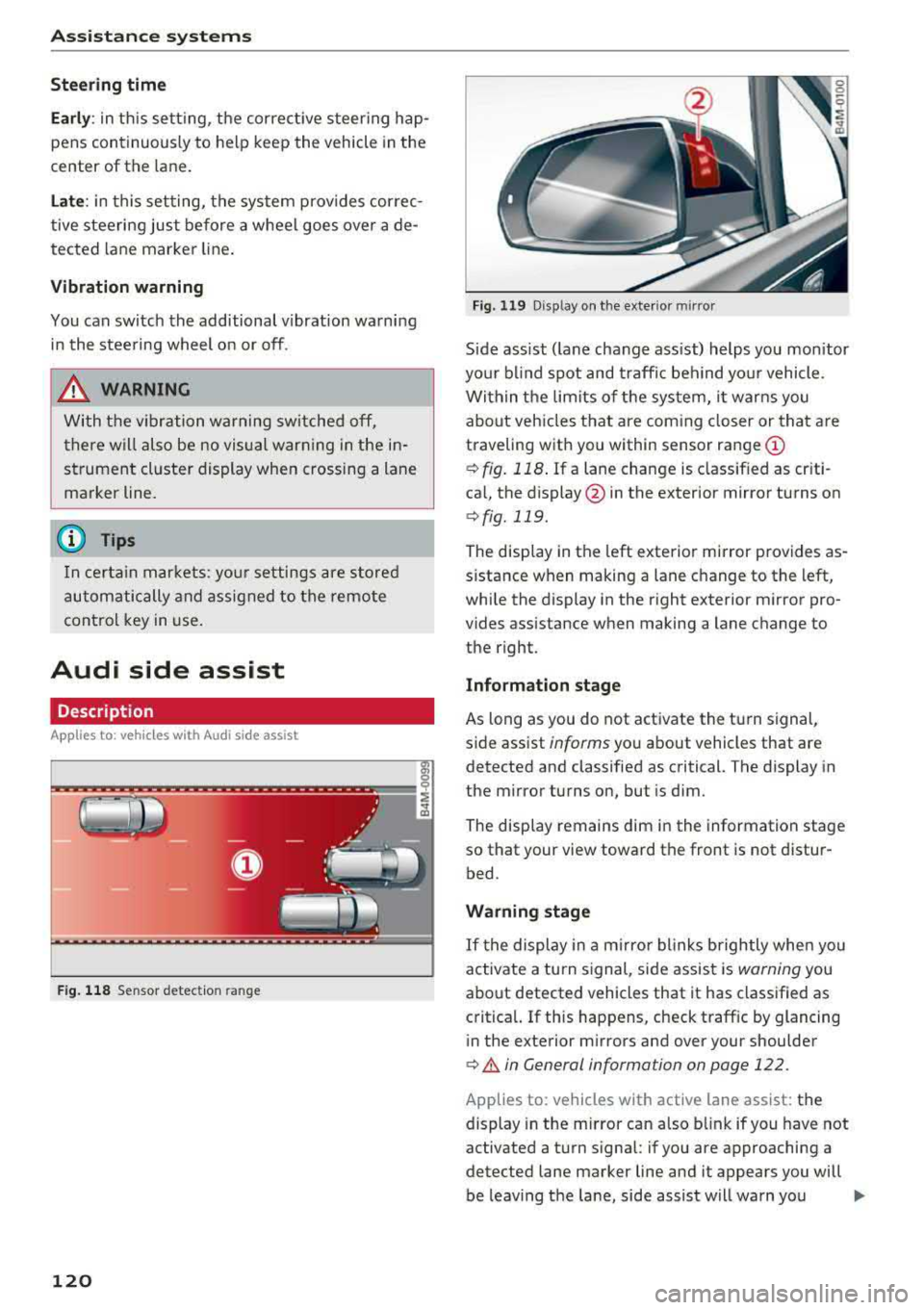
F ig . 11 8 Sensor detect ion ra n ge
120
Fig. 119 D isp lay on the exterior mirror
S ide ass ist ( lane change ass ist) helps you mon itor
you r bl ind spot and traff ic beh ind yo ur vehicle.
Within the limits of the system, it warns you about vehicles that are coming closer or that are
traveling with you within sensor range
(D
¢ fig. 118 . If a lane change is class ified as cr iti
ca l, the display @in the exterior mirror turns on
¢fig. 119.
The display in the left exterior mirror provides as
sistance when making a lane c hange to the left,
while the display in the r ight exterior m irror pro
vides assistance when making a lane change to
the right.
Information stage
As long as you do not activate the turn signal,
s ide assist
informs yo u about vehicles that are
detected and classified as critical. The display in
the mirror turns on, but is dim .
The disp lay remains dim in the information stage
so that your view toward the front is not distur
bed.
Warning stage
If t he display in a m irro r blinks brightly whe n you
activate a turn s ignal, side assist is
warning you
about detected vehicles that it has classified as
critica l. If this happens, check traff ic by glancing
in the exterior m irrors and over your shoulder
¢ A in General information on page 122 .
Applies to: vehicles with active lane assist: the
display in the m irror can also b link if you have not
activated a turn signal : if you are approaching a
detected lane marker line and it appears you will
be leaving the lane, side assist will warn you
..,.