engine AUDI Q5 2018 Service Manual
[x] Cancel search | Manufacturer: AUDI, Model Year: 2018, Model line: Q5, Model: AUDI Q5 2018Pages: 392, PDF Size: 60.56 MB
Page 133 of 392
u co ..... N r-N .....
~ 0 co
Rear parking system
Description
A pplies to: ve hicles with rear park ing aid
The rear parking system is an audible parking
aid .
Description
There is a sensor in the rear bumper cover. If
these detect an obstacle, audible signals warn
you .
Make sure the sensors are not covered by stick
ers, deposits or any other obstructions as it may
impair the function of the system . For informa
tion on cleaning, see
c::;, page 344 .
The range at which the sensors begin to measure
is approximately:
side 3 ft (0.90 m)
rear
center 5.2 ft (1.60 m)
The closer you get to the obstacle, the shorter
the interval between the audible signals . A con
tinuous tone sounds when the obstacle is less
than approximately 1 foot (0.30 meters) away.
Do not continue backing up
c::;, &. in General infor
mation on page 130,
c::;, (D in General information
on page
130!
If the distance to an obstacle remains constant,
the volume of the distance warning gradually lowers after a few seconds until it is muted (this
is not apply in the continuous tone range). If the
obstacle becomes closer than it was before the
sound was muted, the tone will sound again . If
the obstacle is farther away than it was before
the sound was muted, no tone will sound. Pay at
tention to the vehicle 's surroundings when you
start to drive.
Switching on automatically
The system switches on automatically when re
verse gear is engaged while the engine is run
ning. A brief confirmation tone will sound.
Park ing aid
Parking system plus
Description
Applies to: vehicles wit h parking system pl us
Parking system plus provides audio and visual
signals when parking.
Fig. 128 Illust rat ion:
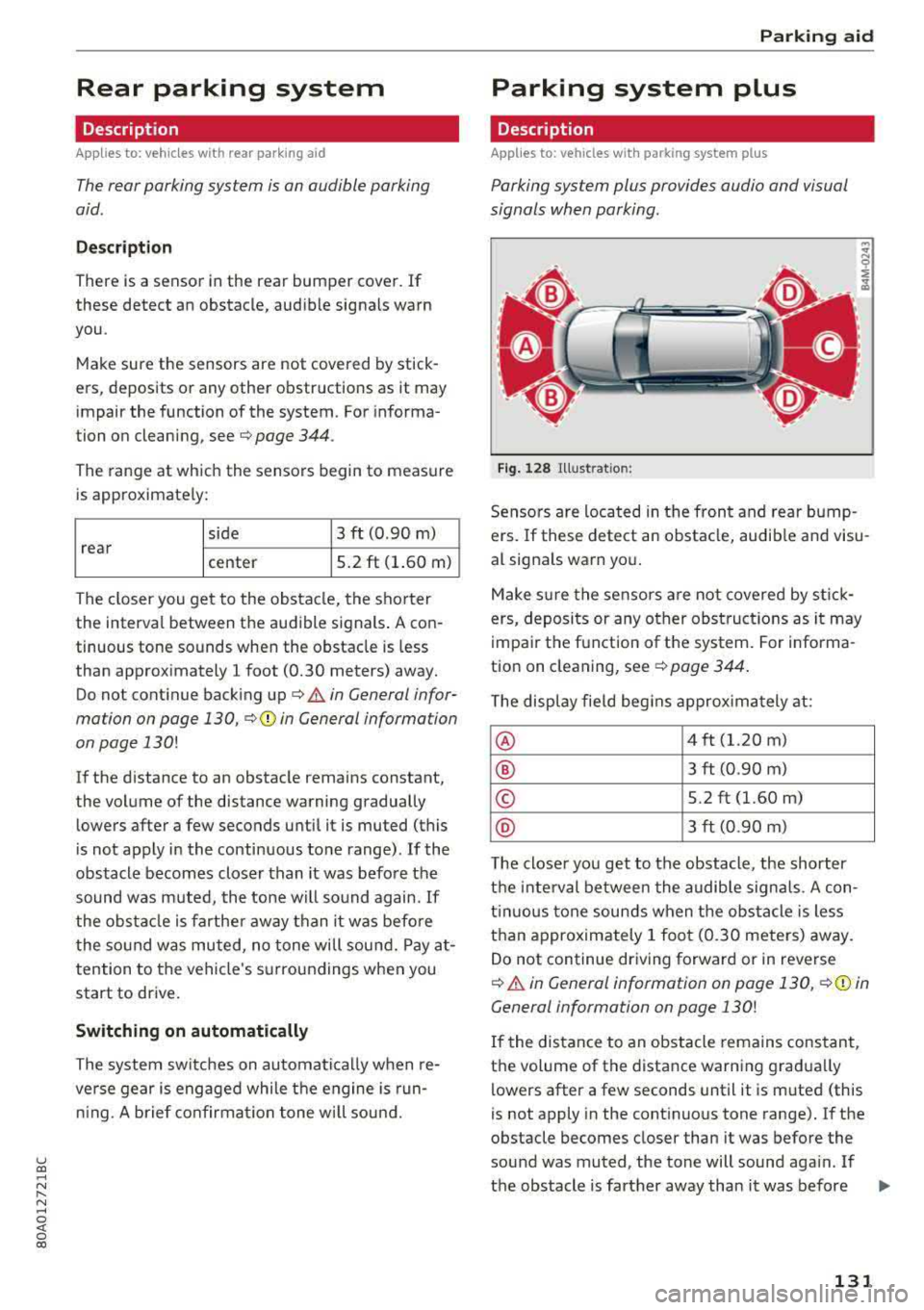
Sensors are located in the front and rear bump
ers. If these detect an obstacle, audible and visu
al signals warn you.
Make sure the sensors are not covered by st ick
ers, deposits or any other obstructions as it may
impair the function of the system. For informa
tion on cleaning, see
c::;, page 344.
The display field begins approximately at:
® 4 ft (1.20 m)
® 3 ft (0.90 m)
© 5.2 ft (1.60 m)
@ 3 ft (0.90 m)
T he closer you get to the obstacle, the shorter
the interval between the audible signals . A con
t inu ous tone sounds when the obstacle is less
than approximately 1 foot (0.30 meters) away.
Do not continue dr iving forward or in reverse
c::;, &. in General information on page 130, c::;, (D in
General information on page
130!
If the distance to an obstacle remains constant,
the volume of the distance warning gradua lly
lowers after a few seconds until it is muted (this
is not apply in the continuous tone range).
If the
obstacle becomes closer than it was before the
sound was muted , the tone will sound aga in . If
the obstacle is farther away than it was before
.,.
131
Page 134 of 392
Parking aid
the sound was muted, no tone will sound. Pay at
tention to the vehicle's surroundings when you
start to dr ive .
Switching on /off
Applies to: ve hicles w ith pa rking system plus
Fig. 129 Center console: park ing a id bu tton
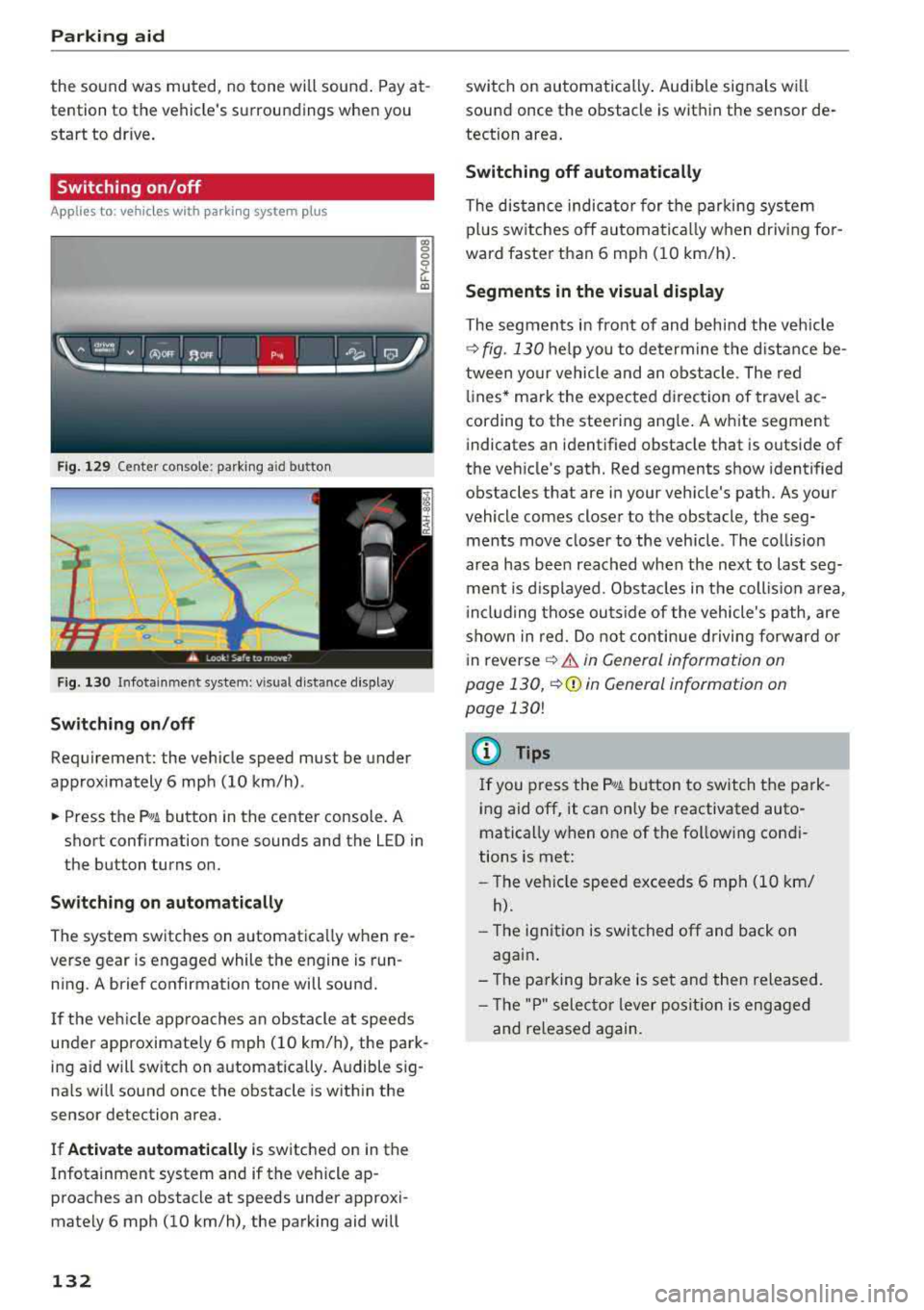
Fig. 130 I n fot ainme nt system: v is ual d ist ance d isplay
Switching on /off
Requirement: the vehicle speed must be under
approximately 6 mph (10 km/h) .
co 0 0
~ LL. m
.. Press the p,, 1A button in the center console . A
short confirmation tone sounds and the LED in
the button turns on.
Switching on automatically
The system switches on automatica lly when re
verse gear is engaged while the engine is run
ning. A brief confirmation tone will sound.
I f the veh icle approaches an obstacle at speeds
under approximate ly 6 mph (10 km/h), the park
ing a id will sw itch on automatically . Audible sig
na ls will sound once the obstacle is within the
sensor detection area.
I f
Activate automatically is switched on in the
Infotainment system and if the vehicle ap
proaches an obstacle at speeds under approxi
mately 6 mph (10
km/h), the parking aid will
132
switch on automatically . Audible signals wi ll
sound once the obstacle is within the sensor de
tection area.
Switching off automatically
The distance indicator for the parking system
plus sw itches
off automatically when driving for
ward faster than 6 mph (10 km/h).
Segments in the visual display
The segments in front of and behind the vehicle
¢
fig. 130 he lp you to determine the distance be
tween your vehicle and an obstacle . The red
lin es* ma rk the expected d irection of travel ac
cording to the steering angle . A white segment
indicates an identified obstacle that is outside of
the veh icle's path. Red segments show identified
obstacles that are in your vehicle's path. As your
vehicle comes closer to the obstacle, the seg ments move closer to the vehicle . The collision
area has been reached when the next to last seg
ment is displayed . Obstacles in the collis ion area,
inclu ding those outside of the vehicle's path, are
shown in red. Do not continue driving forward or
i n
reverse ¢.&. in General information on
page 130,
¢ (D in General information on
page
130!
(D Tips
If you press the ?~A button to switch the park
ing aid
off, it can only be reactivated auto
matically when one of the following condi
tions is met:
-The vehicle speed exceeds 6 mph (10 km/
h).
-The ignition is switched off and back on
again .
- The parking brake is set and then released.
- Th e "P" selector lever position is engaged
and re leased again.
Page 136 of 392
Parking aid
(D Note
-Always read and follow the applicable warn
ings
¢ 0in General information on
page
130.
- The orange-colored orientation lines in the
Infotainment display show the vehicle path based on the steering wheel angle. The
front of the vehicle swings out more than
the rear of the vehicle. Maintain plenty of
distance so that an exterior mirror or a cor
ner of the vehicle does not collide with any
obstacles.
Switching on/off
A pp lies to: ve hicles w ith rearview ca mera
Switching on/off
Requirement: the vehicle speed must be under
approx imately
6 mph (10 km/h).
• Press the P,11A button in the center console
¢ page 132, fig . 129. A short confirmat ion
tone sounds and the LED in the button turns
on.
Switching on automatically
The system switches on automat ically when re
verse gear is engaged while the engine is run
n ing. A brief confirmation tone will sound.
Switching off automatically
The system switches off automatically when driv
ing forward faster than 6 mph
(10 km/h) .
Perpendicular parking
App lies to: ve hicles w ith rearview ca mera
This view may be used when parking in a garage
or in a parking space .
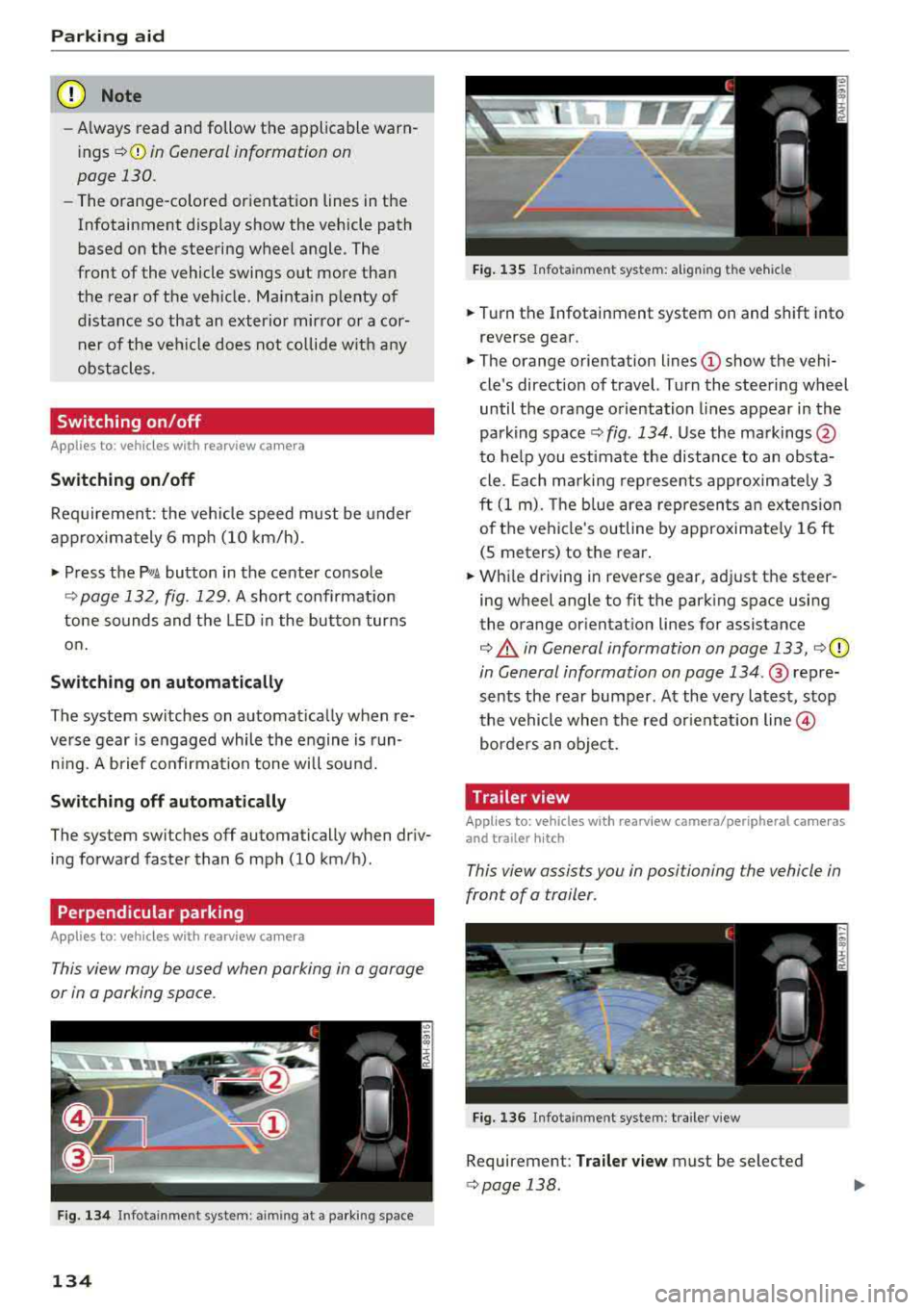
Fig. 134 In fotainme nt system: a iming at a parking space
134
Fig. 135 Infota inment system: al ign ing the vehicle
• Turn the Infotainment system on and shift into
reverse gear.
• The orange orientation lines (D show the vehi
cle's direction of travel. Turn the steering wheel
until the orange orientation lines appear in the
parking
space ¢ fig. 134 . Use the markings @
to help you estimate the distance to an obsta
cle. Each mark ing represents approximately 3
ft
(1 m). The b lue area represents an extension
of the vehicle's outline by approximate ly
16 ft
(5 meters) to the rear.
• While driving in reverse gear, adjust the steer
ing wheel angle to fit the parking space using
the orange orientat ion lines for assistance
¢ .&. in General information on page 133, i=>(D
in General information on page 134 .@ repre
sents the rear bumper. At the very latest, stop
the vehicle when the red orientation
line @
borders an object.
Trailer view
Applies to: vehicl es with rearv iew camera/peripheral ca meras
and trailer hitch
This view assists you in positioning the vehicle in
front of a trailer .
Fig. 136 Infotainment system : trailer view
Requirement: Trailer view must be selected
¢page 138 .
Page 138 of 392
Parking aid
Switching on/off
Applies to: ve hicles w ith per ip heral cameras
Fig. 1 38 Infotainment system: se lect the mode
Switch ing on /off
Req uirement: the veh icle speed must be under
approx imately 6 mp h (10 km/h).
• Press the P'I/ A button in the center console
¢ page 132, fig . 129 . A short confi rmat ion
tone so unds and the
LED in the but to n turns
on.
Switching on automatically
The system switches on automat ica lly when re
verse gear is engaged while the engine is run n ing . A brief confirma tion tone wi ll soun d.
Sw it c hing off automat ically
The system switches off automatically when dr iv
ing forward faster than 6 mph (10 km/h).
Selecting the mode
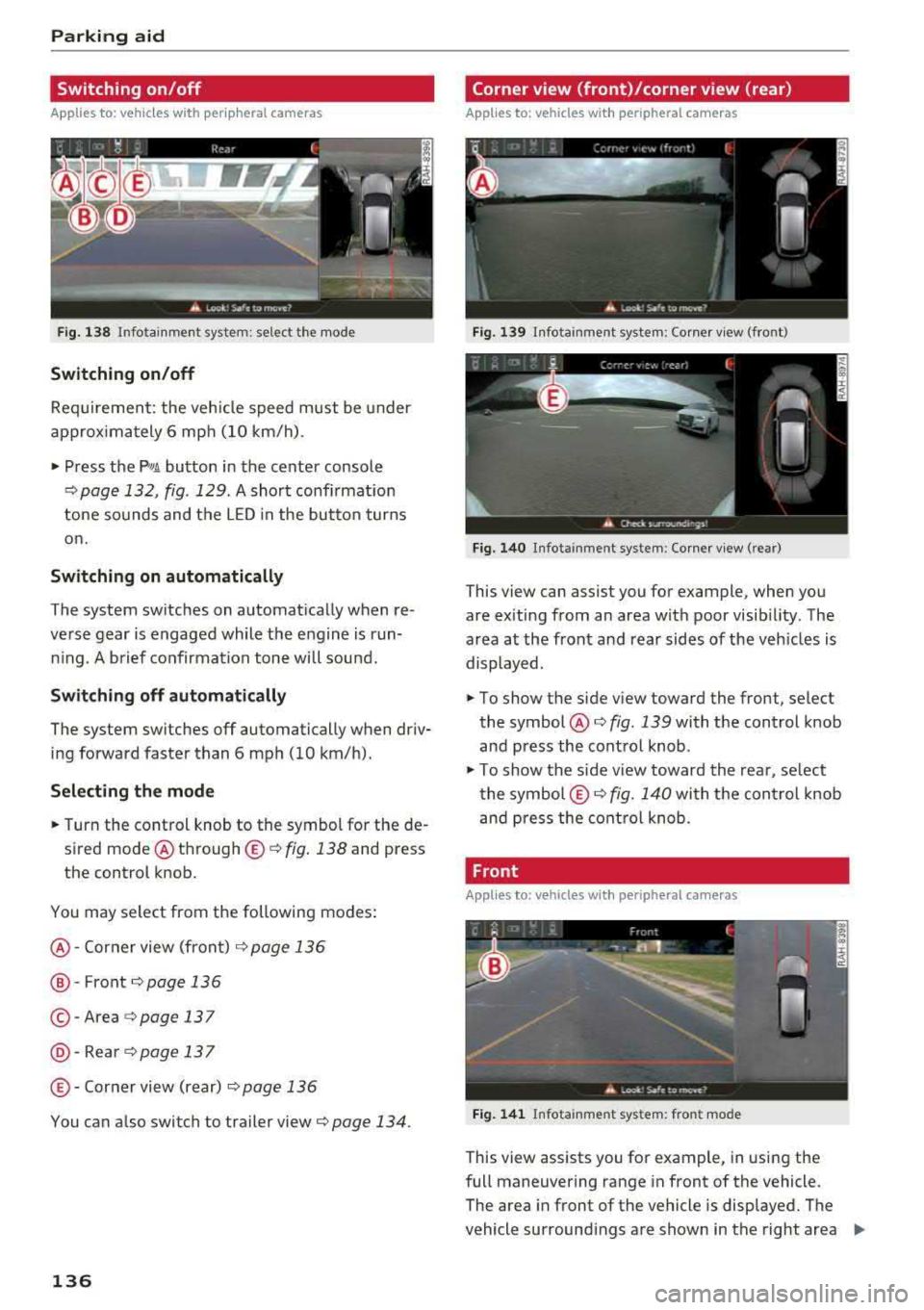
• Turn the control knob to the symbol for the de
sired mode @
th rough ©¢ fig. 138 and press
the control knob.
You may select from the following modes:
@ -Corner view (front) c;> page 136
@-Front¢ page 136
© -Area c;> page 137
@ -Rea rc;> page137
© - Corner view (rear) ¢ page 136
You can a lso switch to trailer view c;> page 134 .
136
Corner view (front)/corner view (rear)
Applies to : vehicles with peripheral cameras
Fi g. 139 In fota inment system: Corner v iew (front)
Fig. 14 0 Infota inment sy stem : Corner v iew (re ar)
This view can assist you for example, when you
are ex iting from an area with poor visib ility. The
area at the front and rear sides of the veh icles is
displayed.
• To show the side v iew toward the front, select
the symbol @
c;> fig. 139 with the control knob
and press the contro l knob .
• To show the s ide v iew toward the rea r, se lect
the symbol ©
c;> fig. 140 with the con trol knob
and p ress the control knob .
Front
Applies to: vehicles wi th peripheral ca meras
Fi g. 141 Info ta in ment sys tem: fron t mode
This view assists you for example, in using the
full maneuvering range in front of the vehicle.
The area in front of the vehicle is displayed. The
vehicle surround ings are shown in the right area
..,
Page 142 of 392
Intelligent Technology
Intelligent Technology Electronic Stabilization
Control (ESC)
Description
Electronic Stabilization Control (ESC) supports
driver safety. It reduces the risk of slipping and improves driving stability. ESC detects critica l sit
uations such as when the vehicle is oversteering
and understeering or the wheels are spinning.
The vehicle is stabilized by applying the brakes or
reducing eng ine torque. When the ESC engages,
the
D.1 ind icator light blinks in the instrument
cluste r.
The follow ing systems are integrated in the ESC:
Anti-lock braking system (ABS)
ABS prevents the wheels from locking when brak
ing. The vehicle can still be steered even during
hard braking. Apply steady pressure to the brake
pedal. Do not pump the pedal. A pulsing in the
brake pedal indicates that the system is acting to
stabilize the vehicle .
Brake assist system
The brake assist system can decrease braking dis
tance. It increases braking power when the driver
presses the brake pedal quickly in emergency sit
uations . You must press and hold the brake pedal
until the dangerous situat ion is over . In veh icles
with adapt ive c ruise control*, the brake assist
system is more sensitive if the distance detected
t o the vehicle dr iv ing ahead is too small.
Anti-Slip Regulation (ASR)
ASR reduces engine power when the drive wheels
beg in sp inning and adapts the force to the road
conditions . This makes it easie r to start, acceler
ate and dr ive up hill s.
Electronic Differential Lock (EDL)
EDL applies the brakes to a wheel that starts
spinning and transfers the drive power to the
other driving wheels. This funct ion is not availa
b le at higher speeds.
140
In extreme cases, EDL automatica lly switches off
to keep the brake on the braked whee l from over
heating. The vehicle is still working correctly. ED L
will switch on again automatically when condi
tions have returned to normal.
Power steering
The ESC can also support vehicle stability
through steering .
Selective wheel torque control
Selective wheel torque control is used when driv
in g on curves. Brak ing is targeted toward the
whee ls on the inside of the curve as needed. This
a llows more precise driving in curves.
Automatic post-collision braking system
The "automatic post-collis io n braking system"
can help to reduce the risk of sl iding and of addi
tional collisions after an accident. If the airbag
contro l modu le detects a collision, the vehicle is
braked by the ESC.
The vehicle does not brake automatically if:
-the driver presses the accelerator pedal, or
-the ESC, the brake system or the veh icle electri-
cal system are not functioning.
A WARNING
-The ESC and its integrated systems cannot
overcome the lim its imposed by natura l
p hys ical laws. Th is is espec ially impo rtant
on slippery or wet roads. If the systems be
gin acting to stabilize your vehicle, you
should immediately alter your speed to
match the road and traffic conditions. Do
not let the increased safety provided tempt
you into taking risks. This could increase
your r isk of a coll is ion.
-Please note the risk of a collision increases
when dr iv ing fast, especially through curves
and on slippery or wet roads, and when dr iv
ing too close to objects ahead . The ESC and
its integrated systems cannot always pre
ve nt co llisions
-there is still a risk of acci
dents!
Page 143 of 392
u co ..... N r--N ..... 0 <( 0 00
-Press t he acce lerato r pedal ca refully whe n
acce le ratin g on smooth , sli ppery sur faces
s u ch as ice and snow. The dr ive whee ls can
spin even w hen th ese con trol systems are
ins tall ed a nd th is can a ffect drivi ng s tabili ty
a nd incr ease the r is k of a coll is io n.
(D Tips
- The ABS and ASR only function co rrectly
whe n all fo ur whee ls have a s imilar wear
Switching on and off
Intelligent Technology
c ondi tion . Diff erent tir e si zes can lea d to a
re duction in eng ine power.
- You may hear n oises when t he systems de
sc ribe d are wor king.
- Applies to: vehicles with roof racks supplied
by the factory: when in st alli ng the roof rac k
s upplie d by t he factory on t he roof rail, se n
so r tec hno logy is use d to adjust the ESC to
any poss ible c hange in t he ve hicle's cente r
of grav ity resu lting from the load.
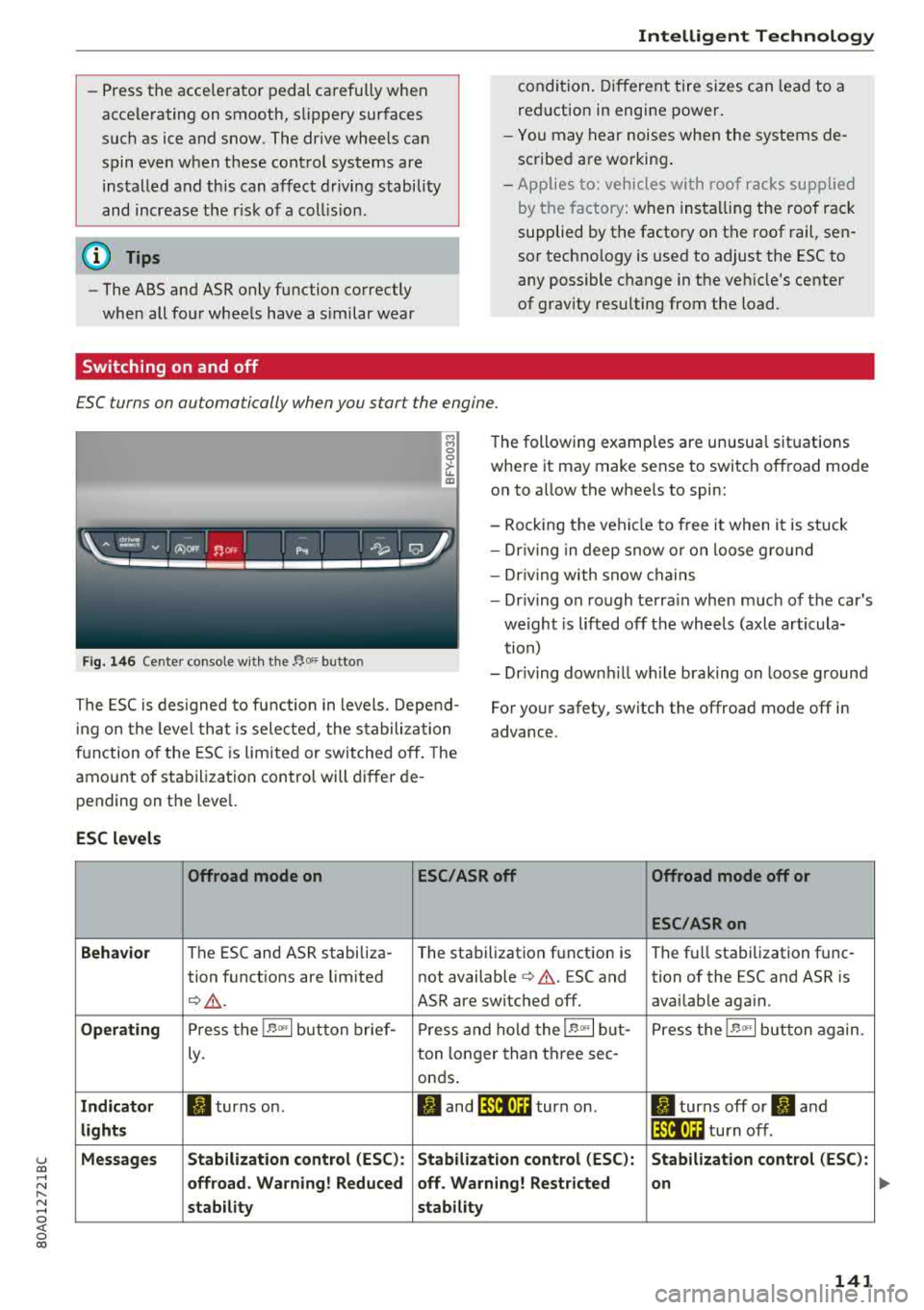
ESC turns on automatically when you start the engine.
F ig. 146 Ce nte r co nso le w it h th e 1',oFF butto n
The following examp les are unusua l situations
whe re it may make se nse to switch off road mode
o n to a llow the whee ls to spin:
- Rock ing t he veh icle to free i t when it is stuck
- Dr iv ing in deep snow o r on loose g ro und
- Dr iv ing with snow c hains
- Dr iv ing on ro ugh te rra in when much of the car 's
we ight is lifted off the wheels (axl e art icula
t ion)
- Dr iv ing down hill while b raking on loose g round
T he ES C is des igned to fu nction in levels . Depe nd
in g on the leve l that i s sele cted , the s ta b ili zat io n
f u nction o f the ES C i s lim ite d or sw it c hed off . The
amo unt o f sta biliza tio n control will differ de
pending on t he leve l. For yo
ur safety, switch the offroad mode off in
advance.
ESC levels
Offroad mode on ESC/ASRoff Offroad mode off or
ESC/ASRon
Behavior
T he ESC and ASR stabiliza -
The sta bilization f unction is T
h e f ull stabilizatio n fu nc -
tion f unct ions are limited not available
c> & . ESC and tion of the ESC and ASR is
Q _& . ASR are switc hed off . availab le aga in.
Operating P ress the 1.$ <>, I button brief - Pr ess and hold t he 1.$ <>, I but- P ress the 1.$ <>, I button again .
Ly. ton
lo n ge r than th ree sec -
on ds.
Indicator II turns on . JI and lf'lii•)H turn on. II turns off or II and
lights lf'lii•)~~ tu rn off.
Messages Stabilization control (ESC
): Stabil .ization control (ESC): Stabilization control (ESC ):
offroad . Warning! Reduced off . Warning! Restricted on
stability stability
141
..
Page 145 of 392
u co ..... N r--N ..... 0 <( 0 00
Wear
Brake pad wear depends largely on the way the
vehicle is driven and on operating conditions.
This is especially true if you are driving frequently in the city and on curves or with a sporty driving
style.
Operating noise
Noises may occur when braking depending on the
speed, braking force and outside conditions such
as temperature and humidity.
Wet conditions or road salt
In certain situations, for example after driving
through water, in heavy rain or after washing
your car, the braking effect may be reduced due
to moisture or ice on the brake rotors and brake
pads. The brakes must be "dried" first with a few
careful brake applications.
At higher speeds and with the windshield wipers
turned on, the brake pads press against the brake
rotors for a short amount of time. This action,
which is not felt by the driver, happens at regular
intervals and ensures a better reaction time for
the brakes in wet weather.
The braking effect can also be reduced if you are
driving on salted roads and you do not apply the brakes for long periods of time. The layer of salt
on the brake rotors and pads must be worn off
first when the brakes are applied.
Corrosion
Leaving the vehicle parked for long periods of
time, low mileage and avoiding heavy braking
can contribute to corrosion on the brake rotors
and to dirty brake pads.
If you usually avoid heavy braking or if there is
corrosion present, occasional heavy braking at high speeds is recommended to clean the brake
rotors and
pads¢ ,&..
Brake system malfunction
If you notice that the brake pedal travel has sud
denly increased, then a brake circuit in the dual
circuit brake system may have malfunctioned. Drive to an authorized Audi dealer or authorized
Audi Service Facility immediately to have the
Intelligent Technology
problem corrected. On the way there, drive with
reduced speed and keep in mind that you will
need a longer distance to stop and you will need
to press the brake pedal harder.
Low brake fluid level
When the brake fluid level is low, malfunctions in
the brake system may occur. The brake fluid level
is electronically monitored.
Brake booster
The brake booster amplifies the pressure you ap
ply to the brake pedal.
& WARNING
= -
- Only apply the brakes for the purpose of
cleaning the brake system when road and
traffic conditions permit. You must not en
danger other road users. This increases the
risk of an accident.
- Never let the vehicle roll while the engine is
stopped because this increases the risk of an
accident.
- Never place objects in the driver's footwell.
An object could end up in the area around
the pedals and prevent you from using
them. You would not be able to use the ped
als if sudden driving or braking maneuvers
were needed, which increases the risk of an
accident.
- Only use floor mats that do not obstruct the
area around the pedals and that can be se
curely fastened in the footwells.
- To reduce the risk of injury, do not place
your foot under the brake pedal.
@ Note
- Never let the brakes "rub" by pressing the
pedal lightly when braking is not actually
necessary. This causes the brakes to over
heat and increases braking distance and
causes wear.
- Before driving downhill a long distance on a
steep hill, decrease your speed and select a
lower gear. This makes use of the engine
braking effect and relieves the brakes. If
you need to brake additionally, brake in in- tervals and not continuously.
.,,.
143
Page 146 of 392
Intelligent Technology
(D Tips
-If the brake booster is not working, you
must press the brake pedal with much more
force than normal.
- If you retrofit your vehicle with a front spoil
er, whee l covers or similar items, make sure
that the a ir flow to the front wheels is not
in terrupted. Otherw ise the brake system
can become too hot .
Electromechanical
steering, Dynamic
steering
The electromechanical steering supports the
driver's steering movements.
Power steering adapts electronically based on
the vehicle speed.
Indicator lights and messages
• Steering: malfunction! Please stop vehicle
If th is ind icator light turns on and stays on and
this message appears, the power steering may
have fa iled.
Stop the vehicle in a safe location as soon as pos
sible . Do
not continue driving . See an author ized
Aud i deale r or authorized Aud i Serv ice Facility fo r
assistance .
,~n Steering: malfunction! You can continue
driving
If the indicator light turns on and the message
appears, the steering wheel may be more diffi
cult to move or more sensit ive than usual. The
steer ing wheel may also be at an angle when
driving st raight.
Drive slowly to an au thorized Audi dealer or au
thor ized Audi Service Fac il ity to have the mal
function corrected .
I@ Dynamic steering: correcting steering wheel
position
If the indicator light turns on and this message
appears, the dynamic steering* is reinitializing.
The steering wheel will be easy to move after
starting the engine. Re initialization might be
144
necessary if the steering wheel was moved while
the engine was switched
off. T he disp lay turns
off if the initialization was successfu l.
(D Tips
-If the . or Erfl indicator light only stays on
for a short time, you may continue driving.
- T he dynamic steering stability systems
¢page 140 are not avai lab le in the event of
a system malfunction .
- For additional information on dynamic
steering, see
¢ page 125.
All-wheel drive (quattro)
General information
In all wheel drive, the driv in g power is distribut
ed between all four whee ls when needed. This
happens automatically depending on your driving
behavior as well as the current road conditions.
Also see
c> page 140 , Electronic Stabilization
Con trol (ESC).
The all-whee l drive system distributes the driving
power variably to the front and rear axle. It works
together with selective wheel torque control,
which activates when driving through curves
c> page 140. With the sport differential*, power
distribution to the rear wheels is variable and can
be adjusted using the drive select
c>poge 125 .
The all wheel drive concept is designed for high
engine power . Your vehicle is excep tionally pow
erful and has excellent driving characteristics
both under normal driving conditions and on
snow and ice. Always read and follow safety pre
cautions ¢.&. .
Winter tires
By using all wheel dr ive, your veh icle has good
forward motion w ith standard tires in winter con
ditions. However, using winter or all season t ires
o n oil four wheels in the winter is recommended,
because this w ill imp rove the braking effect.
Snow chains
If there are snow chain laws, snow chains must
also be used on veh icles with all wheel drive
c> page 340, Snow chains . .,.
Page 147 of 392
u co ..... N r--N ..... 0 <( 0 00
Replacing tires
F or vehicles w it h all whee l dr ive, only wheels w ith
the same ro lling circumference should be used .
Avoid using tires with different tread depths
~ page 332, New tires or wheels.
A WARNING
- Also, in vehicles with all wheel drive, adapt your dr iv ing style to the current road and
traff ic conditions. Do not let the increased
safety provided tempt you into tak ing risks,
because th is increases the r isk of an acci
dent .
- The braking ability of your veh icle is limited
to the tract ion of the wheels. In this way, it
is not diffe rent from a two wheel dr ive vehi
cle. Do not be tempted to accelerate to a
high speed when the road is slippery, be
cause this increases the risk of an accident.
- Note that on wet streets, the front wheels
can "hydroplane" if driving at speeds that
are too high . Unlike front whee l drive
vehicles, the engine does not rev higher sud
denly when the vehicle begins hydroplaning.
For this reason, adapt your speed to the
road conditions to reduce the risk of an acc i
dent .
Energy management
Your vehicle is equipped with an intelligent ener
gy management system for distributing electrici
ty . This s ignificantly improves the starting ab ility
and increases the vehicle battery life .
(D Tips
- If you drive short distances frequently, the
vehicle battery may not charge enough
while dr iving . As a resu lt, convenience func
tions for elect rical equipment may be tem
porarily unavailable.
- The vehicle battery will gradua lly drain if
the vehicle is not driven fo r long pe riods of
time, or if electrical equipment is used
when the engine is not running . To ensure
that the vehicle can still be started, the electrica l equipment will be reduced or
switched off.
Intelligent Technology
Notice about data
recorded by the Event
Data Recorder and
vehicle control modules
Event Data Recorder
T his vehicle is equipped with an Event Data Re
corder (EDR). The main purpose of an EDR is to
record, in certain crash or near crash-like situa
tions, such as an airbag deployment or hitting a road obstacle, data that will assist in understand
ing how a vehicle's systems performed. The EDR
is designed to record data related to vehicle dy
nam ics and safety systems for a short per iod of
t ime, typ ically 30 seconds or less. The EDR in this
vehicle is designed to record such data as:
- How various systems in your vehicle were oper
ating;
- Whether or not the driver and passenger safety
belts were buckled/fastened;
- How far (if at all) the driver was depressing the
accelerator and/or brake pedal; and,
- How fast the vehicle was traveling.
These data can help provide a better understand
ing of the circumstances in which crashes and in
juries occur. NO TE: EDR data are recorded by your
vehicle only if a non-trivial crash situation occurs;
no data are recorded by the EDR under normal
driv ing cond itions and no personal data (e.g .,
name, gender, age, and crash location) are re
corded. However, othe r parties, such as law en
forcement, could comb ine t he EDR data with the
type of personally identifying data routinely ac
quired during a crash investigation.
T o read data recorded by an EDR, special equip
ment is required, and access to the vehicle or the
EDR is needed. In addition to th e ve hicle manu
facturer, other parties, such as law en forcement,
that have the special equipment, can read the in
formation if they have access to the vehicle or the
EDR.
Some state laws restrict the retrieval or down
l oading of data stored by ED Rs installed in a vehi
cle for the express purpose of retrieving data af
ter an accident or crash event without the own- er 's consent .
II>-
145
Page 148 of 392
Intelligent Technology
Audi will not access the EDR and/or similar data
or give it to others -
- unless the vehicle owner (or lessee if the vehi
cle has been leased) agrees; or
- upon the official request by the police; or
- upon the order of a court of law or a govern-
ment agency; o r
- for the defense of a lawsu it through the judicial
discovery process .
- Audi may also use the data for research about
vehicle operation and safety performance or provide the data to a third party for resea rch
purposes without identifying the specific vehi
cle or information about the identity of its own
er or lessee and on ly after the recorded vehicle
data has been accessed.
Vehicle control modules
Your veh icle is also equipped with a num ber of
e lectronic control modules for various veh icle
systems, s uch as engine management, emission
control, airbags, and safety belts.
These electro nic cont rol modules record data
du ring normal vehicle operation that may be
needed by trained technicians for diagnostic and
repair purposes. The recording capability of these
modules is limited to data (no sound is record
ed). Only a small amount of data is actually re
corded over a very limited period of time, or stor
ed when a system fault is detected by a control module . Some of the data stored may relate to
veh icle speed, direct ion, or brak ing, as well as re
stra int system use and performance in the event
of a crash . Stored data can also only be read and
downloaded with special equipment that is di
rectly connected to the vehicle.
(D Tips
Your vehicle may be equipped with Audi con
nect. Your use of certain Audi connect fea
tures requires wireless services that are pro
vided by a third party wire less te lecommuni
cations provider . For detai ls regarding how in
formation obtained through Audi connect is collected, processed, transmitted, used, and
shared, please see your contract with the
w ireless telecommunications provider.
146